warning FORD SUPER DUTY 2013 3.G Workshop Manual
[x] Cancel search | Manufacturer: FORD, Model Year: 2013, Model line: SUPER DUTY, Model: FORD SUPER DUTY 2013 3.GPages: 563, PDF Size: 7.27 MB
Page 102 of 563
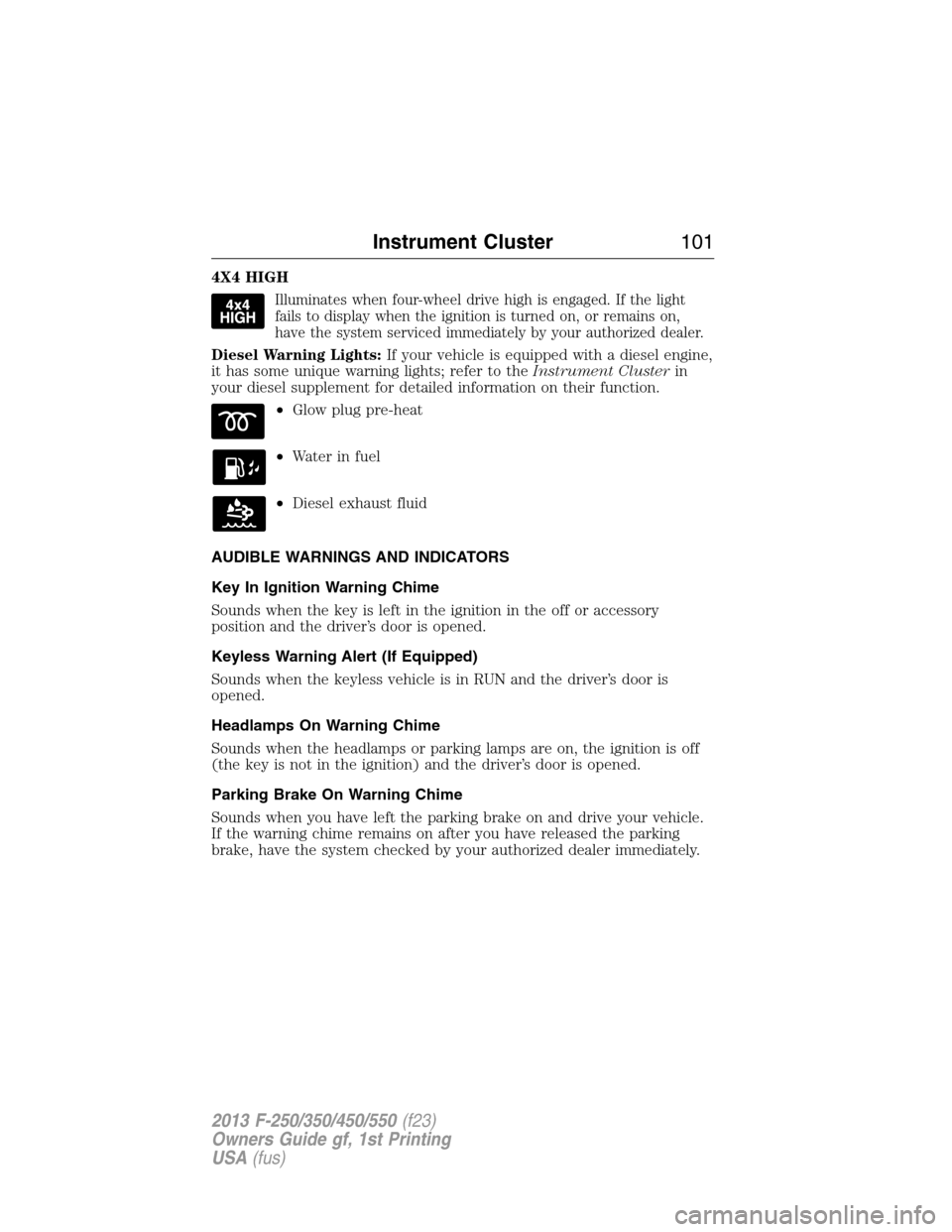
4X4 HIGH
Illuminates when four-wheel drive high is engaged. If the light
fails to display when the ignition is turned on, or remains on,
have the system serviced immediately by your authorized dealer.
Diesel Warning Lights:If your vehicle is equipped with a diesel engine,
it has some unique warning lights; refer to theInstrument Clusterin
your diesel supplement for detailed information on their function.
•Glow plug pre-heat
•Waterinfuel
•Diesel exhaust fluid
AUDIBLE WARNINGS AND INDICATORS
Key In Ignition Warning Chime
Sounds when the key is left in the ignition in the off or accessory
position and the driver’s door is opened.
Keyless Warning Alert (If Equipped)
Sounds when the keyless vehicle is in RUN and the driver’s door is
opened.
Headlamps On Warning Chime
Sounds when the headlamps or parking lamps are on, the ignition is off
(the key is not in the ignition) and the driver’s door is opened.
Parking Brake On Warning Chime
Sounds when you have left the parking brake on and drive your vehicle.
If the warning chime remains on after you have released the parking
brake, have the system checked by your authorized dealer immediately.
Instrument Cluster101
2013 F-250/350/450/550(f23)
Owners Guide gf, 1st Printing
USA(fus)
Page 103 of 563
GENERAL INFORMATION
WARNING:Driving while distracted can result in loss of vehicle
control, accident and injury. Ford strongly recommends that
drivers use extreme caution when using any device or feature that may
take their focus off the road. Your primary responsibility is the safe
operation of the vehicle. We recommend against the use of any
handheld device while driving and that you comply with all applicable
laws.
Various systems on your vehicle can be controlled using the information
display controls on the steering wheel. Corresponding information is
displayed in the information display.
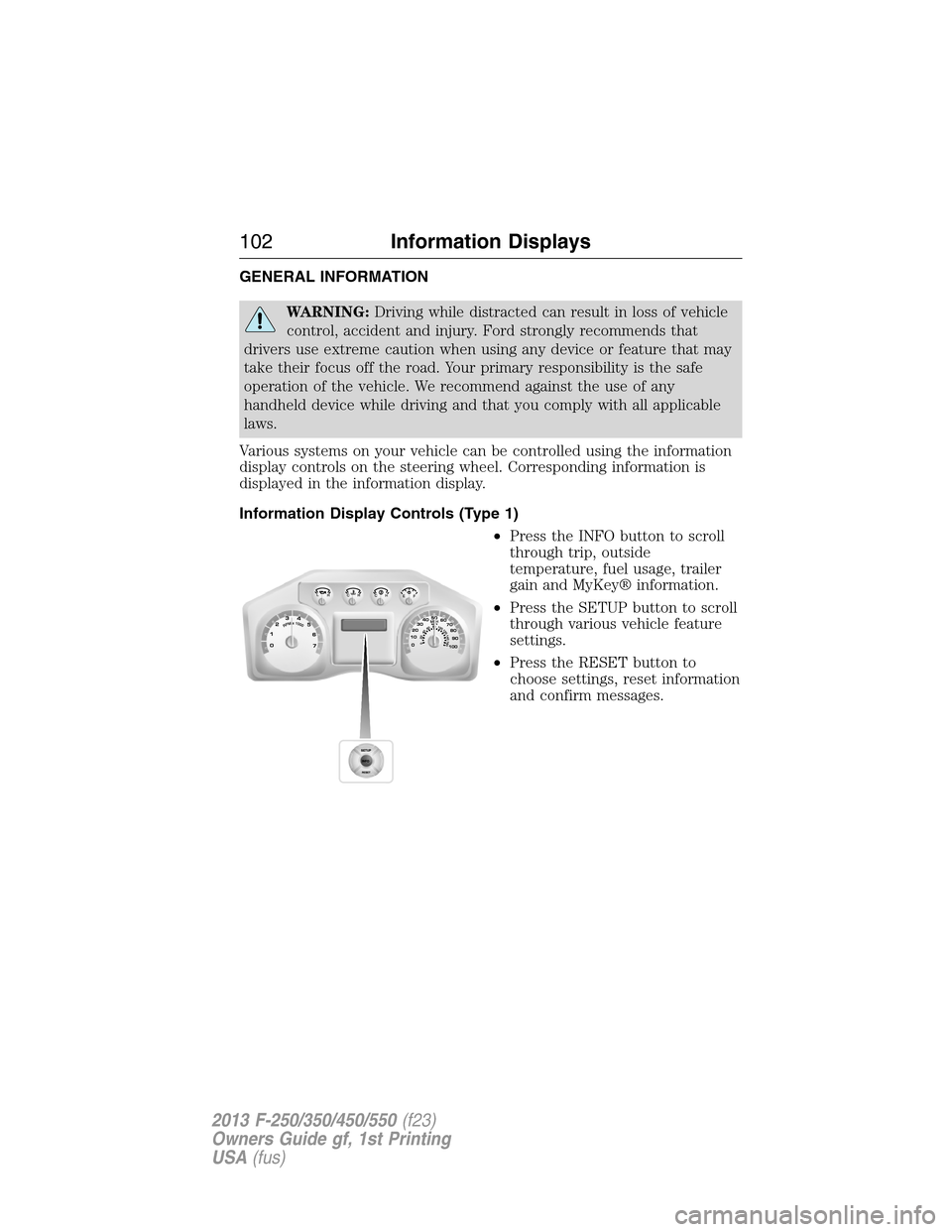
Information Display Controls (Type 1)
•Press the INFO button to scroll
through trip, outside
temperature, fuel usage, trailer
gain and MyKey® information.
•Press the SETUP button to scroll
through various vehicle feature
settings.
•Press the RESET button to
choose settings, reset information
and confirm messages.
102Information Displays
2013 F-250/350/450/550(f23)
Owners Guide gf, 1st Printing
USA(fus)
Page 109 of 563
•RESET FOR REMOTE START (if equipped)
•REAR PARK AID (if equipped): This feature sounds a warning tone to
warn the driver of obstacles near the rear bumper, and functions only
when R (Reverse) gear is selected.
•TBC MODE (if equipped): Allows you to choose the trailer brake
mode.
•TRAILER SWAY (if equipped): This feature uses the electronic
stability control to mitigate trailer sway.
•LANGUAGE = ENGLISH / SPANISH / FRENCH: Allows you to choose
which language the message center will display in.
Waiting four seconds or pressing the RESET button cycles the message
center through each of the language choices.
Press the RESET button to set the language choice.
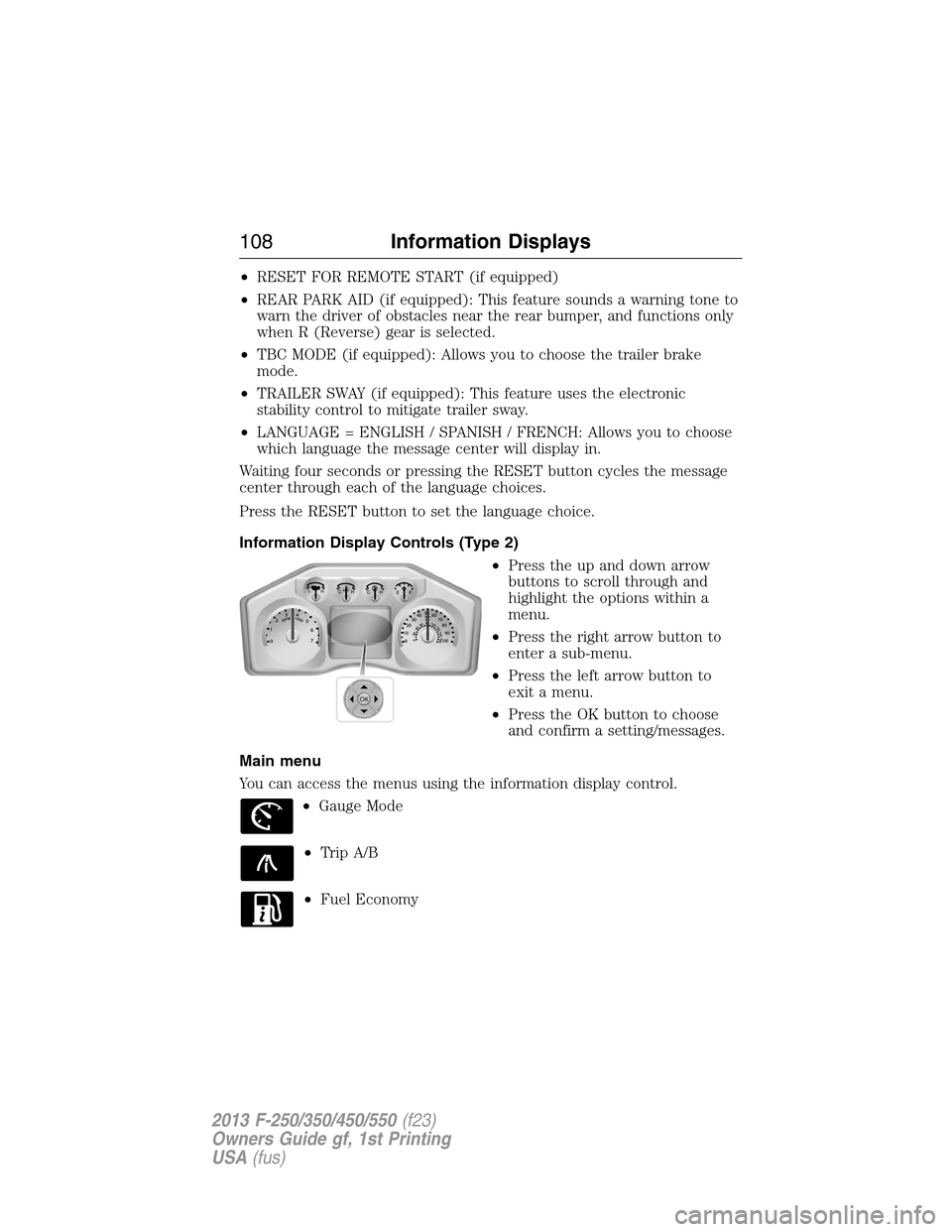
Information Display Controls (Type 2)
•Press the up and down arrow
buttons to scroll through and
highlight the options within a
menu.
•Press the right arrow button to
enter a sub-menu.
•Press the left arrow button to
exit a menu.
•Press the OK button to choose
and confirm a setting/messages.
Main menu
You can access the menus using the information display control.
•Gauge Mode
•Trip A/B
•Fuel Economy
OK
108Information Displays
2013 F-250/350/450/550(f23)
Owners Guide gf, 1st Printing
USA(fus)
Page 117 of 563
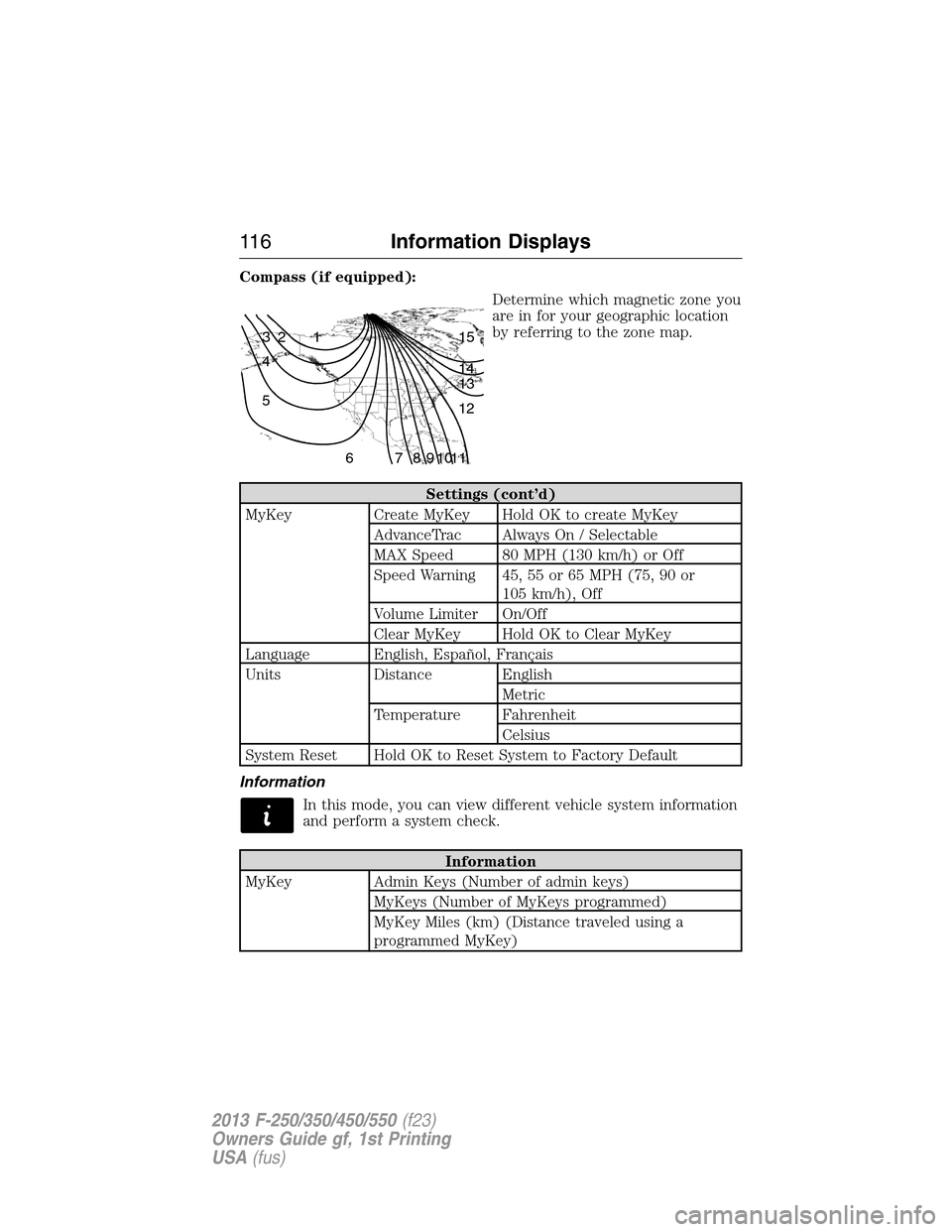
Compass (if equipped):
Determine which magnetic zone you
are in for your geographic location
by referring to the zone map.
Settings (cont’d)
MyKey Create MyKey Hold OK to create MyKey
AdvanceTrac Always On / Selectable
MAX Speed 80 MPH (130 km/h) or Off
Speed Warning 45, 55 or 65 MPH (75, 90 or
105 km/h), Off
Volume Limiter On/Off
Clear MyKey Hold OK to Clear MyKey
Language English, Español, Français
Units Distance English
Metric
Temperature Fahrenheit
Celsius
System Reset Hold OK to Reset System to Factory Default
Information
In this mode, you can view different vehicle system information
and perform a system check.
Information
MyKey Admin Keys (Number of admin keys)
MyKeys (Number of MyKeys programmed)
MyKey Miles (km) (Distance traveled using a
programmed MyKey)
1 2 3
4
5
6 7 8 9 101112 13 14 15
11 6Information Displays
2013 F-250/350/450/550(f23)
Owners Guide gf, 1st Printing
USA(fus)
Page 118 of 563
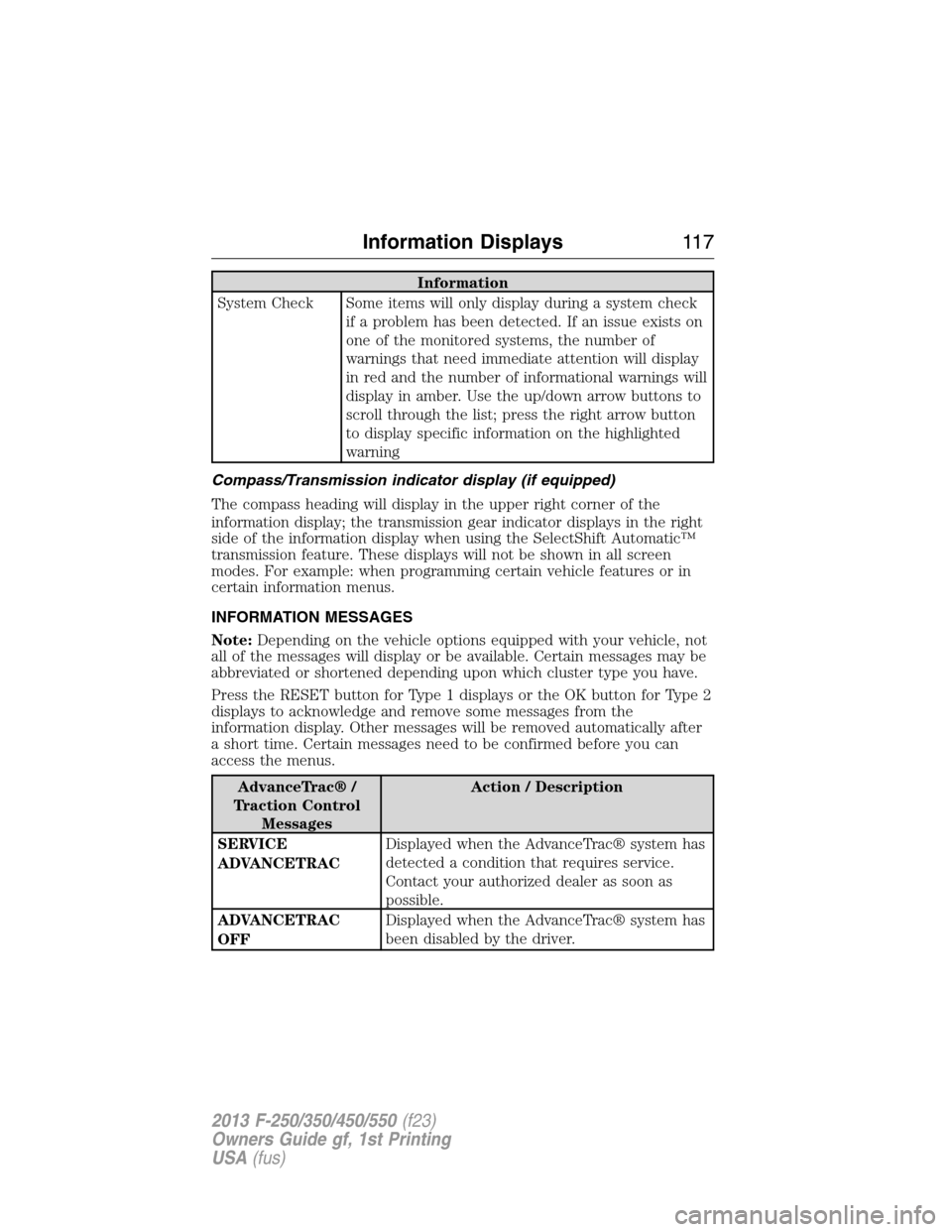
Information
System Check Some items will only display during a system check
if a problem has been detected. If an issue exists on
one of the monitored systems, the number of
warnings that need immediate attention will display
in red and the number of informational warnings will
display in amber. Use the up/down arrow buttons to
scroll through the list; press the right arrow button
to display specific information on the highlighted
warning
Compass/Transmission indicator display (if equipped)
The compass heading will display in the upper right corner of the
information display; the transmission gear indicator displays in the right
side of the information display when using the SelectShift Automatic™
transmission feature. These displays will not be shown in all screen
modes. For example: when programming certain vehicle features or in
certain information menus.
INFORMATION MESSAGES
Note:Depending on the vehicle options equipped with your vehicle, not
all of the messages will display or be available. Certain messages may be
abbreviated or shortened depending upon which cluster type you have.
Press the RESET button for Type 1 displays or the OK button for Type 2
displays to acknowledge and remove some messages from the
information display. Other messages will be removed automatically after
a short time. Certain messages need to be confirmed before you can
access the menus.
AdvanceTrac® /
Traction Control
MessagesAction / Description
SERVICE
ADVANCETRACDisplayed when the AdvanceTrac® system has
detected a condition that requires service.
Contact your authorized dealer as soon as
possible.
ADVANCETRAC
OFFDisplayed when the AdvanceTrac® system has
been disabled by the driver.
Information Displays11 7
2013 F-250/350/450/550(f23)
Owners Guide gf, 1st Printing
USA(fus)
Page 119 of 563
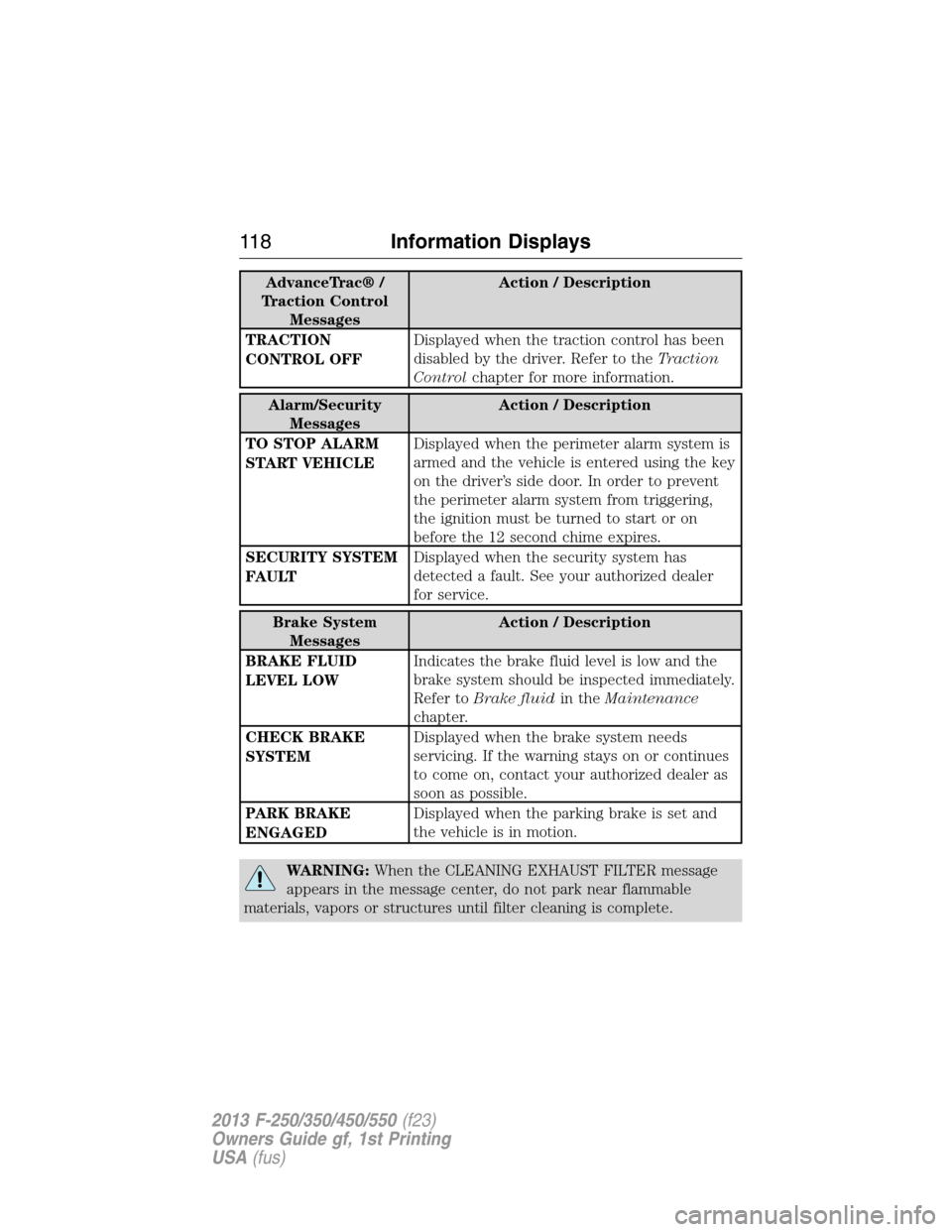
AdvanceTrac® /
Traction Control
MessagesAction / Description
TRACTION
CONTROL OFFDisplayed when the traction control has been
disabled by the driver. Refer to theTraction
Controlchapter for more information.
Alarm/Security
MessagesAction / Description
TO STOP ALARM
START VEHICLEDisplayed when the perimeter alarm system is
armed and the vehicle is entered using the key
on the driver’s side door. In order to prevent
the perimeter alarm system from triggering,
the ignition must be turned to start or on
before the 12 second chime expires.
SECURITY SYSTEM
FAULTDisplayed when the security system has
detected a fault. See your authorized dealer
for service.
Brake System
MessagesAction / Description
BRAKE FLUID
LEVEL LOWIndicates the brake fluid level is low and the
brake system should be inspected immediately.
Refer toBrake fluidin theMaintenance
chapter.
CHECK BRAKE
SYSTEMDisplayed when the brake system needs
servicing. If the warning stays on or continues
to come on, contact your authorized dealer as
soon as possible.
PARK BRAKE
ENGAGEDDisplayed when the parking brake is set and
the vehicle is in motion.
WARNING:When the CLEANING EXHAUST FILTER message
appears in the message center, do not park near flammable
materials, vapors or structures until filter cleaning is complete.
11 8Information Displays
2013 F-250/350/450/550(f23)
Owners Guide gf, 1st Printing
USA(fus)
Page 121 of 563
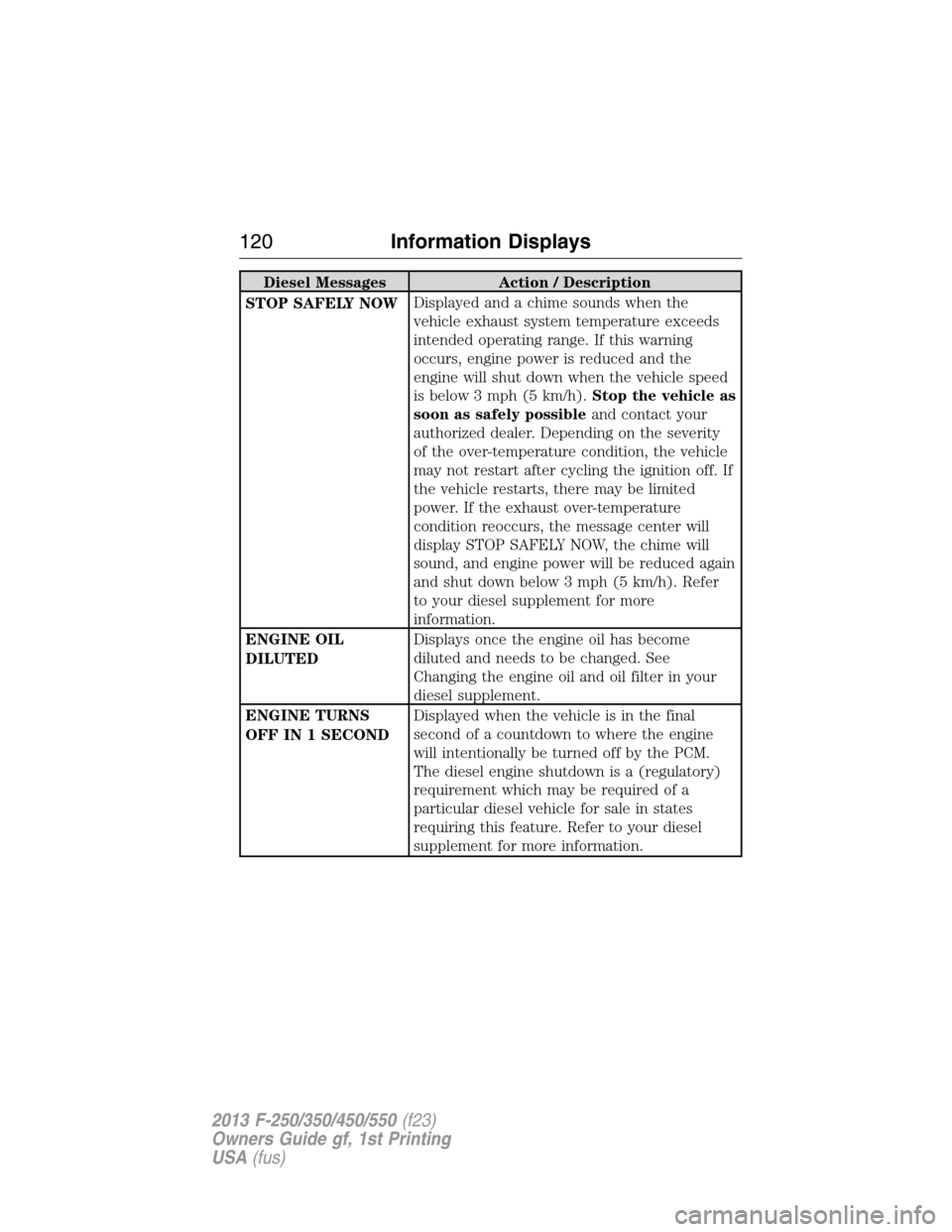
Diesel Messages Action / Description
STOP SAFELY NOWDisplayed and a chime sounds when the
vehicle exhaust system temperature exceeds
intended operating range. If this warning
occurs, engine power is reduced and the
engine will shut down when the vehicle speed
is below 3 mph (5 km/h).Stop the vehicle as
soon as safely possibleand contact your
authorized dealer. Depending on the severity
of the over-temperature condition, the vehicle
may not restart after cycling the ignition off. If
the vehicle restarts, there may be limited
power. If the exhaust over-temperature
condition reoccurs, the message center will
display STOP SAFELY NOW, the chime will
sound, and engine power will be reduced again
and shut down below 3 mph (5 km/h). Refer
to your diesel supplement for more
information.
ENGINE OIL
DILUTEDDisplays once the engine oil has become
diluted and needs to be changed. See
Changing the engine oil and oil filter in your
diesel supplement.
ENGINE TURNS
OFF IN 1 SECONDDisplayed when the vehicle is in the final
second of a countdown to where the engine
will intentionally be turned off by the PCM.
The diesel engine shutdown is a (regulatory)
requirement which may be required of a
particular diesel vehicle for sale in states
requiring this feature. Refer to your diesel
supplement for more information.
120Information Displays
2013 F-250/350/450/550(f23)
Owners Guide gf, 1st Printing
USA(fus)
Page 131 of 563
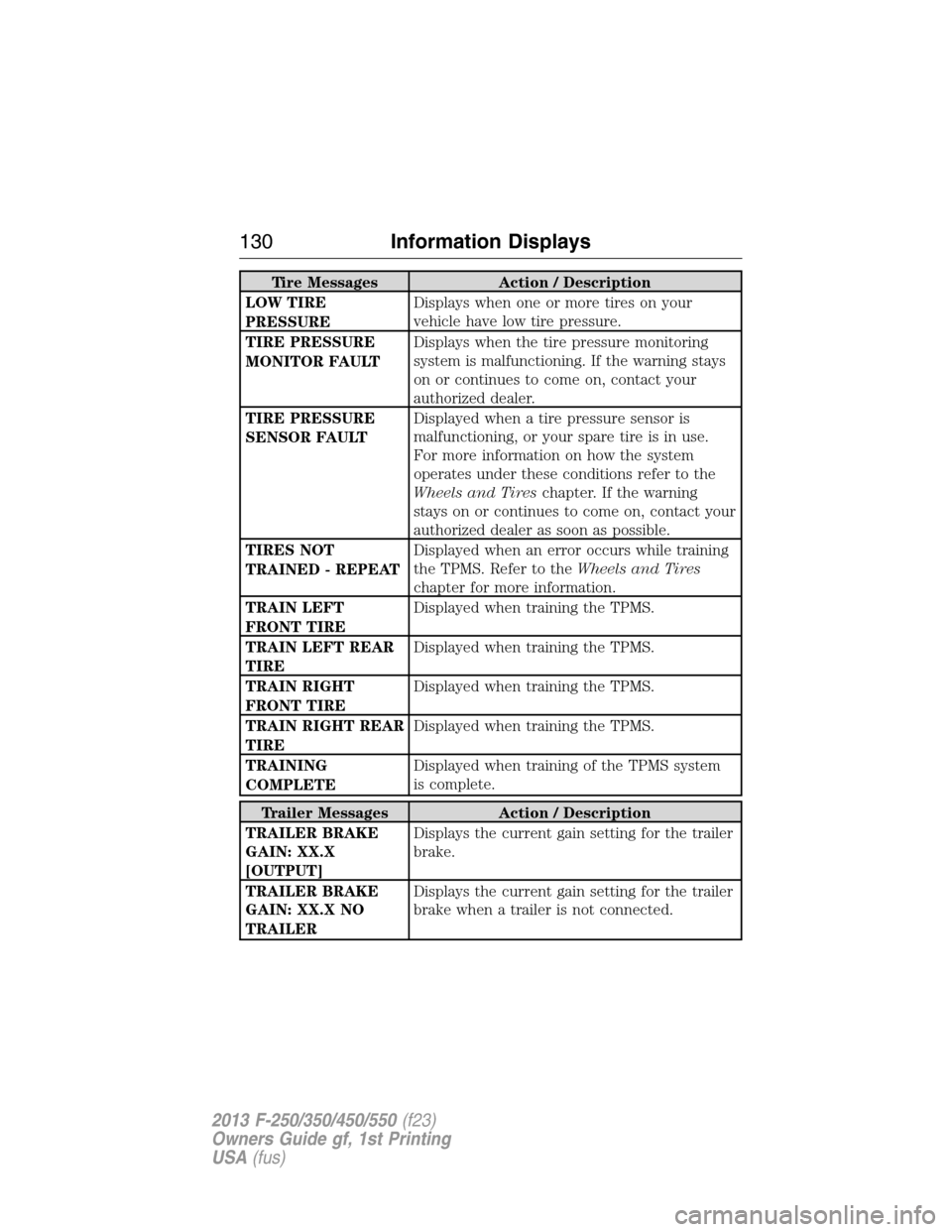
Tire Messages Action / Description
LOW TIRE
PRESSUREDisplays when one or more tires on your
vehicle have low tire pressure.
TIRE PRESSURE
MONITOR FAULTDisplays when the tire pressure monitoring
system is malfunctioning. If the warning stays
on or continues to come on, contact your
authorized dealer.
TIRE PRESSURE
SENSOR FAULTDisplayed when a tire pressure sensor is
malfunctioning, or your spare tire is in use.
For more information on how the system
operates under these conditions refer to the
Wheels and Tireschapter. If the warning
stays on or continues to come on, contact your
authorized dealer as soon as possible.
TIRES NOT
TRAINED - REPEATDisplayed when an error occurs while training
the TPMS. Refer to theWheels and Tires
chapter for more information.
TRAIN LEFT
FRONT TIREDisplayed when training the TPMS.
TRAIN LEFT REAR
TIREDisplayed when training the TPMS.
TRAIN RIGHT
FRONT TIREDisplayed when training the TPMS.
TRAIN RIGHT REAR
TIREDisplayed when training the TPMS.
TRAINING
COMPLETEDisplayed when training of the TPMS system
is complete.
Trailer Messages Action / Description
TRAILER BRAKE
GAIN: XX.X
[OUTPUT]Displays the current gain setting for the trailer
brake.
TRAILER BRAKE
GAIN: XX.X NO
TRAILERDisplays the current gain setting for the trailer
brake when a trailer is not connected.
130Information Displays
2013 F-250/350/450/550(f23)
Owners Guide gf, 1st Printing
USA(fus)
Page 136 of 563
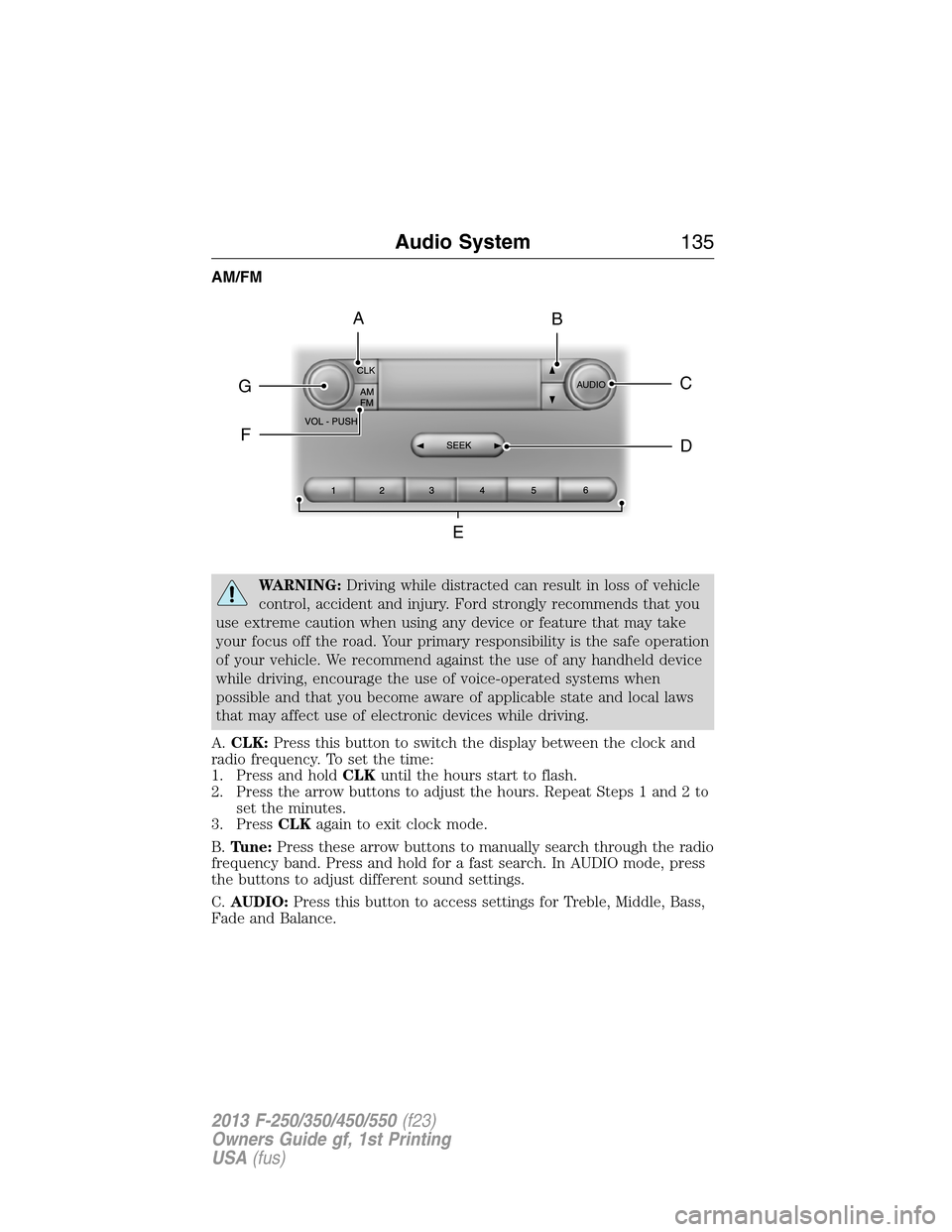
AM/FM
WARNING:Driving while distracted can result in loss of vehicle
control, accident and injury. Ford strongly recommends that you
use extreme caution when using any device or feature that may take
your focus off the road. Your primary responsibility is the safe operation
of your vehicle. We recommend against the use of any handheld device
while driving, encourage the use of voice-operated systems when
possible and that you become aware of applicable state and local laws
that may affect use of electronic devices while driving.
A.CLK:Press this button to switch the display between the clock and
radio frequency. To set the time:
1. Press and holdCLKuntil the hours start to flash.
2. Press the arrow buttons to adjust the hours. Repeat Steps 1 and 2 to
set the minutes.
3. PressCLKagain to exit clock mode.
B.Tune:Press these arrow buttons to manually search through the radio
frequency band. Press and hold for a fast search. In AUDIO mode, press
the buttons to adjust different sound settings.
C.AUDIO:Press this button to access settings for Treble, Middle, Bass,
Fade and Balance.
CLK
AUDIOC
EG
F
BA
D
Audio System135
2013 F-250/350/450/550(f23)
Owners Guide gf, 1st Printing
USA(fus)
Page 137 of 563
D.SEEK:Press this button to go to the previous or next strong station
on the frequency band.
E.Memory presets:Store your favorite radio stations. To store a radio
station, tune to the station, then press and hold a preset button until
sound returns.
F.AM/FM:Press this button to select a frequency band.
G.VOL-PUSH:
•Press this button to switch the system off and on.
•Turn the control to adjust the volume.
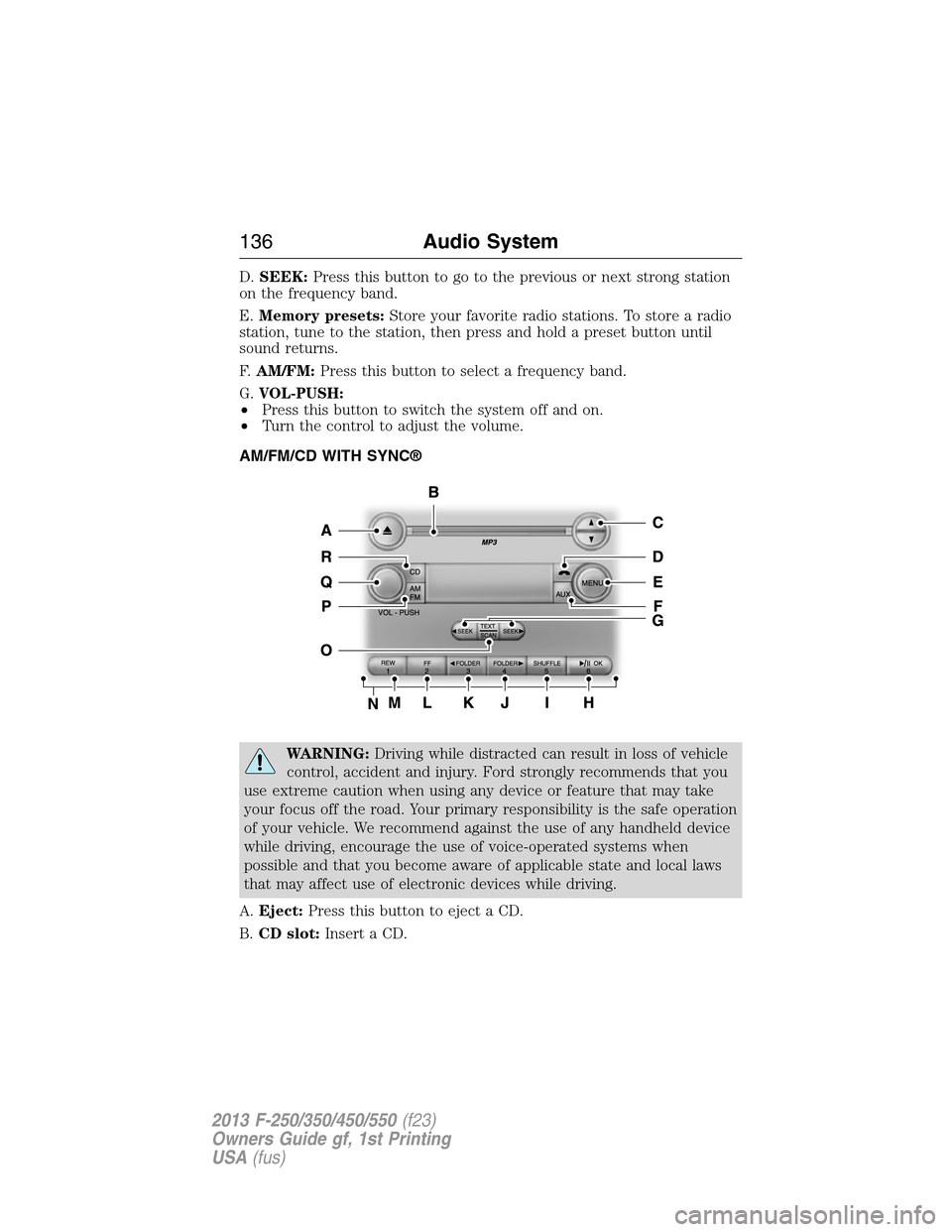
AM/FM/CD WITH SYNC®
WARNING:Driving while distracted can result in loss of vehicle
control, accident and injury. Ford strongly recommends that you
use extreme caution when using any device or feature that may take
your focus off the road. Your primary responsibility is the safe operation
of your vehicle. We recommend against the use of any handheld device
while driving, encourage the use of voice-operated systems when
possible and that you become aware of applicable state and local laws
that may affect use of electronic devices while driving.
A.Eject:Press this button to eject a CD.
B.CD slot:Insert a CD.
136Audio System
2013 F-250/350/450/550(f23)
Owners Guide gf, 1st Printing
USA(fus)