sport mode FORD SUPER DUTY 2013 3.G Owners Manual
[x] Cancel search | Manufacturer: FORD, Model Year: 2013, Model line: SUPER DUTY, Model: FORD SUPER DUTY 2013 3.GPages: 563, PDF Size: 7.27 MB
Page 128 of 563
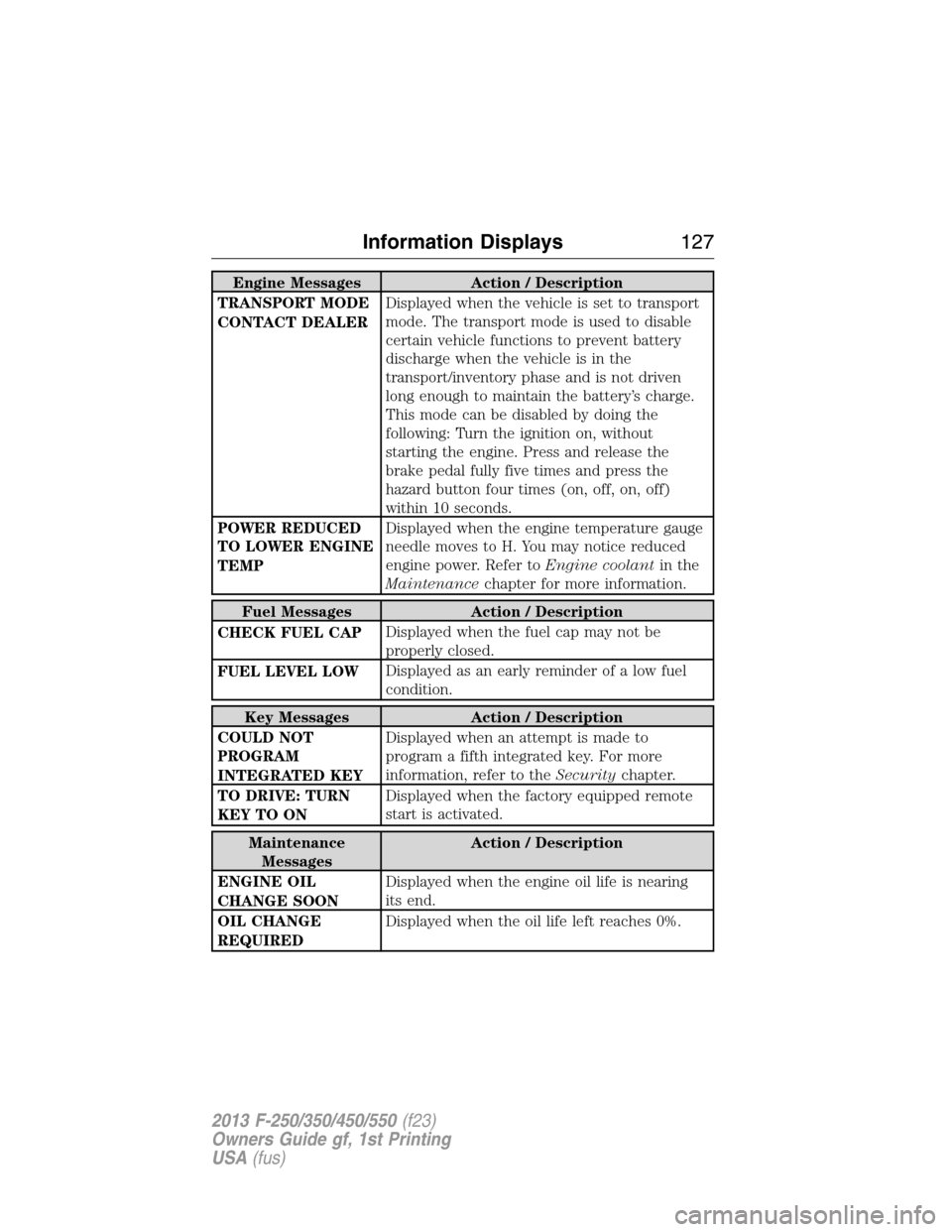
Engine Messages Action / Description
TRANSPORT MODE
CONTACT DEALERDisplayed when the vehicle is set to transport
mode. The transport mode is used to disable
certain vehicle functions to prevent battery
discharge when the vehicle is in the
transport/inventory phase and is not driven
long enough to maintain the battery’s charge.
This mode can be disabled by doing the
following: Turn the ignition on, without
starting the engine. Press and release the
brake pedal fully five times and press the
hazard button four times (on, off, on, off)
within 10 seconds.
POWER REDUCED
TO LOWER ENGINE
TEMPDisplayed when the engine temperature gauge
needle moves to H. You may notice reduced
engine power. Refer toEngine coolantin the
Maintenancechapter for more information.
Fuel Messages Action / Description
CHECK FUEL CAPDisplayed when the fuel cap may not be
properly closed.
FUEL LEVEL LOWDisplayed as an early reminder of a low fuel
condition.
Key Messages Action / Description
COULD NOT
PROGRAM
INTEGRATED KEYDisplayed when an attempt is made to
program a fifth integrated key. For more
information, refer to theSecuritychapter.
TO DRIVE: TURN
KEY TO ONDisplayed when the factory equipped remote
start is activated.
Maintenance
MessagesAction / Description
ENGINE OIL
CHANGE SOONDisplayed when the engine oil life is nearing
its end.
OIL CHANGE
REQUIREDDisplayed when the oil life left reaches 0%.
Information Displays127
2013 F-250/350/450/550(f23)
Owners Guide gf, 1st Printing
USA(fus)
Page 144 of 563
SIRIUS® Satellite Radio Service
Note:SIRIUS® reserves the unrestricted right to change, rearrange, add or
delete programming including canceling, moving or adding particular
channels, and its prices, at any time, with or without notice to you. Ford
Motor Company shall not be responsible for any such programming changes.
SIRIUS® satellite radio is a
subscription-based satellite radio
service that broadcasts a variety of
music, sports, news, weather, traffic
and entertainment programming.
Your factory-installed SIRIUS®
satellite radio system includes
hardware and a limited subscription term which begins on the date of
sale or lease of your vehicle. See your authorized dealer for availability.
For more information on extended subscription terms (a service fee is
required), the online media player and a complete list of SIRIUS® satellite
radio channels, and other features, please visit www.siriusxm.com in the
United States, www.sirius.ca in Canada, or call SIRIUS® at 1–888–539–7474.
Satellite Radio Electronic Serial Number (ESN)
You need your ESN to activate, modify or track your satellite radio
account. When in satellite radio mode, you can view this number by
pressing SIRIUS and memory preset 1 at the same time.
Troubleshooting
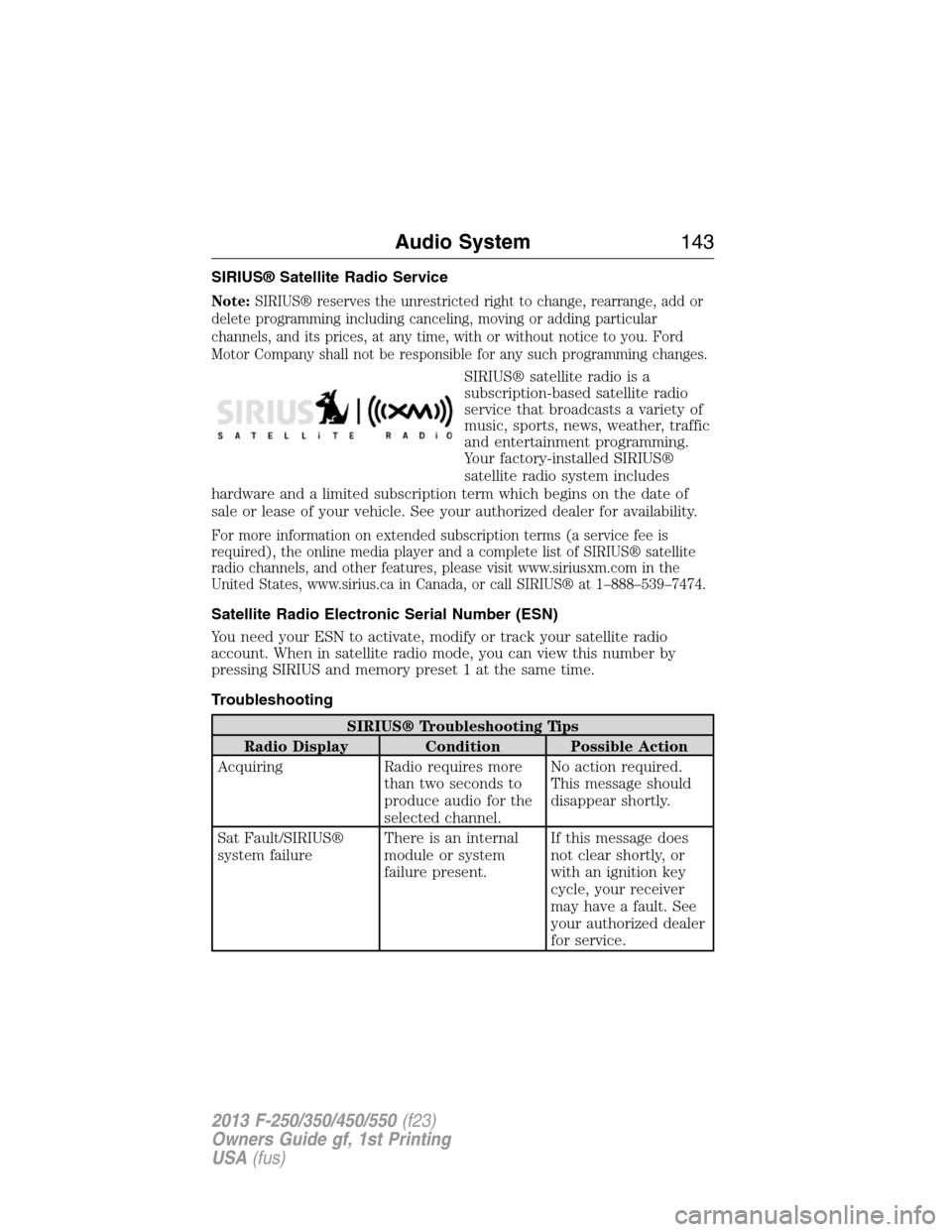
SIRIUS® Troubleshooting Tips
Radio Display Condition Possible Action
Acquiring Radio requires more
than two seconds to
produce audio for the
selected channel.No action required.
This message should
disappear shortly.
Sat Fault/SIRIUS®
system failureThere is an internal
module or system
failure present.If this message does
not clear shortly, or
with an ignition key
cycle, your receiver
may have a fault. See
your authorized dealer
for service.
Audio System143
2013 F-250/350/450/550(f23)
Owners Guide gf, 1st Printing
USA(fus)
Page 215 of 563
How Your Vehicle Differs From Other Vehicles
WARNING:Vehicles with a higher center of gravity such as
utility and four-wheel drive vehicles handle differently than
vehicles with a lower center of gravity. Utility and four-wheel drive
vehicles arenotdesigned for cornering at speeds as high as passenger
cars any more than low-slung sports cars are designed to perform
satisfactorily under off-road conditions. Avoid sharp turns, excessive
speed and abrupt maneuvers in these vehicles. Failure to drive
cautiously could result in an increased risk of loss of vehicle control,
vehicle rollover, personal injury and death.
Truck and utility vehicles can differ from some other vehicles. Your
vehicle may be higher to allow it to travel over rough terrain without
getting hung up or damaging underbody components.
The differences that make your vehicle so versatile also make it handle
differently than an ordinary passenger car.
Maintain steering wheel control at all times, especially in rough terrain.
Since sudden changes in terrain can result in abrupt steering wheel
motion, make sure you grip the steering wheel from the outside. Do not
grip the spokes.
Drive cautiously to avoid vehicle damage from concealed objects such as
rocks and stumps.
You should either know the terrain or examine maps of the area before
driving. Map out your route before driving in the area. To maintain
steering and braking control of your vehicle, you must have all four
wheels on the ground and they must be rolling, not sliding or spinning.
Driving Off-Road With Truck and Utility Vehicles
Note:On some models, the initial shift from two-wheel drive to four-wheel
drive while the vehicle is moving can cause some momentary clunk and
ratcheting sounds. This is the front drivetrain coming up to speed and the
automatic locking hubs engaging and is not cause for concern.
Note:Your vehicle may be equipped with a front air dam that can
become damaged (due to reduced ground clearance) when taking your
vehicle off-road. This air dam can be taken off by removing two bolts.
4WD vehicles are specially equipped for driving on sand, snow, mud and
rough terrain and have operating characteristics that are somewhat
different from conventional vehicles, both on and off the road.
214Four-Wheel Drive (If Equipped)
2013 F-250/350/450/550(f23)
Owners Guide gf, 1st Printing
USA(fus)
Page 463 of 563
Speed-restricted Features
Some features of this system may be too difficult to use while your
vehicle is moving so they are restricted from use unless your vehicle is
stationary.
•Screens that are too crowded with information, such as Point of
Interest reviews and ratings, SIRIUS® Travel Link™ sports scores,
movie times and ski conditions.
•Any action that requires you to use a keyboard is restricted, such as
entering a navigation destination or editing information.
•All lists are limited so the user can view fewer entries (such as phone
contacts or recent phone call entries).
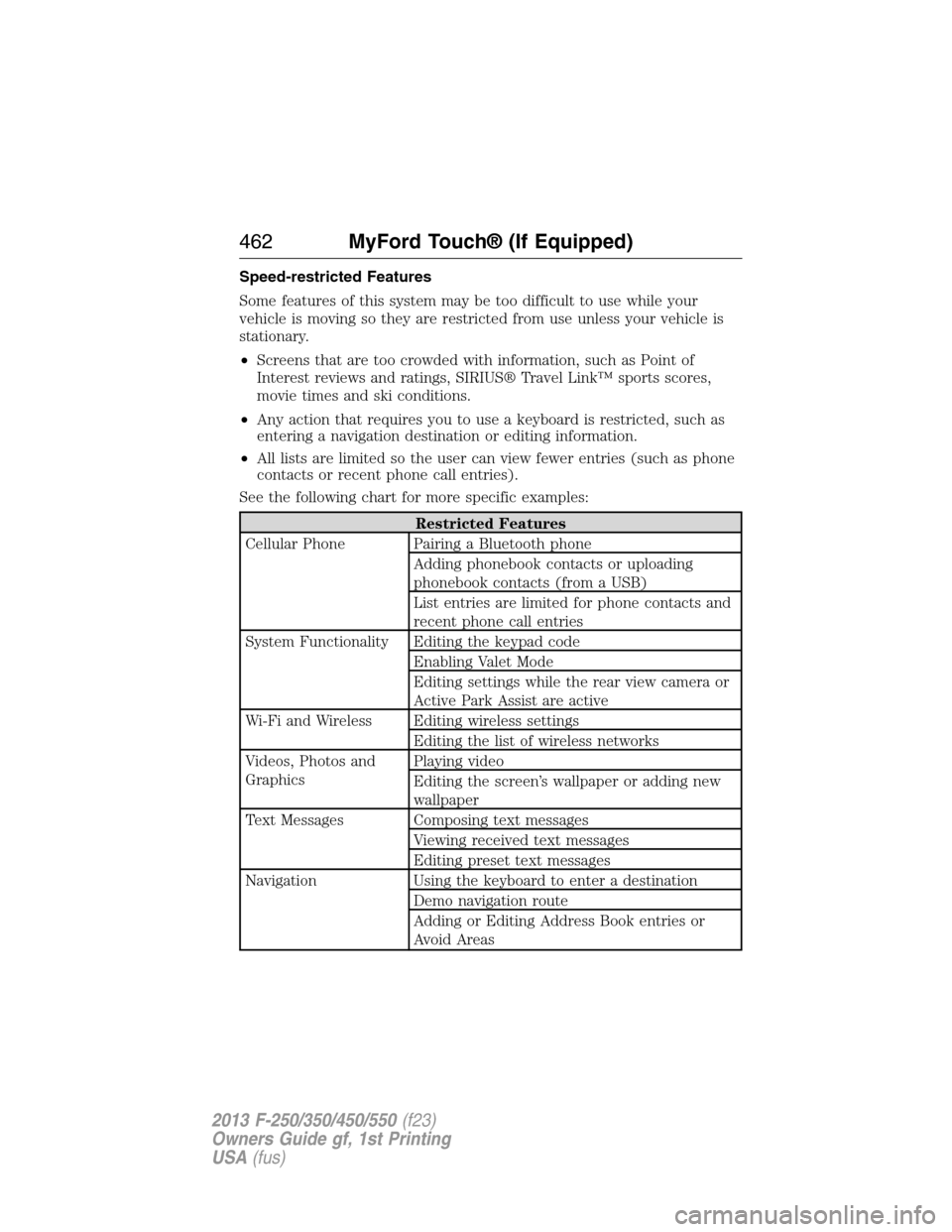
See the following chart for more specific examples:
Restricted Features
Cellular Phone Pairing a Bluetooth phone
Adding phonebook contacts or uploading
phonebook contacts (from a USB)
List entries are limited for phone contacts and
recent phone call entries
System Functionality Editing the keypad code
Enabling Valet Mode
Editing settings while the rear view camera or
Active Park Assist are active
Wi-Fi and Wireless Editing wireless settings
Editing the list of wireless networks
Videos, Photos and
GraphicsPlaying video
Editing the screen’s wallpaper or adding new
wallpaper
Text Messages Composing text messages
Viewing received text messages
Editing preset text messages
Navigation Using the keyboard to enter a destination
Demo navigation route
Adding or Editing Address Book entries or
Avoid Areas
462MyFord Touch® (If Equipped)
2013 F-250/350/450/550(f23)
Owners Guide gf, 1st Printing
USA(fus)
Page 479 of 563
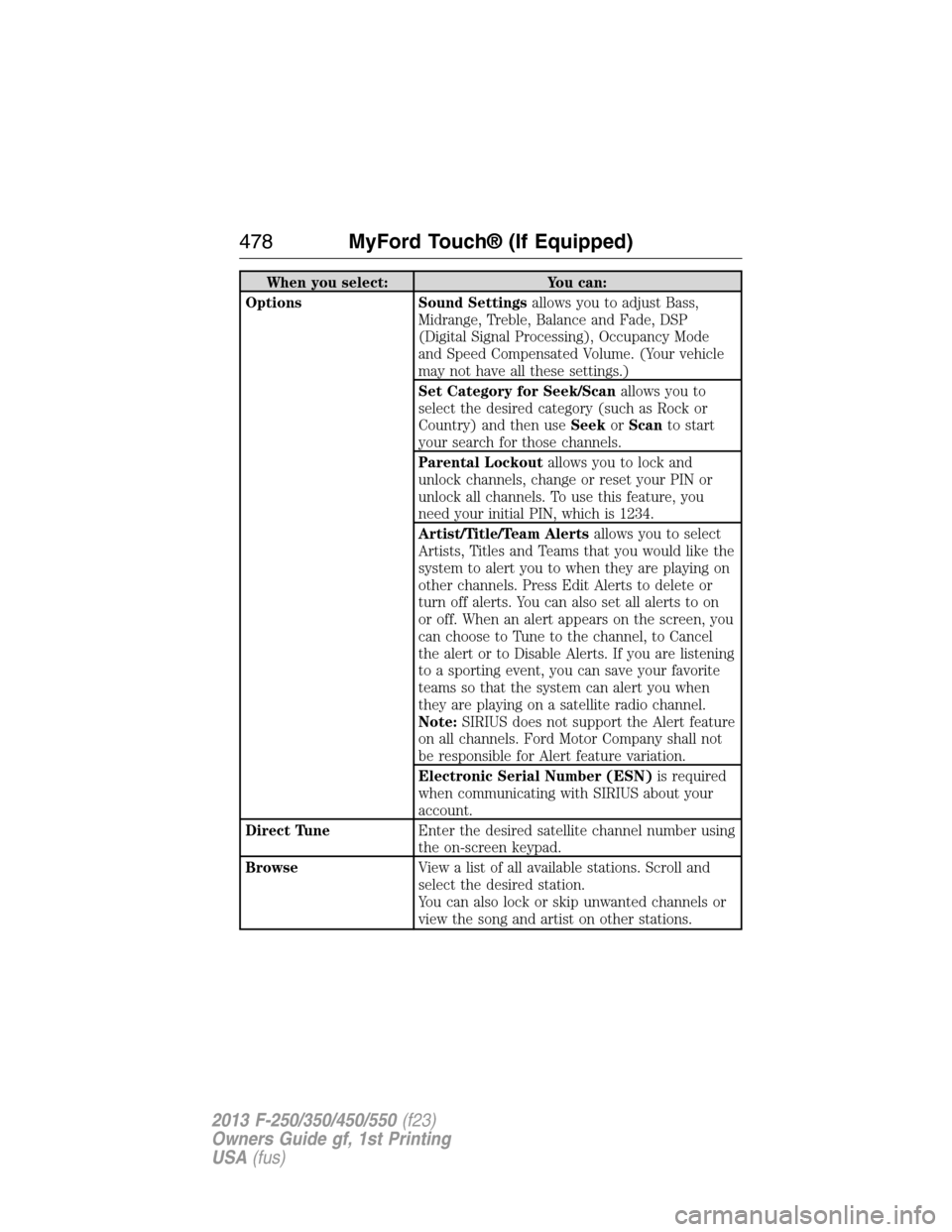
When you select: You can:
Options Sound Settingsallows you to adjust Bass,
Midrange, Treble, Balance and Fade, DSP
(Digital Signal Processing), Occupancy Mode
and Speed Compensated Volume. (Your vehicle
may not have all these settings.)
Set Category for Seek/Scanallows you to
select the desired category (such as Rock or
Country) and then useSeekorScanto start
your search for those channels.
Parental Lockoutallows you to lock and
unlock channels, change or reset your PIN or
unlock all channels. To use this feature, you
need your initial PIN, which is 1234.
Artist/Title/Team Alertsallows you to select
Artists, Titles and Teams that you would like the
system to alert you to when they are playing on
other channels. Press Edit Alerts to delete or
turn off alerts. You can also set all alerts to on
or off. When an alert appears on the screen, you
can choose to Tune to the channel, to Cancel
the alert or to Disable Alerts. If you are listening
to a sporting event, you can save your favorite
teams so that the system can alert you when
they are playing on a satellite radio channel.
Note:SIRIUS does not support the Alert feature
on all channels. Ford Motor Company shall not
be responsible for Alert feature variation.
Electronic Serial Number (ESN)is required
when communicating with SIRIUS about your
account.
Direct TuneEnter the desired satellite channel number using
the on-screen keypad.
BrowseView a list of all available stations. Scroll and
select the desired station.
You can also lock or skip unwanted channels or
view the song and artist on other stations.
478MyFord Touch® (If Equipped)
2013 F-250/350/450/550(f23)
Owners Guide gf, 1st Printing
USA(fus)