oil filter FORD SUPER DUTY 2013 3.G Owners Manual
[x] Cancel search | Manufacturer: FORD, Model Year: 2013, Model line: SUPER DUTY, Model: FORD SUPER DUTY 2013 3.GPages: 563, PDF Size: 7.27 MB
Page 7 of 563
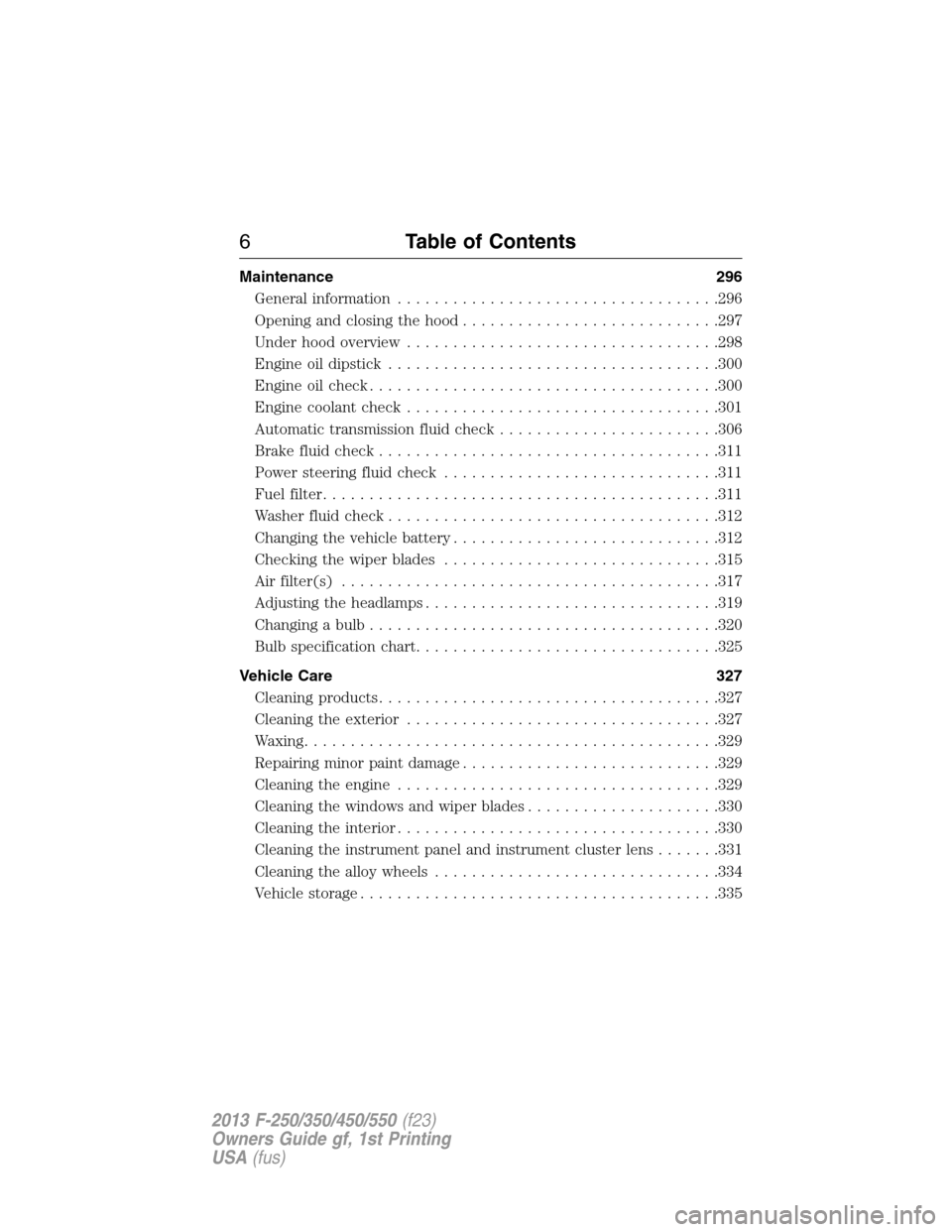
Maintenance 296
General information...................................296
Opening and closing the hood............................297
Under hood overview..................................298
Engine oil dipstick....................................300
Engine oil check......................................300
Engine coolant check..................................301
Automatic transmission fluid check........................306
Brake fluid check.....................................311
Power steering fluid check..............................311
Fuel filter...........................................311
Washer fluid check....................................312
Changing the vehicle battery.............................312
Checking the wiper blades..............................315
Air filter(s).........................................317
Adjusting the headlamps................................319
Changing a bulb......................................320
Bulb specification chart.................................325
Vehicle Care 327
Cleaning products.....................................327
Cleaning the exterior..................................327
Waxing.............................................329
Repairing minor paint damage............................329
Cleaning the engine...................................329
Cleaning the windows and wiper blades.....................330
Cleaning the interior...................................330
Cleaning the instrument panel and instrument cluster lens.......331
Cleaning the alloy wheels...............................334
Vehicle storage.......................................335
6Table of Contents
2013 F-250/350/450/550(f23)
Owners Guide gf, 1st Printing
USA(fus)
Page 11 of 563
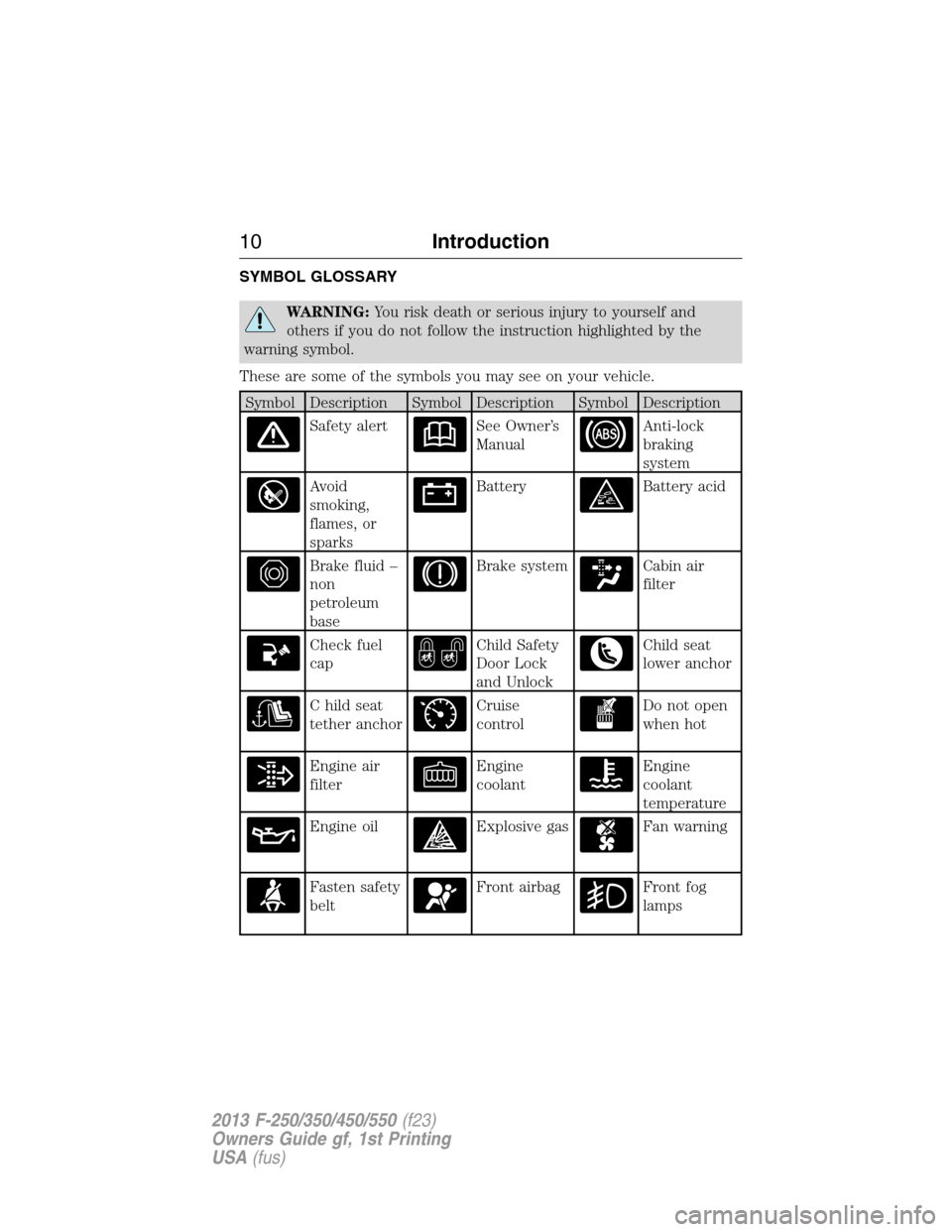
SYMBOL GLOSSARY
WARNING:You risk death or serious injury to yourself and
others if you do not follow the instruction highlighted by the
warning symbol.
These are some of the symbols you may see on your vehicle.
Symbol Description Symbol Description Symbol Description
Safety alertSee Owner’s
ManualAnti-lock
braking
system
Avoid
smoking,
flames, or
sparksBatteryBattery acid
Brake fluid –
non
petroleum
baseBrake systemCabin air
filter
Check fuel
capChild Safety
Door Lock
and UnlockChild seat
lower anchor
C hild seat
tether anchorCruise
controlDo not open
when hot
Engine air
filterEngine
coolantEngine
coolant
temperature
Engine oilExplosive gasFan warning
Fasten safety
beltFront airbagFront fog
lamps
10Introduction
2013 F-250/350/450/550(f23)
Owners Guide gf, 1st Printing
USA(fus)
Page 105 of 563
•MPG (L/km): This displays instantaneous fuel economy as a bar graph.
Your vehicle must be moving to calculate instantaneous fuel economy.
Instantaneous fuel economy cannot be reset.
•TIMER: Displays the trip elapsed drive time. Press and release RESET
to pause the timer. Press and hold RESET to reset the timer.
•TBC GAIN (if equipped): Displays the level of trailer brake gain or if
the trailer is not connected.
•EXHAUST FILTER (Diesel only): For more information, refer to the
Diesel exhaust system: oxidation catalyst/diesel particulate filter
systemin your diesel supplement for more information.
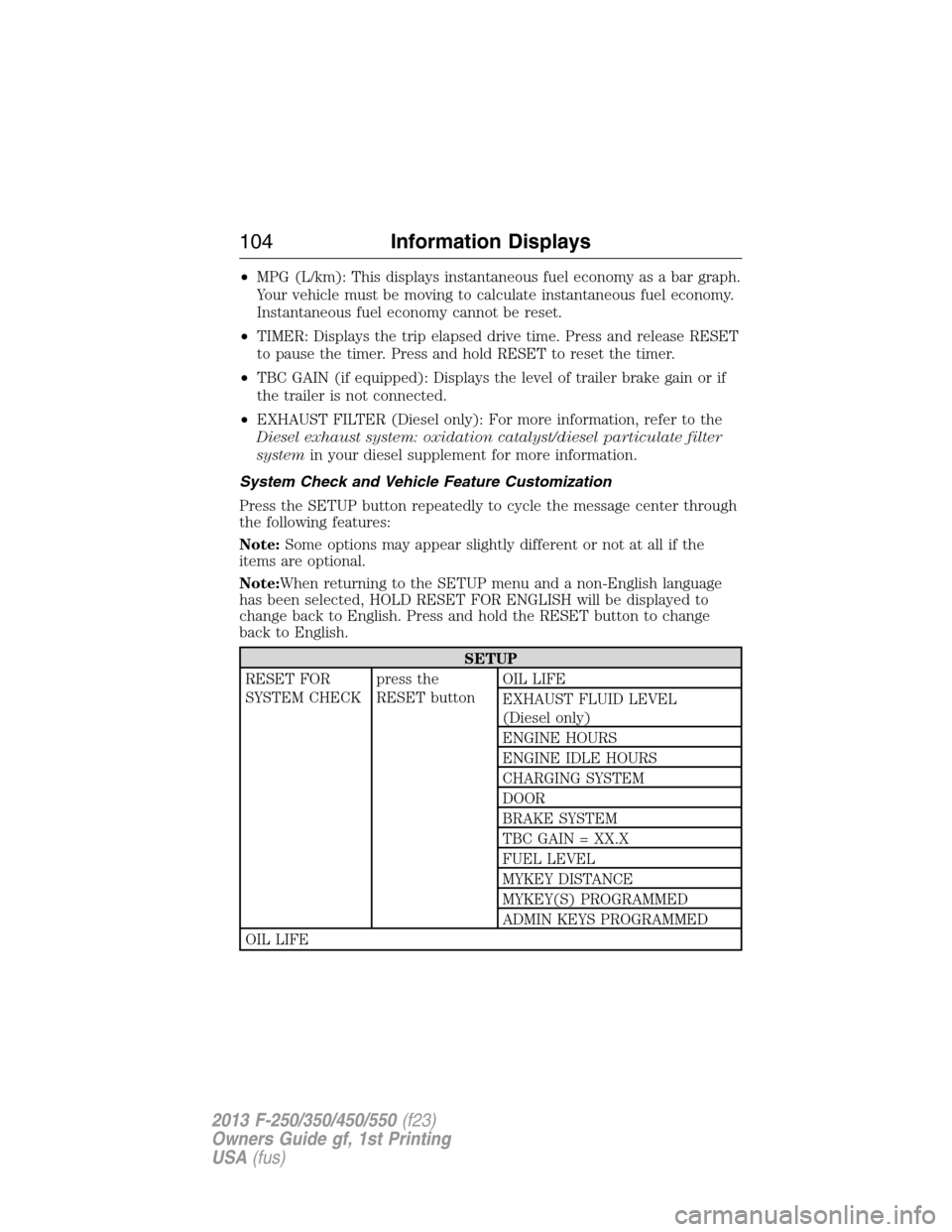
System Check and Vehicle Feature Customization
Press the SETUP button repeatedly to cycle the message center through
the following features:
Note:Some options may appear slightly different or not at all if the
items are optional.
Note:When returning to the SETUP menu and a non-English language
has been selected, HOLD RESET FOR ENGLISH will be displayed to
change back to English. Press and hold the RESET button to change
back to English.
SETUP
RESET FOR
SYSTEM CHECKpress the
RESET buttonOIL LIFE
EXHAUST FLUID LEVEL
(Diesel only)
ENGINE HOURS
ENGINE IDLE HOURS
CHARGING SYSTEM
DOOR
BRAKE SYSTEM
TBC GAIN = XX.X
FUEL LEVEL
MYKEY DISTANCE
MYKEY(S) PROGRAMMED
ADMIN KEYS PROGRAMMED
OIL LIFE
104Information Displays
2013 F-250/350/450/550(f23)
Owners Guide gf, 1st Printing
USA(fus)
Page 110 of 563
•Truck Apps (If Equipped)
•Settings
•Information
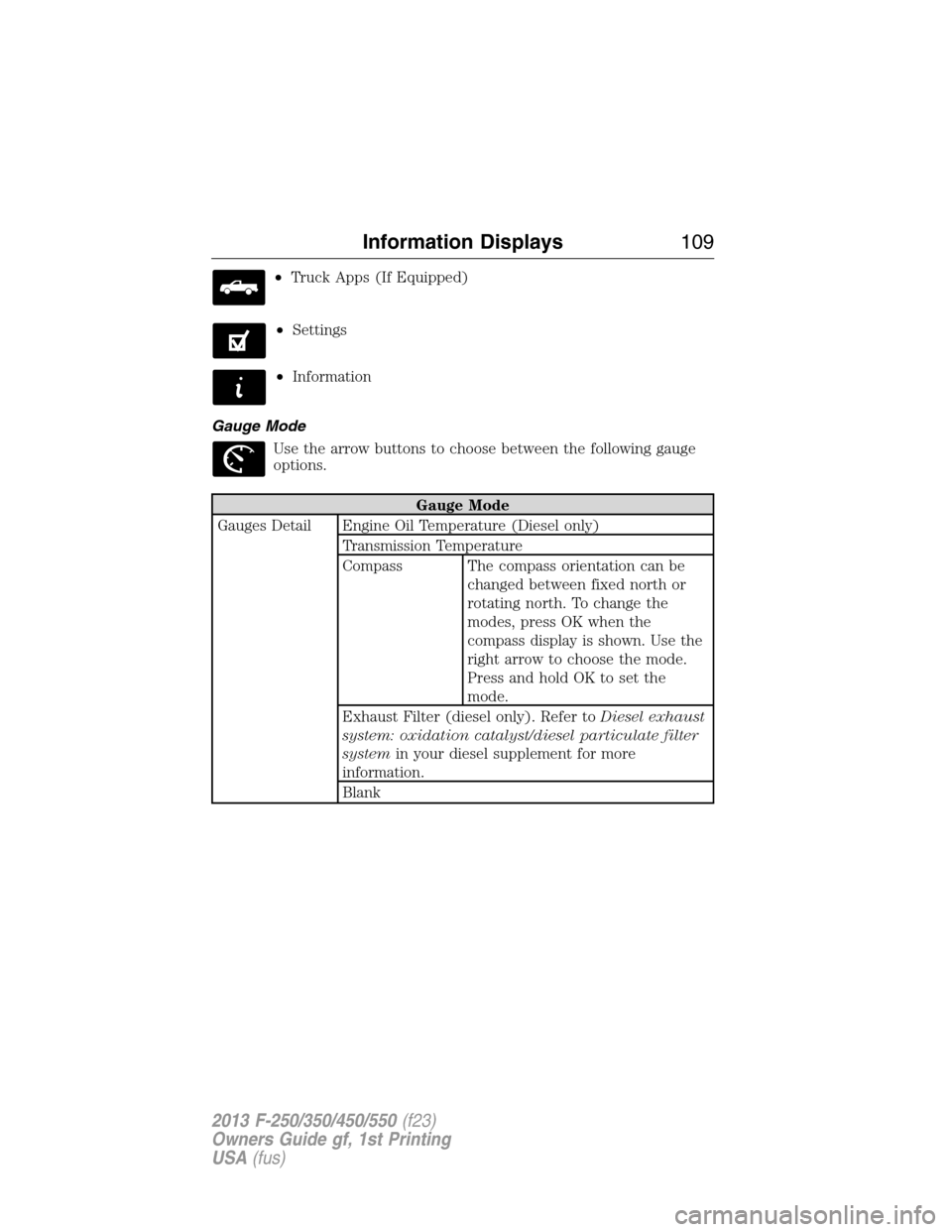
Gauge Mode
Use the arrow buttons to choose between the following gauge
options.
Gauge Mode
Gauges Detail Engine Oil Temperature (Diesel only)
Transmission Temperature
Compass The compass orientation can be
changed between fixed north or
rotating north. To change the
modes, press OK when the
compass display is shown. Use the
right arrow to choose the mode.
Press and hold OK to set the
mode.
Exhaust Filter (diesel only). Refer toDiesel exhaust
system: oxidation catalyst/diesel particulate filter
systemin your diesel supplement for more
information.
Blank
Information Displays109
2013 F-250/350/450/550(f23)
Owners Guide gf, 1st Printing
USA(fus)
Page 116 of 563
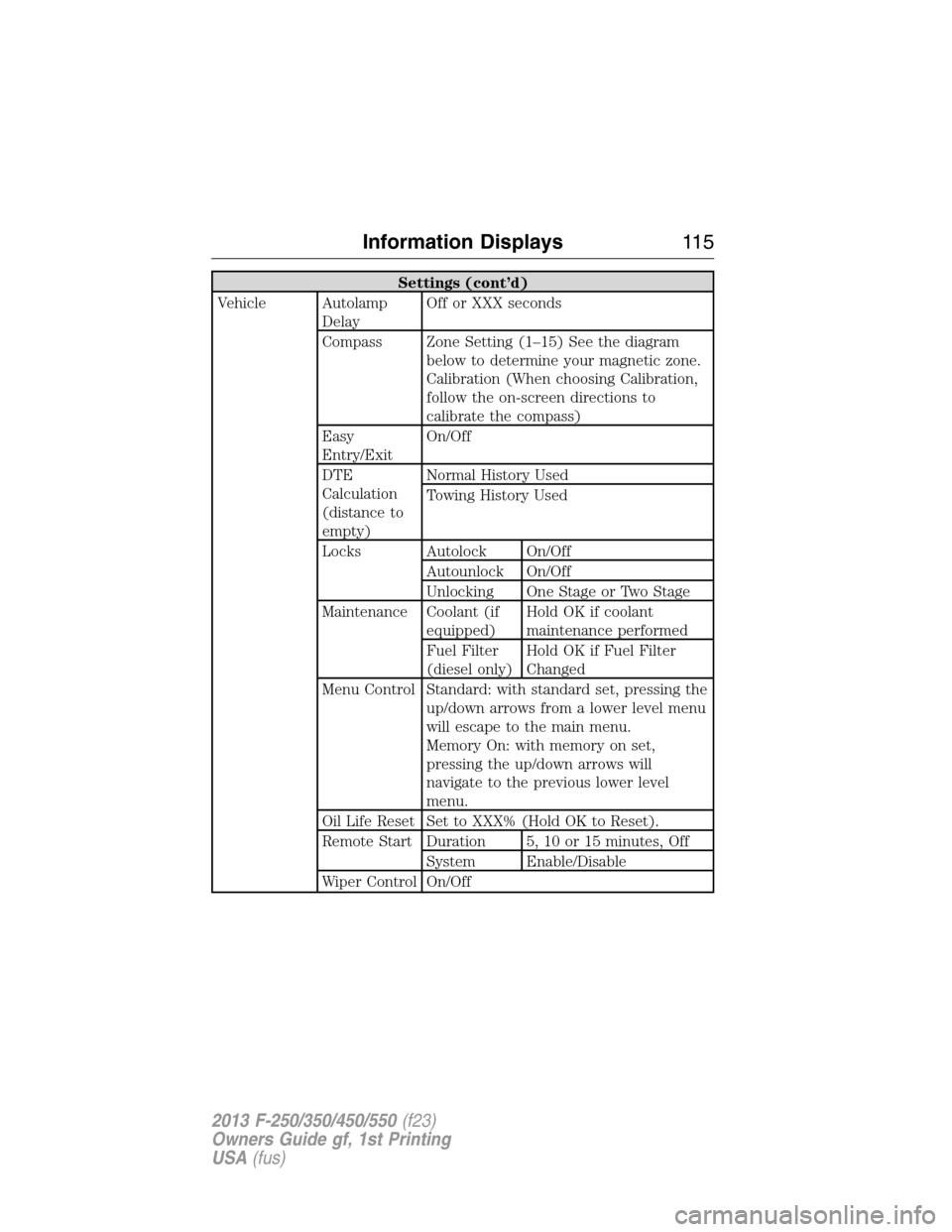
Settings (cont’d)
Vehicle Autolamp
DelayOff or XXX seconds
Compass Zone Setting (1–15) See the diagram
below to determine your magnetic zone.
Calibration (When choosing Calibration,
follow the on-screen directions to
calibrate the compass)
Easy
Entry/ExitOn/Off
DTE
Calculation
(distance to
empty)Normal History Used
Towing History Used
Locks Autolock On/Off
Autounlock On/Off
Unlocking One Stage or Two Stage
Maintenance Coolant (if
equipped)Hold OK if coolant
maintenance performed
Fuel Filter
(diesel only)Hold OK if Fuel Filter
Changed
Menu Control Standard: with standard set, pressing the
up/down arrows from a lower level menu
will escape to the main menu.
Memory On: with memory on set,
pressing the up/down arrows will
navigate to the previous lower level
menu.
Oil Life Reset Set to XXX% (Hold OK to Reset).
Remote Start Duration 5, 10 or 15 minutes, Off
System Enable/Disable
Wiper Control On/Off
Information Displays11 5
2013 F-250/350/450/550(f23)
Owners Guide gf, 1st Printing
USA(fus)
Page 121 of 563
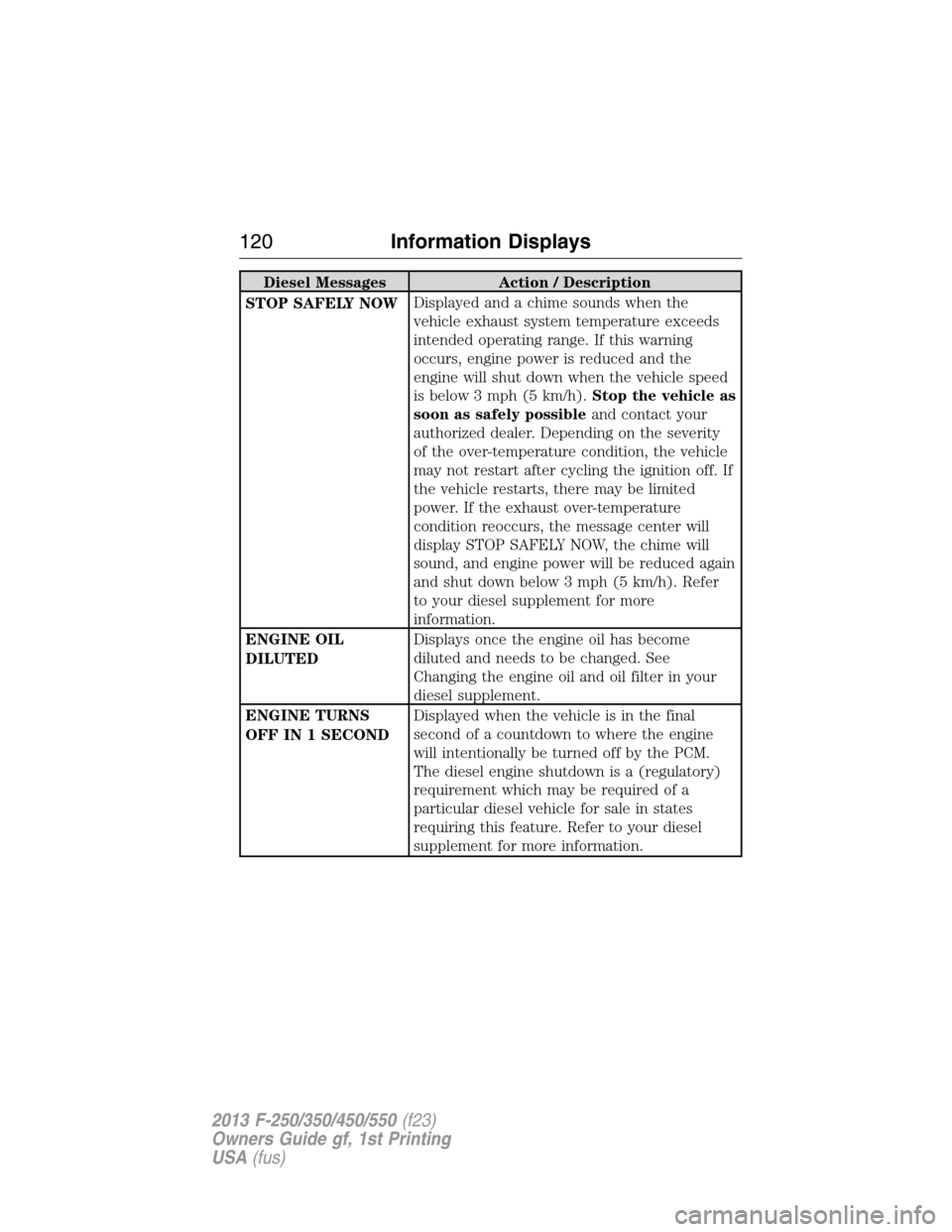
Diesel Messages Action / Description
STOP SAFELY NOWDisplayed and a chime sounds when the
vehicle exhaust system temperature exceeds
intended operating range. If this warning
occurs, engine power is reduced and the
engine will shut down when the vehicle speed
is below 3 mph (5 km/h).Stop the vehicle as
soon as safely possibleand contact your
authorized dealer. Depending on the severity
of the over-temperature condition, the vehicle
may not restart after cycling the ignition off. If
the vehicle restarts, there may be limited
power. If the exhaust over-temperature
condition reoccurs, the message center will
display STOP SAFELY NOW, the chime will
sound, and engine power will be reduced again
and shut down below 3 mph (5 km/h). Refer
to your diesel supplement for more
information.
ENGINE OIL
DILUTEDDisplays once the engine oil has become
diluted and needs to be changed. See
Changing the engine oil and oil filter in your
diesel supplement.
ENGINE TURNS
OFF IN 1 SECONDDisplayed when the vehicle is in the final
second of a countdown to where the engine
will intentionally be turned off by the PCM.
The diesel engine shutdown is a (regulatory)
requirement which may be required of a
particular diesel vehicle for sale in states
requiring this feature. Refer to your diesel
supplement for more information.
120Information Displays
2013 F-250/350/450/550(f23)
Owners Guide gf, 1st Printing
USA(fus)
Page 122 of 563
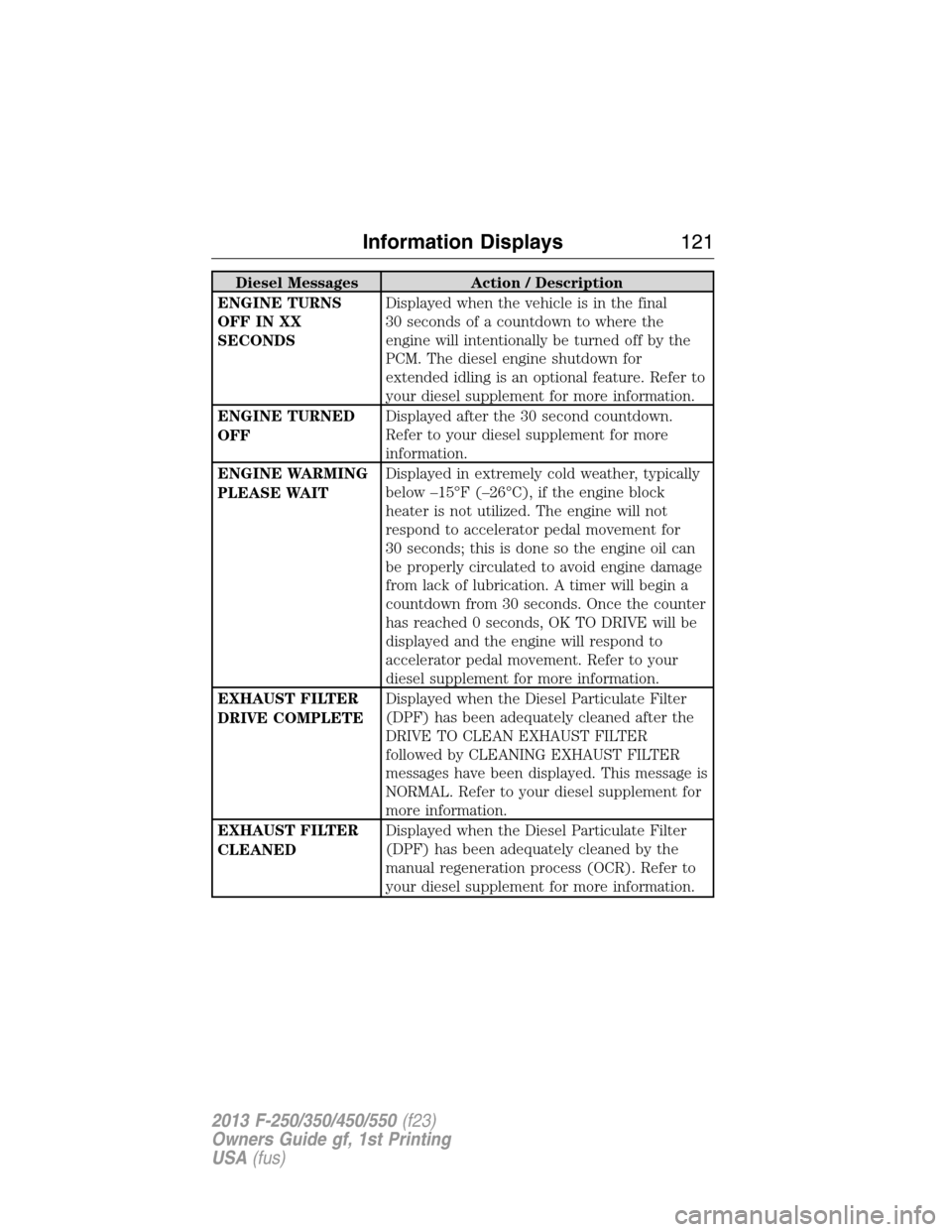
Diesel Messages Action / Description
ENGINE TURNS
OFF IN XX
SECONDSDisplayed when the vehicle is in the final
30 seconds of a countdown to where the
engine will intentionally be turned off by the
PCM. The diesel engine shutdown for
extended idling is an optional feature. Refer to
your diesel supplement for more information.
ENGINE TURNED
OFFDisplayed after the 30 second countdown.
Refer to your diesel supplement for more
information.
ENGINE WARMING
PLEASE WAITDisplayed in extremely cold weather, typically
below –15°F (–26°C), if the engine block
heater is not utilized. The engine will not
respond to accelerator pedal movement for
30 seconds; this is done so the engine oil can
be properly circulated to avoid engine damage
from lack of lubrication. A timer will begin a
countdown from 30 seconds. Once the counter
has reached 0 seconds, OK TO DRIVE will be
displayed and the engine will respond to
accelerator pedal movement. Refer to your
diesel supplement for more information.
EXHAUST FILTER
DRIVE COMPLETEDisplayed when the Diesel Particulate Filter
(DPF) has been adequately cleaned after the
DRIVE TO CLEAN EXHAUST FILTER
followed by CLEANING EXHAUST FILTER
messages have been displayed. This message is
NORMAL. Refer to your diesel supplement for
more information.
EXHAUST FILTER
CLEANEDDisplayed when the Diesel Particulate Filter
(DPF) has been adequately cleaned by the
manual regeneration process (OCR). Refer to
your diesel supplement for more information.
Information Displays121
2013 F-250/350/450/550(f23)
Owners Guide gf, 1st Printing
USA(fus)
Page 299 of 563
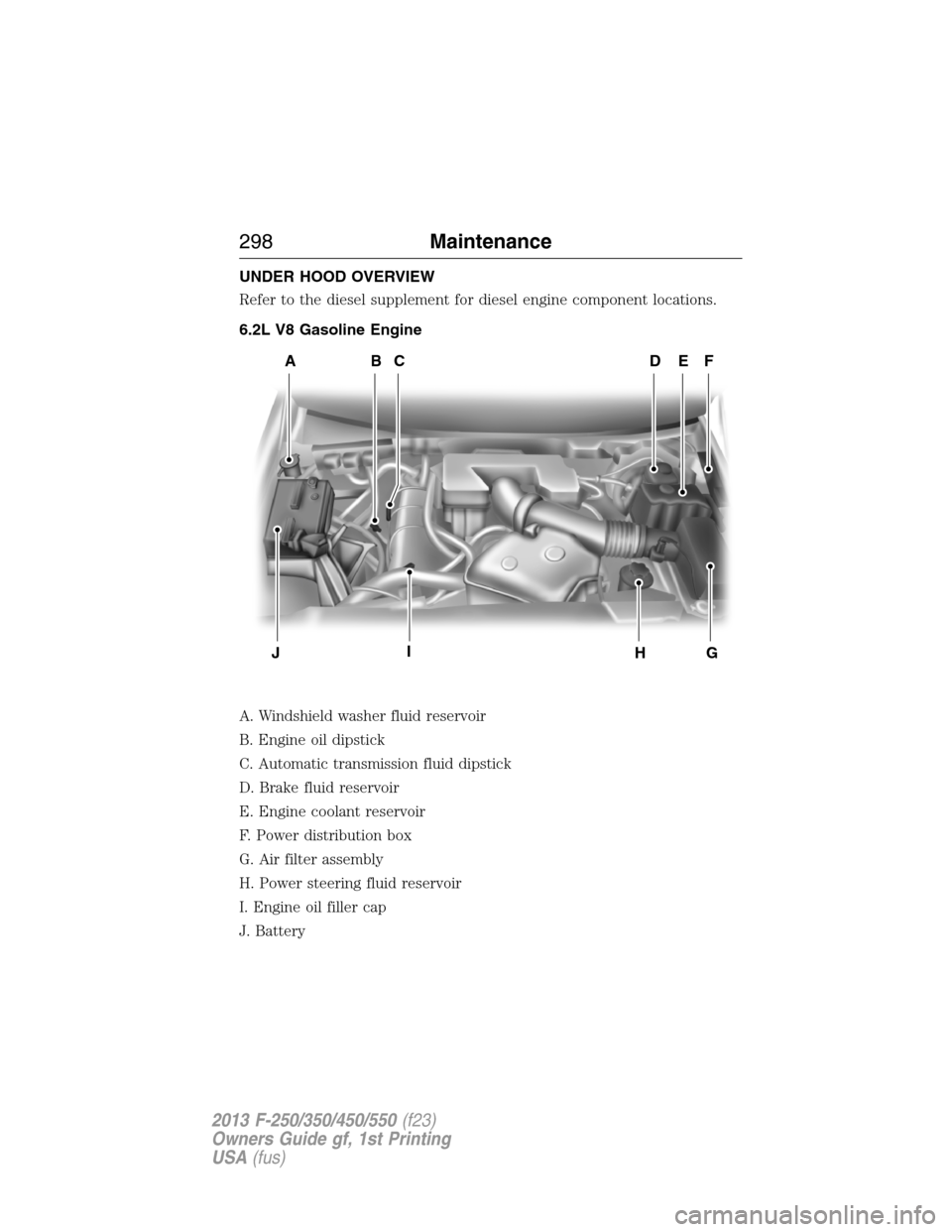
UNDER HOOD OVERVIEW
Refer to the diesel supplement for diesel engine component locations.
6.2L V8 Gasoline Engine
A. Windshield washer fluid reservoir
B. Engine oil dipstick
C. Automatic transmission fluid dipstick
D. Brake fluid reservoir
E. Engine coolant reservoir
F. Power distribution box
G. Air filter assembly
H. Power steering fluid reservoir
I. Engine oil filler cap
J. Battery
ADFEBC
GHIJ
298Maintenance
2013 F-250/350/450/550(f23)
Owners Guide gf, 1st Printing
USA(fus)
Page 300 of 563
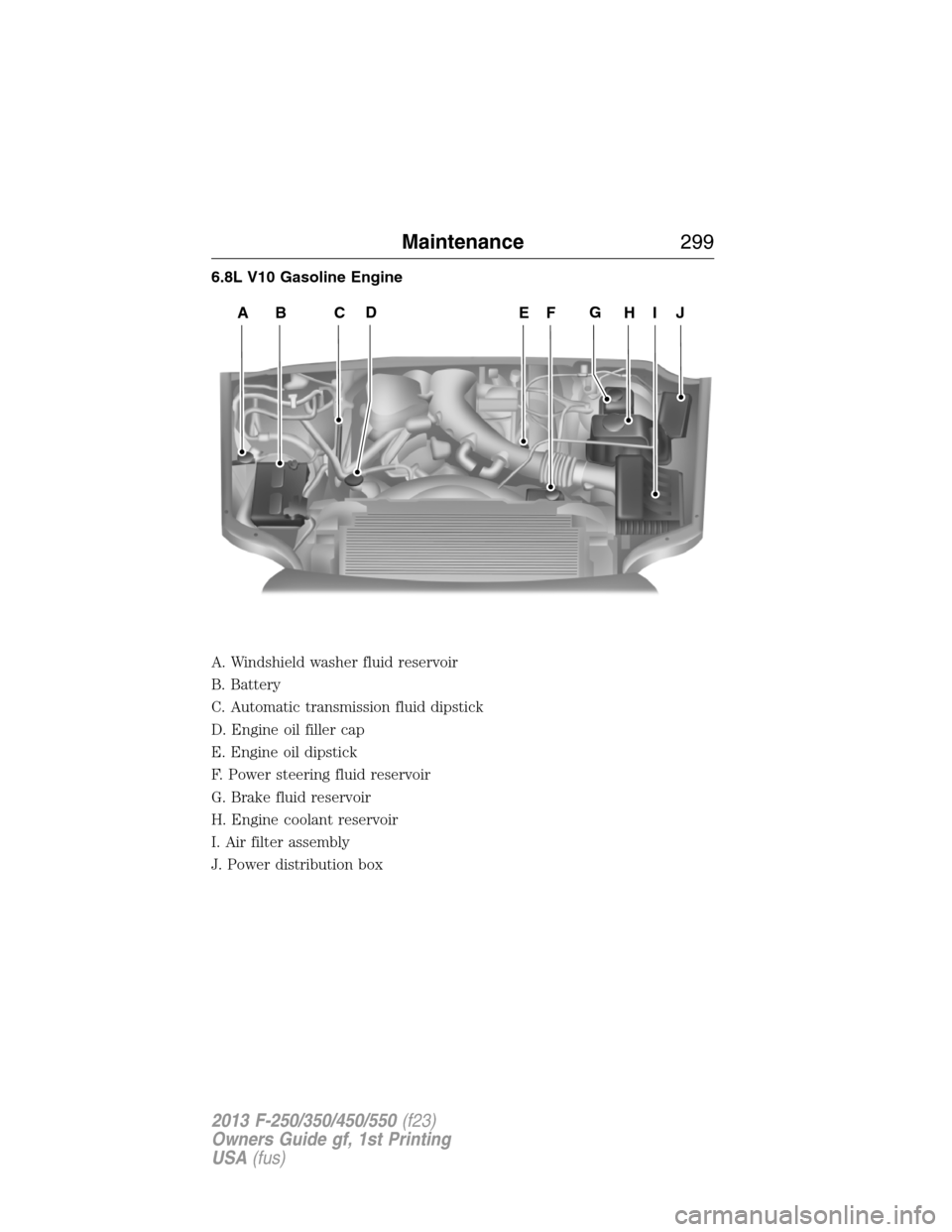
6.8L V10 Gasoline Engine
A. Windshield washer fluid reservoir
B. Battery
C. Automatic transmission fluid dipstick
D. Engine oil filler cap
E. Engine oil dipstick
F. Power steering fluid reservoir
G. Brake fluid reservoir
H. Engine coolant reservoir
I. Air filter assembly
J. Power distribution box
ABCEHIJFDG
Maintenance299
2013 F-250/350/450/550(f23)
Owners Guide gf, 1st Printing
USA(fus)
Page 330 of 563
Cleaning Plastic Exterior Parts
Use only approved products to clean plastic parts.
•For routine cleaning, use Motorcraft® Detail Wash.
•
If tar or grease spots are present, use Motorcraft® Bug and Tar Remover.
WAXING
•Wash the vehicle first.
•Use a quality wax that does not contain abrasives.
•Do not allow paint sealant to come in contact with any non-body
(low-gloss black) colored trim, such as grained door handles, roof
racks, bumpers, side moldings, mirror housings or the windshield cowl
area. The paint sealant will grey or stain the parts over time.
REPAIRING MINOR PAINT DAMAGE
Your authorized dealer has touch-up paint to match your vehicle’s color.
Take your color code (printed on a sticker in the driver’s door jamb) to
your authorized dealer to make sure you get the correct color.
•Remove particles, such as bird droppings, tree sap, insect deposits, tar
spots, road salt and industrial fallout, before repairing paint chips.
•Always read the instructions before using the products.
CLEANING THE ENGINE
Engines are more efficient when they are clean because grease and dirt
buildup keep the engine warmer than normal.
When washing:
•
Take care when using a power washer to clean the engine. The
high-pressure fluid could penetrate the sealed parts and cause damage.
•Do not spray a hot engine with cold water to avoid cracking the
engine block or other engine components.
•Spray Motorcraft® Engine Shampoo and Degreaser on all parts that
require cleaning and pressure rinse clean. In Canada, use Motorcraft®
Engine Shampoo.
•Never wash or rinse the engine while it is hot or running; water in the
running engine may cause internal damage.
•Never wash or rinse any ignition coil, spark plug wire or spark plug
well, or the area in and around these locations.
•Cover the battery, power distribution box, and air filter assembly to
prevent water damage when cleaning the engine.
Vehicle Care329
2013 F-250/350/450/550(f23)
Owners Guide gf, 1st Printing
USA(fus)