display FORD SUPER DUTY 2015 3.G Owners Manual
[x] Cancel search | Manufacturer: FORD, Model Year: 2015, Model line: SUPER DUTY, Model: FORD SUPER DUTY 2015 3.GPages: 470, PDF Size: 18.24 MB
Page 369 of 470
Voice settings using voice commands
"Interaction mode novice"
"Media candidate lists off"
"Media candidate lists on"
"Phone candidate lists off"
"Phone candidate lists on"
"Help"
Using Voice Commands with theTouchscreen Options
Your voice system has a dual mode featurewhich allows you to switch between usingvoice commands and making on-screenselections. This is available only when thesystem displays a list of candidatesgenerated during a voice session. Forexample, when entering in a street addressor trying to call a contact from the phoneyou paired to the system.
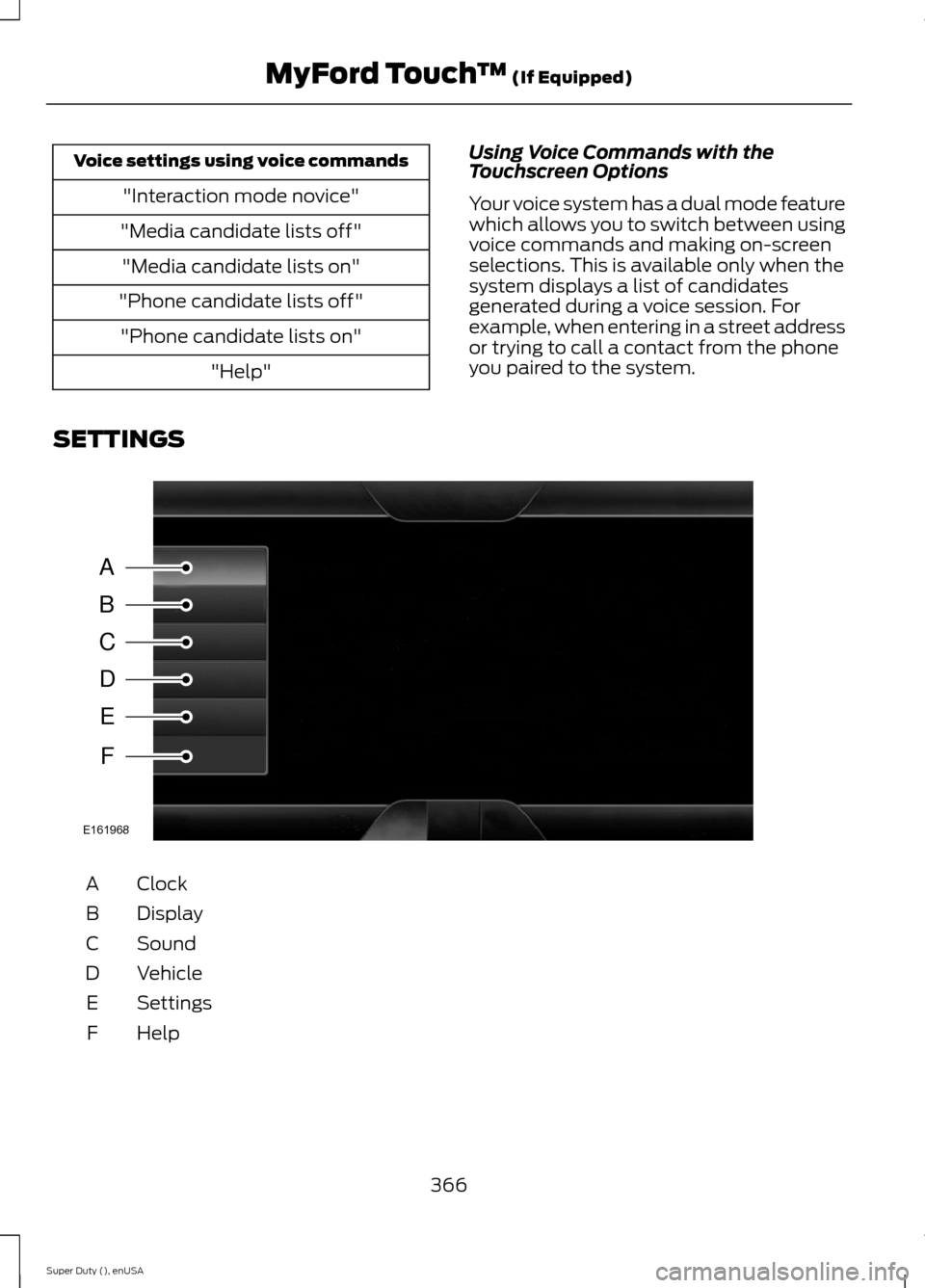
SETTINGS
ClockA
DisplayB
SoundC
VehicleD
SettingsE
HelpF
366Super Duty (), enUSAMyFord Touch™ (If Equipped)ABCDEFE161968
Page 370 of 470
Under this menu, you can setyour clock, access and adjust thedisplay, sound and vehiclesettings as well as access settings forspecific modes or the help feature.
Clock
Note:You cannot manually set the date.Your vehicle’s GPS does this for you.
Note:If the battery has been disconnected,your vehicle needs to acquire a GPS signalto update the clock. Once your vehicleacquires the signal, it may take a fewminutes for the update to display the correcttime.
1.Press the Settings icon > Clock.
2.Press + and - to adjust the time.
From this screen, you can also make otheradjustments such as 12-hour or 24-hourmode, activate GPS time synchronizationand have the system automatically updatenew time zones.
You can also turn the outside airtemperature display off and on. It appearsat the top center of the touchscreen, nextto the time and date.
The system automatically saves anyupdates you make to the settings.
Display
You can adjust the touchscreen displaythrough the touchscreen or by pressing thevoice button on your steering wheelcontrols and when prompted, say, "Displaysettings".
Press the Settings icon >Display, to access and makeadjustments using thetouchscreen.
•Brightness allows you to make thescreen display brighter or dimmer.
•Auto DIM, when set to On, lets you usethe Auto Dim Manual Offset feature.When set to Off, screen brightnessdoes not change.
•Mode allows you to set the screen toa certain brightness or have the systemautomatically change based on theoutside light level, or turn the displayoff.
•If you select AUTO or NIGHT, youhave the options of turning thedisplay's Auto Dim feature on or offand changing the Auto Dim ManualOffset feature.
•Auto Dim Manual Offset allows youto adjust screen dimming as theoutside lighting conditions change fromday to night. This feature also allowsyou to adjust screen brightness usingthe instrument panel dimming control.
•Edit Wallpaper
•You can have your touchscreendisplay the default photo or uploadyour own.
Uploading Photos for Your HomeScreen Wallpaper
Note:You cannot load photos directly fromyour camera. You must access the photoseither from your USB mass storage deviceor from an SD card.
Note:Photographs with extremely largedimensions (such as 2048 x 1536) may notbe compatible and appear as a blank(black) image on the display.
Your system allows you to upload and viewup to 32 photos.
To access, press the Settingsicon > Display > EditWallpaper, and then follow thesystem prompts to upload yourphotographs.
367Super Duty (), enUSAMyFord Touch™ (If Equipped)E142607 E142607 E142607 E142607
Page 371 of 470
Only the photograph(s), which meets thefollowing conditions, display:
•Compatible file formats are as follows:.jpg, .gif, .png, .bmp
•Each file must be 1.5 MB or less.
•Recommended dimensions: 800 x 384
Sound
Press the Settings icon > Sound,then select from the following:
Sound
Bass
Midrange
Treble
Set Balance and Fade
DSP*
Occupancy Mode*
Speed Compensated Volume
* Your vehicle may not have these soundsettings.
Vehicle
Press the Settings icon >Vehicle, then select from thefollowing:
•Vehicle Health Report
•Rear View Camera
•Enable Valet Mode.
Vehicle Health Report
Turn Automatic Reminders on and offand set the mileage interval at which youwould like to receive the reports. Press ?for more information on these selections.
When done making your selections, pressRun Vehicle Health Report Now if youwant your report.
You can find more information on VehicleHealth Report in this chapter. SeeInformation (page 399).
Rear View Camera
This menu allows you to access settingsfor your rear view camera.
Press the Settings icon >Vehicle > Rear View Camera,then select from the followingsettings:
•Rear Camera Delay
•Visual Park Aid Alert
•Guidelines.
You can find more information on the rearview camera in another chapter. See RearView Camera (page 173).
Enable Valet Mode
Valet mode allows you to lock the system.No information is accessible until thesystem is unlocked with the correct PIN.You can create your own four-digit PIN tolock and unlock the system.
1.Press the Settings icon > Vehicle >Enable Valet Mode.
2.When prompted, enter a four-digit PIN.
After you press Continue, the system locksuntil you enter the PIN again.
Note:If the system locks, and you need toreset the PIN, enter 3681 and the systemunlocks.
368Super Duty (), enUSAMyFord Touch™ (If Equipped)E142607 E142607 E142607 E142607
Page 372 of 470
Settings
Access and adjust system settings, voicefeatures, as well as phone, navigation andwireless settings.
System
Press the Settings icon >Settings > System, then selectfrom the following:
System
Select to have the touchscreen display in English, Spanishor French.Language
Select to display units in kilometers or miles.Distance
Select to display units in Celsius or Fahrenheit.Temperature
Adjust the volume of voice prompts from the system.System Prompt Volume
Select to have the system beep to confirm choices madethrough the touchscreen.Touch Screen Button Beep
Select to have the system beep to confirm button choicesmade through the climate or audio system.Touch Panel Button Beep
Have the touchscreen keyboard display in QWERTY orABC format.Keyboard Layout
Install any downloaded applications or view the currentsoftware licenses.Install Applications
Select to restore factory defaults. This erases all personalsettings and personal data.Master Reset
Voice Control
Press the Settings icon >Settings > Voice Control, thenselect from the following:
369Super Duty (), enUSAMyFord Touch™ (If Equipped)E142607 E142607
Page 374 of 470
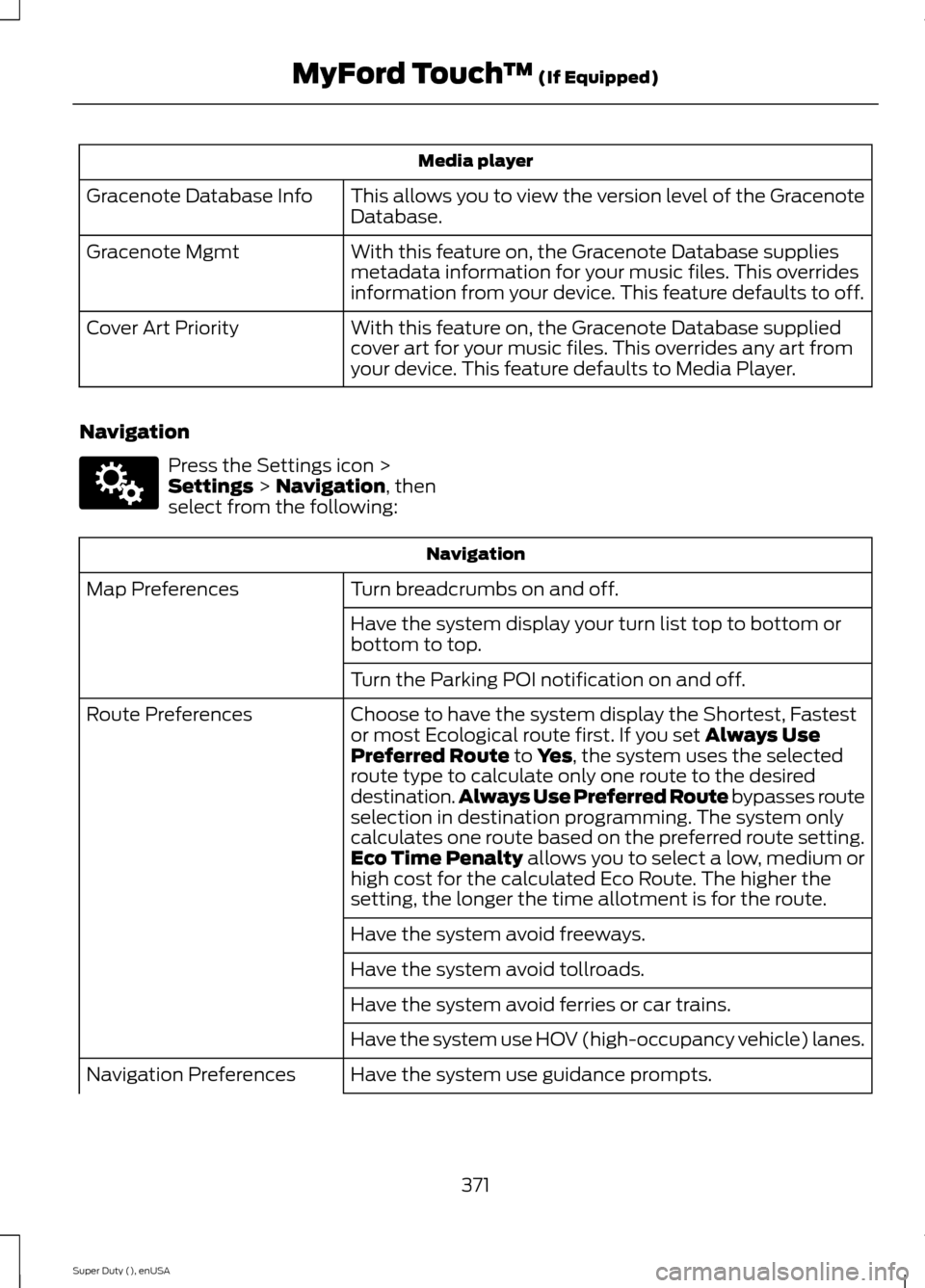
Media player
This allows you to view the version level of the GracenoteDatabase.Gracenote Database Info
With this feature on, the Gracenote Database suppliesmetadata information for your music files. This overridesinformation from your device. This feature defaults to off.
Gracenote Mgmt
With this feature on, the Gracenote Database suppliedcover art for your music files. This overrides any art fromyour device. This feature defaults to Media Player.
Cover Art Priority
Navigation
Press the Settings icon >Settings > Navigation, thenselect from the following:
Navigation
Turn breadcrumbs on and off.Map Preferences
Have the system display your turn list top to bottom orbottom to top.
Turn the Parking POI notification on and off.
Choose to have the system display the Shortest, Fastestor most Ecological route first. If you set Always UsePreferred Route to Yes, the system uses the selectedroute type to calculate only one route to the desireddestination.Always Use Preferred Route bypasses routeselection in destination programming. The system onlycalculates one route based on the preferred route setting.Eco Time Penalty allows you to select a low, medium orhigh cost for the calculated Eco Route. The higher thesetting, the longer the time allotment is for the route.
Route Preferences
Have the system avoid freeways.
Have the system avoid tollroads.
Have the system avoid ferries or car trains.
Have the system use HOV (high-occupancy vehicle) lanes.
Have the system use guidance prompts.Navigation Preferences
371Super Duty (), enUSAMyFord Touch™ (If Equipped)E142607
Page 375 of 470
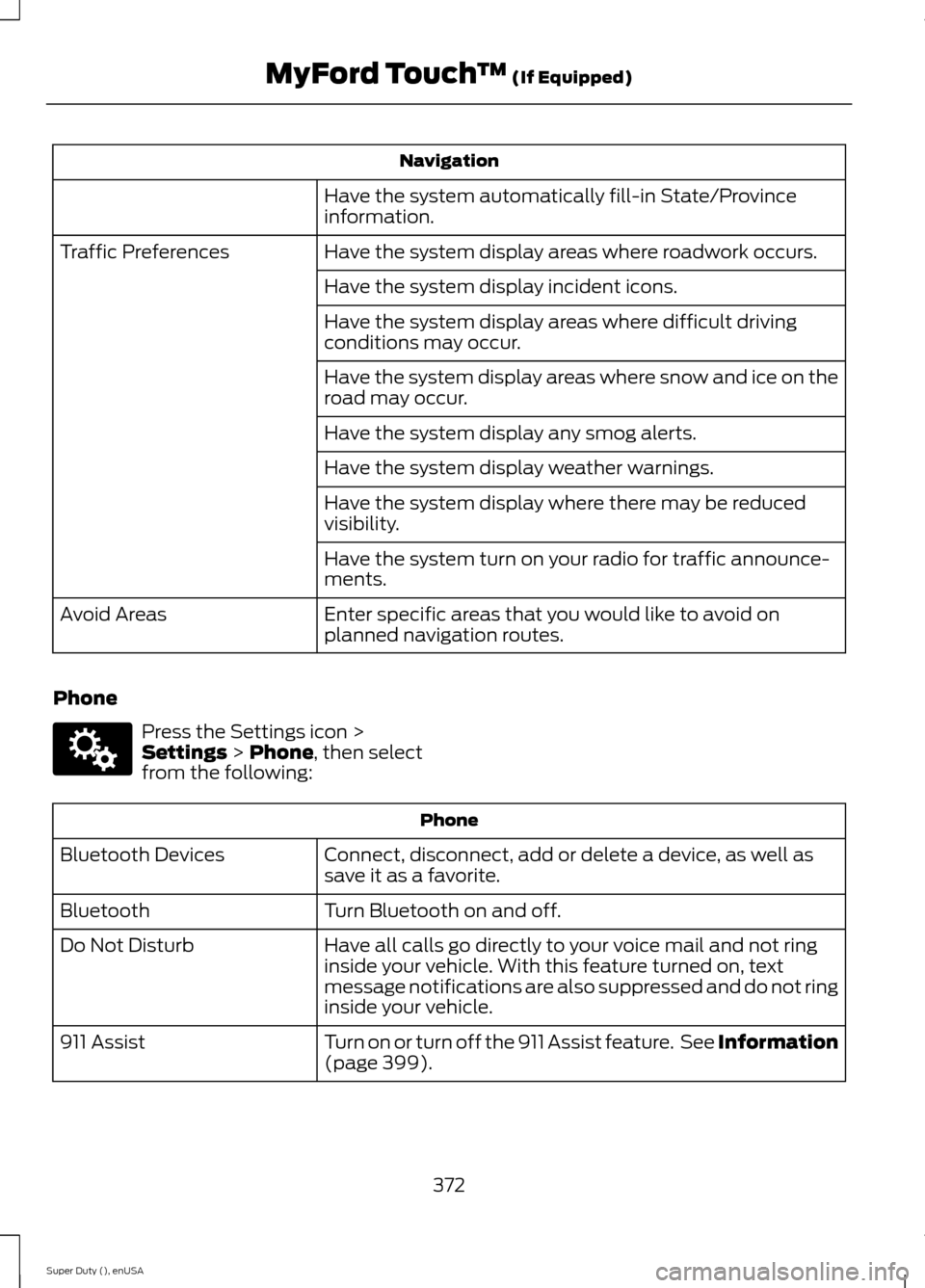
Navigation
Have the system automatically fill-in State/Provinceinformation.
Have the system display areas where roadwork occurs.Traffic Preferences
Have the system display incident icons.
Have the system display areas where difficult drivingconditions may occur.
Have the system display areas where snow and ice on theroad may occur.
Have the system display any smog alerts.
Have the system display weather warnings.
Have the system display where there may be reducedvisibility.
Have the system turn on your radio for traffic announce-ments.
Enter specific areas that you would like to avoid onplanned navigation routes.Avoid Areas
Phone
Press the Settings icon >Settings > Phone, then selectfrom the following:
Phone
Connect, disconnect, add or delete a device, as well assave it as a favorite.Bluetooth Devices
Turn Bluetooth on and off.Bluetooth
Have all calls go directly to your voice mail and not ringinside your vehicle. With this feature turned on, textmessage notifications are also suppressed and do not ringinside your vehicle.
Do Not Disturb
Turn on or turn off the 911 Assist feature. See Information(page 399).911 Assist
372Super Duty (), enUSAMyFord Touch™ (If Equipped)E142607
Page 377 of 470
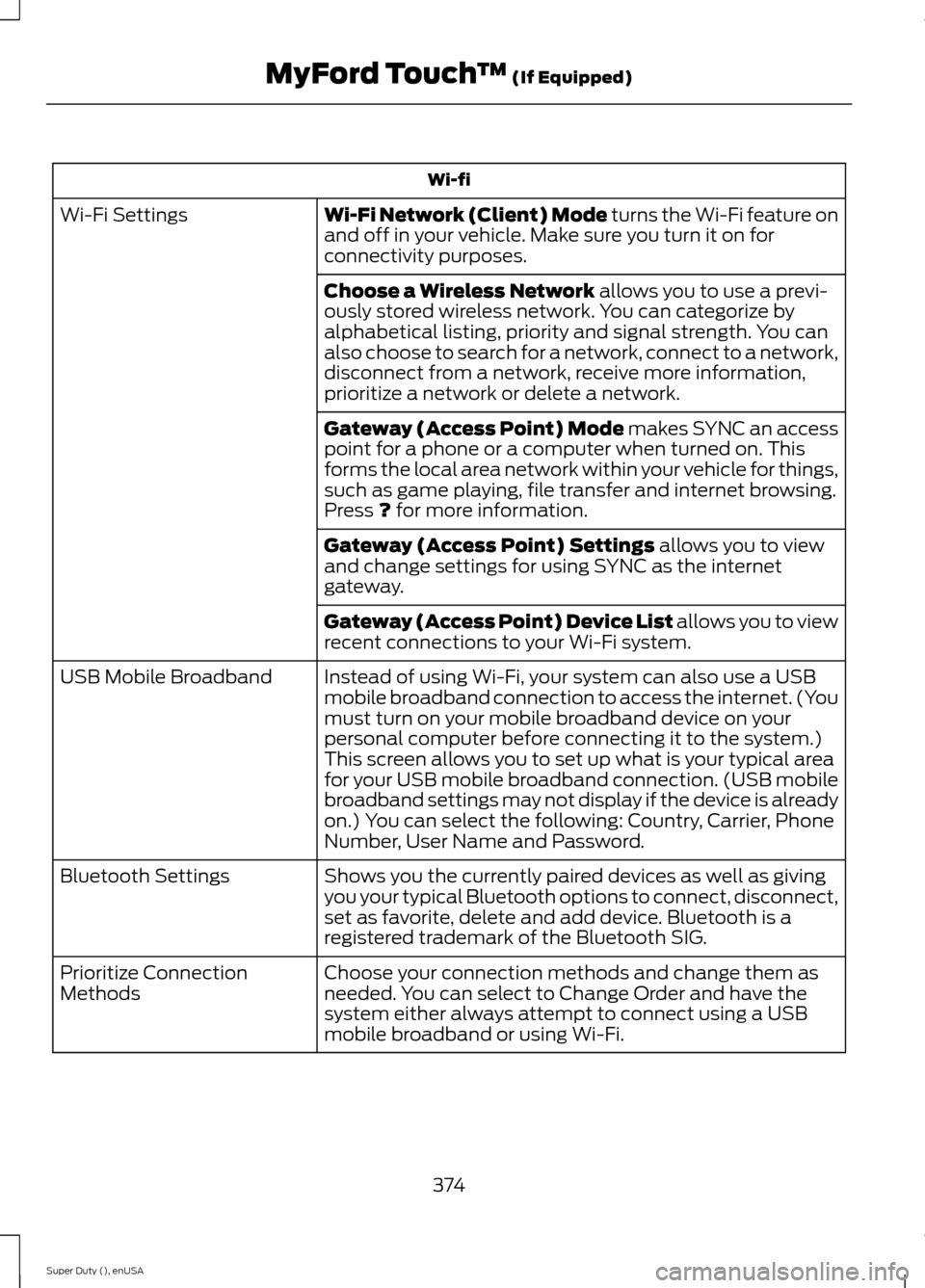
Wi-fi
Wi-Fi Network (Client) Mode turns the Wi-Fi feature onand off in your vehicle. Make sure you turn it on forconnectivity purposes.
Wi-Fi Settings
Choose a Wireless Network allows you to use a previ-ously stored wireless network. You can categorize byalphabetical listing, priority and signal strength. You canalso choose to search for a network, connect to a network,disconnect from a network, receive more information,prioritize a network or delete a network.
Gateway (Access Point) Mode makes SYNC an accesspoint for a phone or a computer when turned on. Thisforms the local area network within your vehicle for things,such as game playing, file transfer and internet browsing.Press ? for more information.
Gateway (Access Point) Settings allows you to viewand change settings for using SYNC as the internetgateway.
Gateway (Access Point) Device List allows you to viewrecent connections to your Wi-Fi system.
Instead of using Wi-Fi, your system can also use a USBmobile broadband connection to access the internet. (Youmust turn on your mobile broadband device on yourpersonal computer before connecting it to the system.)This screen allows you to set up what is your typical areafor your USB mobile broadband connection. (USB mobilebroadband settings may not display if the device is alreadyon.) You can select the following: Country, Carrier, PhoneNumber, User Name and Password.
USB Mobile Broadband
Shows you the currently paired devices as well as givingyou your typical Bluetooth options to connect, disconnect,set as favorite, delete and add device. Bluetooth is aregistered trademark of the Bluetooth SIG.
Bluetooth Settings
Choose your connection methods and change them asneeded. You can select to Change Order and have thesystem either always attempt to connect using a USBmobile broadband or using Wi-Fi.
Prioritize ConnectionMethods
374Super Duty (), enUSAMyFord Touch™ (If Equipped)
Page 381 of 470
![FORD SUPER DUTY 2015 3.G Owners Manual Sample commands
"Sirius <0-223>"*
"Sports games"*
* This command is only usable if you havean active subscription to SIRIUS satelliteradio.** The commands that have [ ] around theword means that the w](/img/11/5311/w960_5311-380.png "FORD SUPER DUTY 2015 3.G Owners Manual Sample commands
\"Sirius <0-223>\"*
\"Sports games\"*
* This command is only usable if you havean active subscription to SIRIUS satelliteradio.** The commands that have [ ] around theword means that the w")
Sample commands
"Sirius <0-223>"*
"Sports games"*
* This command is only usable if you havean active subscription to SIRIUS satelliteradio.** The commands that have [ ] around theword means that the word is optional. Forexample, if you say, "Play Metallica", thisis the same as the voice command, "Play[artist]
AM/FM Radio
Touch the AM or FM tab to listento the radio.
To change between AM and FM presets,just touch the AM or FM tab.
Memory Presets
Save a station by pressing and holding oneof the memory preset areas. There is a briefmute while the radio saves the station.Sound returns when finished.
HD Radio
Touch this button to turn HD Radio on. Thelight on the button illuminates when thefeature is on. HD Radio allows you toreceive radio broadcasts digitally, whereavailable, providing free, crystal-clearsound. See HD Radio information later inthis chapter.
Scan
Touch this button to go to the next strongAM or FM radio station. The light on thebutton illuminates when the feature is on.
Options
Sound Settings
Touch this button to adjust settings for:
•Bass
•Midrange
•Treble
•Balance and Fade
•DSP (Digital Signal processing)
•Occupancy Mode
•Speed Compensated Volume.
Note:Your vehicle may not have all thesesound settings.
Set PTY for Seek/Scan
This allows you to select a category ofmusic you would like to search for. You canthen choose to either seek or scan for thestations playing that category.
RDS Text Display
This allows you to view the informationbroadcast by FM stations.
AST
AST (Autostore) allows you to have thesystem automatically store the sixstrongest stations in your current location.
TAG Button
This feature is available when HD Radio ison, and allows you to tag a song todownload later. When you select On,TAGappears on-screen when HD Radio isactive. You can touch TAG to save theinformation of the song that is playing.When you plug in your portable musicplayer, the information transfers, ifsupported by your device. When you areconnected to iTunes, the tags appear toremind you of the songs you would like todownload. See HD Radio information laterin this chapter.
378Super Duty (), enUSAMyFord Touch™ (If Equipped)E142611
Page 388 of 470
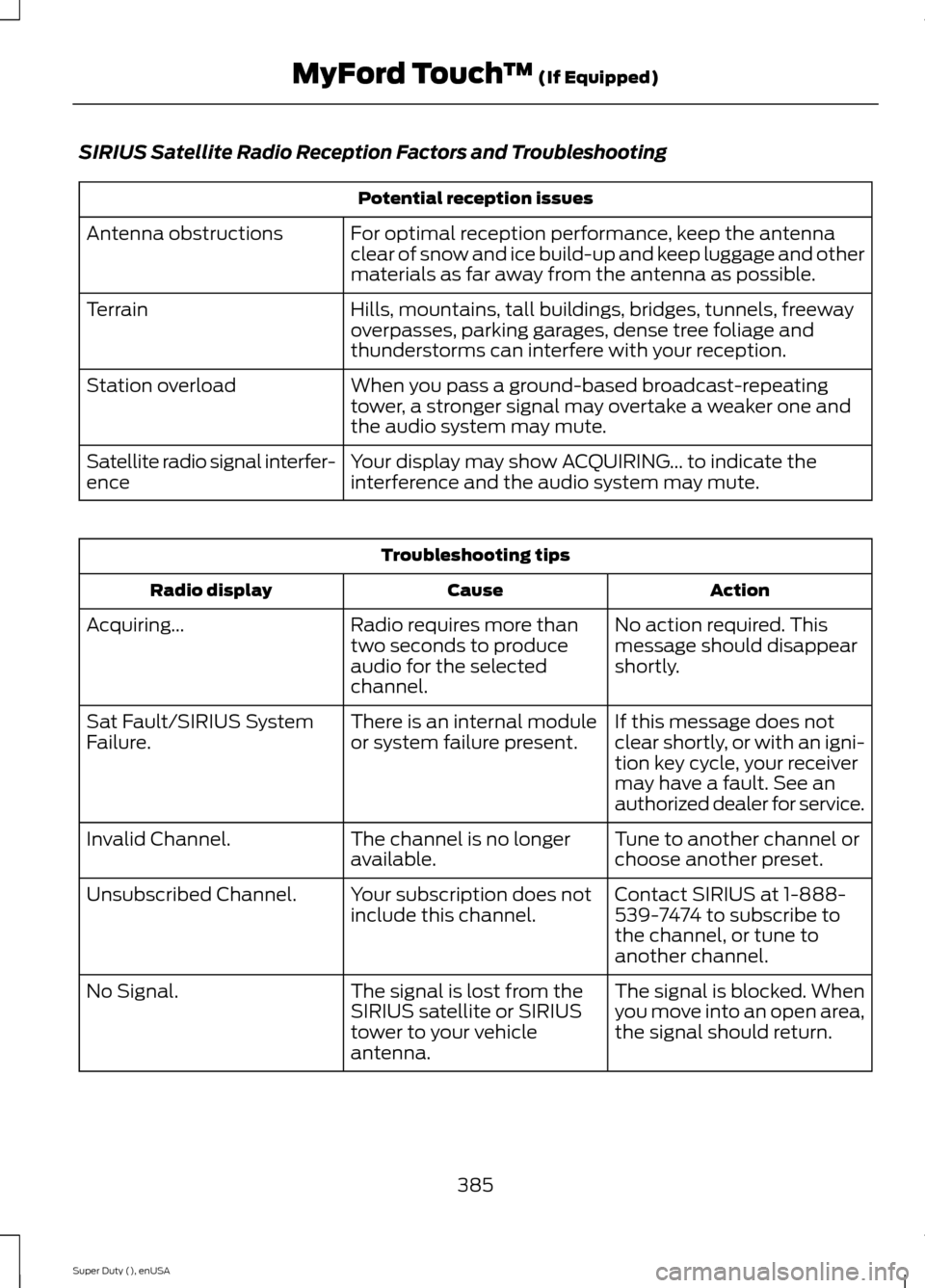
SIRIUS Satellite Radio Reception Factors and Troubleshooting
Potential reception issues
For optimal reception performance, keep the antennaclear of snow and ice build-up and keep luggage and othermaterials as far away from the antenna as possible.
Antenna obstructions
Hills, mountains, tall buildings, bridges, tunnels, freewayoverpasses, parking garages, dense tree foliage andthunderstorms can interfere with your reception.
Terrain
When you pass a ground-based broadcast-repeatingtower, a stronger signal may overtake a weaker one andthe audio system may mute.
Station overload
Your display may show ACQUIRING... to indicate theinterference and the audio system may mute.Satellite radio signal interfer-ence
Troubleshooting tips
ActionCauseRadio display
No action required. Thismessage should disappearshortly.
Radio requires more thantwo seconds to produceaudio for the selectedchannel.
Acquiring...
If this message does notclear shortly, or with an igni-tion key cycle, your receivermay have a fault. See anauthorized dealer for service.
There is an internal moduleor system failure present.Sat Fault/SIRIUS SystemFailure.
Tune to another channel orchoose another preset.The channel is no longeravailable.Invalid Channel.
Contact SIRIUS at 1-888-539-7474 to subscribe tothe channel, or tune toanother channel.
Your subscription does notinclude this channel.Unsubscribed Channel.
The signal is blocked. Whenyou move into an open area,the signal should return.
The signal is lost from theSIRIUS satellite or SIRIUStower to your vehicleantenna.
No Signal.
385Super Duty (), enUSAMyFord Touch™ (If Equipped)
Page 389 of 470
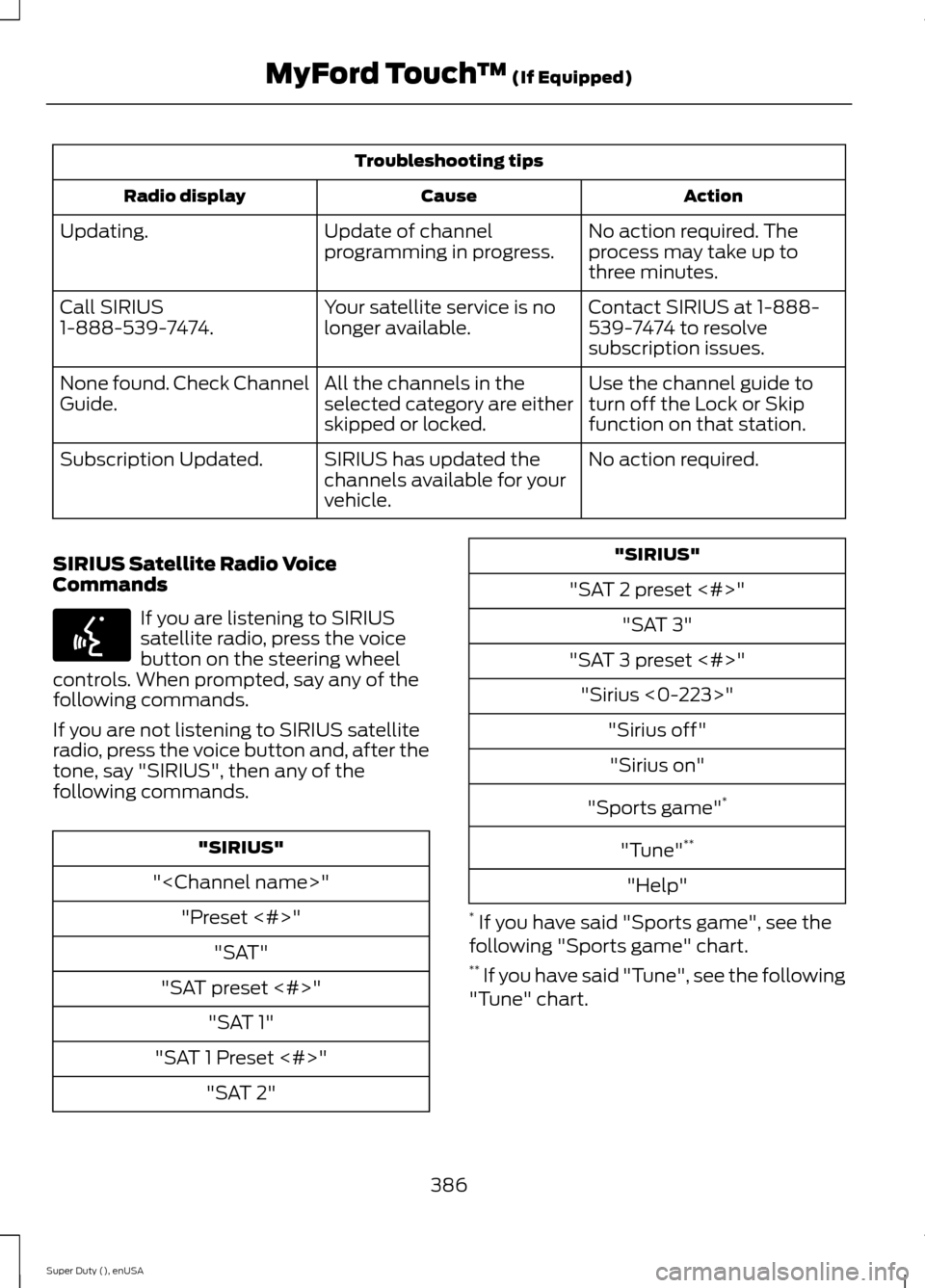
Troubleshooting tips
ActionCauseRadio display
No action required. Theprocess may take up tothree minutes.
Update of channelprogramming in progress.Updating.
Contact SIRIUS at 1-888-539-7474 to resolvesubscription issues.
Your satellite service is nolonger available.Call SIRIUS1-888-539-7474.
Use the channel guide toturn off the Lock or Skipfunction on that station.
All the channels in theselected category are eitherskipped or locked.
None found. Check ChannelGuide.
No action required.SIRIUS has updated thechannels available for yourvehicle.
Subscription Updated.
SIRIUS Satellite Radio VoiceCommands
If you are listening to SIRIUSsatellite radio, press the voicebutton on the steering wheelcontrols. When prompted, say any of thefollowing commands.
If you are not listening to SIRIUS satelliteradio, press the voice button and, after thetone, say "SIRIUS", then any of thefollowing commands.
"SIRIUS"
"
"Preset <#>"
"SAT"
"SAT preset <#>"
"SAT 1"
"SAT 1 Preset <#>"
"SAT 2"
"SIRIUS"
"SAT 2 preset <#>"
"SAT 3"
"SAT 3 preset <#>"
"Sirius <0-223>"
"Sirius off"
"Sirius on"
"Sports game"*
"Tune"**
"Help"
* If you have said "Sports game", see thefollowing "Sports game" chart.** If you have said "Tune", see the following"Tune" chart.
386Super Duty (), enUSAMyFord Touch™ (If Equipped)E142599