climate settings FORD SUPER DUTY 2015 3.G User Guide
[x] Cancel search | Manufacturer: FORD, Model Year: 2015, Model line: SUPER DUTY, Model: FORD SUPER DUTY 2015 3.GPages: 470, PDF Size: 18.24 MB
Page 372 of 470
Settings
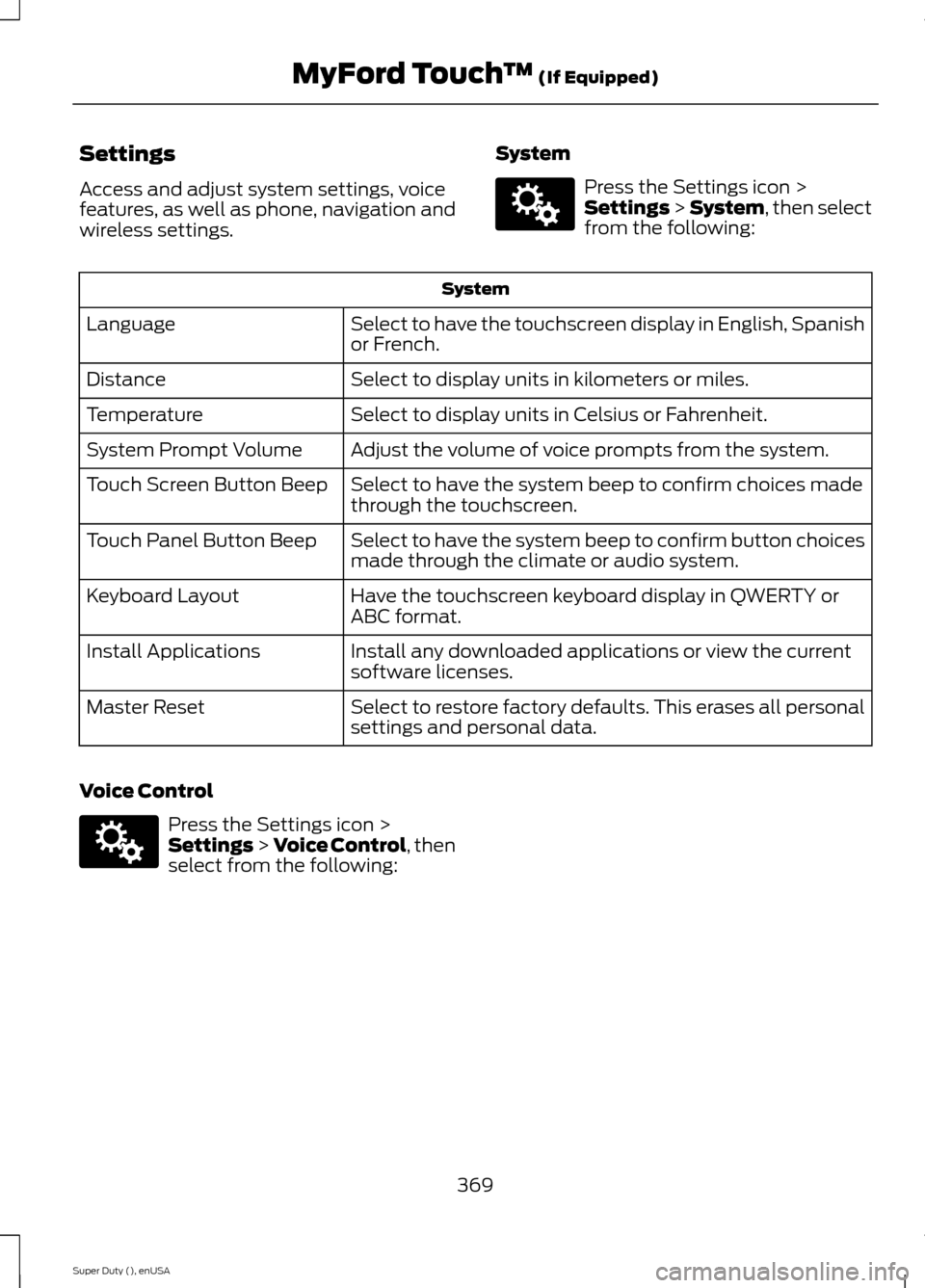
Access and adjust system settings, voicefeatures, as well as phone, navigation andwireless settings.
System
Press the Settings icon >Settings > System, then selectfrom the following:
System
Select to have the touchscreen display in English, Spanishor French.Language
Select to display units in kilometers or miles.Distance
Select to display units in Celsius or Fahrenheit.Temperature
Adjust the volume of voice prompts from the system.System Prompt Volume
Select to have the system beep to confirm choices madethrough the touchscreen.Touch Screen Button Beep
Select to have the system beep to confirm button choicesmade through the climate or audio system.Touch Panel Button Beep
Have the touchscreen keyboard display in QWERTY orABC format.Keyboard Layout
Install any downloaded applications or view the currentsoftware licenses.Install Applications
Select to restore factory defaults. This erases all personalsettings and personal data.Master Reset
Voice Control
Press the Settings icon >Settings > Voice Control, thenselect from the following:
369Super Duty (), enUSAMyFord Touch™ (If Equipped)E142607 E142607
Page 411 of 470
To run a report by voicecommand, press the voicebutton on the steering wheeland, when prompted, say "Vehicle healthreport".
Vehicle Health Report Privacy Notice
When you create a Vehicle Health Report,Ford Motor Company may collect yourcellular phone number (to process yourreport request) and diagnostic informationabout your vehicle. Certain versions orupdates to Vehicle Health Report may alsocollect more vehicle information. Ford mayuse your vehicle information it collects forany purpose. If you do not want to discloseyour cellular phone number or vehicle
information, do not run the feature or setup your Vehicle Health Report profile atwww.SYNCMyRide.com. Seewww.SYNCMyRide.com (Vehicle HealthReport Terms and Conditions, and PrivacyStatement) for more information.
CLIMATE
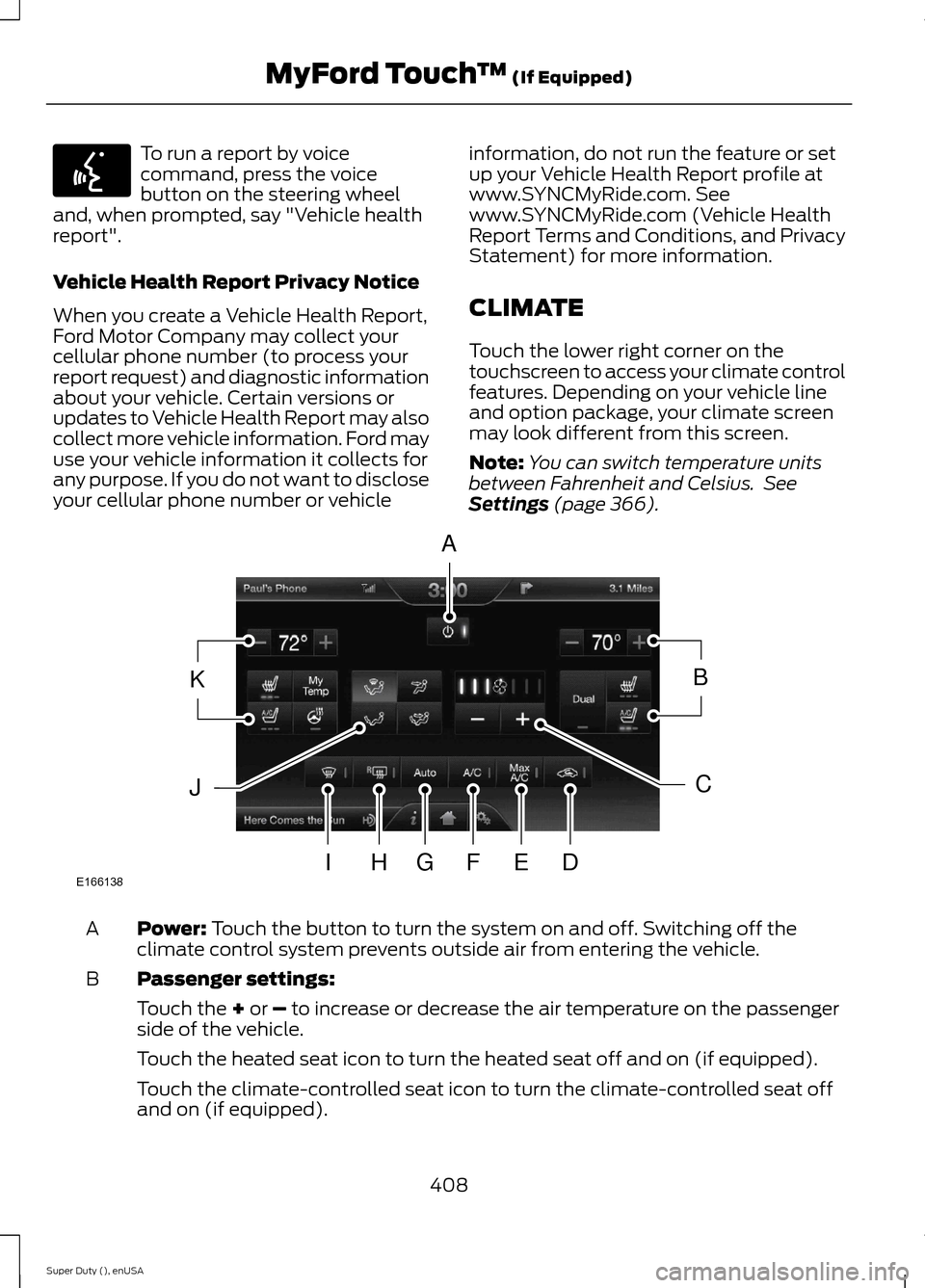
Touch the lower right corner on thetouchscreen to access your climate controlfeatures. Depending on your vehicle lineand option package, your climate screenmay look different from this screen.
Note:You can switch temperature unitsbetween Fahrenheit and Celsius. SeeSettings (page 366).
Power: Touch the button to turn the system on and off. Switching off theclimate control system prevents outside air from entering the vehicle.A
Passenger settings:B
Touch the + or – to increase or decrease the air temperature on the passengerside of the vehicle.
Touch the heated seat icon to turn the heated seat off and on (if equipped).
Touch the climate-controlled seat icon to turn the climate-controlled seat offand on (if equipped).
408Super Duty (), enUSAMyFord Touch™ (If Equipped)E142599 E166138AKBJCIHGFED
Page 461 of 470
Center Console...............................................131Removable Front Cupholders.........................131Changing a Bulb..........................................250Lamp Assembly Condensation....................250Replacing Brake/Tail/Turn/Reverse LampBulbs...................................................................251Replacing Cargo Lamp and High-mountBrake Lamp Bulbs.........................................251Replacing Fog Lamp Bulbs (IfEquipped...........................................................251Replacing Front Clearance andIdentification Lamp Bulbs (IfEquipped).......................................................250Replacing the License Plate LampBulb....................................................................252Changing a Fuse............................................231Fuses........................................................................231Changing a Road Wheel...........................288Dissimilar Spare Wheel and Tire AssemblyInformation.....................................................288Location of the Spare Tire and Tools.........289Removing the Spare Tire (With Spare TireCarrier Only)...................................................290Tire Change Procedure.....................................291Changing the 12V Battery.........................244Battery Management System (IfEquipped)........................................................245Changing the Engine Air Filter................254Changing the Wiper Blades.....................246Checking MyKey System Status...............52Checking the Wiper Blades.....................246Child Restraint and Safety BeltMaintenance.................................................35Child Safety.......................................................15General Information.............................................15Child Safety Locks..........................................27Child Seat Positioning..................................26Cleaning Leather Seats.............................259WITHOUT THE KING RANCHEDITION............................................................259WITH THE KING RANCH EDITION.............260Cleaning Products.......................................256Cleaning the Alloy Wheels........................261Cleaning the Engine....................................257
Cleaning the Exterior..................................256Cleaning Plastic Exterior Parts......................257Exterior Chrome.................................................256Stripes or Graphics (if equipped)................256Underbody............................................................257Cleaning the Instrument Panel andInstrument Cluster Lens........................258Cleaning the Interior...................................258Cleaning the Windows and WiperBlades...........................................................258Clearing All MyKeys.......................................52Climate...........................................................408Climate Control Voice Commands..............410Climate Control.............................................103Climate Controlled Seats...........................118Cooled Seats.........................................................118Heated Seats.........................................................118Coolant CheckSee: Engine Coolant Check............................236Crash Sensors and Airbag Indicator.......44Creating a MyKey...........................................50Programming/Changing ConfigurableSettings................................................................51Cruise Control...................................................61Principle of Operation.......................................176Cruise controlSee: Using Cruise Control................................176Customer Assistance...................................217
D
Data Recording..................................................9Event Data Recording..........................................10Service Data Recording........................................9Daytime Running Lamps............................66Digital Radio...................................................316HD Radio Reception and StationTroubleshooting..............................................317Direction Indicators........................................67Lane Change..........................................................67Driver and Passenger Airbags....................37Children and Airbags...........................................42Passenger Airbag On and Off Switch ..........37Proper Driver and Front Passenger SeatingAdjustment.........................................................41Driving Aids......................................................177Driving Hints..................................................208Driving Through Water..............................209
458Super Duty (), enUSAIndex
Page 463 of 470
Fuel and Refueling.......................................136Fuel Consumption.......................................140Calculating Fuel Economy..............................140Filling the Tank....................................................140Fuel Filter........................................................244Fuel Quality.....................................................137Choosing the Right Fuel...................................137Choosing the Right Fuel With a Flex FuelVehicle (If Equipped)....................................137Diesel Engine........................................................137Octane Recommendations.............................137Fuel Shutoff....................................................213Fuses.................................................................223Fuse Specification Chart...........................223Passenger Compartment FusePanel..................................................................228Power Distribution Box....................................223
G
Garage Door OpenerSee: Universal Garage Door Opener.............121Gauges................................................................75Engine Coolant Temperature Gauge.............76Engine Oil Pressure Gauge................................76Fuel Gauge..............................................................76Information Display..............................................77Transmission Fluid TemperatureGauge...................................................................76General Information on RadioFrequencies...................................................46General Maintenance Information.......440Multi-point Inspection.....................................442Owner Checks and Services...........................441Protecting Your Investment..........................440Why Maintain Your Vehicle?.........................440Why Maintain Your Vehicle at YourDealership?....................................................440Getting Assistance Outside the U.S. andCanada.........................................................220Getting the Services You Need................217Away From Home...............................................217Global Opening...............................................70Opening the Windows........................................70
H
HandbrakeSee: Parking Brake.............................................163Hazard Warning Flashers...........................213HDCSee: Using Hill Descent Control....................170Head Restraints.............................................110Adjusting the Head Restraint...........................111Heated Seats..................................................116Rear Heated Seats ..............................................117Heated Steering Wheel................................62Heated Windows and Mirrors..................108Heated Exterior Mirror......................................108Heated Rear Window.......................................108HeatingSee: Climate Control.........................................103Hill Start Assist..............................................163Using Hill Start Assist.......................................163Hints on Controlling the InteriorClimate..........................................................106Cooling the Interior Quickly.............................107General Hints.......................................................106Heating the Interior Quickly............................106Recommended Settings for Cooling ..........107Recommended Settings for Heating..........107Side Window Defogging in ColdWeather............................................................108Hints on Driving With Anti-LockBrakes............................................................162Hood LockSee: Opening and Closing the Hood...........232
I
Ignition Switch...............................................132In California (U.S. Only).............................218Information Display Control........................61Type 1.........................................................................61Type 2.......................................................................62Information Displays......................................81General Information.............................................81
460Super Duty (), enUSAIndex