remote start FORD SUPER DUTY 2015 3.G User Guide
[x] Cancel search | Manufacturer: FORD, Model Year: 2015, Model line: SUPER DUTY, Model: FORD SUPER DUTY 2015 3.GPages: 470, PDF Size: 18.24 MB
Page 87 of 470
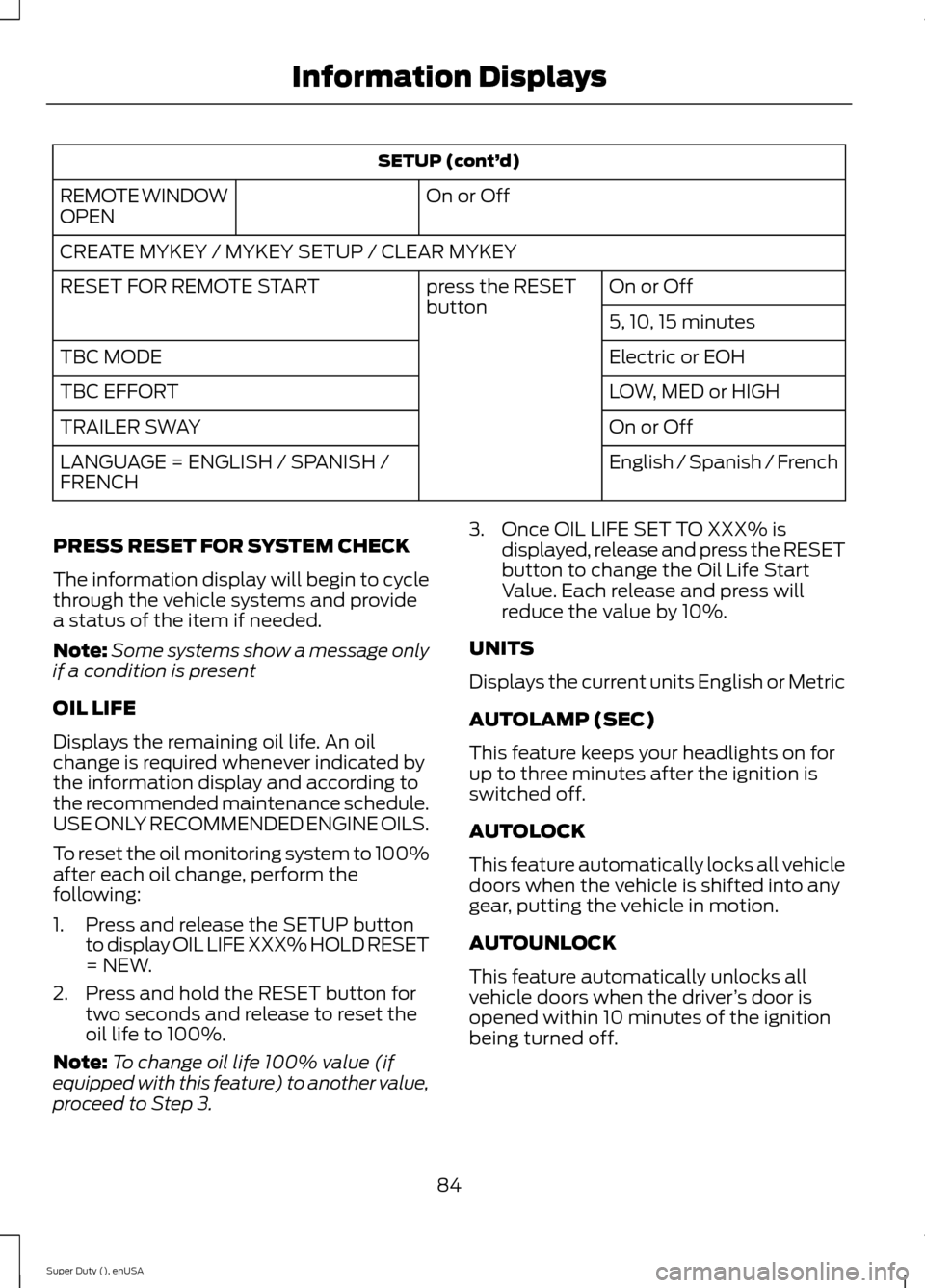
SETUP (cont’d)
On or OffREMOTE WINDOWOPEN
CREATE MYKEY / MYKEY SETUP / CLEAR MYKEY
On or Offpress the RESETbuttonRESET FOR REMOTE START
5, 10, 15 minutes
Electric or EOHTBC MODE
LOW, MED or HIGHTBC EFFORT
On or OffTRAILER SWAY
English / Spanish / FrenchLANGUAGE = ENGLISH / SPANISH /FRENCH
PRESS RESET FOR SYSTEM CHECK
The information display will begin to cyclethrough the vehicle systems and providea status of the item if needed.
Note:Some systems show a message onlyif a condition is present
OIL LIFE
Displays the remaining oil life. An oilchange is required whenever indicated bythe information display and according tothe recommended maintenance schedule.USE ONLY RECOMMENDED ENGINE OILS.
To reset the oil monitoring system to 100%after each oil change, perform thefollowing:
1.Press and release the SETUP buttonto display OIL LIFE XXX% HOLD RESET= NEW.
2.Press and hold the RESET button fortwo seconds and release to reset theoil life to 100%.
Note:To change oil life 100% value (ifequipped with this feature) to another value,proceed to Step 3.
3.Once OIL LIFE SET TO XXX% isdisplayed, release and press the RESETbutton to change the Oil Life StartValue. Each release and press willreduce the value by 10%.
UNITS
Displays the current units English or Metric
AUTOLAMP (SEC)
This feature keeps your headlights on forup to three minutes after the ignition isswitched off.
AUTOLOCK
This feature automatically locks all vehicledoors when the vehicle is shifted into anygear, putting the vehicle in motion.
AUTOUNLOCK
This feature automatically unlocks allvehicle doors when the driver’s door isopened within 10 minutes of the ignitionbeing turned off.
84Super Duty (), enUSAInformation Displays
Page 88 of 470
COURTESY WIPE
This feature allows for an extra swipe ofthe wipers after a wipe/wash cycle.
CREATE MYKEY / MYKEY SETUP /CLEAR MYKEY
For more information, See Creating aMyKey (page 50).
RESET FOR REMOTE START (ifequipped)
REAR PARK AID
This feature sounds a warning tone to warnthe driver of obstacles near the rearbumper, and functions only when R(Reverse) gear is selected.
TBC MODE (if equipped)
Allows you to choose the trailer brakemode.
TBC EFFORT (if equipped)
Allows you to choose the level of initialbraking.
TRAILER SWAY (if equipped)
This feature uses the electronic stabilitycontrol to mitigate trailer sway.
LANGUAGE = ENGLISH / SPANISH /FRENCH
Allows you to choose which language themessage center will display in.
Waiting four seconds or pressing theRESET button cycles the message centerthrough each of the language choices.
Press the RESET button to set thelanguage choice.
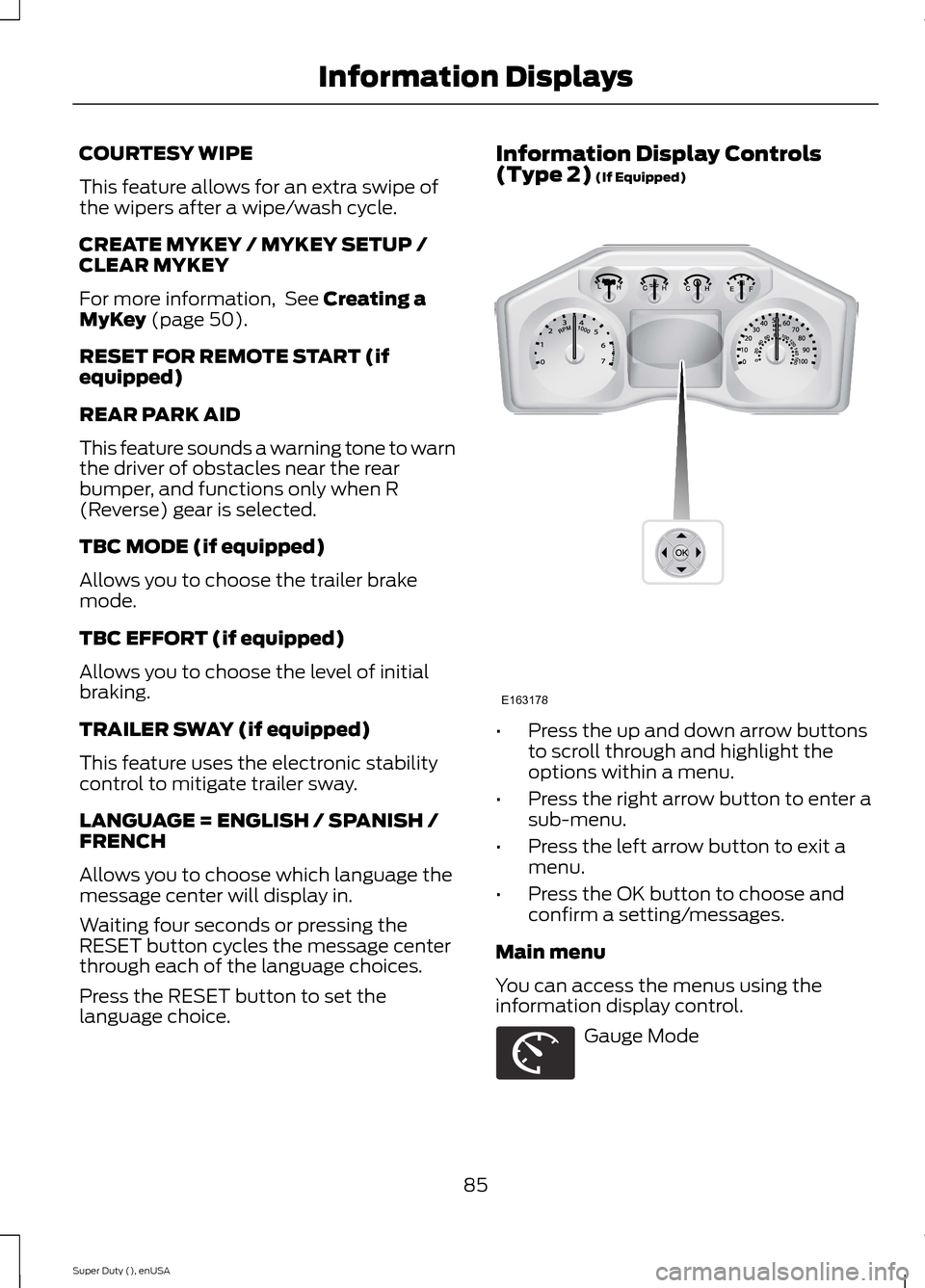
Information Display Controls(Type 2) (If Equipped)
•Press the up and down arrow buttonsto scroll through and highlight theoptions within a menu.
•Press the right arrow button to enter asub-menu.
•Press the left arrow button to exit amenu.
•Press the OK button to choose andconfirm a setting/messages.
Main menu
You can access the menus using theinformation display control.
Gauge Mode
85Super Duty (), enUSAInformation DisplaysE163178 E163179
Page 93 of 470
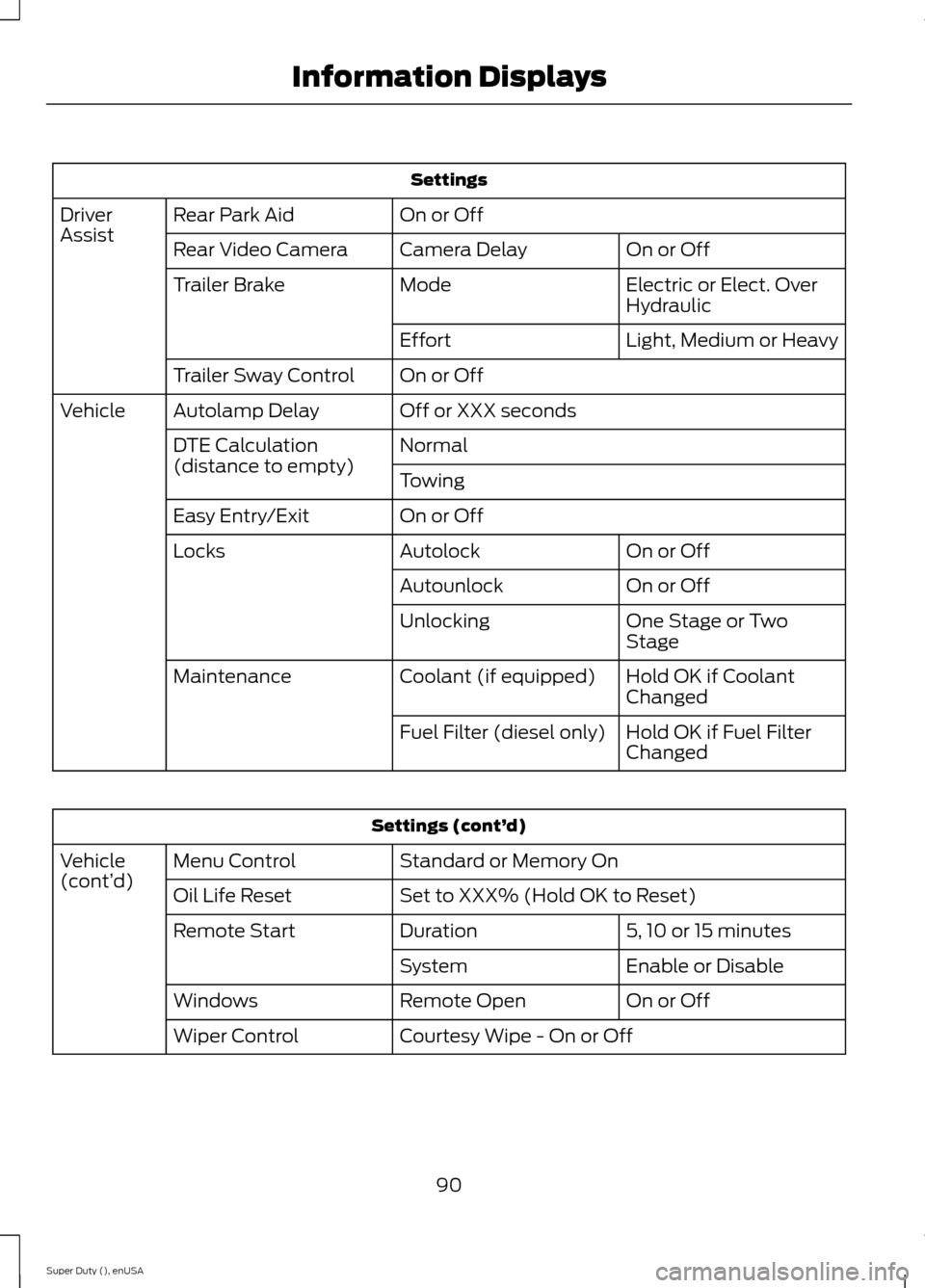
Settings
On or OffRear Park AidDriverAssistOn or OffCamera DelayRear Video Camera
Electric or Elect. OverHydraulicModeTrailer Brake
Light, Medium or HeavyEffort
On or OffTrailer Sway Control
Off or XXX secondsAutolamp DelayVehicle
NormalDTE Calculation(distance to empty)Towing
On or OffEasy Entry/Exit
On or OffAutolockLocks
On or OffAutounlock
One Stage or TwoStageUnlocking
Hold OK if CoolantChangedCoolant (if equipped)Maintenance
Hold OK if Fuel FilterChangedFuel Filter (diesel only)
Settings (cont’d)
Standard or Memory OnMenu ControlVehicle(cont’d)Set to XXX% (Hold OK to Reset)Oil Life Reset
5, 10 or 15 minutesDurationRemote Start
Enable or DisableSystem
On or OffRemote OpenWindows
Courtesy Wipe - On or OffWiper Control
90Super Duty (), enUSAInformation Displays
Page 101 of 470
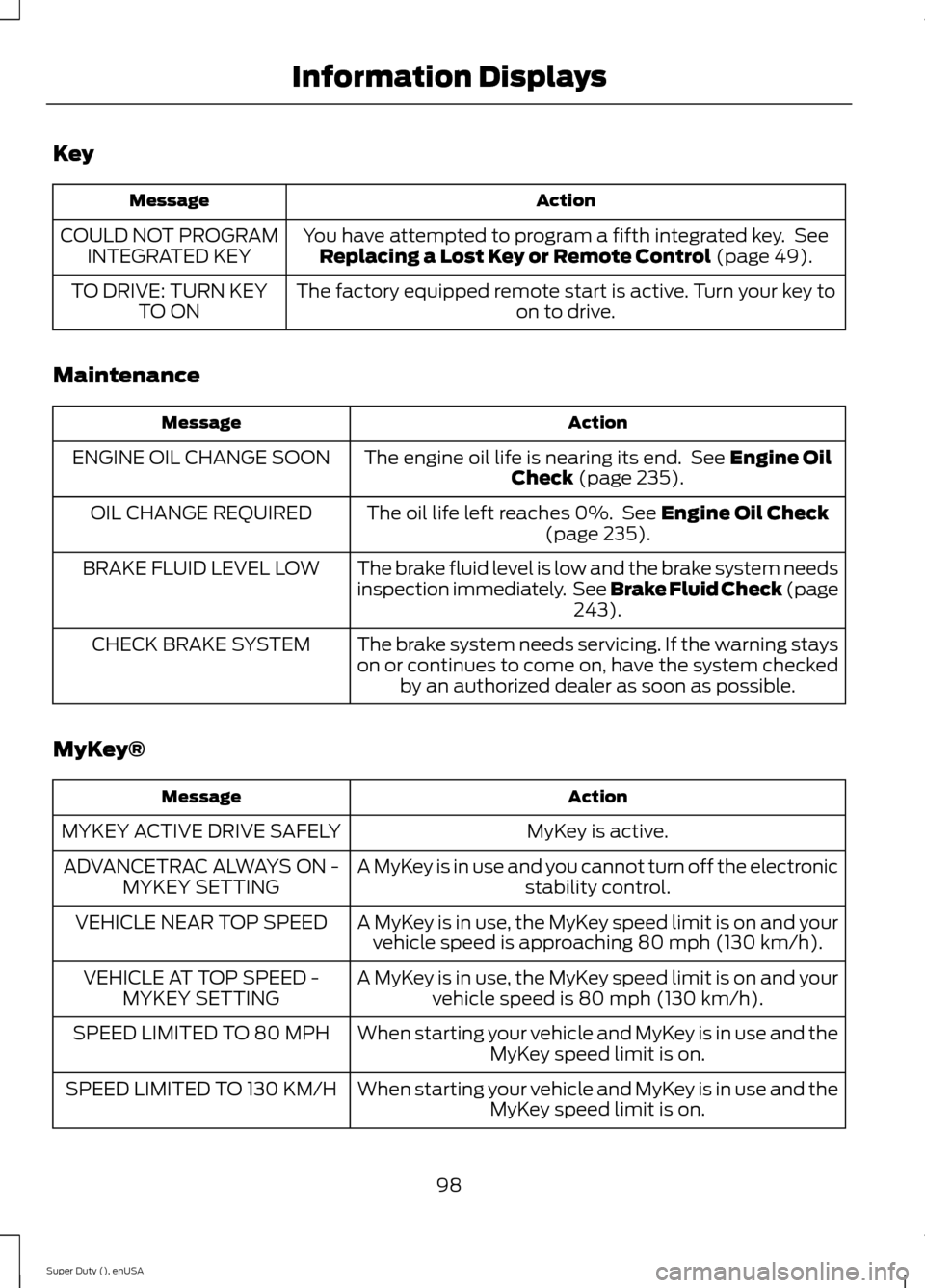
Key
ActionMessage
You have attempted to program a fifth integrated key. SeeReplacing a Lost Key or Remote Control (page 49).COULD NOT PROGRAMINTEGRATED KEY
The factory equipped remote start is active. Turn your key toon to drive.TO DRIVE: TURN KEYTO ON
Maintenance
ActionMessage
The engine oil life is nearing its end. See Engine OilCheck (page 235).ENGINE OIL CHANGE SOON
The oil life left reaches 0%. See Engine Oil Check(page 235).OIL CHANGE REQUIRED
The brake fluid level is low and the brake system needsinspection immediately. See Brake Fluid Check (page243).
BRAKE FLUID LEVEL LOW
The brake system needs servicing. If the warning stayson or continues to come on, have the system checkedby an authorized dealer as soon as possible.
CHECK BRAKE SYSTEM
MyKey®
ActionMessage
MyKey is active.MYKEY ACTIVE DRIVE SAFELY
A MyKey is in use and you cannot turn off the electronicstability control.ADVANCETRAC ALWAYS ON -MYKEY SETTING
A MyKey is in use, the MyKey speed limit is on and yourvehicle speed is approaching 80 mph (130 km/h).VEHICLE NEAR TOP SPEED
A MyKey is in use, the MyKey speed limit is on and yourvehicle speed is 80 mph (130 km/h).VEHICLE AT TOP SPEED -MYKEY SETTING
When starting your vehicle and MyKey is in use and theMyKey speed limit is on.SPEED LIMITED TO 80 MPH
When starting your vehicle and MyKey is in use and theMyKey speed limit is on.SPEED LIMITED TO 130 KM/H
98Super Duty (), enUSAInformation Displays
Page 112 of 470
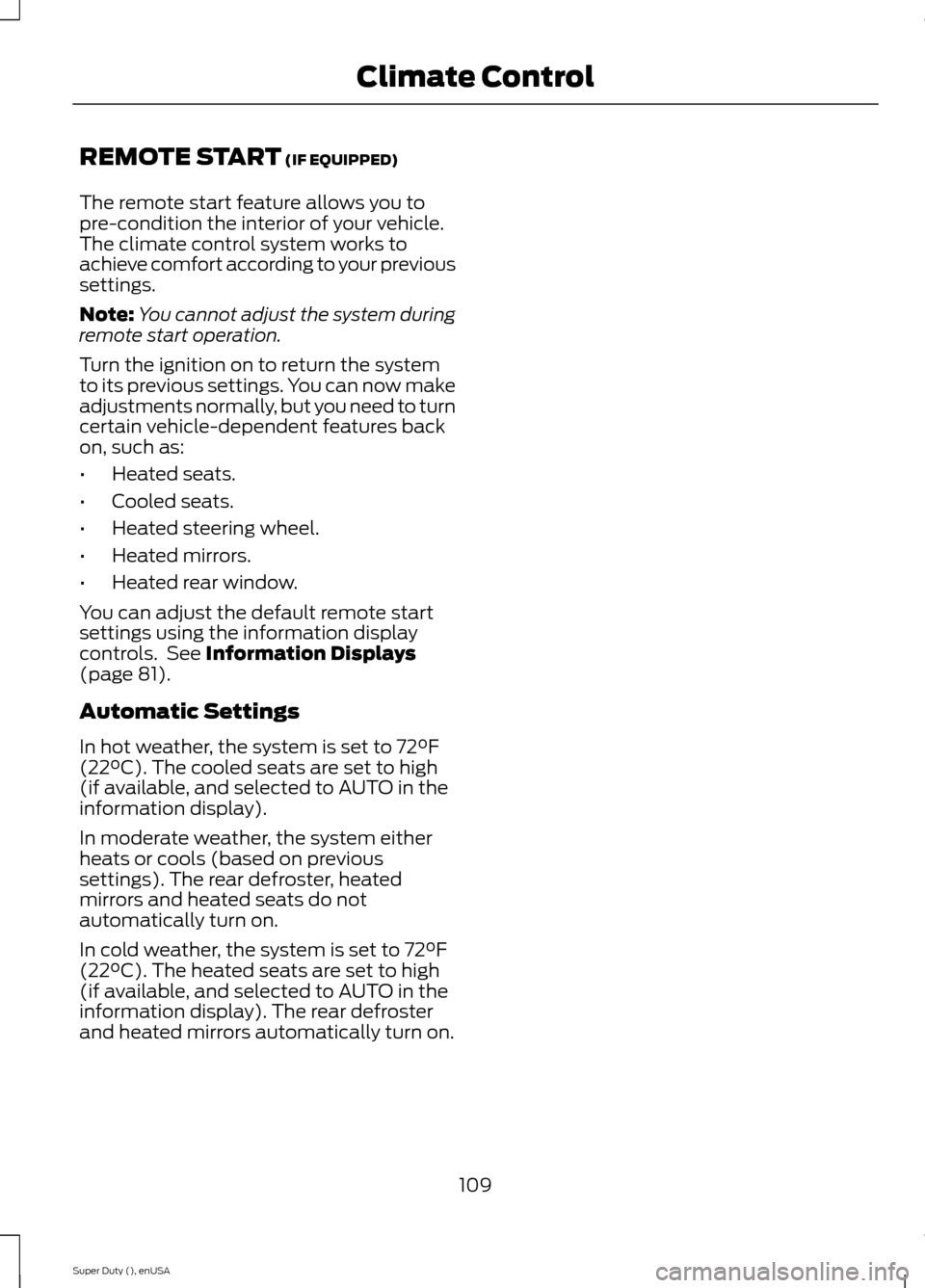
REMOTE START (IF EQUIPPED)
The remote start feature allows you topre-condition the interior of your vehicle.The climate control system works toachieve comfort according to your previoussettings.
Note:You cannot adjust the system duringremote start operation.
Turn the ignition on to return the systemto its previous settings. You can now makeadjustments normally, but you need to turncertain vehicle-dependent features backon, such as:
•Heated seats.
•Cooled seats.
•Heated steering wheel.
•Heated mirrors.
•Heated rear window.
You can adjust the default remote startsettings using the information displaycontrols. See Information Displays(page 81).
Automatic Settings
In hot weather, the system is set to 72°F(22°C). The cooled seats are set to high(if available, and selected to AUTO in theinformation display).
In moderate weather, the system eitherheats or cools (based on previoussettings). The rear defroster, heatedmirrors and heated seats do notautomatically turn on.
In cold weather, the system is set to 72°F(22°C). The heated seats are set to high(if available, and selected to AUTO in theinformation display). The rear defrosterand heated mirrors automatically turn on.
109Super Duty (), enUSAClimate Control
Page 423 of 470
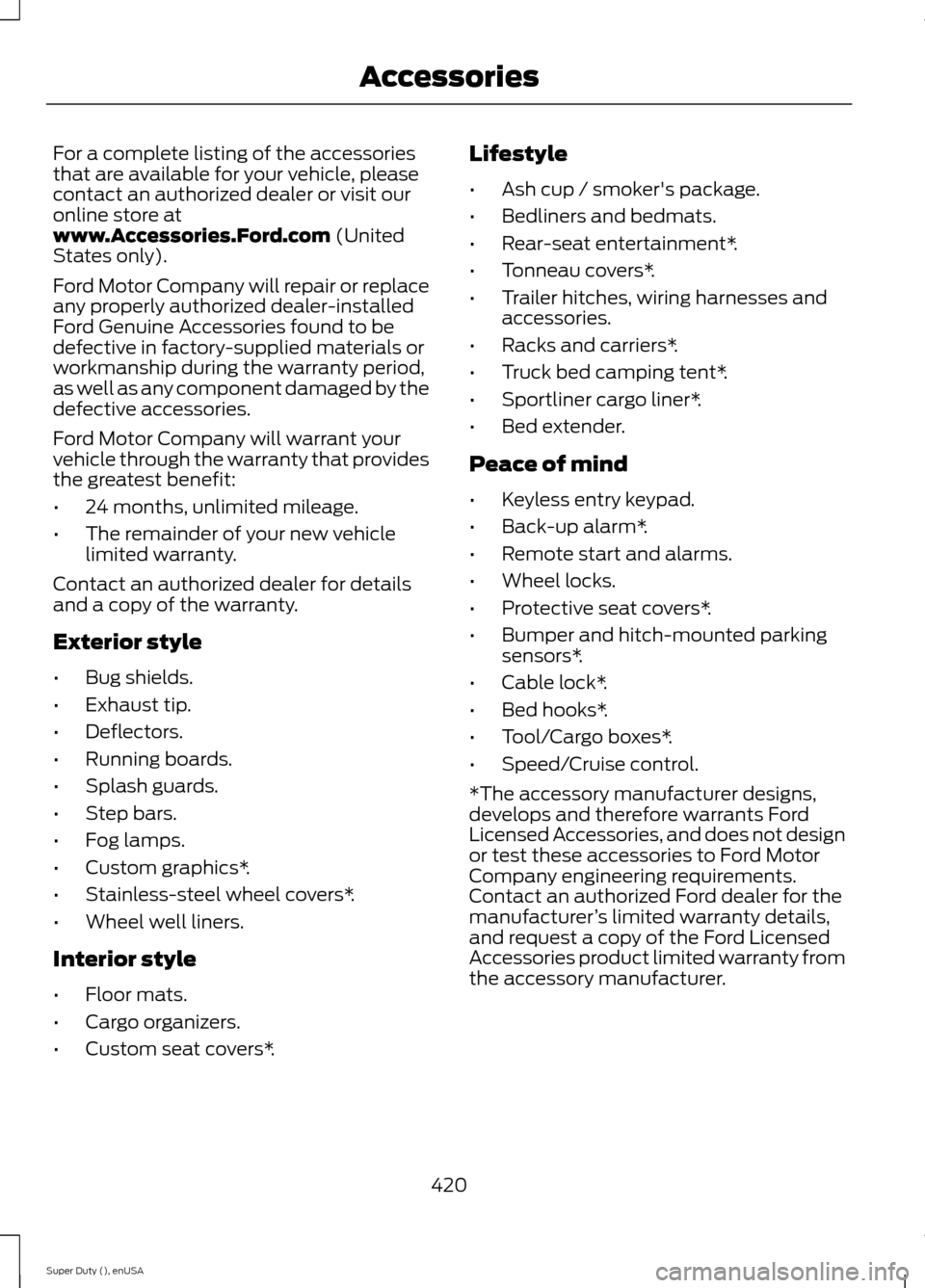
For a complete listing of the accessoriesthat are available for your vehicle, pleasecontact an authorized dealer or visit ouronline store atwww.Accessories.Ford.com (UnitedStates only).
Ford Motor Company will repair or replaceany properly authorized dealer-installedFord Genuine Accessories found to bedefective in factory-supplied materials orworkmanship during the warranty period,as well as any component damaged by thedefective accessories.
Ford Motor Company will warrant yourvehicle through the warranty that providesthe greatest benefit:
•24 months, unlimited mileage.
•The remainder of your new vehiclelimited warranty.
Contact an authorized dealer for detailsand a copy of the warranty.
Exterior style
•Bug shields.
•Exhaust tip.
•Deflectors.
•Running boards.
•Splash guards.
•Step bars.
•Fog lamps.
•Custom graphics*.
•Stainless-steel wheel covers*.
•Wheel well liners.
Interior style
•Floor mats.
•Cargo organizers.
•Custom seat covers*.
Lifestyle
•Ash cup / smoker's package.
•Bedliners and bedmats.
•Rear-seat entertainment*.
•Tonneau covers*.
•Trailer hitches, wiring harnesses andaccessories.
•Racks and carriers*.
•Truck bed camping tent*.
•Sportliner cargo liner*.
•Bed extender.
Peace of mind
•Keyless entry keypad.
•Back-up alarm*.
•Remote start and alarms.
•Wheel locks.
•Protective seat covers*.
•Bumper and hitch-mounted parkingsensors*.
•Cable lock*.
•Bed hooks*.
•Tool/Cargo boxes*.
•Speed/Cruise control.
*The accessory manufacturer designs,develops and therefore warrants FordLicensed Accessories, and does not designor test these accessories to Ford MotorCompany engineering requirements.Contact an authorized Ford dealer for themanufacturer’s limited warranty details,and request a copy of the Ford LicensedAccessories product limited warranty fromthe accessory manufacturer.
420Super Duty (), enUSAAccessories
Page 464 of 470
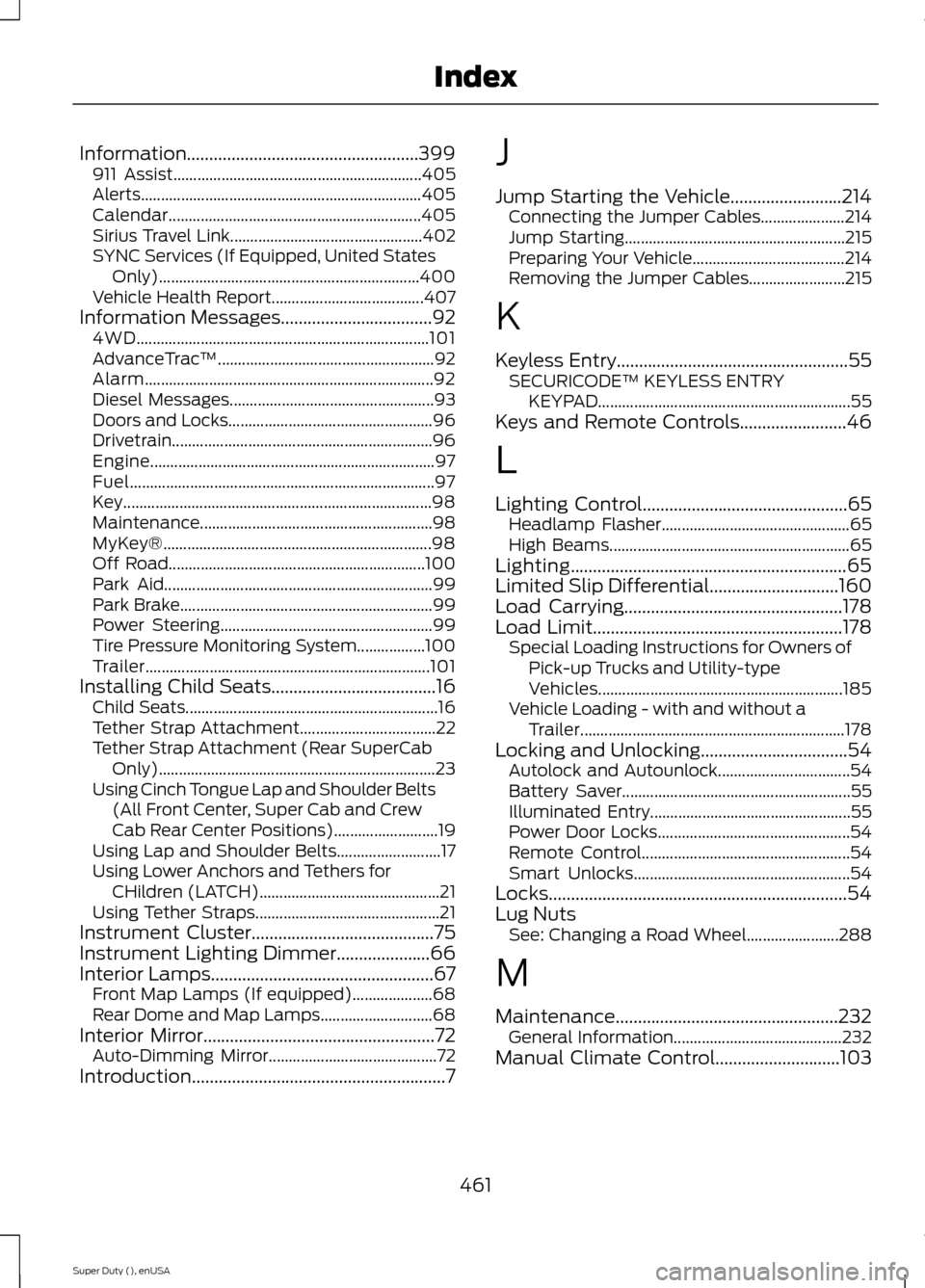
Information....................................................399911 Assist..............................................................405Alerts......................................................................405Calendar...............................................................405Sirius Travel Link................................................402SYNC Services (If Equipped, United StatesOnly).................................................................400Vehicle Health Report......................................407Information Messages..................................924WD.........................................................................101AdvanceTrac™......................................................92Alarm........................................................................92Diesel Messages...................................................93Doors and Locks...................................................96Drivetrain.................................................................96Engine.......................................................................97Fuel............................................................................97Key.............................................................................98Maintenance..........................................................98MyKey®...................................................................98Off Road................................................................100Park Aid...................................................................99Park Brake...............................................................99Power Steering.....................................................99Tire Pressure Monitoring System.................100Trailer.......................................................................101Installing Child Seats.....................................16Child Seats...............................................................16Tether Strap Attachment..................................22Tether Strap Attachment (Rear SuperCabOnly).....................................................................23Using Cinch Tongue Lap and Shoulder Belts(All Front Center, Super Cab and CrewCab Rear Center Positions)..........................19Using Lap and Shoulder Belts..........................17Using Lower Anchors and Tethers forCHildren (LATCH).............................................21Using Tether Straps..............................................21Instrument Cluster.........................................75Instrument Lighting Dimmer.....................66Interior Lamps..................................................67Front Map Lamps (If equipped)....................68Rear Dome and Map Lamps............................68Interior Mirror....................................................72Auto-Dimming Mirror..........................................72Introduction.........................................................7
J
Jump Starting the Vehicle.........................214Connecting the Jumper Cables.....................214Jump Starting.......................................................215Preparing Your Vehicle......................................214Removing the Jumper Cables........................215
K
Keyless Entry....................................................55SECURICODE™ KEYLESS ENTRYKEYPAD...............................................................55Keys and Remote Controls........................46
L
Lighting Control..............................................65Headlamp Flasher...............................................65High Beams............................................................65Lighting..............................................................65Limited Slip Differential.............................160Load Carrying.................................................178Load Limit........................................................178Special Loading Instructions for Owners ofPick-up Trucks and Utility-typeVehicles.............................................................185Vehicle Loading - with and without aTrailer..................................................................178Locking and Unlocking.................................54Autolock and Autounlock.................................54Battery Saver.........................................................55Illuminated Entry..................................................55Power Door Locks................................................54Remote Control....................................................54Smart Unlocks......................................................54Locks...................................................................54Lug NutsSee: Changing a Road Wheel.......................288
M
Maintenance..................................................232General Information..........................................232Manual Climate Control............................103
461Super Duty (), enUSAIndex
Page 466 of 470
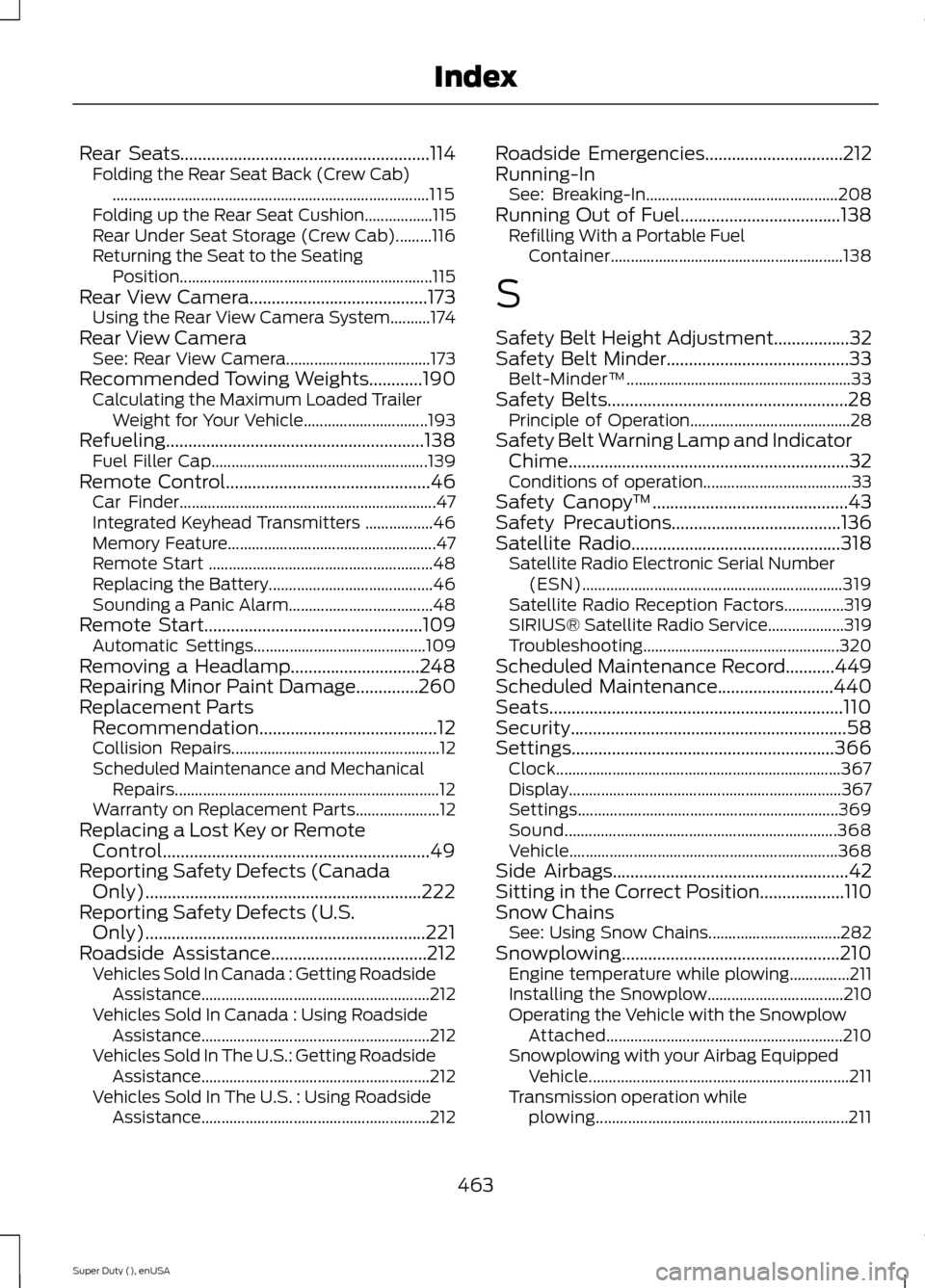
Rear Seats........................................................114Folding the Rear Seat Back (Crew Cab)...............................................................................115Folding up the Rear Seat Cushion.................115Rear Under Seat Storage (Crew Cab).........116Returning the Seat to the SeatingPosition...............................................................115Rear View Camera........................................173Using the Rear View Camera System..........174Rear View CameraSee: Rear View Camera....................................173Recommended Towing Weights............190Calculating the Maximum Loaded TrailerWeight for Your Vehicle...............................193Refueling..........................................................138Fuel Filler Cap......................................................139Remote Control..............................................46Car Finder................................................................47Integrated Keyhead Transmitters .................46Memory Feature....................................................47Remote Start ........................................................48Replacing the Battery.........................................46Sounding a Panic Alarm....................................48Remote Start.................................................109Automatic Settings...........................................109Removing a Headlamp.............................248Repairing Minor Paint Damage..............260Replacement PartsRecommendation........................................12Collision Repairs....................................................12Scheduled Maintenance and MechanicalRepairs..................................................................12Warranty on Replacement Parts.....................12Replacing a Lost Key or RemoteControl............................................................49Reporting Safety Defects (CanadaOnly)..............................................................222Reporting Safety Defects (U.S.Only)...............................................................221Roadside Assistance...................................212Vehicles Sold In Canada : Getting RoadsideAssistance.........................................................212Vehicles Sold In Canada : Using RoadsideAssistance.........................................................212Vehicles Sold In The U.S.: Getting RoadsideAssistance.........................................................212Vehicles Sold In The U.S. : Using RoadsideAssistance.........................................................212
Roadside Emergencies...............................212Running-InSee: Breaking-In................................................208Running Out of Fuel....................................138Refilling With a Portable FuelContainer..........................................................138
S
Safety Belt Height Adjustment.................32Safety Belt Minder.........................................33Belt-Minder™........................................................33Safety Belts......................................................28Principle of Operation........................................28Safety Belt Warning Lamp and IndicatorChime...............................................................32Conditions of operation.....................................33Safety Canopy™............................................43Safety Precautions......................................136Satellite Radio...............................................318Satellite Radio Electronic Serial Number(ESN).................................................................319Satellite Radio Reception Factors...............319SIRIUS® Satellite Radio Service...................319Troubleshooting.................................................320Scheduled Maintenance Record...........449Scheduled Maintenance..........................440Seats..................................................................110Security..............................................................58Settings...........................................................366Clock.......................................................................367Display....................................................................367Settings.................................................................369Sound....................................................................368Vehicle...................................................................368Side Airbags.....................................................42Sitting in the Correct Position...................110Snow ChainsSee: Using Snow Chains.................................282Snowplowing.................................................210Engine temperature while plowing...............211Installing the Snowplow..................................210Operating the Vehicle with the SnowplowAttached...........................................................210Snowplowing with your Airbag EquippedVehicle.................................................................211Transmission operation whileplowing...............................................................211
463Super Duty (), enUSAIndex
Page 468 of 470
Towing..............................................................189Traction Control............................................165Principle of Operation.......................................165Trailer Sway Control....................................190Transfer Case Fluid Check........................243Transmission Code Designation............304Transmission..................................................144TransmissionSee: Transmission..............................................144Transporting the Vehicle..........................206
U
Under Hood Overview - 6.2L...................233Under Hood Overview - 6.8L..................234Universal Garage Door Opener.................121CAR2U® Home Automation System...........121HomeLink Wireless Control System............124USB Port...........................................................321Using Cruise Control....................................176Switching Cruise Control Off..........................176Switching Cruise Control On...........................176Using Four-Wheel Drive..............................1514WD Indicator Lights.........................................152Driving Off-Road With Truck and UtilityVehicles.............................................................155Electronic Shift-On-the-Fly (ESOF) 4WDsystem.................................................................151How Your Vehicle Differs From OtherVehicles.............................................................155Manual Shift On Stop (MSOS) 4WDsystem.................................................................151Using a Manual Shift On Stop (MSOS) 4wdsystem................................................................152Using the Electronic Shift on the Fly 4WDsystem...............................................................154Using Hill Descent Control........................170Hill descent modes............................................170Using MyKey With Remote StartSystems..........................................................52Using Snow Chains.....................................282Using Stability Control................................167AdvanceTrac® with Roll Stability Control™(RSC®)..............................................................167
Using SYNC™ With Your MediaPlayer............................................................345Accessing Your Play Menu.............................349Connecting Your Digital Media Player to theUSB Port..........................................................345Media Menu Features......................................348Media Voice Commands................................346System Settings..................................................351What's Playing?.................................................346Using SYNC™ With Your Phone.............327Accessing Features through the PhoneMenu...................................................................331Accessing Your Phone Settings....................334Making Calls........................................................330Pairing a Phone for the First Time...............328Pairing Subsequent Phones..........................328Phone Options during an Active Call.........330Phone Voice Commands................................328Receiving Calls...................................................330System Settings.................................................335Text Messaging...................................................333Using Traction Control................................165System Indicator Lights andMessages..........................................................166Using Voice Recognition...........................325Initiating a Voice Session................................325System Interaction and Feedback..............326Utilizing the Mediation/ArbitrationProgram (Canada Only).........................219
V
Vehicle Care...................................................256General Information.........................................256Vehicle Certification Label.......................303Vehicle Identification Number................303Vehicle Storage.............................................261Battery...................................................................262Body.........................................................................261Brakes.....................................................................262Cooling system...................................................262Engine....................................................................262Fuel system..........................................................262General...................................................................261Miscellaneous.....................................................262Removing Vehicle From Storage.................262Tires........................................................................262
465Super Duty (), enUSAIndex