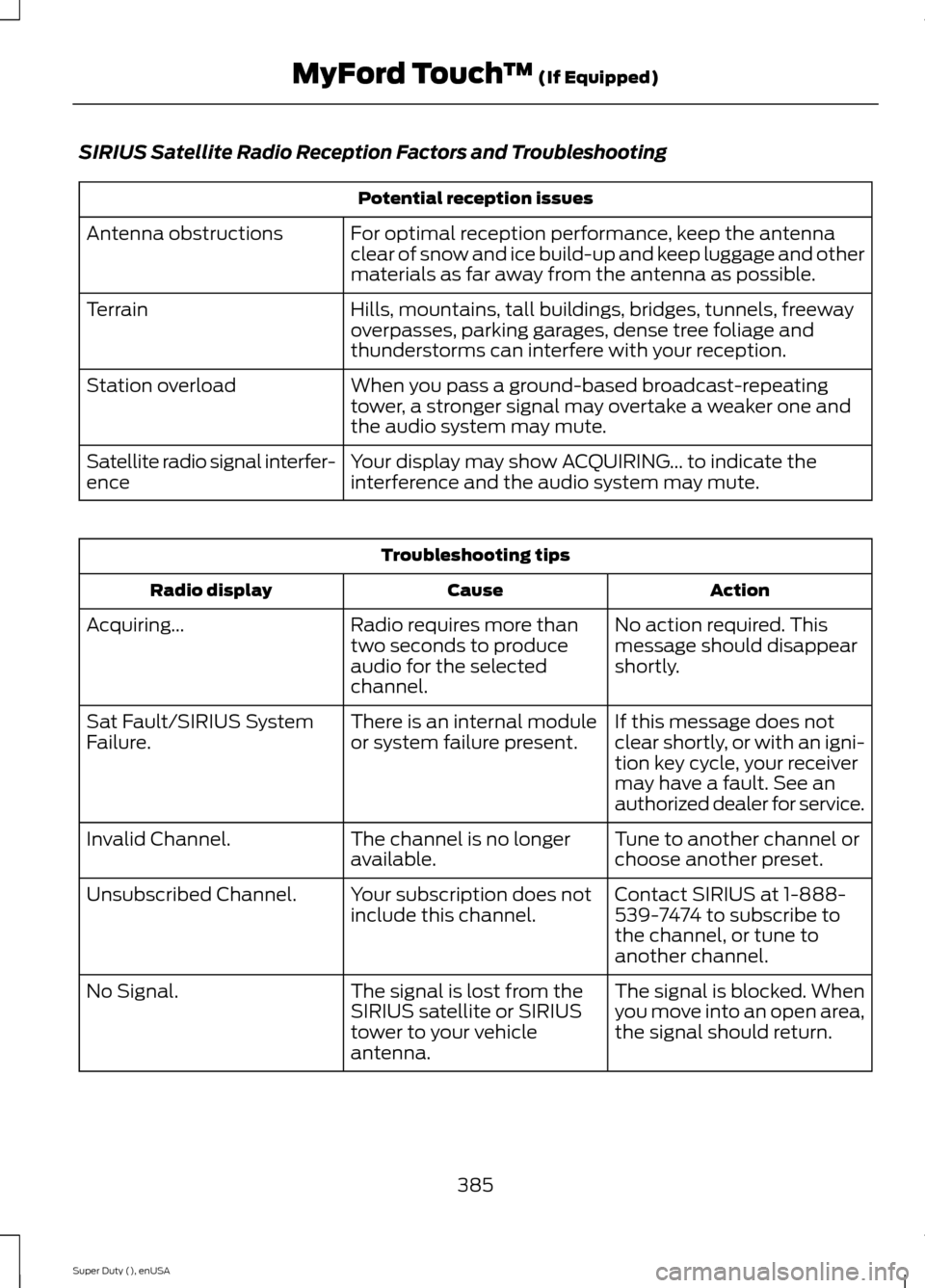
SIRIUS Satellite Radio Reception Factors and Troubleshooting
Potential reception issues
For optimal reception performance, keep the antennaclear of snow and ice build-up and keep luggage and othermaterials as far away from the antenna as possible.
Antenna obstructions
Hills, mountains, tall buildings, bridges, tunnels, freewayoverpasses, parking garages, dense tree foliage andthunderstorms can interfere with your reception.
Terrain
When you pass a ground-based broadcast-repeatingtower, a stronger signal may overtake a weaker one andthe audio system may mute.
Station overload
Your display may show ACQUIRING... to indicate theinterference and the audio system may mute.Satellite radio signal interfer-ence
Troubleshooting tips
ActionCauseRadio display
No action required. Thismessage should disappearshortly.
Radio requires more thantwo seconds to produceaudio for the selectedchannel.
Acquiring...
If this message does notclear shortly, or with an igni-tion key cycle, your receivermay have a fault. See anauthorized dealer for service.
There is an internal moduleor system failure present.Sat Fault/SIRIUS SystemFailure.
Tune to another channel orchoose another preset.The channel is no longeravailable.Invalid Channel.
Contact SIRIUS at 1-888-539-7474 to subscribe tothe channel, or tune toanother channel.
Your subscription does notinclude this channel.Unsubscribed Channel.
The signal is blocked. Whenyou move into an open area,the signal should return.
The signal is lost from theSIRIUS satellite or SIRIUStower to your vehicleantenna.
No Signal.
385Super Duty (), enUSAMyFord Touch™ (If Equipped)
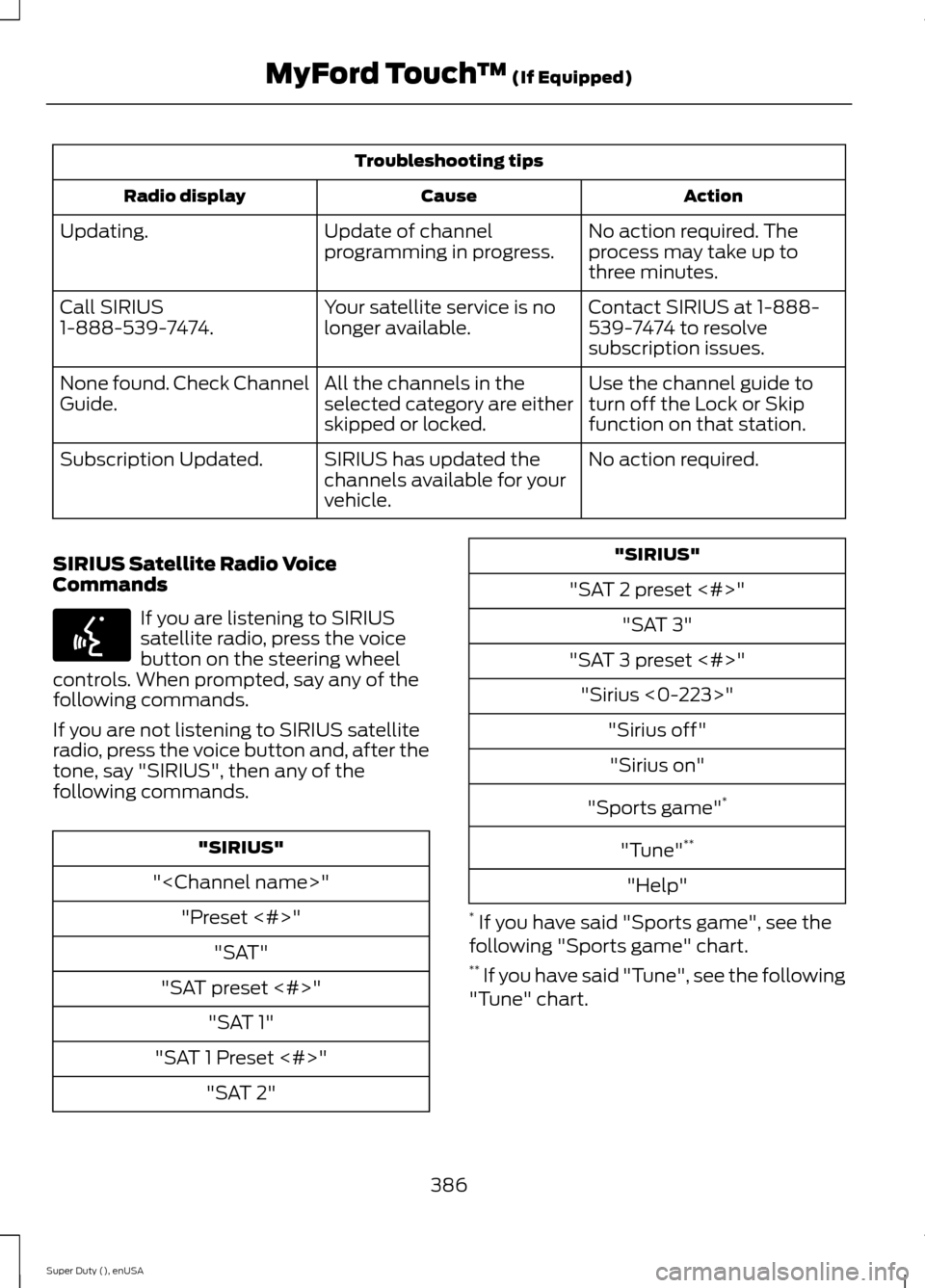
Troubleshooting tips
ActionCauseRadio display
No action required. Theprocess may take up tothree minutes.
Update of channelprogramming in progress.Updating.
Contact SIRIUS at 1-888-539-7474 to resolvesubscription issues.
Your satellite service is nolonger available.Call SIRIUS1-888-539-7474.
Use the channel guide toturn off the Lock or Skipfunction on that station.
All the channels in theselected category are eitherskipped or locked.
None found. Check ChannelGuide.
No action required.SIRIUS has updated thechannels available for yourvehicle.
Subscription Updated.
SIRIUS Satellite Radio VoiceCommands
If you are listening to SIRIUSsatellite radio, press the voicebutton on the steering wheelcontrols. When prompted, say any of thefollowing commands.
If you are not listening to SIRIUS satelliteradio, press the voice button and, after thetone, say "SIRIUS", then any of thefollowing commands.
"SIRIUS"
""
"Preset <#>"
"SAT"
"SAT preset <#>"
"SAT 1"
"SAT 1 Preset <#>"
"SAT 2"
"SIRIUS"
"SAT 2 preset <#>"
"SAT 3"
"SAT 3 preset <#>"
"Sirius <0-223>"
"Sirius off"
"Sirius on"
"Sports game"*
"Tune"**
"Help"
* If you have said "Sports game", see thefollowing "Sports game" chart.** If you have said "Tune", see the following"Tune" chart.
386Super Duty (), enUSAMyFord Touch™ (If Equipped)E142599