warning light FORD SUPER DUTY 2015 3.G Owner's Manual
[x] Cancel search | Manufacturer: FORD, Model Year: 2015, Model line: SUPER DUTY, Model: FORD SUPER DUTY 2015 3.GPages: 470, PDF Size: 18.24 MB
Page 84 of 470
GENERAL INFORMATION
WARNING
Driving while distracted can result inloss of vehicle control, crash andinjury. We strongly recommend thatyou use extreme caution when using anydevice that may take your focus off theroad. Your primary responsibility is the safeoperation of your vehicle. We recommendagainst the use of any hand-held devicewhile driving and encourage the use ofvoice-operated systems when possible.Make sure you are aware of all applicablelocal laws that may affect the use ofelectronic devices while driving.
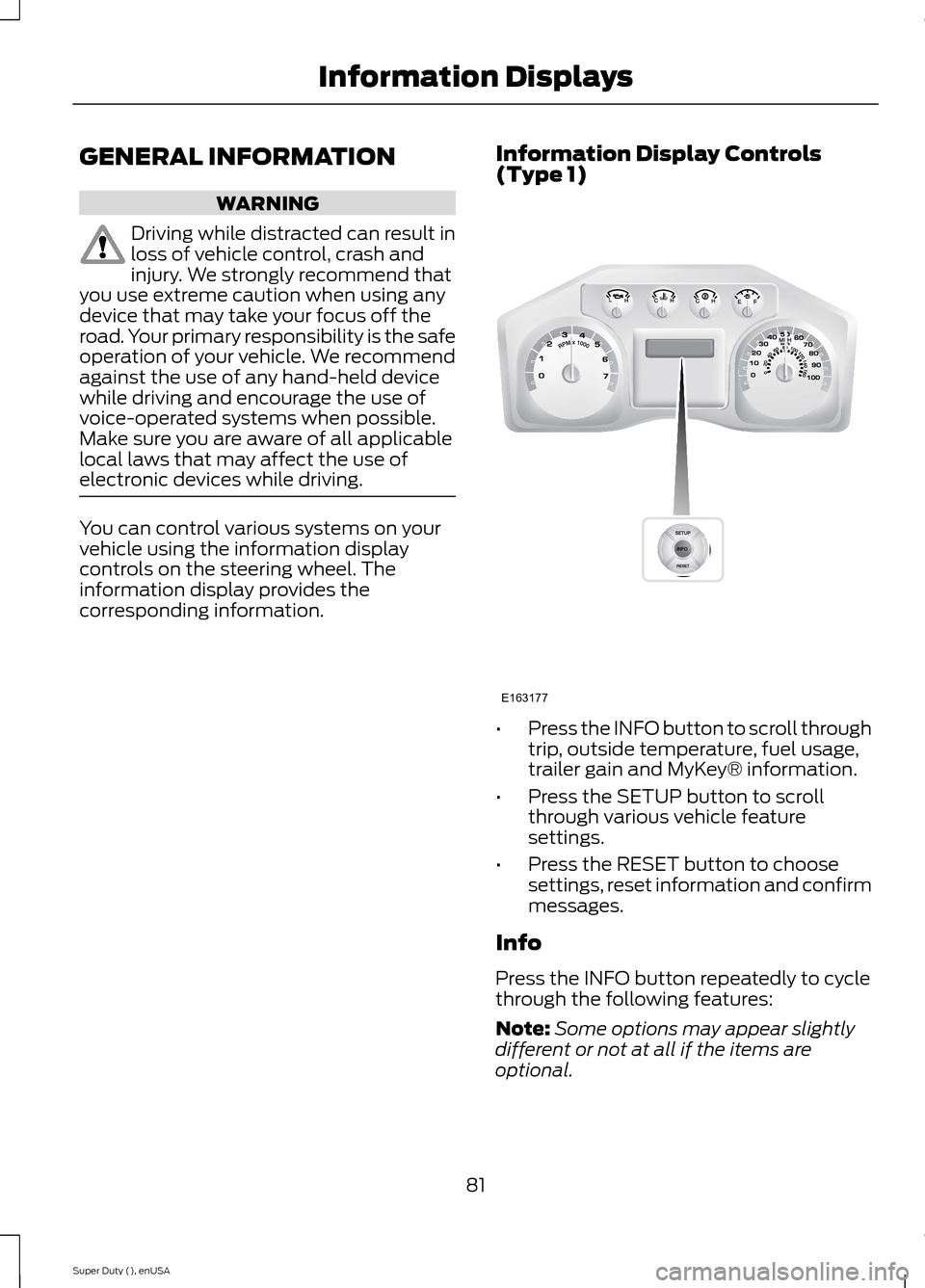
You can control various systems on yourvehicle using the information displaycontrols on the steering wheel. Theinformation display provides thecorresponding information.
Information Display Controls(Type 1)
•Press the INFO button to scroll throughtrip, outside temperature, fuel usage,trailer gain and MyKey® information.
•Press the SETUP button to scrollthrough various vehicle featuresettings.
•Press the RESET button to choosesettings, reset information and confirmmessages.
Info
Press the INFO button repeatedly to cyclethrough the following features:
Note:Some options may appear slightlydifferent or not at all if the items areoptional.
81Super Duty (), enUSAInformation DisplaysE163177
Page 88 of 470
COURTESY WIPE
This feature allows for an extra swipe ofthe wipers after a wipe/wash cycle.
CREATE MYKEY / MYKEY SETUP /CLEAR MYKEY
For more information, See Creating aMyKey (page 50).
RESET FOR REMOTE START (ifequipped)
REAR PARK AID
This feature sounds a warning tone to warnthe driver of obstacles near the rearbumper, and functions only when R(Reverse) gear is selected.
TBC MODE (if equipped)
Allows you to choose the trailer brakemode.
TBC EFFORT (if equipped)
Allows you to choose the level of initialbraking.
TRAILER SWAY (if equipped)
This feature uses the electronic stabilitycontrol to mitigate trailer sway.
LANGUAGE = ENGLISH / SPANISH /FRENCH
Allows you to choose which language themessage center will display in.
Waiting four seconds or pressing theRESET button cycles the message centerthrough each of the language choices.
Press the RESET button to set thelanguage choice.
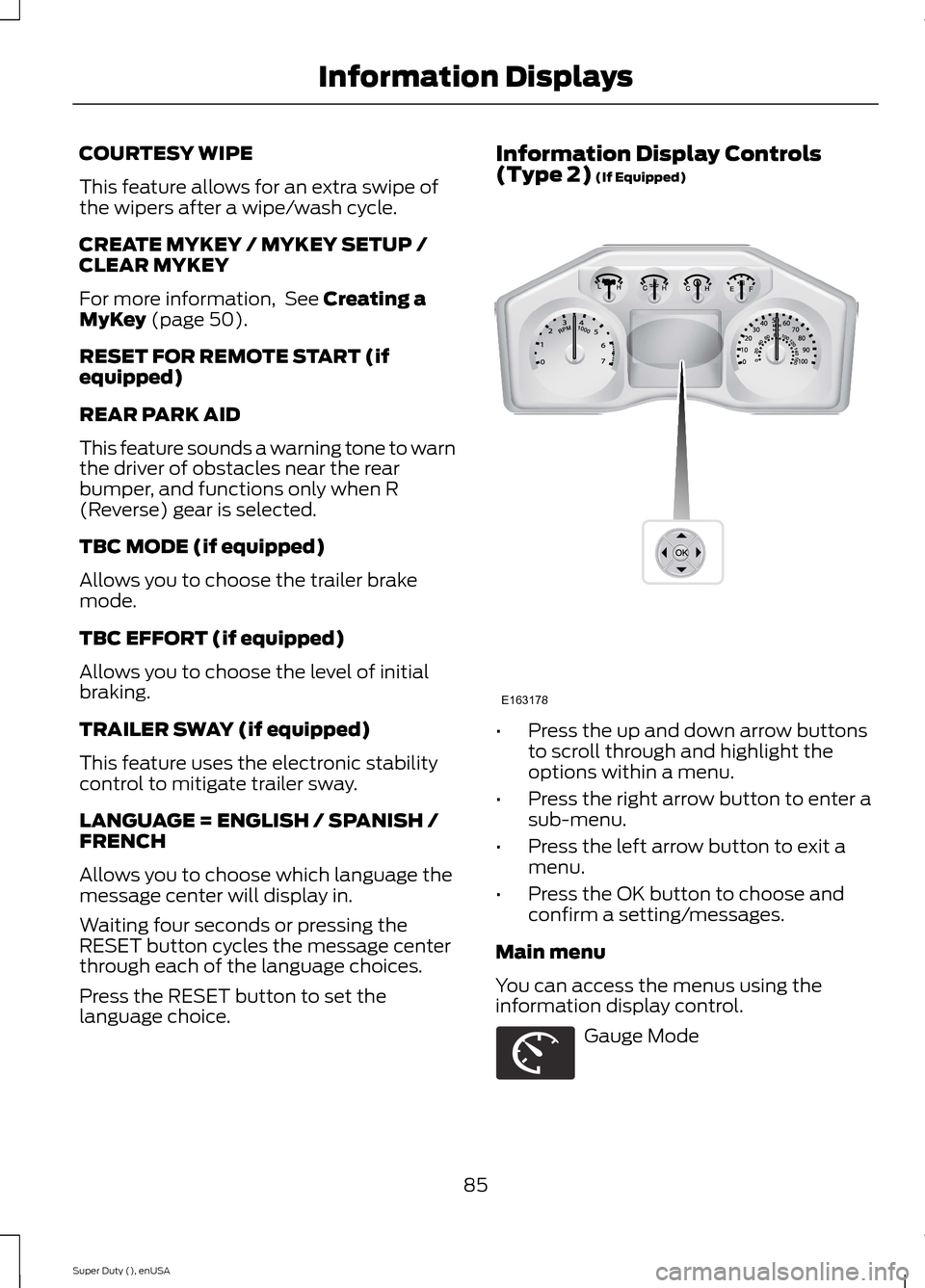
Information Display Controls(Type 2) (If Equipped)
•Press the up and down arrow buttonsto scroll through and highlight theoptions within a menu.
•Press the right arrow button to enter asub-menu.
•Press the left arrow button to exit amenu.
•Press the OK button to choose andconfirm a setting/messages.
Main menu
You can access the menus using theinformation display control.
Gauge Mode
85Super Duty (), enUSAInformation DisplaysE163178 E163179
Page 94 of 470
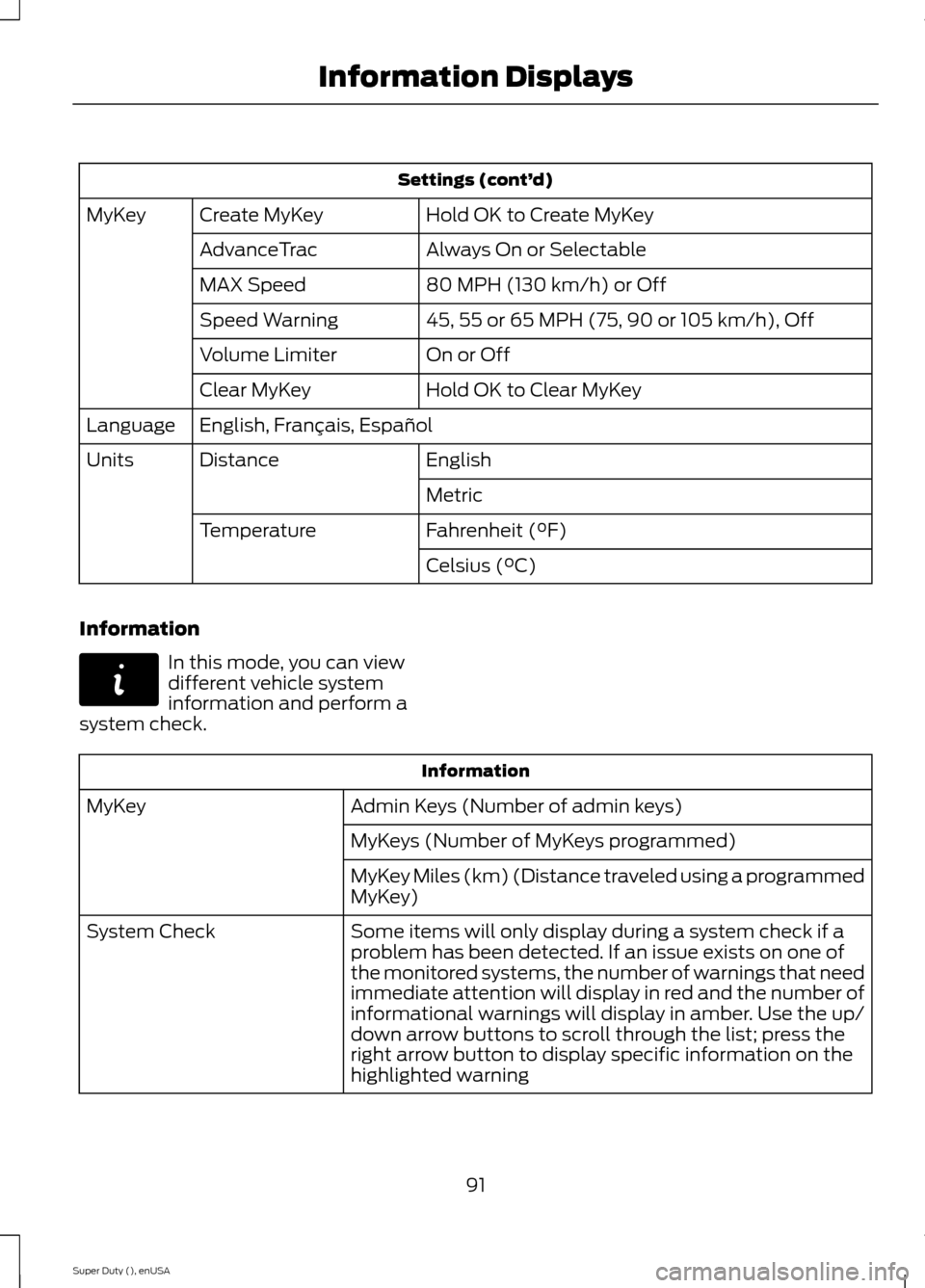
Settings (cont’d)
Hold OK to Create MyKeyCreate MyKeyMyKey
Always On or SelectableAdvanceTrac
80 MPH (130 km/h) or OffMAX Speed
45, 55 or 65 MPH (75, 90 or 105 km/h), OffSpeed Warning
On or OffVolume Limiter
Hold OK to Clear MyKeyClear MyKey
English, Français, EspañolLanguage
EnglishDistanceUnits
Metric
Fahrenheit (°F)Temperature
Celsius (°C)
Information
In this mode, you can viewdifferent vehicle systeminformation and perform asystem check.
Information
Admin Keys (Number of admin keys)MyKey
MyKeys (Number of MyKeys programmed)
MyKey Miles (km) (Distance traveled using a programmedMyKey)
Some items will only display during a system check if aproblem has been detected. If an issue exists on one ofthe monitored systems, the number of warnings that needimmediate attention will display in red and the number ofinformational warnings will display in amber. Use the up/down arrow buttons to scroll through the list; press theright arrow button to display specific information on thehighlighted warning
System Check
91Super Duty (), enUSAInformation DisplaysE144642
Page 96 of 470
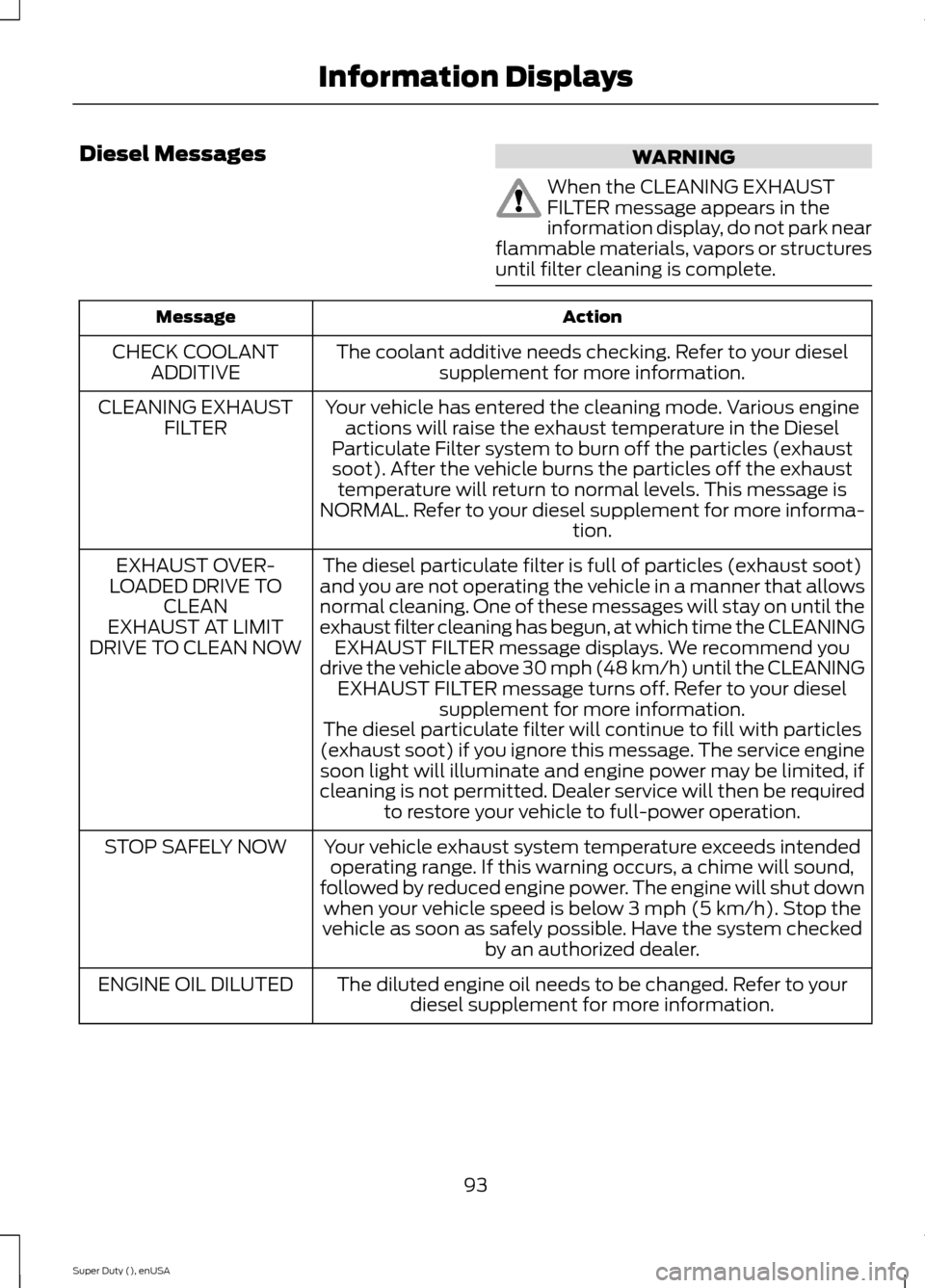
Diesel MessagesWARNING
When the CLEANING EXHAUSTFILTER message appears in theinformation display, do not park nearflammable materials, vapors or structuresuntil filter cleaning is complete.
ActionMessage
The coolant additive needs checking. Refer to your dieselsupplement for more information.CHECK COOLANTADDITIVE
Your vehicle has entered the cleaning mode. Various engineactions will raise the exhaust temperature in the DieselParticulate Filter system to burn off the particles (exhaustsoot). After the vehicle burns the particles off the exhausttemperature will return to normal levels. This message isNORMAL. Refer to your diesel supplement for more informa-tion.
CLEANING EXHAUSTFILTER
The diesel particulate filter is full of particles (exhaust soot)and you are not operating the vehicle in a manner that allowsnormal cleaning. One of these messages will stay on until theexhaust filter cleaning has begun, at which time the CLEANINGEXHAUST FILTER message displays. We recommend youdrive the vehicle above 30 mph (48 km/h) until the CLEANINGEXHAUST FILTER message turns off. Refer to your dieselsupplement for more information.
EXHAUST OVER-LOADED DRIVE TOCLEANEXHAUST AT LIMITDRIVE TO CLEAN NOW
The diesel particulate filter will continue to fill with particles(exhaust soot) if you ignore this message. The service enginesoon light will illuminate and engine power may be limited, ifcleaning is not permitted. Dealer service will then be requiredto restore your vehicle to full-power operation.
Your vehicle exhaust system temperature exceeds intendedoperating range. If this warning occurs, a chime will sound,followed by reduced engine power. The engine will shut downwhen your vehicle speed is below 3 mph (5 km/h). Stop thevehicle as soon as safely possible. Have the system checkedby an authorized dealer.
STOP SAFELY NOW
The diluted engine oil needs to be changed. Refer to yourdiesel supplement for more information.ENGINE OIL DILUTED
93Super Duty (), enUSAInformation Displays
Page 113 of 470
SITTING IN THE CORRECT
POSITION
WARNINGS
Sitting improperly, out of position orwith the seat back reclined too farcan take weight off the seat cushionand affect the decision of the passengersensing system, resulting in serious injuryor death in the event of a crash. Always situpright against your seat back, with yourfeet on the floor.
Do not recline the seat back as thiscan cause the occupant to slideunder the safety belt, resulting inserious injury in the event of a crash.
Do not place objects higher than theseat back to reduce the risk ofserious injury in the event of a crashor during heavy braking.
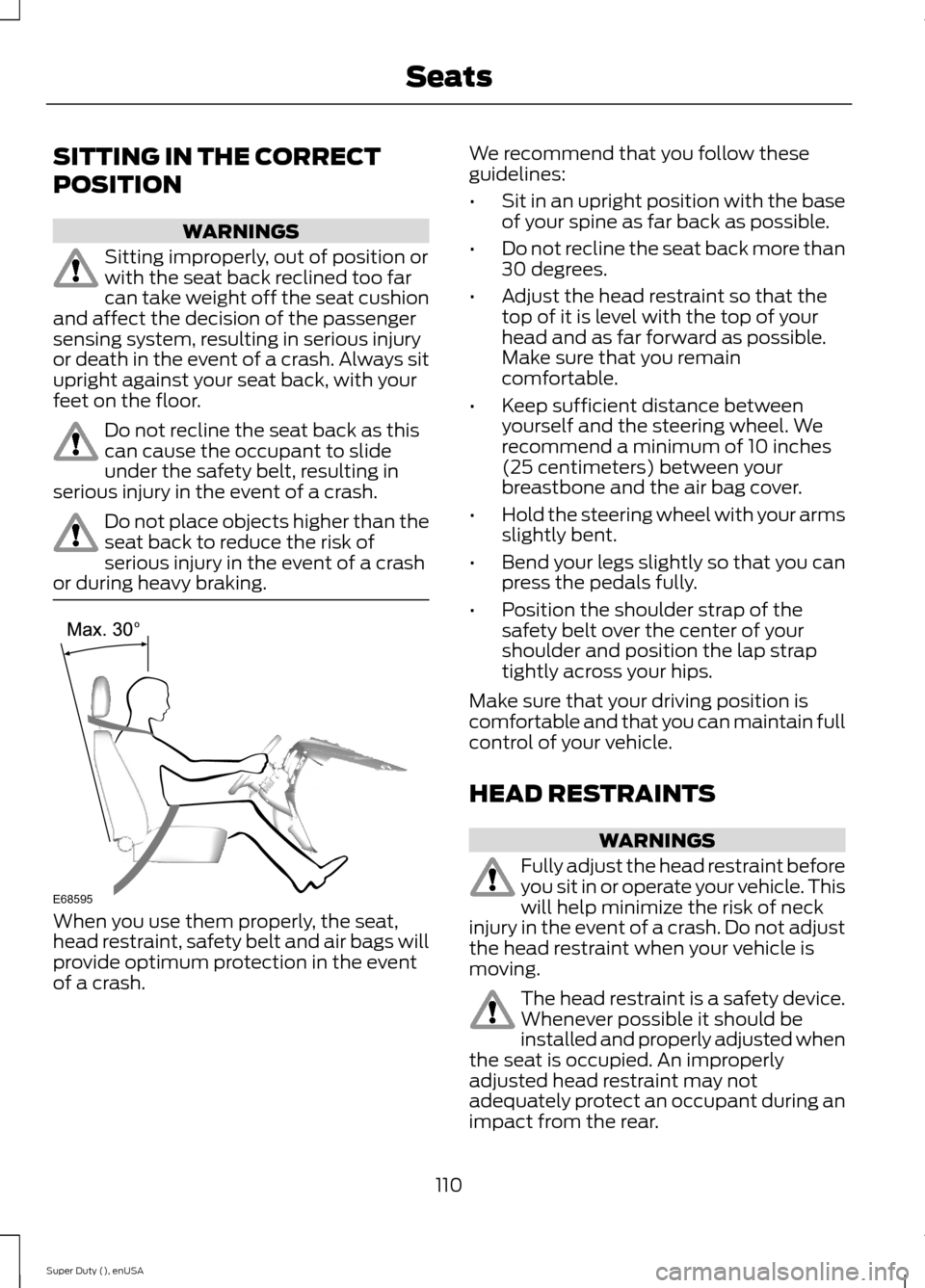
When you use them properly, the seat,head restraint, safety belt and air bags willprovide optimum protection in the eventof a crash.
We recommend that you follow theseguidelines:
•Sit in an upright position with the baseof your spine as far back as possible.
•Do not recline the seat back more than30 degrees.
•Adjust the head restraint so that thetop of it is level with the top of yourhead and as far forward as possible.Make sure that you remaincomfortable.
•Keep sufficient distance betweenyourself and the steering wheel. Werecommend a minimum of 10 inches(25 centimeters) between yourbreastbone and the air bag cover.
•Hold the steering wheel with your armsslightly bent.
•Bend your legs slightly so that you canpress the pedals fully.
•Position the shoulder strap of thesafety belt over the center of yourshoulder and position the lap straptightly across your hips.
Make sure that your driving position iscomfortable and that you can maintain fullcontrol of your vehicle.
HEAD RESTRAINTS
WARNINGS
Fully adjust the head restraint beforeyou sit in or operate your vehicle. Thiswill help minimize the risk of neckinjury in the event of a crash. Do not adjustthe head restraint when your vehicle ismoving.
The head restraint is a safety device.Whenever possible it should beinstalled and properly adjusted whenthe seat is occupied. An improperlyadjusted head restraint may notadequately protect an occupant during animpact from the rear.
110Super Duty (), enUSASeatsE68595
Page 120 of 470
To operate the heated seats, touch theheated seat symbol on the touchscreen tocycle through the various heat settings andoff. Warmer settings are indicated by moreindicator lights.
Rear Heated Seats (If Equipped)
WARNING
Persons who are unable to feel painto the skin because of advanced age,chronic illness, diabetes, spinal cordinjury, medication, alcohol use, exhaustion,or other physical conditions, must exercisecare when using the seat heater. The seatheater may cause burns even at lowtemperatures, especially if used for longperiods of time. Do not place anything onthe seat that insulates against heat, suchas a blanket or cushion, because this maycause the seat heater to overheat. Do notpuncture the seat with pins, needles, orother pointed objects because this maydamage the heating element which maycause the seat heater to overheat. Anoverheated seat may cause seriouspersonal injury.
Note:Do not do the following:
•Place heavy objects on the seat.
•Operate the seat heater if water or anyother liquid is spilled on the seat. Allowthe seat to dry thoroughly.
The rear seat heat controls are located onthe rear door armrest.
To operate the heated seats:
•Push the indicated side of the controlfor maximum heat.
•Push again to deactivate.
•Push the indicated side of the controlfor minimum heat.
•Push again to deactivate.
The heated seat module resets at everyignition run cycle. While the ignition is inthe on position, activate the high or lowheated seat switch to enable heatingmode. When activated, they will turn offautomatically when the engine is turnedoff.
The indicator light will illuminate when theheated seats have been activated.
117Super Duty (), enUSASeatsE146322 E162742 E162743
Page 121 of 470
CLIMATE CONTROLLED SEATS
Heated Seats (If Equipped)
WARNING
People who are unable to feel painto their skin because of advancedage, chronic illness, diabetes, spinalcord injury, medication, alcohol use,exhaustion or other physical conditions,must exercise care when using the heatedseat. The heated seat may cause burnseven at low temperatures, especially ifused for long periods of time. Do not placeanything on the seat that insulates againstheat, such as a blanket or cushion. Thismay cause the heated seat to overheat.Do not puncture the seat with pins, needlesor other pointed objects. This may damagethe heating element which may cause theheated seat to overheat. An overheatedseat may cause serious personal injury.
Do not do the following:
•Place heavy objects on the seat.
•Operate the heated seat if water or anyother liquid is spilled on the seat. Allowthe seat to dry thoroughly.
•Operate the heated seats unless theengine is running. Doing so can causethe battery to lose charge.
To operate the heated seats, touch theheated seat symbol on the touchscreen tocycle through the various heat settings andoff. Warmer settings are indicated by moreindicator lights.
Cooled Seats (If Equipped)
The cooled seats will only function whenthe engine is running.
To operate the cooled seats, press thecooled seat symbol to cycle through thevarious cooling settings and off. Coolersettings are indicated by more indicatorlights.
If the engine falls below 350 RPM whilethe cooled seats are on, the feature willturn itself off. You will need to reactivateit.
Heated and Cooled Seats Air FilterReplacement (If Equipped)
The heated and cooled seat systemincludes air filters. You must replace themperiodically.
The filter is located under each front seat.Access the filter from the second rowfoot-well area. Move the front seats all theway to the full front and full up positionsto ease access.
118Super Duty (), enUSASeatsE146322 E146309 E146319
Page 127 of 470
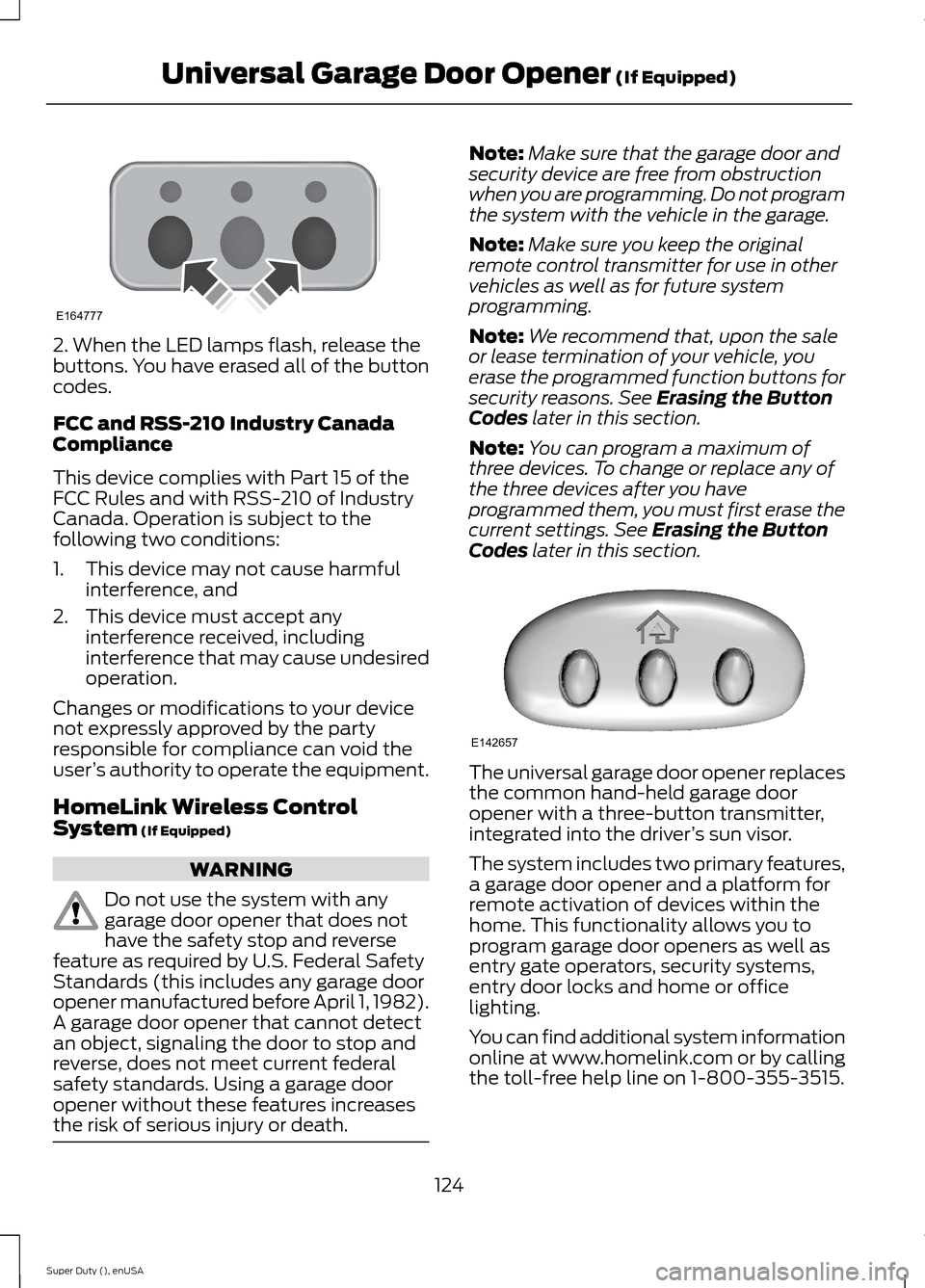
2. When the LED lamps flash, release thebuttons. You have erased all of the buttoncodes.
FCC and RSS-210 Industry CanadaCompliance
This device complies with Part 15 of theFCC Rules and with RSS-210 of IndustryCanada. Operation is subject to thefollowing two conditions:
1.This device may not cause harmfulinterference, and
2.This device must accept anyinterference received, includinginterference that may cause undesiredoperation.
Changes or modifications to your devicenot expressly approved by the partyresponsible for compliance can void theuser’s authority to operate the equipment.
HomeLink Wireless ControlSystem (If Equipped)
WARNING
Do not use the system with anygarage door opener that does nothave the safety stop and reversefeature as required by U.S. Federal SafetyStandards (this includes any garage dooropener manufactured before April 1, 1982).A garage door opener that cannot detectan object, signaling the door to stop andreverse, does not meet current federalsafety standards. Using a garage dooropener without these features increasesthe risk of serious injury or death.
Note:Make sure that the garage door andsecurity device are free from obstructionwhen you are programming. Do not programthe system with the vehicle in the garage.
Note:Make sure you keep the originalremote control transmitter for use in othervehicles as well as for future systemprogramming.
Note:We recommend that, upon the saleor lease termination of your vehicle, youerase the programmed function buttons forsecurity reasons. See Erasing the ButtonCodes later in this section.
Note:You can program a maximum ofthree devices. To change or replace any ofthe three devices after you haveprogrammed them, you must first erase thecurrent settings. See Erasing the ButtonCodes later in this section.
The universal garage door opener replacesthe common hand-held garage dooropener with a three-button transmitter,integrated into the driver’s sun visor.
The system includes two primary features,a garage door opener and a platform forremote activation of devices within thehome. This functionality allows you toprogram garage door openers as well asentry gate operators, security systems,entry door locks and home or officelighting.
You can find additional system informationonline at www.homelink.com or by callingthe toll-free help line on 1-800-355-3515.
124Super Duty (), enUSAUniversal Garage Door Opener (If Equipped)E164777 E142657
Page 132 of 470
12 Volt DC Power Point
WARNING
Do not plug optional electricalaccessories into the cigar lightersocket (if equipped). Improper useof the lighter can cause damage notcovered by your warranty, and can resultin fire or serious injury.
Note:If used when the engine is notrunning, the battery will discharge. Theremay be insufficient power to restart yourengine.
Note:Do not insert objects other than anaccessory plug into the power point. Thiswill damage the outlet and blow the fuse.
Note:Do not hang any type of accessory oraccessory bracket from the plug.
Note:Do not use the power point over thevehicle capacity of 12 volt DC 180 watts ora fuse may blow.
Note:Do not use the power point foroperating a cigar lighter element.
Note:Improper use of the power point cancause damage not covered by yourwarranty.
Note:Always keep the power point capsclosed when not in use.
Run the engine for full capacity use of thepower point. To prevent the battery frombeing discharged:
•do not use the power point longer thannecessary when the engine is notrunning
•do not leave devices plugged inovernight or when the vehicle is parkedfor extended periods.
Locations
Power points may be found:
•On the instrument panel (twolocations).
•Inside the center console.
•On the rear of the center console.
•Inside the front under-seat storagecompartment (if equipped).
•Inside the rear under-seat storagecompartment (if equipped).
110 Volt AC Power Points (If Equipped)
WARNING
Do not keep electrical devicesplugged in the power points whenthe devices are not in use. Do not useany extension cord with the 110 volt ACpower points, since it will defeat the safetyprotection design. Do not use a singlepower point to power multiple devices. Itmay cause the power point to exceed the150 watt load limit and overload, resultingin fire or serious injury.
Note:Keep the engine running to use thepower points.
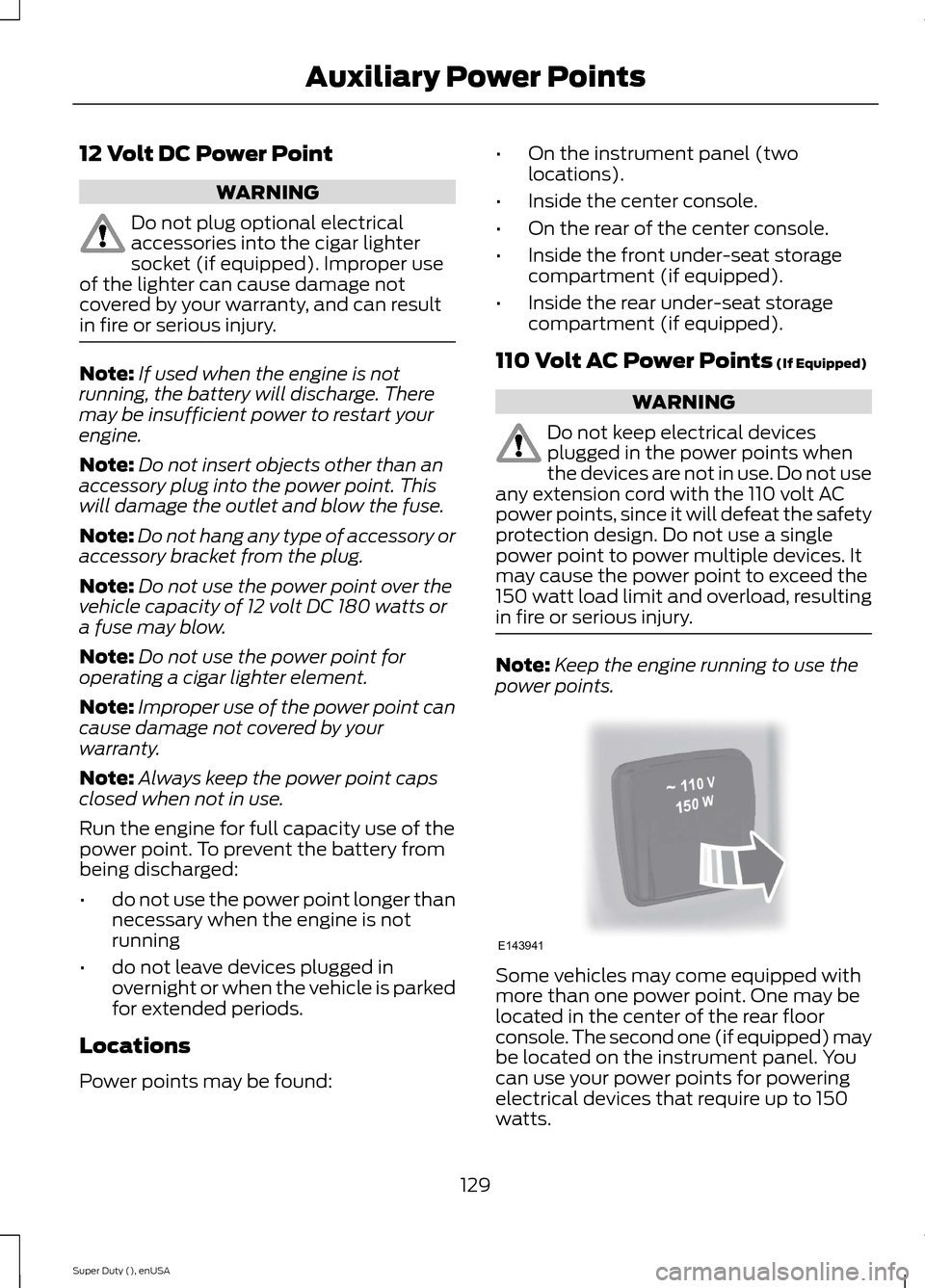
Some vehicles may come equipped withmore than one power point. One may belocated in the center of the rear floorconsole. The second one (if equipped) maybe located on the instrument panel. Youcan use your power points for poweringelectrical devices that require up to 150watts.
129Super Duty (), enUSAAuxiliary Power PointsE143941
Page 141 of 470
We recommend regular unleaded gasolinewith a pump (R+M)/2 octane rating of 87.Some stations offer fuels posted as regularwith an octane rating below 87, particularlyin high altitude areas. We do notrecommend fuels with an octane ratingbelow 87.
Do not be concerned if your enginesometimes knocks lightly. However, if itknocks heavily under most drivingconditions while you are using fuel with therecommended octane rating, see yourauthorized dealer to prevent any enginedamage.
RUNNING OUT OF FUEL
Avoid running out of fuel because thissituation may have an adverse effect onpowertrain components.
If you have run out of fuel:
•You may need to cycle the ignition fromoff to on several times after refuelingto allow the fuel system to pump thefuel from the tank to the engine. Onrestarting, cranking time will take a fewseconds longer than normal. Withkeyless ignition, just start the engine.Crank time will be longer than usual.
•Normally, adding 1 gallon (3.8 liters) offuel is enough to restart the engine. Ifthe vehicle is out of fuel and on a steepgrade, more than 1 gallon (3.8 liters)may be required.
•The service engine soon indicator maycome on. For more information on theservice engine soon indicator, SeeWarning Lamps and Indicators(page 77).
Refilling With a Portable FuelContainer
WARNINGS
The fuel system may be underpressure. If the fuel filler cap isventing vapor or if you hear a hissingsound, wait until it stops before completelyremoving the fuel filler cap. Otherwise, fuelmay spray out and cause personal injury.
Do not try to pry open or push openthe fuel system with foreign objects.This could damage the fuel systemand its seal and cause personal injury toyou or others.
Use the following directions when fillingfrom a portable fuel container:
1.Remove the fuel cap from the fuel fillerpipe by rotating it counter clockwise.
2.Slowly insert the portable fuelcontainer into the fuel filler opening.
3.Fill the vehicle with fuel from theportable fuel container.
4.4. When done, remove the portablefuel container nozzle and reinstall fuelcap. Insert fuel cap into fuel filleropening and turn clockwise until a clickis heard.
REFUELING
WARNINGS
Fuel vapor burns violently and a fuelfire can cause severe injuries.
Read and follow all the instructionson the pump island.
Turn off your engine when you arerefueling.
Do not smoke if you are near fuel orrefueling your vehicle.
138Super Duty (), enUSAFuel and Refueling