belt FORD SUPER DUTY 2015 3.G Service Manual
[x] Cancel search | Manufacturer: FORD, Model Year: 2015, Model line: SUPER DUTY, Model: FORD SUPER DUTY 2015 3.GPages: 470, PDF Size: 18.24 MB
Page 261 of 470
•Never wash or rinse any ignition coil,spark plug wire or spark plug well, orthe area in and around these locations.
•Cover the battery, power distributionbox, and air filter assembly to preventwater damage when cleaning theengine.
CLEANING THE WINDOWS AND
WIPER BLADES
Car wash chemicals and environmentalfallout can result in windshield and wiperblade contamination. Dirty windshield andwipers will result in poor windshield wiperoperation. Keep the windshield and wiperblades clean to maintain windshield wiperperformance.
To clean the windshield and wiper blades:
•Clean the windshield with anon-abrasive glass cleaner.
•For windshields contaminated withtree sap, chemicals, wax or bugs, cleanthe entire windshield using steel wool(no greater than 0000 grade) in acircular motion and rinse with water.
•Clean the wiper blades with isopropylrubbing alcohol or windshield washerfluid.
Note: Do not use razor blades or othersharp objects to clean or remove decalsfrom the inside of the heated rear window.The vehicle warranty does not coverdamage caused to the heated rear windowgrid lines.
CLEANING THE INTERIOR
WARNINGS
Do not use cleaning solvents, bleachor dye on the vehicle’s safety belts,as these actions may weaken thebelt webbing.
WARNINGS
On vehicles equipped withseat-mounted airbags, do not usechemical solvents or strongdetergents. Such products couldcontaminate the side airbag system andaffect performance of the side airbag in acollision.
For fabric, carpets, cloth seats, safety beltsand seats equipped with side airbags:
•Remove dust and loose dirt with avacuum cleaner.
•Remove light stains and soil withMotorcraft Professional StrengthCarpet & Upholstery Cleaner.
•If grease or tar is present on thematerial, spot-clean the area first withMotorcraft Spot and Stain Remover. InCanada, use Motorcraft Multi-PurposeCleaner.
•If a ring forms on the fabric after spotcleaning, clean the entire areaimmediately (but do not oversaturate)or the ring will set.
•Do not use household cleaningproducts or glass cleaners, which canstain and discolor the fabric and affectthe flame retardant abilities of the seatmaterials.
CLEANING THE INSTRUMENT
PANEL AND INSTRUMENT
CLUSTER LENS
WARNING
Do not use chemical solvents orstrong detergents when cleaning thesteering wheel or instrument panelto avoid contamination of the airbagsystem.
258Super Duty (), enUSAVehicle Care
Page 266 of 470
GENERAL INFORMATION
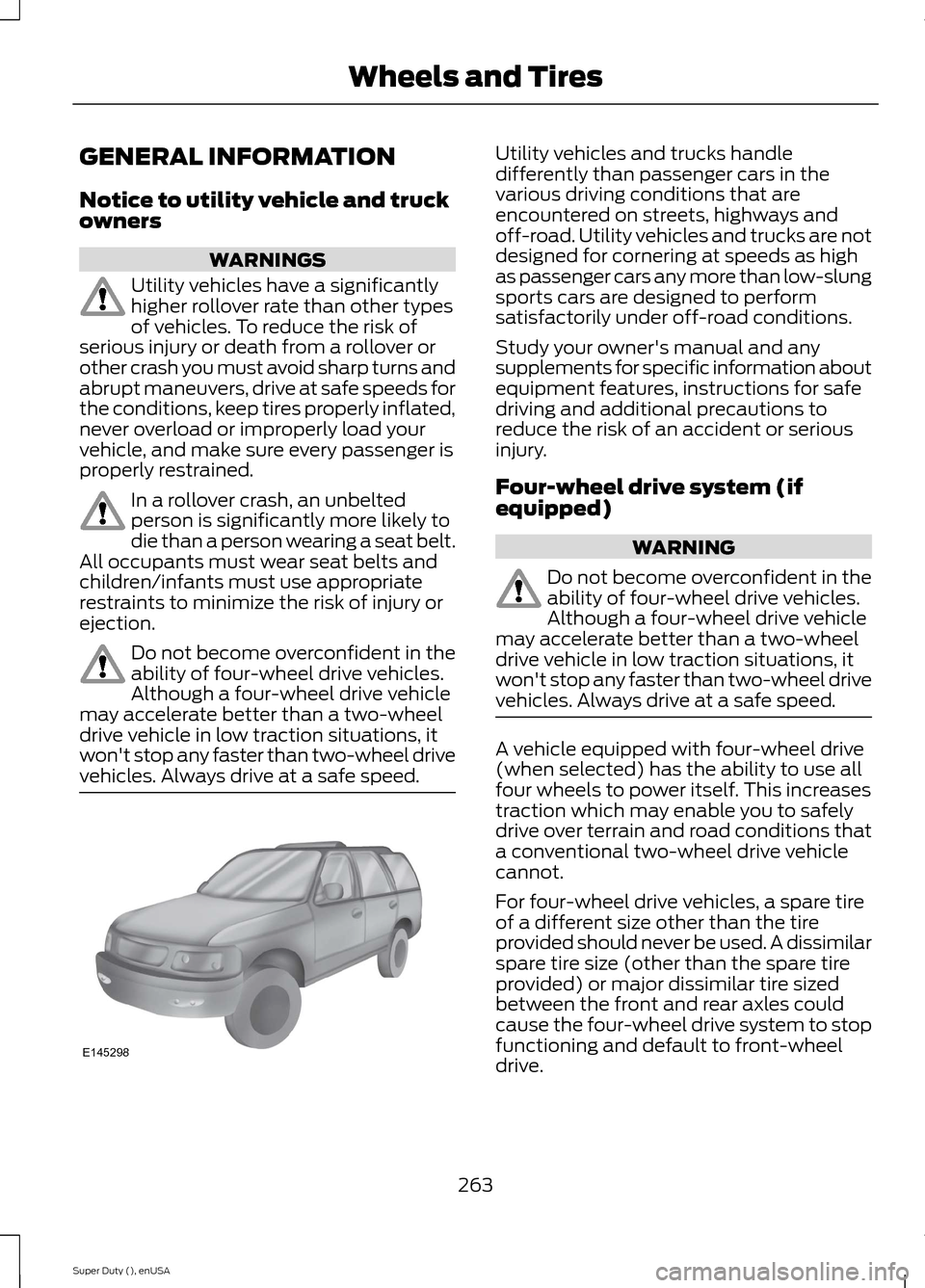
Notice to utility vehicle and truckowners
WARNINGS
Utility vehicles have a significantlyhigher rollover rate than other typesof vehicles. To reduce the risk ofserious injury or death from a rollover orother crash you must avoid sharp turns andabrupt maneuvers, drive at safe speeds forthe conditions, keep tires properly inflated,never overload or improperly load yourvehicle, and make sure every passenger isproperly restrained.
In a rollover crash, an unbeltedperson is significantly more likely todie than a person wearing a seat belt.All occupants must wear seat belts andchildren/infants must use appropriaterestraints to minimize the risk of injury orejection.
Do not become overconfident in theability of four-wheel drive vehicles.Although a four-wheel drive vehiclemay accelerate better than a two-wheeldrive vehicle in low traction situations, itwon't stop any faster than two-wheel drivevehicles. Always drive at a safe speed.
Utility vehicles and trucks handledifferently than passenger cars in thevarious driving conditions that areencountered on streets, highways andoff-road. Utility vehicles and trucks are notdesigned for cornering at speeds as highas passenger cars any more than low-slungsports cars are designed to performsatisfactorily under off-road conditions.
Study your owner's manual and anysupplements for specific information aboutequipment features, instructions for safedriving and additional precautions toreduce the risk of an accident or seriousinjury.
Four-wheel drive system (ifequipped)
WARNING
Do not become overconfident in theability of four-wheel drive vehicles.Although a four-wheel drive vehiclemay accelerate better than a two-wheeldrive vehicle in low traction situations, itwon't stop any faster than two-wheel drivevehicles. Always drive at a safe speed.
A vehicle equipped with four-wheel drive(when selected) has the ability to use allfour wheels to power itself. This increasestraction which may enable you to safelydrive over terrain and road conditions thata conventional two-wheel drive vehiclecannot.
For four-wheel drive vehicles, a spare tireof a different size other than the tireprovided should never be used. A dissimilarspare tire size (other than the spare tireprovided) or major dissimilar tire sizedbetween the front and rear axles couldcause the four-wheel drive system to stopfunctioning and default to front-wheeldrive.
263Super Duty (), enUSAWheels and TiresE145298
Page 304 of 470
ENGINE SPECIFICATIONS
6.8L V10 Engine6.2L V8 EngineEngine
413378Cubic inches
Minimum 87 octaneMinimum 87 octaneRequired fuel
1-6-5-10-2-7-3-8-4-91-5-4-8-6-3-7-2Firing order
Coil on plugCoil on plugIgnition system
0.039-0.043 inch (1.00-1.10mm)0.041-0.047 inch (1.04-1.20mm)Spark plug gap
9.2:19.8:1Compression ratio
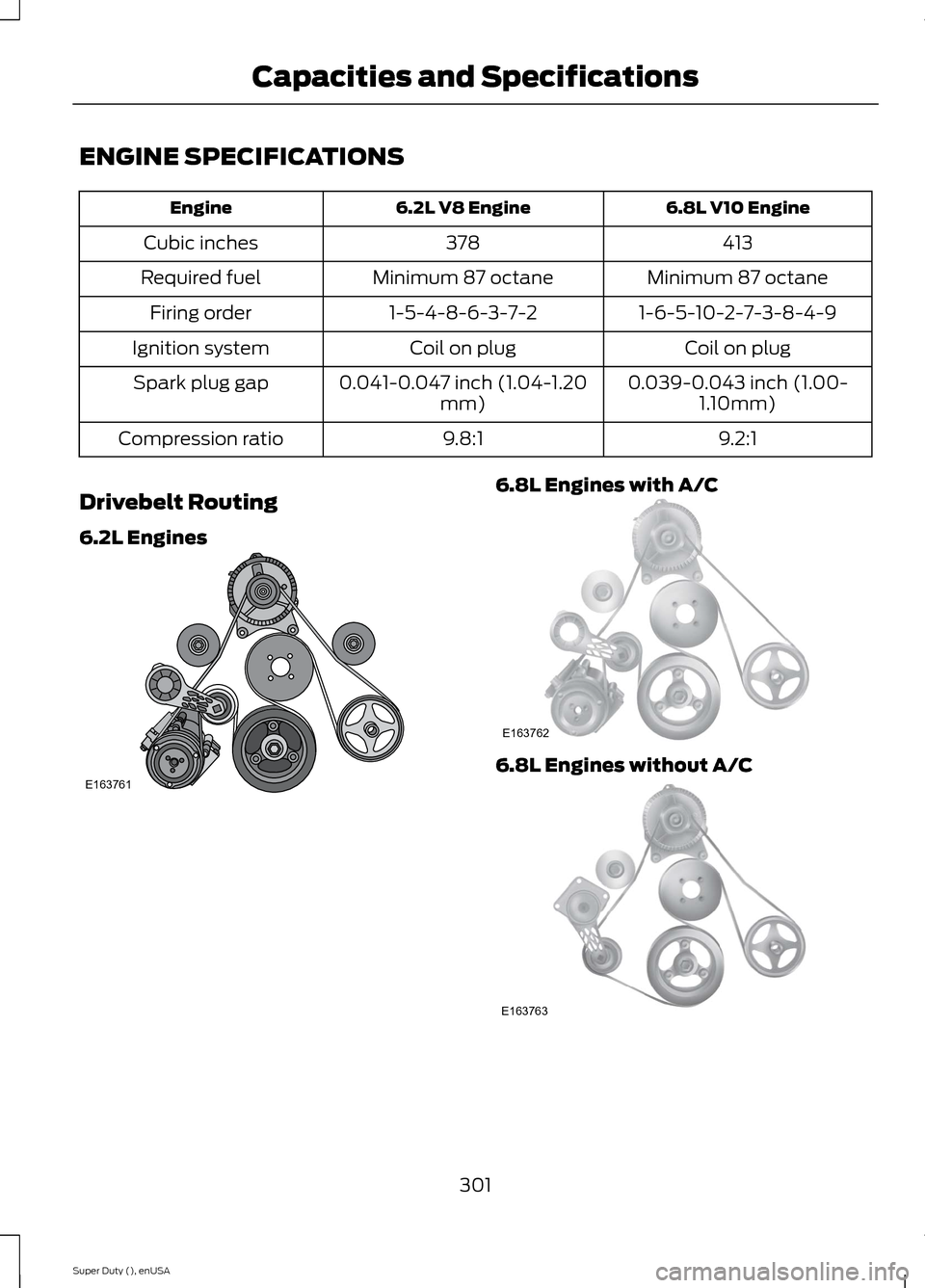
Drivebelt Routing
6.2L Engines
6.8L Engines with A/C
6.8L Engines without A/C
301Super Duty (), enUSACapacities and SpecificationsE163761 E163762 E163763
Page 342 of 470
![FORD SUPER DUTY 2015 3.G Service Manual If a crash deploys an airbag (excludingknee airbags and rear inflatable safetybelts [if equipped]) or activates the fuelpump shut-off, your SYNC-equippedvehicle may be able to contact emergencyservice](/img/11/5311/w960_5311-341.png "FORD SUPER DUTY 2015 3.G Service Manual If a crash deploys an airbag (excludingknee airbags and rear inflatable safetybelts [if equipped]) or activates the fuelpump shut-off, your SYNC-equippedvehicle may be able to contact emergencyservice")
If a crash deploys an airbag (excludingknee airbags and rear inflatable safetybelts [if equipped]) or activates the fuelpump shut-off, your SYNC-equippedvehicle may be able to contact emergencyservices by dialing 911 through a paired andconnected Bluetooth-enabled phone. Youcan learn more about the 911 Assistfeature, visit www.SYNCMyRide.com,www.SYNCMyRide.ca orwww.syncmaroute.ca.
See Supplementary Restraints System(page 36). Important information aboutairbag deployment is in this chapter.
See Roadside Emergencies (page 212).Important information about the fuel pumpshut-off is in this chapter.
Setting 911 Assist On
1.Press the phone button to enter thephone menu.
2.Scroll to select 911 Assist.
3.Press OK to confirm and enter the 911Assist menu.
4.Scroll to select between On and Off.
5.Press OK when the desired optionappears in the radio display.Set On orSet Off appears in the display asconfirmation.
Off selections include:
•Off with reminder: Provides a displayand voice reminder at phoneconnection at vehicle start.
•Off without reminder: Provides adisplay reminder only without a voicereminder at phone connection.
To make sure that 911 Assist worksproperly:
•SYNC must be powered and workingproperly at the time of the incident andthroughout feature activation and use.
•The 911 Assist feature must be set onbefore the incident.
•You must pair and connect aBluetooth-enabled and compatiblecell phone to SYNC.
•A connected Bluetooth-enabled phonemust have the ability to make andmaintain an outgoing call at the timeof the incident.
•A connected Bluetooth-enabled phonemust have adequate network coverage,battery power and signal strength.
•The vehicle must have battery powerand be located in the U.S., Canada orin a territory in which 911 is theemergency number.
In the Event of a Crash
Not all crashes will deploy an airbag oractivate the fuel pump shut-off (thetriggers for 911 Assist). If a connected cellphone sustains damage or loses itsconnection to SYNC during a crash, SYNCwill search for and try to connect to apreviously paired cell phone; SYNC willthen attempt to call the emergencyservices.
Before making the call:
•SYNC provides a short window of time(about 10 seconds) to cancel the call.If you fail to cancel the call, SYNCattempts to dial 911.
•SYNC says the following, or a similarmessage: "SYNC will attempt to call911, to cancel the call, press Cancel onyour screen or press and hold thephone button on your steering wheel."
If you do not cancel the call, and SYNCmakes a successful call, a pre-recordedmessage plays for the 911 operator, andthen the occupant(s) in your vehicle is ableto talk with the operator. Be prepared toprovide your name, phone number andlocation immediately, because not all 911systems are capable of receiving thisinformation electronically.
339Super Duty (), enUSASYNC™ (If Equipped)
Page 409 of 470
![FORD SUPER DUTY 2015 3.G Service Manual If a crash deploys an airbag (excludes kneeairbags and rear inflatable safety belts [ifequipped]) or activates the fuel pumpshut-off, your SYNC-equipped vehicle maybe able to contact emergency service](/img/11/5311/w960_5311-408.png "FORD SUPER DUTY 2015 3.G Service Manual If a crash deploys an airbag (excludes kneeairbags and rear inflatable safety belts [ifequipped]) or activates the fuel pumpshut-off, your SYNC-equipped vehicle maybe able to contact emergency service")
If a crash deploys an airbag (excludes kneeairbags and rear inflatable safety belts [ifequipped]) or activates the fuel pumpshut-off, your SYNC-equipped vehicle maybe able to contact emergency services bydialing 911 through a paired and connectedBluetooth-enabled phone. You can learnmore about the 911 Assist feature, visitwww.SYNCMyRide.com,www.SYNCMyRide.ca orwww.syncmaroute.ca.
See Supplementary Restraints System(page 36). Important informationregarding airbag deployment is in thischapter.
See Roadside Emergencies (page 212).Important information regarding the fuelpump shut-off is in this chapter.
Setting 911 Assist On
If your vehicle is equipped withNavigation, touch the i(Information) button to accessthese features. If your vehicle is notequipped with Navigation, touch the cornerof the touchscreen with the green tab.
Touch Apps > 911 Assist, then select On.
You can also access 911 Assistby:
•Pressing the Settings icon > Settings> Phone > 911 Assist, or
•Pressing the Settings icon > Help > 911Assist.
To make sure that 911 Assist worksproperly:
•SYNC must be powered and workingproperly at the time of the incident andthroughout feature activation and use.
•The 911 Assist feature must be set onprior to the incident.
•You must pair and connect aBluetooth-enabled and compatiblephone to SYNC.
•A connected Bluetooth-enabled phonemust have the ability to make andmaintain an outgoing call at the timeof the incident.
•A connected Bluetooth-enabled phonemust have adequate network coverage,battery power and signal strength.
•The vehicle must have battery powerand be located in the United States,Canada or in a territory in which 911 isthe emergency number.
In the Event of a Crash
Not all crashes deploy an airbag or activatethe fuel pump shut-off (which wouldtrigger 911 Assist); however, SYNC tries tocontact emergency services if 911 Assisttriggers. If a connected phone sustainsdamage or loses connection to SYNC,SYNC searches for, and tries to connectto, any available previously paired phoneand tries to make the call to 911.
Before making the call:
•SYNC provides a short window of time(about 10 seconds) to cancel the call.If you fail to cancel the call, SYNCattempts to dial 911.
•SYNC says the following, or a similarmessage: "SYNC will attempt to call911, to cancel the call, press Cancel onyour screen or press and hold thephone button on your steering wheel."
If you do not cancel the call, and SYNCmakes a successful call, a pre-recordedmessage plays for the 911 operator, andthen the occupant(s) in your vehicle is ableto talk with the operator. Be prepared toprovide your name, phone number andlocation immediately, because not all 911systems are capable of receiving thisinformation electronically.
406Super Duty (), enUSAMyFord Touch™ (If Equipped)E142608 E142607
Page 442 of 470
Avoid the Rising Cost of ProperlyMaintaining Your Vehicle!
Ford Extended Service Plan also offers aPremium Maintenance Plan that covers allscheduled maintenance, and selectedwear items. The coverage is prepaid, soyou never have to worry about affordingyour vehicle’s maintenance. It coversregular checkups, routine inspections,preventive care and replacement of selectitems that require periodic attention fornormal wear:
•Windshield wiper blades
•Spark plugs (except in California)
•The clutch disc
•Brake pads and linings
•Shock absorbers
•Belts and hoses
•Diesel exhaust fluid replenishment
Interest Free Finance OptionsAvailable
Take advantage of our interest freeinstallment payment plan. Just a 10%down payment will provide you with anaffordable, no interest, no fee paymentprogram allowing you all the security andbenefits Ford ESP has to offer while payingover time. You are pre-approved with nocredit checks, no hassles! To learn more,call our Ford ESP specialists at800-367-3377.
Ford ESPP.O. Box 8072Royal Oak, MI 48068-0039
SERVICE PLANS (CANADA ONLY)
You can get more protection for yourvehicle by purchasing a Ford ExtendedService Plan. Ford Extended Service Planis the only service contract backed by FordMotor Company of Canada, Limited.Depending on the plan you purchase, FordExtended Service Plan provides benefitssuch as:
•Rental reimbursement
•Coverage for certain maintenance andwear items
•Protection against repair costs afteryour New Vehicle Limited WarrantyCoverage expires
•Roadside Assistance benefits
There are several Ford Extended ServicePlans available in various time, distanceand deductible combinations. Each planis tailored to fit your own driving needs,including reimbursement for towing andrental. When you purchase Ford ExtendedService Plan, you receive addedpeace-of-mind protection throughoutCanada and the United States, providedby a network of participating authorizedFord Motor Company dealers.
Note:Repairs performed outside of Canadaand the United States are not eligible forFord Extended Service Plan coverage.
This information is subject to change. Formore information, visit your local Ford ofCanada dealer or www.ford.ca to find theFord Extended Service Plan that is right foryou.
439Super Duty (), enUSAExtended Service Plan (ESP)
Page 445 of 470
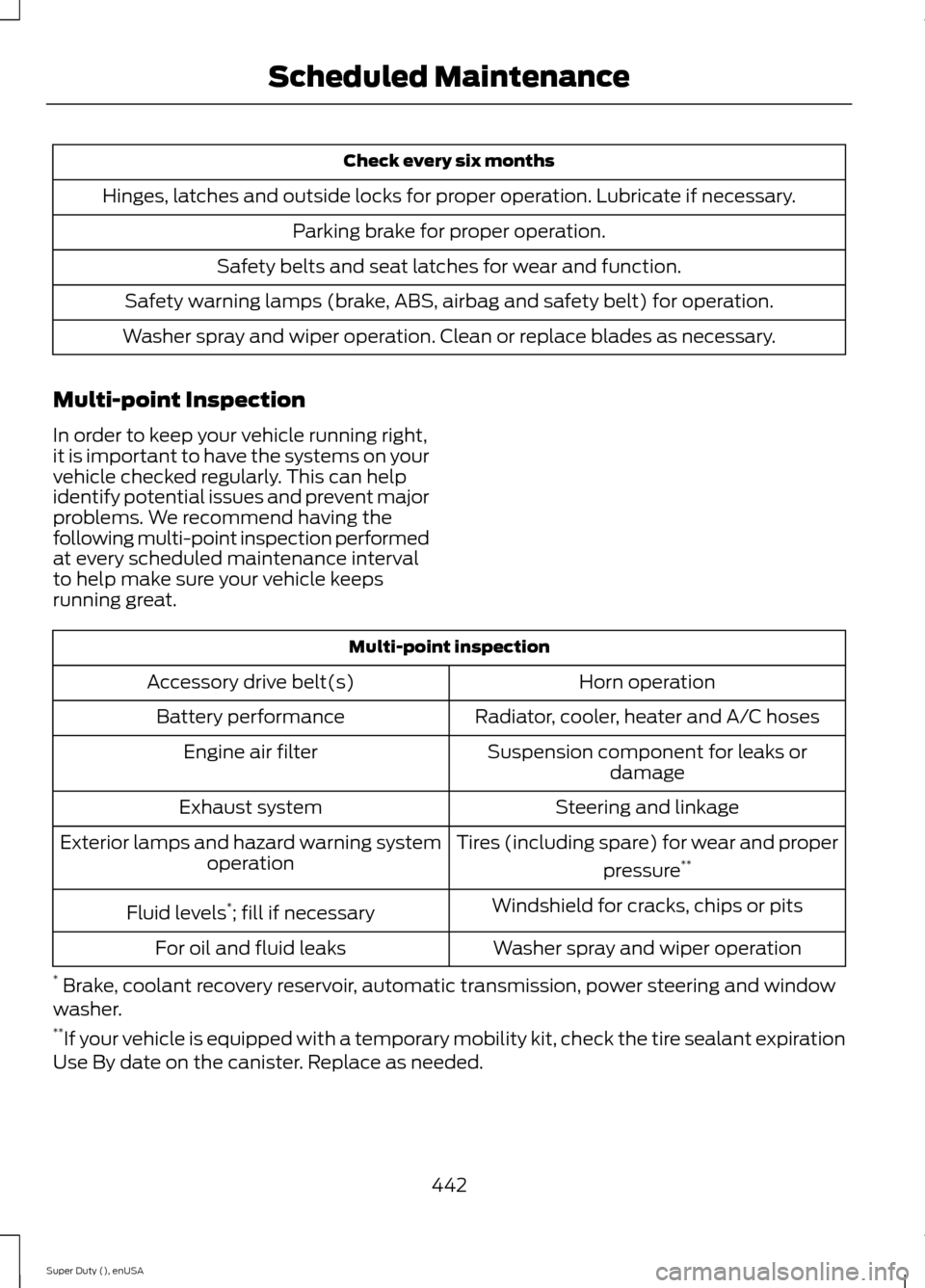
Check every six months
Hinges, latches and outside locks for proper operation. Lubricate if necessary.
Parking brake for proper operation.
Safety belts and seat latches for wear and function.
Safety warning lamps (brake, ABS, airbag and safety belt) for operation.
Washer spray and wiper operation. Clean or replace blades as necessary.
Multi-point Inspection
In order to keep your vehicle running right,it is important to have the systems on yourvehicle checked regularly. This can helpidentify potential issues and prevent majorproblems. We recommend having thefollowing multi-point inspection performedat every scheduled maintenance intervalto help make sure your vehicle keepsrunning great.
Multi-point inspection
Horn operationAccessory drive belt(s)
Radiator, cooler, heater and A/C hosesBattery performance
Suspension component for leaks ordamageEngine air filter
Steering and linkageExhaust system
Tires (including spare) for wear and proper
pressure**Exterior lamps and hazard warning systemoperation
Windshield for cracks, chips or pitsFluid levels*; fill if necessary
Washer spray and wiper operationFor oil and fluid leaks
* Brake, coolant recovery reservoir, automatic transmission, power steering and windowwasher.**If your vehicle is equipped with a temporary mobility kit, check the tire sealant expirationUse By date on the canister. Replace as needed.
442Super Duty (), enUSAScheduled Maintenance
Page 447 of 470
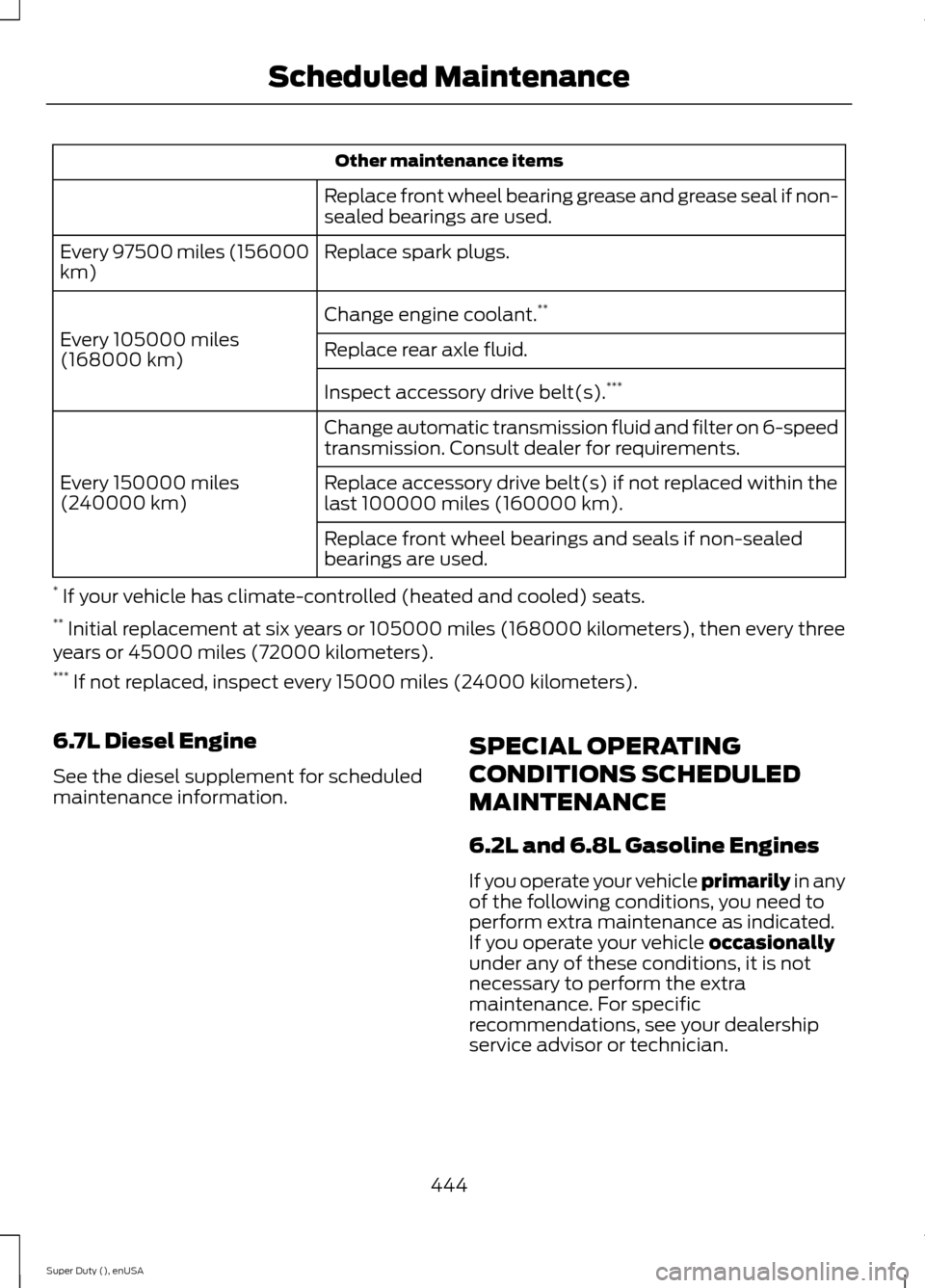
Other maintenance items
Replace front wheel bearing grease and grease seal if non-sealed bearings are used.
Replace spark plugs.Every 97500 miles (156000km)
Change engine coolant.**
Every 105000 miles(168000 km)Replace rear axle fluid.
Inspect accessory drive belt(s).***
Change automatic transmission fluid and filter on 6-speedtransmission. Consult dealer for requirements.
Every 150000 miles(240000 km)Replace accessory drive belt(s) if not replaced within thelast 100000 miles (160000 km).
Replace front wheel bearings and seals if non-sealedbearings are used.
* If your vehicle has climate-controlled (heated and cooled) seats.** Initial replacement at six years or 105000 miles (168000 kilometers), then every threeyears or 45000 miles (72000 kilometers).*** If not replaced, inspect every 15000 miles (24000 kilometers).
6.7L Diesel Engine
See the diesel supplement for scheduledmaintenance information.
SPECIAL OPERATING
CONDITIONS SCHEDULED
MAINTENANCE
6.2L and 6.8L Gasoline Engines
If you operate your vehicle primarily in anyof the following conditions, you need toperform extra maintenance as indicated.If you operate your vehicle occasionallyunder any of these conditions, it is notnecessary to perform the extramaintenance. For specificrecommendations, see your dealershipservice advisor or technician.
444Super Duty (), enUSAScheduled Maintenance
Page 461 of 470
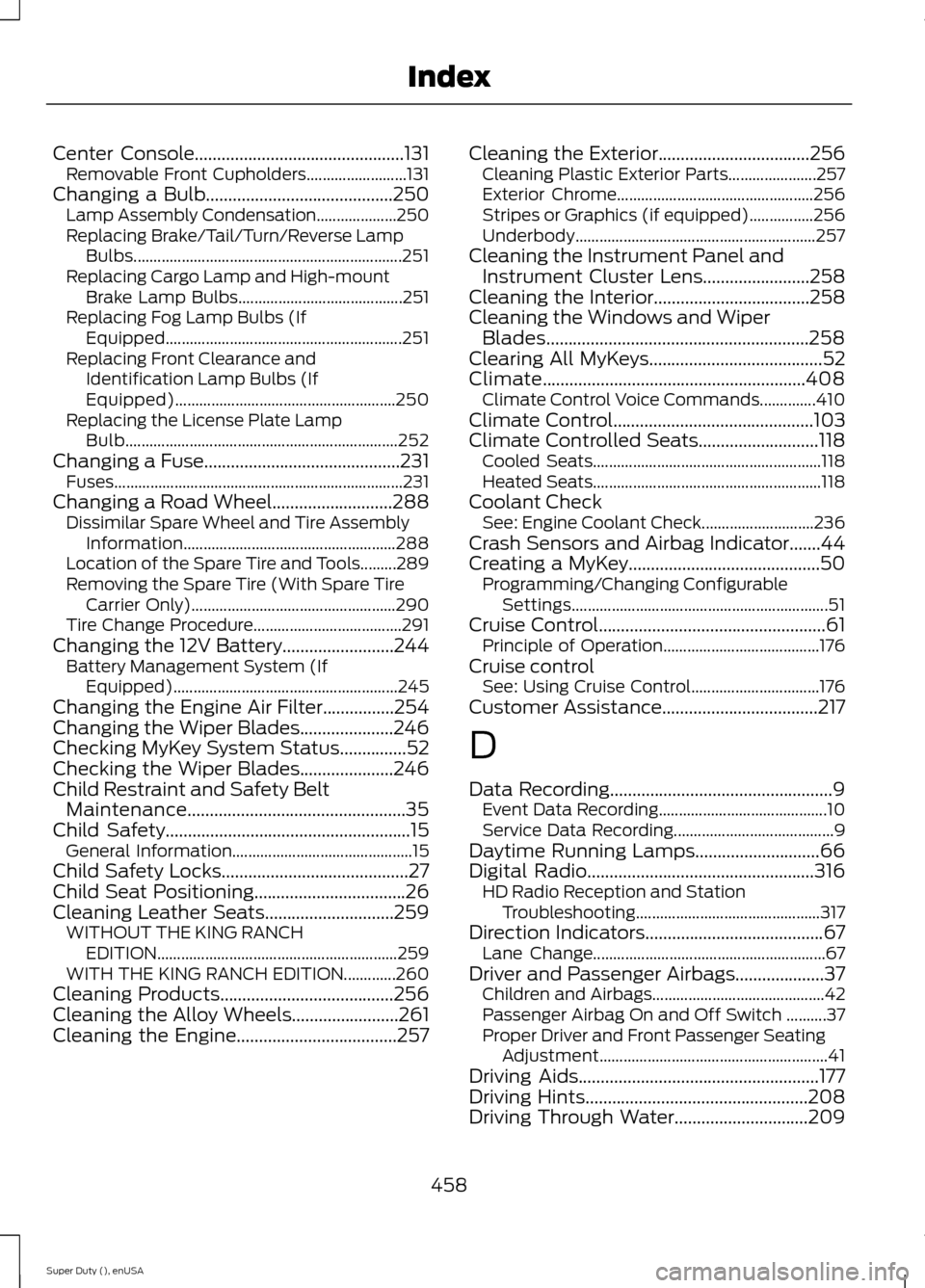
Center Console...............................................131Removable Front Cupholders.........................131Changing a Bulb..........................................250Lamp Assembly Condensation....................250Replacing Brake/Tail/Turn/Reverse LampBulbs...................................................................251Replacing Cargo Lamp and High-mountBrake Lamp Bulbs.........................................251Replacing Fog Lamp Bulbs (IfEquipped...........................................................251Replacing Front Clearance andIdentification Lamp Bulbs (IfEquipped).......................................................250Replacing the License Plate LampBulb....................................................................252Changing a Fuse............................................231Fuses........................................................................231Changing a Road Wheel...........................288Dissimilar Spare Wheel and Tire AssemblyInformation.....................................................288Location of the Spare Tire and Tools.........289Removing the Spare Tire (With Spare TireCarrier Only)...................................................290Tire Change Procedure.....................................291Changing the 12V Battery.........................244Battery Management System (IfEquipped)........................................................245Changing the Engine Air Filter................254Changing the Wiper Blades.....................246Checking MyKey System Status...............52Checking the Wiper Blades.....................246Child Restraint and Safety BeltMaintenance.................................................35Child Safety.......................................................15General Information.............................................15Child Safety Locks..........................................27Child Seat Positioning..................................26Cleaning Leather Seats.............................259WITHOUT THE KING RANCHEDITION............................................................259WITH THE KING RANCH EDITION.............260Cleaning Products.......................................256Cleaning the Alloy Wheels........................261Cleaning the Engine....................................257
Cleaning the Exterior..................................256Cleaning Plastic Exterior Parts......................257Exterior Chrome.................................................256Stripes or Graphics (if equipped)................256Underbody............................................................257Cleaning the Instrument Panel andInstrument Cluster Lens........................258Cleaning the Interior...................................258Cleaning the Windows and WiperBlades...........................................................258Clearing All MyKeys.......................................52Climate...........................................................408Climate Control Voice Commands..............410Climate Control.............................................103Climate Controlled Seats...........................118Cooled Seats.........................................................118Heated Seats.........................................................118Coolant CheckSee: Engine Coolant Check............................236Crash Sensors and Airbag Indicator.......44Creating a MyKey...........................................50Programming/Changing ConfigurableSettings................................................................51Cruise Control...................................................61Principle of Operation.......................................176Cruise controlSee: Using Cruise Control................................176Customer Assistance...................................217
D
Data Recording..................................................9Event Data Recording..........................................10Service Data Recording........................................9Daytime Running Lamps............................66Digital Radio...................................................316HD Radio Reception and StationTroubleshooting..............................................317Direction Indicators........................................67Lane Change..........................................................67Driver and Passenger Airbags....................37Children and Airbags...........................................42Passenger Airbag On and Off Switch ..........37Proper Driver and Front Passenger SeatingAdjustment.........................................................41Driving Aids......................................................177Driving Hints..................................................208Driving Through Water..............................209
458Super Duty (), enUSAIndex
Page 462 of 470
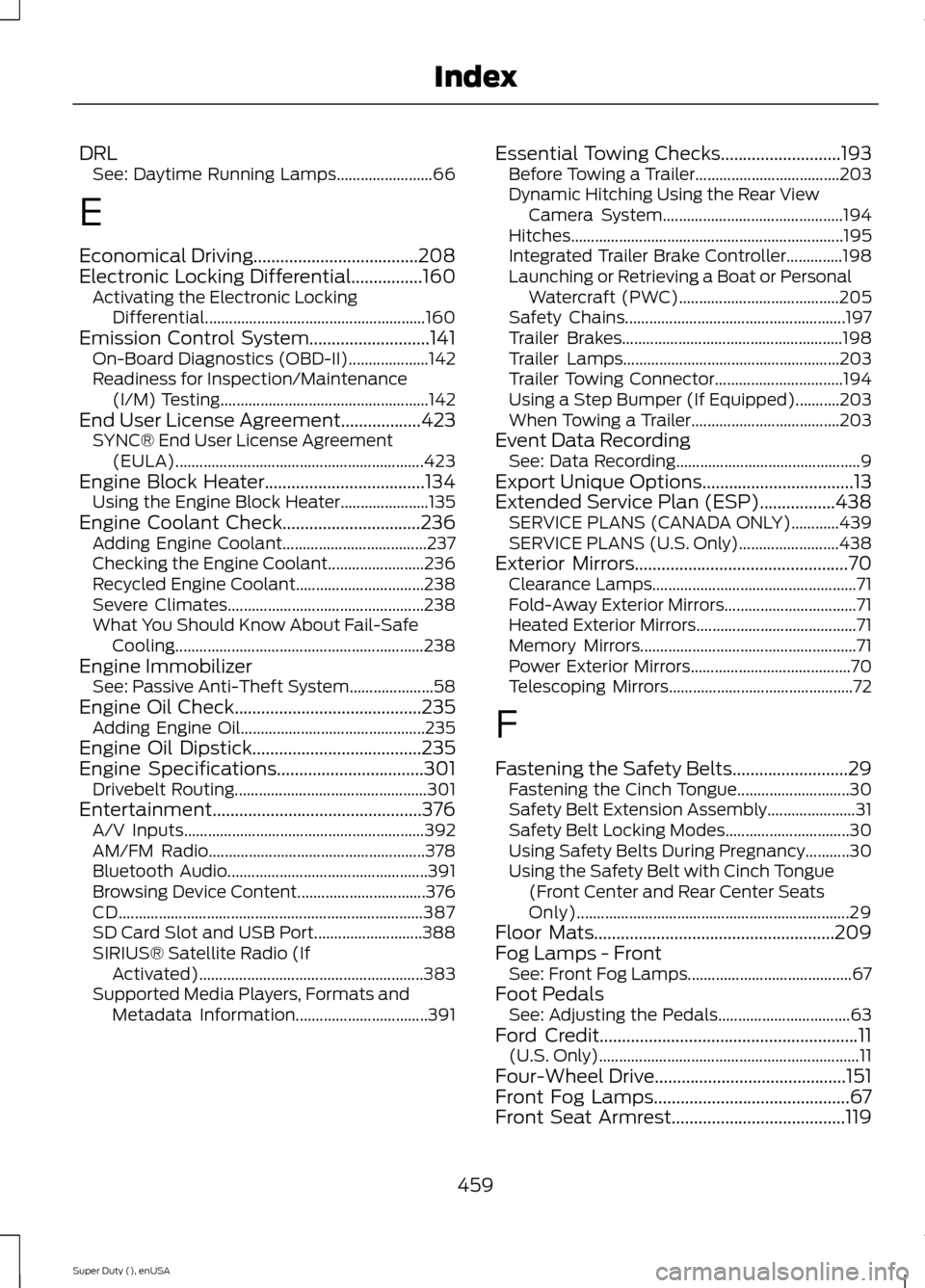
DRLSee: Daytime Running Lamps........................66
E
Economical Driving.....................................208Electronic Locking Differential................160Activating the Electronic LockingDifferential.......................................................160Emission Control System...........................141On-Board Diagnostics (OBD-II)....................142Readiness for Inspection/Maintenance(I/M) Testing....................................................142End User License Agreement..................423SYNC® End User License Agreement(EULA)..............................................................423Engine Block Heater....................................134Using the Engine Block Heater......................135Engine Coolant Check...............................236Adding Engine Coolant....................................237Checking the Engine Coolant........................236Recycled Engine Coolant................................238Severe Climates.................................................238What You Should Know About Fail-SafeCooling..............................................................238Engine ImmobilizerSee: Passive Anti-Theft System.....................58Engine Oil Check..........................................235Adding Engine Oil..............................................235Engine Oil Dipstick......................................235Engine Specifications.................................301Drivebelt Routing................................................301Entertainment...............................................376A/V Inputs............................................................392AM/FM Radio......................................................378Bluetooth Audio..................................................391Browsing Device Content................................376CD............................................................................387SD Card Slot and USB Port...........................388SIRIUS® Satellite Radio (IfActivated)........................................................383Supported Media Players, Formats andMetadata Information.................................391
Essential Towing Checks...........................193Before Towing a Trailer....................................203Dynamic Hitching Using the Rear ViewCamera System.............................................194Hitches....................................................................195Integrated Trailer Brake Controller..............198Launching or Retrieving a Boat or PersonalWatercraft (PWC)........................................205Safety Chains.......................................................197Trailer Brakes.......................................................198Trailer Lamps......................................................203Trailer Towing Connector................................194Using a Step Bumper (If Equipped)...........203When Towing a Trailer.....................................203Event Data RecordingSee: Data Recording..............................................9Export Unique Options..................................13Extended Service Plan (ESP).................438SERVICE PLANS (CANADA ONLY)............439SERVICE PLANS (U.S. Only).........................438Exterior Mirrors................................................70Clearance Lamps...................................................71Fold-Away Exterior Mirrors.................................71Heated Exterior Mirrors........................................71Memory Mirrors......................................................71Power Exterior Mirrors........................................70Telescoping Mirrors..............................................72
F
Fastening the Safety Belts..........................29Fastening the Cinch Tongue............................30Safety Belt Extension Assembly......................31Safety Belt Locking Modes...............................30Using Safety Belts During Pregnancy...........30Using the Safety Belt with Cinch Tongue(Front Center and Rear Center SeatsOnly)....................................................................29Floor Mats......................................................209Fog Lamps - FrontSee: Front Fog Lamps.........................................67Foot PedalsSee: Adjusting the Pedals.................................63Ford Credit..........................................................11(U.S. Only).................................................................11Four-Wheel Drive...........................................151Front Fog Lamps............................................67Front Seat Armrest.......................................119
459Super Duty (), enUSAIndex