alarm FORD SUPER DUTY 2017 4.G User Guide
[x] Cancel search | Manufacturer: FORD, Model Year: 2017, Model line: SUPER DUTY, Model: FORD SUPER DUTY 2017 4.GPages: 636, PDF Size: 10.56 MB
Page 130 of 636
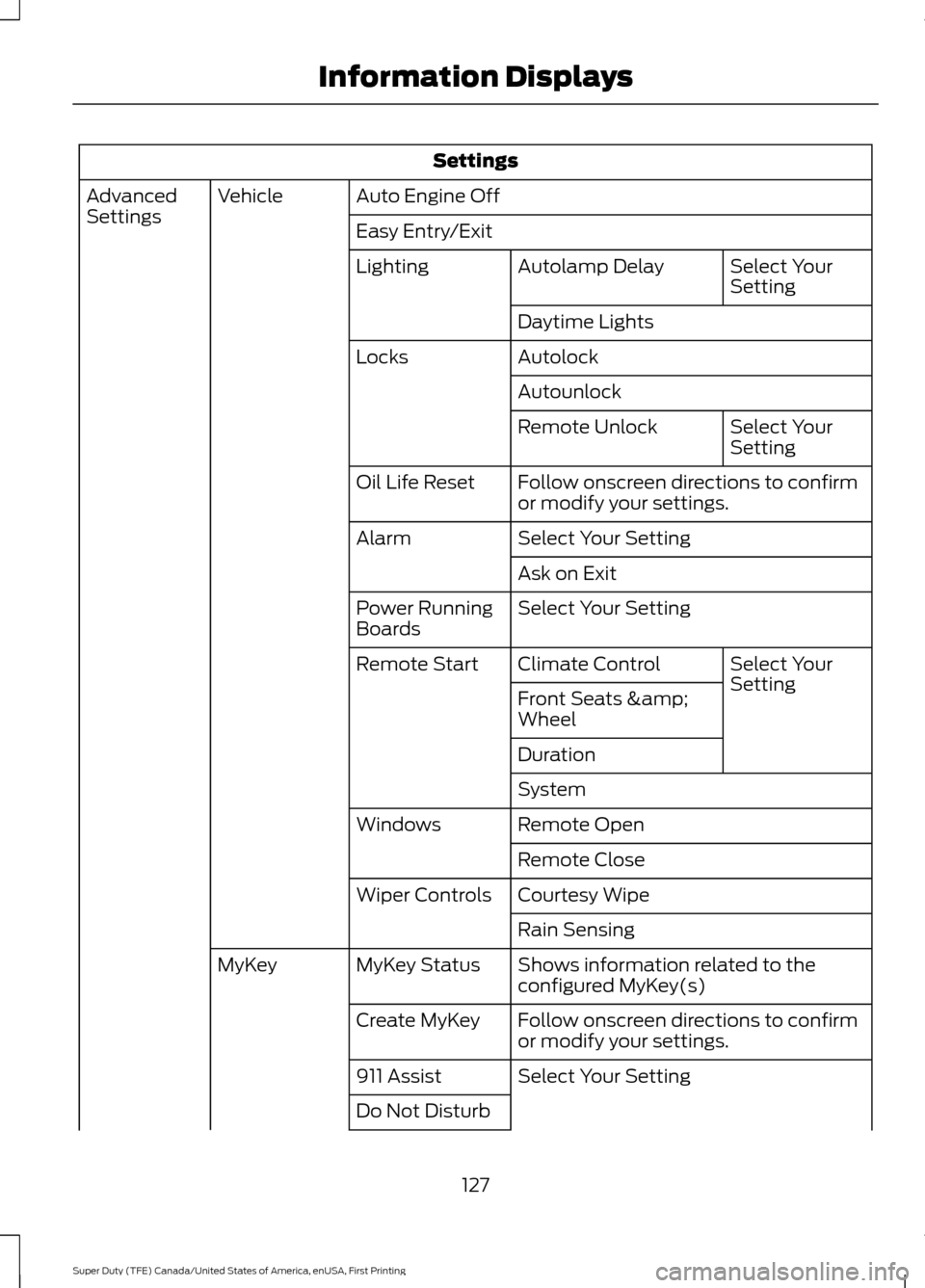
Settings
Auto Engine Off
Vehicle
Advanced
Settings
Easy Entry/Exit
Select Your
Setting
Autolamp Delay
Lighting
Daytime Lights
Autolock
Locks
Autounlock Select Your
Setting
Remote Unlock
Follow onscreen directions to confirm
or modify your settings.
Oil Life Reset
Select Your Setting
Alarm
Ask on Exit
Select Your Setting
Power Running
Boards
Select Your
Setting
Climate Control
Remote Start
Front Seats &
Wheel
Duration
System
Remote Open
Windows
Remote Close
Courtesy Wipe
Wiper Controls
Rain Sensing
Shows information related to the
configured MyKey(s)
MyKey Status
MyKey
Follow onscreen directions to confirm
or modify your settings.
Create MyKey
Select Your Setting
911 Assist
Do Not Disturb
127
Super Duty (TFE) Canada/United States of America, enUSA, First Printing Information Displays
Page 133 of 636
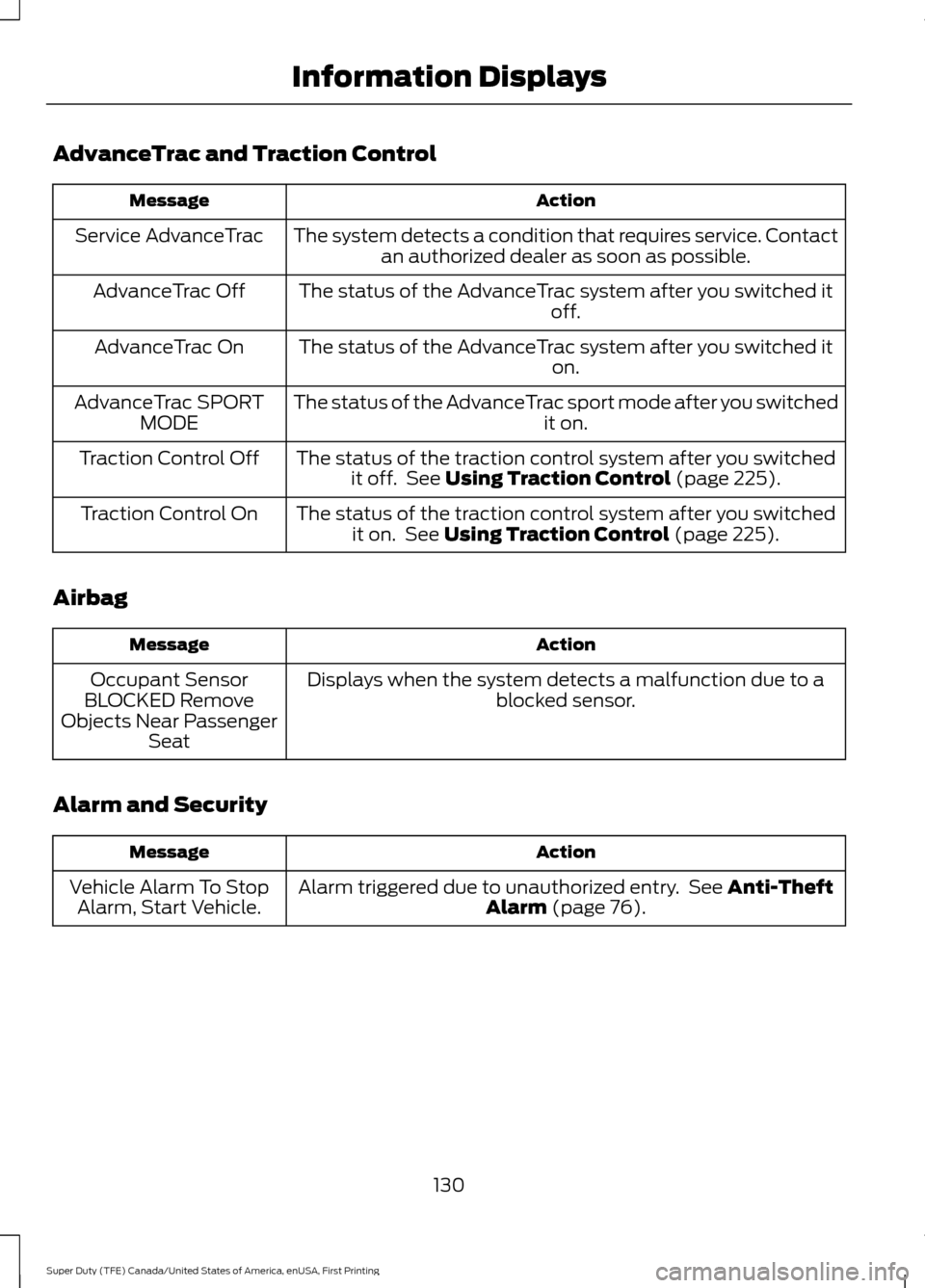
AdvanceTrac and Traction Control
Action
Message
The system detects a condition that requires service. Contactan authorized dealer as soon as possible.
Service AdvanceTrac
The status of the AdvanceTrac system after you switched it off.
AdvanceTrac Off
The status of the AdvanceTrac system after you switched it on.
AdvanceTrac On
The status of the AdvanceTrac sport mode after you switched it on.
AdvanceTrac SPORT
MODE
The status of the traction control system after you switchedit off. See Using Traction Control (page 225).
Traction Control Off
The status of the traction control system after you switchedit on. See
Using Traction Control (page 225).
Traction Control On
Airbag Action
Message
Displays when the system detects a malfunction due to a blocked sensor.
Occupant Sensor
BLOCKED Remove
Objects Near Passenger Seat
Alarm and Security Action
Message
Alarm triggered due to unauthorized entry. See
Anti-Theft
Alarm (page 76).
Vehicle Alarm To Stop
Alarm, Start Vehicle.
130
Super Duty (TFE) Canada/United States of America, enUSA, First Printing Information Displays
Page 234 of 636
PRINCIPLE OF OPERATION
WARNINGS
To help avoid personal injury, please
read and understand the limitations
of the system as contained in this
section. Sensing is only an aid for some
(generally large and fixed) objects when
moving on a flat surface at parking speeds.
Certain objects with surfaces that absorb
ultrasonic waves, surrounding vehicle's
parking aid systems, traffic control
systems, fluorescent lamps, inclement
weather, air brakes, and external motors
and fans may also affect the function of
the sensing system. This may include
reduced performance or a false activation. To help avoid personal injury, always
use caution when in reverse (R) and
when using the sensing system.
This system is not designed to
prevent contact with small or moving
objects. The system is designed to
provide a warning to assist the driver in
detecting large stationary objects to avoid
damaging your vehicle. The system may
not detect smaller objects, particularly
those close to the ground. Certain add-on devices such as large
trailer hitches, bike or surfboard racks
and any device that may block the
normal detection zone of the system, may
create false beeps. Note:
Keep the sensors, located on the
bumper or fascia, free from snow, ice and
large accumulations of dirt. If the sensors
are covered, the system ’s accuracy can be
affected. Do not clean the sensors with
sharp objects.
Note: If your vehicle sustains damage to
the bumper or fascia, leaving it misaligned
or bent, the sensing zone may be altered
causing inaccurate measurement of
obstacles or false alarms. Note:
The sensing system cannot be turned
off when a MyKey is present. See Principle
of Operation (page 61).
Note: If your vehicle is equipped with a
trailer tow package and a trailer is
connected to your vehicle, the rear sensing
system disables and you cannot switch the
system on through the information display.
The sensing system warns the driver of
obstacles within a certain range of your
vehicle. The system turns on automatically
whenever you switch the ignition on.
When receiving a detection warning, the
radio volume reduces to a predetermined
level. After the warning goes away, the
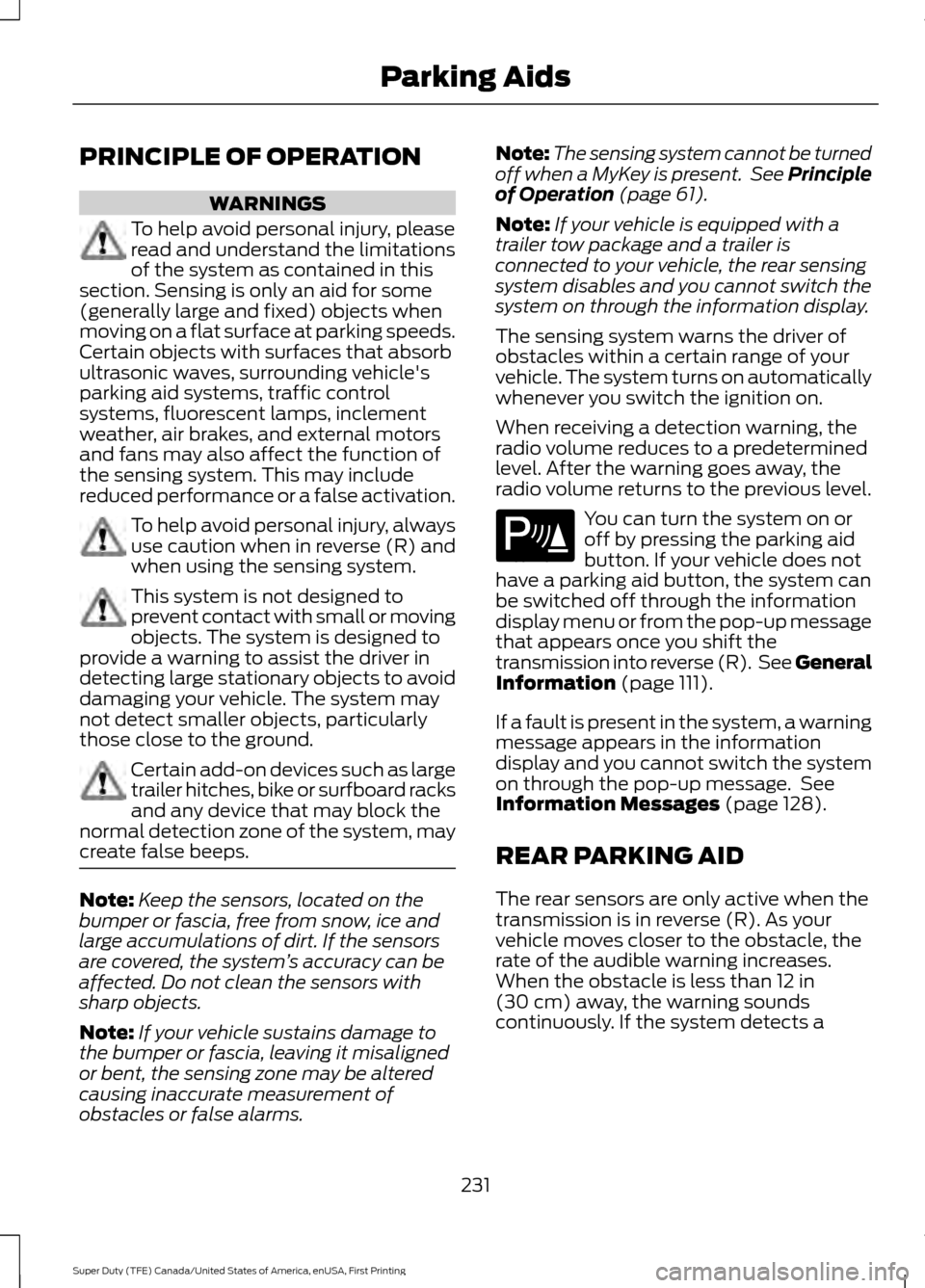
radio volume returns to the previous level. You can turn the system on or
off by pressing the parking aid
button. If your vehicle does not
have a parking aid button, the system can
be switched off through the information
display menu or from the pop-up message
that appears once you shift the
transmission into reverse (R). See General
Information
(page 111).
If a fault is present in the system, a warning
message appears in the information
display and you cannot switch the system
on through the pop-up message. See
Information Messages
(page 128).
REAR PARKING AID
The rear sensors are only active when the
transmission is in reverse (R). As your
vehicle moves closer to the obstacle, the
rate of the audible warning increases.
When the obstacle is less than
12 in
(30 cm) away, the warning sounds
continuously. If the system detects a
231
Super Duty (TFE) Canada/United States of America, enUSA, First Printing Parking AidsE139213
Page 246 of 636
Each time you start the vehicle, the system
selects the last chosen gap for the current
driver.
Disengaging the System
Press the brake pedal or press CNCL. The
last set speed displays in grey but does not
erase.
Overriding the System WARNING
If you override the system by pressing
the accelerator pedal, it does not
automatically apply the brakes to
maintain a gap from any vehicle ahead. When you press the accelerator pedal, you
override the set speed and gap distance.
The green indicator illuminates
when the system engages.
The system resumes operation
when you release the accelerator pedal.
The vehicle speed decreases to the set
speed, or to a lower speed if following a
slower vehicle.
Changing the Set Speed
• Accelerate or brake to the desired
speed, then press and release
SET+.
• Press and hold SET+ or SET- until the
desired set speed shows on the
information display. The vehicle speed
gradually changes to the selected
speed.
• Press and release
SET+ or SET-. The
set speed changes in approximately
1 mph (1 km/h)
.
• Hold the
SET+ or SET- button to
change the set speed in increments of
approximately 5 mph or 10 km/h. The system may apply the brakes to slow
the vehicle to the new set speed. The set
speed displays continuously in the
information display while the system is
active.
Resuming the Set Speed
Note:
Only use resume if you are aware of
the set speed and intend to return to it.
Press and release RES. The vehicle returns
to the previously set speed. The set speed
shows continuously in the information
display while the system is active.
Low Speed Automatic
Cancellation
The system does not function at vehicle
speeds below
12.4 mph (20 km/h). An
audible alarm sounds and the automatic
braking releases if the vehicle drops below
this speed.
Hilly Condition and Trailer Tow
Usage
Note: An audible alarm sounds and the
system shuts down if it applies brakes for
an extended period of time. This allows the
brakes to cool. The system functions
normally again when the brakes have
cooled.
Note: When towing with adaptive cruise
control, turn on Tow/Haul Mode and Diesel
Engine Brake.
Select a lower gear when the system is
active in situations such as prolonged
downhill driving on steep grades, for
example in mountainous areas. The
system needs additional engine braking in
these situations to reduce the load on the
vehicle ’s regular brake system to prevent
it from overheating.
243
Super Duty (TFE) Canada/United States of America, enUSA, First Printing Cruise Control
(If Equipped)E144529
Page 563 of 636
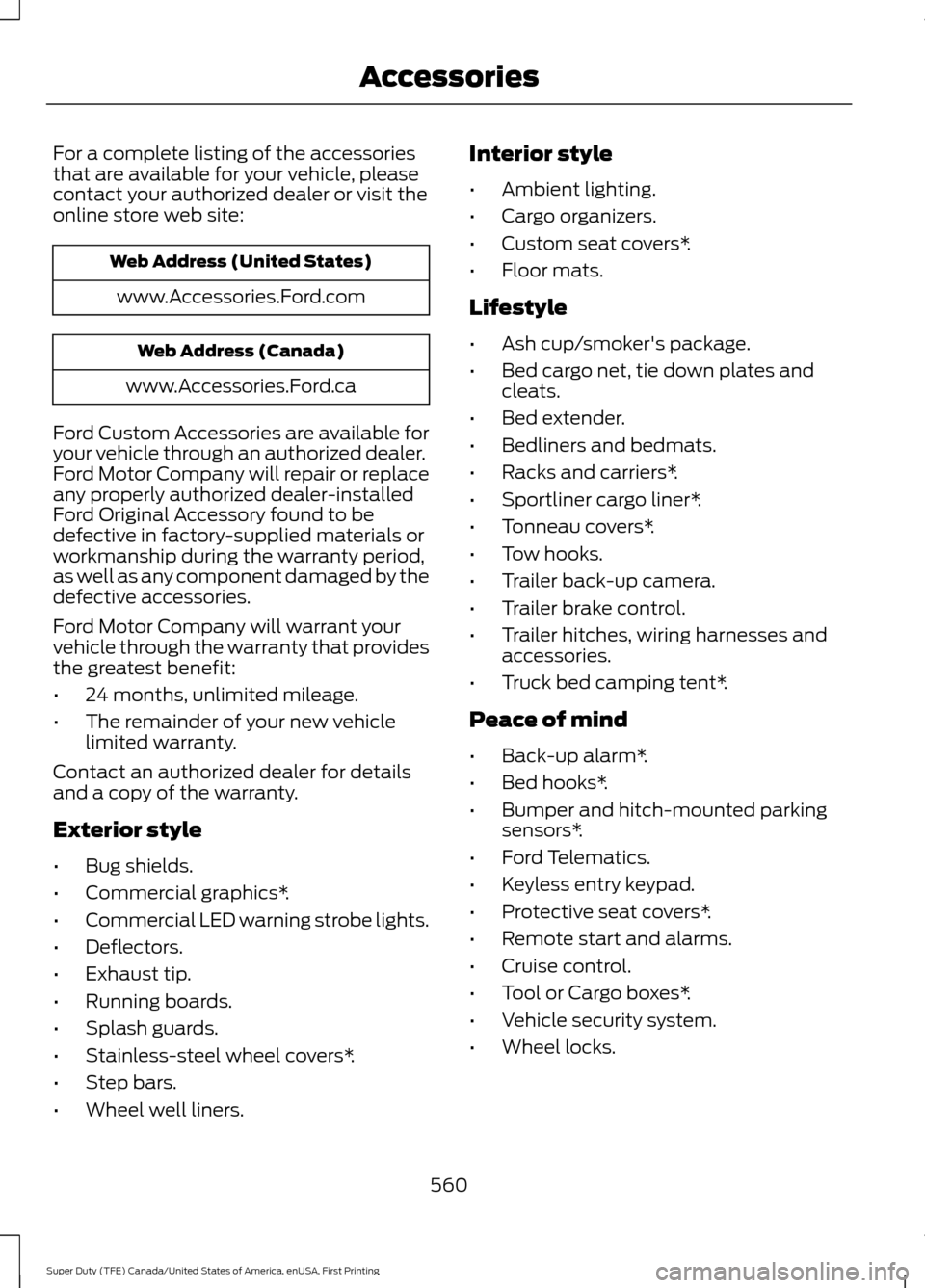
For a complete listing of the accessories
that are available for your vehicle, please
contact your authorized dealer or visit the
online store web site:
Web Address (United States)
www.Accessories.Ford.com Web Address (Canada)
www.Accessories.Ford.ca
Ford Custom Accessories are available for
your vehicle through an authorized dealer.
Ford Motor Company will repair or replace
any properly authorized dealer-installed
Ford Original Accessory found to be
defective in factory-supplied materials or
workmanship during the warranty period,
as well as any component damaged by the
defective accessories.
Ford Motor Company will warrant your
vehicle through the warranty that provides
the greatest benefit:
• 24 months, unlimited mileage.
• The remainder of your new vehicle
limited warranty.
Contact an authorized dealer for details
and a copy of the warranty.
Exterior style
• Bug shields.
• Commercial graphics*.
• Commercial LED warning strobe lights.
• Deflectors.
• Exhaust tip.
• Running boards.
• Splash guards.
• Stainless-steel wheel covers*.
• Step bars.
• Wheel well liners. Interior style
•
Ambient lighting.
• Cargo organizers.
• Custom seat covers*.
• Floor mats.
Lifestyle
• Ash cup/smoker's package.
• Bed cargo net, tie down plates and
cleats.
• Bed extender.
• Bedliners and bedmats.
• Racks and carriers*.
• Sportliner cargo liner*.
• Tonneau covers*.
• Tow hooks.
• Trailer back-up camera.
• Trailer brake control.
• Trailer hitches, wiring harnesses and
accessories.
• Truck bed camping tent*.
Peace of mind
• Back-up alarm*.
• Bed hooks*.
• Bumper and hitch-mounted parking
sensors*.
• Ford Telematics.
• Keyless entry keypad.
• Protective seat covers*.
• Remote start and alarms.
• Cruise control.
• Tool or Cargo boxes*.
• Vehicle security system.
• Wheel locks.
560
Super Duty (TFE) Canada/United States of America, enUSA, First Printing Accessories
Page 564 of 636
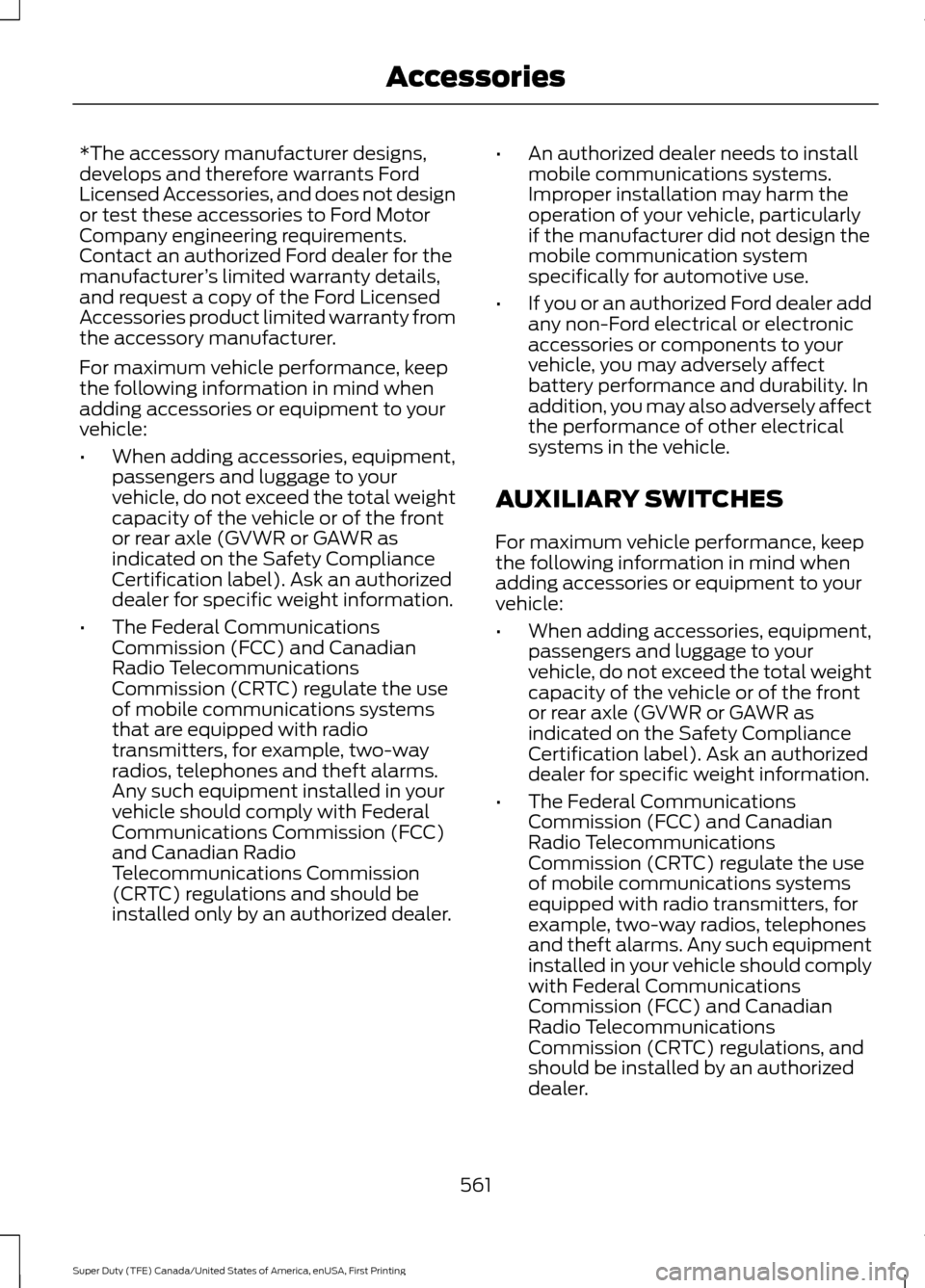
*The accessory manufacturer designs,
develops and therefore warrants Ford
Licensed Accessories, and does not design
or test these accessories to Ford Motor
Company engineering requirements.
Contact an authorized Ford dealer for the
manufacturer
’s limited warranty details,
and request a copy of the Ford Licensed
Accessories product limited warranty from
the accessory manufacturer.
For maximum vehicle performance, keep
the following information in mind when
adding accessories or equipment to your
vehicle:
• When adding accessories, equipment,
passengers and luggage to your
vehicle, do not exceed the total weight
capacity of the vehicle or of the front
or rear axle (GVWR or GAWR as
indicated on the Safety Compliance
Certification label). Ask an authorized
dealer for specific weight information.
• The Federal Communications
Commission (FCC) and Canadian
Radio Telecommunications
Commission (CRTC) regulate the use
of mobile communications systems
that are equipped with radio
transmitters, for example, two-way
radios, telephones and theft alarms.
Any such equipment installed in your
vehicle should comply with Federal
Communications Commission (FCC)
and Canadian Radio
Telecommunications Commission
(CRTC) regulations and should be
installed only by an authorized dealer. •
An authorized dealer needs to install
mobile communications systems.
Improper installation may harm the
operation of your vehicle, particularly
if the manufacturer did not design the
mobile communication system
specifically for automotive use.
• If you or an authorized Ford dealer add
any non-Ford electrical or electronic
accessories or components to your
vehicle, you may adversely affect
battery performance and durability. In
addition, you may also adversely affect
the performance of other electrical
systems in the vehicle.
AUXILIARY SWITCHES
For maximum vehicle performance, keep
the following information in mind when
adding accessories or equipment to your
vehicle:
• When adding accessories, equipment,
passengers and luggage to your
vehicle, do not exceed the total weight
capacity of the vehicle or of the front
or rear axle (GVWR or GAWR as
indicated on the Safety Compliance
Certification label). Ask an authorized
dealer for specific weight information.
• The Federal Communications
Commission (FCC) and Canadian
Radio Telecommunications
Commission (CRTC) regulate the use
of mobile communications systems
equipped with radio transmitters, for
example, two-way radios, telephones
and theft alarms. Any such equipment
installed in your vehicle should comply
with Federal Communications
Commission (FCC) and Canadian
Radio Telecommunications
Commission (CRTC) regulations, and
should be installed by an authorized
dealer.
561
Super Duty (TFE) Canada/United States of America, enUSA, First Printing Accessories
Page 624 of 636
3
360 Degree Camera...................................235
Advanced Camera Views................................ 235
Auxiliary Camera................................................ 238
Camera Views..................................................... 235
Center High-Mount Stop Lamp Camera.............................................................. 237
Front Camera...................................................... 236
Keep Out Zone.................................................... 236
Side Camera......................................................... 237
4
4WD See: Four-Wheel Drive...................................... 210
A
A/C See: Climate Control......................................... 145
About This Manual...........................................7
ABS See: Brakes............................................................ 221
ABS driving hints See: Hints on Driving With Anti-Lock
Brakes................................................................ 222
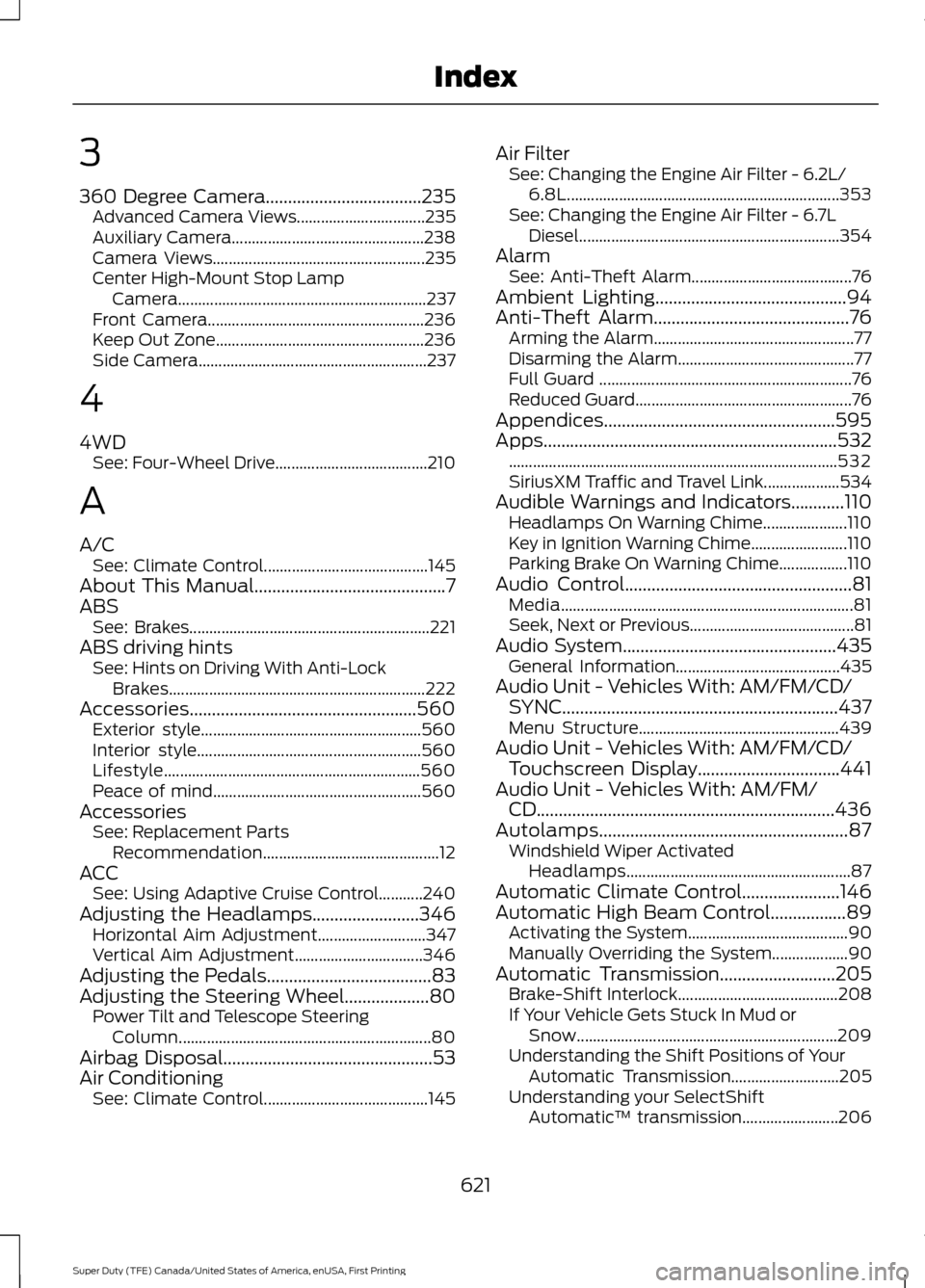
Accessories...................................................560 Exterior style....................................................... 560
Interior style........................................................ 560
Lifestyle................................................................ 560
Peace of mind.................................................... 560
Accessories See: Replacement Parts
Recommendation............................................ 12
ACC See: Using Adaptive Cruise Control...........240
Adjusting the Headlamps........................346 Horizontal Aim Adjustment........................... 347
Vertical Aim Adjustment................................ 346
Adjusting the Pedals
.....................................83
Adjusting the Steering Wheel...................80 Power Tilt and Telescope Steering
Column............................................................... 80
Airbag Disposal
...............................................53
Air Conditioning See: Climate Control......................................... 145Air Filter
See: Changing the Engine Air Filter - 6.2L/
6.8L.................................................................... 353
See: Changing the Engine Air Filter - 6.7L Diesel................................................................. 354
Alarm See: Anti-Theft Alarm........................................ 76
Ambient Lighting
...........................................94
Anti-Theft Alarm............................................76
Arming the Alarm.................................................. 77
Disarming the Alarm............................................ 77
Full Guard ............................................................... 76
Reduced Guard...................................................... 76
Appendices....................................................595
Apps..................................................................532 ........................................................................\
.......... 532
SiriusXM Traffic and Travel Link...................534
Audible Warnings and Indicators............110 Headlamps On Warning Chime.....................110
Key in Ignition Warning Chime........................110
Parking Brake On Warning Chime.................110
Audio Control
...................................................81
Media........................................................................\
. 81
Seek, Next or Previous......................................... 81
Audio System
................................................435
General Information......................................... 435
Audio Unit - Vehicles With: AM/FM/CD/ SYNC
..............................................................437
Menu Structure.................................................. 439
Audio Unit - Vehicles With: AM/FM/CD/ Touchscreen Display................................441
Audio Unit - Vehicles With: AM/FM/ CD...................................................................436
Autolamps........................................................87 Windshield Wiper Activated
Headlamps........................................................ 87
Automatic Climate Control......................146
Automatic High Beam Control.................89 Activating the System........................................ 90
Manually Overriding the System................... 90
Automatic Transmission
..........................205
Brake-Shift Interlock........................................ 208
If Your Vehicle Gets Stuck In Mud or Snow................................................................. 209
Understanding the Shift Positions of Your Automatic Transmission........................... 205
Understanding your SelectShift Automatic ™ transmission........................ 206
621
Super Duty (TFE) Canada/United States of America, enUSA, First Printing Index
Page 629 of 636
Getting the Services You Need..............303
Away From Home............................................. 303
Global Opening
..............................................96
Opening the Windows....................................... 96
H
Handbrake See: Parking Brake............................................. 222
Hazard Warning Flashers.........................296
HDC See: Using Hill Descent Control................... 229
Headlamp Adjusting See: Adjusting the Headlamps.................... 346
Head Restraints
.............................................152
Adjusting the Head Restraint......................... 153
Heated Seats.................................................160 Rear Heated Seats............................................. 160
Heated Steering Wheel
................................82
Heated Windows and Mirrors..................150 Heated Exterior Mirrors...................................... 151
Heated Rear Window........................................ 150
Heating See: Climate Control......................................... 145
Hill Start Assist
.............................................223
Switching the System On and Off...............224
Using Hill Start Assist....................................... 223
Hints on Controlling the Interior Climate..........................................................148
Cooling the Interior Quickly............................ 149
General Hints....................................................... 148
Heating the Interior Quickly............................ 149
Recommended Settings for Cooling..........150
Recommended Settings for Heating..........149
Side Window Defogging in Cold Weather............................................................ 150
Hints on Driving With Anti-Lock Brakes............................................................222
Home Screen................................................498
Hood Lock See: Opening and Closing the Hood..........320
I
Ignition Switch
................................................173
In California (U.S. Only)............................304
Information Display Control
.......................82 Information Displays.....................................111
General Information............................................ 111
Information Messages
................................128
4WD........................................................................\
. 144
Active Park............................................................ 128
Adaptive Cruise Control................................... 129
Adaptive Steering............................................... 129
AdvanceTrac and Traction Control..............130
Airbag...................................................................... 130
Alarm and Security............................................ 130
Automatic Engine Shutdown.......................... 131
Battery and Charging System......................... 131
Blind Spot Information and Cross Traffic Alert System.................................................... 132
Collision Warning System................................ 133
Diesel Messages.................................................. 133
Doors and Locks.................................................. 135
Driver Alert............................................................ 136
Drivetrain................................................................ 136
Engine..................................................................... 136
Fuel........................................................................\
... 137
Keys and Intelligent Access............................. 137
Lane Keeping System....................................... 138
Maintenance........................................................ 138
MyKey...................................................................... 139
Off Road................................................................. 139
Park Aid.................................................................. 140
Park Brake............................................................. 140
Power Steering..................................................... 141
Remote Start......................................................... 141
Seats........................................................................\
. 141
Starting System .................................................. 142
Tire Pressure Monitoring System.................. 142
Trailer....................................................................... 142
Installing Child Restraints
............................18
Child Seats............................................................... 18
Combining Seatbelt and LATCH Lower Anchors for Attaching Child Safety
Seats..................................................................... 27
Front Seat Tether Strap Attachment (Regular Cab)................................................... 28
Rear Seat Tether Strap Attachment (Crew Cab and Super Cab)...................................... 29
Use of Inboard Lower Anchors from the Outboard Seating Positions (Center
Seating Use) .................................................... 26
Using Inflatable Seatbelts (Rear Seat Outboard Positions)....................................... 23
626
Super Duty (TFE) Canada/United States of America, enUSA, First Printing Index
Page 632 of 636
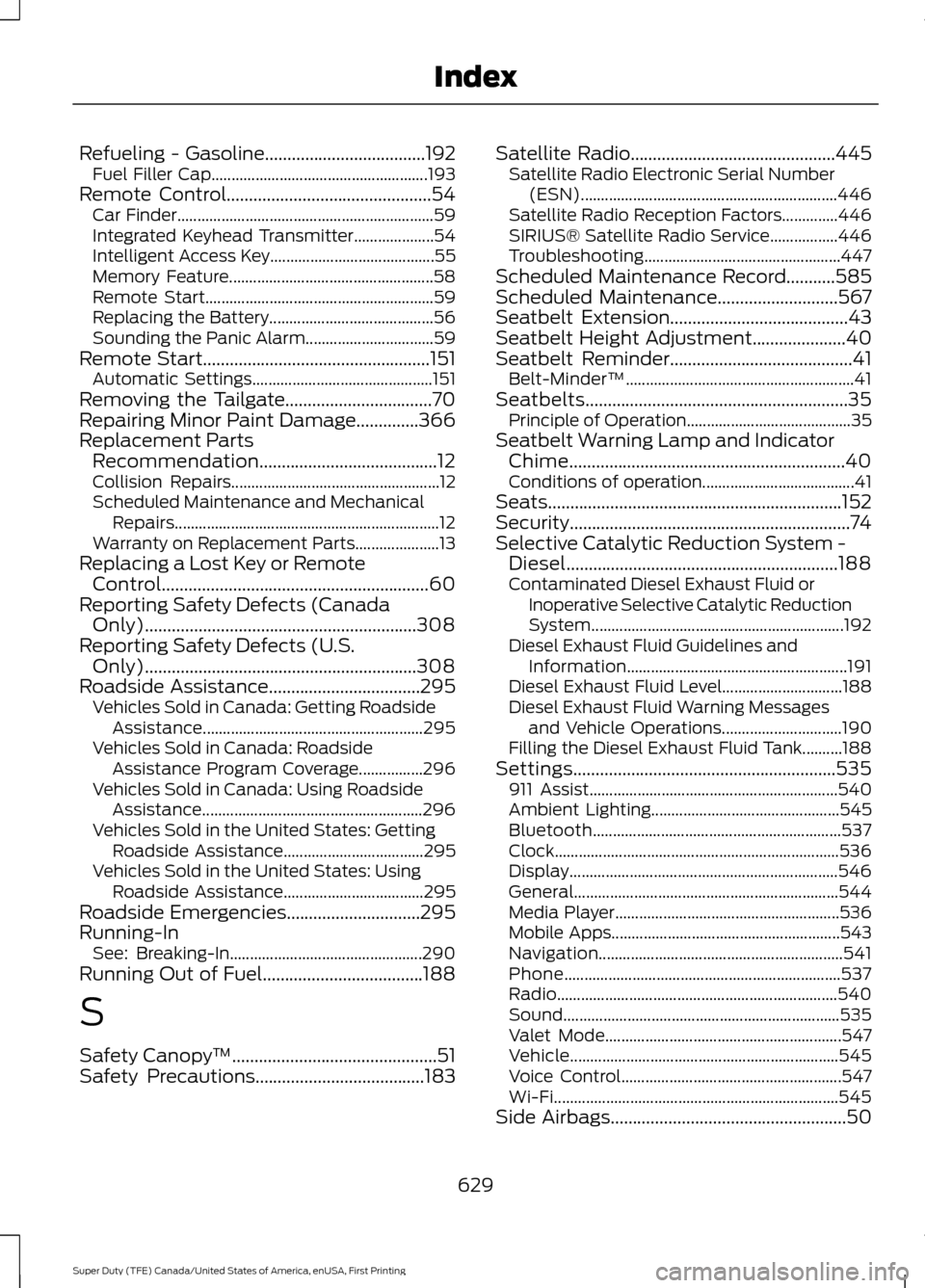
Refueling - Gasoline....................................192
Fuel Filler Cap...................................................... 193
Remote Control..............................................54 Car Finder................................................................ 59
Integrated Keyhead Transmitter....................54
Intelligent Access Key......................................... 55
Memory Feature................................................... 58
Remote Start......................................................... 59
Replacing the Battery......................................... 56
Sounding the Panic Alarm................................ 59
Remote Start...................................................151 Automatic Settings............................................. 151
Removing the Tailgate.................................70
Repairing Minor Paint Damage..............366
Replacement Parts Recommendation........................................12
Collision Repairs.................................................... 12
Scheduled Maintenance and Mechanical Repairs.................................................................. 12
Warranty on Replacement Parts..................... 13
Replacing a Lost Key or Remote Control............................................................60
Reporting Safety Defects (Canada Only).............................................................308
Reporting Safety Defects (U.S. Only).............................................................308
Roadside Assistance
..................................295
Vehicles Sold in Canada: Getting Roadside
Assistance....................................................... 295
Vehicles Sold in Canada: Roadside Assistance Program Coverage................296
Vehicles Sold in Canada: Using Roadside Assistance....................................................... 296
Vehicles Sold in the United States: Getting Roadside Assistance................................... 295
Vehicles Sold in the United States: Using Roadside Assistance................................... 295
Roadside Emergencies
..............................295
Running-In See: Breaking-In................................................ 290
Running Out of Fuel....................................188
S
Safety Canopy ™
..............................................51
Safety Precautions......................................183 Satellite Radio..............................................445
Satellite Radio Electronic Serial Number
(ESN)................................................................ 446
Satellite Radio Reception Factors..............446
SIRIUS® Satellite Radio Service.................446
Troubleshooting................................................. 447
Scheduled Maintenance Record
...........585
Scheduled Maintenance...........................567
Seatbelt Extension........................................43
Seatbelt Height Adjustment.....................40
Seatbelt Reminder.........................................41 Belt-Minder™......................................................... 41
Seatbelts...........................................................35 Principle of Operation......................................... 35
Seatbelt Warning Lamp and Indicator Chime..............................................................40
Conditions of operation...................................... 41
Seats..................................................................152
Security...............................................................74
Selective Catalytic Reduction System - Diesel.............................................................188
Contaminated Diesel Exhaust Fluid or Inoperative Selective Catalytic Reduction
System............................................................... 192
Diesel Exhaust Fluid Guidelines and Information....................................................... 191
Diesel Exhaust Fluid Level.............................. 188
Diesel Exhaust Fluid Warning Messages and Vehicle Operations.............................. 190
Filling the Diesel Exhaust Fluid Tank..........188
Settings...........................................................535 911 Assist.............................................................. 540
Ambient Lighting............................................... 545
Bluetooth.............................................................. 537
Clock....................................................................... 536
Display................................................................... 546
General.................................................................. 544
Media Player........................................................ 536
Mobile Apps......................................................... 543
Navigation............................................................. 541
Phone..................................................................... 537
Radio...................................................................... 540
Sound..................................................................... 535
Valet Mode........................................................... 547
Vehicle................................................................... 545
Voice Control....................................................... 547
Wi-Fi....................................................................... 545
Side Airbags
.....................................................50
629
Super Duty (TFE) Canada/United States of America, enUSA, First Printing Index