climate settings FORD SUPER DUTY 2017 4.G User Guide
[x] Cancel search | Manufacturer: FORD, Model Year: 2017, Model line: SUPER DUTY, Model: FORD SUPER DUTY 2017 4.GPages: 636, PDF Size: 10.56 MB
Page 165 of 636
Press the cooled seat symbol to cycle
through the various cool settings and off.
More indicator lights indicate cooler
settings.
Note:
The cooled seats may remain on after
you remote start your vehicle, based on your
remote start settings. The heated seats may
also turn on when you start your vehicle if
they were on when you switched your
vehicle off.
Note: After 60 minutes of operation, the
cooled seats switch off. Press the cooled
seat symbol to switch the cooled seats on.
Climate Controlled Seat Air Filter
Replacement
The climate controlled seat system
includes air filters. You must replace them
periodically.
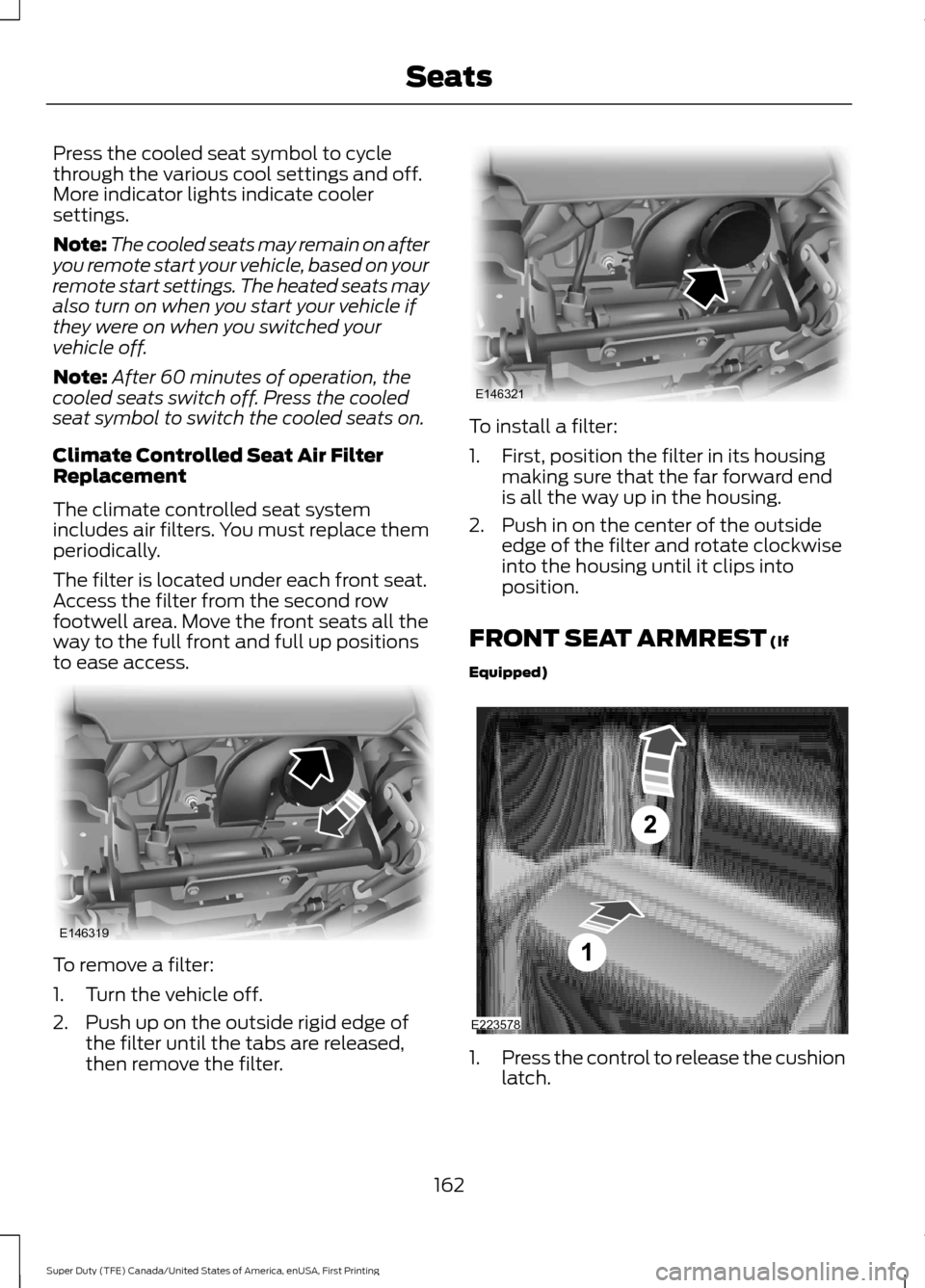
The filter is located under each front seat.
Access the filter from the second row
footwell area. Move the front seats all the
way to the full front and full up positions
to ease access. To remove a filter:
1. Turn the vehicle off.
2. Push up on the outside rigid edge of
the filter until the tabs are released,
then remove the filter. To install a filter:
1. First, position the filter in its housing
making sure that the far forward end
is all the way up in the housing.
2. Push in on the center of the outside edge of the filter and rotate clockwise
into the housing until it clips into
position.
FRONT SEAT ARMREST (If
Equipped) 1.
Press the control to release the cushion
latch.
162
Super Duty (TFE) Canada/United States of America, enUSA, First Printing SeatsE146319 E146321 E223578
Page 456 of 636
To adjust this setting press the voice button, when prompted say:
Action and Description
Voice Command
voice settings
Then any of the following: When enabled, this feature will prompt you
to confirm any voice initiated call command
prior to the call being placed.
phone confirmation on
The system will make a best guess; you
may still occasionally be asked to confirm
settings.
phone confirmation off
Changing the Voice Settings
In addition to using voice commands to
change the voice settings, you can also use
the menu in the audio display.
To change the voice settings press the
Menu button then select: Menu Item
SYNC-Settings
Voice settings
Note: Depending on the current climate
control settings, the fan speed may
automatically go down while issuing voice
commands or while making and receiving
phone calls via SYNC to reduce the amount
of background noise in the vehicle. The fan
speed will automatically return to normal
operation once the voice session ends. Fan
speed can also be adjusted normally during
a voice session, simply press fan buttons (or
turn fan knob) to increase or decrease fan
speed to desired setting. To disable this automatic fan speed
reduction feature during voice sessions,
press and hold the climate control AC and
Recirculated air buttons simultaneously,
release and then increase fan speed within
2 seconds. To re-enable this feature, repeat
the above sequence.
USING SYNC™ WITH YOUR
PHONE
Hands-free calling is one of the main
features of SYNC. While the system
supports a variety of features, many are
dependent on your cellular phone's
functionality. At a minimum, most cellular
phones with Bluetooth wireless technology
support the following functions:
•
Answering an incoming call.
• Ending a call.
• Using privacy mode.
• Dialing a number.
• Redialing.
• Call waiting notification.
• Caller ID.
453
Super Duty (TFE) Canada/United States of America, enUSA, First Printing SYNC™ (If Equipped)
Page 491 of 636
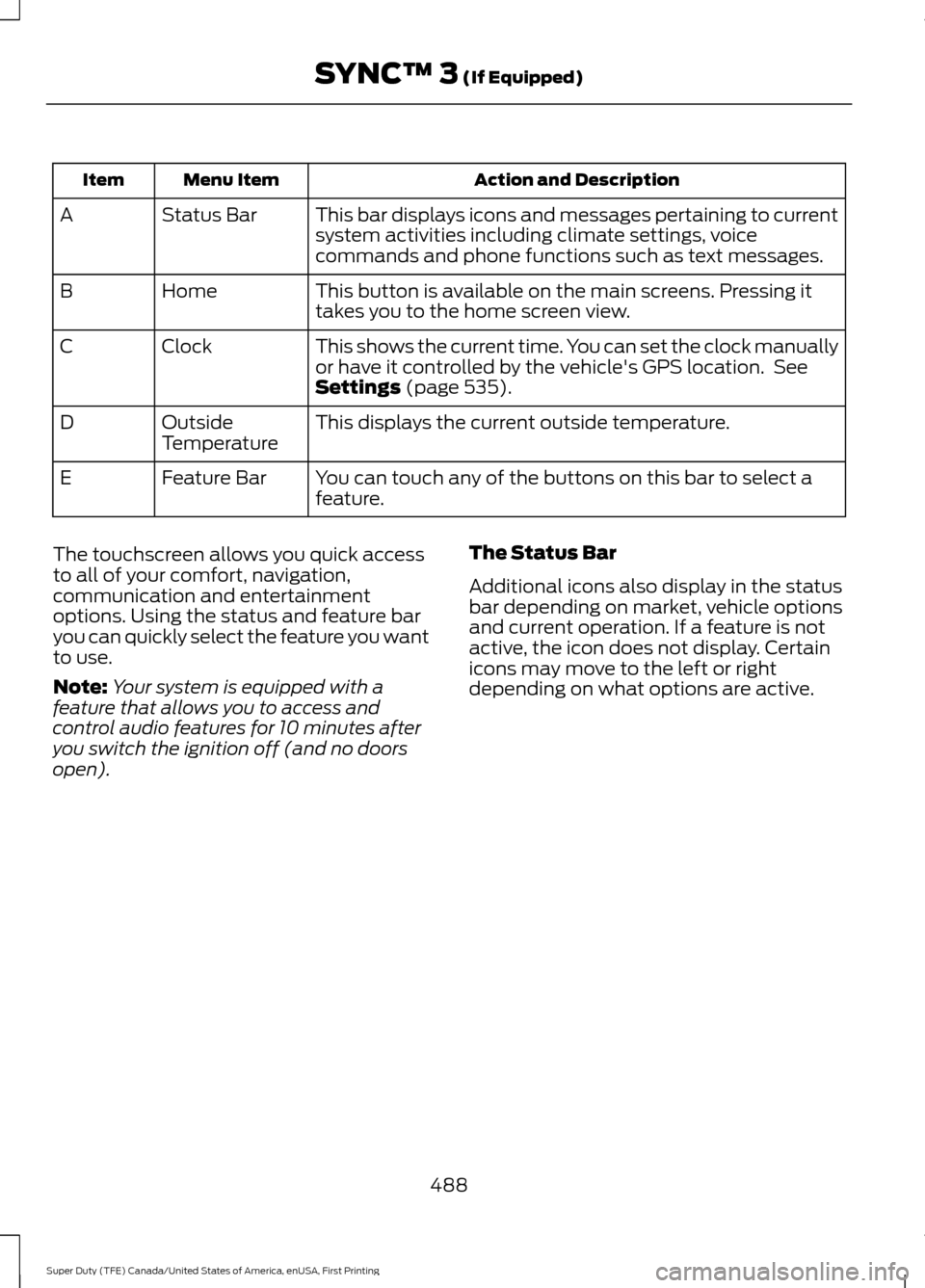
Action and Description
Menu Item
Item
This bar displays icons and messages pertaining to current
system activities including climate settings, voice
commands and phone functions such as text messages.
Status Bar
A
This button is available on the main screens. Pressing it
takes you to the home screen view.
Home
B
This shows the current time. You can set the clock manually
or have it controlled by the vehicle's GPS location. See
Settings (page 535).
Clock
C
This displays the current outside temperature.
Outside
Temperature
D
You can touch any of the buttons on this bar to select a
feature.
Feature Bar
E
The touchscreen allows you quick access
to all of your comfort, navigation,
communication and entertainment
options. Using the status and feature bar
you can quickly select the feature you want
to use.
Note: Your system is equipped with a
feature that allows you to access and
control audio features for 10 minutes after
you switch the ignition off (and no doors
open). The Status Bar
Additional icons also display in the status
bar depending on market, vehicle options
and current operation. If a feature is not
active, the icon does not display. Certain
icons may move to the left or right
depending on what options are active.
488
Super Duty (TFE) Canada/United States of America, enUSA, First Printing SYNC™ 3
(If Equipped)
Page 495 of 636
SEEK PREVIOUS:
•
While in radio mode, press to seek
between memory presets.
• While in USB, Bluetooth Audio or CD
mode, press to seek between songs or
press and hold to fast seek.
PHONE ACCEPT: Press to answer a call
or switch between calls.
PHONE REJECT:
Press to end a call or
reject an incoming call.
Note: On some models, SEEK NEXT
may
be combined with PHONE REJECT and
SEEK PREVIOUS may be combined with
PHONE ACCEPT.
M:
Touch the control repeatedly to switch
between media sources (modes).
See
Steering Wheel (page 80).
Using Your Bezel Controls
Depending on your vehicle and option
package, you may also have these controls
on your instrument panel:
• Power:
Switch the audio system on
and off.
• VOL:
Control the volume of playing
audio.
• Seek
and Tune: Use as you normally
would in audio modes.
• Eject:
Eject a CD from the audio
system.
• SOURCE
or MEDIA: Press repeatedly
to advance through available media
modes.
• SOUND:
Press to access the Sound
menu where you can adjust sound and
other audio settings.
• 1-6:
Press and hold to store or press to
select an AM, FM or SIRIUS memory
preset. See Audio System (page 435
). •
DISP:
Switch the display on or off. You
can also touch the screen to switch the
display back on.
• Temperature, fan and climate
control buttons:
Control the
temperature, fan speed or settings of
the climate control system. See
Climate Control
(page 145).
911 Assist WARNINGS
Unless the 911 Assist setting is set on
before a crash, the system will not
dial for help which could delay
response time, potentially increasing the
risk of serious injury or death after a crash.
setting is set on before a crash, the system
will not dial for help which could delay
response time, potentially increasing the
risk of serious injury or death after a crash. Do not wait for 911 Assist to make an
emergency call if you can do it
yourself. Dial emergency services
immediately to avoid delayed response
time which could increase the risk of
serious injury or death after a crash. If you
do not hear 911 Assist within five seconds
of the crash, the system or phone may be
damaged or non-functional. Always place your phone in a secure
location in your vehicle so it does not
become a projectile or get damaged
in a crash. Failure to do so may cause
serious injury to someone or damage the
phone which could prevent 911 Assist from
working properly. Note:
The SYNC 911 Assist feature must be
set on before the incident.
Note: The SYNC 911 Assist feature only
operates in the U.S., Canada or in a territory
in which 911 is the emergency number.
492
Super Duty (TFE) Canada/United States of America, enUSA, First Printing SYNC™ 3
(If Equipped)
Page 504 of 636
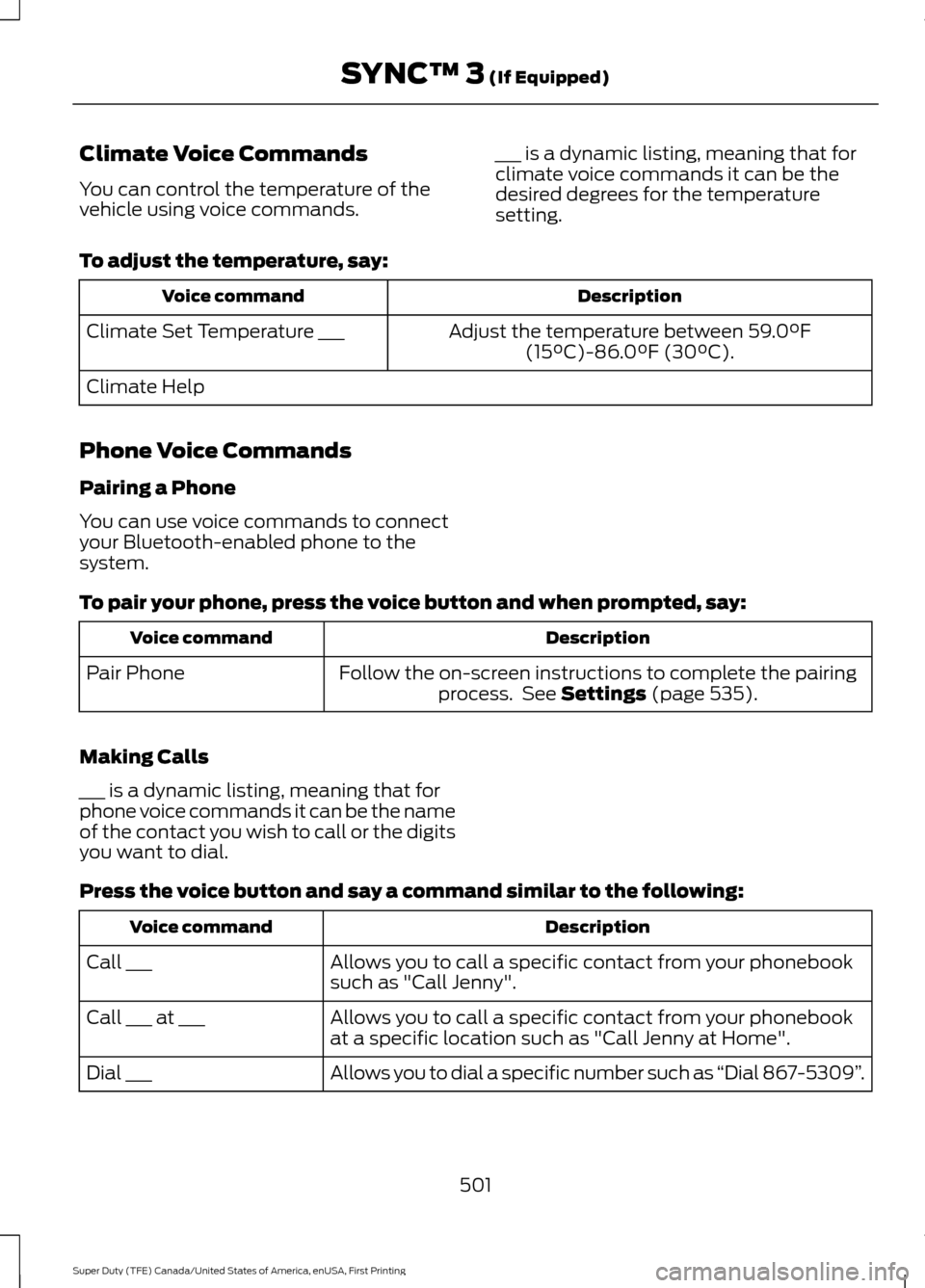
Climate Voice Commands
You can control the temperature of the
vehicle using voice commands.
___ is a dynamic listing, meaning that for
climate voice commands it can be the
desired degrees for the temperature
setting.
To adjust the temperature, say: Description
Voice command
Adjust the temperature between 59.0°F
(15°C)-86.0°F (30°C).
Climate Set Temperature ___
Climate Help
Phone Voice Commands
Pairing a Phone
You can use voice commands to connect
your Bluetooth-enabled phone to the
system.
To pair your phone, press the voice button and when prompted, say: Description
Voice command
Follow the on-screen instructions to complete the pairingprocess. See
Settings (page 535).
Pair Phone
Making Calls
___ is a dynamic listing, meaning that for
phone voice commands it can be the name
of the contact you wish to call or the digits
you want to dial.
Press the voice button and say a command similar to the following: Description
Voice command
Allows you to call a specific contact from your phonebook
such as "Call Jenny".
Call ___
Allows you to call a specific contact from your phonebook
at a specific location such as "Call Jenny at Home".
Call ___ at ___
Allows you to dial a specific number such as “Dial 867-5309”.
Dial ___
501
Super Duty (TFE) Canada/United States of America, enUSA, First Printing SYNC™ 3
(If Equipped)
Page 508 of 636
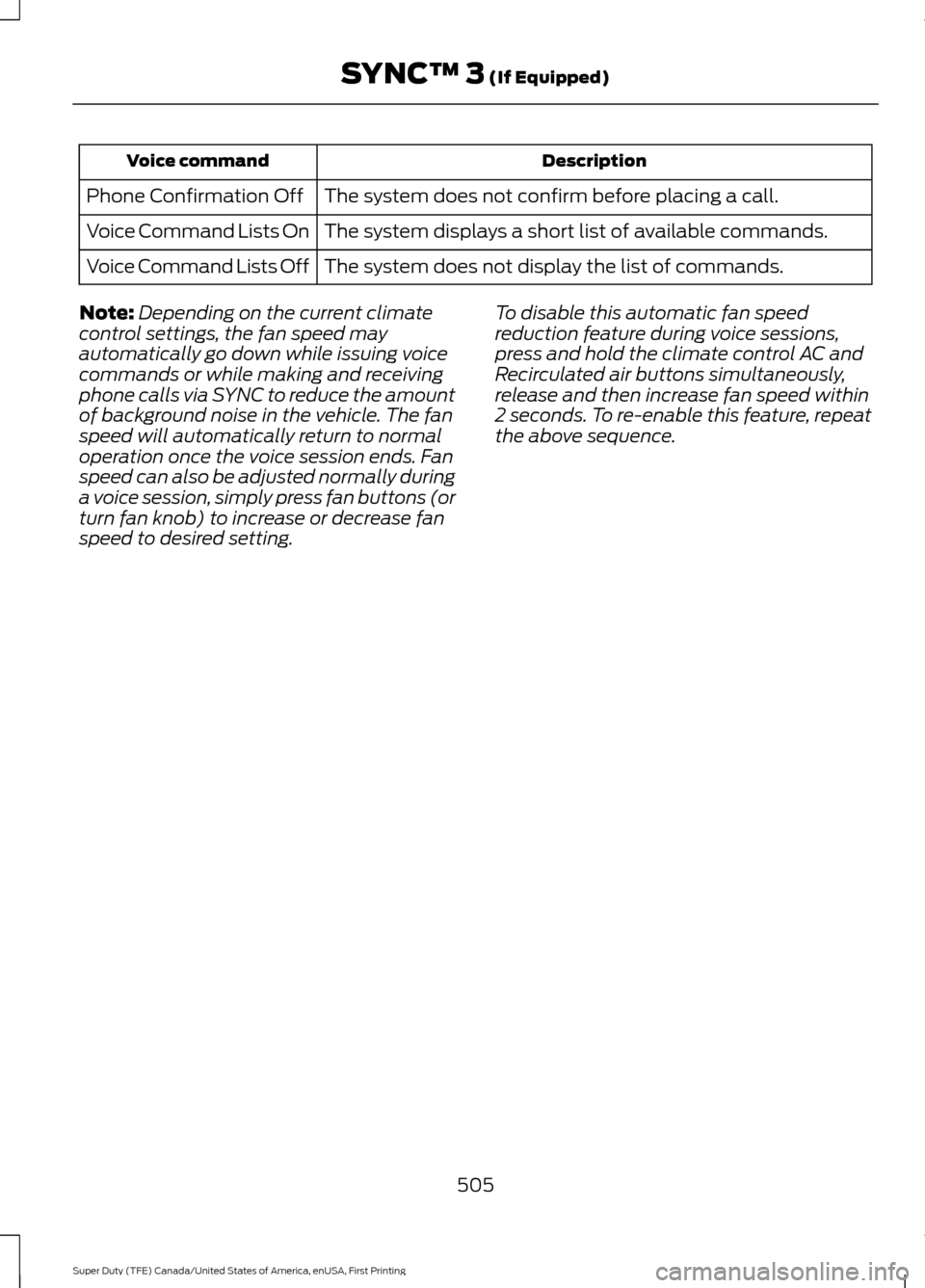
Description
Voice command
The system does not confirm before placing a call.
Phone Confirmation Off
The system displays a short list of available commands.
Voice Command Lists On
The system does not display the list of commands.
Voice Command Lists Off
Note: Depending on the current climate
control settings, the fan speed may
automatically go down while issuing voice
commands or while making and receiving
phone calls via SYNC to reduce the amount
of background noise in the vehicle. The fan
speed will automatically return to normal
operation once the voice session ends. Fan
speed can also be adjusted normally during
a voice session, simply press fan buttons (or
turn fan knob) to increase or decrease fan
speed to desired setting. To disable this automatic fan speed
reduction feature during voice sessions,
press and hold the climate control AC and
Recirculated air buttons simultaneously,
release and then increase fan speed within
2 seconds. To re-enable this feature, repeat
the above sequence.
505
Super Duty (TFE) Canada/United States of America, enUSA, First Printing SYNC™ 3 (If Equipped)
Page 519 of 636
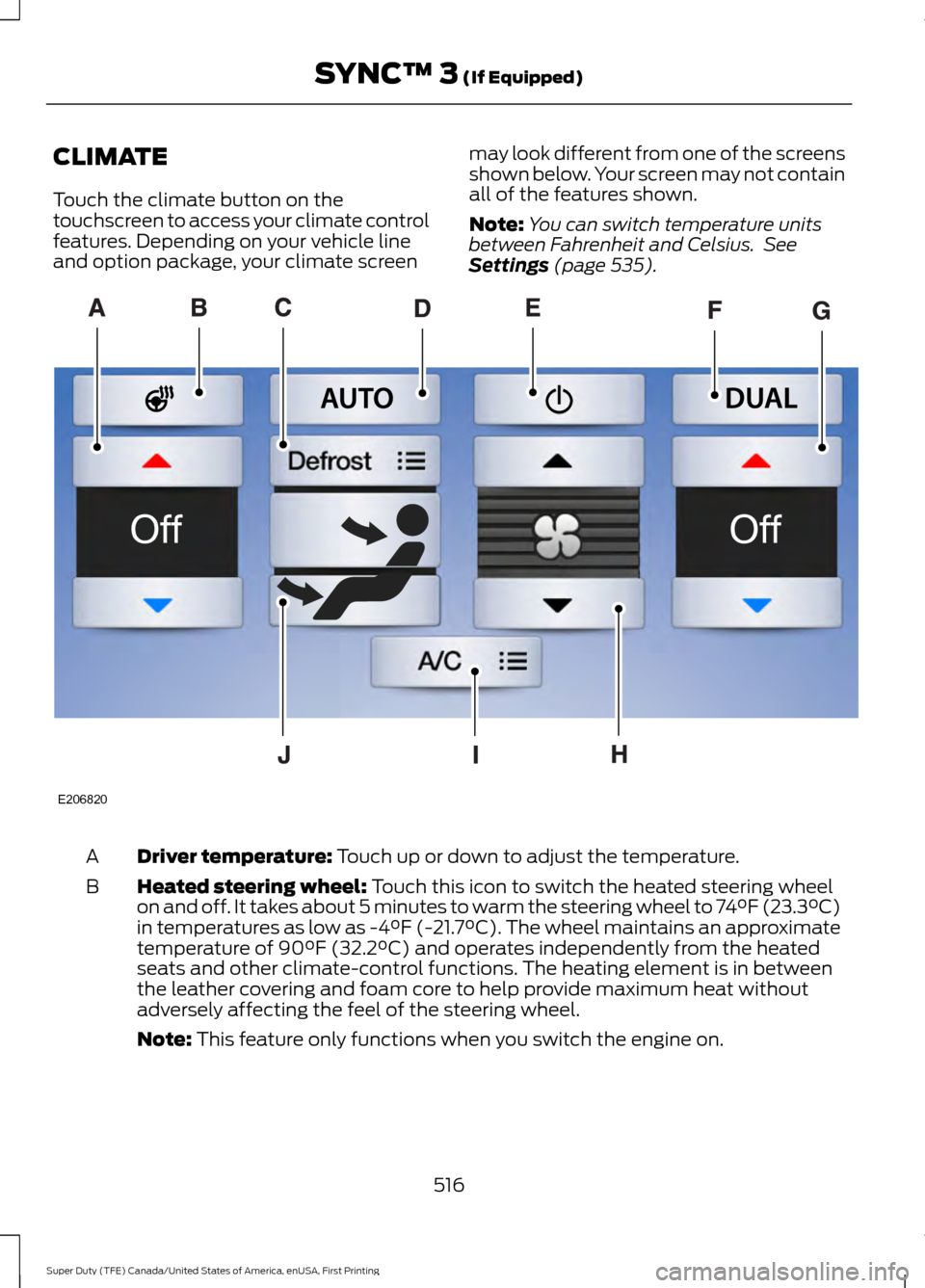
CLIMATE
Touch the climate button on the
touchscreen to access your climate control
features. Depending on your vehicle line
and option package, your climate screen
may look different from one of the screens
shown below. Your screen may not contain
all of the features shown.
Note:
You can switch temperature units
between Fahrenheit and Celsius. See
Settings (page 535). Driver temperature:
Touch up or down to adjust the temperature.
A
Heated steering wheel:
Touch this icon to switch the heated steering wheel
on and off. It takes about 5 minutes to warm the steering wheel to 74°F (23.3°C)
in temperatures as low as -4°F (-21.7°C). The wheel maintains an approximate
temperature of 90°F (32.2°C) and operates independently from the heated
seats and other climate-control functions. The heating element is in between
the leather covering and foam core to help provide maximum heat without
adversely affecting the feel of the steering wheel.
B
Note:
This feature only functions when you switch the engine on. 516
Super Duty (TFE) Canada/United States of America, enUSA, First Printing SYNC™ 3
(If Equipped)E206820
Page 520 of 636
Note: The heated steering wheel may remain on after remote starting the
vehicle, based on your remote start settings. The heated steering wheel may
also turn on when you start your vehicle, if it was on when you switched your
vehicle off.
Note:
For steering wheels with wood trim, the heating feature will not heat the
wheel between the 10 and 2 o'clock positions.
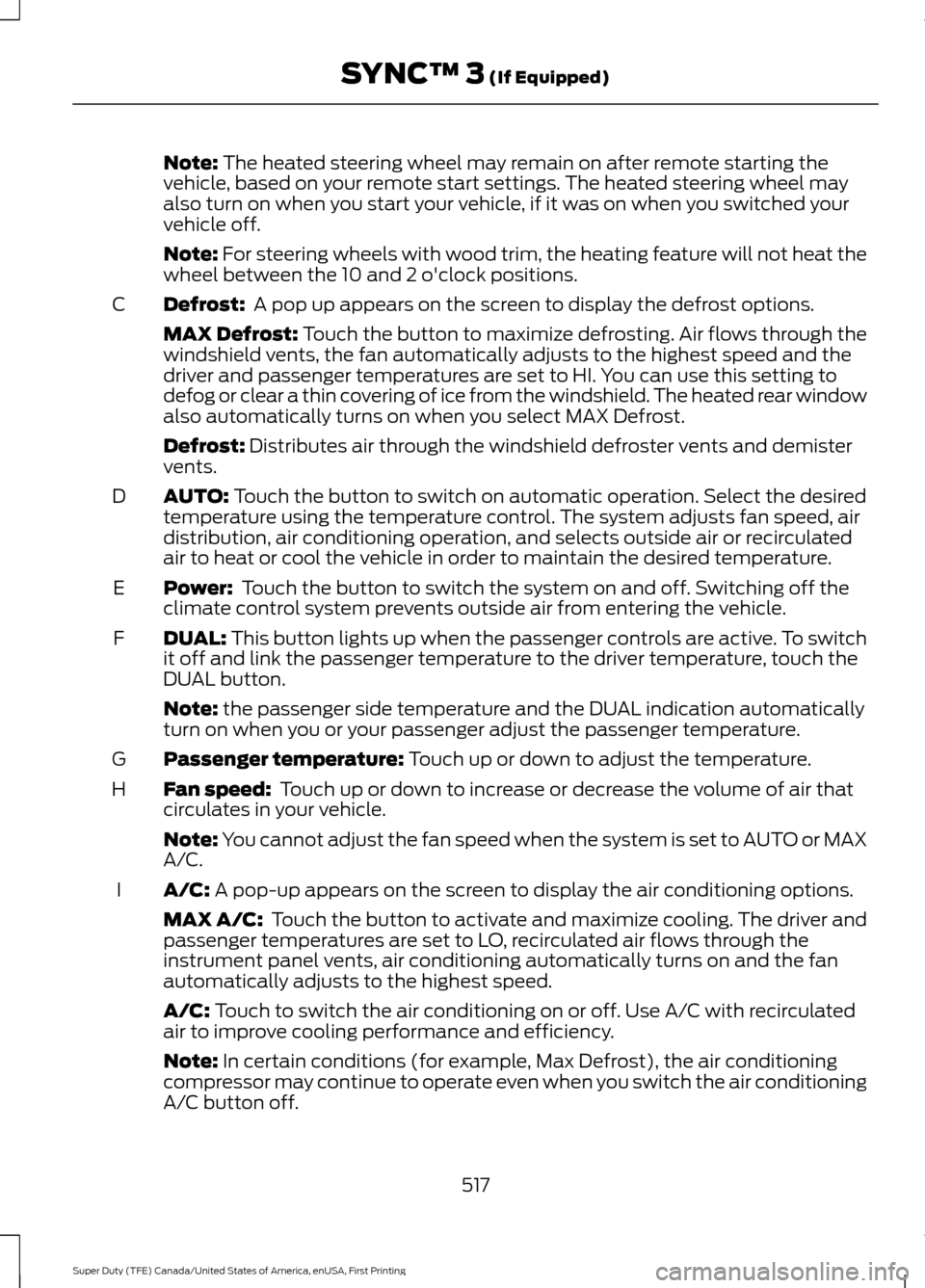
Defrost:
A pop up appears on the screen to display the defrost options.
C
MAX Defrost: Touch the button to maximize defrosting. Air flows through the
windshield vents, the fan automatically adjusts to the highest speed and the
driver and passenger temperatures are set to HI. You can use this setting to
defog or clear a thin covering of ice from the windshield. The heated rear window
also automatically turns on when you select MAX Defrost.
Defrost:
Distributes air through the windshield defroster vents and demister
vents.
AUTO:
Touch the button to switch on automatic operation. Select the desired
temperature using the temperature control. The system adjusts fan speed, air
distribution, air conditioning operation, and selects outside air or recirculated
air to heat or cool the vehicle in order to maintain the desired temperature.
D
Power:
Touch the button to switch the system on and off. Switching off the
climate control system prevents outside air from entering the vehicle.
E
DUAL:
This button lights up when the passenger controls are active. To switch
it off and link the passenger temperature to the driver temperature, touch the
DUAL button.
F
Note:
the passenger side temperature and the DUAL indication automatically
turn on when you or your passenger adjust the passenger temperature.
Passenger temperature:
Touch up or down to adjust the temperature.
G
Fan speed:
Touch up or down to increase or decrease the volume of air that
circulates in your vehicle.
H
Note:
You cannot adjust the fan speed when the system is set to AUTO or MAX
A/C.
A/C:
A pop-up appears on the screen to display the air conditioning options.
I
MAX A/C: Touch the button to activate and maximize cooling. The driver and
passenger temperatures are set to LO, recirculated air flows through the
instrument panel vents, air conditioning automatically turns on and the fan
automatically adjusts to the highest speed.
A/C:
Touch to switch the air conditioning on or off. Use A/C with recirculated
air to improve cooling performance and efficiency.
Note:
In certain conditions (for example, Max Defrost), the air conditioning
compressor may continue to operate even when you switch the air conditioning
A/C button off.
517
Super Duty (TFE) Canada/United States of America, enUSA, First Printing SYNC™ 3
(If Equipped)
Page 626 of 636
Engine-mounted Fuel Filter...........................
358
Changing the Engine Oil and Oil Filter...............................................................326
Engine lubrication for severe service operation.......................................................... 327
Changing the Wiper Blades.....................345
Checking MyKey System Status...............63 MyKey Distance.................................................... 63
Number of Admin Keys...................................... 63
Number of MyKeys.............................................. 63
Checking the Wiper Blades.....................345
Child Restraint and Seatbelt Maintenance.................................................42
Child Restraint Positioning.........................32
Child Safety
........................................................17
General Information............................................. 17
Child Safety Locks..........................................33 Left-Hand Side...................................................... 34
Right-Hand Side................................................... 34
Cleaning Leather Seats
.............................365
With King Ranch Edition................................. 366
Without King Ranch Edition.......................... 365
Cleaning Products
......................................360
Cleaning the Engine....................................362
Cleaning the Exhaust - 6.7L Diesel.......363
Cleaning the Exterior...................................361 Exterior Chrome Parts...................................... 361
Exterior Plastic Parts......................................... 361
Stripes or Graphics............................................. 361
Underbody........................................................... 362
Under Hood......................................................... 362
Cleaning the Instrument Panel and Instrument Cluster Lens........................364
Cleaning the Interior
...................................364
Cleaning the Wheels..................................366
Cleaning the Windows and Wiper Blades...........................................................363
Clearing All MyKeys.......................................63
Climate.............................................................516
Climate Control
.............................................145
Climate Controlled Seats...........................161 Cooled Seats......................................................... 161
Heated Seats......................................................... 161
Collision Warning System
........................258
Principle Of Operation..................................... 258Coolant Check
See: Engine Coolant Check - 6.2L/6.8L.....329
See: Engine Coolant Check - 6.7L
Diesel................................................................. 333
Crash Sensors and Airbag Indicator
........52
Creating a MyKey............................................62
Programming or Changing Configurable
Settings............................................................... 63
Cross Traffic Alert
........................................254
False Alerts.......................................................... 256
Switching the System Off and On..............256
System Errors...................................................... 256
System Lights, Messages and Audible Alerts................................................................. 255
System Limitations........................................... 256
Using the System............................................... 254
Cruise Control..................................................82 Principle of Operation...................................... 239
Type 1........................................................................\
82
Type 2....................................................................... 82
Cruise control See: Using Cruise Control............................... 239
Customer Assistance
.................................303
D
Data Recording
................................................10
Event Data Recording.......................................... 10
Service Data Recording...................................... 10
Daytime Running Lamps............................88 Type 1 - Conventional
(Non-Configurable)....................................... 88
Type 2 - Configurable......................................... 88
Diesel Particulate Filter..............................180 Regeneration....................................................... 180
Digital Radio
..................................................442
HD Radio Reception and Station
Troubleshooting............................................ 444
Direction Indicators
.......................................90
Doors and Locks.............................................65
DPF See: Diesel Particulate Filter.......................... 180
Draining the Fuel Filter Water Trap - 6.7L Diesel.............................................................342
Draining the Diesel Fuel Conditioner Module.............................................................. 342
Driver and Passenger Airbags...................45 Children and Airbags.......................................... 50
623
Super Duty (TFE) Canada/United States of America, enUSA, First Printing Index
Page 629 of 636
Getting the Services You Need..............303
Away From Home............................................. 303
Global Opening
..............................................96
Opening the Windows....................................... 96
H
Handbrake See: Parking Brake............................................. 222
Hazard Warning Flashers.........................296
HDC See: Using Hill Descent Control................... 229
Headlamp Adjusting See: Adjusting the Headlamps.................... 346
Head Restraints
.............................................152
Adjusting the Head Restraint......................... 153
Heated Seats.................................................160 Rear Heated Seats............................................. 160
Heated Steering Wheel
................................82
Heated Windows and Mirrors..................150 Heated Exterior Mirrors...................................... 151
Heated Rear Window........................................ 150
Heating See: Climate Control......................................... 145
Hill Start Assist
.............................................223
Switching the System On and Off...............224
Using Hill Start Assist....................................... 223
Hints on Controlling the Interior Climate..........................................................148
Cooling the Interior Quickly............................ 149
General Hints....................................................... 148
Heating the Interior Quickly............................ 149
Recommended Settings for Cooling..........150
Recommended Settings for Heating..........149
Side Window Defogging in Cold Weather............................................................ 150
Hints on Driving With Anti-Lock Brakes............................................................222
Home Screen................................................498
Hood Lock See: Opening and Closing the Hood..........320
I
Ignition Switch
................................................173
In California (U.S. Only)............................304
Information Display Control
.......................82 Information Displays.....................................111
General Information............................................ 111
Information Messages
................................128
4WD........................................................................\
. 144
Active Park............................................................ 128
Adaptive Cruise Control................................... 129
Adaptive Steering............................................... 129
AdvanceTrac and Traction Control..............130
Airbag...................................................................... 130
Alarm and Security............................................ 130
Automatic Engine Shutdown.......................... 131
Battery and Charging System......................... 131
Blind Spot Information and Cross Traffic Alert System.................................................... 132
Collision Warning System................................ 133
Diesel Messages.................................................. 133
Doors and Locks.................................................. 135
Driver Alert............................................................ 136
Drivetrain................................................................ 136
Engine..................................................................... 136
Fuel........................................................................\
... 137
Keys and Intelligent Access............................. 137
Lane Keeping System....................................... 138
Maintenance........................................................ 138
MyKey...................................................................... 139
Off Road................................................................. 139
Park Aid.................................................................. 140
Park Brake............................................................. 140
Power Steering..................................................... 141
Remote Start......................................................... 141
Seats........................................................................\
. 141
Starting System .................................................. 142
Tire Pressure Monitoring System.................. 142
Trailer....................................................................... 142
Installing Child Restraints
............................18
Child Seats............................................................... 18
Combining Seatbelt and LATCH Lower Anchors for Attaching Child Safety
Seats..................................................................... 27
Front Seat Tether Strap Attachment (Regular Cab)................................................... 28
Rear Seat Tether Strap Attachment (Crew Cab and Super Cab)...................................... 29
Use of Inboard Lower Anchors from the Outboard Seating Positions (Center
Seating Use) .................................................... 26
Using Inflatable Seatbelts (Rear Seat Outboard Positions)....................................... 23
626
Super Duty (TFE) Canada/United States of America, enUSA, First Printing Index