AUX FORD SUPER DUTY 2019 User Guide
[x] Cancel search | Manufacturer: FORD, Model Year: 2019, Model line: SUPER DUTY, Model: FORD SUPER DUTY 2019Pages: 666, PDF Size: 13.6 MB
Page 324 of 666
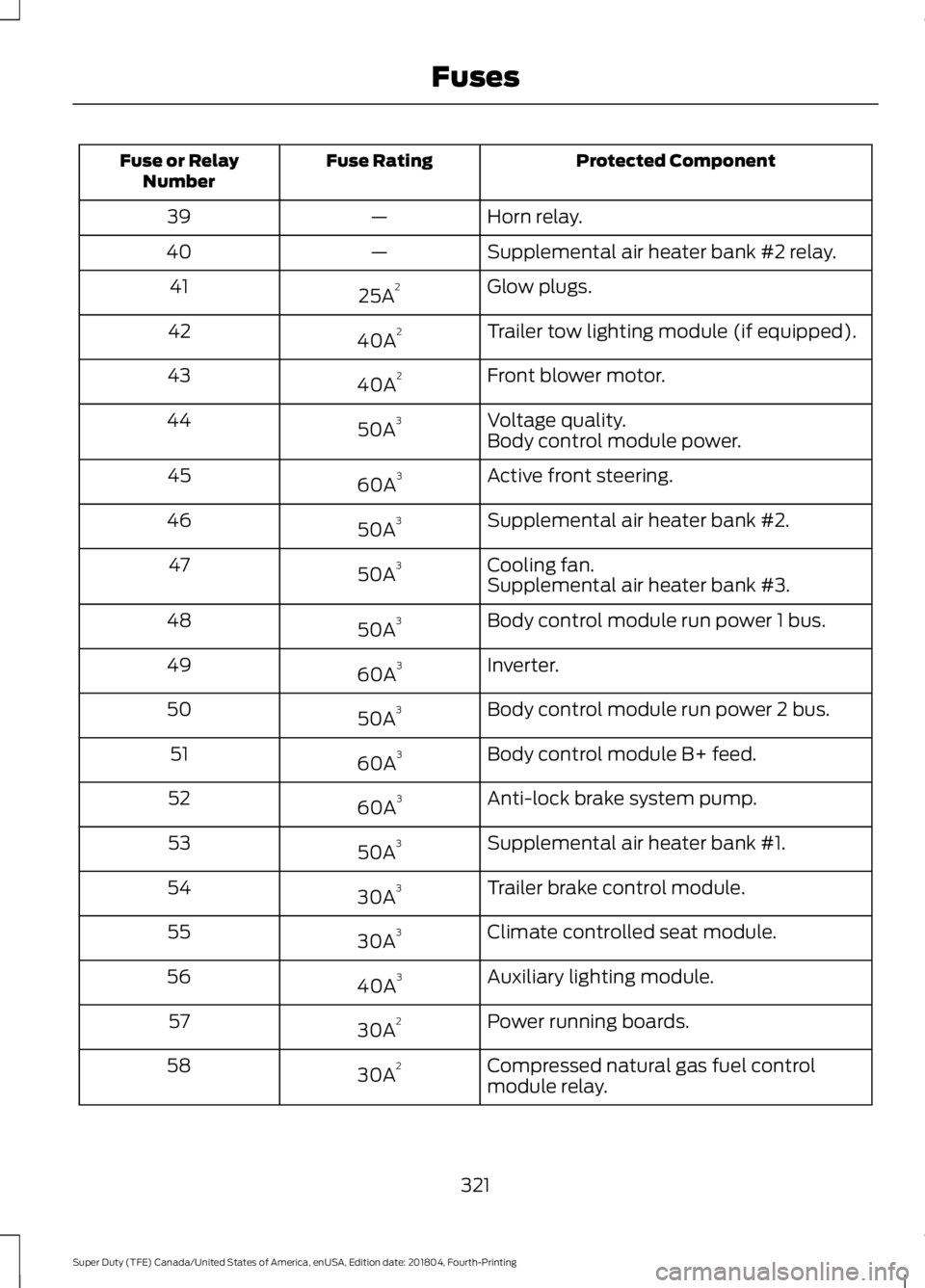
Protected Component
Fuse Rating
Fuse or Relay
Number
Horn relay.
—
39
Supplemental air heater bank #2 relay.
—
40
Glow plugs.
25A 2
41
Trailer tow lighting module (if equipped).
40A 2
42
Front blower motor.
40A 2
43
Voltage quality.
50A 3
44
Body control module power.
Active front steering.
60A 3
45
Supplemental air heater bank #2.
50A 3
46
Cooling fan.
50A 3
47
Supplemental air heater bank #3.
Body control module run power 1 bus.
50A 3
48
Inverter.
60A 3
49
Body control module run power 2 bus.
50A 3
50
Body control module B+ feed.
60A 3
51
Anti-lock brake system pump.
60A 3
52
Supplemental air heater bank #1.
50A 3
53
Trailer brake control module.
30A 3
54
Climate controlled seat module.
30A 3
55
Auxiliary lighting module.
40A 3
56
Power running boards.
30A 2
57
Compressed natural gas fuel control
module relay.
30A 2
58
321
Super Duty (TFE) Canada/United States of America, enUSA, Edition date: 201804, Fourth-Printing Fuses
Page 325 of 666
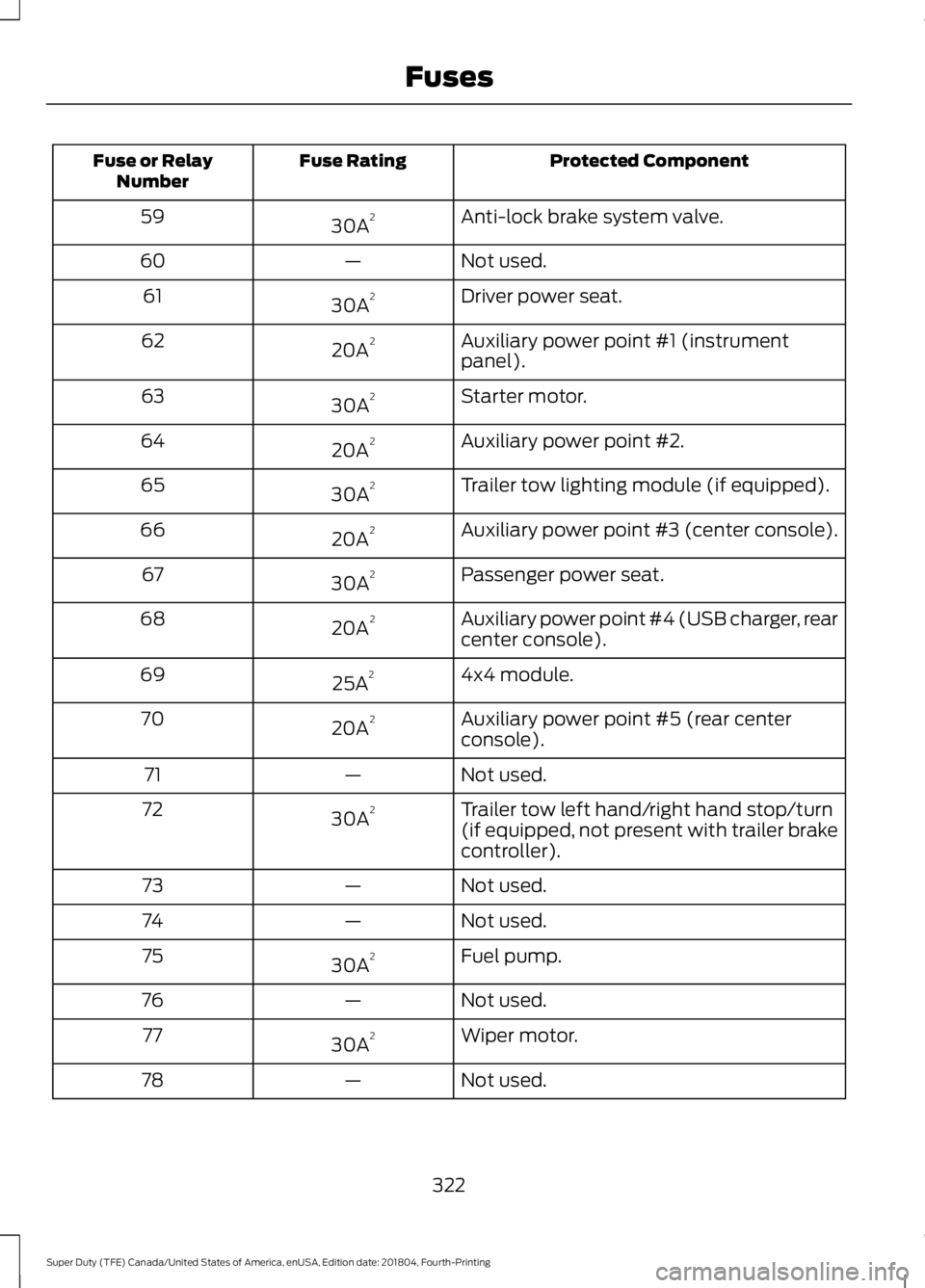
Protected Component
Fuse Rating
Fuse or Relay
Number
Anti-lock brake system valve.
30A 2
59
Not used.
—
60
Driver power seat.
30A 2
61
Auxiliary power point #1 (instrument
panel).
20A 2
62
Starter motor.
30A 2
63
Auxiliary power point #2.
20A 2
64
Trailer tow lighting module (if equipped).
30A 2
65
Auxiliary power point #3 (center console).
20A 2
66
Passenger power seat.
30A 2
67
Auxiliary power point #4 (USB charger, rear
center console).
20A 2
68
4x4 module.
25A 2
69
Auxiliary power point #5 (rear center
console).
20A 2
70
Not used.
—
71
Trailer tow left hand/right hand stop/turn
(if equipped, not present with trailer brake
controller).
30A
2
72
Not used.
—
73
Not used.
—
74
Fuel pump.
30A 2
75
Not used.
—
76
Wiper motor.
30A 2
77
Not used.
—
78
322
Super Duty (TFE) Canada/United States of America, enUSA, Edition date: 201804, Fourth-Printing Fuses
Page 326 of 666
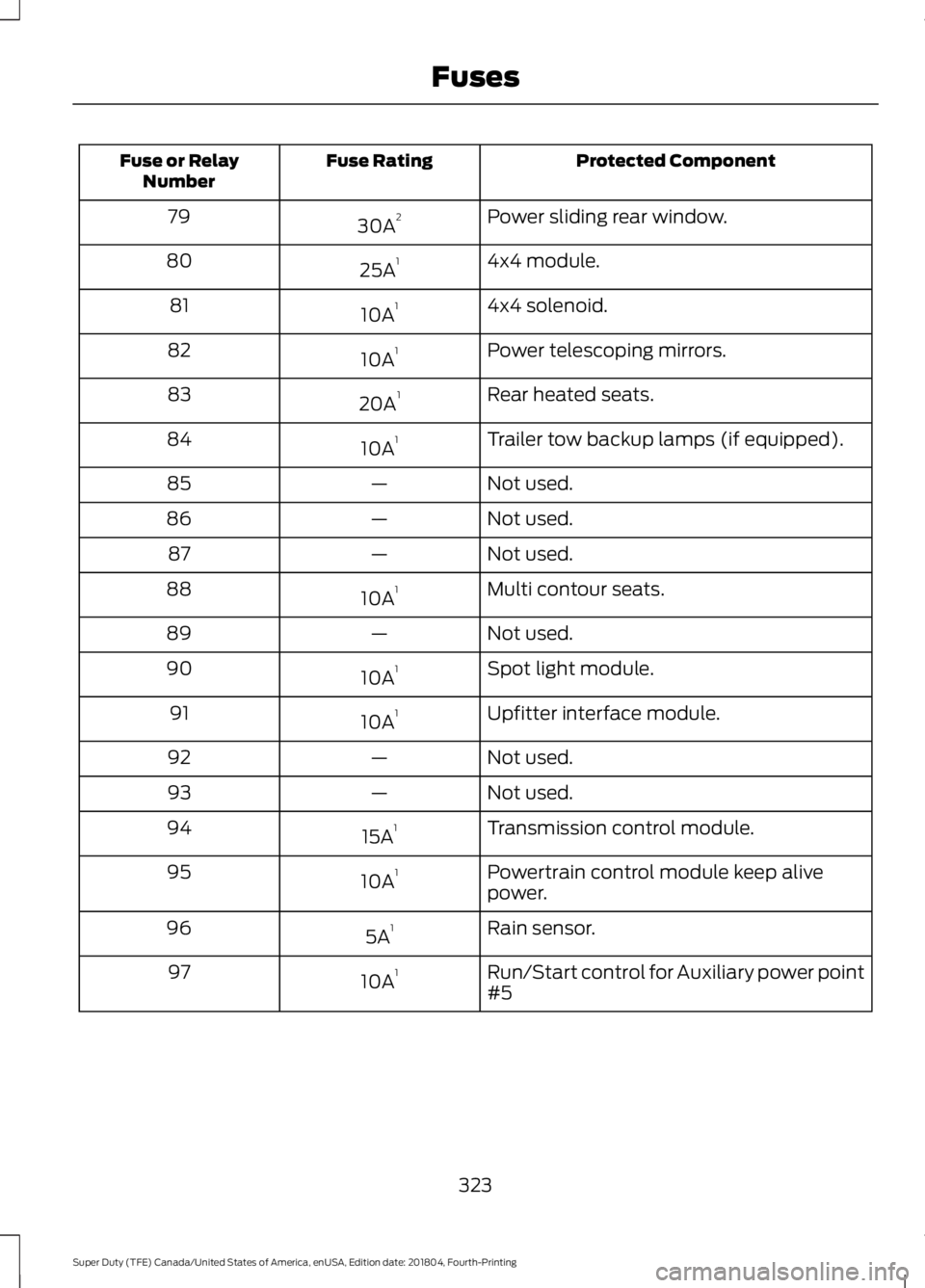
Protected Component
Fuse Rating
Fuse or Relay
Number
Power sliding rear window.
30A 2
79
4x4 module.
25A 1
80
4x4 solenoid.
10A 1
81
Power telescoping mirrors.
10A 1
82
Rear heated seats.
20A 1
83
Trailer tow backup lamps (if equipped).
10A 1
84
Not used.
—
85
Not used.
—
86
Not used.
—
87
Multi contour seats.
10A 1
88
Not used.
—
89
Spot light module.
10A 1
90
Upfitter interface module.
10A 1
91
Not used.
—
92
Not used.
—
93
Transmission control module.
15A 1
94
Powertrain control module keep alive
power.
10A 1
95
Rain sensor.
5A 1
96
Run/Start control for Auxiliary power point
#5
10A 1
97
323
Super Duty (TFE) Canada/United States of America, enUSA, Edition date: 201804, Fourth-Printing Fuses
Page 447 of 666
GENERAL INFORMATION
Radio Frequencies and Reception
Factors
AM and FM frequencies are established by
the Federal Communications Commission
(FCC) and the Canadian Radio and
Telecommunications Commission (CRTC).
Those frequencies are:
•
AM: 530-1710 kHz
• FM: 87.9-107.9 MHz
Note: Listening to loud audio for long
periods of time could damage your hearing. Radio Reception Factors
The further you travel from an AM or FM station, the
weaker the signal and the weaker the reception.
Distance and strength
Hills, mountains, tall buildings, bridges, tunnels, freeway
overpasses, parking garages, dense tree foliage and
thunderstorms can interfere with the reception.
Terrain
When you pass a ground-based broadcast repeating
tower, a stronger signal may overtake a weaker one and
result in the audio system muting.
Station overload
AUDIO UNIT - VEHICLES WITH:
AM/FM WARNING: Driving while
distracted can result in loss of vehicle
control, crash and injury. We strongly
recommend that you use extreme
caution when using any device that may
take your focus off the road. Your
primary responsibility is the safe
operation of your vehicle. We
recommend against the use of any
hand-held device while driving and
encourage the use of voice-operated
systems when possible. Make sure you
are aware of all applicable local laws
that may affect the use of electronic
devices while driving. Accessing the Auxiliary Media
Sources Press and release to access or
switch between media devices.
Accessing the Menu Press and release to access
different audio system features.
444
Super Duty (TFE) Canada/United States of America, enUSA, Edition date: 201804, Fourth-Printing Audio SystemE265277 E265038
Page 459 of 666
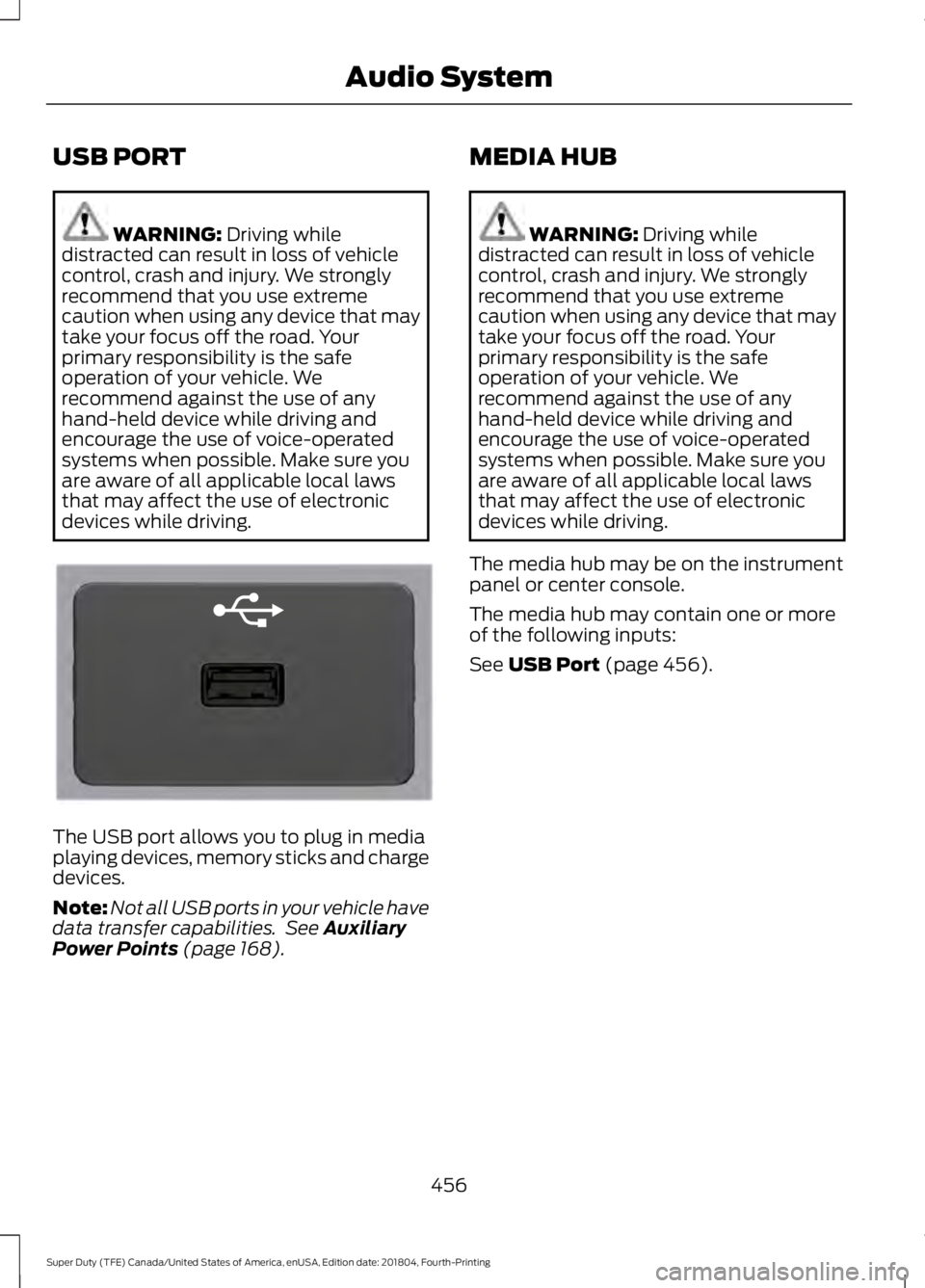
USB PORT
WARNING: Driving while
distracted can result in loss of vehicle
control, crash and injury. We strongly
recommend that you use extreme
caution when using any device that may
take your focus off the road. Your
primary responsibility is the safe
operation of your vehicle. We
recommend against the use of any
hand-held device while driving and
encourage the use of voice-operated
systems when possible. Make sure you
are aware of all applicable local laws
that may affect the use of electronic
devices while driving. The USB port allows you to plug in media
playing devices, memory sticks and charge
devices.
Note:
Not all USB ports in your vehicle have
data transfer capabilities. See
Auxiliary
Power Points (page 168). MEDIA HUB WARNING:
Driving while
distracted can result in loss of vehicle
control, crash and injury. We strongly
recommend that you use extreme
caution when using any device that may
take your focus off the road. Your
primary responsibility is the safe
operation of your vehicle. We
recommend against the use of any
hand-held device while driving and
encourage the use of voice-operated
systems when possible. Make sure you
are aware of all applicable local laws
that may affect the use of electronic
devices while driving.
The media hub may be on the instrument
panel or center console.
The media hub may contain one or more
of the following inputs:
See
USB Port (page 456).
456
Super Duty (TFE) Canada/United States of America, enUSA, Edition date: 201804, Fourth-Printing Audio SystemE201595
Page 577 of 666
AUXILIARY SWITCHES (IF
EQUIPPED)
For maximum vehicle performance, keep
the following information in mind when
adding accessories or equipment to your
vehicle:
• When adding accessories, equipment,
passengers and luggage to your
vehicle, do not exceed the total weight
capacity of the vehicle or of the front
or rear axle (GVWR or GAWR as
indicated on the Safety Compliance
Certification label). Ask an authorized
dealer for specific weight information.
• The Federal Communications
Commission (FCC) and Canadian
Radio Telecommunications
Commission (CRTC) regulate the use
of mobile communications systems
equipped with radio transmitters, for
example, two-way radios, telephones
and theft alarms. Any such equipment
installed in your vehicle should comply
with Federal Communications
Commission (FCC) and Canadian
Radio Telecommunications
Commission (CRTC) regulations, and
should be installed by an authorized
dealer.
• An authorized dealer needs to install
mobile communications systems.
Improper installation may harm the
operation of your vehicle, particularly
if the manufacturer did not design the
mobile communication system
specifically for automotive use.
• If you or an authorized Ford dealer add
any non-Ford electrical or electronic
accessories or components to your
vehicle, you may adversely affect
battery performance and durability. In
addition, you may also adversely affect
the performance of other electrical
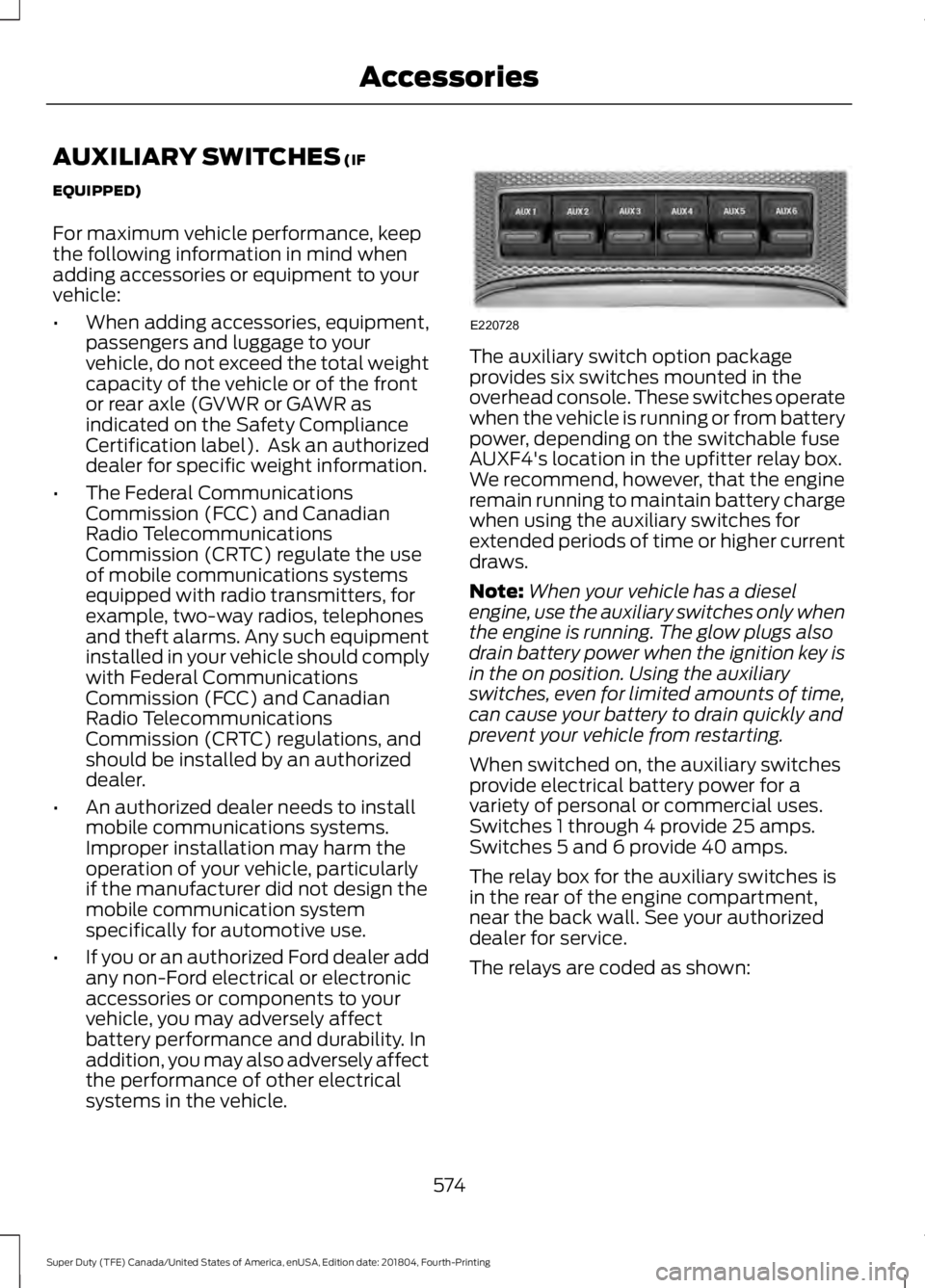
systems in the vehicle. The auxiliary switch option package
provides six switches mounted in the
overhead console. These switches operate
when the vehicle is running or from battery
power, depending on the switchable fuse
AUXF4's location in the upfitter relay box.
We recommend, however, that the engine
remain running to maintain battery charge
when using the auxiliary switches for
extended periods of time or higher current
draws.
Note:
When your vehicle has a diesel
engine, use the auxiliary switches only when
the engine is running. The glow plugs also
drain battery power when the ignition key is
in the on position. Using the auxiliary
switches, even for limited amounts of time,
can cause your battery to drain quickly and
prevent your vehicle from restarting.
When switched on, the auxiliary switches
provide electrical battery power for a
variety of personal or commercial uses.
Switches 1 through 4 provide 25 amps.
Switches 5 and 6 provide 40 amps.
The relay box for the auxiliary switches is
in the rear of the engine compartment,
near the back wall. See your authorized
dealer for service.
The relays are coded as shown:
574
Super Duty (TFE) Canada/United States of America, enUSA, Edition date: 201804, Fourth-Printing AccessoriesE220728
Page 579 of 666
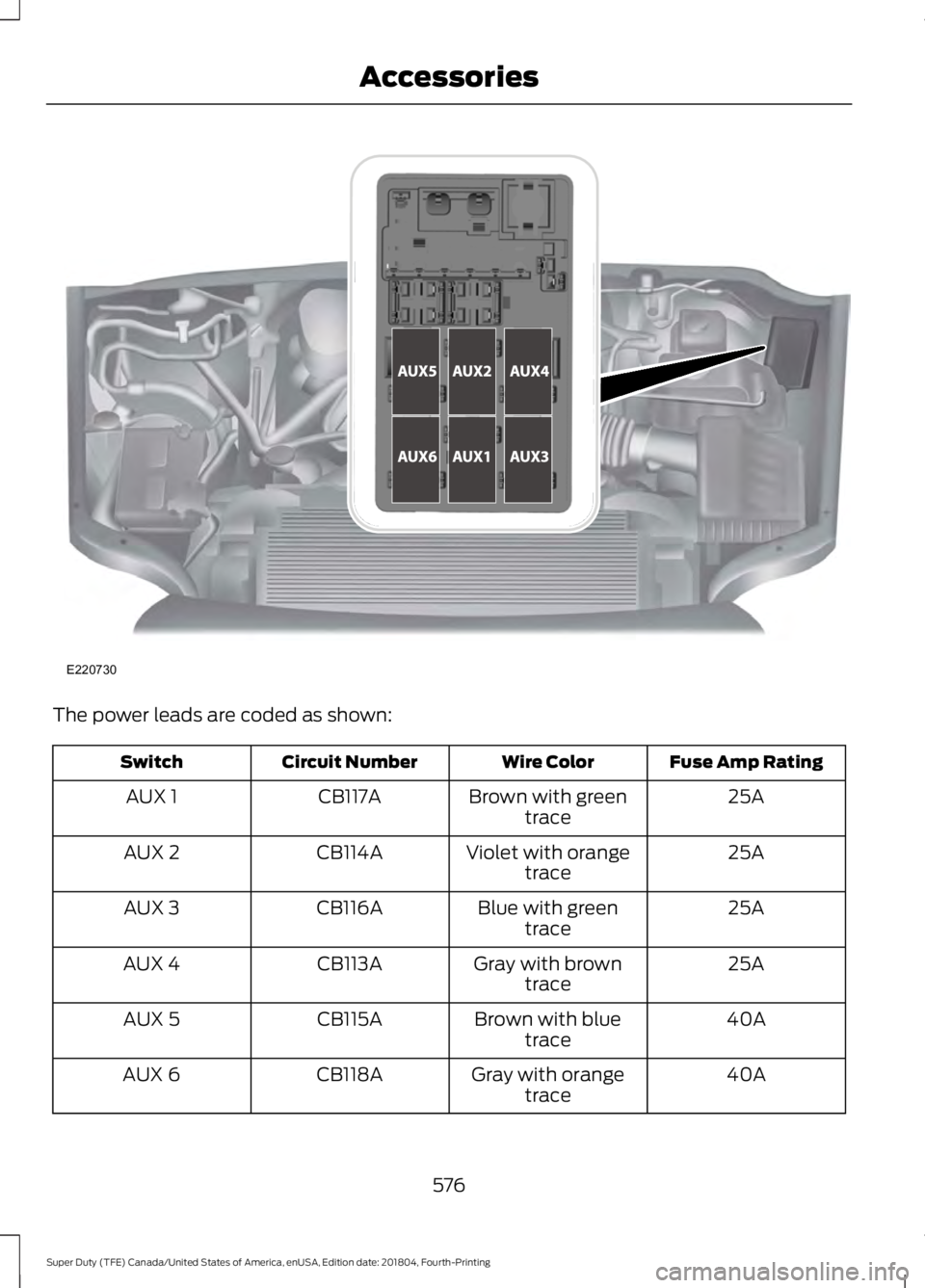
The power leads are coded as shown:
Fuse Amp Rating
Wire Color
Circuit Number
Switch
25A
Brown with green
trace
CB117A
AUX 1
25A
Violet with orange
trace
CB114A
AUX 2
25A
Blue with green
trace
CB116A
AUX 3
25A
Gray with brown
trace
CB113A
AUX 4
40A
Brown with blue
trace
CB115A
AUX 5
40A
Gray with orange
trace
CB118A
AUX 6
576
Super Duty (TFE) Canada/United States of America, enUSA, Edition date: 201804, Fourth-Printing AccessoriesE220730
Page 580 of 666
Upfitter Interface Module (If Equipped)
The Upfitter Interface Module (UIM) is an
electronic control module that operates
equipment (such as lift buckets, cranes,
motors, salt spreaders and snow plows)
with external relays.
If you replace the module, it will require
additional programming by the upfitter.
Obtain this data directly from the upfitter
company. The upfitter contact information
is in the vehicle door opening.
For more information on the Upfitter
Interface Module and the auxiliary
switches, contact your upfitter.
577
Super Duty (TFE) Canada/United States of America, enUSA, Edition date: 201804, Fourth-Printing Accessories
Page 652 of 666
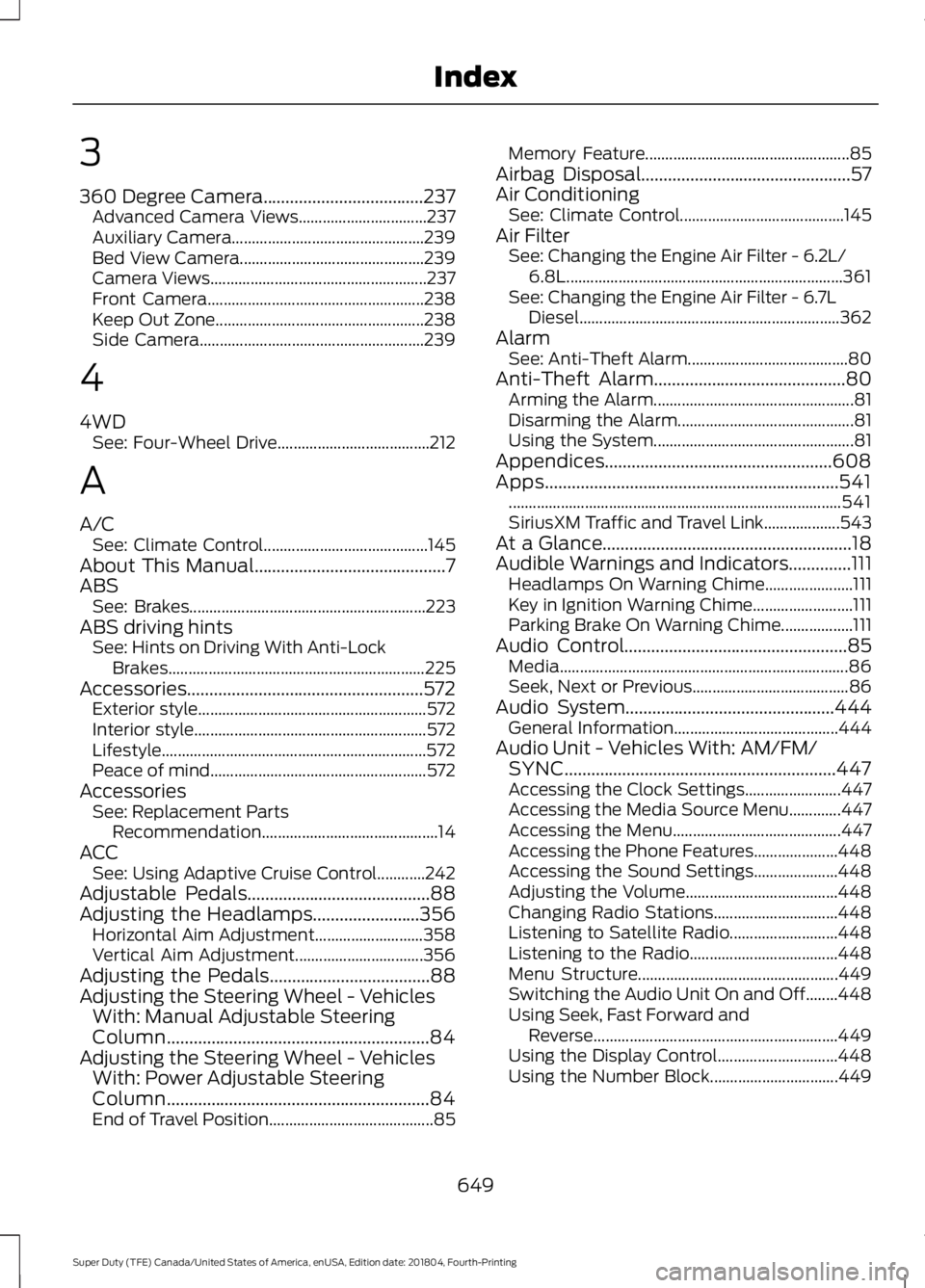
3
360 Degree Camera....................................237
Advanced Camera Views................................ 237
Auxiliary Camera................................................ 239
Bed View Camera.............................................. 239
Camera Views...................................................... 237
Front Camera...................................................... 238
Keep Out Zone.................................................... 238
Side Camera........................................................ 239
4
4WD See: Four-Wheel Drive...................................... 212
A
A/C See: Climate Control......................................... 145
About This Manual...........................................7
ABS See: Brakes........................................................... 223
ABS driving hints See: Hints on Driving With Anti-Lock
Brakes................................................................ 225
Accessories.....................................................572 Exterior style......................................................... 572
Interior style.......................................................... 572
Lifestyle.................................................................. 572
Peace of mind...................................................... 572
Accessories See: Replacement Parts
Recommendation............................................ 14
ACC See: Using Adaptive Cruise Control............242
Adjustable Pedals
.........................................88
Adjusting the Headlamps........................356
Horizontal Aim Adjustment........................... 358
Vertical Aim Adjustment................................ 356
Adjusting the Pedals....................................88
Adjusting the Steering Wheel - Vehicles With: Manual Adjustable Steering
Column
...........................................................84
Adjusting the Steering Wheel - Vehicles With: Power Adjustable Steering
Column
...........................................................84
End of Travel Position......................................... 85Memory Feature...................................................
85
Airbag Disposal...............................................57
Air Conditioning See: Climate Control......................................... 145
Air Filter See: Changing the Engine Air Filter - 6.2L/
6.8L..................................................................... 361
See: Changing the Engine Air Filter - 6.7L Diesel................................................................. 362
Alarm See: Anti-Theft Alarm........................................ 80
Anti-Theft Alarm
...........................................80
Arming the Alarm.................................................. 81
Disarming the Alarm............................................ 81
Using the System.................................................. 81
Appendices...................................................608
Apps..................................................................541 ........................................................................\
........... 541
SiriusXM Traffic and Travel Link................... 543
At a Glance........................................................18
Audible Warnings and Indicators
..............111
Headlamps On Warning Chime...................... 111
Key in Ignition Warning Chime......................... 111
Parking Brake On Warning Chime.................. 111
Audio Control
..................................................85
Media........................................................................\
86
Seek, Next or Previous....................................... 86
Audio System
...............................................444
General Information......................................... 444
Audio Unit - Vehicles With: AM/FM/ SYNC
.............................................................447
Accessing the Clock Settings........................ 447
Accessing the Media Source Menu.............447
Accessing the Menu.......................................... 447
Accessing the Phone Features..................... 448
Accessing the Sound Settings..................... 448
Adjusting the Volume...................................... 448
Changing Radio Stations............................... 448
Listening to Satellite Radio........................... 448
Listening to the Radio..................................... 448
Menu Structure.................................................. 449
Switching the Audio Unit On and Off........448
Using Seek, Fast Forward and Reverse............................................................. 449
Using the Display Control.............................. 448
Using the Number Block................................ 449
649
Super Duty (TFE) Canada/United States of America, enUSA, Edition date: 201804, Fourth-Printing Index
Page 653 of 666
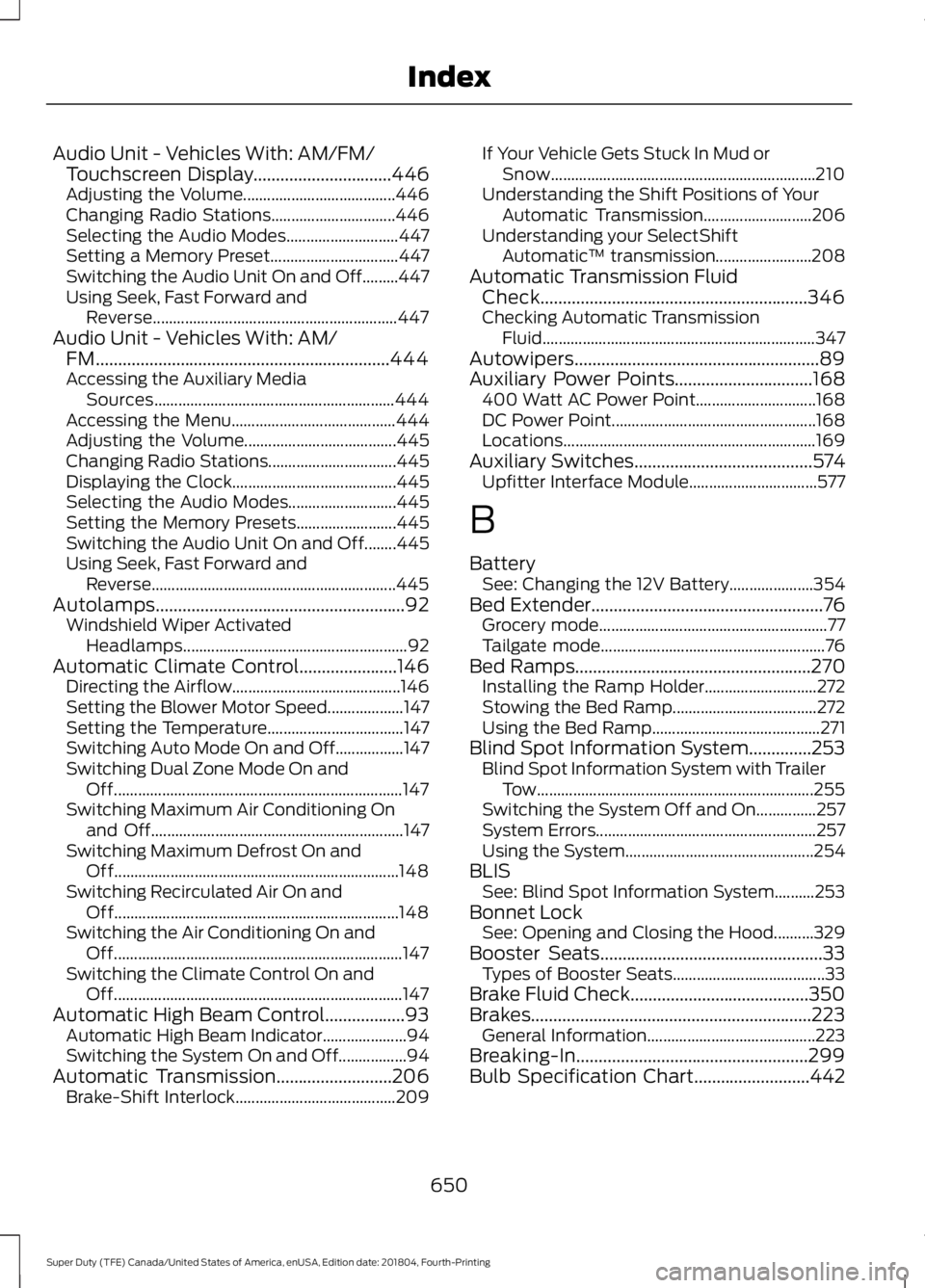
Audio Unit - Vehicles With: AM/FM/
Touchscreen Display...............................446
Adjusting the Volume...................................... 446
Changing Radio Stations............................... 446
Selecting the Audio Modes............................ 447
Setting a Memory Preset................................ 447
Switching the Audio Unit On and Off.........447
Using Seek, Fast Forward and Reverse............................................................. 447
Audio Unit - Vehicles With: AM/ FM..................................................................444
Accessing the Auxiliary Media Sources............................................................ 444
Accessing the Menu......................................... 444
Adjusting the Volume...................................... 445
Changing Radio Stations................................ 445
Displaying the Clock......................................... 445
Selecting the Audio Modes........................... 445
Setting the Memory Presets......................... 445
Switching the Audio Unit On and Off........445
Using Seek, Fast Forward and Reverse............................................................. 445
Autolamps
........................................................92
Windshield Wiper Activated
Headlamps........................................................ 92
Automatic Climate Control......................146 Directing the Airflow.......................................... 146
Setting the Blower Motor Speed................... 147
Setting the Temperature.................................. 147
Switching Auto Mode On and Off.................147
Switching Dual Zone Mode On and Off........................................................................\
147
Switching Maximum Air Conditioning On and Off............................................................... 147
Switching Maximum Defrost On and Off....................................................................... 148
Switching Recirculated Air On and Off....................................................................... 148
Switching the Air Conditioning On and Off........................................................................\
147
Switching the Climate Control On and Off........................................................................\
147
Automatic High Beam Control..................93 Automatic High Beam Indicator..................... 94
Switching the System On and Off.................94
Automatic Transmission
..........................206
Brake-Shift Interlock........................................ 209If Your Vehicle Gets Stuck In Mud or
Snow.................................................................. 210
Understanding the Shift Positions of Your Automatic Transmission........................... 206
Understanding your SelectShift Automatic ™ transmission........................ 208
Automatic Transmission Fluid Check............................................................346
Checking Automatic Transmission Fluid.................................................................... 347
Autowipers.......................................................89
Auxiliary Power Points...............................168 400 Watt AC Power Point.............................. 168
DC Power Point................................................... 168
Locations............................................................... 169
Auxiliary Switches
........................................574
Upfitter Interface Module................................ 577
B
Battery See: Changing the 12V Battery..................... 354
Bed Extender
....................................................76
Grocery mode......................................................... 77
Tailgate mode........................................................ 76
Bed Ramps
.....................................................270
Installing the Ramp Holder............................ 272
Stowing the Bed Ramp.................................... 272
Using the Bed Ramp.......................................... 271
Blind Spot Information System..............253 Blind Spot Information System with Trailer
Tow..................................................................... 255
Switching the System Off and On...............257
System Errors....................................................... 257
Using the System............................................... 254
BLIS See: Blind Spot Information System..........253
Bonnet Lock See: Opening and Closing the Hood..........329
Booster Seats..................................................33 Types of Booster Seats...................................... 33
Brake Fluid Check........................................350
Brakes...............................................................223 General Information.......................................... 223
Breaking-In....................................................299
Bulb Specification Chart..........................442
650
Super Duty (TFE) Canada/United States of America, enUSA, Edition date: 201804, Fourth-Printing Index