open hood FORD SUPER DUTY 2019 User Guide
[x] Cancel search | Manufacturer: FORD, Model Year: 2019, Model line: SUPER DUTY, Model: FORD SUPER DUTY 2019Pages: 666, PDF Size: 13.6 MB
Page 337 of 666
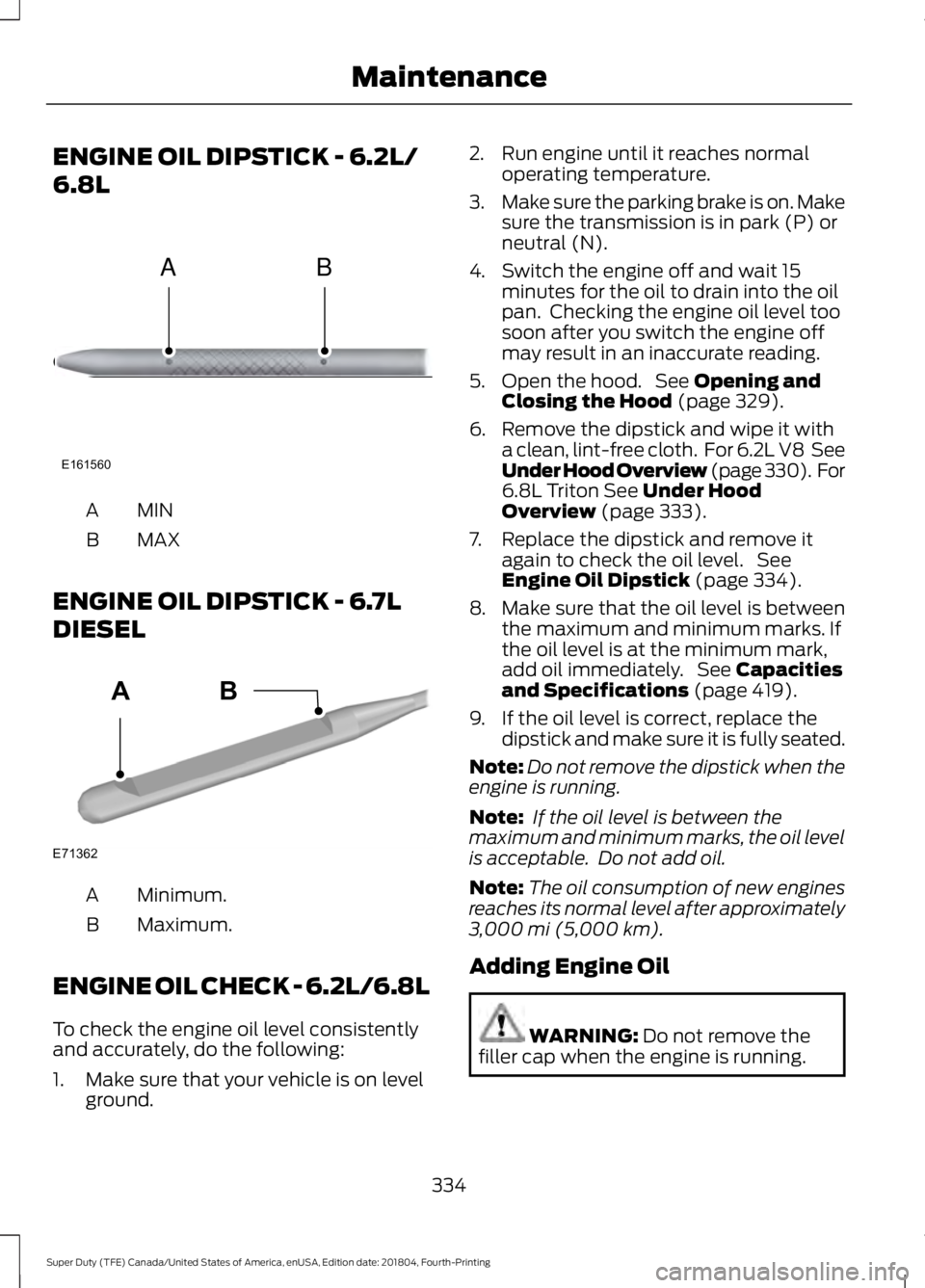
ENGINE OIL DIPSTICK - 6.2L/
6.8L
MINA
MAX
B
ENGINE OIL DIPSTICK - 6.7L
DIESEL Minimum.
A
Maximum.
B
ENGINE OIL CHECK - 6.2L/6.8L
To check the engine oil level consistently
and accurately, do the following:
1. Make sure that your vehicle is on level ground. 2. Run engine until it reaches normal
operating temperature.
3. Make sure the parking brake is on. Make
sure the transmission is in park (P) or
neutral (N).
4. Switch the engine off and wait 15 minutes for the oil to drain into the oil
pan. Checking the engine oil level too
soon after you switch the engine off
may result in an inaccurate reading.
5. Open the hood. See Opening and
Closing the Hood (page 329).
6. Remove the dipstick and wipe it with a clean, lint-free cloth. For 6.2L V8 See
Under Hood Overview (page 330). For
6.8L Triton
See Under Hood
Overview (page 333).
7. Replace the dipstick and remove it again to check the oil level. See
Engine Oil Dipstick
(page 334).
8. Make sure that the oil level is between
the maximum and minimum marks. If
the oil level is at the minimum mark,
add oil immediately. See
Capacities
and Specifications (page 419).
9. If the oil level is correct, replace the dipstick and make sure it is fully seated.
Note: Do not remove the dipstick when the
engine is running.
Note: If the oil level is between the
maximum and minimum marks, the oil level
is acceptable. Do not add oil.
Note: The oil consumption of new engines
reaches its normal level after approximately
3,000 mi (5,000 km)
.
Adding Engine Oil WARNING:
Do not remove the
filler cap when the engine is running.
334
Super Duty (TFE) Canada/United States of America, enUSA, Edition date: 201804, Fourth-Printing MaintenanceE161560
AB E71362
AB
Page 338 of 666
Do not use supplemental engine oil
additives because they are unnecessary
and could lead to engine damage that may
not be covered by the vehicle Warranty.
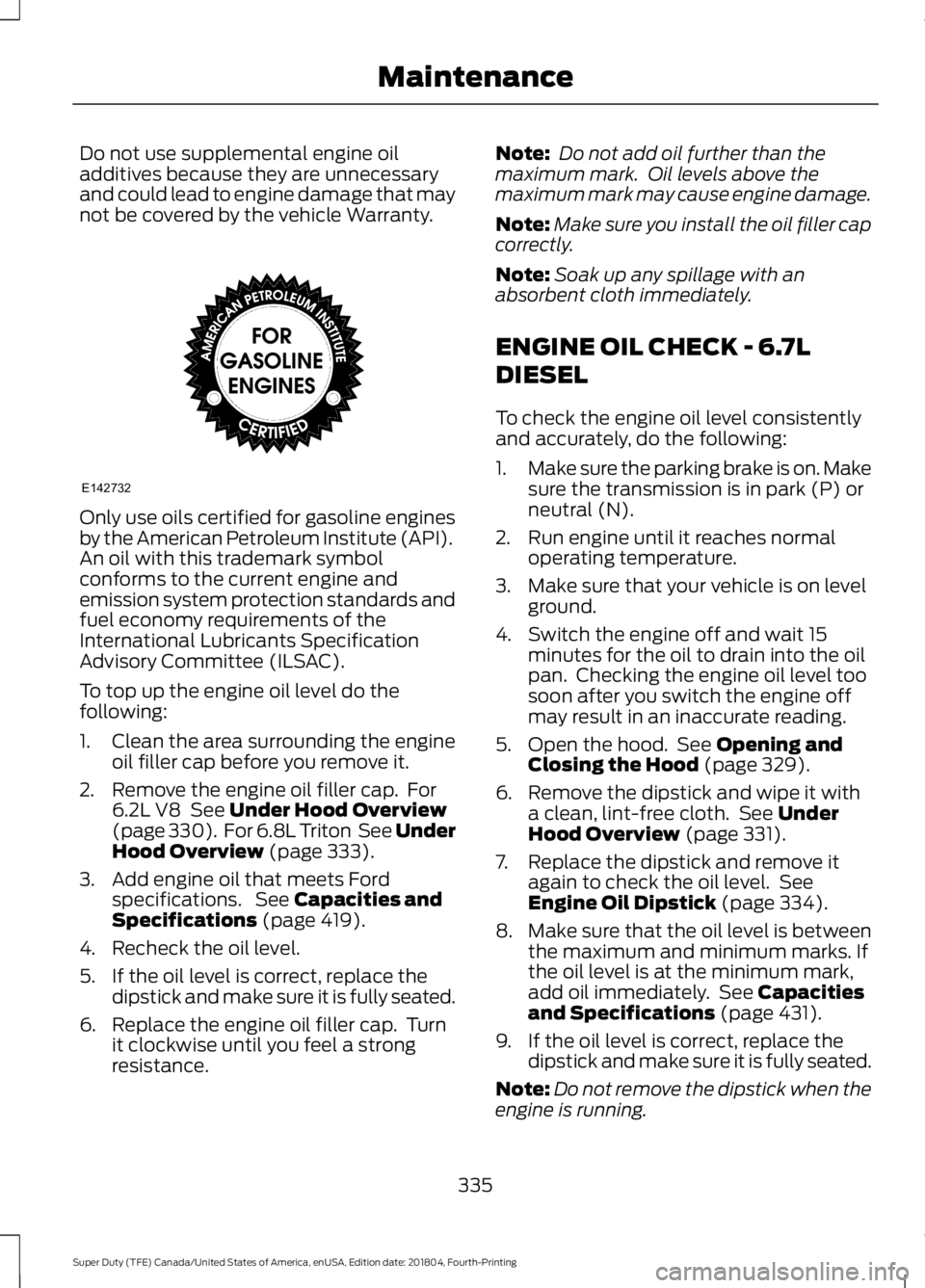
Only use oils certified for gasoline engines
by the American Petroleum Institute (API).
An oil with this trademark symbol
conforms to the current engine and
emission system protection standards and
fuel economy requirements of the
International Lubricants Specification
Advisory Committee (ILSAC).
To top up the engine oil level do the
following:
1. Clean the area surrounding the engine
oil filler cap before you remove it.
2. Remove the engine oil filler cap. For 6.2L V8 See Under Hood Overview
(page 330). For 6.8L Triton See Under
Hood Overview
(page 333).
3. Add engine oil that meets Ford specifications. See
Capacities and
Specifications (page 419).
4. Recheck the oil level.
5. If the oil level is correct, replace the dipstick and make sure it is fully seated.
6. Replace the engine oil filler cap. Turn it clockwise until you feel a strong
resistance. Note:
Do not add oil further than the
maximum mark. Oil levels above the
maximum mark may cause engine damage.
Note: Make sure you install the oil filler cap
correctly.
Note: Soak up any spillage with an
absorbent cloth immediately.
ENGINE OIL CHECK - 6.7L
DIESEL
To check the engine oil level consistently
and accurately, do the following:
1. Make sure the parking brake is on. Make
sure the transmission is in park (P) or
neutral (N).
2. Run engine until it reaches normal operating temperature.
3. Make sure that your vehicle is on level ground.
4. Switch the engine off and wait 15 minutes for the oil to drain into the oil
pan. Checking the engine oil level too
soon after you switch the engine off
may result in an inaccurate reading.
5. Open the hood. See
Opening and
Closing the Hood (page 329).
6. Remove the dipstick and wipe it with a clean, lint-free cloth. See
Under
Hood Overview (page 331).
7. Replace the dipstick and remove it again to check the oil level. See
Engine Oil Dipstick
(page 334).
8. Make sure that the oil level is between
the maximum and minimum marks. If
the oil level is at the minimum mark,
add oil immediately. See
Capacities
and Specifications (page 431).
9. If the oil level is correct, replace the dipstick and make sure it is fully seated.
Note: Do not remove the dipstick when the
engine is running.
335
Super Duty (TFE) Canada/United States of America, enUSA, Edition date: 201804, Fourth-Printing MaintenanceE142732
Page 339 of 666
Note:
If the oil level is between the
maximum and minimum marks, the oil level
is acceptable. Do not add oil.
Note: The oil consumption of new engines
reaches its normal level after approximately
3,000 mi (5,000 km).
Adding Engine Oil WARNING:
Do not remove the
filler cap when the engine is running.
Do not use supplemental engine oil
additives because they are unnecessary
and could lead to engine damage that may
not be covered by the vehicle Warranty.
To top up the engine oil level do the
following:
1. Clean the area surrounding the engine oil filler cap before you remove it.
2. Remove the engine oil filler cap. See Under Hood Overview
(page 331).
Turn it counterclockwise and remove
it.
3. Add engine oil of the proper viscosity and grade that meets Ford
specifications. See
Capacities and
Specifications (page 431). You may
have to use a funnel to pour the engine
oil into the opening.
4. Recheck the oil level.
5. If the oil level is correct, replace the dipstick and make sure it is fully seated.
6. Replace the engine oil filler cap. Turn it clockwise until you feel a strong
resistance.
Note: Do not add oil further than the
maximum mark. Oil levels above the
maximum mark may cause engine damage.
Note: Make sure you install the oil filler cap
correctly. Note:
Soak up any spillage with an
absorbent cloth immediately.
Engine lubrication for severe
service operation
The following conditions define severe
operation for which engine operation with
SAE 5W-40 oil which meets Ford
specification, WSS-M2C171-F1, is
recommended. Oil and oil filter change
intervals will be determined by the
Intelligent Oil Life Monitor™ as noted
previously.
CHANGING THE ENGINE OIL
AND OIL FILTER WARNING:
Do not handle a hot
oil filter with bare hands. WARNING:
Continuous contact
with used motor oil has caused cancer
in laboratory mice. Protect your skin by
washing with soap and water.
If your vehicle is equipped with a diesel
engine, an Intelligent Oil Life Monitor™
calculates the proper oil change service
interval. When the information display
indicates: OIL CHANGE REQUIRED, change
the engine oil and oil filter. See
Information Displays
(page 112).
The engine oil filter protects your engine
by filtering harmful, abrasive or sludge
particles and particles significantly smaller
than most available will-fit filters. See
Motorcraft Parts
(page 421).
1. Unscrew the oil filter and oil pan drain plug and wait for the oil to drain.
2. Replace the filter.
3. Reinstall the oil pan drain plug.
336
Super Duty (TFE) Canada/United States of America, enUSA, Edition date: 201804, Fourth-Printing Maintenance
Page 360 of 666
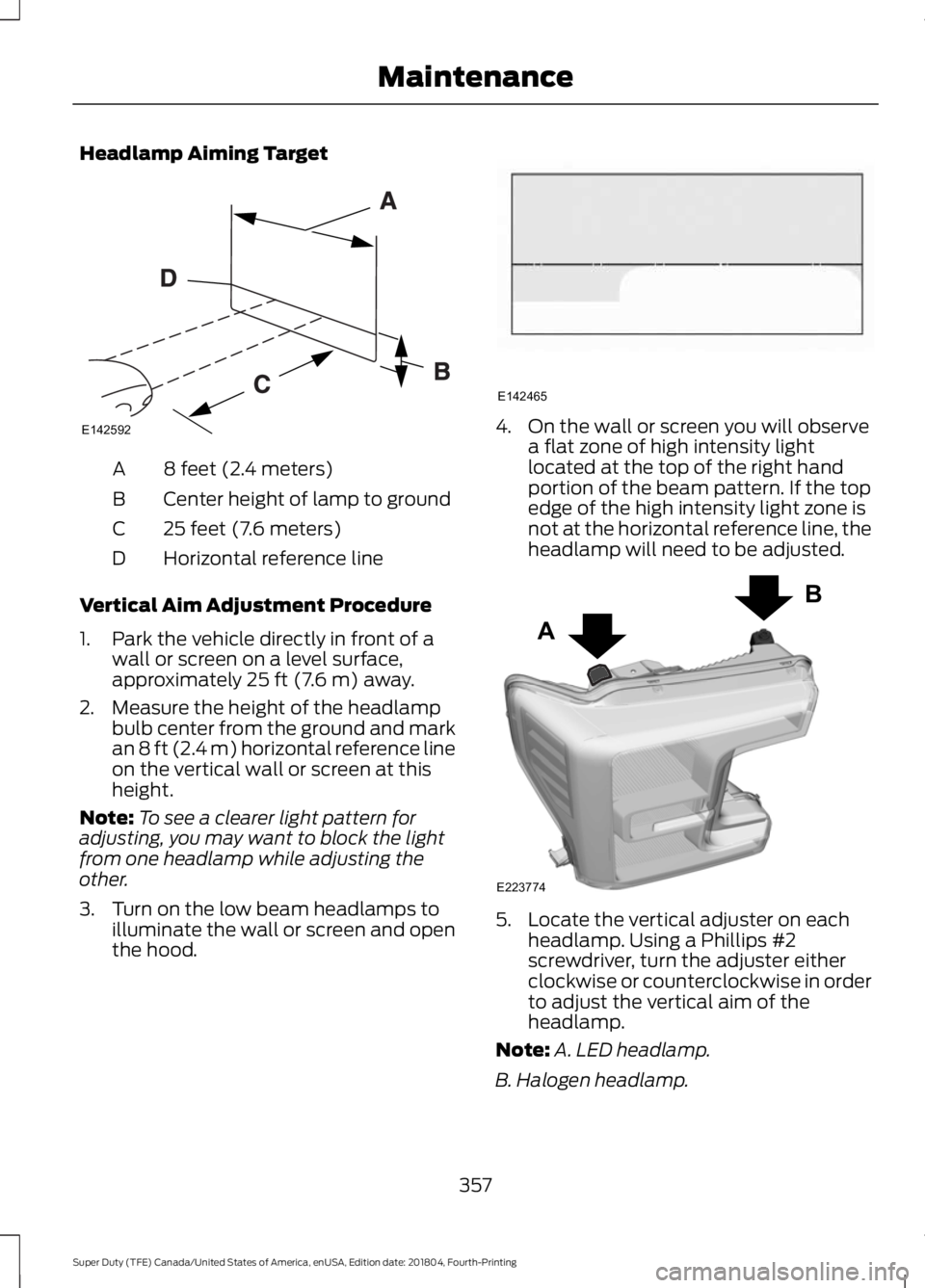
Headlamp Aiming Target
8 feet (2.4 meters)
A
Center height of lamp to ground
B
25 feet (7.6 meters)
C
Horizontal reference line
D
Vertical Aim Adjustment Procedure
1. Park the vehicle directly in front of a wall or screen on a level surface,
approximately 25 ft (7.6 m) away.
2. Measure the height of the headlamp bulb center from the ground and mark
an
8 ft (2.4 m) horizontal reference line
on the vertical wall or screen at this
height.
Note: To see a clearer light pattern for
adjusting, you may want to block the light
from one headlamp while adjusting the
other.
3. Turn on the low beam headlamps to illuminate the wall or screen and open
the hood. 4. On the wall or screen you will observe
a flat zone of high intensity light
located at the top of the right hand
portion of the beam pattern. If the top
edge of the high intensity light zone is
not at the horizontal reference line, the
headlamp will need to be adjusted. 5. Locate the vertical adjuster on each
headlamp. Using a Phillips #2
screwdriver, turn the adjuster either
clockwise or counterclockwise in order
to adjust the vertical aim of the
headlamp.
Note: A. LED headlamp.
B. Halogen headlamp.
357
Super Duty (TFE) Canada/United States of America, enUSA, Edition date: 201804, Fourth-Printing MaintenanceE142592 E142465 A
B
E223774
Page 367 of 666
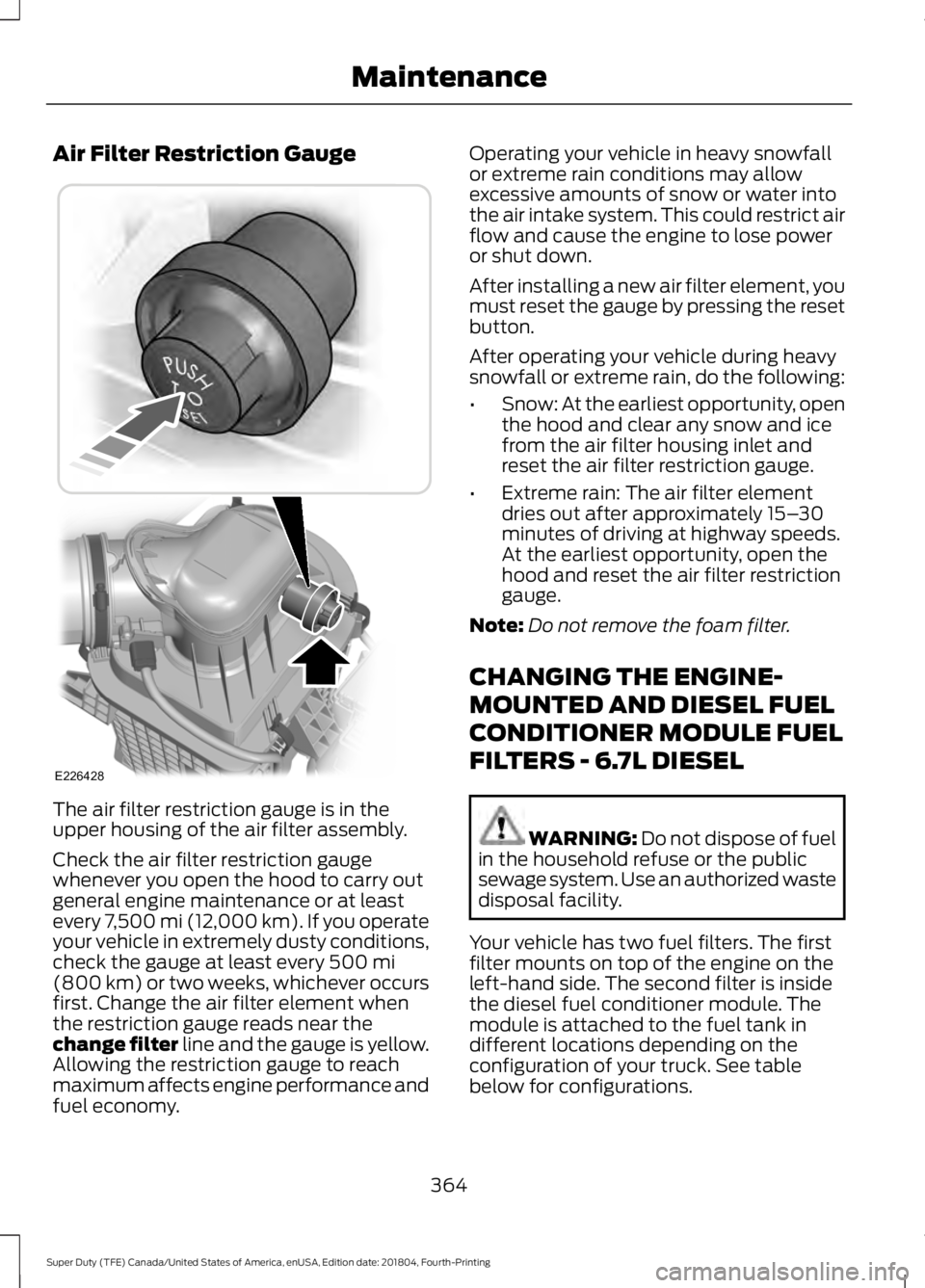
Air Filter Restriction Gauge
The air filter restriction gauge is in the
upper housing of the air filter assembly.
Check the air filter restriction gauge
whenever you open the hood to carry out
general engine maintenance or at least
every 7,500 mi (12,000 km). If you operate
your vehicle in extremely dusty conditions,
check the gauge at least every 500 mi
(800 km) or two weeks, whichever occurs
first. Change the air filter element when
the restriction gauge reads near the
change filter line and the gauge is yellow.
Allowing the restriction gauge to reach
maximum affects engine performance and
fuel economy. Operating your vehicle in heavy snowfall
or extreme rain conditions may allow
excessive amounts of snow or water into
the air intake system. This could restrict air
flow and cause the engine to lose power
or shut down.
After installing a new air filter element, you
must reset the gauge by pressing the reset
button.
After operating your vehicle during heavy
snowfall or extreme rain, do the following:
•
Snow: At the earliest opportunity, open
the hood and clear any snow and ice
from the air filter housing inlet and
reset the air filter restriction gauge.
• Extreme rain: The air filter element
dries out after approximately 15– 30
minutes of driving at highway speeds.
At the earliest opportunity, open the
hood and reset the air filter restriction
gauge.
Note: Do not remove the foam filter.
CHANGING THE ENGINE-
MOUNTED AND DIESEL FUEL
CONDITIONER MODULE FUEL
FILTERS - 6.7L DIESEL WARNING:
Do not dispose of fuel
in the household refuse or the public
sewage system. Use an authorized waste
disposal facility.
Your vehicle has two fuel filters. The first
filter mounts on top of the engine on the
left-hand side. The second filter is inside
the diesel fuel conditioner module. The
module is attached to the fuel tank in
different locations depending on the
configuration of your truck. See table
below for configurations.
364
Super Duty (TFE) Canada/United States of America, enUSA, Edition date: 201804, Fourth-Printing MaintenanceE226428
Page 653 of 666
Audio Unit - Vehicles With: AM/FM/
Touchscreen Display...............................446
Adjusting the Volume...................................... 446
Changing Radio Stations............................... 446
Selecting the Audio Modes............................ 447
Setting a Memory Preset................................ 447
Switching the Audio Unit On and Off.........447
Using Seek, Fast Forward and Reverse............................................................. 447
Audio Unit - Vehicles With: AM/ FM..................................................................444
Accessing the Auxiliary Media Sources............................................................ 444
Accessing the Menu......................................... 444
Adjusting the Volume...................................... 445
Changing Radio Stations................................ 445
Displaying the Clock......................................... 445
Selecting the Audio Modes........................... 445
Setting the Memory Presets......................... 445
Switching the Audio Unit On and Off........445
Using Seek, Fast Forward and Reverse............................................................. 445
Autolamps
........................................................92
Windshield Wiper Activated
Headlamps........................................................ 92
Automatic Climate Control......................146 Directing the Airflow.......................................... 146
Setting the Blower Motor Speed................... 147
Setting the Temperature.................................. 147
Switching Auto Mode On and Off.................147
Switching Dual Zone Mode On and Off........................................................................\
147
Switching Maximum Air Conditioning On and Off............................................................... 147
Switching Maximum Defrost On and Off....................................................................... 148
Switching Recirculated Air On and Off....................................................................... 148
Switching the Air Conditioning On and Off........................................................................\
147
Switching the Climate Control On and Off........................................................................\
147
Automatic High Beam Control..................93 Automatic High Beam Indicator..................... 94
Switching the System On and Off.................94
Automatic Transmission
..........................206
Brake-Shift Interlock........................................ 209If Your Vehicle Gets Stuck In Mud or
Snow.................................................................. 210
Understanding the Shift Positions of Your Automatic Transmission........................... 206
Understanding your SelectShift Automatic ™ transmission........................ 208
Automatic Transmission Fluid Check............................................................346
Checking Automatic Transmission Fluid.................................................................... 347
Autowipers.......................................................89
Auxiliary Power Points...............................168 400 Watt AC Power Point.............................. 168
DC Power Point................................................... 168
Locations............................................................... 169
Auxiliary Switches
........................................574
Upfitter Interface Module................................ 577
B
Battery See: Changing the 12V Battery..................... 354
Bed Extender
....................................................76
Grocery mode......................................................... 77
Tailgate mode........................................................ 76
Bed Ramps
.....................................................270
Installing the Ramp Holder............................ 272
Stowing the Bed Ramp.................................... 272
Using the Bed Ramp.......................................... 271
Blind Spot Information System..............253 Blind Spot Information System with Trailer
Tow..................................................................... 255
Switching the System Off and On...............257
System Errors....................................................... 257
Using the System............................................... 254
BLIS See: Blind Spot Information System..........253
Bonnet Lock See: Opening and Closing the Hood..........329
Booster Seats..................................................33 Types of Booster Seats...................................... 33
Brake Fluid Check........................................350
Brakes...............................................................223 General Information.......................................... 223
Breaking-In....................................................299
Bulb Specification Chart..........................442
650
Super Duty (TFE) Canada/United States of America, enUSA, Edition date: 201804, Fourth-Printing Index
Page 658 of 666
Turbo Boost Gauge...........................................
106
Type 1 and 2.......................................................... 104
Type 3..................................................................... 105
Gearbox See: Transmission............................................. 206
General Information on Radio Frequencies...................................................58
Intelligent Access................................................. 58
General Maintenance Information.......580 Multi-Point Inspection..................................... 583
Owner Checks and Services........................... 581
Protecting Your Investment.......................... 580
Why Maintain Your Vehicle?......................... 580
Why Maintain Your Vehicle at Your Dealership?.................................................... 580
Getting Assistance Outside the U.S. and Canada..........................................................314
Getting the Services You Need.................311 Away From Home................................................ 311
Global Opening..............................................98 Opening the Windows....................................... 98
H
Handbrake See: Parking Brake............................................. 225
Hazard Flashers...........................................305
HDC See: Using Hill Descent Control.....................231
Headlamp Adjusting See: Adjusting the Headlamps..................... 356
Headrest See: Head Restraints......................................... 152
Head Restraints.............................................152
Adjusting the Head Restraint......................... 153
Heated Exterior Mirrors................................151
Heated Rear Window..................................150
Heated Seats.................................................160 Rear Heated Seats.............................................. 161
Heated Steering Wheel
................................87
Heating See: Climate Control......................................... 145
Hill Start Assist.............................................225 Switching the System On and Off..............226
Using Hill Start Assist....................................... 226Hints on Controlling the Interior
Climate..........................................................148
Defogging the Side Windows in Cold Weather............................................................ 150
General Hints....................................................... 148
Quickly Cooling the Interior............................ 149
Quickly Heating the Interior............................ 149
Recommended Settings for Cooling..........150
Recommended Settings for Heating..........149
Hints on Driving With Anti-Lock Brakes............................................................225
Home Screen
................................................507
Hood Lock See: Opening and Closing the Hood..........329
I
Ignition Switch
................................................173
In California (U.S. Only)..............................312
Information Display Control
.......................87
Information Displays.....................................112
General Information............................................ 112
Information Messages
................................128
4WD........................................................................\
. 144
Adaptive Cruise Control................................... 129
Adaptive Steering............................................... 130
AdvanceTrac and Traction Control..............130
Airbag....................................................................... 131
Alarm and Security.............................................. 131
Automatic Engine Shutdown.......................... 131
Battery and Charging System........................ 132
Blind Spot Information and Cross Traffic Alert System.................................................... 132
Diesel Messages.................................................. 133
Doors and Locks.................................................. 135
Driver Alert............................................................ 136
Drivetrain................................................................ 136
Engine..................................................................... 136
Fuel........................................................................\
... 137
Keys and Intelligent Access............................. 137
Lane Keeping System....................................... 138
Maintenance........................................................ 138
MyKey...................................................................... 139
Off Road................................................................. 139
Park Aid.................................................................. 140
Park Brake............................................................. 140
Power Steering..................................................... 141
Pre-Collision Assist............................................. 141
655
Super Duty (TFE) Canada/United States of America, enUSA, Edition date: 201804, Fourth-Printing Index
Page 660 of 666
Setting the Blower Motor Speed..................
145
Setting the Temperature................................. 145
Switching Maximum Air Conditioning On and Off.............................................................. 146
Switching Maximum Defrost On and Off....................................................................... 146
Switching Recirculated Air On and Off....................................................................... 146
Switching the Air Conditioning On and Off........................................................................\
145
Switching the Climate Control On and Off....................................................................... 146
Manual Seats.................................................154
Manual Lumbar .................................................. 155
Moving the Seat Backward and Forward............................................................. 155
Recline Adjustment........................................... 155
Media Hub
......................................................456
Memory Function.........................................158
Easy Entry and Exit Feature............................ 159
Linking a PreSet Position to your Remote Control or Intelligent Access Key Fob
........................................................................\
...... 158
Recalling a Preset Position............................. 158
Saving a Preset Position.................................. 158
Message Center See: Information Displays................................. 112
Mirrors See: Windows and Mirrors................................ 97
Mobile Communications Equipment
......16
Moonroof.........................................................102 Bounce-Back....................................................... 103
Opening and Closing the Moonroof............102
Motorcraft Parts - 6.2L...............................421
Motorcraft Parts - 6.7L Diesel
.................422
Motorcraft Parts - 6.8L..............................423
MyKey – Troubleshooting...........................67
MyKey ™.............................................................65
Principle of Operation........................................ 65
N
Navigation
......................................................533
cityseeker............................................................. 540
Destination Mode.............................................. 535
Map Mode............................................................. 533
Navigation Map Updates................................. 541
Navigation Menu................................................ 538SiriusXM Traffic and Travel Link....................
541
SYNC AppLink.................................................... 540
Waypoints............................................................ 539
Normal Scheduled Maintenance
..........584
Diesel Engine....................................................... 585
Gasoline Engine................................................. 584
O
Oil Change Indicator Reset
......................338
Oil Check See: Engine Oil Check - 6.2L/6.8L..............334
See: Engine Oil Check - 6.7L Diesel.............335
Opening and Closing the Hood..............329
Ordering Additional Owner's Literature......................................................316
Obtaining a French Owner ’s Manual..........316
Overhead Console........................................170
P
Parking Aids
...................................................233
Principle of Operation...................................... 233
Parking Brake
.................................................225
Passive Anti-Theft System.........................78 SecuriLock®........................................................... 78
PATS See: Passive Anti-Theft System..................... 78
Perchlorate........................................................14
Phone...............................................................527 During a Phone Call........................................... 531
Making Calls........................................................ 530
Pairing Your Cell Phone for the First Time................................................................... 528
Phone Menu........................................................ 528
Receiving Calls..................................................... 531
Smartphone Connectivity.............................. 532
Text Messaging................................................... 532
Post-Crash Alert System
..........................308
Power Door Locks See: Locking and Unlocking............................. 69
Power Running Boards................................82
Power Seats
....................................................155
Adjusting the Lumbar Support..................... 156
Adjusting the Multi-Contour Front Seats With Active Motion ...................................... 156
Power Steering Fluid Check....................350
Power Take-Off
..............................................211
657
Super Duty (TFE) Canada/United States of America, enUSA, Edition date: 201804, Fourth-Printing Index
Page 664 of 666
.........")
Radio Frequency Certifications for SYNC
3........................................................................\
.. 646
Radio Frequency Certifications for Tire Pressure Monitoring Sensor(s)...............636
Radio Frequency Certifications for Wireless Charging........................................................... 645
Radio Frequency Statement for Audio Unit..................................................................... 647
U
Under Hood Overview - 6.2L..................330
Under Hood Overview - 6.7L Diesel.......331 F-Super Duty........................................................ 331
Scheduled Maintenance................................. 332
Under Hood Overview - 6.8L...................333
Under Seat Storage.....................................170 Rear Under Seat Storage................................. 170
Universal Garage Door Opener...............164 HomeLink Wireless Control System...........164
USB Port
.........................................................456
Using Adaptive Cruise Control................242 Automatic Cancellation.................................. 246
Blocked Sensor................................................... 247
Canceling the Set Speed................................ 245
Changing the Set Speed................................. 245
Detection Issues................................................ 246
Following a Vehicle........................................... 243
Hilly Condition and Trailer Tow Usage................................................................ 246
Overriding the Set Speed............................... 245
Resuming the Set Speed................................ 245
Setting the Adaptive Cruise Speed.............243
Setting the Gap Distance............................... 244
Switching Adaptive Cruise Control Off...................................................................... 246
Switching Adaptive Cruise Control On....................................................................... 243
Switching to Normal Cruise Control...........248
System Not Available....................................... 247
Using Cruise Control....................................241 Canceling the Set Speed................................ 242
Changing the Set Speed.................................. 241
Resuming the Set Speed................................ 242
Setting the Cruise Speed................................. 241
Switching Cruise Control Off......................... 242
Switching Cruise Control On.......................... 241Using Four-Wheel Drive
.............................212
4WD Indicator Lights......................................... 213
Driving Off-Road With Truck and Utility Vehicles............................................................. 216
Electronic Shift-On-the-Fly (ESOF) 4WD system................................................................ 212
How Your Vehicle Differs From Other Vehicles............................................................. 216
Manual Shift On Stop (MSOS) 4WD system................................................................ 212
Using a Manual Shift On Stop (MSOS) 4WD system.................................................... 213
Using the Electronic Shift on the Fly 4WD system................................................................ 215
Using Hill Descent Control
........................231
Hill descent modes............................................ 231
Using MyKey With Remote Start Systems...........................................................67
Using Power Running Boards....................82 Automatic Power Deploy.................................. 82
Automatic Power Stow...................................... 82
Bounce-back......................................................... 83
Enabling and Disabling...................................... 83
Manual Power Deploy........................................ 82
Using Snow Chains.....................................397
Using Stability Control...............................229 AdvanceTrac® with Roll Stability Control ™
(RSC®)............................................................. 229
Using SYNC™ With Your Media Player.............................................................478
Accessing Your USB Song Library...............482
Bluetooth Devices and System Settings............................................................ 484
Connecting Your Digital Media Player to the USB Port........................................................... 478
Media Menu Features....................................... 481
Media Voice Commands................................. 479
USB 2..................................................................... 484
Voice Commands for Audio Sources.........485
Using SYNC™ With Your Phone.............461 Accessing Features through the Phone
Menu................................................................. 466
Accessing Your Phone Settings................... 469
Bluetooth Devices............................................. 470
Making Calls........................................................ 465
Pairing a Phone for the First Time...............462
Pairing Subsequent Phones.......................... 463
Phone Options during an Active Call.........465
661
Super Duty (TFE) Canada/United States of America, enUSA, Edition date: 201804, Fourth-Printing Index