clock FORD SUPER DUTY 2019 Owner's Guide
[x] Cancel search | Manufacturer: FORD, Model Year: 2019, Model line: SUPER DUTY, Model: FORD SUPER DUTY 2019Pages: 666, PDF Size: 13.6 MB
Page 454 of 666
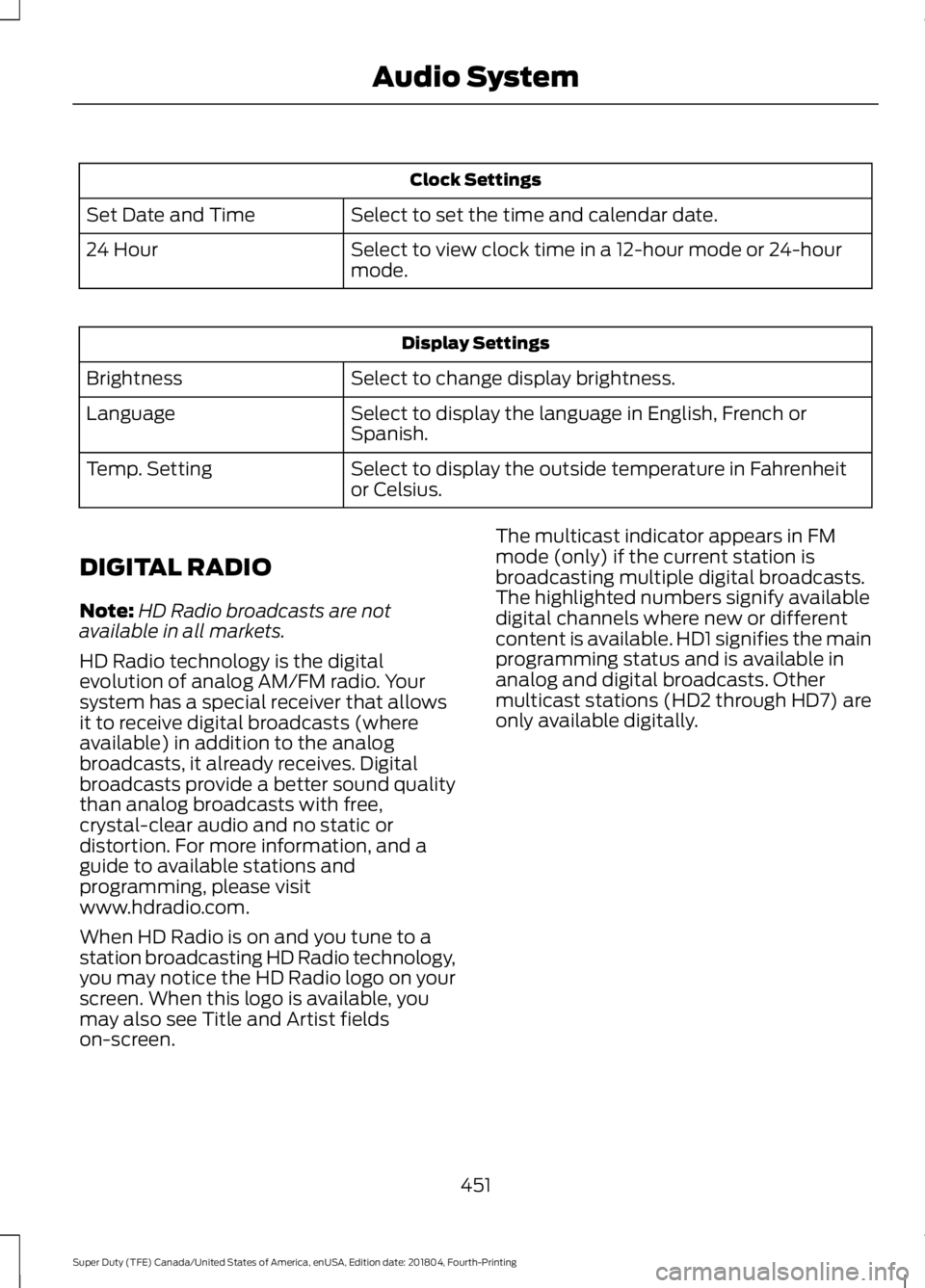
Clock Settings
Select to set the time and calendar date.
Set Date and Time
Select to view clock time in a 12-hour mode or 24-hour
mode.
24 Hour Display Settings
Select to change display brightness.
Brightness
Select to display the language in English, French or
Spanish.
Language
Select to display the outside temperature in Fahrenheit
or Celsius.
Temp. Setting
DIGITAL RADIO
Note: HD Radio broadcasts are not
available in all markets.
HD Radio technology is the digital
evolution of analog AM/FM radio. Your
system has a special receiver that allows
it to receive digital broadcasts (where
available) in addition to the analog
broadcasts, it already receives. Digital
broadcasts provide a better sound quality
than analog broadcasts with free,
crystal-clear audio and no static or
distortion. For more information, and a
guide to available stations and
programming, please visit
www.hdradio.com.
When HD Radio is on and you tune to a
station broadcasting HD Radio technology,
you may notice the HD Radio logo on your
screen. When this logo is available, you
may also see Title and Artist fields
on-screen. The multicast indicator appears in FM
mode (only) if the current station is
broadcasting multiple digital broadcasts.
The highlighted numbers signify available
digital channels where new or different
content is available. HD1 signifies the main
programming status and is available in
analog and digital broadcasts. Other
multicast stations (HD2 through HD7) are
only available digitally.
451
Super Duty (TFE) Canada/United States of America, enUSA, Edition date: 201804, Fourth-Printing Audio System
Page 499 of 666
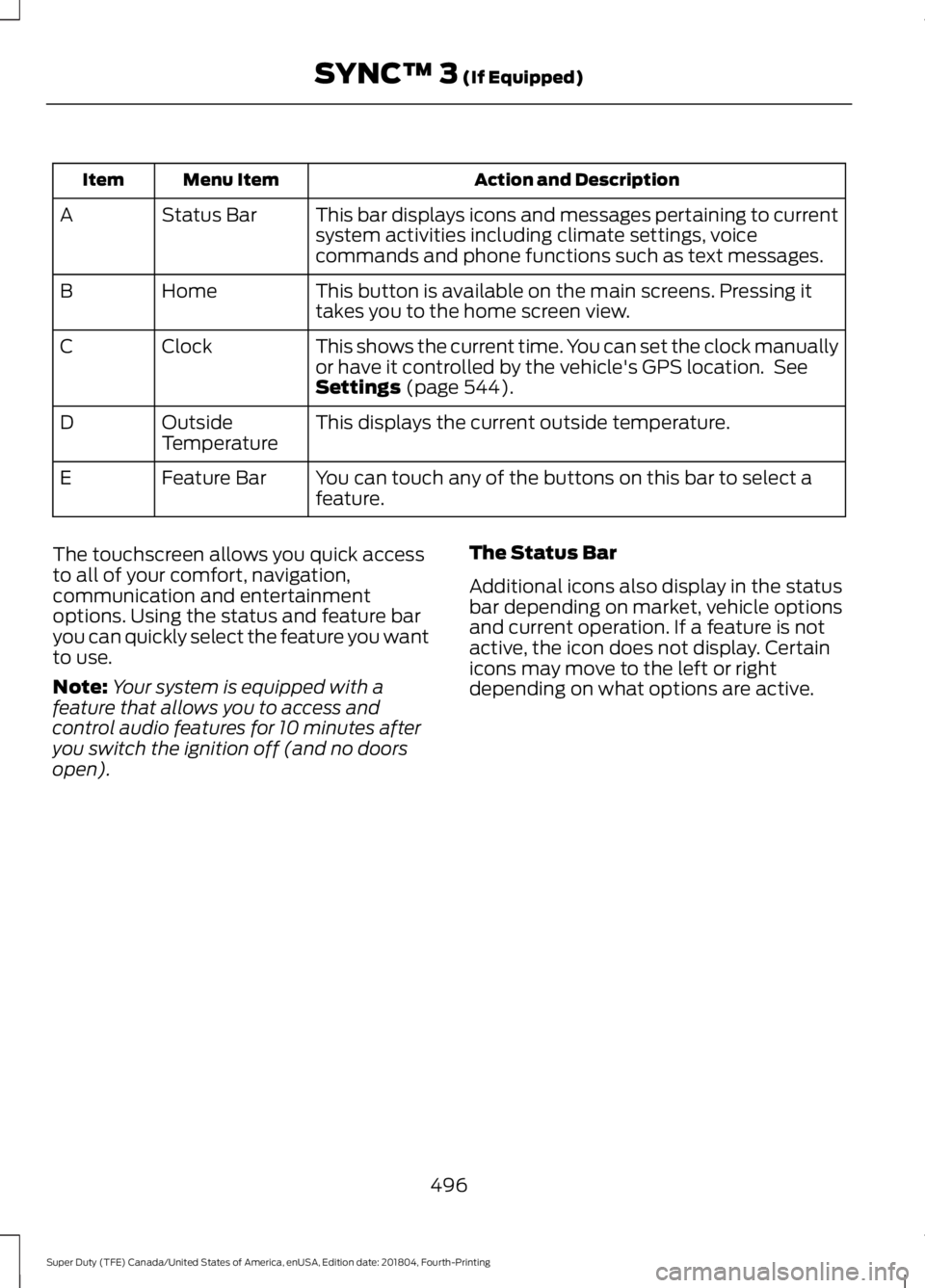
Action and Description
Menu Item
Item
This bar displays icons and messages pertaining to current
system activities including climate settings, voice
commands and phone functions such as text messages.
Status Bar
A
This button is available on the main screens. Pressing it
takes you to the home screen view.
Home
B
This shows the current time. You can set the clock manually
or have it controlled by the vehicle's GPS location. See
Settings (page 544).
Clock
C
This displays the current outside temperature.
Outside
Temperature
D
You can touch any of the buttons on this bar to select a
feature.
Feature Bar
E
The touchscreen allows you quick access
to all of your comfort, navigation,
communication and entertainment
options. Using the status and feature bar
you can quickly select the feature you want
to use.
Note: Your system is equipped with a
feature that allows you to access and
control audio features for 10 minutes after
you switch the ignition off (and no doors
open). The Status Bar
Additional icons also display in the status
bar depending on market, vehicle options
and current operation. If a feature is not
active, the icon does not display. Certain
icons may move to the left or right
depending on what options are active.
496
Super Duty (TFE) Canada/United States of America, enUSA, Edition date: 201804, Fourth-Printing SYNC™ 3
(If Equipped)
Page 549 of 666
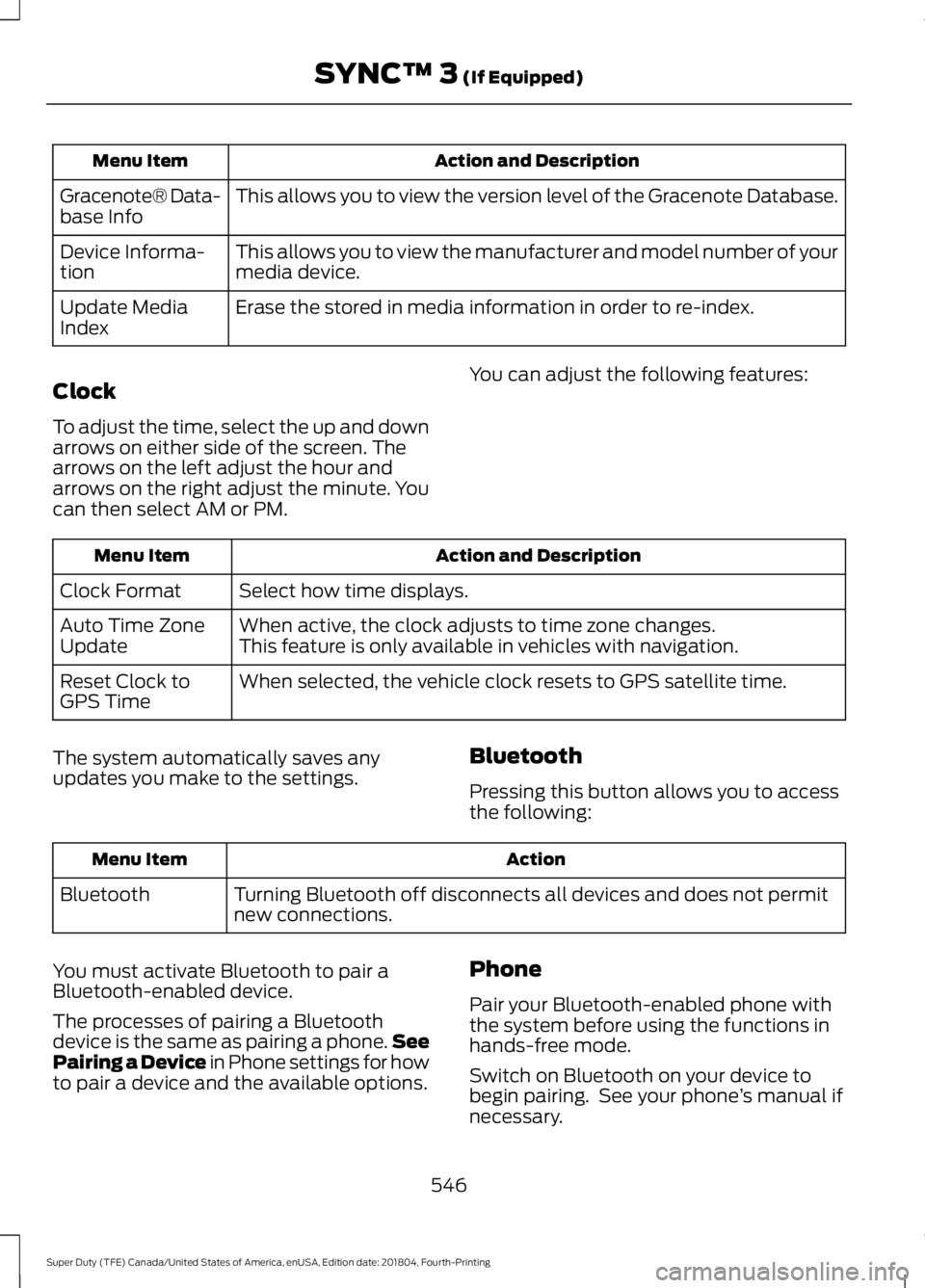
Action and Description
Menu Item
This allows you to view the version level of the Gracenote Database.
Gracenote® Data-
base Info
This allows you to view the manufacturer and model number of your
media device.
Device Informa-
tion
Erase the stored in media information in order to re-index.
Update Media
Index
Clock
To adjust the time, select the up and down
arrows on either side of the screen. The
arrows on the left adjust the hour and
arrows on the right adjust the minute. You
can then select AM or PM. You can adjust the following features:Action and Description
Menu Item
Select how time displays.
Clock Format
When active, the clock adjusts to time zone changes.
Auto Time Zone
Update This feature is only available in vehicles with navigation.
When selected, the vehicle clock resets to GPS satellite time.
Reset Clock to
GPS Time
The system automatically saves any
updates you make to the settings. Bluetooth
Pressing this button allows you to access
the following: Action
Menu Item
Turning Bluetooth off disconnects all devices and does not permit
new connections.
Bluetooth
You must activate Bluetooth to pair a
Bluetooth-enabled device.
The processes of pairing a Bluetooth
device is the same as pairing a phone. See
Pairing a Device in Phone settings for how
to pair a device and the available options. Phone
Pair your Bluetooth-enabled phone with
the system before using the functions in
hands-free mode.
Switch on Bluetooth on your device to
begin pairing. See your phone
’s manual if
necessary.
546
Super Duty (TFE) Canada/United States of America, enUSA, Edition date: 201804, Fourth-Printing SYNC™ 3 (If Equipped)
Page 652 of 666
3
360 Degree Camera....................................237
Advanced Camera Views................................ 237
Auxiliary Camera................................................ 239
Bed View Camera.............................................. 239
Camera Views...................................................... 237
Front Camera...................................................... 238
Keep Out Zone.................................................... 238
Side Camera........................................................ 239
4
4WD See: Four-Wheel Drive...................................... 212
A
A/C See: Climate Control......................................... 145
About This Manual...........................................7
ABS See: Brakes........................................................... 223
ABS driving hints See: Hints on Driving With Anti-Lock
Brakes................................................................ 225
Accessories.....................................................572 Exterior style......................................................... 572
Interior style.......................................................... 572
Lifestyle.................................................................. 572
Peace of mind...................................................... 572
Accessories See: Replacement Parts
Recommendation............................................ 14
ACC See: Using Adaptive Cruise Control............242
Adjustable Pedals
.........................................88
Adjusting the Headlamps........................356
Horizontal Aim Adjustment........................... 358
Vertical Aim Adjustment................................ 356
Adjusting the Pedals....................................88
Adjusting the Steering Wheel - Vehicles With: Manual Adjustable Steering
Column
...........................................................84
Adjusting the Steering Wheel - Vehicles With: Power Adjustable Steering
Column
...........................................................84
End of Travel Position......................................... 85Memory Feature...................................................
85
Airbag Disposal...............................................57
Air Conditioning See: Climate Control......................................... 145
Air Filter See: Changing the Engine Air Filter - 6.2L/
6.8L..................................................................... 361
See: Changing the Engine Air Filter - 6.7L Diesel................................................................. 362
Alarm See: Anti-Theft Alarm........................................ 80
Anti-Theft Alarm
...........................................80
Arming the Alarm.................................................. 81
Disarming the Alarm............................................ 81
Using the System.................................................. 81
Appendices...................................................608
Apps..................................................................541 ........................................................................\
........... 541
SiriusXM Traffic and Travel Link................... 543
At a Glance........................................................18
Audible Warnings and Indicators
..............111
Headlamps On Warning Chime...................... 111
Key in Ignition Warning Chime......................... 111
Parking Brake On Warning Chime.................. 111
Audio Control
..................................................85
Media........................................................................\
86
Seek, Next or Previous....................................... 86
Audio System
...............................................444
General Information......................................... 444
Audio Unit - Vehicles With: AM/FM/ SYNC
.............................................................447
Accessing the Clock Settings........................ 447
Accessing the Media Source Menu.............447
Accessing the Menu.......................................... 447
Accessing the Phone Features..................... 448
Accessing the Sound Settings..................... 448
Adjusting the Volume...................................... 448
Changing Radio Stations............................... 448
Listening to Satellite Radio........................... 448
Listening to the Radio..................................... 448
Menu Structure.................................................. 449
Switching the Audio Unit On and Off........448
Using Seek, Fast Forward and Reverse............................................................. 449
Using the Display Control.............................. 448
Using the Number Block................................ 449
649
Super Duty (TFE) Canada/United States of America, enUSA, Edition date: 201804, Fourth-Printing Index
Page 653 of 666
Audio Unit - Vehicles With: AM/FM/
Touchscreen Display...............................446
Adjusting the Volume...................................... 446
Changing Radio Stations............................... 446
Selecting the Audio Modes............................ 447
Setting a Memory Preset................................ 447
Switching the Audio Unit On and Off.........447
Using Seek, Fast Forward and Reverse............................................................. 447
Audio Unit - Vehicles With: AM/ FM..................................................................444
Accessing the Auxiliary Media Sources............................................................ 444
Accessing the Menu......................................... 444
Adjusting the Volume...................................... 445
Changing Radio Stations................................ 445
Displaying the Clock......................................... 445
Selecting the Audio Modes........................... 445
Setting the Memory Presets......................... 445
Switching the Audio Unit On and Off........445
Using Seek, Fast Forward and Reverse............................................................. 445
Autolamps
........................................................92
Windshield Wiper Activated
Headlamps........................................................ 92
Automatic Climate Control......................146 Directing the Airflow.......................................... 146
Setting the Blower Motor Speed................... 147
Setting the Temperature.................................. 147
Switching Auto Mode On and Off.................147
Switching Dual Zone Mode On and Off........................................................................\
147
Switching Maximum Air Conditioning On and Off............................................................... 147
Switching Maximum Defrost On and Off....................................................................... 148
Switching Recirculated Air On and Off....................................................................... 148
Switching the Air Conditioning On and Off........................................................................\
147
Switching the Climate Control On and Off........................................................................\
147
Automatic High Beam Control..................93 Automatic High Beam Indicator..................... 94
Switching the System On and Off.................94
Automatic Transmission
..........................206
Brake-Shift Interlock........................................ 209If Your Vehicle Gets Stuck In Mud or
Snow.................................................................. 210
Understanding the Shift Positions of Your Automatic Transmission........................... 206
Understanding your SelectShift Automatic ™ transmission........................ 208
Automatic Transmission Fluid Check............................................................346
Checking Automatic Transmission Fluid.................................................................... 347
Autowipers.......................................................89
Auxiliary Power Points...............................168 400 Watt AC Power Point.............................. 168
DC Power Point................................................... 168
Locations............................................................... 169
Auxiliary Switches
........................................574
Upfitter Interface Module................................ 577
B
Battery See: Changing the 12V Battery..................... 354
Bed Extender
....................................................76
Grocery mode......................................................... 77
Tailgate mode........................................................ 76
Bed Ramps
.....................................................270
Installing the Ramp Holder............................ 272
Stowing the Bed Ramp.................................... 272
Using the Bed Ramp.......................................... 271
Blind Spot Information System..............253 Blind Spot Information System with Trailer
Tow..................................................................... 255
Switching the System Off and On...............257
System Errors....................................................... 257
Using the System............................................... 254
BLIS See: Blind Spot Information System..........253
Bonnet Lock See: Opening and Closing the Hood..........329
Booster Seats..................................................33 Types of Booster Seats...................................... 33
Brake Fluid Check........................................350
Brakes...............................................................223 General Information.......................................... 223
Breaking-In....................................................299
Bulb Specification Chart..........................442
650
Super Duty (TFE) Canada/United States of America, enUSA, Edition date: 201804, Fourth-Printing Index
Page 662 of 666
Seatbelt Warning Lamp and Indicator
Chime..............................................................43
Conditions of operation..................................... 44
Seats..................................................................152
Security..............................................................78
Selective Catalytic Reductant System - Diesel.............................................................196
Contaminated Diesel Exhaust Fluid or Inoperative Selective Catalytic Reduction
System............................................................. 200
Diesel Exhaust Fluid Guidelines and Information...................................................... 199
Diesel Exhaust Fluid Level.............................. 196
Diesel Exhaust Fluid Warning Messages and Vehicle Operations............................... 198
Filling the Diesel Exhaust Fluid Tank..........196
Settings...........................................................544 911 Assist............................................................... 549
Bluetooth............................................................. 546
Clock...................................................................... 546
Display.................................................................... 557
General.................................................................. 554
Media Player........................................................ 545
Mobile Apps......................................................... 552
Modem.................................................................. 554
Navigation............................................................ 550
Phone.................................................................... 546
Radio...................................................................... 549
Sound.................................................................... 544
Valet Mode........................................................... 558
Vehicle................................................................... 556
Voice Control....................................................... 558
Wi-Fi....................................................................... 556
Side Airbags.....................................................54
Sitting in the Correct Position..................152
Sliding Windows............................................101 Power Sliding Back Window........................... 101
Snow Chains See: Using Snow Chains................................. 397
Snow Plowing
................................................301
Engine temperature while plowing.............303
Installing the Snowplow.................................. 301
Operating the Vehicle with the Snowplow Attached.......................................................... 302
Snowplowing with your Airbag Equipped Vehicle.............................................................. 302
Transmission operation while plowing............................................................. 303Spare Wheel
See: Changing a Road Wheel....................... 406
Special Notices
................................................14
New Vehicle Limited Warranty......................... 14
On Board Diagnostics Data Link Connector............................................................ 15
Special Instructions.............................................. 15
Using a Slide-In Camper.................................... 15
Using your Vehicle as an Ambulance............15
Using your Vehicle as a Stationary Power Source.................................................................. 16
Using your Vehicle With a Snowplow............15
Special Operating Conditions Scheduled Maintenance..............................................588
Diesel Engine........................................................ 591
Exceptions........................................................... 596
Gasoline Engine................................................. 588
Speed Control See: Cruise Control............................................. 241
Spot Lamps
.....................................................95
Stability Control...........................................228
Principle of Operation...................................... 228
Starter Switch See: Ignition Switch............................................ 173
Starting a Diesel Engine - 6.7L Diesel..............................................................176
........................................................................\
............ 176
Automatic Engine Shutdown......................... 178
Cold Weather Operation.................................. 178
Cold Weather Starting...................................... 178
Diesel Engine Fast Start Glow Plug System................................................................ 177
Vehicles with an Ignition Key........................... 177
Vehicles with Keyless Start.............................. 177
Starting a Gasoline Engine - 6.2L/ 6.8L..................................................................174
Automatic Engine Shutdown......................... 175
Cold Weather Starting (Flexible Fuel Vehicles Only)................................................. 176
Failure to Start...................................................... 175
Guarding Against Exhaust Fumes................176
Important Ventilating Information...............176
Stopping the Engine When Your Vehicle is Moving................................................................ 175
Stopping the Engine When Your Vehicle is Stationary.......................................................... 175
Vehicles with an Ignition Key.......................... 175
Vehicles with Keyless Start............................. 175
659
Super Duty (TFE) Canada/United States of America, enUSA, Edition date: 201804, Fourth-Printing Index