ignition FORD SUPER DUTY 2022 Owner's Manual
[x] Cancel search | Manufacturer: FORD, Model Year: 2022, Model line: SUPER DUTY, Model: FORD SUPER DUTY 2022Pages: 740, PDF Size: 9.95 MB
Page 96 of 740
HOW DOES EASY ENTRY AND
EXIT WORK
Easy entry and exit moves the driver seat
rearward up to 2 in (5 cm) and the steering
column up when you switch the ignition
off. The driver seat and steering column
return to their previous positions when you
switch the ignition on.
Note:
Depending on your vehicle, the
column may move up and in.
SWITCHING EASY ENTRY AND
EXIT ON AND OFF
1. Press Settings on the touchscreen.
2. Press
Vehicle.
3. Select
Easy Entry/Exit.
If you press any adjustment or memory
button when in easy exit mode, the system
cancels the operation.
93
2022 Super Duty (TFE) Canada/United States of America, enUSA, Edition date: 202103, First-Printing Easy Entry and Exit
Page 97 of 740
TAILGATE PRECAUTIONS
WARNING: It is extremely
dangerous to ride in a cargo area, inside
or outside of a vehicle. In a crash, people
riding in these areas are more likely to be
seriously injured or killed. Do not allow
people to ride in any area of your vehicle
that is not equipped with seats and
seatbelts. Make sure everyone in your
vehicle is in a seat and properly using a
seatbelt. Failure to follow this warning
could result in serious personal injury or
death.
OPENING THE TAILGATE
OPENING THE TAILGATE FROM
OUTSIDE YOUR VEHICLE Pull up on the handle to release the
tailgate.
Note:
You may need to unlock the tailgate
first. LOCKING AND UNLOCKING
THE TAILGATE
Lock.
A
Unlock.
B
1. Insert the ignition key into the tailgate lock.
2. Turn it to the left to lock the tailgate.
3. Turn it to the right to unlock the tailgate.
REMOVING AND INSTALLING
THE TAILGATE WARNING: Always properly secure
cargo to prevent shifting cargo or cargo
falling from the vehicle. Failure to do so
could result in compromised vehicle
stability and serious personal injury to
vehicle occupants or others.
94
2022 Super Duty (TFE) Canada/United States of America, enUSA, Edition date: 202103, First-Printing Tailgate - Vehicles With: Manual TailgateE333071 E332901
Page 109 of 740
PASSIVE ANTI-THEFT
SYSTEM
WHAT IS THE PASSIVE ANTI-
THEFT SYSTEM
The passive anti-theft system prevents
someone from starting the vehicle with an
incorrectly coded key.
HOW DOES THE PASSIVE ANTI-
THEFT SYSTEM WORK
The passive anti-theft system arms when
you switch the ignition off.
It disarms when the ignition is switched on
with a correctly coded key.
Note:
The system is not compatible with
non-Ford aftermarket remote start systems.
Note: Do not leave a duplicate coded key
in your vehicle. Always take the keys and
lock all doors when leaving your vehicle.
ANTI-THEFT ALARM SYSTEM
WHAT IS THE ANTI-THEFT ALARM
SYSTEM
The Anti-Theft Alarm System warns you
of an unauthorized entry to your vehicle.
HOW DOES THE ANTI-THEFT
ALARM SYSTEM WORK
When armed, the anti-theft alarm is
triggered in any of the following ways:
• If someone opens a door, the tailgate
or the hood without a correctly coded
key or remote control.
• If you turn the power on without a
correctly coded key.
• If the interior sensors detect movement
inside your vehicle. •
If the inclination sensors detect an
attempt to raise your vehicle.
• If someone disconnects the vehicle
battery or the battery backup alarm.
• If someone disconnects the trailer. See
Connecting a Trailer (page 323).
Any further attempts to carry out one of
the above sounds the alarm again.
If the anti-theft alarm is triggered, the
alarm horn sounds for 30 seconds and the
direction indicators flash for five minutes.
WHAT IS THE PERIMETER ALARM
The perimeter alarm is designed to detect
unauthorized access to your vehicle.
WHAT ARE THE INTERIOR
SENSORS
The interior sensors are designed to detect
any movement inside your vehicle.
The interior sensors are in the overhead
console.
Note: Do not cover the interior sensors.
WHAT ARE THE INCLINATION
SENSORS
The inclination sensor is designed to detect
an attempt to raise your vehicle, for
example to remove a wheel or to tow it
away.
WHAT IS THE BATTERY BACKUP
ALARM
The battery backup alarm is an additional
alarm system that has its own battery and
horn. It is designed to detect if the vehicle
battery or the battery backup alarm is
disconnected.
106
2022 Super Duty (TFE) Canada/United States of America, enUSA, Edition date: 202103, First-Printing Security
(If Equipped)
Page 110 of 740
ARMING THE ANTI-THEFT ALARM
SYSTEM
The alarm is ready to arm when there is
not a key in your vehicle.
Lock your vehicle with your remote control
to arm the alarm.
DISARMING THE ANTI-THEFT
ALARM SYSTEM
Disarm the alarm by performing any of the
following actions:
•
Unlock the doors or luggage
compartment with the remote control.
• Switch your vehicle on or start your
vehicle.
ANTI-THEFT ALARM SYSTEM
SETTINGS
WHAT ARE THE ALARM SECURITY
LEVELS
You can select two levels of alarm security,
all sensors and perimeter sensing.
All Sensors
All sensors is the standard setting.
In all sensors, all equipped sensors are on
when you arm the alarm. Note:
Do not arm the alarm with all sensors
if passengers, animals or other moving
objects are inside your vehicle.
Perimeter Sensing
In perimeter sensing, the interior sensors
are off when you arm the alarm.
All the other equipped sensors activate
when you arm the alarm in this mode.
SETTING THE ALARM SECURITY
LEVEL
1. Press Settings on the touchscreen.
2. Press
Vehicle Settings.
3. Press
Alarm System.
4. Press
Motion Sensors.
5. Press a setting.
WHAT IS ASK ON EXIT
You can choose which level of security you
require after you switch the ignition off.
Note: If you do not choose a setting, the
system defaults to all sensors.
SWITCHING ASK ON EXIT ON AND
OFF
1. Press
Settings on the touchscreen.
2. Press
Vehicle Settings.
3. Press
Alarm System.
4. Switch
Ask on Exit on or off.
107
2022 Super Duty (TFE) Canada/United States of America, enUSA, Edition date: 202103, First-Printing Security
(If Equipped)
Page 114 of 740
ADJUSTING THE STEERING
WHEEL - VEHICLES WITH:
POWER ADJUSTABLE
STEERING COLUMN
WARNING: Do not adjust the
steering wheel when your vehicle is
moving.
Note: Make sure that you are sitting in the
correct position. See
Sitting in the Correct
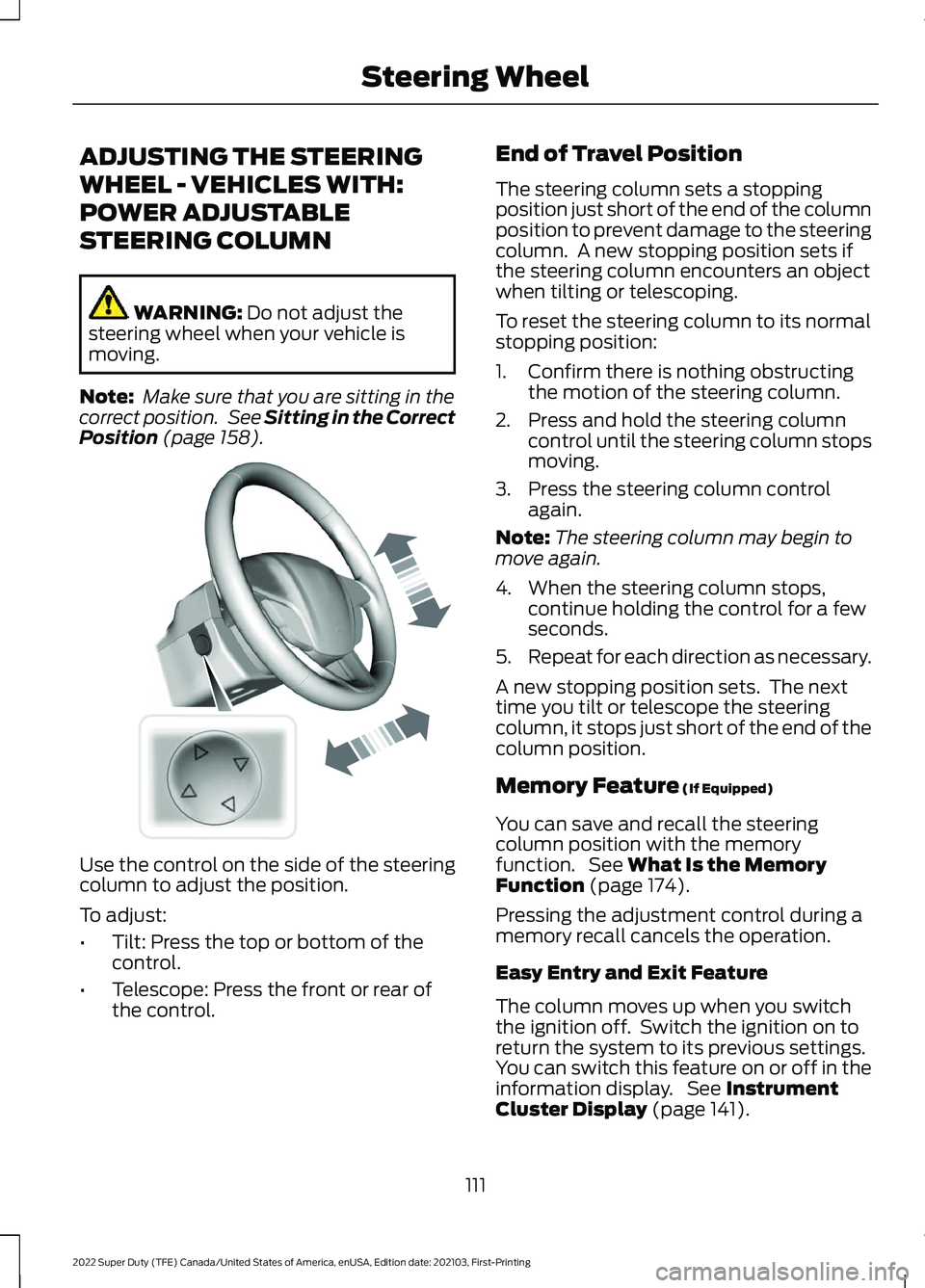
Position (page 158). Use the control on the side of the steering
column to adjust the position.
To adjust:
•
Tilt: Press the top or bottom of the
control.
• Telescope: Press the front or rear of
the control. End of Travel Position
The steering column sets a stopping
position just short of the end of the column
position to prevent damage to the steering
column. A new stopping position sets if
the steering column encounters an object
when tilting or telescoping.
To reset the steering column to its normal
stopping position:
1. Confirm there is nothing obstructing
the motion of the steering column.
2. Press and hold the steering column control until the steering column stops
moving.
3. Press the steering column control again.
Note: The steering column may begin to
move again.
4. When the steering column stops, continue holding the control for a few
seconds.
5. Repeat for each direction as necessary.
A new stopping position sets. The next
time you tilt or telescope the steering
column, it stops just short of the end of the
column position.
Memory Feature
(If Equipped)
You can save and recall the steering
column position with the memory
function. See
What Is the Memory
Function (page 174).
Pressing the adjustment control during a
memory recall cancels the operation.
Easy Entry and Exit Feature
The column moves up when you switch
the ignition off. Switch the ignition on to
return the system to its previous settings.
You can switch this feature on or off in the
information display. See
Instrument
Cluster Display (page 141).
111
2022 Super Duty (TFE) Canada/United States of America, enUSA, Edition date: 202103, First-Printing Steering WheelE261582
Page 129 of 740
OPENING AND CLOSING THE
WINDOWS
WARNING: Do not leave children
unattended in your vehicle and do not
let them play with the power windows.
Failure to follow this instruction could
result in personal injury. WARNING:
When closing the
power windows, verify they are free of
obstruction and make sure that children
and pets are not in the proximity of the
window openings. Press the window control switch
to open the window. Lift the
window control switch to close
the window.
Note: The power windows operate with the
ignition on, and for several minutes after you
switch the ignition off or until you open a
front door.
To reduce wind noise or pulsing noise when
one window is open, slightly open the
opposite window.
One-Touch Open
Fully press the window control switch and
release it. Press again or lift it to stop the
window.
One-Touch Close
Fully lift the window control switch and
release it. Press again or lift it to stop the
window.
Resetting One-Touch Close
Carry out all steps within 30 seconds of
starting the sequence.
1. Close the window. 2. Press and hold the window control
switch until the window is fully open.
Keep the window control switch
pressed for a few seconds.
3. Lift and hold the window control switch
until the window is fully closed. Keep
the window control switch held for a
few seconds.
4. Press and hold the window control switch until the window is fully open.
Keep the window control switch
pressed for a few seconds.
5. Lift and hold the window control switch
until the window is fully closed. Keep
the window control switch held for a
few seconds.
Note: Repeat the procedure if the window
does not close when you use one-touch.
WINDOW BOUNCE-BACK
WHAT IS WINDOW BOUNCE-BACK
The window stops and reverses if it detects
an obstruction when closing.
OVERRIDING WINDOW BOUNCE-
BACK WARNING:
If you override
bounce-back, the window does not
reverse if it detects an obstacle. Take
care when closing the windows to avoid
personal injury or damage to your
vehicle.
1. Close the window until it reaches the point of resistance and let it reverse.
2. Lift and hold the window control switch
within two seconds to override
bounce-back and close the window.
Bounce-back is now disabled and you
can close the window manually.
126
2022 Super Duty (TFE) Canada/United States of America, enUSA, Edition date: 202103, First-Printing Windows
Page 132 of 740
ADJUSTING THE EXTERIOR
MIRRORS
WARNING: Do not adjust the
mirrors when your vehicle is moving. This
could result in the loss of control of your
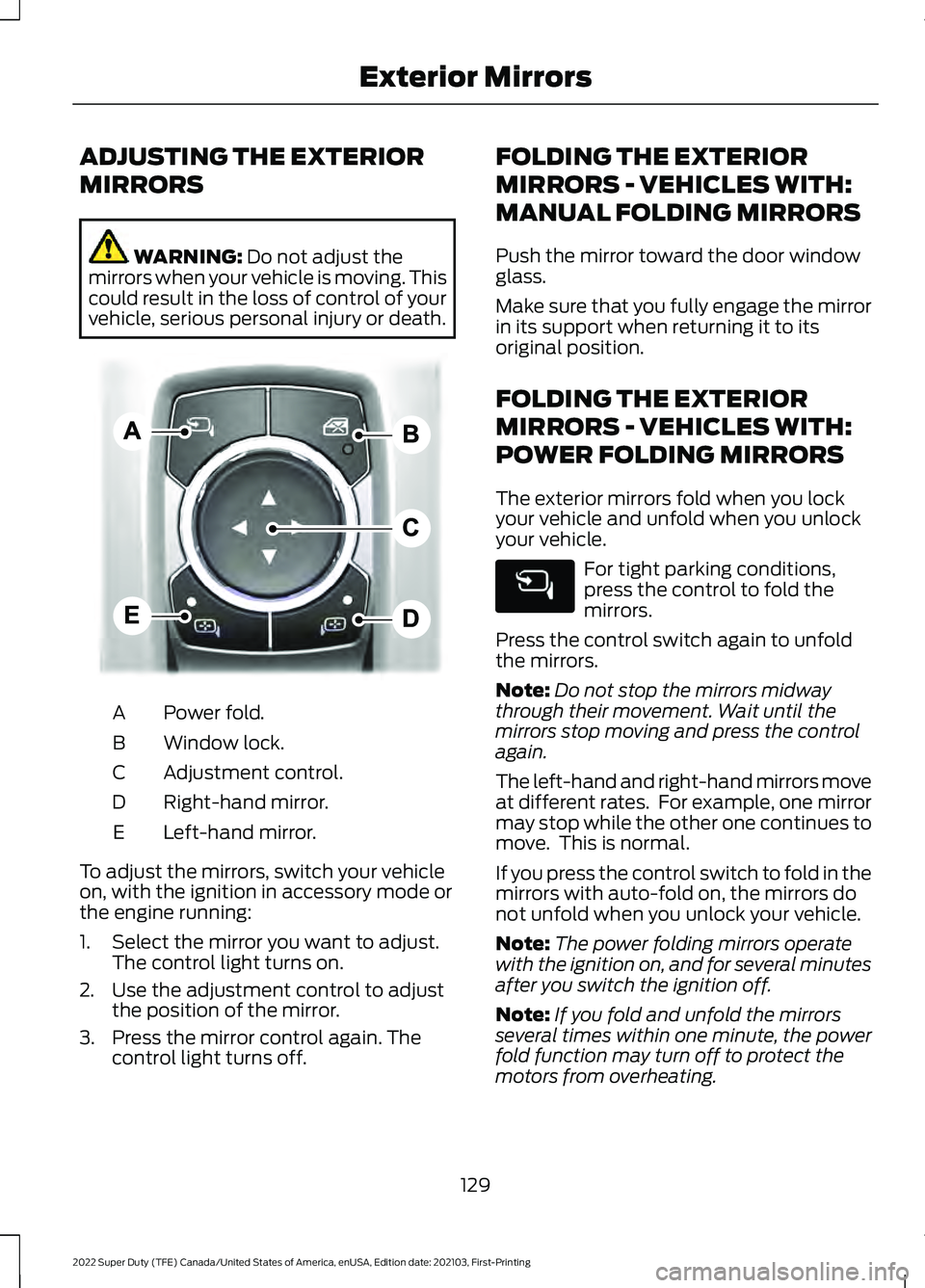
vehicle, serious personal injury or death. Power fold.
A
Window lock.
B
Adjustment control.
C
Right-hand mirror.
D
Left-hand mirror.
E
To adjust the mirrors, switch your vehicle
on, with the ignition in accessory mode or
the engine running:
1. Select the mirror you want to adjust. The control light turns on.
2. Use the adjustment control to adjust the position of the mirror.
3. Press the mirror control again. The control light turns off. FOLDING THE EXTERIOR
MIRRORS - VEHICLES WITH:
MANUAL FOLDING MIRRORS
Push the mirror toward the door window
glass.
Make sure that you fully engage the mirror
in its support when returning it to its
original position.
FOLDING THE EXTERIOR
MIRRORS - VEHICLES WITH:
POWER FOLDING MIRRORS
The exterior mirrors fold when you lock
your vehicle and unfold when you unlock
your vehicle.
For tight parking conditions,
press the control to fold the
mirrors.
Press the control switch again to unfold
the mirrors.
Note: Do not stop the mirrors midway
through their movement. Wait until the
mirrors stop moving and press the control
again.
The left-hand and right-hand mirrors move
at different rates. For example, one mirror
may stop while the other one continues to
move. This is normal.
If you press the control switch to fold in the
mirrors with auto-fold on, the mirrors do
not unfold when you unlock your vehicle.
Note: The power folding mirrors operate
with the ignition on, and for several minutes
after you switch the ignition off.
Note: If you fold and unfold the mirrors
several times within one minute, the power
fold function may turn off to protect the
motors from overheating.
129
2022 Super Duty (TFE) Canada/United States of America, enUSA, Edition date: 202103, First-Printing Exterior MirrorsE311081
Page 133 of 740
Switching Auto-fold On and Off
1. Press Settings on the touchscreen.
2. Press
Vehicle Settings.
3. Press
Mirrors.
4. Switch
Autofold on or off.
Loose Mirror
If you manually fold your power-folding
mirrors, they may not work properly even
after you re-position them. You need to
reset them if:
• The mirrors vibrate when you drive.
• The mirrors feel loose.
• The mirrors do not stay in the folded or
unfolded position.
• One of the mirrors is not in its normal
driving position.
To reset the mirrors, perform the following
steps:
1. By hand, fold or retract both mirrors.
2. Using the power folding/power telescoping mirror control switch,
operate the mirrors until you hear an
audible click.
3. Operate the power folding or power telescoping mirrors an additional 3 to
4 times to synchronize the mirrors.
EXTENDING THE EXTERIOR
MIRRORS
This optional feature lets you extend the
mirror about 3 in (75 mm). It is useful when
towing a trailer. You can manually pull out
or push in the mirrors to various positions.
Power Telescoping Mirrors
(If
Equipped)
This feature lets you position both mirrors
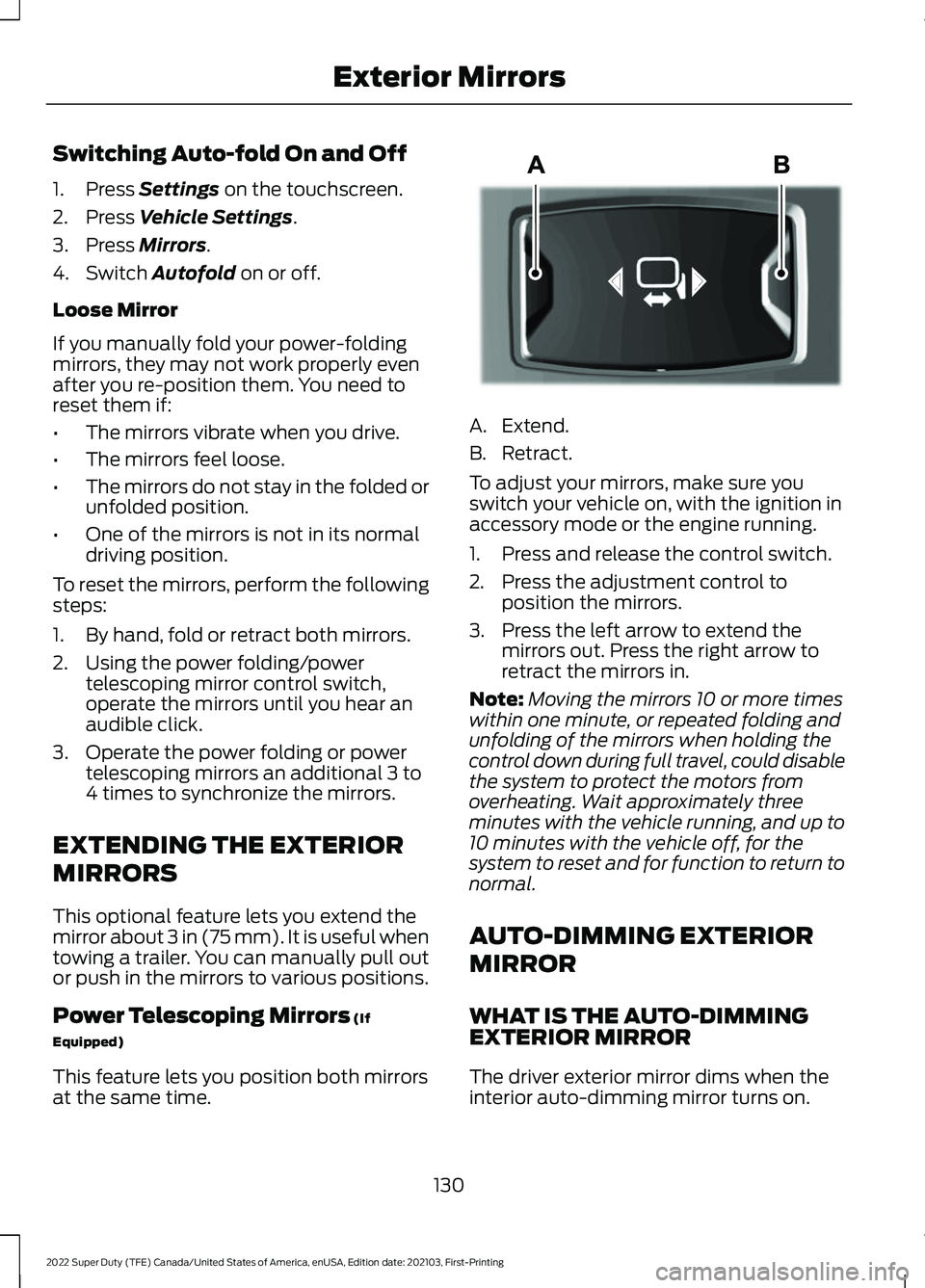
at the same time. A. Extend.
B. Retract.
To adjust your mirrors, make sure you
switch your vehicle on, with the ignition in
accessory mode or the engine running.
1. Press and release the control switch.
2. Press the adjustment control to
position the mirrors.
3. Press the left arrow to extend the mirrors out. Press the right arrow to
retract the mirrors in.
Note: Moving the mirrors 10 or more times
within one minute, or repeated folding and
unfolding of the mirrors when holding the
control down during full travel, could disable
the system to protect the motors from
overheating. Wait approximately three
minutes with the vehicle running, and up to
10 minutes with the vehicle off, for the
system to reset and for function to return to
normal.
AUTO-DIMMING EXTERIOR
MIRROR
WHAT IS THE AUTO-DIMMING
EXTERIOR MIRROR
The driver exterior mirror dims when the
interior auto-dimming mirror turns on.
130
2022 Super Duty (TFE) Canada/United States of America, enUSA, Edition date: 202103, First-Printing Exterior MirrorsE218902
Page 140 of 740
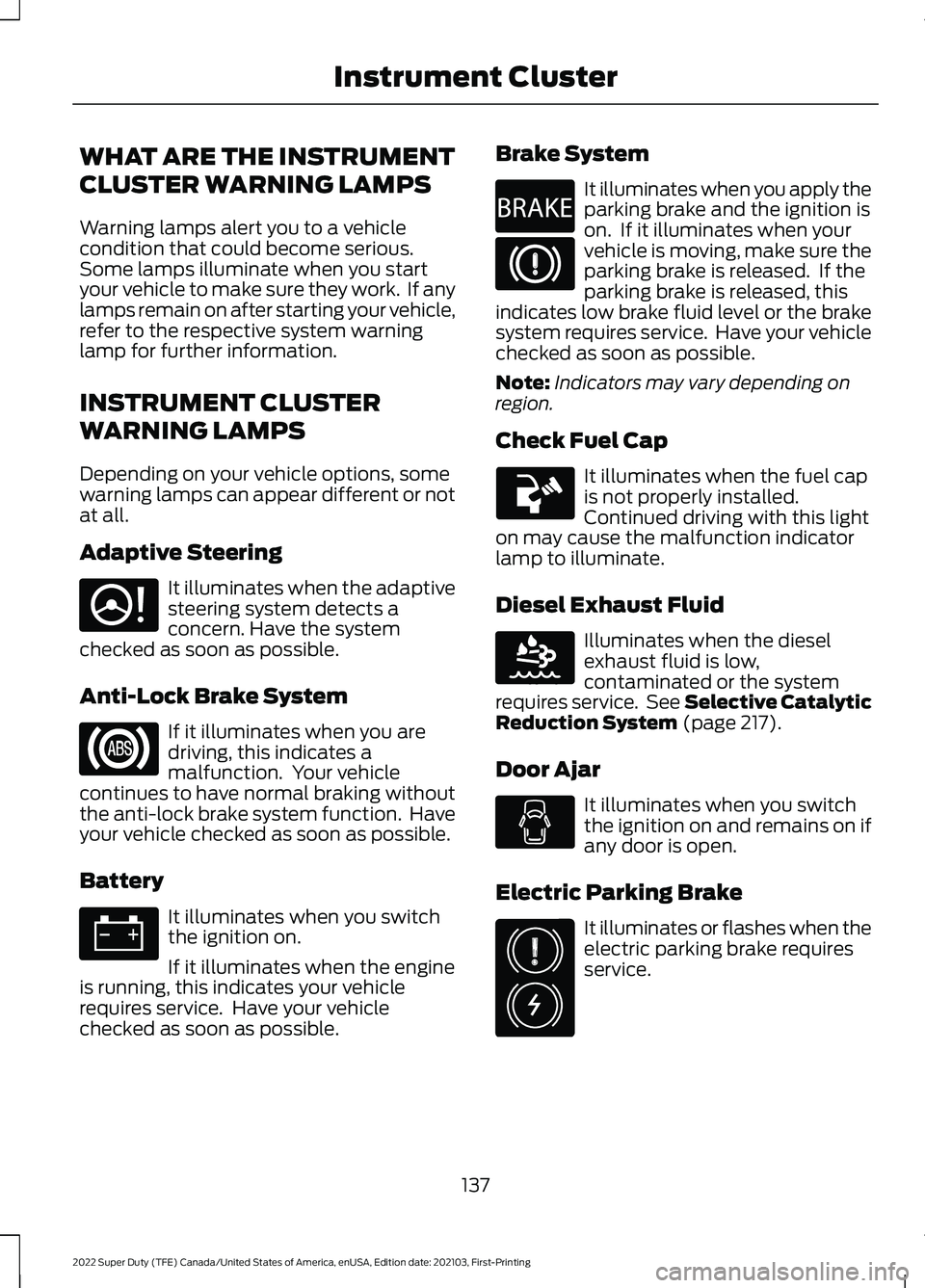
WHAT ARE THE INSTRUMENT
CLUSTER WARNING LAMPS
Warning lamps alert you to a vehicle
condition that could become serious.
Some lamps illuminate when you start
your vehicle to make sure they work. If any
lamps remain on after starting your vehicle,
refer to the respective system warning
lamp for further information.
INSTRUMENT CLUSTER
WARNING LAMPS
Depending on your vehicle options, some
warning lamps can appear different or not
at all.
Adaptive Steering
It illuminates when the adaptive
steering system detects a
concern. Have the system
checked as soon as possible.
Anti-Lock Brake System If it illuminates when you are
driving, this indicates a
malfunction. Your vehicle
continues to have normal braking without
the anti-lock brake system function. Have
your vehicle checked as soon as possible.
Battery It illuminates when you switch
the ignition on.
If it illuminates when the engine
is running, this indicates your vehicle
requires service. Have your vehicle
checked as soon as possible. Brake System It illuminates when you apply the
parking brake and the ignition is
on. If it illuminates when your
vehicle is moving, make sure the
parking brake is released. If the
parking brake is released, this
indicates low brake fluid level or the brake
system requires service. Have your vehicle
checked as soon as possible.
Note: Indicators may vary depending on
region.
Check Fuel Cap It illuminates when the fuel cap
is not properly installed.
Continued driving with this light
on may cause the malfunction indicator
lamp to illuminate.
Diesel Exhaust Fluid Illuminates when the diesel
exhaust fluid is low,
contaminated or the system
requires service. See Selective Catalytic
Reduction System (page 217).
Door Ajar It illuminates when you switch
the ignition on and remains on if
any door is open.
Electric Parking Brake It illuminates or flashes when the
electric parking brake requires
service.
137
2022 Super Duty (TFE) Canada/United States of America, enUSA, Edition date: 202103, First-Printing Instrument ClusterE223375 E270480 E163176 E325775
Page 141 of 740
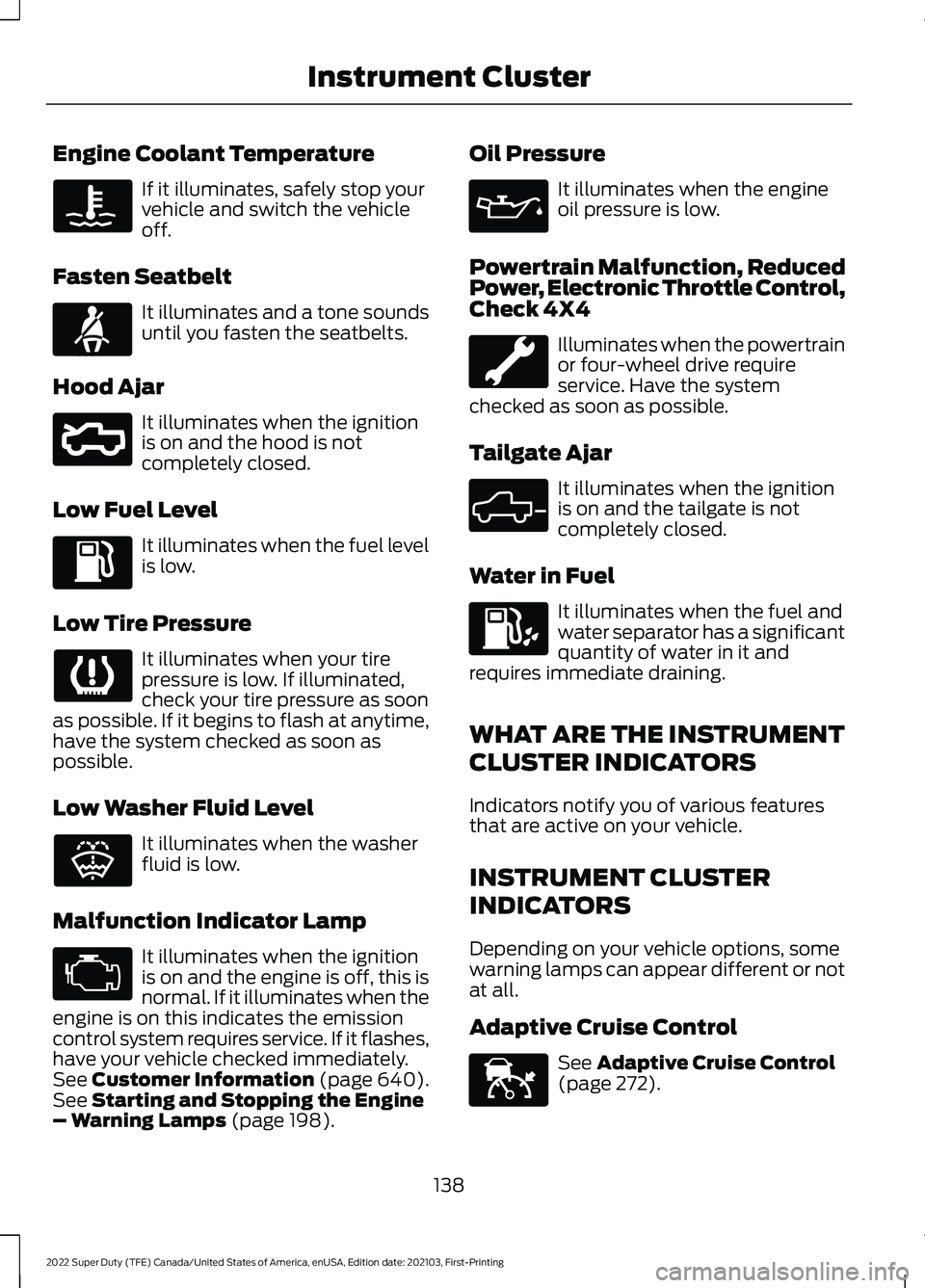
Engine Coolant Temperature
If it illuminates, safely stop your
vehicle and switch the vehicle
off.
Fasten Seatbelt It illuminates and a tone sounds
until you fasten the seatbelts.
Hood Ajar It illuminates when the ignition
is on and the hood is not
completely closed.
Low Fuel Level It illuminates when the fuel level
is low.
Low Tire Pressure It illuminates when your tire
pressure is low. If illuminated,
check your tire pressure as soon
as possible. If it begins to flash at anytime,
have the system checked as soon as
possible.
Low Washer Fluid Level It illuminates when the washer
fluid is low.
Malfunction Indicator Lamp It illuminates when the ignition
is on and the engine is off, this is
normal. If it illuminates when the
engine is on this indicates the emission
control system requires service. If it flashes,
have your vehicle checked immediately.
See Customer Information (page 640).
See Starting and Stopping the Engine
– Warning Lamps (page 198). Oil Pressure It illuminates when the engine
oil pressure is low.
Powertrain Malfunction, Reduced
Power, Electronic Throttle Control,
Check 4X4 Illuminates when the powertrain
or four-wheel drive require
service. Have the system
checked as soon as possible.
Tailgate Ajar It illuminates when the ignition
is on and the tailgate is not
completely closed.
Water in Fuel It illuminates when the fuel and
water separator has a significant
quantity of water in it and
requires immediate draining.
WHAT ARE THE INSTRUMENT
CLUSTER INDICATORS
Indicators notify you of various features
that are active on your vehicle.
INSTRUMENT CLUSTER
INDICATORS
Depending on your vehicle options, some
warning lamps can appear different or not
at all.
Adaptive Cruise Control See
Adaptive Cruise Control
(page 272).
138
2022 Super Duty (TFE) Canada/United States of America, enUSA, Edition date: 202103, First-Printing Instrument Cluster E71880 E296055 E132353 E324523 E144524