battery FORD SUPER DUTY 2022 Workshop Manual
[x] Cancel search | Manufacturer: FORD, Model Year: 2022, Model line: SUPER DUTY, Model: FORD SUPER DUTY 2022Pages: 740, PDF Size: 9.95 MB
Page 431 of 740
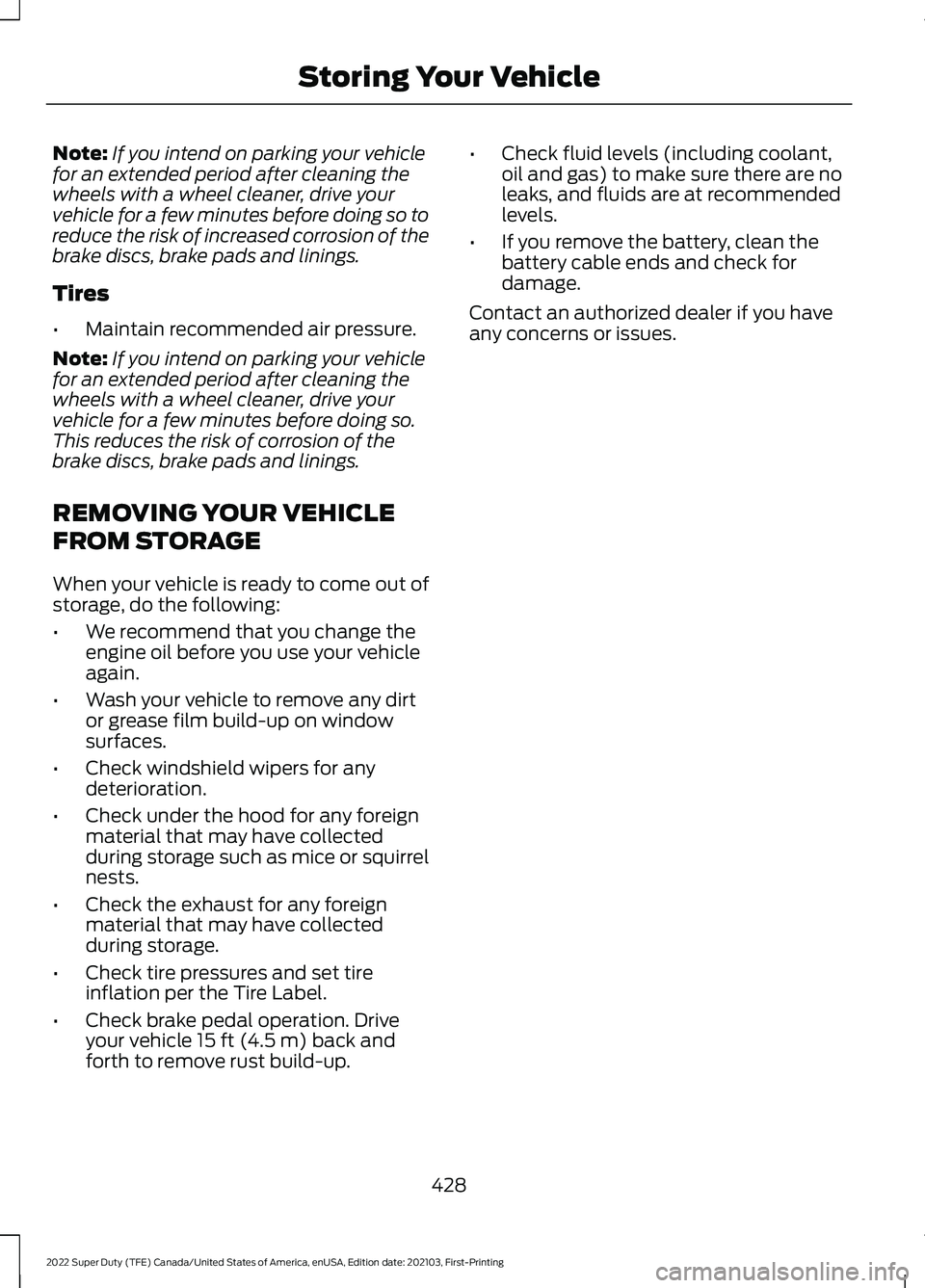
Note:
If you intend on parking your vehicle
for an extended period after cleaning the
wheels with a wheel cleaner, drive your
vehicle for a few minutes before doing so to
reduce the risk of increased corrosion of the
brake discs, brake pads and linings.
Tires
• Maintain recommended air pressure.
Note: If you intend on parking your vehicle
for an extended period after cleaning the
wheels with a wheel cleaner, drive your
vehicle for a few minutes before doing so.
This reduces the risk of corrosion of the
brake discs, brake pads and linings.
REMOVING YOUR VEHICLE
FROM STORAGE
When your vehicle is ready to come out of
storage, do the following:
• We recommend that you change the
engine oil before you use your vehicle
again.
• Wash your vehicle to remove any dirt
or grease film build-up on window
surfaces.
• Check windshield wipers for any
deterioration.
• Check under the hood for any foreign
material that may have collected
during storage such as mice or squirrel
nests.
• Check the exhaust for any foreign
material that may have collected
during storage.
• Check tire pressures and set tire
inflation per the Tire Label.
• Check brake pedal operation. Drive
your vehicle 15 ft (4.5 m) back and
forth to remove rust build-up. •
Check fluid levels (including coolant,
oil and gas) to make sure there are no
leaks, and fluids are at recommended
levels.
• If you remove the battery, clean the
battery cable ends and check for
damage.
Contact an authorized dealer if you have
any concerns or issues.
428
2022 Super Duty (TFE) Canada/United States of America, enUSA, Edition date: 202103, First-Printing Storing Your Vehicle
Page 472 of 740
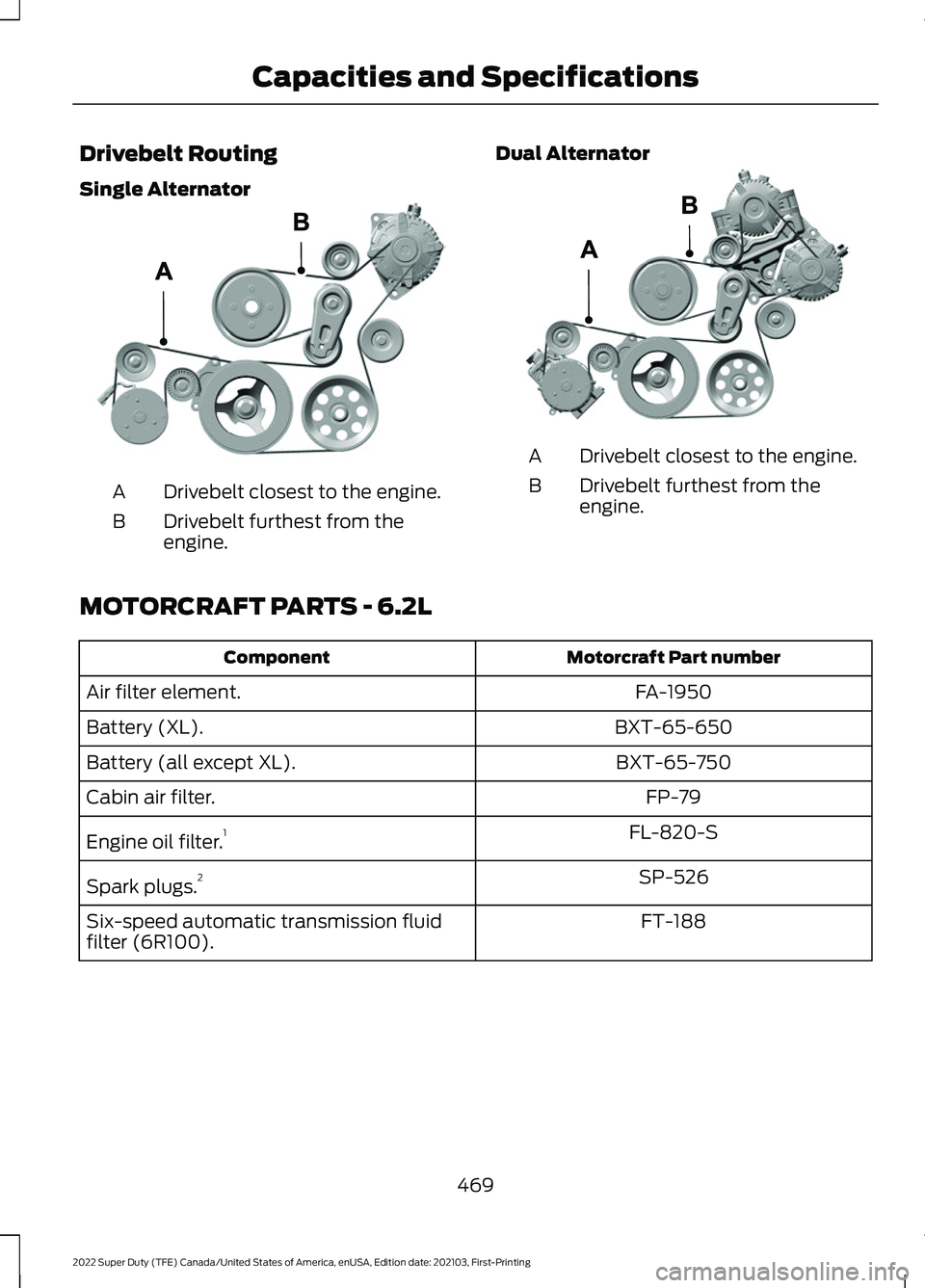
Drivebelt Routing
Single Alternator
Drivebelt closest to the engine.
A
Drivebelt furthest from the
engine.
B Dual Alternator Drivebelt closest to the engine.
A
Drivebelt furthest from the
engine.
B
MOTORCRAFT PARTS - 6.2L Motorcraft Part number
Component
FA-1950
Air filter element.
BXT-65-650
Battery (XL).
BXT-65-750
Battery (all except XL).
FP-79
Cabin air filter.
FL-820-S
Engine oil filter. 1
SP-526
Spark plugs. 2
FT-188
Six-speed automatic transmission fluid
filter (6R100).
469
2022 Super Duty (TFE) Canada/United States of America, enUSA, Edition date: 202103, First-Printing Capacities and SpecificationsE305075 E298579
Page 474 of 740
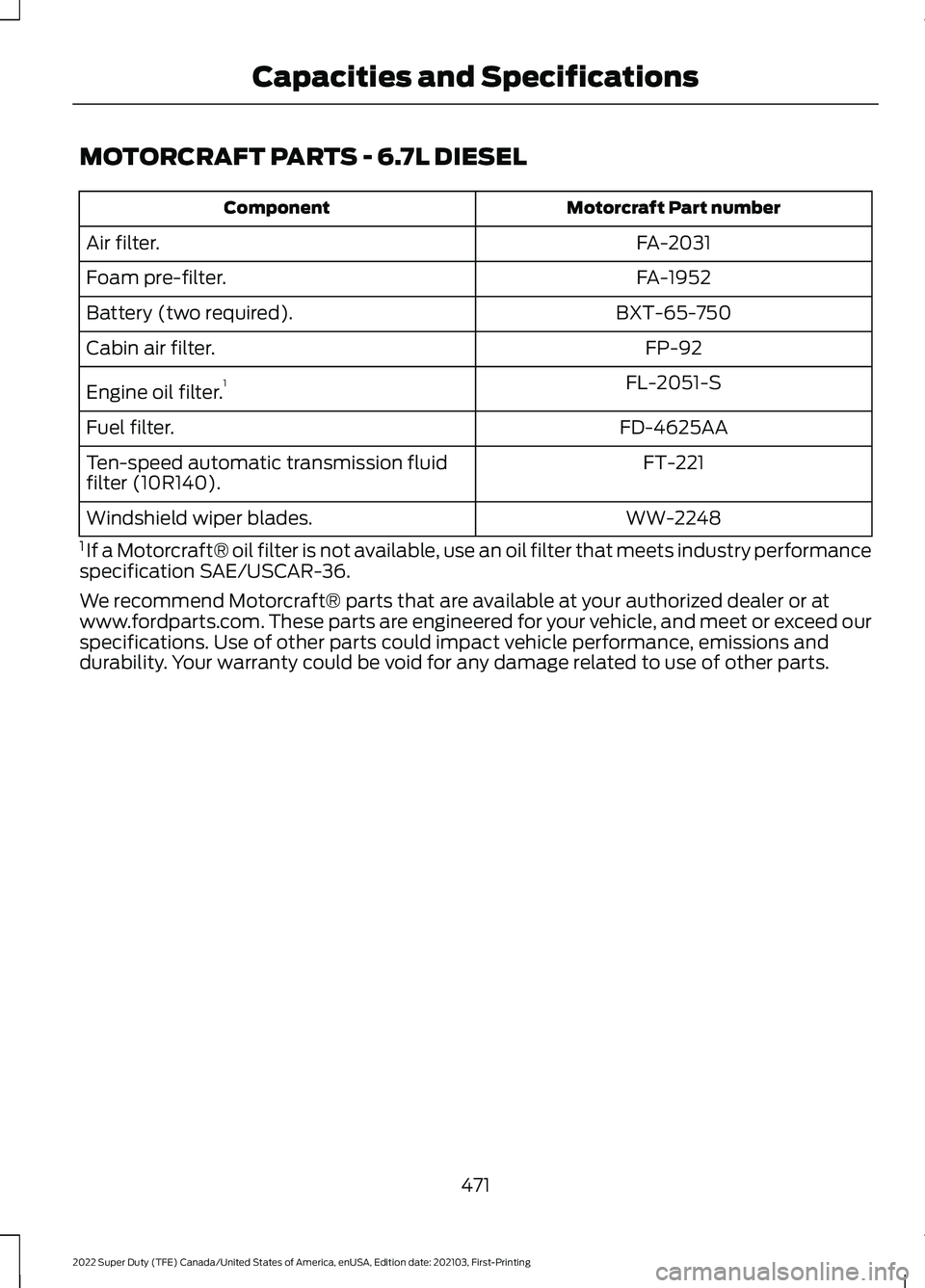
MOTORCRAFT PARTS - 6.7L DIESEL
Motorcraft Part number
Component
FA-2031
Air filter.
FA-1952
Foam pre-filter.
BXT-65-750
Battery (two required).
FP-92
Cabin air filter.
FL-2051-S
Engine oil filter. 1
FD-4625AA
Fuel filter.
FT-221
Ten-speed automatic transmission fluid
filter (10R140).
WW-2248
Windshield wiper blades.
1 If a Motorcraft® oil filter is not available, use an oil filter that meets industry performance
specification SAE/USCAR-36.
We recommend Motorcraft® parts that are available at your authorized dealer or at
www.fordparts.com. These parts are engineered for your vehicle, and meet or exceed our
specifications. Use of other parts could impact vehicle performance, emissions and
durability. Your warranty could be void for any damage related to use of other parts.
471
2022 Super Duty (TFE) Canada/United States of America, enUSA, Edition date: 202103, First-Printing Capacities and Specifications
Page 475 of 740
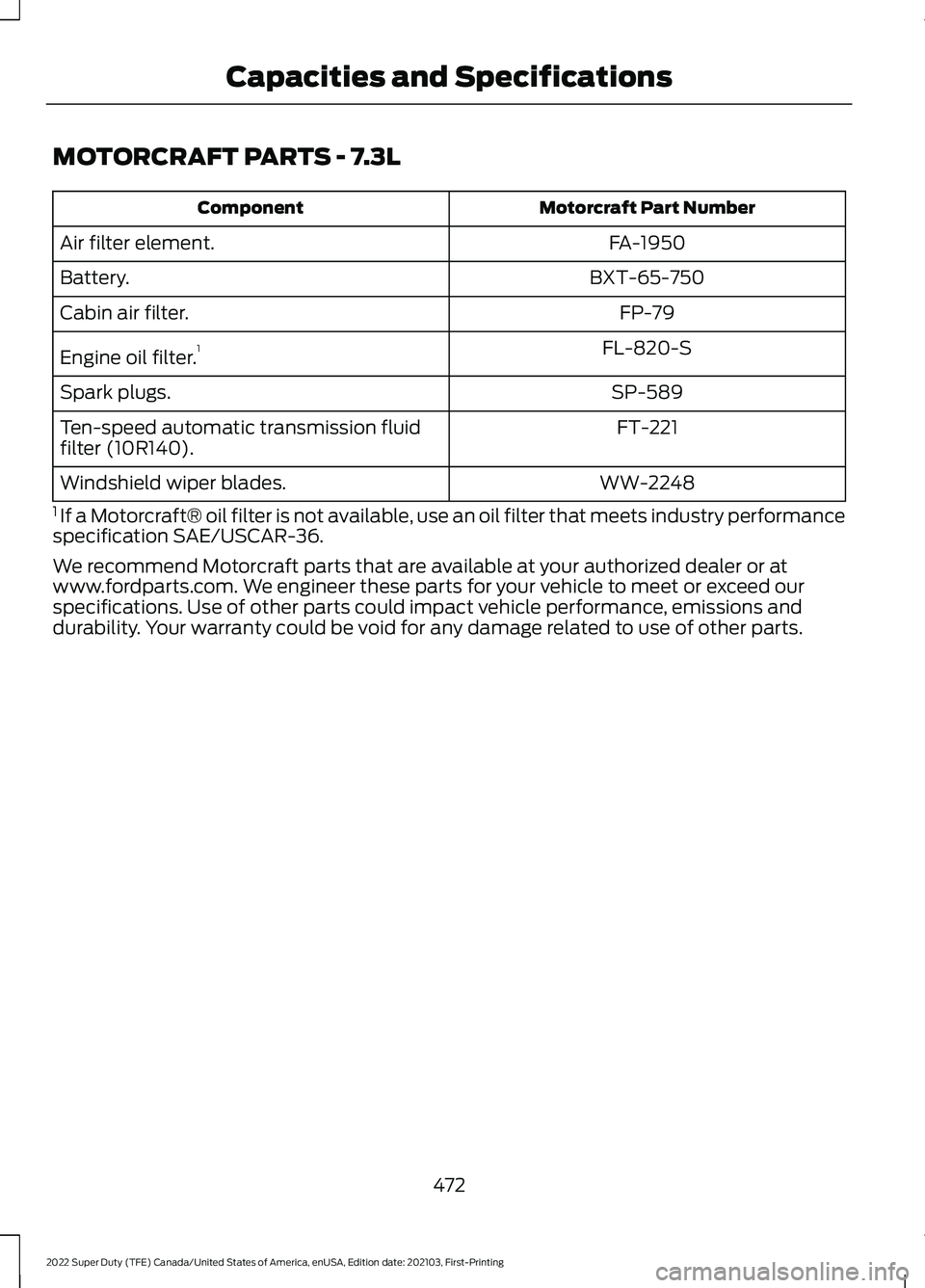
MOTORCRAFT PARTS - 7.3L
Motorcraft Part Number
Component
FA-1950
Air filter element.
BXT-65-750
Battery.
FP-79
Cabin air filter.
FL-820-S
Engine oil filter. 1
SP-589
Spark plugs.
FT-221
Ten-speed automatic transmission fluid
filter (10R140).
WW-2248
Windshield wiper blades.
1 If a Motorcraft® oil filter is not available, use an oil filter that meets industry performance
specification SAE/USCAR-36.
We recommend Motorcraft parts that are available at your authorized dealer or at
www.fordparts.com. We engineer these parts for your vehicle to meet or exceed our
specifications. Use of other parts could impact vehicle performance, emissions and
durability. Your warranty could be void for any damage related to use of other parts.
472
2022 Super Duty (TFE) Canada/United States of America, enUSA, Edition date: 202103, First-Printing Capacities and Specifications
Page 546 of 740
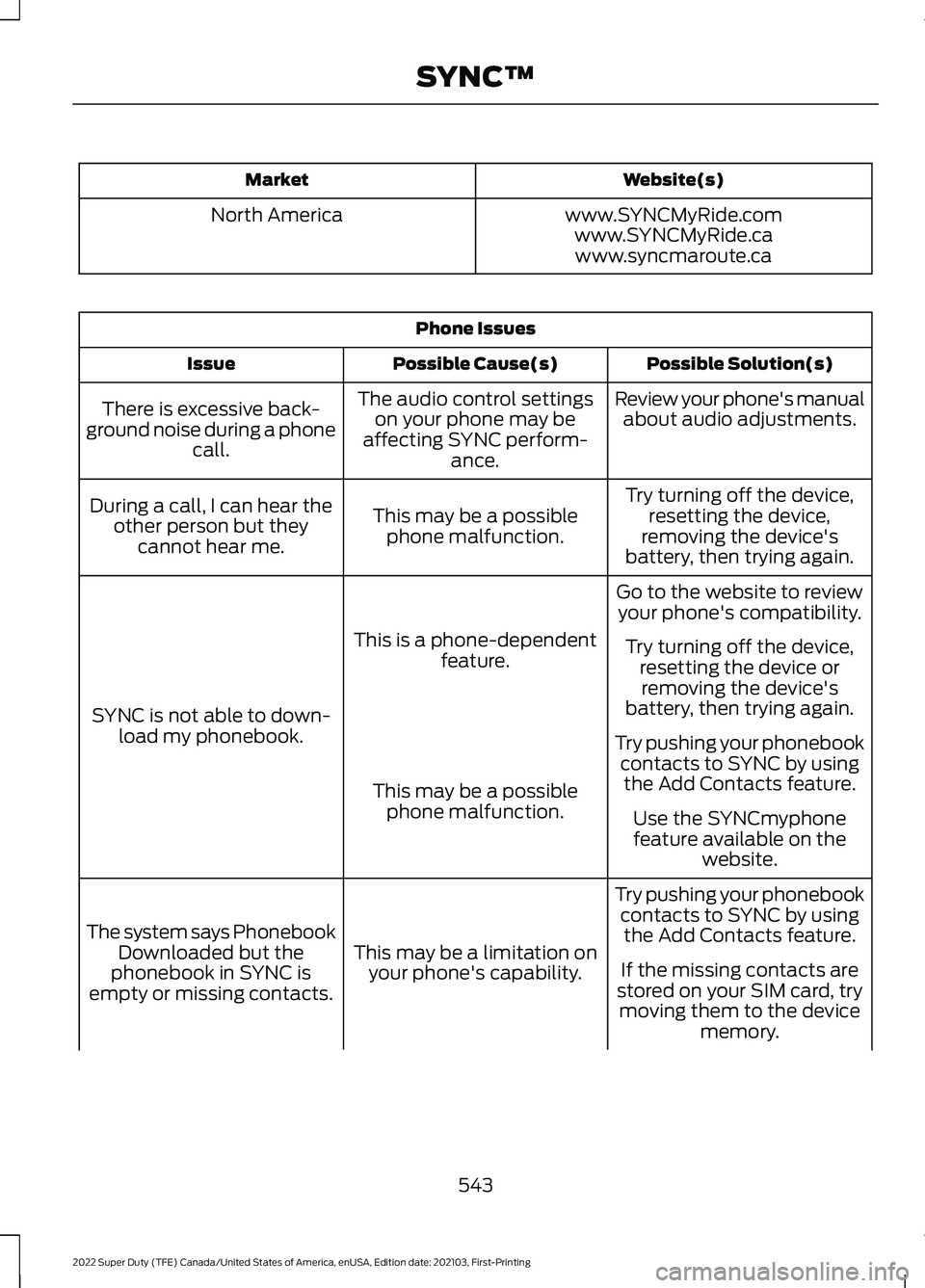
Website(s)
Market
www.SYNCMyRide.com
North America
www.SYNCMyRide.cawww.syncmaroute.ca Phone Issues
Possible Solution(s)
Possible Cause(s)
Issue
Review your phone's manualabout audio adjustments.
The audio control settings
on your phone may be
affecting SYNC perform- ance.
There is excessive back-
ground noise during a phone call.
Try turning off the device,resetting the device,
removing the device's
battery, then trying again.
This may be a possible
phone malfunction.
During a call, I can hear the
other person but theycannot hear me.
Go to the website to reviewyour phone's compatibility.
This is a phone-dependent feature.
SYNC is not able to down- load my phonebook. Try turning off the device,
resetting the device orremoving the device's
battery, then trying again.
Try pushing your phonebook contacts to SYNC by usingthe Add Contacts feature.
This may be a possible
phone malfunction. Use the SYNCmyphone
feature available on the website.
Try pushing your phonebook contacts to SYNC by usingthe Add Contacts feature.
This may be a limitation on
your phone's capability.
The system says Phonebook
Downloaded but the
phonebook in SYNC is
empty or missing contacts. If the missing contacts are
stored on your SIM card, try moving them to the device memory.
543
2022 Super Duty (TFE) Canada/United States of America, enUSA, Edition date: 202103, First-Printing SYNC™
Page 547 of 740
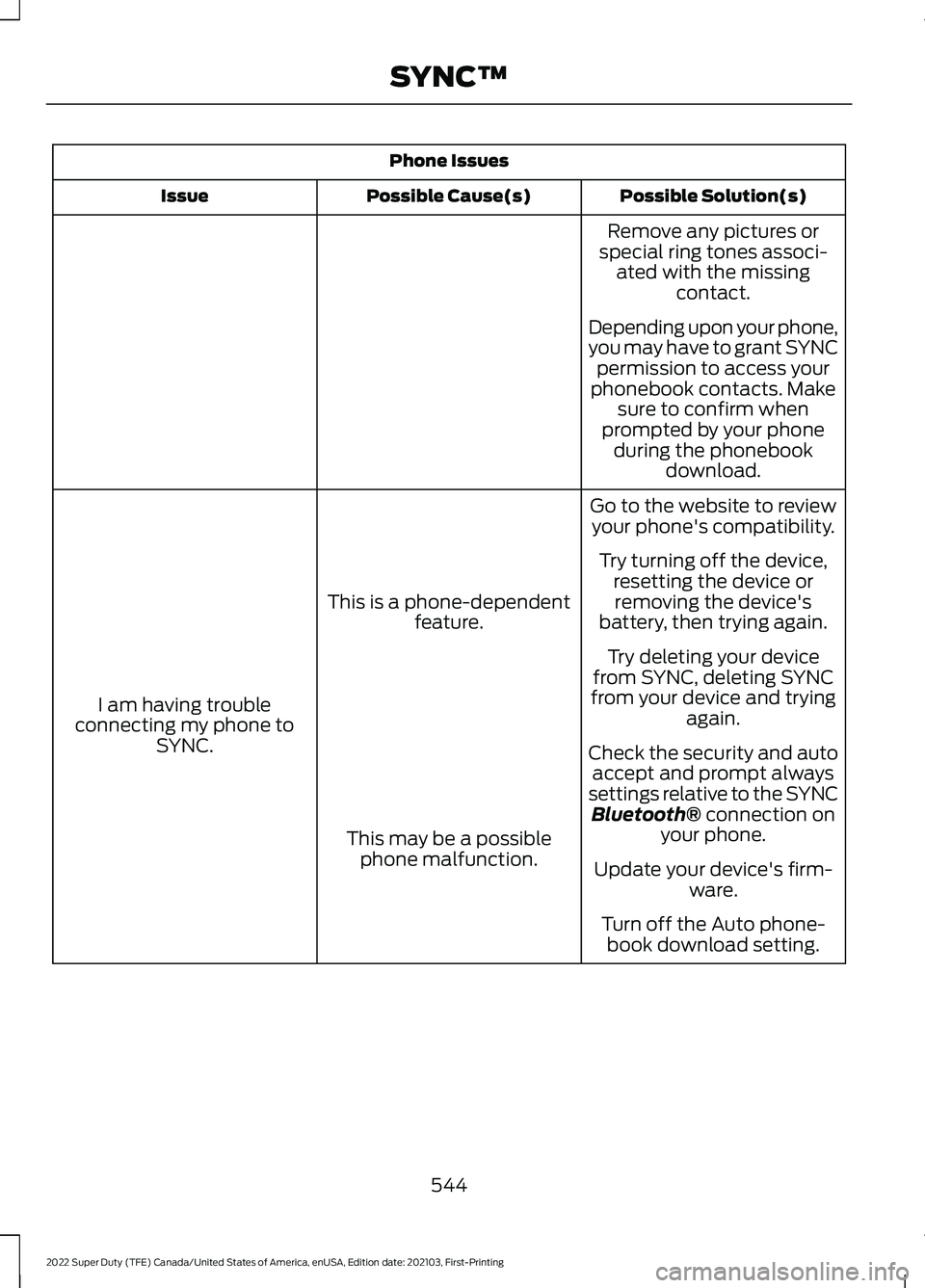
Phone Issues
Possible Solution(s)
Possible Cause(s)
Issue
Remove any pictures or
special ring tones associ- ated with the missing contact.
Depending upon your phone,
you may have to grant SYNC permission to access your
phonebook contacts. Make sure to confirm when
prompted by your phone during the phonebook download.
Go to the website to review your phone's compatibility.
This is a phone-dependent feature.
I am having trouble
connecting my phone to SYNC. Try turning off the device,
resetting the device orremoving the device's
battery, then trying again.
Try deleting your device
from SYNC, deleting SYNC
from your device and trying again.
Check the security and auto accept and prompt always
settings relative to the SYNC Bluetooth® connection on
your phone.
This may be a possible
phone malfunction. Update your device's firm-
ware.
Turn off the Auto phone- book download setting.
544
2022 Super Duty (TFE) Canada/United States of America, enUSA, Edition date: 202103, First-Printing SYNC™
Page 548 of 740
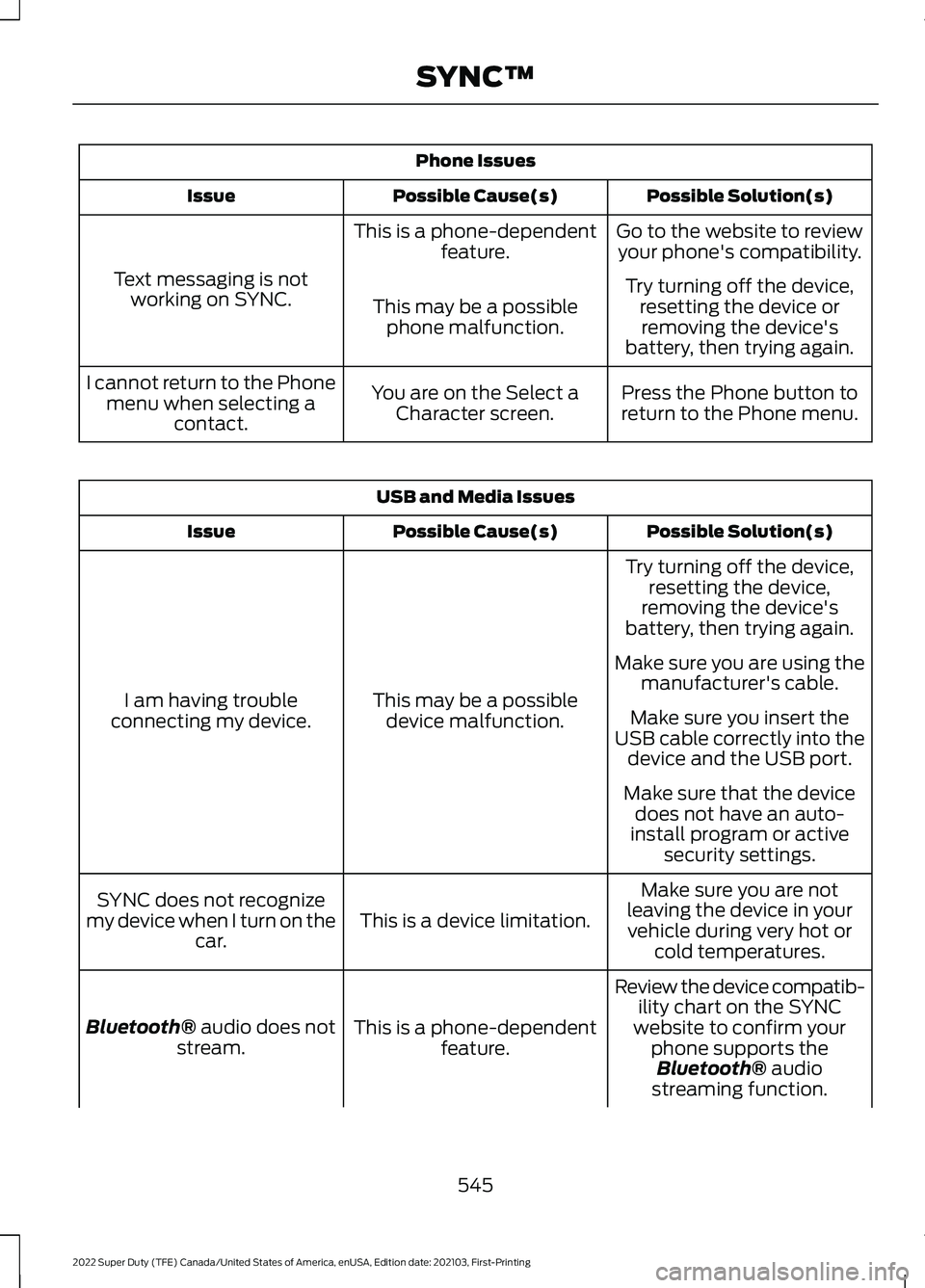
Phone Issues
Possible Solution(s)
Possible Cause(s)
Issue
Go to the website to reviewyour phone's compatibility.
This is a phone-dependent
feature.
Text messaging is not working on SYNC. Try turning off the device,
resetting the device orremoving the device's
battery, then trying again.
This may be a possible
phone malfunction.
Press the Phone button to
return to the Phone menu.
You are on the Select a
Character screen.
I cannot return to the Phone
menu when selecting a contact. USB and Media Issues
Possible Solution(s)
Possible Cause(s)
Issue
Try turning off the device,resetting the device,
removing the device's
battery, then trying again.
This may be a possible device malfunction.
I am having trouble
connecting my device. Make sure you are using the
manufacturer's cable.
Make sure you insert the
USB cable correctly into the device and the USB port.
Make sure that the device does not have an auto-
install program or active security settings.
Make sure you are not
leaving the device in your vehicle during very hot or cold temperatures.
This is a device limitation.
SYNC does not recognize
my device when I turn on the car.
Review the device compatib-ility chart on the SYNC
website to confirm your phone supports theBluetooth® audio
streaming function.
This is a phone-dependent
feature.
Bluetooth®
audio does not
stream.
545
2022 Super Duty (TFE) Canada/United States of America, enUSA, Edition date: 202103, First-Printing SYNC™
Page 600 of 740
CENTER DISPLAY
PRECAUTIONS
WARNING: Driving while distracted
can result in loss of vehicle control, crash
and injury. We strongly recommend that
you use extreme caution when using any
device that may take your focus off the
road. Your primary responsibility is the
safe operation of your vehicle. We
recommend against the use of any
hand-held device while driving and
encourage the use of voice-operated
systems when possible. Make sure you
are aware of all applicable local laws
that may affect the use of electronic
devices while driving.
CENTER DISPLAY
LIMITATIONS
Speed-restricted Features
For your safety, some features are not
available while the vehicle is in motion at
or above 6 mph (10 km/h). Settings that
are not critical while driving your vehicle
will be shown as restricted on your display.
See below for examples:
• System Updates.
• Personal Profiles Setup.
• Valet Mode Setup.
• Driver Assistance Settings.
• Auto-Start-Stop Speed Threshold.
Vehicle Settings
• 30 Minute Max Idle.
• MyKey Setup.
• Door Keypad Code Setup.
• Backup Start Passcode Setup. These restricted features will become
available when your vehicle is no longer in
motion.
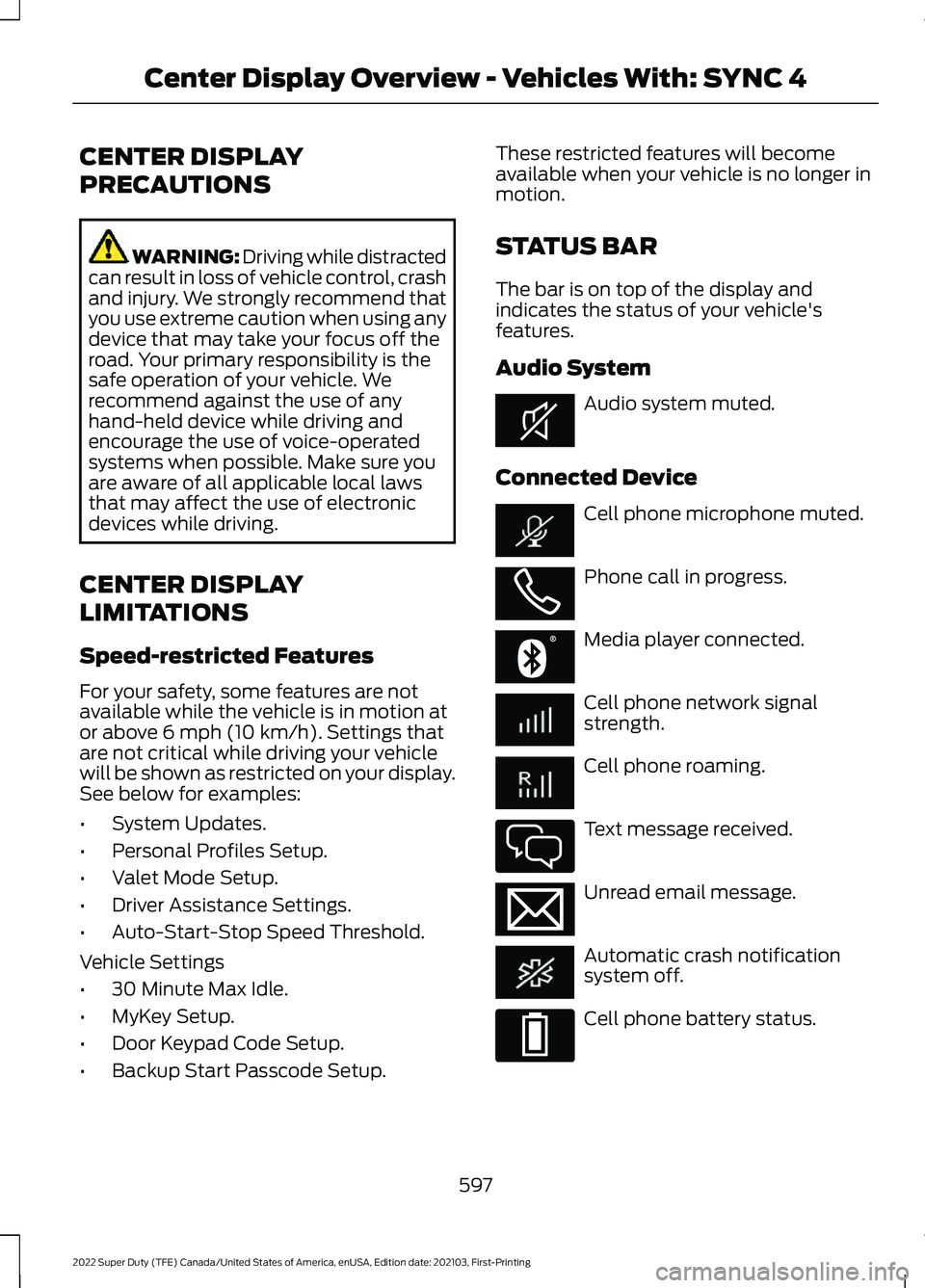
STATUS BAR
The bar is on top of the display and
indicates the status of your vehicle's
features.
Audio System
Audio system muted.
Connected Device Cell phone microphone muted.
Phone call in progress.
Media player connected.
Cell phone network signal
strength.
Cell phone roaming.
Text message received.
Unread email message.
Automatic crash notification
system off.
Cell phone battery status.
597
2022 Super Duty (TFE) Canada/United States of America, enUSA, Edition date: 202103, First-Printing Center Display Overview - Vehicles With: SYNC 4E353221 E353213 E353208 E335295 E353216 E335293
Page 607 of 740
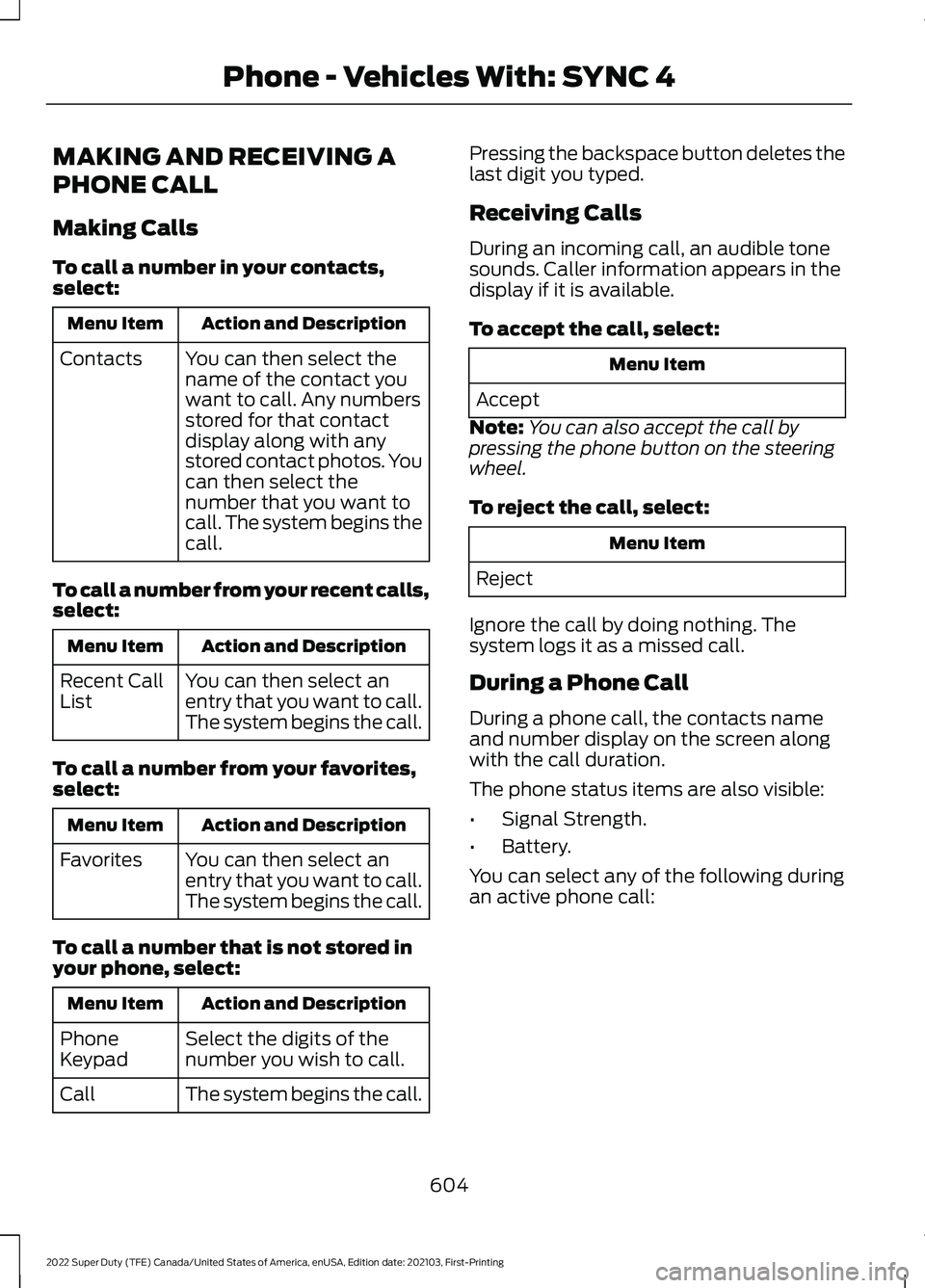
MAKING AND RECEIVING A
PHONE CALL
Making Calls
To call a number in your contacts,
select:
Action and Description
Menu Item
You can then select the
name of the contact you
want to call. Any numbers
stored for that contact
display along with any
stored contact photos. You
can then select the
number that you want to
call. The system begins the
call.
Contacts
To call a number from your recent calls,
select: Action and Description
Menu Item
You can then select an
entry that you want to call.
The system begins the call.
Recent Call
List
To call a number from your favorites,
select: Action and Description
Menu Item
You can then select an
entry that you want to call.
The system begins the call.
Favorites
To call a number that is not stored in
your phone, select: Action and Description
Menu Item
Select the digits of the
number you wish to call.
Phone
Keypad
The system begins the call.
Call Pressing the backspace button deletes the
last digit you typed.
Receiving Calls
During an incoming call, an audible tone
sounds. Caller information appears in the
display if it is available.
To accept the call, select:
Menu Item
Accept
Note: You can also accept the call by
pressing the phone button on the steering
wheel.
To reject the call, select: Menu Item
Reject
Ignore the call by doing nothing. The
system logs it as a missed call.
During a Phone Call
During a phone call, the contacts name
and number display on the screen along
with the call duration.
The phone status items are also visible:
• Signal Strength.
• Battery.
You can select any of the following during
an active phone call:
604
2022 Super Duty (TFE) Canada/United States of America, enUSA, Edition date: 202103, First-Printing Phone - Vehicles With: SYNC 4
Page 618 of 740
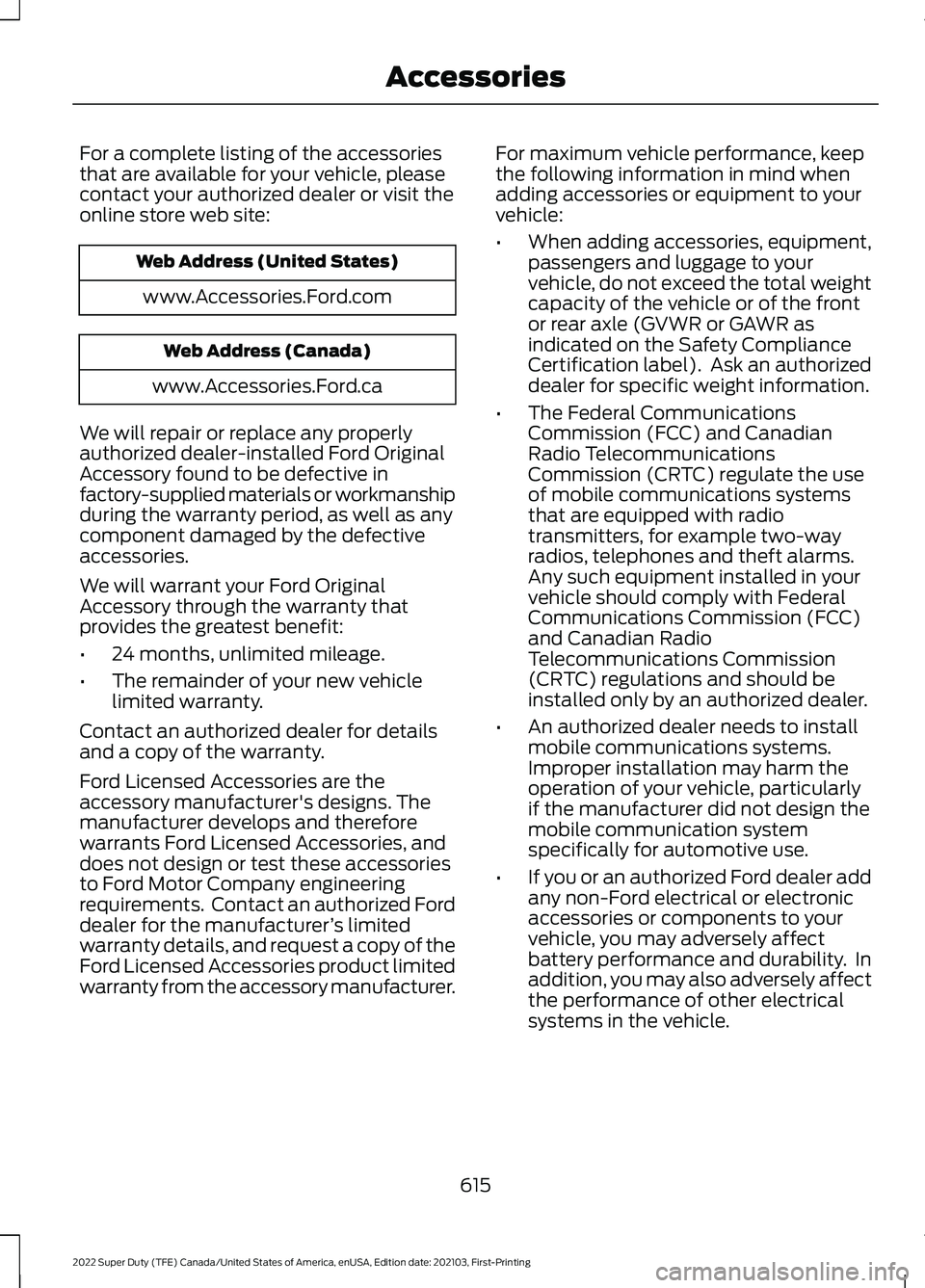
For a complete listing of the accessories
that are available for your vehicle, please
contact your authorized dealer or visit the
online store web site:
Web Address (United States)
www.Accessories.Ford.com Web Address (Canada)
www.Accessories.Ford.ca
We will repair or replace any properly
authorized dealer-installed Ford Original
Accessory found to be defective in
factory-supplied materials or workmanship
during the warranty period, as well as any
component damaged by the defective
accessories.
We will warrant your Ford Original
Accessory through the warranty that
provides the greatest benefit:
• 24 months, unlimited mileage.
• The remainder of your new vehicle
limited warranty.
Contact an authorized dealer for details
and a copy of the warranty.
Ford Licensed Accessories are the
accessory manufacturer's designs. The
manufacturer develops and therefore
warrants Ford Licensed Accessories, and
does not design or test these accessories
to Ford Motor Company engineering
requirements. Contact an authorized Ford
dealer for the manufacturer ’s limited
warranty details, and request a copy of the
Ford Licensed Accessories product limited
warranty from the accessory manufacturer. For maximum vehicle performance, keep
the following information in mind when
adding accessories or equipment to your
vehicle:
•
When adding accessories, equipment,
passengers and luggage to your
vehicle, do not exceed the total weight
capacity of the vehicle or of the front
or rear axle (GVWR or GAWR as
indicated on the Safety Compliance
Certification label). Ask an authorized
dealer for specific weight information.
• The Federal Communications
Commission (FCC) and Canadian
Radio Telecommunications
Commission (CRTC) regulate the use
of mobile communications systems
that are equipped with radio
transmitters, for example two-way
radios, telephones and theft alarms.
Any such equipment installed in your
vehicle should comply with Federal
Communications Commission (FCC)
and Canadian Radio
Telecommunications Commission
(CRTC) regulations and should be
installed only by an authorized dealer.
• An authorized dealer needs to install
mobile communications systems.
Improper installation may harm the
operation of your vehicle, particularly
if the manufacturer did not design the
mobile communication system
specifically for automotive use.
• If you or an authorized Ford dealer add
any non-Ford electrical or electronic
accessories or components to your
vehicle, you may adversely affect
battery performance and durability. In
addition, you may also adversely affect
the performance of other electrical
systems in the vehicle.
615
2022 Super Duty (TFE) Canada/United States of America, enUSA, Edition date: 202103, First-Printing Accessories