change time FORD SUPER DUTY 2023 Owner's Manual
[x] Cancel search | Manufacturer: FORD, Model Year: 2023, Model line: SUPER DUTY, Model: FORD SUPER DUTY 2023Pages: 738, PDF Size: 18.49 MB
Page 345 of 738
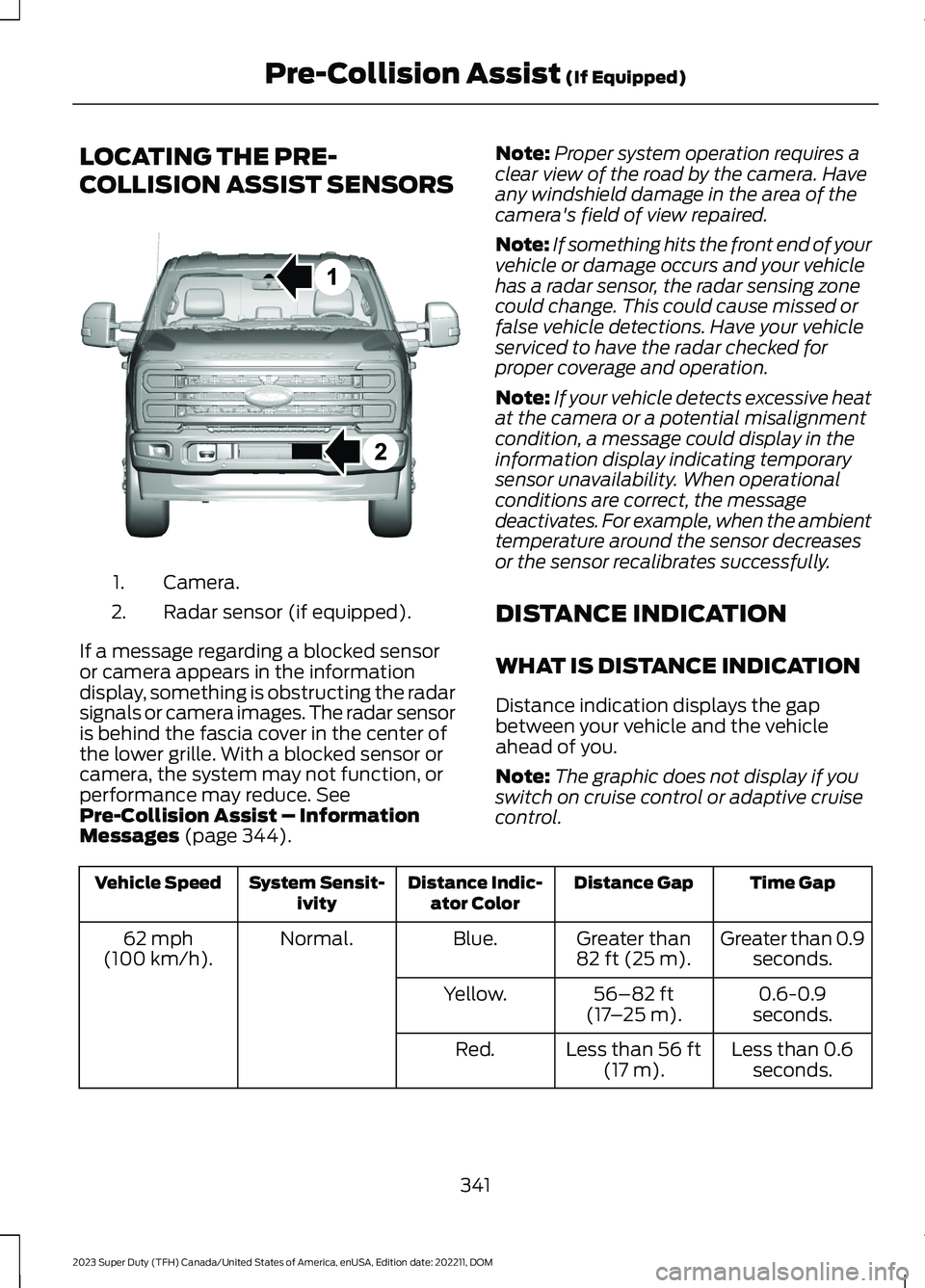
LOCATING THE PRE-
COLLISION ASSIST SENSORS
Camera.1.
Radar sensor (if equipped).2.
If a message regarding a blocked sensoror camera appears in the informationdisplay, something is obstructing the radarsignals or camera images. The radar sensoris behind the fascia cover in the center ofthe lower grille. With a blocked sensor orcamera, the system may not function, orperformance may reduce. SeePre-Collision Assist – InformationMessages (page 344).
Note:Proper system operation requires aclear view of the road by the camera. Haveany windshield damage in the area of thecamera's field of view repaired.
Note:If something hits the front end of yourvehicle or damage occurs and your vehiclehas a radar sensor, the radar sensing zonecould change. This could cause missed orfalse vehicle detections. Have your vehicleserviced to have the radar checked forproper coverage and operation.
Note:If your vehicle detects excessive heatat the camera or a potential misalignmentcondition, a message could display in theinformation display indicating temporarysensor unavailability. When operationalconditions are correct, the messagedeactivates. For example, when the ambienttemperature around the sensor decreasesor the sensor recalibrates successfully.
DISTANCE INDICATION
WHAT IS DISTANCE INDICATION
Distance indication displays the gapbetween your vehicle and the vehicleahead of you.
Note:The graphic does not display if youswitch on cruise control or adaptive cruisecontrol.
Time GapDistance GapDistance Indic-ator ColorSystem Sensit-ivityVehicle Speed
Greater than 0.9seconds.Greater than82 ft (25 m).Blue.Normal.62 mph(100 km/h).
0.6-0.9seconds.56–82 ft(17–25 m).Yellow.
Less than 0.6seconds.Less than 56 ft(17 m).Red.
341
2023 Super Duty (TFH) Canada/United States of America, enUSA, Edition date: 202211, DOMPre-Collision Assist (If Equipped)E390505
Page 402 of 738
TRAILER BACKUP ASSISTANCE– FREQUENTLY ASKEDQUESTIONS
Why does the trailer not reversestraight?
Verify the sensor is correctly installed.Other factors such as the hitchconnection, road camber, road slopeand trailer suspension could influencehow straight the system can reversethe trailer when the control knob is notturned. You can compensate for thetrailer drifting to the right or left byslowly turning the knob until the traileris following your desired path and thenholding the knob in that position.
Why does the system not detect asensor?
There could be an issue with theconnection, the wiring harness couldbe damaged, you could have multiplesensors connected or the sensor couldbe incorrectly installed. Check that the12-way connector is fully inserted intothe 12-way socket. The red rubber sealis not visible when the connector isfully inserted. Also check that thewiring harness sensor connection isfully inserted at the trailer sensor, andcheck for damaged wiring betweenthe 12-way connector and the trailersensor. Also, check that the sensor isinstalled on a vertical surface with thearrows pointing straight up.
What does it mean if the systemremains on one message for anextended time during calibration whensetting up the system with the sticker?
The camera could need to be cleaned,the sticker could be blocked, thedrawbar could be outside the allowedrange of 4–19 in (10–48 cm) or youcould need to move to a different areato change the lighting and background.Verify the sticker is in the properlocation. See Applying the TrailerReversing Aid Sticker (page 388).You can move to a different area orchange the direction you are driving orsetup the system at a different timeof day. Some trailers are notcompatible with the sticker andcamera system. If the issue persistswith the sticker setup, you may chooseto setup the trailer with a sensor.
What does it mean if the system pausesduring calibration?
There could be steering input or trailermovement during the straight driveportion of the calibration process.
What does it mean if the systemremains on one message for anextended time during calibration whensetting up the system with the sensor?
The sensor could be incorrectlyinstalled, the trailer length could beoutside the allowed range or the roadsurface could be too rough or bumpy.
What does it mean if the systemdisplays hold steering steady duringturn?
Part of the calibration process for thesticker setup requires a steady turn. Ifyou are continually moving thesteering wheel during the turn, thisdelays the calibration process. Toenable the calibration process, holdthe steering wheel at the sameposition when turning.
398
2023 Super Duty (TFH) Canada/United States of America, enUSA, Edition date: 202211, DOMTrailer Backup Assistance (If Equipped)
Page 404 of 738
What does it mean when the systemtells you to take control of the steeringwheel?
The system is no longer steering thevehicle and you must take oversteering. There are four reasons thesystem could display this message.The first reason the system coulddisplay this message is that you havetouched the steering wheel when thesystem is steering. The second reasonthe system could display this messageis that you have exceeded themaximum speed for the feature. Thethird reason the system could displaythis message is that the trailer is notdetected. The final reason the systemcould display this message is that aninternal condition for system operationis not met that requires your vehicle toreturn to manual control of thesteering.
How do I use a sticker if I havepreviously setup a trailer with thesensor?
Disconnect the sensor wiring and adda new trailer to the system and followthe instructions for setup with asticker. See Applying the TrailerReversing Aid Sticker (page 388). Ifyour vehicle does not support thesticker option, the touchscreeninstructs you to install the sensoragain.
What if I want to use a sensor for thetrailer instead of a sticker?
Install the sensor and connect thesensor wiring before adding the newtrailer to the system. You mustconnect the sensor before you add thetrailer. If your vehicle did not come witha sensor, you can purchase one fromyour authorized dealer.
What does it mean if the system doesnot detect a trailer that is setup with asticker?
The system requires a clear view of thesticker placed on the trailer. You mustkeep the camera lens and sticker cleanfor the system to correctly operate. Ifthe system cannot initially detect thetrailer, it could be necessary for you tochange the lighting conditions bymoving your vehicle and trailer orwaiting until the conditions change.See Applying the Trailer ReversingAid Sticker (page 388). Some trailersare not compatible with the stickerand camera system. If the systemconsistently does not detect the trailerwith the sticker setup, you may chooseto setup the trailer with a sensor.
Note:The system is designed to be usedwith the same trailer connection every timeyou choose the trailer from the touchscreen.When using a different drawbar or adifferent pin hole on drawbars with morethan one, connecting the drawbar to yourvehicle affects the trailer position and youmay need to repeat the trailer setup andcalibration process.
400
2023 Super Duty (TFH) Canada/United States of America, enUSA, Edition date: 202211, DOMTrailer Backup Assistance (If Equipped)
Page 408 of 738
Note:If your vehicle came with a trailersensor kit, the vehicle will receive an updatethat allows the system to operate with asensor or sticker. If your vehicle did not comewith a trailer sensor kit, your vehicle can besetup using either method, but you need toseparately purchase the trailer sensor kitfrom your authorized dealer. Once yourvehicle is enabled for sticker setup, thedefault setup for new trailers requiresplacement of the sticker. To setup a trailerwith a sensor, install the sensor on the trailerand plug the connector into the connectorin your bumper prior to configuring thetrailer. Trailers that were set up with asensor still require the sensor to function.To change a trailer to use the sticker, deletethe trailer in the system and repeat thetrailer setup with the sticker.
CALIBRATING THE SYSTEM
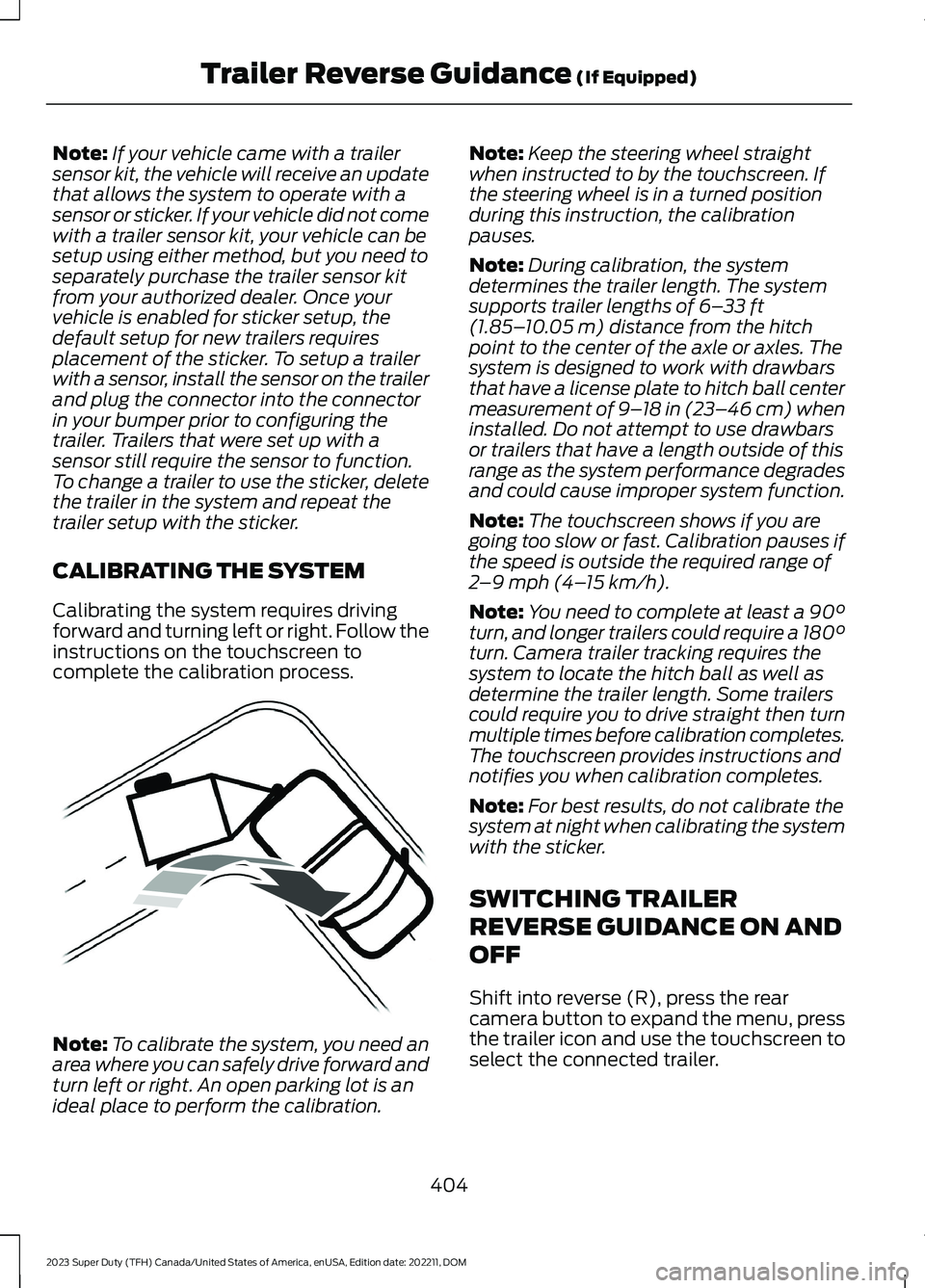
Calibrating the system requires drivingforward and turning left or right. Follow theinstructions on the touchscreen tocomplete the calibration process.
Note:To calibrate the system, you need anarea where you can safely drive forward andturn left or right. An open parking lot is anideal place to perform the calibration.
Note:Keep the steering wheel straightwhen instructed to by the touchscreen. Ifthe steering wheel is in a turned positionduring this instruction, the calibrationpauses.
Note:During calibration, the systemdetermines the trailer length. The systemsupports trailer lengths of 6–33 ft(1.85–10.05 m) distance from the hitchpoint to the center of the axle or axles. Thesystem is designed to work with drawbarsthat have a license plate to hitch ball centermeasurement of 9–18 in (23–46 cm) wheninstalled. Do not attempt to use drawbarsor trailers that have a length outside of thisrange as the system performance degradesand could cause improper system function.
Note:The touchscreen shows if you aregoing too slow or fast. Calibration pauses ifthe speed is outside the required range of2–9 mph (4–15 km/h).
Note:You need to complete at least a 90°turn, and longer trailers could require a 180°turn. Camera trailer tracking requires thesystem to locate the hitch ball as well asdetermine the trailer length. Some trailerscould require you to drive straight then turnmultiple times before calibration completes.The touchscreen provides instructions andnotifies you when calibration completes.
Note:For best results, do not calibrate thesystem at night when calibrating the systemwith the sticker.
SWITCHING TRAILER
REVERSE GUIDANCE ON AND
OFF
Shift into reverse (R), press the rearcamera button to expand the menu, pressthe trailer icon and use the touchscreen toselect the connected trailer.
404
2023 Super Duty (TFH) Canada/United States of America, enUSA, Edition date: 202211, DOMTrailer Reverse Guidance (If Equipped)E352329
Page 413 of 738
TRAILER REVERSE GUIDANCE –FREQUENTLY ASKED QUESTIONS
Why does the trailer not reversestraight?
Verify the sensor is correctly installed.Other factors such as the hitchconnection, road camber, road slopeand trailer suspension could influencehow straight the system can reversethe trailer when the control knob is notturned. You can compensate for thetrailer drifting to the right or left byslowly turning the knob until the traileris following your desired path and thenholding the knob in that position.
Why does the system not detect asensor?
There could be an issue with theconnection, the wiring harness couldbe damaged, you could have multiplesensors connected or the sensor couldbe incorrectly installed. Check that the12-way connector is fully inserted intothe 12-way socket. The red rubber sealis not visible when the connector isfully inserted. Also check that thewiring harness sensor connection isfully inserted at the trailer sensor, andcheck for damaged wiring betweenthe 12-way connector and the trailersensor. Also, check that the sensor isinstalled on a vertical surface with thearrows pointing straight up.
What does it mean if the systemremains on one message for anextended time during calibration whensetting up the system with the sticker?
The camera could need to be cleaned,the sticker could be blocked, thedrawbar could be outside the allowedrange of 4–19 in (10–48 cm) or youcould need to move to a different areato change the lighting and background.Verify the sticker is in the properlocation. See Applying the TrailerReverse Aid Sticker (page 403). Youcan move to a different area or changethe direction you are driving or setupthe system at a different time of day.Some trailers are not compatible withthe sticker and camera system. If theissue persists with the sticker setup,you may choose to setup the trailerwith a sensor.
What does it mean if the system pausesduring calibration?
There could be steering input or trailermovement during the straight driveportion of the calibration process.
What does it mean if the systemremains on one message for anextended time during calibration whensetting up the system with the sensor?
The sensor could be incorrectlyinstalled, the trailer length could beoutside the allowed range or the roadsurface could be too rough or bumpy.
What does it mean if the systemdisplays hold steering steady duringturn?
Part of the calibration process for thesticker setup requires a steady turn. Ifyou are continually moving thesteering wheel during the turn, thisdelays the calibration process. Toenable the calibration process, holdthe steering wheel at the sameposition when turning.
409
2023 Super Duty (TFH) Canada/United States of America, enUSA, Edition date: 202211, DOMTrailer Reverse Guidance (If Equipped)
Page 415 of 738
What does it mean when the systemtells you to take control of the steeringwheel?
The system is no longer steering thevehicle and you must take oversteering. There are four reasons thesystem could display this message.The first reason the system coulddisplay this message is that you havetouched the steering wheel when thesystem is steering. The second reasonthe system could display this messageis that you have exceeded themaximum speed for the feature. Thethird reason the system could displaythis message is that the trailer is notdetected. The final reason the systemcould display this message is that aninternal condition for system operationis not met that requires your vehicle toreturn to manual control of thesteering.
How do I use a sticker if I havepreviously setup a trailer with thesensor?
Disconnect the sensor wiring and adda new trailer to the system and followthe instructions for setup with asticker. See Applying the TrailerReverse Aid Sticker (page 403). Ifyour vehicle does not support thesticker option, the touchscreeninstructs you to install the sensoragain.
What if I want to use a sensor for thetrailer instead of a sticker?
Install the sensor and connect thesensor wiring before adding the newtrailer to the system. You mustconnect the sensor before you add thetrailer. If your vehicle did not come witha sensor, you can purchase one fromyour authorized dealer.
What does it mean if the system doesnot detect a trailer that is setup with asticker?
The system requires a clear view of thesticker placed on the trailer. You mustkeep the camera lens and sticker cleanfor the system to correctly operate. Ifthe system cannot initially detect thetrailer, it could be necessary for you tochange the lighting conditions bymoving your vehicle and trailer orwaiting until the conditions change.See Applying the Trailer ReverseAid Sticker (page 403). Some trailersare not compatible with the stickerand camera system. If the systemconsistently does not detect the trailerwith the sticker setup, you may chooseto setup the trailer with a sensor.
Note:The system is designed to be usedwith the same trailer connection every timeyou choose the trailer from the touchscreen.When using a different drawbar or adifferent pin hole on drawbars with morethan one, connecting the drawbar to yourvehicle affects the trailer position and youmay need to repeat the trailer setup andcalibration process.
411
2023 Super Duty (TFH) Canada/United States of America, enUSA, Edition date: 202211, DOMTrailer Reverse Guidance (If Equipped)
Page 416 of 738
OFF-ROAD DRIVING
WHAT IS OFF-ROAD DRIVING
Off-road driving is driving your vehicle onunsurfaced roads or trails, made from dirt,rocks, sand and mud.
BASIC OFF-ROAD DRIVINGTECHNIQUES
Off-road Driving Hints
Before taking your vehicle off-roading, abasic vehicle inspection should be done tomake sure that the vehicle is in top workingcondition. It is always recommended thatat least two vehicles are used whileoff-roading. The buddy system helps makesure that help is close at hand should avehicle become stuck or damaged. It is alsowise to take supplies such as a first aid kit,supply of water, tow strap, cell or satellitephone with you any time an off-roadexcursion is planned.
1.Grip the steering wheel with thumbson the outside of the rim. This willreduce the risk of injury due to abruptsteering wheel motions that occurwhen negotiating rough terrain.
2.Throttle, brake and steering inputsshould be made in a smooth andcontrolled manner. Sudden inputs tothe controls can cause loss of tractionor upset the vehicle, especially whileon loose terrain or while crossingobstacles such as rocks or logs.
3.Look ahead on your route notingupcoming obstacles, or any otherfactors which may indicate a changein available traction, and adjust thevehicle speed and route accordingly.
4.When driving off-road, if the front orrear suspension is bottoming outand/or excessive contact with theskid-plates is encountered, reducevehicle speed to avoid potentialdamage to the vehicle.
5.When with other vehicles, it isrecommended that communication isused, and the lead vehicle notify othervehicles of obstacles that could causepotential vehicle damage.
6.Always keep available groundclearance in mind and pick a route thatminimizes the risk of catching theunderside of the vehicle on an obstacle.
7.When negotiating low speed obstacles,applying light brake pressure inconjunction with the throttle will helpprevent the vehicle from jerking andwill allow you to negotiate the obstaclein a more controlled manner. Using 4Lwill also help with this.
8.Off-roading requires a high degree ofconcentration. Even if your local lawdoes not prohibit alcohol use whiledriving off-road, Ford stronglyrecommends against drinking if youplan to off-road.
Crossing Obstacles
•Review the path ahead beforeattempting to cross any obstacle. It isbest if the obstacle is reviewed fromoutside the vehicle so that there is agood understanding of terrain conditionboth in front of and behind theobstacle.
•Approach obstacles slowly.
412
2023 Super Duty (TFH) Canada/United States of America, enUSA, Edition date: 202211, DOMDriving Hints
Page 455 of 738
It is very important to use predilutedcoolant approved to the correctspecification in order to avoid plugging thesmall passageways in the engine coolingsystem. See Capacities andSpecifications (page 520). Do not mixdifferent colors or types of coolant in yourvehicle. Mixing of engine coolants or usingan incorrect coolant may harm the engineor cooling system components and maynot be covered by the vehicle Warranty.
Note:If prediluted coolant is not available,use the approved concentrated coolantdiluting it to 50/50 with deionised ordistilled water. See Capacities andSpecifications (page 520). Using water thathas not been deionised may contribute todeposit formation, corrosion and pluggingof the small cooling system passageways.
Note: Coolants marketed for all makes andmodels may not be approved to ourspecifications and may cause damage tothe cooling system. Resulting componentdamage may not be covered by the vehicleWarranty.
If the coolant level is at or below theminimum mark, add prediluted coolantimmediately.
To top up the coolant level do thefollowing:
1.Unscrew the cap slowly. Any pressureescapes as you unscrew the cap.
2.Add prediluted coolant approved tothe correct specification. SeeCapacities and Specifications (page520).
3.Add enough prediluted coolant toreach the correct level.
4.Replace the coolant reservoir cap. Turnthe cap clockwise until it contacts thehard stop.
5.Check the coolant level in the coolantreservoir the next few times you driveyour vehicle. If necessary, add enoughprediluted engine coolant to bring thecoolant level to the correct level.
If you have to add more than 1.1 qt (1 L) ofengine coolant per month, have yourvehicle checked as soon as possible.Operating an engine with a low level ofcoolant can result in engine overheatingand possible engine damage.
In case of emergency, you can add a largeamount of water without engine coolantin order to reach a vehicle service location.
Water alone, without engine coolant, cancause engine damage from corrosion,overheating or freezing.
Do not use the following as a coolantsubstitute:
•Alcohol.
•Methanol.
•Brine.
•Any coolant mixed with alcohol ormethanol antifreeze.
Alcohol and other liquids can cause enginedamage from overheating or freezing.
Do not add extra inhibitors or additives tothe coolant. These can be harmful andcompromise the corrosion protection ofthe coolant.
CHANGING THE COOLANT
For coolant change, see your authorizeddealer.
Changing the coolant is necessary atspecific mileage intervals listed in thescheduled maintenance information. SeeScheduled Maintenance (page 591).
451
2023 Super Duty (TFH) Canada/United States of America, enUSA, Edition date: 202211, DOMMaintenance
Page 457 of 738
COOLANT – INFORMATION MESSAGES
Description and ActionMessage
Displays when the engine temperature istoo high. Stop your vehicle as soon as it issafe to do so, switch the engine off andallow it to cool. If the problem persists, haveyour vehicle checked as soon as possible.See Checking the Coolant Level (page450).
High engine temperature Stop safely
CHANGING THE FUEL FILTER
- DIESEL
Your fuel filters must be changed at thecorrect service interval or when you see thelow fuel pressure message appear. Referto scheduled maintenance for the correctservice interval.
CHANGING THE FUEL FILTER
- GASOLINE
Your vehicle has a lifetime fuel filter thatintegrates with the fuel tank. It does notneed regular maintenance or replacement.
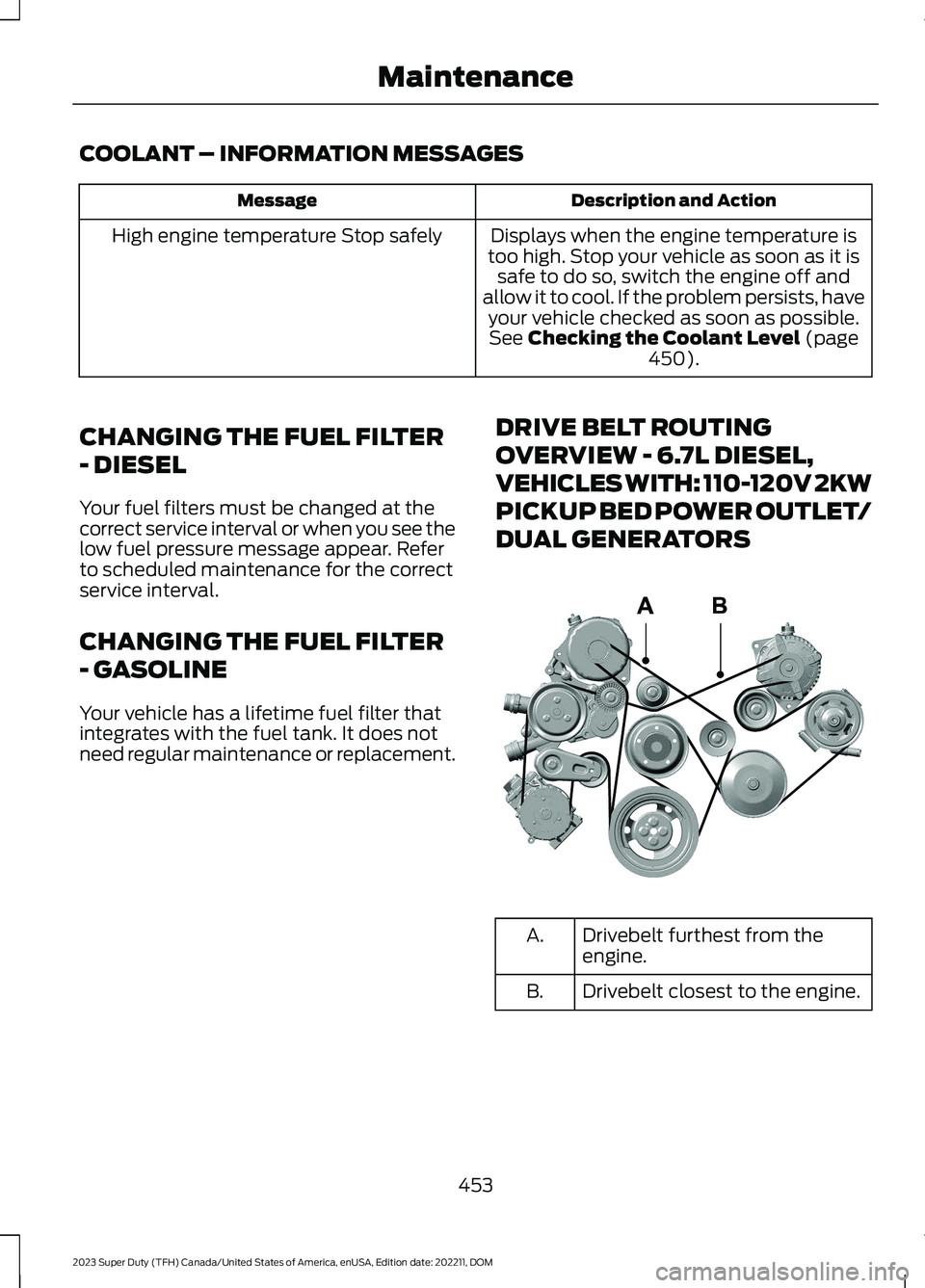
DRIVE BELT ROUTING
OVERVIEW - 6.7L DIESEL,
VEHICLES WITH: 110-120V 2KW
PICKUP BED POWER OUTLET/
DUAL GENERATORS
Drivebelt furthest from theengine.A.
Drivebelt closest to the engine.B.
453
2023 Super Duty (TFH) Canada/United States of America, enUSA, Edition date: 202211, DOMMaintenanceE376526
Page 484 of 738
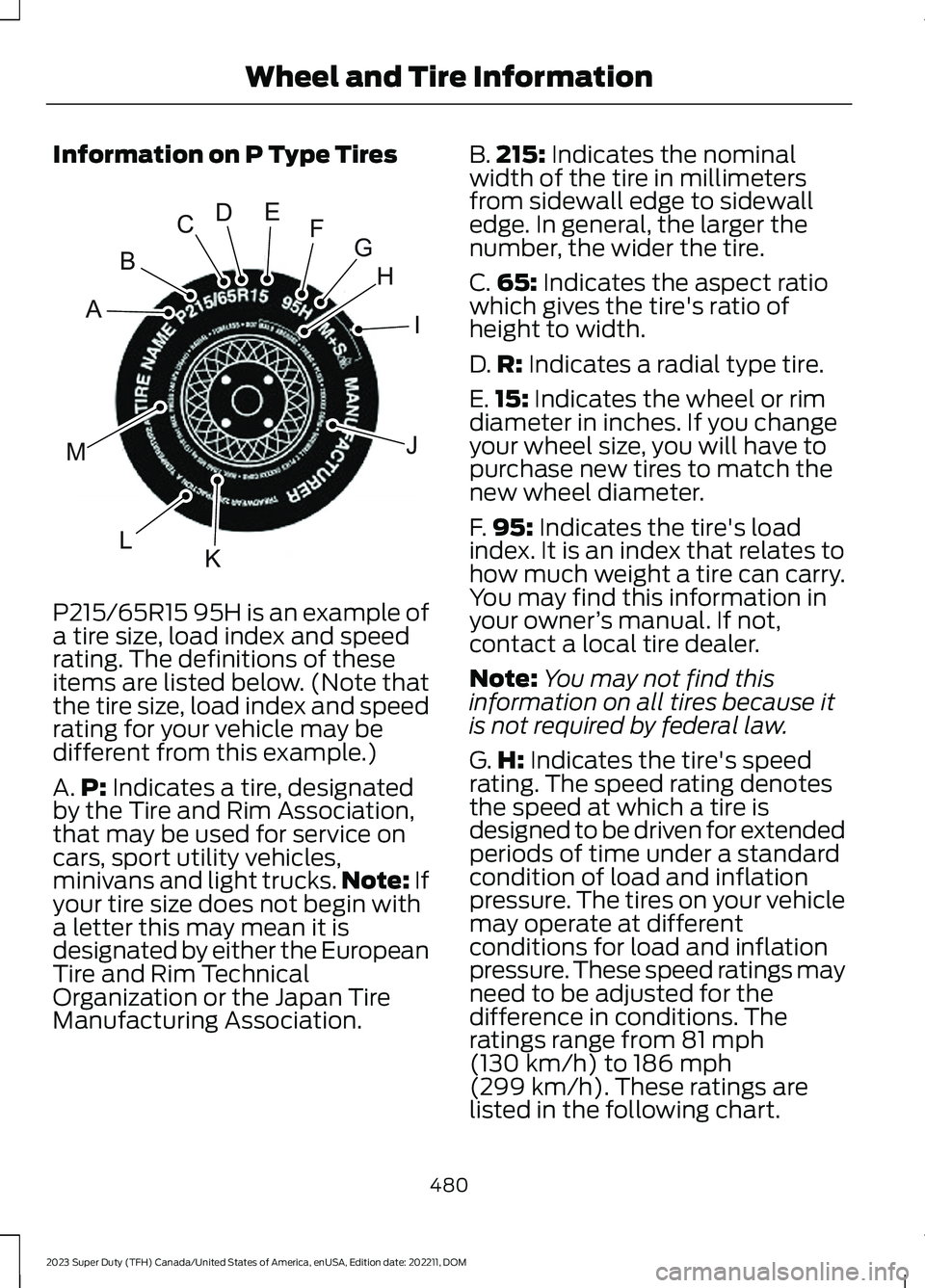
Information on P Type Tires
P215/65R15 95H is an example of
a tire size, load index and speedrating. The definitions of theseitems are listed below. (Note thatthe tire size, load index and speedrating for your vehicle may bedifferent from this example.)
A.P: Indicates a tire, designatedby the Tire and Rim Association,that may be used for service oncars, sport utility vehicles,minivans and light trucks.Note: Ifyour tire size does not begin witha letter this may mean it isdesignated by either the EuropeanTire and Rim TechnicalOrganization or the Japan TireManufacturing Association.
B.215: Indicates the nominalwidth of the tire in millimetersfrom sidewall edge to sidewalledge. In general, the larger thenumber, the wider the tire.
C.65: Indicates the aspect ratiowhich gives the tire's ratio ofheight to width.
D.R: Indicates a radial type tire.
E.15: Indicates the wheel or rimdiameter in inches. If you changeyour wheel size, you will have topurchase new tires to match thenew wheel diameter.
F.95: Indicates the tire's loadindex. It is an index that relates tohow much weight a tire can carry.You may find this information inyour owner’s manual. If not,contact a local tire dealer.
Note:You may not find thisinformation on all tires because itis not required by federal law.
G.H: Indicates the tire's speedrating. The speed rating denotesthe speed at which a tire isdesigned to be driven for extendedperiods of time under a standardcondition of load and inflationpressure. The tires on your vehiclemay operate at differentconditions for load and inflationpressure. These speed ratings mayneed to be adjusted for thedifference in conditions. Theratings range from 81 mph(130 km/h) to 186 mph
(299 km/h). These ratings arelisted in the following chart.
480
2023 Super Duty (TFH) Canada/United States of America, enUSA, Edition date: 202211, DOMWheel and Tire InformationHIJKLMABCDEFGE142543