wiring FORD SUPER DUTY 2023 Owner's Manual
[x] Cancel search | Manufacturer: FORD, Model Year: 2023, Model line: SUPER DUTY, Model: FORD SUPER DUTY 2023Pages: 738, PDF Size: 18.49 MB
Page 413 of 738
TRAILER REVERSE GUIDANCE –FREQUENTLY ASKED QUESTIONS
Why does the trailer not reversestraight?
Verify the sensor is correctly installed.Other factors such as the hitchconnection, road camber, road slopeand trailer suspension could influencehow straight the system can reversethe trailer when the control knob is notturned. You can compensate for thetrailer drifting to the right or left byslowly turning the knob until the traileris following your desired path and thenholding the knob in that position.
Why does the system not detect asensor?
There could be an issue with theconnection, the wiring harness couldbe damaged, you could have multiplesensors connected or the sensor couldbe incorrectly installed. Check that the12-way connector is fully inserted intothe 12-way socket. The red rubber sealis not visible when the connector isfully inserted. Also check that thewiring harness sensor connection isfully inserted at the trailer sensor, andcheck for damaged wiring betweenthe 12-way connector and the trailersensor. Also, check that the sensor isinstalled on a vertical surface with thearrows pointing straight up.
What does it mean if the systemremains on one message for anextended time during calibration whensetting up the system with the sticker?
The camera could need to be cleaned,the sticker could be blocked, thedrawbar could be outside the allowedrange of 4–19 in (10–48 cm) or youcould need to move to a different areato change the lighting and background.Verify the sticker is in the properlocation. See Applying the TrailerReverse Aid Sticker (page 403). Youcan move to a different area or changethe direction you are driving or setupthe system at a different time of day.Some trailers are not compatible withthe sticker and camera system. If theissue persists with the sticker setup,you may choose to setup the trailerwith a sensor.
What does it mean if the system pausesduring calibration?
There could be steering input or trailermovement during the straight driveportion of the calibration process.
What does it mean if the systemremains on one message for anextended time during calibration whensetting up the system with the sensor?
The sensor could be incorrectlyinstalled, the trailer length could beoutside the allowed range or the roadsurface could be too rough or bumpy.
What does it mean if the systemdisplays hold steering steady duringturn?
Part of the calibration process for thesticker setup requires a steady turn. Ifyou are continually moving thesteering wheel during the turn, thisdelays the calibration process. Toenable the calibration process, holdthe steering wheel at the sameposition when turning.
409
2023 Super Duty (TFH) Canada/United States of America, enUSA, Edition date: 202211, DOMTrailer Reverse Guidance (If Equipped)
Page 415 of 738
What does it mean when the systemtells you to take control of the steeringwheel?
The system is no longer steering thevehicle and you must take oversteering. There are four reasons thesystem could display this message.The first reason the system coulddisplay this message is that you havetouched the steering wheel when thesystem is steering. The second reasonthe system could display this messageis that you have exceeded themaximum speed for the feature. Thethird reason the system could displaythis message is that the trailer is notdetected. The final reason the systemcould display this message is that aninternal condition for system operationis not met that requires your vehicle toreturn to manual control of thesteering.
How do I use a sticker if I havepreviously setup a trailer with thesensor?
Disconnect the sensor wiring and adda new trailer to the system and followthe instructions for setup with asticker. See Applying the TrailerReverse Aid Sticker (page 403). Ifyour vehicle does not support thesticker option, the touchscreeninstructs you to install the sensoragain.
What if I want to use a sensor for thetrailer instead of a sticker?
Install the sensor and connect thesensor wiring before adding the newtrailer to the system. You mustconnect the sensor before you add thetrailer. If your vehicle did not come witha sensor, you can purchase one fromyour authorized dealer.
What does it mean if the system doesnot detect a trailer that is setup with asticker?
The system requires a clear view of thesticker placed on the trailer. You mustkeep the camera lens and sticker cleanfor the system to correctly operate. Ifthe system cannot initially detect thetrailer, it could be necessary for you tochange the lighting conditions bymoving your vehicle and trailer orwaiting until the conditions change.See Applying the Trailer ReverseAid Sticker (page 403). Some trailersare not compatible with the stickerand camera system. If the systemconsistently does not detect the trailerwith the sticker setup, you may chooseto setup the trailer with a sensor.
Note:The system is designed to be usedwith the same trailer connection every timeyou choose the trailer from the touchscreen.When using a different drawbar or adifferent pin hole on drawbars with morethan one, connecting the drawbar to yourvehicle affects the trailer position and youmay need to repeat the trailer setup andcalibration process.
411
2023 Super Duty (TFH) Canada/United States of America, enUSA, Edition date: 202211, DOMTrailer Reverse Guidance (If Equipped)
Page 492 of 738
cause steering, suspension, axle, transfercase or power transfer unit failure.Follow the recommended tire inflationpressures found on the SafetyCompliance Certification label, or theTire Label on the B-Pillar or the edge ofthe driver door. Failure to follow thisinstruction could result in loss of vehiclecontrol, vehicle rollover, or personal injuryor death.
Note:Do not use snow chains on vehicleswith LT275/65R20 or LT 285/75R18 sizedtires.
Note:The suspension insulation andbumpers will help prevent vehicle damage.Do not remove these components from yourvehicle when using snow tires and chains.
The tires on your vehicle have all-weathertreads to provide traction in rain and snow.However, in some climates, you may needto use snow tires and cables. If you needto use cables, we recommend that you usesteel wheels of the same size andspecification, as cables may chipaluminum wheels.
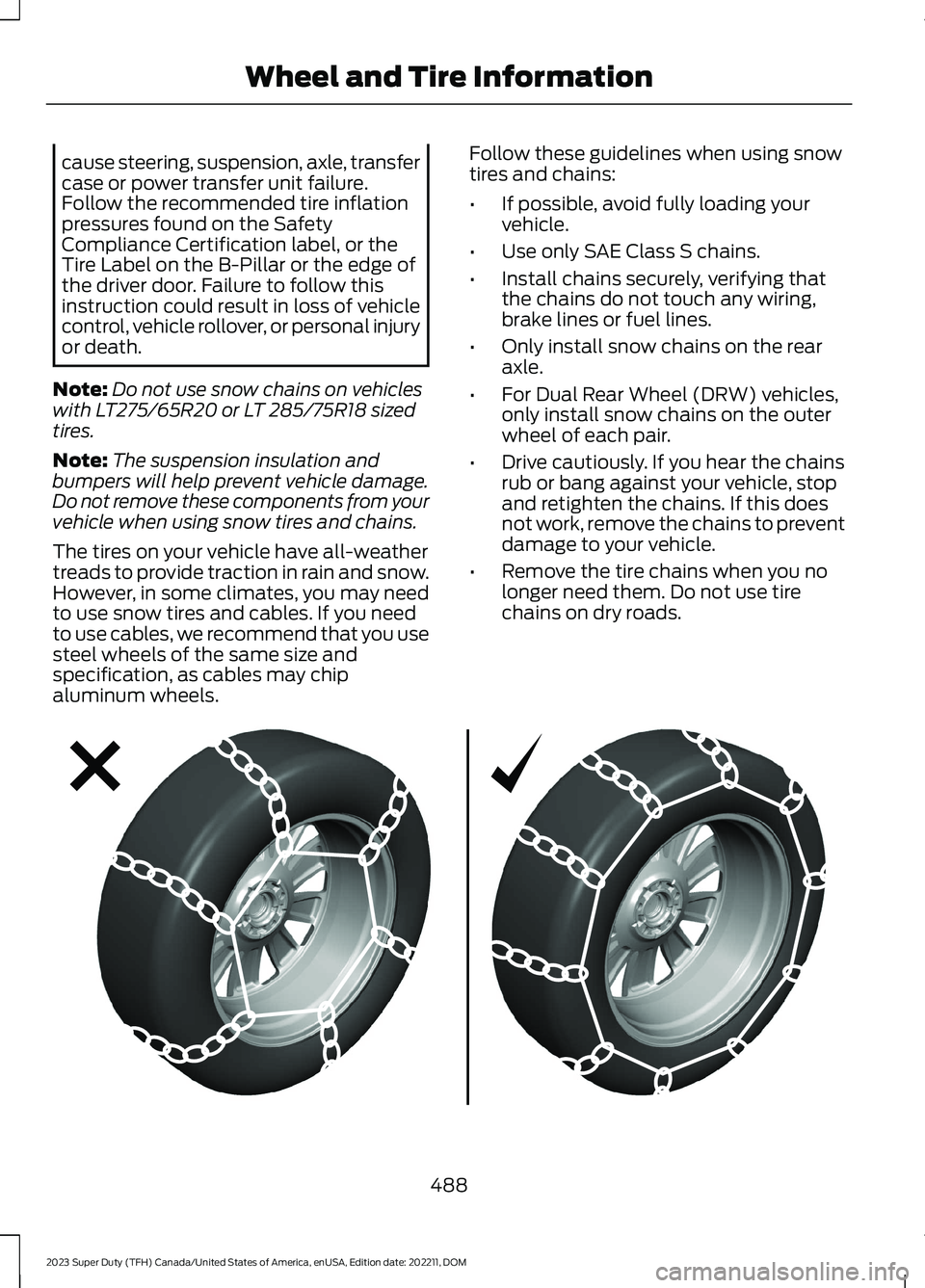
Follow these guidelines when using snowtires and chains:
•If possible, avoid fully loading yourvehicle.
•Use only SAE Class S chains.
•Install chains securely, verifying thatthe chains do not touch any wiring,brake lines or fuel lines.
•Only install snow chains on the rearaxle.
•For Dual Rear Wheel (DRW) vehicles,only install snow chains on the outerwheel of each pair.
•Drive cautiously. If you hear the chainsrub or bang against your vehicle, stopand retighten the chains. If this doesnot work, remove the chains to preventdamage to your vehicle.
•Remove the tire chains when you nolonger need them. Do not use tirechains on dry roads.
488
2023 Super Duty (TFH) Canada/United States of America, enUSA, Edition date: 202211, DOMWheel and Tire InformationE292547
Page 590 of 738
LOCATING THE AUXILIARY
SWITCHES
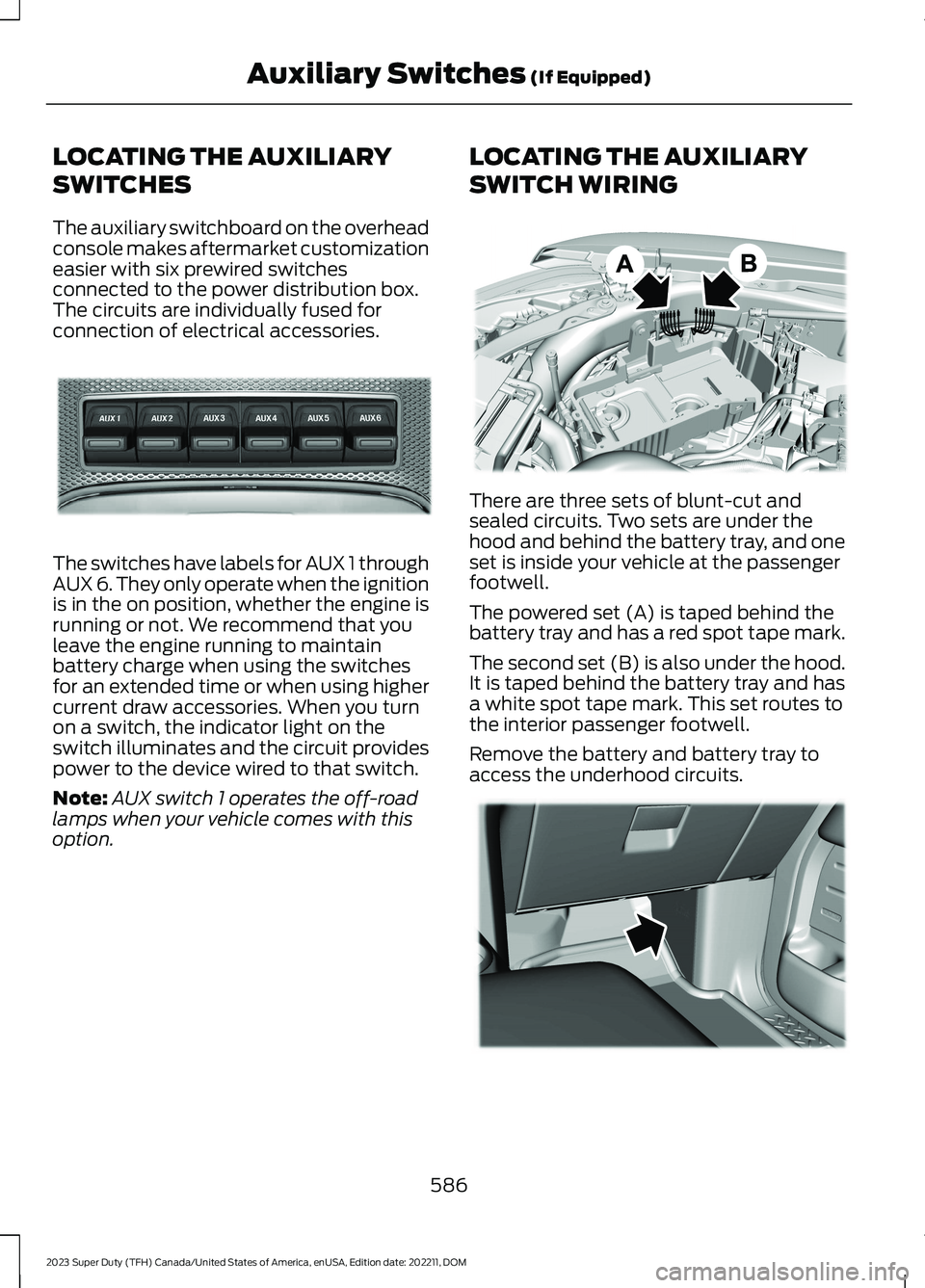
The auxiliary switchboard on the overheadconsole makes aftermarket customizationeasier with six prewired switchesconnected to the power distribution box.The circuits are individually fused forconnection of electrical accessories.
The switches have labels for AUX 1 throughAUX 6. They only operate when the ignitionis in the on position, whether the engine isrunning or not. We recommend that youleave the engine running to maintainbattery charge when using the switchesfor an extended time or when using highercurrent draw accessories. When you turnon a switch, the indicator light on theswitch illuminates and the circuit providespower to the device wired to that switch.
Note:AUX switch 1 operates the off-roadlamps when your vehicle comes with thisoption.
LOCATING THE AUXILIARY
SWITCH WIRING
There are three sets of blunt-cut andsealed circuits. Two sets are under thehood and behind the battery tray, and oneset is inside your vehicle at the passengerfootwell.
The powered set (A) is taped behind thebattery tray and has a red spot tape mark.
The second set (B) is also under the hood.It is taped behind the battery tray and hasa white spot tape mark. This set routes tothe interior passenger footwell.
Remove the battery and battery tray toaccess the underhood circuits.
586
2023 Super Duty (TFH) Canada/United States of America, enUSA, Edition date: 202211, DOMAuxiliary Switches (If Equipped)E220728 E347548 E347399
Page 591 of 738
The interior set is taped on a wire harnessby the passenger side footwell. This set isthe other end of the circuits taped behindthe battery tray, with a white spot tapemark.
Remove the fuse panel access door in thekick panel to access the wires. If you do notsee them, you may need to pull themdown.
See Fuses (page 430). See your authorizeddealer for service.
Circuits from the under hood fuse box (A)are powered. All other circuits (B-E) arenot connected at either end.
Additional information on fuse and relaylocations is available. See Fuses (page430). See your authorized dealer for service.
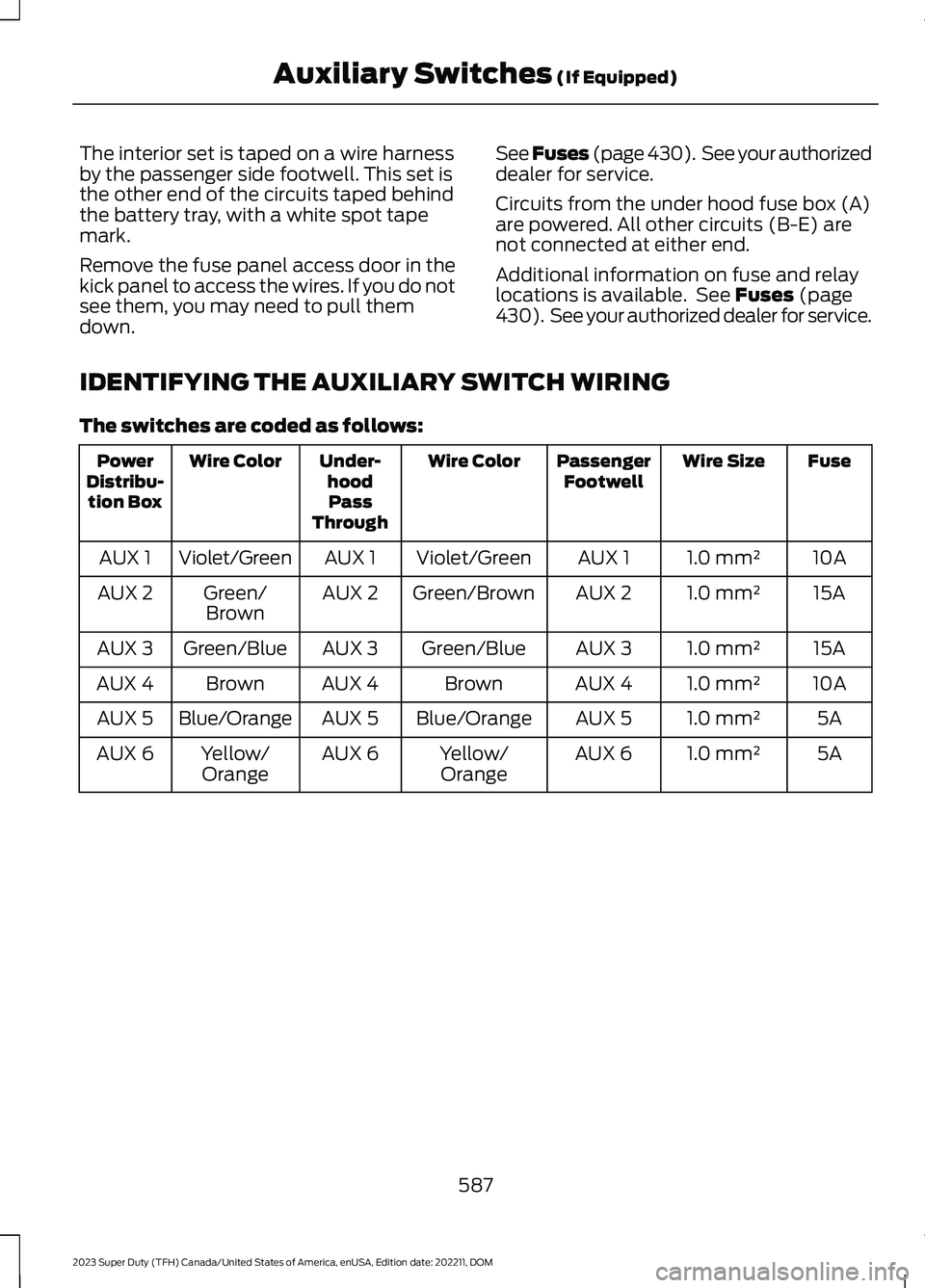
IDENTIFYING THE AUXILIARY SWITCH WIRING
The switches are coded as follows:
FuseWire SizePassengerFootwellWire ColorUnder-hoodPassThrough
Wire ColorPowerDistribu-tion Box
10A1.0 mm²AUX 1Violet/GreenAUX 1Violet/GreenAUX 1
15A1.0 mm²AUX 2Green/BrownAUX 2Green/BrownAUX 2
15A1.0 mm²AUX 3Green/BlueAUX 3Green/BlueAUX 3
10A1.0 mm²AUX 4BrownAUX 4BrownAUX 4
5A1.0 mm²AUX 5Blue/OrangeAUX 5Blue/OrangeAUX 5
5A1.0 mm²AUX 6Yellow/OrangeAUX 6Yellow/OrangeAUX 6
587
2023 Super Duty (TFH) Canada/United States of America, enUSA, Edition date: 202211, DOMAuxiliary Switches (If Equipped)
Page 707 of 738
ELECTROMAGNETIC
COMPATIBILITY
WARNING: Do not place objectsor mount equipment on or near theairbag cover, on the side of the front orrear seatbacks, or in areas that maycome into contact with a deployingairbag. Failure to follow theseinstructions may increase the risk ofpersonal injury in the event of a crash.
WARNING: Do not fasten antennacables to vehicle wiring, fuel pipes andbrake pipes.
WARNING: Keep antenna andpower cables at least 4 in (10 cm) fromany electronic modules and airbags.
Note:We test and certify your vehicle tomeet electromagnetic compatibilitylegislation. It is your responsibility to makesure that any equipment an authorizeddealer installs on your vehicle complies withapplicable local legislation and otherrequirements. Installation of someaftermarket electronic devices coulddegrade the performance of vehiclefunctions, which use radio frequency signalssuch as broadcast radio receiver, tirepressure monitoring system, push buttonstart,Bluetooth® connectivity or satellitenavigation.
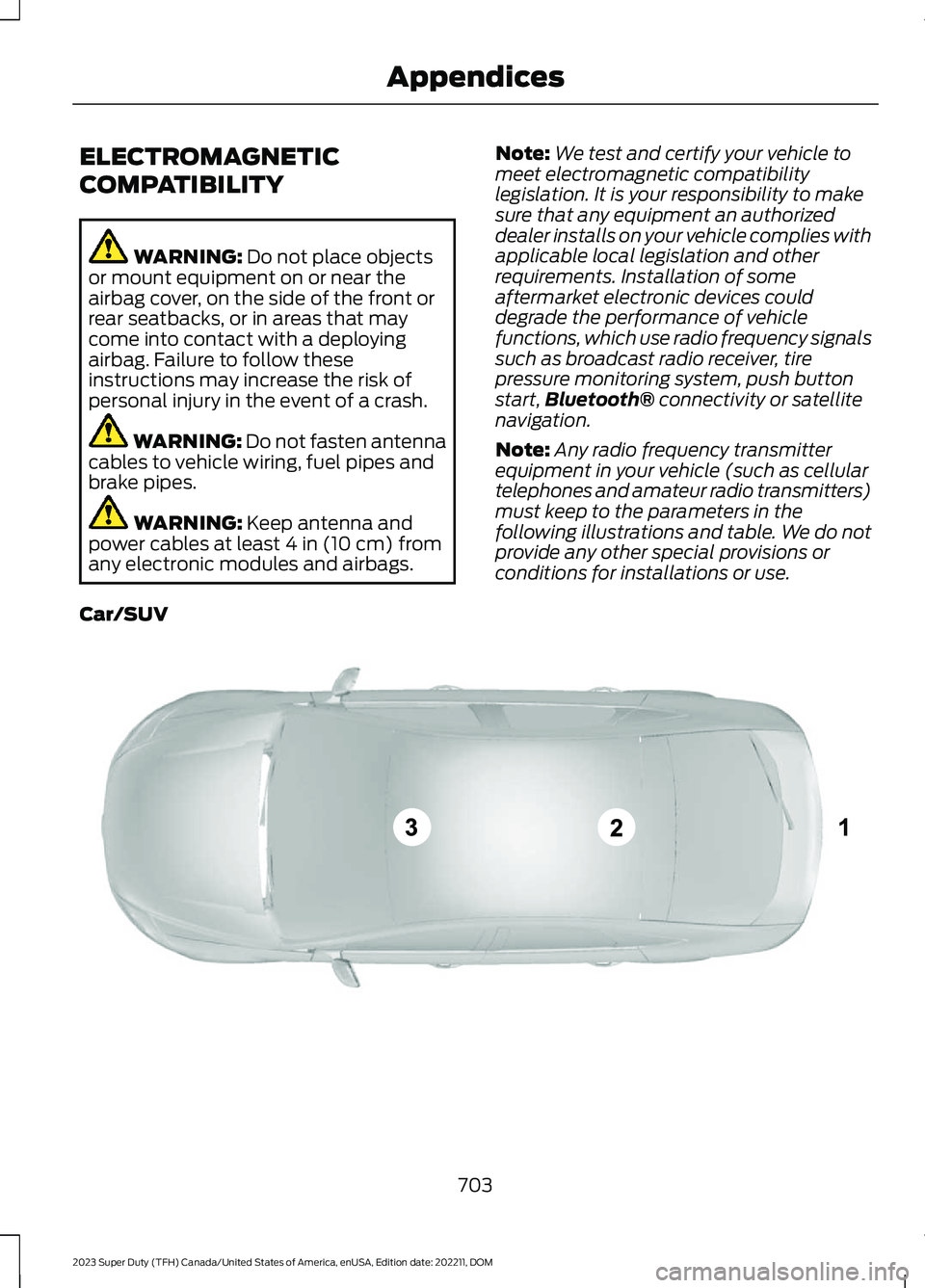
Note:Any radio frequency transmitterequipment in your vehicle (such as cellulartelephones and amateur radio transmitters)must keep to the parameters in thefollowing illustrations and table. We do notprovide any other special provisions orconditions for installations or use.
Car/SUV
703
2023 Super Duty (TFH) Canada/United States of America, enUSA, Edition date: 202211, DOMAppendicesE239120
Page 722 of 738
How Does the Selective CatalyticReduction System Work........................226How Does the Speed Limiter Work.......316How Does Traction Control Work.........268How Does Trailer Backup AssistanceWork..............................................................386How Does Trailer Hitching AssistanceWork...............................................................378How Does Trailer Reverse GuidanceWork...............................................................401How Does Trailer Sway ControlWork...............................................................377How Do Personal Profiles Work..............577How Do the Front Airbags Work...............57How Do the Side Airbags Work.................57Hydraulic Power Steering Fluid Capacityand Specification.....................................546Hydraulic Power Steering.........................279Checking the Hydraulic Power SteeringFluid...................................................................280Hydraulic Power Steering Guidelines.........279Locating the Hydraulic Power Steering FluidReservoir..........................................................280
I
Icon GlossarySee: Symbols Glossary.......................................23IconsSee: Symbols Glossary.......................................23Identifying Fuse Types...............................439Identifying the Audio Unit........................553Identifying the Auxiliary SwitchWiring............................................................587Identifying the Climate ControlUnit..................................................................152Idle Timer........................................................207How Does Idle Timer Work.............................207Idle Timer Precautions....................................208Idle Timer Settings...........................................208What is Idle Timer..............................................207Ignition Switch..............................................202Inflating the Tires........................................490Information On Demand Screen...........564Information on the Tire Sidewall...........479Inspecting the Tire for Damage.............494Inspecting the Tire for Wear....................494
Inspecting the Wheel ValveStems...........................................................498Installing Child Restraints..........................40Attaching the Front Seat Tether Strap........45Attaching the Rear Seat Tether Strap..........46Combining the Seatbelt and Lower Anchorsfor Attaching Child Restraints....................45Installing a Child Restraint in a CenterSeat......................................................................44Using Lower Anchors and Tethers forChildren...............................................................44Using Seatbelts....................................................40Using Tether Straps.............................................45Instrument Cluster Display.......................143Instrument Cluster Display Main Menu -Vehicles With: 12 Inch Screen...............144Instrument Cluster Display Main Menu -Vehicles With: 8 Inch Screen.................143Instrument Cluster Indicators..................140Instrument Cluster.......................................136Fuel Gauge.............................................................137Instrument Cluster Overview - VehiclesWith: 12 Inch Screen..................................137Instrument Cluster Overview - VehiclesWith: 8 Inch Screen...................................136Instrument Cluster WarningLamps............................................................139Instrument Panel............................................32Integrated Trailer Brake Controller.........372Integrated Trailer Brake Controller –Troubleshooting.............................................375Integrated Trailer Brake ControllerPrecautions..................................................372Integrated Trailer Brake Controller –Troubleshooting........................................375Integrated Trailer Brake Controller –Frequently Asked Questions.....................376Integrated Trailer Brake Controller –Information Messages.................................375Integrated Trailer Brake ControllerVideos............................................................376Intentionally Exceeding the Set SpeedLimit................................................................316Interior Air Quality........................................160Interior Bulbs................................................468Interior Bulb Specification Chart.................468Interior Fuse Box..........................................435Accessing the Interior Fuse Box...................435
718
2023 Super Duty (TFH) Canada/United States of America, enUSA, Edition date: 202211, DOMIndex
Page 724 of 738
What Is Live Traffic............................................579Load Carrying.................................................351Load Carrying Precautions........................351Loading Your Trailer....................................366Locating the 360 DegreeCameras......................................................290Locating the Auxiliary Switches............586Locating the Auxiliary SwitchWiring............................................................586Locating the Blind Spot InformationSystem Sensors........................................328Locating the Brake Fluid Reservoir.......249Locating the Cross Traffic AlertSensors.........................................................336Locating the Exit Warning Sensors.......333Locating the Keyless Entry Keypad.........87Locating the Key Readers............................73Locating the Memory FunctionButtons...........................................................177Locating the Outlets...................................188Locating the Power Outlets......................185Locating the Pre-Collision AssistSensors..........................................................341Locating the Rear View Camera.............287Locating the Safety ComplianceCertification Labels..................................352Locating the Tire label...............................478Locating the USB Ports..............................183Locating the Wireless AccessoryCharger..........................................................195Locating Your Vehicle....................................74Locking the Rear Window Controls.......129
M
Maintenance.................................................44012V Battery...........................................................45612V Battery – Troubleshooting.....................459Coolant.................................................................450Engine Air Filter..................................................445Engine Oil.............................................................444Exterior Bulbs.......................................................461Interior Bulbs......................................................468Maintenance Precautions.......................440Making and Receiving a Phone Call.......571Manually Dimming the InteriorMirror...............................................................131
Manually Releasing the Electric ParkingBrake..............................................................253Manually Shifting Gears............................235Shifting Using the Buttons on the ColumnShifter................................................................235Manual Seats.................................................162Adjusting the Head Restraint.........................162Adjusting the Lumbar Support.....................164Adjusting the Seat Backrest...........................164Folding the Seats.................................................171Head Restraint Components.........................162Installing the Head Restraint.........................163Moving the Seat Backward andForward.............................................................163Removing the Head Restraint........................163Unfolding the Seats.............................................171Massage Seats...............................................167Adjusting the Massage Seat Settings........168Massage Seat Limitations...............................167Memory Function..........................................177Memory Function Precautions.................177Memory Function Videos...........................178Mislock...............................................................82Mislock Limitations..............................................82Switching Mislock On and Off.........................82What Is Mislock.....................................................82Mobile CommunicationsEquipment...................................................674Mobile Device Data........................................29Moonroof Bounce-Back.............................135Overriding Moonroof Bounce-Back.............135What Is Moonroof Bounce-Back..................135Moonroof.........................................................134Moonroof Bounce-Back...................................135Moonroof Videos..........................................135Motorcraft Parts - 6.7L Diesel.................523Motorcraft Parts - 6.8L, Gasoline..........524Motorcraft Parts - 7.3L, Gasoline...........525Muting the Audio.........................................554
N
Navigation Map Updates..........................579Navigation......................................................579Adjusting the Map.............................................579Live Traffic............................................................579Route Guidance.................................................580Setting a Destination........................................579
720
2023 Super Duty (TFH) Canada/United States of America, enUSA, Edition date: 202211, DOMIndex