ESP FORD SUPER DUTY 2023 Manual PDF
[x] Cancel search | Manufacturer: FORD, Model Year: 2023, Model line: SUPER DUTY, Model: FORD SUPER DUTY 2023Pages: 738, PDF Size: 18.49 MB
Page 376 of 738
WHAT IS THE INTEGRATED
TRAILER BRAKE CONTROLLER
The trailer brake controller assists insmooth and effective trailer braking basedon the towing vehicle’s brake pressure.
INTEGRATED TRAILER BRAKE
CONTROLLER PRECAUTIONS
WARNING: Use the integratedtrailer brake controller to properly adjustthe trailer brakes and check allconnections before towing a trailer.Failure to follow this instruction couldresult in the loss of control of yourvehicle, personal injury or death.
•Only use the manual control lever forproper adjustment of the gain duringtrailer setup. Misuse, such asapplication during trailer sway, couldcause instability of trailer or towvehicle.
•Avoid towing in adverse weatherconditions. The trailer brake controllerdoes not provide anti-lock control ofthe trailer wheels. Trailer wheels canlock up on slippery surfaces, resultingin reduced stability of trailer and towvehicle.
•The trailer brake controller is only afactory-installed or dealer-installeditem. Ford is not responsible forwarranty or performance of thecontroller due to misuse or customerinstallation.
Note:Do not attempt removal of the trailerbrake controller without consulting theWorkshop Manual. Damage to the unit mayresult.
Note:Make sure to set the integrated trailerbrake controller gain to 0 if you are using anaftermarket trailer brake controller.
USING THE INTEGRATED
TRAILER BRAKE CONTROLLER
1.Make sure the trailer brakes are in goodworking condition, functioning normallyand properly adjusted. See your trailerdealer if necessary.
Note:An authorized dealer can diagnosethe trailer brake controller to determineexactly which trailer fault has occurred. Yourvehicle warranty does not cover issues withyour trailer.
2.Hook up the trailer and make theelectrical connections according to thetrailer manufacturer's instructions.
Note:Select default mode if the trailer hassurge brakes, or no brakes at all. The systemhas no effect on the braking performanceof the trailer in either of these cases.
Note:If a trailer is connected by a four-pinconnector, the trailer braking function willnot be supported.
3.When you plug in a trailer with electricor electric-over-hydraulic brakes, amessage confirming connectionappears in the information display.
4.Use the gain adjustment to find thedesired starting point. A gain setting of6.0 is a good starting point for heavierloads.
Note:Use the following steps to adjust thegain setting whenever road, weather andtrailer, or vehicle loading conditions, changefrom when you initially set the gain.
5.In a traffic-free environment, tow thetrailer on a dry, level surface andsqueeze the manual control levercompletely.
372
2023 Super Duty (TFH) Canada/United States of America, enUSA, Edition date: 202211, DOMIntegrated Trailer Brake Controller
Page 382 of 738
WHAT IS TRAILER HITCHING
ASSISTANCE
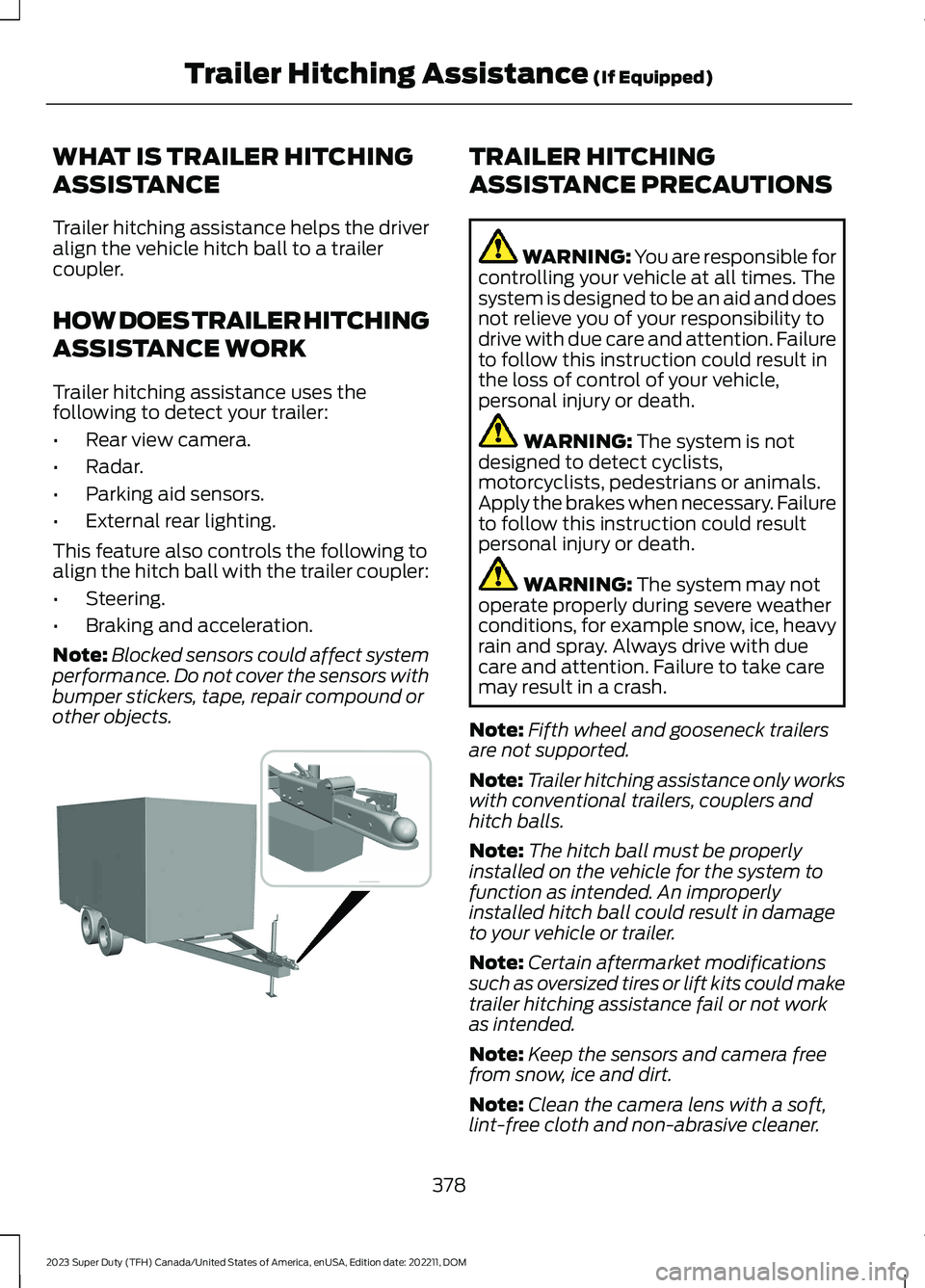
Trailer hitching assistance helps the driveralign the vehicle hitch ball to a trailercoupler.
HOW DOES TRAILER HITCHING
ASSISTANCE WORK
Trailer hitching assistance uses thefollowing to detect your trailer:
•Rear view camera.
•Radar.
•Parking aid sensors.
•External rear lighting.
This feature also controls the following toalign the hitch ball with the trailer coupler:
•Steering.
•Braking and acceleration.
Note:Blocked sensors could affect systemperformance. Do not cover the sensors withbumper stickers, tape, repair compound orother objects.
TRAILER HITCHING
ASSISTANCE PRECAUTIONS
WARNING: You are responsible forcontrolling your vehicle at all times. Thesystem is designed to be an aid and doesnot relieve you of your responsibility todrive with due care and attention. Failureto follow this instruction could result inthe loss of control of your vehicle,personal injury or death.
WARNING: The system is notdesigned to detect cyclists,motorcyclists, pedestrians or animals.Apply the brakes when necessary. Failureto follow this instruction could resultpersonal injury or death.
WARNING: The system may notoperate properly during severe weatherconditions, for example snow, ice, heavyrain and spray. Always drive with duecare and attention. Failure to take caremay result in a crash.
Note:Fifth wheel and gooseneck trailersare not supported.
Note:Trailer hitching assistance only workswith conventional trailers, couplers andhitch balls.
Note:The hitch ball must be properlyinstalled on the vehicle for the system tofunction as intended. An improperlyinstalled hitch ball could result in damageto your vehicle or trailer.
Note:Certain aftermarket modificationssuch as oversized tires or lift kits could maketrailer hitching assistance fail or not workas intended.
Note:Keep the sensors and camera freefrom snow, ice and dirt.
Note:Clean the camera lens with a soft,lint-free cloth and non-abrasive cleaner.
378
2023 Super Duty (TFH) Canada/United States of America, enUSA, Edition date: 202211, DOMTrailer Hitching Assistance (If Equipped) E383821
Page 390 of 738
WHAT IS TRAILER BACKUP
ASSISTANCE
Trailer backup assistance utilizes thecontrol knob on the instrument panel tohelp you steer a trailer. Turn the controlknob in the direction you want the trailerto go and the system steers the vehicle.
HOW DOES TRAILER BACKUP
ASSISTANCE WORK
Trailer backup assistance uses a sticker orsensor attached to the trailer to detect thetrailer angle relative to the towing vehicleand provides instructions, graphics andcamera views on the touchscreen.
TRAILER BACKUP
ASSISTANCE PRECAUTIONS
WARNING: Driving while distractedcan result in loss of vehicle control, crashand injury. We strongly recommend thatyou use extreme caution when using anydevice that may take your focus off theroad. Your primary responsibility is thesafe operation of your vehicle. Werecommend against the use of anyhand-held device while driving andencourage the use of voice-operatedsystems when possible. Make sure youare aware of all applicable local lawsthat may affect the use of electronicdevices while driving.
WARNING: This system is an extradriving aid. It does not replace yourattention and judgment, or the need toapply the brakes. This system does NOTautomatically brake your vehicle. If youfail to press the brake pedal whennecessary, you may collide with anothervehicle.
Note:The system is not a substitute forsafe driving practices. Always be aware ofyour vehicle and trailer combination, andthe surrounding environment.
Note:The system does not detect orprevent your vehicle or trailer from makingcontact with obstacles in the surroundingenvironment.
Note:The front end of your vehicle swingsout when changing the direction of thetrailer.
Note:In certain conditions, the trailer couldturn faster or the trailer angle could increasemore than anticipated. Always monitor theclearance between the trailer and vehicleand the surroundings.
SETTING UP THE TRAILER
BACKUP ASSISTANCE FOR A
CONVENTIONAL TRAILER
CONFIGURING THE TRAILER
You must configure a trailer in the systemto use trailer backup assistance. This is aone-time setup process and the trailerinformation is saved in the system for thenext time you use that trailer.
The following illustration shows examplesof conventional trailers.
386
2023 Super Duty (TFH) Canada/United States of America, enUSA, Edition date: 202211, DOMTrailer Backup Assistance (If Equipped)
Page 405 of 738
WHAT IS TRAILER REVERSE
GUIDANCE
Trailer reverse guidance provides viewsand graphics on the touchscreen to helpyou steer your vehicle when you backup atrailer.
HOW DOES TRAILER REVERSE
GUIDANCE WORK
Trailer reverse guidance uses a sticker orsensor attached to the trailer to detect thetrailer angle relative to the towing vehicleand provides instructions, graphics andcamera views on the touchscreen.
TRAILER REVERSE GUIDANCE
PRECAUTIONS
WARNING: Driving while distractedcan result in loss of vehicle control, crashand injury. We strongly recommend thatyou use extreme caution when using anydevice that may take your focus off theroad. Your primary responsibility is thesafe operation of your vehicle. Werecommend against the use of anyhand-held device while driving andencourage the use of voice-operatedsystems when possible. Make sure youare aware of all applicable local lawsthat may affect the use of electronicdevices while driving.
WARNING: This system is an extradriving aid. It does not replace yourattention and judgment, or the need toapply the brakes. This system does NOTautomatically brake your vehicle. If youfail to press the brake pedal whennecessary, you may collide with anothervehicle.
Note:The system is not a substitute forsafe driving practices. Always be aware ofyour vehicle and trailer combination, andthe surrounding environment.
Note:The system does not detect orprevent your vehicle or trailer from makingcontact with obstacles in the surroundingenvironment.
Note:The front end of your vehicle swingsout when changing the direction of thetrailer.
Note:In certain conditions, the trailer couldturn faster or the trailer angle could increasemore than anticipated. Always monitor theclearance between the trailer and vehicleand the surroundings.
SETTING UP TRAILER
REVERSE GUIDANCE FOR A
CONVENTIONAL TRAILER
CONFIGURING THE TRAILER
You must configure a trailer in the systemto use trailer reverse guidance. This is aone-time setup process and the trailerinformation is saved in the system for thenext time you use that trailer.
The system only works with conventionaltrailers. It does not work with other typesincluding fifth-wheel and gooseneck. Thefollowing illustration shows examples ofconventional trailers on the left-hand side.
Note:Trailer reverse guidance cameraviews are available with no trailer setup.However, complete functionality includinggraphics and automatic view switching isenabled by setup. Setup is required toenable trailer backup assistance.
401
2023 Super Duty (TFH) Canada/United States of America, enUSA, Edition date: 202211, DOMTrailer Reverse Guidance (If Equipped)
Page 408 of 738
Note:If your vehicle came with a trailersensor kit, the vehicle will receive an updatethat allows the system to operate with asensor or sticker. If your vehicle did not comewith a trailer sensor kit, your vehicle can besetup using either method, but you need toseparately purchase the trailer sensor kitfrom your authorized dealer. Once yourvehicle is enabled for sticker setup, thedefault setup for new trailers requiresplacement of the sticker. To setup a trailerwith a sensor, install the sensor on the trailerand plug the connector into the connectorin your bumper prior to configuring thetrailer. Trailers that were set up with asensor still require the sensor to function.To change a trailer to use the sticker, deletethe trailer in the system and repeat thetrailer setup with the sticker.
CALIBRATING THE SYSTEM
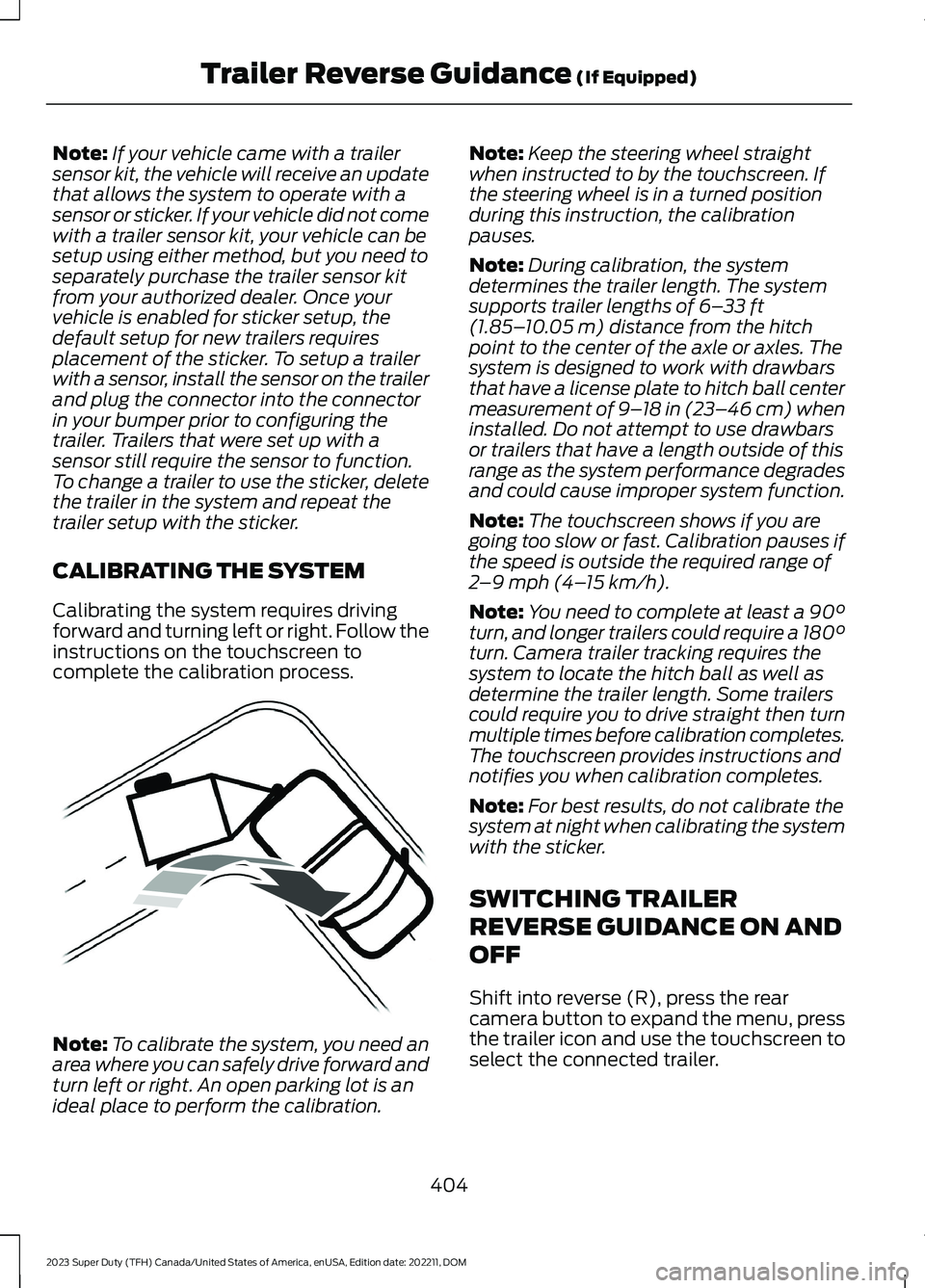
Calibrating the system requires drivingforward and turning left or right. Follow theinstructions on the touchscreen tocomplete the calibration process.
Note:To calibrate the system, you need anarea where you can safely drive forward andturn left or right. An open parking lot is anideal place to perform the calibration.
Note:Keep the steering wheel straightwhen instructed to by the touchscreen. Ifthe steering wheel is in a turned positionduring this instruction, the calibrationpauses.
Note:During calibration, the systemdetermines the trailer length. The systemsupports trailer lengths of 6–33 ft(1.85–10.05 m) distance from the hitchpoint to the center of the axle or axles. Thesystem is designed to work with drawbarsthat have a license plate to hitch ball centermeasurement of 9–18 in (23–46 cm) wheninstalled. Do not attempt to use drawbarsor trailers that have a length outside of thisrange as the system performance degradesand could cause improper system function.
Note:The touchscreen shows if you aregoing too slow or fast. Calibration pauses ifthe speed is outside the required range of2–9 mph (4–15 km/h).
Note:You need to complete at least a 90°turn, and longer trailers could require a 180°turn. Camera trailer tracking requires thesystem to locate the hitch ball as well asdetermine the trailer length. Some trailerscould require you to drive straight then turnmultiple times before calibration completes.The touchscreen provides instructions andnotifies you when calibration completes.
Note:For best results, do not calibrate thesystem at night when calibrating the systemwith the sticker.
SWITCHING TRAILER
REVERSE GUIDANCE ON AND
OFF
Shift into reverse (R), press the rearcamera button to expand the menu, pressthe trailer icon and use the touchscreen toselect the connected trailer.
404
2023 Super Duty (TFH) Canada/United States of America, enUSA, Edition date: 202211, DOMTrailer Reverse Guidance (If Equipped)E352329
Page 416 of 738
OFF-ROAD DRIVING
WHAT IS OFF-ROAD DRIVING
Off-road driving is driving your vehicle onunsurfaced roads or trails, made from dirt,rocks, sand and mud.
BASIC OFF-ROAD DRIVINGTECHNIQUES
Off-road Driving Hints
Before taking your vehicle off-roading, abasic vehicle inspection should be done tomake sure that the vehicle is in top workingcondition. It is always recommended thatat least two vehicles are used whileoff-roading. The buddy system helps makesure that help is close at hand should avehicle become stuck or damaged. It is alsowise to take supplies such as a first aid kit,supply of water, tow strap, cell or satellitephone with you any time an off-roadexcursion is planned.
1.Grip the steering wheel with thumbson the outside of the rim. This willreduce the risk of injury due to abruptsteering wheel motions that occurwhen negotiating rough terrain.
2.Throttle, brake and steering inputsshould be made in a smooth andcontrolled manner. Sudden inputs tothe controls can cause loss of tractionor upset the vehicle, especially whileon loose terrain or while crossingobstacles such as rocks or logs.
3.Look ahead on your route notingupcoming obstacles, or any otherfactors which may indicate a changein available traction, and adjust thevehicle speed and route accordingly.
4.When driving off-road, if the front orrear suspension is bottoming outand/or excessive contact with theskid-plates is encountered, reducevehicle speed to avoid potentialdamage to the vehicle.
5.When with other vehicles, it isrecommended that communication isused, and the lead vehicle notify othervehicles of obstacles that could causepotential vehicle damage.
6.Always keep available groundclearance in mind and pick a route thatminimizes the risk of catching theunderside of the vehicle on an obstacle.
7.When negotiating low speed obstacles,applying light brake pressure inconjunction with the throttle will helpprevent the vehicle from jerking andwill allow you to negotiate the obstaclein a more controlled manner. Using 4Lwill also help with this.
8.Off-roading requires a high degree ofconcentration. Even if your local lawdoes not prohibit alcohol use whiledriving off-road, Ford stronglyrecommends against drinking if youplan to off-road.
Crossing Obstacles
•Review the path ahead beforeattempting to cross any obstacle. It isbest if the obstacle is reviewed fromoutside the vehicle so that there is agood understanding of terrain conditionboth in front of and behind theobstacle.
•Approach obstacles slowly.
412
2023 Super Duty (TFH) Canada/United States of America, enUSA, Edition date: 202211, DOMDriving Hints
Page 421 of 738
Mud
Be cautious of sudden changes in vehiclespeed or direction when you are driving inmud. Even all-wheel drive and four-wheeldrive vehicles can lose traction in mud. Ifyour vehicle slides, steer in the direction ofthe slide until you regain control of yourvehicle. After driving through mud, cleanoff residue stuck to rotating driveshaftsand tires. Excess residue can cause animbalance that could damage drivecomponents.
Water
If you must drive though deep water, driveslowly. The water could limit traction orbrake capability. See Driving ThroughWater Limitations (page 413).
FLOOR MATS
WARNING: Use a floor matdesigned to fit the footwell of yourvehicle that does not obstruct the pedalarea. Failure to follow this instructioncould result in the loss of control of yourvehicle, personal injury or death.
WARNING: Pedals that cannotmove freely can cause loss of vehiclecontrol and increase the risk of seriouspersonal injury.
WARNING: Secure the floor matto both retention devices so that itcannot slip out of position and interferewith the pedals. Failure to follow thisinstruction could result in the loss ofcontrol of your vehicle, personal injury ordeath.
WARNING: Do not place additionalfloor mats or any other covering on topof the original floor mats. This couldresult in the floor mat interfering with theoperation of the pedals. Failure to followthis instruction could result in the loss ofcontrol of your vehicle, personal injury ordeath.
WARNING: Always make sure thatobjects cannot fall into the driver footwell while your vehicle is moving. Objectsthat are loose can become trappedunder the pedals causing a loss ofvehicle control.
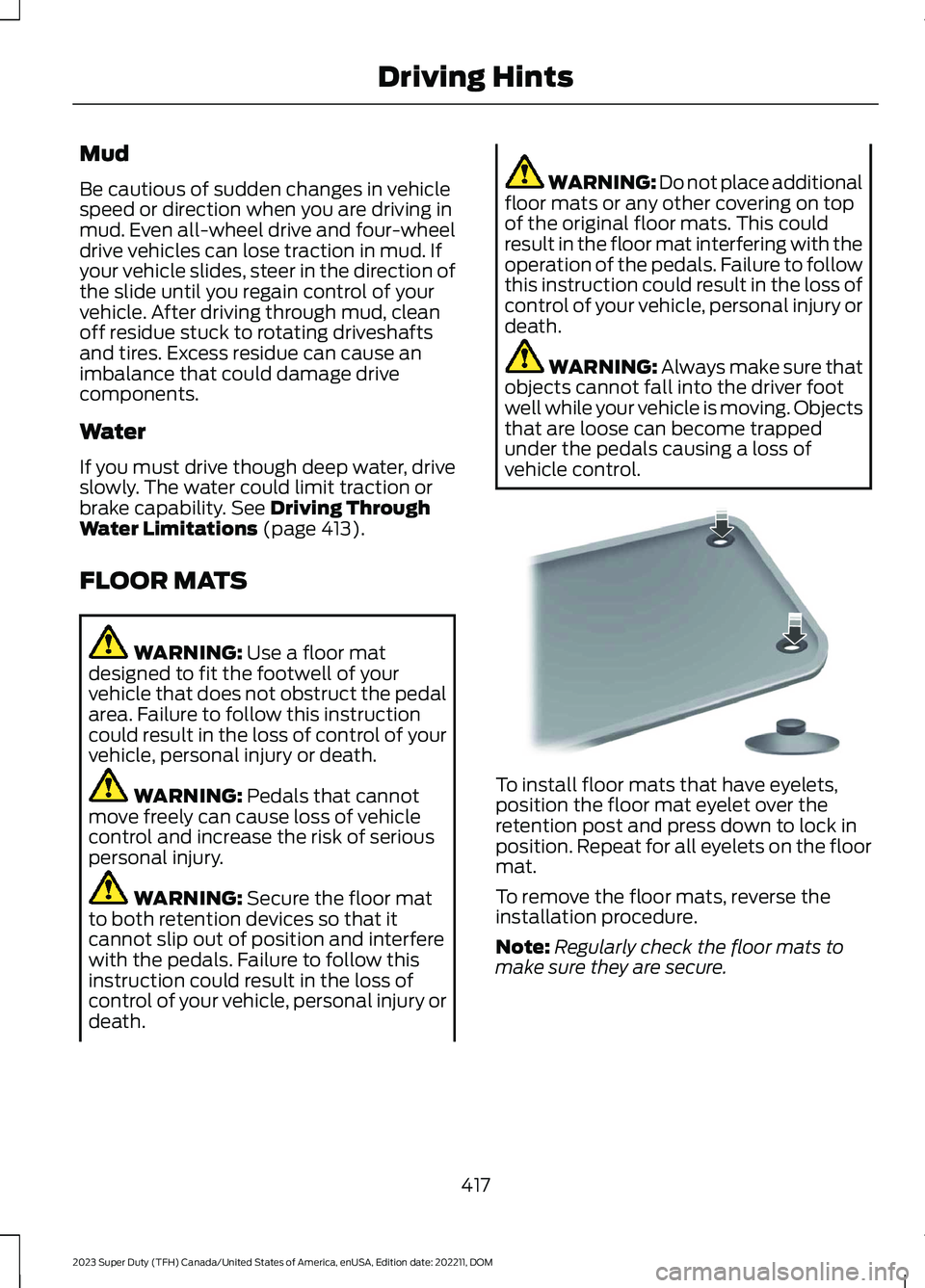
To install floor mats that have eyelets,position the floor mat eyelet over theretention post and press down to lock inposition. Repeat for all eyelets on the floormat.
To remove the floor mats, reverse theinstallation procedure.
Note:Regularly check the floor mats tomake sure they are secure.
417
2023 Super Duty (TFH) Canada/United States of America, enUSA, Edition date: 202211, DOMDriving HintsE142666
Page 424 of 738
ROADSIDE ASSISTANCE
Vehicles Sold in the United States:Getting Roadside Assistance
If you have a vehicle concern, Ford MotorCompany offers a complimentary roadsideassistance program. This program isseparate from the New Vehicle LimitedWarranty.
The service is available:
•24 hours a day, seven days a week.
•For the coverage period supplied withyour vehicle.
Roadside Assistance covers:
•A flat tire change with a good spare(except vehicles supplied with a tireinflation kit).
•Battery jump start.
•Lock-out assistance (key replacementcost is the customer's responsibility).
•Fuel delivery — independent servicecontractors, if not prohibited by state,local or municipal law, shall deliver upto 2 gal (8 L) of gasoline or 5 gal (20 L)of diesel fuel to a disabled vehicle.Roadside assistance limits fuel deliveryservice to two no-charge occurrenceswithin a 12-month period.
•Winch out — available within 100 ft(30 m) of a paved or countymaintained road, no recoveries.
•Towing — independent servicecontractors, if not prohibited by state,local or municipal law, shall tow Fordeligible vehicles to an authorized dealerwithin 50 mi (80 km) of thedisablement location or to the nearestauthorized dealer. If a memberrequests a tow to an authorized dealerthat is more than 50 mi (80 km) fromthe disablement location, the membershall be responsible for any mileagecosts in excess of 50 mi (80 km).
•Roadside Assistance includes up to$200 for a towed trailer if the disabledeligible vehicle requires service at thenearest authorized dealer. If the towingvehicle is operational but the trailer isnot, then the trailer does not qualify forany roadside services.
Vehicles Sold in the United States:Using Roadside Assistance
Complete the roadside assistanceidentification card and place it in yourwallet for quick reference. This card is inthe Owner's Manual kit.
United States vehicle customers whorequire Roadside Assistance, call1-800-241-3673.
If you need to arrange roadside assistanceon your own, Ford Motor Companyreimburses a reasonable amount fortowing to the nearest dealership within50 mi (80 km). To obtain reimbursementinformation, United States vehiclecustomers call 1-800-241-3673.Customers need to submit their originalreceipts.
Vehicles Sold in Canada: GettingRoadside Assistance
If you have a vehicle concern, Ford MotorCompany of Canada, Limited offers acomplimentary roadside assistanceprogram. This program is eligible withinCanada or the continental United States.
420
2023 Super Duty (TFH) Canada/United States of America, enUSA, Edition date: 202211, DOMCrash and Breakdown Information
Page 456 of 738
MANAGING THE COOLANTTEMPERATURE
If you tow a trailer with your vehicle, theengine may temporarily reach a highertemperature during severe operatingconditions, for example ascending a longor steep grade in high ambienttemperatures.
At this time, you may notice the coolanttemperature gauge moves toward the redzone and a message may appear in theinformation display.
WARNING: To reduce the risk ofcrash and injury, be prepared that thevehicle speed may reduce and thevehicle may not be able to acceleratewith full power until the coolanttemperature reduces.
WARNING: If you continue to driveyour vehicle when the engine isoverheating, the engine could stopwithout warning. Failure to follow thisinstruction could result in the loss ofcontrol of your vehicle.
You may notice a reduction in vehiclespeed caused by reduced engine power inorder to manage the engine coolanttemperature. Your vehicle may enter thismode if certain high-temperature andhigh-load conditions take place. Theamount of speed reduction depends onvehicle loading, grade and outsidetemperature. If this occurs, there is noneed to stop your vehicle. You cancontinue to drive. See Fail-Safe Cooling(page 425).
The air conditioning may automaticallyturn on and off during severe operatingconditions to protect the engine fromoverheating. When the coolanttemperature decreases to the normaloperating temperature, the air conditioningturns on.
If the coolant temperature gauge movesfully into the red zone, or if the coolanttemperature warning or service enginesoon messages appear in your informationdisplay, do the following:
1.Stop your vehicle as soon as it is safeto do so. Fully apply the parking brake,shift into park (P) or neutral (N).
2.Leave the engine running until thecoolant temperature gauge needlereturns to the normal position. If thetemperature does not drop afterseveral minutes, follow the remainingsteps.
3.Switch the engine off and wait for it tocool. Check the coolant level.
4.If the coolant level is at or below theminimum mark, add prediluted coolantimmediately.
5.If the coolant level is normal, restartthe engine and continue.
COOLANT – WARNING LAMPS
If the engine begins to overheat,the coolant temperature gaugemoves toward the red zone.
A warning lamp illuminates anda message may appear in theinformation display.
452
2023 Super Duty (TFH) Canada/United States of America, enUSA, Edition date: 202211, DOMMaintenanceE103308 E67028
Page 460 of 738
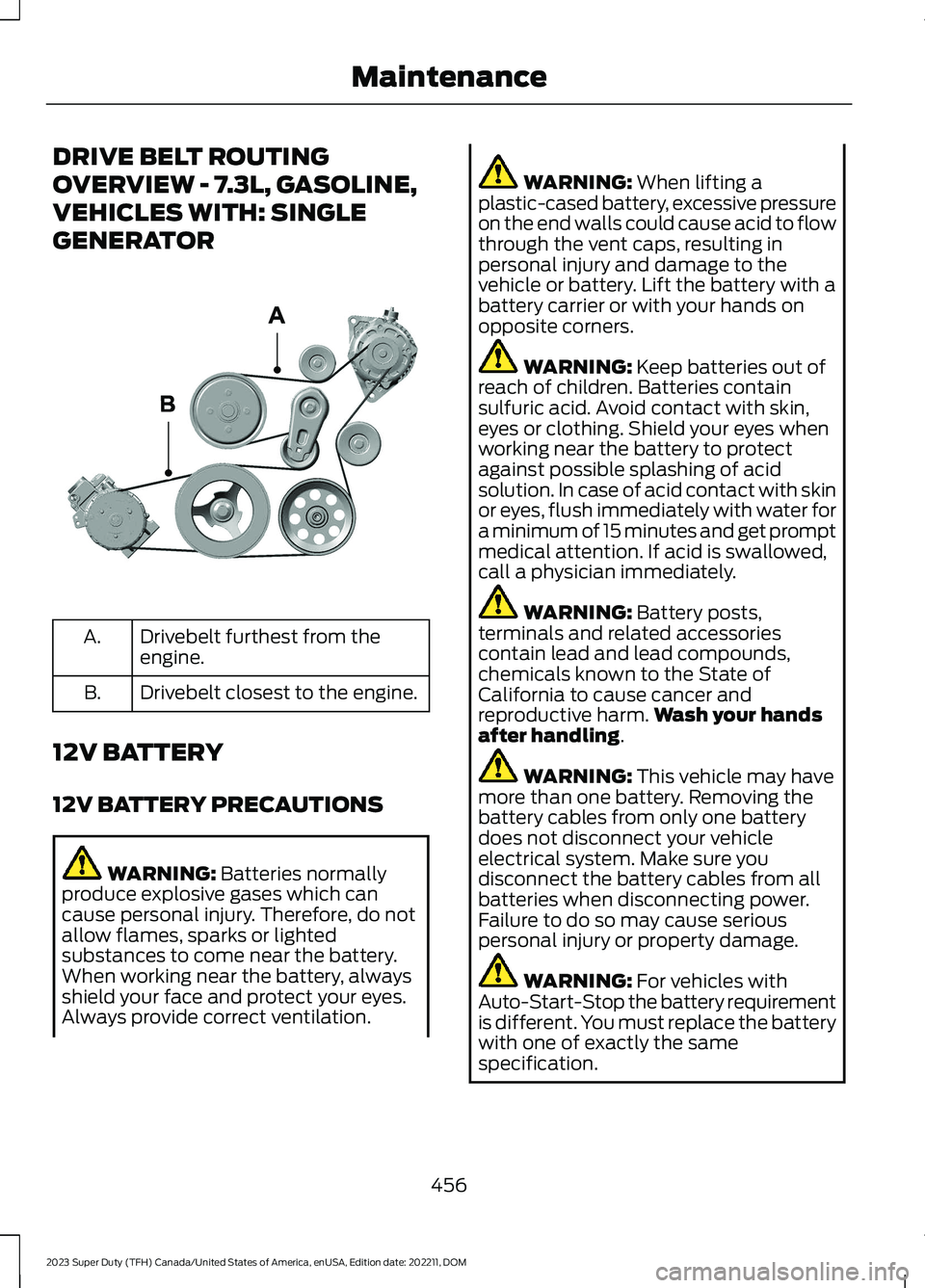
DRIVE BELT ROUTING
OVERVIEW - 7.3L, GASOLINE,
VEHICLES WITH: SINGLE
GENERATOR
Drivebelt furthest from theengine.A.
Drivebelt closest to the engine.B.
12V BATTERY
12V BATTERY PRECAUTIONS
WARNING: Batteries normallyproduce explosive gases which cancause personal injury. Therefore, do notallow flames, sparks or lightedsubstances to come near the battery.When working near the battery, alwaysshield your face and protect your eyes.Always provide correct ventilation.
WARNING: When lifting aplastic-cased battery, excessive pressureon the end walls could cause acid to flowthrough the vent caps, resulting inpersonal injury and damage to thevehicle or battery. Lift the battery with abattery carrier or with your hands onopposite corners.
WARNING: Keep batteries out ofreach of children. Batteries containsulfuric acid. Avoid contact with skin,eyes or clothing. Shield your eyes whenworking near the battery to protectagainst possible splashing of acidsolution. In case of acid contact with skinor eyes, flush immediately with water fora minimum of 15 minutes and get promptmedical attention. If acid is swallowed,call a physician immediately.
WARNING: Battery posts,terminals and related accessoriescontain lead and lead compounds,chemicals known to the State ofCalifornia to cause cancer andreproductive harm.Wash your handsafter handling.
WARNING: This vehicle may havemore than one battery. Removing thebattery cables from only one batterydoes not disconnect your vehicleelectrical system. Make sure youdisconnect the battery cables from allbatteries when disconnecting power.Failure to do so may cause seriouspersonal injury or property damage.
WARNING: For vehicles withAuto-Start-Stop the battery requirementis different. You must replace the batterywith one of exactly the samespecification.
456
2023 Super Duty (TFH) Canada/United States of America, enUSA, Edition date: 202211, DOMMaintenanceE376525