mirror FORD SUPER DUTY 2023 Owners Manual
[x] Cancel search | Manufacturer: FORD, Model Year: 2023, Model line: SUPER DUTY, Model: FORD SUPER DUTY 2023Pages: 738, PDF Size: 18.49 MB
Page 7 of 738
Tailgate Step.................................................100
Tailgate – Troubleshooting.......................101
Tailgate Videos.............................................102
Security
Passive Anti-Theft System......................103
Anti-Theft Alarm System.........................103
Anti-Theft Alarm System Settings.......104
Security – Troubleshooting.....................105
Power Running Boards
Power Running Board Precautions.......107
Power Running Board Settings..............107
Power Running Boards –Troubleshooting......................................108
Power Running Boards Videos..............108
Steering Wheel
Adjusting the Steering Wheel - VehiclesWith: Manual Adjustable SteeringColumn.......................................................109
Adjusting the Steering Wheel - VehiclesWith: Power Adjustable SteeringColumn.......................................................109
Resetting the Stopping Position -Vehicles With: Power AdjustableSteering Column.......................................110
Horn...................................................................110
Switching the Heated Steering WheelOn and Off....................................................111
Steering Wheel Videos................................111
Adjustable Pedals
Adjusting the Pedals....................................112
Wipers and Washers
Wipers...............................................................113
Autowipers......................................................113
Checking the Wiper Blades.......................114
Replacing the Front Wiper Blades.........114
Washers...........................................................114
Wipers and Washers Videos.....................115
Wipers and Washers – Troubleshooting..........................................................................115
Exterior Lighting
Exterior Lighting Control.............................117
Headlamps......................................................117
Headlamps – Troubleshooting................117
Autolamps......................................................118
Exterior Lamps..............................................118
Exterior Zone Lighting.................................121
Automatic High Beam Control...............122
Automatic High Beam Control –Troubleshooting.......................................124
Adaptive Front Lighting.............................124
Exterior Lighting Videos.............................125
Interior Lighting
Switching All of the Interior Lamps Onand Off........................................................126
Switching the Front Interior Lamps Onand Off........................................................126
Switching the Rear Interior Lamps Onand Off........................................................126
Interior Lamp Function..............................126
Adjusting the Instrument Panel LightingBrightness...................................................127
Ambient Lighting..........................................127
Interior Lighting – Troubleshooting.......127
Windows
Opening and Closing the Windows......128
Global Opening............................................128
Window Bounce-Back...............................129
Locking the Rear Window Controls......129
Opening and Closing the SlidingWindows.....................................................129
Windows Videos..........................................130
Interior Mirror
Interior Mirror Precautions.........................131
3
2023 Super Duty (TFH) Canada/United States of America, enUSA, Edition date: 202211, DOMTable of Contents
Page 8 of 738
Manually Dimming the Interior Mirror..........................................................................131
Auto-Dimming Interior Mirror...................131
Exterior Mirrors
Adjusting the Exterior Mirrors..................132
Folding the Exterior Mirrors - VehiclesWith: Manual Folding Mirrors..............132
Folding the Exterior Mirrors - VehiclesWith: Power Folding Mirrors................132
Extending the Exterior Mirrors.................133
Exterior Mirrors Videos...............................133
Moonroof
Opening and Closing the Sunshade......134
Opening and Closing the Moonroof......134
Venting the Moonroof................................135
Moonroof Bounce-Back............................135
Moonroof Videos.........................................135
Instrument Cluster
Instrument Cluster Overview - VehiclesWith: 8 Inch Screen................................136
Instrument Cluster Overview - VehiclesWith: 12 Inch Screen................................137
Tachometer....................................................137
Speedometer.................................................137
Fuel Gauge......................................................137
Engine Coolant Temperature Gauge.........................................................................138
Engine Oil Pressure Gauge.......................138
Engine Oil Temperature Gauge..............138
Transmission Fluid Temperature Gauge.........................................................................138
Turbo Boost Gauge.....................................138
Diesel Exhaust Fluid Gauge.....................138
What Are the Instrument ClusterWarning Lamps........................................139
Instrument Cluster Warning Lamps......139
What Are the Instrument ClusterIndicators...................................................140
Instrument Cluster Indicators.................140
Instrument Cluster Display
Using the Instrument Cluster DisplayControls.......................................................143
Instrument Cluster Display Main Menu -Vehicles With: 8 Inch Screen...............143
Instrument Cluster Display Main Menu -Vehicles With: 12 Inch Screen.............144
Customizing the Instrument ClusterDisplay - Vehicles With: 8 Inch Screen.........................................................................144
Customizing the Instrument ClusterDisplay - Vehicles With: 12 Inch Screen.........................................................................144
Personalized Settings
Changing the Language............................145
Changing the Measurement Unit..........145
Changing the Temperature Unit............145
Changing the Tire Pressure Unit............145
Trip Computer
Accessing the Trip Computer - VehiclesWith: 8 Inch Screen................................146
Accessing the Trip Computer - VehiclesWith: 12 Inch Screen...............................146
Resetting the Trip Computer..................146
Trip Data.........................................................146
Head Up Display
What Is the Head Up Display..................147
Switching the Head Up Display On andOff..................................................................147
Head Up Display Settings.........................147
Head Up Display – Troubleshooting.........................................................................148
Remote Start
What Is Remote Start................................149
Remote Start Precautions.......................149
Remote Start Limitations........................149
4
2023 Super Duty (TFH) Canada/United States of America, enUSA, Edition date: 202211, DOMTable of Contents
Page 9 of 738
Enabling Remote Start.............................149
Remotely Starting and Stopping theVehicle.........................................................149
Extending the Remote Start Duration.........................................................................150
Remote Start Remote Control Indicators.........................................................................150
Remote Start Settings..............................150
Remote Start Videos...................................151
Climate Control - VehiclesWith: AutomaticTemperature Control
Identifying the Climate Control Unit.....152
Switching Climate Control On and Off.........................................................................152
Switching Recirculated Air On and Off.........................................................................152
Switching Air Conditioning On and Off.........................................................................152
Switching Defrost On and Off................152
Switching Maximum Defrost On and Off.........................................................................152
Switching Maximum Cooling On and Off.........................................................................153
Switching the Heated Rear Window Onand Off........................................................153
Setting the Blower Motor Speed...........153
Switching the Heated Mirrors On and Off.........................................................................153
Setting the Temperature...........................153
Directing the Flow of Air............................154
Auto Mode......................................................154
Climate Control Hints................................154
Climate Control Videos.............................155
Climate Control - VehiclesWith: Manual TemperatureControl
Identifying the Climate Control Unit.....156
Switching Climate Control On and Off.........................................................................156
Switching Recirculated Air On and Off.........................................................................156
Switching Air Conditioning On and Off.........................................................................156
Switching Defrost On and Off................156
Switching Maximum Defrost On and Off.........................................................................156
Switching Maximum Cooling On and Off.........................................................................157
Switching the Heated Rear Window Onand Off.........................................................157
Setting the Blower Motor Speed............157
Switching the Heated Mirrors On and Off.........................................................................157
Setting the Temperature..........................158
Directing the Flow of Air...........................158
Climate Control Hints................................158
Climate Control Videos.............................159
Interior Air Quality
What Is the Cabin Air Filter......................160
Replacing the Cabin Air Filter.................160
Front Seats
Front Seat Precautions..............................161
Sitting in the Correct Position..................161
Manual Seats................................................162
Power Seats..................................................164
Massage Seats..............................................167
Heated Seats................................................168
Ventilated Seats..........................................169
Front Seats Videos.....................................169
Rear Seats
Manual Seats................................................170
Heated Seats.................................................172
Rear Occupant Alert System
What is the Rear Occupant Alert System.........................................................................174
5
2023 Super Duty (TFH) Canada/United States of America, enUSA, Edition date: 202211, DOMTable of Contents
Page 39 of 738
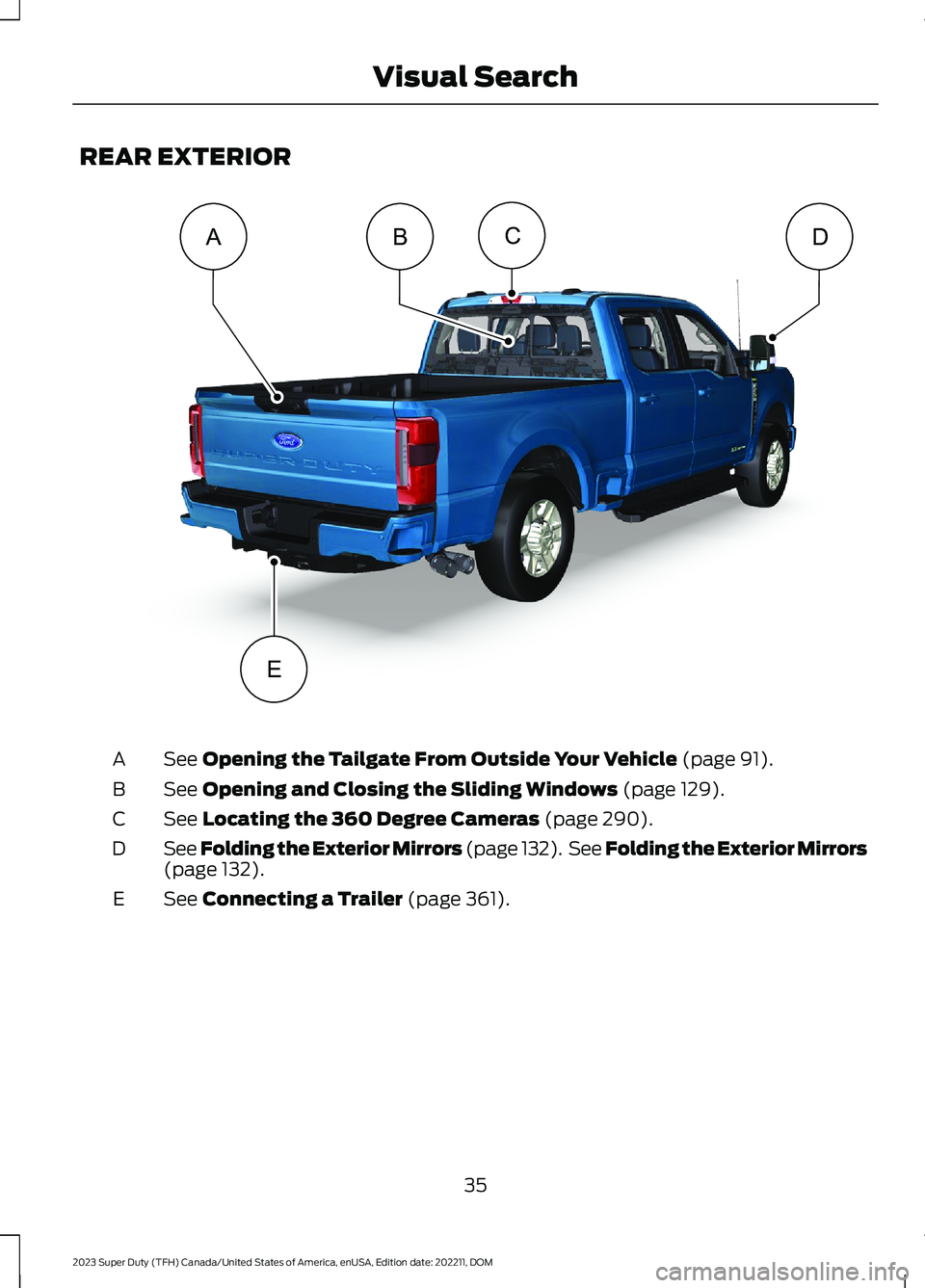
REAR EXTERIOR
See Opening the Tailgate From Outside Your Vehicle (page 91).A
See Opening and Closing the Sliding Windows (page 129).B
See Locating the 360 Degree Cameras (page 290).C
See Folding the Exterior Mirrors (page 132). See Folding the Exterior Mirrors(page 132).D
See Connecting a Trailer (page 361).E
35
2023 Super Duty (TFH) Canada/United States of America, enUSA, Edition date: 202211, DOMVisual SearchCDBAE E374898
Page 124 of 738
4.Switch Daytime Running Lights on oroff.
The daytime running lamps turn on whenall of the following occur:
•You switch the system on.
•You switch your vehicle on.
•The transmission is not in park (P) forvehicles with automatic transmissionsor you release the parking brake forvehicles with manual transmissions.
•The lighting control is in the autolampsposition.
•The headlamps are off.
Note:Other lighting control positions donot turn on the daytime running lamps.
SWITCHING THE DAYTIMERUNNING LAMPS ON AND OFF -VEHICLES WITH: DAYTIMERUNNING LAMPS (DRL)
WARNING: The daytime runninglamps system does not activate the rearlamps and may not provide adequatelighting during low visibility drivingconditions. Make sure you switch theheadlamps on, as appropriate, during alllow visibility conditions. Failure to do somay result in a crash.
Daytime running lamps are always onunless you switch on the headlamps oryour vehicle is in park (P).
USING THE FRONT FOG LAMPS (If
Equipped)
To switch the lamps on or off:
1.Set the lighting control to the parkinglamps, headlamps or autolampsposition.
Note:When the lighting control is in theautolamps position, you cannot switch thefog lamps on unless the low beamheadlamps are on.
2.
Press the button on thelighting control to switch the front foglamps on or off.
Note:Only switch the front fog lamps onduring reduced visibility.
Note:The brightness of the daytime runninglamps may decrease when the front foglamps are switched on.
Note:The front fog lamps lights switch offautomatically when high beams areactivated.
Front Fog Lamps Indicator
It illuminates when you switchthe front fog lamps on.
SWITCHING THE CARGO LAMPSON (If Equipped)
Press the button in the lightingcontrol or in the rear cargo box.
SWITCHING THE SPOT LAMPS ONAND OFF (If Equipped)
The spot lamp buttons are near the lightingcontrol.
Press the button to switch on theleft-hand spot lamp.
Press the button to switch on theright-hand spot lamp.
Move the position of the exterior mirrorsto adjust the aim.
120
2023 Super Duty (TFH) Canada/United States of America, enUSA, Edition date: 202211, DOMExterior Lighting E189587 E340436 E340437
Page 135 of 738
INTERIOR MIRROR
PRECAUTIONS
WARNING: Do not adjust themirrors when your vehicle is moving. Thiscould result in the loss of control of yourvehicle, serious personal injury or death.
Note:Do not clean the mirror housing orglass with harsh abrasives, fuel or otherpetroleum-based cleaning products.
MANUALLY DIMMING THE
INTERIOR MIRROR
Pull the tab below the mirror toward youto reduce glare at night.
AUTO-DIMMING INTERIOR
MIRROR (IF EQUIPPED)
WHAT IS THE AUTO-DIMMINGINTERIOR MIRROR
The mirror dims to reduce the effect ofbright light from behind. It returns tonormal when the bright light from behindis no longer present or if you shift intoreverse (R).
AUTO-DIMMING INTERIORMIRROR LIMITATIONS
Do not block the sensors on the front andback of the mirror.
Note:A rear center passenger or raised rearcenter head restraint could prevent lightfrom reaching the sensor.
131
2023 Super Duty (TFH) Canada/United States of America, enUSA, Edition date: 202211, DOMInterior Mirror
Page 136 of 738
ADJUSTING THE EXTERIOR
MIRRORS
WARNING: Do not adjust themirrors when your vehicle is moving. Thiscould result in the loss of control of yourvehicle, serious personal injury or death.
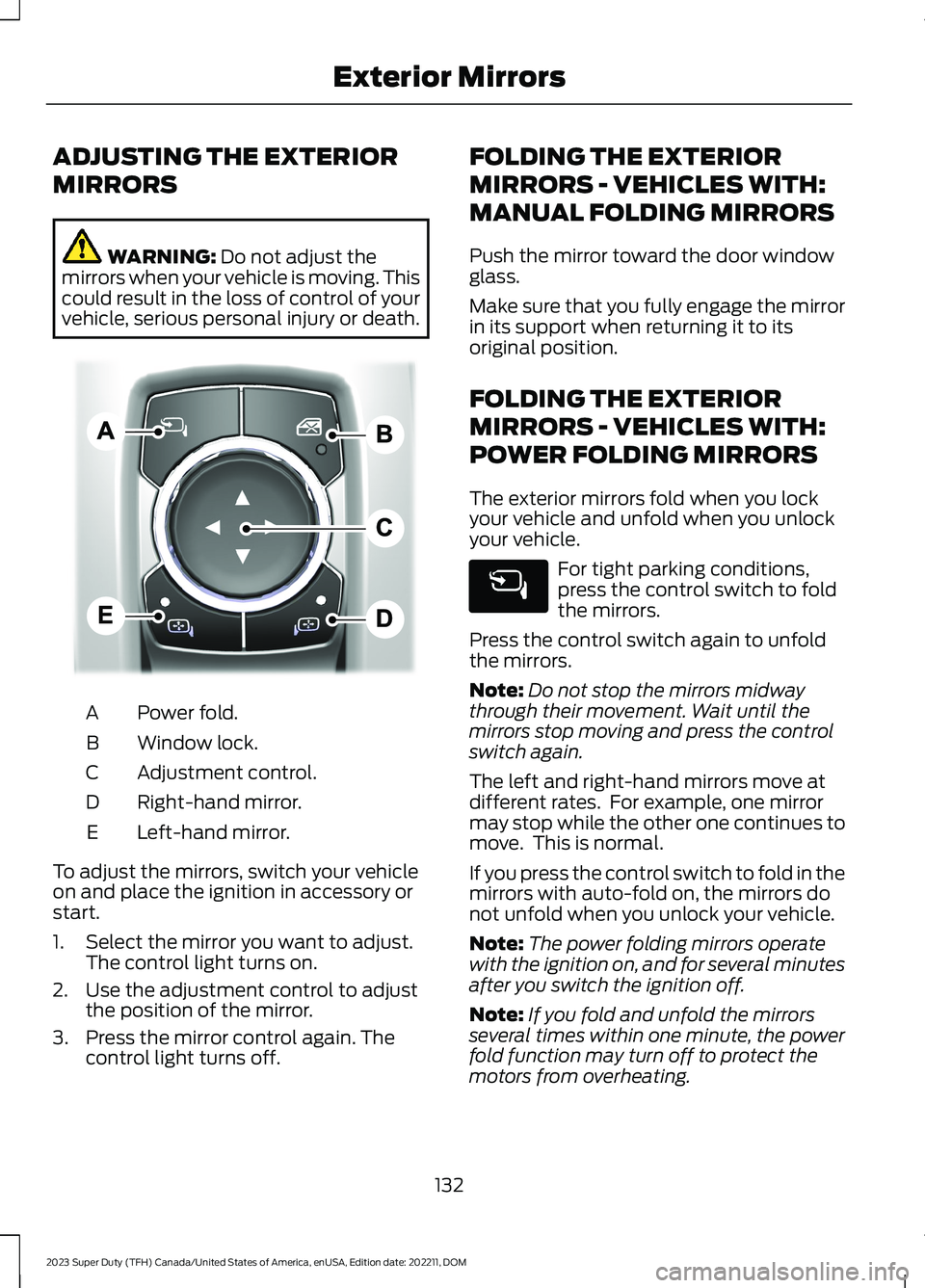
Power fold.A
Window lock.B
Adjustment control.C
Right-hand mirror.D
Left-hand mirror.E
To adjust the mirrors, switch your vehicleon and place the ignition in accessory orstart.
1.Select the mirror you want to adjust.The control light turns on.
2.Use the adjustment control to adjustthe position of the mirror.
3.Press the mirror control again. Thecontrol light turns off.
FOLDING THE EXTERIOR
MIRRORS - VEHICLES WITH:
MANUAL FOLDING MIRRORS
Push the mirror toward the door windowglass.
Make sure that you fully engage the mirrorin its support when returning it to itsoriginal position.
FOLDING THE EXTERIOR
MIRRORS - VEHICLES WITH:
POWER FOLDING MIRRORS
The exterior mirrors fold when you lockyour vehicle and unfold when you unlockyour vehicle.
For tight parking conditions,press the control switch to foldthe mirrors.
Press the control switch again to unfoldthe mirrors.
Note:Do not stop the mirrors midwaythrough their movement. Wait until themirrors stop moving and press the controlswitch again.
The left and right-hand mirrors move atdifferent rates. For example, one mirrormay stop while the other one continues tomove. This is normal.
If you press the control switch to fold in themirrors with auto-fold on, the mirrors donot unfold when you unlock your vehicle.
Note:The power folding mirrors operatewith the ignition on, and for several minutesafter you switch the ignition off.
Note:If you fold and unfold the mirrorsseveral times within one minute, the powerfold function may turn off to protect themotors from overheating.
132
2023 Super Duty (TFH) Canada/United States of America, enUSA, Edition date: 202211, DOMExterior MirrorsE311081
Page 137 of 738
Switching Auto-fold On and Off
1.Press Settings on the touchscreen.
2.Press Vehicle Settings.
3.Press Mirrors.
4.Switch Autofold on and off.
Loose Mirror
If you manually fold your power-foldingmirrors, they may not work properly evenafter you reposition them. You need toreset them if:
•The mirrors vibrate when you drive.
•The mirrors feel loose.
•The mirrors do not stay in the folded orunfolded position.
•One of the mirrors is not in its normaldriving position.
To reset the mirrors, perform the followingsteps:
1.By hand, fold or retract both mirrors.
2.Using the power folding/powertelescoping mirror control switch,operate the mirrors until you hear anaudible click.
3.Operate the power folding or powertelescoping mirrors an additional 3 to4 times to synchronize the mirrors.
EXTENDING THE EXTERIOR
MIRRORS
This optional feature lets you extend themirror about 3 in (75 mm). It is useful whentowing a trailer. You can manually pull outor push in the mirrors to various positions.
Power Telescoping Mirrors (If
Equipped)
This feature lets you position both mirrorsat the same time.
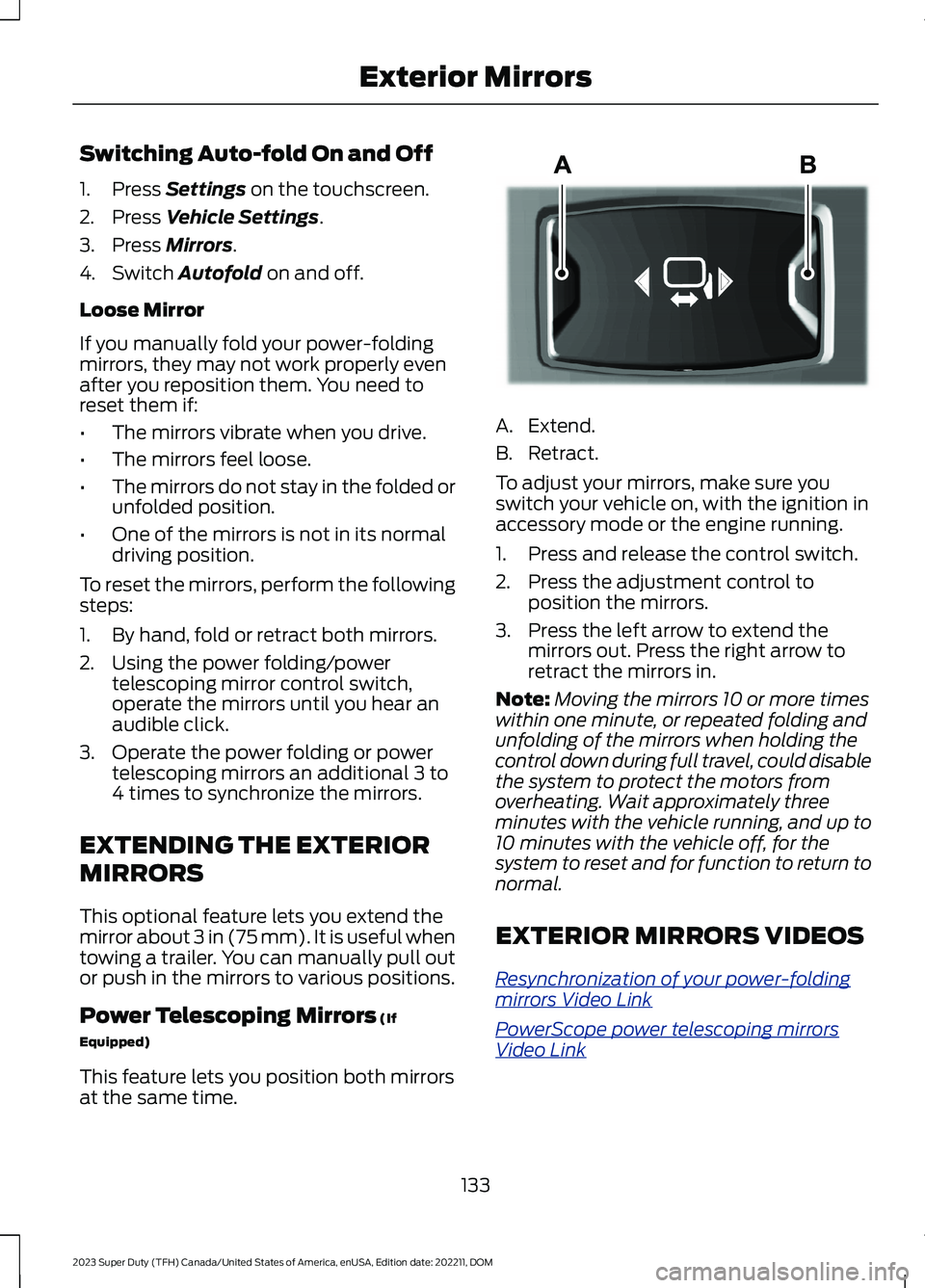
A.Extend.
B.Retract.
To adjust your mirrors, make sure youswitch your vehicle on, with the ignition inaccessory mode or the engine running.
1.Press and release the control switch.
2.Press the adjustment control toposition the mirrors.
3.Press the left arrow to extend themirrors out. Press the right arrow toretract the mirrors in.
Note:Moving the mirrors 10 or more timeswithin one minute, or repeated folding andunfolding of the mirrors when holding thecontrol down during full travel, could disablethe system to protect the motors fromoverheating. Wait approximately threeminutes with the vehicle running, and up to10 minutes with the vehicle off, for thesystem to reset and for function to return tonormal.
EXTERIOR MIRRORS VIDEOS
Resynchronization of your power-foldingmirrors Video Link
PowerScope power telescoping mirrorsVideo Link
133
2023 Super Duty (TFH) Canada/United States of America, enUSA, Edition date: 202211, DOMExterior MirrorsE218902
Page 157 of 738
SWITCHING MAXIMUM
COOLING ON AND OFF
Press the button.
Note:When you switch maximum coolingoff, air conditioning remains on.
SWITCHING THE HEATED
REAR WINDOW ON AND OFF
Press the button to clear the rearwindow of thin ice and fog. Theheated rear window turns offafter a short period of time.
Note:This button also activates the heatedmirrors.
Note:Do not use harsh chemicals, razorblades or other sharp objects to clean orremove decals from the inside of the heatedrear window as this could cause damage tothe heated rear window grid lines notcovered by the vehicle Warranty.
SETTING THE BLOWER MOTOR
SPEED
Press up or down on the controlto select the blower motorspeed.
Note:For Hybrid Electric Vehicle (HEV) andPlug-In Hybrid Electric Vehicle (PHEV)vehicles, the blower motor may run, and youmay feel airflow when the climate controlis off, to provide cooling to the battery.
SWITCHING THE HEATED
MIRRORS ON AND OFF
When you switch the heated rear windowon, the heated exterior mirrors turn on.See Switching the Heated Rear WindowOn and Off (page 153).
Note:Do not remove ice from the mirrorswith a scraper or adjust the mirror glasswhen it is frozen in place.
Note:Do not clean the mirror housing orglass with harsh abrasives, fuel or otherpetroleum-based cleaning products. Thevehicle warranty may not cover damagecaused to the mirror housing or glass.
Note:The engine must be running or yourvehicle must be ready to drive to switch thesystem on.
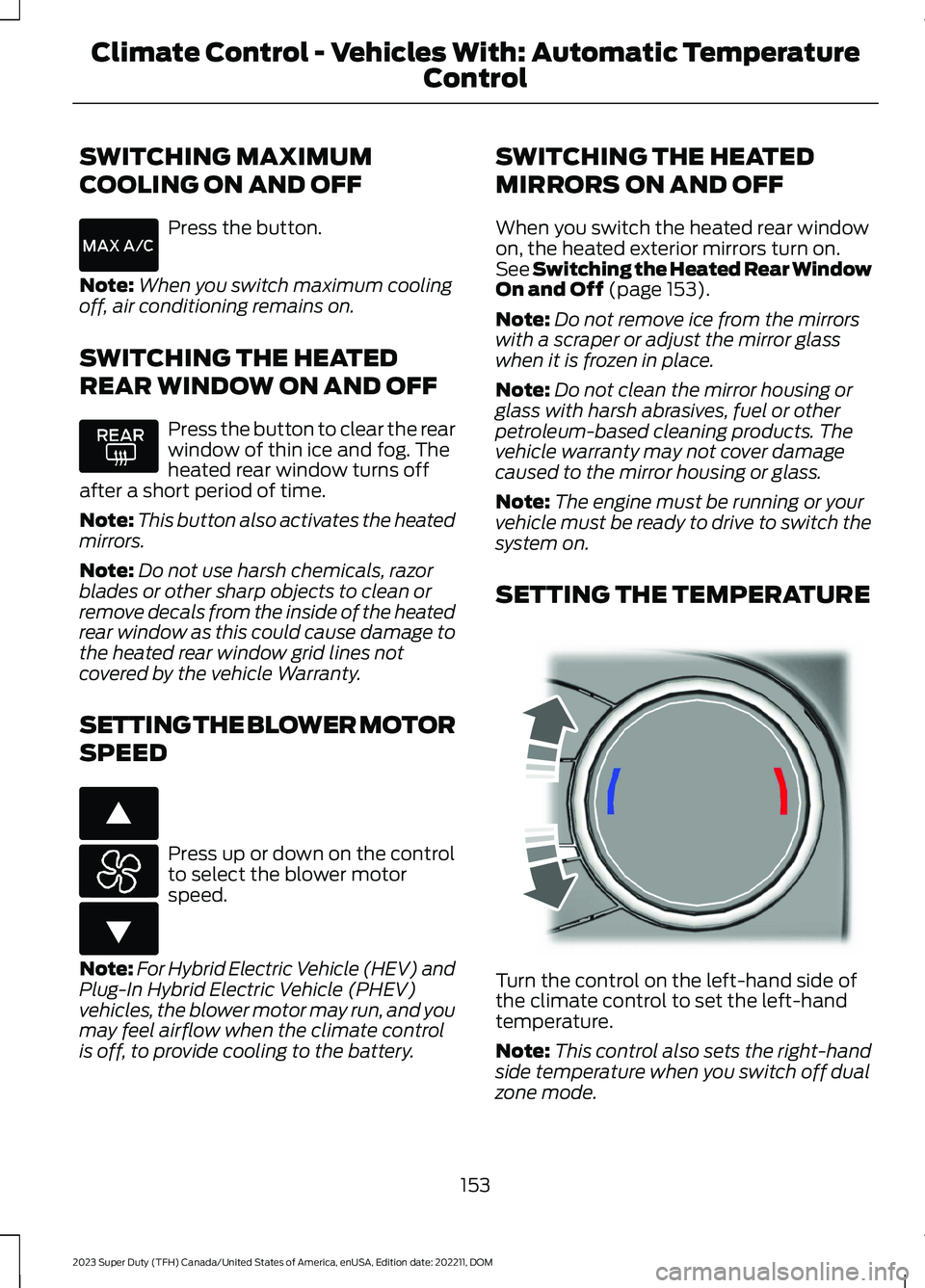
SETTING THE TEMPERATURE
Turn the control on the left-hand side ofthe climate control to set the left-handtemperature.
Note:This control also sets the right-handside temperature when you switch off dualzone mode.
153
2023 Super Duty (TFH) Canada/United States of America, enUSA, Edition date: 202211, DOMClimate Control - Vehicles With: Automatic Temperature
Control E266187 E266186 E244115
Page 159 of 738
Automatic Climate Control
•Adjusting the settings when yourvehicle interior is extremely hot or coldis not necessary. Automatic mode isbest recommended to maintain settemperature.
•The system adjusts to heat or cool theinterior to the temperature you selectas quickly as possible.
•For the system to function efficiently,the instrument panel and side air ventsshould be fully open.
•If you press AUTO during cold outsidetemperatures, the system directs airflow to the windshield and side windowair vents.In addition, the blower motormay run at a slower speed until theengine warms up.
•If you press AUTO during hottemperatures and the inside of thevehicle is hot, the system usesrecirculated air to maximize interiorcooling. Blower motor speed may alsoreduce until the air cools.
Quickly Heating the Interior
1.Press AUTO.
2.Adjust the temperature function to thesetting you prefer.
Recommended Settings forHeating
1.Press AUTO.
2.Adjust the temperature function to thesetting you prefer. Use 72°F (22°C) asa starting point, then adjust the settingas necessary.
Quickly Cooling the Interior
1.Press MAX A/C.
2.Drive with the windows open for a shortperiod of time.
Recommended Settings forCooling
1.Press AUTO.
2.Adjust the temperature function to thesetting you prefer. Use 72°F (22°C) asa starting point, then adjust the settingas necessary.
Defogging the Side Windows inCold Weather
1.Press and release defrost or maximumdefrost.
2.Adjust the temperature control to thesetting you prefer. Use 72°F (22°C) asa starting point, then adjust the settingas necessary.
CLIMATE CONTROL VIDEOS
Heated Mirrors
155
2023 Super Duty (TFH) Canada/United States of America, enUSA, Edition date: 202211, DOMClimate Control - Vehicles With: Automatic Temperature
Control