lock FORD TAURUS 1999 3.G User Guide
[x] Cancel search | Manufacturer: FORD, Model Year: 1999, Model line: TAURUS, Model: FORD TAURUS 1999 3.GPages: 224, PDF Size: 1.42 MB
Page 56 of 224

CENTER CONSOLE
Your vehicle may be equipped with a variety of
console features. These include:
²utility compartment
²cupholders
²coin holder slots
²cellular phone (if equipped)
Use only soft cups in the cupholder. Hard
objects can injure you in a collision.
If your vehicle is equipped with the column shift and
a bench seat, it has a center console in the center
front seating position.
The center console has the same features as the full
console. To open the storage compartment, raise the
armrest and pull the strap on the seat up and
toward the front of the vehicle. The cupholders in
the center console can be removed for cleaning.
Cellular phone
Refer to the ªCellular phone guideº for instructions
on operation.
POSITIVE RETENTION FLOOR MAT
Position the floor mat so
that the eyelet is over the
pointed end of the
retention post and rotate
forward to lock in. Make
sure that the mat does not
interfere with the operation
of the accelerator or the
brake pedal. To remove the
floor mat, reverse the installation procedure.
Controls and features
56
Page 57 of 224
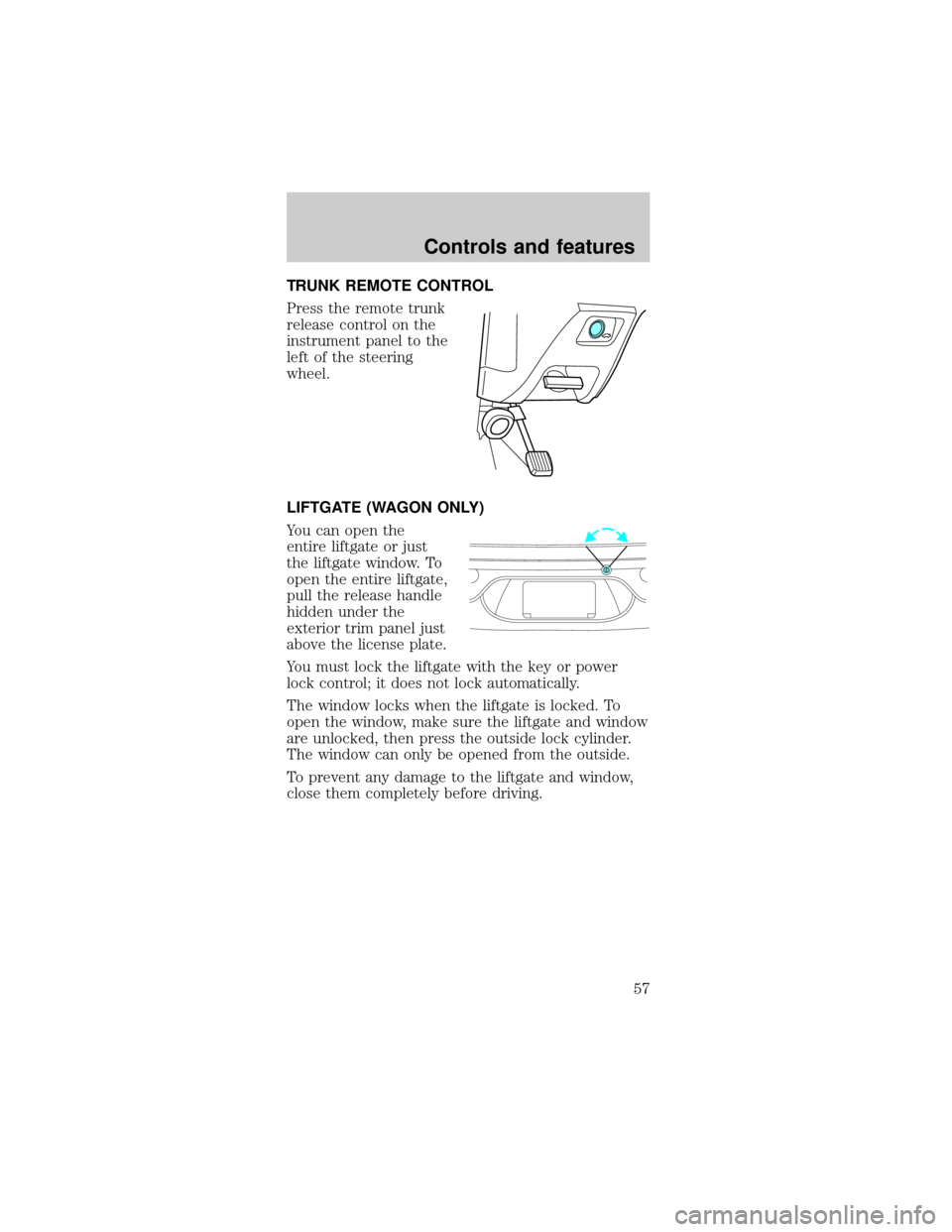
TRUNK REMOTE CONTROL
Press the remote trunk
release control on the
instrument panel to the
left of the steering
wheel.
LIFTGATE (WAGON ONLY)
You can open the
entire liftgate or just
the liftgate window. To
open the entire liftgate,
pull the release handle
hidden under the
exterior trim panel just
above the license plate.
You must lock the liftgate with the key or power
lock control; it does not lock automatically.
The window locks when the liftgate is locked. To
open the window, make sure the liftgate and window
are unlocked, then press the outside lock cylinder.
The window can only be opened from the outside.
To prevent any damage to the liftgate and window,
close them completely before driving.
Controls and features
57
Page 60 of 224

2. Wrap the vinyl
around the roller tube
twice. Tuck the edges
of the vinyl inside the
end cap with each
wrap.
3. Fold the edges of
the vinyl towards the
center, making sure that the edges clear the end cap
slots. Use tape or a rubber band to hold the vinyl to
the left side of the tube.
4. Push in the right
end cap (marked RH)
about
1¤4of the total
length to disengage the
clutch and hold the
end cap in while
turning the roller tube
toward you 14 times.
5. Let go of the right end cap. The clutch will now
engage and stop the shade from losing its spring
tension.
6. Unfold the vinyl and place it into the end cap
slots.
7. Insert the shade into the side mounting brackets
and check to make sure that it operates properly.
The cover may cause injury in a sudden stop
or accident if it is not securely installed.
REMOTE ENTRY SYSTEM (IF EQUIPPED)
The remote entry system allows you to lock or
unlock all vehicle doors, trunk and liftgate without a
key.
The remote entry features only operate with the
ignition in the OFF position.
If there is any potential remote keyless entry
problem with your vehicle, ensureALL key fobs
Controls and features
60
Page 61 of 224

(remote entry transmitters) are brought to the
dealership, to aid in troubleshooting.
Unlocking the doors
Press this control to
unlock the driver's
door. The interior
lamps will illuminate.
Press the control a
second time within five
seconds to unlock all
doors.
Locking the doors
Press this control to
lock all doors.
To confirm all doors
are closed and locked,
press the control a
second time within five
seconds. The doors will
lock again, the horn
will chirp and the lamps will flash.
If any of the doors are ajar, the horn will make two
quick chirps, reminding you to properly close all
doors.
Unlocking the liftgate/trunk
Press the control to
unlock the
liftgate/trunk.
Controls and features
61
Page 62 of 224
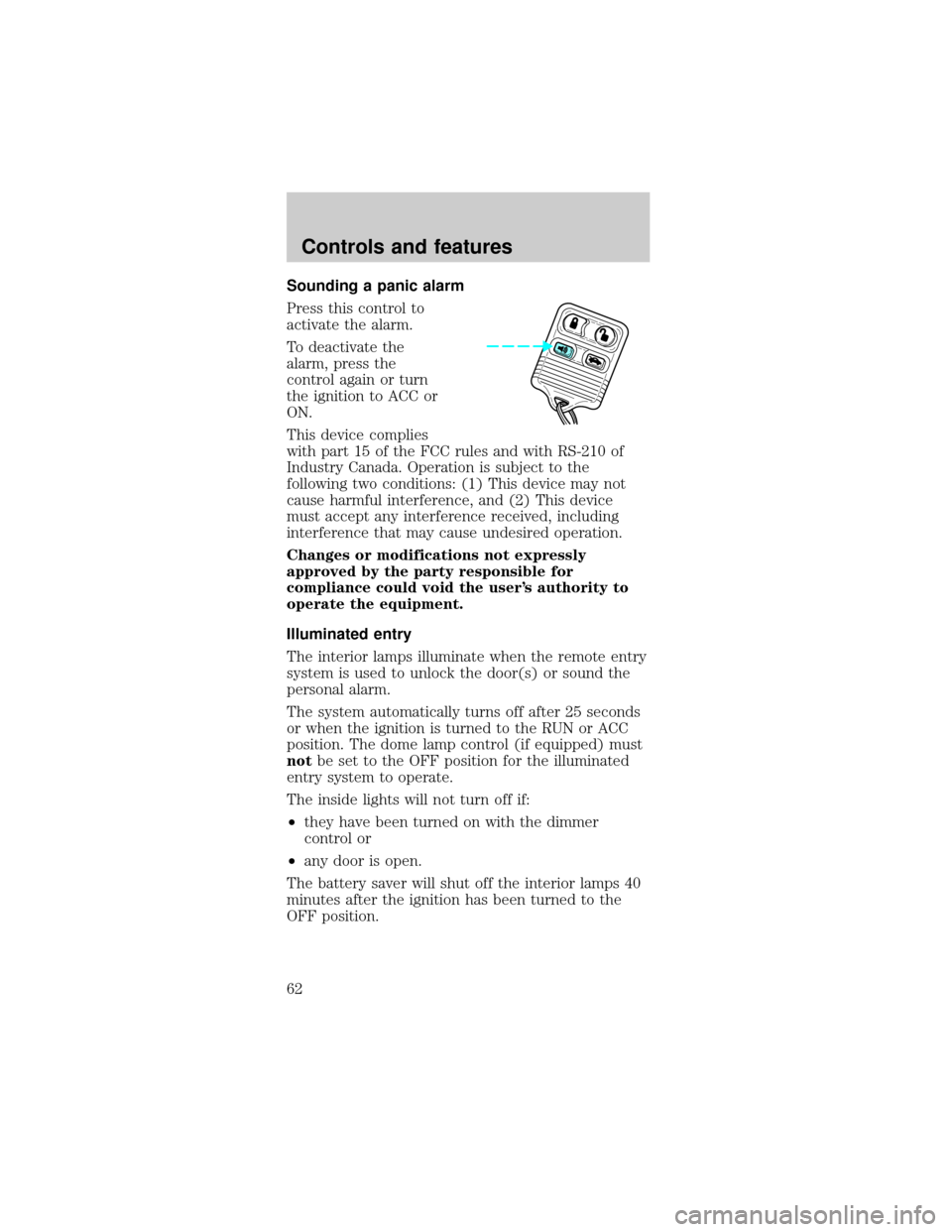
Sounding a panic alarm
Press this control to
activate the alarm.
To deactivate the
alarm, press the
control again or turn
the ignition to ACC or
ON.
This device complies
with part 15 of the FCC rules and with RS-210 of
Industry Canada. Operation is subject to the
following two conditions: (1) This device may not
cause harmful interference, and (2) This device
must accept any interference received, including
interference that may cause undesired operation.
Changes or modifications not expressly
approved by the party responsible for
compliance could void the user's authority to
operate the equipment.
Illuminated entry
The interior lamps illuminate when the remote entry
system is used to unlock the door(s) or sound the
personal alarm.
The system automatically turns off after 25 seconds
or when the ignition is turned to the RUN or ACC
position. The dome lamp control (if equipped) must
notbe set to the OFF position for the illuminated
entry system to operate.
The inside lights will not turn off if:
²they have been turned on with the dimmer
control or
²any door is open.
The battery saver will shut off the interior lamps 40
minutes after the ignition has been turned to the
OFF position.
Controls and features
62
Page 63 of 224

Replacing lost transmitters
Take all your vehicle's
transmitters to your
dealer if service is
required.
If you purchase
additional transmitters
(up to four may be
programmed), perform
the following procedure:
To reprogram the transmitters yourself, place the
key in the ignition and turn from OFF to ON eight
times in rapid succession (within 10 seconds) ending
in ON. After doors lock/unlock, press any control on
all transmitters (up to four). When completed, turn
the ignition to OFF. The doors will lock/unlock one
last time to confirm completion of program mode.
All transmitters must be programmed at the same
time.
Replacing the battery
The remote transmitter is powered by one coin type
three-volt lithium battery CR2032 or equivalent.
Typical operating range will allow you to be up to
10 meters (33 feet) away from your vehicle. A
decrease in operating range can be caused by:
²weather conditions
²nearby radio towers
²structures around the vehicle
²other vehicles parked next to the vehicle
Controls and features
63
Page 65 of 224

²Press the remote
entry lock control
(doors opened or
closed).
²Press 7/8 and 9/0
controls on the
keyless entry pad at
the same time to
lock the doors
(doors opened or
closed).
²Open a door and press the power door lock
control to lock the doors.
²Use the door key to lock the doors (doors opened
or closed).
If a door or the liftgate (wagon) is open, the system
is prearmed and is waiting for the door to close or
liftgate to close.
Once the doors and liftgate (wagon) are closed, the
system will arm in 20 seconds.
When you press the
lock control twice
within 5 seconds on
your remote entry
transmitter, the horn
will chirp once to let
you know that the
system is armed.
If the doors or liftgate (wagon) are not closed and
you press the remote entry transmitter twice to
confirm the doors are locked, the horn will chirp
twice to warn you that the system is not arming.
123
45678
90
Controls and features
65
Page 66 of 224

Disarming the system
You can disarm the system by any of the following
actions:
²Unlock the doors by
using your remote
entry transmitter.
²Unlock the doors by
using your keyless
entry pad.
²Unlock the doors or liftgate with a key. Turn the
key full travel (toward the front of the vehicle) to
make sure the alarm disarms.
²Turn ignition to ACC or ON.
²Press control on the
remote entry
transmitter. This will
disarm the system
when the alarm is
sounding.
KEYLESS ENTRY SYSTEM
With the keyless entry
keypad, you can:
²lock or unlock the
vehicle doors and liftgate (wagons) without using
the key.
²arm and disarm the perimeter alarm system (if
equipped)
See alsoRemote entry systemandPerimeter
alarm systemin this chapter for more information.
123
45678
90
123
45678
90
Controls and features
66
Page 67 of 224

Your vehicle has a factory-set 5±digit code that
operates the keyless entry system. You can also
program your own 5±digit personal entry code.
The factory-set code is located:
²on the owner's wallet card in the glove
compartment
²taped to the computer module
When pressing the controls on the keyless entry
keypad, press the middle of the controls to ensure a
good activation.
Programming your own personal entry code
1. Enter the factory-set code (keypad will illuminate
when pressed).
2. Press the 1/2 control
within five seconds of
step 1.
3. Enter your personal
5 digit code. Enter
each digit within five
seconds of the previous one.
Do not set a code that includes five of the same
number or presents them in sequential order.
Thieves can easily figure out these types of codes.
Your personal code does not replace the permanent
code that the dealership gave you. You can use
either code to unlock your vehicle. If a second
personal code is entered, the module will erase the
first personal code in favor of the new code.
123
45678
90
Controls and features
67
Page 68 of 224

If you wish to erase your personal code, use the
following instructions:
Erasing personal code
1. Enter the factory-set code.
2. Press 1/2 within five
seconds of step 1.
3. Press the 7/8 and 9/0
controls at the same
time within five
seconds of step two.
The system will now only respond to the factory-set
code.
Unlocking the doors and releasing the trunk
with the keyless entry system
The driver's door must be unlocked before any
other. If more than five seconds pass between
pressing numbers, enter the code again. The system
has shut down if the keypad light is out. If the
keyless entry system does not work, use the key or
remote entry transmitter(s).
1. To unlock the driver's door, enter one of the two
codes. After pressing the fifth number, the driver's
door unlocks.
2. To unlock the
passenger's door(s) and
liftgate (wagon), press
the 3/4 control within
five seconds of
unlocking the driver's
door.
3. To unlock the trunk
or liftgate (wagon),
enter the five-digit
factory-set code, then
press the 5/6 control
within five seconds.
123
45678
90
123
45678
90
123
45678
90
Controls and features
68