phone FORD TAURUS 2009 5.G Owners Manual
[x] Cancel search | Manufacturer: FORD, Model Year: 2009, Model line: TAURUS, Model: FORD TAURUS 2009 5.GPages: 336, PDF Size: 2.36 MB
Page 8 of 336
Event Data Recording
Other modules in your vehicle — event data recorders — are capable of
collecting and storing data during a crash or near crash event. The
recorded information may assist in the investigation of such an event.
The modules may record information about both the vehicle and the
occupants, potentially including information such as:
•how various systems in your vehicle were operating;
•whether or not the driver and passenger seatbelts were buckled;
•how far (if at all) the driver was depressing the accelerator and/or the
brake pedal;
•how fast the vehicle was traveling; and
•where the driver was positioning the steering wheel.
To access this information, special equipment must be directly connected
to the recording modules. Ford Motor Company and Ford of Canada do
not access event data recorder information without obtaining consent,
unless pursuant to court order or where required by law enforcement,
other government authorities or other third parties acting with lawful
authority. Other parties may seek to access the information
independently of Ford Motor Company and Ford of Canada.
Cell phone use
The use of Mobile Communications Equipment has become increasingly
important in the conduct of business and personal affairs. However,
drivers must not compromise their own or others’ safety when using
such equipment. Mobile Communications can enhance personal safety
and security when appropriately used, particularly in emergency
situations. Safety must be paramount when using mobile communications
equipment to avoid negating these benefits.
2009 Taurus(500)
Owners Guide, 1st Printing
USA(fus)
Introduction
8
Page 9 of 336
Mobile Communication Equipment includes, but is not limited to cellular
phones, pagers, portable email devices, in-vehicle communications
systems, telematics devices and portable two-way radios.
WARNING:Driving while distracted can result in loss of vehicle
control, accident and injury. Ford strongly recommends that
drivers use extreme caution when using any device that may take their
focus off the road. The driver’s primary responsibility is the safe
operation of their vehicle. Only use cell phones and other devices not
essential to the driving task when it is safe to do so.
Export unique (Non–United States/Canada) vehicle specific
information
For your particular global region, your vehicle may be equipped with
features and options that are different from the ones that are described
in thisOwner’s Guide.A market unique supplement may be supplied
that complements this book. By referring to the market unique
supplement, if provided, you can properly identify those features,
recommendations and specifications that are unique to your vehicle. This
Owner’s Guideis written primarily for the U.S. and Canadian Markets.
Features or equipment listed as standard may be different on units built
for Export.Refer to this Owner’s Guide for all other required
information and warnings.
2009 Taurus(500)
Owners Guide, 1st Printing
USA(fus)
Introduction
9
Page 18 of 336
AUDIO SYSTEMS
Quick start — How to get going
WARNING:Driving while distracted can result in loss of vehicle
control, accident and injury. Ford strongly recommends that
drivers use extreme caution when using any device that may take their
focus off the road. The drivers primary responsibility is the safe
operation of their vehicle. Only use cell phones and other devices not
essential to the driving task when it is safe to do so.
Listening to the radio
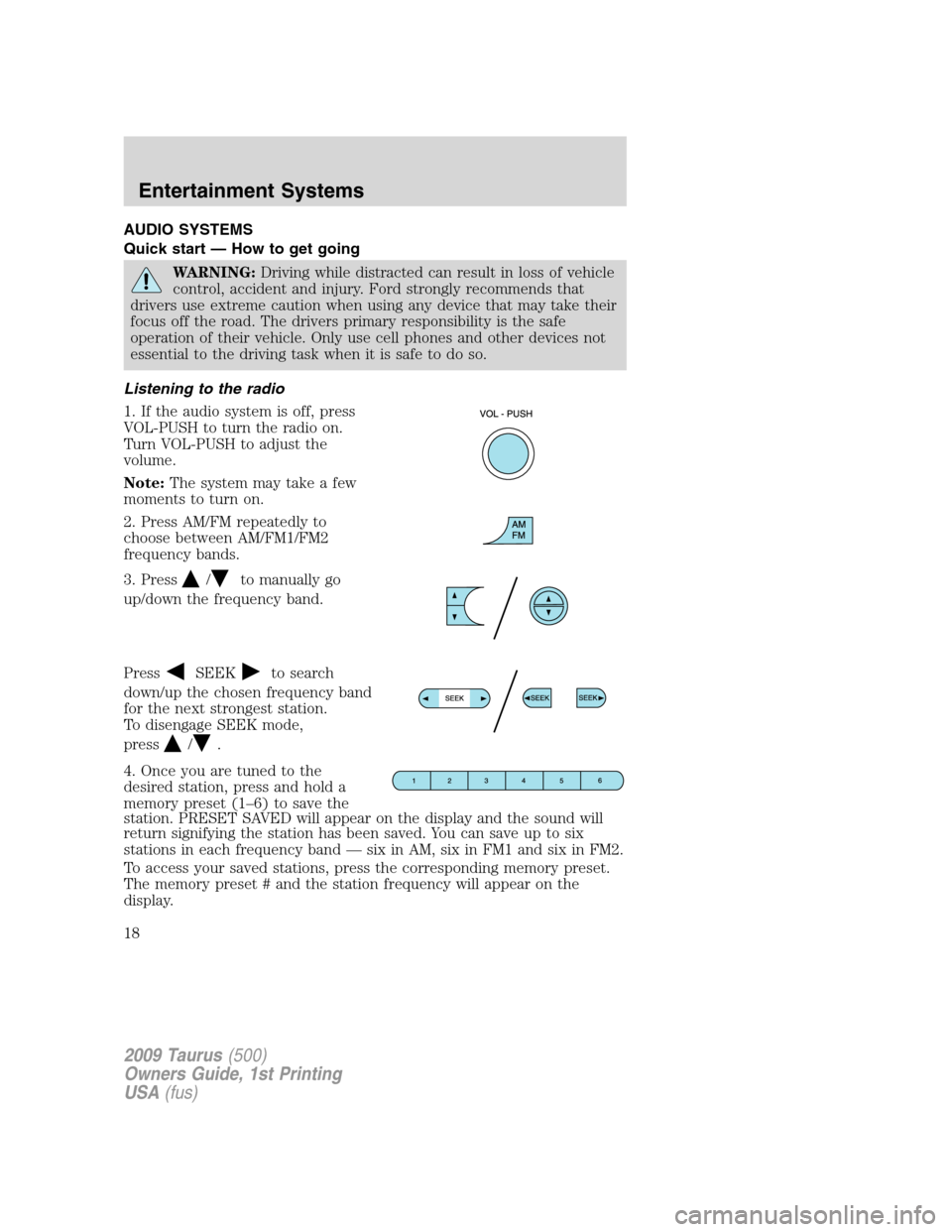
1. If the audio system is off, press
VOL-PUSH to turn the radio on.
Turn VOL-PUSH to adjust the
volume.
Note:The system may take a few
moments to turn on.
2. Press AM/FM repeatedly to
choose between AM/FM1/FM2
frequency bands.
3. Press
/to manually go
up/down the frequency band.
Press
SEEKto search
down/up the chosen frequency band
for the next strongest station.
To disengage SEEK mode,
press
/.
4. Once you are tuned to the
desired station, press and hold a
memory preset (1–6) to save the
station. PRESET SAVED will appear on the display and the sound will
return signifying the station has been saved. You can save up to six
stations in each frequency band — six in AM, six in FM1 and six in FM2.
To access your saved stations, press the corresponding memory preset.
The memory preset # and the station frequency will appear on the
display.
2009 Taurus(500)
Owners Guide, 1st Printing
USA(fus)
Entertainment Systems
18
Page 22 of 336
AM/FM Single CD/MP3 satellite compatible sound system (if equipped)
WARNING:Driving while distracted can result in loss of vehicle
control, accident and injury. Ford strongly recommends that
drivers use extreme caution when using any device that may take their
focus off the road. The driver’s primary responsibility is the safe
operation of their vehicle. Only use cell phones and other devices not
essential to the driving task when it is safe to do so.
Accessory delay:Your vehicle is equipped with accessory delay. With
this feature, the window switches, radio and moon roof (if equipped)
may be used for up to ten minutes after the ignition is turned off or until
either front door is opened.
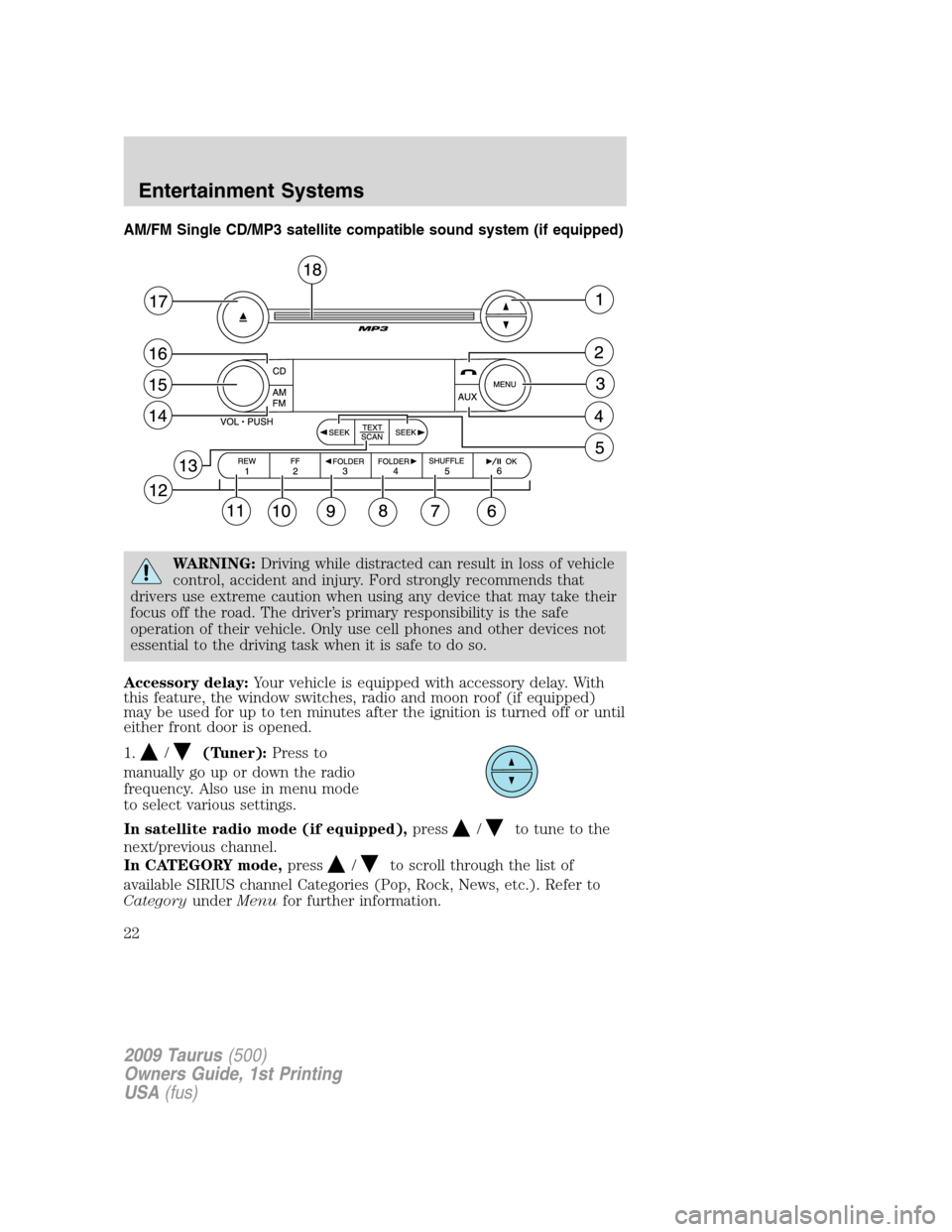
1.
/(Tuner):Press to
manually go up or down the radio
frequency. Also use in menu mode
to select various settings.
In satellite radio mode (if equipped),press
/to tune to the
next/previous channel.
In CATEGORY mode,press
/to scroll through the list of
available SIRIUS channel Categories (Pop, Rock, News, etc.). Refer to
CategoryunderMenufor further information.
2009 Taurus(500)
Owners Guide, 1st Printing
USA(fus)
Entertainment Systems
22
Page 23 of 336
Satellite radio is available only with a valid SIRIUS subscription.
Check with your authorized dealer for availability.
2.
(Phone):Your vehicle may
be equipped with SYNC which has
special phone features. For more
information, please refer to theSYNCsupplement.
3.MENU:Press repeatedly to
access the following settings:
Setting the clock:Press MENU until SET HOURS or SET MINUTES is
displayed. Use
/to manually increase/decrease. Press MENU again
to disengage clock mode.
If your vehicle is equipped with an in-dash clock, refer toClockin the
Driver Controlschapter.
SATELLITE RADIO MENU (if equipped):Press MENU when satellite
radio mode is active to access. Press OK to enter into the satellite radio
menu. Press
/to cycle through the following options:
•CATEGORY:Press OK to enter category mode. Press
/to
scroll through the list of available SIRIUS channel Categories (Pop,
Rock, News, etc.) Press OK when the desired category appears in the
display. After a category is selected, press SEEK to search for that
specific category of channels only (i.e. ROCK). You may also select
CATEGORY ALL to seek all available SIRIUS categories and channels.
Press OK to close and return to the main menu.
•SAVE SONG:Press OK to save the currently playing song in the
system’s memory. (If you try to save something other than a song,
CANT SAVE will appear in the display.) When the chosen song is
playing on any satellite radio channel, the system will alert you with
an audible prompt. Press OK while SONG ALERT is in the display and
the system will take you to the channel playing the desired song. You
can save up to 20 songs. If you attempt to save a song when the
system is full, the display will read REPLACE SONG? Press OK to
access the saved songs and press
/to cycle through the saved
songs. When the song appears in the display that you would like to
replace, press OK. SONG REPLACED will appear in the display.
•DELETE SONG:Press OK to delete a song from the system’s
memory. Press
/to cycle through the saved songs. When the
2009 Taurus(500)
Owners Guide, 1st Printing
USA(fus)
Entertainment Systems
23
Page 26 of 336
4.AUX:Press repeatedly to cycle
through FES/DVD (if equipped),
LINE IN (auxiliary audio mode),
SAT1, SAT2 and SAT3 (satellite radio, if equipped) and SYNC (if
equipped).
For location and further information on auxiliary audio mode, refer to
Auxiliary input jacklater in this chapter.
Satellite radio is available only with a valid SIRIUS radio
subscription. Check with your authorized dealer for availability.
If your vehicle is equipped with a Family Entertainment System (FES)
please refer to theFamily Entertainment DVD systemlater in this
chapter.
If your vehicle is equipped with SYNC, please refer to theSYNC
supplement.
5.SEEK: In radio mode,
press
/to access the
previous/next strong station.
In CD mode,press
/to access the previous/next CD track.
In satellite radio mode (if equipped),press
SEEK, SEEKto
seek to the previous/next channel. If a specific category is selected,
(Jazz, Rock, News, etc.), press
SEEK, SEEKto seek to the
previous/next channel in the selected category. Press and hold
SEEK, SEEKto fast seek through the previous /next channels.
In TEXT MODE,press
SEEK, SEEKto view the
previous/additional display text.
In CATEGORY mode,press
SEEK, SEEKto select a category.
Satellite radio is available only with a valid SIRIUS subscription.
Check with your authorized dealer for availability.
6.
/OK:(Play/Pause):This
control is operational in CD and
DVD mode (if equipped). When a
CD or DVD is playing in the FES system, press this control to play or
pause the current CD or DVD. The CD/DVD status will display in the
radio display.
OK:Use in various menu selections.
Your vehicle may be equipped with special phone and media features.
Refer to theSYNCsupplement for further information.
2009 Taurus(500)
Owners Guide, 1st Printing
USA(fus)
Entertainment Systems
26
Page 29 of 336
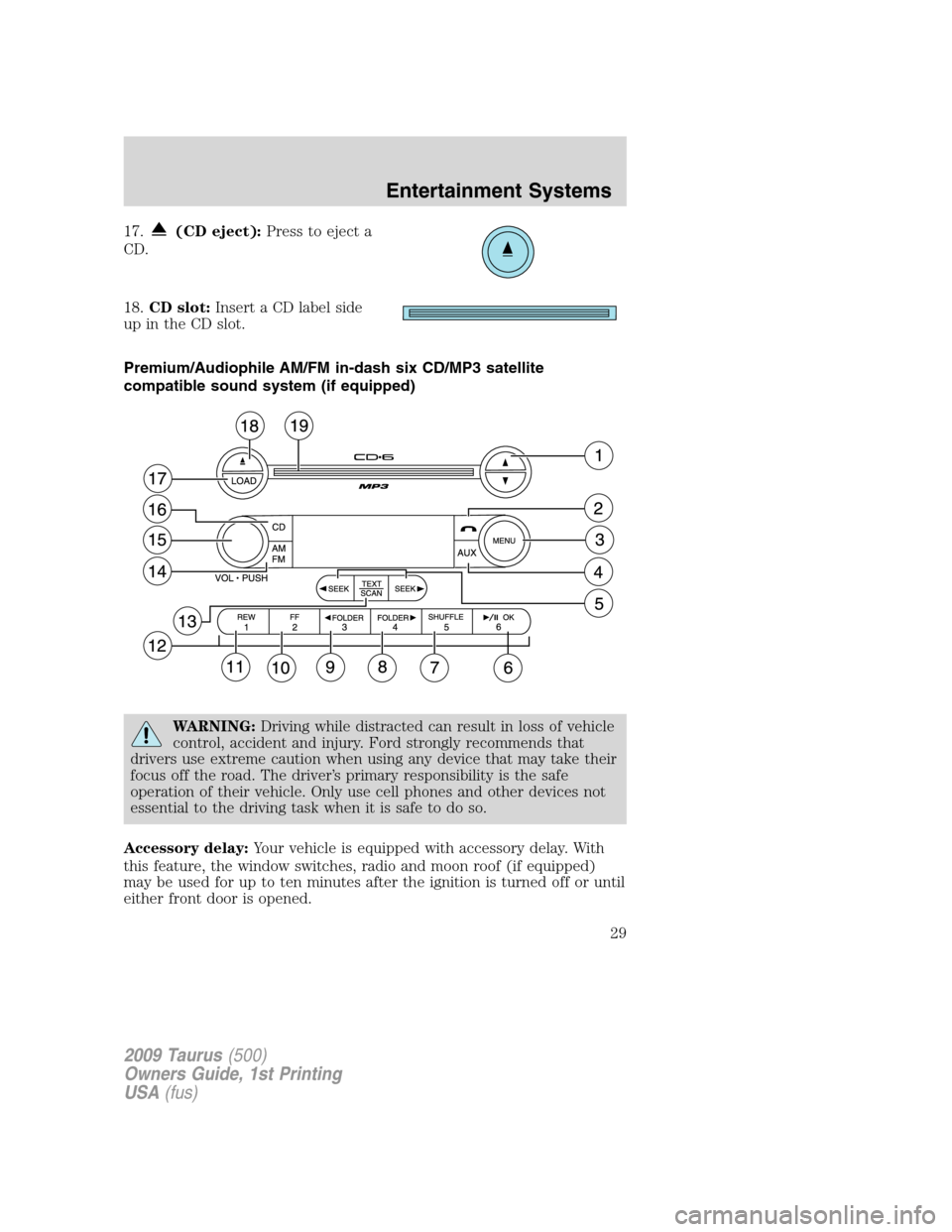
17.(CD eject):Press to eject a
CD.
18.CD slot:Insert a CD label side
up in the CD slot.
Premium/Audiophile AM/FM in-dash six CD/MP3 satellite
compatible sound system (if equipped)
WARNING:Driving while distracted can result in loss of vehicle
control, accident and injury. Ford strongly recommends that
drivers use extreme caution when using any device that may take their
focus off the road. The driver’s primary responsibility is the safe
operation of their vehicle. Only use cell phones and other devices not
essential to the driving task when it is safe to do so.
Accessory delay:Your vehicle is equipped with accessory delay. With
this feature, the window switches, radio and moon roof (if equipped)
may be used for up to ten minutes after the ignition is turned off or until
either front door is opened.
2009 Taurus(500)
Owners Guide, 1st Printing
USA(fus)
Entertainment Systems
29
Page 30 of 336
1./(Tune/Disc selector):
In radio mode,press to manually
go up (
) or down ()the
radio frequency. Press and hold for
a fast advance through radio frequencies.
In menu mode,use to select various settings.
In CD/MP3 mode,press to select the desired disc.
In CATEGORY mode (if equipped),press to scroll through the list of
available SIRIUS channel categories.
Satellite radio is available only with a valid SIRIUS radio
subscription. Check with your authorized dealer for availability.
2.
(Phone):Your vehicle may be
equipped with the SYNC system
which has special phone features.
For further information, refer to theSYNCsupplement.
3.MENU:Press repeatedly to
access to the following settings:
Setting the clock:Press until SELECT HOURS or SELECT MINS is
displayed. Press
/to adjust the hours/minutes. Press MENU again
to disengage clock mode.
If your vehicle is equipped with an in-dash clock, refer toClockin the
Driver Controlschapter.
SATELLITE RADIO MENU (if equipped):Press MENU when satellite
radio mode is active to access. Press OK to enter into the satellite radio
menu. Press
/to cycle through the following options:
•CATEGORY:Press OK to enter category mode. Press
/to
scroll through the list of available SIRIUS channel Categories (Pop,
Rock, News, etc.) Press OK when the desired category appears in the
display. After a category is selected, press SEEK to search for that
specific category of channels only (i.e. ROCK). You may also select
CATEGORY ALL to seek all available SIRIUS categories and channels.
Press OK to close and return to the main menu.
•SAVE SONG:Press OK to save the currently playing song in the
system’s memory. (If you try to save something other than a song,
CANT SAVE will appear in the display.) When the chosen song is
2009 Taurus(500)
Owners Guide, 1st Printing
USA(fus)
Entertainment Systems
30
Page 34 of 336
previous/next channel in the selected category. Press and hold
SEEK, SEEKto fast seek through the previous /next channels.
In TEXT MODE,press
SEEK, SEEKto view the
previous/additional display text.
In CATEGORY MODE,press
SEEK, SEEKto select a
category.
Satellite radio is available only with a valid SIRIUS radio
subscription. Check with your authorized dealer for availability.
6.
OK:(Play/Pause):This
control is operational in CD and
DVD mode (if equipped). When a
CD or DVD is playing in the FES system, press this control to play or
pause the current CD/DVD. The CD/DVD status will display in the radio
display.
If your vehicle is equipped with a Family Entertainment System (FES),
please refer toFamily entertainment DVD systemlater in this chapter
for further information.
OK:Use in various menu selections.
Your vehicle may be equipped with special phone and media features.
Refer to theSYNCsupplement for further information.
7.SHUFFLE:In CD/MP3 mode,
press SHUFFLE to engage shuffle
mode. SHUFFLE ON will appear in
the display. If you wish to engage shuffle mode right away, press SEEK
to begin random play. Otherwise, random play will begin when the
current track is finished playing. CD SHUF will appear in the display. To
disengage, press SHUFFLE again. SHUFFLE OFF will appear in the
display.
Note:In track mode, all tracks on thecurrentdisc will shuffle in
random order. In MP3 folder mode, the system will randomly play all
tracks within the current folder.
8.FOLDER
: In folder mode,
press FOLDER
to access next
folder on MP3 discs, if available.
9.
FOLDER:In folder mode,
press
FOLDER to access the
previous folder on MP3 discs, if
available.
2009 Taurus(500)
Owners Guide, 1st Printing
USA(fus)
Entertainment Systems
34
Page 37 of 336
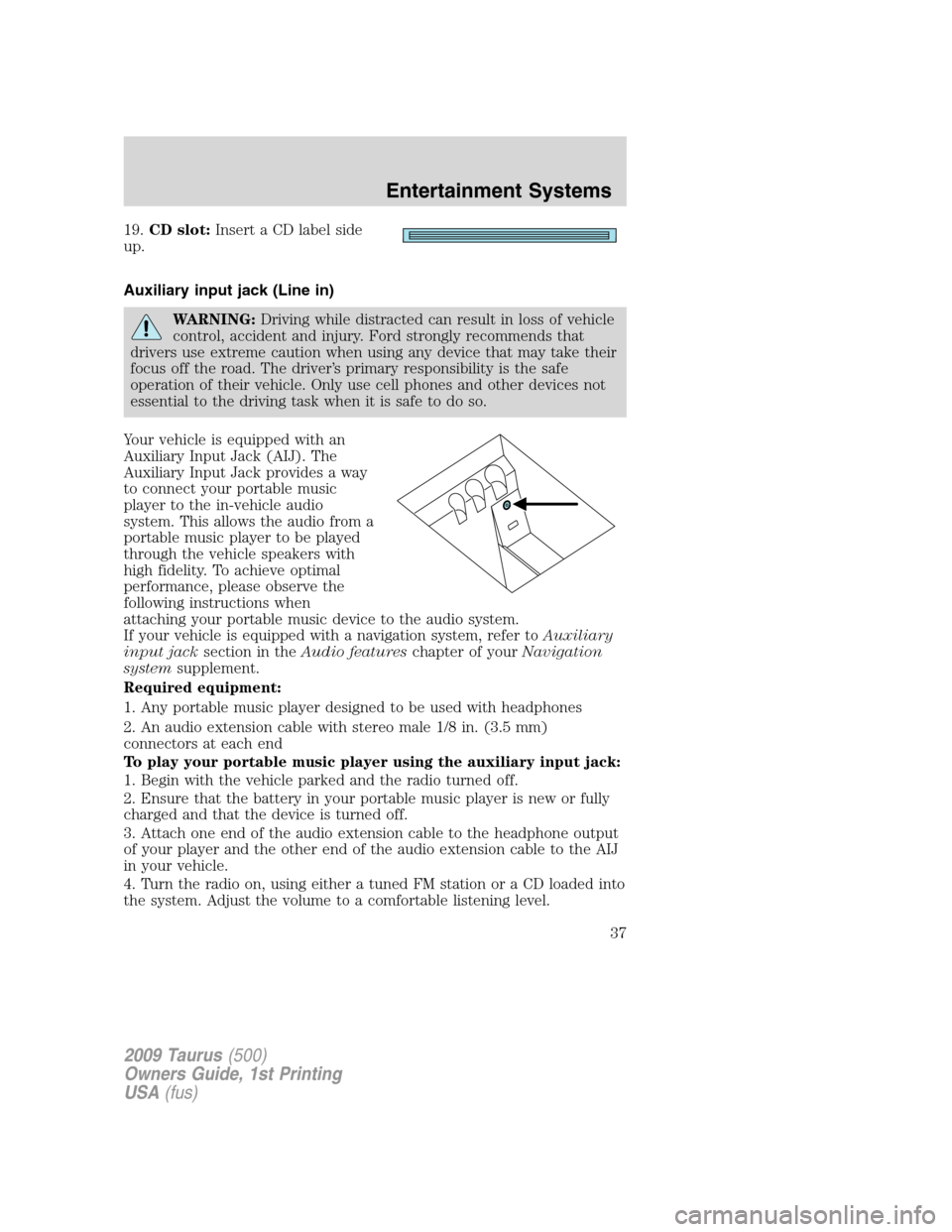
19.CD slot:Insert a CD label side
up.
Auxiliary input jack (Line in)
WARNING:Driving while distracted can result in loss of vehicle
control, accident and injury. Ford strongly recommends that
drivers use extreme caution when using any device that may take their
focus off the road. The driver’s primary responsibility is the safe
operation of their vehicle. Only use cell phones and other devices not
essential to the driving task when it is safe to do so.
Your vehicle is equipped with an
Auxiliary Input Jack (AIJ). The
Auxiliary Input Jack provides a way
to connect your portable music
player to the in-vehicle audio
system. This allows the audio from a
portable music player to be played
through the vehicle speakers with
high fidelity. To achieve optimal
performance, please observe the
following instructions when
attaching your portable music device to the audio system.
If your vehicle is equipped with a navigation system, refer toAuxiliary
input jacksection in theAudio featureschapter of yourNavigation
systemsupplement.
Required equipment:
1. Any portable music player designed to be used with headphones
2. An audio extension cable with stereo male 1/8 in. (3.5 mm)
connectors at each end
To play your portable music player using the auxiliary input jack:
1. Begin with the vehicle parked and the radio turned off.
2. Ensure that the battery in your portable music player is new or fully
charged and that the device is turned off.
3. Attach one end of the audio extension cable to the headphone output
of your player and the other end of the audio extension cable to the AIJ
in your vehicle.
4. Turn the radio on, using either a tuned FM station or a CD loaded into
the system. Adjust the volume to a comfortable listening level.
2009 Taurus(500)
Owners Guide, 1st Printing
USA(fus)
Entertainment Systems
37