instrument cluster FORD TAURUS 2011 6.G Owner's Manual
[x] Cancel search | Manufacturer: FORD, Model Year: 2011, Model line: TAURUS, Model: FORD TAURUS 2011 6.GPages: 406, PDF Size: 3.03 MB
Page 31 of 406
REMOVE HANDS PUT IN REVERSE (if equipped)— May display
when using the active park assist system. SeeActive park assistin the
Drivingchapter for more information.
ACTIVE PARK NOT AVAILABLE (if equipped)— May display when
using the active park assist system. SeeActive park assistin the
Drivingchapter for more information.
ACTIVE PARK DEACTIVATED (if equipped)— Displayed when the
active park feature has been turned off. Refer toActive park assistin
theDrivingchapter for more information.
TO STOP ALARM START VEHICLE— Displayed when the perimeter
alarm system is armed and the vehicle is entered using the key on the
driver’s side door. In order to prevent the perimeter alarm system from
triggering, the ignition must be turned to start or on before the
12 second chime expires. SeePerimeter alarm systemin theLocks and
Securitychapter.
SERVICE TIRE MOBILITY KIT (if equipped)— Displayed when the
tire mobility kit requires service. See your authorized dealer for more
information.
Instrument Cluster
31
2011 Taurus(500)
Owners Guide, 1st Printing
USA(fus)
Page 51 of 406
MANUAL HEATING AND AIR CONDITIONING SYSTEM
(IF EQUIPPED)
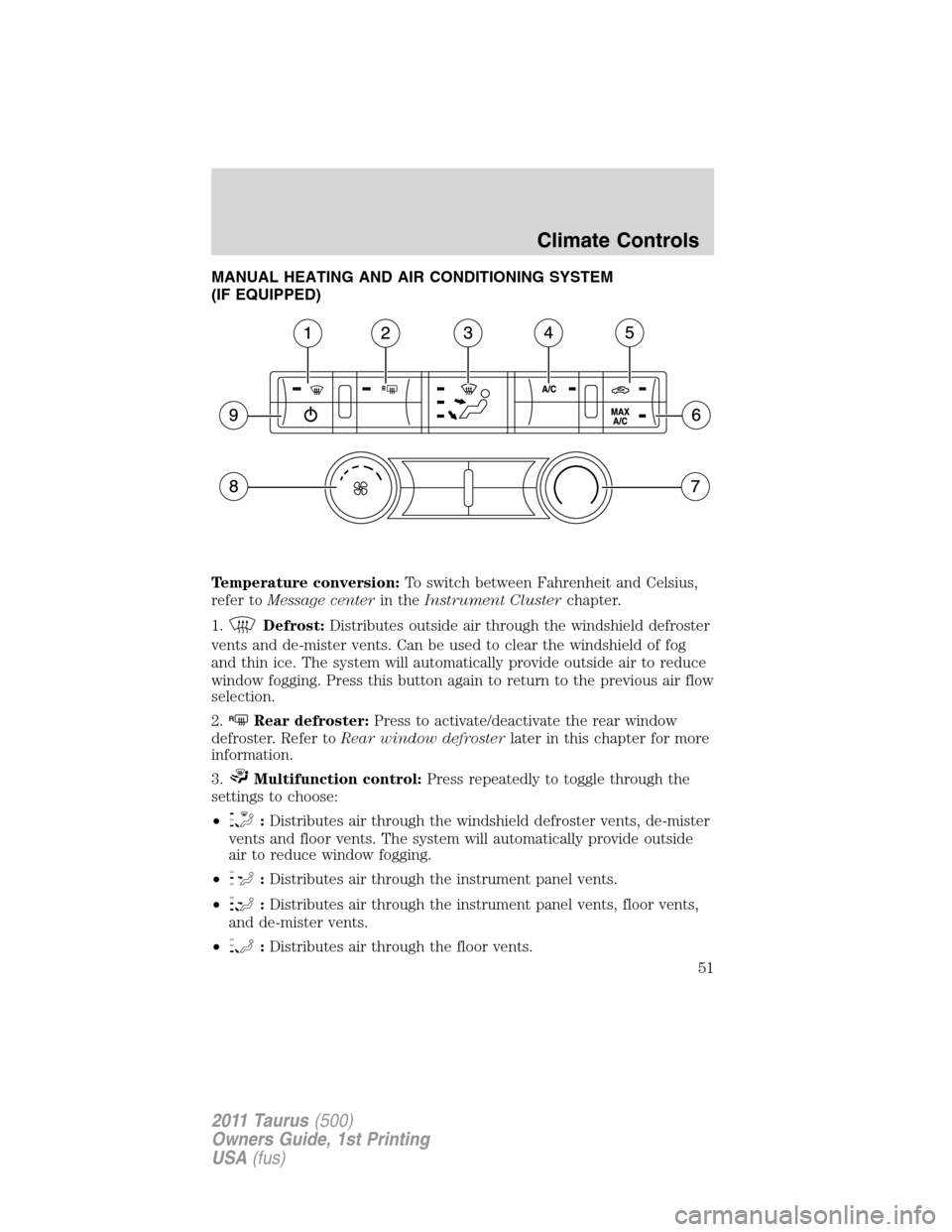
Temperature conversion:To switch between Fahrenheit and Celsius,
refer toMessage centerin theInstrument Clusterchapter.
1.
Defrost:Distributes outside air through the windshield defroster
vents and de-mister vents. Can be used to clear the windshield of fog
and thin ice. The system will automatically provide outside air to reduce
window fogging. Press this button again to return to the previous air flow
selection.
2.
RRear defroster:Press to activate/deactivate the rear window
defroster. Refer toRear window defrosterlater in this chapter for more
information.
3.
Multifunction control:Press repeatedly to toggle through the
settings to choose:
•
:Distributes air through the windshield defroster vents, de-mister
vents and floor vents. The system will automatically provide outside
air to reduce window fogging.
•
:Distributes air through the instrument panel vents.
•
:Distributes air through the instrument panel vents, floor vents,
and de-mister vents.
•
:Distributes air through the floor vents.
Climate Controls
51
2011 Taurus(500)
Owners Guide, 1st Printing
USA(fus)
Page 54 of 406
DUAL ZONE AUTOMATIC TEMPERATURE CONTROL
(IF EQUIPPED)
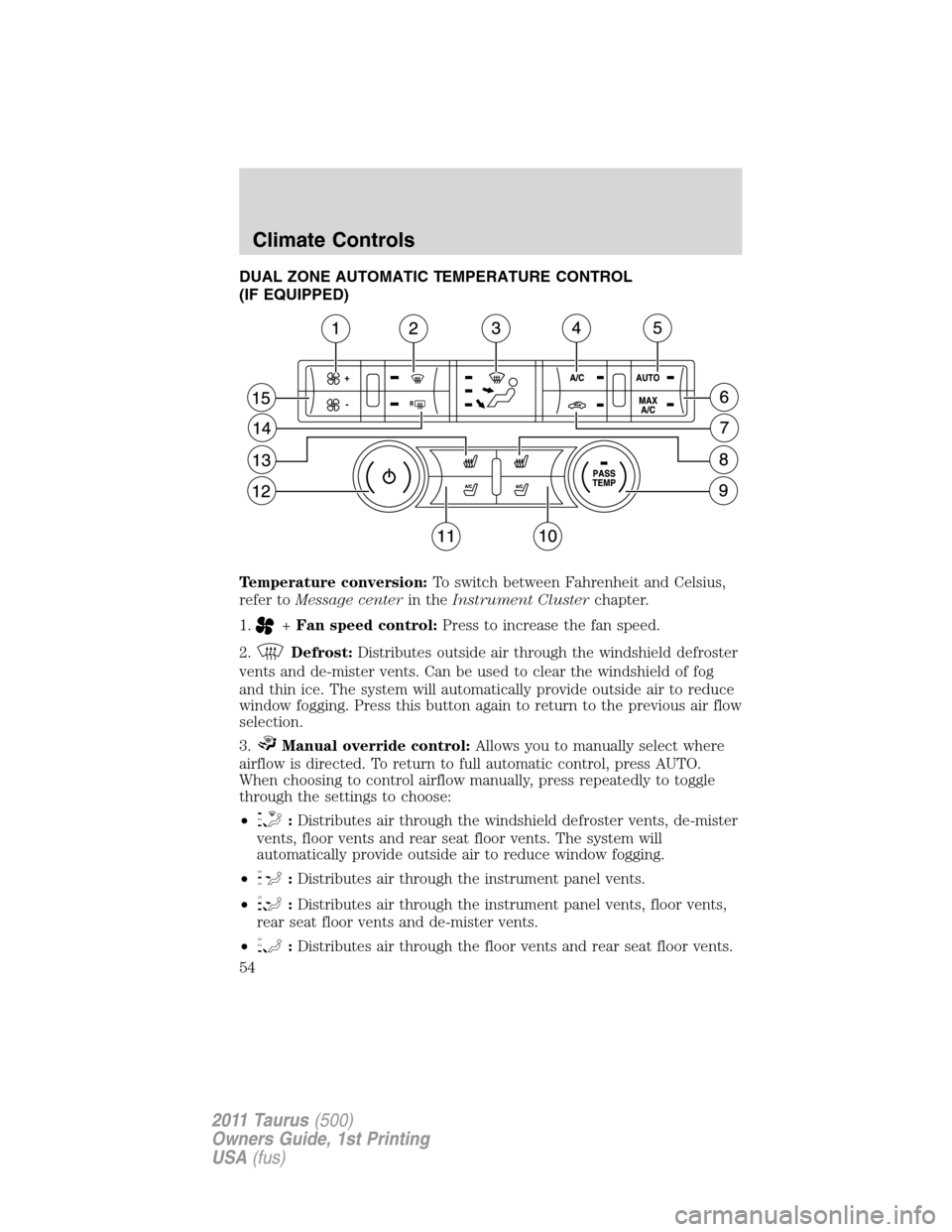
Temperature conversion:To switch between Fahrenheit and Celsius,
refer toMessage centerin theInstrument Clusterchapter.
1.
+Fan speed control:Press to increase the fan speed.
2.
Defrost:Distributes outside air through the windshield defroster
vents and de-mister vents. Can be used to clear the windshield of fog
and thin ice. The system will automatically provide outside air to reduce
window fogging. Press this button again to return to the previous air flow
selection.
3.
Manual override control:Allows you to manually select where
airflow is directed. To return to full automatic control, press AUTO.
When choosing to control airflow manually, press repeatedly to toggle
through the settings to choose:
•
:Distributes air through the windshield defroster vents, de-mister
vents, floor vents and rear seat floor vents. The system will
automatically provide outside air to reduce window fogging.
•
:Distributes air through the instrument panel vents.
•
:Distributes air through the instrument panel vents, floor vents,
rear seat floor vents and de-mister vents.
•
:Distributes air through the floor vents and rear seat floor vents.
Climate Controls
54
2011 Taurus(500)
Owners Guide, 1st Printing
USA(fus)
Page 57 of 406
Temperature conversion:To switch between Fahrenheit and Celsius,
refer toMessage centerin theInstrument Clusterchapter.
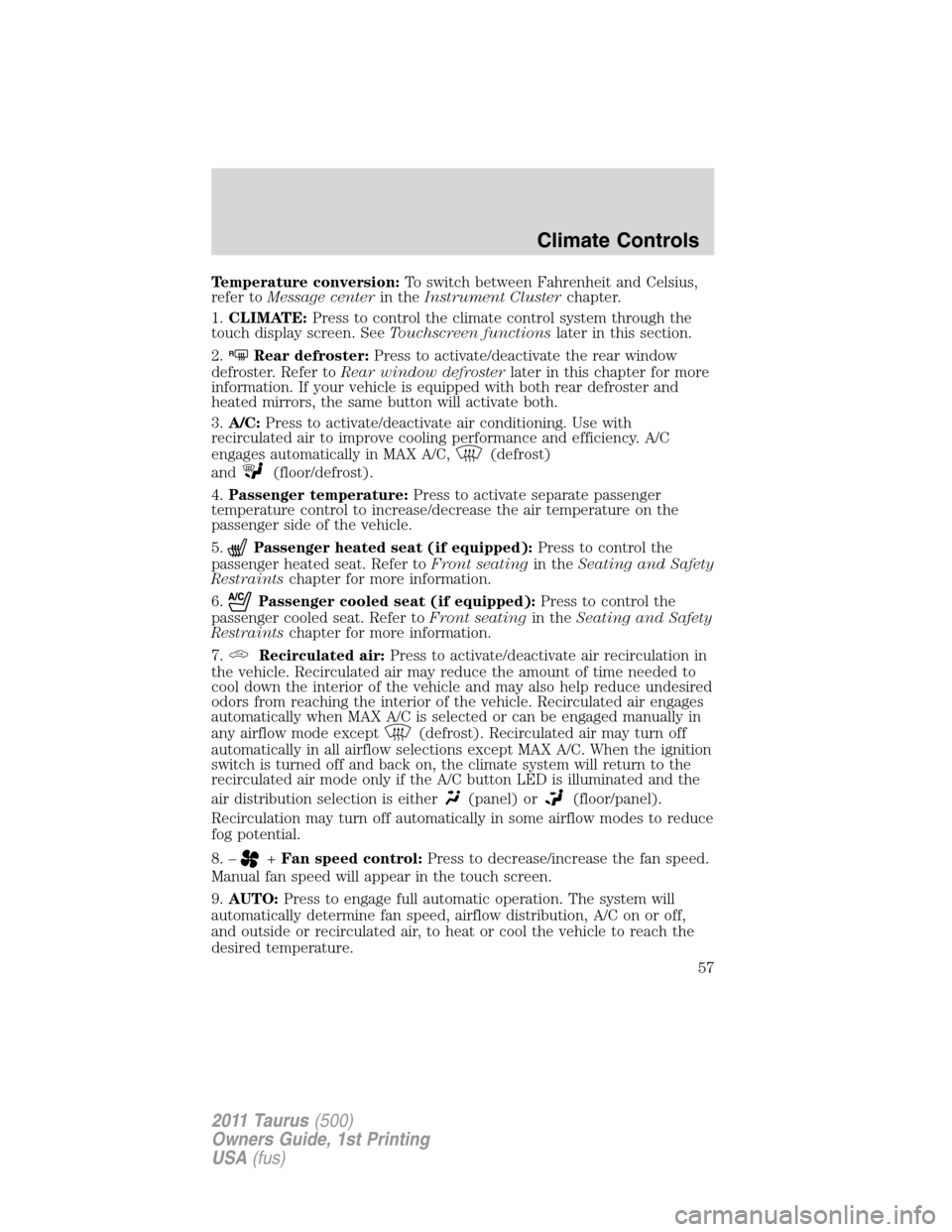
1.CLIMATE:Press to control the climate control system through the
touch display screen. SeeTouchscreen functionslater in this section.
2.
RRear defroster:Press to activate/deactivate the rear window
defroster. Refer toRear window defrosterlater in this chapter for more
information. If your vehicle is equipped with both rear defroster and
heated mirrors, the same button will activate both.
3.A/C:Press to activate/deactivate air conditioning. Use with
recirculated air to improve cooling performance and efficiency. A/C
engages automatically in MAX A/C,
(defrost)
and
(floor/defrost).
4.Passenger temperature:Press to activate separate passenger
temperature control to increase/decrease the air temperature on the
passenger side of the vehicle.
5.
Passenger heated seat (if equipped):Press to control the
passenger heated seat. Refer toFront seatingin theSeating and Safety
Restraintschapter for more information.
6.
Passenger cooled seat (if equipped):Press to control the
passenger cooled seat. Refer toFront seatingin theSeating and Safety
Restraintschapter for more information.
7.
Recirculated air:Press to activate/deactivate air recirculation in
the vehicle. Recirculated air may reduce the amount of time needed to
cool down the interior of the vehicle and may also help reduce undesired
odors from reaching the interior of the vehicle. Recirculated air engages
automatically when MAX A/C is selected or can be engaged manually in
any airflow mode except
(defrost). Recirculated air may turn off
automatically in all airflow selections except MAX A/C. When the ignition
switch is turned off and back on, the climate system will return to the
recirculated air mode only if the A/C button LED is illuminated and the
air distribution selection is either
(panel) or(floor/panel).
Recirculation may turn off automatically in some airflow modes to reduce
fog potential.
8. –
+Fan speed control:Press to decrease/increase the fan speed.
Manual fan speed will appear in the touch screen.
9.AUTO:Press to engage full automatic operation. The system will
automatically determine fan speed, airflow distribution, A/C on or off,
and outside or recirculated air, to heat or cool the vehicle to reach the
desired temperature.
Climate Controls
57
2011 Taurus(500)
Owners Guide, 1st Printing
USA(fus)
Page 58 of 406
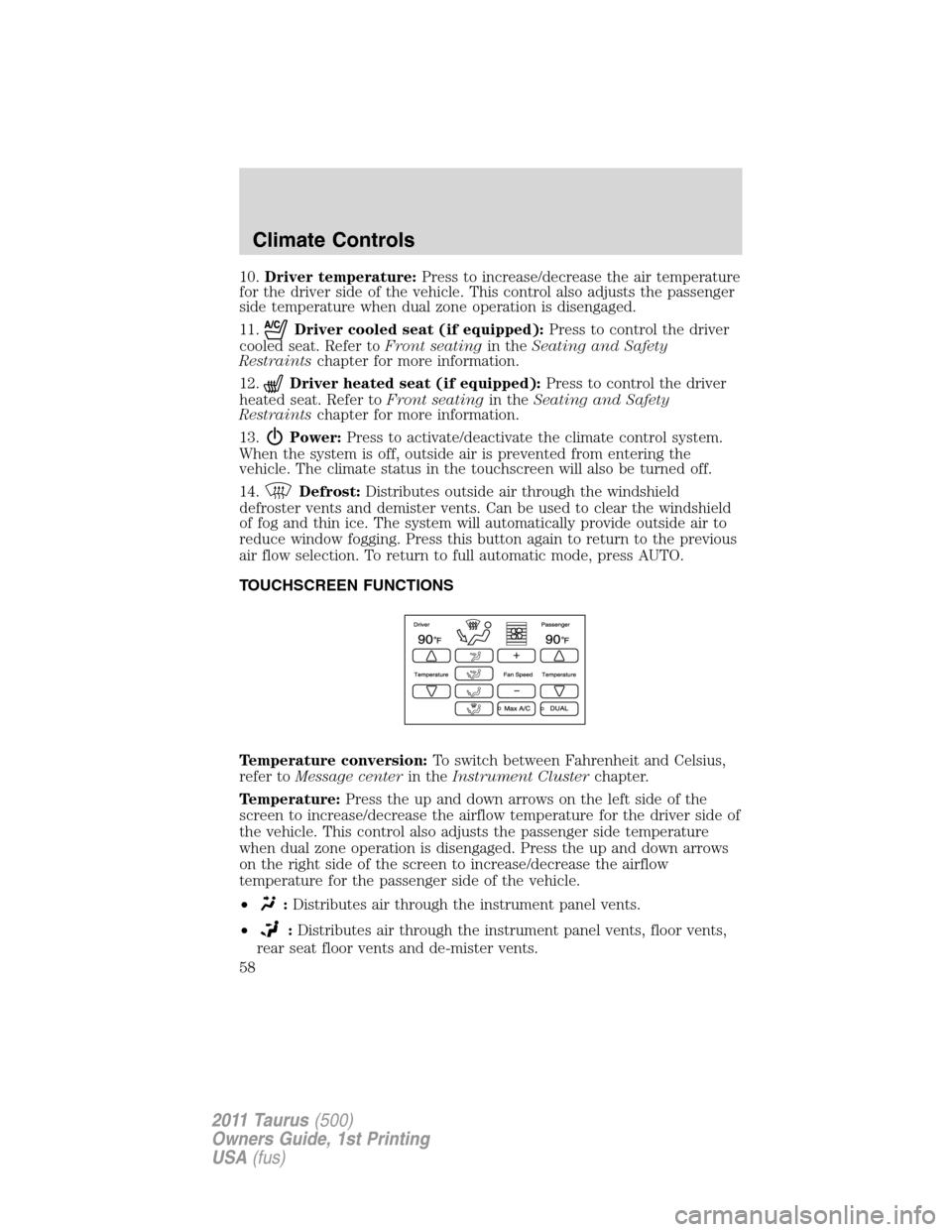
10.Driver temperature:Press to increase/decrease the air temperature
for the driver side of the vehicle. This control also adjusts the passenger
side temperature when dual zone operation is disengaged.
11.
Driver cooled seat (if equipped):Press to control the driver
cooled seat. Refer toFront seatingin theSeating and Safety
Restraintschapter for more information.
12.
Driver heated seat (if equipped):Press to control the driver
heated seat. Refer toFront seatingin theSeating and Safety
Restraintschapter for more information.
13.
Power:Press to activate/deactivate the climate control system.
When the system is off, outside air is prevented from entering the
vehicle. The climate status in the touchscreen will also be turned off.
14.
Defrost:Distributes outside air through the windshield
defroster vents and demister vents. Can be used to clear the windshield
of fog and thin ice. The system will automatically provide outside air to
reduce window fogging. Press this button again to return to the previous
air flow selection. To return to full automatic mode, press AUTO.
TOUCHSCREEN FUNCTIONS
Temperature conversion:To switch between Fahrenheit and Celsius,
refer toMessage centerin theInstrument Clusterchapter.
Temperature:Press the up and down arrows on the left side of the
screen to increase/decrease the airflow temperature for the driver side of
the vehicle. This control also adjusts the passenger side temperature
when dual zone operation is disengaged. Press the up and down arrows
on the right side of the screen to increase/decrease the airflow
temperature for the passenger side of the vehicle.
•
:Distributes air through the instrument panel vents.
•
:Distributes air through the instrument panel vents, floor vents,
rear seat floor vents and de-mister vents.
Climate Controls
58
2011 Taurus(500)
Owners Guide, 1st Printing
USA(fus)
Page 63 of 406
4. Turn the headlamp control to the autolamp position. The headlamps
will turn on.
5. Wait the desired amount of time for the exit delay you want (up to
three minutes), then turn the headlamps off.
You can also use the message center to program the autolamp exit time
delay. SeeMessage centerin theInstrument Clusterchapter.
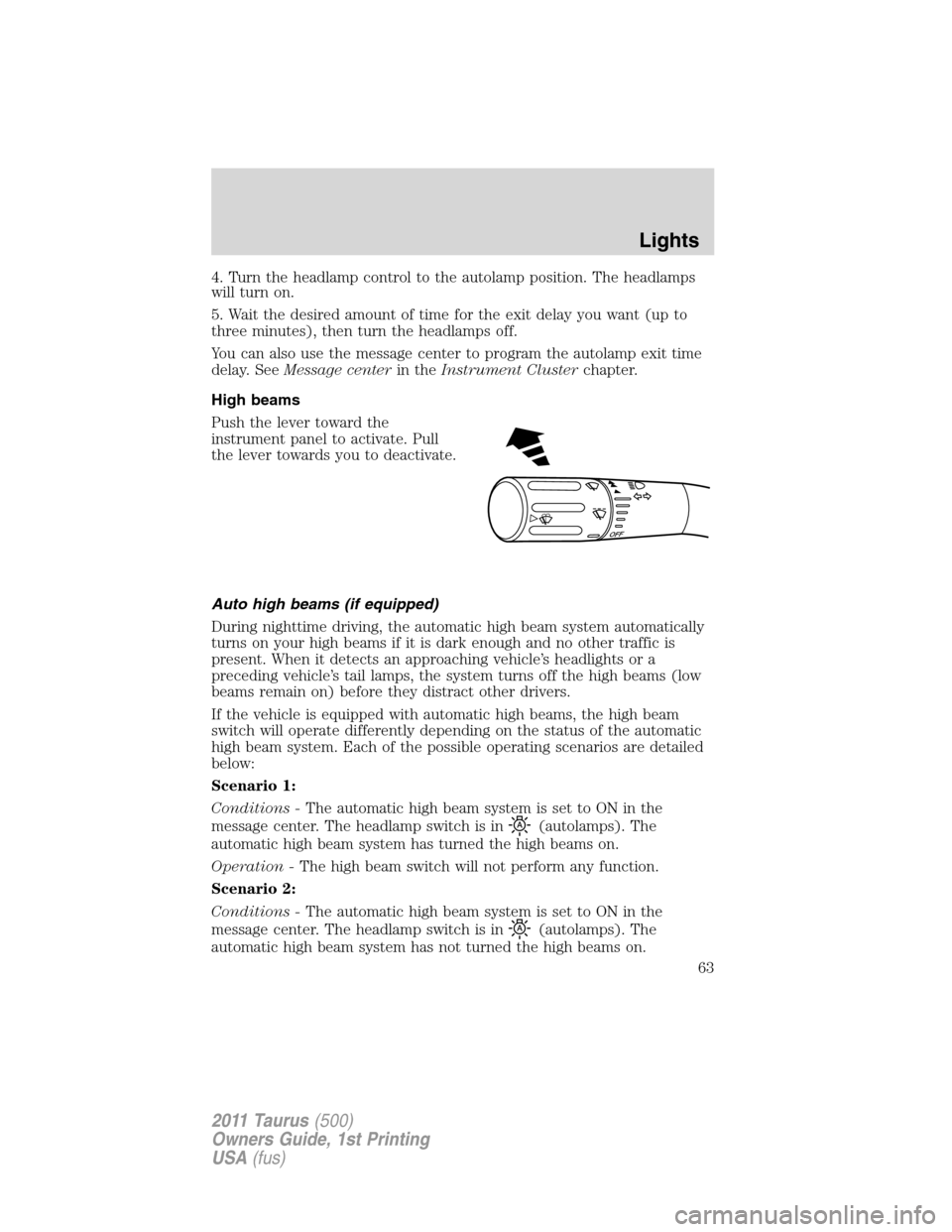
High beams
Push the lever toward the
instrument panel to activate. Pull
the lever towards you to deactivate.
Auto high beams (if equipped)
During nighttime driving, the automatic high beam system automatically
turns on your high beams if it is dark enough and no other traffic is
present. When it detects an approaching vehicle’s headlights or a
preceding vehicle’s tail lamps, the system turns off the high beams (low
beams remain on) before they distract other drivers.
If the vehicle is equipped with automatic high beams, the high beam
switch will operate differently depending on the status of the automatic
high beam system. Each of the possible operating scenarios are detailed
below:
Scenario 1:
Conditions -The automatic high beam system is set to ON in the
message center. The headlamp switch is in
(autolamps). The
automatic high beam system has turned the high beams on.
Operation -The high beam switch will not perform any function.
Scenario 2:
Conditions -The automatic high beam system is set to ON in the
message center. The headlamp switch is in
(autolamps). The
automatic high beam system has not turned the high beams on.
O
F
F
Lights
63
2011 Taurus(500)
Owners Guide, 1st Printing
USA(fus)
Page 64 of 406
Operation -The high beam switch can be used to turn the high beams
on. They will then remain on until the switch has been returned to the
neutral position and the auto high beam system has turned the high
beams off.
Scenario 3:
Conditions -The automatic high beam system is set to ON in the
message center. The headlamp switch is in
(off),(park lamps),
or
(on).
Operation -The high beam switch can be used to turn the high beams
on and off.
Scenario 4:
Conditions -The automatic high beam system is set to OFF in the
message center. The headlamp switch is
in
(autolamps),(off),(park lamps), or(on).
Operation -The high beam switch can be used to turn the high beams
on and off.
Enabling/disabling auto high beams
Enabling/disabling and/or checking the status of the automatic high beam
system can be performed using the message center. SeeMessage center
in theInstrument clusterchapter.
Activating high beams
If there is no traffic in front of the vehicle, the high beams will come on
automatically and the
light will display in the instrument panel if
the following are true:
•The headlamp control is in auto lamp
mode.
•The ambient light level is low enough that high beams are needed.
•Vehicle speed must be greater than 32 mph (51 km/h).
•Severe weather is not detected.
Deactivating high beams
The automatic high beams will deactivate if any of the following events
occur:
•An approaching vehicle’s headlights or a preceding vehicle’s tail lamps
are detected.
•The headlamp control is moved out of the autolamps position.
Lights
64
2011 Taurus(500)
Owners Guide, 1st Printing
USA(fus)
Page 88 of 406
Memory feature (if equipped)
The accelerator and brake pedal positions are saved when doing a
memory set function and can be recalled along with the vehicle
personality features when a memory position is selected through the
remote entry transmitter, keyless entry keypad or memory switch on the
driver’s door (if equipped with memory feature). Refer toFront seating
in theSeating and Safety Restraintschapter.
SPEED CONTROL
With speed control set, you can maintain a set speed without keeping
your foot on the accelerator pedal.
WARNING:Do not use the speed control in heavy traffic or on
roads that are winding, slippery or unpaved.
Using speed control
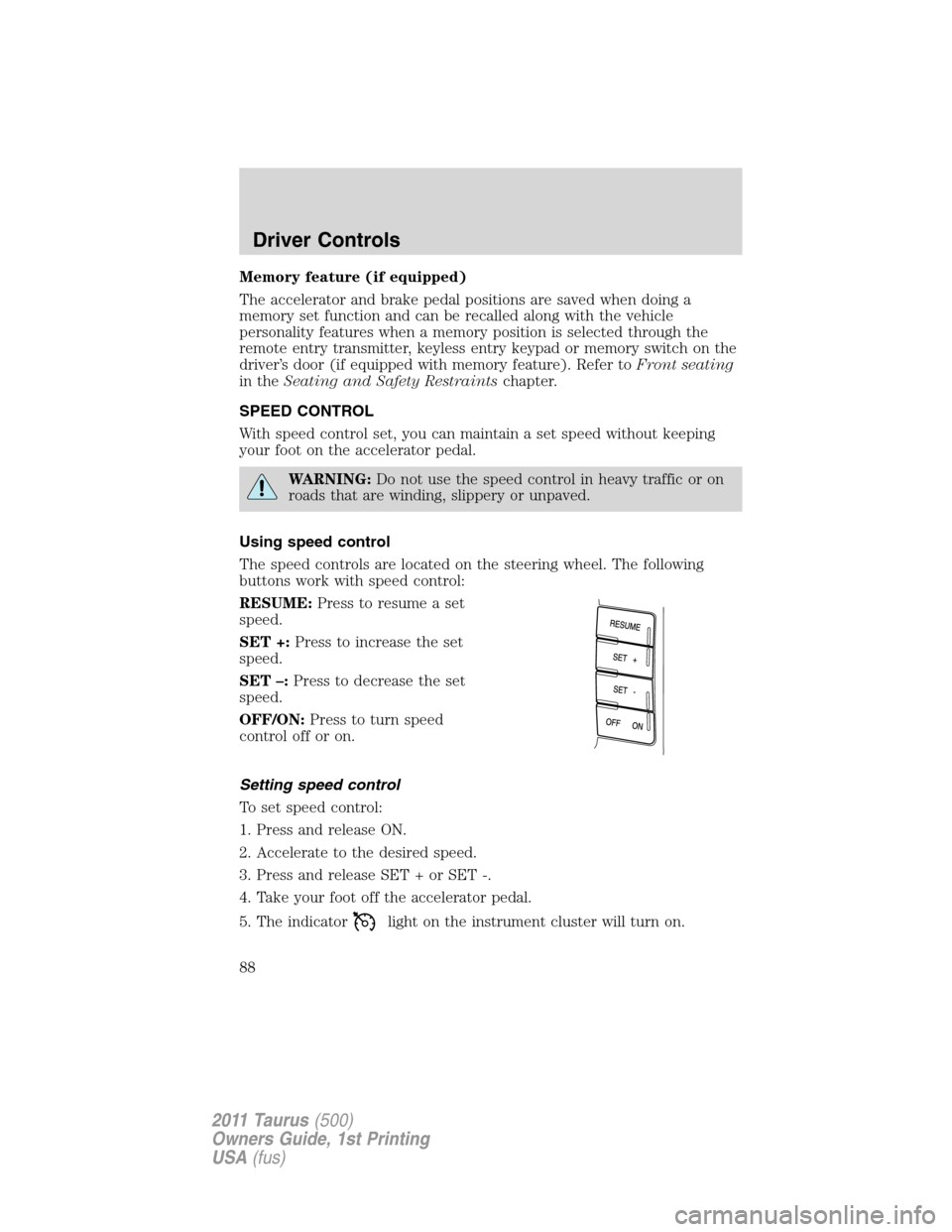
The speed controls are located on the steering wheel. The following
buttons work with speed control:
RESUME:Press to resume a set
speed.
SET +:Press to increase the set
speed.
SET –:Press to decrease the set
speed.
OFF/ON:Press to turn speed
control off or on.
Setting speed control
To set speed control:
1. Press and release ON.
2. Accelerate to the desired speed.
3. Press and release SET + or SET -.
4. Take your foot off the accelerator pedal.
5. The indicator
light on the instrument cluster will turn on.
Driver Controls
88
2011 Taurus(500)
Owners Guide, 1st Printing
USA(fus)
Page 91 of 406
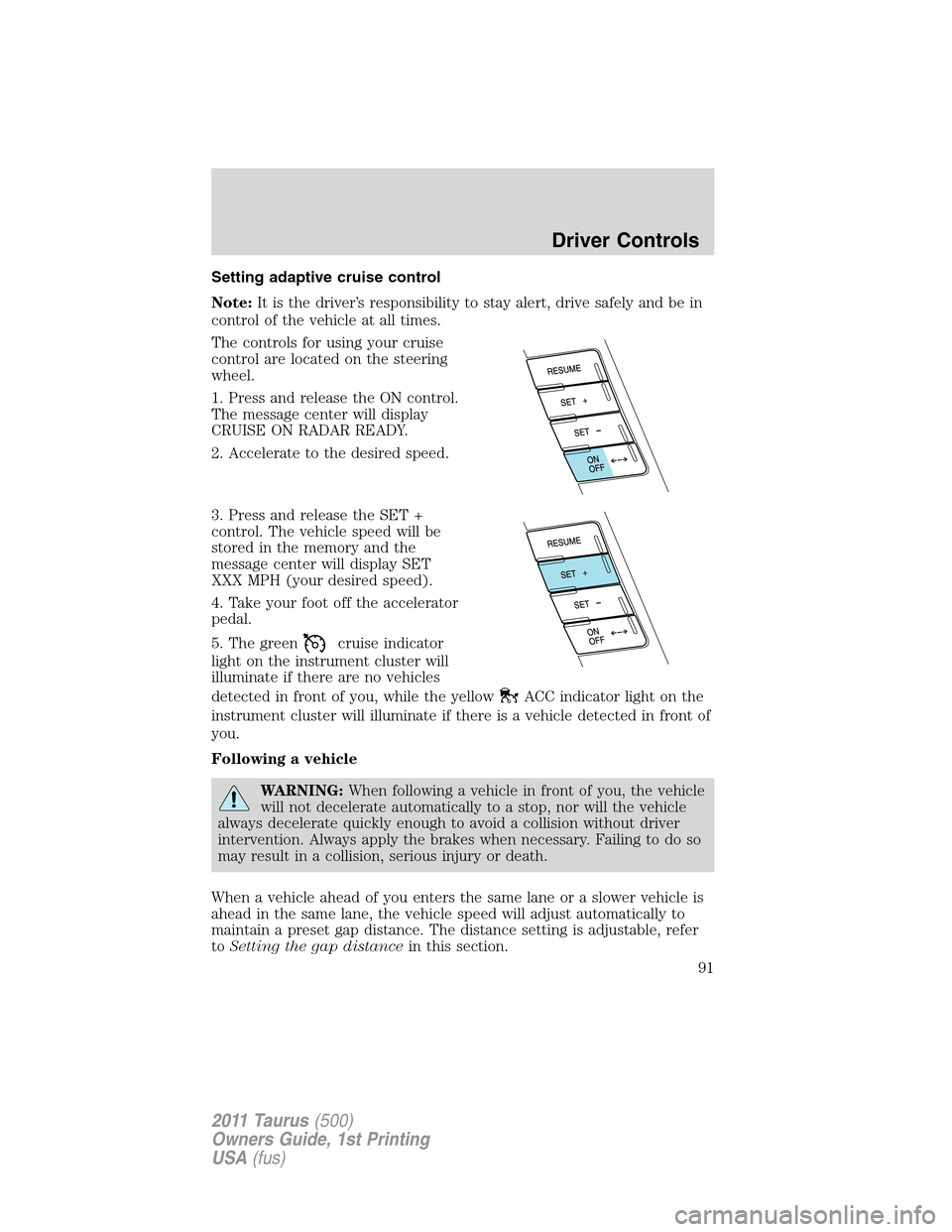
Setting adaptive cruise control
Note:It is the driver’s responsibility to stay alert, drive safely and be in
control of the vehicle at all times.
The controls for using your cruise
control are located on the steering
wheel.
1. Press and release the ON control.
The message center will display
CRUISE ON RADAR READY.
2. Accelerate to the desired speed.
3. Press and release the SET +
control. The vehicle speed will be
stored in the memory and the
message center will display SET
XXX MPH (your desired speed).
4. Take your foot off the accelerator
pedal.
5. The green
cruise indicator
light on the instrument cluster will
illuminate if there are no vehicles
detected in front of you, while the yellow
ACC indicator light on the
instrument cluster will illuminate if there is a vehicle detected in front of
you.
Following a vehicle
WARNING:When following a vehicle in front of you, the vehicle
will not decelerate automatically to a stop, nor will the vehicle
always decelerate quickly enough to avoid a collision without driver
intervention. Always apply the brakes when necessary. Failing to do so
may result in a collision, serious injury or death.
When a vehicle ahead of you enters the same lane or a slower vehicle is
ahead in the same lane, the vehicle speed will adjust automatically to
maintain a preset gap distance. The distance setting is adjustable, refer
toSetting the gap distancein this section.
Driver Controls
91
2011 Taurus(500)
Owners Guide, 1st Printing
USA(fus)
Page 92 of 406
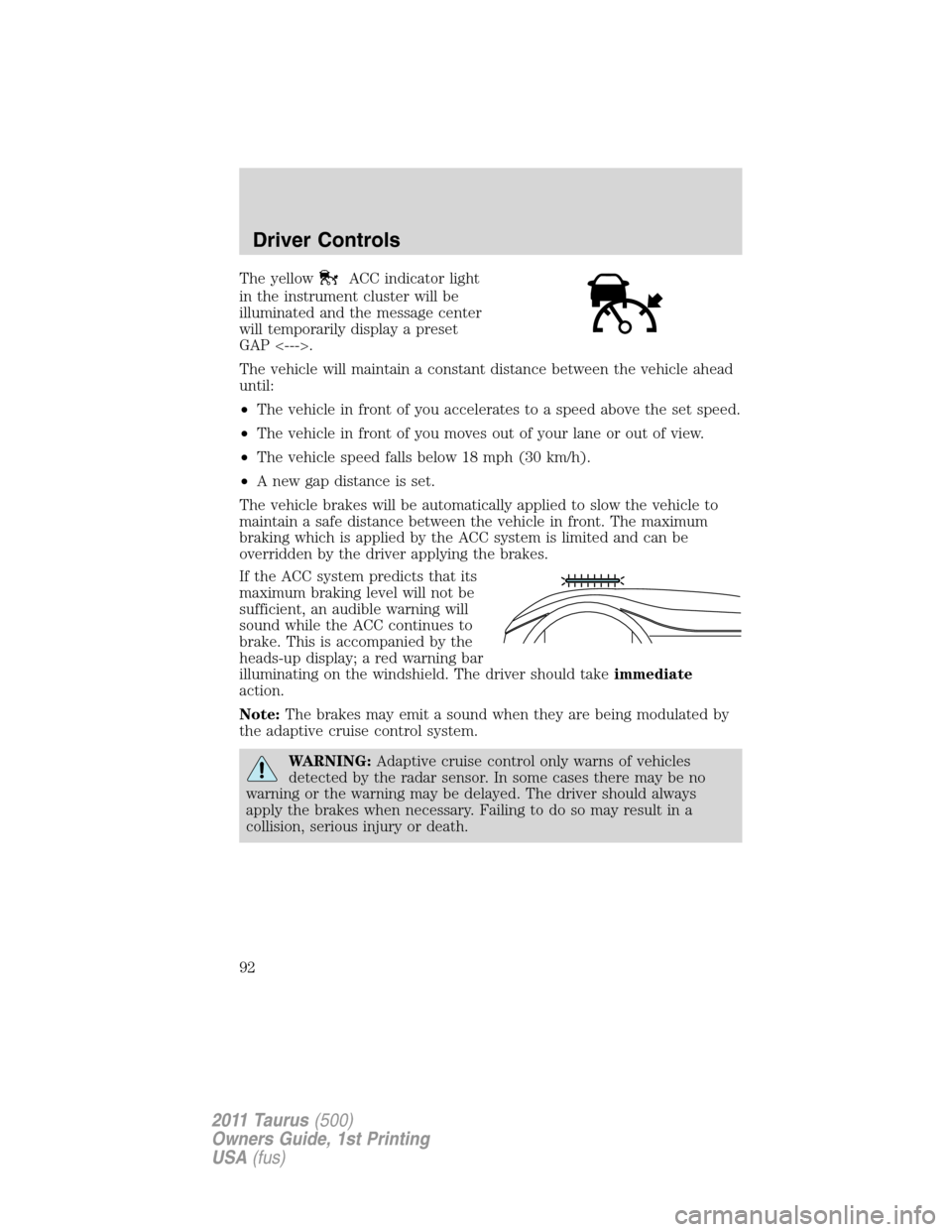
The yellowACC indicator light
in the instrument cluster will be
illuminated and the message center
will temporarily display a preset
GAP <--->.
The vehicle will maintain a constant distance between the vehicle ahead
until:
•The vehicle in front of you accelerates to a speed above the set speed.
•The vehicle in front of you moves out of your lane or out of view.
•The vehicle speed falls below 18 mph (30 km/h).
•A new gap distance is set.
The vehicle brakes will be automatically applied to slow the vehicle to
maintain a safe distance between the vehicle in front. The maximum
braking which is applied by the ACC system is limited and can be
overridden by the driver applying the brakes.
If the ACC system predicts that its
maximum braking level will not be
sufficient, an audible warning will
sound while the ACC continues to
brake. This is accompanied by the
heads-up display; a red warning bar
illuminating on the windshield. The driver should takeimmediate
action.
Note:The brakes may emit a sound when they are being modulated by
the adaptive cruise control system.
WARNING:Adaptive cruise control only warns of vehicles
detected by the radar sensor. In some cases there may be no
warning or the warning may be delayed. The driver should always
apply the brakes when necessary. Failing to do so may result in a
collision, serious injury or death.
Driver Controls
92
2011 Taurus(500)
Owners Guide, 1st Printing
USA(fus)