display FORD TAURUS 2014 6.G Service Manual
[x] Cancel search | Manufacturer: FORD, Model Year: 2014, Model line: TAURUS, Model: FORD TAURUS 2014 6.GPages: 550, PDF Size: 7.21 MB
Page 126 of 550
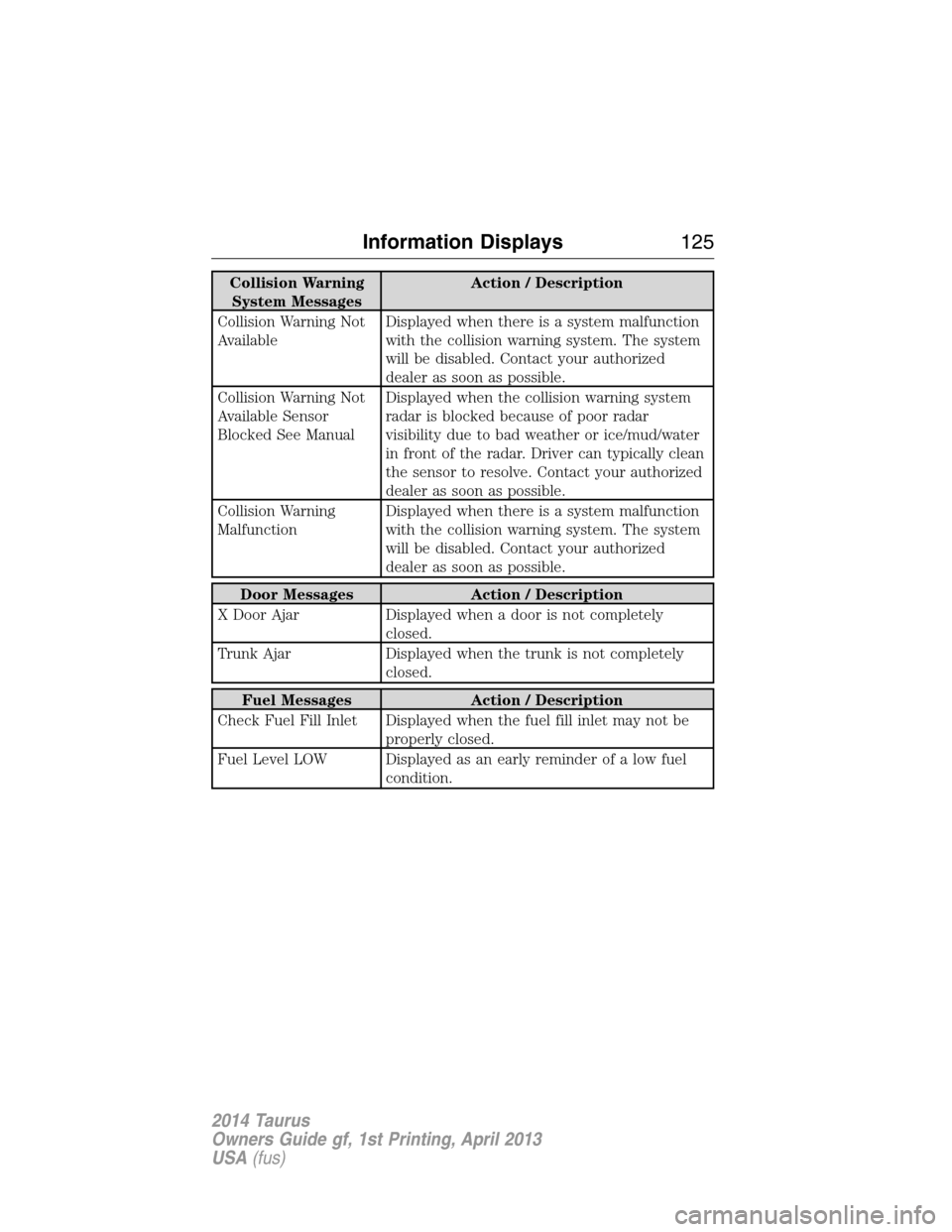
Collision Warning
System MessagesAction / Description
Collision Warning Not
AvailableDisplayed when there is a system malfunction
with the collision warning system. The system
will be disabled. Contact your authorized
dealer as soon as possible.
Collision Warning Not
Available Sensor
Blocked See ManualDisplayed when the collision warning system
radar is blocked because of poor radar
visibility due to bad weather or ice/mud/water
in front of the radar. Driver can typically clean
the sensor to resolve. Contact your authorized
dealer as soon as possible.
Collision Warning
MalfunctionDisplayed when there is a system malfunction
with the collision warning system. The system
will be disabled. Contact your authorized
dealer as soon as possible.
Door Messages Action / Description
X Door Ajar Displayed when a door is not completely
closed.
Trunk Ajar Displayed when the trunk is not completely
closed.
Fuel Messages Action / Description
Check Fuel Fill Inlet Displayed when the fuel fill inlet may not be
properly closed.
Fuel Level LOW Displayed as an early reminder of a low fuel
condition.
Information Displays125
2014 Taurus
Owners Guide gf, 1st Printing, April 2013
USA(fus)
Page 127 of 550
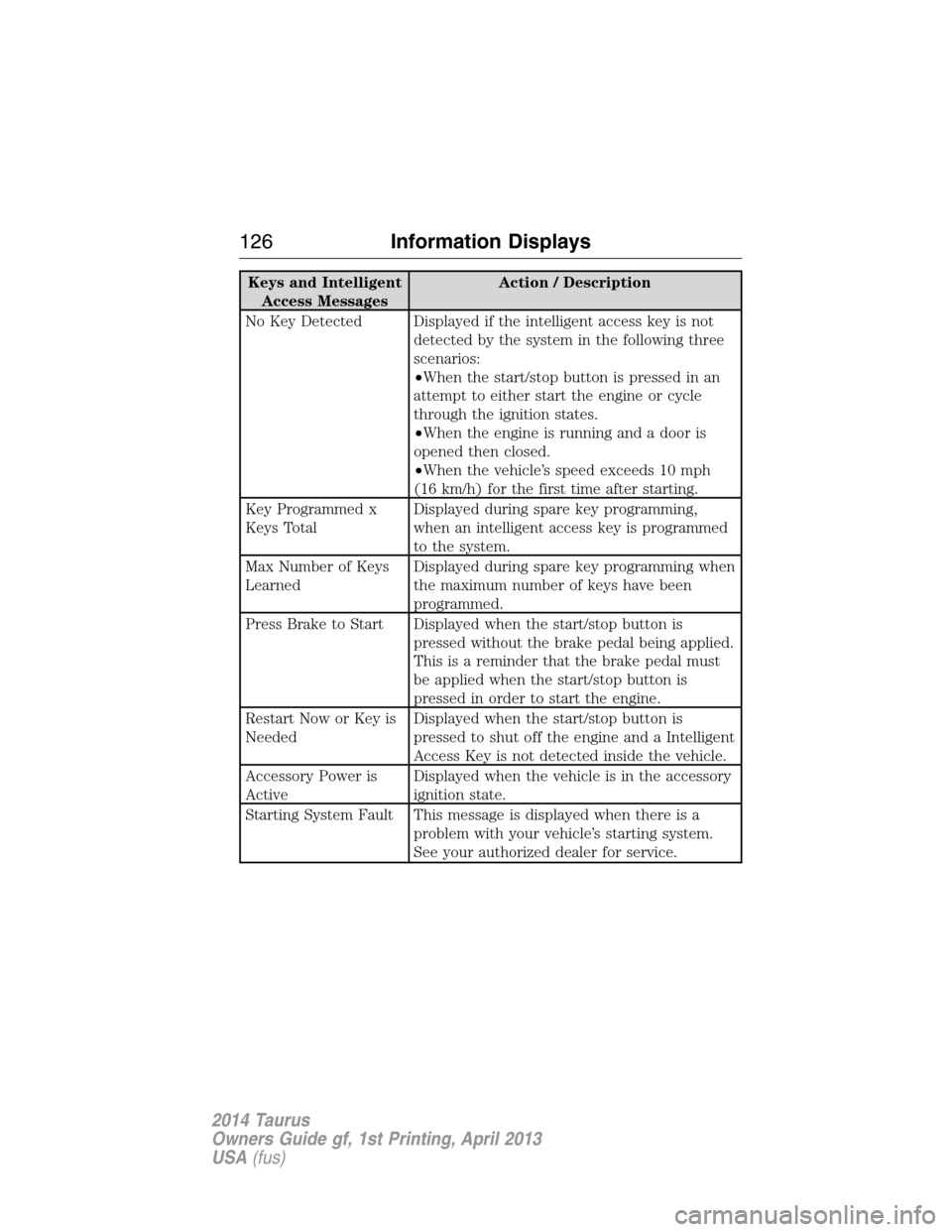
Keys and Intelligent
Access MessagesAction / Description
No Key Detected Displayed if the intelligent access key is not
detected by the system in the following three
scenarios:
•When the start/stop button is pressed in an
attempt to either start the engine or cycle
through the ignition states.
•When the engine is running and a door is
opened then closed.
•When the vehicle’s speed exceeds 10 mph
(16 km/h) for the first time after starting.
Key Programmed x
Keys TotalDisplayed during spare key programming,
when an intelligent access key is programmed
to the system.
Max Number of Keys
LearnedDisplayed during spare key programming when
the maximum number of keys have been
programmed.
Press Brake to Start Displayed when the start/stop button is
pressed without the brake pedal being applied.
This is a reminder that the brake pedal must
be applied when the start/stop button is
pressed in order to start the engine.
Restart Now or Key is
NeededDisplayed when the start/stop button is
pressed to shut off the engine and a Intelligent
Access Key is not detected inside the vehicle.
Accessory Power is
ActiveDisplayed when the vehicle is in the accessory
ignition state.
Starting System Fault This message is displayed when there is a
problem with your vehicle’s starting system.
See your authorized dealer for service.
126Information Displays
2014 Taurus
Owners Guide gf, 1st Printing, April 2013
USA(fus)
Page 128 of 550
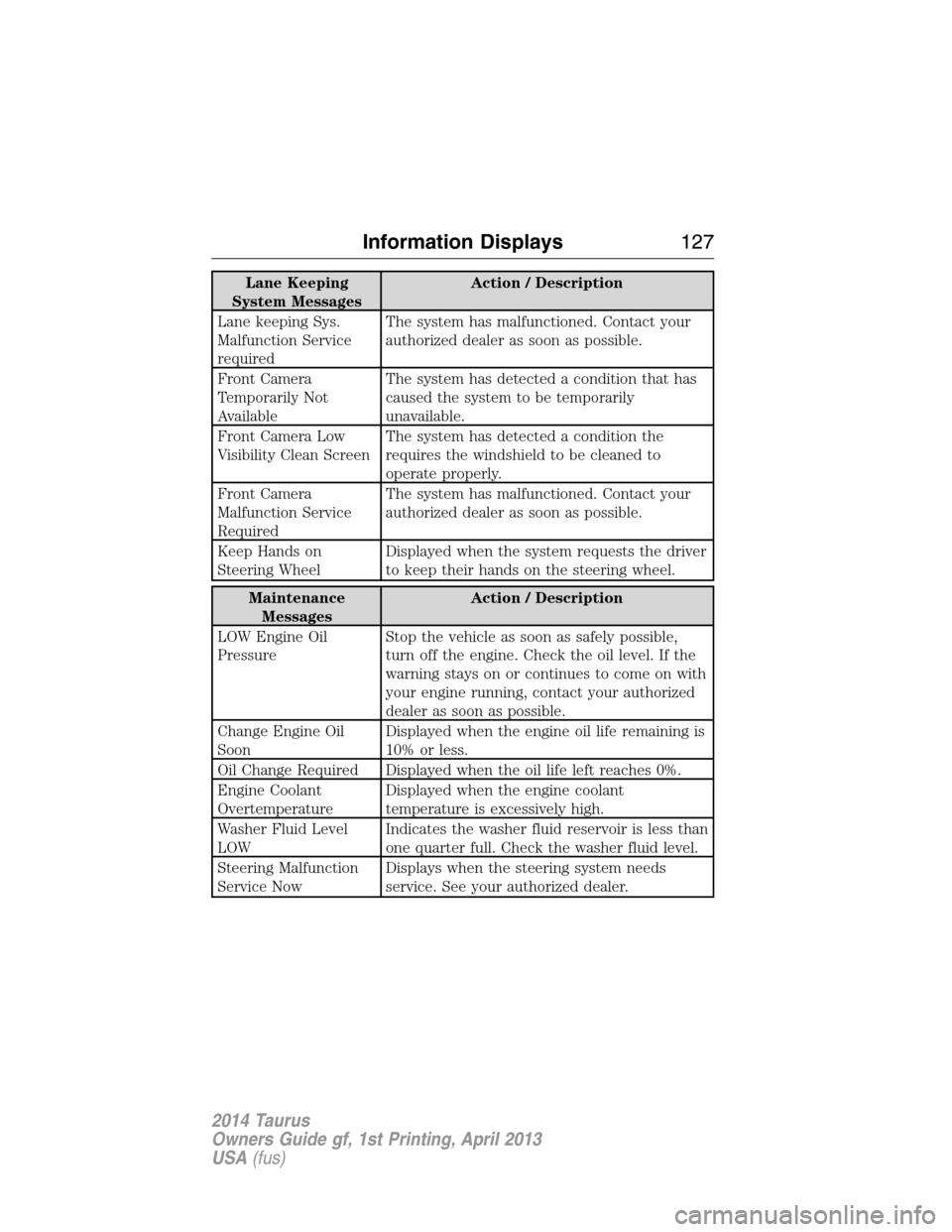
Lane Keeping
System MessagesAction / Description
Lane keeping Sys.
Malfunction Service
requiredThe system has malfunctioned. Contact your
authorized dealer as soon as possible.
Front Camera
Temporarily Not
AvailableThe system has detected a condition that has
caused the system to be temporarily
unavailable.
Front Camera Low
Visibility Clean ScreenThe system has detected a condition the
requires the windshield to be cleaned to
operate properly.
Front Camera
Malfunction Service
RequiredThe system has malfunctioned. Contact your
authorized dealer as soon as possible.
Keep Hands on
Steering WheelDisplayed when the system requests the driver
to keep their hands on the steering wheel.
Maintenance
MessagesAction / Description
LOW Engine Oil
PressureStop the vehicle as soon as safely possible,
turn off the engine. Check the oil level. If the
warning stays on or continues to come on with
your engine running, contact your authorized
dealer as soon as possible.
Change Engine Oil
SoonDisplayed when the engine oil life remaining is
10% or less.
Oil Change Required Displayed when the oil life left reaches 0%.
Engine Coolant
OvertemperatureDisplayed when the engine coolant
temperature is excessively high.
Washer Fluid Level
LOWIndicates the washer fluid reservoir is less than
one quarter full. Check the washer fluid level.
Steering Malfunction
Service NowDisplays when the steering system needs
service. See your authorized dealer.
Information Displays127
2014 Taurus
Owners Guide gf, 1st Printing, April 2013
USA(fus)
Page 129 of 550
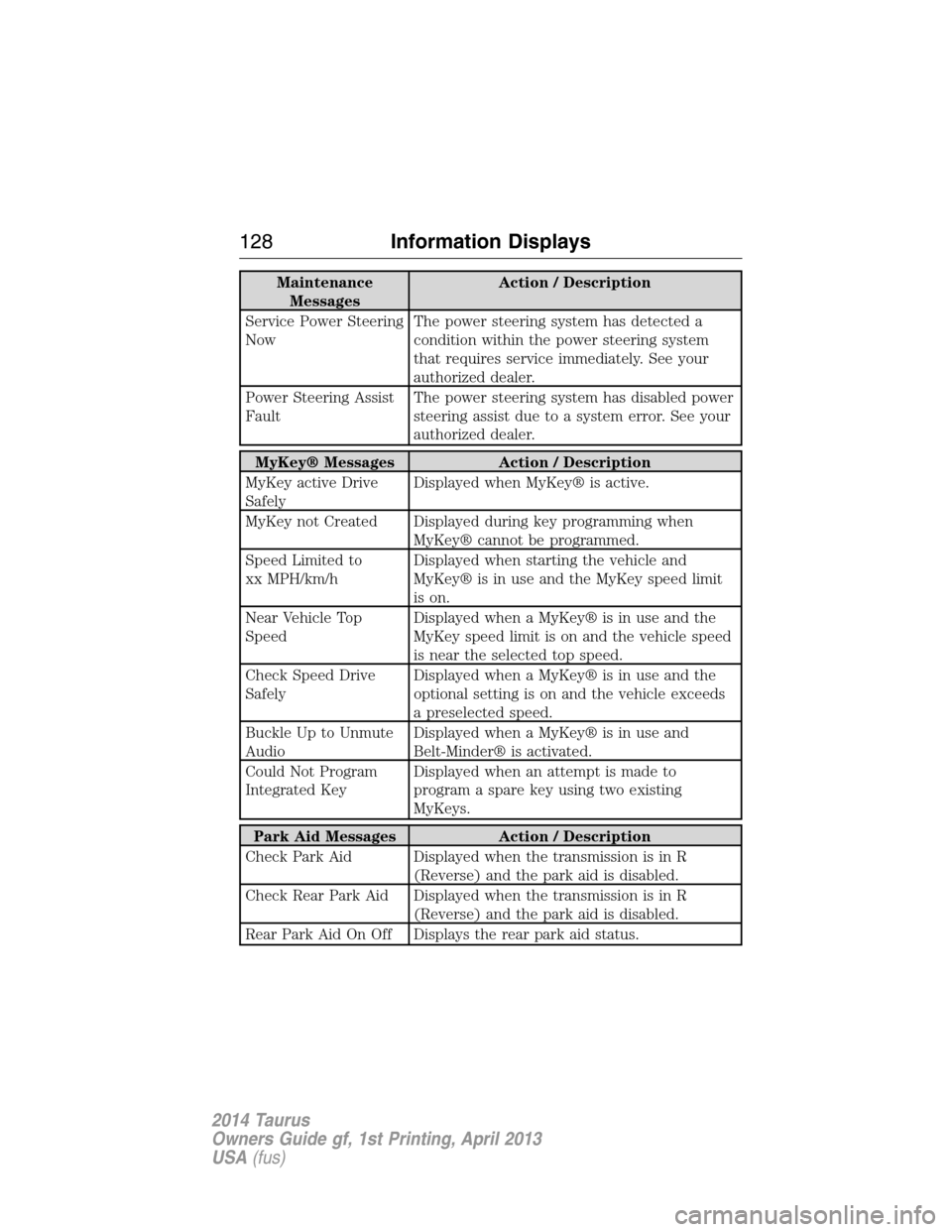
Maintenance
MessagesAction / Description
Service Power Steering
NowThe power steering system has detected a
condition within the power steering system
that requires service immediately. See your
authorized dealer.
Power Steering Assist
FaultThe power steering system has disabled power
steering assist due to a system error. See your
authorized dealer.
MyKey® Messages Action / Description
MyKey active Drive
SafelyDisplayed when MyKey® is active.
MyKey not Created Displayed during key programming when
MyKey® cannot be programmed.
Speed Limited to
xx MPH/km/hDisplayed when starting the vehicle and
MyKey® is in use and the MyKey speed limit
is on.
Near Vehicle Top
SpeedDisplayed when a MyKey® is in use and the
MyKey speed limit is on and the vehicle speed
is near the selected top speed.
Check Speed Drive
SafelyDisplayed when a MyKey® is in use and the
optional setting is on and the vehicle exceeds
a preselected speed.
Buckle Up to Unmute
AudioDisplayed when a MyKey® is in use and
Belt-Minder® is activated.
Could Not Program
Integrated KeyDisplayed when an attempt is made to
program a spare key using two existing
MyKeys.
Park Aid Messages Action / Description
Check Park Aid Displayed when the transmission is in R
(Reverse) and the park aid is disabled.
Check Rear Park Aid Displayed when the transmission is in R
(Reverse) and the park aid is disabled.
Rear Park Aid On Off Displays the rear park aid status.
128Information Displays
2014 Taurus
Owners Guide gf, 1st Printing, April 2013
USA(fus)
Page 130 of 550
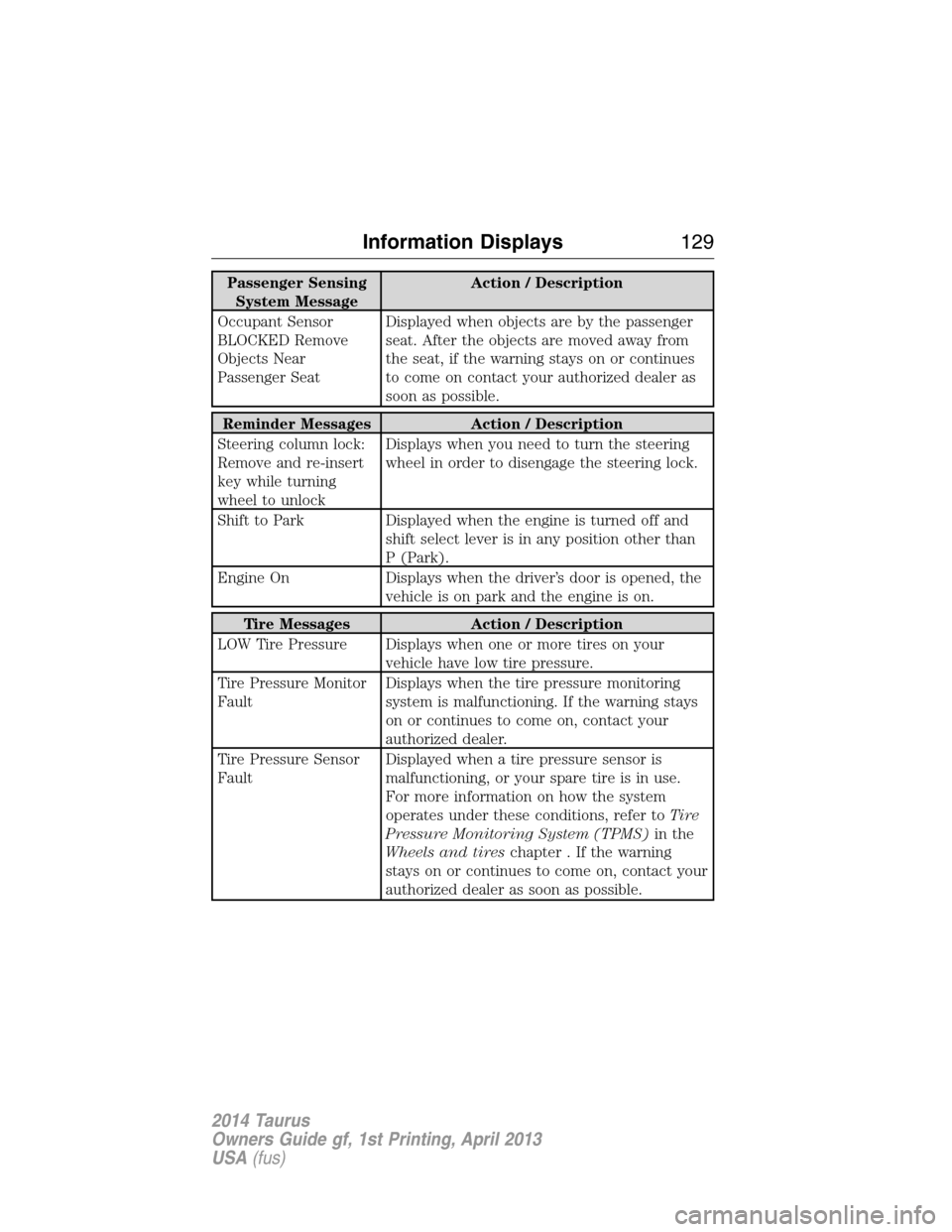
Passenger Sensing
System MessageAction / Description
Occupant Sensor
BLOCKED Remove
Objects Near
Passenger SeatDisplayed when objects are by the passenger
seat. After the objects are moved away from
the seat, if the warning stays on or continues
to come on contact your authorized dealer as
soon as possible.
Reminder Messages Action / Description
Steering column lock:
Remove and re-insert
key while turning
wheel to unlockDisplays when you need to turn the steering
wheel in order to disengage the steering lock.
Shift to Park Displayed when the engine is turned off and
shift select lever is in any position other than
P (Park).
Engine On Displays when the driver’s door is opened, the
vehicle is on park and the engine is on.
Tire Messages Action / Description
LOW Tire Pressure Displays when one or more tires on your
vehicle have low tire pressure.
Tire Pressure Monitor
FaultDisplays when the tire pressure monitoring
system is malfunctioning. If the warning stays
on or continues to come on, contact your
authorized dealer.
Tire Pressure Sensor
FaultDisplayed when a tire pressure sensor is
malfunctioning, or your spare tire is in use.
For more information on how the system
operates under these conditions, refer toTi r e
Pressure Monitoring System (TPMS)in the
Wheels and tireschapter . If the warning
stays on or continues to come on, contact your
authorized dealer as soon as possible.
Information Displays129
2014 Taurus
Owners Guide gf, 1st Printing, April 2013
USA(fus)
Page 140 of 550
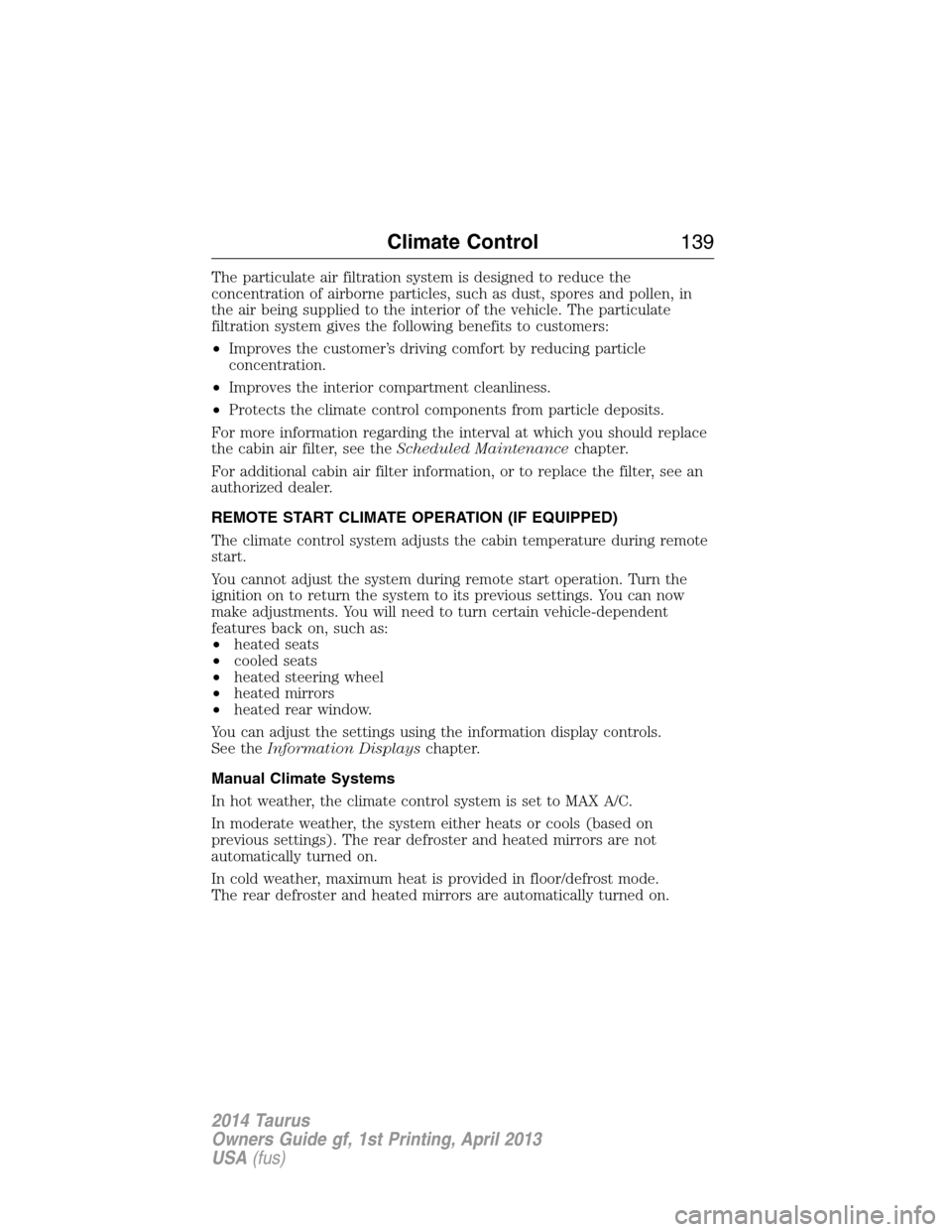
The particulate air filtration system is designed to reduce the
concentration of airborne particles, such as dust, spores and pollen, in
the air being supplied to the interior of the vehicle. The particulate
filtration system gives the following benefits to customers:
•Improves the customer’s driving comfort by reducing particle
concentration.
•Improves the interior compartment cleanliness.
•Protects the climate control components from particle deposits.
For more information regarding the interval at which you should replace
the cabin air filter, see theScheduled Maintenancechapter.
For additional cabin air filter information, or to replace the filter, see an
authorized dealer.
REMOTE START CLIMATE OPERATION (IF EQUIPPED)
The climate control system adjusts the cabin temperature during remote
start.
You cannot adjust the system during remote start operation. Turn the
ignition on to return the system to its previous settings. You can now
make adjustments. You will need to turn certain vehicle-dependent
features back on, such as:
•heated seats
•cooled seats
•heated steering wheel
•heated mirrors
•heated rear window.
You can adjust the settings using the information display controls.
See theInformation Displayschapter.
Manual Climate Systems
In hot weather, the climate control system is set to MAX A/C.
In moderate weather, the system either heats or cools (based on
previous settings). The rear defroster and heated mirrors are not
automatically turned on.
In cold weather, maximum heat is provided in floor/defrost mode.
The rear defroster and heated mirrors are automatically turned on.
Climate Control139
2014 Taurus
Owners Guide gf, 1st Printing, April 2013
USA(fus)
Page 141 of 550

Automatic Climate Systems
In hot weather, the system is set to 72°F (22°C). Cooled seats are set to
high (if available and selected to AUTO in the information display).
In moderate weather, the system either heats or cools (based on
previous settings). The rear defroster, heated mirrors and heated/cooled
seats are not automatically turned on.
In cold weather, the system is set to 72°F (22°C). The heated seats and
heated steering wheel are set to high (if available, and selected to AUTO
in the information display). The rear defroster and heated mirrors are
automatically turned on.
140Climate Control
2014 Taurus
Owners Guide gf, 1st Printing, April 2013
USA(fus)
Page 150 of 550
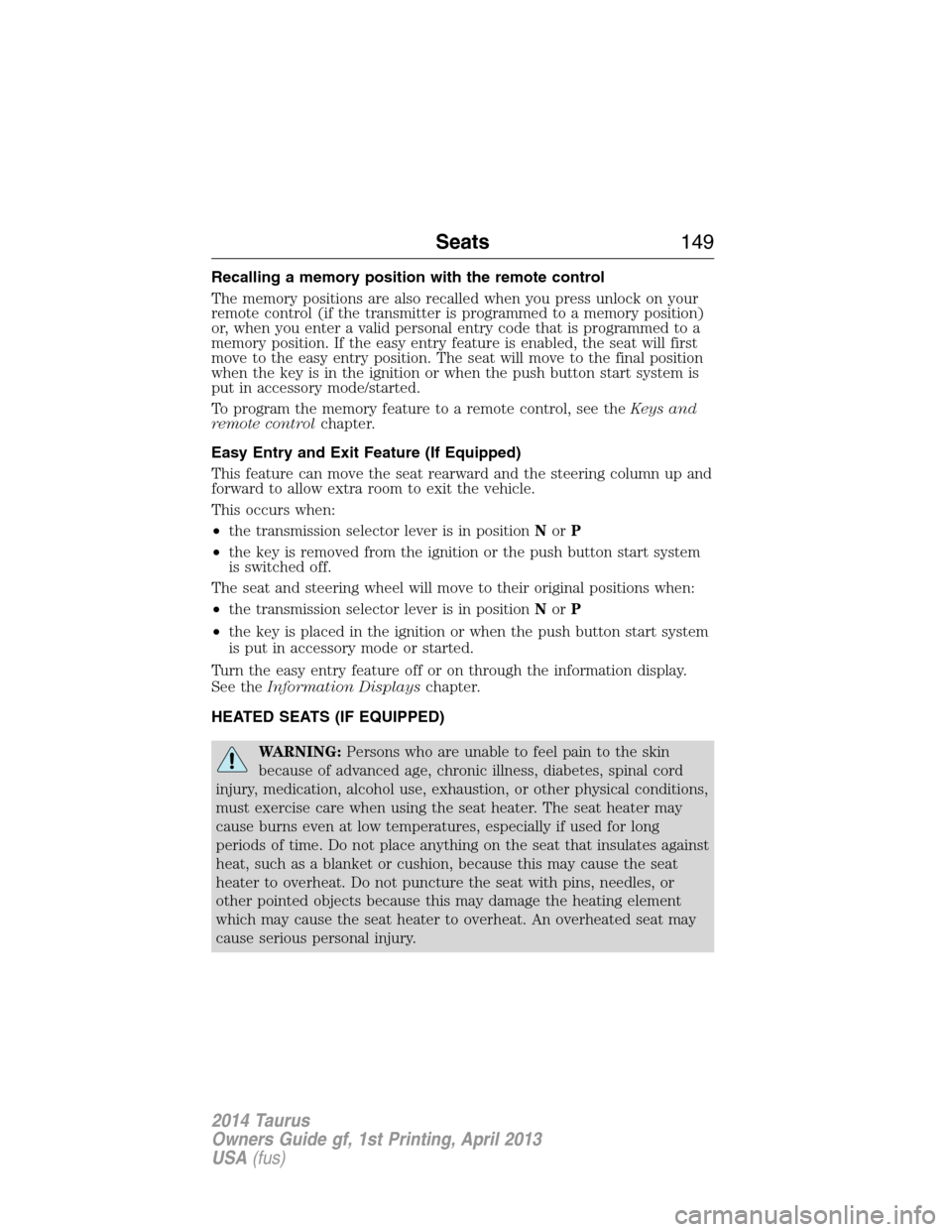
Recalling a memory position with the remote control
The memory positions are also recalled when you press unlock on your
remote control (if the transmitter is programmed to a memory position)
or, when you enter a valid personal entry code that is programmed to a
memory position. If the easy entry feature is enabled, the seat will first
move to the easy entry position. The seat will move to the final position
when the key is in the ignition or when the push button start system is
put in accessory mode/started.
To program the memory feature to a remote control, see theKeys and
remote controlchapter.
Easy Entry and Exit Feature (If Equipped)
This feature can move the seat rearward and the steering column up and
forward to allow extra room to exit the vehicle.
This occurs when:
•the transmission selector lever is in positionNorP
•the key is removed from the ignition or the push button start system
is switched off.
The seat and steering wheel will move to their original positions when:
•the transmission selector lever is in positionNorP
•the key is placed in the ignition or when the push button start system
is put in accessory mode or started.
Turn the easy entry feature off or on through the information display.
See theInformation Displayschapter.
HEATED SEATS (IF EQUIPPED)
WARNING:Persons who are unable to feel pain to the skin
because of advanced age, chronic illness, diabetes, spinal cord
injury, medication, alcohol use, exhaustion, or other physical conditions,
must exercise care when using the seat heater. The seat heater may
cause burns even at low temperatures, especially if used for long
periods of time. Do not place anything on the seat that insulates against
heat, such as a blanket or cushion, because this may cause the seat
heater to overheat. Do not puncture the seat with pins, needles, or
other pointed objects because this may damage the heating element
which may cause the seat heater to overheat. An overheated seat may
cause serious personal injury.
Seats149
2014 Taurus
Owners Guide gf, 1st Printing, April 2013
USA(fus)
Page 159 of 550
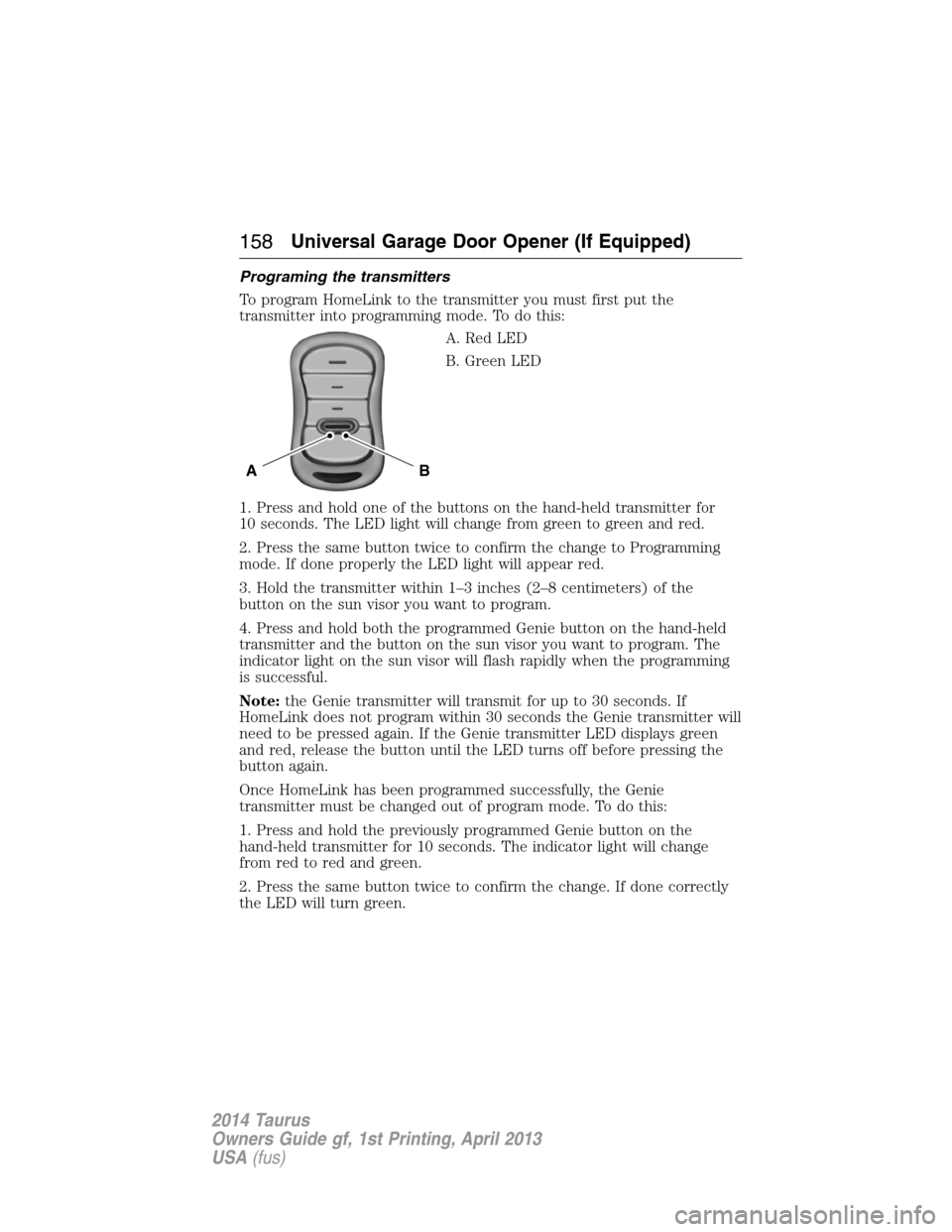
Programing the transmitters
To program HomeLink to the transmitter you must first put the
transmitter into programming mode. To do this:
A. Red LED
B. Green LED
1. Press and hold one of the buttons on the hand-held transmitter for
10 seconds. The LED light will change from green to green and red.
2. Press the same button twice to confirm the change to Programming
mode. If done properly the LED light will appear red.
3. Hold the transmitter within 1–3 inches (2–8 centimeters) of the
button on the sun visor you want to program.
4. Press and hold both the programmed Genie button on the hand-held
transmitter and the button on the sun visor you want to program. The
indicator light on the sun visor will flash rapidly when the programming
is successful.
Note:the Genie transmitter will transmit for up to 30 seconds. If
HomeLink does not program within 30 seconds the Genie transmitter will
need to be pressed again. If the Genie transmitter LED displays green
and red, release the button until the LED turns off before pressing the
button again.
Once HomeLink has been programmed successfully, the Genie
transmitter must be changed out of program mode. To do this:
1. Press and hold the previously programmed Genie button on the
hand-held transmitter for 10 seconds. The indicator light will change
from red to red and green.
2. Press the same button twice to confirm the change. If done correctly
the LED will turn green.
BA
158Universal Garage Door Opener (If Equipped)
2014 Taurus
Owners Guide gf, 1st Printing, April 2013
USA(fus)
Page 165 of 550
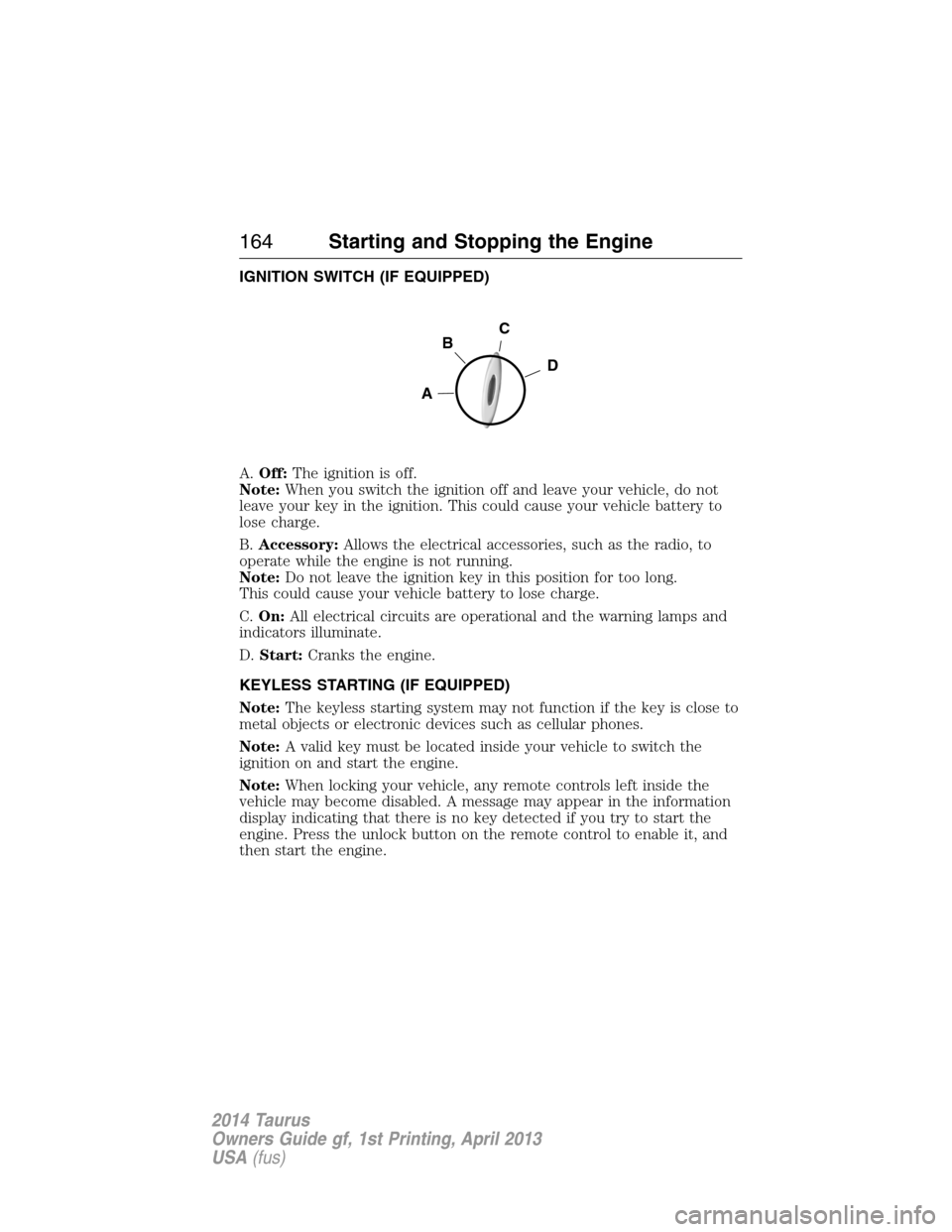
IGNITION SWITCH (IF EQUIPPED)
A.Off:The ignition is off.
Note:When you switch the ignition off and leave your vehicle, do not
leave your key in the ignition. This could cause your vehicle battery to
lose charge.
B.Accessory:Allows the electrical accessories, such as the radio, to
operate while the engine is not running.
Note:Do not leave the ignition key in this position for too long.
This could cause your vehicle battery to lose charge.
C.On:All electrical circuits are operational and the warning lamps and
indicators illuminate.
D.Start:Cranks the engine.
KEYLESS STARTING (IF EQUIPPED)
Note:The keyless starting system may not function if the key is close to
metal objects or electronic devices such as cellular phones.
Note:A valid key must be located inside your vehicle to switch the
ignition on and start the engine.
Note:When locking your vehicle, any remote controls left inside the
vehicle may become disabled. A message may appear in the information
display indicating that there is no key detected if you try to start the
engine. Press the unlock button on the remote control to enable it, and
then start the engine.
C
D
B
A
164Starting and Stopping the Engine
2014 Taurus
Owners Guide gf, 1st Printing, April 2013
USA(fus)