USB FORD TAURUS 2015 6.G User Guide
[x] Cancel search | Manufacturer: FORD, Model Year: 2015, Model line: TAURUS, Model: FORD TAURUS 2015 6.GPages: 558, PDF Size: 4.42 MB
Page 420 of 558
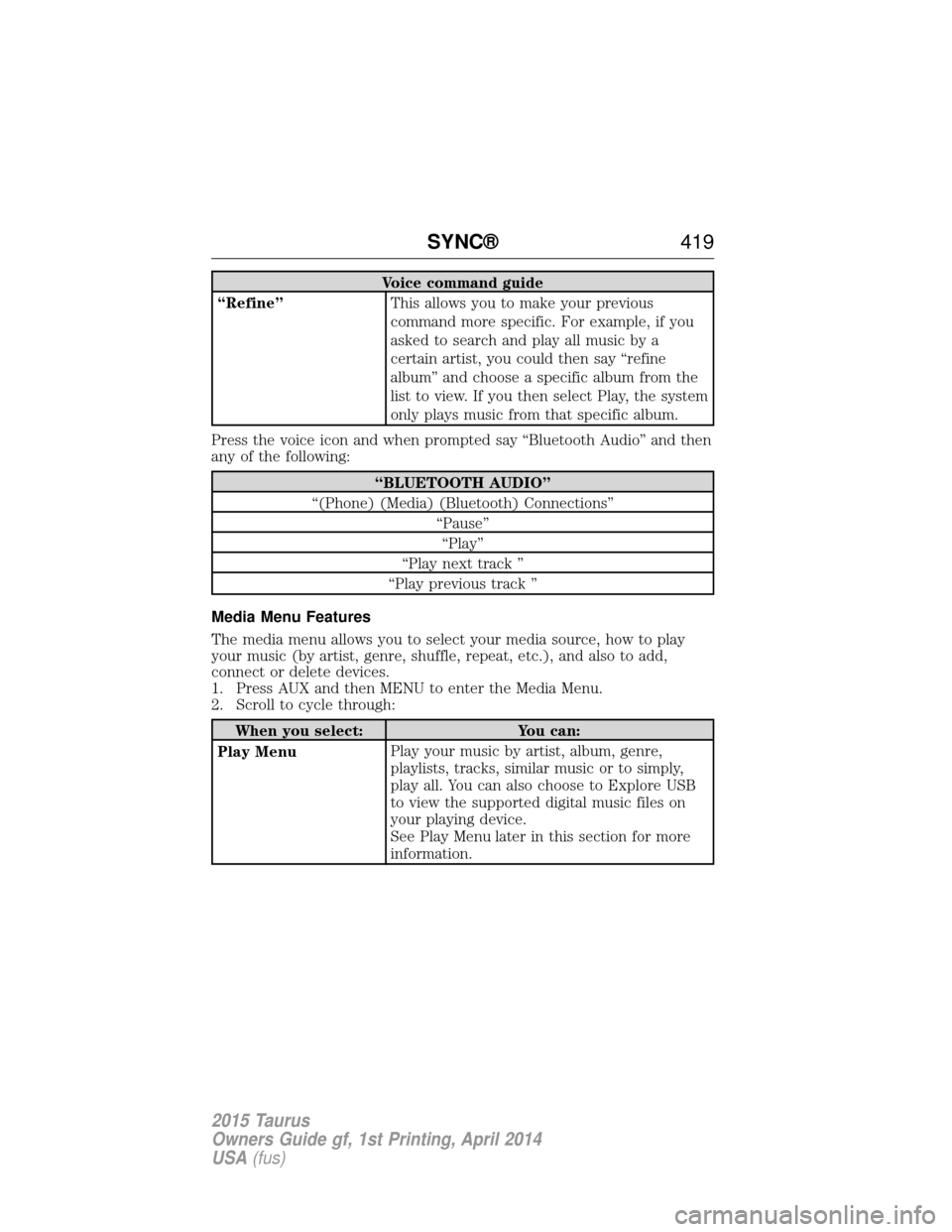
Voice command guide
“Refine” This allows you to make your previous
command more specific. For example, if you
asked to search and play all music by a
certain artist, you could then say “refine
album” and choose a specific album from the
list to view. If you then select Play, the system
only plays music from that specific album.
Press the voice icon and when prompted say “Bluetooth Audio” and then
any of the following:
“BLUETOOTH AUDIO”
“(Phone) (Media) (Bluetooth) Connections” “Pause”“Play”
“Play next track ”
“Play previous track ”
Media Menu Features
The media menu allows you to select your media source, how to play
your music (by artist, genre, shuffle, repeat, etc.), and also to add,
connect or delete devices.
1. Press AUX and then MENU to enter the Media Menu.
2. Scroll to cycle through:
When you select: You can:
Play Menu Play your music by artist, album, genre,
playlists, tracks, similar music or to simply,
play all. You can also choose to Explore USB
to view the supported digital music files on
your playing device.
See Play Menu later in this section for more
information.
SYNC®
419
2015 Taurus
Owners Guide gf, 1st Printing, April 2014
USA(fus)
Page 421 of 558
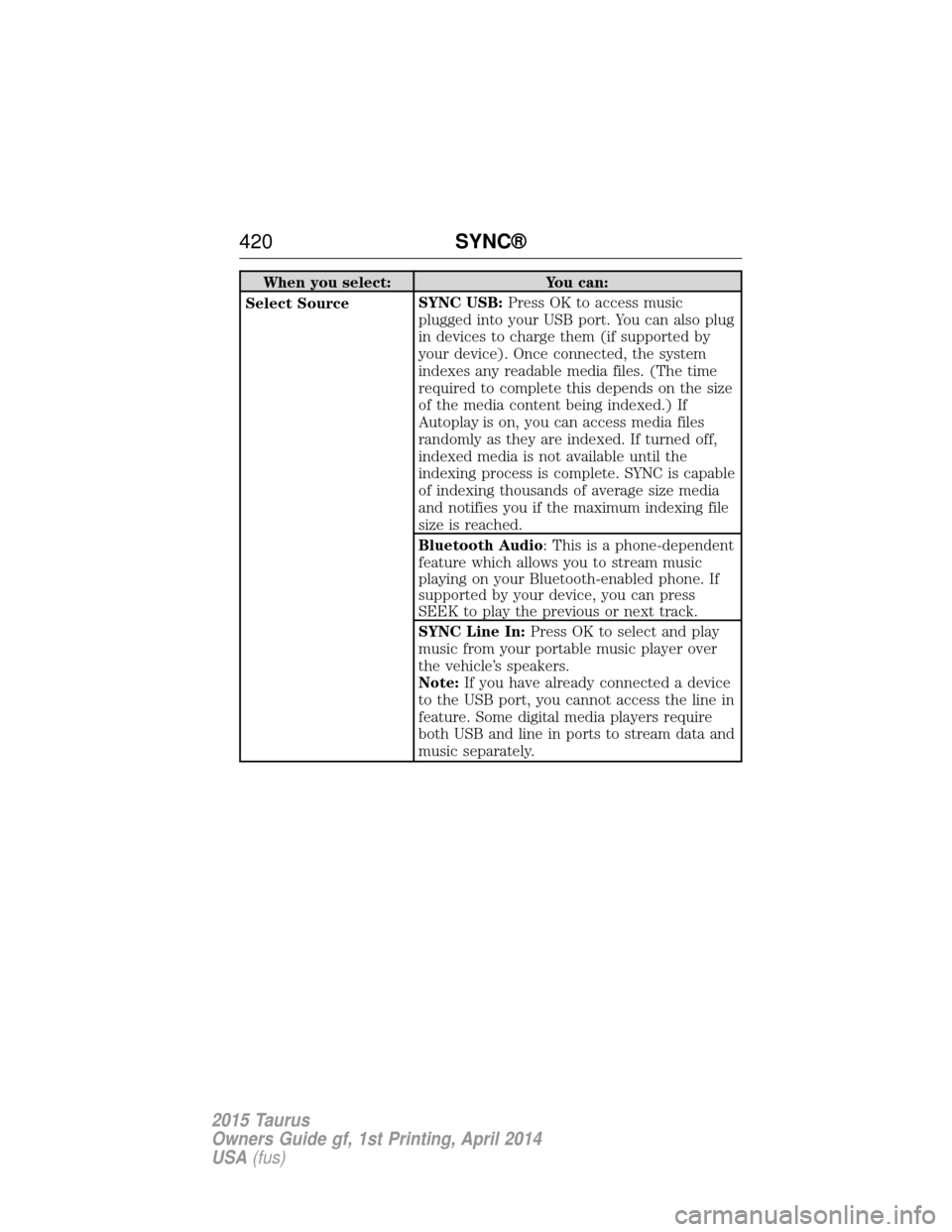
When you select:You can:
Select Source SYNC USB:
Press OK to access music
plugged into your USB port. You can also plug
in devices to charge them (if supported by
your device). Once connected, the system
indexes any readable media files. (The time
required to complete this depends on the size
of the media content being indexed.) If
Autoplay is on, you can access media files
randomly as they are indexed. If turned off,
indexed media is not available until the
indexing process is complete. SYNC is capable
of indexing thousands of average size media
and notifies you if the maximum indexing file
size is reached.
Bluetooth Audio: This is a phone-dependent
feature which allows you to stream music
playing on your Bluetooth-enabled phone. If
supported by your device, you can press
SEEK to play the previous or next track.
SYNC Line In: Press OK to select and play
music from your portable music player over
the vehicle’s speakers.
Note: If you have already connected a device
to the USB port, you cannot access the line in
feature. Some digital media players require
both USB and line in ports to stream data and
music separately.
420 SYNC®
2015 Taurus
Owners Guide gf, 1st Printing, April 2014
USA(fus)
Page 422 of 558
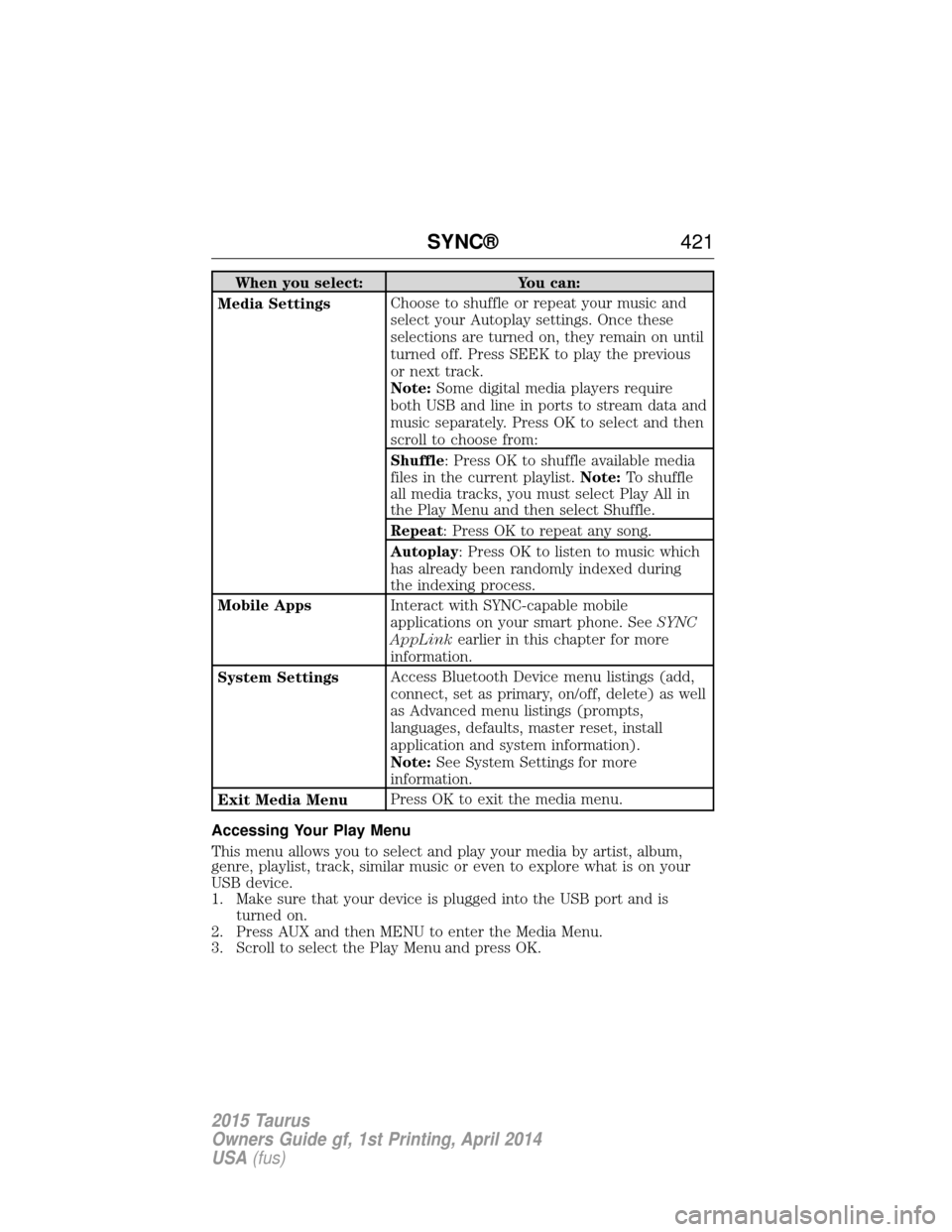
When you select:You can:
Media Settings Choose to shuffle or repeat your music and
select your Autoplay settings. Once these
selections are turned on, they remain on until
turned off. Press SEEK to play the previous
or next track.
Note:
Some digital media players require
both USB and line in ports to stream data and
music separately. Press OK to select and then
scroll to choose from:
Shuffle: Press OK to shuffle available media
files in the current playlist. Note:To shuffle
all media tracks, you must select Play All in
the Play Menu and then select Shuffle.
Repeat: Press OK to repeat any song.
Autoplay: Press OK to listen to music which
has already been randomly indexed during
the indexing process.
Mobile Apps Interact with SYNC-capable mobile
applications on your smart phone. See SYNC
AppLink earlier in this chapter for more
information.
System Settings Access Bluetooth Device menu listings (add,
connect, set as primary, on/off, delete) as well
as Advanced menu listings (prompts,
languages, defaults, master reset, install
application and system information).
Note:
See System Settings for more
information.
Exit Media Menu Press OK to exit the media menu.
Accessing Your Play Menu
This menu allows you to select and play your media by artist, album,
genre, playlist, track, similar music or even to explore what is on your
USB device.
1. Make sure that your device is plugged into the USB port and is turned on.
2. Press AUX and then MENU to enter the Media Menu.
3. Scroll to select the Play Menu and press OK.
SYNC® 421
2015 Taurus
Owners Guide gf, 1st Printing, April 2014
USA(fus)
Page 424 of 558
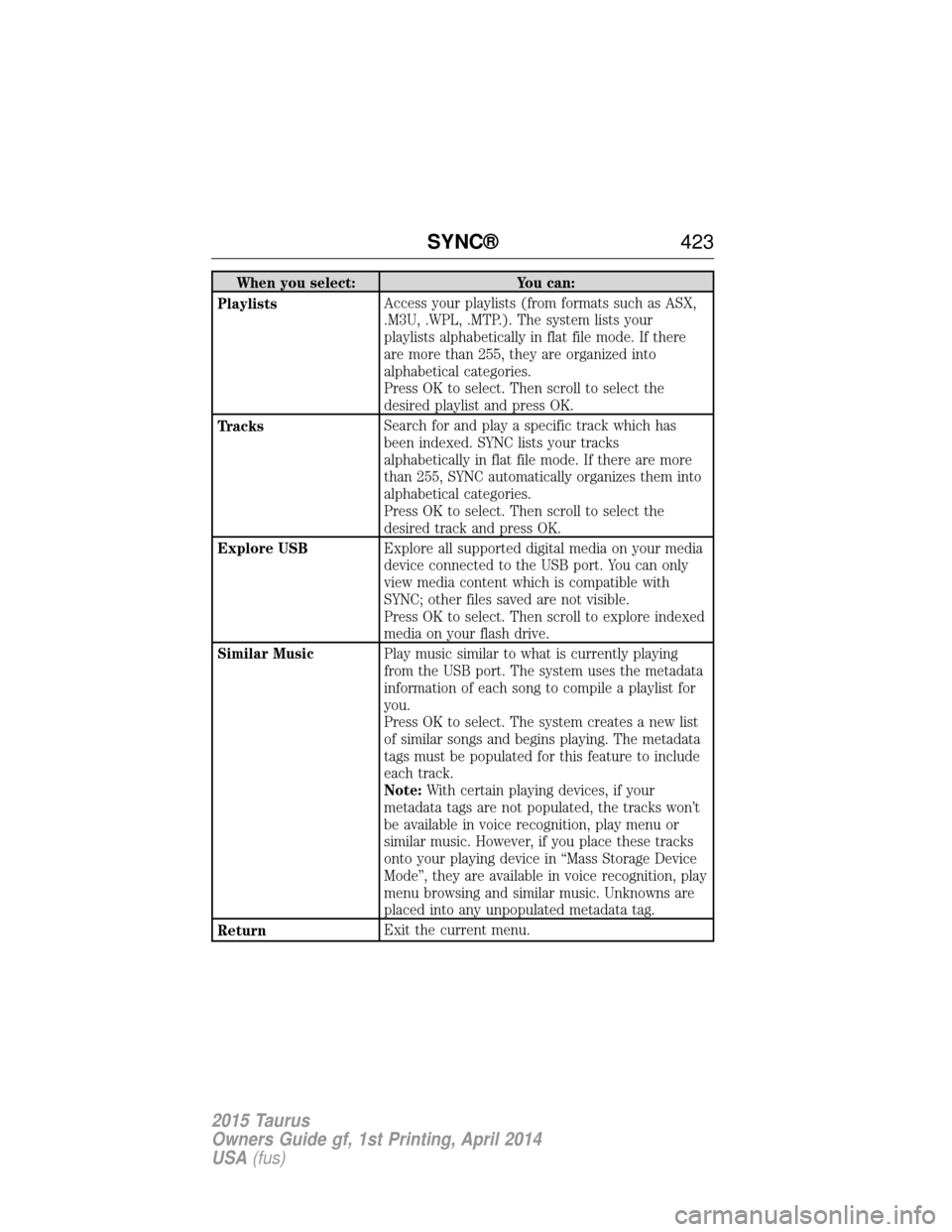
When you select:You can:
Playlists Access your playlists (from formats such as ASX,
.M3U, .WPL, .MTP.). The system lists your
playlists alphabetically in flat file mode. If there
are more than 255, they are organized into
alphabetical categories.
Press OK to select. Then scroll to select the
desired playlist and press OK.
Tracks Search for and play a specific track which has
been indexed. SYNC lists your tracks
alphabetically in flat file mode. If there are more
than 255, SYNC automatically organizes them into
alphabetical categories.
Press OK to select. Then scroll to select the
desired track and press OK.
Explore USB Explore all supported digital media on your media
device connected to the USB port. You can only
view media content which is compatible with
SYNC; other files saved are not visible.
Press OK to select. Then scroll to explore indexed
media on your flash drive.
Similar Music Play music similar to what is currently playing
from the USB port. The system uses the metadata
information of each song to compile a playlist for
you.
Press OK to select. The system creates a new list
of similar songs and begins playing. The metadata
tags must be populated for this feature to include
each track.
Note:With certain playing devices, if your
metadata tags are not populated, the tracks won’t
be available in voice recognition, play menu or
similar music. However, if you place these tracks
onto your playing device in “Mass Storage Device
Mode”, they are available in voice recognition, play
menu browsing and similar music. Unknowns are
placed into any unpopulated metadata tag.
Return Exit the current menu.
SYNC®
423
2015 Taurus
Owners Guide gf, 1st Printing, April 2014
USA(fus)
Page 427 of 558
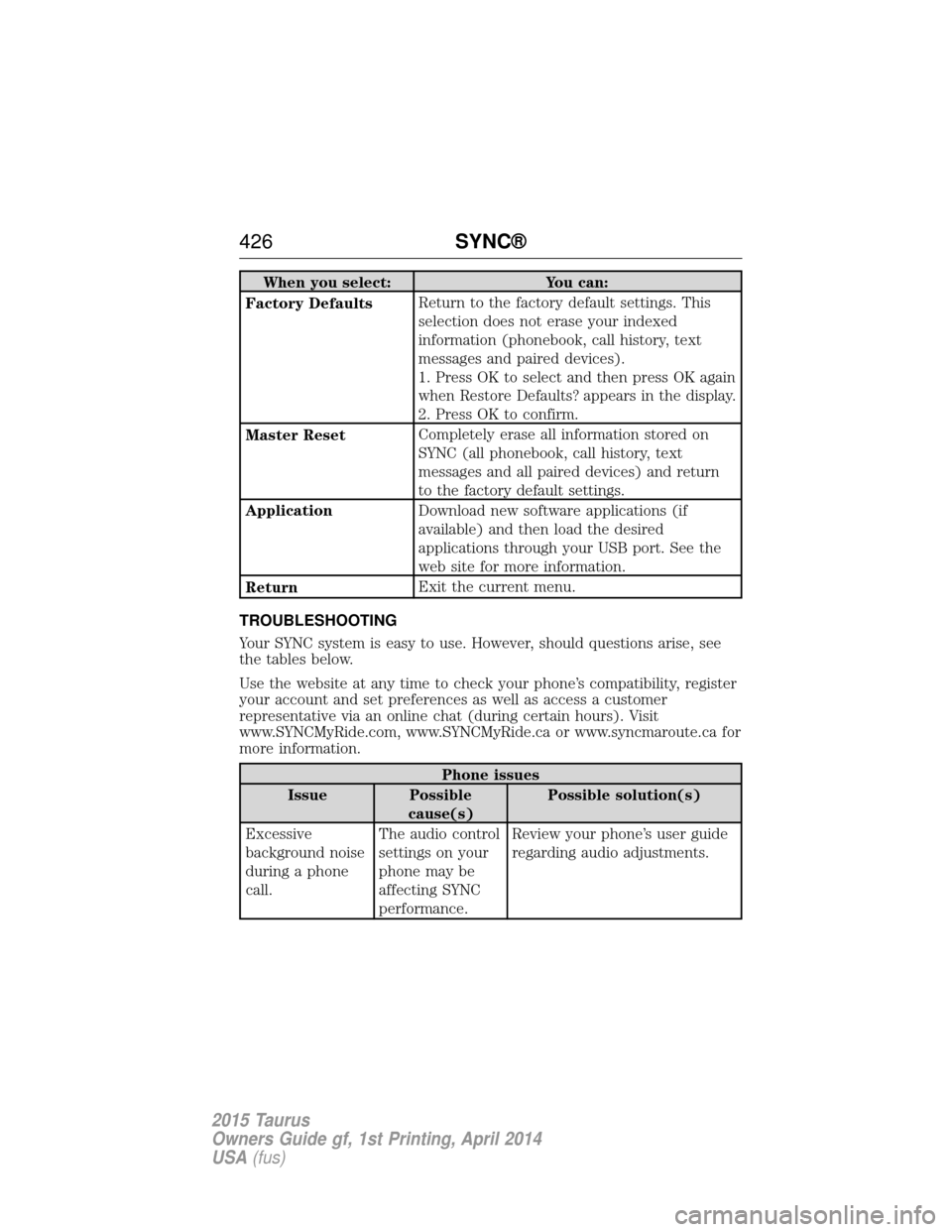
When you select:You can:
Factory Defaults Return to the factory default settings. This
selection does not erase your indexed
information (phonebook, call history, text
messages and paired devices).
1. Press OK to select and then press OK again
when Restore Defaults? appears in the display.
2. Press OK to confirm.
Master Reset Completely erase all information stored on
SYNC (all phonebook, call history, text
messages and all paired devices) and return
to the factory default settings.
Application Download new software applications (if
available) and then load the desired
applications through your USB port. See the
web site for more information.
Return Exit the current menu.
TROUBLESHOOTING
Your SYNC system is easy to use. However, should questions arise, see
the tables below.
Use the website at any time to check your phone’s compatibility, register
your account and set preferences as well as access a customer
representative via an online chat (during certain hours). Visit
www.SYNCMyRide.com, www.SYNCMyRide.ca or www.syncmaroute.ca for
more information.
Phone issues
Issue Possible cause(s) Possible solution(s)
Excessive
background noise
during a phone
call. The audio control
settings on your
phone may be
affecting SYNC
performance.Review your phone’s user guide
regarding audio adjustments.
426
SYNC®
2015 Taurus
Owners Guide gf, 1st Printing, April 2014
USA(fus)
Page 430 of 558
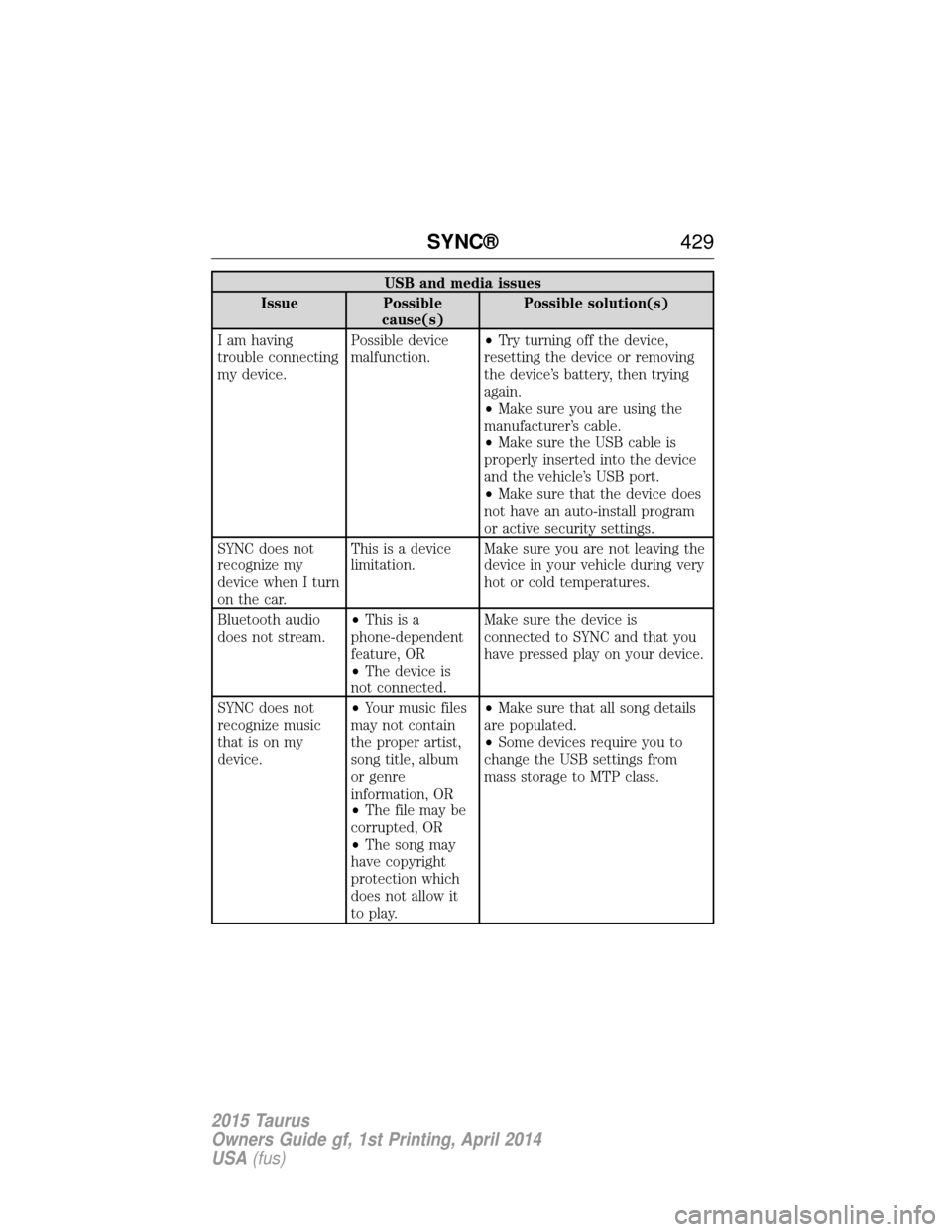
USB and media issues
Issue Possible cause(s) Possible solution(s)
I am having
trouble connecting
my device. Possible device
malfunction.
•
Try turning off the device,
resetting the device or removing
the device’s battery, then trying
again.
• Make sure you are using the
manufacturer’s cable.
• Make sure the USB cable is
properly inserted into the device
and the vehicle’s USB port.
• Make sure that the device does
not have an auto-install program
or active security settings.
SYNC does not
recognize my
device when I turn
on the car. This is a device
limitation.
Make sure you are not leaving the
device in your vehicle during very
hot or cold temperatures.
Bluetooth audio
does not stream. •
Thisisa
phone-dependent
feature, OR
• The device is
not connected. Make sure the device is
connected to SYNC and that you
have pressed play on your device.
SYNC does not
recognize music
that is on my
device. •
Your music files
may not contain
the proper artist,
song title, album
or genre
information, OR
• The file may be
corrupted, OR
• The song may
have copyright
protection which
does not allow it
to play. •
Make sure that all song details
are populated.
• Some devices require you to
change the USB settings from
mass storage to MTP class.
SYNC® 429
2015 Taurus
Owners Guide gf, 1st Printing, April 2014
USA(fus)
Page 434 of 558
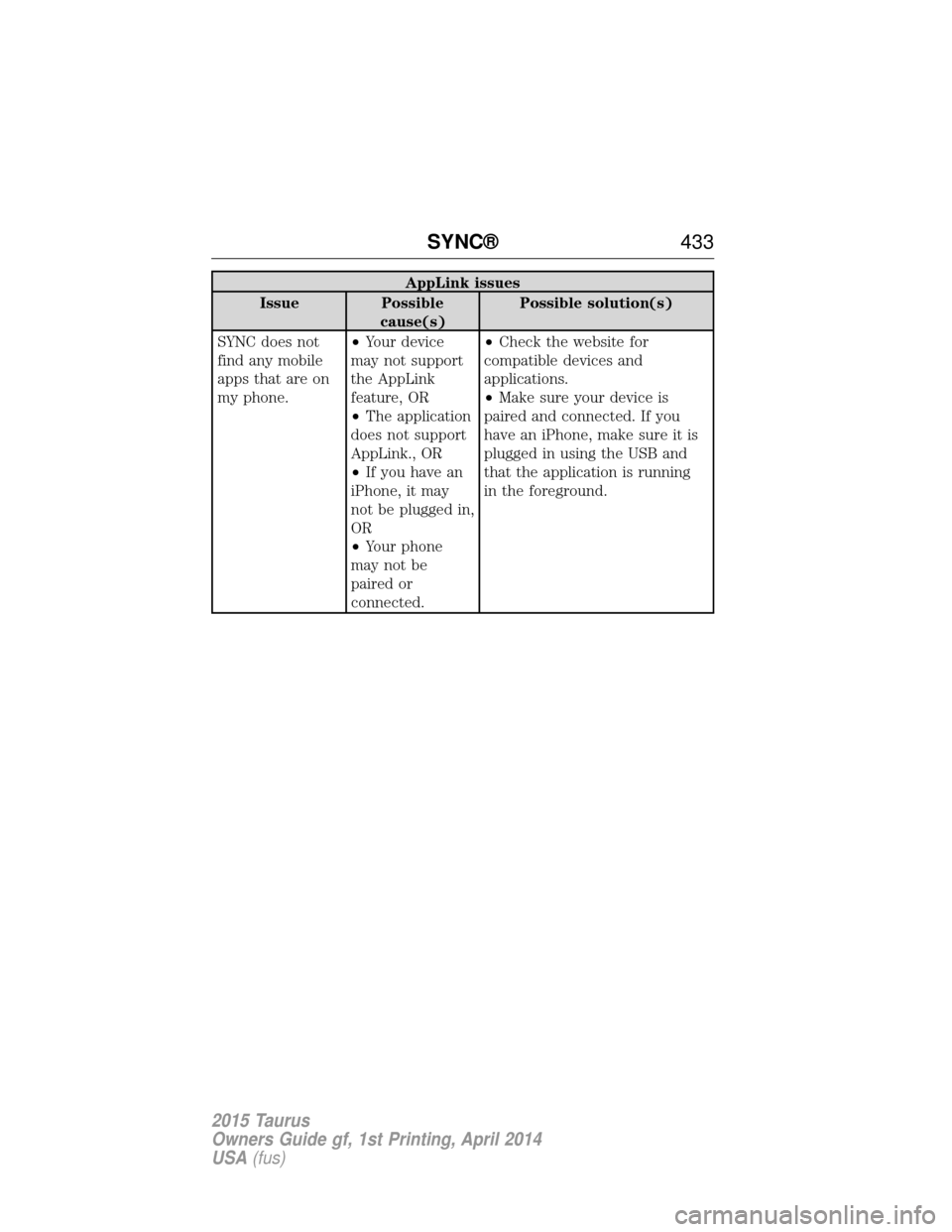
AppLink issues
Issue Possible cause(s) Possible solution(s)
SYNC does not
find any mobile
apps that are on
my phone. •
Your device
may not support
the AppLink
feature, OR
• The application
does not support
AppLink., OR
• If you have an
iPhone, it may
not be plugged in,
OR
• Your phone
may not be
paired or
connected. •
Check the website for
compatible devices and
applications.
• Make sure your device is
paired and connected. If you
have an iPhone, make sure it is
plugged in using the USB and
that the application is running
in the foreground.
SYNC® 433
2015 Taurus
Owners Guide gf, 1st Printing, April 2014
USA(fus)
Page 437 of 558
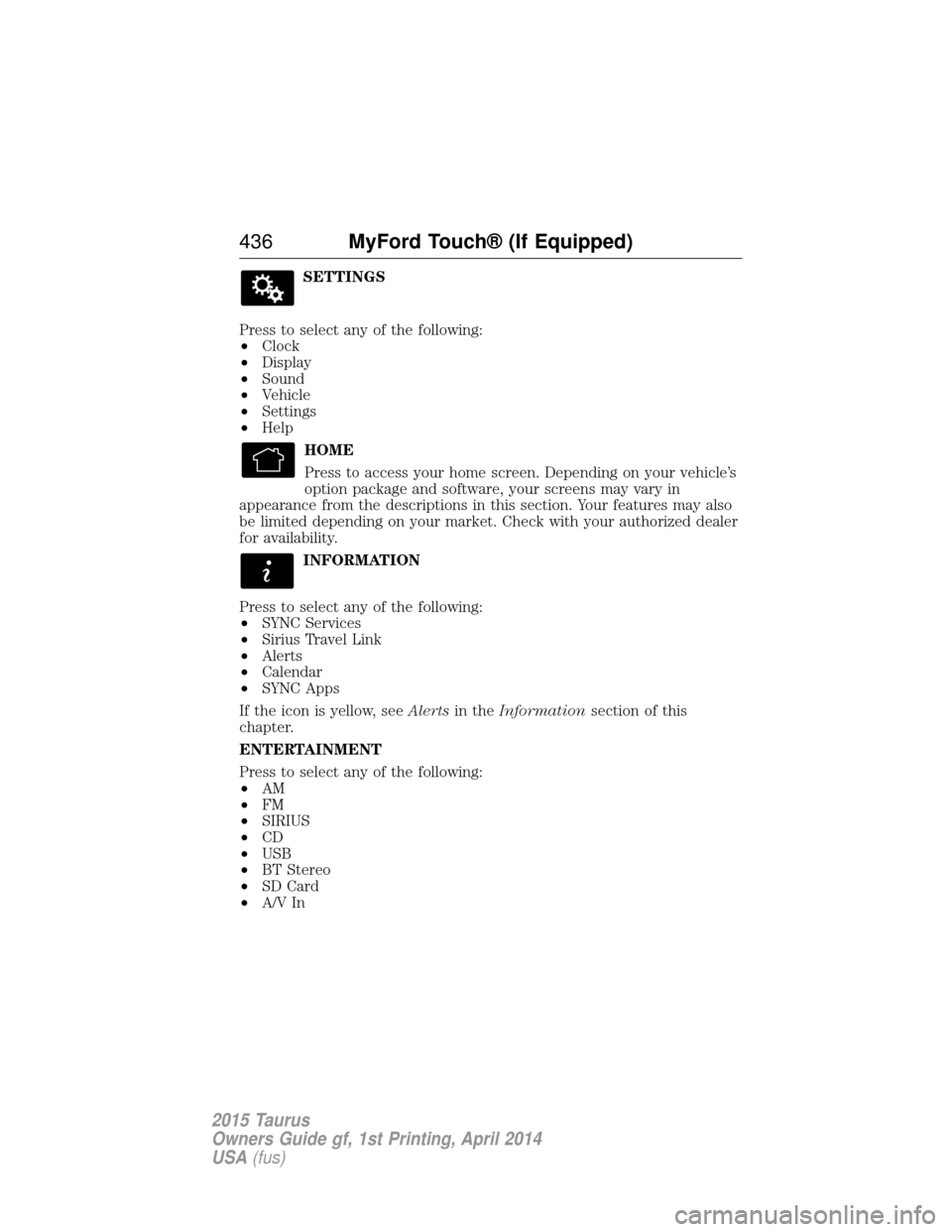
SETTINGS
Press to select any of the following:
• Clock
• Display
• Sound
• Vehicle
• Settings
• Help
HOME
Press to access your home screen. Depending on your vehicle’s
option package and software, your screens may vary in
appearance from the descriptions in this section. Your features may also
be limited depending on your market. Check with your authorized dealer
for availability.
INFORMATION
Press to select any of the following:
• SYNC Services
• Sirius Travel Link
• Alerts
• Calendar
• SYNC Apps
If the icon is yellow, see Alertsin theInformation section of this
chapter.
ENTERTAINMENT
Press to select any of the following:
• AM
• FM
• SIRIUS
• CD
• USB
• BT Stereo
• SD Card
• A/V In
436 MyFord Touch® (If Equipped)
2015 Taurus
Owners Guide gf, 1st Printing, April 2014
USA(fus)
Page 438 of 558
Using the Touch-sensitive Controls on Your System
To turn a feature on and off, just touch the graphic with your finger. To
get the best performance from the touch-sensitive controls:
•
Do not press hard on the controls. They are sensitive to light touch.
• Use your bare finger to touch the center of a touch-control graphic.
Touching off-center of the graphic may affect operation of a nearby control.
• Make sure your hands are clean and dry.
• Keep metal and other conductive material away from the surface of the
touchscreen as this may cause electronic interference (for example,
inadvertently turning on a feature other than the one you meant to turn on).
Depending on your vehicle and option package, you may also have these
controls on your bezel:
•
Power: Switch the media or climate features off and on.
• VOL: Control the volume of playing media.
• Seek and Tune buttons: Use as you normally would in media modes.
• Eject: Eject a CD from the entertainment system.
• SOURCE: Touch the word repeatedly to see all available media modes.
The screen does not change, but you see the media change in the lower
left status bar.
• SOUND: Touch the word to access the Sound menu where you can
adjust settings such as: Bass, Treble, Midrange, Balance and Fade, THX
Deep Note Demo, DSP (Digital Signal Processing), Occupancy Mode
and Speed Compensated Volume. (Your vehicle may not have all of
these sound options.)
• Climate control: Control the temperature, fan speed or settings of the
climate control system.
Using Your Steering Wheel Controls
Depending on your vehicle and option package, you can use your
steering wheel controls to interact with the touchscreen system.
• VOL: Control the volume of audio output.
• SEEK:
• While in radio mode, press to seek between memory presets or
press and hold to seek between stations.
• While in USB or CD mode, press to seek between stations or press
and hold to fast seek.
• Voice: Press to start a voice session. Press again and hold to end a
voice session.
• Phone: Press to answer a call, or to switch between calls. Press and
hold to end a call, or to reject and incoming call.
See the Steering Wheel chapter for more information.
MyFord Touch® (If Equipped) 437
2015 Taurus
Owners Guide gf, 1st Printing, April 2014
USA(fus)
Page 440 of 558
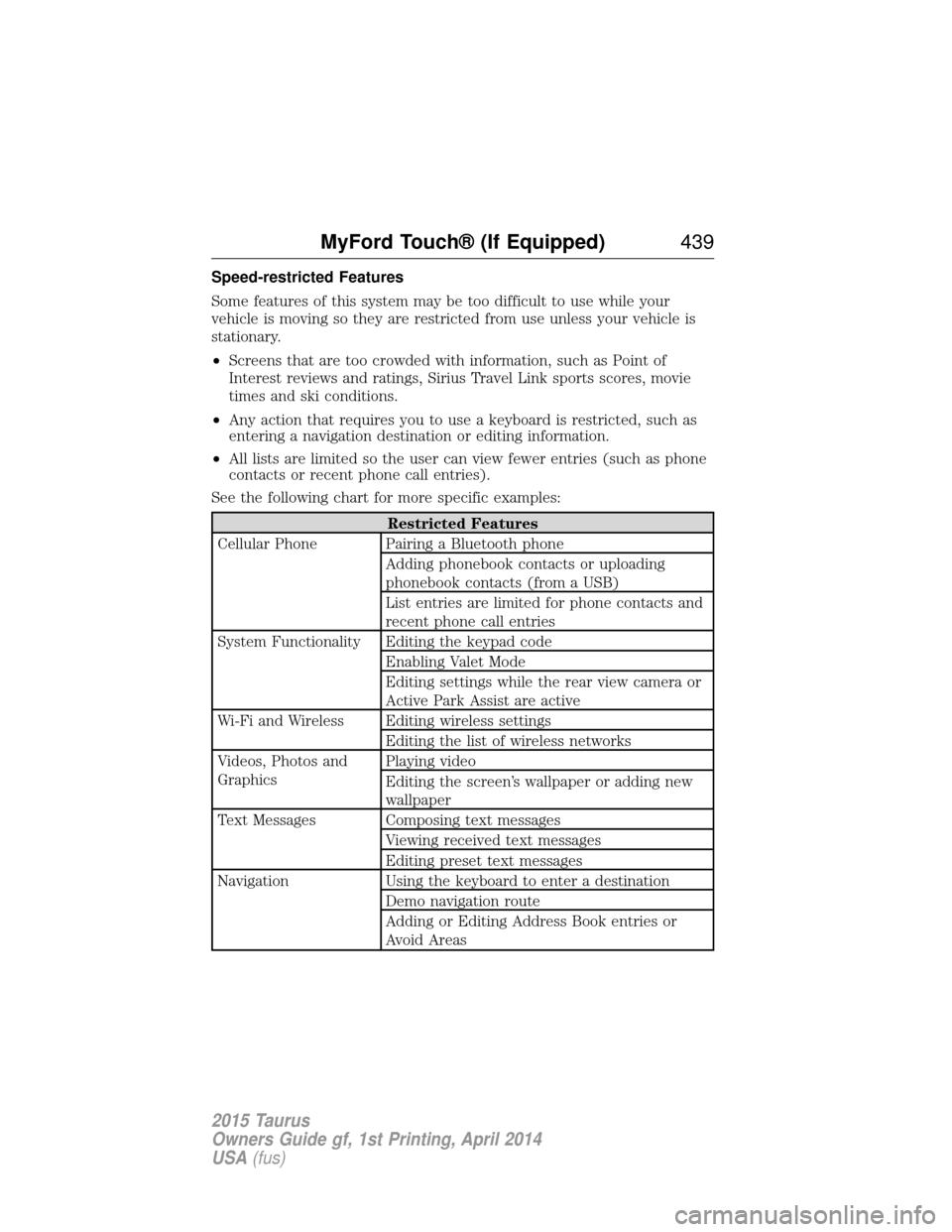
Speed-restricted Features
Some features of this system may be too difficult to use while your
vehicle is moving so they are restricted from use unless your vehicle is
stationary.
•Screens that are too crowded with information, such as Point of
Interest reviews and ratings, Sirius Travel Link sports scores, movie
times and ski conditions.
• Any action that requires you to use a keyboard is restricted, such as
entering a navigation destination or editing information.
• All lists are limited so the user can view fewer entries (such as phone
contacts or recent phone call entries).
See the following chart for more specific examples:
Restricted Features
Cellular Phone Pairing a Bluetooth phone Adding phonebook contacts or uploading
phonebook contacts (from a USB)
List entries are limited for phone contacts and
recent phone call entries
System Functionality Editing the keypad code Enabling Valet Mode
Editing settings while the rear view camera or
Active Park Assist are active
Wi-Fi and Wireless Editing wireless settings Editing the list of wireless networks
Videos, Photos and
Graphics Playing video
Editing the screen’s wallpaper or adding new
wallpaper
Text Messages Composing text messages Viewing received text messages
Editing preset text messages
Navigation Using the keyboard to enter a destination Demo navigation route
Adding or Editing Address Book entries or
Avoid Areas
MyFord Touch® (If Equipped) 439
2015 Taurus
Owners Guide gf, 1st Printing, April 2014
USA(fus)