change wheel FORD TAURUS 2015 6.G User Guide
[x] Cancel search | Manufacturer: FORD, Model Year: 2015, Model line: TAURUS, Model: FORD TAURUS 2015 6.GPages: 558, PDF Size: 4.42 MB
Page 225 of 558
LANE KEEPING SYSTEM (IF EQUIPPED)
WARNING:The system is designed to aid the driver. It is not
intended to replace the driver’s attention and judgment. The
driver is still responsible to drive with due care and attention.
The system detects unintentional drifting toward the outside of the lane
and alerts and/or aids the driver to stay in the lane through the steering
system and instrument cluster display. The system automatically detects
and tracks the road lane markings using a camera that is mounted
behind the interior rear view mirror.
Note: The system works above 40 mph (64 km/h).
Note: The system works as long as one lane marking can be detected by
the camera.
Note: If the camera is blocked or if the windshield is damaged, the
system may not function.
Note: When Aid mode is on and the system detects no driver steering
activity for a short period after system activation, the system alerts the
driver to keep their hands on the steering wheel. The system may detect
a light touch or grip on the steering wheel as hands-off driving.
Switching the System On and Off
Press the button located on the center console to switch the
system on or off.
Note: The system on/off setting is stored until it is manual changed,
unless a MyKey® is detected. If a MyKey® is detected, the system is
defaulted to on and the mode is set to Alert.
Note: If a MyKey® is detected, pressing the button will not affect the
on/off status of the system. Only the Mode and Intensity settings can be
changed when a MyKey® is present.
System Settings
The system has one standard feature setting and one optional setting
menu available. To view or adjust the settings, refer to the Information
Displays chapter. The last-known selection for each of these settings is
stored by the system. You do not need to readjust your settings each
time you turn on the system.
Mode: This setting allows you to enable one of the system features.
224 Driving Aids
2015 Taurus
Owners Guide gf, 1st Printing, April 2014
USA(fus)
Page 317 of 558
General
•Store all vehicles in a dry, ventilated place.
• Protect from sunlight, if possible.
• If vehicles are stored outside, they require regular maintenance to
protect against rust and damage.
Body
• Wash vehicle thoroughly to remove dirt, grease, oil, tar or mud from
exterior surfaces, rear-wheel housing and underside of front fenders.
• Periodically wash vehicles stored in exposed locations.
• Touch up raw or primed metal to prevent rust.
• Cover chrome and stainless steel parts with a thick coat of auto wax
to prevent discoloration. Re-wax as necessary when the vehicle is
washed.
• Lubricate hood latch, all door latches and trunk lid hinges with a light
grade oil.
• Cover interior trim to prevent fading.
• Keep all rubber parts free from oil and solvents.
Engine
• The engine oil and filter should be changed prior to storage, as used
engine oil contains contaminates that may cause engine damage.
• Start the engine every 15 days. Run at fast idle until it reaches normal
operating temperature.
• With your foot on the brake, shift through all the gears while the
engine is running.
Fuel system
• Fill the fuel tank with high-quality fuel until the first automatic shutoff
of the fuel pump nozzle.
Cooling system
• Protect against freezing temperatures.
• When removing vehicle from storage, check coolant fluid level.
Confirm there are no cooling system leaks, and fluid is at the
recommended level.
Battery
• Check and recharge as necessary. Keep connections clean.
316 Vehicle Care
2015 Taurus
Owners Guide gf, 1st Printing, April 2014
USA(fus)
Page 322 of 558
INFORMATION CONTAINED ON THE TIRE SIDEWALL
Both U.S. and Canada Federal regulations require tire manufacturers to
place standardized information on the sidewall of all tires. This
information identifies and describes the fundamental characteristics of
the tire and also provides a U.S. DOT Tire Identification Number for
safety standard certification and in case of a recall.
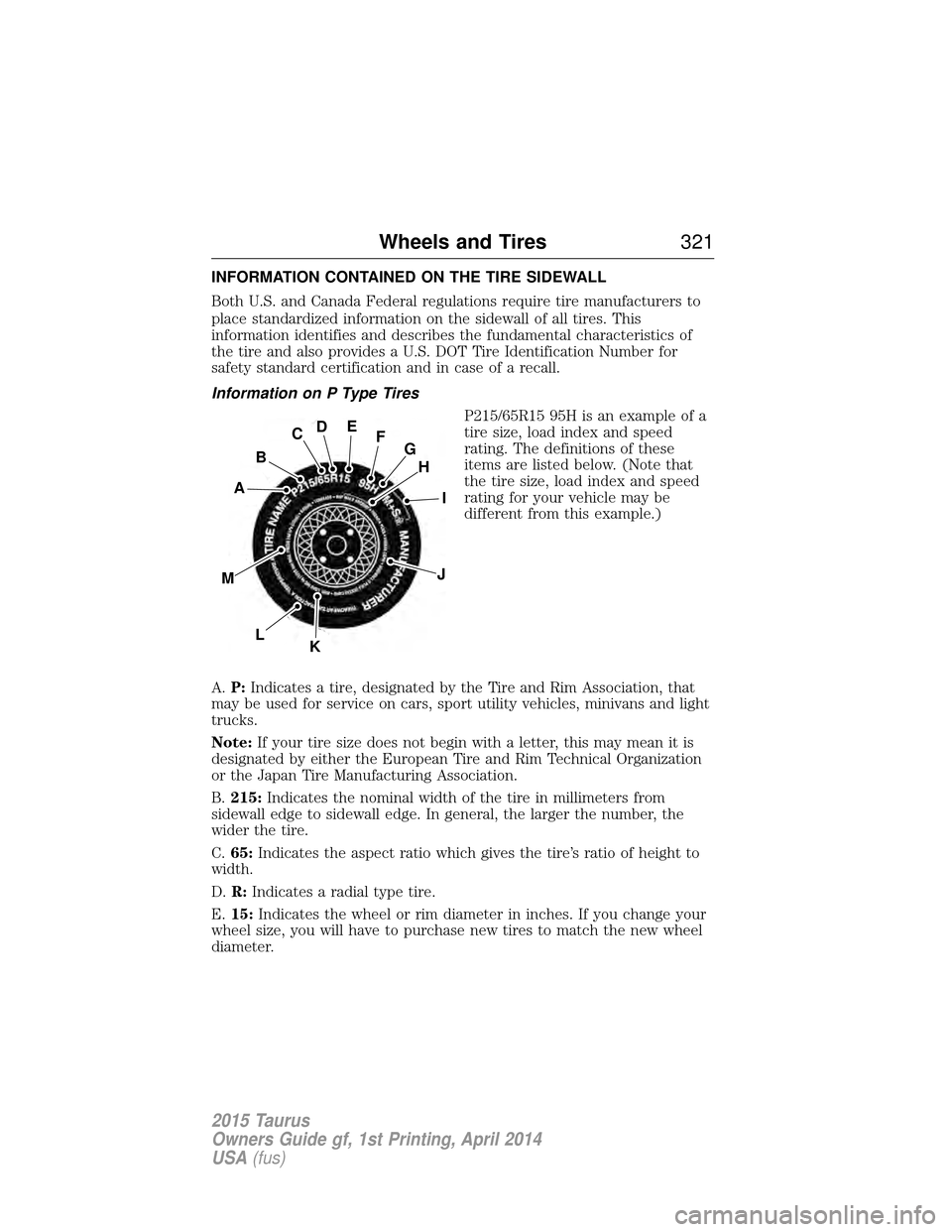
Information on P Type TiresP215/65R15 95H is an example of a
tire size, load index and speed
rating. The definitions of these
items are listed below. (Note that
the tire size, load index and speed
rating for your vehicle may be
different from this example.)
A. P: Indicates a tire, designated by the Tire and Rim Association, that
may be used for service on cars, sport utility vehicles, minivans and light
trucks.
Note: If your tire size does not begin with a letter, this may mean it is
designated by either the European Tire and Rim Technical Organization
or the Japan Tire Manufacturing Association.
B. 215: Indicates the nominal width of the tire in millimeters from
sidewall edge to sidewall edge. In general, the larger the number, the
wider the tire.
C. 65: Indicates the aspect ratio which gives the tire’s ratio of height to
width.
D. R: Indicates a radial type tire.
E. 15: Indicates the wheel or rim diameter in inches. If you change your
wheel size, you will have to purchase new tires to match the new wheel
diameter.
H
I
J
KL
M
A
B
CDEFG
Wheels and Tires 321
2015 Taurus
Owners Guide gf, 1st Printing, April 2014
USA(fus)
Page 326 of 558
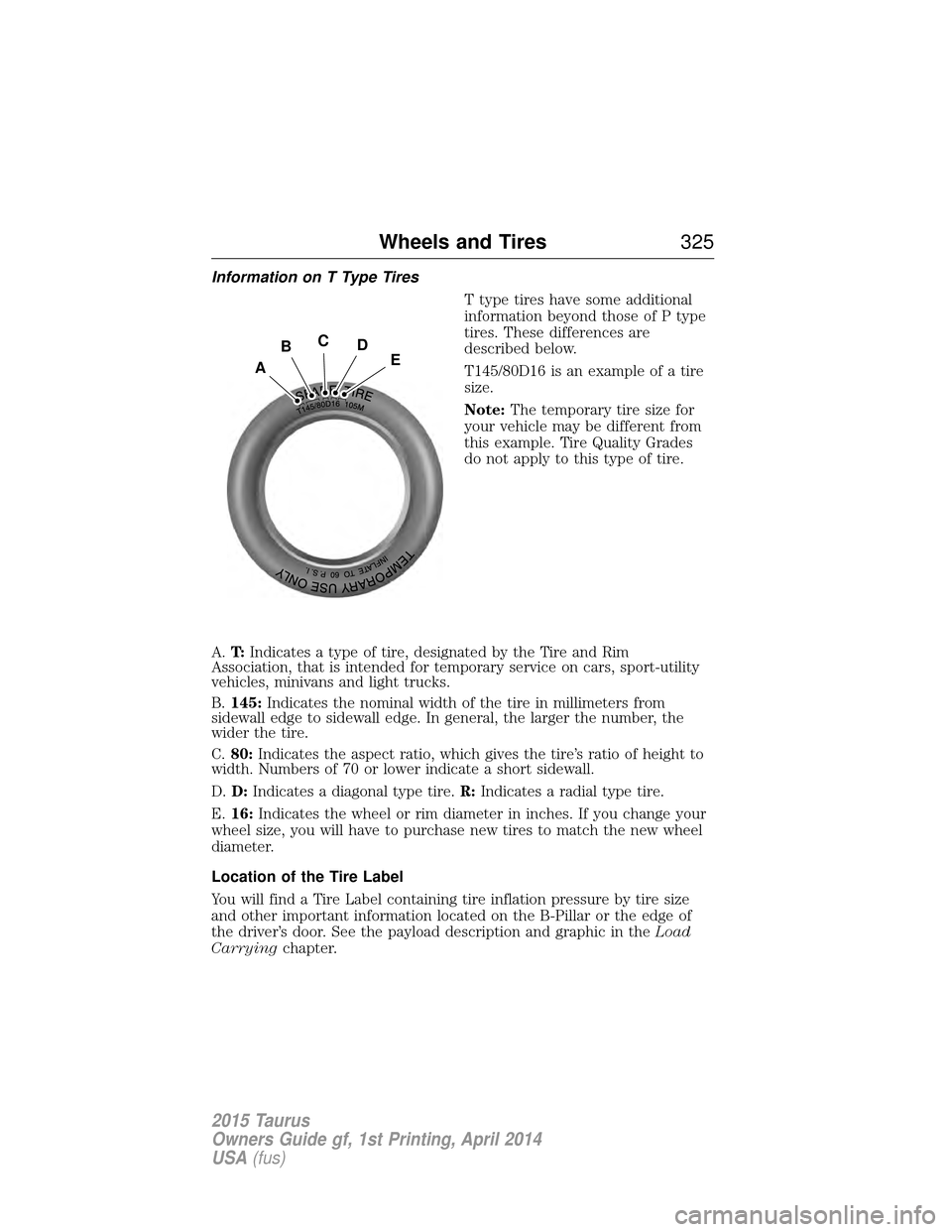
Information on T Type TiresT type tires have some additional
information beyond those of P type
tires. These differences are
described below.
T145/80D16 is an example of a tire
size.
Note:The temporary tire size for
your vehicle may be different from
this example. Tire Quality Grades
do not apply to this type of tire.
A. T:Indicates a type of tire, designated by the Tire and Rim
Association, that is intended for temporary service on cars, sport-utility
vehicles, minivans and light trucks.
B. 145: Indicates the nominal width of the tire in millimeters from
sidewall edge to sidewall edge. In general, the larger the number, the
wider the tire.
C. 80: Indicates the aspect ratio, which gives the tire’s ratio of height to
width. Numbers of 70 or lower indicate a short sidewall.
D. D: Indicates a diagonal type tire. R:Indicates a radial type tire.
E. 16: Indicates the wheel or rim diameter in inches. If you change your
wheel size, you will have to purchase new tires to match the new wheel
diameter.
Location of the Tire Label
You will find a Tire Label containing tire inflation pressure by tire size
and other important information located on the B-Pillar or the edge of
the driver’s door. See the payload description and graphic in the Load
Carrying chapter.
A
BCDE
Wheels and Tires 325
2015 Taurus
Owners Guide gf, 1st Printing, April 2014
USA(fus)
Page 328 of 558
on the Safety Compliance Certification Label (affixed to either the door
hinge pillar, door-latch post, or the door edge that meets the door-latch
post, next to the driver’s seating position), or Tire Label which is located
on the B-Pillar or the edge of the driver’s door. The cold inflation
pressure should never be set lower than the recommended pressure on
the Safety Compliance Certification Label or Tire Label.
When weather temperature changes occur, tire inflation pressures also
change. A 10°F (6°C) temperature drop can cause a corresponding drop
of 1 psi (7 kPa) in inflation pressure. Check your tire pressures
frequently and adjust them to the proper pressure which can be found
on the Safety Compliance Certification Label or Tire Label.
To check the pressure in your tire(s):
1. Make sure the tires are cool, meaning they are not hot from driving
even a mile.
Note:If you are checking tire pressure when the tire is hot (for
example, driven more than 1 mile [1.6 kilometers]), never bleed or
reduce air pressure. The tires are hot from driving and it is normal for
pressures to increase above recommended cold pressures. A hot tire at
or below recommended cold inflation pressure could be significantly
under-inflated.
Note: If you have to drive a distance to get air for your tire(s), check
and record the tire pressure first and add the appropriate air pressure
when you get to the pump. It is normal for tires to heat up and the air
pressure inside to go up as you drive.
2. Remove the cap from the valve on one tire, then firmly press the tire
gauge onto the valve and measure the pressure.
3. Add enough air to reach the recommended air pressure.
Note: If you overfill the tire, release air by pressing on the metal stem in
the center of the valve. Then recheck the pressure with your tire gauge.
4. Replace the valve cap.
5. Repeat this procedure for each tire, including the spare.
Note: Some spare tires operate at a higher inflation pressure than the
other tires. For T-type mini-spare tires, see the Dissimilar Spare Tire
and Wheel Assembly Information section. Store and maintain at 60 psi
(4.15 bar). For full-size and dissimilar spare tires, see Dissimilar Spare
Tire and Wheel Assembly Information underChanging a Road Wheel
in this chapter. Store and maintain at the higher of the front and rear
inflation pressure as shown on the Tire Label.
Wheels and Tires 327
2015 Taurus
Owners Guide gf, 1st Printing, April 2014
USA(fus)
Page 342 of 558
•Ground clearance and parking at curbs
• Winter weather driving capability
• Wet weather driving capability
• All-wheel driving capability (if applicable)
• Load leveling adjustment (if applicable)
When driving with the full-size dissimilar spare tire and wheel assembly,
additional caution should be given to:
• towing a trailer.
• driving vehicles equipped with a camper body.
• driving vehicles with a load on the cargo rack.
Drive cautiously when using a full-size dissimilar spare tire and wheel,
and seek service as soon as possible.
Tire Change Procedure
WARNING: When one of the front wheels is off the ground, the
transmission alone will not prevent your vehicle from moving or
slipping off the jack, even if the transmission is in park (P).
WARNING:To help prevent your vehicle from moving when you
change a tire, be sure to place the transmission in park (P),set
the parking brake and block (in both directions) the wheel that is
diagonally opposite (other side and end of the vehicle) to the tire being
changed.
WARNING: Never get underneath a vehicle that is supported
only by a jack. If your vehicle slips off the jack, you or someone
else could be seriously injured.
WARNING: Do not attempt to change a tire on the side of your
vehicle close to moving traffic. Pull far enough off the road to
avoid the danger of being hit when operating the jack or changing the
wheel.
Wheels and Tires 341
2015 Taurus
Owners Guide gf, 1st Printing, April 2014
USA(fus)
Page 393 of 558
USING VOICE RECOGNITION
This system helps you control many features using voice commands. This
allows you to keep your hands on the wheel and focus on what is in
front of you.
Initiating a Voice SessionPush the voice icon; a tone sounds and Listening appears in the
display. Say any of the following:
Say: If you want to:
“Phone” Make calls.
“USB” Access the device connected to your USB
port.
“Bluetooth Audio” Stream audio from your phone.
“Line in” Access the device connected to the auxiliary
input jack.
“Cancel” Cancel the requested action.
“SYNC” Return to the main menu.
“Voice settings” Adjust the level of voice interaction and feedback.
“Vehicle Health Report” Run a vehicle health report.
*
“Services” Access the SYNC Services portal.*
“Mobile apps”Access mobile applications.*
“Help”Hear a list of voice commands available in the
current mode.
*If equipped, U.S. only.
System Interaction and Feedback
The system provides feedback through audible tones, prompts, questions
and spoken confirmations depending on the situation and the chosen
level of interaction (voice settings). You can customize the voice
recognition system to provide more or less instruction and feedback.
The default setting is to a higher level of interaction in order to help you
learn to use the system. You can change these settings at any time.
392 SYNC®
2015 Taurus
Owners Guide gf, 1st Printing, April 2014
USA(fus)
Page 438 of 558
Using the Touch-sensitive Controls on Your System
To turn a feature on and off, just touch the graphic with your finger. To
get the best performance from the touch-sensitive controls:
•
Do not press hard on the controls. They are sensitive to light touch.
• Use your bare finger to touch the center of a touch-control graphic.
Touching off-center of the graphic may affect operation of a nearby control.
• Make sure your hands are clean and dry.
• Keep metal and other conductive material away from the surface of the
touchscreen as this may cause electronic interference (for example,
inadvertently turning on a feature other than the one you meant to turn on).
Depending on your vehicle and option package, you may also have these
controls on your bezel:
•
Power: Switch the media or climate features off and on.
• VOL: Control the volume of playing media.
• Seek and Tune buttons: Use as you normally would in media modes.
• Eject: Eject a CD from the entertainment system.
• SOURCE: Touch the word repeatedly to see all available media modes.
The screen does not change, but you see the media change in the lower
left status bar.
• SOUND: Touch the word to access the Sound menu where you can
adjust settings such as: Bass, Treble, Midrange, Balance and Fade, THX
Deep Note Demo, DSP (Digital Signal Processing), Occupancy Mode
and Speed Compensated Volume. (Your vehicle may not have all of
these sound options.)
• Climate control: Control the temperature, fan speed or settings of the
climate control system.
Using Your Steering Wheel Controls
Depending on your vehicle and option package, you can use your
steering wheel controls to interact with the touchscreen system.
• VOL: Control the volume of audio output.
• SEEK:
• While in radio mode, press to seek between memory presets or
press and hold to seek between stations.
• While in USB or CD mode, press to seek between stations or press
and hold to fast seek.
• Voice: Press to start a voice session. Press again and hold to end a
voice session.
• Phone: Press to answer a call, or to switch between calls. Press and
hold to end a call, or to reject and incoming call.
See the Steering Wheel chapter for more information.
MyFord Touch® (If Equipped) 437
2015 Taurus
Owners Guide gf, 1st Printing, April 2014
USA(fus)
Page 442 of 558
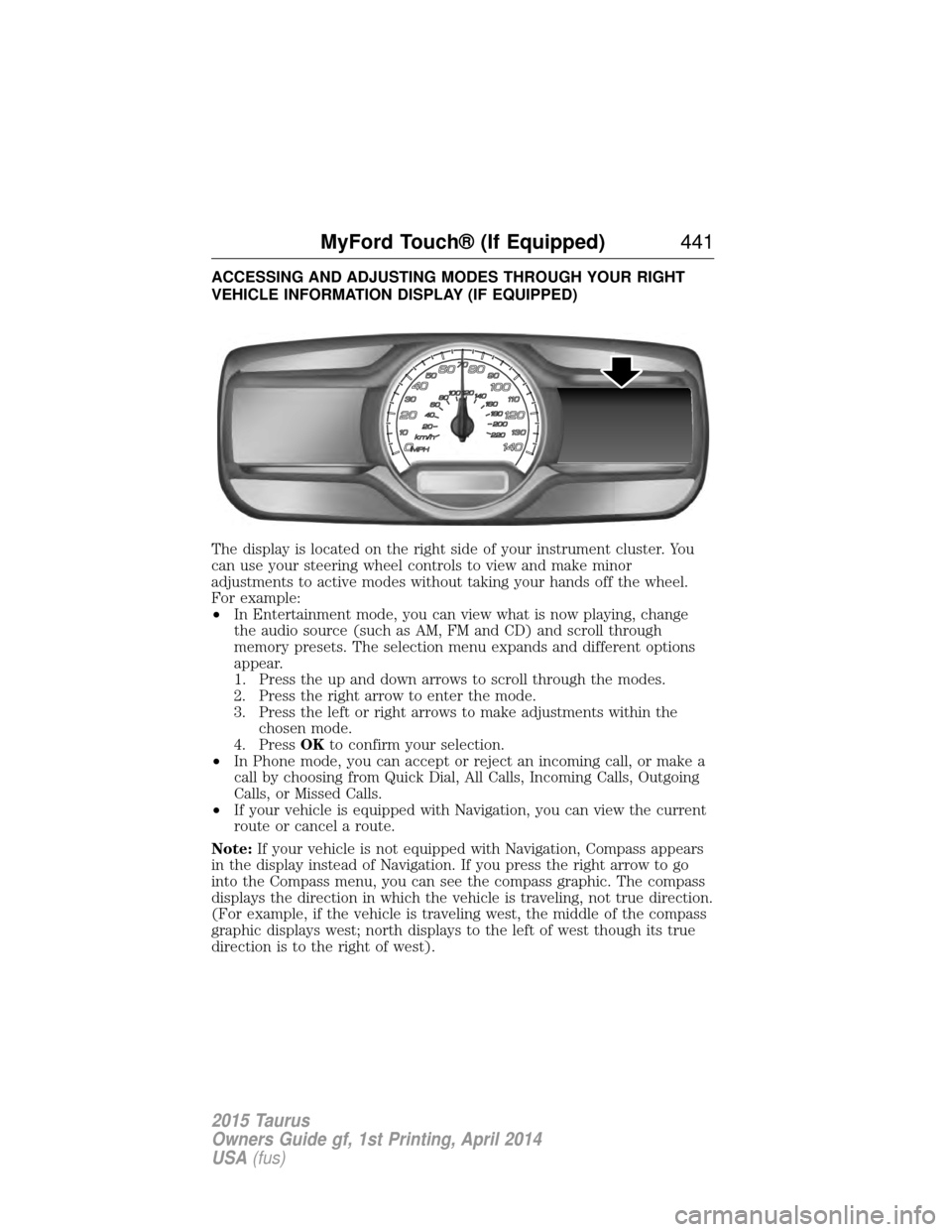
ACCESSING AND ADJUSTING MODES THROUGH YOUR RIGHT
VEHICLE INFORMATION DISPLAY (IF EQUIPPED)
The display is located on the right side of your instrument cluster. You
can use your steering wheel controls to view and make minor
adjustments to active modes without taking your hands off the wheel.
For example:
•In Entertainment mode, you can view what is now playing, change
the audio source (such as AM, FM and CD) and scroll through
memory presets. The selection menu expands and different options
appear.
1. Press the up and down arrows to scroll through the modes.
2. Press the right arrow to enter the mode.
3. Press the left or right arrows to make adjustments within the chosen mode.
4. Press OKto confirm your selection.
• In Phone mode, you can accept or reject an incoming call, or make a
call by choosing from Quick Dial, All Calls, Incoming Calls, Outgoing
Calls, or Missed Calls.
• If your vehicle is equipped with Navigation, you can view the current
route or cancel a route.
Note: If your vehicle is not equipped with Navigation, Compass appears
in the display instead of Navigation. If you press the right arrow to go
into the Compass menu, you can see the compass graphic. The compass
displays the direction in which the vehicle is traveling, not true direction.
(For example, if the vehicle is traveling west, the middle of the compass
graphic displays west; north displays to the left of west though its true
direction is to the right of west).
MyFord Touch® (If Equipped) 441
2015 Taurus
Owners Guide gf, 1st Printing, April 2014
USA(fus)
Page 448 of 558
Browsing Device Content
When listening to audio on a device, you can browse through other
devices without having to change sources. For example, if you are
currently listening to audio on an SD card, you can browse all the artists
that are stored on your USB device.Press the voice icon on the steering wheel. When prompted,
you can say:
“BROWSE” within devices “Browse”*
“Browse
“Browse
“Browse Sirius channel guide”**
“Browse SD card”“Browse USB” “Help”
*If you have said “Browse”, you can then say any commands in the
following chart.
**This command is only usable if you have an active subscription to
Sirius satellite radio.
“BROWSE”
“
”
“SD card”**
“Sirius channel guide”*
“USB”**
“Help”
*This command is only usable if you have an active subscription to Sirius
satellite radio.
**For more commands in SD card or USB mode, see the “SD card and
USB Port” section of this chapter.
For a complete list of “Browse” voice commands, see USB and SD card
voice commands andBluetooth audio voice commands in the
following sections.
MyFord Touch® (If Equipped) 447
2015 Taurus
Owners Guide gf, 1st Printing, April 2014
USA(fus)