USB port FORD TAURUS 2015 6.G Owner's Manual
[x] Cancel search | Manufacturer: FORD, Model Year: 2015, Model line: TAURUS, Model: FORD TAURUS 2015 6.GPages: 558, PDF Size: 4.42 MB
Page 465 of 558
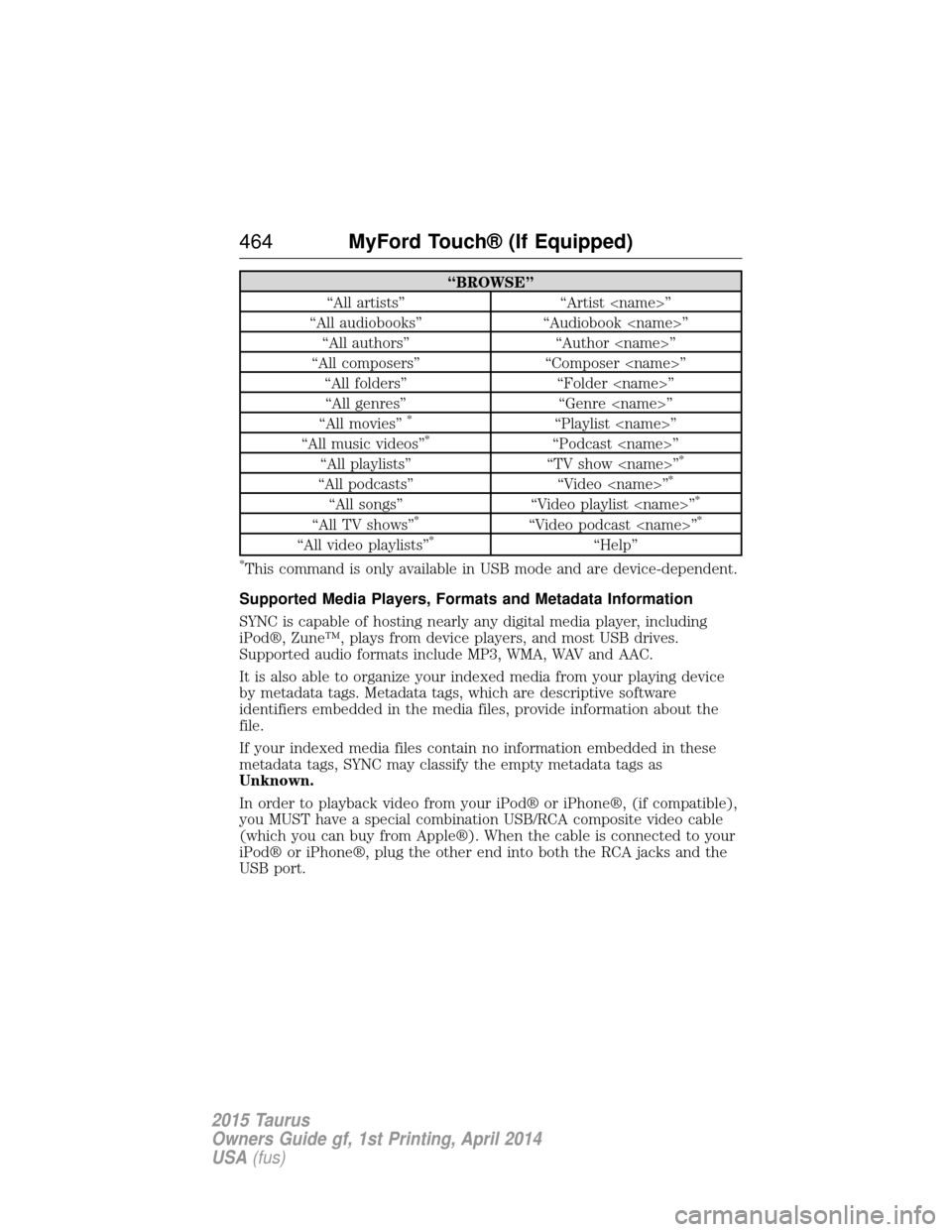
“BROWSE”
“All artists” “Artist
“All audiobooks” “Audiobook
“All composers” “Composer
“All movies”
*“Playlist
“All music videos”*“Podcast
“All playlists” “TV show
“All podcasts” “Video
“All songs”“Video playlist
“All TV shows”*“Video podcast
“All video playlists”*“Help”
*This command is only available in USB mode and are device-dependent.
Supported Media Players, Formats and Metadata Information
SYNC is capable of hosting nearly any digital media player, including
iPod®, Zune™, plays from device players, and most USB drives.
Supported audio formats include MP3, WMA, WAV and AAC.
It is also able to organize your indexed media from your playing device
by metadata tags. Metadata tags, which are descriptive software
identifiers embedded in the media files, provide information about the
file.
If your indexed media files contain no information embedded in these
metadata tags, SYNC may classify the empty metadata tags as
Unknown.
In order to playback video from your iPod® or iPhone®, (if compatible),
you MUST have a special combination USB/RCA composite video cable
(which you can buy from Apple®). When the cable is connected to your
iPod® or iPhone®, plug the other end into both the RCA jacks and the
USB port.
464 MyFord Touch® (If Equipped)
2015 Taurus
Owners Guide gf, 1st Printing, April 2014
USA(fus)
Page 467 of 558
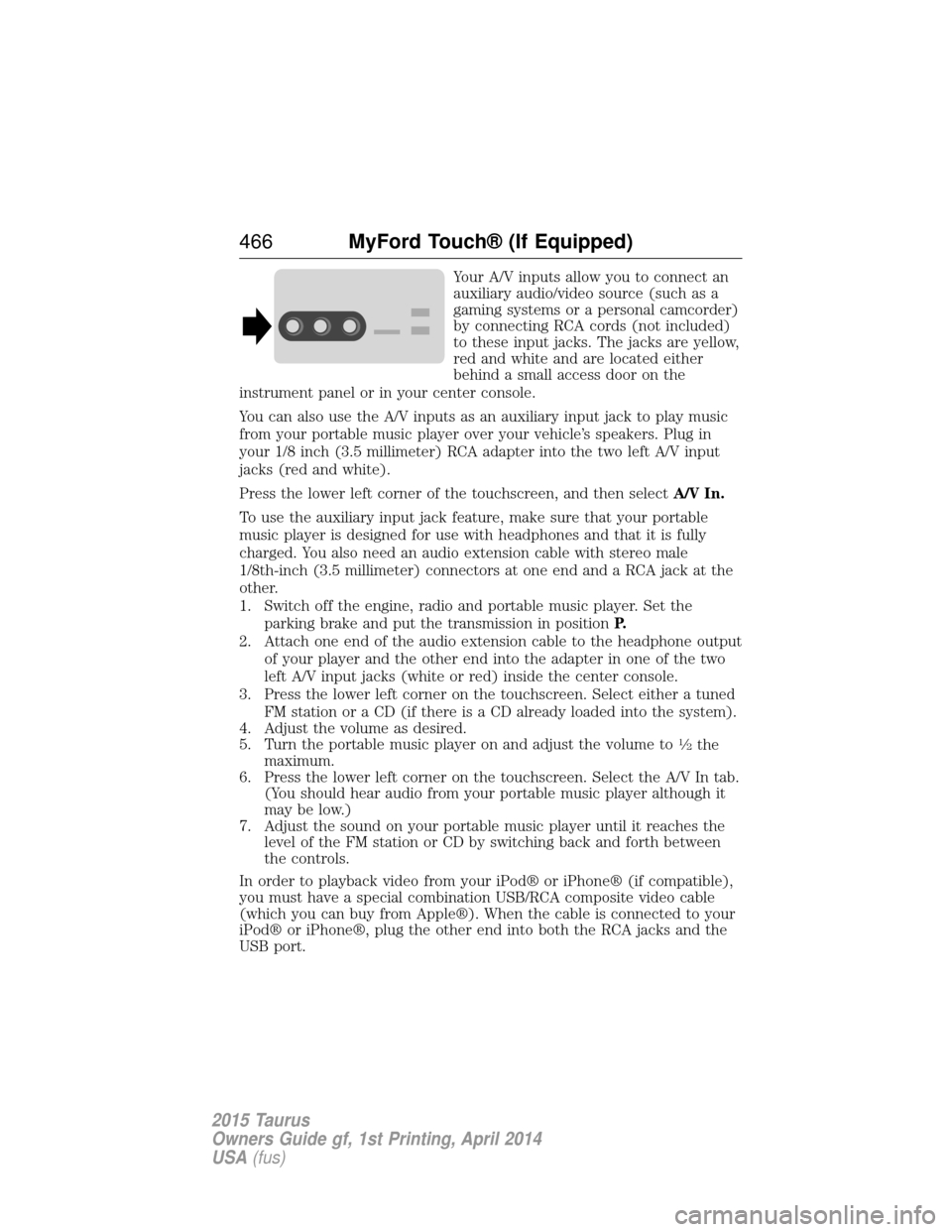
Your A/V inputs allow you to connect an
auxiliary audio/video source (such as a
gaming systems or a personal camcorder)
by connecting RCA cords (not included)
to these input jacks. The jacks are yellow,
red and white and are located either
behind a small access door on the
instrument panel or in your center console.
You can also use the A/V inputs as an auxiliary input jack to play music
from your portable music player over your vehicle’s speakers. Plug in
your 1/8 inch (3.5 millimeter) RCA adapter into the two left A/V input
jacks (red and white).
Press the lower left corner of the touchscreen, and then select A/V In.
To use the auxiliary input jack feature, make sure that your portable
music player is designed for use with headphones and that it is fully
charged. You also need an audio extension cable with stereo male
1/8th-inch (3.5 millimeter) connectors at one end and a RCA jack at the
other.
1. Switch off the engine, radio and portable music player. Set the parking brake and put the transmission in position P.
2. Attach one end of the audio extension cable to the headphone output of your player and the other end into the adapter in one of the two
left A/V input jacks (white or red) inside the center console.
3. Press the lower left corner on the touchscreen. Select either a tuned FM station or a CD (if there is a CD already loaded into the system).
4. Adjust the volume as desired.
5. Turn the portable music player on and adjust the volume to
12the
maximum.
6. Press the lower left corner on the touchscreen. Select the A/V In tab. (You should hear audio from your portable music player although it
may be low.)
7. Adjust the sound on your portable music player until it reaches the level of the FM station or CD by switching back and forth between
the controls.
In order to playback video from your iPod® or iPhone® (if compatible),
you must have a special combination USB/RCA composite video cable
(which you can buy from Apple®). When the cable is connected to your
iPod® or iPhone®, plug the other end into both the RCA jacks and the
USB port.
466 MyFord Touch® (If Equipped)
2015 Taurus
Owners Guide gf, 1st Printing, April 2014
USA(fus)
Page 497 of 558
Wireless & Internet
Your system has a Wi-Fi feature that creates a wireless network within
your vehicle, thereby allowing other devices (such as personal computers
or phones) in your vehicle to speak to each other, share files or play
games. Using this Wi-Fi feature, everyone in your vehicle can also gain
access the internet if you have a USB mobile broadband connection
inside your vehicle, your phone supports personal area networking and if
you park outside a wireless hotspot.Press the Settings icon > Settings>Wireless & Internet,
then select from the following:
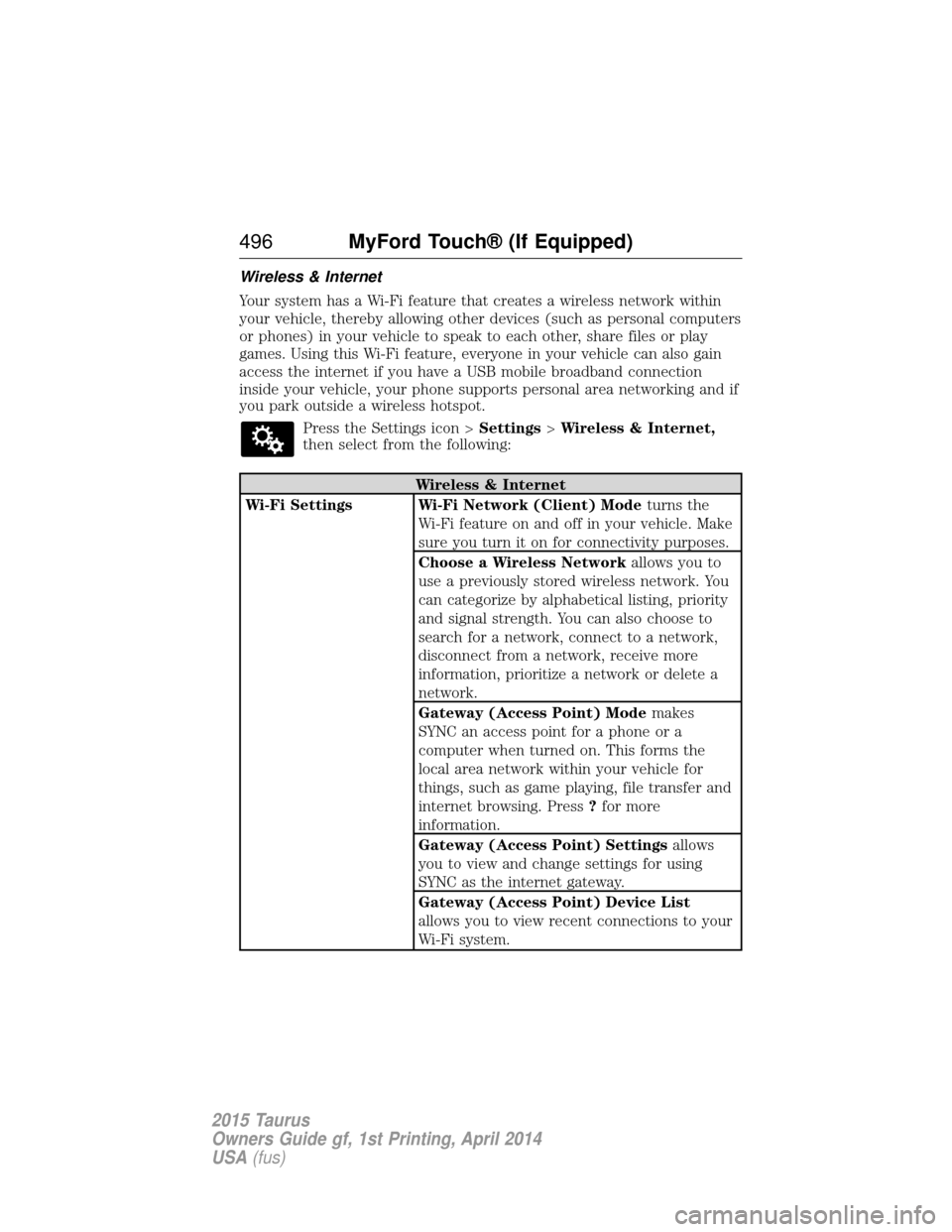
Wireless & Internet
Wi-Fi Settings Wi-Fi Network (Client) Mode turns the
Wi-Fi feature on and off in your vehicle. Make
sure you turn it on for connectivity purposes.
Choose a Wireless Network allows you to
use a previously stored wireless network. You
can categorize by alphabetical listing, priority
and signal strength. You can also choose to
search for a network, connect to a network,
disconnect from a network, receive more
information, prioritize a network or delete a
network.
Gateway (Access Point) Mode makes
SYNC an access point for a phone or a
computer when turned on. This forms the
local area network within your vehicle for
things, such as game playing, file transfer and
internet browsing. Press ?for more
information.
Gateway (Access Point) Settings allows
you to view and change settings for using
SYNC as the internet gateway.
Gateway (Access Point) Device List
allows you to view recent connections to your
Wi-Fi system.
496 MyFord Touch® (If Equipped)
2015 Taurus
Owners Guide gf, 1st Printing, April 2014
USA(fus)
Page 551 of 558
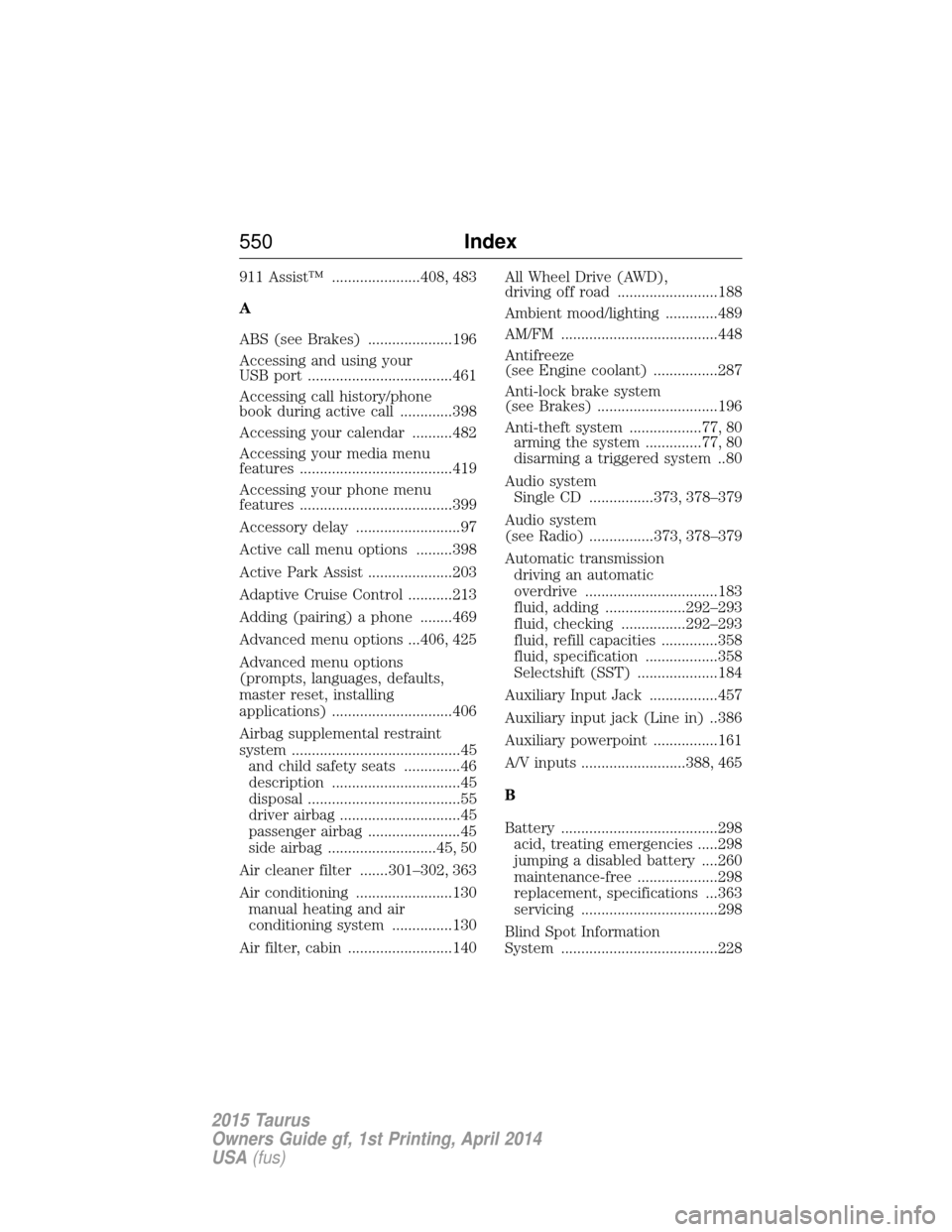
911 Assist™ ......................408, 483
A
ABS (see Brakes) .....................196
Accessing and using your
USB port ....................................461
Accessing call history/phone
book during active call .............398
Accessing your calendar ..........482
Accessing your media menu
features ......................................419
Accessing your phone menu
features ......................................399
Accessory delay ..........................97
Active call menu options .........398
Active Park Assist .....................203
Adaptive Cruise Control ...........213
Adding (pairing) a phone ........469
Advanced menu options ...406, 425
Advanced menu options
(prompts, languages, defaults,
master reset, installing
applications) ..............................406
Airbag supplemental restraint
system ..........................................45and child safety seats ..............46
description ................................45
disposal ......................................55
driver airbag ..............................45
passenger airbag .......................45
side airbag ...........................45, 50
Air cleaner filter .......301–302, 363
Air conditioning ........................130 manual heating and air
conditioning system ...............130
Air filter, cabin ..........................140 All Wheel Drive (AWD),
driving off road .........................188
Ambient mood/lighting .............489
AM/FM .......................................448
Antifreeze
(see Engine coolant) ................287
Anti-lock brake system
(see Brakes) ..............................196
Anti-theft system ..................77, 80
arming the system ..............77, 80
disarming a triggered system ..80
Audio system Single CD ................373, 378–379
Audio system
(see Radio) ................373, 378–379
Automatic transmission driving an automatic
overdrive .................................183
fluid, adding ....................292–293
fluid, checking ................292–293
fluid, refill capacities ..............358
fluid, specification ..................358
Selectshift (SST) ....................184
Auxiliary Input Jack .................457
Auxiliary input jack (Line in) ..386
Auxiliary powerpoint ................161
A/V inputs ..........................388, 465
B
Battery .......................................298 acid, treating emergencies .....298
jumping a disabled battery ....260
maintenance-free ....................298
replacement, specifications ...363
servicing ..................................298
Blind Spot Information
System .......................................228
550 Index
2015 Taurus
Owners Guide gf, 1st Printing, April 2014
USA(fus)
Page 556 of 558
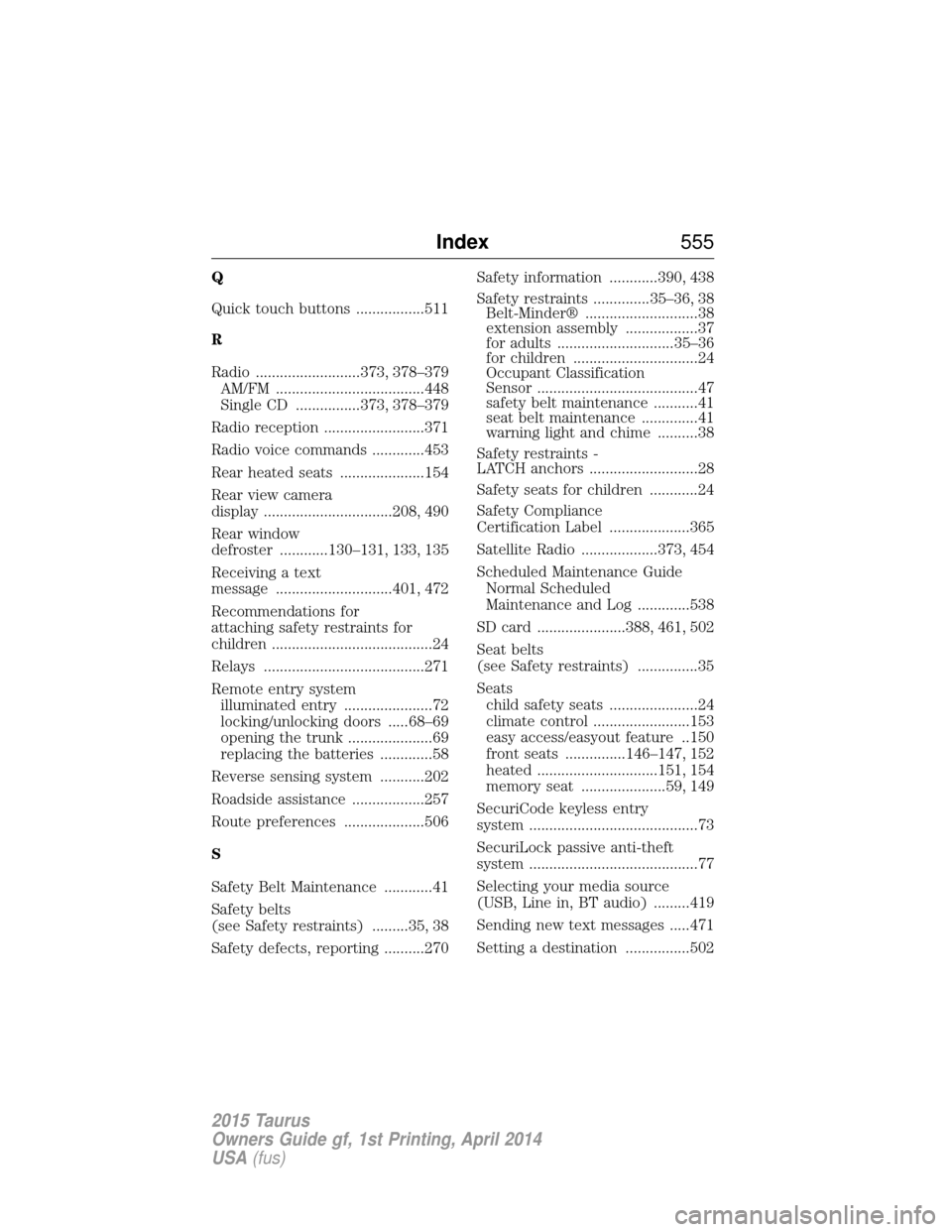
Q
Quick touch buttons .................511
R
Radio ..........................373, 378–379AM/FM .....................................448
Single CD ................373, 378–379
Radio reception .........................371
Radio voice commands .............453
Rear heated seats .....................154
Rear view camera
display ................................208, 490
Rear window
defroster ............130–131, 133, 135
Receiving a text
message .............................401, 472
Recommendations for
attaching safety restraints for
children ........................................24
Relays ........................................271
Remote entry system illuminated entry ......................72
locking/unlocking doors .....68–69
opening the trunk .....................69
replacing the batteries .............58
Reverse sensing system ...........202
Roadside assistance ..................257
Route preferences ....................506
S
Safety Belt Maintenance ............41
Safety belts
(see Safety restraints) .........35, 38
Safety defects, reporting ..........270 Safety information ............390, 438
Safety restraints ..............35–36, 38
Belt-Minder® ............................38
extension assembly ..................37
for adults .............................35–36
for children ...............................24
Occupant Classification
Sensor ........................................47
safety belt maintenance ...........41
seat belt maintenance ..............41
warning light and chime ..........38
Safety restraints -
LATCH anchors ...........................28
Safety seats for children ............24
Safety Compliance
Certification Label ....................365
Satellite Radio ...................373, 454
Scheduled Maintenance Guide Normal Scheduled
Maintenance and Log .............538
SD card ......................388, 461, 502
Seat belts
(see Safety restraints) ...............35
Seats child safety seats ......................24
climate control ........................153
easy access/easyout feature ..150
front seats ...............146–147, 152
heated ..............................151, 154
memory seat .....................59, 149
SecuriCode keyless entry
system ..........................................73
SecuriLock passive anti-theft
system ..........................................77
Selecting your media source
(USB, Line in, BT audio) .........419
Sending new text messages .....471
Setting a destination ................502
Index 555
2015 Taurus
Owners Guide gf, 1st Printing, April 2014
USA(fus)
Page 558 of 558
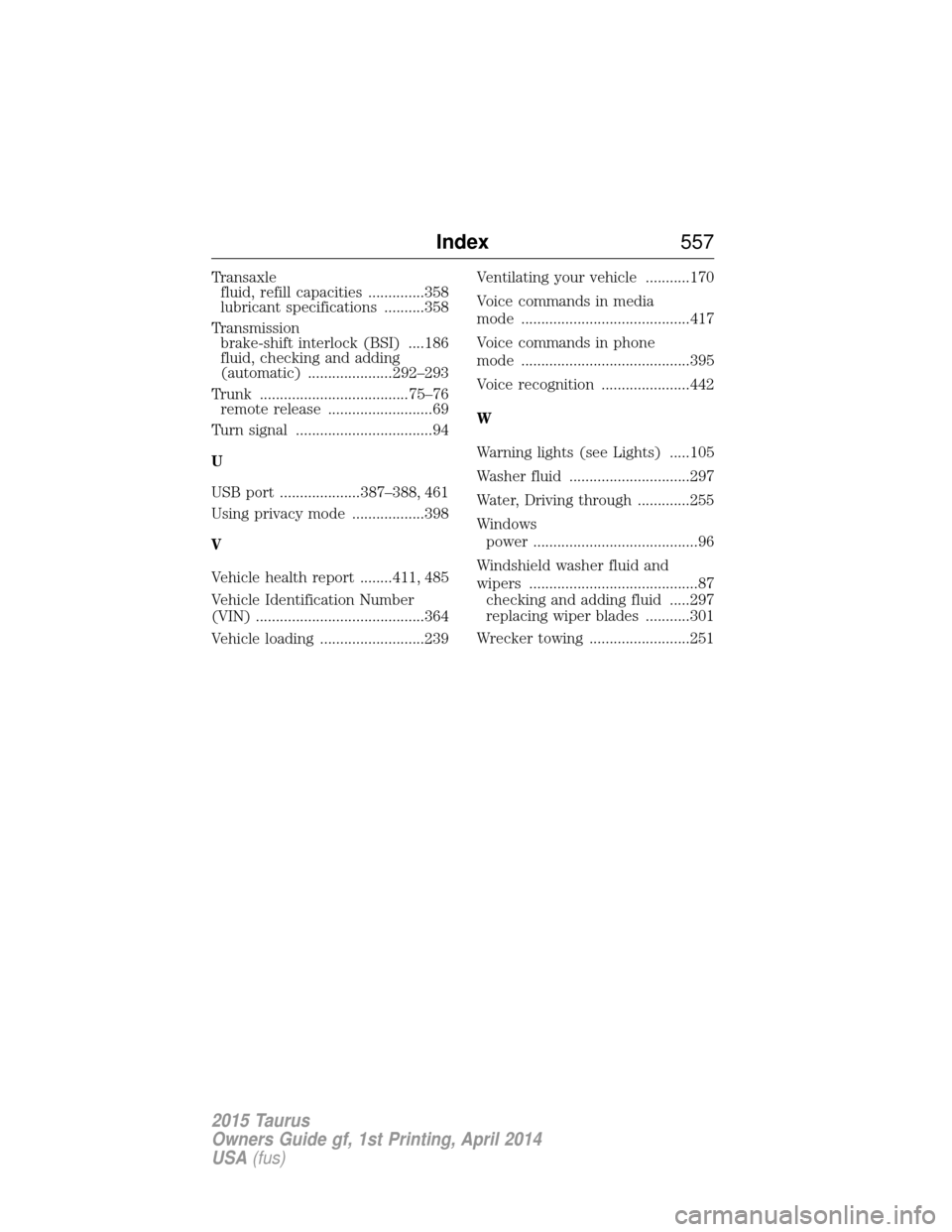
Transaxlefluid, refill capacities ..............358
lubricant specifications ..........358
Transmission brake-shift interlock (BSI) ....186
fluid, checking and adding
(automatic) .....................292–293
Trunk .....................................75–76 remote release ..........................69
Turn signal ..................................94
U
USB port ....................387–388, 461
Using privacy mode ..................398
V
Vehicle health report ........411, 485
Vehicle Identification Number
(VIN) ..........................................364
Vehicle loading ..........................239 Ventilating your vehicle ...........170
Voice commands in media
mode ..........................................417
Voice commands in phone
mode ..........................................395
Voice recognition ......................442
W
Warning lights (see Lights) .....105
Washer fluid ..............................297
Water, Driving through .............255
Windows
power .........................................96
Windshield washer fluid and
wipers ..........................................87 checking and adding fluid .....297
replacing wiper blades ...........301
Wrecker towing .........................251
Index 557
2015 Taurus
Owners Guide gf, 1st Printing, April 2014
USA(fus)