key FORD TAURUS 2015 6.G Workshop Manual
[x] Cancel search | Manufacturer: FORD, Model Year: 2015, Model line: TAURUS, Model: FORD TAURUS 2015 6.GPages: 558, PDF Size: 4.42 MB
Page 203 of 558
If a fault is present in the system, a warning message appears in the
information display and does not allow the driver to switch the faulted
system on.
Note:If your vehicle is equipped with MyKey®, it is possible to prevent
turning the sensing system off. Refer to the MyKey®chapter.
Using the Rear Sensing System
The rear sensors are only active when the transmission is in R.Asthe
vehicle moves closer to the obstacle, the rate of the audible warning
increases. When the obstacle is fewer than 12 inches (30 centimeters)
away, the warning sounds continuously. If a stationary or receding object
is detected farther than 12 inches (30 centimeters) from the side of the
vehicle, the tone sounds for only three seconds. Once the system detects
an object approaching, the warning sounds again.
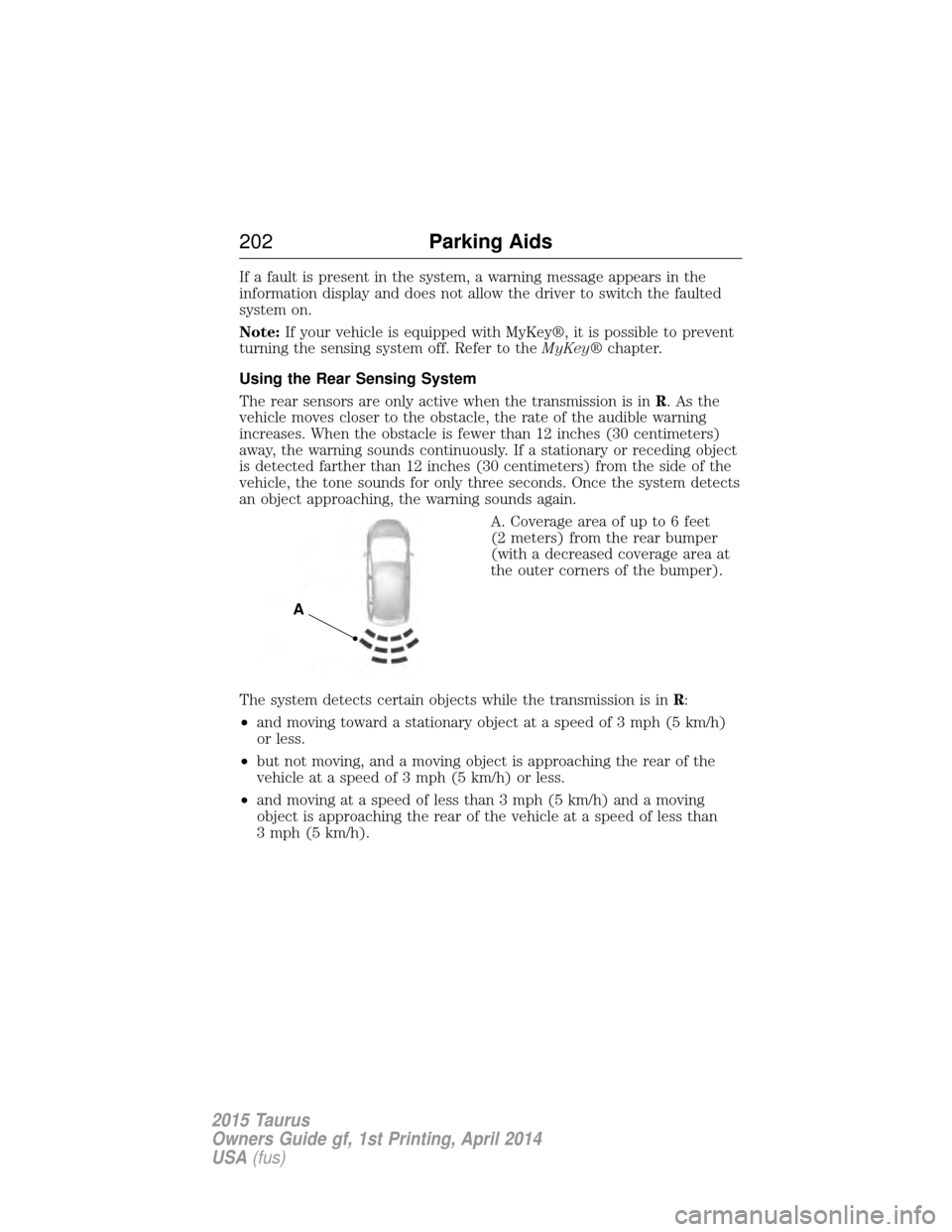
A. Coverage area of up to 6 feet
(2 meters) from the rear bumper
(with a decreased coverage area at
the outer corners of the bumper).
The system detects certain objects while the transmission is in R:
• and moving toward a stationary object at a speed of 3 mph (5 km/h)
or less.
• but not moving, and a moving object is approaching the rear of the
vehicle at a speed of 3 mph (5 km/h) or less.
• and moving at a speed of less than 3 mph (5 km/h) and a moving
object is approaching the rear of the vehicle at a speed of less than
3 mph (5 km/h).
A
202 Parking Aids
2015 Taurus
Owners Guide gf, 1st Printing, April 2014
USA(fus)
Page 222 of 558
CauseAction
Swirling water, or snow or ice on
the surface of the road may
interfere with the radar signals. Do not use system in these
conditions because it may not
detect any vehicle ahead.
You are in a desert or remote area
with no other vehicles and no
roadside objects. Wait a short time or switch to
normal cruise control.
Due to the nature of radar technology, it is possible to get a blockage
warning and not be blocked. This can happen, for example, when driving
in sparse rural or desert environments. A false blocked condition will
either self-clear or clear after a key cycle.
Switching to Normal Cruise Control
WARNING: Normal cruise control will not brake due to slower
vehicles. Always be aware of which mode is selected and apply
the brakes when necessary.
You can manually change from adaptive cruise control to normal cruise
control through the information display. The cruise control indicator light will replace the adaptive
cruise control indicator light if normal cruise control is selected.
The gap setting will not be displayed, the system will not
automatically respond to lead vehicles and automatic braking will not be
activated. The system will default to adaptive cruise control when the
engine is started.
Cruise Control 221
2015 Taurus
Owners Guide gf, 1st Printing, April 2014
USA(fus)
Page 225 of 558
LANE KEEPING SYSTEM (IF EQUIPPED)
WARNING:The system is designed to aid the driver. It is not
intended to replace the driver’s attention and judgment. The
driver is still responsible to drive with due care and attention.
The system detects unintentional drifting toward the outside of the lane
and alerts and/or aids the driver to stay in the lane through the steering
system and instrument cluster display. The system automatically detects
and tracks the road lane markings using a camera that is mounted
behind the interior rear view mirror.
Note: The system works above 40 mph (64 km/h).
Note: The system works as long as one lane marking can be detected by
the camera.
Note: If the camera is blocked or if the windshield is damaged, the
system may not function.
Note: When Aid mode is on and the system detects no driver steering
activity for a short period after system activation, the system alerts the
driver to keep their hands on the steering wheel. The system may detect
a light touch or grip on the steering wheel as hands-off driving.
Switching the System On and Off
Press the button located on the center console to switch the
system on or off.
Note: The system on/off setting is stored until it is manual changed,
unless a MyKey® is detected. If a MyKey® is detected, the system is
defaulted to on and the mode is set to Alert.
Note: If a MyKey® is detected, pressing the button will not affect the
on/off status of the system. Only the Mode and Intensity settings can be
changed when a MyKey® is present.
System Settings
The system has one standard feature setting and one optional setting
menu available. To view or adjust the settings, refer to the Information
Displays chapter. The last-known selection for each of these settings is
stored by the system. You do not need to readjust your settings each
time you turn on the system.
Mode: This setting allows you to enable one of the system features.
224 Driving Aids
2015 Taurus
Owners Guide gf, 1st Printing, April 2014
USA(fus)
Page 232 of 558
System Sensors
WARNING:Just prior to the system recognizing a blocked
condition and alerting the driver, the number of missed objects
will increase. To help avoid injuries, NEVER use the BLIS® as a
replacement for using the side and rear view mirrors and looking over
your shoulder before changing lanes. BLIS® is not a replacement for
careful driving.
Note: It is possible to get a blockage warning with no blockage present;
this is rare and known as a false blockage warning. A false blocked
condition either self-corrects or clears after a key cycle.
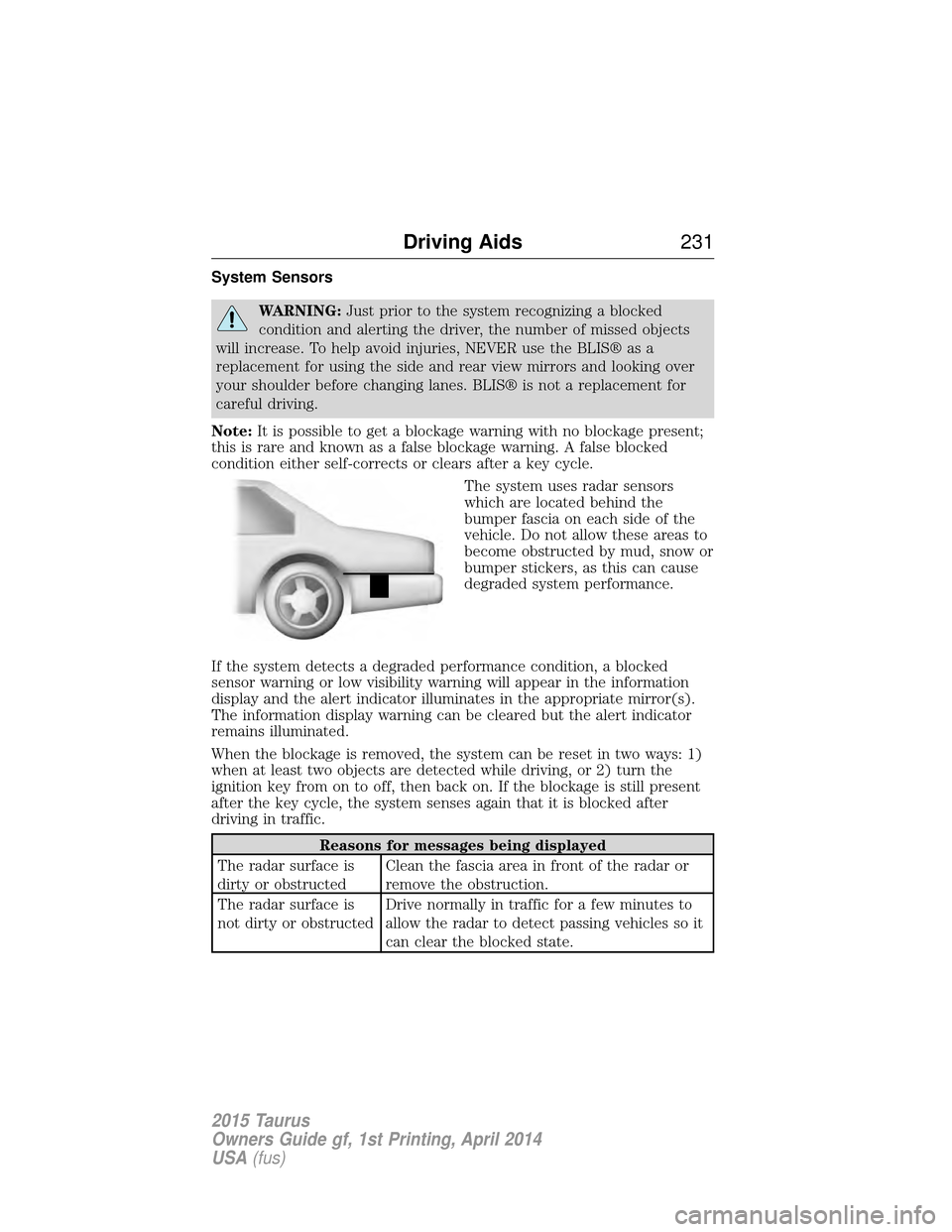
The system uses radar sensors
which are located behind the
bumper fascia on each side of the
vehicle. Do not allow these areas to
become obstructed by mud, snow or
bumper stickers, as this can cause
degraded system performance.
If the system detects a degraded performance condition, a blocked
sensor warning or low visibility warning will appear in the information
display and the alert indicator illuminates in the appropriate mirror(s).
The information display warning can be cleared but the alert indicator
remains illuminated.
When the blockage is removed, the system can be reset in two ways: 1)
when at least two objects are detected while driving, or 2) turn the
ignition key from on to off, then back on. If the blockage is still present
after the key cycle, the system senses again that it is blocked after
driving in traffic.
Reasons for messages being displayed
The radar surface is
dirty or obstructed Clean the fascia area in front of the radar or
remove the obstruction.
The radar surface is
not dirty or obstructed Drive normally in traffic for a few minutes to
allow the radar to detect passing vehicles so it
can clear the blocked state.
Driving Aids
231
2015 Taurus
Owners Guide gf, 1st Printing, April 2014
USA(fus)
Page 258 of 558
ROADSIDE ASSISTANCE
Vehicles Sold in the United States: Getting Roadside Assistance
To fully assist you should you have a vehicle concern, Ford Motor
Company offers a complimentary Roadside Assistance program. This
program is separate from the New Vehicle Limited Warranty. The service
is available:
•24 hours a day, seven days a week.
• For the coverage period listed on the Roadside Assistance Card
included in your Owner’s Manual portfolio.
Roadside assistance will cover:
• A flat tire change with a good spare (except vehicles that have been
supplied with a tire inflation kit).
• Battery jump start.
• Lock-out assistance (key replacement cost is the customer’s
responsibility).
• Fuel delivery – Independent Service Contractors, if not prohibited by
state, local or municipal law, shall deliver up to 2.0 gallons (7.5 liters)
of gasoline or 5.0 gallons (18.9 liters) of diesel fuel to a disabled
vehicle. Fuel delivery service is limited to two no-charge occurrences
within a 12-month period.
• Winch out – available within 100 feet (30.5 meters) of a paved or
county maintained road, no recoveries.
• Towing – Ford eligible vehicles will be towed to an authorized dealer
within 35 miles (56.3 kilometers) of the disablement location or to the
nearest authorized dealer. If a member requests to be towed to an
authorized dealer more than 35 miles (56.3 kilometers) from the
disablement location, the member shall be responsible for any mileage
costs in excess of 35 miles (56.3 kilometers).
Roadside Assistance will include up to $200 coverage for a towed trailer
if the disabled eligible vehicle requires service at the nearest authorized
dealer. If the towing vehicle is operational but the trailer is not, then the
trailer does not qualify for any roadside services.
Roadside Emergencies 257
2015 Taurus
Owners Guide gf, 1st Printing, April 2014
USA(fus)
Page 260 of 558
FUEL SHUTOFF
WARNING:Failure to inspect and if necessary repair fuel leaks
after a collision may increase the risk of fire and serious injury.
Ford Motor Company recommends that the fuel system be inspected by
an authorized dealer after any collision.
In the event of a moderate to severe collision, this vehicle includes a fuel
pump shutoff feature that stops the flow of fuel to the engine. Not every
impact will cause a shutoff.
Should your vehicle shut off after a collision, you may restart your
vehicle. For vehicles equipped with a key system:
1. Switch off the ignition.
2. Switch on the ignition.
3. Repeat Steps 1 and 2 to re-enable fuel pump.
For vehicles equipped with a push button start system:
1. Press the START/STOP button to switch off the ignition.
2. Press the brake pedal and press the START/STOPbutton to start the
vehicle.
3. Remove your foot from the brake pedal and press the START/STOP
button to switch off the ignition.
4. You can either attempt to start the engine by pressing the brake pedal
and the START/STOP button, or switch on the ignition only by pressing
the START/STOP button without pressing the brake pedal. Both ways
re-enable the fuel system.
Note: When you try to restart your vehicle after a fuel shutoff, the
vehicle makes sure that various systems are safe to restart. Once your
vehicle determines that the systems are safe, then the vehicle will allow
you to restart.
Note: In the event that your vehicle does not restart after your third
attempt, contact an authorized dealer.
Roadside Emergencies 259
2015 Taurus
Owners Guide gf, 1st Printing, April 2014
USA(fus)
Page 278 of 558
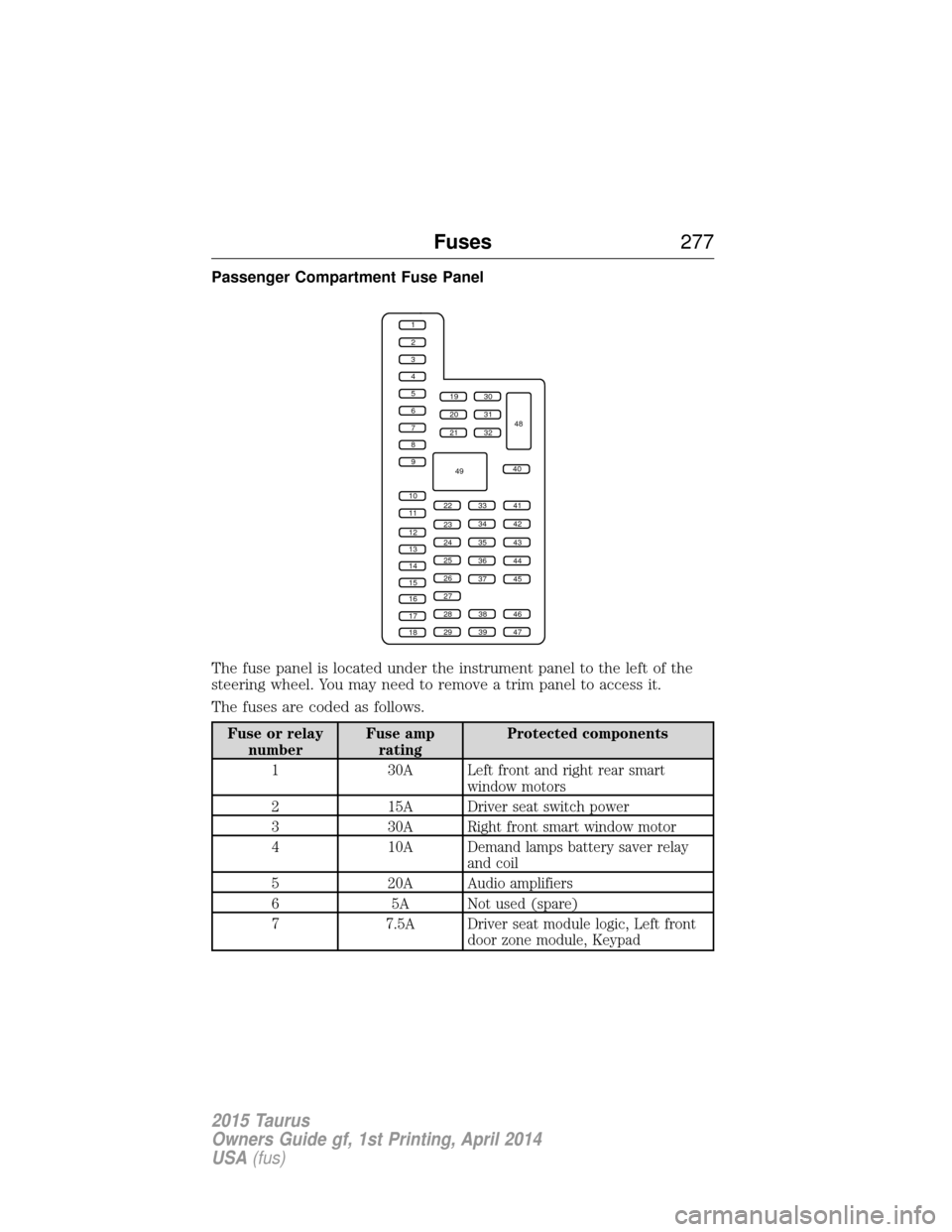
Passenger Compartment Fuse Panel
The fuse panel is located under the instrument panel to the left of the
steering wheel. You may need to remove a trim panel to access it.
The fuses are coded as follows.
Fuse or relaynumber Fuse amp
rating Protected components
1 30A Left front and right rear smart window motors
2 15A Driver seat switch power
3 30A Right front smart window motor
4 10A Demand lamps battery saver relay and coil
5 20A Audio amplifiers
6 5A Not used (spare)
7 7.5A Driver seat module logic, Left front door zone module, Keypad
1
2
3
4
5
6
7
8
9
10
11
12
13
14
15
16
17
18
19
20
21
223341
42
43
44
45
34
35
36
37
23
24
25
26
27
283846
394729
32
40
31
30
48
49
Fuses 277
2015 Taurus
Owners Guide gf, 1st Printing, April 2014
USA(fus)
Page 279 of 558
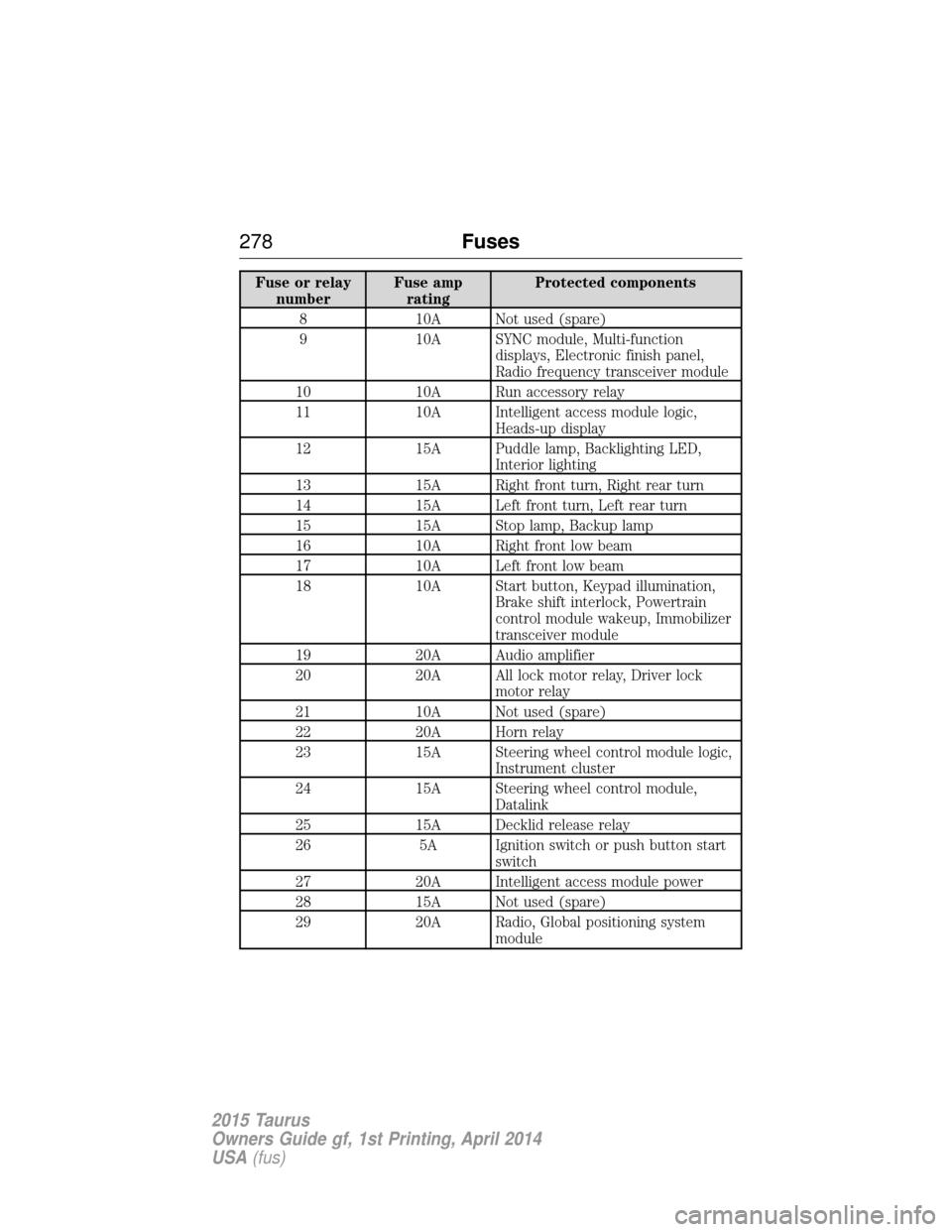
Fuse or relaynumber Fuse amp
rating Protected components
8 10A Not used (spare)
9 10A SYNC module, Multi-function displays, Electronic finish panel,
Radio frequency transceiver module
10 10A Run accessory relay
11 10A Intelligent access module logic, Heads-up display
12 15A Puddle lamp, Backlighting LED, Interior lighting
13 15A Right front turn, Right rear turn
14 15A Left front turn, Left rear turn
15 15A Stop lamp, Backup lamp
16 10A Right front low beam
17 10A Left front low beam
18 10A Start button, Keypad illumination, Brake shift interlock, Powertrain
control module wakeup, Immobilizer
transceiver module
19 20A Audio amplifier
20 20A All lock motor relay, Driver lock motor relay
21 10A Not used (spare)
22 20A Horn relay
23 15A Steering wheel control module logic, Instrument cluster
24 15A Steering wheel control module, Datalink
25 15A Decklid release relay
26 5A Ignition switch or push button start switch
27 20A Intelligent access module power
28 15A Not used (spare)
29 20A Radio, Global positioning system module
278Fuses
2015 Taurus
Owners Guide gf, 1st Printing, April 2014
USA(fus)
Page 281 of 558
GENERAL INFORMATION
Have your vehicle serviced regularly to help maintain its roadworthiness
and resale value. There is a large network of Ford authorized dealers
who are there to help you with their professional servicing expertise. We
believe that their specially trained technicians are best qualified to
service your vehicle properly and expertly. They are supported by a wide
range of highly specialized tools developed specifically for servicing your
vehicle.
To help you service your vehicle, we provideScheduled Maintenance
Information which makes tracking routine service easy.
If your vehicle requires professional service, your authorized dealer can
provide the necessary parts and service. Check your warranty
information to find out which parts and services are covered.
Use only recommended fuels, lubricants, fluids and service parts
conforming to specifications. Motorcraft® parts are designed and built to
provide the best performance in your vehicle.
Precautions
• Do not work on a hot engine.
• Make sure that nothing gets caught in moving parts.
• Do not work on a vehicle with the engine running in an enclosed
space, unless you are sure you have enough ventilation.
• Keep all open flames and other burning material (such as cigarettes)
away from the battery and all fuel related parts.
Working with the Engine Off
1. Set the parking brake and shift to P(Park).
2. Turn off the engine and remove the key (if equipped).
3. Block the wheels.
Working with the Engine On
WARNING: To reduce the risk of vehicle damage or personal
burn injuries, do not start your engine with the air cleaner
removed and do not remove it while the engine is running.
1. Set the parking brake and shift to position P(Park) .
2. Block the wheels.
280 Maintenance
2015 Taurus
Owners Guide gf, 1st Printing, April 2014
USA(fus)
Page 301 of 558
instrument cluster or center stack display to alert the driver that battery
protection actions are active. See theInformation displaysin the
Instrument Cluster andEntertainment Systems chapters for more
information. These messages are only for notification that an action is
taking place, and do not necessarily indicate that an electrical problem
exists or that the battery requires replacement.
Electrical accessory installation
To ensure proper operation of the BMS, any electrical devices that are
added to the vehicle should not have their ground connection made
directly at the negative battery post. A connection at the negative
battery post can cause inaccurate measurements of the battery condition
and potential incorrect system operation.
Note: Electrical or electronic accessories added to the vehicle by the
dealer or the owner may adversely affect battery performance and
durability and may also affect the performance of other electrical
systems in the vehicle.
When a battery replacement is required, the battery should be replaced
with a Ford recommended replacement battery that matches the
electrical requirements of the vehicle. After battery replacement, or in
some cases after charging the battery with an external charger, the BMS
requires eight hours of vehicle sleep time (key off with doors closed) to
relearn the new battery state of charge. Prior to relearning state of
charge, the BMS may disable electrical features (to protect the battery)
earlier than normal.
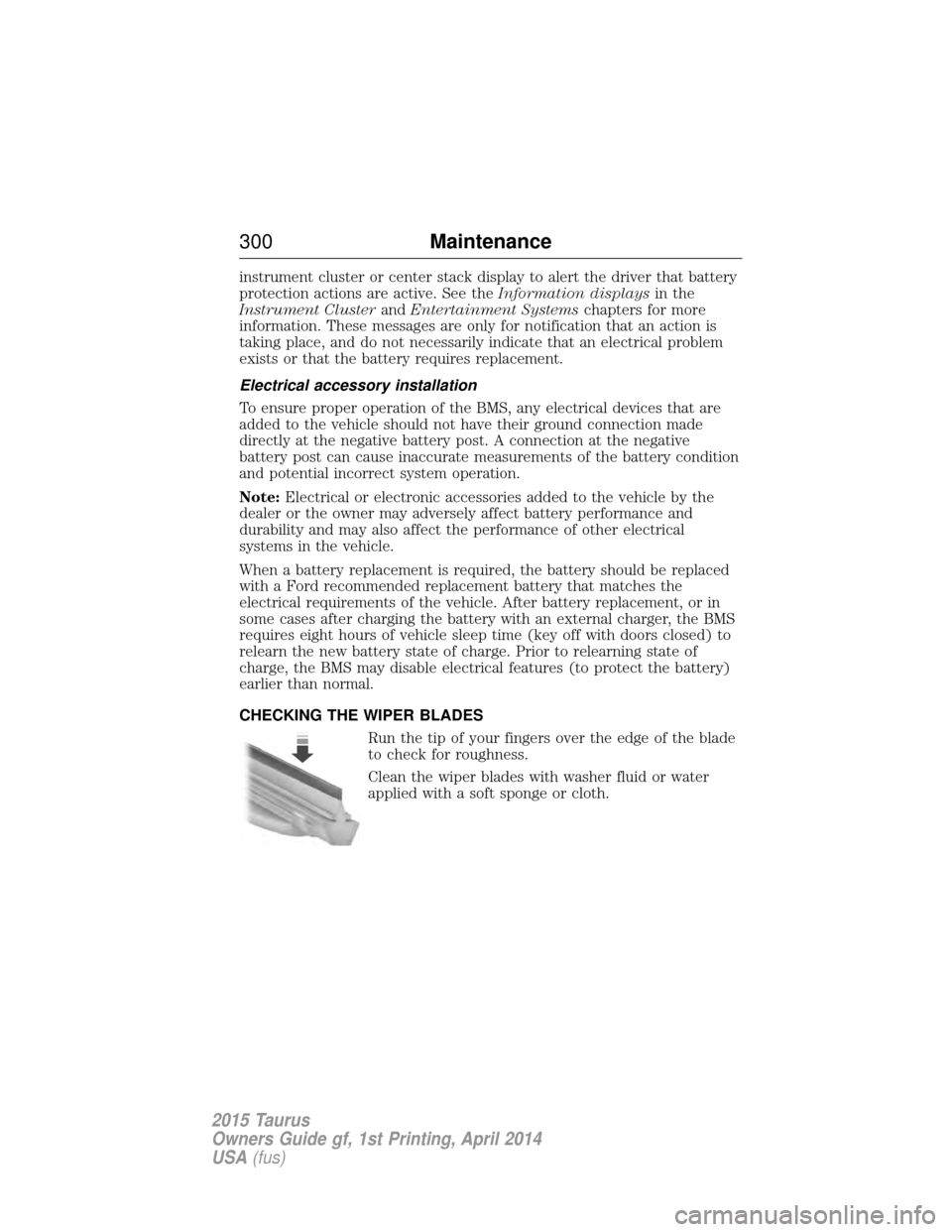
CHECKING THE WIPER BLADES
Run the tip of your fingers over the edge of the blade
to check for roughness.
Clean the wiper blades with washer fluid or water
applied with a soft sponge or cloth.
300 Maintenance
2015 Taurus
Owners Guide gf, 1st Printing, April 2014
USA(fus)