audio control FORD TAURUS 2015 6.G Owners Manual
[x] Cancel search | Manufacturer: FORD, Model Year: 2015, Model line: TAURUS, Model: FORD TAURUS 2015 6.GPages: 558, PDF Size: 4.42 MB
Page 65 of 558
PRINCIPLES OF OPERATION
MyKey allows you to program keys with restricted driving modes to
promote good driving habits. All but one of the keys programmed to the
vehicle can be activated with these restricted modes.
Any keys that have not been programmed are referred to as
administrator keys or admin keys. These can be used to:
•Create a MyKey.
• Program configurable MyKey settings.
• Clear all MyKey features.
When you have programmed a MyKey, you can access the following
information using the information display:
• How many admin keys and MyKeys are programmed to your vehicle.
• The total distance your vehicle has traveled using a MyKey.
Note: All MyKeys are programmed to the same settings. You cannot
program them individually.
Note: For vehicles with intelligent access (push-button start), when both
a MyKey and an admin transmitter are present, the admin transmitter
will be recognized to start the vehicle.
Non-configurable Settings
The following settings cannot be changed by an admin key user:
• Belt-Minder. You cannot disable this feature. The audio system will
mute when the front seat occupants’ safety belts are not fastened.
• Early low fuel warning. The low fuel warning is activated earlier, giving
the MyKey user more time to refuel.
• Driver assist features, if equipped on your vehicle, are forced on:
parking aid, blind spot information system (BLIS) with cross traffic
alert, lane departure warning and forward collision warning system.
• Satellite radio adult content restrictions.
Configurable Settings
With an admin key, you can configure certain MyKey settings when you
first create a MyKey and before you recycle the key or restart the
engine. You can also change the settings afterward with an admin key.
• A vehicle speed limit can be set. Warnings will be shown in the display
followed by an audible tone when your vehicle reaches the set speed.
You cannot override the set speed by fully depressing the accelerator
pedal or by setting cruise control.
64 MyKey
2015 Taurus
Owners Guide gf, 1st Printing, April 2014
USA(fus)
Page 66 of 558
•Vehicle speed minders of 45, 55 or 65 mph (75, 90 or 105 km/h). Once
you select a speed, it will be shown in the display, followed by an
audible tone when the preselected vehicle speed is exceeded.
•
Audio system maximum volume of 45%. A message will be shown in the
display when you attempt to exceed the limited volume. Also, the
speed-sensitive or compensated automatic volume control will be disabled.
• Always on setting. When this is selected, you will not be able to turn
off AdvanceTrac or the do not disturb feature (if your vehicle is
equipped with this feature).
CREATING A MYKEY
Use the information display to create a MyKey:
1. Insert the key you want to program into the ignition. If your vehicle is
equipped with a push-button start and you do not have a backup slot,
hold the intelligent access key next to the steering column. The correct
position to place your fob is in another chapter. See Starting and
Stopping the Engine .
2. Switch the ignition on.
3. Access the main menu on the information display controls, and select
Settings, then MyKeyby pressing OKor the >button.
4. Press OKor the >button to select Create MyKey.
5. When prompted, hold the OKbutton until you see a message informing
you to label this key as a MyKey. The key will be restricted at the next start.
MyKey is successfully created. Make sure you label it so you can
distinguish it from the admin keys.
You can also program configurable settings for the key(s). Refer to
Programming/Changing Configurable Settings .
Programming/Changing Configurable Settings
Use the information display to access your configurable MyKey settings:
1. Switch the ignition on using an admin key. If your vehicle has
push-button start, place the intelligent access key fob into the backup
slot. The location of your backup slot is in another chapter. See Starting
and Stopping the Engine .
2. Access the main menu and select Settings, thenMyKeyby pressing
OK or the >button.
3. Use the arrow buttons to get to a configurable feature.
MyKey 65
2015 Taurus
Owners Guide gf, 1st Printing, April 2014
USA(fus)
Page 84 of 558
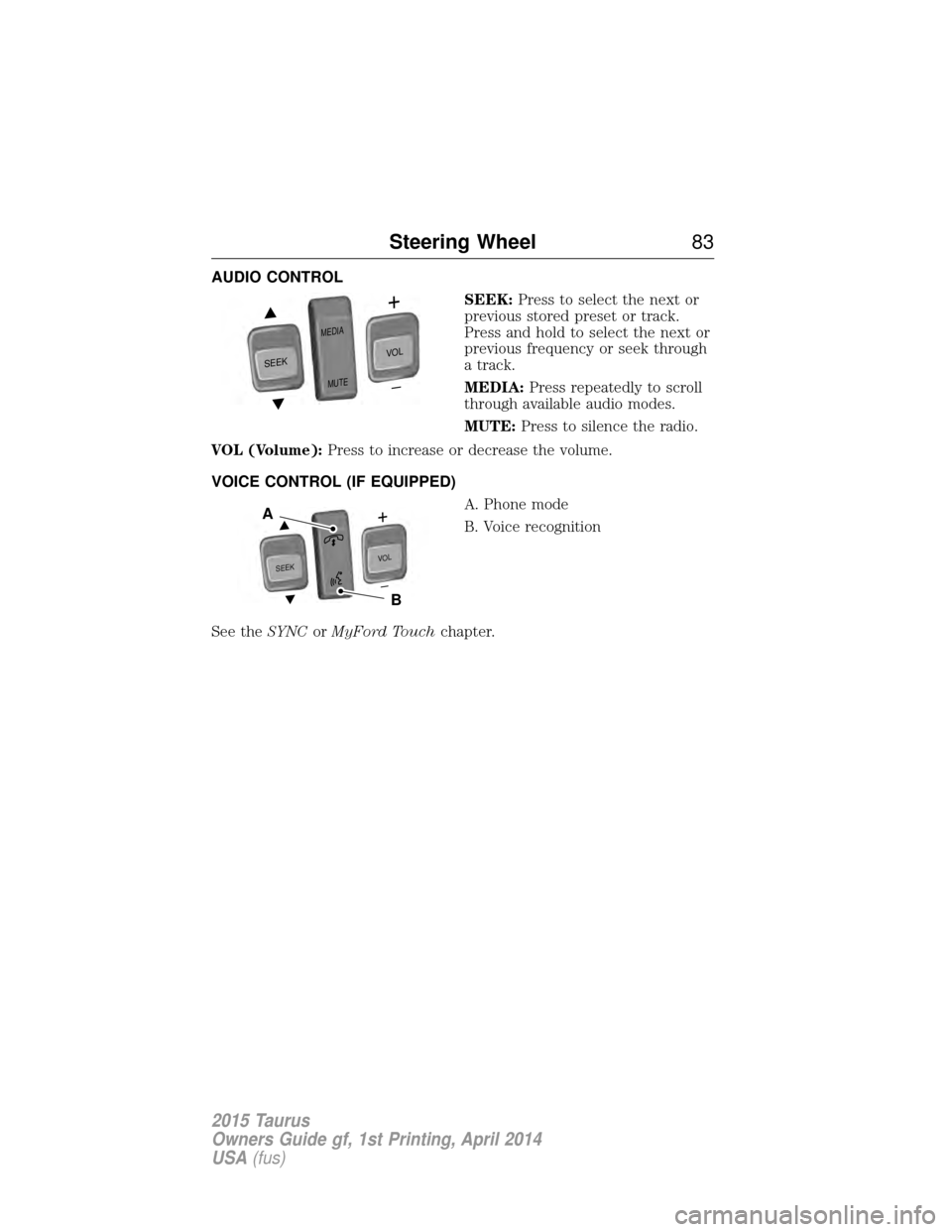
AUDIO CONTROLSEEK:Press to select the next or
previous stored preset or track.
Press and hold to select the next or
previous frequency or seek through
a track.
MEDIA: Press repeatedly to scroll
through available audio modes.
MUTE: Press to silence the radio.
VOL (Volume): Press to increase or decrease the volume.
VOICE CONTROL (IF EQUIPPED) A. Phone mode
B. Voice recognition
See the SYNCorMyFord Touch chapter.
SEEK
MED IA
M UTE
V O L
SEEKVOL
A
B
Steering Wheel 83
2015 Taurus
Owners Guide gf, 1st Printing, April 2014
USA(fus)
Page 86 of 558
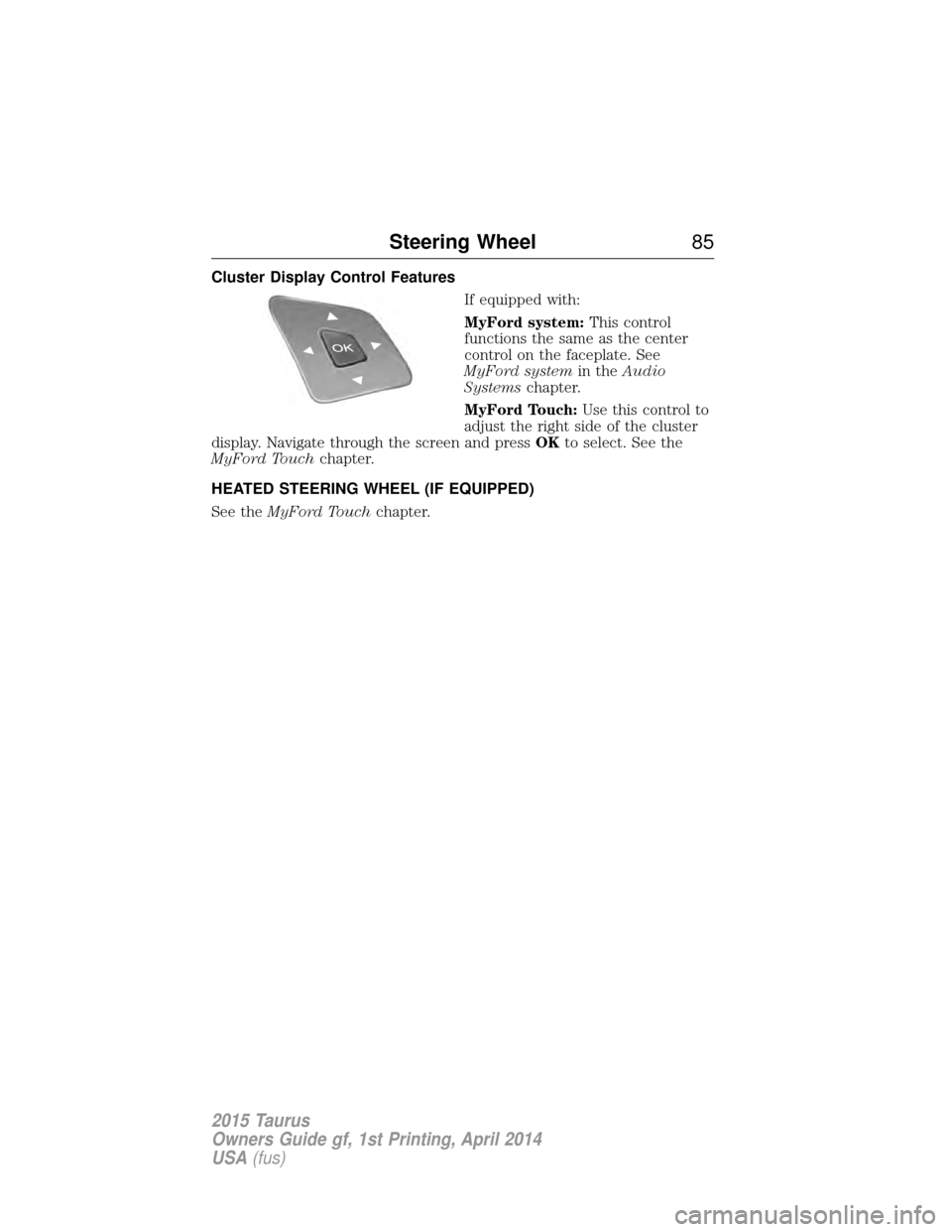
Cluster Display Control FeaturesIf equipped with:
MyFord system:This control
functions the same as the center
control on the faceplate. See
MyFord system in theAudio
Systems chapter.
MyFord Touch: Use this control to
adjust the right side of the cluster
display. Navigate through the screen and press OKto select. See the
MyFord Touch chapter.
HEATED STEERING WHEEL (IF EQUIPPED)
See the MyFord Touch chapter.
Steering Wheel 85
2015 Taurus
Owners Guide gf, 1st Printing, April 2014
USA(fus)
Page 134 of 558
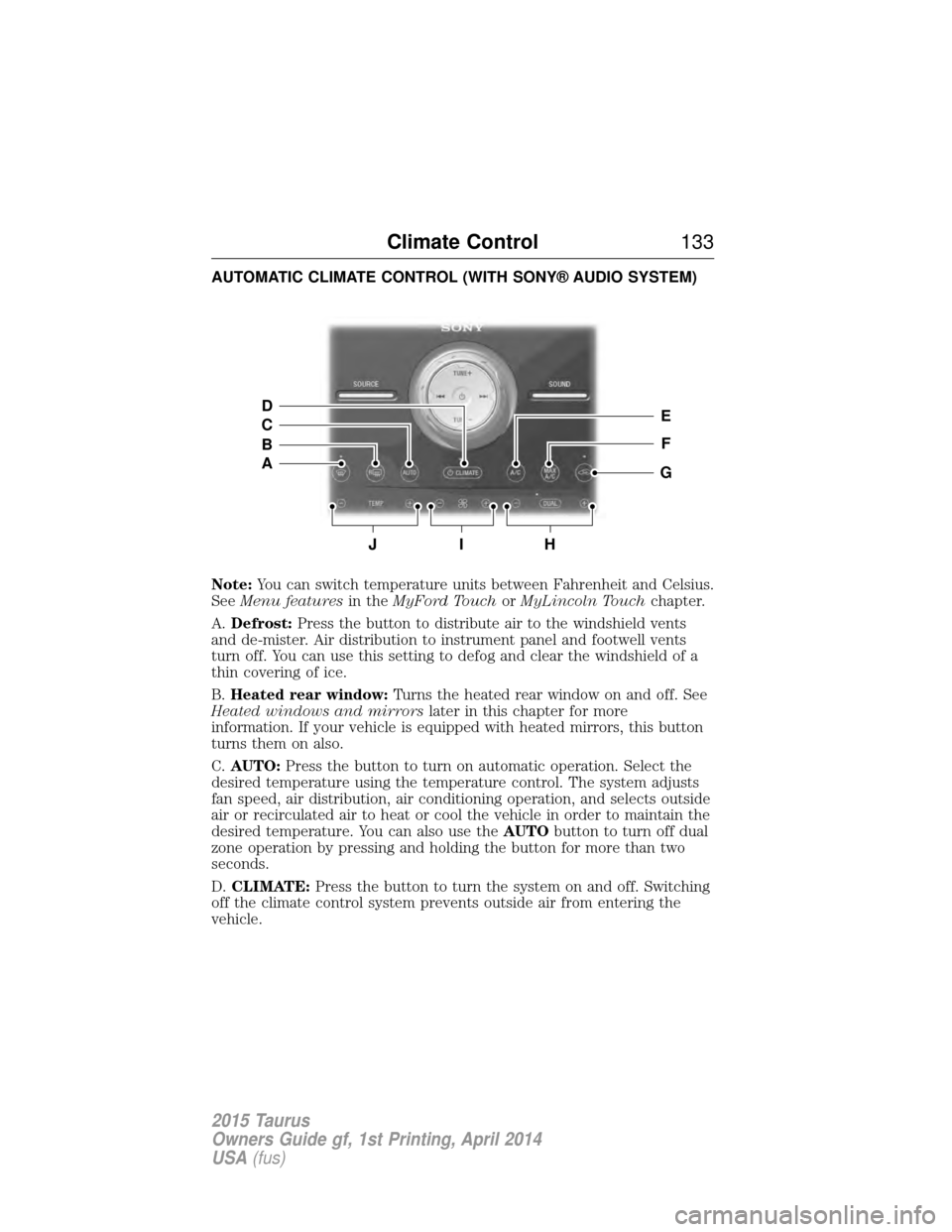
AUTOMATIC CLIMATE CONTROL (WITH SONY® AUDIO SYSTEM)
Note:You can switch temperature units between Fahrenheit and Celsius.
See Menu features in theMyFord Touch orMyLincoln Touch chapter.
A. Defrost: Press the button to distribute air to the windshield vents
and de-mister. Air distribution to instrument panel and footwell vents
turn off. You can use this setting to defog and clear the windshield of a
thin covering of ice.
B. Heated rear window: Turns the heated rear window on and off. See
Heated windows and mirrors later in this chapter for more
information. If your vehicle is equipped with heated mirrors, this button
turns them on also.
C. AUTO: Press the button to turn on automatic operation. Select the
desired temperature using the temperature control. The system adjusts
fan speed, air distribution, air conditioning operation, and selects outside
air or recirculated air to heat or cool the vehicle in order to maintain the
desired temperature. You can also use the AUTObutton to turn off dual
zone operation by pressing and holding the button for more than two
seconds.
D. CLIMATE: Press the button to turn the system on and off. Switching
off the climate control system prevents outside air from entering the
vehicle.
JIH
E
F
G
D
C
B
A
Climate Control 133
2015 Taurus
Owners Guide gf, 1st Printing, April 2014
USA(fus)
Page 163 of 558
CENTER CONSOLE
Stow items in the cupholder carefully as items may become loose during
hard braking, acceleration or collisions, including hot drinks which may
spill.
Note:The appearance and features of the center console may be
different than shown based on your vehicle’s option level.
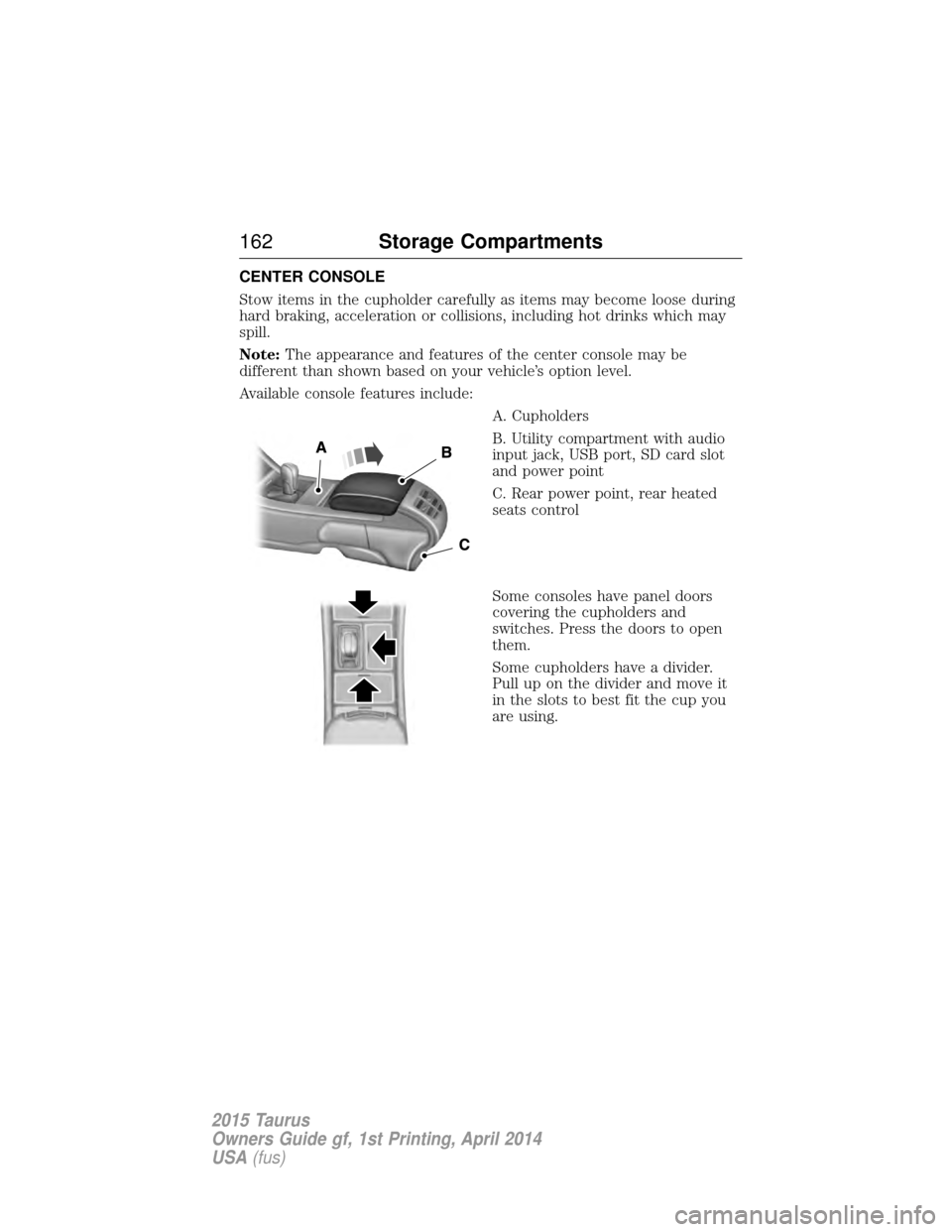
Available console features include:
A. Cupholders
B. Utility compartment with audio
input jack, USB port, SD card slot
and power point
C. Rear power point, rear heated
seats control
Some consoles have panel doors
covering the cupholders and
switches. Press the doors to open
them.
Some cupholders have a divider.
Pull up on the divider and move it
in the slots to best fit the cup you
are using.
162Storage Compartments
2015 Taurus
Owners Guide gf, 1st Printing, April 2014
USA(fus)
Page 279 of 558
Fuse or relaynumber Fuse amp
rating Protected components
8 10A Not used (spare)
9 10A SYNC module, Multi-function displays, Electronic finish panel,
Radio frequency transceiver module
10 10A Run accessory relay
11 10A Intelligent access module logic, Heads-up display
12 15A Puddle lamp, Backlighting LED, Interior lighting
13 15A Right front turn, Right rear turn
14 15A Left front turn, Left rear turn
15 15A Stop lamp, Backup lamp
16 10A Right front low beam
17 10A Left front low beam
18 10A Start button, Keypad illumination, Brake shift interlock, Powertrain
control module wakeup, Immobilizer
transceiver module
19 20A Audio amplifier
20 20A All lock motor relay, Driver lock motor relay
21 10A Not used (spare)
22 20A Horn relay
23 15A Steering wheel control module logic, Instrument cluster
24 15A Steering wheel control module, Datalink
25 15A Decklid release relay
26 5A Ignition switch or push button start switch
27 20A Intelligent access module power
28 15A Not used (spare)
29 20A Radio, Global positioning system module
278Fuses
2015 Taurus
Owners Guide gf, 1st Printing, April 2014
USA(fus)
Page 300 of 558
Battery relearn
Because your vehicle’s engine is electronically controlled by a computer,
some control conditions are maintained by power from the battery. When
the battery is disconnected or a new battery is installed, the engine must
relearn its idle and fuel trim strategy for optimum driveability and
performance. To begin this process:
1. With the vehicle at a complete stop, set the parking brake.
2. Put the gearshift lever inP(Park), turn off all accessories and start
the engine.
3. Run the engine until it reaches normal operating temperature.
4. Allow the engine to idle for at least one minute.
5. Turn the A/C on and allow the engine to idle for at least one minute.
6. Drive the vehicle to complete the relearning process.
• The vehicle may need to be driven to relearn the idle and fuel trim
strategy.
• Note: If you do not allow the engine to relearn its idle trim, the idle
quality of your vehicle may be adversely affected until the idle trim is
eventually relearned.
When the battery is disconnected or a new battery installed, the
transmission must relearn its adaptive strategy. As a result of this, the
transmission may shift firmly. This operation is considered normal and
will not affect function or durability of the transmission. Over time the
adaptive learning process will fully update transmission operation to its
optimum shift feel.
If the battery has been disconnected or a new battery has been installed,
the clock and the preset radio stations must be reset once the battery is
reconnected.
Always dispose of automotive batteries in a responsible manner. Follow
your local authorized standards for disposal. Call your local authorized
recycling center to find out more about recycling automotive batteries.
Battery management system
The battery management system (BMS) monitors battery conditions and
takes actions to extend battery life. If excessive battery drain is
detected, the system may temporarily disable certain electrical features
to protect the battery. Those electrical accessories affected include rear
defrost, heated/cooled seats, climate control fan, heated steering wheel,
audio and navigation system. A message may be displayed on the
Maintenance 299
2015 Taurus
Owners Guide gf, 1st Printing, April 2014
USA(fus)
Page 374 of 558
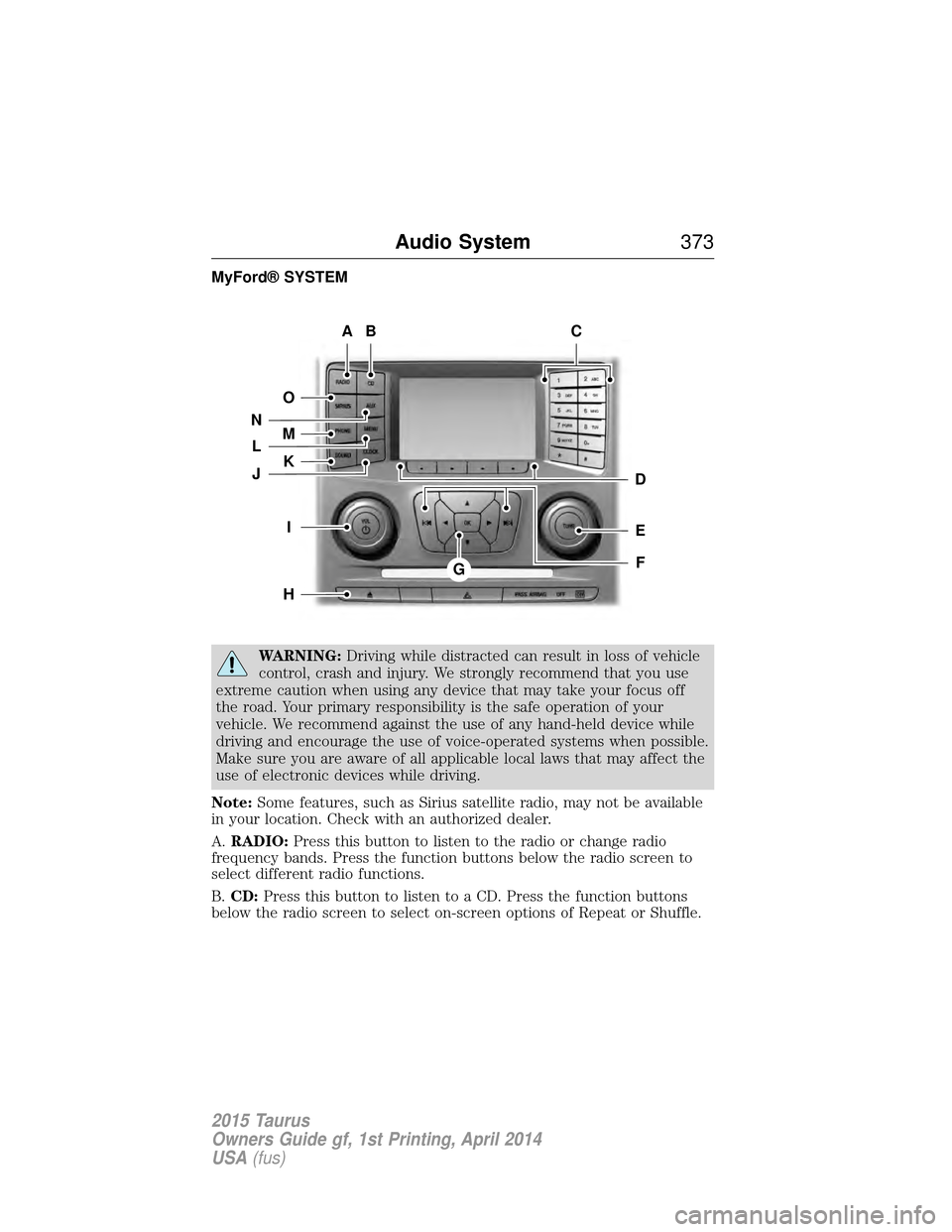
MyFord® SYSTEM
WARNING:Driving while distracted can result in loss of vehicle
control, crash and injury. We strongly recommend that you use
extreme caution when using any device that may take your focus off
the road. Your primary responsibility is the safe operation of your
vehicle. We recommend against the use of any hand-held device while
driving and encourage the use of voice-operated systems when possible.
Make sure you are aware of all applicable local laws that may affect the
use of electronic devices while driving.
Note: Some features, such as Sirius satellite radio, may not be available
in your location. Check with an authorized dealer.
A. RADIO: Press this button to listen to the radio or change radio
frequency bands. Press the function buttons below the radio screen to
select different radio functions.
B. CD: Press this button to listen to a CD. Press the function buttons
below the radio screen to select on-screen options of Repeat or Shuffle.
AB
O
NMLKJ
EI
H
C
FG
D
Audio System 373
2015 Taurus
Owners Guide gf, 1st Printing, April 2014
USA(fus)
Page 375 of 558
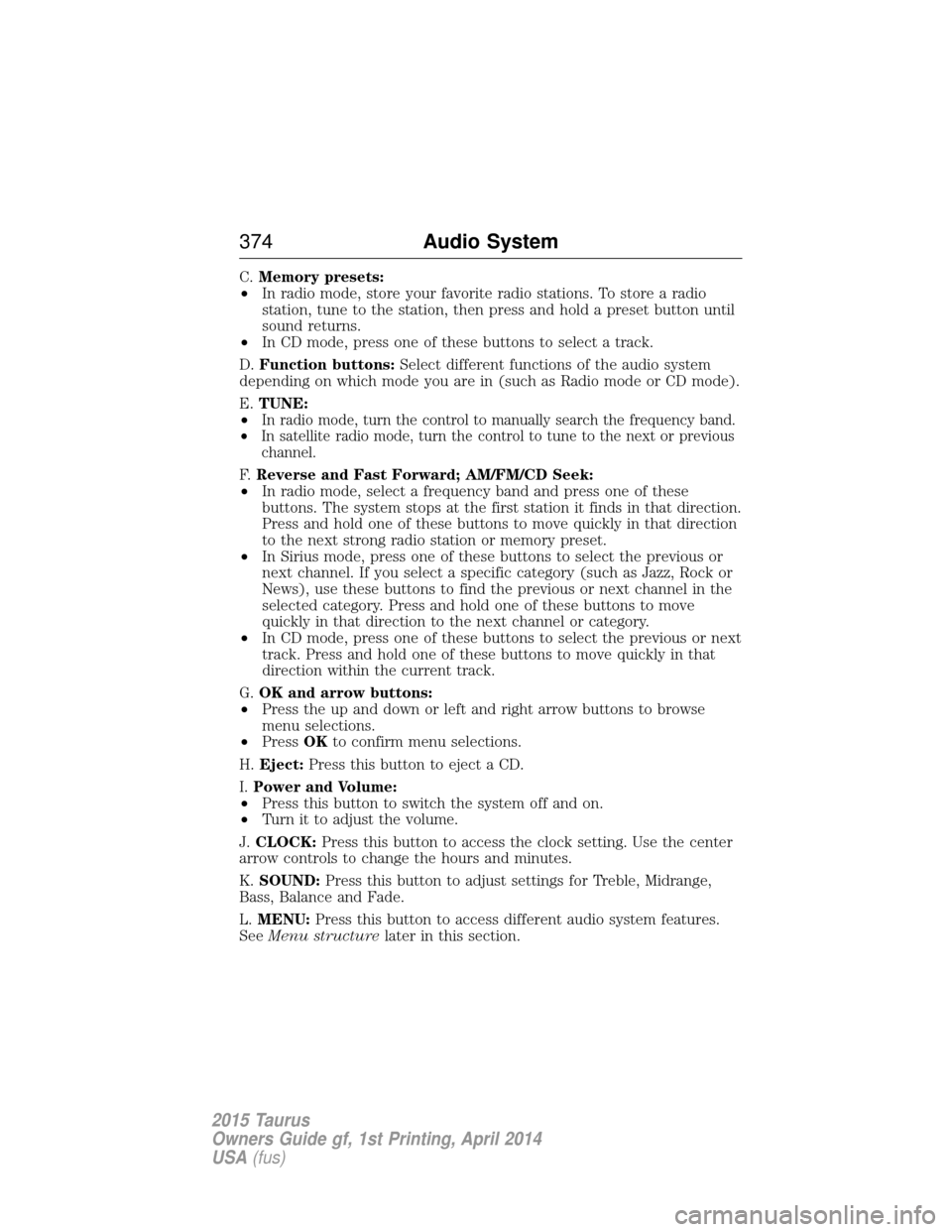
C.Memory presets:
• In radio mode, store your favorite radio stations. To store a radio
station, tune to the station, then press and hold a preset button until
sound returns.
• In CD mode, press one of these buttons to select a track.
D. Function buttons: Select different functions of the audio system
depending on which mode you are in (such as Radio mode or CD mode).
E. TUNE:
•
In radio mode, turn the control to manually search the frequency band.
• In satellite radio mode, turn the control to tune to the next or previous
channel.
F. Reverse and Fast Forward; AM/FM/CD Seek:
• In radio mode, select a frequency band and press one of these
buttons. The system stops at the first station it finds in that direction.
Press and hold one of these buttons to move quickly in that direction
to the next strong radio station or memory preset.
• In Sirius mode, press one of these buttons to select the previous or
next channel. If you select a specific category (such as Jazz, Rock or
News), use these buttons to find the previous or next channel in the
selected category. Press and hold one of these buttons to move
quickly in that direction to the next channel or category.
• In CD mode, press one of these buttons to select the previous or next
track. Press and hold one of these buttons to move quickly in that
direction within the current track.
G. OK and arrow buttons:
• Press the up and down or left and right arrow buttons to browse
menu selections.
• Press OKto confirm menu selections.
H. Eject: Press this button to eject a CD.
I. Power and Volume:
• Press this button to switch the system off and on.
• Turn it to adjust the volume.
J. CLOCK: Press this button to access the clock setting. Use the center
arrow controls to change the hours and minutes.
K. SOUND: Press this button to adjust settings for Treble, Midrange,
Bass, Balance and Fade.
L. MENU: Press this button to access different audio system features.
See Menu structure later in this section.
374 Audio System
2015 Taurus
Owners Guide gf, 1st Printing, April 2014
USA(fus)