odometer FORD TAURUS 2015 6.G Owners Manual
[x] Cancel search | Manufacturer: FORD, Model Year: 2015, Model line: TAURUS, Model: FORD TAURUS 2015 6.GPages: 558, PDF Size: 4.42 MB
Page 112 of 558
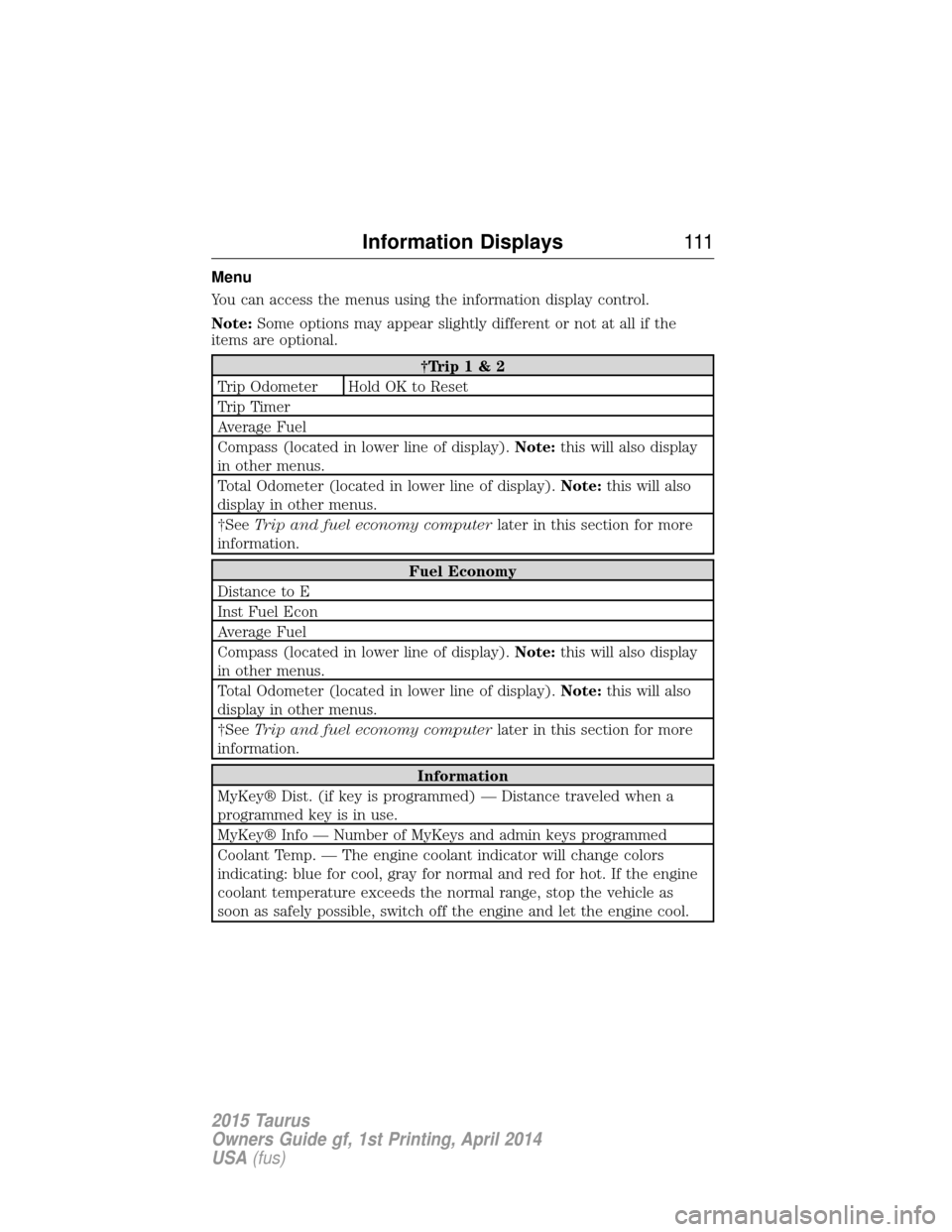
Menu
You can access the menus using the information display control.
Note:Some options may appear slightly different or not at all if the
items are optional.
†Trip 1 & 2
Trip Odometer Hold OK to Reset
Trip Timer
Average Fuel
Compass (located in lower line of display). Note:this will also display
in other menus.
Total Odometer (located in lower line of display). Note:this will also
display in other menus.
†See Trip and fuel economy computer later in this section for more
information.
Fuel Economy
Distance to E
Inst Fuel Econ
Average Fuel
Compass (located in lower line of display). Note:this will also display
in other menus.
Total Odometer (located in lower line of display). Note:this will also
display in other menus.
†See Trip and fuel economy computer later in this section for more
information.
Information
MyKey® Dist. (if key is programmed) — Distance traveled when a
programmed key is in use.
MyKey® Info — Number of MyKeys and admin keys programmed
Coolant Temp. — The engine coolant indicator will change colors
indicating: blue for cool, gray for normal and red for hot. If the engine
coolant temperature exceeds the normal range, stop the vehicle as
soon as safely possible, switch off the engine and let the engine cool.
Information Displays 111
2015 Taurus
Owners Guide gf, 1st Printing, April 2014
USA(fus)
Page 115 of 558
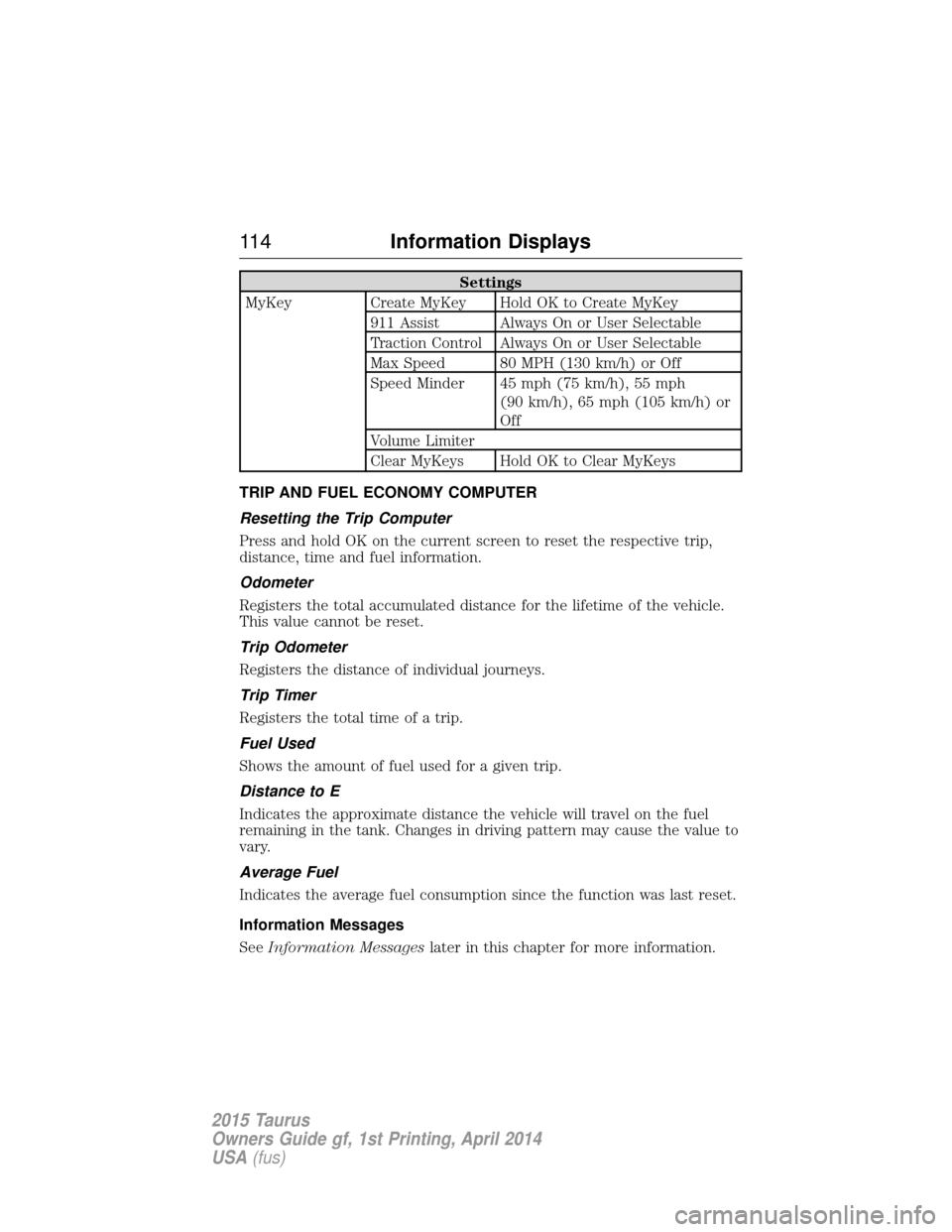
Settings
MyKey Create MyKey Hold OK to Create MyKey 911 Assist Always On or User Selectable
Traction Control Always On or User Selectable
Max Speed 80 MPH (130 km/h) or Off
Speed Minder 45 mph (75 km/h), 55 mph (90 km/h), 65 mph (105 km/h) or
Off
Volume Limiter
Clear MyKeys Hold OK to Clear MyKeys
TRIP AND FUEL ECONOMY COMPUTER
Resetting the Trip Computer
Press and hold OK on the current screen to reset the respective trip,
distance, time and fuel information.
Odometer
Registers the total accumulated distance for the lifetime of the vehicle.
This value cannot be reset.
Trip Odometer
Registers the distance of individual journeys.
Trip Timer
Registers the total time of a trip.
Fuel Used
Shows the amount of fuel used for a given trip.
Distance to E
Indicates the approximate distance the vehicle will travel on the fuel
remaining in the tank. Changes in driving pattern may cause the value to
vary.
Average Fuel
Indicates the average fuel consumption since the function was last reset.
Information Messages
See Information Messages later in this chapter for more information.
11 4Information Displays
2015 Taurus
Owners Guide gf, 1st Printing, April 2014
USA(fus)
Page 117 of 558
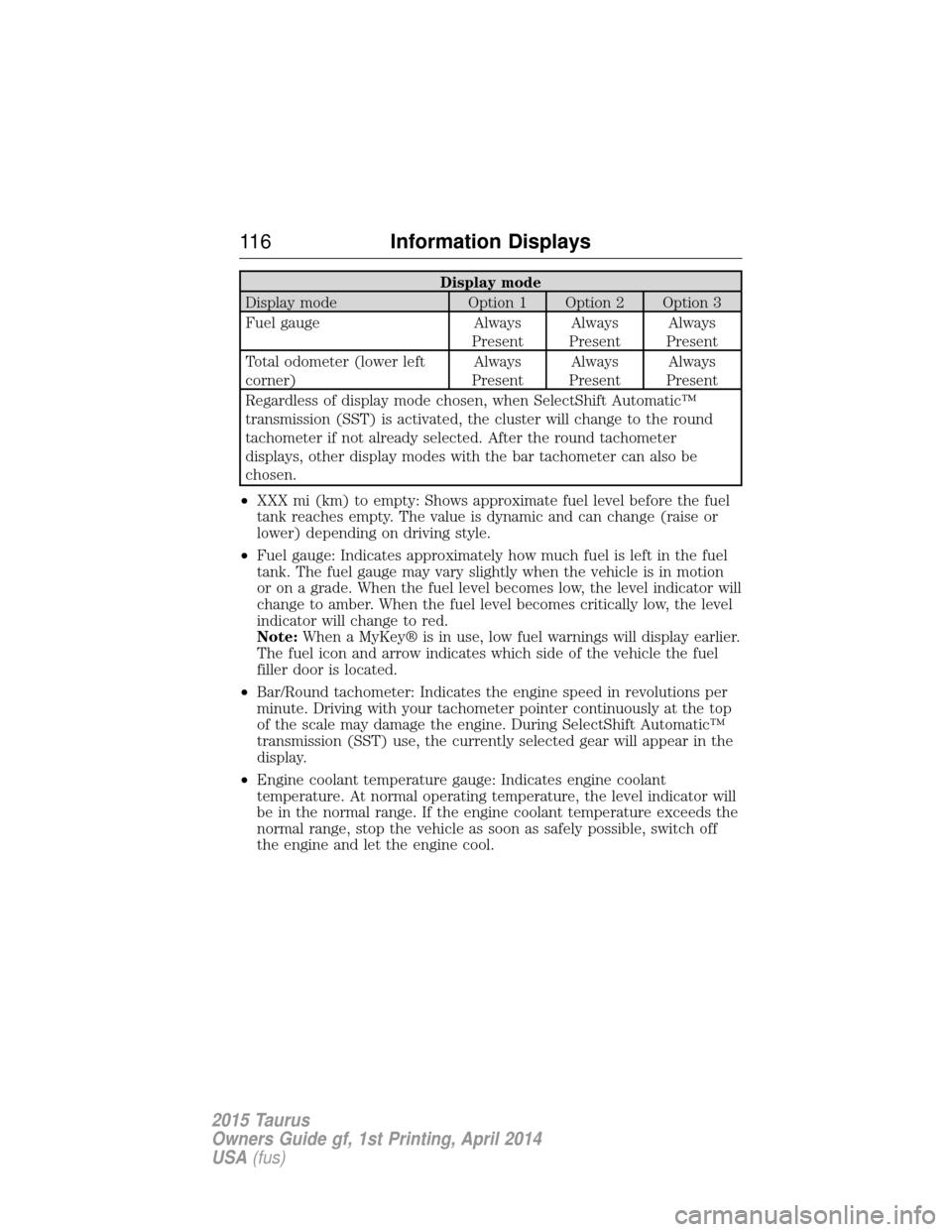
Display mode
Display mode Option 1 Option 2 Option 3
Fuel gauge Always PresentAlways
Present Always
Present
Total odometer (lower left
corner) Always
Present Always
Present Always
Present
Regardless of display mode chosen, when SelectShift Automatic™
transmission (SST) is activated, the cluster will change to the round
tachometer if not already selected. After the round tachometer
displays, other display modes with the bar tachometer can also be
chosen.
• XXX mi (km) to empty: Shows approximate fuel level before the fuel
tank reaches empty. The value is dynamic and can change (raise or
lower) depending on driving style.
• Fuel gauge: Indicates approximately how much fuel is left in the fuel
tank. The fuel gauge may vary slightly when the vehicle is in motion
or on a grade. When the fuel level becomes low, the level indicator will
change to amber. When the fuel level becomes critically low, the level
indicator will change to red.
Note: When a MyKey® is in use, low fuel warnings will display earlier.
The fuel icon and arrow indicates which side of the vehicle the fuel
filler door is located.
• Bar/Round tachometer: Indicates the engine speed in revolutions per
minute. Driving with your tachometer pointer continuously at the top
of the scale may damage the engine. During SelectShift Automatic™
transmission (SST) use, the currently selected gear will appear in the
display.
• Engine coolant temperature gauge: Indicates engine coolant
temperature. At normal operating temperature, the level indicator will
be in the normal range. If the engine coolant temperature exceeds the
normal range, stop the vehicle as soon as safely possible, switch off
the engine and let the engine cool.
11 6 Information Displays
2015 Taurus
Owners Guide gf, 1st Printing, April 2014
USA(fus)
Page 118 of 558
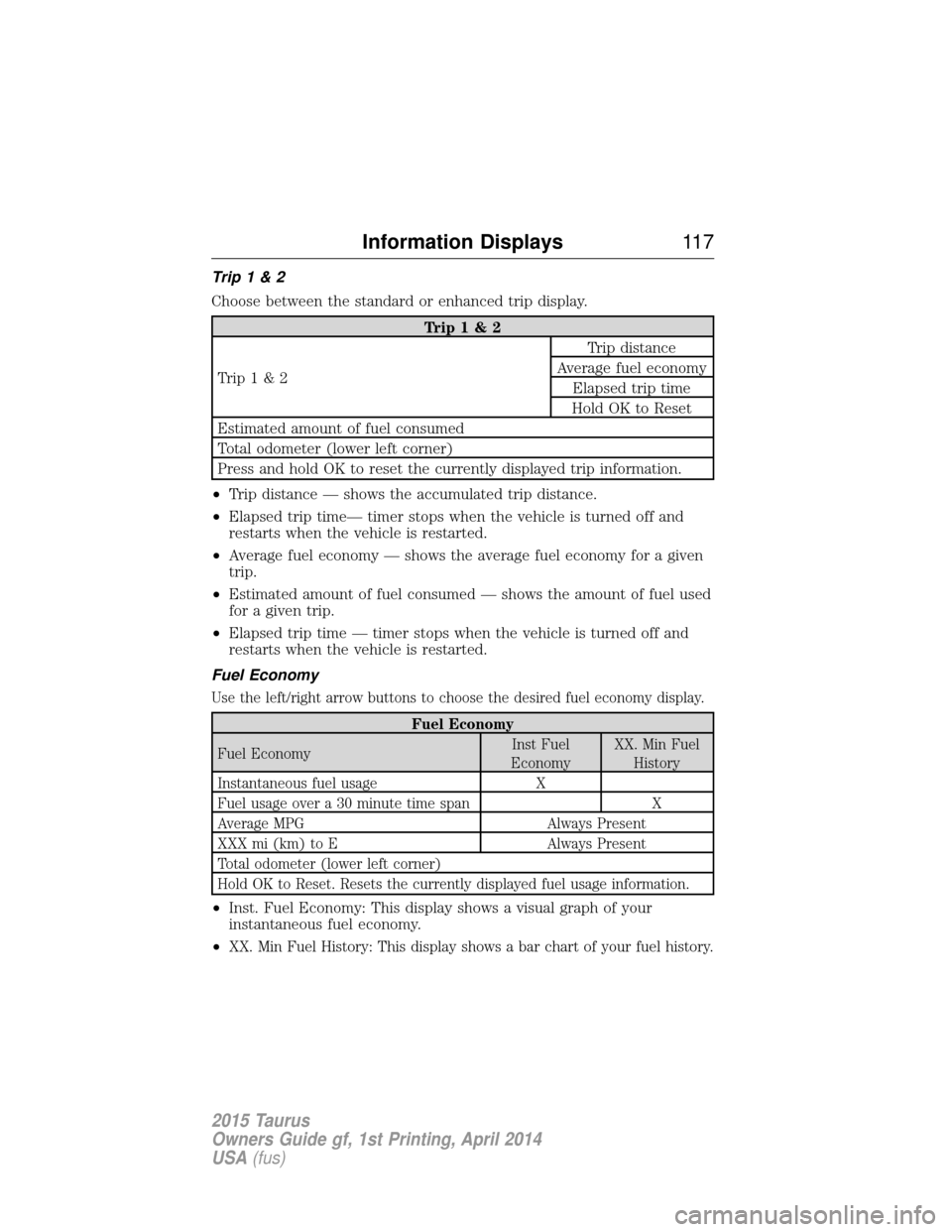
Trip1&2
Choose between the standard or enhanced trip display.
Trip1&2
Trip1&2 Trip distance
Average fuel economy Elapsed trip time
Hold OK to Reset
Estimated amount of fuel consumed
Total odometer (lower left corner)
Press and hold OK to reset the currently displayed trip information.
• Trip distance — shows the accumulated trip distance.
• Elapsed trip time— timer stops when the vehicle is turned off and
restarts when the vehicle is restarted.
• Average fuel economy — shows the average fuel economy for a given
trip.
• Estimated amount of fuel consumed — shows the amount of fuel used
for a given trip.
• Elapsed trip time — timer stops when the vehicle is turned off and
restarts when the vehicle is restarted.
Fuel Economy
Use the left/right arrow buttons to choose the desired fuel economy display.
Fuel Economy
Fuel Economy Inst Fuel
Economy XX. Min Fuel
History
Instantaneous fuel usage X
Fuel usage over a 30 minute time span X
Average MPG Always Present
XXX mi (km) to E Always Present
Total odometer (lower left corner)
Hold OK to Reset. Resets the currently displayed fuel usage information.
• Inst. Fuel Economy: This display shows a visual graph of your
instantaneous fuel economy.
•
XX. Min Fuel History: This display shows a bar chart of your fuel history.
Information Displays 11 7
2015 Taurus
Owners Guide gf, 1st Printing, April 2014
USA(fus)
Page 180 of 558
Note:The amount of usable fuel in the empty reserve varies and should
not be relied upon to increase driving range. When refueling your vehicle
after the fuel gauge indicates empty, you might not be able to refuel the
full amount of the advertised capacity of the fuel tank due to the empty
reserve still present in the tank.
For consistent results when filling the fuel tank:
• Turn the ignition off before fueling; an inaccurate reading results if the
engine is left running.
• Use the same fill rate (low–medium–high) each time the tank is filled.
• Allow no more than two automatic click–offs when filling.
Results are most accurate when the filling method is consistent.
Calculating Fuel Economy
Do not measure fuel economy during the first 1000 miles
(1600 kilometers) of driving (this is your engine’s break-in period); a
more accurate measurement is obtained after 2000 miles–3000 miles
(3200 kilometers–4800 kilometers). Also, fuel expense, frequency of
fill-ups or fuel gauge readings are not accurate ways to measure fuel
economy.
1. Fill the fuel tank completely and record the initial odometer reading.
2. Each time you fill the tank, record the amount of fuel added.
3. After at least three to five tank fill-ups, fill the fuel tank and record
the current odometer reading.
4. Subtract your initial odometer reading from the current odometer
reading.
5. Calculate fuel economy as follows: Standard: Divide miles traveled by gallons used.
Metric: Multiply liters used by 100, then divide by kilometers traveled.
Keep a record for at least one month and record the type of driving (city
or highway). This provides an accurate estimate of the vehicle’s fuel
economy under current driving conditions. Additionally, keeping records
during summer and winter show how temperature impacts fuel economy.
In general, lower temperatures mean lower fuel economy.
Fuel and Refueling 179
2015 Taurus
Owners Guide gf, 1st Printing, April 2014
USA(fus)
Page 265 of 558
In Canada:
Mailing address
Customer Relationship Centre
Ford Motor Company of Canada, Limited
P.O. Box 2000
Oakville, Ontario L6K 1C8
Telephone
1-800-565-3673 (FORD)
Online
www.ford.ca
Twitter
@FordServiceCA (English Canada)
@FordServiceQC (Quebec)
Additional Assistance
If you have questions or concerns, or are unsatisfied with the service you
are receiving, follow these steps:
1. Contact your Sales Representative or Service Advisor at your selling or
servicing authorized dealer.
2. If your inquiry or concern remains unresolved, contact the Sales
Manager, Service Manager or Customer Relations Manager.
3. If you require assistance or clarification on Ford Motor Company
policies, please contact the Ford Customer Relationship Center.
In order to help serve you better, please have the following information
available when contacting a Customer Relationship Center:
•Vehicle Identification Number (VIN)
• Your telephone number (home and business)
• The name of the authorized dealer and city where located
• The vehicle’s current odometer reading.
In some states, you must directly notify Ford in writing before pursuing
remedies under your state’s warranty laws. Ford is also allowed a final
repair attempt in some states.
In the United States, a warranty dispute must be submitted to the BBB
AUTO LINE before taking action under the Magnuson-Moss Warranty
Act, or to the extent allowed by state law, before pursuing replacement
or repurchase remedies provided by certain state laws. This dispute
handling procedure is not required prior to enforcing state created rights
264 Customer Assistance
2015 Taurus
Owners Guide gf, 1st Printing, April 2014
USA(fus)
Page 412 of 558
Vehicle Health Report
WARNING:Always follow scheduled maintenance instructions,
regularly inspect your vehicle, and seek repair for any damage or
problem you suspect. Vehicle Health Report supplements, but cannot
replace normal maintenance and vehicle inspection. Vehicle Health
Report only monitors certain systems that are electronically monitored
by the vehicle and will not monitor or report the status of any other
system, (such as brake lining wear). Failure to perform scheduled
maintenance and regularly inspect your vehicle may result in vehicle
damage and serious injury.
Note: Your Vehicle Health Report feature requires activation prior to
use. Visit www.SYNCMyRide.com to register. There is no fee or
subscription associated with Vehicle Health Report, but you must register
to use this feature.
Note: This feature may not function properly if you have enabled caller
ID blocking on your mobile phone. Before running a report, review the
Vehicle Health Report privacy notice.
Note: In order to allow a break-in period for your vehicle, you may not
be able to create a Vehicle Health Report until your vehicle odometer has
reached 200 miles.
Register for Vehicle Health Report and set your report preferences at
www.SYNCMyRide.com. After registering, you can request a Vehicle
Health Report (inside your vehicle). Return to your account at
www.SYNCMyRide.com to view your report. You can also choose for
SYNC to automatically remind you to run reports at specific mileage
intervals. Cellular phone airtime usage may apply when reporting.
The system allows you to check your vehicle’s overall health in the form
of a diagnostic report card. The vehicle health report contains valuable
information such as:
• Vehicle Diagnostic Information
• Scheduled maintenance
• Open Recalls and Field Service Actions
• Unserviced items from vehicle inspections by your authorized dealer.
You can run a report (after the vehicle has been running a minimum of
60 seconds) by pressing the voice button and saying “Vehicle health
report”, or pressing the phone button.
SYNC® 411
2015 Taurus
Owners Guide gf, 1st Printing, April 2014
USA(fus)
Page 486 of 558
to provide your name, phone number and location immediately, because
not all 911 systems are capable of receiving this information
electronically.
911 Assist May Not Work If
•Your cellular phone or 911 Assist hardware sustains damage in a
crash.
• The vehicle’s battery or SYNC system has no power.
• The phones(s) previously paired or connected to the system are
thrown from the vehicle.
911 Assist Privacy Notice
When you turn on 911 Assist, it may disclose to emergency services that
your vehicle has been in a crash involving the deployment of an airbag or
activation of the fuel pump shut-off. Certain versions or updates to 911
Assist may also be capable of electronically or verbally disclosing to 911
operators your vehicle location or other details about your vehicle or
crash to assist 911 operators to provide the most appropriate emergency
services. If you do not want to disclose this information, do not turn the
feature on.
Vehicle Health Report (If Equipped, United States Only)
WARNING: Always follow scheduled maintenance instructions,
regularly inspect your vehicle, and seek repair for any damage or
problem you suspect. Vehicle Health Report supplements, but cannot
replace, normal maintenance and vehicle inspection. Vehicle Health
Report only monitors certain systems electronically monitored by your
vehicle and will not monitor or report the status of any other system,
(such as brake lining wear). Failure to perform scheduled maintenance
and regularly inspect your vehicle may result in vehicle damage and
serious injury.
Note: Your Vehicle Health Report feature requires activation prior to
use. Visit www.SYNCMyRide.com to register. There is no fee or
subscription associated with Vehicle Health Report, but you must register
to use this feature.
Note: This feature may not function properly if you have enabled caller
ID blocking on your mobile phone. Before running a report, review the
Vehicle Health Report Privacy Notice.
Note: In order to allow a break-in period for your vehicle, you may not
be able to create a Vehicle Health Report until your vehicle odometer has
reached 200 miles.
MyFord Touch® (If Equipped) 485
2015 Taurus
Owners Guide gf, 1st Printing, April 2014
USA(fus)
Page 545 of 558
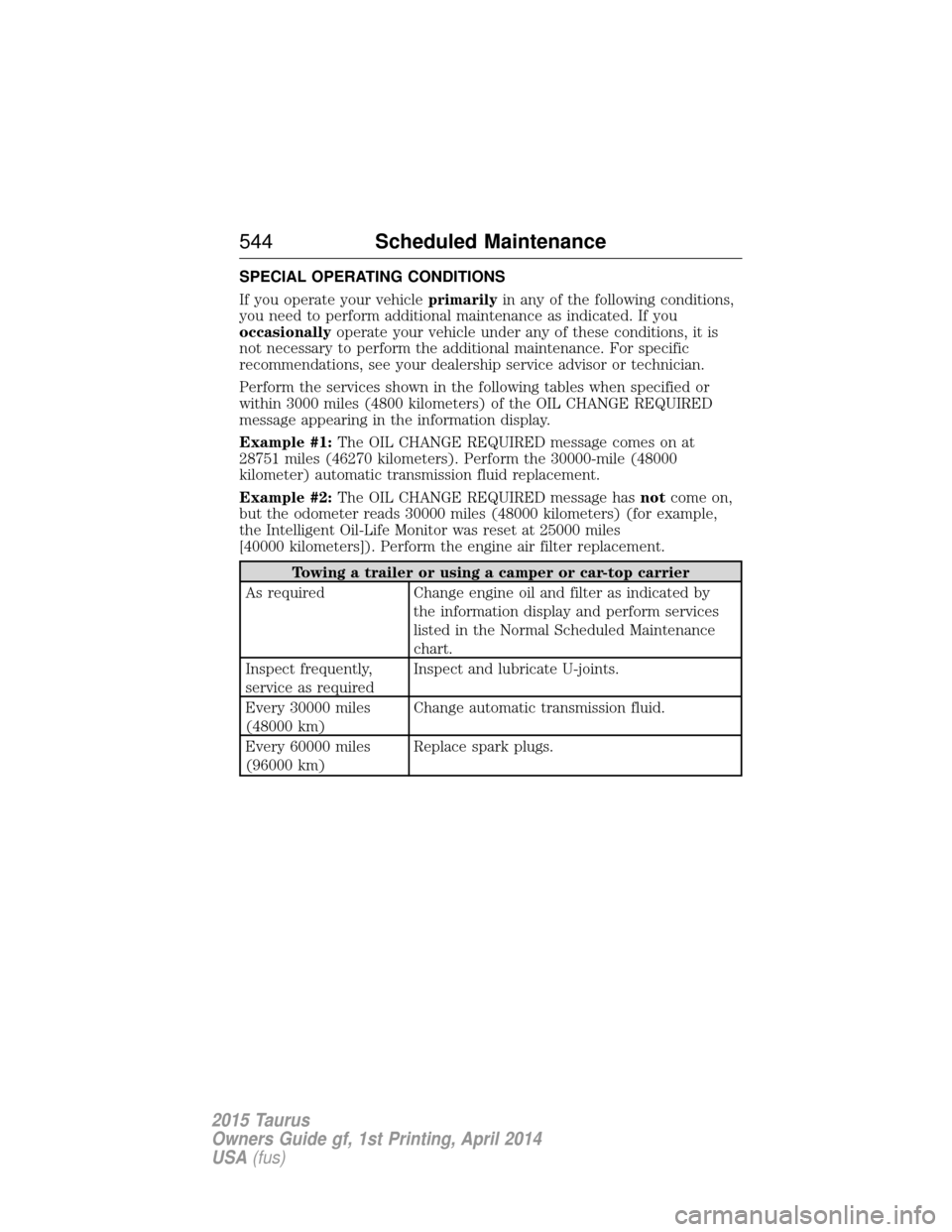
SPECIAL OPERATING CONDITIONS
If you operate your vehicleprimarilyin any of the following conditions,
you need to perform additional maintenance as indicated. If you
occasionally operate your vehicle under any of these conditions, it is
not necessary to perform the additional maintenance. For specific
recommendations, see your dealership service advisor or technician.
Perform the services shown in the following tables when specified or
within 3000 miles (4800 kilometers) of the OIL CHANGE REQUIRED
message appearing in the information display.
Example #1: The OIL CHANGE REQUIRED message comes on at
28751 miles (46270 kilometers). Perform the 30000-mile (48000
kilometer) automatic transmission fluid replacement.
Example #2: The OIL CHANGE REQUIRED message has notcome on,
but the odometer reads 30000 miles (48000 kilometers) (for example,
the Intelligent Oil-Life Monitor was reset at 25000 miles
[40000 kilometers]). Perform the engine air filter replacement.
Towing a trailer or using a camper or car-top carrier
As required Change engine oil and filter as indicated by the information display and perform services
listed in the Normal Scheduled Maintenance
chart.
Inspect frequently,
service as required Inspect and lubricate U-joints.
Every 30000 miles
(48000 km) Change automatic transmission fluid.
Every 60000 miles
(96000 km) Replace spark plugs.
544
Scheduled Maintenance
2015 Taurus
Owners Guide gf, 1st Printing, April 2014
USA(fus)
Page 553 of 558
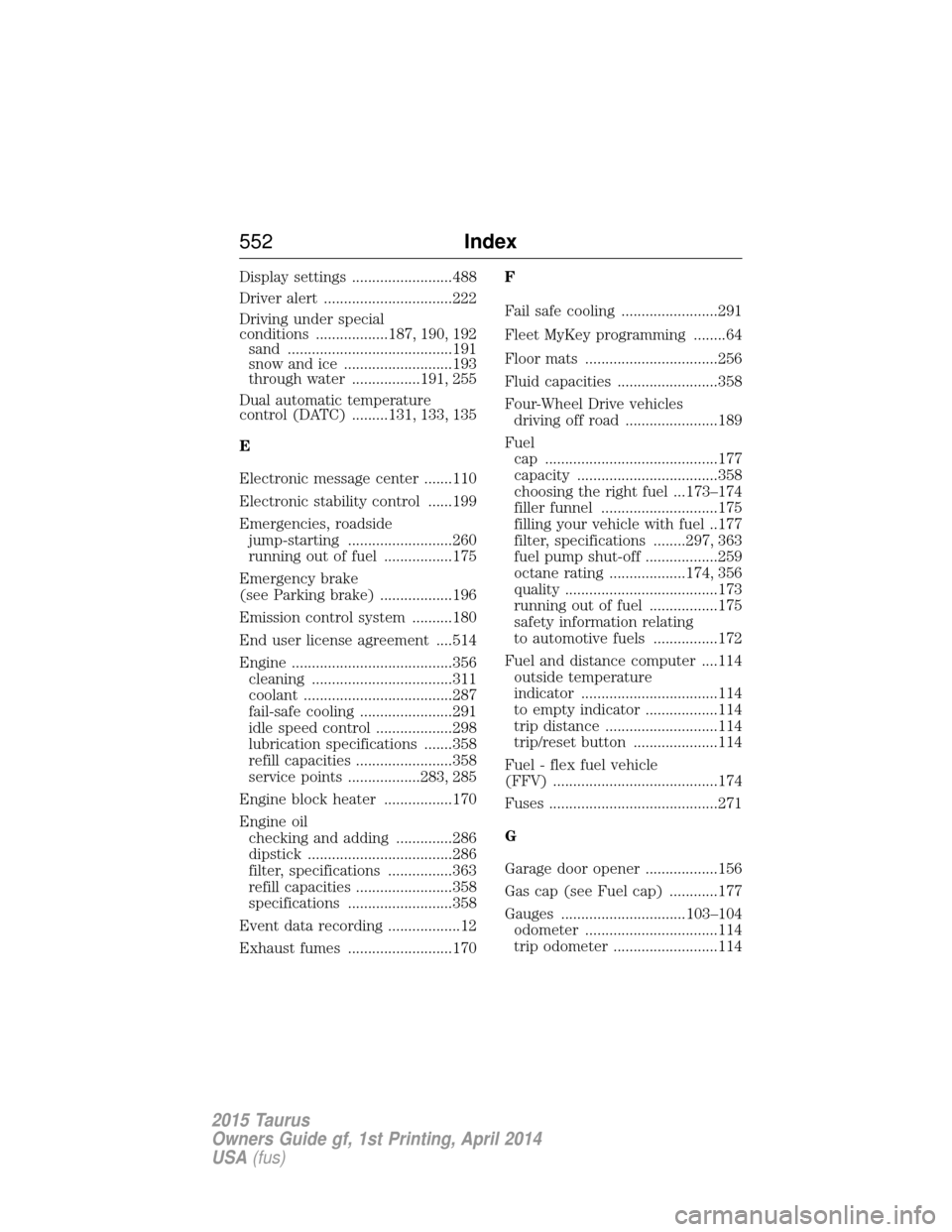
Display settings .........................488
Driver alert ................................222
Driving under special
conditions ..................187, 190, 192sand .........................................191
snow and ice ...........................193
through water .................191, 255
Dual automatic temperature
control (DATC) .........131, 133, 135
E
Electronic message center .......110
Electronic stability control ......199
Emergencies, roadside jump-starting ..........................260
running out of fuel .................175
Emergency brake
(see Parking brake) ..................196
Emission control system ..........180
End user license agreement ....514
Engine ........................................356 cleaning ...................................311
coolant .....................................287
fail-safe cooling .......................291
idle speed control ...................298
lubrication specifications .......358
refill capacities ........................358
service points ..................283, 285
Engine block heater .................170
Engine oil checking and adding ..............286
dipstick ....................................286
filter, specifications ................363
refill capacities ........................358
specifications ..........................358
Event data recording ..................12
Exhaust fumes ..........................170 F
Fail safe cooling ........................291
Fleet MyKey programming ........64
Floor mats .................................256
Fluid capacities .........................358
Four-Wheel Drive vehicles
driving off road .......................189
Fuel cap ...........................................177
capacity ...................................358
choosing the right fuel ...173–174
filler funnel .............................175
filling your vehicle with fuel ..177
filter, specifications ........297, 363
fuel pump shut-off ..................259
octane rating ...................174, 356
quality ......................................173
running out of fuel .................175
safety information relating
to automotive fuels ................172
Fuel and distance computer ....114 outside temperature
indicator ..................................114
to empty indicator ..................114
trip distance ............................114
trip/reset button .....................114
Fuel - flex fuel vehicle
(FFV) .........................................174
Fuses ..........................................271
G
Garage door opener ..................156
Gas cap (see Fuel cap) ............177
Gauges ...............................103–104 odometer .................................114
trip odometer ..........................114
552 Index
2015 Taurus
Owners Guide gf, 1st Printing, April 2014
USA(fus)