reset FORD TAURUS 2016 6.G Owners Manual
[x] Cancel search | Manufacturer: FORD, Model Year: 2016, Model line: TAURUS, Model: FORD TAURUS 2016 6.GPages: 424, PDF Size: 4.04 MB
Page 7 of 424
Fuel Shutoff....................................................213
Jump Starting the Vehicle.........................214
Post-Crash Alert System...........................216
Customer Assistance
Getting the Services You Need................217
In California (U.S. Only)
.............................218
The Better Business Bureau (BBB) Auto Line Program (U.S. Only)......................219
Utilizing the Mediation/Arbitration Program (Canada Only)
.......................220
Getting Assistance Outside the U.S. and Canada........................................................220
Ordering Additional Owner's Literature......................................................221
Reporting Safety Defects (U.S. Only).............................................................222
Reporting Safety Defects (Canada Only).............................................................222
Fuses
Fuse Specification Chart
..........................224
Changing a Fuse...........................................232
Maintenance
General Information
...................................234
Opening and Closing the Hood..............234
Under Hood Overview - 2.0L EcoBoost™................................................236
Under Hood Overview - 3.5L Ecoboost™.................................................237
Under Hood Overview - 3.5L Duratec........................................................238
Engine Oil Dipstick - 2.0L EcoBoost™................................................239
Engine Oil Dipstick - 3.5L Duratec/3.5L Ecoboost™................................................239
Engine Oil Check..........................................239
Oil Change Indicator Reset
......................240
Engine Coolant Check...............................240
Automatic Transmission Fluid Check - 2.0L EcoBoost™
......................................244 Automatic Transmission Fluid Check -
3.5L Duratec/3.5L Ecoboost™..........244
Brake Fluid Check........................................248
Power Steering Fluid Check
....................248
Washer Fluid Check
....................................248
Fuel Filter
........................................................249
Changing the 12V Battery.........................249
Checking the Wiper Blades
.......................251
Changing the Wiper Blades
......................251
Adjusting the Headlamps.........................252
Changing a Bulb...........................................253
Bulb Specification Chart...........................254
Changing the Engine Air Filter
................256
Vehicle Care
General Information....................................257
Cleaning Products
.......................................257
Cleaning the Exterior...................................257
Waxing.............................................................258
Cleaning the Engine
....................................259
Cleaning the Windows and Wiper Blades..........................................................259
Cleaning the Interior...................................260
Cleaning the Instrument Panel and Instrument Cluster Lens.......................260
Cleaning Leather Seats..............................261
Repairing Minor Paint Damage...............261
Cleaning the Alloy Wheels........................261
Vehicle Storage
.............................................262
Wheels and Tires
General Information
...................................264
Tire Sealant and Inflator Kit....................264
Tire Care
..........................................................270
Using Summer Tires
...................................283
Using Snow Chains
.....................................283
Tire Pressure Monitoring System..........284
Changing a Road Wheel
...........................288
Technical Specifications
...........................293
4
Taurus (CPH) Canada/United States of America, enUSA, First Printing Table of Contents
Page 11 of 424
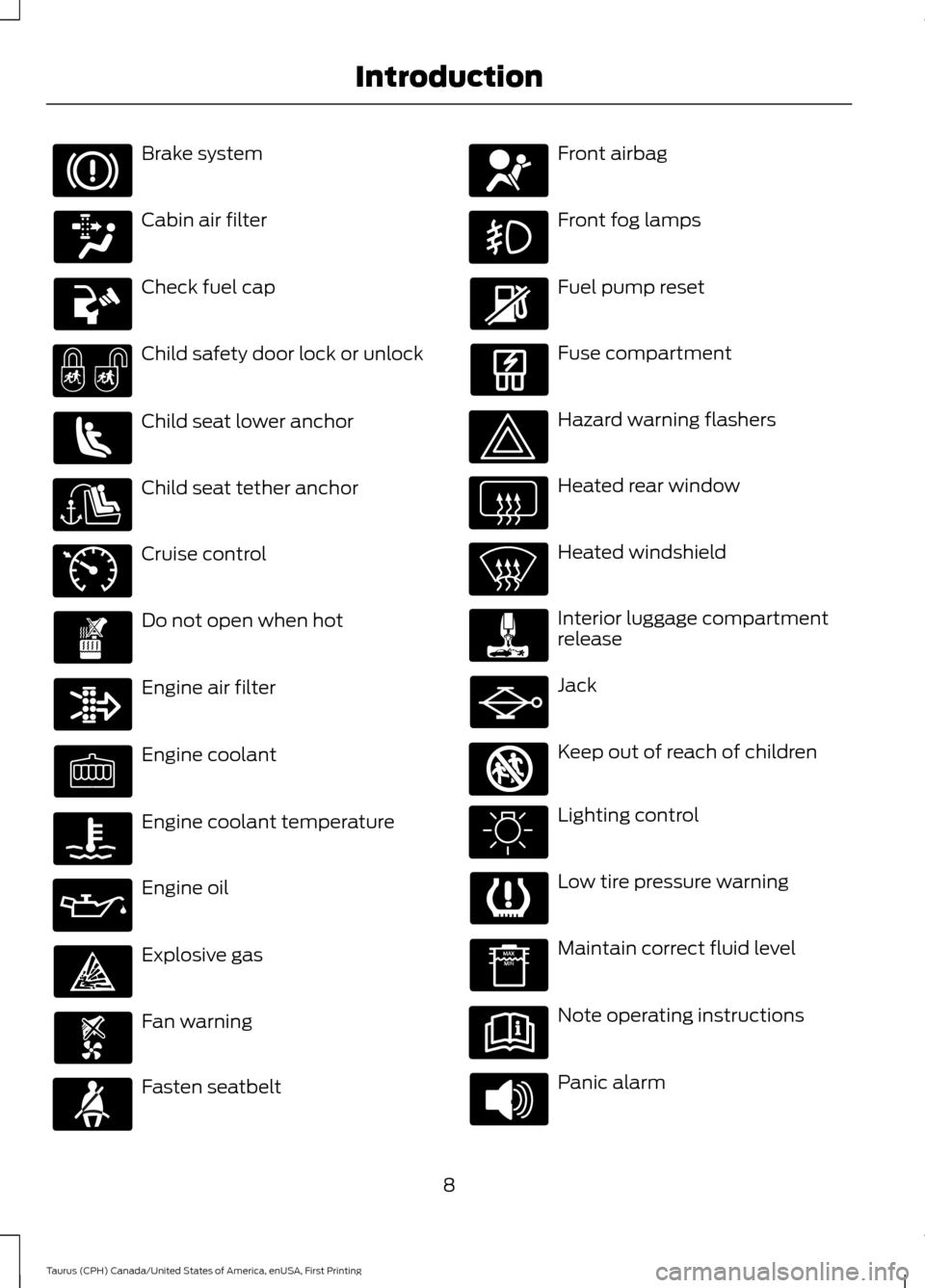
Brake system
Cabin air filter
Check fuel cap
Child safety door lock or unlock
Child seat lower anchor
Child seat tether anchor
Cruise control
Do not open when hot
Engine air filter
Engine coolant
Engine coolant temperature
Engine oil
Explosive gas
Fan warning
Fasten seatbelt Front airbag
Front fog lamps
Fuel pump reset
Fuse compartment
Hazard warning flashers
Heated rear window
Heated windshield
Interior luggage compartment
release
Jack
Keep out of reach of children
Lighting control
Low tire pressure warning
Maintain correct fluid level
Note operating instructions
Panic alarm
8
Taurus (CPH) Canada/United States of America, enUSA, First Printing Introduction E71340 E161353
Page 56 of 424
Potential Causes
Condition
Program a spare key. See Passive Anti-Theft
System (page 61).
I lost a key.
MyKey distances do not accumulate.
•The MyKey user is not using the MyKey.
• An admin key holder cleared the MyKeys
and created new MyKeys.
• The key system has been reset.
• An admin transmitter is present at vehicle
start.
• No MyKeys are created. See
Creating a
MyKey (page 49).
No MyKey functions with the keyless
entry transmitter.
53
Taurus (CPH) Canada/United States of America, enUSA, First Printing MyKey
™
Page 67 of 424
End of Travel Position
The steering column sets a stopping
position just short of the end of the column
position to prevent damage to the steering
column. A new stopping position sets if the
steering column encounters an object
when tilting or telescoping.
To reset the steering column to its normal
stopping position:
1. Confirm there is nothing obstructing
the motion of the steering column.
2. Press and hold the steering column control until the steering column stops
moving.
3. Press the steering column control again. The steering column may begin
to move again.
4. When the steering column stops, continue holding the control for an
additional few seconds.
5. Repeat for each direction as necessary.
A new stopping position is set. The next
time you tilt or telescope the steering
column, it will stop just short of the end of
the column position.
Memory Feature
You can save and recall the steering
column position with the memory function.
See Memory Function (page 122).
Note: Pressing the adjustment control
during memory recall cancels the operation.
Easy Entry and Exit Feature
When you switch the ignition off, the
steering column will move to allow extra
room to exit your vehicle. The column will
return to the previous setting when you
switch the ignition on. You can enable or
disable this feature in the information
display. See Information Displays (page
86
). AUDIO CONTROL
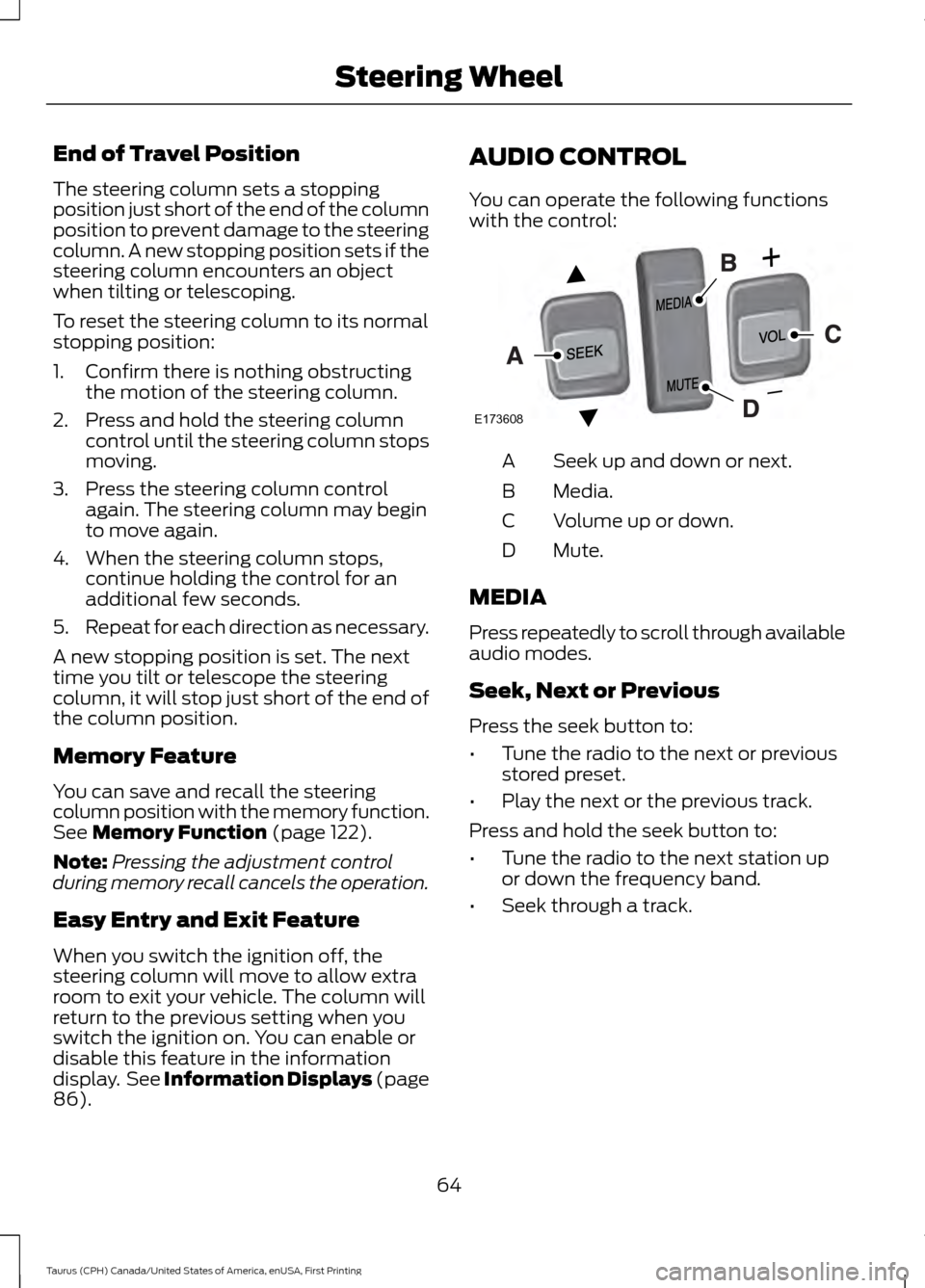
You can operate the following functions
with the control:
Seek up and down or next.
A
Media.
B
Volume up or down.
C
Mute.
D
MEDIA
Press repeatedly to scroll through available
audio modes.
Seek, Next or Previous
Press the seek button to:
• Tune the radio to the next or previous
stored preset.
• Play the next or the previous track.
Press and hold the seek button to:
• Tune the radio to the next station up
or down the frequency band.
• Seek through a track.
64
Taurus (CPH) Canada/United States of America, enUSA, First Printing Steering WheelE173608
Page 90 of 424
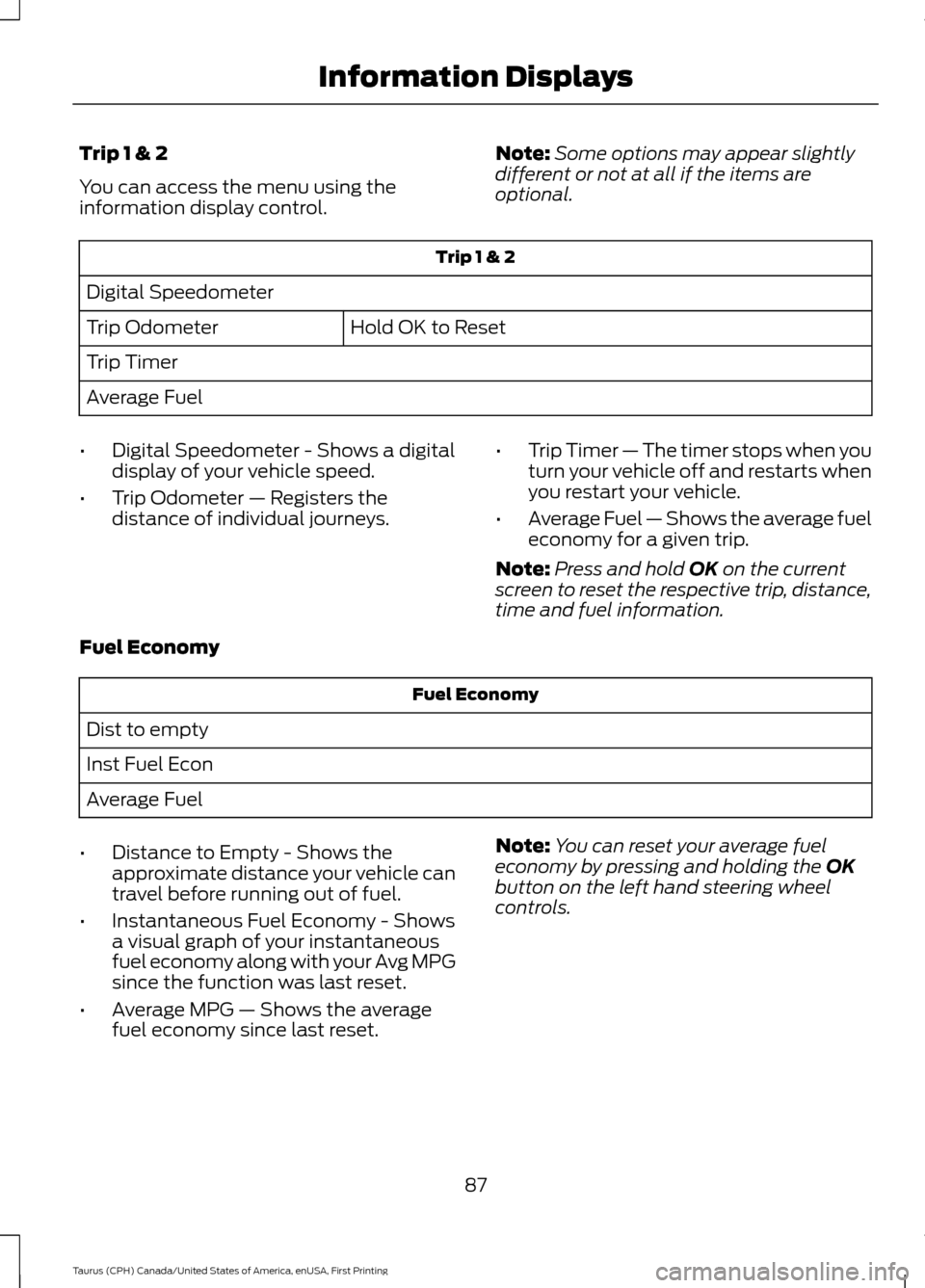
Trip 1 & 2
You can access the menu using the
information display control.
Note:
Some options may appear slightly
different or not at all if the items are
optional. Trip 1 & 2
Digital Speedometer Hold OK to Reset
Trip Odometer
Trip Timer
Average Fuel
• Digital Speedometer - Shows a digital
display of your vehicle speed.
• Trip Odometer — Registers the
distance of individual journeys. •
Trip Timer — The timer stops when you
turn your vehicle off and restarts when
you restart your vehicle.
• Average Fuel — Shows the average fuel
economy for a given trip.
Note: Press and hold OK on the current
screen to reset the respective trip, distance,
time and fuel information.
Fuel Economy Fuel Economy
Dist to empty
Inst Fuel Econ
Average Fuel
• Distance to Empty - Shows the
approximate distance your vehicle can
travel before running out of fuel.
• Instantaneous Fuel Economy - Shows
a visual graph of your instantaneous
fuel economy along with your Avg MPG
since the function was last reset.
• Average MPG — Shows the average
fuel economy since last reset. Note:
You can reset your average fuel
economy by pressing and holding the
OK
button on the left hand steering wheel
controls.
87
Taurus (CPH) Canada/United States of America, enUSA, First Printing Information Displays
Page 92 of 424
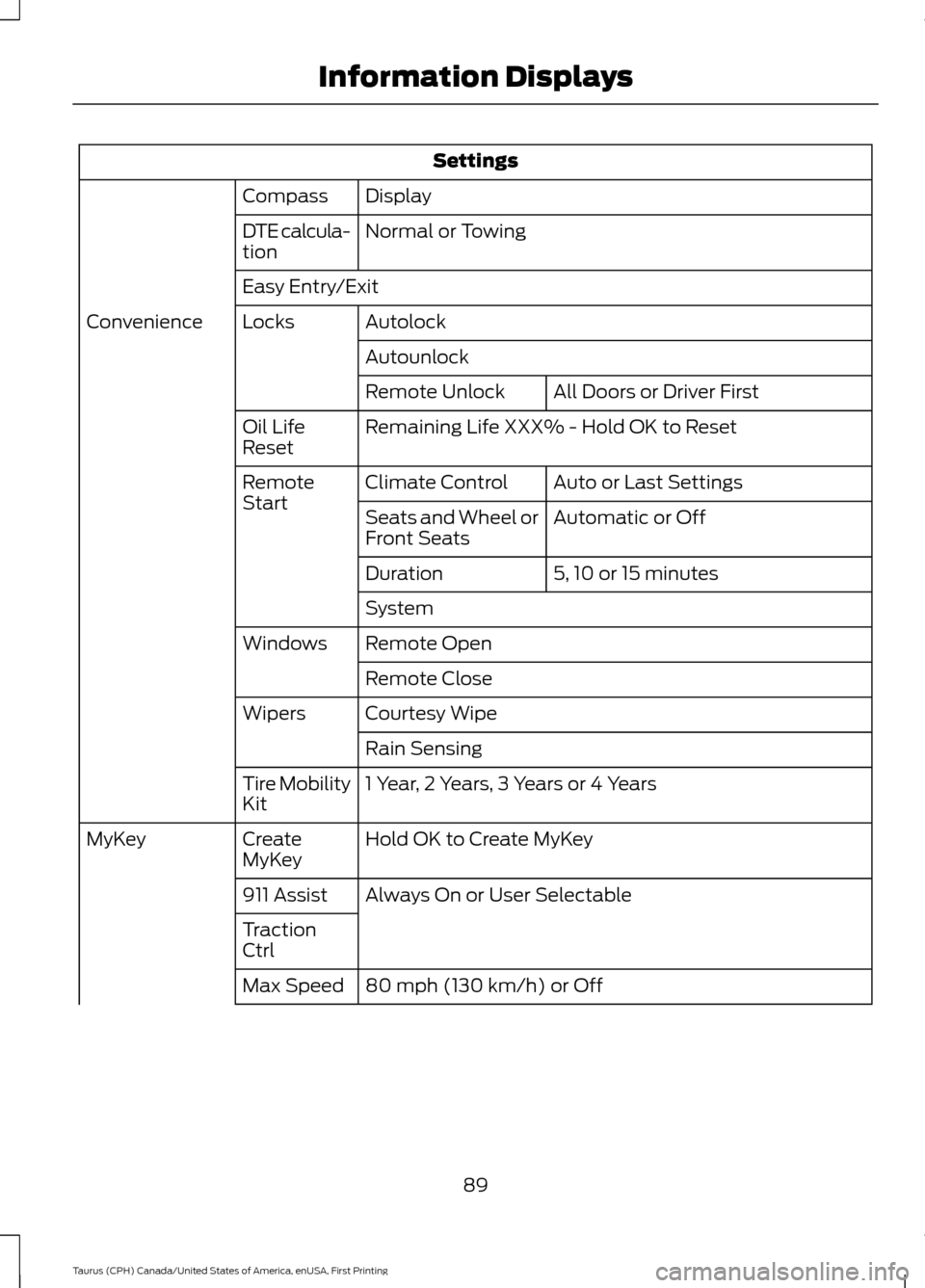
Settings
Display
Compass
Normal or Towing
DTE calcula-
tion
Easy Entry/Exit
Autolock
Locks
Convenience
AutounlockAll Doors or Driver First
Remote Unlock
Remaining Life XXX% - Hold OK to Reset
Oil Life
Reset
Auto or Last Settings
Climate Control
Remote
Start
Automatic or Off
Seats and Wheel or
Front Seats
5, 10 or 15 minutes
Duration
System
Remote Open
Windows
Remote Close
Courtesy Wipe
Wipers
Rain Sensing
1 Year, 2 Years, 3 Years or 4 Years
Tire Mobility
Kit
Hold OK to Create MyKey
Create
MyKey
MyKey
Always On or User Selectable
911 Assist
Traction
Ctrl
80 mph (130 km/h) or Off
Max Speed
89
Taurus (CPH) Canada/United States of America, enUSA, First Printing Information Displays
Page 95 of 424
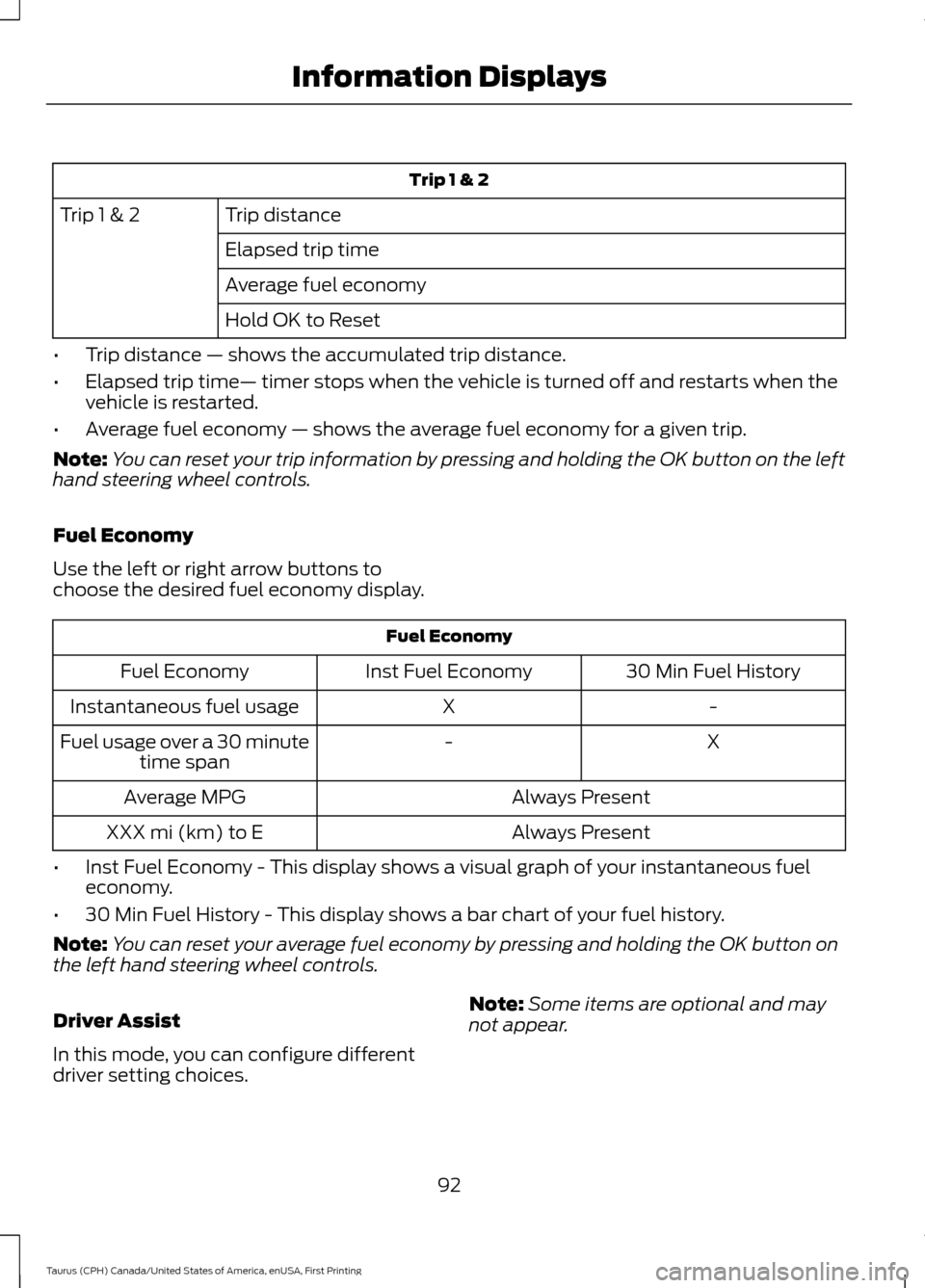
Trip 1 & 2
Trip distance
Trip 1 & 2
Elapsed trip time
Average fuel economy
Hold OK to Reset
• Trip distance — shows the accumulated trip distance.
• Elapsed trip time— timer stops when the vehicle is turned off and restarts when the
vehicle is restarted.
• Average fuel economy — shows the average fuel economy for a given trip.
Note: You can reset your trip information by pressing and holding the OK button on the left
hand steering wheel controls.
Fuel Economy
Use the left or right arrow buttons to
choose the desired fuel economy display. Fuel Economy
30 Min Fuel History
Inst Fuel Economy
Fuel Economy
-
X
Instantaneous fuel usage
X
-
Fuel usage over a 30 minute
time span
Always Present
Average MPG
Always Present
XXX mi (km) to E
• Inst Fuel Economy - This display shows a visual graph of your instantaneous fuel
economy.
• 30 Min Fuel History - This display shows a bar chart of your fuel history.
Note: You can reset your average fuel economy by pressing and holding the OK button on
the left hand steering wheel controls.
Driver Assist
In this mode, you can configure different
driver setting choices. Note:
Some items are optional and may
not appear.
92
Taurus (CPH) Canada/United States of America, enUSA, First Printing Information Displays
Page 96 of 424
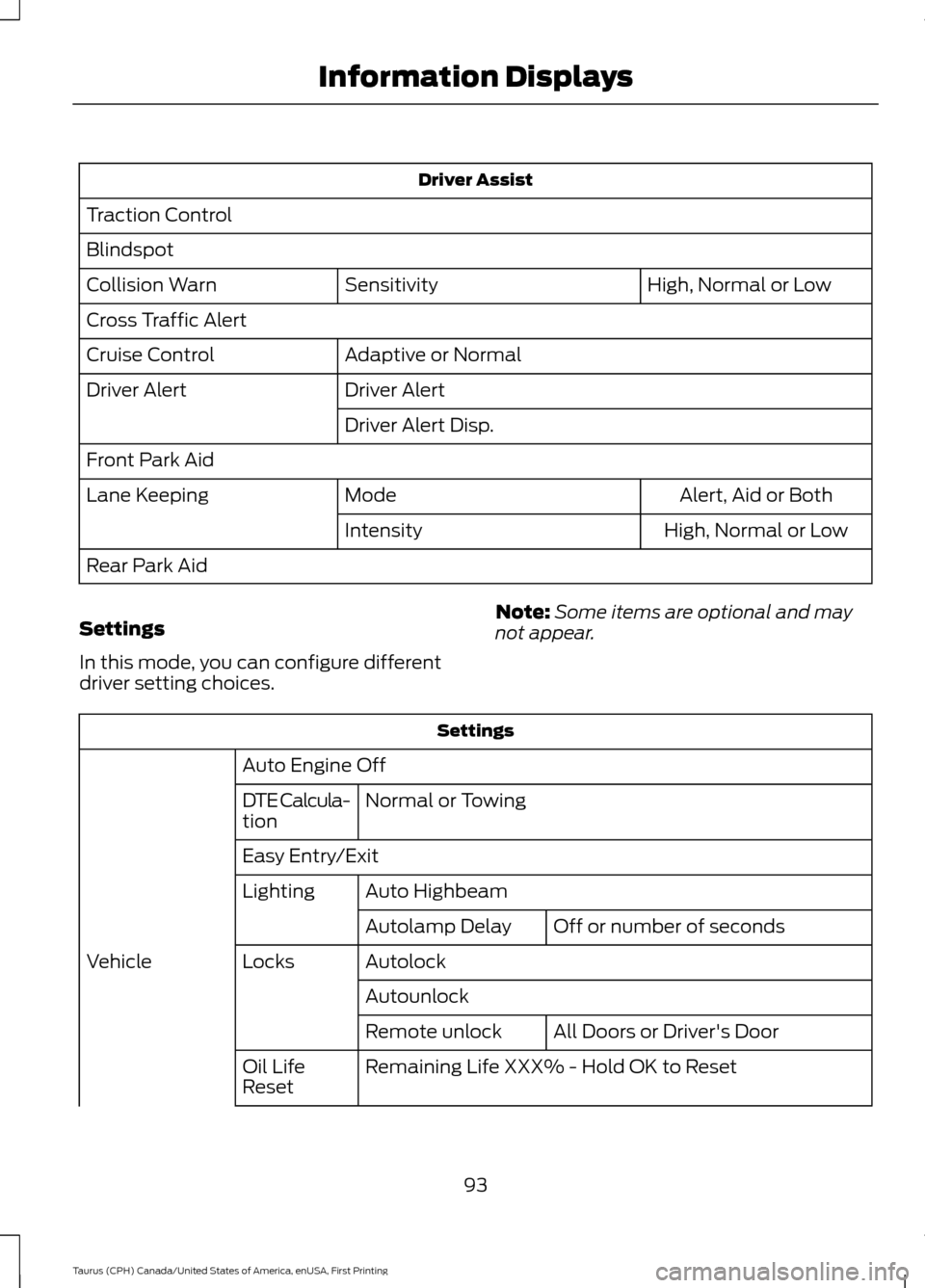
Driver Assist
Traction Control
Blindspot High, Normal or Low
Sensitivity
Collision Warn
Cross Traffic Alert
Adaptive or Normal
Cruise Control
Driver Alert
Driver Alert
Driver Alert Disp.
Front Park Aid Alert, Aid or Both
Mode
Lane Keeping
High, Normal or Low
Intensity
Rear Park Aid
Settings
In this mode, you can configure different
driver setting choices. Note:
Some items are optional and may
not appear. Settings
Auto Engine Off Normal or Towing
DTE Calcula-
tion
Easy Entry/Exit
Auto Highbeam
Lighting
Off or number of seconds
Autolamp Delay
Autolock
Locks
Vehicle
AutounlockAll Doors or Driver's Door
Remote unlock
Remaining Life XXX% - Hold OK to Reset
Oil Life
Reset
93
Taurus (CPH) Canada/United States of America, enUSA, First Printing Information Displays
Page 123 of 424
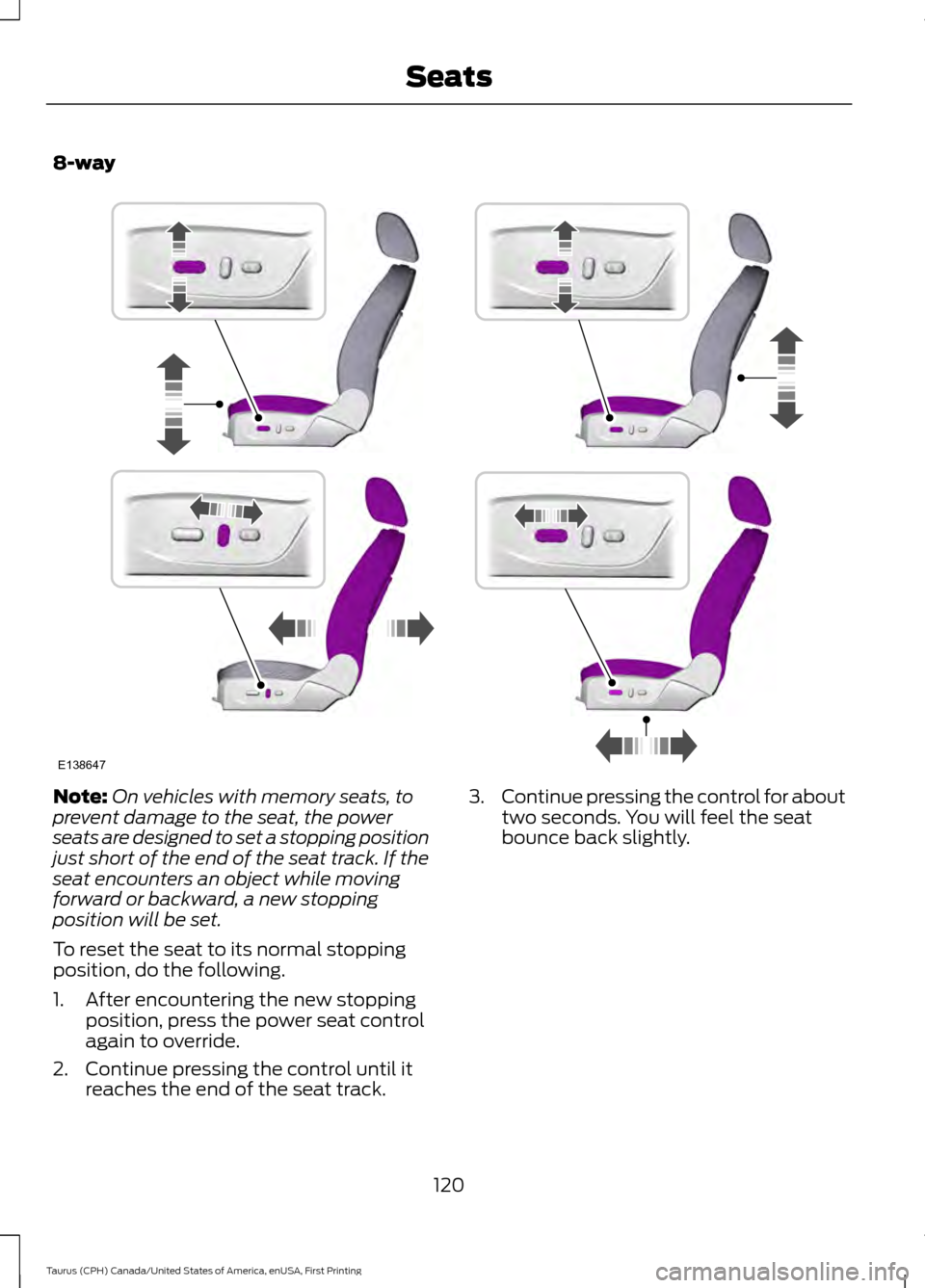
8-way
Note:
On vehicles with memory seats, to
prevent damage to the seat, the power
seats are designed to set a stopping position
just short of the end of the seat track. If the
seat encounters an object while moving
forward or backward, a new stopping
position will be set.
To reset the seat to its normal stopping
position, do the following.
1. After encountering the new stopping position, press the power seat control
again to override.
2. Continue pressing the control until it reaches the end of the seat track. 3.
Continue pressing the control for about
two seconds. You will feel the seat
bounce back slightly.
120
Taurus (CPH) Canada/United States of America, enUSA, First Printing SeatsE138647
Page 125 of 424
MEMORY FUNCTION (If Equipped)
WARNINGS
Before activating the seat memory,
make sure that the area immediately
surrounding the seat is clear of
obstructions and that all occupants are
clear of moving parts. Do not use the memory function
when your vehicle is moving.
This function automatically recalls the
position of these features.
•
Driver seat.
• Power mirrors.
• Optional power adjustable pedals.
• Optional power steering column.
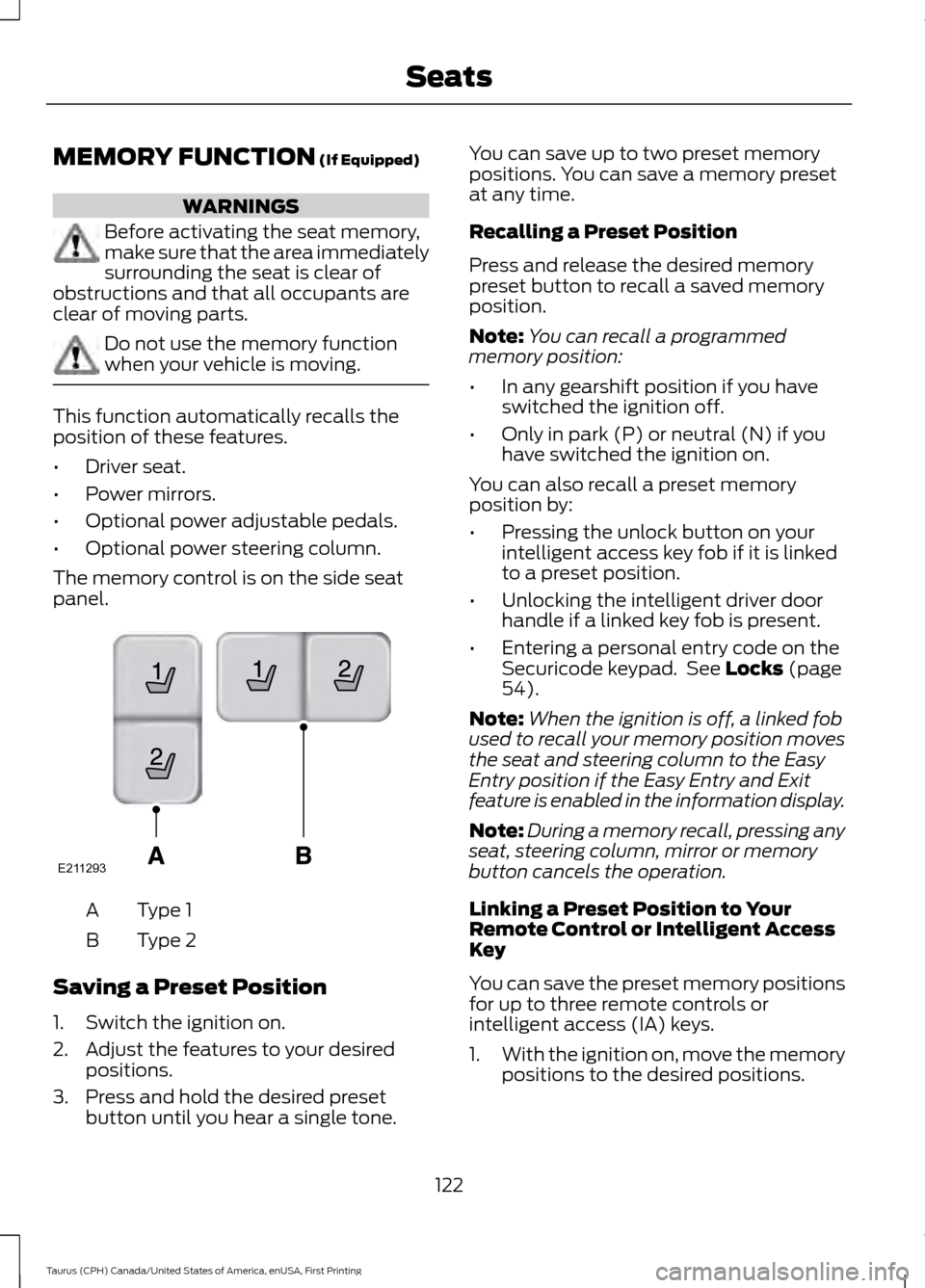
The memory control is on the side seat
panel. Type 1
A
Type 2
B
Saving a Preset Position
1. Switch the ignition on.
2. Adjust the features to your desired positions.
3. Press and hold the desired preset button until you hear a single tone. You can save up to two preset memory
positions. You can save a memory preset
at any time.
Recalling a Preset Position
Press and release the desired memory
preset button to recall a saved memory
position.
Note:
You can recall a programmed
memory position:
• In any gearshift position if you have
switched the ignition off.
• Only in park (P) or neutral (N) if you
have switched the ignition on.
You can also recall a preset memory
position by:
• Pressing the unlock button on your
intelligent access key fob if it is linked
to a preset position.
• Unlocking the intelligent driver door
handle if a linked key fob is present.
• Entering a personal entry code on the
Securicode keypad. See
Locks (page
54).
Note: When the ignition is off, a linked fob
used to recall your memory position moves
the seat and steering column to the Easy
Entry position if the Easy Entry and Exit
feature is enabled in the information display.
Note: During a memory recall, pressing any
seat, steering column, mirror or memory
button cancels the operation.
Linking a Preset Position to Your
Remote Control or Intelligent Access
Key
You can save the preset memory positions
for up to three remote controls or
intelligent access (IA) keys.
1. With the ignition on, move the memory
positions to the desired positions.
122
Taurus (CPH) Canada/United States of America, enUSA, First Printing SeatsE211293