wheel FORD TAURUS 2017 Owners Manual
[x] Cancel search | Manufacturer: FORD, Model Year: 2017, Model line: TAURUS, Model: FORD TAURUS 2017Pages: 504, PDF Size: 5.84 MB
Page 312 of 504
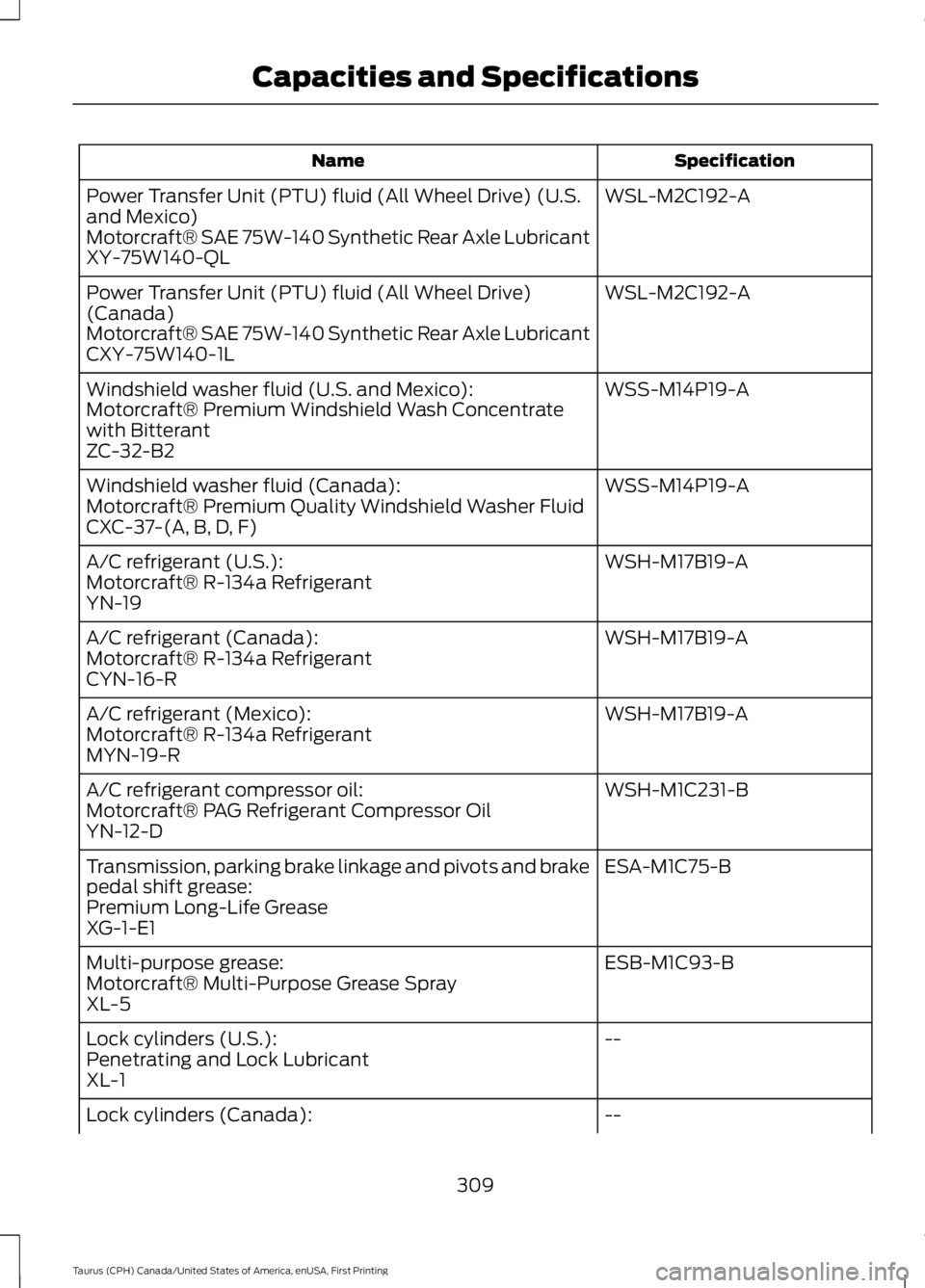
SpecificationName
WSL-M2C192-APower Transfer Unit (PTU) fluid (All Wheel Drive) (U.S.and Mexico)Motorcraft® SAE 75W-140 Synthetic Rear Axle LubricantXY-75W140-QL
WSL-M2C192-APower Transfer Unit (PTU) fluid (All Wheel Drive)(Canada)Motorcraft® SAE 75W-140 Synthetic Rear Axle LubricantCXY-75W140-1L
WSS-M14P19-AWindshield washer fluid (U.S. and Mexico):Motorcraft® Premium Windshield Wash Concentratewith BitterantZC-32-B2
WSS-M14P19-AWindshield washer fluid (Canada):Motorcraft® Premium Quality Windshield Washer FluidCXC-37-(A, B, D, F)
WSH-M17B19-AA/C refrigerant (U.S.):Motorcraft® R-134a RefrigerantYN-19
WSH-M17B19-AA/C refrigerant (Canada):Motorcraft® R-134a RefrigerantCYN-16-R
WSH-M17B19-AA/C refrigerant (Mexico):Motorcraft® R-134a RefrigerantMYN-19-R
WSH-M1C231-BA/C refrigerant compressor oil:Motorcraft® PAG Refrigerant Compressor OilYN-12-D
ESA-M1C75-BTransmission, parking brake linkage and pivots and brakepedal shift grease:Premium Long-Life GreaseXG-1-E1
ESB-M1C93-BMulti-purpose grease:Motorcraft® Multi-Purpose Grease SprayXL-5
--Lock cylinders (U.S.):Penetrating and Lock LubricantXL-1
--Lock cylinders (Canada):
309
Taurus (CPH) Canada/United States of America, enUSA, First Printing
Capacities and Specifications
Page 314 of 504
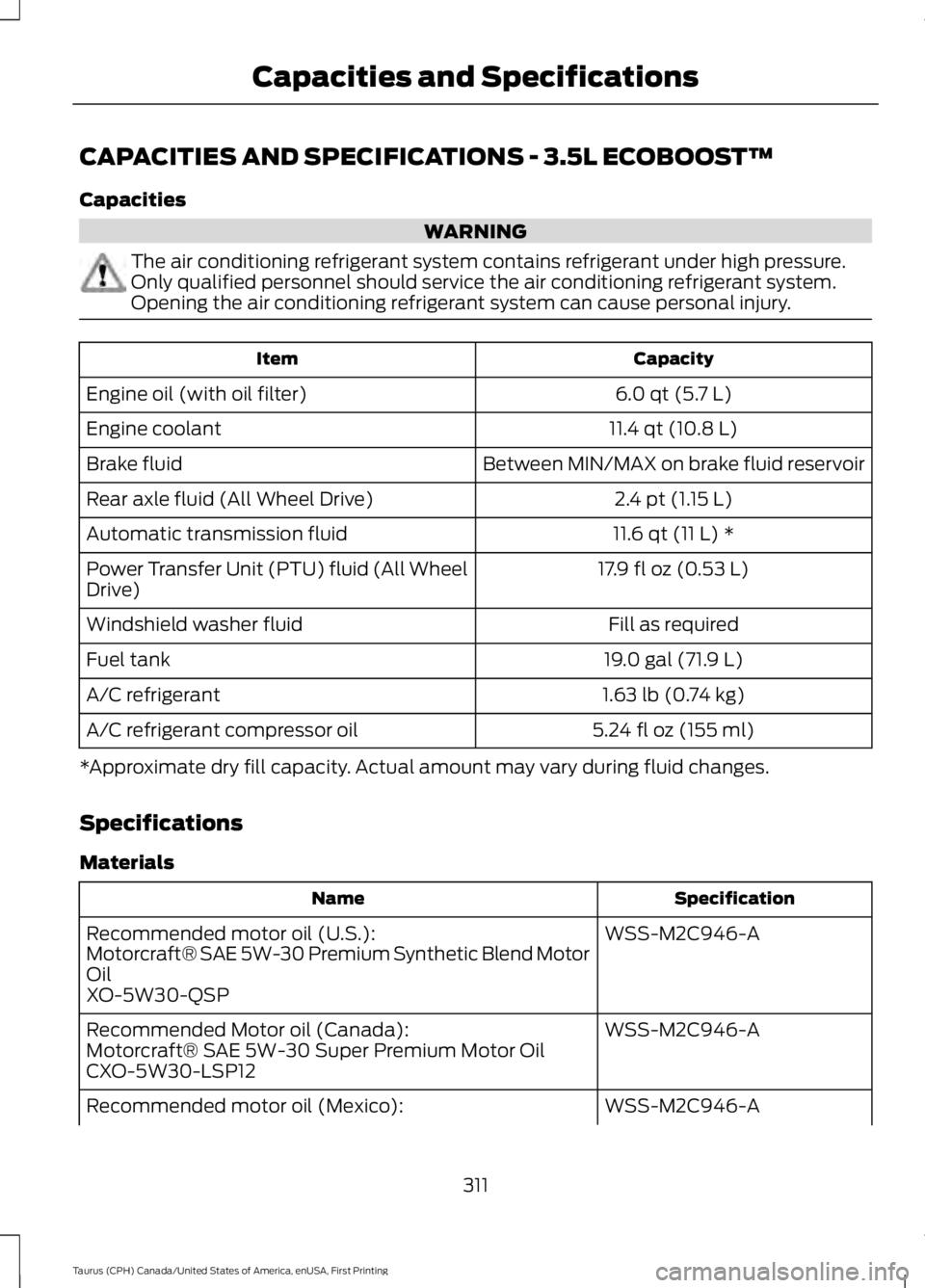
CAPACITIES AND SPECIFICATIONS - 3.5L ECOBOOST™
Capacities
WARNING
The air conditioning refrigerant system contains refrigerant under high pressure.Only qualified personnel should service the air conditioning refrigerant system.Opening the air conditioning refrigerant system can cause personal injury.
CapacityItem
6.0 qt (5.7 L)Engine oil (with oil filter)
11.4 qt (10.8 L)Engine coolant
Between MIN/MAX on brake fluid reservoirBrake fluid
2.4 pt (1.15 L)Rear axle fluid (All Wheel Drive)
11.6 qt (11 L) *Automatic transmission fluid
17.9 fl oz (0.53 L)Power Transfer Unit (PTU) fluid (All WheelDrive)
Fill as requiredWindshield washer fluid
19.0 gal (71.9 L)Fuel tank
1.63 lb (0.74 kg)A/C refrigerant
5.24 fl oz (155 ml)A/C refrigerant compressor oil
*Approximate dry fill capacity. Actual amount may vary during fluid changes.
Specifications
Materials
SpecificationName
WSS-M2C946-ARecommended motor oil (U.S.):Motorcraft® SAE 5W-30 Premium Synthetic Blend MotorOilXO-5W30-QSP
WSS-M2C946-ARecommended Motor oil (Canada):Motorcraft® SAE 5W-30 Super Premium Motor OilCXO-5W30-LSP12
WSS-M2C946-ARecommended motor oil (Mexico):
311
Taurus (CPH) Canada/United States of America, enUSA, First Printing
Capacities and Specifications
Page 315 of 504
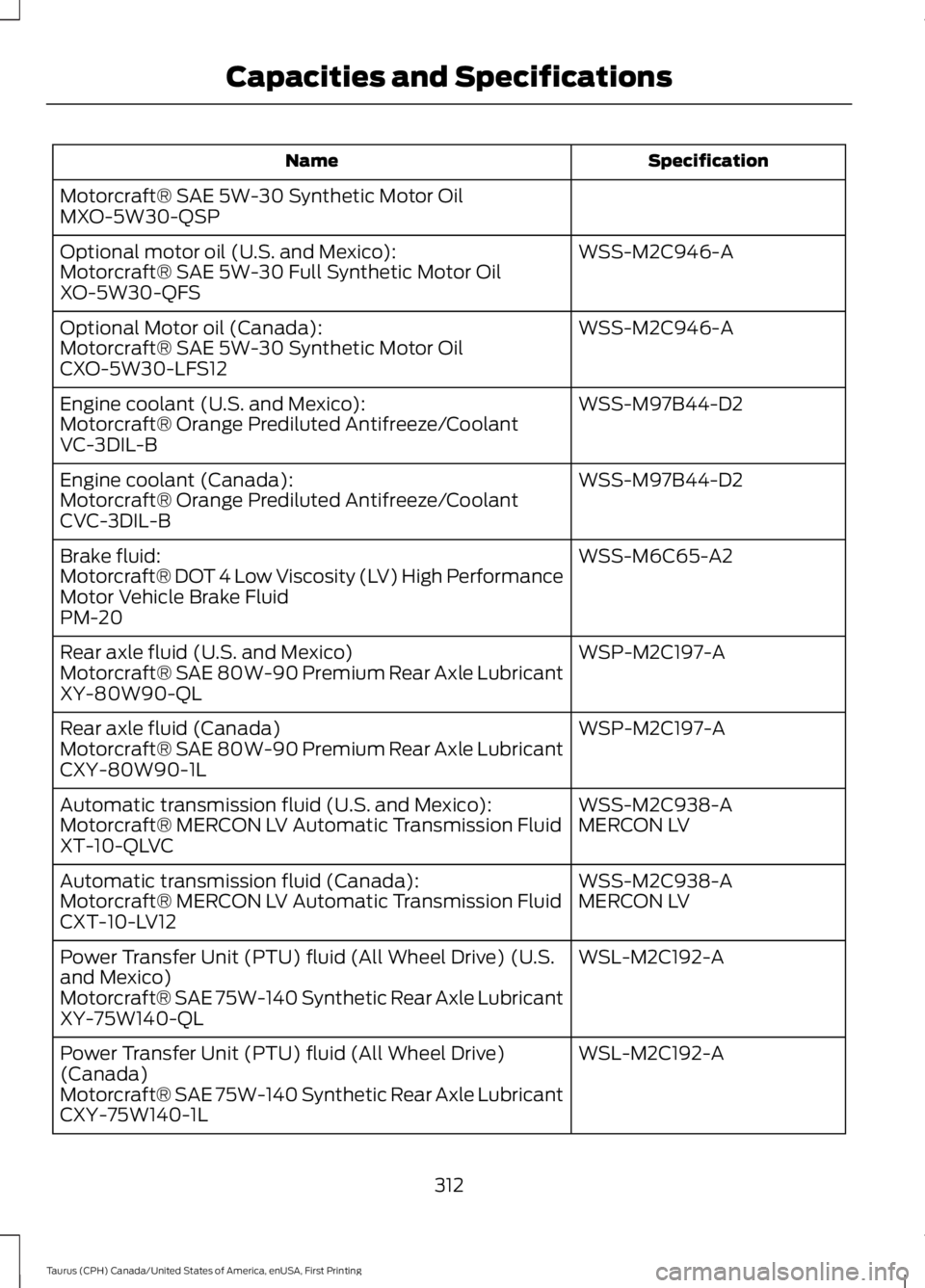
SpecificationName
Motorcraft® SAE 5W-30 Synthetic Motor OilMXO-5W30-QSP
WSS-M2C946-AOptional motor oil (U.S. and Mexico):Motorcraft® SAE 5W-30 Full Synthetic Motor OilXO-5W30-QFS
WSS-M2C946-AOptional Motor oil (Canada):Motorcraft® SAE 5W-30 Synthetic Motor OilCXO-5W30-LFS12
WSS-M97B44-D2Engine coolant (U.S. and Mexico):Motorcraft® Orange Prediluted Antifreeze/CoolantVC-3DIL-B
WSS-M97B44-D2Engine coolant (Canada):Motorcraft® Orange Prediluted Antifreeze/CoolantCVC-3DIL-B
WSS-M6C65-A2Brake fluid:Motorcraft® DOT 4 Low Viscosity (LV) High PerformanceMotor Vehicle Brake FluidPM-20
WSP-M2C197-ARear axle fluid (U.S. and Mexico)Motorcraft® SAE 80W-90 Premium Rear Axle LubricantXY-80W90-QL
WSP-M2C197-ARear axle fluid (Canada)Motorcraft® SAE 80W-90 Premium Rear Axle LubricantCXY-80W90-1L
WSS-M2C938-AAutomatic transmission fluid (U.S. and Mexico):MERCON LVMotorcraft® MERCON LV Automatic Transmission FluidXT-10-QLVC
WSS-M2C938-AAutomatic transmission fluid (Canada):MERCON LVMotorcraft® MERCON LV Automatic Transmission FluidCXT-10-LV12
WSL-M2C192-APower Transfer Unit (PTU) fluid (All Wheel Drive) (U.S.and Mexico)Motorcraft® SAE 75W-140 Synthetic Rear Axle LubricantXY-75W140-QL
WSL-M2C192-APower Transfer Unit (PTU) fluid (All Wheel Drive)(Canada)Motorcraft® SAE 75W-140 Synthetic Rear Axle LubricantCXY-75W140-1L
312
Taurus (CPH) Canada/United States of America, enUSA, First Printing
Capacities and Specifications
Page 332 of 504
System data cannot be accessed withoutspecial equipment and access to thevehicle's SYNC module. Ford MotorCompany and Ford of Canada will notaccess the system data for any purposeother than as described absent consent, acourt order, or where required by lawenforcement, other governmentauthorities, or other third parties actingwith lawful authority. Other parties mayseek to access the informationindependently of Ford Motor Company andFord of Canada. For further privacyinformation, see the sections on 911 Assist,Vehicle Health Report, and Traffic,Directions and Information.
USING VOICE RECOGNITION
This system helps you control manyfeatures using voice commands. Thisallows you to keep your hands on thewheel and focus on what is in front of you.
Helpful Hints
•Make sure the interior of your vehicle isas quiet as possible. Wind noise fromopen windows and road vibrations mayprevent the system from correctlyrecognizing spoken commands.
•After pressing the voice button, waituntil after the tone sounds andListening appears before saying acommand. Any command spokenbefore this does not register with thesystem.
•Speak naturally, without long pausesbetween words.
•At any time, you can interrupt thesystem while it is speaking by pressingthe voice button.
Initiating a Voice Session
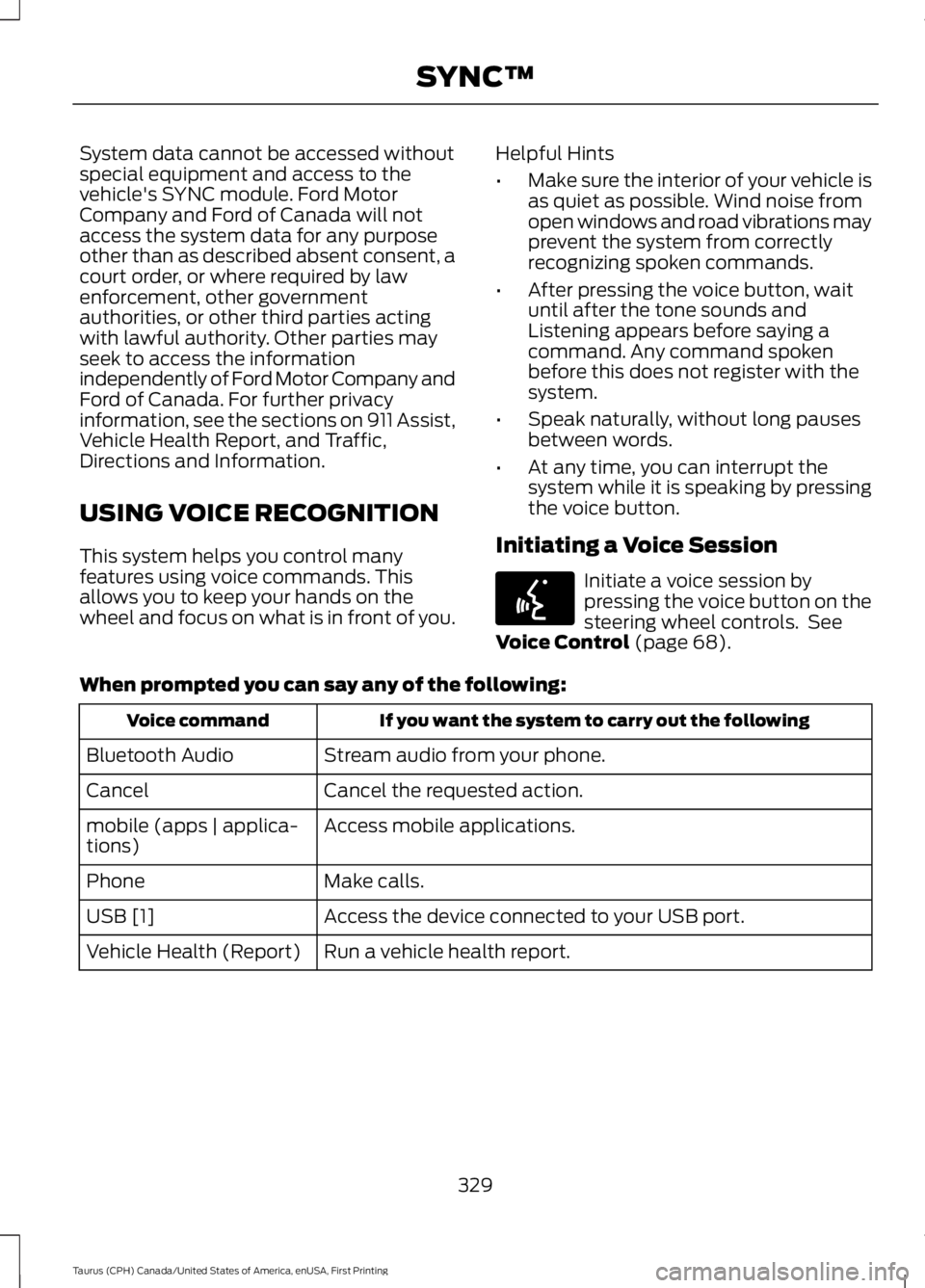
Initiate a voice session bypressing the voice button on thesteering wheel controls. SeeVoice Control (page 68).
When prompted you can say any of the following:
If you want the system to carry out the followingVoice command
Stream audio from your phone.Bluetooth Audio
Cancel the requested action.Cancel
Access mobile applications.mobile (apps | applica-tions)
Make calls.Phone
Access the device connected to your USB port.USB [1]
Run a vehicle health report.Vehicle Health (Report)
329
Taurus (CPH) Canada/United States of America, enUSA, First Printing
SYNC™E142599
Page 333 of 504
If you want the system to carry out the followingVoice command
Adjust the level of voice interaction and feedback.Voice Settings | VoicePreferences
Hear a list of voice commands available in the current mode.Help
You can say any of the voice commands that appear within open and close brackets thatare separated by |. For example, where (cancel | stop | exit) appears you say; cancel orstop or exit.
You must say any of the voice commands that appear outside of open and close brackets.For example, where mobile (apps | applications) appears, you must say mobile followedby either apps or applications.
You do not need to say words that appear within square brackets. For example, for where(USB [stick] | iPOD | MP3 [player]) appears, you can say USB or USB stick.
Note:SYNC Services and Vehicle health report are only available in the United States ofAmerica.
System Interaction and Feedback
The system provides feedback throughaudible tones, prompts, questions andspoken confirmations depending on thesituation and the chosen level ofinteraction (voice settings). You cancustomize the voice recognition system toprovide more or less instruction andfeedback.
The default setting is to a higher level ofinteraction in order to help you learn to usethe system. You can change these settingsat any time.
Adjusting the Interaction Level
Initiate a voice session bypressing the voice button on thesteering wheel controls. SeeVoice Control (page 68).
When prompted say the following:
If you want the system to carry out the followingVoice command
Voice Settings | Voice Preferences
Followed by either of the following:
Provide more detailed interaction and guidance.Interaction ModeStandard
Provide less audible interaction and more tone prompts.Interaction ModeAdvanced
The system defaults to the standard interaction mode.
330
Taurus (CPH) Canada/United States of America, enUSA, First Printing
SYNC™E142599
Page 350 of 504
•A connected Bluetooth-enabled phonemust have adequate network coverage,battery power and signal strength.
•The vehicle must have battery powerand be located in the U.S., Canada orin a territory in which 911 is theemergency number.
In the Event of a Crash
Not all crashes will deploy an airbag oractivate the fuel pump shut-off (thetriggers for 911 Assist). If a connected cellphone sustains damage or loses itsconnection to SYNC during a crash, SYNCwill search for and try to connect to apreviously paired cell phone; SYNC willthen attempt to call the emergencyservices.
Before making the call:
•SYNC provides a short window of time(about 10 seconds) to cancel the call.If you fail to cancel the call, SYNCattempts to dial 911.
•SYNC says the following, or a similarmessage: "SYNC will attempt to call911, to cancel the call, press Cancel onyour screen or press and hold thephone button on your steering wheel."
If you do not cancel the call, and SYNCmakes a successful call, a pre-recordedmessage plays for the 911 operator, andthen the occupant(s) in your vehicle is ableto talk with the operator. Be prepared toprovide your name, phone number andlocation immediately, because not all 911systems are capable of receiving thisinformation electronically.
911 Assist May Not Work If
•Your cellular phone or 911 Assisthardware sustains damage in a crash.
•The vehicle's battery or the SYNCsystem has no power.
•The phone(s) thrown from your vehicleare the ones paired and connected tothe system.
911 Assist Privacy Notice
When you turn on 911 Assist, it maydisclose to emergency services that yourvehicle has been in a crash involving thedeployment of an airbag or activation ofthe fuel pump shut-off. Certain versions orupdates to 911 Assist may also be capableof electronically or verbally disclosing to911 operators your vehicle location or otherdetails about your vehicle or crash to assist911 operators to provide the mostappropriate emergency services. If you donot want to disclose this information, donot turn the feature on.
SYNC™ APPLINK™
SYNC Mobile Apps
Note:You must pair and connect yoursmartphone to SYNC to access AppLink.
Note:iPhone users need to connect thephone to the USB port in order to start theapplication.
Note:The AppLink feature is not availableif your vehicle is equipped with the MyFordTouch system.
Note:Depending on your display type, youcan access AppLink from the media menu,the phone menu, or by using voicecommands. Once an app is running throughAppLink, you can control main features ofthe app through voice commands andsteering wheel controls.
347
Taurus (CPH) Canada/United States of America, enUSA, First Printing
SYNC™
Page 373 of 504
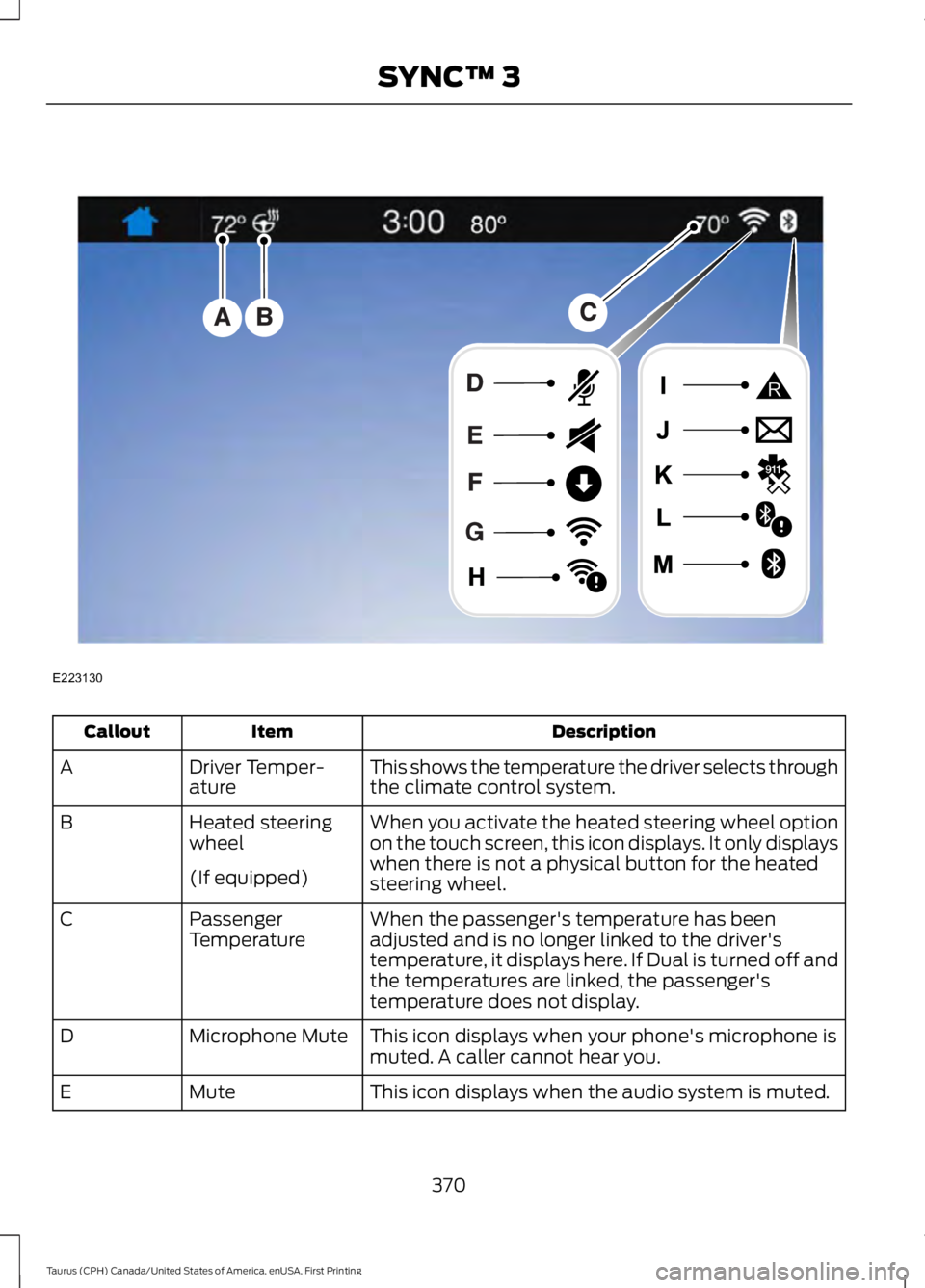
DescriptionItemCallout
This shows the temperature the driver selects throughthe climate control system.Driver Temper-atureA
When you activate the heated steering wheel optionon the touch screen, this icon displays. It only displayswhen there is not a physical button for the heatedsteering wheel.
Heated steeringwheelB
(If equipped)
When the passenger's temperature has beenadjusted and is no longer linked to the driver'stemperature, it displays here. If Dual is turned off andthe temperatures are linked, the passenger'stemperature does not display.
PassengerTemperatureC
This icon displays when your phone's microphone ismuted. A caller cannot hear you.Microphone MuteD
This icon displays when the audio system is muted.MuteE
370
Taurus (CPH) Canada/United States of America, enUSA, First Printing
SYNC™ 3E223130
Page 375 of 504
FunctionsFeature Bar Item
Allows you to see your vehicle's location ona virtual road map, get driving directions toyour destination and find points of interestalong your route.
Navigation
(If equipped)
Connect and control SYNC 3 compatibleapps running on your iphone or androiddevice. Also, access built-in additionalfeatures such as SiriusXM Traffic and TravelLink (if equipped).
Apps
If your vehicle is a hybrid, plug-in hybrid, orelectric this is also where your settings andpower information is located.
You can customize your system withvarious settings for the touchscreen display,feature preferences, and how you want tointeract with your vehicle.
Settings
Cleaning the Touchscreen
You can remove fingerprints with a dry,clean, soft cloth.
If dirt or fingerprints are still on the screen,apply a small amount of alcohol to thecloth and try to clean it again.
Note: Do not use detergent or any type ofsolvent to clean the touchscreen.
Note:Do not pour or spray alcohol onto thetouchscreen.
Using Voice Recognition
Using voice commands allows you to keepyour hands on the wheel and focus onwhat is in front of you. The system providesfeedback through audible tones, prompts,questions and spoken confirmationsdepending on the situation and the chosenlevel of interaction (voice settings).
The system also asks short questions(confirmation prompts) when it is not sureof your request or when there are multiplepossible responses to your request.
When using voice commands, words andicons may appear in the status barindicating the status of the voice commandsession. See Using Voice Recognition(page 382).
Accessing and Adjusting ModesThrough Your Vehicle InformationDisplay (If Equipped)
Depending on your vehicle and selectedoptions you may be able to control someof the SYNC 3 features on your informationdisplay. The features are visible the righthand display (A).
372
Taurus (CPH) Canada/United States of America, enUSA, First Printing
SYNC™ 3
Page 377 of 504
InformationOption
Missed callsOutgoing callsIncoming callsAll callsQuickdial
If you are on a call, the call information is displayed on the information display.
If you are receiving a call, you can accept it by selecting OK on the right-handsteering wheel controls.
1 Depending on your vehicle options, all of these choices may not display.
Use the OK and arrow buttons on the rightside of your steering wheel to scrollthrough the available modes.
The selection menu expands and differentoptions appear.
•Press the up and down arrows to scrollthrough the modes.
•Press the right arrow to enter the mode,use the left arrow to exit the mode.
•Press the up and down arrows to makeadjustments within the chosen mode.
•Press OK to confirm your selection.
Note:If your vehicle is not equipped withnavigation, compass appears in the displayinstead of navigation. If you press the rightarrow to go into the compass menu, you cansee the compass graphic. The compassdisplays the direction in which the vehicleis traveling, not true direction (for example,if the vehicle is traveling west, the middleof the compass graphic displays west; northdisplays to the left of west though its truedirection is to the right of west).
Using the Steering Wheel Controls
Depending on your vehicle and optionpackage, you can use different controls onyour steering wheel to interact with thetouchscreen system in different ways.
VOL: Control the volume of audio output.
Mute: Mute the audio output.
Voice: Press to start a voice session. Pressagain to stop the voice prompt andimmediately begin speaking. Press andhold to end a voice session.
SEEK NEXT:
•While in radio mode, press to seekbetween memory presets.
•While in USB, Bluetooth Audio or CDmode, press to seek between songs orpress and hold to fast seek.
SEEK PREVIOUS:
•While in radio mode, press to seekbetween memory presets.
•While in USB, Bluetooth Audio or CDmode, press to seek between songs orpress and hold to fast seek.
PHONE ACCEPT: Press to answer a callor switch between calls.
PHONE REJECT: Press to end a call orreject an incoming call.
Note:On some models,SEEK NEXT maybe combined with PHONE REJECT andSEEK PREVIOUS may be combined withPHONE ACCEPT.
M: Touch the control repeatedly to switchbetween media sources (modes).
See Steering Wheel (page 66).
Using Your Bezel Controls
Depending on your vehicle and optionpackage, you may also have these controlson your instrument panel:
374
Taurus (CPH) Canada/United States of America, enUSA, First Printing
SYNC™ 3
Page 379 of 504
![FORD TAURUS 2017 Owners Manual If a crash deploys an airbag (excludingknee airbags and rear inflatable safetybelts [if equipped]) or activates the fuelpump shut-off, your SYNC-equippedvehicle may be able to contact emergencyservice](/img/11/58821/w960_58821-378.png "FORD TAURUS 2017 Owners Manual If a crash deploys an airbag (excludingknee airbags and rear inflatable safetybelts [if equipped]) or activates the fuelpump shut-off, your SYNC-equippedvehicle may be able to contact emergencyservice")
If a crash deploys an airbag (excludingknee airbags and rear inflatable safetybelts [if equipped]) or activates the fuelpump shut-off, your SYNC-equippedvehicle may be able to contact emergencyservices by dialing 911 through a paired andconnected Bluetooth-enabled phone. Youcan learn more about the 911 Assistfeature, by visiting:
Website
www.owner.ford.comwww.syncmyride.cawww.syncmaroute.ca
For important information about airbagdeployment and the fuel pump shut-offplease see the Supplementary Restrainsand Roadside Emergencies sections ofyour owner manual.
To switch 911 Assist on and off please viewthe settings information. See Settings(page 418).
To make sure that 911 Assist workscorrectly:
•SYNC must be powered and workingproperly at the time of the incident andthroughout feature activation and use.
•The 911 Assist feature must be set onbefore the incident.
•You must pair and connect aBluetooth-enabled and compatiblecell phone to SYNC.
•A connected Bluetooth-enabled phonemust have the ability to make andmaintain an outgoing call at the timeof the incident.
•A connected Bluetooth-enabled phonemust have adequate network coverage,battery power and signal strength.
•The vehicle must have battery powerand be located in the U.S., Canada orin a territory in which 911 is theemergency number.
In the Event of a Crash
Not all crashes will deploy an airbag oractivate the fuel pump shut-off (thetriggers for 911 Assist). If a connected cellphone sustains damage or loses itsconnection to SYNC during a crash, SYNCwill search for and try to connect to apreviously paired cell phone; SYNC willthen attempt to call the emergencyservices.
Before making the call:
•SYNC provides a short window of time(about 10 seconds) to cancel the call.If you fail to cancel the call, SYNCattempts to dial 911.
•SYNC says the following, or a similarmessage: "SYNC will attempt to call911, to cancel the call, press Cancel onyour screen or press and hold thephone button on your steering wheel."
If you do not cancel the call, and SYNCmakes a successful call, a pre-recordedmessage plays for the 911 operator, andthen the occupant(s) in your vehicle is ableto talk with the operator. Be prepared toprovide your name, phone number andlocation immediately, because not all 911systems are capable of receiving thisinformation electronically.
911 Assist May Not Work If
•Your cellular phone or 911 Assisthardware sustains damage in a crash.
•The vehicle's battery or the SYNCsystem has no power.
•The phone(s) thrown from your vehicleare the ones paired and connected tothe system.
376
Taurus (CPH) Canada/United States of America, enUSA, First Printing
SYNC™ 3