ECO mode FORD TAURUS 2017 User Guide
[x] Cancel search | Manufacturer: FORD, Model Year: 2017, Model line: TAURUS, Model: FORD TAURUS 2017Pages: 504, PDF Size: 5.84 MB
Page 70 of 504
End of Travel Position
The steering column sets a stoppingposition just short of the end of the columnposition to prevent damage to the steeringcolumn. A new stopping position sets if thesteering column encounters an objectwhen tilting or telescoping.
To reset the steering column to its normalstopping position:
1. Confirm there is nothing obstructingthe motion of the steering column.
2. Press and hold the steering columncontrol until the steering column stopsmoving.
3. Press the steering column controlagain. The steering column may beginto move again.
4. When the steering column stops,continue holding the control for anadditional few seconds.
5.Repeat for each direction as necessary.
A new stopping position is set. The nexttime you tilt or telescope the steeringcolumn, it will stop just short of the end ofthe column position.
Memory Feature
You can save and recall the steeringcolumn position with the memory function.See Memory Function (page 125).
Note:Pressing the adjustment controlduring memory recall cancels the operation.
Easy Entry and Exit Feature
When you switch the ignition off, thesteering column will move to allow extraroom to exit your vehicle. The column willreturn to the previous setting when youswitch the ignition on. You can enable ordisable this feature in the informationdisplay. See Information Displays (page89).
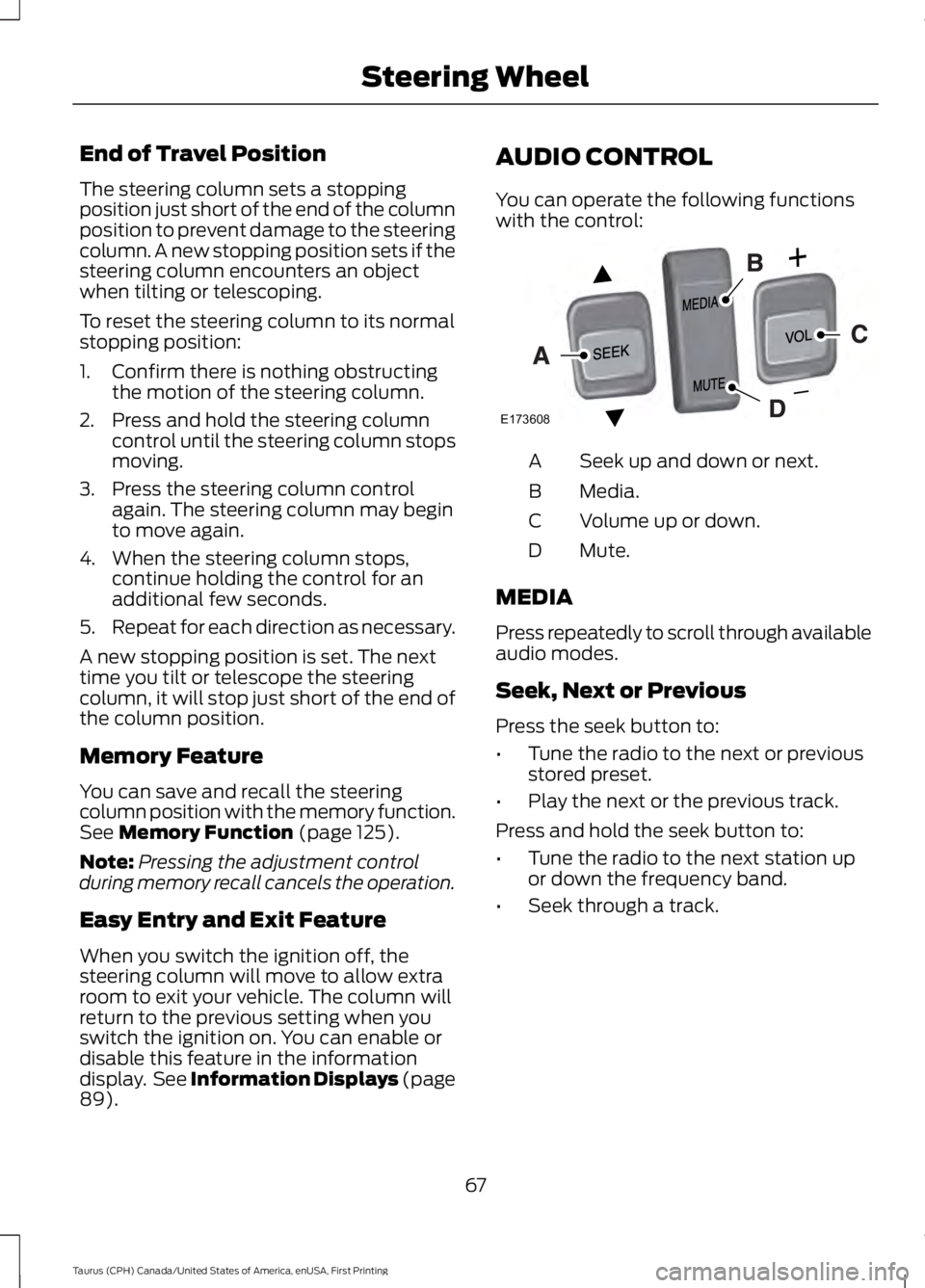
AUDIO CONTROL
You can operate the following functionswith the control:
Seek up and down or next.A
Media.B
Volume up or down.C
Mute.D
MEDIA
Press repeatedly to scroll through availableaudio modes.
Seek, Next or Previous
Press the seek button to:
•Tune the radio to the next or previousstored preset.
•Play the next or the previous track.
Press and hold the seek button to:
•Tune the radio to the next station upor down the frequency band.
•Seek through a track.
67
Taurus (CPH) Canada/United States of America, enUSA, First Printing
Steering WheelE173608
Page 71 of 504
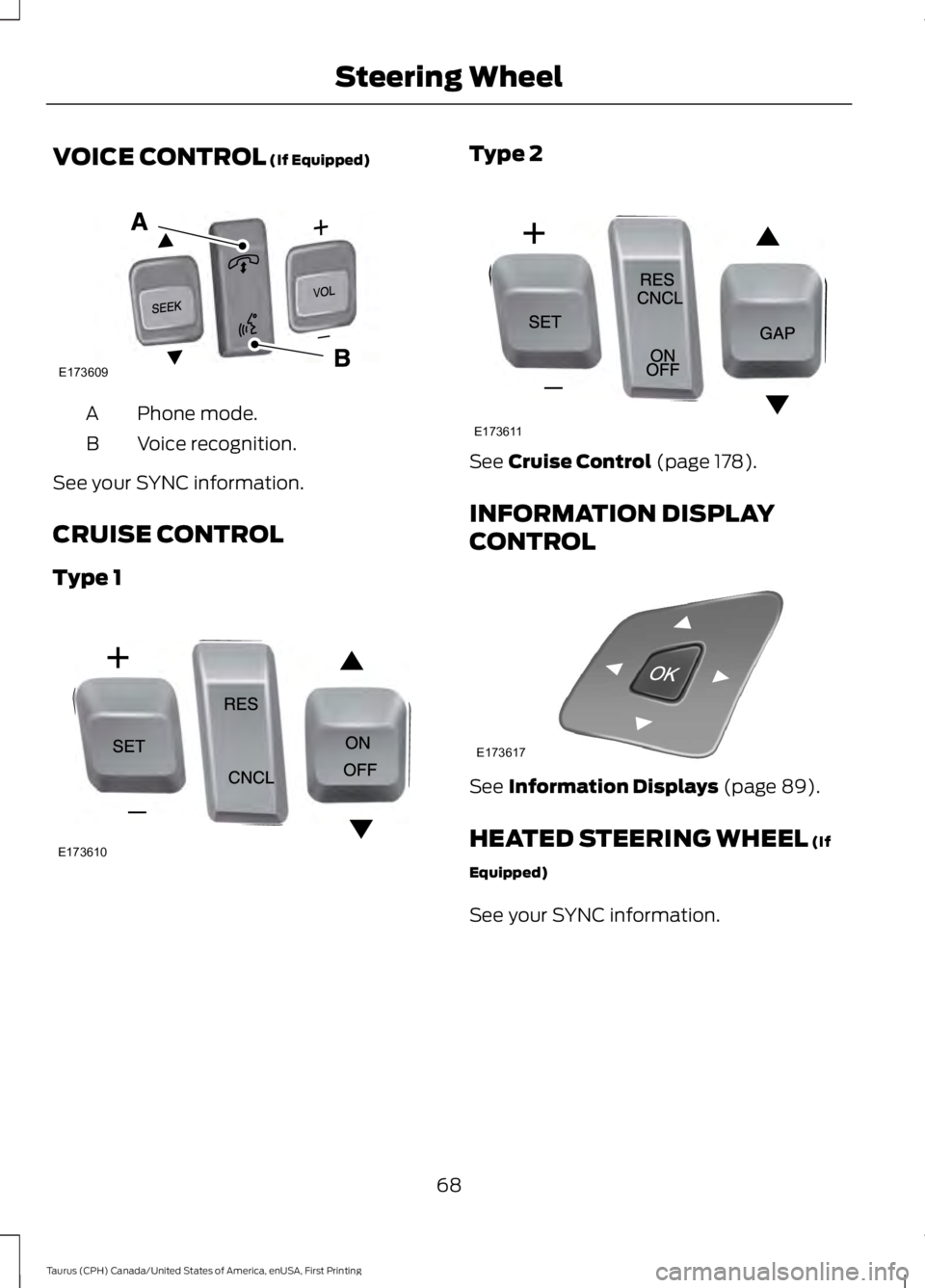
VOICE CONTROL (If Equipped)
Phone mode.A
Voice recognition.B
See your SYNC information.
CRUISE CONTROL
Type 1
Type 2
See Cruise Control (page 178).
INFORMATION DISPLAY
CONTROL
See Information Displays (page 89).
HEATED STEERING WHEEL (If
Equipped)
See your SYNC information.
68
Taurus (CPH) Canada/United States of America, enUSA, First Printing
Steering WheelE173609
V E173610 E173611 E173617
Page 76 of 504
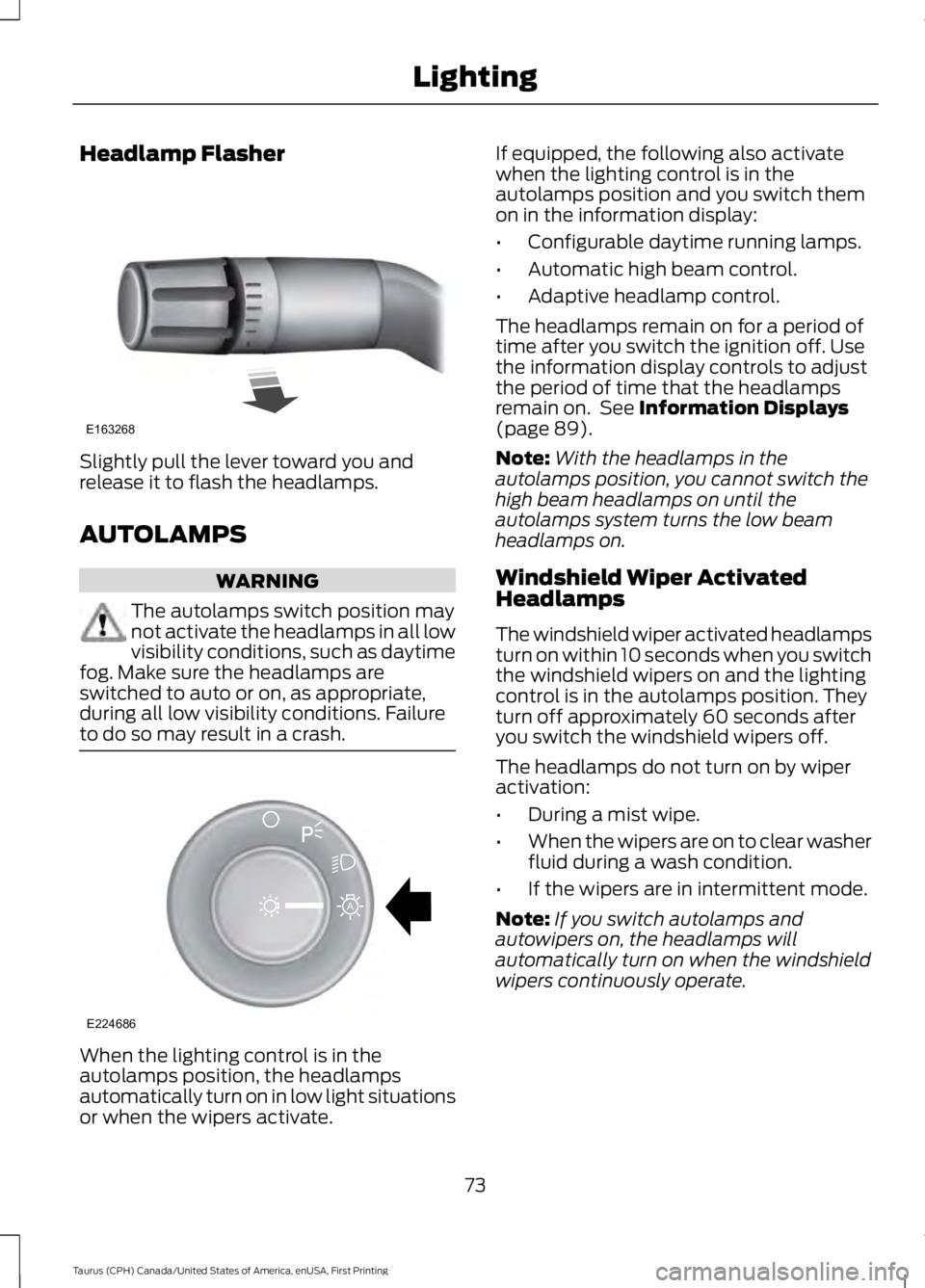
Headlamp Flasher
Slightly pull the lever toward you andrelease it to flash the headlamps.
AUTOLAMPS
WARNING
The autolamps switch position maynot activate the headlamps in all lowvisibility conditions, such as daytimefog. Make sure the headlamps areswitched to auto or on, as appropriate,during all low visibility conditions. Failureto do so may result in a crash.
When the lighting control is in theautolamps position, the headlampsautomatically turn on in low light situationsor when the wipers activate.
If equipped, the following also activatewhen the lighting control is in theautolamps position and you switch themon in the information display:
•Configurable daytime running lamps.
•Automatic high beam control.
•Adaptive headlamp control.
The headlamps remain on for a period oftime after you switch the ignition off. Usethe information display controls to adjustthe period of time that the headlampsremain on. See Information Displays(page 89).
Note:With the headlamps in theautolamps position, you cannot switch thehigh beam headlamps on until theautolamps system turns the low beamheadlamps on.
Windshield Wiper ActivatedHeadlamps
The windshield wiper activated headlampsturn on within 10 seconds when you switchthe windshield wipers on and the lightingcontrol is in the autolamps position. Theyturn off approximately 60 seconds afteryou switch the windshield wipers off.
The headlamps do not turn on by wiperactivation:
•During a mist wipe.
•When the wipers are on to clear washerfluid during a wash condition.
•If the wipers are in intermittent mode.
Note:If you switch autolamps andautowipers on, the headlamps willautomatically turn on when the windshieldwipers continuously operate.
73
Taurus (CPH) Canada/United States of America, enUSA, First Printing
LightingE163268 E224686
A
Page 78 of 504
The daytime running lamps turn on when:
1. The ignition is switched to the onposition.
2. The lighting control is in the offposition, parking lamps position or theautolamps position, and the sensordetects daylight.
3. Your vehicle is in drive (D).
AUTOMATIC HIGH BEAM
CONTROL (If Equipped)
The system will automatically turn on yourhigh beams if it is dark enough and no othertraffic is present. When it detects theheadlights of an approaching vehicle, thetail lamps of the preceding vehicle or streetlighting, the system will turn off the highbeams. The low beams remain on.
Note:If it appears that automatic controlof the high beams is not functioningproperly, check the windshield in front ofthe camera for a blockage. A clear view ofthe road is required for proper systemoperation. Have any windshield damage inthe area of the camera’s field-of-viewrepaired.
Note:If the system detects a blockage suchas bird droppings, bug splatter, snow or ice,and you do not observe changes, the systemwill go into low beam mode until you clearthe blockage. A message may also appearin the instrument cluster display noting thefront camera is blocked.
Note:In cold or inclement weatherconditions, you will notice a decrease in theavailability of the high beam system,especially at start up. If you want to changethe beam state independently of theautomatic control, you may switch the highbeams on or off using the lever. Automaticcontrol will resume when conditions arecorrect.
Note:Modification of the vehicle ride heightsuch as using much larger tires, maydegrade feature performance.
A camera sensor, centrally mountedbehind the windshield of your vehicle,continuously monitors conditions to decidewhen to turn the high beams off and on.
Once the system is active, the high beamswill turn on if:
•The ambient light level is low enough.
•There is no traffic in front of the vehicle.
•The vehicle speed is greater than32 mph (52 km/h).
The high beams will turn off if:
•The system detects the headlamps ofan approaching vehicle or the taillamps of a preceding vehicle.
•Vehicle speed falls below 27 mph(44 km/h).
•The ambient light level is high enoughthat high beams are not required.
•The system detects severe rain, snowor fog.
•The camera is blocked.
Activating the System
Switch on the system using the informationdisplay and autolamps. See InformationDisplays (page 89).
Switch the lighting control to theautolamps position. See Autolamps(page 73).
75
Taurus (CPH) Canada/United States of America, enUSA, First Printing
Lighting
Page 88 of 504
•It may take a short time for the needleto reach full after leaving the gasstation. This is normal and dependsupon the slope of pavement at the gasstation.
•The fuel amount dispensed into thetank is a little less or more than thegauge indicated. This is normal anddepends upon the slope of pavementat the gas station.
•If the gas station nozzle shuts offbefore the tank is full, try a differentgas pump nozzle.
•There is a small reserve left in the tankwhen the fuel gauge reaches empty.
Low Fuel Reminder
A low fuel reminder triggers when thedistance to empty reaches 75 miles (120km), 50 miles (80 km), 25 miles (40 km),10 miles (20 km) and 0 miles (0 km) .
Variations:
Note:The low fuel warning anddistance-to-empty warning can appear atdifferent fuel gauge positions depending onfuel economy conditions. This variation isnormal.
WARNING LAMPS AND
INDICATORS
The following warning lamps andindicators alert you to a vehicle conditionthat may become serious. Some lampsilluminate when you start your vehicle tomake sure they work. If any lamps remainon after starting your vehicle, refer to therespective system warning lamp for furtherinformation.
Note:Some warning indicators appear inthe information display and function thesame as a warning lamp, but do not displaywhen you start your vehicle.
Adaptive Cruise Control (If Equipped)
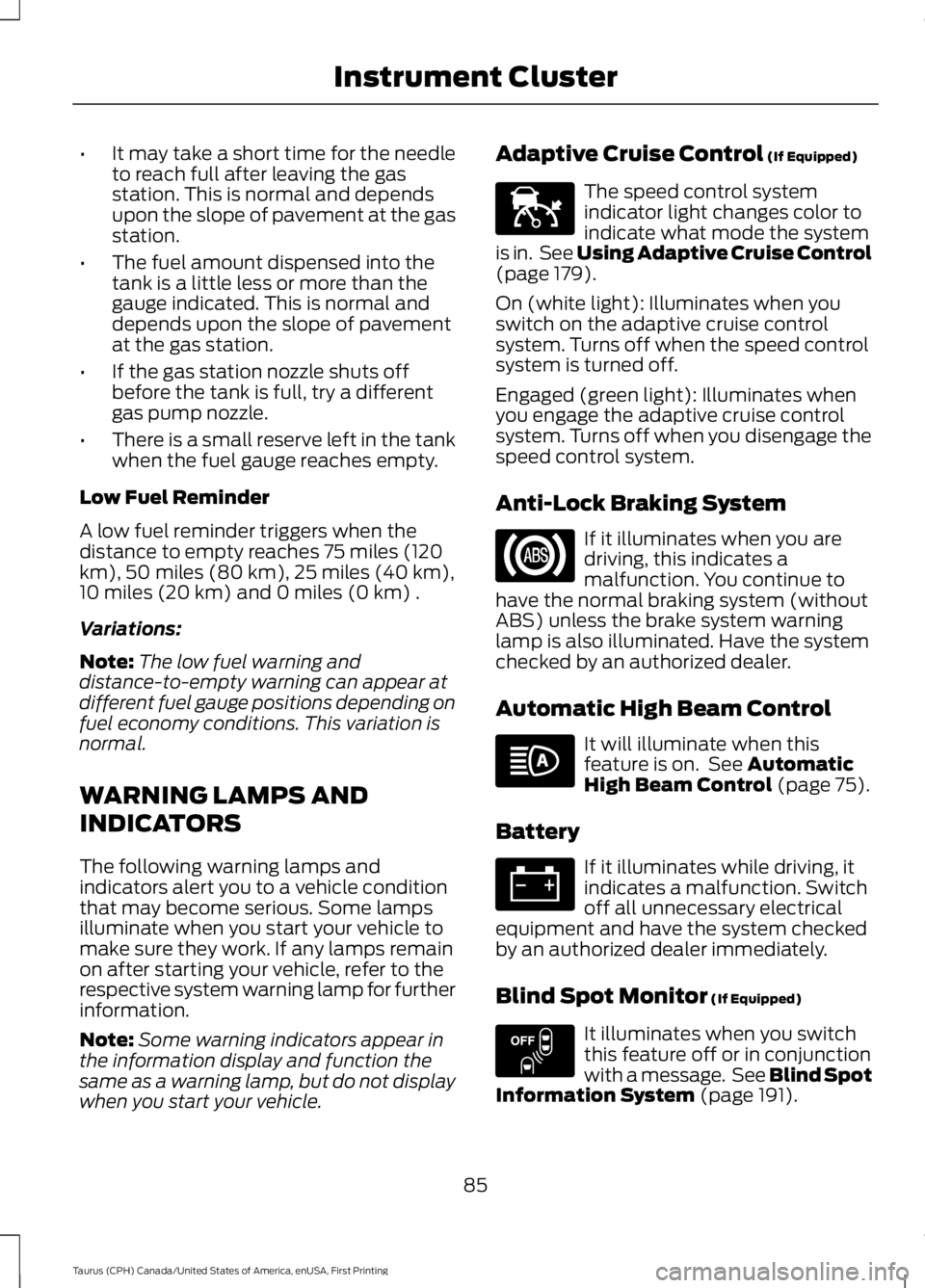
The speed control systemindicator light changes color toindicate what mode the systemis in. See Using Adaptive Cruise Control(page 179).
On (white light): Illuminates when youswitch on the adaptive cruise controlsystem. Turns off when the speed controlsystem is turned off.
Engaged (green light): Illuminates whenyou engage the adaptive cruise controlsystem. Turns off when you disengage thespeed control system.
Anti-Lock Braking System
If it illuminates when you aredriving, this indicates amalfunction. You continue tohave the normal braking system (withoutABS) unless the brake system warninglamp is also illuminated. Have the systemchecked by an authorized dealer.
Automatic High Beam Control
It will illuminate when thisfeature is on. See AutomaticHigh Beam Control (page 75).
Battery
If it illuminates while driving, itindicates a malfunction. Switchoff all unnecessary electricalequipment and have the system checkedby an authorized dealer immediately.
Blind Spot Monitor (If Equipped)
It illuminates when you switchthis feature off or in conjunctionwith a message. See Blind SpotInformation System (page 191).
85
Taurus (CPH) Canada/United States of America, enUSA, First Printing
Instrument ClusterE144524 E151262
Page 94 of 504
Information
Information
MyKey® Dist. (if key is programmed) — Distance traveled when a programmed key isin use.
MyKey® Info — Number of MyKeys and admin keys programmed
Coolant Temp. — The engine coolant indicator will change colors indicating: blue forcool, gray for normal and red for hot. If the engine coolant temperature exceeds thenormal range, stop the vehicle as soon as safely possible, switch off the engine and letthe engine cool.
Settings
In this mode, you can configure differentdriver setting choices.
Note:Some items are optional and maynot appear.
Settings
Traction CtrlDriver Assist
Blindspot
High, Normal or LowSensitivityCollisionWarnChimes
Warning
Cross Traffic
Adaptive or NormalCruiseControl
Rear Park Aid
Select your applicable languageLanguageDisplay
Miles & Gal, km/L or L/100kmDistanceUnits
Fahrenheit (°F) or Celsius (°C)Temperature
Auto Engine Off
Auto Highbeam
Off or number of secondsAutolampDelay
91
Taurus (CPH) Canada/United States of America, enUSA, First Printing
Information Displays
Page 96 of 504
Settings
Volume Limiter
Always On or User SelectableDo NotDisturb
Hold OK to Clear All MyKeysClearMyKeys
Note:Some MyKey items only appear if aMyKey is set.
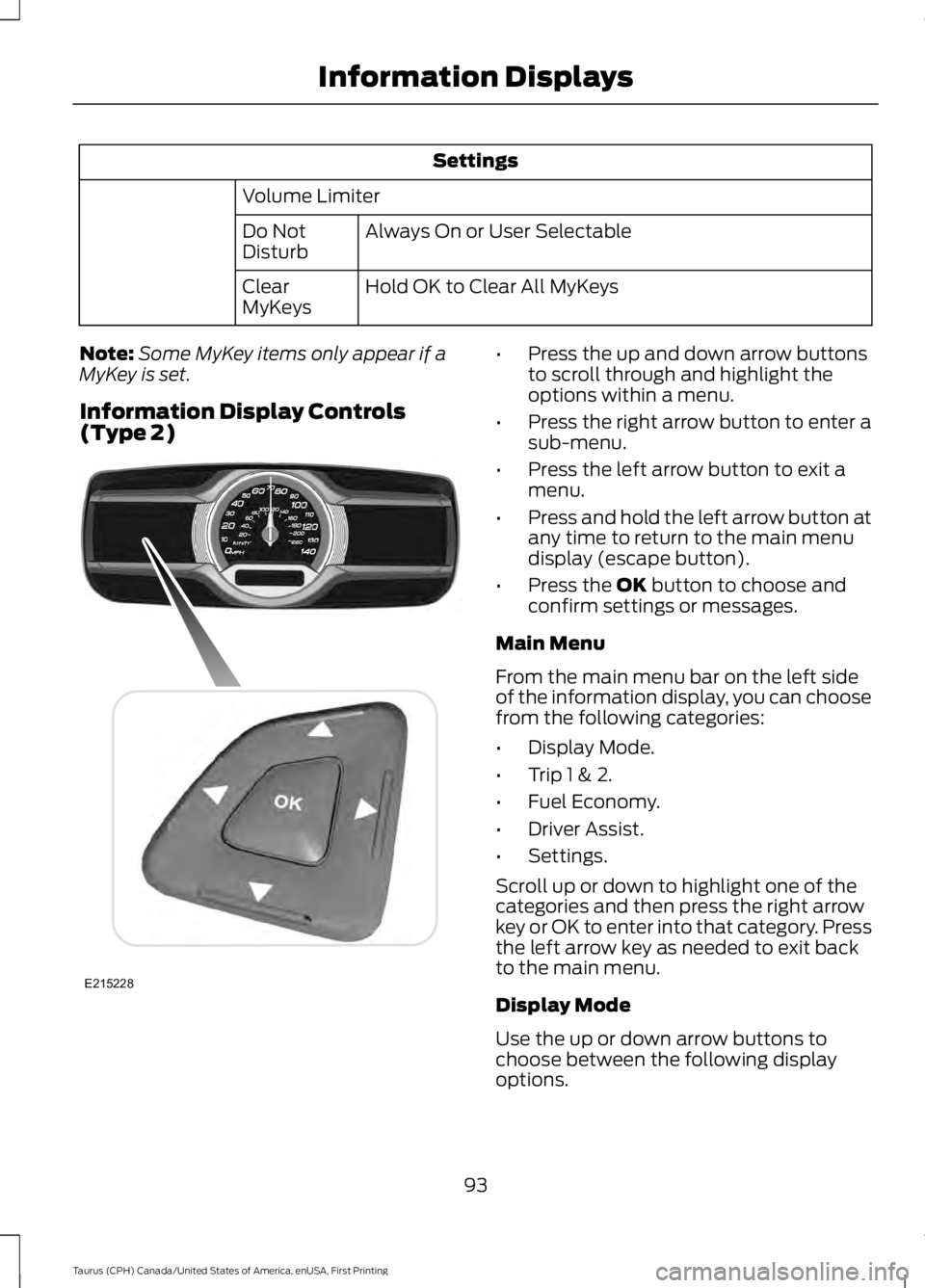
Information Display Controls(Type 2)
•Press the up and down arrow buttonsto scroll through and highlight theoptions within a menu.
•Press the right arrow button to enter asub-menu.
•Press the left arrow button to exit amenu.
•Press and hold the left arrow button atany time to return to the main menudisplay (escape button).
•Press the OK button to choose andconfirm settings or messages.
Main Menu
From the main menu bar on the left sideof the information display, you can choosefrom the following categories:
•Display Mode.
•Trip 1 & 2.
•Fuel Economy.
•Driver Assist.
•Settings.
Scroll up or down to highlight one of thecategories and then press the right arrowkey or OK to enter into that category. Pressthe left arrow key as needed to exit backto the main menu.
Display Mode
Use the up or down arrow buttons tochoose between the following displayoptions.
93
Taurus (CPH) Canada/United States of America, enUSA, First Printing
Information DisplaysE215228
Page 97 of 504
Display Mode
XXX mi (km) to empty, Fuel gauge and Total odometerOption 1
Round tachometer, Fuel gauge and Total odometerOption 2
Round tachometer, Engine coolant temp gauge, Fuel gauge and TotalodometerOption 3
Digital speedometer, Fuel gauge and Total odometerOption 4
Regardless of display mode chosen, when you use the SelectShift Automatic™ trans-mission (SST), the cluster will change to the round tachometer if not already selected.
XXX mi (km) to empty
Shows approximate fuel level before thefuel tank reaches empty. The value isdynamic and can change (raise or lower)depending on driving style.
Fuel gauge
Switch the ignition on. The fuel gaugeindicates approximately how much fuel isin the fuel tank. The arrow next to the fuelpump symbol shows the fuel filler doorside of your vehicle. When the fuel levelbecomes low, the level indicator changesto amber. When the fuel level becomescritically low, the level indicator changesto red.
Note:The fuel gauge level may vary slightlywhen your vehicle is moving or when drivingon a slope.
Note:When a MyKey is in use, low fuelwarnings display earlier.
Round tachometer
Indicates the engine speed in revolutionsper minute. Driving with your tachometerpointer continuously at the top of the scalemay damage the engine. During SelectShiftAutomatic™ transmission (SST) use, thecurrently selected gear appears in thedisplay.
Engine coolant temperature gauge
Indicates engine coolant temperature. Atnormal operating temperature, the levelindicator is in the normal range. If theengine coolant temperature exceeds thenormal range, stop your vehicle as soon assafely possible, switch off the engine andlet the engine cool.
Trip 1 & 2
You can access the menu using theinformation display control.
Note:Some options may appear slightlydifferent or not at all if the items areoptional.
94
Taurus (CPH) Canada/United States of America, enUSA, First Printing
Information Displays
Page 98 of 504
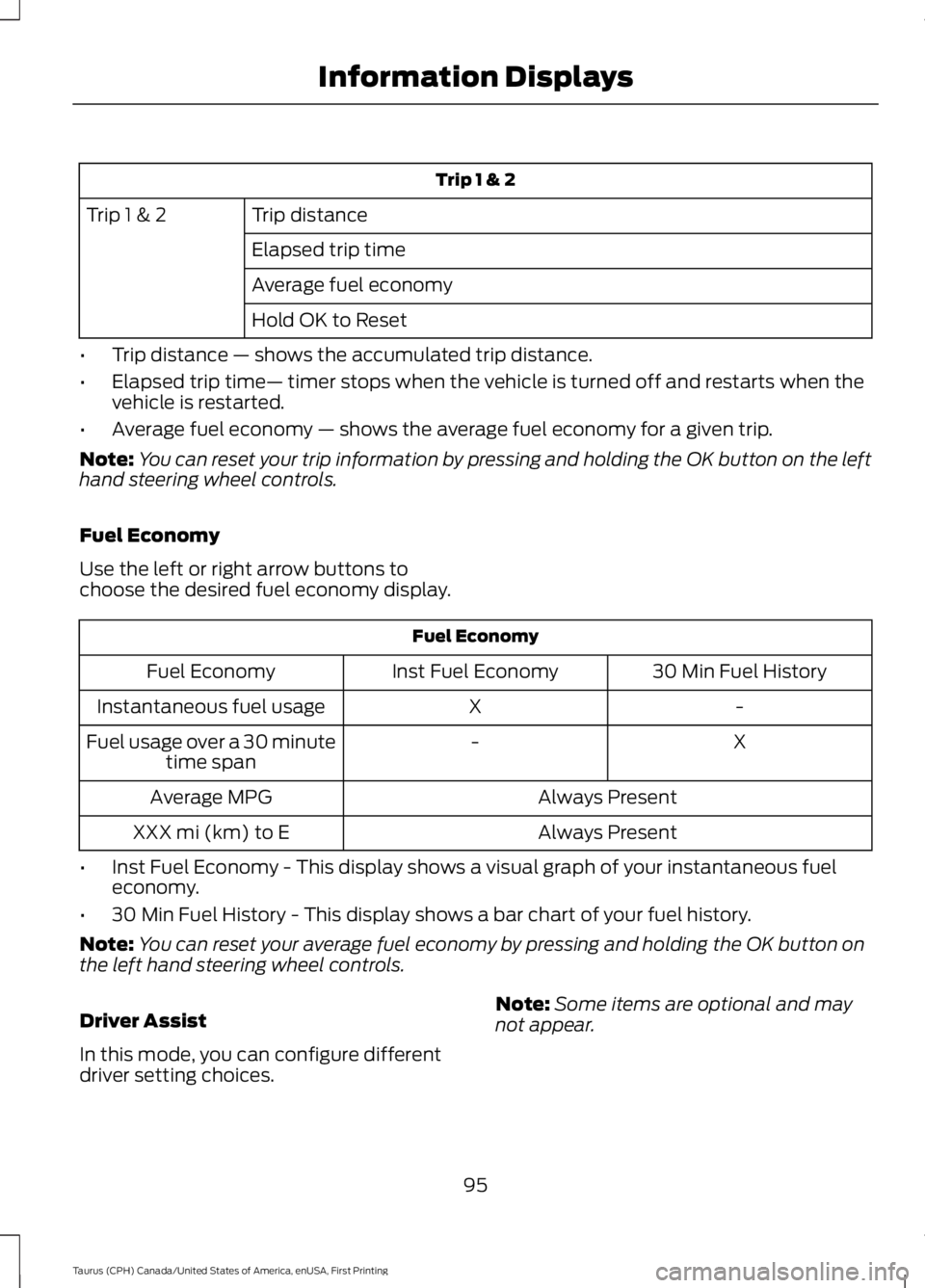
Trip 1 & 2
Trip distanceTrip 1 & 2
Elapsed trip time
Average fuel economy
Hold OK to Reset
•Trip distance — shows the accumulated trip distance.
•Elapsed trip time— timer stops when the vehicle is turned off and restarts when thevehicle is restarted.
•Average fuel economy — shows the average fuel economy for a given trip.
Note:You can reset your trip information by pressing and holding the OK button on the lefthand steering wheel controls.
Fuel Economy
Use the left or right arrow buttons tochoose the desired fuel economy display.
Fuel Economy
30 Min Fuel HistoryInst Fuel EconomyFuel Economy
-XInstantaneous fuel usage
X-Fuel usage over a 30 minutetime span
Always PresentAverage MPG
Always PresentXXX mi (km) to E
•Inst Fuel Economy - This display shows a visual graph of your instantaneous fueleconomy.
•30 Min Fuel History - This display shows a bar chart of your fuel history.
Note:You can reset your average fuel economy by pressing and holding the OK button onthe left hand steering wheel controls.
Driver Assist
In this mode, you can configure differentdriver setting choices.
Note:Some items are optional and maynot appear.
95
Taurus (CPH) Canada/United States of America, enUSA, First Printing
Information Displays
Page 99 of 504
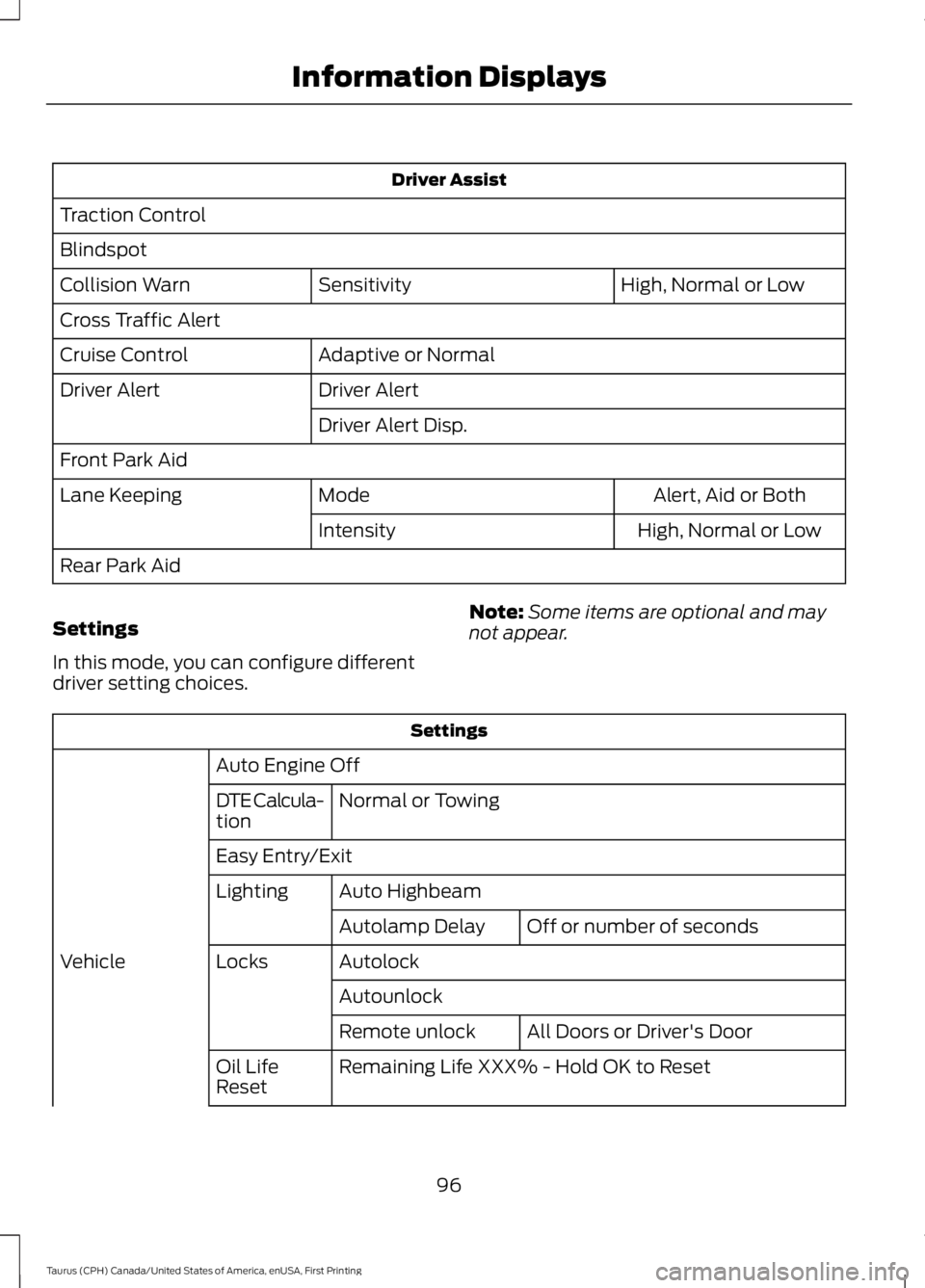
Driver Assist
Traction Control
Blindspot
High, Normal or LowSensitivityCollision Warn
Cross Traffic Alert
Adaptive or NormalCruise Control
Driver AlertDriver Alert
Driver Alert Disp.
Front Park Aid
Alert, Aid or BothModeLane Keeping
High, Normal or LowIntensity
Rear Park Aid
Settings
In this mode, you can configure differentdriver setting choices.
Note:Some items are optional and maynot appear.
Settings
Auto Engine Off
Normal or TowingDTE Calcula-tion
Easy Entry/Exit
Auto HighbeamLighting
Off or number of secondsAutolamp Delay
AutolockLocksVehicle
Autounlock
All Doors or Driver's DoorRemote unlock
Remaining Life XXX% - Hold OK to ResetOil LifeReset
96
Taurus (CPH) Canada/United States of America, enUSA, First Printing
Information Displays