check oil FORD TAURUS 2017 User Guide
[x] Cancel search | Manufacturer: FORD, Model Year: 2017, Model line: TAURUS, Model: FORD TAURUS 2017Pages: 504, PDF Size: 5.84 MB
Page 246 of 504
Note:Make sure you install the oil filler capcorrectly.
Note:Soak up any spillage with anabsorbent cloth immediately.
OIL CHANGE INDICATOR
RESET
Use the information display controls onthe steering wheel to reset the oil changeindicator.
From the main menu scroll to:
Action and descriptionMessage
Press the right arrow button,then from this menu scrollto the following message.
Settings
Press the right arrow button,then from this menu scrollto the following message.
Vehicle
Press the right arrow button,then from this menu scrollto the following message.
Oil Life
Press and hold the OKbutton until the instrumentcluster displays thefollowing message.
Hold OK toReset
Reset Successful
When the oil change indic-ator resets the instrumentcluster displays 100%.
Remaining Life
{00}%
Action and descriptionMessage
If the instrument clusterdisplays one of the followingmessages, repeat theprocess.
Not Reset
Reset Cancelled
ENGINE COOLANT CHECK
WARNINGS
Do not remove the coolant reservoircap when the cooling system is hot.Wait 10 minutes for the coolingsystem to cool down. Cover the coolantreservoir cap with a thick cloth to preventthe possibility of scalding and slowlyremove the cap. Failure to follow thisinstruction could result in personal injury.
Do not put coolant in the windshieldwasher fluid reservoir. If sprayed onthe windshield, coolant could makeit difficult to see through the windshield.
To reduce the risk of personal injury,make sure the engine is cool beforeunscrewing the coolant pressurerelief cap. The cooling system is underpressure. Steam and hot liquid can comeout forcefully when you loosen the capslightly.
Do not add coolant further than theMAX mark.
When the engine is cold, check theconcentration and level of the coolant atthe intervals listed in the scheduledmaintenance information. See ScheduledMaintenance (page 447).
Note:Make sure that the coolant level isbetween the MIN and MAX marks on thecoolant reservoir.
243
Taurus (CPH) Canada/United States of America, enUSA, First Printing
Maintenance
Page 258 of 504
ADJUSTING THE HEADLAMPS
Vertical Aim Adjustment
The headlamps on your vehicle areproperly aimed at the assembly plant. Ifyour vehicle has been in an accident, havethe alignment of your headlamps checkedby your authorized dealer.
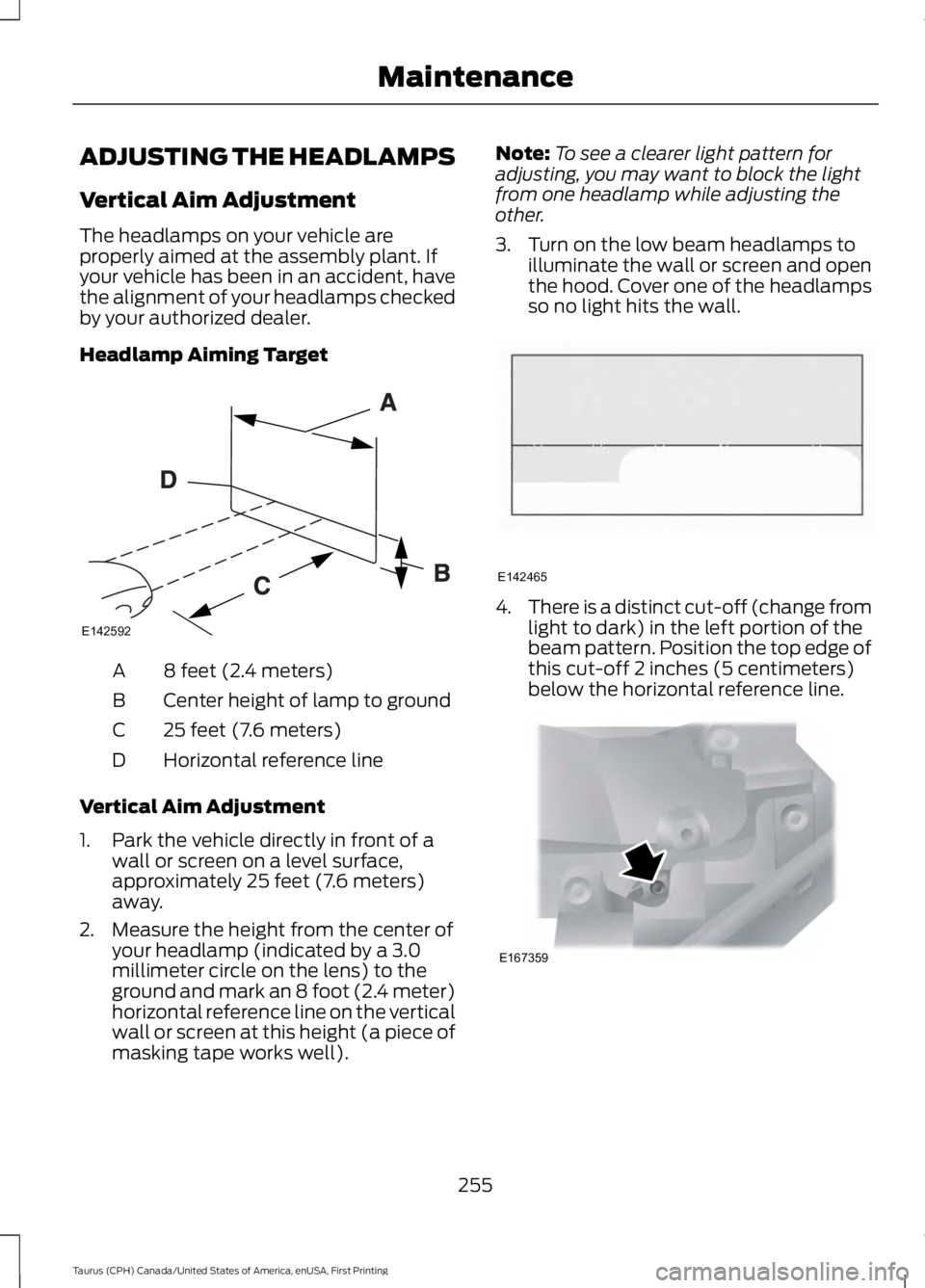
Headlamp Aiming Target
8 feet (2.4 meters)A
Center height of lamp to groundB
25 feet (7.6 meters)C
Horizontal reference lineD
Vertical Aim Adjustment
1. Park the vehicle directly in front of awall or screen on a level surface,approximately 25 feet (7.6 meters)away.
2. Measure the height from the center ofyour headlamp (indicated by a 3.0millimeter circle on the lens) to theground and mark an 8 foot (2.4 meter)horizontal reference line on the verticalwall or screen at this height (a piece ofmasking tape works well).
Note:To see a clearer light pattern foradjusting, you may want to block the lightfrom one headlamp while adjusting theother.
3. Turn on the low beam headlamps toilluminate the wall or screen and openthe hood. Cover one of the headlampsso no light hits the wall.
4.There is a distinct cut-off (change fromlight to dark) in the left portion of thebeam pattern. Position the top edge ofthis cut-off 2 inches (5 centimeters)below the horizontal reference line.
255
Taurus (CPH) Canada/United States of America, enUSA, First Printing
MaintenanceE142592 E142465 E167359
Page 269 of 504
•With your foot on the brake, shiftthrough all the gears while the engineis running.
•We recommend that you change theengine oil before you use your vehicleagain.
Fuel system
•Fill the fuel tank with high-quality fueluntil the first automatic shutoff of thefuel pump nozzle.
Cooling system
•Protect against freezing temperatures.
•When removing your vehicle fromstorage, check coolant fluid level.Confirm that there are no coolingsystem leaks and that fluid is at therecommended level.
Battery
•Check and recharge as necessary. Keepconnections clean.
•If storing your vehicle for more than 30days without recharging the battery,we recommend that you disconnectthe battery cables to maintain batterycharge for quick starting.
Note:It is necessary to reset memoryfeatures if battery cables are disconnected.
Brakes
•Make sure the brakes and parking brakerelease fully.
Tires
•Maintain recommended air pressure.
Miscellaneous
•Make sure all linkages, cables, leversand pins under your vehicle are coveredwith grease to prevent rust.
•Move vehicles at least 25 ft (7.5 m)every 15 days to lubricate working partsand prevent corrosion.
Removing Vehicle From Storage
When your vehicle is ready to come out ofstorage, do the following:
•Wash your vehicle to remove any dirtor grease film build-up on windowsurfaces.
•Check windshield wipers for anydeterioration.
•Check under the hood for any foreignmaterial that may have collectedduring storage such as mice or squirrelnests.
•Check the exhaust for any foreignmaterial that may have collectedduring storage.
•Check tire pressures and set tireinflation per the Tire Label.
•Check brake pedal operation. Driveyour vehicle 15 ft (4.5 m) back andforth to remove rust build-up.
•Check fluid levels (including coolant,oil and gas) to make sure there are noleaks, and fluids are at recommendedlevels.
•If you remove the battery, clean thebattery cable ends and check fordamage.
Contact an authorized dealer if you haveany concerns or issues.
266
Taurus (CPH) Canada/United States of America, enUSA, First Printing
Vehicle Care
Page 451 of 504
When the oil change message appears inthe information display, it is time for an oilchange. Make sure you perform the oilchange within two weeks or 500 miles(800 kilometers) of the messageappearing. Make sure you reset theIntelligent Oil-Life Monitor after each oilchange. See Oil Change Indicator Reset(page 243).
If your information display resetsprematurely or becomes inoperative, youshould perform the oil change interval atsix months or 5000 miles (8000kilometers) from your last oil change.Never exceed one year or 10000 miles(16000 kilometers) between oil changeintervals.
Your vehicle is very sophisticated and builtwith multiple, complex, performancesystems. Every manufacturer developsthese systems using differentspecifications and performance features.That is why it is important to rely upon yourdealership to properly diagnose and repairyour vehicle.
Ford Motor Company has recommendedmaintenance intervals for various partsand component systems based uponengineering testing. Ford Motor Companyrelies upon this testing to determine themost appropriate mileage for replacementof oils and fluids to protect your vehicle atthe lowest overall cost to you andrecommends against maintenanceschedules that deviate from the scheduledmaintenance information.
We strongly recommend the use of onlygenuine Ford, Motorcraft orFord-authorized re-manufacturedreplacement parts engineered for yourvehicle.
Additives and Chemicals
This owner's manual and the FordWorkshop Manual list the recommendedadditives and chemicals for your vehicle.We do not recommend using chemicals oradditives not approved by us as part ofyour vehicle’s normal maintenance. Pleaseconsult your warranty information.
Oils, Fluids and Flushing
In many cases, fluid discoloration is anormal operating characteristic and, byitself, does not necessarily indicate aconcern or that the fluid needs to bechanged. However, a qualified expert, suchas the factory-trained technicians at yourdealership, should inspect discolored fluidsthat also show signs of overheating orforeign material contaminationimmediately.
Make sure to change your vehicle’s oils andfluids at the specified intervals or inconjunction with a repair. Flushing is aviable way to change fluid for many vehiclesub-systems during scheduledmaintenance. It is critical that systems areflushed only with new fluid that is the sameas that required to fill and operate thesystem or using a Ford-approved flushingchemical.
Owner Checks and Services
Make sure you perform the following basicmaintenance checks and inspections everymonth or at six-month intervals.
448
Taurus (CPH) Canada/United States of America, enUSA, First Printing
Scheduled Maintenance
Page 452 of 504
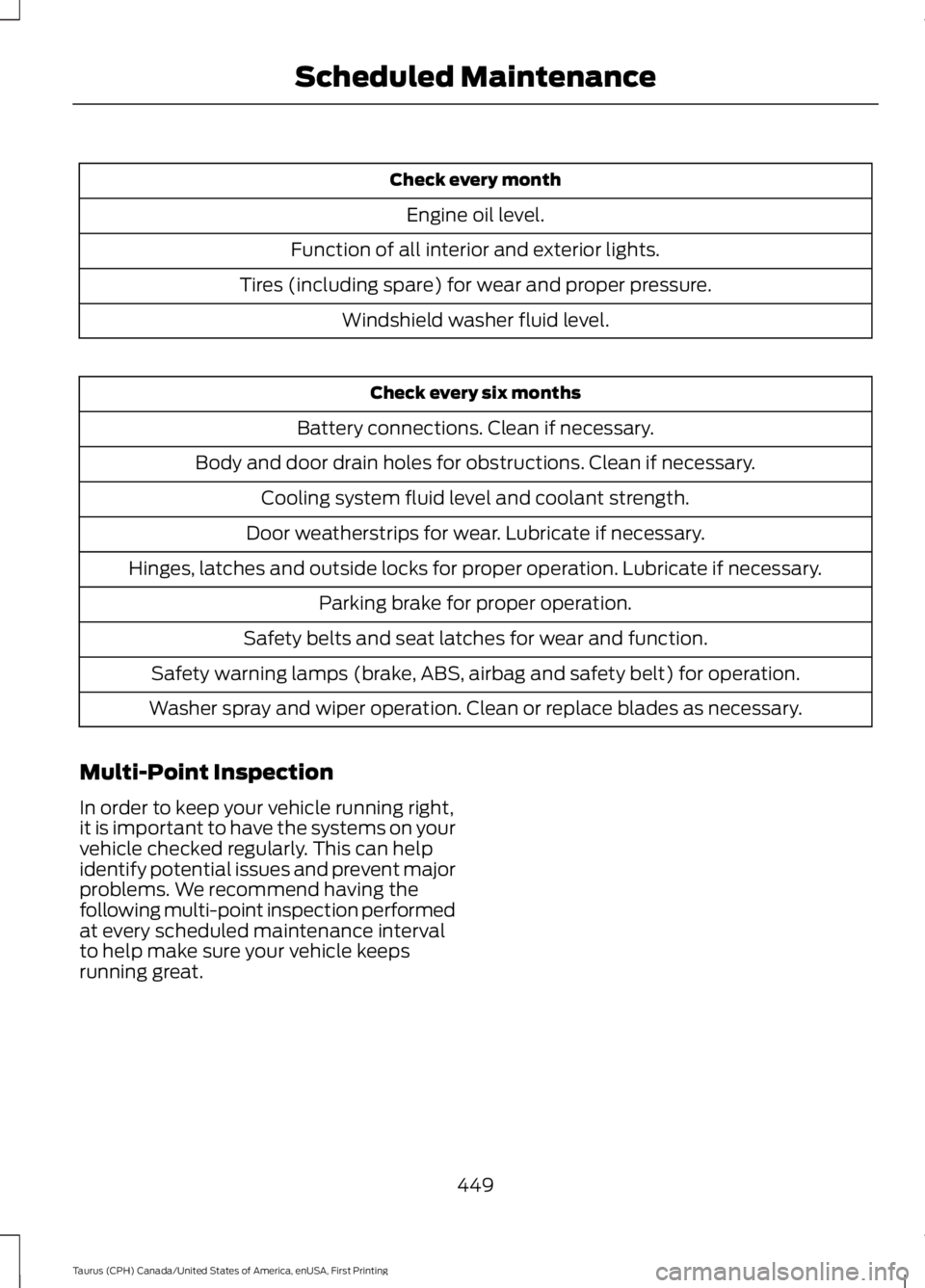
Check every month
Engine oil level.
Function of all interior and exterior lights.
Tires (including spare) for wear and proper pressure.
Windshield washer fluid level.
Check every six months
Battery connections. Clean if necessary.
Body and door drain holes for obstructions. Clean if necessary.
Cooling system fluid level and coolant strength.
Door weatherstrips for wear. Lubricate if necessary.
Hinges, latches and outside locks for proper operation. Lubricate if necessary.
Parking brake for proper operation.
Safety belts and seat latches for wear and function.
Safety warning lamps (brake, ABS, airbag and safety belt) for operation.
Washer spray and wiper operation. Clean or replace blades as necessary.
Multi-Point Inspection
In order to keep your vehicle running right,it is important to have the systems on yourvehicle checked regularly. This can helpidentify potential issues and prevent majorproblems. We recommend having thefollowing multi-point inspection performedat every scheduled maintenance intervalto help make sure your vehicle keepsrunning great.
449
Taurus (CPH) Canada/United States of America, enUSA, First Printing
Scheduled Maintenance
Page 453 of 504
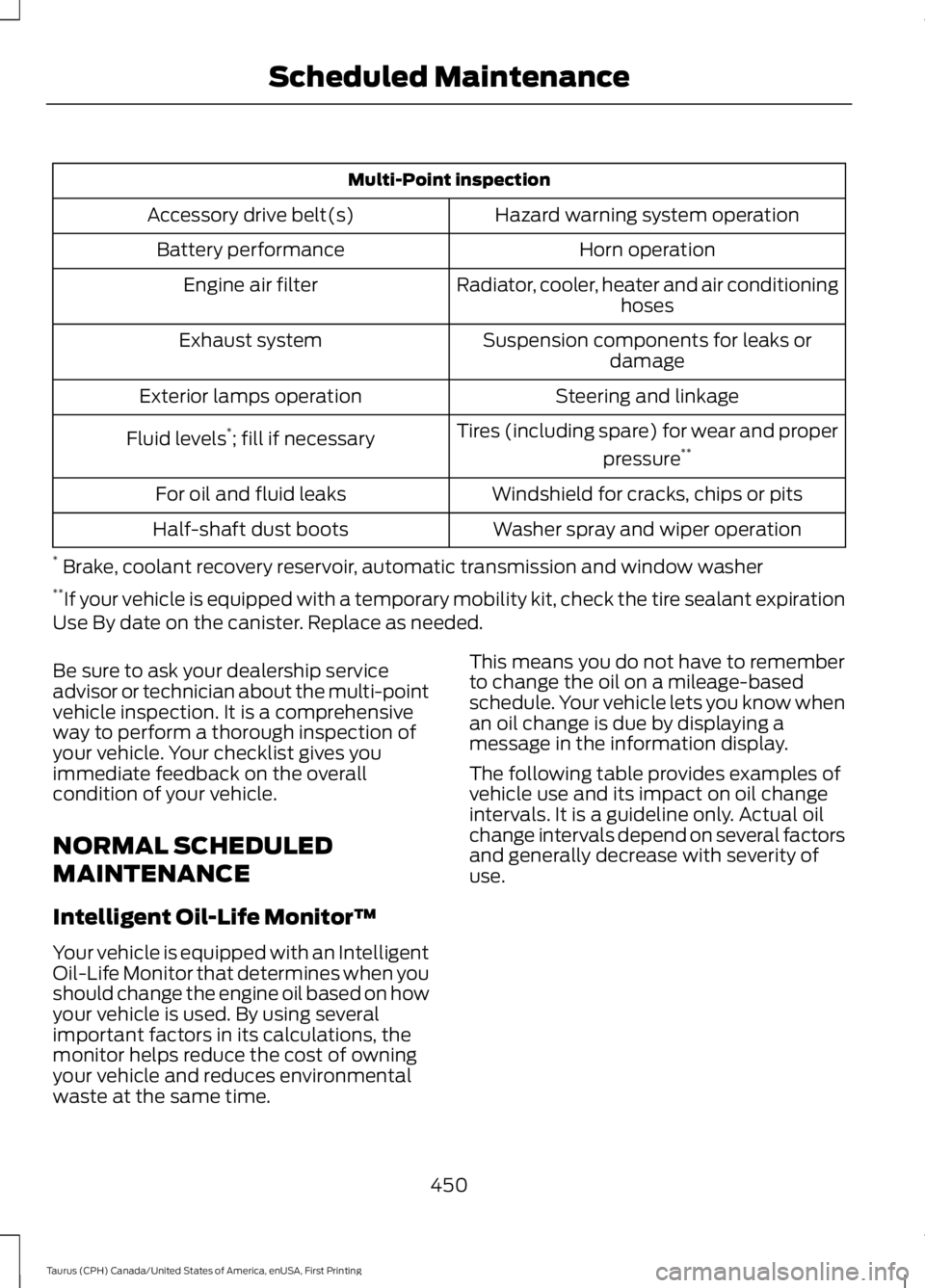
Multi-Point inspection
Hazard warning system operationAccessory drive belt(s)
Horn operationBattery performance
Radiator, cooler, heater and air conditioninghosesEngine air filter
Suspension components for leaks ordamageExhaust system
Steering and linkageExterior lamps operation
Tires (including spare) for wear and proper
pressure**Fluid levels*; fill if necessary
Windshield for cracks, chips or pitsFor oil and fluid leaks
Washer spray and wiper operationHalf-shaft dust boots
* Brake, coolant recovery reservoir, automatic transmission and window washer**If your vehicle is equipped with a temporary mobility kit, check the tire sealant expirationUse By date on the canister. Replace as needed.
Be sure to ask your dealership serviceadvisor or technician about the multi-pointvehicle inspection. It is a comprehensiveway to perform a thorough inspection ofyour vehicle. Your checklist gives youimmediate feedback on the overallcondition of your vehicle.
NORMAL SCHEDULED
MAINTENANCE
Intelligent Oil-Life Monitor™
Your vehicle is equipped with an IntelligentOil-Life Monitor that determines when youshould change the engine oil based on howyour vehicle is used. By using severalimportant factors in its calculations, themonitor helps reduce the cost of owningyour vehicle and reduces environmentalwaste at the same time.
This means you do not have to rememberto change the oil on a mileage-basedschedule. Your vehicle lets you know whenan oil change is due by displaying amessage in the information display.
The following table provides examples ofvehicle use and its impact on oil changeintervals. It is a guideline only. Actual oilchange intervals depend on several factorsand generally decrease with severity ofuse.
450
Taurus (CPH) Canada/United States of America, enUSA, First Printing
Scheduled Maintenance
Page 457 of 504
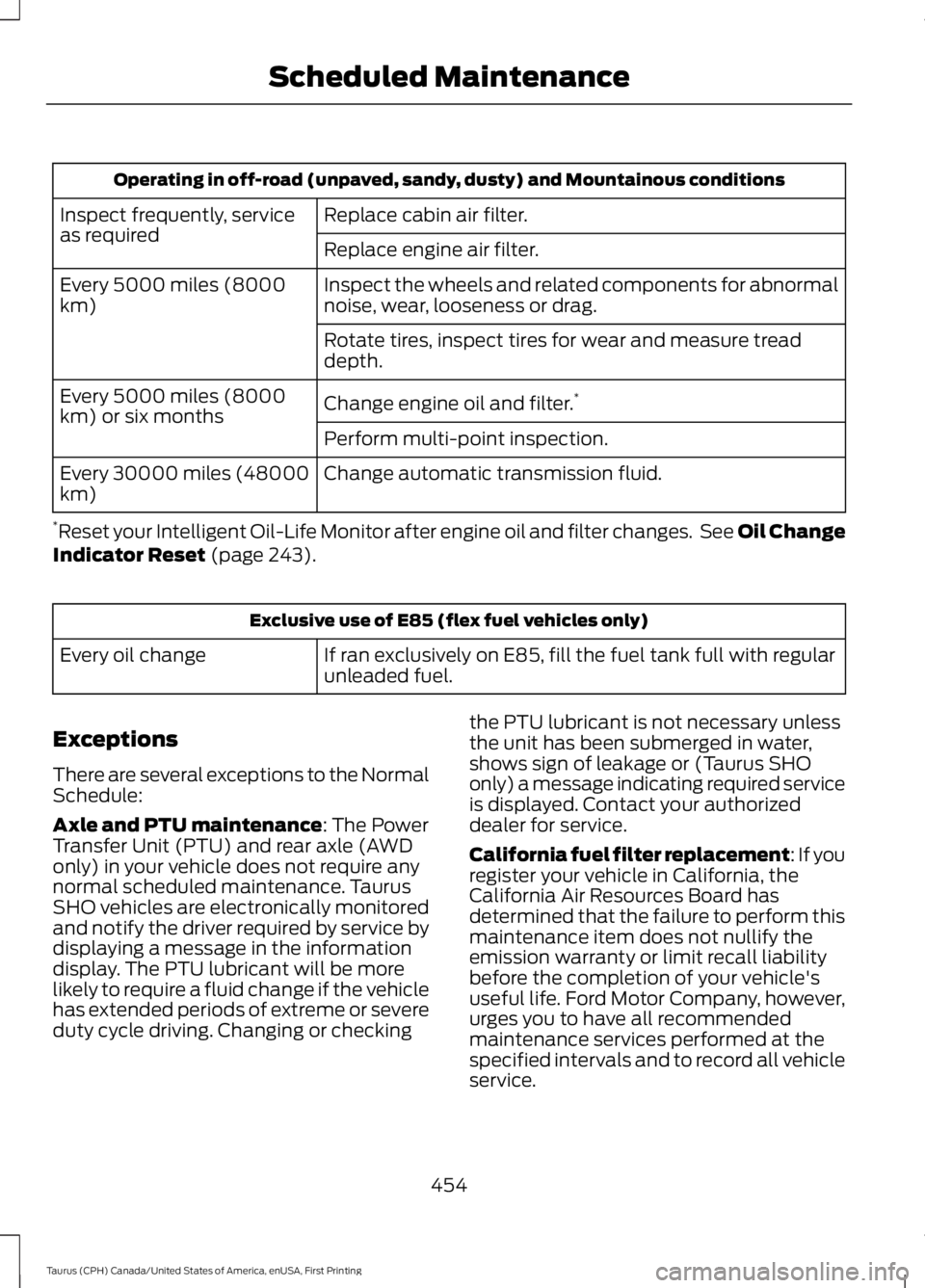
Operating in off-road (unpaved, sandy, dusty) and Mountainous conditions
Replace cabin air filter.Inspect frequently, serviceas requiredReplace engine air filter.
Inspect the wheels and related components for abnormalnoise, wear, looseness or drag.Every 5000 miles (8000km)
Rotate tires, inspect tires for wear and measure treaddepth.
Change engine oil and filter.*Every 5000 miles (8000km) or six monthsPerform multi-point inspection.
Change automatic transmission fluid.Every 30000 miles (48000km)
*Reset your Intelligent Oil-Life Monitor after engine oil and filter changes. See Oil ChangeIndicator Reset (page 243).
Exclusive use of E85 (flex fuel vehicles only)
If ran exclusively on E85, fill the fuel tank full with regularunleaded fuel.Every oil change
Exceptions
There are several exceptions to the NormalSchedule:
Axle and PTU maintenance: The PowerTransfer Unit (PTU) and rear axle (AWDonly) in your vehicle does not require anynormal scheduled maintenance. TaurusSHO vehicles are electronically monitoredand notify the driver required by service bydisplaying a message in the informationdisplay. The PTU lubricant will be morelikely to require a fluid change if the vehiclehas extended periods of extreme or severeduty cycle driving. Changing or checking
the PTU lubricant is not necessary unlessthe unit has been submerged in water,shows sign of leakage or (Taurus SHOonly) a message indicating required serviceis displayed. Contact your authorizeddealer for service.
California fuel filter replacement: If youregister your vehicle in California, theCalifornia Air Resources Board hasdetermined that the failure to perform thismaintenance item does not nullify theemission warranty or limit recall liabilitybefore the completion of your vehicle'suseful life. Ford Motor Company, however,urges you to have all recommendedmaintenance services performed at thespecified intervals and to record all vehicleservice.
454
Taurus (CPH) Canada/United States of America, enUSA, First Printing
Scheduled Maintenance
Page 496 of 504
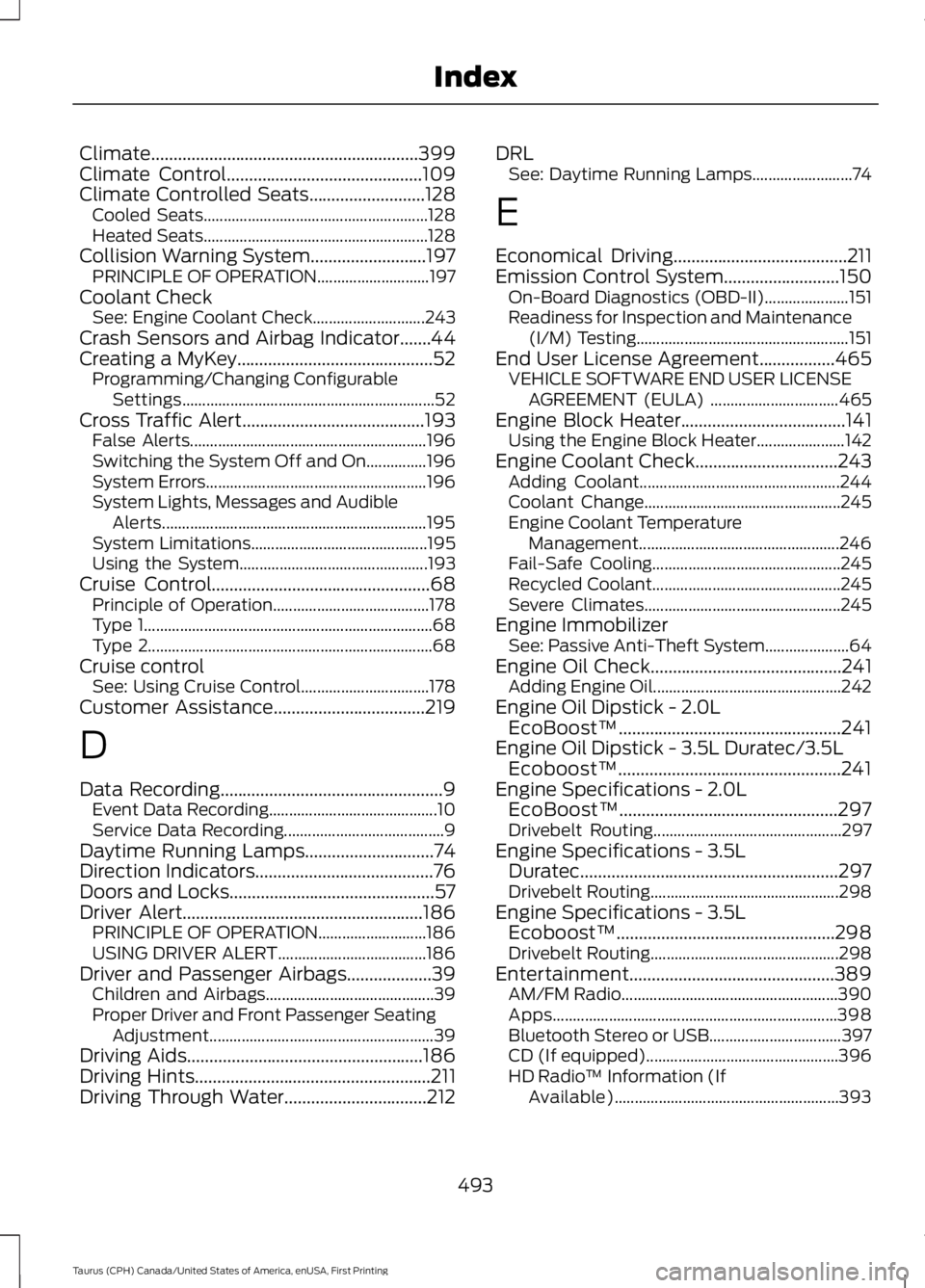
Climate............................................................399Climate Control............................................109Climate Controlled Seats..........................128Cooled Seats........................................................128Heated Seats........................................................128Collision Warning System..........................197PRINCIPLE OF OPERATION............................197Coolant CheckSee: Engine Coolant Check............................243Crash Sensors and Airbag Indicator.......44Creating a MyKey............................................52Programming/Changing ConfigurableSettings...............................................................52Cross Traffic Alert.........................................193False Alerts...........................................................196Switching the System Off and On...............196System Errors.......................................................196System Lights, Messages and AudibleAlerts..................................................................195System Limitations............................................195Using the System...............................................193Cruise Control.................................................68Principle of Operation.......................................178Type 1........................................................................68Type 2.......................................................................68Cruise controlSee: Using Cruise Control................................178Customer Assistance..................................219
D
Data Recording..................................................9Event Data Recording..........................................10Service Data Recording........................................9Daytime Running Lamps.............................74Direction Indicators........................................76Doors and Locks..............................................57Driver Alert......................................................186PRINCIPLE OF OPERATION...........................186USING DRIVER ALERT.....................................186Driver and Passenger Airbags...................39Children and Airbags..........................................39Proper Driver and Front Passenger SeatingAdjustment........................................................39Driving Aids.....................................................186Driving Hints.....................................................211Driving Through Water................................212
DRLSee: Daytime Running Lamps.........................74
E
Economical Driving.......................................211Emission Control System..........................150On-Board Diagnostics (OBD-II).....................151Readiness for Inspection and Maintenance(I/M) Testing.....................................................151End User License Agreement.................465VEHICLE SOFTWARE END USER LICENSEAGREEMENT (EULA) ................................465Engine Block Heater.....................................141Using the Engine Block Heater......................142Engine Coolant Check................................243Adding Coolant..................................................244Coolant Change.................................................245Engine Coolant TemperatureManagement..................................................246Fail-Safe Cooling...............................................245Recycled Coolant...............................................245Severe Climates.................................................245Engine ImmobilizerSee: Passive Anti-Theft System.....................64Engine Oil Check...........................................241Adding Engine Oil...............................................242Engine Oil Dipstick - 2.0LEcoBoost™..................................................241Engine Oil Dipstick - 3.5L Duratec/3.5LEcoboost™..................................................241Engine Specifications - 2.0LEcoBoost™.................................................297Drivebelt Routing...............................................297Engine Specifications - 3.5LDuratec..........................................................297Drivebelt Routing...............................................298Engine Specifications - 3.5LEcoboost™.................................................298Drivebelt Routing...............................................298Entertainment..............................................389AM/FM Radio......................................................390Apps.......................................................................398Bluetooth Stereo or USB.................................397CD (If equipped)................................................396HD Radio™ Information (IfAvailable)........................................................393
493
Taurus (CPH) Canada/United States of America, enUSA, First Printing
Index
Page 500 of 504
O
Oil Change Indicator Reset......................243Oil CheckSee: Engine Oil Check.......................................241Opening and Closing the Hood..............236Closing the Hood................................................237Opening the Hood.............................................236Ordering Additional Owner'sLiterature......................................................223Obtaining a French Owner’s Manual..........224Overhead Console........................................136
P
Parking Aids....................................................170Principle of Operation.......................................170Parking Brake.................................................165Passive Anti-Theft System........................64SecuriLock®...........................................................64PATSSee: Passive Anti-Theft System.....................64Pedals................................................................69Perchlorate.........................................................11Personal Safety System™..........................37How Does the Personal Safety SystemWork?...................................................................37Phone..............................................................402During a Phone Call.........................................405Making Calls........................................................404Pairing Your Cell Phone for the FirstTime..................................................................402Phone Menu........................................................403Receiving Calls...................................................405Smartphone Connectivity.............................406Text Messaging..................................................406Post-Crash Alert System...........................218Power Door LocksSee: Locking and Unlocking..............................57Power Seats....................................................122Multi-Contour Front Seats With ActiveMotion ...............................................................124Power Lumbar.....................................................124Power Steering Fluid Check......................251Power Windows..............................................78Accessory Delay....................................................78Bounce-Back.........................................................78One-Touch Down.................................................78
One-Touch Up.......................................................78Window Lock.........................................................78Protecting the Environment........................15
R
Rear Parking Aid............................................170Rear Seat Armrest........................................128Rear Seats.......................................................126Split-folding Rear Seat.....................................126Rear View Camera........................................175Using the Rear View Camera System..........175Rear View CameraSee: Rear View Camera....................................175Recommended Towing Weights............207Refueling..........................................................147System Warnings...............................................148Remote Control..............................................46Car Finder................................................................48Integrated Keyhead Transmitter....................46Intelligent Access Key.........................................47Memory Feature...................................................50Remote Start.........................................................49Replacing the Battery.........................................47Sounding the Panic Alarm................................49Remote Start..................................................118Automatic Settings.............................................118Repairing Minor Paint Damage..............264Replacement PartsRecommendation........................................12Collision Repairs....................................................12Scheduled Maintenance and MechanicalRepairs..................................................................12Warranty on Replacement Parts.....................12Replacing a Lost Key or RemoteControl............................................................50Reporting Safety Defects (CanadaOnly)..............................................................224Reporting Safety Defects (U.S.Only)..............................................................224Roadside Assistance...................................214Vehicles Sold in Canada: Getting RoadsideAssistance........................................................214Vehicles Sold in Canada: RoadsideAssistance Program Coverage..................215Vehicles Sold in Canada: Using RoadsideAssistance........................................................215
497
Taurus (CPH) Canada/United States of America, enUSA, First Printing
Index