tire pressure FORD TAURUS 2017 Owners Manual
[x] Cancel search | Manufacturer: FORD, Model Year: 2017, Model line: TAURUS, Model: FORD TAURUS 2017Pages: 504, PDF Size: 5.84 MB
Page 7 of 504
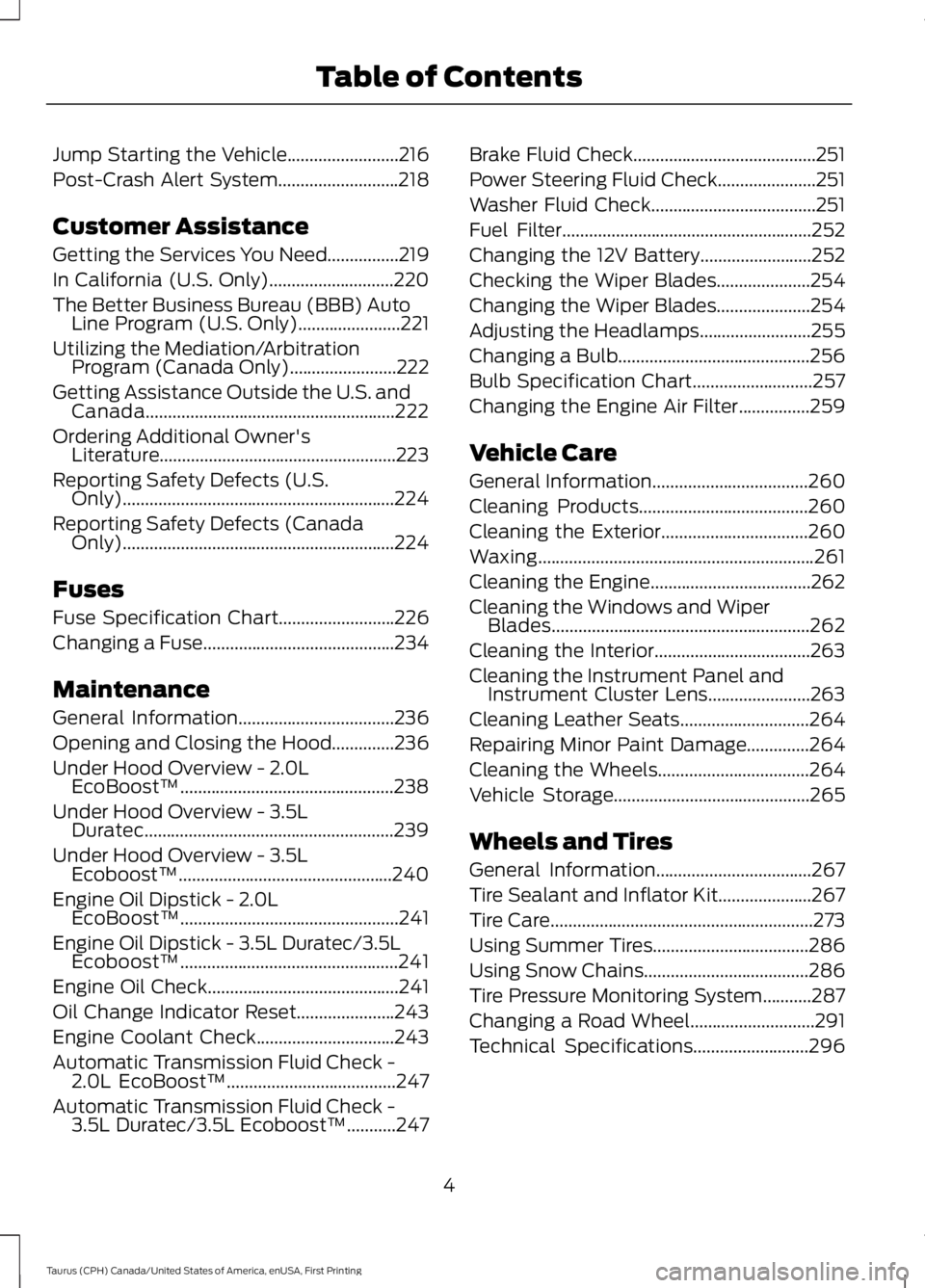
Jump Starting the Vehicle.........................216
Post-Crash Alert System...........................218
Customer Assistance
Getting the Services You Need................219
In California (U.S. Only)............................220
The Better Business Bureau (BBB) AutoLine Program (U.S. Only).......................221
Utilizing the Mediation/ArbitrationProgram (Canada Only)........................222
Getting Assistance Outside the U.S. andCanada........................................................222
Ordering Additional Owner'sLiterature.....................................................223
Reporting Safety Defects (U.S.Only).............................................................224
Reporting Safety Defects (CanadaOnly).............................................................224
Fuses
Fuse Specification Chart..........................226
Changing a Fuse...........................................234
Maintenance
General Information...................................236
Opening and Closing the Hood..............236
Under Hood Overview - 2.0LEcoBoost™................................................238
Under Hood Overview - 3.5LDuratec........................................................239
Under Hood Overview - 3.5LEcoboost™................................................240
Engine Oil Dipstick - 2.0LEcoBoost™.................................................241
Engine Oil Dipstick - 3.5L Duratec/3.5LEcoboost™.................................................241
Engine Oil Check...........................................241
Oil Change Indicator Reset......................243
Engine Coolant Check...............................243
Automatic Transmission Fluid Check -2.0L EcoBoost™......................................247
Automatic Transmission Fluid Check -3.5L Duratec/3.5L Ecoboost™...........247
Brake Fluid Check.........................................251
Power Steering Fluid Check......................251
Washer Fluid Check.....................................251
Fuel Filter........................................................252
Changing the 12V Battery.........................252
Checking the Wiper Blades.....................254
Changing the Wiper Blades.....................254
Adjusting the Headlamps.........................255
Changing a Bulb...........................................256
Bulb Specification Chart...........................257
Changing the Engine Air Filter................259
Vehicle Care
General Information...................................260
Cleaning Products......................................260
Cleaning the Exterior.................................260
Waxing..............................................................261
Cleaning the Engine....................................262
Cleaning the Windows and WiperBlades..........................................................262
Cleaning the Interior...................................263
Cleaning the Instrument Panel andInstrument Cluster Lens.......................263
Cleaning Leather Seats.............................264
Repairing Minor Paint Damage..............264
Cleaning the Wheels..................................264
Vehicle Storage............................................265
Wheels and Tires
General Information...................................267
Tire Sealant and Inflator Kit.....................267
Tire Care...........................................................273
Using Summer Tires...................................286
Using Snow Chains.....................................286
Tire Pressure Monitoring System...........287
Changing a Road Wheel............................291
Technical Specifications..........................296
4
Taurus (CPH) Canada/United States of America, enUSA, First Printing
Table of Contents
Page 11 of 504
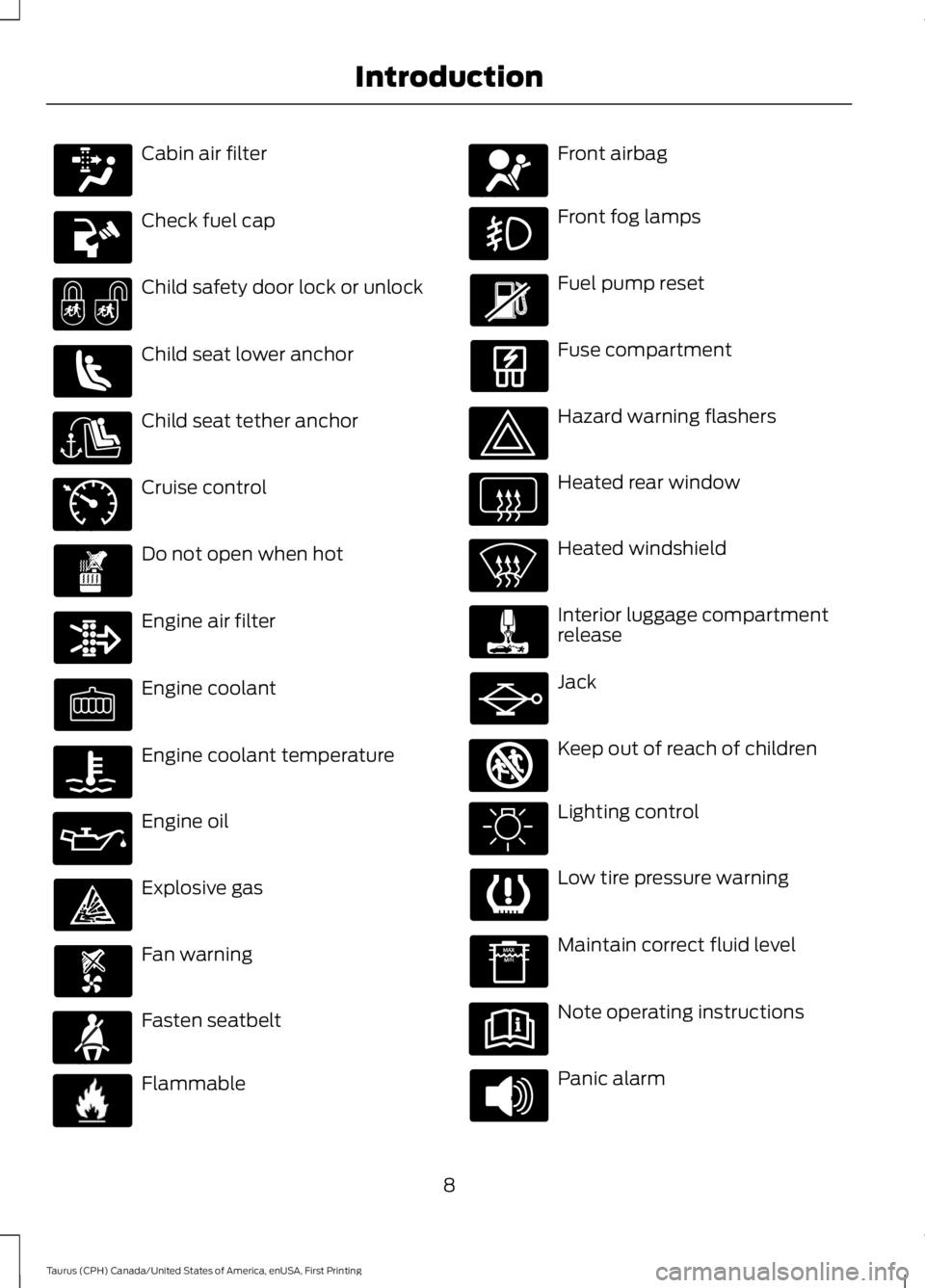
Cabin air filter
Check fuel cap
Child safety door lock or unlock
Child seat lower anchor
Child seat tether anchor
Cruise control
Do not open when hot
Engine air filter
Engine coolant
Engine coolant temperature
Engine oil
Explosive gas
Fan warning
Fasten seatbelt
Flammable
Front airbag
Front fog lamps
Fuel pump reset
Fuse compartment
Hazard warning flashers
Heated rear window
Heated windshield
Interior luggage compartmentrelease
Jack
Keep out of reach of children
Lighting control
Low tire pressure warning
Maintain correct fluid level
Note operating instructions
Panic alarm
8
Taurus (CPH) Canada/United States of America, enUSA, First Printing
Introduction E71340 E71880 E231160 E67017 E161353
Page 90 of 504
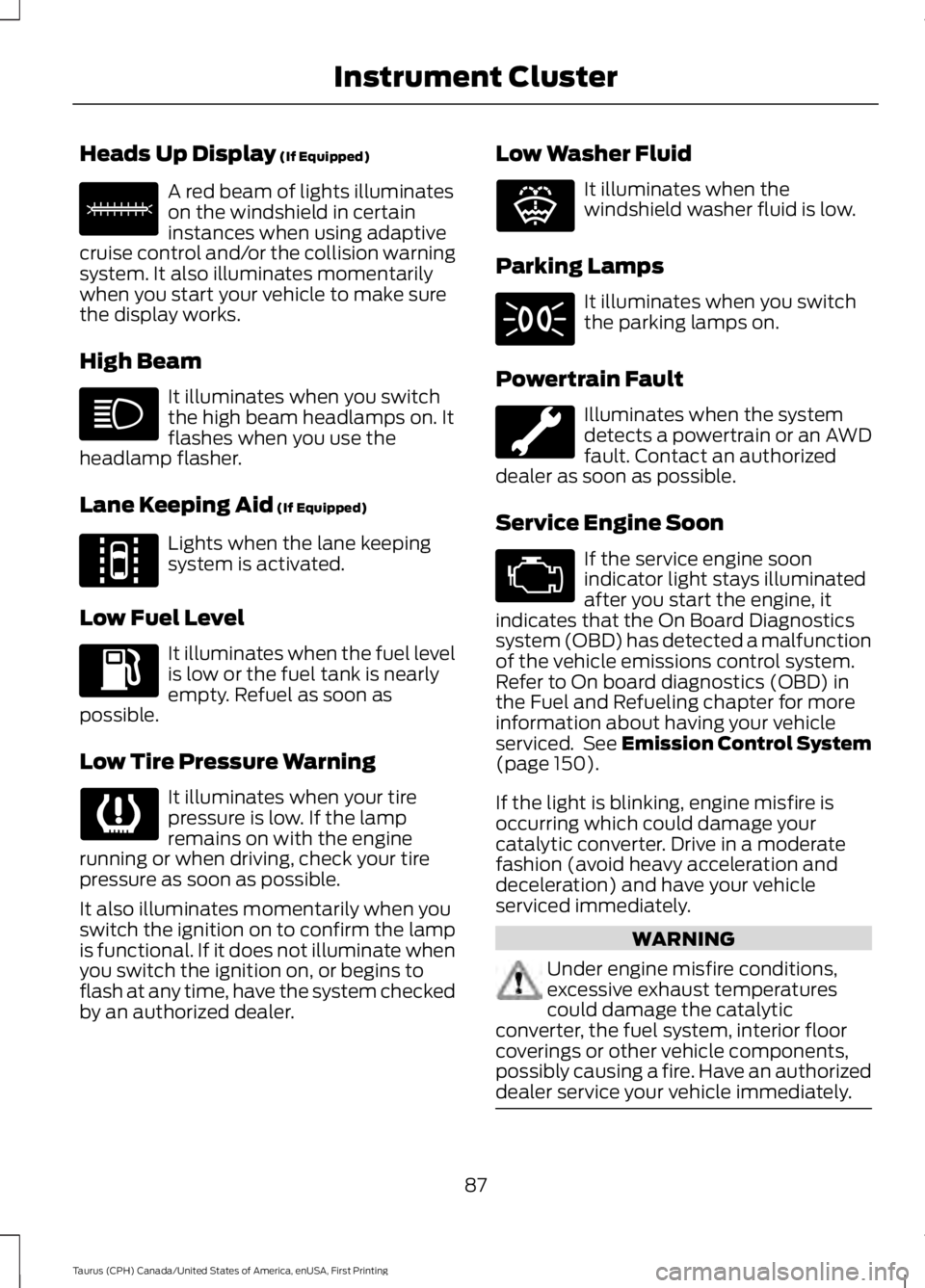
Heads Up Display (If Equipped)
A red beam of lights illuminateson the windshield in certaininstances when using adaptivecruise control and/or the collision warningsystem. It also illuminates momentarilywhen you start your vehicle to make surethe display works.
High Beam
It illuminates when you switchthe high beam headlamps on. Itflashes when you use theheadlamp flasher.
Lane Keeping Aid (If Equipped)
Lights when the lane keepingsystem is activated.
Low Fuel Level
It illuminates when the fuel levelis low or the fuel tank is nearlyempty. Refuel as soon aspossible.
Low Tire Pressure Warning
It illuminates when your tirepressure is low. If the lampremains on with the enginerunning or when driving, check your tirepressure as soon as possible.
It also illuminates momentarily when youswitch the ignition on to confirm the lampis functional. If it does not illuminate whenyou switch the ignition on, or begins toflash at any time, have the system checkedby an authorized dealer.
Low Washer Fluid
It illuminates when thewindshield washer fluid is low.
Parking Lamps
It illuminates when you switchthe parking lamps on.
Powertrain Fault
Illuminates when the systemdetects a powertrain or an AWDfault. Contact an authorizeddealer as soon as possible.
Service Engine Soon
If the service engine soonindicator light stays illuminatedafter you start the engine, itindicates that the On Board Diagnosticssystem (OBD) has detected a malfunctionof the vehicle emissions control system.Refer to On board diagnostics (OBD) inthe Fuel and Refueling chapter for moreinformation about having your vehicleserviced. See Emission Control System(page 150).
If the light is blinking, engine misfire isoccurring which could damage yourcatalytic converter. Drive in a moderatefashion (avoid heavy acceleration anddeceleration) and have your vehicleserviced immediately.
WARNING
Under engine misfire conditions,excessive exhaust temperaturescould damage the catalyticconverter, the fuel system, interior floorcoverings or other vehicle components,possibly causing a fire. Have an authorizeddealer service your vehicle immediately.
87
Taurus (CPH) Canada/United States of America, enUSA, First Printing
Instrument ClusterE156133 E144813 E132353
Page 109 of 504
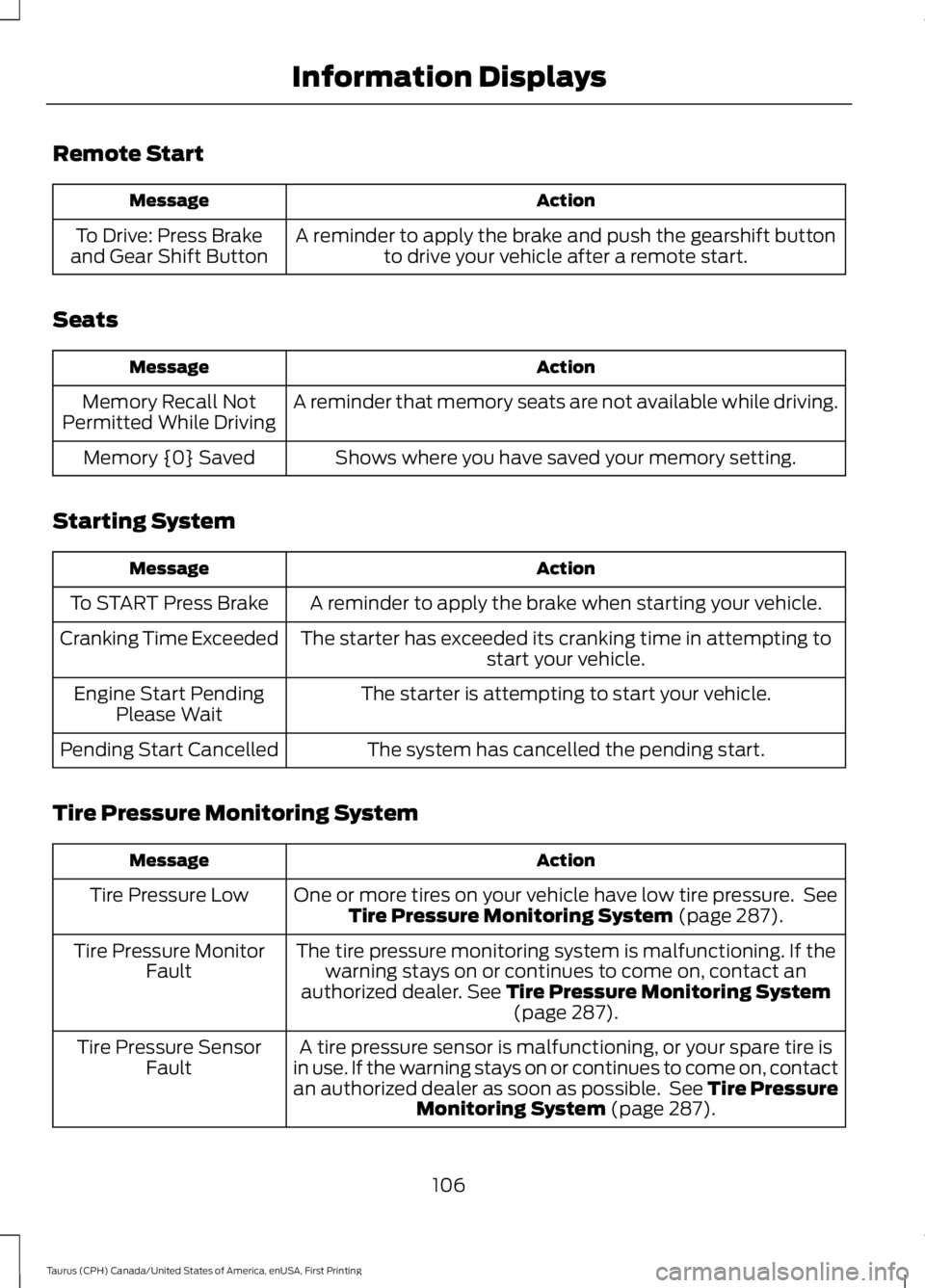
Remote Start
ActionMessage
A reminder to apply the brake and push the gearshift buttonto drive your vehicle after a remote start.To Drive: Press Brakeand Gear Shift Button
Seats
ActionMessage
A reminder that memory seats are not available while driving.Memory Recall NotPermitted While Driving
Shows where you have saved your memory setting.Memory {0} Saved
Starting System
ActionMessage
A reminder to apply the brake when starting your vehicle.To START Press Brake
The starter has exceeded its cranking time in attempting tostart your vehicle.Cranking Time Exceeded
The starter is attempting to start your vehicle.Engine Start PendingPlease Wait
The system has cancelled the pending start.Pending Start Cancelled
Tire Pressure Monitoring System
ActionMessage
One or more tires on your vehicle have low tire pressure. SeeTire Pressure Monitoring System (page 287).Tire Pressure Low
The tire pressure monitoring system is malfunctioning. If thewarning stays on or continues to come on, contact anauthorized dealer. See Tire Pressure Monitoring System(page 287).
Tire Pressure MonitorFault
A tire pressure sensor is malfunctioning, or your spare tire isin use. If the warning stays on or continues to come on, contactan authorized dealer as soon as possible. See Tire PressureMonitoring System (page 287).
Tire Pressure SensorFault
106
Taurus (CPH) Canada/United States of America, enUSA, First Printing
Information Displays
Page 163 of 504
If Your Vehicle Goes Off the Edge of thePavement
•If your vehicle goes off the edge of thepavement, slow down, but avoid severebrake application, ease the vehicleback onto the pavement only afterreducing your speed. Do not turn thesteering wheel too sharply whilereturning to the road surface.
•It may be safer to stay on the apron orshoulder of the road and slow downgradually before returning to thepavement. You may lose control if youdo not slow down or if you turn thesteering wheel too sharply or abruptly.
•It often may be less risky to strike smallobjects, such as highway reflectors,with minor damage to your vehiclerather than attempt a sudden return tothe pavement which could cause thevehicle to slide sideways out of controlor rollover. Remember, your safety andthe safety of others should be yourprimary concern.
If Your Vehicle Gets Stuck
WARNINGS
Always fully apply the parking brakeand make sure you shift into park (P).Switch the ignition off and removethe key whenever you leave your vehicle.
If the parking brake is fully released,but the brake warning lamp remainsilluminated, the brakes may not beworking properly. Have your vehiclechecked as soon as possible.
Do not spin the wheels at over34 mph (55 km/h). The tires may failand injure a passenger or bystander.
Note:Do not rock the vehicle if the engineis not at normal operating temperature ordamage to the transmission may occur.
Note:Do not rock the vehicle for more thana few minutes or damage to thetransmission and tires may occur or theengine may overheat.
If your vehicle gets stuck in mud or snow itmay be rocked out by shifting betweenforward and reverse gears, stoppingbetween shifts, in a steady pattern. Presslightly on the accelerator in each gear.
If your vehicle is equipped withAdvanceTrac® with Roll StabilityControl™, it may be beneficial todisengage the AdvanceTrac® with RollStability Control™ system whileattempting to rock the vehicle.
Emergency Maneuvers
•In an unavoidable emergency situationwhere a sudden sharp turn must bemade, remember to avoid"over-driving" your vehicle (that is, turnthe steering wheel only as rapidly andas far as required to avoid theemergency). Excessive steering willresult in less vehicle control, not more.Additionally, smooth variations of theaccelerator and/or brake pedalpressure should be utilized if changesin vehicle speed are called for. Avoidabrupt steering, acceleration or brakingwhich could result in an increased riskof loss of vehicle control, vehiclerollover and/or personal injury. Use allavailable road surface to return thevehicle to a safe direction of travel.
•In the event of an emergency stop,avoid skidding the tires and do notattempt any sharp steering wheelmovements.
•If the vehicle goes from one type ofsurface to another (that is, fromconcrete to gravel) there will be achange in the way the vehicle respondsto a maneuver (steering, accelerationor braking). Again, avoid these abruptinputs.
160
Taurus (CPH) Canada/United States of America, enUSA, First Printing
All-Wheel Drive (If Equipped)
Page 164 of 504
Sand
Most of the time traction control improvestire traction by managing wheel slipthrough Brake, Engine, and AWDcalibrations. However, during low speeddriving, disabling traction control in deepsand can help keep the wheels moving tomaintain vehicle momentum.
When driving over sand, try to keep all fourwheels on the most solid area of the trail.Avoid reducing the tire pressures but shiftto a lower gear and drive steadily throughthe terrain. Apply the accelerator slowlyand avoid spinning the wheels.
Do not drive your vehicle in deep sand foran extended period of time. This couldcause the AWD system to overheat anddefault to front-wheel drive. If this occurs,an AWD OFF message displays in theinformation display. To resume normalAWD function as soon as possible, stopthe vehicle in a safe location and stop theengine for at least 10 minutes. After theengine has been restarted and the AWDsystem has adequately cooled, the AWDOFF message turns off and normal AWDfunction returns. In the event the engine isnot stopped, the AWD OFF message turnsoff when the system cools and normalAWD function returns.
When driving at slow speeds in deep sandunder high outside temperatures, use L(Low) gear when possible. L (Low) gearoperation will maximize the engine andtransmission cooling capability.
Under severe operating conditions, the A/Cmay cycle on and off to protectoverheating of the engine.
Avoid excessive speed because vehiclemomentum can work against you andcause the vehicle to become stuck to thepoint that assistance may be required fromanother vehicle. Remember, you may beable to back out the way you came if youproceed with caution.
Mud and Water
If you must drive through high water, driveslowly. Traction or brake capability maybe limited.
When driving through water, determine thedepth; avoid water higher than the bottomof the wheel rims (for cars) or the bottomof the hubs (for trucks) (if possible) andproceed slowly. If the ignition system getswet, the vehicle may stall.
Once through water, always try the brakes.Wet brakes do not stop the vehicle aseffectively as dry brakes. Drying can beimproved by moving your vehicle slowlywhile applying light pressure on the brakepedal.
Be cautious of sudden changes in vehiclespeed or direction when you are driving inmud. Even AWD vehicles can lose tractionin slick mud. As when you are driving oversand, apply the accelerator slowly andavoid spinning your wheels. If the vehicledoes slide, steer in the direction of the slideuntil you regain control of the vehicle.
After driving through mud, clean off residuestuck to rotating driveshafts and tires.Excess mud stuck on tires and rotatingdriveshafts causes an imbalance thatcould damage drive components.
Note:Driving through deep water maydamage the transmission.
If the front or rear axle is submerged inwater, have the power transfer unit (PTU)or rear axle serviced by an authorizeddealer.
161
Taurus (CPH) Canada/United States of America, enUSA, First Printing
All-Wheel Drive (If Equipped)E143950
Page 194 of 504
Why is the feature not available (line markings are gray) when I can see the lane markingson the road?
Lane width too narrow or too wide
Camera not calibrated after a windshield replacement
Driving on tight roads or on uneven roads
Why does the vehicle not come back toward the middle of the lane, as expected, in theAid or Aid + Alert mode?
High cross winds
Large road crown
Rough roads, grooves, shoulder drop-offs
Heavy uneven loading of the vehicle or improper tire inflation pressure
If the tires have been exchanged (including snow tires), or the suspension has beenmodified
BLIND SPOT INFORMATION
SYSTEM (If Equipped)
WARNING
Never use the Blind SpotInformation System as areplacement for using the interiorand exterior mirrors or looking over yourshoulder before changing lanes. The BlindSpot Information System is not areplacement for careful driving.
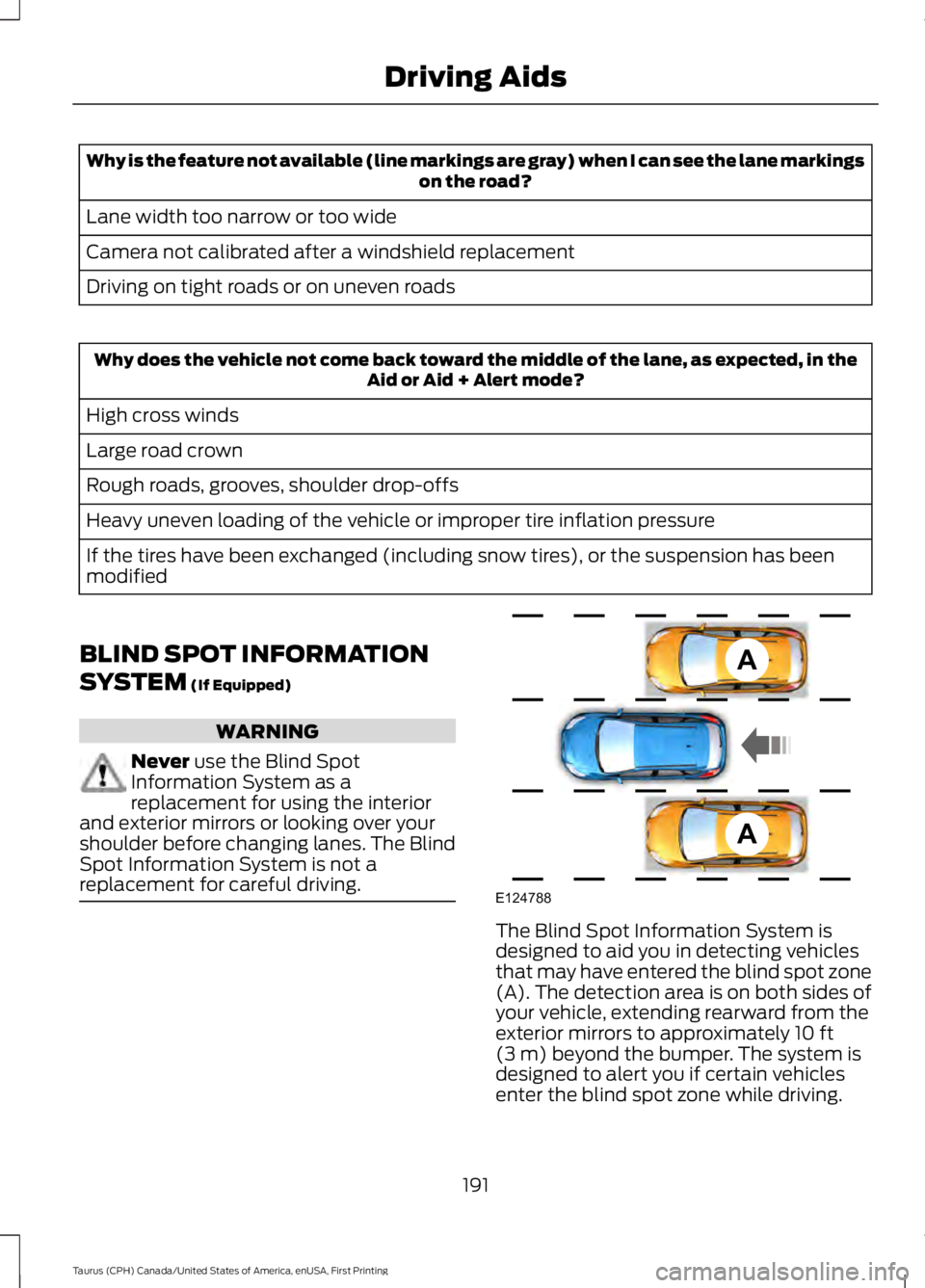
The Blind Spot Information System isdesigned to aid you in detecting vehiclesthat may have entered the blind spot zone(A). The detection area is on both sides ofyour vehicle, extending rearward from theexterior mirrors to approximately 10 ft(3 m) beyond the bumper. The system isdesigned to alert you if certain vehiclesenter the blind spot zone while driving.
191
Taurus (CPH) Canada/United States of America, enUSA, First Printing
Driving AidsA
A
E124788
Page 200 of 504
Steering Tips
If the steering wanders or pulls, check for:
•Correct tire pressures.
•Uneven tire wear.
•Loose or worn suspensioncomponents.
•Loose or worn steering components.
•Improper vehicle alignment.
Note:A high crown in the road or highcrosswinds may also make the steeringseem to wander or pull.
Adaptive Learning
The electronic power steering systemadaptive learning helps correct roadirregularities and improves overall handlingand steering feel. It communicates withthe brake system to help operateadvanced stability control and accidentavoidance systems. Additionally, wheneverthe battery is disconnected or a newbattery installed, you must drive yourvehicle a short distance before the systemrelearns the strategy and reactivates allsystems.
COLLISION WARNING SYSTEM
(If Equipped)
PRINCIPLE OF OPERATION
WARNINGS
This system is designed to be asupplementary driving aid. It is notintended to replace the driver’sattention, and judgment, or the need toapply the brakes. This system does NOTactivate the brakes automatically. Failureto press the brake pedal to activate thebrakes may result in a collision.
WARNINGS
The collision warning system withbrake support cannot help preventall collisions. Do not rely on thissystem to replace driver judgment and theneed to maintain distance and speed.
Note:The system does not detect, warn orrespond to potential collisions with vehiclesto the rear or sides of the vehicle.
Note:The collision warning system is activeat speeds above approximately 5 mph(8 km/h).
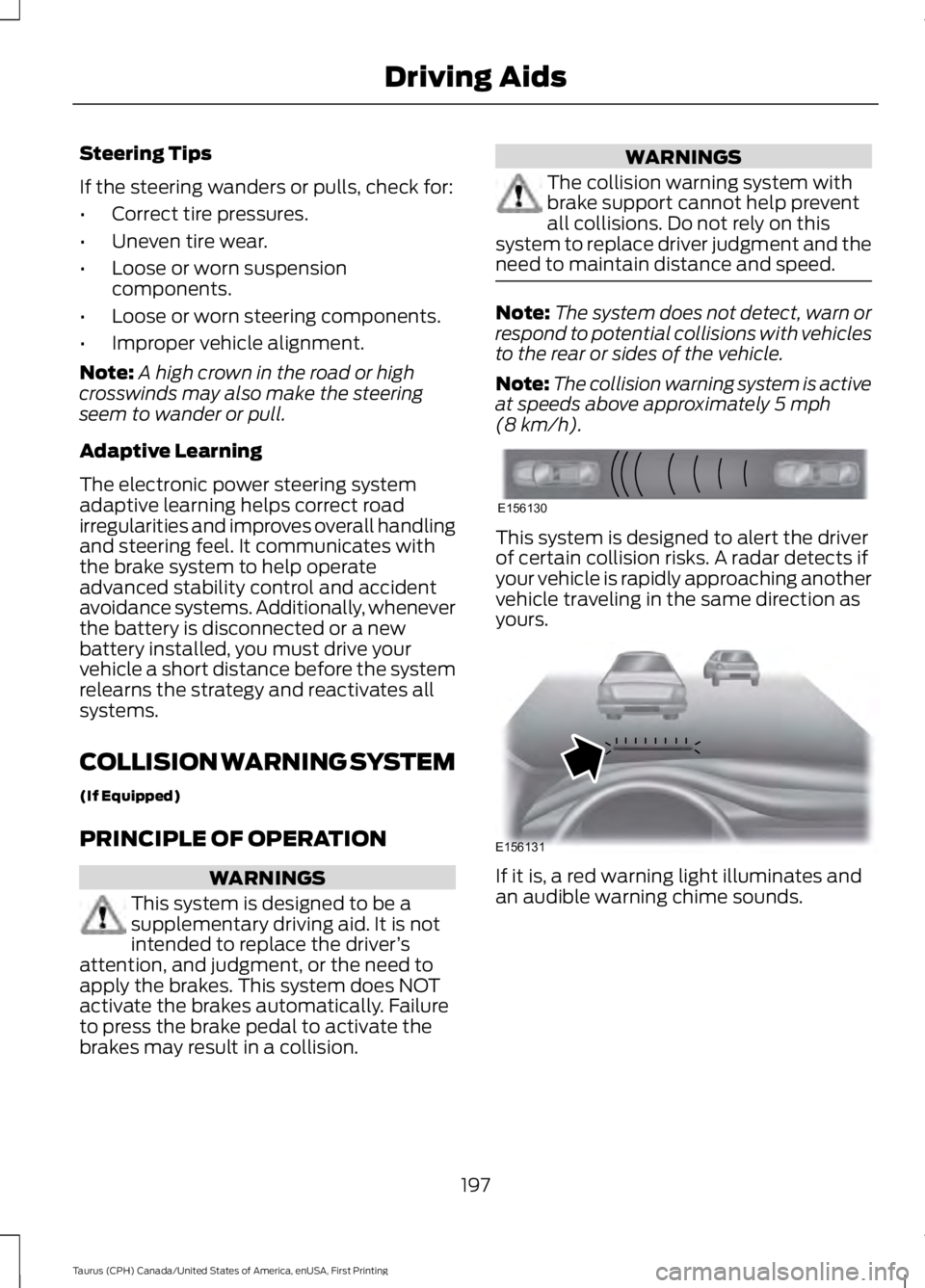
This system is designed to alert the driverof certain collision risks. A radar detects ifyour vehicle is rapidly approaching anothervehicle traveling in the same direction asyours.
If it is, a red warning light illuminates andan audible warning chime sounds.
197
Taurus (CPH) Canada/United States of America, enUSA, First Printing
Driving AidsE156130 E156131
Page 264 of 504
•Dry your vehicle with a chamois or softterry cloth towel to eliminate waterspotting.
•Immediately remove fuel spillages, birddroppings, insect deposits and road tar.These may cause damage to yourvehicle’s paintwork or trim over time.We recommend Motorcraft Bug andTar Remover.
•Remove any exterior accessories, forexample antennas, before entering acar wash.
Note:Suntan lotions and insect repellentscan damage painted surfaces. If thesesubstances come in contact with yourvehicle, wash the affected area as soon aspossible.
Exterior Chrome Parts
•Apply a high quality-cleaning productto bumpers and other chrome parts.Follow the manufacturer’s instructions.We recommend Motorcraft CustomBright Metal Cleaner.
•Do not apply the cleaning product tohot surfaces. Do not leave the cleaningproduct on chrome surfaces longerthan the time recommended.
•Using other non-recommendedcleaners can result in severe andpermanent cosmetic damage.
Note:Never use abrasive materials, forexample steel wool or plastic pads as theycan scratch the chrome surface.
Note:Do not use chrome cleaner, metalcleaner or polish on wheels or wheel covers.
Exterior Plastic Parts
For routine cleaning we recommendMotorcraft Detail Wash. If tar or greasespots are present, we recommendMotorcraft Bug and Tar Remover.
Stripes or Graphics (If Equipped)
Hand washing your vehicle is preferredhowever, pressure washing may be usedunder the following conditions:
•Do not use water pressure higher than2,000 psi (14,000 kPa).
•Do not use water hotter than 179°F(82°C).
•Use a spray with a 40° wide sprayangle pattern.
•Keep the nozzle at a 12 in (305 mm)distance and 90° angle to yourvehicle's surface.
Note:Holding the pressure washer nozzleat an angle to the vehicle's surface maydamage graphics and cause the edges topeel away from the vehicle's surface.
Underbody
Flush the complete underside of yourvehicle frequently. Keep body and doordrain holes free of debris or foreignmaterial.
Under Hood
For removing black rubber marks fromunder the hood we recommend MotorcraftWheel and Tire Cleaner or Motorcraft Bugand Tar Remover.
WAXING
Regular waxing is necessary to protect yourcar's paint from the elements. Werecommend that you wash and wax thepainted surface once or twice a year.
When washing and waxing, park yourvehicle in a shaded area out of directsunlight. Always wash your vehicle beforeapplying wax.
261
Taurus (CPH) Canada/United States of America, enUSA, First Printing
Vehicle Care
Page 265 of 504
•Use a quality wax that does not containabrasives.
•Follow the manufacturer’s instructionsto apply and remove the wax.
•Apply a small amount of wax in aback-and-forth motion, not in circles.
•Do not allow wax to come in contactwith any non-body (low-gloss black)colored trim. The wax will discolor orstain the parts over time.
•Roof racks.
•Bumpers.
•Grained door handles.
•Side moldings.
•Mirror housings.
•Windshield cowl area.
•Do not apply wax to glass areas.
•After waxing, your car's paint shouldfeel smooth, and be free of streaks andsmudges.
CLEANING THE ENGINE
Engines are more efficient when they areclean because grease and dirt buildup keepthe engine warmer than normal.
When washing:
•Take care when using a power washerto clean the engine. The high-pressurefluid could penetrate the sealed partsand cause damage.
•Do not spray a hot engine with coldwater to avoid cracking the engineblock or other engine components.
•Spray Motorcraft Engine Shampoo andDegreaser on all parts that requirecleaning and pressure rinse clean. InCanada, use Motorcraft EngineShampoo.
•Never wash or rinse the engine while itis hot or running; water in the runningengine may cause internal damage.
•Never wash or rinse any ignition coil,spark plug wire or spark plug well, orthe area in and around these locations.
•Cover the battery, power distributionbox, and air filter assembly to preventwater damage when cleaning theengine.
CLEANING THE WINDOWS AND
WIPER BLADES
Car wash chemicals and environmentalfallout can result in windshield and wiperblade contamination. Dirty windshield andwipers will result in poor windshield wiperoperation. Keep the windshield and wiperblades clean to maintain windshield wiperperformance.
To clean the windshield and wiper blades:
•Clean the windshield with anon-abrasive glass cleaner. Whencleaning the interior of the windshield,avoid getting any glass cleaner on theinstrument panel or door panels. Wipeany glass cleaner off these surfacesimmediately.
•For windshields contaminated withtree sap, chemicals, wax or bugs, cleanthe entire windshield using steel wool(no greater than 0000 grade) in acircular motion and rinse with water.
•Clean the wiper blades with isopropylrubbing alcohol or windshield washerconcentrate.
Note: Do not use razor blades or othersharp objects to clean or remove decalsfrom the inside of the heated rear window.The vehicle warranty does not coverdamage caused to the heated rear windowgrid lines.
262
Taurus (CPH) Canada/United States of America, enUSA, First Printing
Vehicle Care