manual transmission FORD TAURUS 2017 User Guide
[x] Cancel search | Manufacturer: FORD, Model Year: 2017, Model line: TAURUS, Model: FORD TAURUS 2017Pages: 504, PDF Size: 5.84 MB
Page 335 of 504
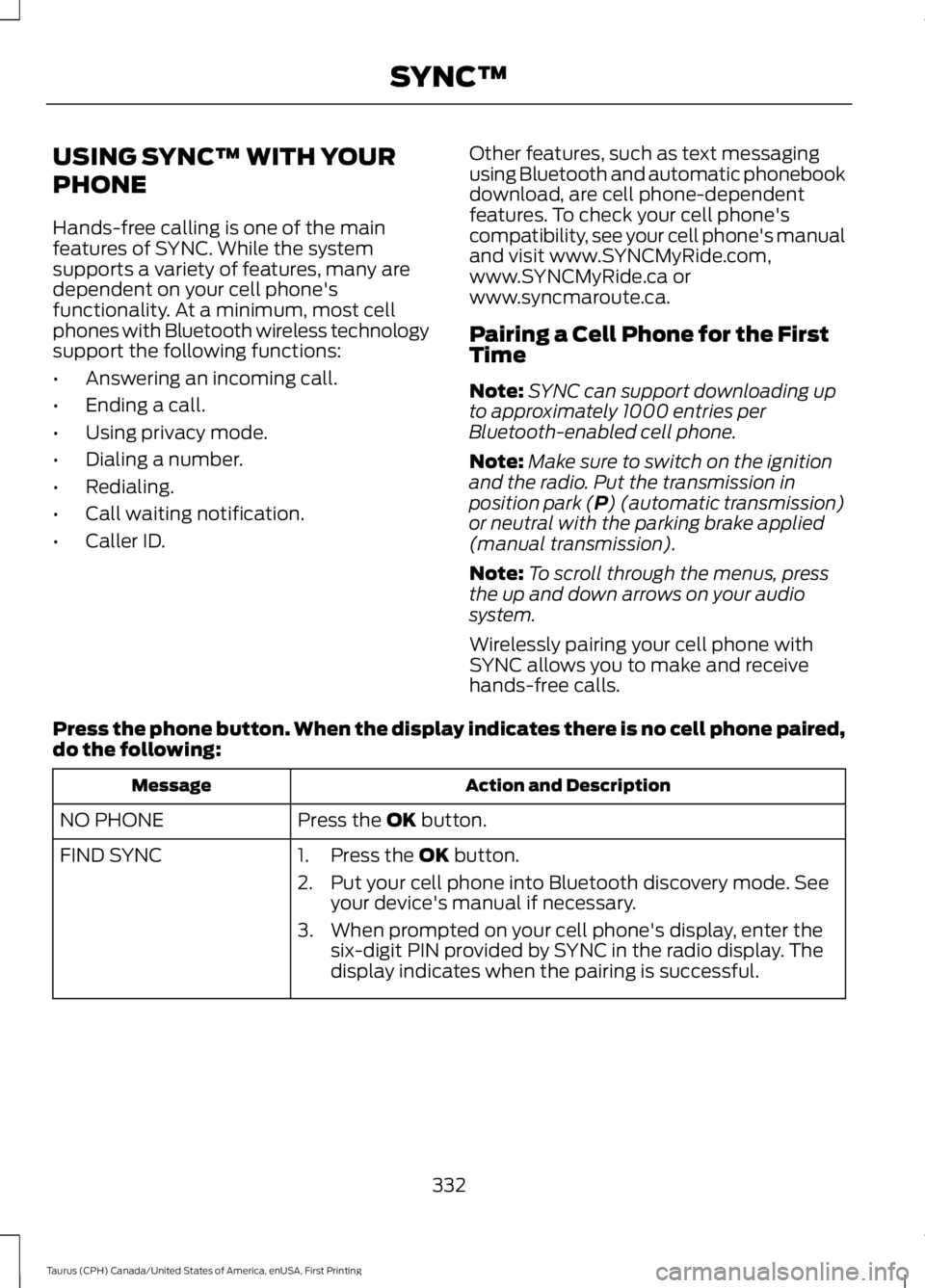
USING SYNC™ WITH YOUR
PHONE
Hands-free calling is one of the mainfeatures of SYNC. While the systemsupports a variety of features, many aredependent on your cell phone'sfunctionality. At a minimum, most cellphones with Bluetooth wireless technologysupport the following functions:
•Answering an incoming call.
•Ending a call.
•Using privacy mode.
•Dialing a number.
•Redialing.
•Call waiting notification.
•Caller ID.
Other features, such as text messagingusing Bluetooth and automatic phonebookdownload, are cell phone-dependentfeatures. To check your cell phone'scompatibility, see your cell phone's manualand visit www.SYNCMyRide.com,www.SYNCMyRide.ca orwww.syncmaroute.ca.
Pairing a Cell Phone for the FirstTime
Note:SYNC can support downloading upto approximately 1000 entries perBluetooth-enabled cell phone.
Note:Make sure to switch on the ignitionand the radio. Put the transmission inposition park (P) (automatic transmission)or neutral with the parking brake applied(manual transmission).
Note:To scroll through the menus, pressthe up and down arrows on your audiosystem.
Wirelessly pairing your cell phone withSYNC allows you to make and receivehands-free calls.
Press the phone button. When the display indicates there is no cell phone paired,do the following:
Action and DescriptionMessage
Press the OK button.NO PHONE
FIND SYNC1. Press the OK button.
2. Put your cell phone into Bluetooth discovery mode. Seeyour device's manual if necessary.
3. When prompted on your cell phone's display, enter thesix-digit PIN provided by SYNC in the radio display. Thedisplay indicates when the pairing is successful.
332
Taurus (CPH) Canada/United States of America, enUSA, First Printing
SYNC™
Page 336 of 504
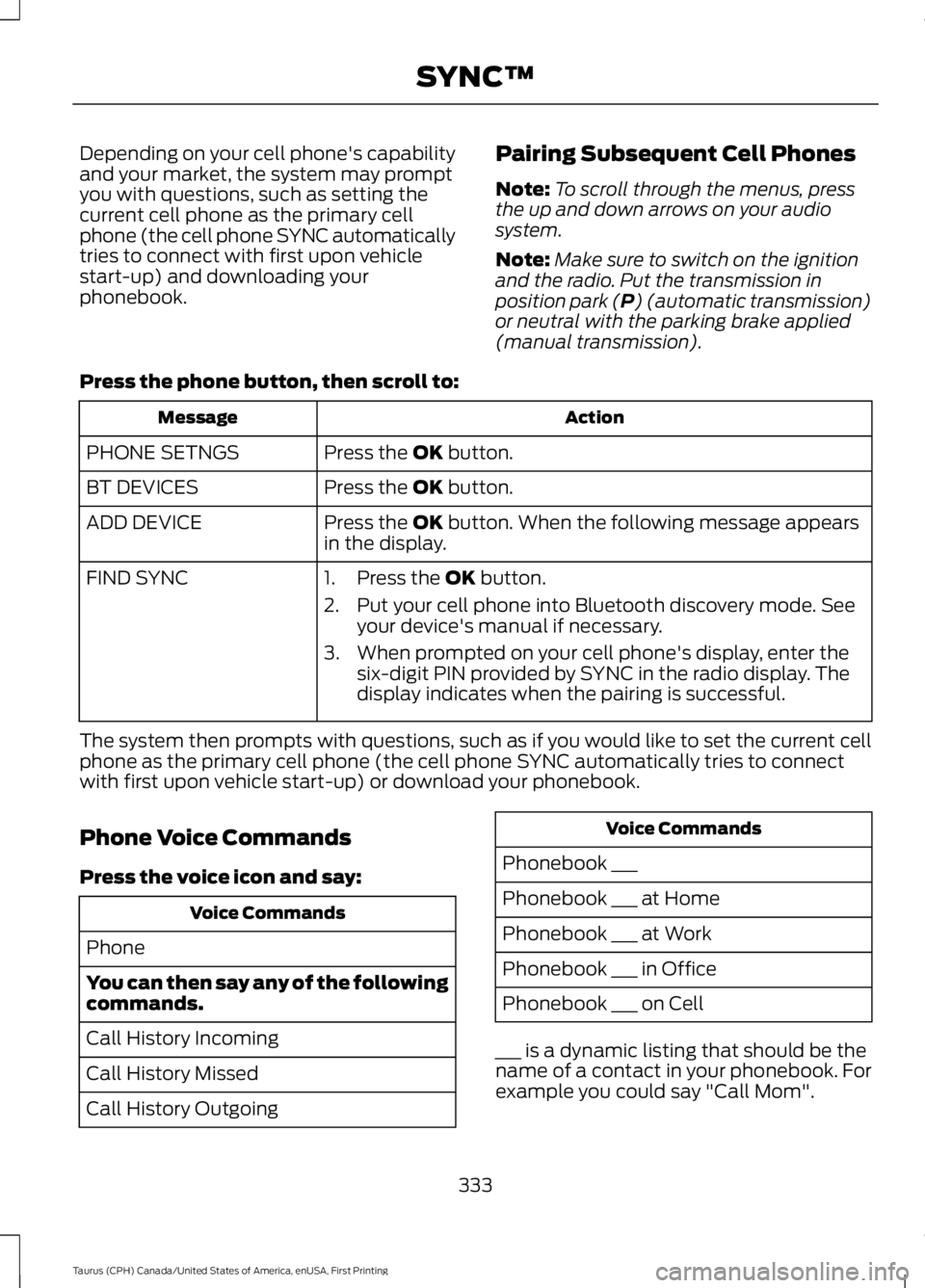
Depending on your cell phone's capabilityand your market, the system may promptyou with questions, such as setting thecurrent cell phone as the primary cellphone (the cell phone SYNC automaticallytries to connect with first upon vehiclestart-up) and downloading yourphonebook.
Pairing Subsequent Cell Phones
Note:To scroll through the menus, pressthe up and down arrows on your audiosystem.
Note:Make sure to switch on the ignitionand the radio. Put the transmission inposition park (P) (automatic transmission)or neutral with the parking brake applied(manual transmission).
Press the phone button, then scroll to:
ActionMessage
Press the OK button.PHONE SETNGS
Press the OK button.BT DEVICES
Press the OK button. When the following message appearsin the display.ADD DEVICE
FIND SYNC1. Press the OK button.
2. Put your cell phone into Bluetooth discovery mode. Seeyour device's manual if necessary.
3. When prompted on your cell phone's display, enter thesix-digit PIN provided by SYNC in the radio display. Thedisplay indicates when the pairing is successful.
The system then prompts with questions, such as if you would like to set the current cellphone as the primary cell phone (the cell phone SYNC automatically tries to connectwith first upon vehicle start-up) or download your phonebook.
Phone Voice Commands
Press the voice icon and say:
Voice Commands
Phone
You can then say any of the followingcommands.
Call History Incoming
Call History Missed
Call History Outgoing
Voice Commands
Phonebook ___
Phonebook ___ at Home
Phonebook ___ at Work
Phonebook ___ in Office
Phonebook ___ on Cell
___ is a dynamic listing that should be thename of a contact in your phonebook. Forexample you could say "Call Mom".
333
Taurus (CPH) Canada/United States of America, enUSA, First Printing
SYNC™
Page 494 of 504
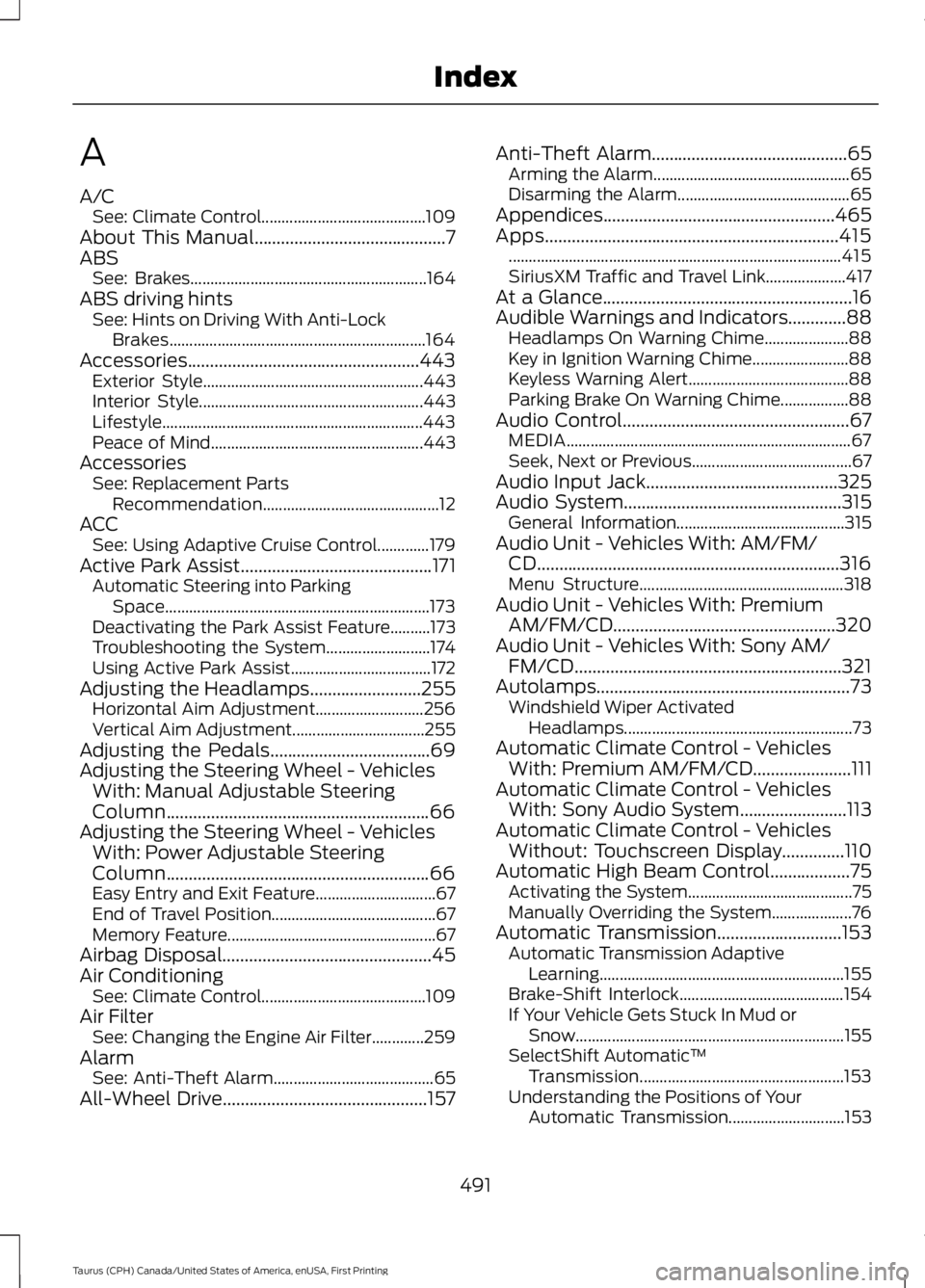
A
A/CSee: Climate Control.........................................109About This Manual...........................................7ABSSee: Brakes...........................................................164ABS driving hintsSee: Hints on Driving With Anti-LockBrakes................................................................164Accessories....................................................443Exterior Style.......................................................443Interior Style........................................................443Lifestyle.................................................................443Peace of Mind.....................................................443AccessoriesSee: Replacement PartsRecommendation............................................12ACCSee: Using Adaptive Cruise Control.............179Active Park Assist...........................................171Automatic Steering into ParkingSpace..................................................................173Deactivating the Park Assist Feature..........173Troubleshooting the System..........................174Using Active Park Assist...................................172Adjusting the Headlamps.........................255Horizontal Aim Adjustment...........................256Vertical Aim Adjustment.................................255Adjusting the Pedals....................................69Adjusting the Steering Wheel - VehiclesWith: Manual Adjustable SteeringColumn...........................................................66Adjusting the Steering Wheel - VehiclesWith: Power Adjustable SteeringColumn...........................................................66Easy Entry and Exit Feature..............................67End of Travel Position.........................................67Memory Feature....................................................67Airbag Disposal...............................................45Air ConditioningSee: Climate Control.........................................109Air FilterSee: Changing the Engine Air Filter.............259AlarmSee: Anti-Theft Alarm........................................65All-Wheel Drive..............................................157
Anti-Theft Alarm............................................65Arming the Alarm.................................................65Disarming the Alarm...........................................65Appendices....................................................465Apps..................................................................415...................................................................................415SiriusXM Traffic and Travel Link....................417At a Glance........................................................16Audible Warnings and Indicators.............88Headlamps On Warning Chime.....................88Key in Ignition Warning Chime........................88Keyless Warning Alert........................................88Parking Brake On Warning Chime.................88Audio Control...................................................67MEDIA.......................................................................67Seek, Next or Previous........................................67Audio Input Jack...........................................325Audio System.................................................315General Information..........................................315Audio Unit - Vehicles With: AM/FM/CD....................................................................316Menu Structure...................................................318Audio Unit - Vehicles With: PremiumAM/FM/CD..................................................320Audio Unit - Vehicles With: Sony AM/FM/CD............................................................321Autolamps.........................................................73Windshield Wiper ActivatedHeadlamps.........................................................73Automatic Climate Control - VehiclesWith: Premium AM/FM/CD......................111Automatic Climate Control - VehiclesWith: Sony Audio System........................113Automatic Climate Control - VehiclesWithout: Touchscreen Display..............110Automatic High Beam Control..................75Activating the System.........................................75Manually Overriding the System....................76Automatic Transmission............................153Automatic Transmission AdaptiveLearning.............................................................155Brake-Shift Interlock.........................................154If Your Vehicle Gets Stuck In Mud orSnow...................................................................155SelectShift Automatic™Transmission...................................................153Understanding the Positions of YourAutomatic Transmission.............................153
491
Taurus (CPH) Canada/United States of America, enUSA, First Printing
Index