park assist FORD TAURUS 2017 User Guide
[x] Cancel search | Manufacturer: FORD, Model Year: 2017, Model line: TAURUS, Model: FORD TAURUS 2017Pages: 504, PDF Size: 5.84 MB
Page 175 of 504
The system may not operate correctly inany of the following conditions:
•You use a spare tire or a tiresignificantly worn more than the othertires.
•One or more tires are improperlyinflated.
•You try to park on a tight curve.
Do not use the system if:
•You have attached a bike rack, traileror other object near the sensors on thefront or rear of your vehicle.
•You have attached an overhangingobject (surfboard) to the roof.
•The front bumper or side sensors aredamaged or obstructed (front bumpercover).
•The correct tire size is not in use on yourvehicle (for example, a mini-spare tire).
Using Active Park Assist
Press the button to turn thesystem on or off.
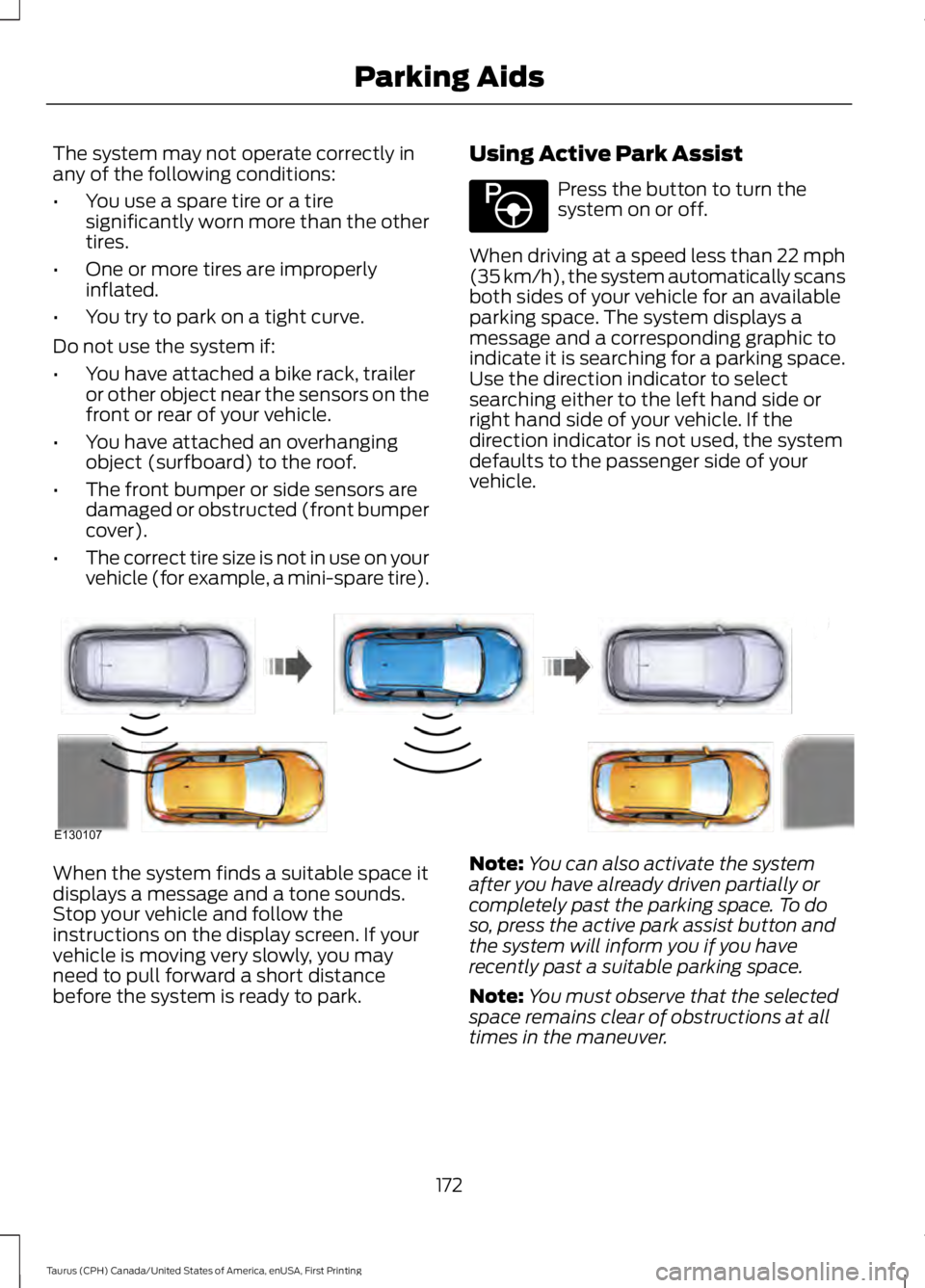
When driving at a speed less than 22 mph(35 km/h), the system automatically scansboth sides of your vehicle for an availableparking space. The system displays amessage and a corresponding graphic toindicate it is searching for a parking space.Use the direction indicator to selectsearching either to the left hand side orright hand side of your vehicle. If thedirection indicator is not used, the systemdefaults to the passenger side of yourvehicle.
When the system finds a suitable space itdisplays a message and a tone sounds.Stop your vehicle and follow theinstructions on the display screen. If yourvehicle is moving very slowly, you mayneed to pull forward a short distancebefore the system is ready to park.
Note:You can also activate the systemafter you have already driven partially orcompletely past the parking space. To doso, press the active park assist button andthe system will inform you if you haverecently past a suitable parking space.
Note:You must observe that the selectedspace remains clear of obstructions at alltimes in the maneuver.
172
Taurus (CPH) Canada/United States of America, enUSA, First Printing
Parking AidsE146186 E130107
Page 176 of 504
Note:Active park assist may not detectvehicles with overhanging loads (a bus or atruck), street furniture and other items. Youmust make sure the selected space issuitable for parking.
Note:You should drive your vehicle within5 ft (1.5 m) and as parallel to the othervehicles as possible while passing a parkingspace.
Note:The system always offers the lastdetected parking space (for example, if yourvehicle detects multiple spaces while youare driving, it offers the last one).
Note:If driven above approximately 22 mph(35 km/h), the display screen shows amessage to alert you to reduce your vehiclespeed.
Automatic Steering into ParkingSpace
Note:If vehicle speed exceeds 6 mph(10 km/h) or the maneuver is interrupted(driver input is detected), the systemswitches off and you need to take fullcontrol of your vehicle.
Note:If a maneuver is interrupted beforecompletion, the system switches off. Thesteering wheel position will not indicate theactualy position of the steering and you haveto take full control of your vehicle.
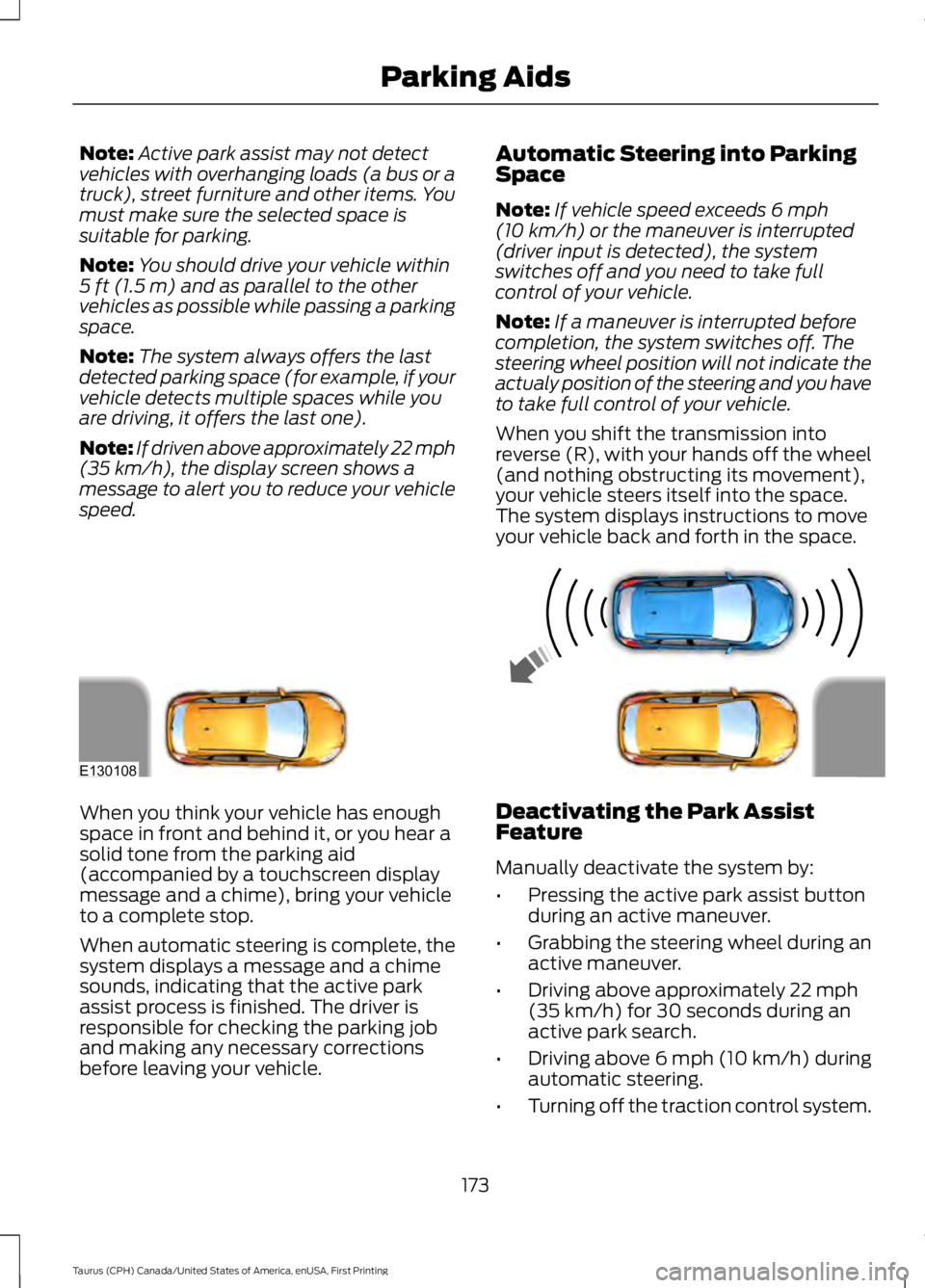
When you shift the transmission intoreverse (R), with your hands off the wheel(and nothing obstructing its movement),your vehicle steers itself into the space.The system displays instructions to moveyour vehicle back and forth in the space.
When you think your vehicle has enoughspace in front and behind it, or you hear asolid tone from the parking aid(accompanied by a touchscreen displaymessage and a chime), bring your vehicleto a complete stop.
When automatic steering is complete, thesystem displays a message and a chimesounds, indicating that the active parkassist process is finished. The driver isresponsible for checking the parking joband making any necessary correctionsbefore leaving your vehicle.
Deactivating the Park AssistFeature
Manually deactivate the system by:
•Pressing the active park assist buttonduring an active maneuver.
•Grabbing the steering wheel during anactive maneuver.
•Driving above approximately 22 mph(35 km/h) for 30 seconds during anactive park search.
•Driving above 6 mph (10 km/h) duringautomatic steering.
•Turning off the traction control system.
173
Taurus (CPH) Canada/United States of America, enUSA, First Printing
Parking AidsE130108
Page 212 of 504
Before Towing a Trailer
Practice turning, stopping and backing upto get the feel of your vehicle-trailercombination before starting on a trip.When turning, make wider turns so thetrailer wheels clear curbs and otherobstacles.
When Towing a Trailer
•Do not drive faster than 70 mph(113 km/h) during the first 500 mi(800 km).
•Do not make full-throttle starts.
•Check your hitch, electrical connectionsand trailer wheel lug nuts thoroughlyafter you have traveled 50 mi (80 km).
•When stopped in congested or heavytraffic during hot weather, place thegearshift in position P to aid engine andtransmission cooling and to help A/Cperformance.
•Turn off the speed control with heavyloads or in hilly terrain. The speedcontrol may turn off automaticallywhen you are towing on long, steepgrades.
•Shift to a lower gear when driving downa long or steep hill. Do not apply thebrakes continuously, as they mayoverheat and become less effective.
•If your transmission is equipped with aGrade Assist or Tow/Haul feature, usethis feature when towing. This providesengine braking and helps eliminateexcessive transmission shifting foroptimum fuel economy andtransmission cooling.
•Allow more distance for stopping witha trailer attached. Anticipate stops andbrake gradually.
•Avoid parking on a grade. However, ifyou must park on a grade:
1. Turn the steering wheel to point yourvehicle tires away from traffic flow.
2. Set your vehicle parking brake.
3. Place the automatic transmission inposition P.
4. Place wheel chocks in front and backof the trailer wheels. (Chocks notincluded with vehicle.)
Launching or Retrieving a Boat orPersonal Watercraft (PWC)
Note:Disconnect the wiring to the trailerbefore backing the trailer into the water.
Note:Reconnect the wiring to the trailerafter removing the trailer from the water.
When backing down a ramp during boatlaunching or retrieval:
•Do not allow the static water level torise above the bottom edge of the rearbumper.
•Do not allow waves to break higherthan 6 in (15 cm) above the bottomedge of the rear bumper.
Exceeding these limits may allow water toenter vehicle components:
•Causing internal damage to thecomponents.
•Affecting driveability, emissions, andreliability.
Replace the rear axle lubricant anytimethe rear axle has been submerged in water.Water may have contaminated the rearaxle lubricant, which is not normallychecked or changed unless a leak issuspected or other axle repair is required.
209
Taurus (CPH) Canada/United States of America, enUSA, First Printing
Towing
Page 272 of 504
•When inflating a tire or other objects,use the black air hose only. Do not usethe transparent hose which is designedfor sealant application only.
•Operating the kit could cause anelectrical disturbance in radio, CD, andDVD player operation.
What to do when a Tire IsPunctured
A tire puncture within the tire tread areacan be repaired in two stages with the kit.
•In the first stage, the tire will bereinflated with a sealing compoundand air. After the tire has beenreinflated, you will need to drive thevehicle a short distance 4 mi (6 km) todistribute the sealant in the tire.
•In the second stage, you will need tocheck the tire pressure and adjust, ifnecessary, to the vehicle tire inflationpressure.
First Stage: Reinflating the Tirewith Sealing Compound and Air
WARNINGS
Do not stand directly over the kitwhile inflating the tire. If you noticeany unusual bulges or deformationsin the tire sidewall during inflation, stopand call roadside assistance.
If the tire does not inflate to therecommended tire pressure within15 minutes, stop and call roadsideassistance.
Preparation: Park the vehicle in a safe, leveland secure area, away from moving traffic.Turn the hazard lights on. Apply the parkingbrake and turn the engine off. Inspect theflat tire for visible damage.
Sealant compound contains latex. Toavoid any allergic reactions, use thenon-latex gloves located in the accessorybox on the underside of the kit housing.
Do not remove any foreign object that haspierced the tire. If a puncture is located inthe tire sidewall, stop and call roadsideassistance.
1. Remove the valve cap from the tirevalve.
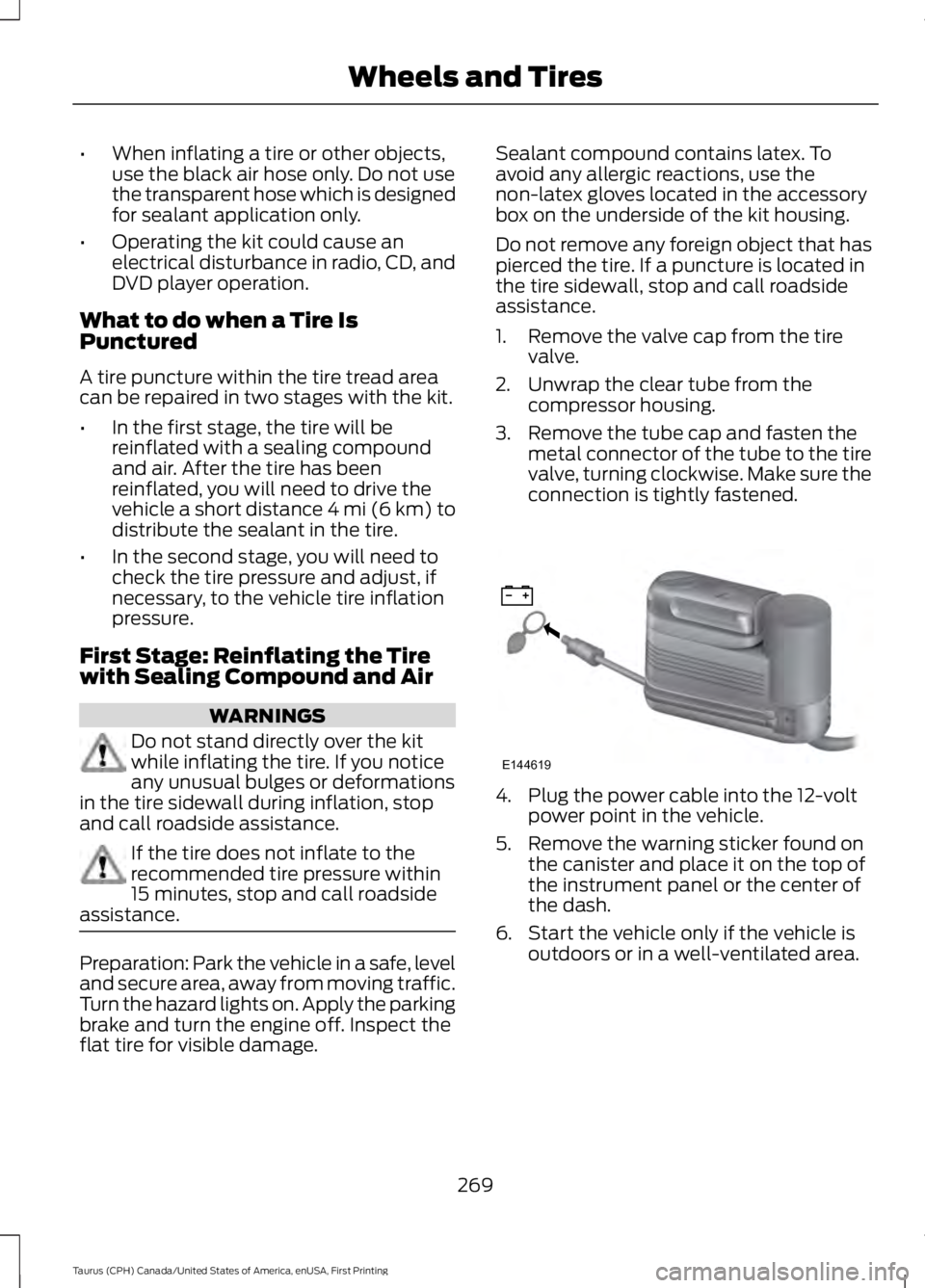
2. Unwrap the clear tube from thecompressor housing.
3. Remove the tube cap and fasten themetal connector of the tube to the tirevalve, turning clockwise. Make sure theconnection is tightly fastened.
4. Plug the power cable into the 12-voltpower point in the vehicle.
5. Remove the warning sticker found onthe canister and place it on the top ofthe instrument panel or the center ofthe dash.
6. Start the vehicle only if the vehicle isoutdoors or in a well-ventilated area.
269
Taurus (CPH) Canada/United States of America, enUSA, First Printing
Wheels and TiresE144619
Page 381 of 504
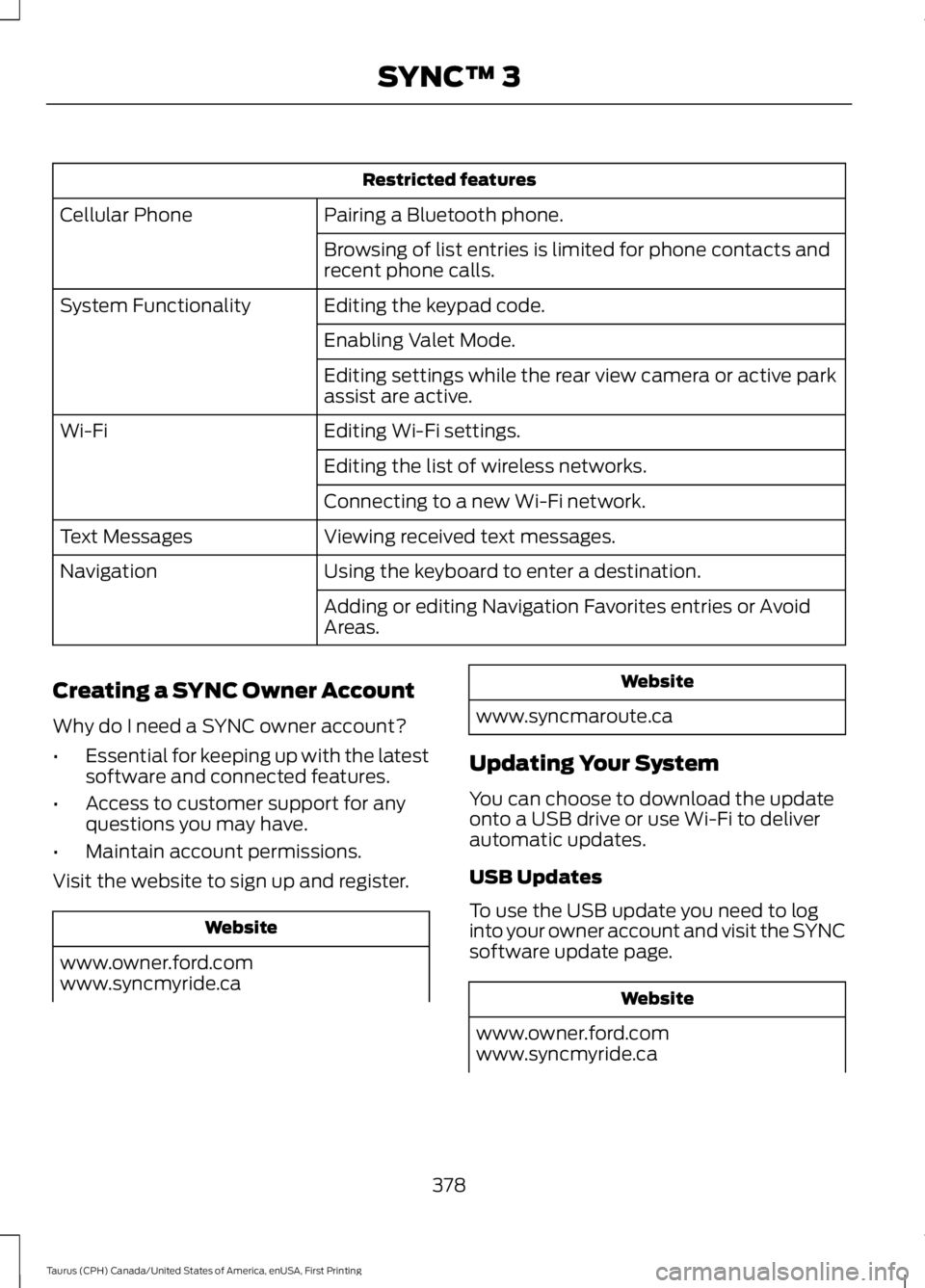
Restricted features
Pairing a Bluetooth phone.Cellular Phone
Browsing of list entries is limited for phone contacts andrecent phone calls.
Editing the keypad code.System Functionality
Enabling Valet Mode.
Editing settings while the rear view camera or active parkassist are active.
Editing Wi-Fi settings.Wi-Fi
Editing the list of wireless networks.
Connecting to a new Wi-Fi network.
Viewing received text messages.Text Messages
Using the keyboard to enter a destination.Navigation
Adding or editing Navigation Favorites entries or AvoidAreas.
Creating a SYNC Owner Account
Why do I need a SYNC owner account?
•Essential for keeping up with the latestsoftware and connected features.
•Access to customer support for anyquestions you may have.
•Maintain account permissions.
Visit the website to sign up and register.
Website
www.owner.ford.comwww.syncmyride.ca
Website
www.syncmaroute.ca
Updating Your System
You can choose to download the updateonto a USB drive or use Wi-Fi to deliverautomatic updates.
USB Updates
To use the USB update you need to loginto your owner account and visit the SYNCsoftware update page.
Website
www.owner.ford.comwww.syncmyride.ca
378
Taurus (CPH) Canada/United States of America, enUSA, First Printing
SYNC™ 3
Page 446 of 504
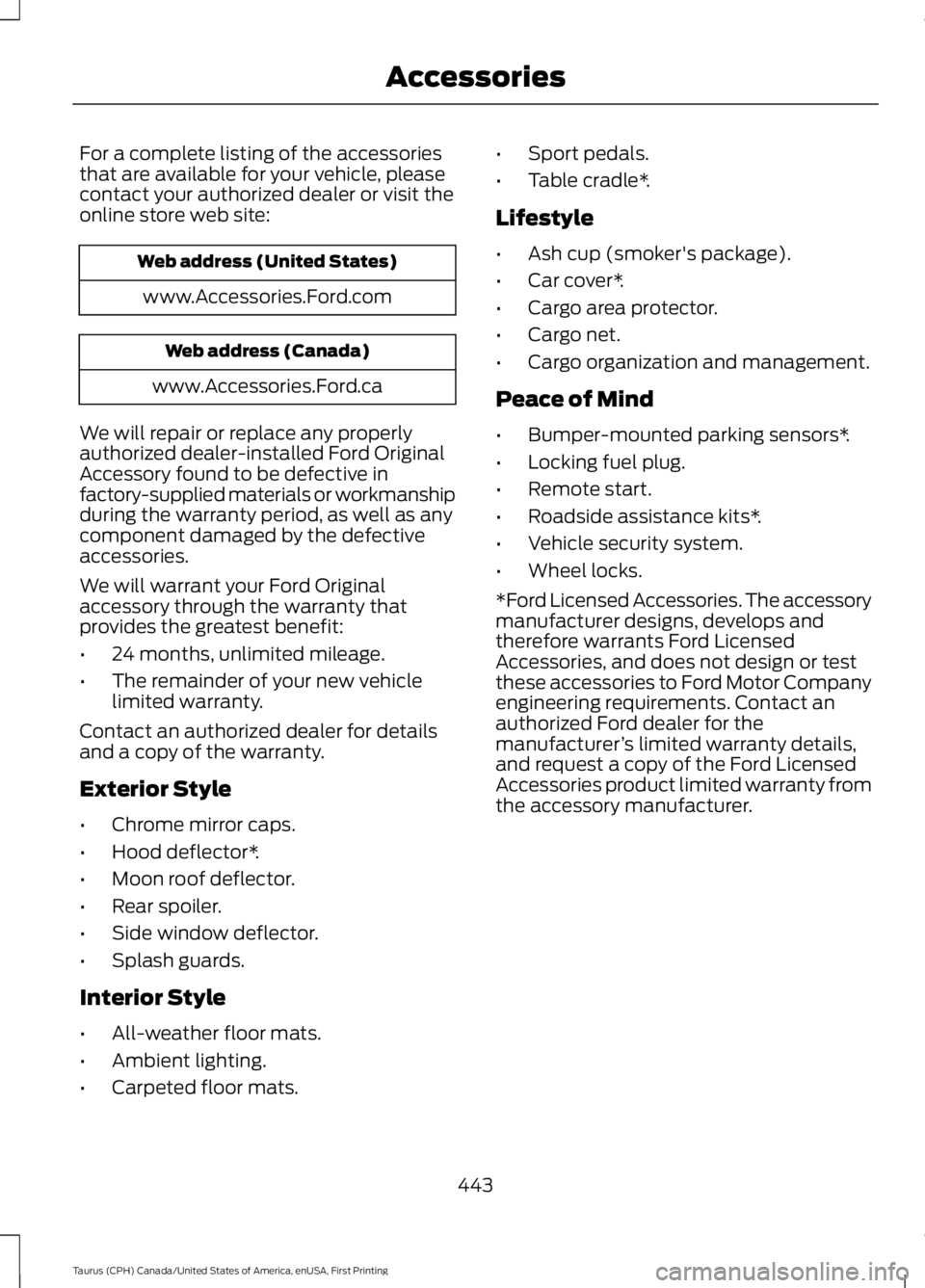
For a complete listing of the accessoriesthat are available for your vehicle, pleasecontact your authorized dealer or visit theonline store web site:
Web address (United States)
www.Accessories.Ford.com
Web address (Canada)
www.Accessories.Ford.ca
We will repair or replace any properlyauthorized dealer-installed Ford OriginalAccessory found to be defective infactory-supplied materials or workmanshipduring the warranty period, as well as anycomponent damaged by the defectiveaccessories.
We will warrant your Ford Originalaccessory through the warranty thatprovides the greatest benefit:
•24 months, unlimited mileage.
•The remainder of your new vehiclelimited warranty.
Contact an authorized dealer for detailsand a copy of the warranty.
Exterior Style
•Chrome mirror caps.
•Hood deflector*.
•Moon roof deflector.
•Rear spoiler.
•Side window deflector.
•Splash guards.
Interior Style
•All-weather floor mats.
•Ambient lighting.
•Carpeted floor mats.
•Sport pedals.
•Table cradle*.
Lifestyle
•Ash cup (smoker's package).
•Car cover*.
•Cargo area protector.
•Cargo net.
•Cargo organization and management.
Peace of Mind
•Bumper-mounted parking sensors*.
•Locking fuel plug.
•Remote start.
•Roadside assistance kits*.
•Vehicle security system.
•Wheel locks.
*Ford Licensed Accessories. The accessorymanufacturer designs, develops andtherefore warrants Ford LicensedAccessories, and does not design or testthese accessories to Ford Motor Companyengineering requirements. Contact anauthorized Ford dealer for themanufacturer’s limited warranty details,and request a copy of the Ford LicensedAccessories product limited warranty fromthe accessory manufacturer.
443
Taurus (CPH) Canada/United States of America, enUSA, First Printing
Accessories
Page 449 of 504
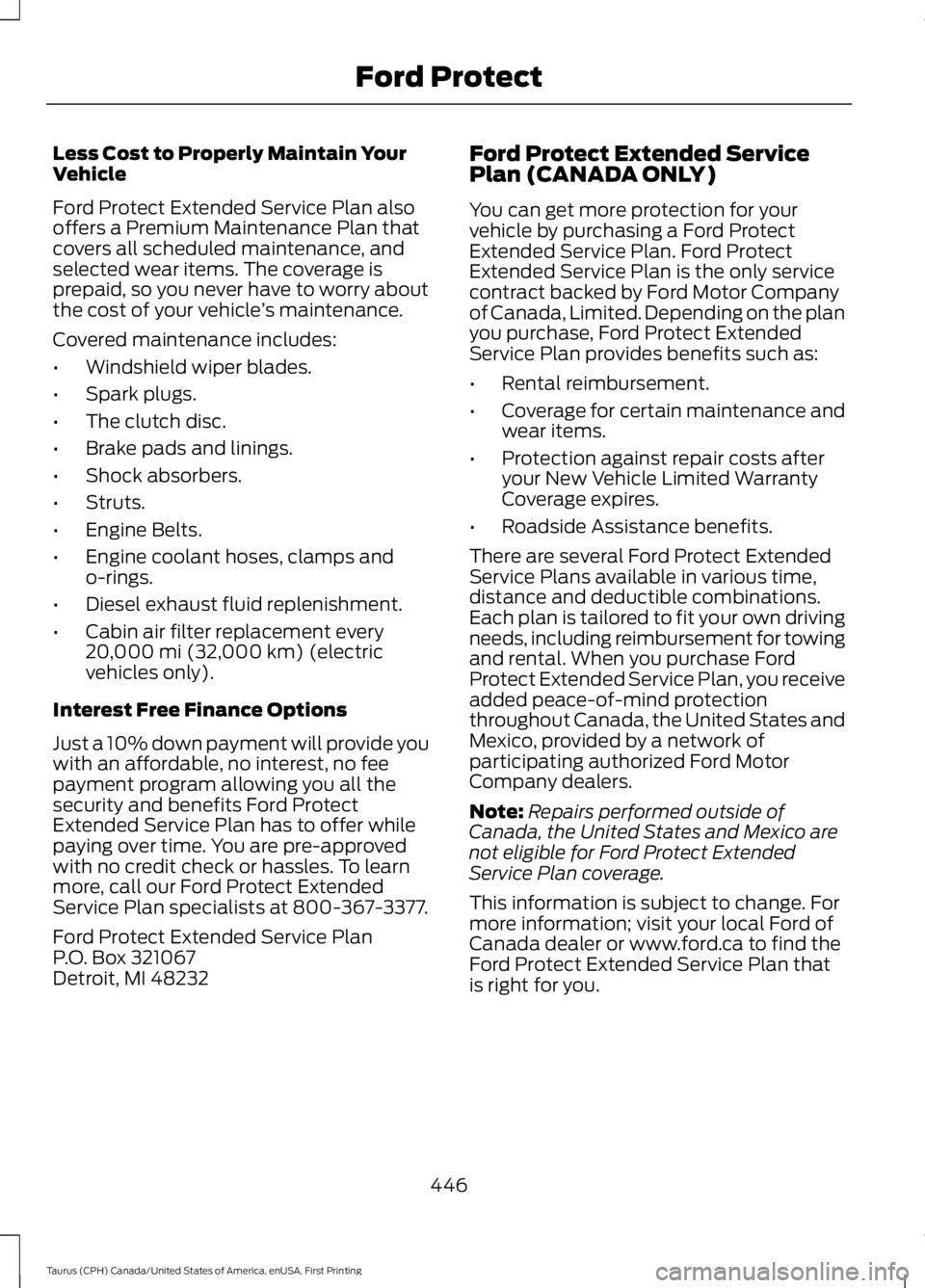
Less Cost to Properly Maintain YourVehicle
Ford Protect Extended Service Plan alsooffers a Premium Maintenance Plan thatcovers all scheduled maintenance, andselected wear items. The coverage isprepaid, so you never have to worry aboutthe cost of your vehicle’s maintenance.
Covered maintenance includes:
•Windshield wiper blades.
•Spark plugs.
•The clutch disc.
•Brake pads and linings.
•Shock absorbers.
•Struts.
•Engine Belts.
•Engine coolant hoses, clamps ando-rings.
•Diesel exhaust fluid replenishment.
•Cabin air filter replacement every20,000 mi (32,000 km) (electricvehicles only).
Interest Free Finance Options
Just a 10% down payment will provide youwith an affordable, no interest, no feepayment program allowing you all thesecurity and benefits Ford ProtectExtended Service Plan has to offer whilepaying over time. You are pre-approvedwith no credit check or hassles. To learnmore, call our Ford Protect ExtendedService Plan specialists at 800-367-3377.
Ford Protect Extended Service PlanP.O. Box 321067Detroit, MI 48232
Ford Protect Extended ServicePlan (CANADA ONLY)
You can get more protection for yourvehicle by purchasing a Ford ProtectExtended Service Plan. Ford ProtectExtended Service Plan is the only servicecontract backed by Ford Motor Companyof Canada, Limited. Depending on the planyou purchase, Ford Protect ExtendedService Plan provides benefits such as:
•Rental reimbursement.
•Coverage for certain maintenance andwear items.
•Protection against repair costs afteryour New Vehicle Limited WarrantyCoverage expires.
•Roadside Assistance benefits.
There are several Ford Protect ExtendedService Plans available in various time,distance and deductible combinations.Each plan is tailored to fit your own drivingneeds, including reimbursement for towingand rental. When you purchase FordProtect Extended Service Plan, you receiveadded peace-of-mind protectionthroughout Canada, the United States andMexico, provided by a network ofparticipating authorized Ford MotorCompany dealers.
Note:Repairs performed outside ofCanada, the United States and Mexico arenot eligible for Ford Protect ExtendedService Plan coverage.
This information is subject to change. Formore information; visit your local Ford ofCanada dealer or www.ford.ca to find theFord Protect Extended Service Plan thatis right for you.
446
Taurus (CPH) Canada/United States of America, enUSA, First Printing
Ford Protect
Page 494 of 504
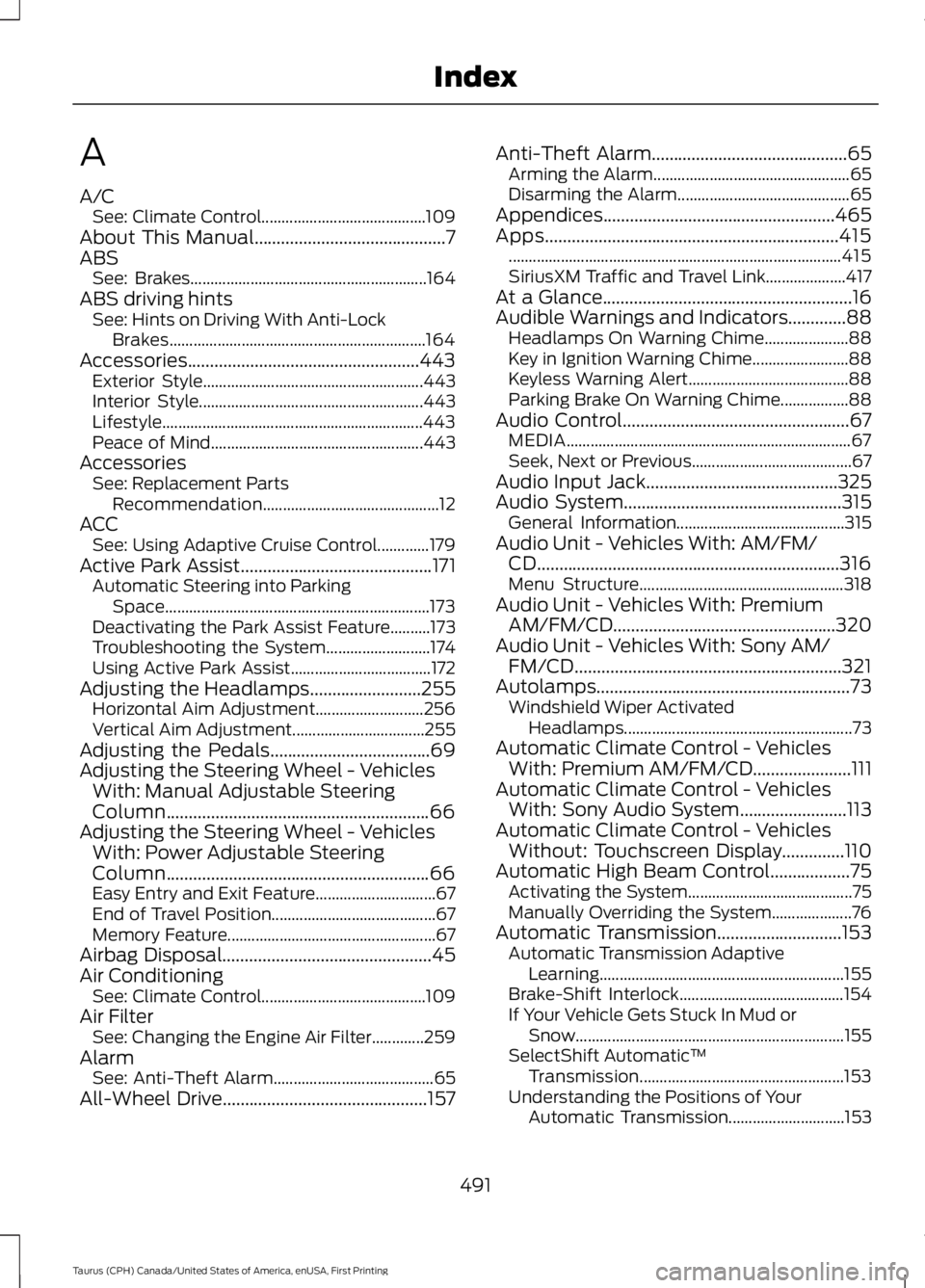
A
A/CSee: Climate Control.........................................109About This Manual...........................................7ABSSee: Brakes...........................................................164ABS driving hintsSee: Hints on Driving With Anti-LockBrakes................................................................164Accessories....................................................443Exterior Style.......................................................443Interior Style........................................................443Lifestyle.................................................................443Peace of Mind.....................................................443AccessoriesSee: Replacement PartsRecommendation............................................12ACCSee: Using Adaptive Cruise Control.............179Active Park Assist...........................................171Automatic Steering into ParkingSpace..................................................................173Deactivating the Park Assist Feature..........173Troubleshooting the System..........................174Using Active Park Assist...................................172Adjusting the Headlamps.........................255Horizontal Aim Adjustment...........................256Vertical Aim Adjustment.................................255Adjusting the Pedals....................................69Adjusting the Steering Wheel - VehiclesWith: Manual Adjustable SteeringColumn...........................................................66Adjusting the Steering Wheel - VehiclesWith: Power Adjustable SteeringColumn...........................................................66Easy Entry and Exit Feature..............................67End of Travel Position.........................................67Memory Feature....................................................67Airbag Disposal...............................................45Air ConditioningSee: Climate Control.........................................109Air FilterSee: Changing the Engine Air Filter.............259AlarmSee: Anti-Theft Alarm........................................65All-Wheel Drive..............................................157
Anti-Theft Alarm............................................65Arming the Alarm.................................................65Disarming the Alarm...........................................65Appendices....................................................465Apps..................................................................415...................................................................................415SiriusXM Traffic and Travel Link....................417At a Glance........................................................16Audible Warnings and Indicators.............88Headlamps On Warning Chime.....................88Key in Ignition Warning Chime........................88Keyless Warning Alert........................................88Parking Brake On Warning Chime.................88Audio Control...................................................67MEDIA.......................................................................67Seek, Next or Previous........................................67Audio Input Jack...........................................325Audio System.................................................315General Information..........................................315Audio Unit - Vehicles With: AM/FM/CD....................................................................316Menu Structure...................................................318Audio Unit - Vehicles With: PremiumAM/FM/CD..................................................320Audio Unit - Vehicles With: Sony AM/FM/CD............................................................321Autolamps.........................................................73Windshield Wiper ActivatedHeadlamps.........................................................73Automatic Climate Control - VehiclesWith: Premium AM/FM/CD......................111Automatic Climate Control - VehiclesWith: Sony Audio System........................113Automatic Climate Control - VehiclesWithout: Touchscreen Display..............110Automatic High Beam Control..................75Activating the System.........................................75Manually Overriding the System....................76Automatic Transmission............................153Automatic Transmission AdaptiveLearning.............................................................155Brake-Shift Interlock.........................................154If Your Vehicle Gets Stuck In Mud orSnow...................................................................155SelectShift Automatic™Transmission...................................................153Understanding the Positions of YourAutomatic Transmission.............................153
491
Taurus (CPH) Canada/United States of America, enUSA, First Printing
Index
Page 497 of 504
SIRIUS® Satellite Radio (IfActivated).........................................................391Sources.................................................................389Supported Media Players, Formats andMetadata Information................................398USB Ports.............................................................398Environment......................................................15Essential Towing Checks..........................208Before Towing a Trailer....................................209Hitches..................................................................208Launching or Retrieving a Boat or PersonalWatercraft (PWC)........................................209Safety Chains.....................................................208Trailer Brakes......................................................208Trailer Lamps......................................................208When Towing a Trailer.....................................209Event Data RecordingSee: Data Recording..............................................9Export Unique Options..................................13Exterior Mirrors................................................79Auto-Dimming Feature......................................79Blind Spot Monitor..............................................80Fold-Away Exterior Mirrors...............................79Heated Exterior Mirrors......................................79Integrated Blind Spot Mirrors..........................80Memory Mirrors.....................................................79Power Exterior Mirrors........................................79Puddle Lamps.......................................................80
F
Fastening the Seatbelts................................31Seatbelt Locking Modes....................................32Using Seatbelts During Pregnancy.................31Flat Tire InflationSee: Tire Sealant and Inflator Kit.................267Floor Mats........................................................212Foot PedalsSee: Adjusting the Pedals.................................69Ford Credit..........................................................11US Only......................................................................11Ford Protect...................................................445Ford Protect Extended Service Plan(CANADA ONLY)..........................................446Ford Protect Extended Service Plans (U.S.Only)..................................................................445Front Passenger Sensing System............40Fuel and Refueling.......................................143
Fuel Consumption.......................................149Calculating Fuel Economy..............................149Filling the Fuel Tank...........................................149Fuel Filler Funnel Location........................145Fuel Filter........................................................252Fuel Quality - E85........................................144Choosing the Right Fuel - Flex FuelVehicles.............................................................144Switching Between E85 andGasoline............................................................145Fuel Quality - Gasoline...............................145Choosing the Right Fuel...................................145Fuel Shutoff....................................................215Fuses................................................................226Fuse Specification Chart..........................226Passenger Compartment Fuse Panel.........231Power Distribution Box....................................226
G
Garage Door OpenerSee: Universal Garage Door Opener...........130Gauges...............................................................83Fuel Gauge.............................................................84Information Display.............................................84Type 1........................................................................83Type 2.......................................................................84General Information on RadioFrequencies...................................................46Intelligent Access.................................................46General Maintenance Information........447Multi-Point Inspection.....................................449Owner Checks and Services.........................448Protecting Your Investment...........................447Why Maintain Your Vehicle?..........................447Why Maintain Your Vehicle at YourDealership?.....................................................447Getting Assistance Outside the U.S. andCanada..........................................................222Getting the Services You Need................219Away From Home...............................................219Global Opening...............................................79Opening the Windows........................................79
H
HandbrakeSee: Parking Brake.............................................165
494
Taurus (CPH) Canada/United States of America, enUSA, First Printing
Index
Page 500 of 504
O
Oil Change Indicator Reset......................243Oil CheckSee: Engine Oil Check.......................................241Opening and Closing the Hood..............236Closing the Hood................................................237Opening the Hood.............................................236Ordering Additional Owner'sLiterature......................................................223Obtaining a French Owner’s Manual..........224Overhead Console........................................136
P
Parking Aids....................................................170Principle of Operation.......................................170Parking Brake.................................................165Passive Anti-Theft System........................64SecuriLock®...........................................................64PATSSee: Passive Anti-Theft System.....................64Pedals................................................................69Perchlorate.........................................................11Personal Safety System™..........................37How Does the Personal Safety SystemWork?...................................................................37Phone..............................................................402During a Phone Call.........................................405Making Calls........................................................404Pairing Your Cell Phone for the FirstTime..................................................................402Phone Menu........................................................403Receiving Calls...................................................405Smartphone Connectivity.............................406Text Messaging..................................................406Post-Crash Alert System...........................218Power Door LocksSee: Locking and Unlocking..............................57Power Seats....................................................122Multi-Contour Front Seats With ActiveMotion ...............................................................124Power Lumbar.....................................................124Power Steering Fluid Check......................251Power Windows..............................................78Accessory Delay....................................................78Bounce-Back.........................................................78One-Touch Down.................................................78
One-Touch Up.......................................................78Window Lock.........................................................78Protecting the Environment........................15
R
Rear Parking Aid............................................170Rear Seat Armrest........................................128Rear Seats.......................................................126Split-folding Rear Seat.....................................126Rear View Camera........................................175Using the Rear View Camera System..........175Rear View CameraSee: Rear View Camera....................................175Recommended Towing Weights............207Refueling..........................................................147System Warnings...............................................148Remote Control..............................................46Car Finder................................................................48Integrated Keyhead Transmitter....................46Intelligent Access Key.........................................47Memory Feature...................................................50Remote Start.........................................................49Replacing the Battery.........................................47Sounding the Panic Alarm................................49Remote Start..................................................118Automatic Settings.............................................118Repairing Minor Paint Damage..............264Replacement PartsRecommendation........................................12Collision Repairs....................................................12Scheduled Maintenance and MechanicalRepairs..................................................................12Warranty on Replacement Parts.....................12Replacing a Lost Key or RemoteControl............................................................50Reporting Safety Defects (CanadaOnly)..............................................................224Reporting Safety Defects (U.S.Only)..............................................................224Roadside Assistance...................................214Vehicles Sold in Canada: Getting RoadsideAssistance........................................................214Vehicles Sold in Canada: RoadsideAssistance Program Coverage..................215Vehicles Sold in Canada: Using RoadsideAssistance........................................................215
497
Taurus (CPH) Canada/United States of America, enUSA, First Printing
Index