park assist FORD TAURUS 2017 Owners Manual
[x] Cancel search | Manufacturer: FORD, Model Year: 2017, Model line: TAURUS, Model: FORD TAURUS 2017Pages: 504, PDF Size: 5.84 MB
Page 6 of 504
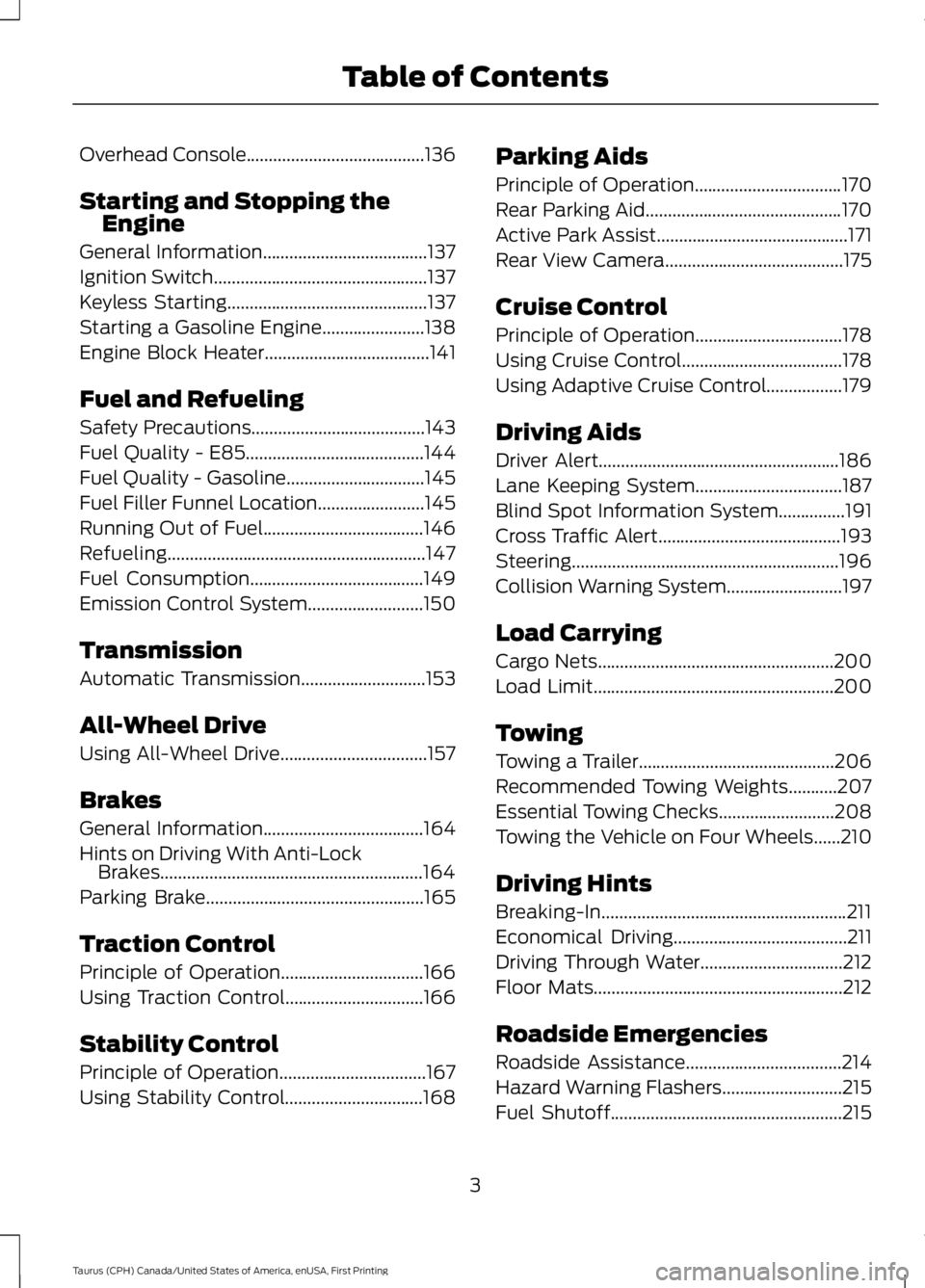
Overhead Console........................................136
Starting and Stopping theEngine
General Information.....................................137
Ignition Switch................................................137
Keyless Starting.............................................137
Starting a Gasoline Engine.......................138
Engine Block Heater.....................................141
Fuel and Refueling
Safety Precautions.......................................143
Fuel Quality - E85........................................144
Fuel Quality - Gasoline...............................145
Fuel Filler Funnel Location........................145
Running Out of Fuel....................................146
Refueling..........................................................147
Fuel Consumption.......................................149
Emission Control System..........................150
Transmission
Automatic Transmission............................153
All-Wheel Drive
Using All-Wheel Drive.................................157
Brakes
General Information....................................164
Hints on Driving With Anti-LockBrakes...........................................................164
Parking Brake.................................................165
Traction Control
Principle of Operation................................166
Using Traction Control...............................166
Stability Control
Principle of Operation.................................167
Using Stability Control...............................168
Parking Aids
Principle of Operation.................................170
Rear Parking Aid............................................170
Active Park Assist...........................................171
Rear View Camera........................................175
Cruise Control
Principle of Operation.................................178
Using Cruise Control....................................178
Using Adaptive Cruise Control.................179
Driving Aids
Driver Alert......................................................186
Lane Keeping System.................................187
Blind Spot Information System...............191
Cross Traffic Alert.........................................193
Steering............................................................196
Collision Warning System..........................197
Load Carrying
Cargo Nets.....................................................200
Load Limit......................................................200
Towing
Towing a Trailer............................................206
Recommended Towing Weights...........207
Essential Towing Checks..........................208
Towing the Vehicle on Four Wheels......210
Driving Hints
Breaking-In.......................................................211
Economical Driving.......................................211
Driving Through Water................................212
Floor Mats........................................................212
Roadside Emergencies
Roadside Assistance...................................214
Hazard Warning Flashers...........................215
Fuel Shutoff....................................................215
3
Taurus (CPH) Canada/United States of America, enUSA, First Printing
Table of Contents
Page 54 of 504
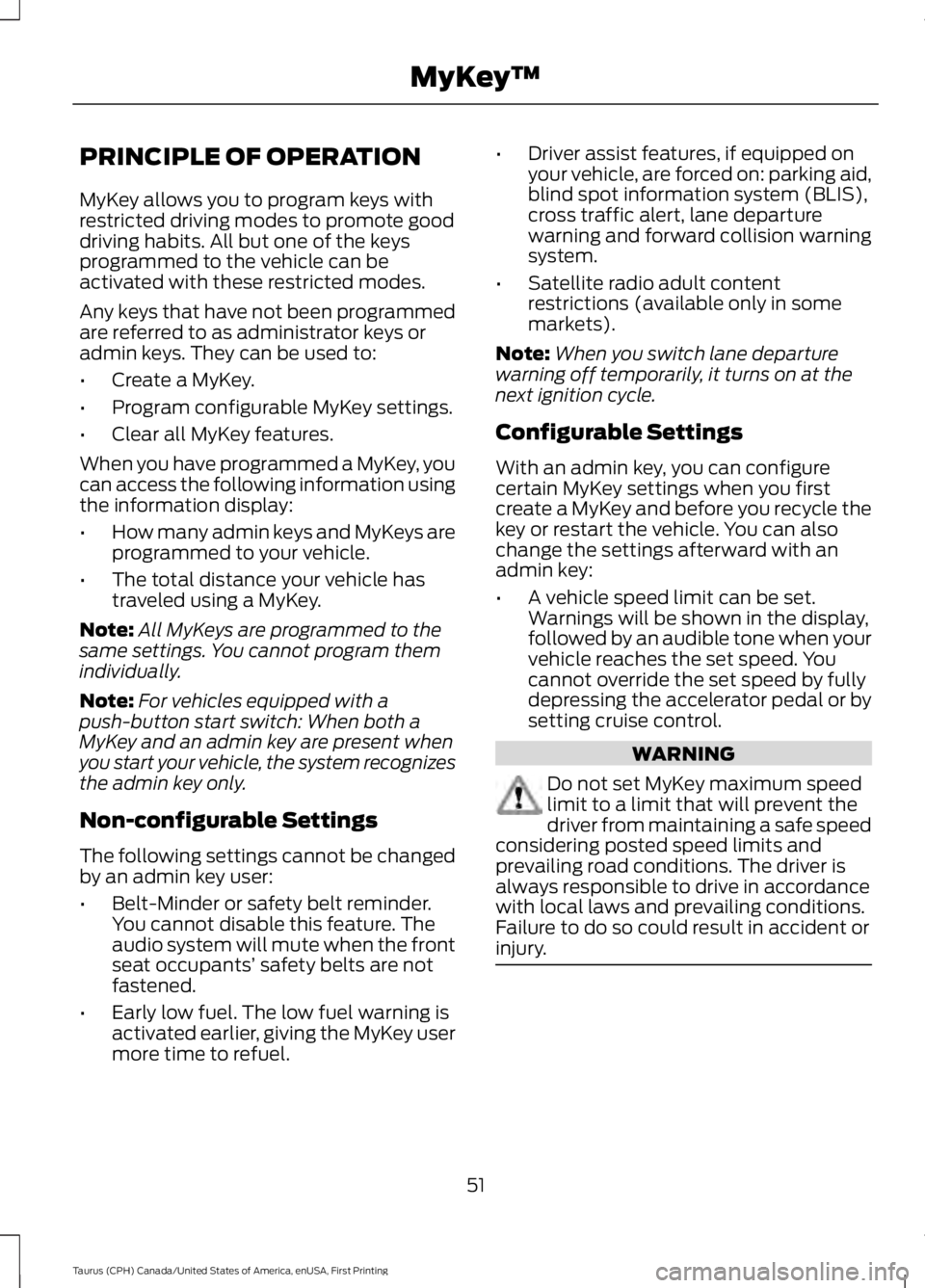
PRINCIPLE OF OPERATION
MyKey allows you to program keys withrestricted driving modes to promote gooddriving habits. All but one of the keysprogrammed to the vehicle can beactivated with these restricted modes.
Any keys that have not been programmedare referred to as administrator keys oradmin keys. They can be used to:
•Create a MyKey.
•Program configurable MyKey settings.
•Clear all MyKey features.
When you have programmed a MyKey, youcan access the following information usingthe information display:
•How many admin keys and MyKeys areprogrammed to your vehicle.
•The total distance your vehicle hastraveled using a MyKey.
Note:All MyKeys are programmed to thesame settings. You cannot program themindividually.
Note:For vehicles equipped with apush-button start switch: When both aMyKey and an admin key are present whenyou start your vehicle, the system recognizesthe admin key only.
Non-configurable Settings
The following settings cannot be changedby an admin key user:
•Belt-Minder or safety belt reminder.You cannot disable this feature. Theaudio system will mute when the frontseat occupants’ safety belts are notfastened.
•Early low fuel. The low fuel warning isactivated earlier, giving the MyKey usermore time to refuel.
•Driver assist features, if equipped onyour vehicle, are forced on: parking aid,blind spot information system (BLIS),cross traffic alert, lane departurewarning and forward collision warningsystem.
•Satellite radio adult contentrestrictions (available only in somemarkets).
Note:When you switch lane departurewarning off temporarily, it turns on at thenext ignition cycle.
Configurable Settings
With an admin key, you can configurecertain MyKey settings when you firstcreate a MyKey and before you recycle thekey or restart the vehicle. You can alsochange the settings afterward with anadmin key:
•A vehicle speed limit can be set.Warnings will be shown in the display,followed by an audible tone when yourvehicle reaches the set speed. Youcannot override the set speed by fullydepressing the accelerator pedal or bysetting cruise control.
WARNING
Do not set MyKey maximum speedlimit to a limit that will prevent thedriver from maintaining a safe speedconsidering posted speed limits andprevailing road conditions. The driver isalways responsible to drive in accordancewith local laws and prevailing conditions.Failure to do so could result in accident orinjury.
51
Taurus (CPH) Canada/United States of America, enUSA, First Printing
MyKey™
Page 94 of 504
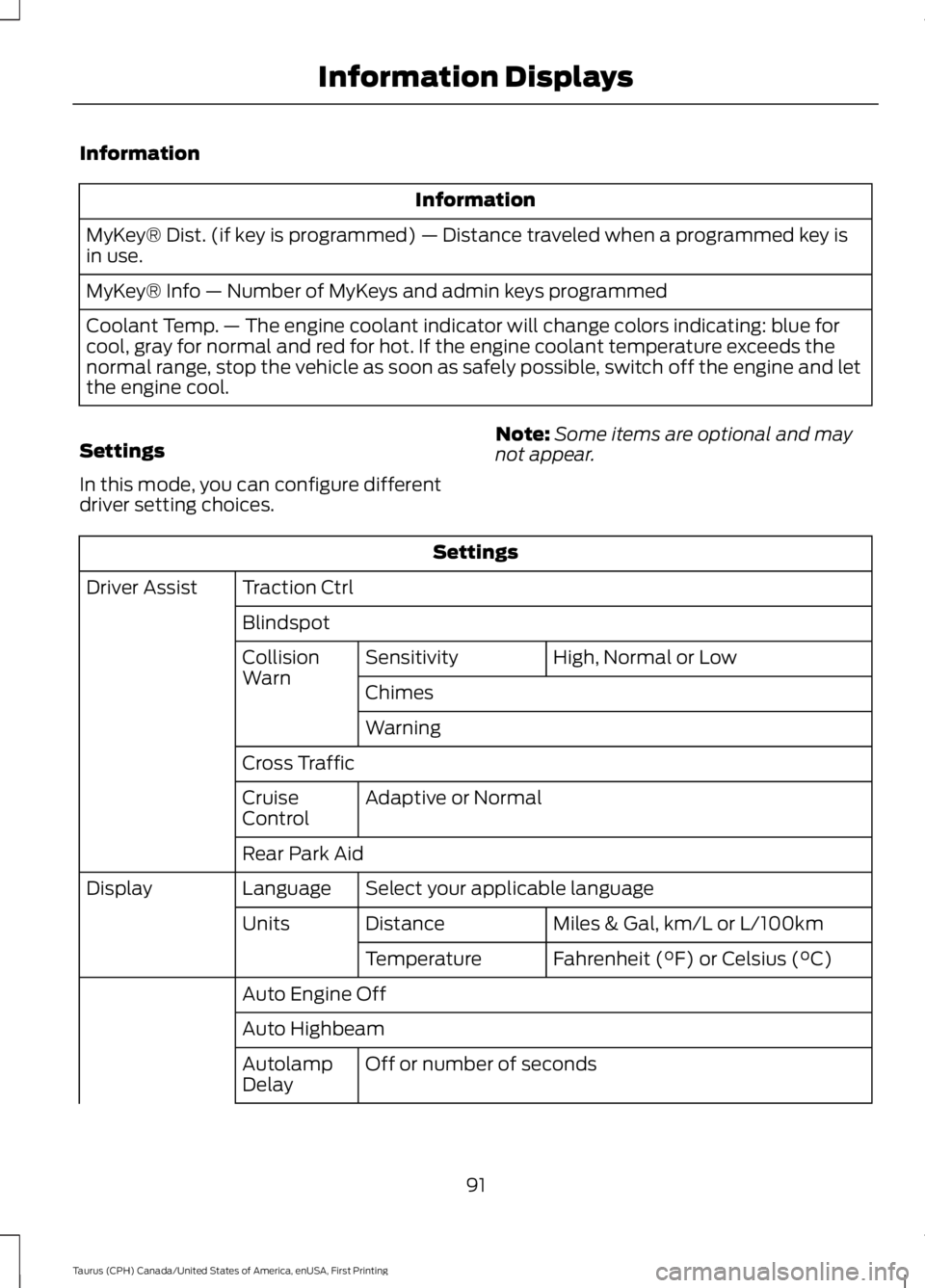
Information
Information
MyKey® Dist. (if key is programmed) — Distance traveled when a programmed key isin use.
MyKey® Info — Number of MyKeys and admin keys programmed
Coolant Temp. — The engine coolant indicator will change colors indicating: blue forcool, gray for normal and red for hot. If the engine coolant temperature exceeds thenormal range, stop the vehicle as soon as safely possible, switch off the engine and letthe engine cool.
Settings
In this mode, you can configure differentdriver setting choices.
Note:Some items are optional and maynot appear.
Settings
Traction CtrlDriver Assist
Blindspot
High, Normal or LowSensitivityCollisionWarnChimes
Warning
Cross Traffic
Adaptive or NormalCruiseControl
Rear Park Aid
Select your applicable languageLanguageDisplay
Miles & Gal, km/L or L/100kmDistanceUnits
Fahrenheit (°F) or Celsius (°C)Temperature
Auto Engine Off
Auto Highbeam
Off or number of secondsAutolampDelay
91
Taurus (CPH) Canada/United States of America, enUSA, First Printing
Information Displays
Page 99 of 504
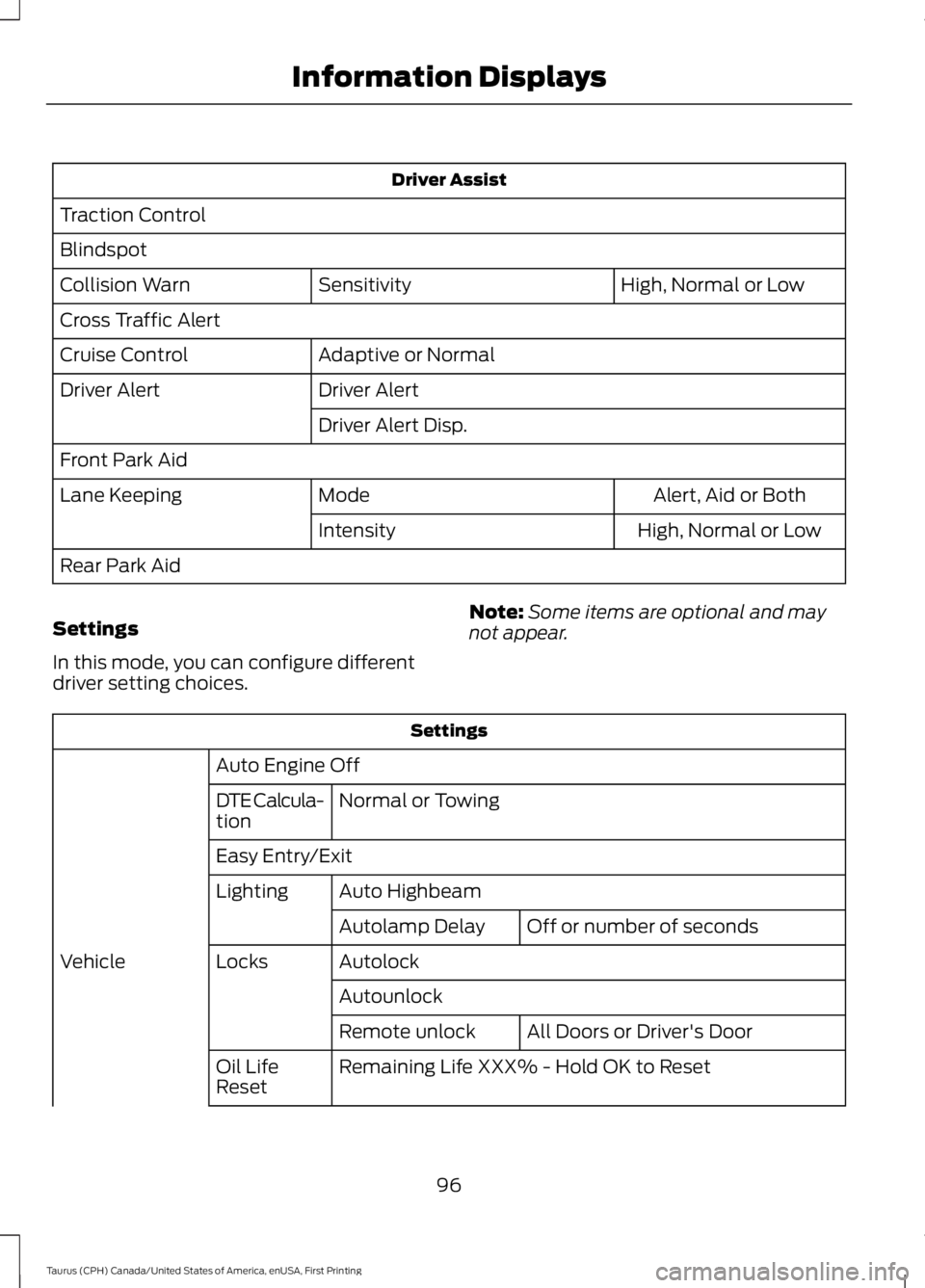
Driver Assist
Traction Control
Blindspot
High, Normal or LowSensitivityCollision Warn
Cross Traffic Alert
Adaptive or NormalCruise Control
Driver AlertDriver Alert
Driver Alert Disp.
Front Park Aid
Alert, Aid or BothModeLane Keeping
High, Normal or LowIntensity
Rear Park Aid
Settings
In this mode, you can configure differentdriver setting choices.
Note:Some items are optional and maynot appear.
Settings
Auto Engine Off
Normal or TowingDTE Calcula-tion
Easy Entry/Exit
Auto HighbeamLighting
Off or number of secondsAutolamp Delay
AutolockLocksVehicle
Autounlock
All Doors or Driver's DoorRemote unlock
Remaining Life XXX% - Hold OK to ResetOil LifeReset
96
Taurus (CPH) Canada/United States of America, enUSA, First Printing
Information Displays
Page 108 of 504
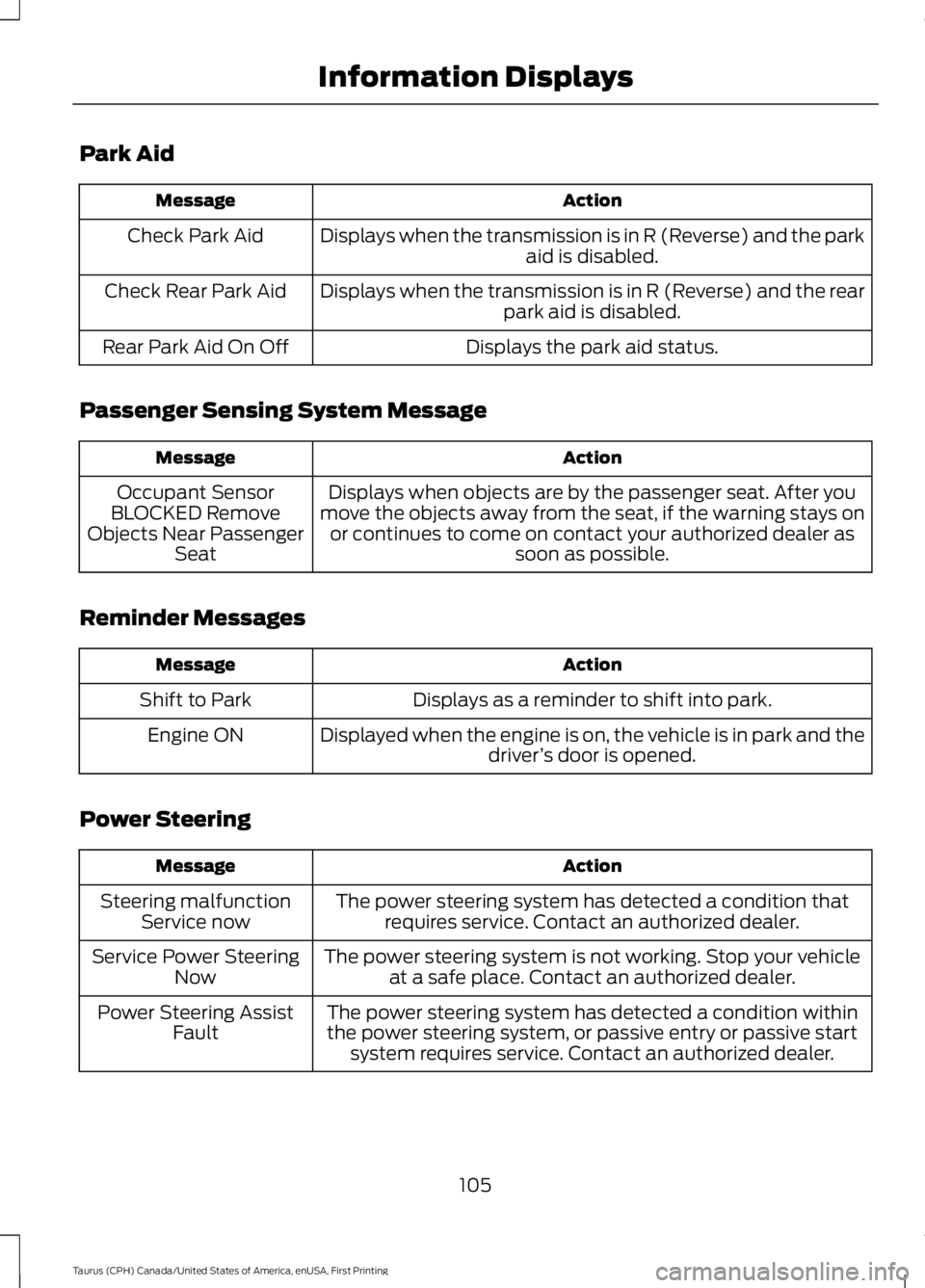
Park Aid
ActionMessage
Displays when the transmission is in R (Reverse) and the parkaid is disabled.Check Park Aid
Displays when the transmission is in R (Reverse) and the rearpark aid is disabled.Check Rear Park Aid
Displays the park aid status.Rear Park Aid On Off
Passenger Sensing System Message
ActionMessage
Displays when objects are by the passenger seat. After youmove the objects away from the seat, if the warning stays onor continues to come on contact your authorized dealer assoon as possible.
Occupant SensorBLOCKED RemoveObjects Near PassengerSeat
Reminder Messages
ActionMessage
Displays as a reminder to shift into park.Shift to Park
Displayed when the engine is on, the vehicle is in park and thedriver’s door is opened.Engine ON
Power Steering
ActionMessage
The power steering system has detected a condition thatrequires service. Contact an authorized dealer.Steering malfunctionService now
The power steering system is not working. Stop your vehicleat a safe place. Contact an authorized dealer.Service Power SteeringNow
The power steering system has detected a condition withinthe power steering system, or passive entry or passive startsystem requires service. Contact an authorized dealer.
Power Steering AssistFault
105
Taurus (CPH) Canada/United States of America, enUSA, First Printing
Information Displays
Page 144 of 504
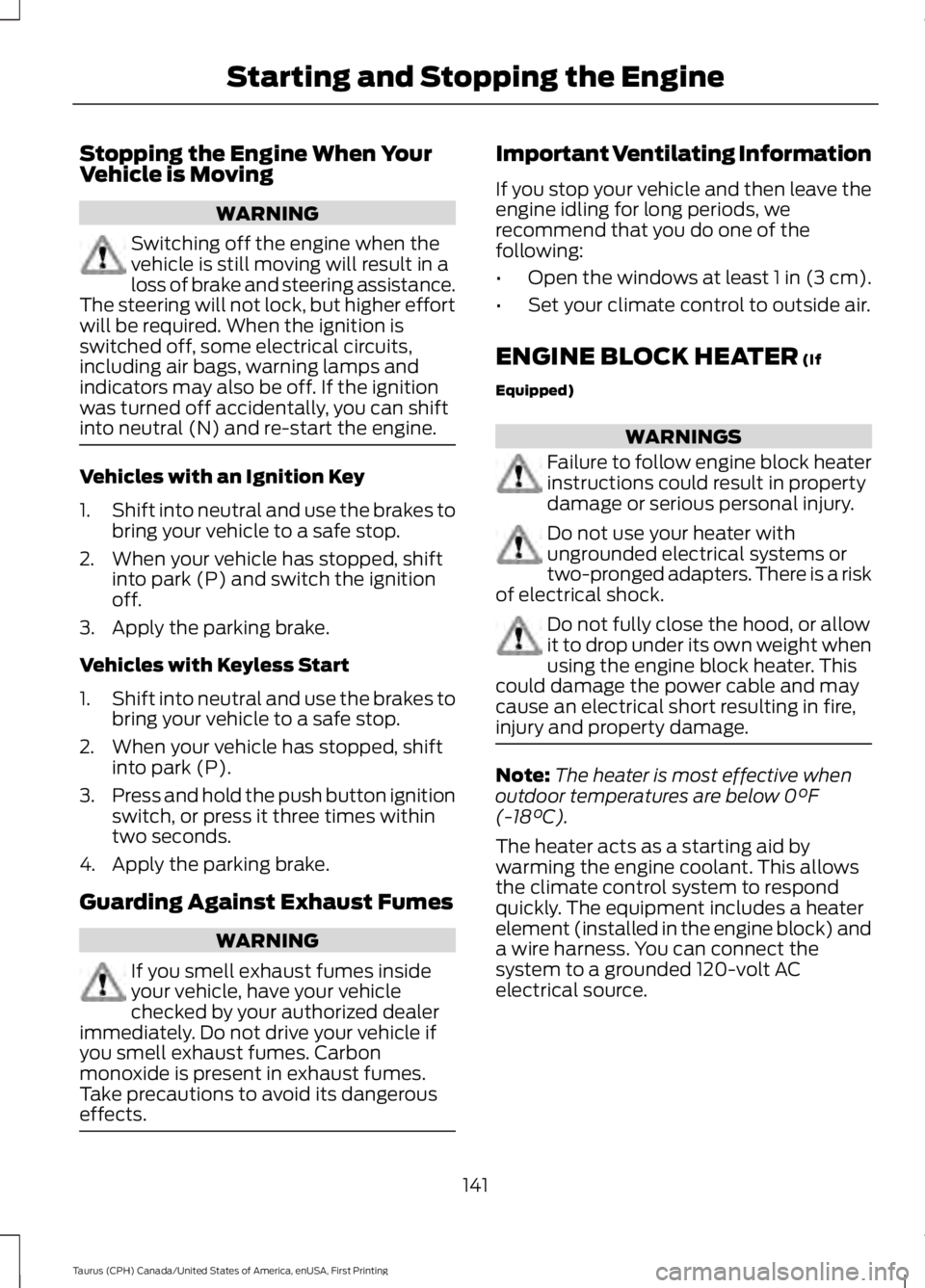
Stopping the Engine When YourVehicle is Moving
WARNING
Switching off the engine when thevehicle is still moving will result in aloss of brake and steering assistance.The steering will not lock, but higher effortwill be required. When the ignition isswitched off, some electrical circuits,including air bags, warning lamps andindicators may also be off. If the ignitionwas turned off accidentally, you can shiftinto neutral (N) and re-start the engine.
Vehicles with an Ignition Key
1.Shift into neutral and use the brakes tobring your vehicle to a safe stop.
2. When your vehicle has stopped, shiftinto park (P) and switch the ignitionoff.
3. Apply the parking brake.
Vehicles with Keyless Start
1.Shift into neutral and use the brakes tobring your vehicle to a safe stop.
2. When your vehicle has stopped, shiftinto park (P).
3.Press and hold the push button ignitionswitch, or press it three times withintwo seconds.
4. Apply the parking brake.
Guarding Against Exhaust Fumes
WARNING
If you smell exhaust fumes insideyour vehicle, have your vehiclechecked by your authorized dealerimmediately. Do not drive your vehicle ifyou smell exhaust fumes. Carbonmonoxide is present in exhaust fumes.Take precautions to avoid its dangerouseffects.
Important Ventilating Information
If you stop your vehicle and then leave theengine idling for long periods, werecommend that you do one of thefollowing:
•Open the windows at least 1 in (3 cm).
•Set your climate control to outside air.
ENGINE BLOCK HEATER (If
Equipped)
WARNINGS
Failure to follow engine block heaterinstructions could result in propertydamage or serious personal injury.
Do not use your heater withungrounded electrical systems ortwo-pronged adapters. There is a riskof electrical shock.
Do not fully close the hood, or allowit to drop under its own weight whenusing the engine block heater. Thiscould damage the power cable and maycause an electrical short resulting in fire,injury and property damage.
Note:The heater is most effective whenoutdoor temperatures are below 0°F(-18°C).
The heater acts as a starting aid bywarming the engine coolant. This allowsthe climate control system to respondquickly. The equipment includes a heaterelement (installed in the engine block) anda wire harness. You can connect thesystem to a grounded 120-volt ACelectrical source.
141
Taurus (CPH) Canada/United States of America, enUSA, First Printing
Starting and Stopping the Engine
Page 157 of 504
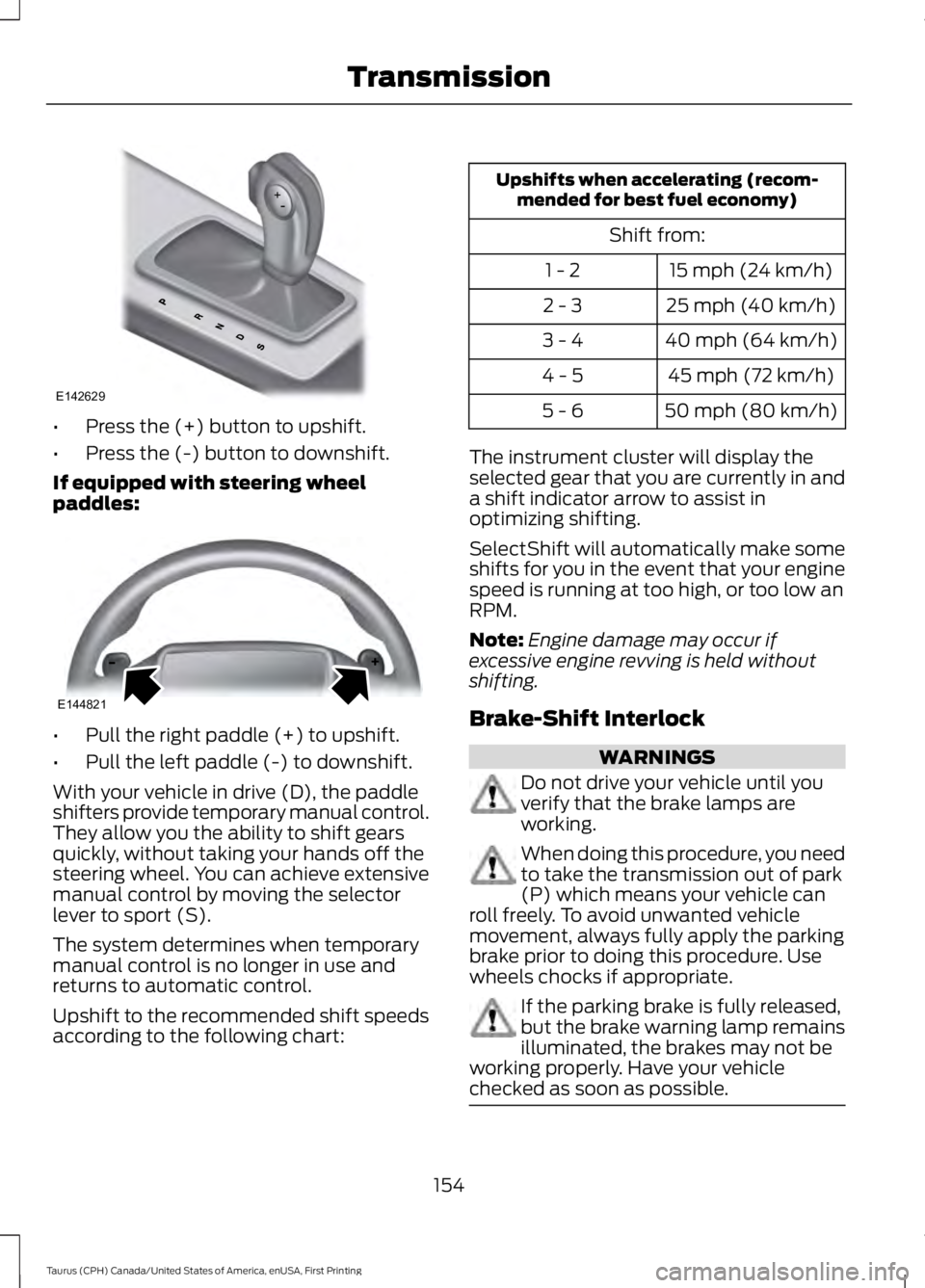
•Press the (+) button to upshift.
•Press the (-) button to downshift.
If equipped with steering wheelpaddles:
•Pull the right paddle (+) to upshift.
•Pull the left paddle (-) to downshift.
With your vehicle in drive (D), the paddleshifters provide temporary manual control.They allow you the ability to shift gearsquickly, without taking your hands off thesteering wheel. You can achieve extensivemanual control by moving the selectorlever to sport (S).
The system determines when temporarymanual control is no longer in use andreturns to automatic control.
Upshift to the recommended shift speedsaccording to the following chart:
Upshifts when accelerating (recom-mended for best fuel economy)
Shift from:
15 mph (24 km/h)1 - 2
25 mph (40 km/h)2 - 3
40 mph (64 km/h)3 - 4
45 mph (72 km/h)4 - 5
50 mph (80 km/h)5 - 6
The instrument cluster will display theselected gear that you are currently in anda shift indicator arrow to assist inoptimizing shifting.
SelectShift will automatically make someshifts for you in the event that your enginespeed is running at too high, or too low anRPM.
Note:Engine damage may occur ifexcessive engine revving is held withoutshifting.
Brake-Shift Interlock
WARNINGS
Do not drive your vehicle until youverify that the brake lamps areworking.
When doing this procedure, you needto take the transmission out of park(P) which means your vehicle canroll freely. To avoid unwanted vehiclemovement, always fully apply the parkingbrake prior to doing this procedure. Usewheels chocks if appropriate.
If the parking brake is fully released,but the brake warning lamp remainsilluminated, the brakes may not beworking properly. Have your vehiclechecked as soon as possible.
154
Taurus (CPH) Canada/United States of America, enUSA, First Printing
TransmissionE142629 E144821
Page 167 of 504
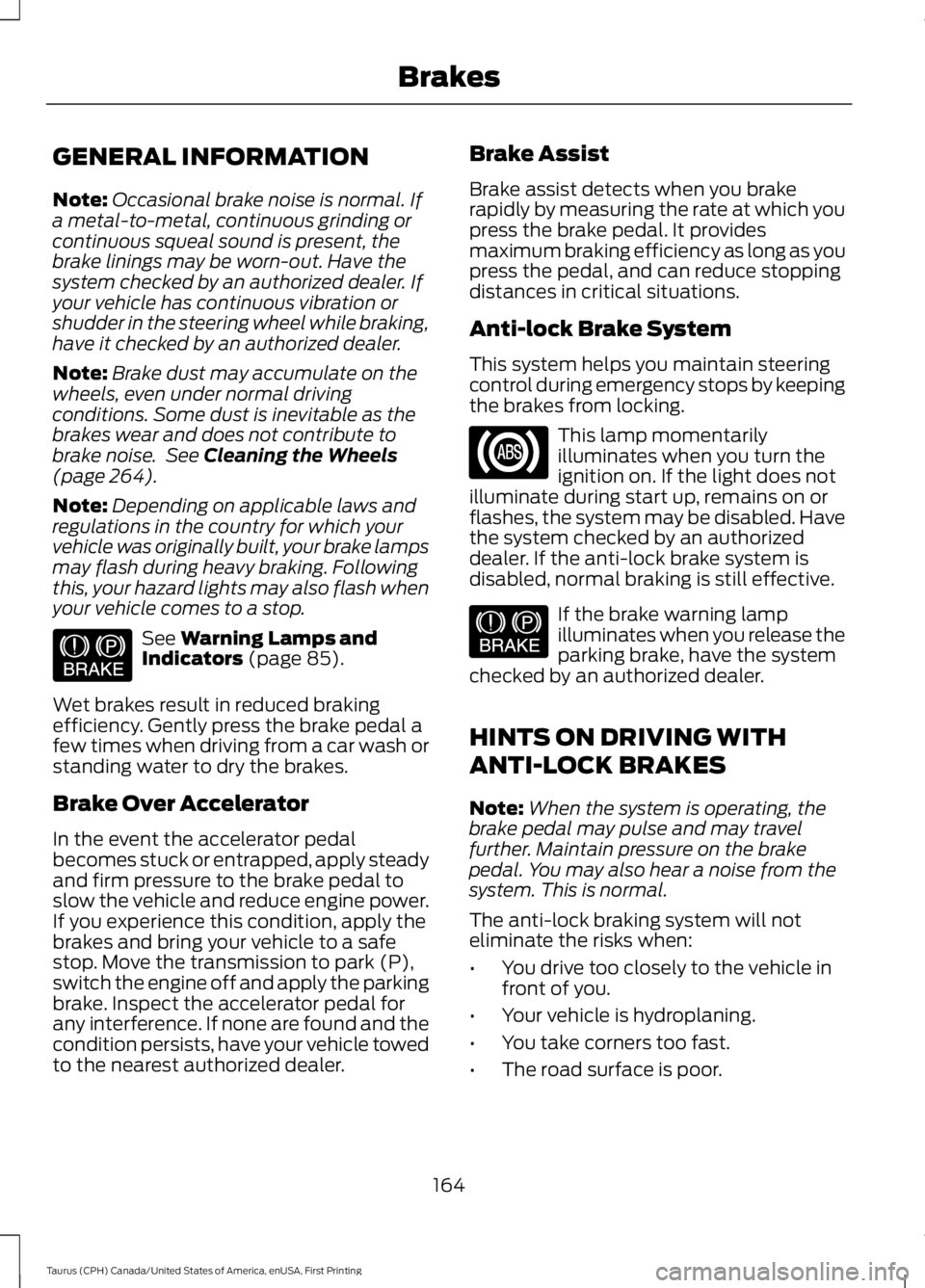
GENERAL INFORMATION
Note:Occasional brake noise is normal. Ifa metal-to-metal, continuous grinding orcontinuous squeal sound is present, thebrake linings may be worn-out. Have thesystem checked by an authorized dealer. Ifyour vehicle has continuous vibration orshudder in the steering wheel while braking,have it checked by an authorized dealer.
Note:Brake dust may accumulate on thewheels, even under normal drivingconditions. Some dust is inevitable as thebrakes wear and does not contribute tobrake noise. See Cleaning the Wheels(page 264).
Note:Depending on applicable laws andregulations in the country for which yourvehicle was originally built, your brake lampsmay flash during heavy braking. Followingthis, your hazard lights may also flash whenyour vehicle comes to a stop.
See Warning Lamps andIndicators (page 85).
Wet brakes result in reduced brakingefficiency. Gently press the brake pedal afew times when driving from a car wash orstanding water to dry the brakes.
Brake Over Accelerator
In the event the accelerator pedalbecomes stuck or entrapped, apply steadyand firm pressure to the brake pedal toslow the vehicle and reduce engine power.If you experience this condition, apply thebrakes and bring your vehicle to a safestop. Move the transmission to park (P),switch the engine off and apply the parkingbrake. Inspect the accelerator pedal forany interference. If none are found and thecondition persists, have your vehicle towedto the nearest authorized dealer.
Brake Assist
Brake assist detects when you brakerapidly by measuring the rate at which youpress the brake pedal. It providesmaximum braking efficiency as long as youpress the pedal, and can reduce stoppingdistances in critical situations.
Anti-lock Brake System
This system helps you maintain steeringcontrol during emergency stops by keepingthe brakes from locking.
This lamp momentarilyilluminates when you turn theignition on. If the light does notilluminate during start up, remains on orflashes, the system may be disabled. Havethe system checked by an authorizeddealer. If the anti-lock brake system isdisabled, normal braking is still effective.
If the brake warning lampilluminates when you release theparking brake, have the systemchecked by an authorized dealer.
HINTS ON DRIVING WITH
ANTI-LOCK BRAKES
Note:When the system is operating, thebrake pedal may pulse and may travelfurther. Maintain pressure on the brakepedal. You may also hear a noise from thesystem. This is normal.
The anti-lock braking system will noteliminate the risks when:
•You drive too closely to the vehicle infront of you.
•Your vehicle is hydroplaning.
•You take corners too fast.
•The road surface is poor.
164
Taurus (CPH) Canada/United States of America, enUSA, First Printing
BrakesE144522 E144522
Page 173 of 504
PRINCIPLE OF OPERATION
WARNINGS
To help avoid personal injury, pleaseread and understand the limitationsof the system as contained in thissection. Sensing is only an aid for some(generally large and fixed) objects whenmoving on a flat surface at parking speeds.Certain objects with surfaces that absorbultrasonic waves, surrounding vehicle'sparking aid systems, traffic controlsystems, fluorescent lamps, inclementweather, air brakes, and external motorsand fans may also affect the function ofthe sensing system; this may includereduced performance or a false activation.
To help avoid personal injury, alwaysuse caution when in reverse (R) andwhen using the sensing system.
This system is not designed toprevent contact with small or movingobjects. The system is designed toprovide a warning to assist the driver indetecting large stationary objects to avoiddamaging your vehicle. The system maynot detect smaller objects, particularlythose close to the ground.
Certain add-on devices such as largetrailer hitches, bike or surfboard racksand any device that may block thenormal detection zone of the system, maycreate false beeps.
Note:Keep the sensors, located on thebumper or fascia, free from snow, ice andlarge accumulations of dirt. If the sensorsare covered, the system’s accuracy can beaffected. Do not clean the sensors withsharp objects.
Note:If your vehicle sustains damage tothe bumper or fascia, leaving it misalignedor bent, the sensing zone may be alteredcausing inaccurate measurement ofobstacles or false alarms.
Note:The sensing system cannot be turnedoff when a MyKey is present. See Principleof Operation (page 51).
Note:If you attach certain add-on devicessuch as a trailer or bike rack, the rear sensingsystem may detect that add-on device andtherefore provide warnings. It is suggestedthat you disable the rear sensing systemwhen you attach an add-on device to yourvehicle to prevent these warnings.
The sensing system warns the driver ofobstacles within a certain range of yourvehicle. The system turns on automaticallywhenever you switch the ignition on.
You can turn the system on oroff by pressing the parking aidbutton. If your vehicle does nothave a parking aid button, the system canbe switched off through the informationdisplay menu or from the pop-up messagethat appears once you shift thetransmission into reverse (R). See GeneralInformation (page 89).
If a fault is present in the system, a warningmessage appears in the informationdisplay. See Information Messages(page 98).
REAR PARKING AID
The rear sensors are only active when thetransmission is in reverse (R). As yourvehicle moves closer to the obstacle, therate of the audible warning increases.When the obstacle is less than 12 in(30 cm) away, the warning soundscontinuously. If the system detects astationary or receding object farther than12 in (30 cm) from the corners of thebumper, the tone sounds for only threeseconds. Once the system detects anobject approaching, the warning soundsagain.
170
Taurus (CPH) Canada/United States of America, enUSA, First Printing
Parking AidsE139213
Page 174 of 504
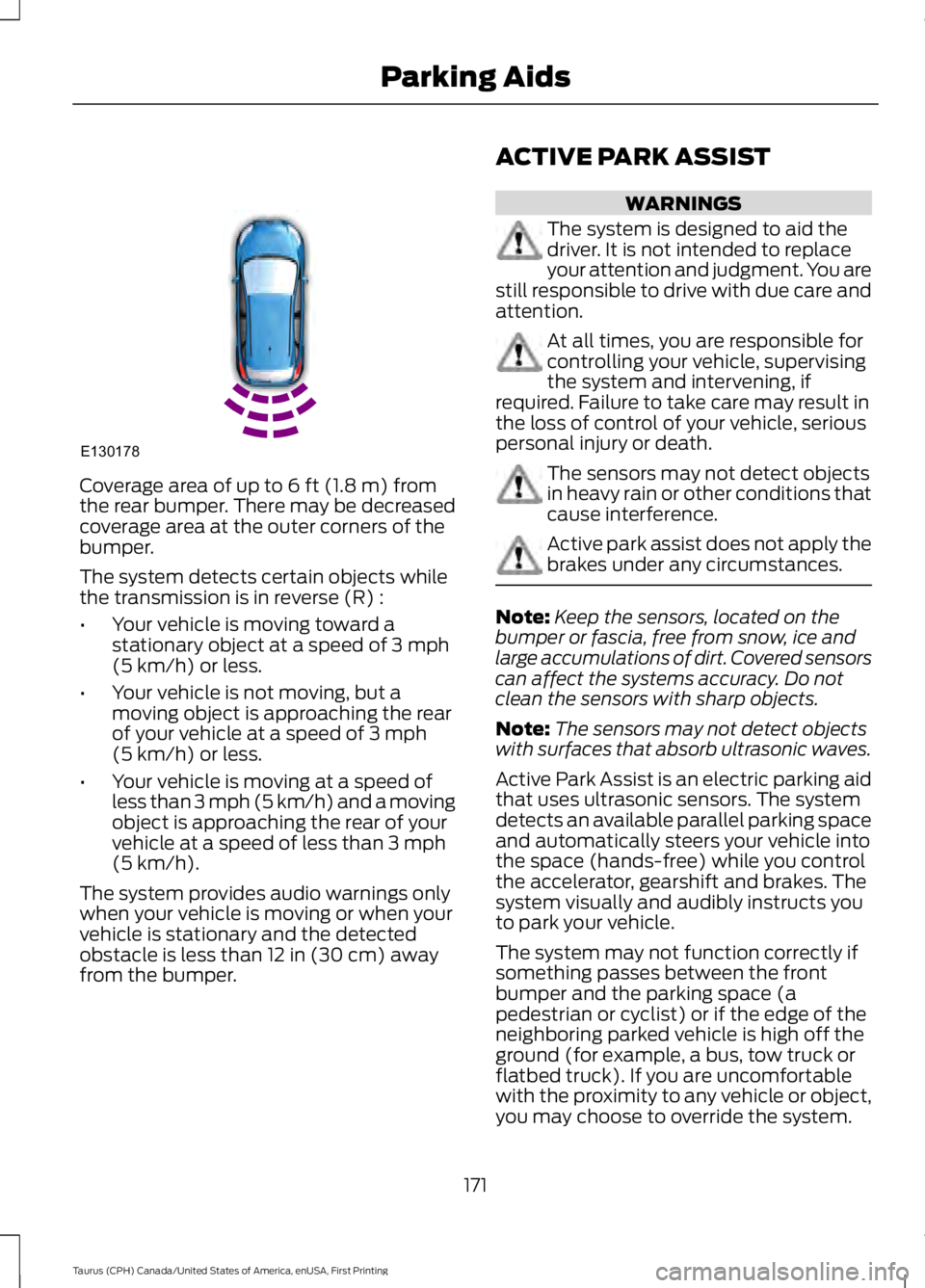
Coverage area of up to 6 ft (1.8 m) fromthe rear bumper. There may be decreasedcoverage area at the outer corners of thebumper.
The system detects certain objects whilethe transmission is in reverse (R) :
•Your vehicle is moving toward astationary object at a speed of 3 mph(5 km/h) or less.
•Your vehicle is not moving, but amoving object is approaching the rearof your vehicle at a speed of 3 mph(5 km/h) or less.
•Your vehicle is moving at a speed ofless than 3 mph (5 km/h) and a movingobject is approaching the rear of yourvehicle at a speed of less than 3 mph(5 km/h).
The system provides audio warnings onlywhen your vehicle is moving or when yourvehicle is stationary and the detectedobstacle is less than 12 in (30 cm) awayfrom the bumper.
ACTIVE PARK ASSIST
WARNINGS
The system is designed to aid thedriver. It is not intended to replaceyour attention and judgment. You arestill responsible to drive with due care andattention.
At all times, you are responsible forcontrolling your vehicle, supervisingthe system and intervening, ifrequired. Failure to take care may result inthe loss of control of your vehicle, seriouspersonal injury or death.
The sensors may not detect objectsin heavy rain or other conditions thatcause interference.
Active park assist does not apply thebrakes under any circumstances.
Note:Keep the sensors, located on thebumper or fascia, free from snow, ice andlarge accumulations of dirt. Covered sensorscan affect the systems accuracy. Do notclean the sensors with sharp objects.
Note:The sensors may not detect objectswith surfaces that absorb ultrasonic waves.
Active Park Assist is an electric parking aidthat uses ultrasonic sensors. The systemdetects an available parallel parking spaceand automatically steers your vehicle intothe space (hands-free) while you controlthe accelerator, gearshift and brakes. Thesystem visually and audibly instructs youto park your vehicle.
The system may not function correctly ifsomething passes between the frontbumper and the parking space (apedestrian or cyclist) or if the edge of theneighboring parked vehicle is high off theground (for example, a bus, tow truck orflatbed truck). If you are uncomfortablewith the proximity to any vehicle or object,you may choose to override the system.
171
Taurus (CPH) Canada/United States of America, enUSA, First Printing
Parking AidsE130178