traction control FORD TAURUS 2017 User Guide
[x] Cancel search | Manufacturer: FORD, Model Year: 2017, Model line: TAURUS, Model: FORD TAURUS 2017Pages: 504, PDF Size: 5.84 MB
Page 169 of 504
PRINCIPLE OF OPERATION
The traction control system helps avoiddrive wheel spin and loss of traction.
If your vehicle begins to slide, the systemapplies the brakes to individual wheelsand, when needed, reduces engine powerat the same time. If the wheels spin whenaccelerating on slippery or loose surfaces,the system reduces engine power in orderto increase traction.
USING TRACTION CONTROL
WARNING
The stability and traction controllight illuminates steadily if thesystem detects a failure. Make sureyou did not manually disable the tractioncontrol system using the informationdisplay controls or the switch. If thestability control and traction control lightis still illuminating steadily, have thesystem serviced by an authorized dealerimmediately. Operating your vehicle withthe traction control disabled could lead toan increased risk of loss of vehicle control,vehicle rollover, personal injury and death.
The system automatically turns on eachtime you switch the ignition on.
If your vehicle is stuck in mud or snow,switching traction control off may bebeneficial as this allows the wheels to spin.
Note:When you switch traction control off,stability control remains fully active.
Switching the System Off
When you switch the system off or on, amessage appears in the informationdisplay showing system status.
You can switch the system off by eitherusing the information display controls orthe switch.
Using the Information DisplayControls
You can switch this feature off or on in theinformation display. See GeneralInformation (page 89).
Using a Switch (If Equipped)
Use the traction control switch on theinstrument panel to switch the system offor on.
The switch illuminates when tractioncontrol is off.
System Indicator Lights andMessages
The stability and traction controllight:
•Temporarily illuminates on enginestart-up.
•Flashes when a driving conditionactivates either of the systems.
•Illuminates if a problem occurs in eitherof the systems.
The stability and traction controloff light temporarily illuminateson engine start-up and stays onwhen you switch the traction controlsystem off.
166
Taurus (CPH) Canada/United States of America, enUSA, First Printing
Traction ControlE138639 E130458
Page 170 of 504
PRINCIPLE OF OPERATION
WARNINGS
Vehicle modifications involvingbraking system, aftermarket roofracks, suspension, steering system,tire construction and wheel and tire sizemay change the handling characteristicsof your vehicle and may adversely affectthe performance of the electronic stabilitycontrol system. In addition, installing anystereo loudspeakers may interfere withand adversely affect the electronic stabilitycontrol system. Install any aftermarketstereo loudspeaker as far as possible fromthe front center console, the tunnel, andthe front seats in order to minimize the riskof interfering with the electronic stabilitycontrol sensors. Reducing theeffectiveness of the electronic stabilitycontrol system could lead to an increasedrisk of loss of vehicle control, vehiclerollover, personal injury and death.
Remember that even advancedtechnology cannot defy the laws ofphysics. It’s always possible to losecontrol of a vehicle due to inappropriatedriver input for the conditions. Aggressivedriving on any road condition can causeyou to lose control of your vehicleincreasing the risk of personal injury orproperty damage. Activation of theelectronic stability control system is anindication that at least some of the tireshave exceeded their ability to grip the road;this could reduce the operator’s ability tocontrol the vehicle potentially resulting ina loss of vehicle control, vehicle rollover,personal injury and death. If your electronicstability control system activates, SLOWDOWN.
The system automatically turns on eachtime you switch the ignition on.
If a fault occurs in either the stabilitycontrol or the traction control system, youmay experience the following conditions:
•The stability and traction control lightilluminates steadily.
•The stability control and tractioncontrol systems do not enhance yourvehicle's ability to maintain traction ofthe wheels.
If a driving condition activates either thestability control or the traction controlsystem you may experience the followingconditions:
•The stability and traction control lightflashes.
•Your vehicle slows down.
•Reduced engine power.
•A vibration in the brake pedal.
•The brake pedal is stiffer than usual.
•If the driving condition is severe andyour foot is not on the brake, the brakepedal may move as the system applieshigher brake force.
The stability control system has severalfeatures built into it to help you maintaincontrol of your vehicle:
Electronic Stability Control
The system enhances your vehicle’s abilityto prevent skids or lateral slides byapplying brakes to one or more of thewheels individually and, if necessary,reducing engine power.
Traction Control
The system enhances your vehicle’s abilityto maintain traction of the wheels bydetecting and controlling wheel spin. SeeUsing Traction Control (page 166).
167
Taurus (CPH) Canada/United States of America, enUSA, First Printing
Stability Control
Page 171 of 504
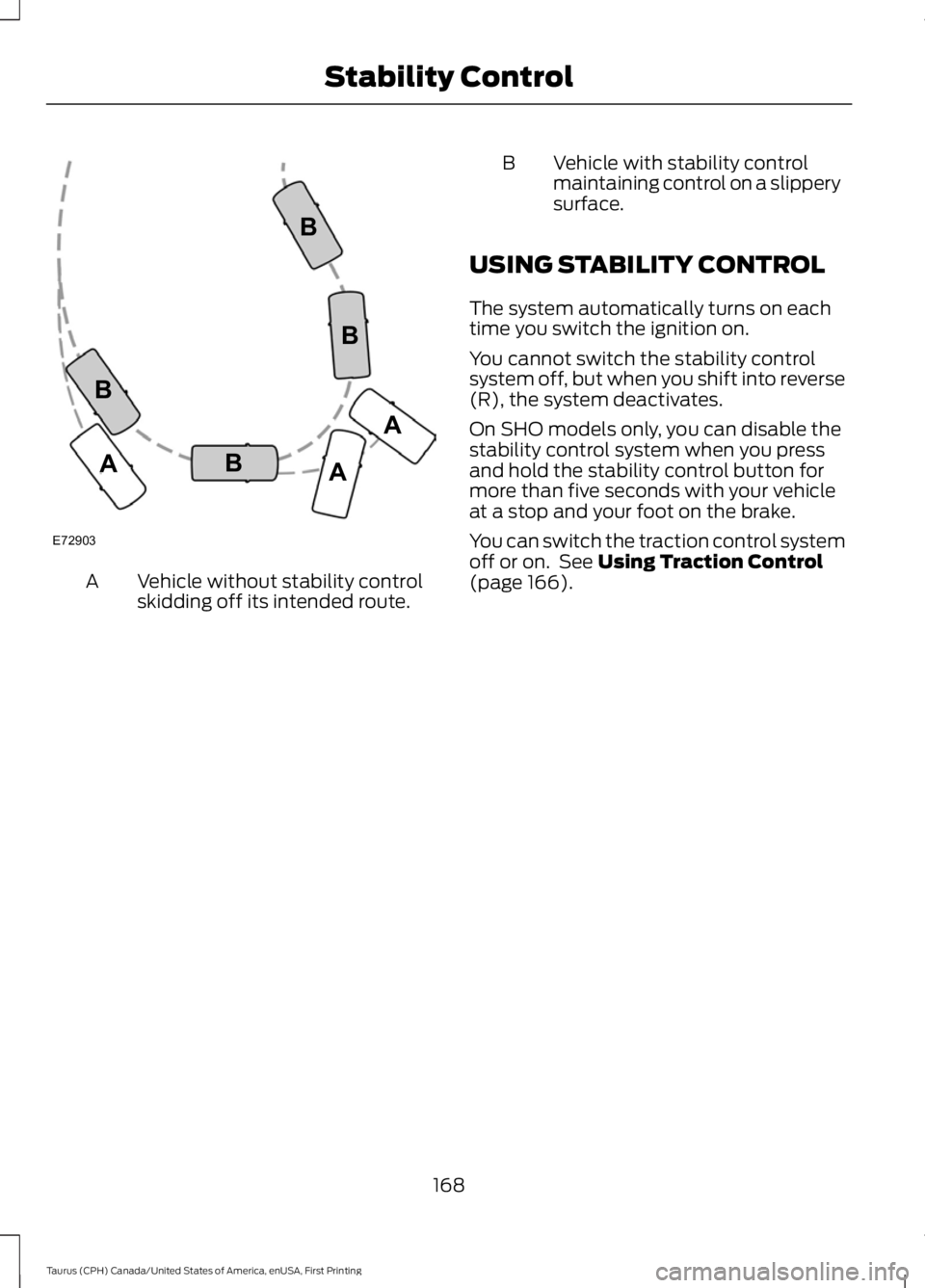
Vehicle without stability controlskidding off its intended route.A
B Vehicle with stability controlmaintaining control on a slipperysurface.
USING STABILITY CONTROL
The system automatically turns on eachtime you switch the ignition on.
You cannot switch the stability controlsystem off, but when you shift into reverse(R), the system deactivates.
On SHO models only, you can disable thestability control system when you pressand hold the stability control button formore than five seconds with your vehicleat a stop and your foot on the brake.
You can switch the traction control systemoff or on. See Using Traction Control(page 166).
168
Taurus (CPH) Canada/United States of America, enUSA, First Printing
Stability ControlE72903A
AA
B
BB
B
Page 172 of 504
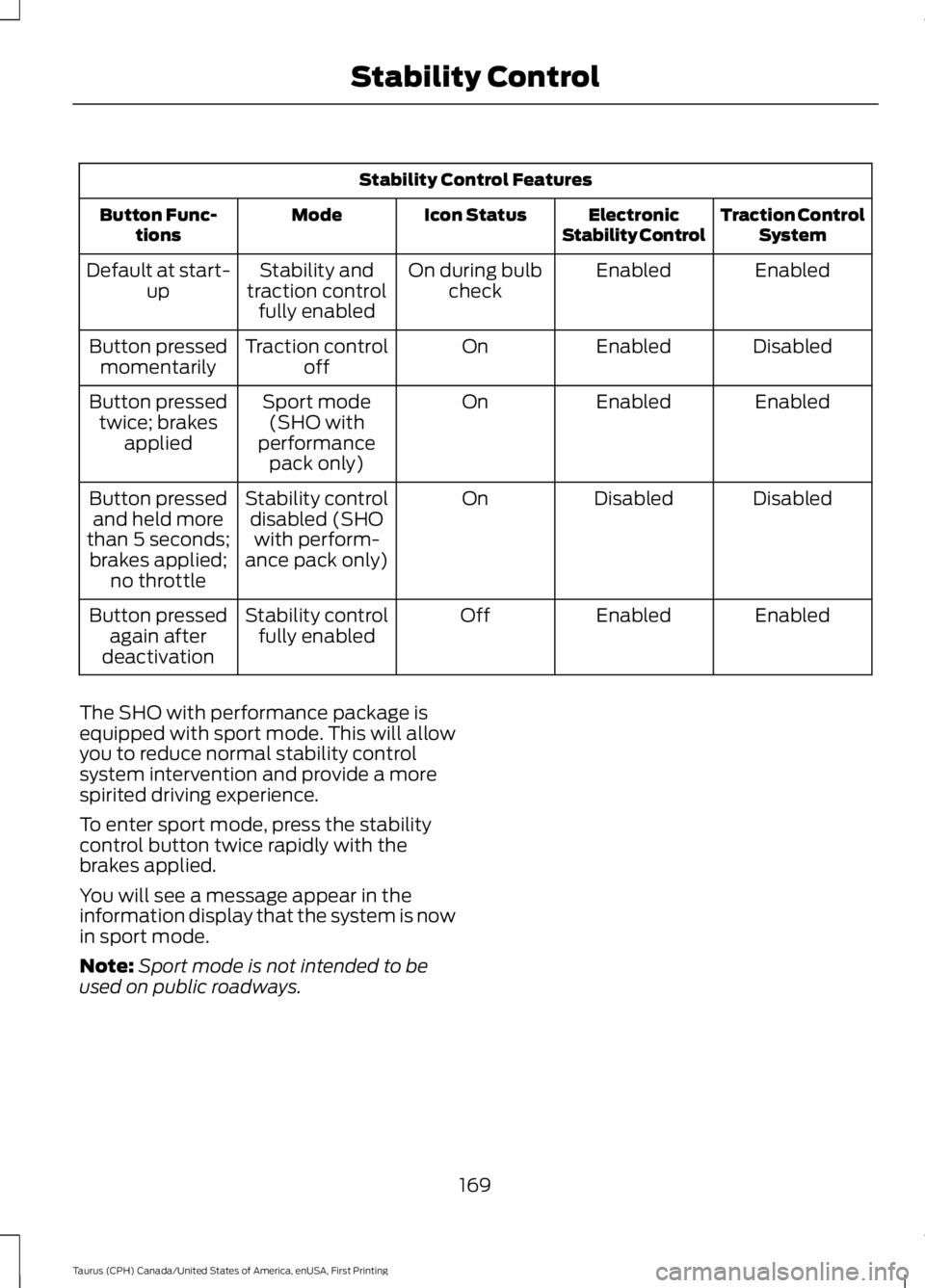
Stability Control Features
Traction ControlSystemElectronicStability ControlIcon StatusModeButton Func-tions
EnabledEnabledOn during bulbcheckStability andtraction controlfully enabled
Default at start-up
DisabledEnabledOnTraction controloffButton pressedmomentarily
EnabledEnabledOnSport mode(SHO withperformancepack only)
Button pressedtwice; brakesapplied
DisabledDisabledOnStability controldisabled (SHOwith perform-ance pack only)
Button pressedand held morethan 5 seconds;brakes applied;no throttle
EnabledEnabledOffStability controlfully enabledButton pressedagain afterdeactivation
The SHO with performance package isequipped with sport mode. This will allowyou to reduce normal stability controlsystem intervention and provide a morespirited driving experience.
To enter sport mode, press the stabilitycontrol button twice rapidly with thebrakes applied.
You will see a message appear in theinformation display that the system is nowin sport mode.
Note:Sport mode is not intended to beused on public roadways.
169
Taurus (CPH) Canada/United States of America, enUSA, First Printing
Stability Control
Page 176 of 504
Note:Active park assist may not detectvehicles with overhanging loads (a bus or atruck), street furniture and other items. Youmust make sure the selected space issuitable for parking.
Note:You should drive your vehicle within5 ft (1.5 m) and as parallel to the othervehicles as possible while passing a parkingspace.
Note:The system always offers the lastdetected parking space (for example, if yourvehicle detects multiple spaces while youare driving, it offers the last one).
Note:If driven above approximately 22 mph(35 km/h), the display screen shows amessage to alert you to reduce your vehiclespeed.
Automatic Steering into ParkingSpace
Note:If vehicle speed exceeds 6 mph(10 km/h) or the maneuver is interrupted(driver input is detected), the systemswitches off and you need to take fullcontrol of your vehicle.
Note:If a maneuver is interrupted beforecompletion, the system switches off. Thesteering wheel position will not indicate theactualy position of the steering and you haveto take full control of your vehicle.
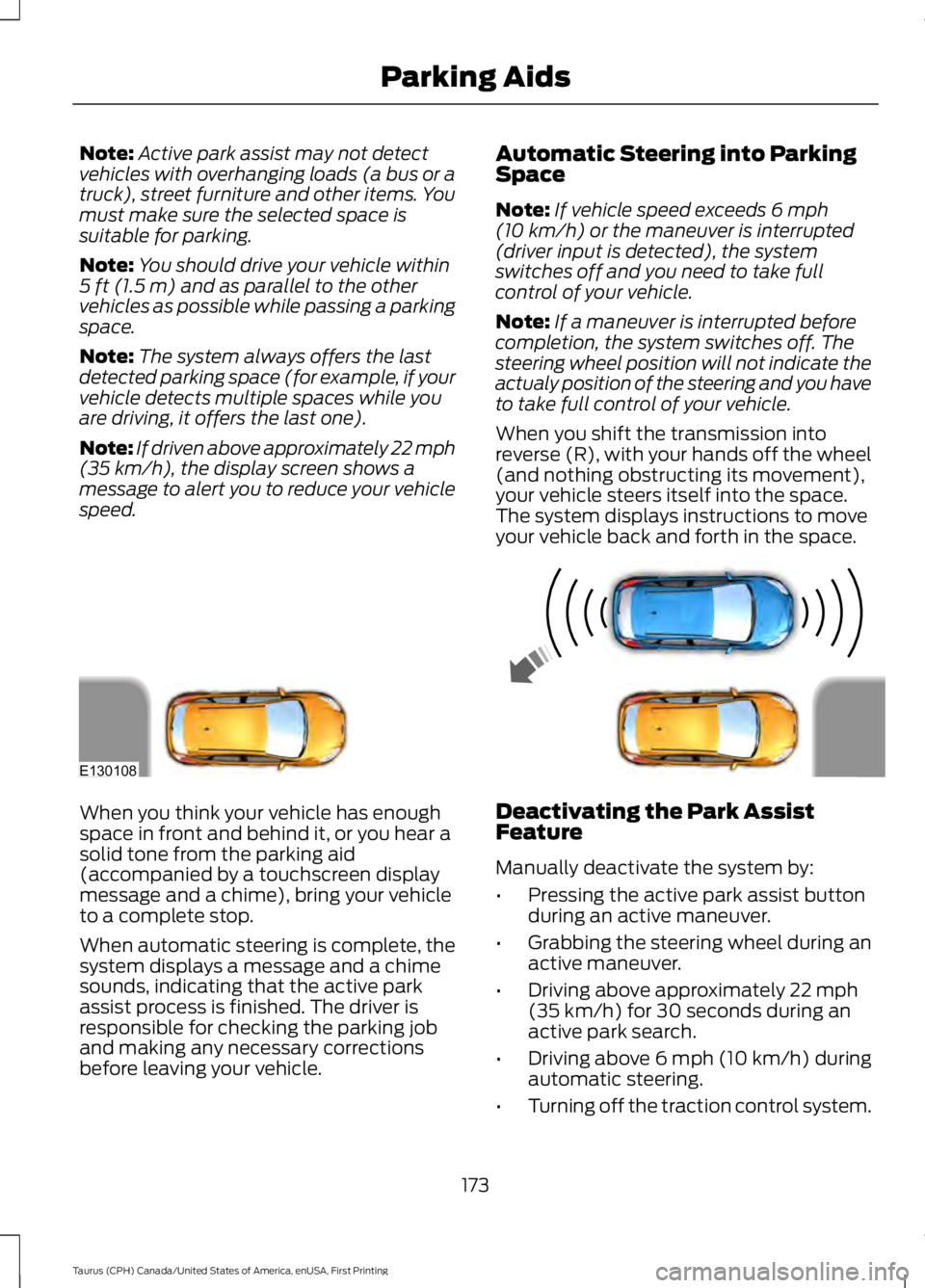
When you shift the transmission intoreverse (R), with your hands off the wheel(and nothing obstructing its movement),your vehicle steers itself into the space.The system displays instructions to moveyour vehicle back and forth in the space.
When you think your vehicle has enoughspace in front and behind it, or you hear asolid tone from the parking aid(accompanied by a touchscreen displaymessage and a chime), bring your vehicleto a complete stop.
When automatic steering is complete, thesystem displays a message and a chimesounds, indicating that the active parkassist process is finished. The driver isresponsible for checking the parking joband making any necessary correctionsbefore leaving your vehicle.
Deactivating the Park AssistFeature
Manually deactivate the system by:
•Pressing the active park assist buttonduring an active maneuver.
•Grabbing the steering wheel during anactive maneuver.
•Driving above approximately 22 mph(35 km/h) for 30 seconds during anactive park search.
•Driving above 6 mph (10 km/h) duringautomatic steering.
•Turning off the traction control system.
173
Taurus (CPH) Canada/United States of America, enUSA, First Printing
Parking AidsE130108
Page 177 of 504
Certain vehicle conditions can alsodeactivate the system, such as:
•Traction control has activated on aslippery or loose surface.
•There is an anti-lock brake systemactivation or failure.
•Something touches the steering wheel.
If a problem occurs with the system, awarning message is displayed, followedby a chime. Occasional system messagesmay occur in normal operation. Forrecurring or frequent system faults, contactan authorized dealer to have your vehicleserviced.
Troubleshooting the System
The system does not look for a space
The traction control system may be off.
The transmission is in reverse (R); your vehicle must be moving forward to detect aparking space.
The system does not offer a particular space
The sensors may be covered (for example, snow, ice or dirt buildup). Covered sensorscan affect the system's functionality
There is not enough room in the parking space for your vehicle to safely park.
There is not enough space for the parking maneuver on the opposite side of the parkingspace.
The parking space is farther than 5 ft (1.5 m) or closer than 16 in (40 cm) away.
Your vehicle is going faster than 22 mph (35 km/h).
You may have recently disconnected or replaced the battery. After a battery disconnect,the vehicle must be driven on a straight road at a speed greater than 12 mph (20 km/h)for up to 30 seconds.
The system does not position your vehicle where I want in the space
Your vehicle is rolling in the opposite direction of the transmission (rolling forward whenreverse [R] is selected).
An irregular curb along the parking space prevents the system from aligning your vehicleproperly.
Vehicles or objects bordering the space may not be positioned correctly.
Your vehicle was pulled too far past the parking space.
174
Taurus (CPH) Canada/United States of America, enUSA, First Printing
Parking Aids
Page 215 of 504
•Transmissions give their best fueleconomy when operated in the topcruise gear and with steady pressureon the gas pedal.
•Four-wheel-drive operation (ifequipped) is less fuel efficient thantwo-wheel-drive operation.
•Close the windows for high-speeddriving.
DRIVING THROUGH WATER
WARNING
Do not drive through flowing or deepwater as you may lose control of yourvehicle.
Note:Driving through standing water cancause vehicle damage.
Note:Engine damage can occur if waterenters the air filter.
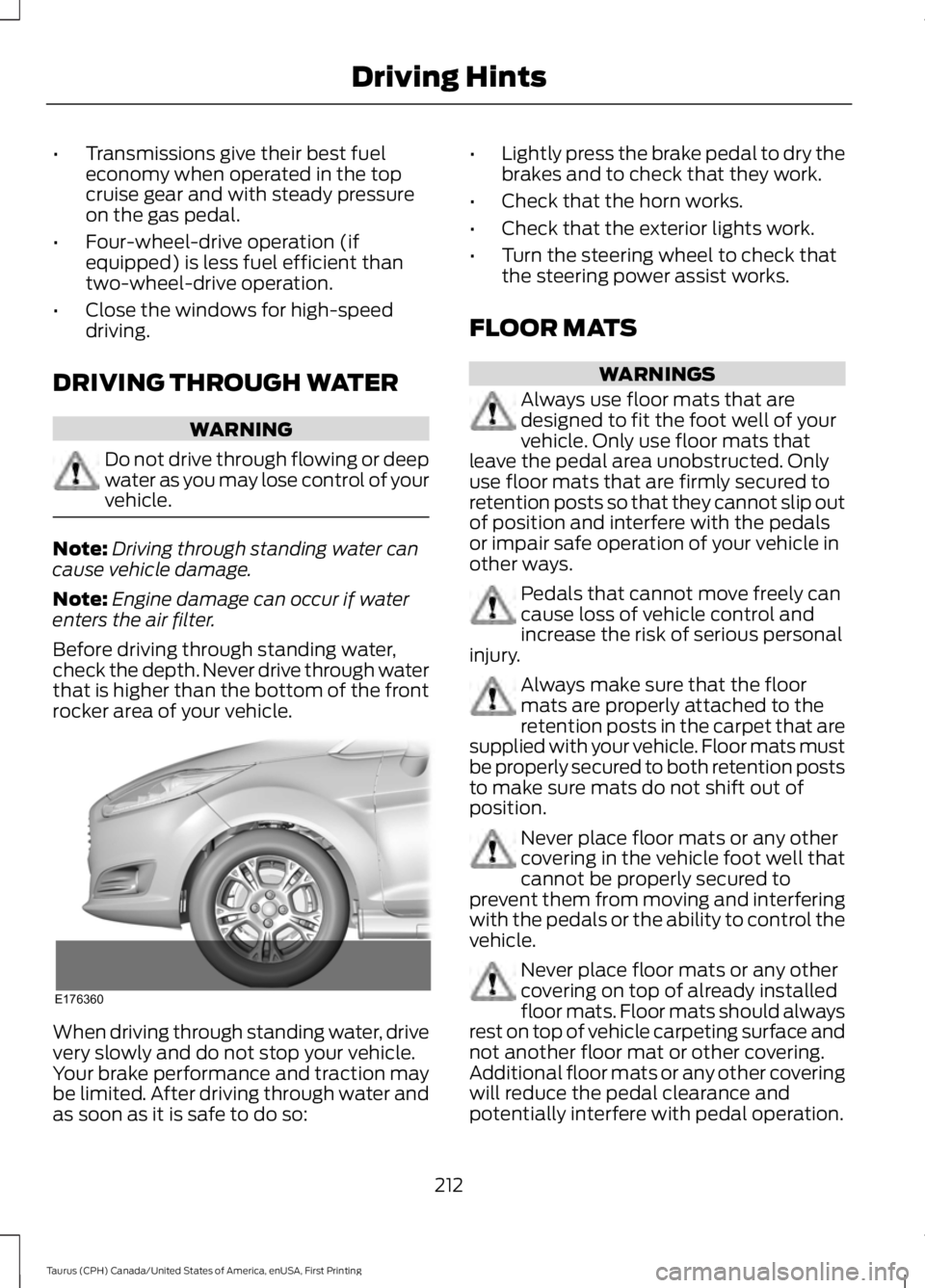
Before driving through standing water,check the depth. Never drive through waterthat is higher than the bottom of the frontrocker area of your vehicle.
When driving through standing water, drivevery slowly and do not stop your vehicle.Your brake performance and traction maybe limited. After driving through water andas soon as it is safe to do so:
•Lightly press the brake pedal to dry thebrakes and to check that they work.
•Check that the horn works.
•Check that the exterior lights work.
•Turn the steering wheel to check thatthe steering power assist works.
FLOOR MATS
WARNINGS
Always use floor mats that aredesigned to fit the foot well of yourvehicle. Only use floor mats thatleave the pedal area unobstructed. Onlyuse floor mats that are firmly secured toretention posts so that they cannot slip outof position and interfere with the pedalsor impair safe operation of your vehicle inother ways.
Pedals that cannot move freely cancause loss of vehicle control andincrease the risk of serious personalinjury.
Always make sure that the floormats are properly attached to theretention posts in the carpet that aresupplied with your vehicle. Floor mats mustbe properly secured to both retention poststo make sure mats do not shift out ofposition.
Never place floor mats or any othercovering in the vehicle foot well thatcannot be properly secured toprevent them from moving and interferingwith the pedals or the ability to control thevehicle.
Never place floor mats or any othercovering on top of already installedfloor mats. Floor mats should alwaysrest on top of vehicle carpeting surface andnot another floor mat or other covering.Additional floor mats or any other coveringwill reduce the pedal clearance andpotentially interfere with pedal operation.
212
Taurus (CPH) Canada/United States of America, enUSA, First Printing
Driving HintsE176360
Page 236 of 504
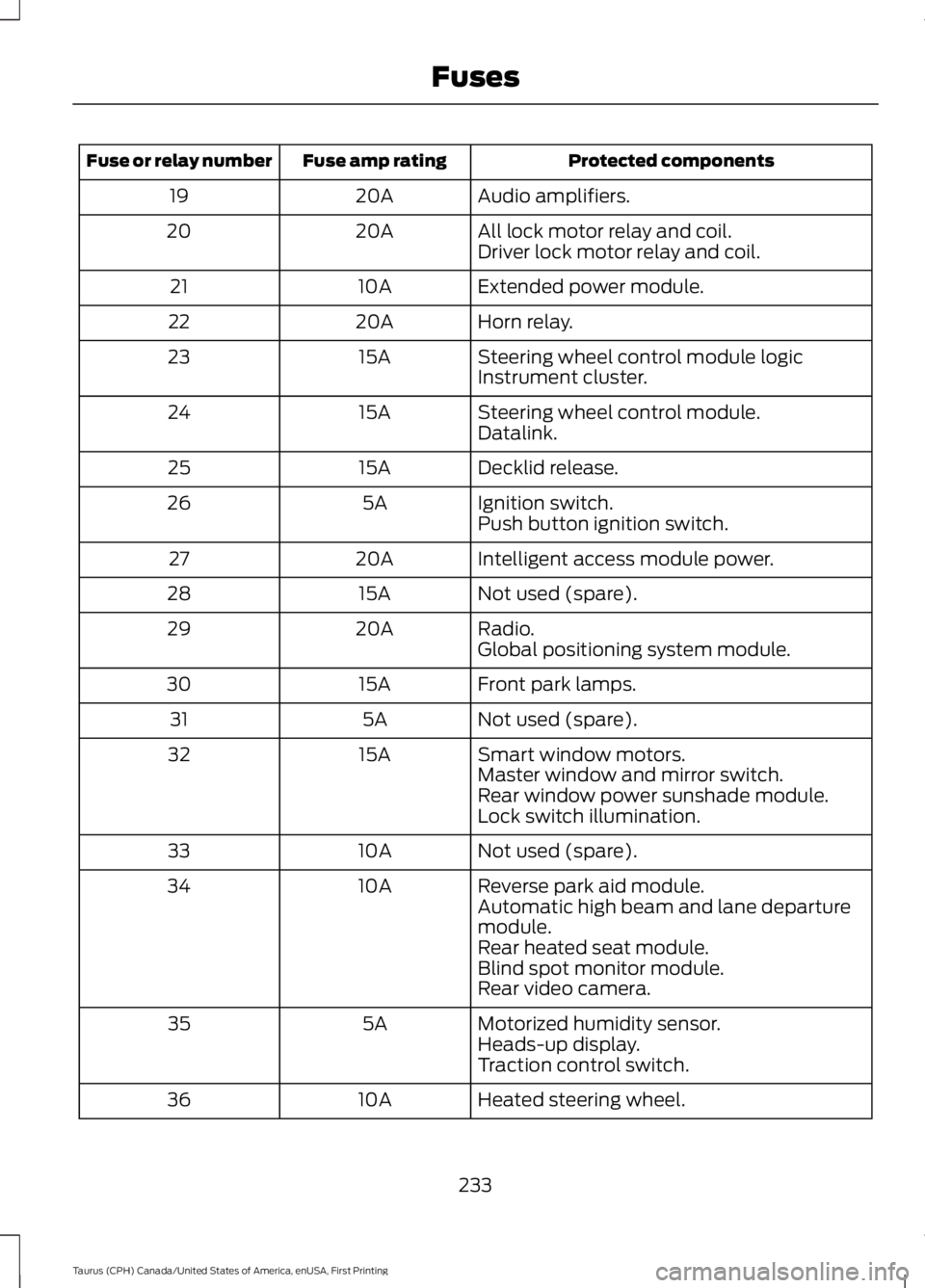
Protected componentsFuse amp ratingFuse or relay number
Audio amplifiers.20A19
All lock motor relay and coil.20A20Driver lock motor relay and coil.
Extended power module.10A21
Horn relay.20A22
Steering wheel control module logic15A23Instrument cluster.
Steering wheel control module.15A24Datalink.
Decklid release.15A25
Ignition switch.5A26Push button ignition switch.
Intelligent access module power.20A27
Not used (spare).15A28
Radio.20A29Global positioning system module.
Front park lamps.15A30
Not used (spare).5A31
Smart window motors.15A32Master window and mirror switch.Rear window power sunshade module.Lock switch illumination.
Not used (spare).10A33
Reverse park aid module.10A34Automatic high beam and lane departuremodule.Rear heated seat module.Blind spot monitor module.Rear video camera.
Motorized humidity sensor.5A35Heads-up display.Traction control switch.
Heated steering wheel.10A36
233
Taurus (CPH) Canada/United States of America, enUSA, First Printing
Fuses
Page 276 of 504
Be sure to check the sealant compound'suse by date regularly. The use by date ison the lower right hand corner of the labellocated on the sealant canister (bottle).The sealant canister should be replacedafter four years of non-use.
TIRE CARE
Information About UniformTire Quality Grading
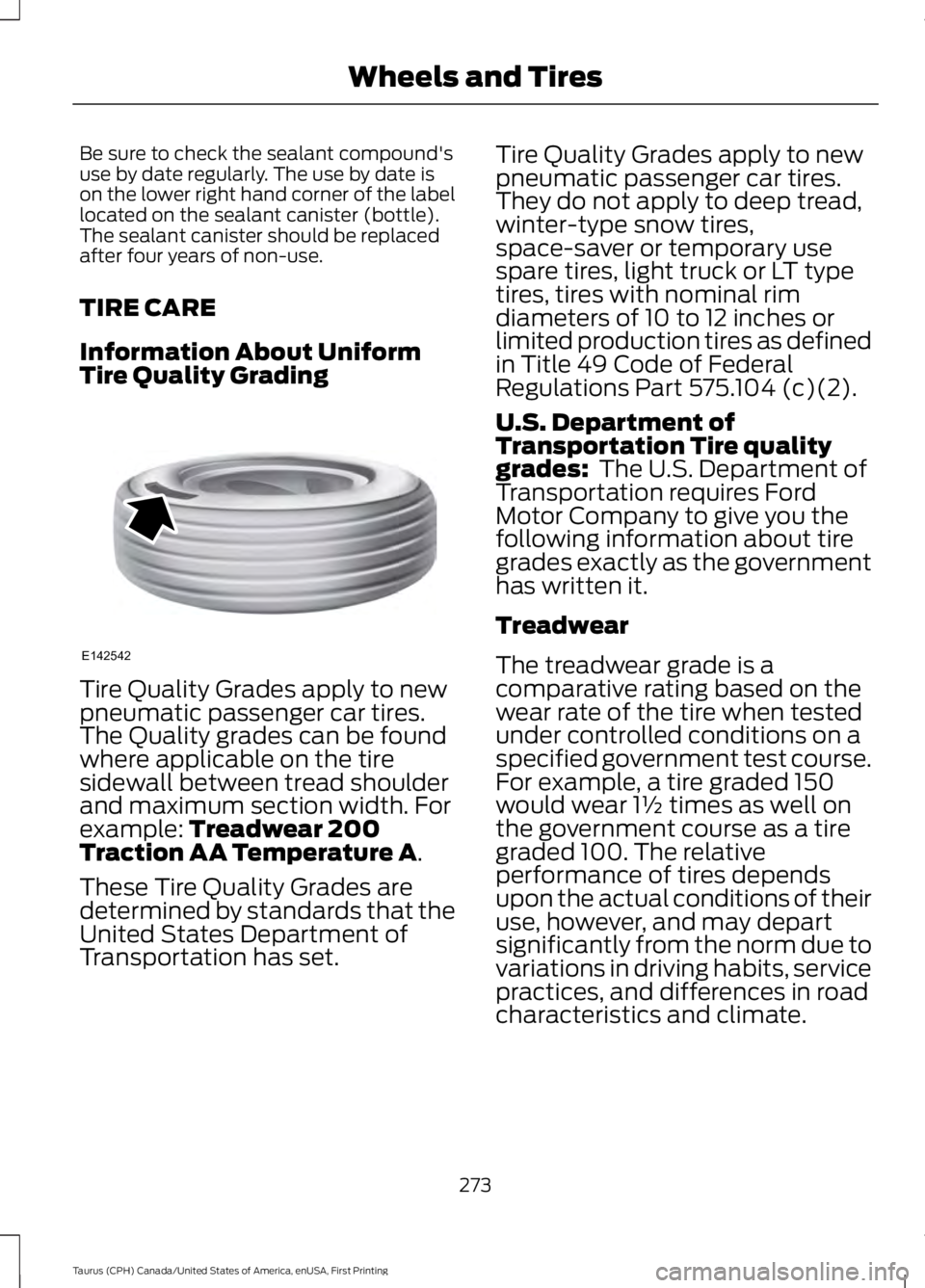
Tire Quality Grades apply to newpneumatic passenger car tires.The Quality grades can be foundwhere applicable on the tiresidewall between tread shoulderand maximum section width. Forexample: Treadwear 200Traction AA Temperature A.
These Tire Quality Grades aredetermined by standards that theUnited States Department ofTransportation has set.
Tire Quality Grades apply to newpneumatic passenger car tires.They do not apply to deep tread,winter-type snow tires,space-saver or temporary usespare tires, light truck or LT typetires, tires with nominal rimdiameters of 10 to 12 inches orlimited production tires as definedin Title 49 Code of FederalRegulations Part 575.104 (c)(2).
U.S. Department ofTransportation Tire qualitygrades: The U.S. Department ofTransportation requires FordMotor Company to give you thefollowing information about tiregrades exactly as the governmenthas written it.
Treadwear
The treadwear grade is acomparative rating based on thewear rate of the tire when testedunder controlled conditions on aspecified government test course.For example, a tire graded 150would wear 1½ times as well onthe government course as a tiregraded 100. The relativeperformance of tires dependsupon the actual conditions of theiruse, however, and may departsignificantly from the norm due tovariations in driving habits, servicepractices, and differences in roadcharacteristics and climate.
273
Taurus (CPH) Canada/United States of America, enUSA, First Printing
Wheels and TiresE142542
Page 277 of 504
Traction AA A B C
WARNING
The traction grade assignedto this tire is based onstraight-ahead braking tractiontests, and does not includeacceleration, cornering,hydroplaning or peak tractioncharacteristics.
The traction grades, from highestto lowest are AA, A, B, and C. Thegrades represent the tire’s abilityto stop on wet pavement asmeasured under controlledconditions on specifiedgovernment test surfaces ofasphalt and concrete. A tiremarked C may have poor tractionperformance.
Temperature A B C
WARNING
The temperature grade forthis tire is established for atire that is properly inflated andnot overloaded. Excessive speed,underinflation, or excessiveloading, either separately or incombination, can cause heatbuildup and possible tire failure.
The temperature grades are A(the highest), B and C,representing the tire’s resistanceto the generation of heat and itsability to dissipate heat whentested under controlled conditionson a specified indoor laboratory
test wheel. Sustained hightemperature can cause thematerial of the tire to degenerateand reduce tire life, and excessivetemperature can lead to suddentire failure. The grade Ccorresponds to a level ofperformance which all passengercar tires must meet under theFederal Motor Vehicle SafetyStandard No. 139. Grades B and Arepresent higher levels ofperformance on the laboratorytest wheel than the minimumrequired by law.
Glossary of Tire Terminology
*Tire label: A label showing theoriginal equipment tire sizes,recommended inflation pressureand the maximum weight the
vehicle can carry.
*Tire Identification Number(TIN): A number on the sidewallof each tire providing informationabout the tire brand andmanufacturing plant, tire size anddate of manufacture. Also referredto as DOT code.
*Inflation pressure: A measureof the amount of air in a tire.
274
Taurus (CPH) Canada/United States of America, enUSA, First Printing
Wheels and Tires