change time FORD TAURUS 2017 Workshop Manual
[x] Cancel search | Manufacturer: FORD, Model Year: 2017, Model line: TAURUS, Model: FORD TAURUS 2017Pages: 504, PDF Size: 5.84 MB
Page 453 of 504
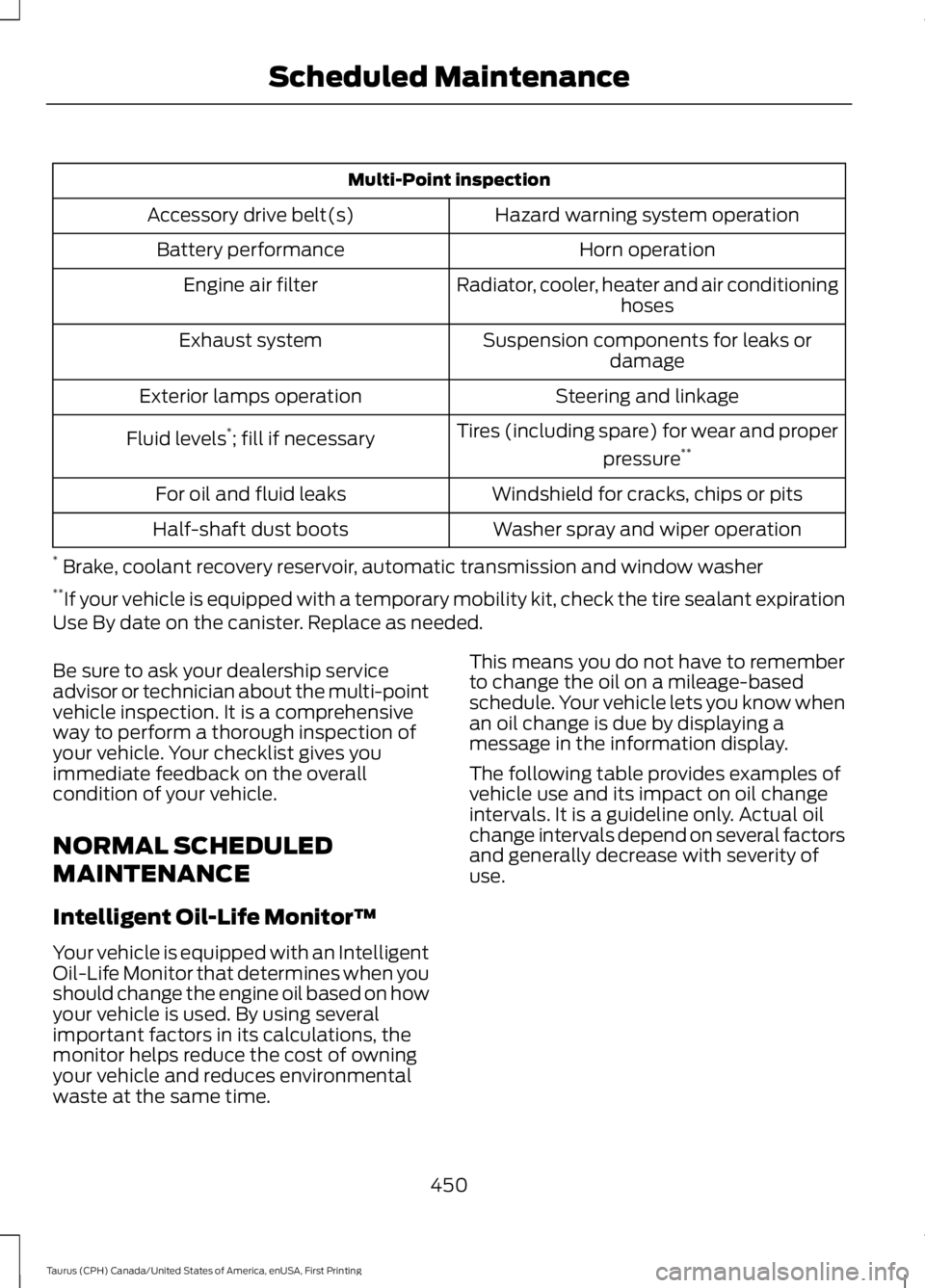
Multi-Point inspection
Hazard warning system operationAccessory drive belt(s)
Horn operationBattery performance
Radiator, cooler, heater and air conditioninghosesEngine air filter
Suspension components for leaks ordamageExhaust system
Steering and linkageExterior lamps operation
Tires (including spare) for wear and proper
pressure**Fluid levels*; fill if necessary
Windshield for cracks, chips or pitsFor oil and fluid leaks
Washer spray and wiper operationHalf-shaft dust boots
* Brake, coolant recovery reservoir, automatic transmission and window washer**If your vehicle is equipped with a temporary mobility kit, check the tire sealant expirationUse By date on the canister. Replace as needed.
Be sure to ask your dealership serviceadvisor or technician about the multi-pointvehicle inspection. It is a comprehensiveway to perform a thorough inspection ofyour vehicle. Your checklist gives youimmediate feedback on the overallcondition of your vehicle.
NORMAL SCHEDULED
MAINTENANCE
Intelligent Oil-Life Monitor™
Your vehicle is equipped with an IntelligentOil-Life Monitor that determines when youshould change the engine oil based on howyour vehicle is used. By using severalimportant factors in its calculations, themonitor helps reduce the cost of owningyour vehicle and reduces environmentalwaste at the same time.
This means you do not have to rememberto change the oil on a mileage-basedschedule. Your vehicle lets you know whenan oil change is due by displaying amessage in the information display.
The following table provides examples ofvehicle use and its impact on oil changeintervals. It is a guideline only. Actual oilchange intervals depend on several factorsand generally decrease with severity ofuse.
450
Taurus (CPH) Canada/United States of America, enUSA, First Printing
Scheduled Maintenance
Page 490 of 504
GRACENOTE SERVERS OR GRACENOTECONTENT. GRACENOTE COLLECTIVELYAND SEPARATELY RESERVE THE RIGHTTO DELETE DATA AND/OR CONTENTFROM THE COMPANIES' RESPECTIVESERVERS OR, IN THE CASE OFGRACENOTE, CHANGE DATACATEGORIES FOR ANY CAUSE THATGRACENOTE DEEMS SUFFICIENT. NOWARRANTY IS MADE THAT EITHERGRACENOTE CONTENT OR THEGRACENOTE SOFTWARE ORGRACENOTE SERVERS ARE ERROR-FREEOR THAT THE FUNCTIONING OF THEGRACENOTE SOFTWARE ORGRACENOTE SERVERS WILL BEUNINTERRUPTED. GRACENOTE IS NOTOBLIGATED TO PROVIDE YOU WITH ANYENHANCED OR ADDITIONAL DATA TYPESTHAT GRACENOTE MAY CHOOSE TOPROVIDE IN THE FUTURE AND IS FREETO DISCONTINUE ITS ONLINE SERVICESAT ANY TIME. GRACENOTE DISCLAIM ALLWARRANTIES EXPRESS OR IMPLIED,INCLUDING, BUT NOT LIMITED TO,IMPLIED WARRANTIES OFMERCHANTABILITY, FITNESS FOR APARTICULAR PURPOSE, TITLE, ANDNON-INFRINGEMENT. NEITHERGRACENOTE WARRANTS THE RESULTSTHAT WILL BE OBTAINED BY YOUR USEOF THE GRACENOTE SOFTWARE OR ANYGRACENOTE SERVER. IN NO CASE WILLGRACENOTE BE LIABLE FOR ANYCONSEQUENTIAL OR INCIDENTALDAMAGES OR FOR ANY LOST PROFITSOR LOST REVENUES FOR ANY REASONWHATSOEVER. © Gracenote 2007.
Radio Frequency Statement
FCC ID: ACJ-SYNCG3-L
IC: 216B-SYNCG3-L
This device complies with Part 15 of theFCC Rules and with RSS-210 of IndustryCanada. Operation is subject to thefollowing two conditions:
(1) This device may not cause harmfulinterference, and
(2) this device must accept anyinterference received, includinginterference that may cause undesiredoperation.
Note:Changes or modifications notexpressively approved by the partyresponsible for compliance could void theuser's authority to operate the equipment.
The antenna used for this transmitter mustnot be co-located or operating inconjunction with any other antenna ortransmitter.
SUNA TRAFFIC CHANNEL – TERMSAND CONDITIONS
By activating, using and/or accessing theSUNA Traffic Channel, SUNA Predictive orother content or material provided byIntelematics (together,SUNA Productsand/or Services), you must acceptcertain terms and conditions. The followingis a brief summary of the terms andconditions that apply to you. To view thefull terms and conditions relevant to youruse of the SUNA Products and/or Services,please consult:
Website
www.sunatraffic.com.au/termsandcon-ditions/
1. Acceptance
By using SUNA Products and/or Services,you will be deemed to have accepted andagreed to be bound by the terms andconditions fully detailed at:
487
Taurus (CPH) Canada/United States of America, enUSA, First Printing
Appendices
Page 491 of 504
Website
www.sunatraffic.com.au/termsandcon-ditions/
2. Intellectual Property
SUNA Products and/or Services are foryour personal use. You may not record, orretransmit the content, nor use the contentin association with any other trafficinformation or route guidance service ordevice not approved by Intelematics. Youobtain no right of ownership in anyIntellectual Property Rights (includingcopyright) in the data that is used toprovide SUNA Products and/or Services.
3. Appropriate Use
SUNA Products and/or Services areintended as an aid to personal motoringand travel planning, and do not providecomprehensive or accurate information onall occasions. On occasions, you mayexperience additional delay as a result ofusing SUNA Products and/or Services. Youacknowledge that it is not intended, orsuitable, for use in applications where timeof arrival or driving directions may impactthe safety of the public or yourself.
4. Use of SUNA Products and Serviceswhile driving
You, and other authorised drivers of thevehicle in which SUNA Products and/orServices are available or installed andactive, remain at all times responsible forobserving all relevant laws and codes ofsafe driving. In particular, you agree to onlyactively operate SUNA Products and/orServices when the Vehicle is at a completestop and it is safe to do so.
5. Service Continuity and Reception ofthe SUNA Traffic Channel
We will use reasonable endeavours toprovide the SUNA Traffic Channel 24 hoursa day, 365 days a year. The SUNA TrafficChannel may occasionally be unavailablefor technical reasons or for plannedmaintenance. We will try to performmaintenance at times when congestion islight. We reserve the right to withdrawSUNA Products and/or Services at anytime.
Also, we cannot assure the uninterruptedreception of the SUNA Traffic ChannelRDS-TMC signal at any particular location.
6. Limitation of Liability
Neither Intelematics (nor its suppliers orthe manufacturer of your device (the“Suppliers”)) shall be liable to you or toany third party for any damages eitherdirect, indirect, incidental, consequentialor otherwise arising out of the use of orinability to use SUNA Products and/orServices even if Intelematics or a Supplierhas been advised of the possibility of suchdamages. You also acknowledge that theneither Intelematics nor any Supplierguarantees nor make any warranties thatrelate to the availability, accuracy orcompleteness of SUNA Products and/orServices, and to the extent which it islawful to do so, both Intelematics and eachSupplier excludes any warranties whichmight otherwise be implied by any Stateor Federal legislation in relation to SUNAProducts and/or Services.
7. Please Note
Great care has been taken in preparing thismanual. Constant product developmentmay mean that some information is notentirely up-to-date. The information in thisdocument is subject to change withoutnotice.
488
Taurus (CPH) Canada/United States of America, enUSA, First Printing
Appendices
Page 496 of 504
Climate............................................................399Climate Control............................................109Climate Controlled Seats..........................128Cooled Seats........................................................128Heated Seats........................................................128Collision Warning System..........................197PRINCIPLE OF OPERATION............................197Coolant CheckSee: Engine Coolant Check............................243Crash Sensors and Airbag Indicator.......44Creating a MyKey............................................52Programming/Changing ConfigurableSettings...............................................................52Cross Traffic Alert.........................................193False Alerts...........................................................196Switching the System Off and On...............196System Errors.......................................................196System Lights, Messages and AudibleAlerts..................................................................195System Limitations............................................195Using the System...............................................193Cruise Control.................................................68Principle of Operation.......................................178Type 1........................................................................68Type 2.......................................................................68Cruise controlSee: Using Cruise Control................................178Customer Assistance..................................219
D
Data Recording..................................................9Event Data Recording..........................................10Service Data Recording........................................9Daytime Running Lamps.............................74Direction Indicators........................................76Doors and Locks..............................................57Driver Alert......................................................186PRINCIPLE OF OPERATION...........................186USING DRIVER ALERT.....................................186Driver and Passenger Airbags...................39Children and Airbags..........................................39Proper Driver and Front Passenger SeatingAdjustment........................................................39Driving Aids.....................................................186Driving Hints.....................................................211Driving Through Water................................212
DRLSee: Daytime Running Lamps.........................74
E
Economical Driving.......................................211Emission Control System..........................150On-Board Diagnostics (OBD-II).....................151Readiness for Inspection and Maintenance(I/M) Testing.....................................................151End User License Agreement.................465VEHICLE SOFTWARE END USER LICENSEAGREEMENT (EULA) ................................465Engine Block Heater.....................................141Using the Engine Block Heater......................142Engine Coolant Check................................243Adding Coolant..................................................244Coolant Change.................................................245Engine Coolant TemperatureManagement..................................................246Fail-Safe Cooling...............................................245Recycled Coolant...............................................245Severe Climates.................................................245Engine ImmobilizerSee: Passive Anti-Theft System.....................64Engine Oil Check...........................................241Adding Engine Oil...............................................242Engine Oil Dipstick - 2.0LEcoBoost™..................................................241Engine Oil Dipstick - 3.5L Duratec/3.5LEcoboost™..................................................241Engine Specifications - 2.0LEcoBoost™.................................................297Drivebelt Routing...............................................297Engine Specifications - 3.5LDuratec..........................................................297Drivebelt Routing...............................................298Engine Specifications - 3.5LEcoboost™.................................................298Drivebelt Routing...............................................298Entertainment..............................................389AM/FM Radio......................................................390Apps.......................................................................398Bluetooth Stereo or USB.................................397CD (If equipped)................................................396HD Radio™ Information (IfAvailable)........................................................393
493
Taurus (CPH) Canada/United States of America, enUSA, First Printing
Index
Page 500 of 504
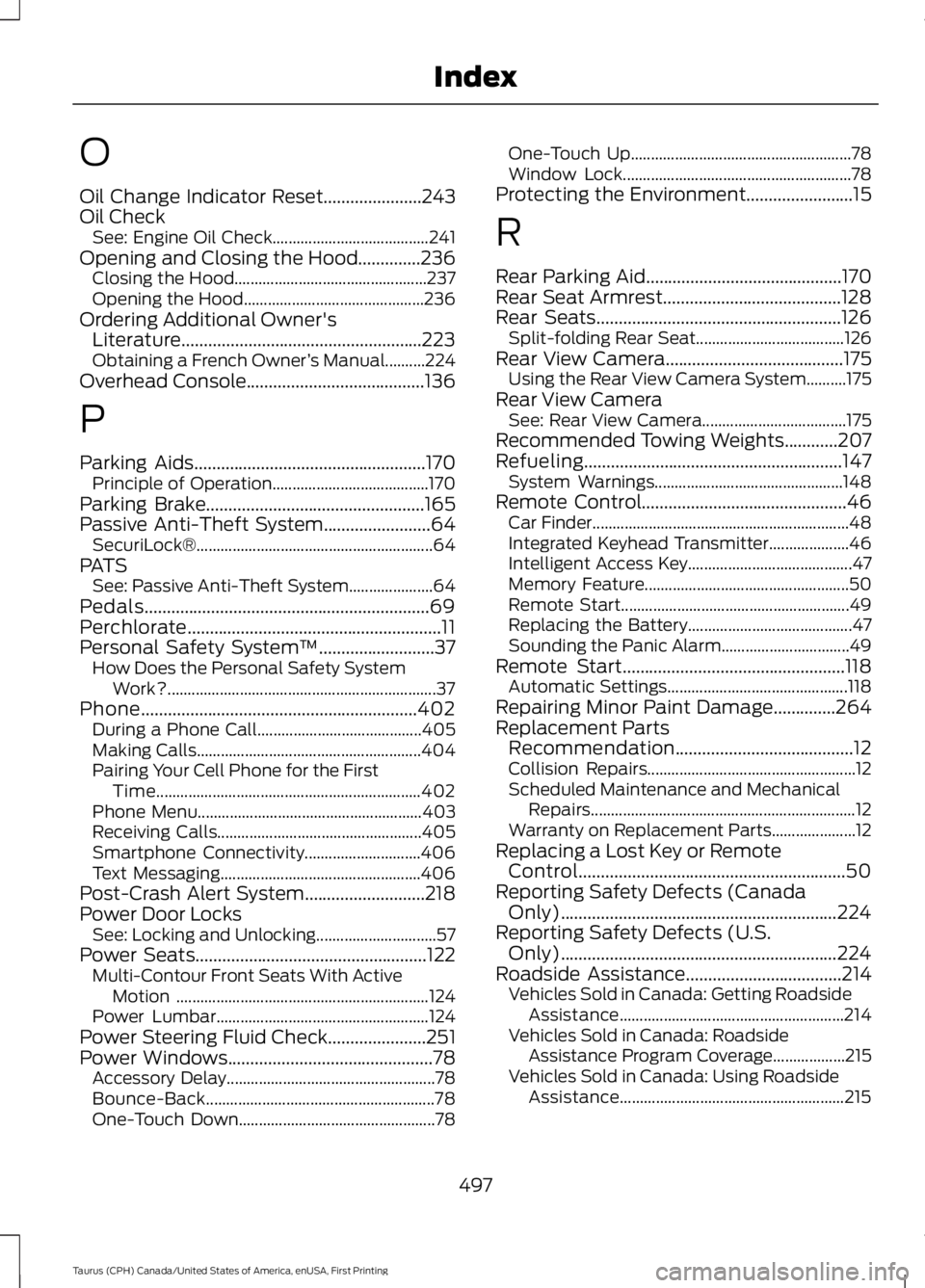
O
Oil Change Indicator Reset......................243Oil CheckSee: Engine Oil Check.......................................241Opening and Closing the Hood..............236Closing the Hood................................................237Opening the Hood.............................................236Ordering Additional Owner'sLiterature......................................................223Obtaining a French Owner’s Manual..........224Overhead Console........................................136
P
Parking Aids....................................................170Principle of Operation.......................................170Parking Brake.................................................165Passive Anti-Theft System........................64SecuriLock®...........................................................64PATSSee: Passive Anti-Theft System.....................64Pedals................................................................69Perchlorate.........................................................11Personal Safety System™..........................37How Does the Personal Safety SystemWork?...................................................................37Phone..............................................................402During a Phone Call.........................................405Making Calls........................................................404Pairing Your Cell Phone for the FirstTime..................................................................402Phone Menu........................................................403Receiving Calls...................................................405Smartphone Connectivity.............................406Text Messaging..................................................406Post-Crash Alert System...........................218Power Door LocksSee: Locking and Unlocking..............................57Power Seats....................................................122Multi-Contour Front Seats With ActiveMotion ...............................................................124Power Lumbar.....................................................124Power Steering Fluid Check......................251Power Windows..............................................78Accessory Delay....................................................78Bounce-Back.........................................................78One-Touch Down.................................................78
One-Touch Up.......................................................78Window Lock.........................................................78Protecting the Environment........................15
R
Rear Parking Aid............................................170Rear Seat Armrest........................................128Rear Seats.......................................................126Split-folding Rear Seat.....................................126Rear View Camera........................................175Using the Rear View Camera System..........175Rear View CameraSee: Rear View Camera....................................175Recommended Towing Weights............207Refueling..........................................................147System Warnings...............................................148Remote Control..............................................46Car Finder................................................................48Integrated Keyhead Transmitter....................46Intelligent Access Key.........................................47Memory Feature...................................................50Remote Start.........................................................49Replacing the Battery.........................................47Sounding the Panic Alarm................................49Remote Start..................................................118Automatic Settings.............................................118Repairing Minor Paint Damage..............264Replacement PartsRecommendation........................................12Collision Repairs....................................................12Scheduled Maintenance and MechanicalRepairs..................................................................12Warranty on Replacement Parts.....................12Replacing a Lost Key or RemoteControl............................................................50Reporting Safety Defects (CanadaOnly)..............................................................224Reporting Safety Defects (U.S.Only)..............................................................224Roadside Assistance...................................214Vehicles Sold in Canada: Getting RoadsideAssistance........................................................214Vehicles Sold in Canada: RoadsideAssistance Program Coverage..................215Vehicles Sold in Canada: Using RoadsideAssistance........................................................215
497
Taurus (CPH) Canada/United States of America, enUSA, First Printing
Index