display FORD TAURUS 2017 Workshop Manual
[x] Cancel search | Manufacturer: FORD, Model Year: 2017, Model line: TAURUS, Model: FORD TAURUS 2017Pages: 504, PDF Size: 5.84 MB
Page 151 of 504
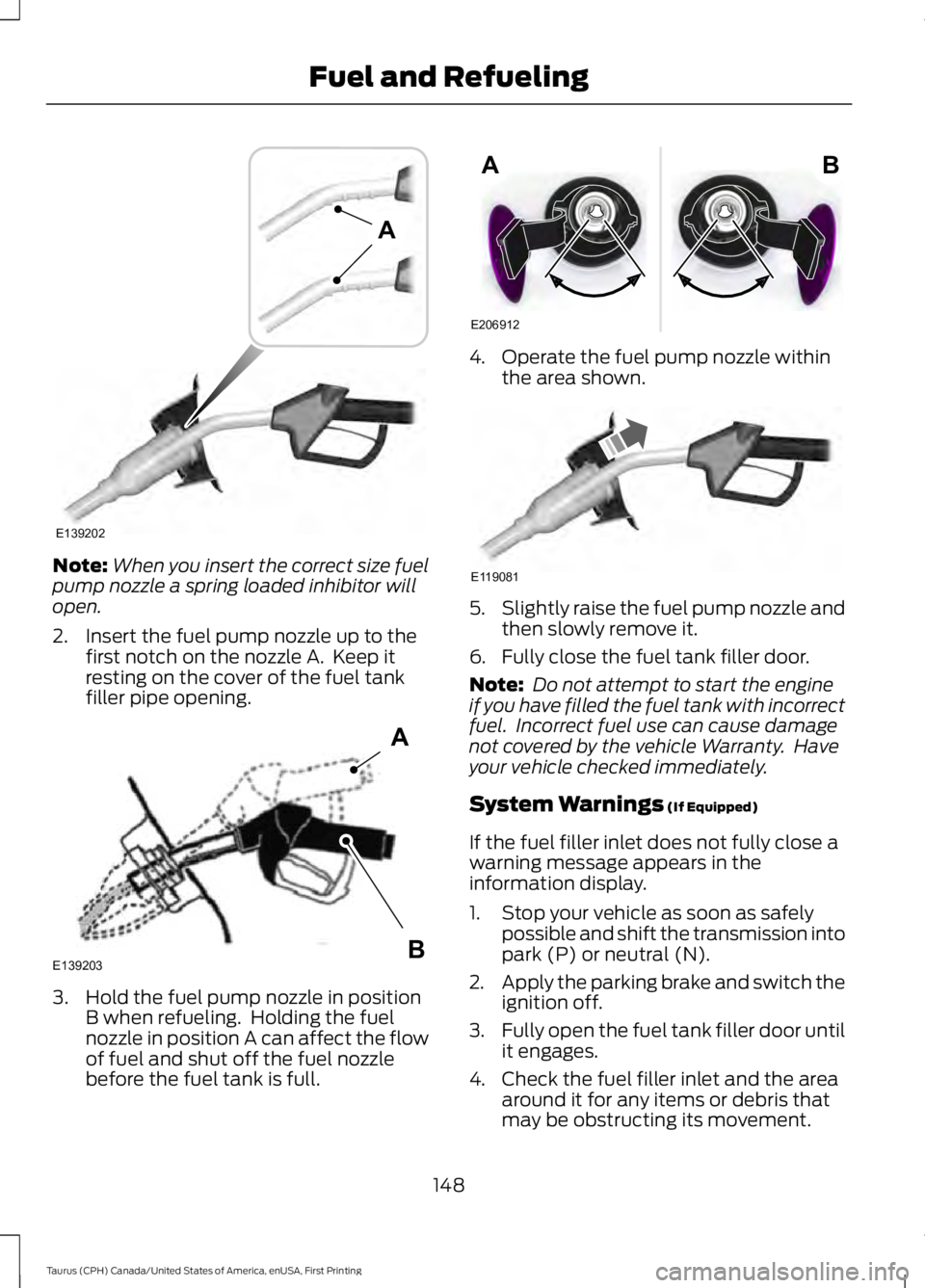
Note:When you insert the correct size fuelpump nozzle a spring loaded inhibitor willopen.
2. Insert the fuel pump nozzle up to thefirst notch on the nozzle A. Keep itresting on the cover of the fuel tankfiller pipe opening.
3. Hold the fuel pump nozzle in positionB when refueling. Holding the fuelnozzle in position A can affect the flowof fuel and shut off the fuel nozzlebefore the fuel tank is full.
4. Operate the fuel pump nozzle withinthe area shown.
5.Slightly raise the fuel pump nozzle andthen slowly remove it.
6. Fully close the fuel tank filler door.
Note: Do not attempt to start the engineif you have filled the fuel tank with incorrectfuel. Incorrect fuel use can cause damagenot covered by the vehicle Warranty. Haveyour vehicle checked immediately.
System Warnings (If Equipped)
If the fuel filler inlet does not fully close awarning message appears in theinformation display.
1. Stop your vehicle as soon as safelypossible and shift the transmission intopark (P) or neutral (N).
2.Apply the parking brake and switch theignition off.
3.Fully open the fuel tank filler door untilit engages.
4. Check the fuel filler inlet and the areaaround it for any items or debris thatmay be obstructing its movement.
148
Taurus (CPH) Canada/United States of America, enUSA, First Printing
Fuel and RefuelingE139202
A E139203
A
B E206912
AB E119081
Page 152 of 504
5. Insert a fuel pump nozzle or the fuelfiller funnel provided with your vehiclein to the fuel tank filler pipe opening.This action should dislodge any debristhat may be preventing the fuel fillerinlet from fully closing.
Note: If this action corrects the problemthe message may not reset immediately. Ifthe message remains and the service enginesoon warning lamp appears in theinformation display, have your vehiclechecked as soon as possible.
FUEL CONSUMPTION
The advertised capacity is the indicatedcapacity and the empty reserve combined.In addition, the fuel tank contains an emptyreserve. Empty reserve is the amount offuel in the fuel tank after the fuel gaugeindicates empty.
Note:The amount of fuel in the emptyreserve varies and should not be relied uponto increase driving range.
•The usable capacity of the fuel tank isthe amount of fuel that you can add tothe fuel tank when the fuel gaugeindicates empty, before the first fuelfiller nozzle automatic shutoff event.
•The advertised capacity is equal to thevolumetric difference between actualfuel fill before the first fuel filler nozzleautomatic shutoff event and the fuelquantity when the fuel gauge indicatesempty. See Capacities andSpecifications (page 297). It is theusable capacity minus the emptyreserve.
•Due to the empty reserve, you may beable to add more fuel than theadvertised capacity of the fuel tankwhen the fuel gauge indicates empty.
Filling the Fuel Tank
For consistent results when refueling:
•Turn the ignition off before fueling; aninaccurate reading results if the engineis left running.
•Use the same fill rate(low-medium-high) each time the tankis filled.
•Allow no more than one automaticshut-off when refueling.
Results are most accurate when the fillingmethod is consistent.
Calculating Fuel Economy
Do not measure fuel economy during thefirst 1,000 mi (1,600 km) of driving (this isyour engine’s break-in period). A moreaccurate measurement is obtained after2,000 mi (3,200 km) to 3,000 mi(4,800 km). Also, fuel expense, frequencyof fill ups or fuel gauge readings are notaccurate ways to measure fuel economy.
1.Fill the fuel tank completely and recordthe initial odometer reading.
2. Each time you fill the fuel tank, recordthe amount of fuel added.
3. After at least three fill ups, fill the fueltank and record the current odometerreading.
4. Subtract your initial odometer readingfrom the current odometer reading.
To calculate L/100 km (liters per 100kilometers) fuel consumption, multiply theliters used by 100, then divide by kilometerstraveled. To calculate MPG (miles pergallon) fuel consumption, divide milestraveled by gallons used.
149
Taurus (CPH) Canada/United States of America, enUSA, First Printing
Fuel and Refueling
Page 157 of 504
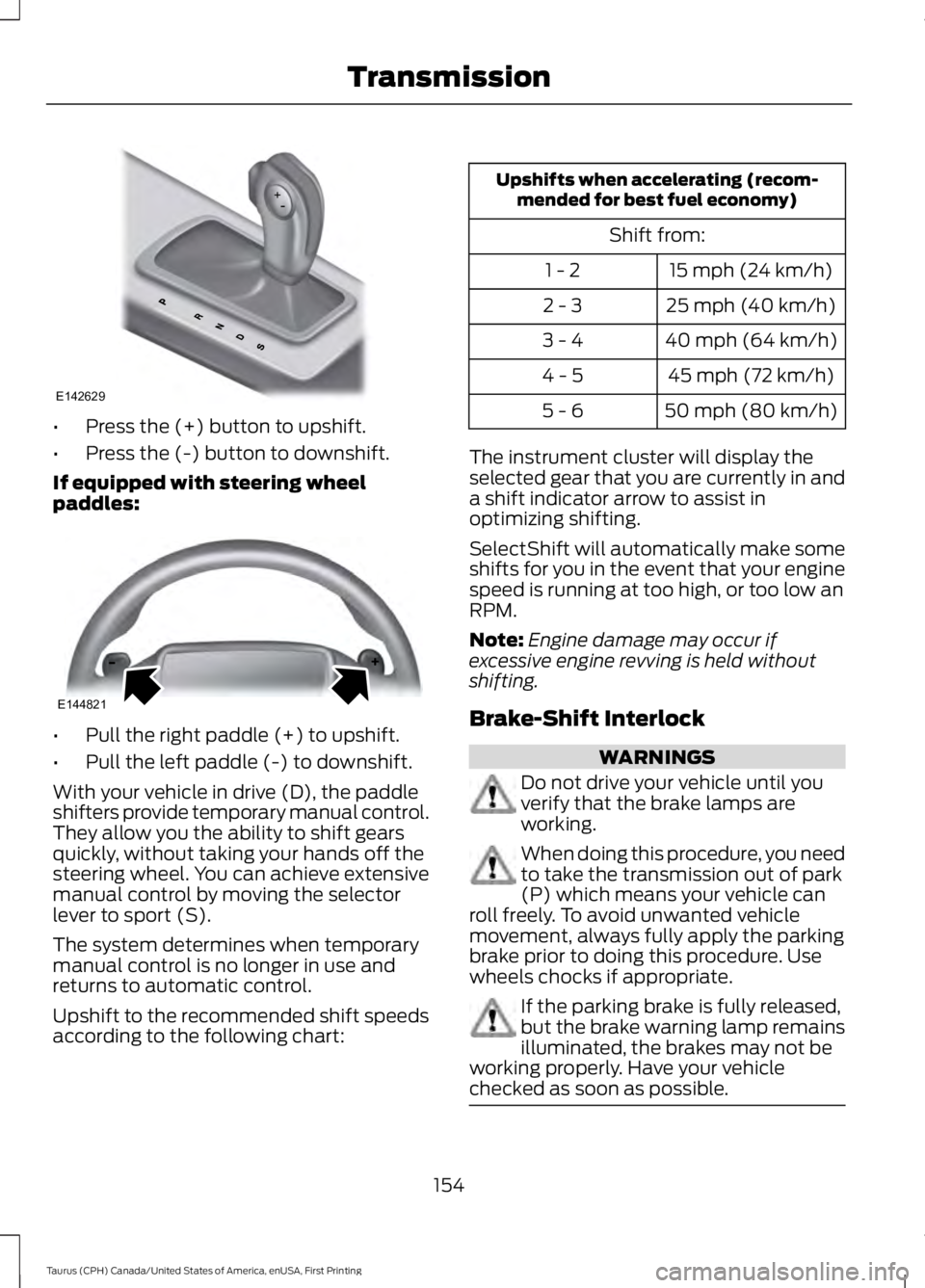
•Press the (+) button to upshift.
•Press the (-) button to downshift.
If equipped with steering wheelpaddles:
•Pull the right paddle (+) to upshift.
•Pull the left paddle (-) to downshift.
With your vehicle in drive (D), the paddleshifters provide temporary manual control.They allow you the ability to shift gearsquickly, without taking your hands off thesteering wheel. You can achieve extensivemanual control by moving the selectorlever to sport (S).
The system determines when temporarymanual control is no longer in use andreturns to automatic control.
Upshift to the recommended shift speedsaccording to the following chart:
Upshifts when accelerating (recom-mended for best fuel economy)
Shift from:
15 mph (24 km/h)1 - 2
25 mph (40 km/h)2 - 3
40 mph (64 km/h)3 - 4
45 mph (72 km/h)4 - 5
50 mph (80 km/h)5 - 6
The instrument cluster will display theselected gear that you are currently in anda shift indicator arrow to assist inoptimizing shifting.
SelectShift will automatically make someshifts for you in the event that your enginespeed is running at too high, or too low anRPM.
Note:Engine damage may occur ifexcessive engine revving is held withoutshifting.
Brake-Shift Interlock
WARNINGS
Do not drive your vehicle until youverify that the brake lamps areworking.
When doing this procedure, you needto take the transmission out of park(P) which means your vehicle canroll freely. To avoid unwanted vehiclemovement, always fully apply the parkingbrake prior to doing this procedure. Usewheels chocks if appropriate.
If the parking brake is fully released,but the brake warning lamp remainsilluminated, the brakes may not beworking properly. Have your vehiclechecked as soon as possible.
154
Taurus (CPH) Canada/United States of America, enUSA, First Printing
TransmissionE142629 E144821
Page 160 of 504
USING ALL-WHEEL DRIVE (If
Equipped)
All-wheel drive uses all four wheels topower the vehicle. This increases traction,enabling you to drive over terrain and roadconditions that a conventional two-wheeldrive vehicle cannot. The AWD system isactive all the time and requires no inputfrom the operator.
Note:Your AWD vehicle is not intended foroff-road use. The AWD feature gives yourvehicle some limited off-road capabilitiesin which driving surfaces are relatively level,obstruction-free and otherwise similar tonormal on-road driving conditions.Operating your vehicle under other thanthose conditions could subject the vehicleto excessive stress which might result indamage which is not covered under yourwarranty.
Note: The Power Transfer Unit (PTU) inTaurus SHO™ performance packagevehicles does not require any normalscheduled maintenance. The system iselectronically monitored and notifies thedriver of required service by displaying themessage Change AWD Power TransferUnit Lube in the information display. ThePTU lubricant will be more likely to requirea fluid change if the vehicle has experiencedextended periods of extreme or severe dutycycle driving. Do not check or change thePTU lubricant unless the unit shows signsof leakage or a message indicating requiredservice is displayed. Contact an authorizeddealer for service if the PTU was submergedin water and to reset the PTU lube lifemonitor.
Note:When an AWD system fault ispresent, the warning Check AWD displaysin the information display. The AWD systemis not functioning correctly and defaultedto front-wheel drive. When this warningdisplays, have your vehicle serviced at anauthorized dealer.
Note: The AWD OFF message may alsoappear in the information display if the AWDsystem overheats and defaults tofront-wheel drive. This may occur if thevehicle is operated in extreme conditionswith excessive wheel slip, such as deepsand. To resume normal AWD function assoon as possible, stop the vehicle in a safelocation and stop the engine for at least 10minutes. After the engine has beenrestarted and the AWD system hasadequately cooled, the AWD OFF messagewill turn off and normal AWD functionreturns. If the engine is not stopped, theAWD OFF message turns off when thesystem cools and normal AWD functionreturns.
157
Taurus (CPH) Canada/United States of America, enUSA, First Printing
All-Wheel Drive (If Equipped)
Page 161 of 504
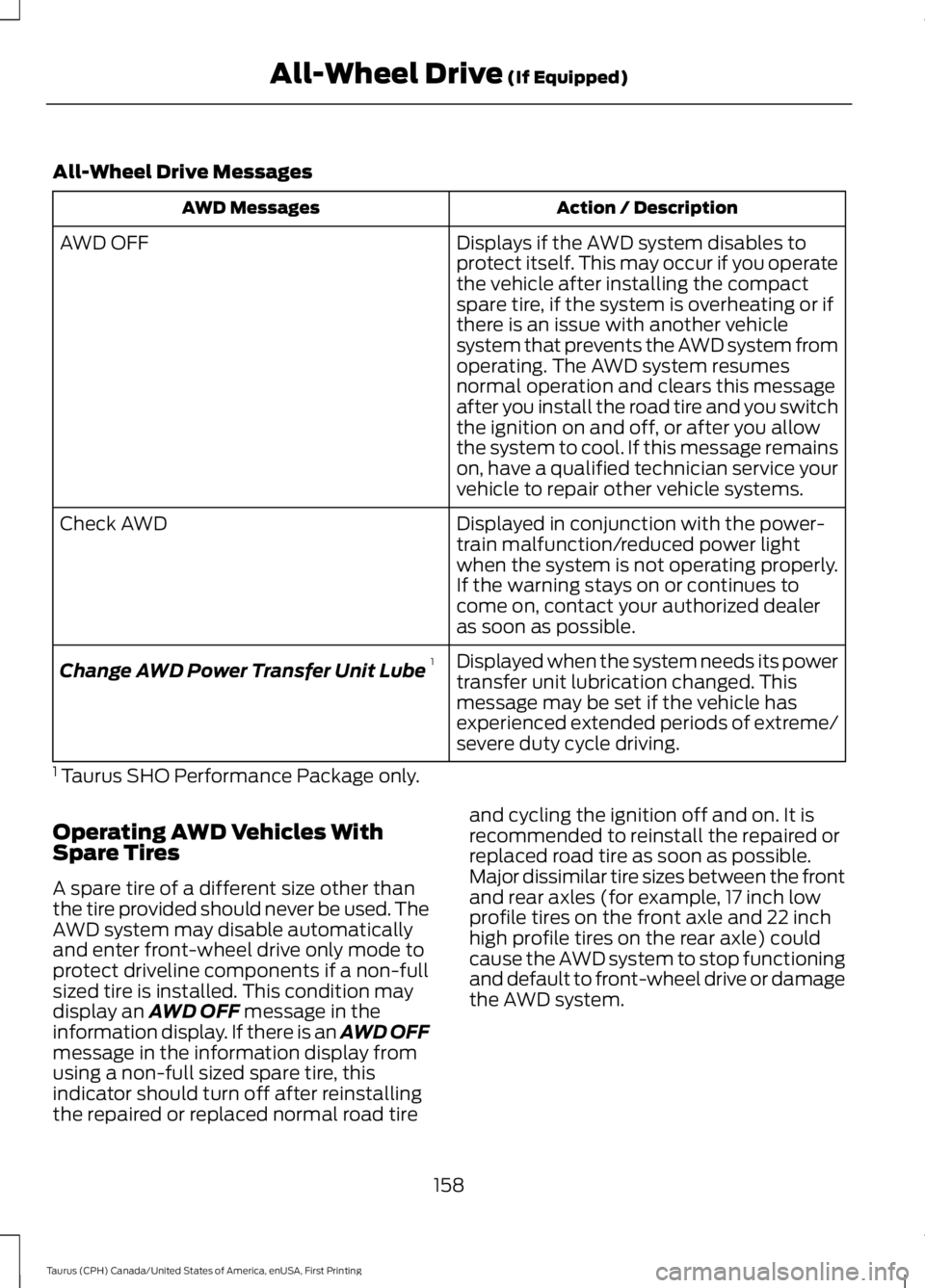
All-Wheel Drive Messages
Action / DescriptionAWD Messages
Displays if the AWD system disables toprotect itself. This may occur if you operatethe vehicle after installing the compactspare tire, if the system is overheating or ifthere is an issue with another vehiclesystem that prevents the AWD system from
AWD OFF
operating. The AWD system resumesnormal operation and clears this messageafter you install the road tire and you switchthe ignition on and off, or after you allowthe system to cool. If this message remainson, have a qualified technician service yourvehicle to repair other vehicle systems.
Displayed in conjunction with the power-train malfunction/reduced power lightwhen the system is not operating properly.If the warning stays on or continues tocome on, contact your authorized dealeras soon as possible.
Check AWD
Displayed when the system needs its powertransfer unit lubrication changed. Thismessage may be set if the vehicle hasexperienced extended periods of extreme/severe duty cycle driving.
Change AWD Power Transfer Unit Lube1
1 Taurus SHO Performance Package only.
Operating AWD Vehicles WithSpare Tires
A spare tire of a different size other thanthe tire provided should never be used. TheAWD system may disable automaticallyand enter front-wheel drive only mode toprotect driveline components if a non-fullsized tire is installed. This condition maydisplay an AWD OFF message in theinformation display. If there is an AWD OFFmessage in the information display fromusing a non-full sized spare tire, thisindicator should turn off after reinstallingthe repaired or replaced normal road tire
and cycling the ignition off and on. It isrecommended to reinstall the repaired orreplaced road tire as soon as possible.Major dissimilar tire sizes between the frontand rear axles (for example, 17 inch lowprofile tires on the front axle and 22 inchhigh profile tires on the rear axle) couldcause the AWD system to stop functioningand default to front-wheel drive or damagethe AWD system.
158
Taurus (CPH) Canada/United States of America, enUSA, First Printing
All-Wheel Drive (If Equipped)
Page 164 of 504
Sand
Most of the time traction control improvestire traction by managing wheel slipthrough Brake, Engine, and AWDcalibrations. However, during low speeddriving, disabling traction control in deepsand can help keep the wheels moving tomaintain vehicle momentum.
When driving over sand, try to keep all fourwheels on the most solid area of the trail.Avoid reducing the tire pressures but shiftto a lower gear and drive steadily throughthe terrain. Apply the accelerator slowlyand avoid spinning the wheels.
Do not drive your vehicle in deep sand foran extended period of time. This couldcause the AWD system to overheat anddefault to front-wheel drive. If this occurs,an AWD OFF message displays in theinformation display. To resume normalAWD function as soon as possible, stopthe vehicle in a safe location and stop theengine for at least 10 minutes. After theengine has been restarted and the AWDsystem has adequately cooled, the AWDOFF message turns off and normal AWDfunction returns. In the event the engine isnot stopped, the AWD OFF message turnsoff when the system cools and normalAWD function returns.
When driving at slow speeds in deep sandunder high outside temperatures, use L(Low) gear when possible. L (Low) gearoperation will maximize the engine andtransmission cooling capability.
Under severe operating conditions, the A/Cmay cycle on and off to protectoverheating of the engine.
Avoid excessive speed because vehiclemomentum can work against you andcause the vehicle to become stuck to thepoint that assistance may be required fromanother vehicle. Remember, you may beable to back out the way you came if youproceed with caution.
Mud and Water
If you must drive through high water, driveslowly. Traction or brake capability maybe limited.
When driving through water, determine thedepth; avoid water higher than the bottomof the wheel rims (for cars) or the bottomof the hubs (for trucks) (if possible) andproceed slowly. If the ignition system getswet, the vehicle may stall.
Once through water, always try the brakes.Wet brakes do not stop the vehicle aseffectively as dry brakes. Drying can beimproved by moving your vehicle slowlywhile applying light pressure on the brakepedal.
Be cautious of sudden changes in vehiclespeed or direction when you are driving inmud. Even AWD vehicles can lose tractionin slick mud. As when you are driving oversand, apply the accelerator slowly andavoid spinning your wheels. If the vehicledoes slide, steer in the direction of the slideuntil you regain control of the vehicle.
After driving through mud, clean off residuestuck to rotating driveshafts and tires.Excess mud stuck on tires and rotatingdriveshafts causes an imbalance thatcould damage drive components.
Note:Driving through deep water maydamage the transmission.
If the front or rear axle is submerged inwater, have the power transfer unit (PTU)or rear axle serviced by an authorizeddealer.
161
Taurus (CPH) Canada/United States of America, enUSA, First Printing
All-Wheel Drive (If Equipped)E143950
Page 169 of 504
PRINCIPLE OF OPERATION
The traction control system helps avoiddrive wheel spin and loss of traction.
If your vehicle begins to slide, the systemapplies the brakes to individual wheelsand, when needed, reduces engine powerat the same time. If the wheels spin whenaccelerating on slippery or loose surfaces,the system reduces engine power in orderto increase traction.
USING TRACTION CONTROL
WARNING
The stability and traction controllight illuminates steadily if thesystem detects a failure. Make sureyou did not manually disable the tractioncontrol system using the informationdisplay controls or the switch. If thestability control and traction control lightis still illuminating steadily, have thesystem serviced by an authorized dealerimmediately. Operating your vehicle withthe traction control disabled could lead toan increased risk of loss of vehicle control,vehicle rollover, personal injury and death.
The system automatically turns on eachtime you switch the ignition on.
If your vehicle is stuck in mud or snow,switching traction control off may bebeneficial as this allows the wheels to spin.
Note:When you switch traction control off,stability control remains fully active.
Switching the System Off
When you switch the system off or on, amessage appears in the informationdisplay showing system status.
You can switch the system off by eitherusing the information display controls orthe switch.
Using the Information DisplayControls
You can switch this feature off or on in theinformation display. See GeneralInformation (page 89).
Using a Switch (If Equipped)
Use the traction control switch on theinstrument panel to switch the system offor on.
The switch illuminates when tractioncontrol is off.
System Indicator Lights andMessages
The stability and traction controllight:
•Temporarily illuminates on enginestart-up.
•Flashes when a driving conditionactivates either of the systems.
•Illuminates if a problem occurs in eitherof the systems.
The stability and traction controloff light temporarily illuminateson engine start-up and stays onwhen you switch the traction controlsystem off.
166
Taurus (CPH) Canada/United States of America, enUSA, First Printing
Traction ControlE138639 E130458
Page 172 of 504
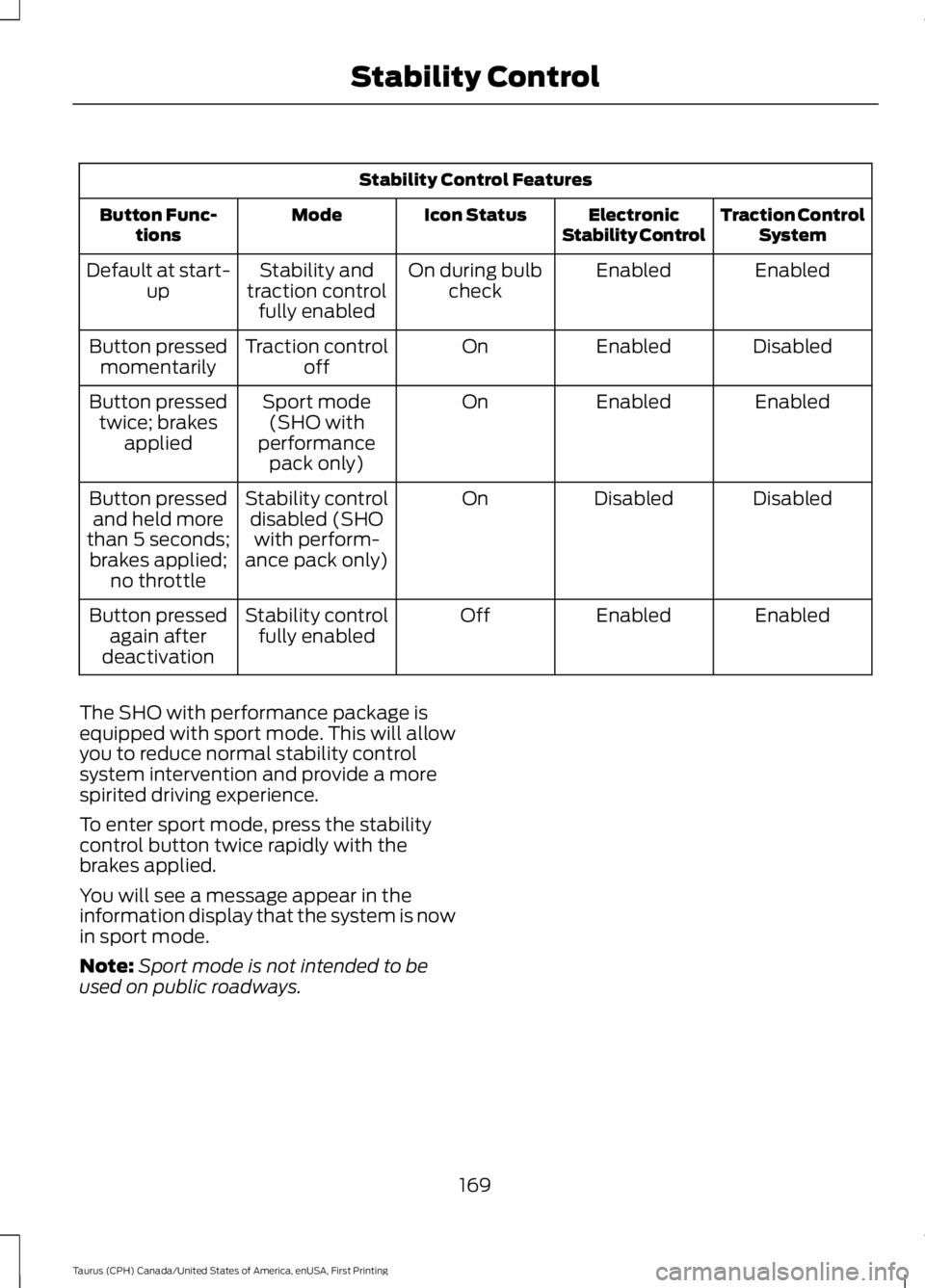
Stability Control Features
Traction ControlSystemElectronicStability ControlIcon StatusModeButton Func-tions
EnabledEnabledOn during bulbcheckStability andtraction controlfully enabled
Default at start-up
DisabledEnabledOnTraction controloffButton pressedmomentarily
EnabledEnabledOnSport mode(SHO withperformancepack only)
Button pressedtwice; brakesapplied
DisabledDisabledOnStability controldisabled (SHOwith perform-ance pack only)
Button pressedand held morethan 5 seconds;brakes applied;no throttle
EnabledEnabledOffStability controlfully enabledButton pressedagain afterdeactivation
The SHO with performance package isequipped with sport mode. This will allowyou to reduce normal stability controlsystem intervention and provide a morespirited driving experience.
To enter sport mode, press the stabilitycontrol button twice rapidly with thebrakes applied.
You will see a message appear in theinformation display that the system is nowin sport mode.
Note:Sport mode is not intended to beused on public roadways.
169
Taurus (CPH) Canada/United States of America, enUSA, First Printing
Stability Control
Page 173 of 504
PRINCIPLE OF OPERATION
WARNINGS
To help avoid personal injury, pleaseread and understand the limitationsof the system as contained in thissection. Sensing is only an aid for some(generally large and fixed) objects whenmoving on a flat surface at parking speeds.Certain objects with surfaces that absorbultrasonic waves, surrounding vehicle'sparking aid systems, traffic controlsystems, fluorescent lamps, inclementweather, air brakes, and external motorsand fans may also affect the function ofthe sensing system; this may includereduced performance or a false activation.
To help avoid personal injury, alwaysuse caution when in reverse (R) andwhen using the sensing system.
This system is not designed toprevent contact with small or movingobjects. The system is designed toprovide a warning to assist the driver indetecting large stationary objects to avoiddamaging your vehicle. The system maynot detect smaller objects, particularlythose close to the ground.
Certain add-on devices such as largetrailer hitches, bike or surfboard racksand any device that may block thenormal detection zone of the system, maycreate false beeps.
Note:Keep the sensors, located on thebumper or fascia, free from snow, ice andlarge accumulations of dirt. If the sensorsare covered, the system’s accuracy can beaffected. Do not clean the sensors withsharp objects.
Note:If your vehicle sustains damage tothe bumper or fascia, leaving it misalignedor bent, the sensing zone may be alteredcausing inaccurate measurement ofobstacles or false alarms.
Note:The sensing system cannot be turnedoff when a MyKey is present. See Principleof Operation (page 51).
Note:If you attach certain add-on devicessuch as a trailer or bike rack, the rear sensingsystem may detect that add-on device andtherefore provide warnings. It is suggestedthat you disable the rear sensing systemwhen you attach an add-on device to yourvehicle to prevent these warnings.
The sensing system warns the driver ofobstacles within a certain range of yourvehicle. The system turns on automaticallywhenever you switch the ignition on.
You can turn the system on oroff by pressing the parking aidbutton. If your vehicle does nothave a parking aid button, the system canbe switched off through the informationdisplay menu or from the pop-up messagethat appears once you shift thetransmission into reverse (R). See GeneralInformation (page 89).
If a fault is present in the system, a warningmessage appears in the informationdisplay. See Information Messages(page 98).
REAR PARKING AID
The rear sensors are only active when thetransmission is in reverse (R). As yourvehicle moves closer to the obstacle, therate of the audible warning increases.When the obstacle is less than 12 in(30 cm) away, the warning soundscontinuously. If the system detects astationary or receding object farther than12 in (30 cm) from the corners of thebumper, the tone sounds for only threeseconds. Once the system detects anobject approaching, the warning soundsagain.
170
Taurus (CPH) Canada/United States of America, enUSA, First Printing
Parking AidsE139213
Page 175 of 504
The system may not operate correctly inany of the following conditions:
•You use a spare tire or a tiresignificantly worn more than the othertires.
•One or more tires are improperlyinflated.
•You try to park on a tight curve.
Do not use the system if:
•You have attached a bike rack, traileror other object near the sensors on thefront or rear of your vehicle.
•You have attached an overhangingobject (surfboard) to the roof.
•The front bumper or side sensors aredamaged or obstructed (front bumpercover).
•The correct tire size is not in use on yourvehicle (for example, a mini-spare tire).
Using Active Park Assist
Press the button to turn thesystem on or off.
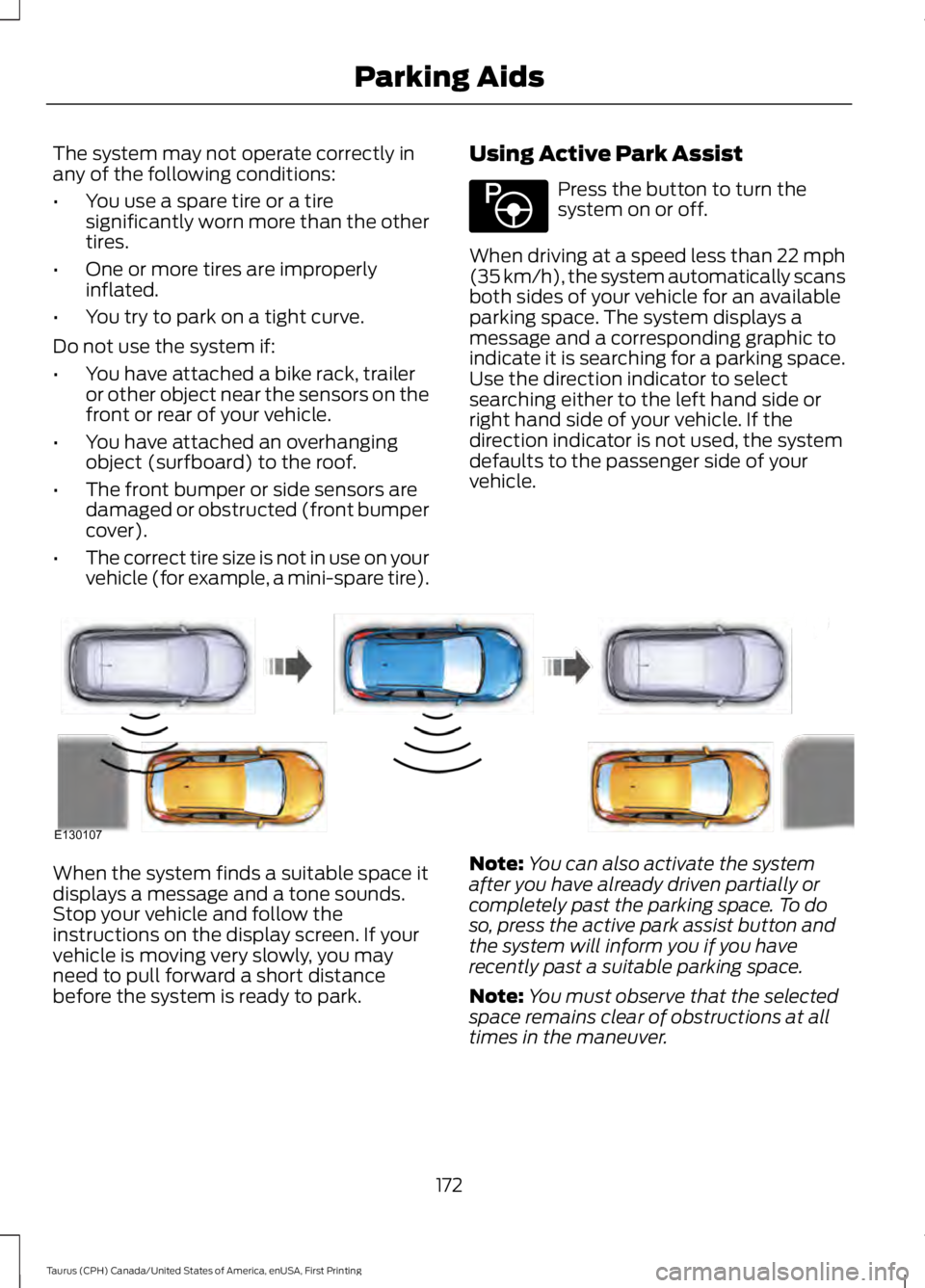
When driving at a speed less than 22 mph(35 km/h), the system automatically scansboth sides of your vehicle for an availableparking space. The system displays amessage and a corresponding graphic toindicate it is searching for a parking space.Use the direction indicator to selectsearching either to the left hand side orright hand side of your vehicle. If thedirection indicator is not used, the systemdefaults to the passenger side of yourvehicle.
When the system finds a suitable space itdisplays a message and a tone sounds.Stop your vehicle and follow theinstructions on the display screen. If yourvehicle is moving very slowly, you mayneed to pull forward a short distancebefore the system is ready to park.
Note:You can also activate the systemafter you have already driven partially orcompletely past the parking space. To doso, press the active park assist button andthe system will inform you if you haverecently past a suitable parking space.
Note:You must observe that the selectedspace remains clear of obstructions at alltimes in the maneuver.
172
Taurus (CPH) Canada/United States of America, enUSA, First Printing
Parking AidsE146186 E130107