park assist FORD TAURUS 2018 User Guide
[x] Cancel search | Manufacturer: FORD, Model Year: 2018, Model line: TAURUS, Model: FORD TAURUS 2018Pages: 510, PDF Size: 22.04 MB
Page 176 of 510
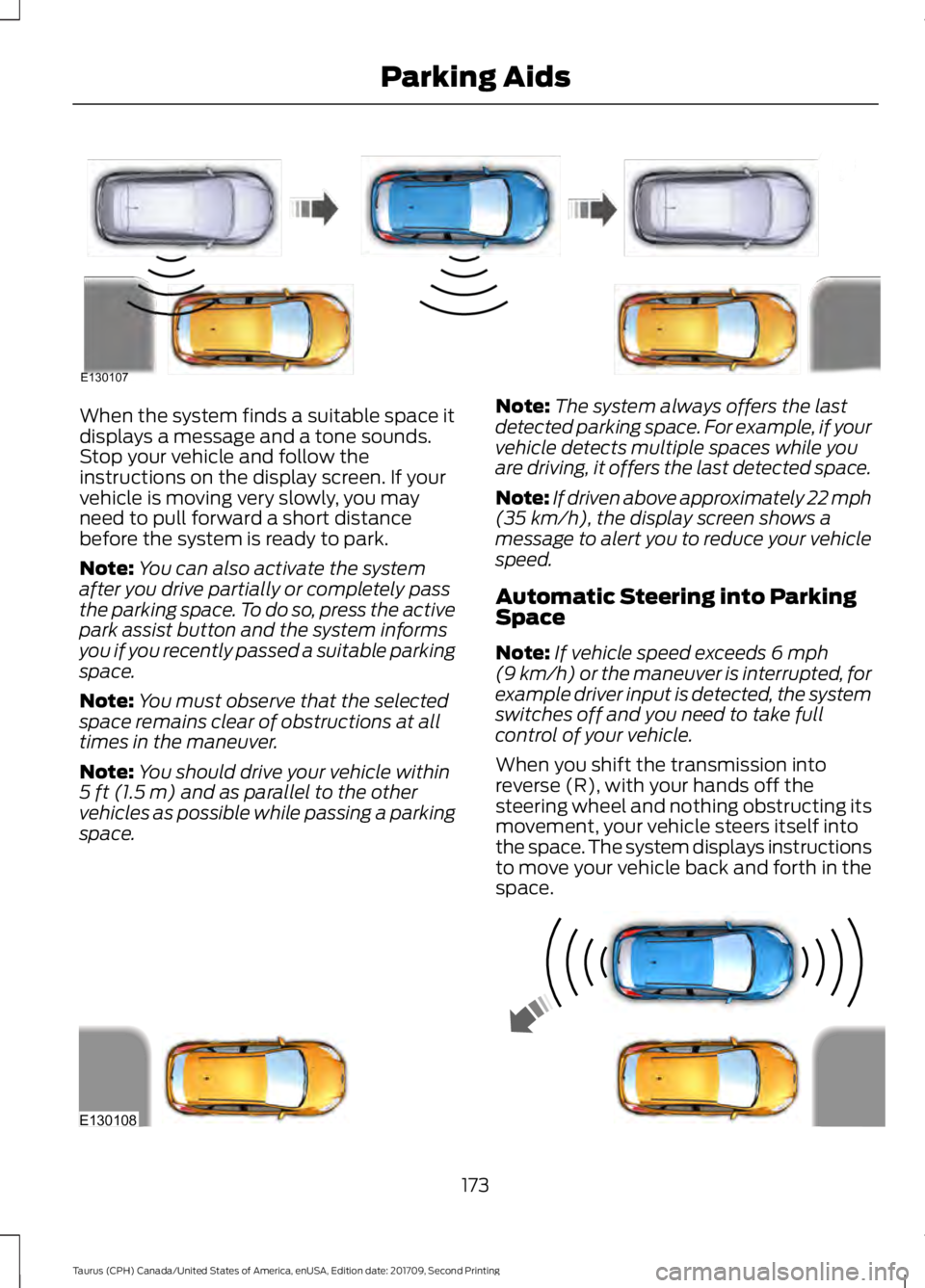
When the system finds a suitable space it
displays a message and a tone sounds.
Stop your vehicle and follow the
instructions on the display screen. If your
vehicle is moving very slowly, you may
need to pull forward a short distance
before the system is ready to park.
Note:
You can also activate the system
after you drive partially or completely pass
the parking space. To do so, press the active
park assist button and the system informs
you if you recently passed a suitable parking
space.
Note: You must observe that the selected
space remains clear of obstructions at all
times in the maneuver.
Note: You should drive your vehicle within
5 ft (1.5 m) and as parallel to the other
vehicles as possible while passing a parking
space. Note:
The system always offers the last
detected parking space. For example, if your
vehicle detects multiple spaces while you
are driving, it offers the last detected space.
Note: If driven above approximately 22 mph
(35 km/h)
, the display screen shows a
message to alert you to reduce your vehicle
speed.
Automatic Steering into Parking
Space
Note: If vehicle speed exceeds
6 mph
(9 km/h) or the maneuver is interrupted, for
example driver input is detected, the system
switches off and you need to take full
control of your vehicle.
When you shift the transmission into
reverse (R), with your hands off the
steering wheel and nothing obstructing its
movement, your vehicle steers itself into
the space. The system displays instructions
to move your vehicle back and forth in the
space. 173
Taurus (CPH) Canada/United States of America, enUSA, Edition date: 201709, Second Printing Parking AidsE130107 E130108
Page 177 of 510
When you think your vehicle has enough
space in front and behind it, or you hear a
solid tone from the parking aid
(accompanied by a touchscreen display
message and a chime), bring your vehicle
to a complete stop.
When automatic steering is complete, the
system displays a message and a chime
sounds, indicating that the active park
assist process is finished. You are
responsible for checking the parking job
and making any necessary corrections
before leaving your vehicle.
Deactivating the Park Assist
Feature
Manually deactivate the system by:
•
Pressing the active park assist button
during an active maneuver.
• Grabbing the steering wheel during an
active maneuver. •
Driving above approximately 22 mph
(35 km/h) for 30 seconds during an
active park search.
• Driving above
6 mph (9 km/h) during
automatic steering.
• Switching off the traction control
system.
Certain vehicle conditions can also
deactivate the system, such as:
• Traction control has activated.
• There is an anti-lock brake system
activation or failure.
If a problem occurs with the system, a
warning message displays accompanied
by a tone. Occasional system messages
may occur in normal operation. For
recurring or frequent system faults, contact
an authorized dealer to have your vehicle
serviced.
Troubleshooting the System The system does not look for a space
The traction control system may be off.
The transmission is in reverse (R). Your vehicle must be moving forward to detect a
parking space. The system does not offer a particular space
The sensors may be covered. For example, with snow, ice or dirt. Covered sensors can
affect the system's functionality
There is not enough room in the parking space for your vehicle to safely park.
There is not enough space for the parking maneuver on the opposite side of the parking
space.
174
Taurus (CPH) Canada/United States of America, enUSA, Edition date: 201709, Second Printing Parking Aids
Page 211 of 510
Before Towing a Trailer
Practice turning, stopping and backing up
to get the feel of your vehicle-trailer
combination before starting on a trip.
When turning, make wider turns so the
trailer wheels clear curbs and other
obstacles.
When Towing a Trailer
•
Do not drive faster than 70 mph
(113 km/h) during the first 500 mi
(800 km).
• Do not make full-throttle starts.
• Check your hitch, electrical connections
and trailer wheel lug nuts thoroughly
after you have traveled 50 mi (80 km).
• When stopped in congested or heavy
traffic during hot weather, place the
gearshift in position P to aid engine and
transmission cooling and to help A/C
performance.
• Turn off the speed control with heavy
loads or in hilly terrain. The speed
control may turn off automatically
when you are towing on long, steep
grades.
• Shift to a lower gear when driving down
a long or steep hill. Do not apply the
brakes continuously, as they may
overheat and become less effective.
• If your transmission is equipped with a
Grade Assist or Tow/Haul feature, use
this feature when towing. This provides
engine braking and helps eliminate
excessive transmission shifting for
optimum fuel economy and
transmission cooling.
• Allow more distance for stopping with
a trailer attached. Anticipate stops and
brake gradually.
• Avoid parking on a grade. However, if
you must park on a grade:
1. Turn the steering wheel to point your vehicle tires away from traffic flow. 2. Set your vehicle parking brake.
3. Place the automatic transmission in
park (P).
4. Place wheel chocks in front and back of the trailer wheels. Chocks are not
included with your vehicle.
Launching or Retrieving a Boat or
Personal Watercraft (PWC)
Note: Disconnect the wiring to the trailer
before backing the trailer into the water.
Note: Reconnect the wiring to the trailer
after
removing the trailer from the water.
When backing down a ramp during boat
launching or retrieval:
• Do not allow the static water level to
rise above the bottom edge of the rear
bumper.
• Do not allow waves to break higher
than
6 in (15 cm) above the bottom
edge of the rear bumper.
Exceeding these limits may allow water to
enter vehicle components:
• Causing internal damage to the
components.
• Affecting drivability, emissions, and
reliability.
Replace the rear axle lubricant anytime
the rear axle has been submerged in water.
Water may have contaminated the rear
axle lubricant, which is not normally
checked or changed unless a leak is
suspected or other axle repair is required.
208
Taurus (CPH) Canada/United States of America, enUSA, Edition date: 201709, Second Printing Towing
Page 250 of 510
Your vehicle has limited engine power
when in the fail-safe mode, drive your
vehicle with caution. Your vehicle does not
maintain high-speed operation and the
engine may operate poorly.
Remember that the engine is capable of
automatically shutting down to prevent
engine damage. In this situation:
1. Pull off the road as soon as safely
possible and switch the engine off.
2. If you are a member of a roadside assistance program, we recommend
that you contact your roadside
assistance service provider.
3. If this is not possible, wait a short period for the engine to cool.
4. Check the coolant level. If the coolant level is at or below the minimum mark,
add prediluted coolant immediately.
5. When the engine temperature cools, you can re-start the engine. Have your
vehicle checked as soon as possible to
minimize engine damage.
Note: Driving your vehicle without repair
increases the chance of engine damage.
Engine Coolant Temperature
Management (If Equipped) WARNING
To reduce the risk of crash and injury,
be prepared that the vehicle speed
may reduce and the vehicle may not
be able to accelerate with full power until
the coolant temperature reduces. If you tow a trailer with your vehicle, the
engine may temporarily reach a higher
temperature during severe operating
conditions, for example ascending a long
or steep grade in high ambient
temperatures. At this time, you may notice the coolant
temperature gauge moves toward the red
zone and a message may appear in the
information display.
You may notice a reduction in vehicle
speed caused by reduced engine power in
order to manage the engine coolant
temperature. Your vehicle may enter this
mode if certain high-temperature and
high-load conditions take place. The
amount of speed reduction depends on
vehicle loading, grade and ambient
temperature. If this occurs, there is no
need to stop your vehicle. You can
continue to drive.
The air conditioning may automatically
turn on and off during severe operating
conditions to protect the engine from
overheating. When the coolant
temperature decreases to the normal
operating temperature, the air conditioning
turns on.
If the coolant temperature gauge moves
fully into the red zone, or if the coolant
temperature warning or service engine
soon messages appear in your information
display, do the following:
1. Stop your vehicle as soon as it is safe
to do so. Fully apply the parking brake,
shift into park (P) or neutral (N).
2. Leave the engine running until the coolant temperature gauge needle
returns to the normal position. After
several minutes, if the temperature
does not drop, follow the remaining
steps.
3. Switch the engine off and wait for it to
cool. Check the coolant level.
4. If the coolant level is at or below the minimum mark, add prediluted coolant
immediately.
5. If the coolant level is normal, restart the engine and continue.
247
Taurus (CPH) Canada/United States of America, enUSA, Edition date: 201709, Second Printing Maintenance
Page 272 of 510
•
When inflating a tire or other objects,
use the black air hose only. Do not use
the transparent hose which is designed
for sealant application only.
• Operating the kit could cause an
electrical disturbance in radio, CD, and
DVD player operation.
What to do when a Tire Is
Punctured
A tire puncture within the tire tread area
can be repaired in two stages with the kit.
• In the first stage, the tire will be
reinflated with a sealing compound
and air. After the tire has been
reinflated, you will need to drive the
vehicle a short distance 4 mi (6 km) to
distribute the sealant in the tire.
• In the second stage, you will need to
check the tire pressure and adjust, if
necessary, to the vehicle tire inflation
pressure.
First Stage: Reinflating the Tire
with Sealing Compound and Air WARNINGS
Do not stand directly over the kit
while inflating the tire. If you notice
any unusual bulges or deformations
in the tire's sidewall during inflation, stop
and call roadside assistance. If the tire does not inflate to the
recommended tire pressure within
15 minutes, stop and call roadside
assistance. Preparation: Park the vehicle in a safe, level
and secure area, away from moving traffic.
Turn the hazard lights on. Apply the parking
brake and turn the engine off. Inspect the
flat tire for visible damage. Sealant compound contains latex. To
avoid any allergic reactions, use the
non-latex gloves in the accessory box on
the underside of the kit housing.
Do not remove any foreign object that has
pierced the tire. If a puncture is in the tire
sidewall, stop and call roadside assistance.
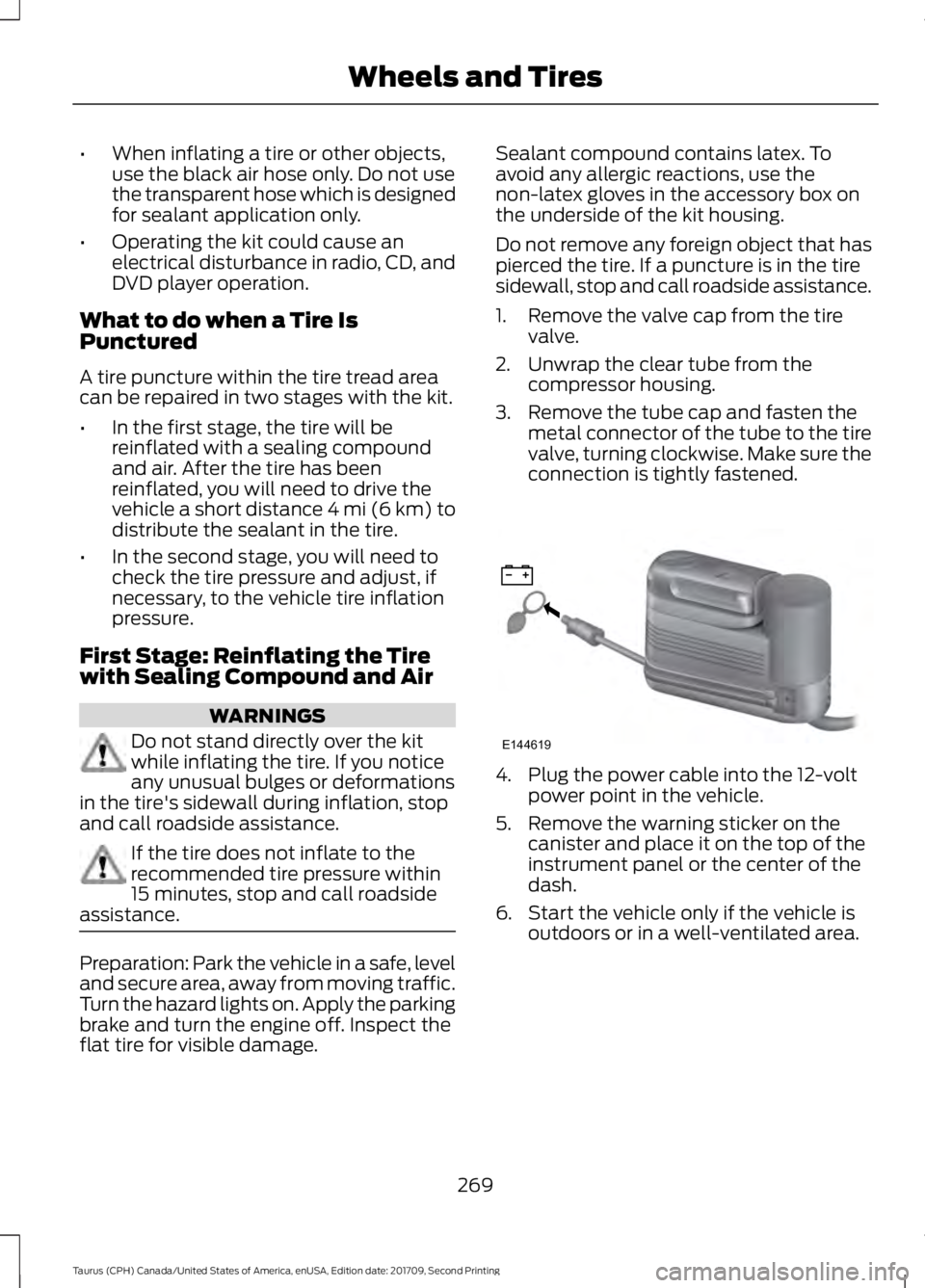
1. Remove the valve cap from the tire
valve.
2. Unwrap the clear tube from the compressor housing.
3. Remove the tube cap and fasten the metal connector of the tube to the tire
valve, turning clockwise. Make sure the
connection is tightly fastened. 4. Plug the power cable into the 12-volt
power point in the vehicle.
5. Remove the warning sticker on the canister and place it on the top of the
instrument panel or the center of the
dash.
6. Start the vehicle only if the vehicle is outdoors or in a well-ventilated area.
269
Taurus (CPH) Canada/United States of America, enUSA, Edition date: 201709, Second Printing Wheels and TiresE144619
Page 382 of 510
Safety Information
WARNING
Driving while distracted can result in
loss of vehicle control, crash and
injury. We strongly recommend that
you use extreme caution when using any
device that may take your focus off the
road. Your primary responsibility is the safe
operation of your vehicle. We recommend
against the use of any hand-held device
while driving and encourage the use of
voice-operated systems when possible.
Make sure you are aware of all applicable
local laws that may affect the use of
electronic devices while driving. •
Do not attempt to service or repair the
system. Have an authorized dealer
check your vehicle.
• Do not operate playing devices if the
power cords or cables are broken, split
or damaged. Place cords and cables
out of the way, so they do not interfere
with the operation of pedals, seats,
compartments or safe driving abilities. •
Do not leave playing devices in your
vehicle during extreme conditions as it
could cause them damage. See your
device's user guide for further
information.
• For your safety, some SYNC 3 functions
are speed-dependent. Their use is
limited to when your vehicle is traveling
at speeds under 3 mph (5 km/h). Make
sure that you review your device's
manual before using it with SYNC 3.
Speed-restricted Features
Some features of this system may be too
difficult to use while your vehicle is moving
so they are restricted from use unless your
vehicle is stationary.
• Screens crowded with information,
such as Point of Interest reviews and
ratings, SiriusXM Traffic and Travel Link
sports scores, movie times or ski
conditions.
• Any action that requires you to use a
keyboard is restricted, such as entering
a navigation destination or editing
information.
• All lists are limited so the user can view
fewer entries (such as phone contacts
or recent phone call entries).
See the following table for more specific
examples. Restricted features
Pairing a Bluetooth phone.
Cellular Phone
Browsing of list entries is limited for phone contacts and
recent phone calls.
Editing the keypad code.
System Functionality
Enabling Valet Mode.
Editing settings while the rear view camera or active park
assist are active.
379
Taurus (CPH) Canada/United States of America, enUSA, Edition date: 201709, Second Printing SYNC™ 3
Page 451 of 510
For a complete listing of the accessories
that are available for your vehicle, please
contact your authorized dealer or visit the
online store web site:
Web address (United States)
www.Accessories.Ford.com Web address (Canada)
www.Accessories.Ford.ca
We will repair or replace any properly
authorized dealer-installed Ford Original
Accessory found to be defective in
factory-supplied materials or workmanship
during the warranty period, as well as any
component damaged by the defective
accessories.
We will warrant your Ford Original
accessory through the warranty that
provides the greatest benefit:
• 24 months, unlimited mileage.
• The remainder of your new vehicle
limited warranty.
Contact an authorized dealer for details
and a copy of the warranty.
Exterior Style
• Chrome mirror caps.
• Hood deflector*.
• Moon roof deflector.
• Rear spoiler.
• Side window deflector*.
• Splash guards.
Interior Style
• All-weather floor mats.
• Ambient lighting.
• Carpeted floor mats. •
Sport pedals.
• Table cradle*.
Lifestyle
• Ash cup (smoker's package).
• Car cover*.
• Cargo area protector.
• Cargo net.
• Cargo organization and management.
Peace of Mind
• Bumper-mounted parking sensors*.
• First aid kit*.
• Locking fuel plug.
• Remote start.
• Roadside assistance kits*.
• Vehicle security system.
• Wheel locks.
*Ford Licensed Accessories. The accessory
manufacturer designs, develops and
therefore warrants Ford Licensed
Accessories, and does not design or test
these accessories to Ford Motor Company
engineering requirements. Contact an
authorized Ford dealer for the
manufacturer ’s limited warranty details,
and request a copy of the Ford Licensed
Accessories product limited warranty from
the accessory manufacturer.
448
Taurus (CPH) Canada/United States of America, enUSA, Edition date: 201709, Second Printing Accessories
Page 454 of 510
Less Cost to Properly Maintain Your
Vehicle
Ford Protect extended service plan also
offers a Premium Maintenance Plan that
covers all scheduled maintenance, and
selected wear items. The coverage is
prepaid, so you never have to worry about
the cost of your vehicle
’s maintenance.
Covered maintenance includes:
• Windshield wiper blades.
• Spark plugs.
• The clutch disc (if equipped).
• Brake pads and linings.
• Shock absorbers.
• Struts.
• Engine Belts.
• Engine coolant hoses, clamps and
o-rings.
• Diesel exhaust fluid replenishment (if
equipped).
• Cabin air filter replacement every
20,000 mi (32,000 km) (electric
vehicles only).
Interest Free Finance Options
Just a 10% down payment will provide you
with an affordable, no interest, no fee
payment program allowing you all the
security and benefits Ford Protect
extended service plan has to offer while
paying over time. You are pre-approved
with no credit check or hassles. To learn
more, call our Ford Protect extended
service plan specialists at 800-367-3377.
Ford Protect Extended Service Plan
P.O. Box 321067
Detroit, MI 48232 Ford Protect Extended Service
Plan (CANADA ONLY)
You can get more protection for your
vehicle by purchasing a Ford Protect
extended service plan. Ford Protect
extended service plan is the only service
contract backed by Ford Motor Company
of Canada, Limited. Depending on the plan
you purchase, Ford Protect extended
service plan provides benefits such as:
•
Rental reimbursement.
• Coverage for certain maintenance and
wear items.
• Protection against repair costs after
your New Vehicle Limited Warranty
Coverage expires.
• Roadside Assistance benefits.
There are several Ford Protect extended
service plans available in various time,
distance and deductible combinations.
Each plan is tailored to fit your own driving
needs, including reimbursement for towing
and rental. When you purchase Ford
Protect extended service plan, you receive
added peace-of-mind protection
throughout Canada, the United States and
Mexico, provided by a network of
participating authorized Ford Motor
Company dealers.
Note: Repairs performed outside of
Canada, the United States and Mexico are
not eligible for Ford Protect extended
service plan coverage.
This information is subject to change. For
more information; visit your local Ford of
Canada dealer or www.ford.ca to find the
Ford Protect extended service plan that is
right for you.
451
Taurus (CPH) Canada/United States of America, enUSA, Edition date: 201709, Second Printing Ford Protect
Page 500 of 510
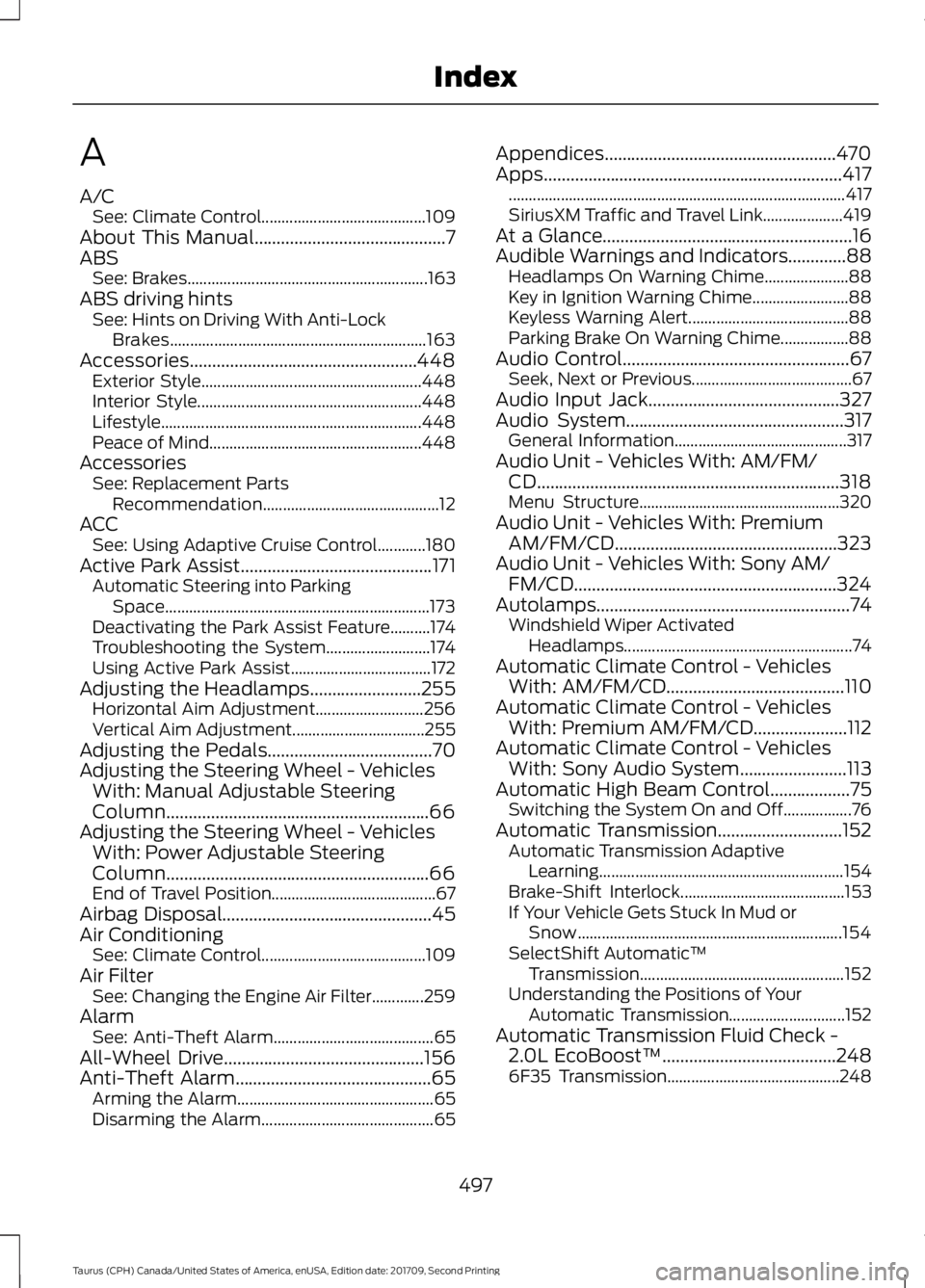
A
A/C
See: Climate Control......................................... 109
About This Manual...........................................7
ABS See: Brakes............................................................ 163
ABS driving hints See: Hints on Driving With Anti-Lock
Brakes................................................................ 163
Accessories...................................................448 Exterior Style....................................................... 448
Interior Style........................................................ 448
Lifestyle................................................................. 448
Peace of Mind..................................................... 448
Accessories See: Replacement Parts
Recommendation............................................ 12
ACC See: Using Adaptive Cruise Control............180
Active Park Assist
...........................................171
Automatic Steering into Parking
Space.................................................................. 173
Deactivating the Park Assist Feature..........174
Troubleshooting the System.......................... 174
Using Active Park Assist................................... 172
Adjusting the Headlamps.........................255 Horizontal Aim Adjustment........................... 256
Vertical Aim Adjustment................................. 255
Adjusting the Pedals.....................................70
Adjusting the Steering Wheel - Vehicles With: Manual Adjustable Steering
Column...........................................................66
Adjusting the Steering Wheel - Vehicles With: Power Adjustable Steering
Column...........................................................66
End of Travel Position......................................... 67
Airbag Disposal...............................................45
Air Conditioning See: Climate Control......................................... 109
Air Filter See: Changing the Engine Air Filter.............259
Alarm See: Anti-Theft Alarm........................................ 65
All-Wheel Drive.............................................156
Anti-Theft Alarm
............................................65
Arming the Alarm................................................. 65
Disarming the Alarm........................................... 65Appendices....................................................470
Apps...................................................................417
........................................................................\
............ 417
SiriusXM Traffic and Travel Link.................... 419
At a Glance........................................................16
Audible Warnings and Indicators.............88 Headlamps On Warning Chime..................... 88
Key in Ignition Warning Chime........................ 88
Keyless Warning Alert........................................ 88
Parking Brake On Warning Chime.................88
Audio Control...................................................67 Seek, Next or Previous........................................ 67
Audio Input Jack...........................................327
Audio System.................................................317 General Information........................................... 317
Audio Unit - Vehicles With: AM/FM/ CD....................................................................318
Menu Structure.................................................. 320
Audio Unit - Vehicles With: Premium AM/FM/CD..................................................323
Audio Unit - Vehicles With: Sony AM/ FM/CD...........................................................324
Autolamps.........................................................74 Windshield Wiper Activated
Headlamps......................................................... 74
Automatic Climate Control - Vehicles With: AM/FM/CD
........................................110
Automatic Climate Control - Vehicles With: Premium AM/FM/CD
.....................112
Automatic Climate Control - Vehicles With: Sony Audio System
........................113
Automatic High Beam Control..................75
Switching the System On and Off.................76
Automatic Transmission
............................152
Automatic Transmission Adaptive
Learning............................................................. 154
Brake-Shift Interlock......................................... 153
If Your Vehicle Gets Stuck In Mud or Snow.................................................................. 154
SelectShift Automatic ™
Transmission................................................... 152
Understanding the Positions of Your Automatic Transmission............................. 152
Automatic Transmission Fluid Check - 2.0L EcoBoost™
.......................................248
6F35 Transmission........................................... 248
497
Taurus (CPH) Canada/United States of America, enUSA, Edition date: 201709, Second Printing Index
Page 504 of 510
Why Maintain Your Vehicle at Your
Dealership?..................................................... 452
Getting Assistance Outside the U.S. and Canada..........................................................222
Getting the Services You Need................219 Away From Home............................................... 219
Global Opening...............................................79
Opening the Windows........................................ 79
H
Handbrake See: Parking Brake............................................. 164
Hazard Flashers
.............................................214
Headlamp Adjusting See: Adjusting the Headlamps..................... 255
Headlamp Exit Delay.....................................75
Headrest See: Head Restraints.......................................... 119
Head Restraints
.............................................119
Adjusting the Head Restraint......................... 120
Tilting Head Restraints ..................................... 121
Heated Seats
..................................................126
Rear Heated Seats............................................. 126
Heated Steering Wheel
...............................68
Heated Windows and Mirrors....................117 Heated Exterior Mirror........................................ 117
Heated Rear Window.......................................... 117
Heating See: Climate Control......................................... 109
Hill Start Assist..............................................164 Switching the System On and Off...............165
Using Hill Start Assist....................................... 164
Hints on Controlling the Interior Climate...........................................................115
Defogging the Side Windows in Cold Weather.............................................................. 117
General Hints......................................................... 115
Quickly Cooling the Interior............................. 116
Quickly Heating the Interior............................. 116
Recommended Settings for Cooling............117
Recommended Settings for Heating...........116
Hints on Driving With Anti-Lock Brakes............................................................163
Home Screen
................................................382
Hood Lock See: Opening and Closing the Hood...........237 I
Ignition Switch
...............................................135
In California (U.S. Only)............................220
Information Display Control......................68
Information Displays....................................89
General Information........................................... 89
Information Messages
.................................98
Adaptive Cruise Control.................................... 98
AdvanceTrac ™..................................................... 99
Alarm........................................................................\
99
All Wheel Drive................................................... 100
Automatic Engine Shutdown.......................... 99
Automatic High Beam Control....................... 99
Battery and Charging System....................... 100
Blind Spot Information and Cross Traffic Alert System..................................................... 101
Brake System........................................................ 101
Collision Warning System............................... 102
Doors and Locks................................................. 102
Driver Alert............................................................ 102
Fuel........................................................................\
.. 102
Keys and Intelligent Access............................ 103
Lane Keeping System....................................... 103
Maintenance........................................................ 104
MyKey..................................................................... 104
Park Aid.................................................................. 105
Passenger Sensing System Message.........105
Power Steering.................................................... 106
Reminder Messages.......................................... 105
Remote Start....................................................... 106
Seats....................................................................... 106
Starting System.................................................. 106
Tire Pressure Monitoring System.................. 107
Traction Control................................................... 107
Transmission........................................................ 107
Installing Child Restraints............................19 Child Seats............................................................... 19
Using Lap and Shoulder Belts......................... 20
Using Lower Anchors and Tethers for CHildren (LATCH)............................................ 22
Using Tether Straps............................................. 23
Instrument Cluster
........................................83
Instrument Lighting Dimmer......................74
Instrument Panel Overview........................16
Interior Lamps
..................................................77
Interior Luggage Compartment Release............................................................62
501
Taurus (CPH) Canada/United States of America, enUSA, Edition date: 201709, Second Printing Index