cooling FORD TAURUS 2018 Owner's Manual
[x] Cancel search | Manufacturer: FORD, Model Year: 2018, Model line: TAURUS, Model: FORD TAURUS 2018Pages: 510, PDF Size: 22.04 MB
Page 406 of 510
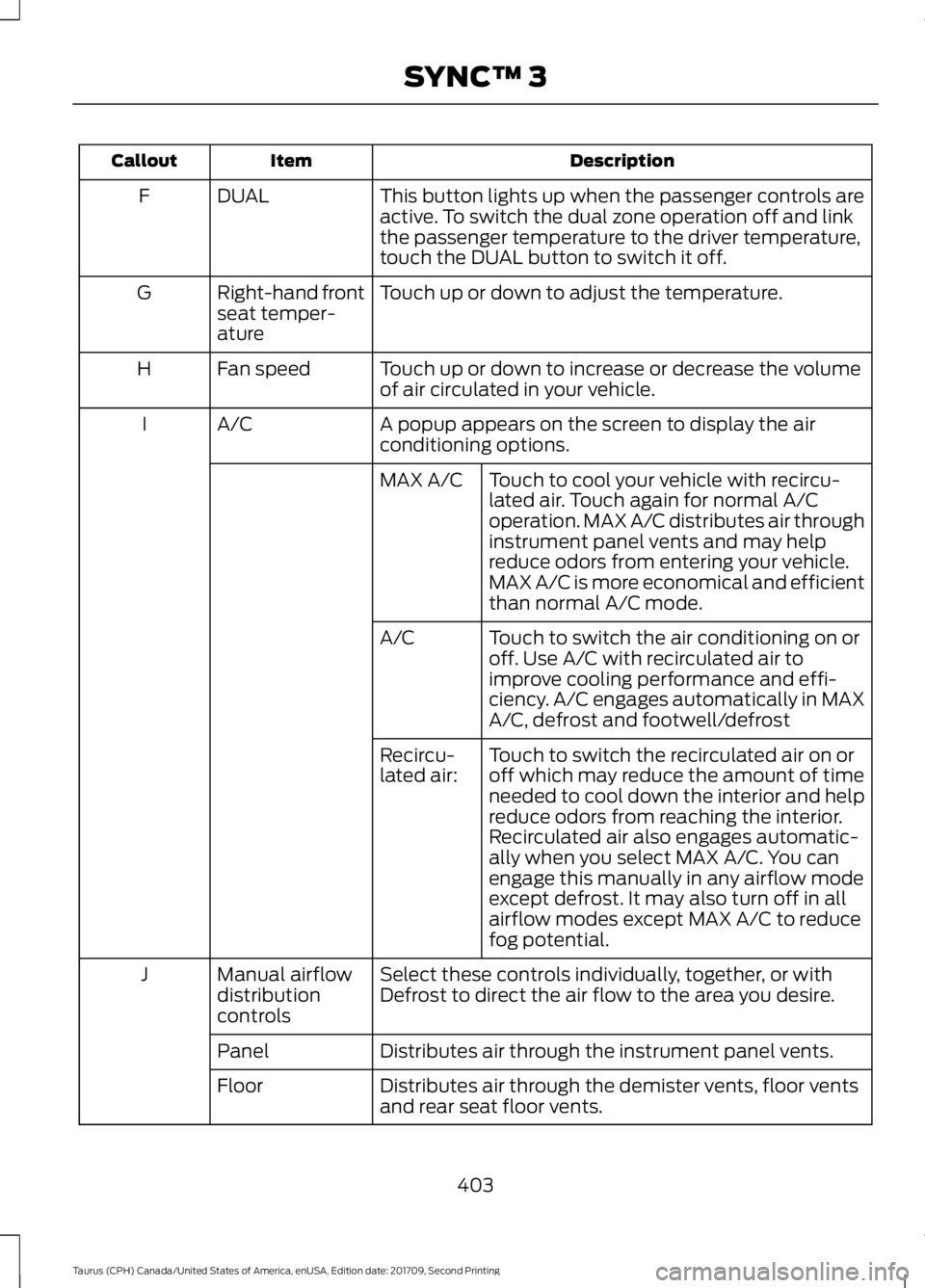
Description
Item
Callout
This button lights up when the passenger controls are
active. To switch the dual zone operation off and link
the passenger temperature to the driver temperature,
touch the DUAL button to switch it off.
DUAL
F
Touch up or down to adjust the temperature.
Right-hand front
seat temper-
ature
G
Touch up or down to increase or decrease the volume
of air circulated in your vehicle.
Fan speed
H
A popup appears on the screen to display the air
conditioning options.
A/C
I
Touch to cool your vehicle with recircu-
lated air. Touch again for normal A/C
operation. MAX A/C distributes air through
instrument panel vents and may help
reduce odors from entering your vehicle.
MAX A/C is more economical and efficient
than normal A/C mode.
MAX A/C
Touch to switch the air conditioning on or
off. Use A/C with recirculated air to
improve cooling performance and effi-
ciency. A/C engages automatically in MAX
A/C, defrost and footwell/defrost
A/C
Touch to switch the recirculated air on or
off which may reduce the amount of time
needed to cool down the interior and help
reduce odors from reaching the interior.
Recirculated air also engages automatic-
ally when you select MAX A/C. You can
engage this manually in any airflow mode
except defrost. It may also turn off in all
airflow modes except MAX A/C to reduce
fog potential.
Recircu-
lated air:
Select these controls individually, together, or with
Defrost to direct the air flow to the area you desire.
Manual airflow
distribution
controls
J
Distributes air through the instrument panel vents.
Panel
Distributes air through the demister vents, floor vents
and rear seat floor vents.
Floor
403
Taurus (CPH) Canada/United States of America, enUSA, Edition date: 201709, Second Printing SYNC™ 3
Page 457 of 510
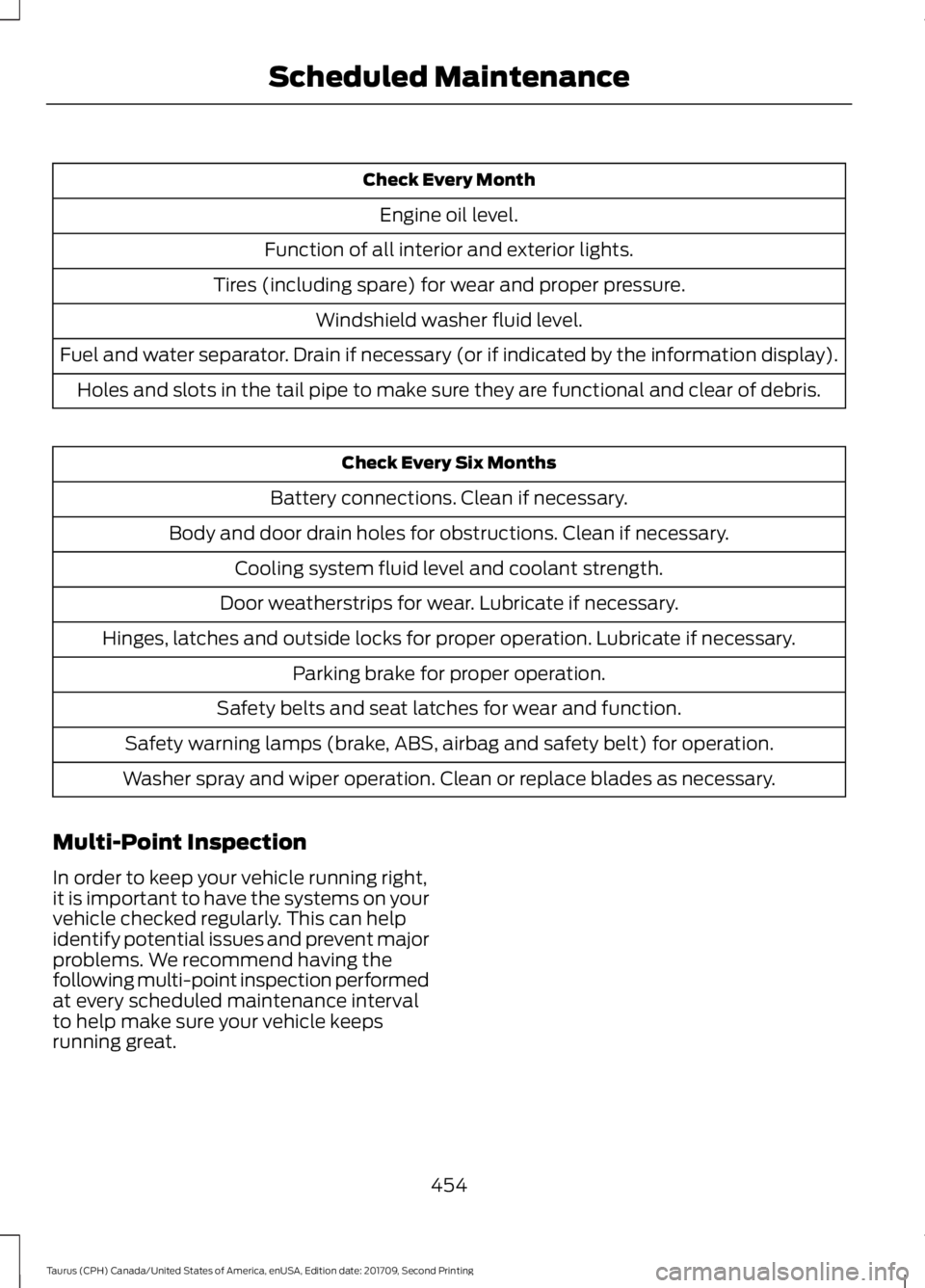
Check Every Month
Engine oil level.
Function of all interior and exterior lights.
Tires (including spare) for wear and proper pressure. Windshield washer fluid level.
Fuel and water separator. Drain if necessary (or if indicated by the information display). Holes and slots in the tail pipe to make sure they are functional and clear of debris. Check Every Six Months
Battery connections. Clean if necessary.
Body and door drain holes for obstructions. Clean if necessary. Cooling system fluid level and coolant strength.
Door weatherstrips for wear. Lubricate if necessary.
Hinges, latches and outside locks for proper operation. Lubricate if necessary. Parking brake for proper operation.
Safety belts and seat latches for wear and function.
Safety warning lamps (brake, ABS, airbag and safety belt) for operation.
Washer spray and wiper operation. Clean or replace blades as necessary.
Multi-Point Inspection
In order to keep your vehicle running right,
it is important to have the systems on your
vehicle checked regularly. This can help
identify potential issues and prevent major
problems. We recommend having the
following multi-point inspection performed
at every scheduled maintenance interval
to help make sure your vehicle keeps
running great.
454
Taurus (CPH) Canada/United States of America, enUSA, Edition date: 201709, Second Printing Scheduled Maintenance
Page 459 of 510
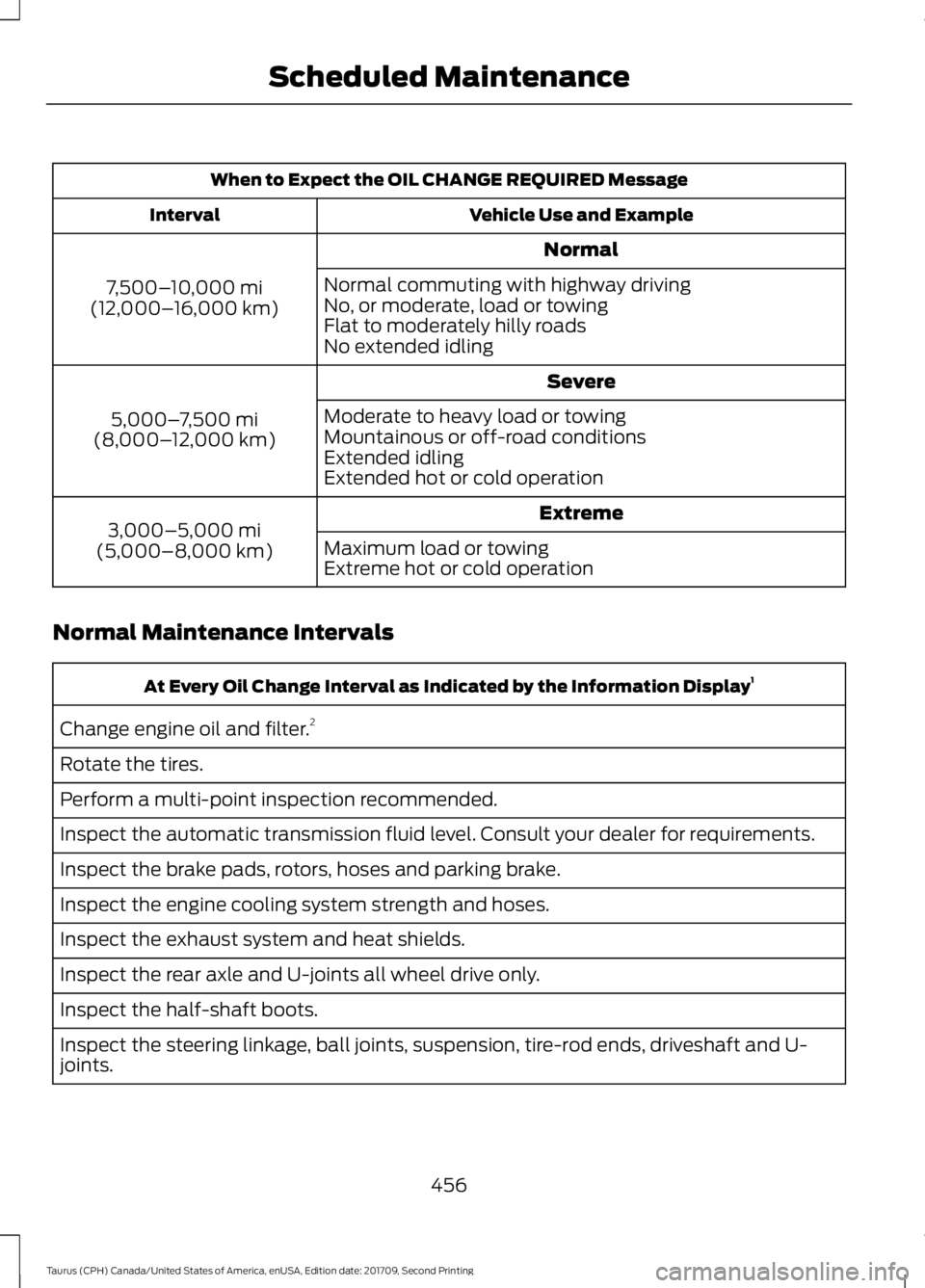
When to Expect the OIL CHANGE REQUIRED Message
Vehicle Use and Example
Interval
Normal
7,500– 10,000 mi
(12,000– 16,000 km) Normal commuting with highway driving
No, or moderate, load or towing
Flat to moderately hilly roads
No extended idling
Severe
5,000– 7,500 mi
(8,000– 12,000 km) Moderate to heavy load or towing
Mountainous or off-road conditions
Extended idling
Extended hot or cold operation
Extreme
3,000–5,000 mi
(5,000–8,000 km) Maximum load or towing
Extreme hot or cold operation
Normal Maintenance Intervals At Every Oil Change Interval as Indicated by the Information Display
1
Change engine oil and filter. 2
Rotate the tires.
Perform a multi-point inspection recommended.
Inspect the automatic transmission fluid level. Consult your dealer for requirements.
Inspect the brake pads, rotors, hoses and parking brake.
Inspect the engine cooling system strength and hoses.
Inspect the exhaust system and heat shields.
Inspect the rear axle and U-joints all wheel drive only.
Inspect the half-shaft boots.
Inspect the steering linkage, ball joints, suspension, tire-rod ends, driveshaft and U-
joints.
456
Taurus (CPH) Canada/United States of America, enUSA, Edition date: 201709, Second Printing Scheduled Maintenance
Page 502 of 510
Exterior Plastic Parts.........................................
261
Stripes or Graphics............................................. 261
Underbody............................................................ 261
Under Hood.......................................................... 261
Cleaning the Instrument Panel and Instrument Cluster Lens.........................263
Cleaning the Interior...................................263
Cleaning the Wheels..................................264
Cleaning the Windows and Wiper Blades...........................................................262
Clearing All MyKeys.......................................53
Climate.............................................................401
Climate Control
............................................109
Climate Controlled Seats...........................127 Cooled Seats......................................................... 127
Heated Seats........................................................ 127
Collision Warning System..........................197 PRINCIPLE OF OPERATION............................ 197
Coolant Check See: Engine Coolant Check............................ 244
Crash Sensors and Airbag Indicator.......44
Creating a MyKey............................................52 Programming/Changing Configurable
Settings............................................................... 52
Cross Traffic Alert.........................................194 False Alerts........................................................... 196
Switching the System Off and On...............196
System Errors....................................................... 196
System Lights, Messages and Audible Alerts.................................................................. 195
System Limitations............................................ 196
Using the System............................................... 194
Cruise Control.................................................68 Principle of Operation....................................... 179
Cruise control See: Using Cruise Control................................ 179
Customer Assistance..................................219
D
Data Recording
..................................................9
Event Data Recording.......................................... 10
Service Data Recording........................................ 9
Daytime Running Lamps
.............................75
Direction Indicators........................................76
Doors and Locks..............................................57
Driver Alert
......................................................186
PRINCIPLE OF OPERATION........................... 186USING DRIVER ALERT.....................................
186
Driver and Passenger Airbags...................39 Children and Airbags.......................................... 40
Proper Driver and Front Passenger Seating Adjustment........................................................ 39
Driving Aids.....................................................186
Driving Hints...................................................210
Driving Through Water.................................211
DRL See: Daytime Running Lamps......................... 75
E
Economical Driving
......................................210
Emission Law.................................................148 Noise Emissions Warranty, Prohibited
Tampering Acts and Maintenance..........149
Tampering With a Noise Control System............................................................... 148
End User License Agreement..................470 VEHICLE SOFTWARE END USER LICENSE
AGREEMENT (EULA) ................................. 470
Engine Block Heater....................................138 Using the Engine Block Heater...................... 139
Engine Coolant Check...............................244 Adding Coolant.................................................. 244
Coolant Change................................................. 246
Engine Coolant Temperature Management.................................................. 247
Fail-Safe Cooling............................................... 246
Recycled Coolant............................................... 245
Severe Climates................................................. 246
Engine Emission Control...........................148
Engine Immobilizer See: Passive Anti-Theft System..................... 64
Engine Oil Check..........................................242 Adding Engine Oil............................................... 242
Engine Oil Dipstick - 2.0L EcoBoost™.................................................242
Engine Oil Dipstick - 3.5L Duratec/3.5L Ecoboost™.................................................242
Engine Specifications - 2.0L EcoBoost™.................................................297
Drivebelt Routing............................................... 297
Engine Specifications - 3.5L Duratec..........................................................297
Drivebelt Routing............................................... 298
499
Taurus (CPH) Canada/United States of America, enUSA, Edition date: 201709, Second Printing Index
Page 504 of 510
Why Maintain Your Vehicle at Your
Dealership?..................................................... 452
Getting Assistance Outside the U.S. and Canada..........................................................222
Getting the Services You Need................219 Away From Home............................................... 219
Global Opening...............................................79
Opening the Windows........................................ 79
H
Handbrake See: Parking Brake............................................. 164
Hazard Flashers
.............................................214
Headlamp Adjusting See: Adjusting the Headlamps..................... 255
Headlamp Exit Delay.....................................75
Headrest See: Head Restraints.......................................... 119
Head Restraints
.............................................119
Adjusting the Head Restraint......................... 120
Tilting Head Restraints ..................................... 121
Heated Seats
..................................................126
Rear Heated Seats............................................. 126
Heated Steering Wheel
...............................68
Heated Windows and Mirrors....................117 Heated Exterior Mirror........................................ 117
Heated Rear Window.......................................... 117
Heating See: Climate Control......................................... 109
Hill Start Assist..............................................164 Switching the System On and Off...............165
Using Hill Start Assist....................................... 164
Hints on Controlling the Interior Climate...........................................................115
Defogging the Side Windows in Cold Weather.............................................................. 117
General Hints......................................................... 115
Quickly Cooling the Interior............................. 116
Quickly Heating the Interior............................. 116
Recommended Settings for Cooling............117
Recommended Settings for Heating...........116
Hints on Driving With Anti-Lock Brakes............................................................163
Home Screen
................................................382
Hood Lock See: Opening and Closing the Hood...........237 I
Ignition Switch
...............................................135
In California (U.S. Only)............................220
Information Display Control......................68
Information Displays....................................89
General Information........................................... 89
Information Messages
.................................98
Adaptive Cruise Control.................................... 98
AdvanceTrac ™..................................................... 99
Alarm........................................................................\
99
All Wheel Drive................................................... 100
Automatic Engine Shutdown.......................... 99
Automatic High Beam Control....................... 99
Battery and Charging System....................... 100
Blind Spot Information and Cross Traffic Alert System..................................................... 101
Brake System........................................................ 101
Collision Warning System............................... 102
Doors and Locks................................................. 102
Driver Alert............................................................ 102
Fuel........................................................................\
.. 102
Keys and Intelligent Access............................ 103
Lane Keeping System....................................... 103
Maintenance........................................................ 104
MyKey..................................................................... 104
Park Aid.................................................................. 105
Passenger Sensing System Message.........105
Power Steering.................................................... 106
Reminder Messages.......................................... 105
Remote Start....................................................... 106
Seats....................................................................... 106
Starting System.................................................. 106
Tire Pressure Monitoring System.................. 107
Traction Control................................................... 107
Transmission........................................................ 107
Installing Child Restraints............................19 Child Seats............................................................... 19
Using Lap and Shoulder Belts......................... 20
Using Lower Anchors and Tethers for CHildren (LATCH)............................................ 22
Using Tether Straps............................................. 23
Instrument Cluster
........................................83
Instrument Lighting Dimmer......................74
Instrument Panel Overview........................16
Interior Lamps
..................................................77
Interior Luggage Compartment Release............................................................62
501
Taurus (CPH) Canada/United States of America, enUSA, Edition date: 201709, Second Printing Index
Page 509 of 510

Switching Adaptive Cruise Control
On........................................................................\
180
Switching to Normal Cruise Control...........185
System Not Available....................................... 184
Using All-Wheel Drive.................................156 Driving In Special Conditions With
All-Wheel Drive (AWD)............................... 158
Operating AWD Vehicles With Mismatched Tires.................................................................... 158
Operating AWD Vehicles With Spare Tires..................................................................... 157
Using Cruise Control....................................179
Switching Cruise Control Off.......................... 179
Switching Cruise Control On........................... 179
Using MyKey With Remote Start Systems..........................................................55
Using Snow Chains
.....................................286
Using Stability Control...............................168
Using Summer Tires...................................286
Using SYNC™ With Your Media Player
..............................................................351
Accessing Your Play Menu............................. 356
Connecting Your Digital Media Player to the USB Port............................................................ 351
Media Menu Features...................................... 354
Media Voice Commands................................. 353
System Settings................................................. 358
What's Playing?................................................. 353
Using SYNC™ With Your Phone
............335
Accessing Features Through the Phone
Menu.................................................................. 339
Accessing Your Phone Settings................... 344
Making a Call....................................................... 338
Pairing Subsequent Cell Phones.................336
Pairing Your Cell Phone for the First Time ........................................................................\
..... 335
Phone Options during an Active Call.........338
Phone Voice Commands................................ 336
Receiving Calls.................................................... 338
System Settings................................................. 345
Text Messaging................................................... 342
Using Traction Control...............................166 Switching the System Off............................... 166
System Indicator Lights and Messages.......................................................... 166
Using a Switch..................................................... 166
Using the Information Display Controls............................................................. 166Using Voice Recognition............................332
Audio Voice Commands................................. 385
Climate Voice Commands............................. 386
Initiating a Voice Session................................ 332
Mobile App Voice Commands...................... 389
Navigation Voice Commands....................... 388
Phone Voice Commands............................... 386
SiriusXM Traffic and Travel Link Voice Commands..................................................... 389
System Interaction and Feedback..............333
Voice Settings Commands............................ 390
Utilizing the Mediation/Arbitration Program (Canada Only).........................222
V
Vehicle Care..................................................260 General Information......................................... 260
Vehicle Certification Label.......................303
Vehicle Identification Number
................302
Vehicle Storage............................................265 Battery................................................................... 266
Body........................................................................\
265
Brakes.................................................................... 266
Cooling system................................................... 266
Engine.................................................................... 265
Fuel system.......................................................... 265
General.................................................................. 265
Miscellaneous..................................................... 266
Removing Vehicle From Storage.................266
Tires........................................................................\
266
Ventilation See: Climate Control......................................... 109
VIN See: Vehicle Identification Number............302
Voice Control
...................................................68
W
Warning Lamps and Indicators................85 Adaptive Cruise Control.................................... 85
Anti-Lock Braking System................................ 85
Automatic High Beam Control....................... 85
Battery...................................................................... 85
Blind Spot Monitor.............................................. 86
Brake System........................................................ 86
Cruise Control....................................................... 86
Direction Indicator............................................... 86
506
Taurus (CPH) Canada/United States of America, enUSA, Edition date: 201709, Second Printing Index