door lock FORD TAURUS 2018 Owner's Manual
[x] Cancel search | Manufacturer: FORD, Model Year: 2018, Model line: TAURUS, Model: FORD TAURUS 2018Pages: 510, PDF Size: 22.04 MB
Page 105 of 510
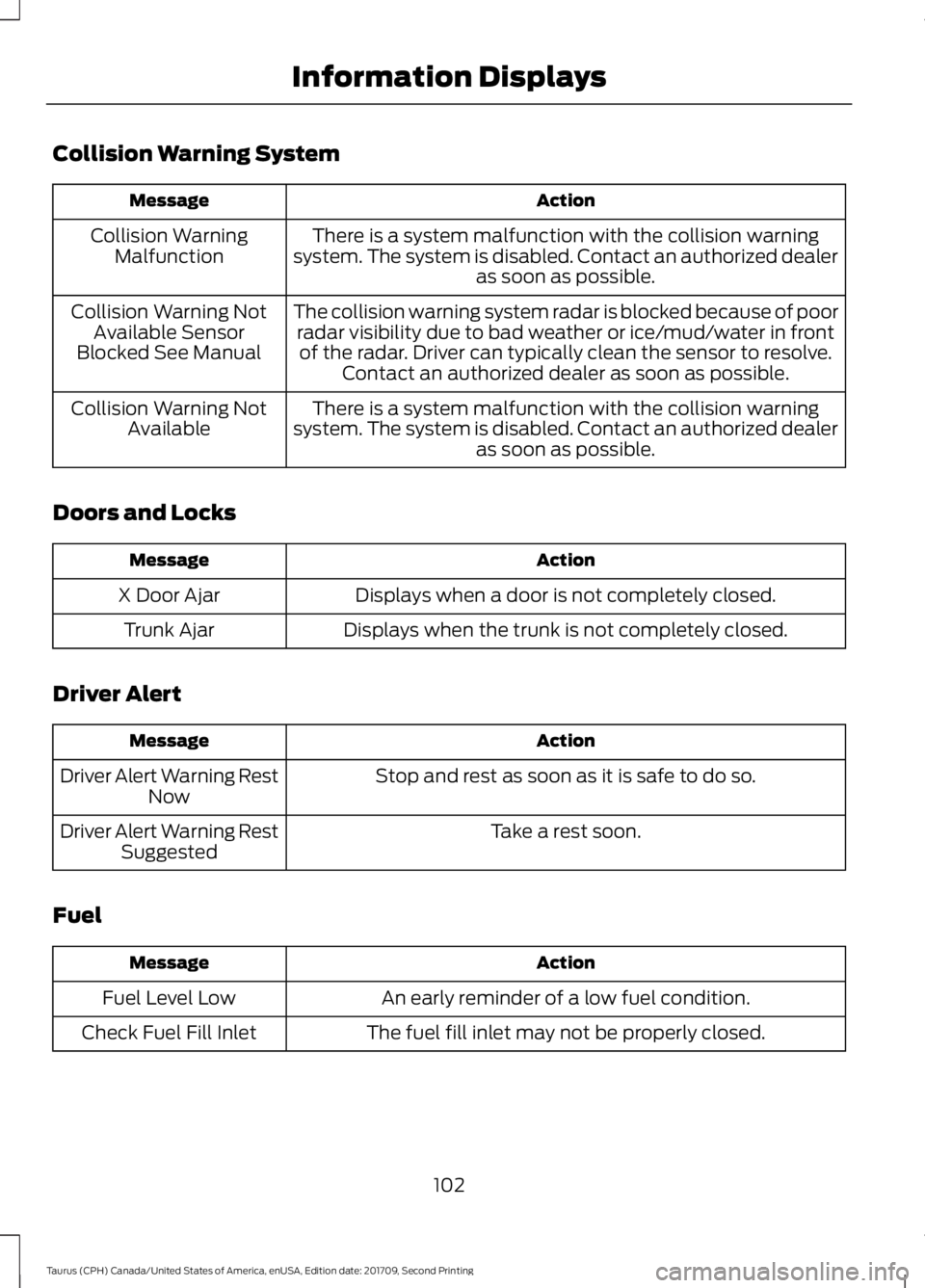
Collision Warning System
Action
Message
There is a system malfunction with the collision warning
system. The system is disabled. Contact an authorized dealer as soon as possible.
Collision Warning
Malfunction
The collision warning system radar is blocked because of poorradar visibility due to bad weather or ice/mud/water in frontof the radar. Driver can typically clean the sensor to resolve. Contact an authorized dealer as soon as possible.
Collision Warning Not
Available Sensor
Blocked See Manual
There is a system malfunction with the collision warning
system. The system is disabled. Contact an authorized dealer as soon as possible.
Collision Warning Not
Available
Doors and Locks Action
Message
Displays when a door is not completely closed.
X Door Ajar
Displays when the trunk is not completely closed.
Trunk Ajar
Driver Alert Action
Message
Stop and rest as soon as it is safe to do so.
Driver Alert Warning Rest
Now
Take a rest soon.
Driver Alert Warning Rest
Suggested
Fuel Action
Message
An early reminder of a low fuel condition.
Fuel Level Low
The fuel fill inlet may not be properly closed.
Check Fuel Fill Inlet
102
Taurus (CPH) Canada/United States of America, enUSA, Edition date: 201709, Second Printing Information Displays
Page 108 of 510
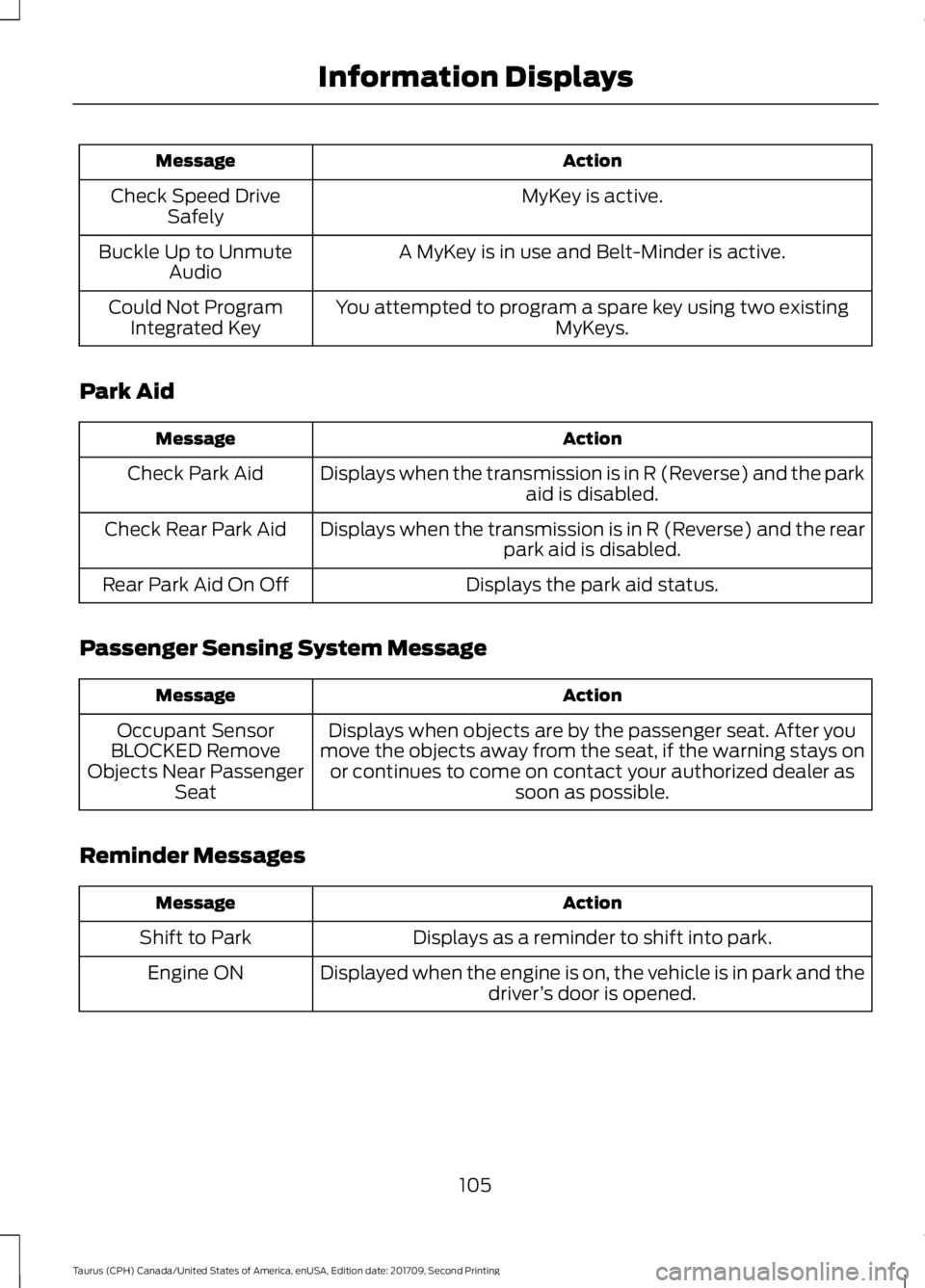
Action
Message
MyKey is active.
Check Speed Drive
Safely
A MyKey is in use and Belt-Minder is active.
Buckle Up to Unmute
Audio
You attempted to program a spare key using two existing MyKeys.
Could Not Program
Integrated Key
Park Aid Action
Message
Displays when the transmission is in R (Reverse) and the park aid is disabled.
Check Park Aid
Displays when the transmission is in R (Reverse) and the rearpark aid is disabled.
Check Rear Park Aid
Displays the park aid status.
Rear Park Aid On Off
Passenger Sensing System Message Action
Message
Displays when objects are by the passenger seat. After you
move the objects away from the seat, if the warning stays on or continues to come on contact your authorized dealer as soon as possible.
Occupant Sensor
BLOCKED Remove
Objects Near Passenger Seat
Reminder Messages Action
Message
Displays as a reminder to shift into park.
Shift to Park
Displayed when the engine is on, the vehicle is in park and thedriver’s door is opened.
Engine ON
105
Taurus (CPH) Canada/United States of America, enUSA, Edition date: 201709, Second Printing Information Displays
Page 127 of 510
MEMORY FUNCTION (If Equipped)
WARNINGS
Before activating the memory seat,
make sure that the area immediately
surrounding the seat is clear of
obstructions and that all occupants are
clear of moving parts. Do not use the memory function
when your vehicle is moving.
This function automatically recalls the
position of the following:
•
Driver seat.
• Power mirrors.
• Optional power adjustable pedals.
• Optional power steering column.
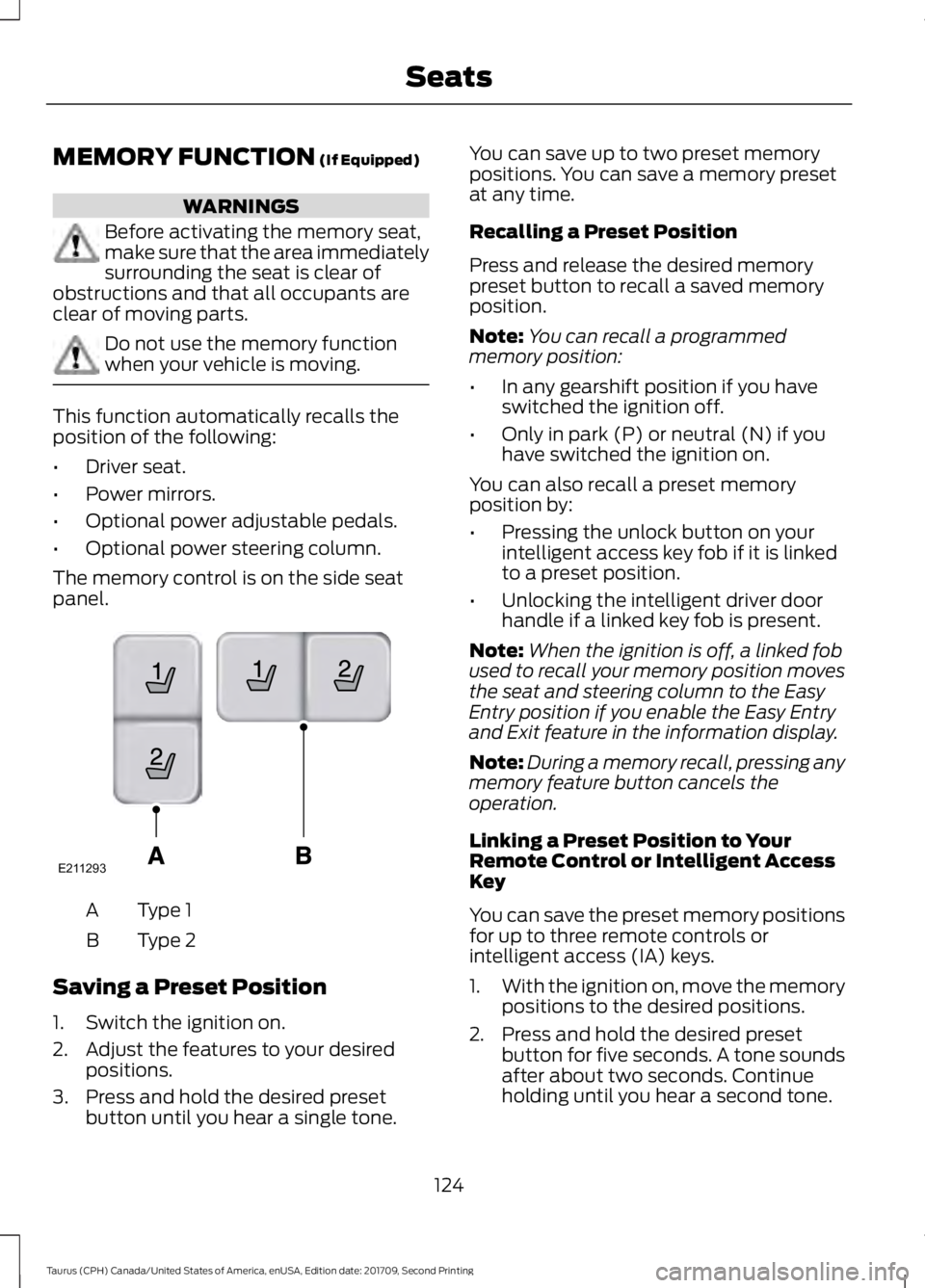
The memory control is on the side seat
panel. Type 1
A
Type 2
B
Saving a Preset Position
1. Switch the ignition on.
2. Adjust the features to your desired positions.
3. Press and hold the desired preset button until you hear a single tone. You can save up to two preset memory
positions. You can save a memory preset
at any time.
Recalling a Preset Position
Press and release the desired memory
preset button to recall a saved memory
position.
Note:
You can recall a programmed
memory position:
• In any gearshift position if you have
switched the ignition off.
• Only in park (P) or neutral (N) if you
have switched the ignition on.
You can also recall a preset memory
position by:
• Pressing the unlock button on your
intelligent access key fob if it is linked
to a preset position.
• Unlocking the intelligent driver door
handle if a linked key fob is present.
Note: When the ignition is off, a linked fob
used to recall your memory position moves
the seat and steering column to the Easy
Entry position if you enable the Easy Entry
and Exit feature in the information display.
Note: During a memory recall, pressing any
memory feature button cancels the
operation.
Linking a Preset Position to Your
Remote Control or Intelligent Access
Key
You can save the preset memory positions
for up to three remote controls or
intelligent access (IA) keys.
1. With the ignition on, move the memory
positions to the desired positions.
2. Press and hold the desired preset button for five seconds. A tone sounds
after about two seconds. Continue
holding until you hear a second tone.
124
Taurus (CPH) Canada/United States of America, enUSA, Edition date: 201709, Second Printing SeatsE211293
Page 132 of 510
HomeLink Wireless Control
System
WARNINGS
Make sure that the garage door and
security device are free from
obstruction when you are
programming. Do not program the system
with the vehicle in the garage. Do not use the system with any
garage door opener that does not
have the safety stop and reverse
feature as required by U.S. Federal Safety
Standards (this includes any garage door
opener manufactured before April 1, 1982).
A garage door opener which cannot detect
an object, signaling the door to stop and
reverse, does not meet current federal
safety standards. Using a garage door
opener without these features increases
the risk of serious injury or death. Note:
Make sure you keep the original
remote control transmitter for use in other
vehicles as well as for future system
programming.
Note: We recommend that upon the sale
or lease termination of your vehicle, you
erase the programmed function buttons for
security reasons. See Erasing the Function
Button Codes later in this section.
Note: You can program a maximum of
three devices. To change or replace any of
the three devices after it has been initially
programmed, you must first erase the
current settings. See Erasing the Function
Button Codes
. The universal garage door opener replaces
the common hand-held garage door
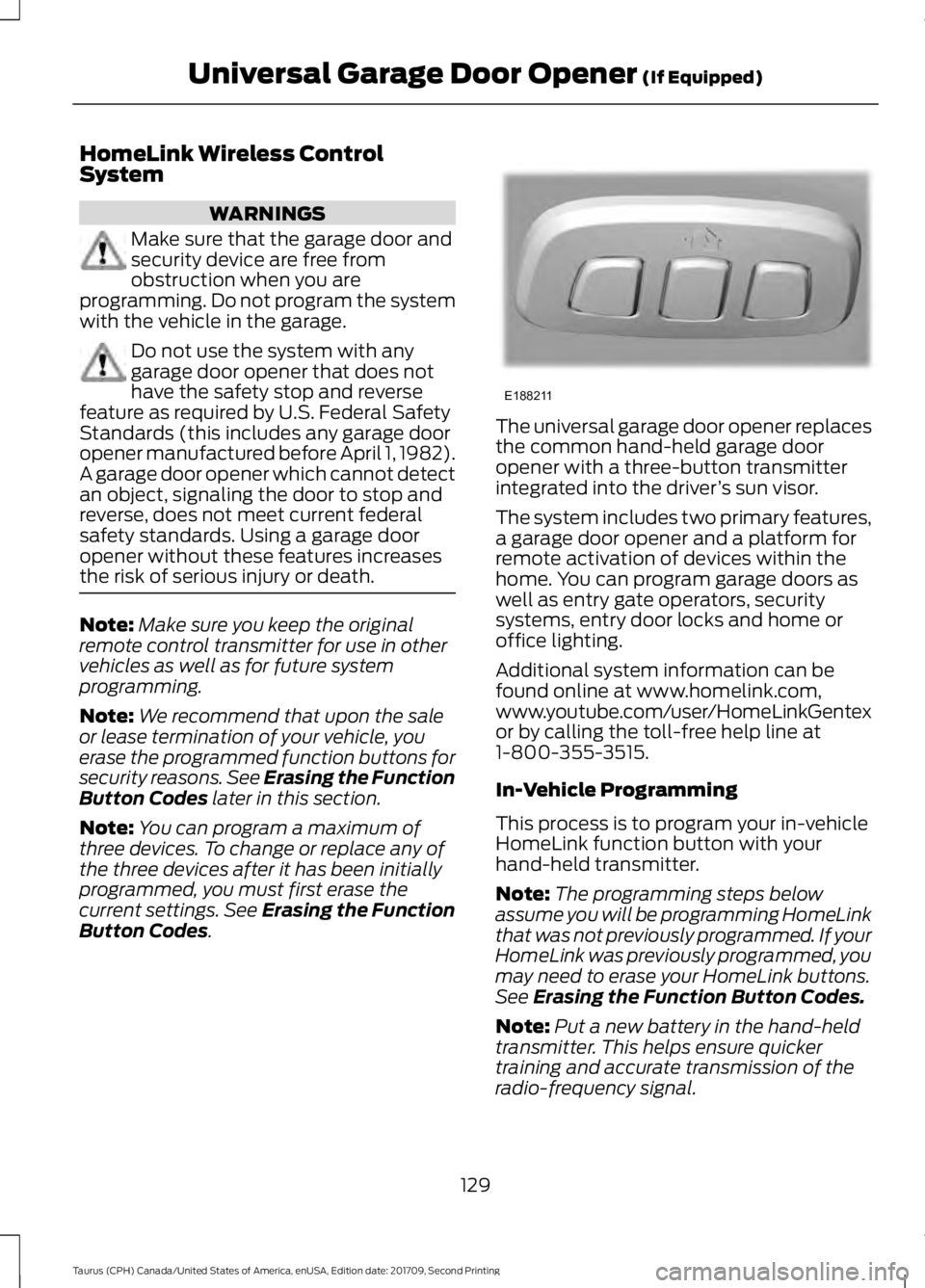
opener with a three-button transmitter
integrated into the driver
’s sun visor.
The system includes two primary features,
a garage door opener and a platform for
remote activation of devices within the
home. You can program garage doors as
well as entry gate operators, security
systems, entry door locks and home or
office lighting.
Additional system information can be
found online at www.homelink.com,
www.youtube.com/user/HomeLinkGentex
or by calling the toll-free help line at
1-800-355-3515.
In-Vehicle Programming
This process is to program your in-vehicle
HomeLink function button with your
hand-held transmitter.
Note: The programming steps below
assume you will be programming HomeLink
that was not previously programmed. If your
HomeLink was previously programmed, you
may need to erase your HomeLink buttons.
See
Erasing the Function Button Codes.
Note: Put a new battery in the hand-held
transmitter. This helps ensure quicker
training and accurate transmission of the
radio-frequency signal.
129
Taurus (CPH) Canada/United States of America, enUSA, Edition date: 201709, Second Printing Universal Garage Door Opener
(If Equipped)E188211
Page 141 of 510
Guarding Against Exhaust Fumes
WARNING
If you smell exhaust fumes inside
your vehicle, have your vehicle
checked by your authorized dealer
immediately. Do not drive your vehicle if
you smell exhaust fumes. Carbon
monoxide is present in exhaust fumes.
Take precautions to avoid its dangerous
effects. Important Ventilating Information
If you stop your vehicle and then leave the
engine idling for long periods, we
recommend that you do one of the
following:
•
Open the windows at least 1 in (3 cm).
• Set your climate control to outside air.
ENGINE BLOCK HEATER (If
Equipped) WARNINGS
Failure to follow engine block heater
instructions could result in property
damage or serious personal injury.
Do not use your heater with
ungrounded electrical systems or
two-pronged adapters. There is a risk
of electrical shock. Do not fully close the hood, or allow
it to drop under its own weight when
using the engine block heater. This
could damage the power cable and may
cause an electrical short resulting in fire,
injury and property damage. Note:
The heater is most effective when
outdoor temperatures are below
0°F
(-18°C). The heater acts as a starting aid by
warming the engine coolant. This allows
the climate control system to respond
quickly. The equipment includes a heater
element (installed in the engine block) and
a wire harness. You can connect the
system to a grounded 120-volt AC
electrical source.
We recommend that you do the following
for a safe and correct operation:
•
Use a 16-gauge outdoor extension cord
that is product certified by
Underwriter ’s Laboratory (UL) or
Canadian Standards Association
(CSA). This extension cord must be
suitable for use outdoors, in cold
temperatures, and be clearly marked
Suitable for Use with Outdoor
Appliances. Do not use an indoor
extension cord outdoors. This could
result in an electric shock or become a
fire hazard.
• Use as short an extension cord as
possible.
• Do not use multiple extension cords.
• Make sure that when in operation, the
extension cord plug and heater cord
plug connections are free and clear of
water. This could cause an electric
shock or fire.
• Make sure your vehicle is parked in a
clean area, clear of combustibles.
• Make sure the heater, heater cord and
extension cord are firmly connected.
• Check for heat anywhere in the
electrical hookup once the system has
been operating for approximately 30
minutes.
138
Taurus (CPH) Canada/United States of America, enUSA, Edition date: 201709, Second Printing Starting and Stopping the Engine
Page 191 of 510
WARNINGS
In cold and severe weather
conditions the system may not
function. Rain, snow and spray can
all limit sensor performance. The system will not operate if the
sensor cannot track the road lane
markings.
The sensor may incorrectly track lane
markings as other structures or
objects. This can result in a false or
missed warning. Large contrasts in outside lighting
can limit sensor performance.
The system may not operate
properly if the sensor is blocked.
Keep the windshield free from
obstruction. If damage occurs in the immediate
area surrounding the sensor, have
your vehicle checked as soon as
possible. The system may not correctly
operate if your vehicle is fitted with
a suspension kit not approved by us.
Note:
The system works above 40 mph
(64 km/h).
Note: The system works as long as the
camera can detect one lane marking.
Note: When aid or alert and aid modes are
selected and the system detects no steering
activity for a short period, the system alerts
you to put your hands on the steering wheel.
The system may detect a light grip or touch
on the steering wheel as hands off driving.
Note: The system may not function if the
camera is blocked, or if the windshield is
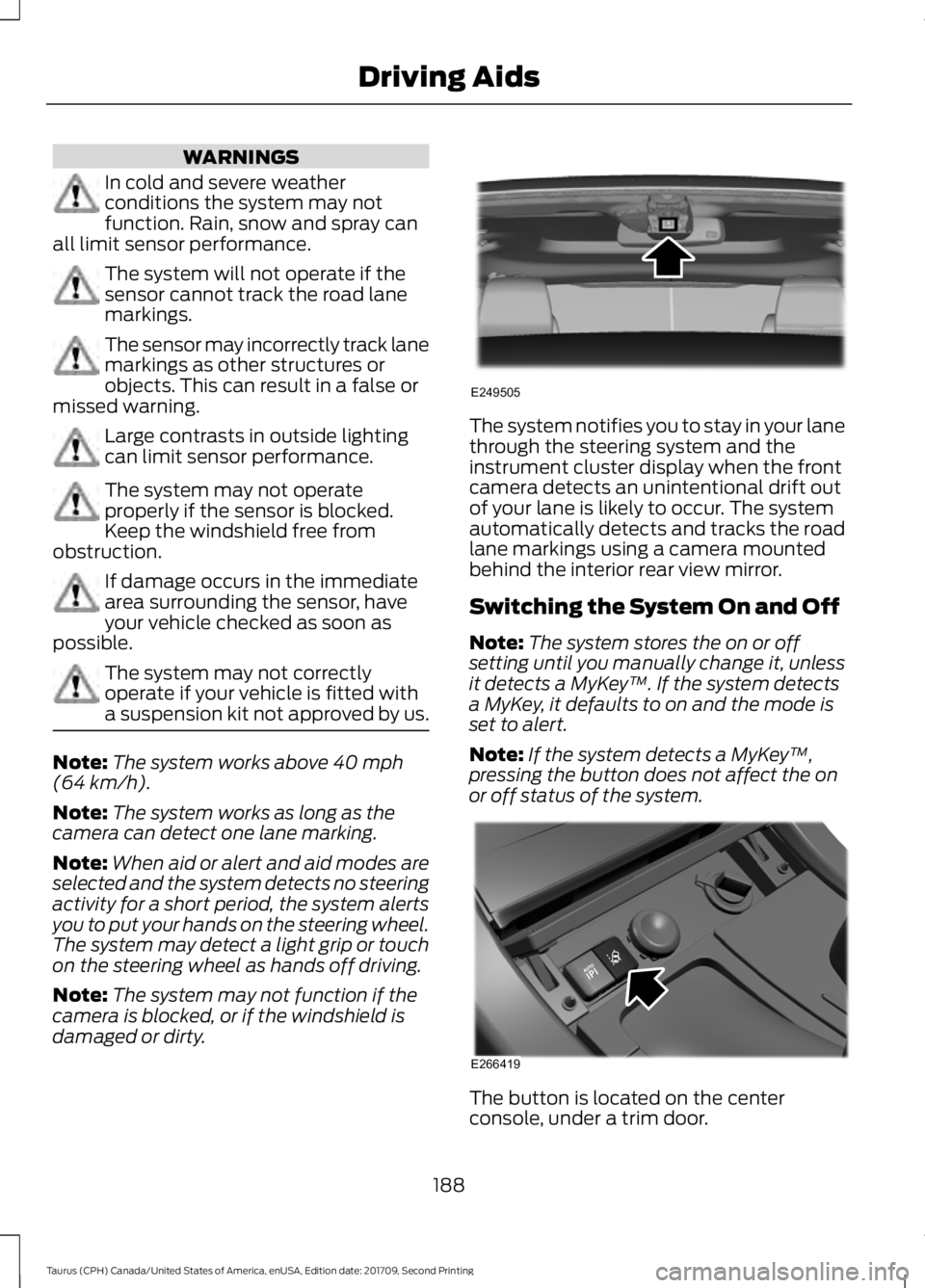
damaged or dirty. The system notifies you to stay in your lane
through the steering system and the
instrument cluster display when the front
camera detects an unintentional drift out
of your lane is likely to occur. The system
automatically detects and tracks the road
lane markings using a camera mounted
behind the interior rear view mirror.
Switching the System On and Off
Note:
The system stores the on or off
setting until you manually change it, unless
it detects a MyKey ™. If the system detects
a MyKey, it defaults to on and the mode is
set to alert.
Note: If the system detects a MyKey ™,
pressing the button does not affect the on
or off status of the system. The button is located on the center
console, under a trim door.
188
Taurus (CPH) Canada/United States of America, enUSA, Edition date: 201709, Second Printing Driving AidsE249505 E266419
Page 265 of 510
When washing and waxing, park your
vehicle in a shaded area out of direct
sunlight. Always wash your vehicle before
applying wax.
•
Use a quality wax that does not contain
abrasives.
• Follow the manufacturer ’s instructions
to apply and remove the wax.
• Apply a small amount of wax in a
back-and-forth motion, not in circles.
• Do not allow wax to come in contact
with any non-body (low-gloss black)
colored trim. The wax will discolor or
stain the parts over time.
•Roof racks.
• Bumpers.
• Grained door handles.
• Side moldings.
• Mirror housings.
• Windshield cowl area.
• Do not apply wax to glass areas.
• After waxing, your car's paint should
feel smooth, and be free of streaks and
smudges.
CLEANING THE ENGINE
Engines are more efficient when they are
clean because grease and dirt buildup keep
the engine warmer than normal.
When washing:
• Take care when using a power washer
to clean the engine. The high-pressure
fluid could penetrate the sealed parts
and cause damage.
• Do not spray a hot engine with cold
water to avoid cracking the engine
block or other engine components. •
Spray Motorcraft Engine Shampoo and
Degreaser on all parts that require
cleaning and pressure rinse clean. In
Canada, use Motorcraft Engine
Shampoo.
• Never wash or rinse the engine while it
is hot or running; water in the running
engine may cause internal damage.
• Never wash or rinse any ignition coil,
spark plug wire or spark plug well, or
the area in and around these locations.
• Cover the battery, power distribution
box, and air filter assembly to prevent
water damage when cleaning the
engine.
CLEANING THE WINDOWS AND
WIPER BLADES
Car wash chemicals and environmental
fallout can result in windshield and wiper
blade contamination. Dirty windshield and
wipers will result in poor windshield wiper
operation. Keep the windshield and wiper
blades clean to maintain windshield wiper
performance.
To clean the windshield and wiper blades:
• Clean the windshield with a
non-abrasive glass cleaner. When
cleaning the interior of the windshield,
avoid getting any glass cleaner on the
instrument panel or door panels. Wipe
any glass cleaner off these surfaces
immediately.
• For windshields contaminated with
tree sap, chemicals, wax or bugs, clean
the entire windshield using steel wool
(no greater than 0000 grade) in a
circular motion and rinse with water.
• Clean the wiper blades with isopropyl
rubbing alcohol or windshield washer
concentrate.
262
Taurus (CPH) Canada/United States of America, enUSA, Edition date: 201709, Second Printing Vehicle Care
Page 272 of 510
•
When inflating a tire or other objects,
use the black air hose only. Do not use
the transparent hose which is designed
for sealant application only.
• Operating the kit could cause an
electrical disturbance in radio, CD, and
DVD player operation.
What to do when a Tire Is
Punctured
A tire puncture within the tire tread area
can be repaired in two stages with the kit.
• In the first stage, the tire will be
reinflated with a sealing compound
and air. After the tire has been
reinflated, you will need to drive the
vehicle a short distance 4 mi (6 km) to
distribute the sealant in the tire.
• In the second stage, you will need to
check the tire pressure and adjust, if
necessary, to the vehicle tire inflation
pressure.
First Stage: Reinflating the Tire
with Sealing Compound and Air WARNINGS
Do not stand directly over the kit
while inflating the tire. If you notice
any unusual bulges or deformations
in the tire's sidewall during inflation, stop
and call roadside assistance. If the tire does not inflate to the
recommended tire pressure within
15 minutes, stop and call roadside
assistance. Preparation: Park the vehicle in a safe, level
and secure area, away from moving traffic.
Turn the hazard lights on. Apply the parking
brake and turn the engine off. Inspect the
flat tire for visible damage. Sealant compound contains latex. To
avoid any allergic reactions, use the
non-latex gloves in the accessory box on
the underside of the kit housing.
Do not remove any foreign object that has
pierced the tire. If a puncture is in the tire
sidewall, stop and call roadside assistance.
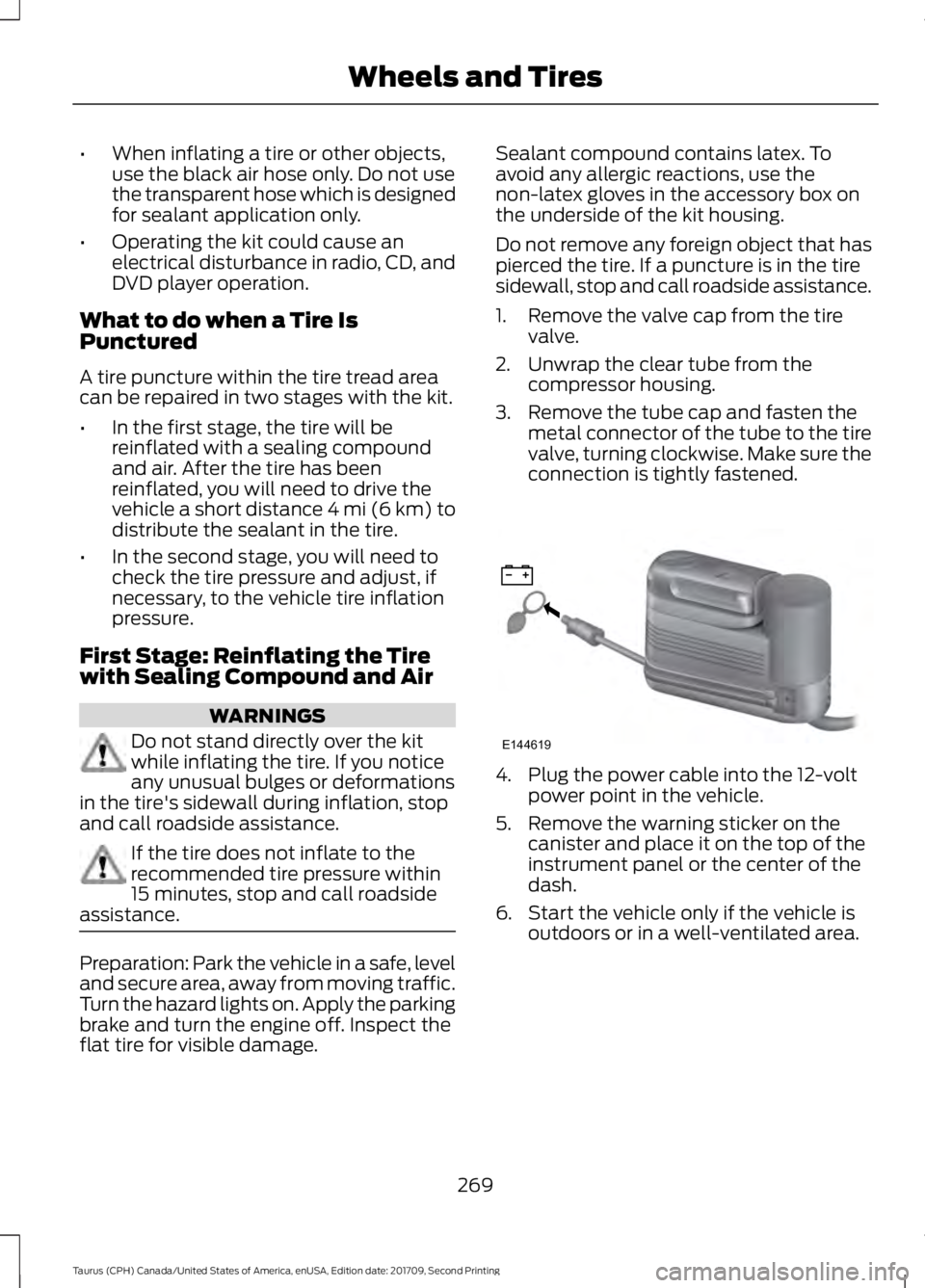
1. Remove the valve cap from the tire
valve.
2. Unwrap the clear tube from the compressor housing.
3. Remove the tube cap and fasten the metal connector of the tube to the tire
valve, turning clockwise. Make sure the
connection is tightly fastened. 4. Plug the power cable into the 12-volt
power point in the vehicle.
5. Remove the warning sticker on the canister and place it on the top of the
instrument panel or the center of the
dash.
6. Start the vehicle only if the vehicle is outdoors or in a well-ventilated area.
269
Taurus (CPH) Canada/United States of America, enUSA, Edition date: 201709, Second Printing Wheels and TiresE144619
Page 273 of 510
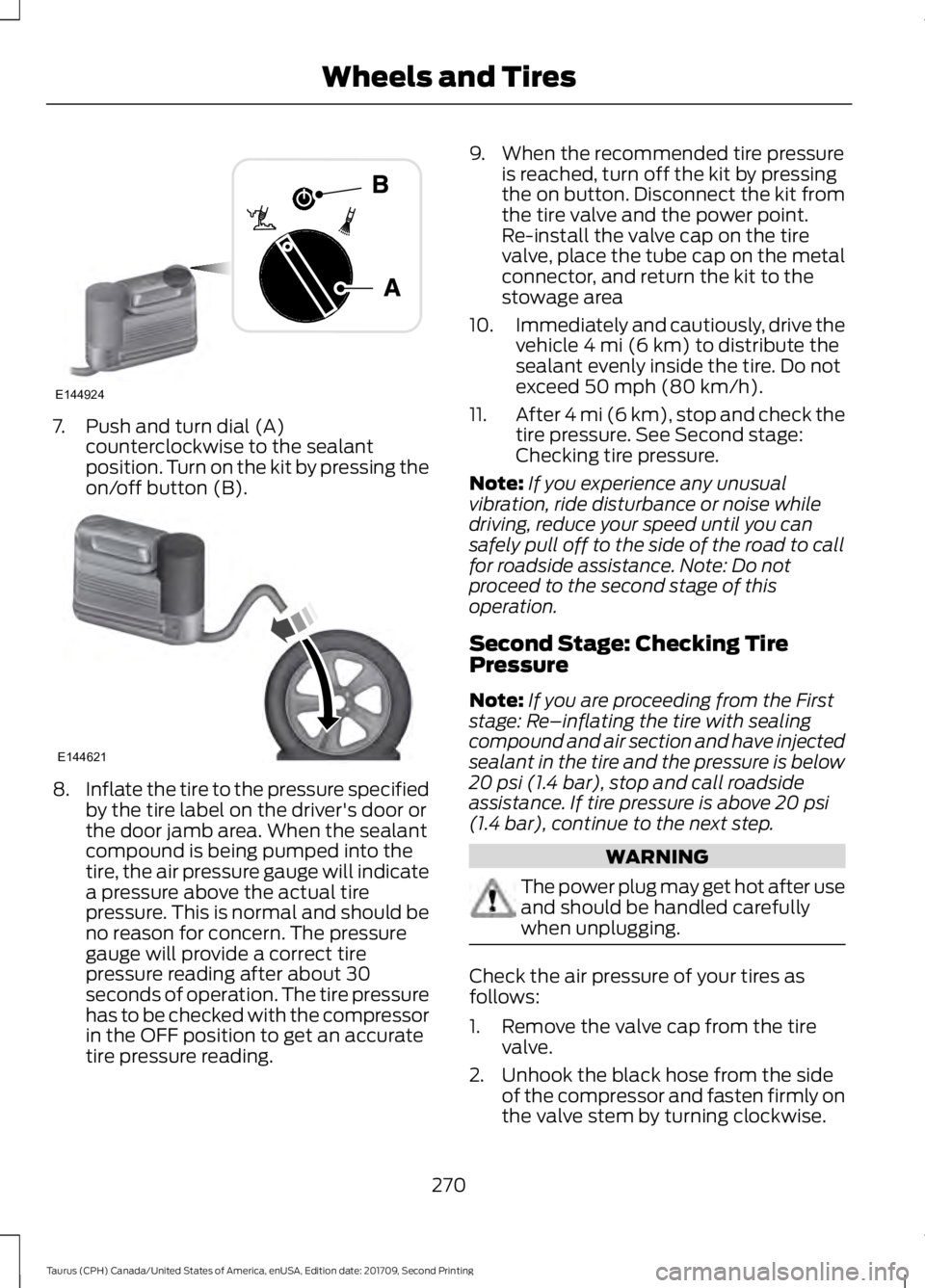
7. Push and turn dial (A)
counterclockwise to the sealant
position. Turn on the kit by pressing the
on/off button (B). 8.
Inflate the tire to the pressure specified
by the tire label on the driver's door or
the door jamb area. When the sealant
compound is being pumped into the
tire, the air pressure gauge will indicate
a pressure above the actual tire
pressure. This is normal and should be
no reason for concern. The pressure
gauge will provide a correct tire
pressure reading after about 30
seconds of operation. The tire pressure
has to be checked with the compressor
in the OFF position to get an accurate
tire pressure reading. 9. When the recommended tire pressure
is reached, turn off the kit by pressing
the on button. Disconnect the kit from
the tire valve and the power point.
Re-install the valve cap on the tire
valve, place the tube cap on the metal
connector, and return the kit to the
stowage area
10. Immediately and cautiously, drive the
vehicle 4 mi (6 km) to distribute the
sealant evenly inside the tire. Do not
exceed
50 mph (80 km/h).
11. After 4 mi (6 km), stop and check the
tire pressure. See Second stage:
Checking tire pressure.
Note: If you experience any unusual
vibration, ride disturbance or noise while
driving, reduce your speed until you can
safely pull off to the side of the road to call
for roadside assistance. Note: Do not
proceed to the second stage of this
operation.
Second Stage: Checking Tire
Pressure
Note: If you are proceeding from the First
stage: Re–inflating the tire with sealing
compound and air section and have injected
sealant in the tire and the pressure is below
20 psi (1.4 bar)
, stop and call roadside
assistance. If tire pressure is above 20 psi
(1.4 bar), continue to the next step. WARNING
The power plug may get hot after use
and should be handled carefully
when unplugging.
Check the air pressure of your tires as
follows:
1. Remove the valve cap from the tire
valve.
2. Unhook the black hose from the side of the compressor and fasten firmly on
the valve stem by turning clockwise.
270
Taurus (CPH) Canada/United States of America, enUSA, Edition date: 201709, Second Printing Wheels and TiresE144924 E144621
Page 274 of 510
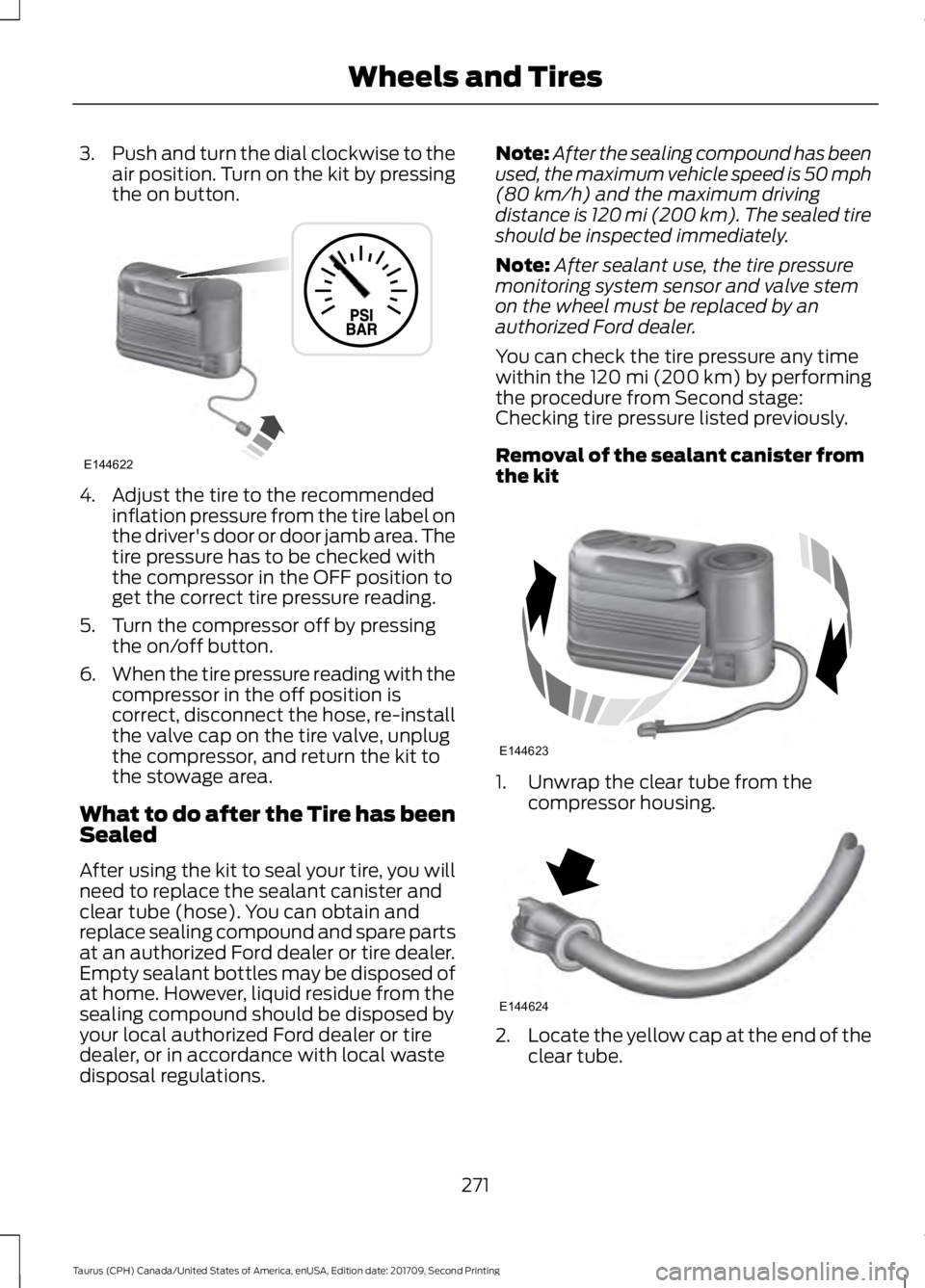
3.
Push and turn the dial clockwise to the
air position. Turn on the kit by pressing
the on button. 4. Adjust the tire to the recommended
inflation pressure from the tire label on
the driver's door or door jamb area. The
tire pressure has to be checked with
the compressor in the OFF position to
get the correct tire pressure reading.
5. Turn the compressor off by pressing the on/off button.
6. When the tire pressure reading with the
compressor in the off position is
correct, disconnect the hose, re-install
the valve cap on the tire valve, unplug
the compressor, and return the kit to
the stowage area.
What to do after the Tire has been
Sealed
After using the kit to seal your tire, you will
need to replace the sealant canister and
clear tube (hose). You can obtain and
replace sealing compound and spare parts
at an authorized Ford dealer or tire dealer.
Empty sealant bottles may be disposed of
at home. However, liquid residue from the
sealing compound should be disposed by
your local authorized Ford dealer or tire
dealer, or in accordance with local waste
disposal regulations. Note:
After the sealing compound has been
used, the maximum vehicle speed is 50 mph
(80 km/h) and the maximum driving
distance is 120 mi (200 km). The sealed tire
should be inspected immediately.
Note: After sealant use, the tire pressure
monitoring system sensor and valve stem
on the wheel must be replaced by an
authorized Ford dealer.
You can check the tire pressure any time
within the 120 mi (200 km) by performing
the procedure from Second stage:
Checking tire pressure listed previously.
Removal of the sealant canister from
the kit 1. Unwrap the clear tube from the
compressor housing. 2.
Locate the yellow cap at the end of the
clear tube.
271
Taurus (CPH) Canada/United States of America, enUSA, Edition date: 201709, Second Printing Wheels and TiresE144622 E144623 E144624