power steering FORD TAURUS 2018 Owner's Manual
[x] Cancel search | Manufacturer: FORD, Model Year: 2018, Model line: TAURUS, Model: FORD TAURUS 2018Pages: 510, PDF Size: 22.04 MB
Page 289 of 510
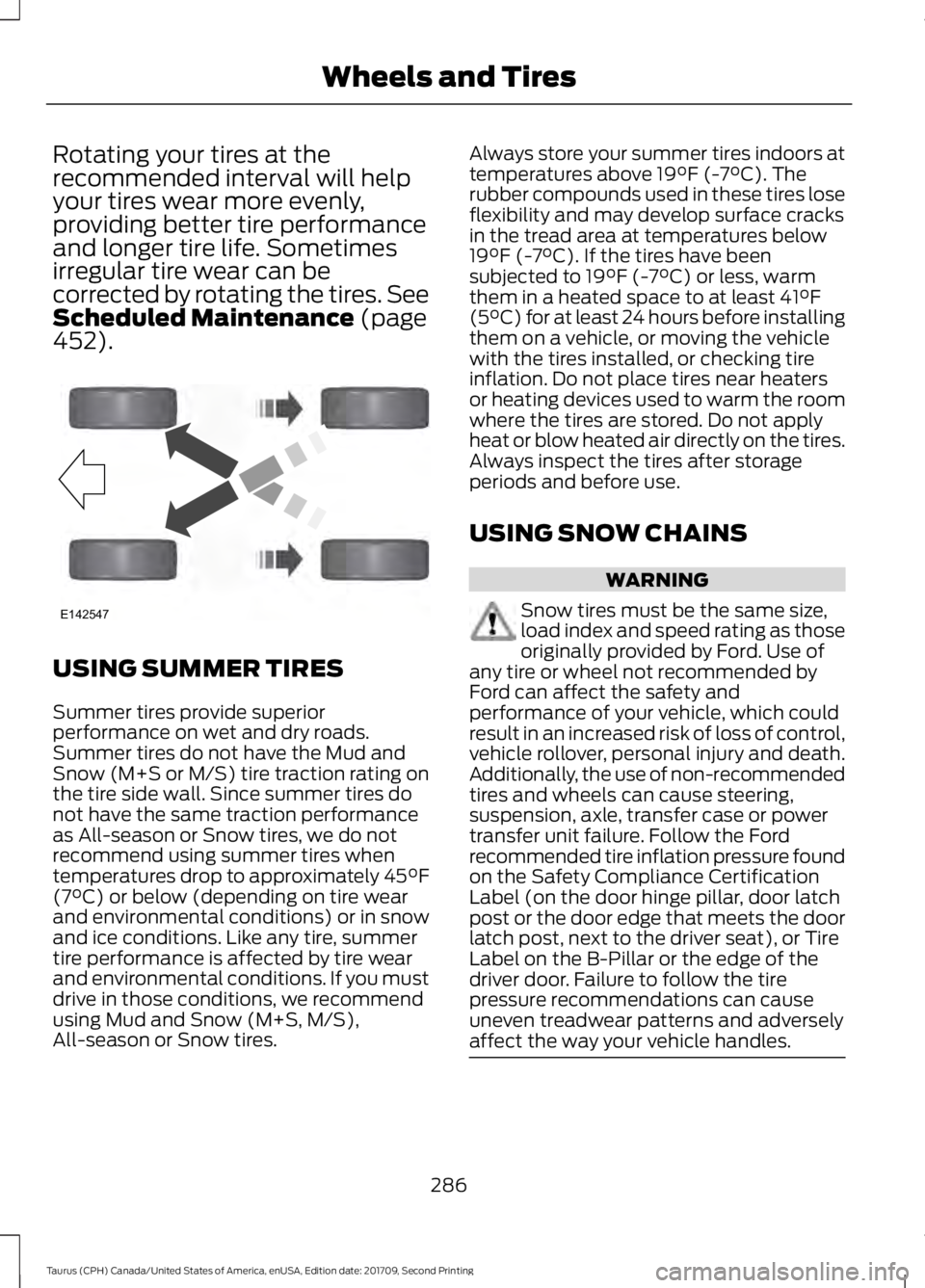
Rotating your tires at the
recommended interval will help
your tires wear more evenly,
providing better tire performance
and longer tire life. Sometimes
irregular tire wear can be
corrected by rotating the tires. See
Scheduled Maintenance (page
452). USING SUMMER TIRES
Summer tires provide superior
performance on wet and dry roads.
Summer tires do not have the Mud and
Snow (M+S or M/S) tire traction rating on
the tire side wall. Since summer tires do
not have the same traction performance
as All-season or Snow tires, we do not
recommend using summer tires when
temperatures drop to approximately 45°F
(7°C)
or below (depending on tire wear
and environmental conditions) or in snow
and ice conditions. Like any tire, summer
tire performance is affected by tire wear
and environmental conditions. If you must
drive in those conditions, we recommend
using Mud and Snow (M+S, M/S),
All-season or Snow tires. Always store your summer tires indoors at
temperatures above
19°F (-7°C). The
rubber compounds used in these tires lose
flexibility and may develop surface cracks
in the tread area at temperatures below
19°F (-7°C)
. If the tires have been
subjected to 19°F (-7°C) or less, warm
them in a heated space to at least 41°F
(5°C) for at least 24 hours before installing
them on a vehicle, or moving the vehicle
with the tires installed, or checking tire
inflation. Do not place tires near heaters
or heating devices used to warm the room
where the tires are stored. Do not apply
heat or blow heated air directly on the tires.
Always inspect the tires after storage
periods and before use.
USING SNOW CHAINS WARNING
Snow tires must be the same size,
load index and speed rating as those
originally provided by Ford. Use of
any tire or wheel not recommended by
Ford can affect the safety and
performance of your vehicle, which could
result in an increased risk of loss of control,
vehicle rollover, personal injury and death.
Additionally, the use of non-recommended
tires and wheels can cause steering,
suspension, axle, transfer case or power
transfer unit failure. Follow the Ford
recommended tire inflation pressure found
on the Safety Compliance Certification
Label (on the door hinge pillar, door latch
post or the door edge that meets the door
latch post, next to the driver seat), or Tire
Label on the B-Pillar or the edge of the
driver door. Failure to follow the tire
pressure recommendations can cause
uneven treadwear patterns and adversely
affect the way your vehicle handles. 286
Taurus (CPH) Canada/United States of America, enUSA, Edition date: 201709, Second Printing Wheels and TiresE142547
Page 352 of 510
Switching 911 Assist On or Off
Press the phone button to enter the phone menu and scroll to:
Action and Description
Message
Press the OK button to confirm and enter the 911 Assist menu.
911 Assist
Press the OK button when the desired option appears in the
radio display.
On
Off
Off selections include: Action and Description
Message
Provides a display and voice reminder at phone connection
at vehicle start.
Off with reminder:
Provides a display reminder only without a voice reminder at
phone connection.
Off without reminder:
To make sure that 911 Assist works
correctly:
• SYNC must be powered and working
properly at the time of the incident and
throughout feature activation and use.
• The 911 Assist feature must be set on
before the incident.
• You must pair and connect a
Bluetooth-enabled and compatible
cell phone to SYNC.
• A connected Bluetooth-enabled phone
must have the ability to make and
maintain an outgoing call at the time
of the incident.
• A connected Bluetooth-enabled phone
must have adequate network coverage,
battery power and signal strength.
• The vehicle must have battery power
and be located in the U.S., Canada or
in a territory in which 911 is the
emergency number. In the Event of a Crash
Not all crashes will deploy an airbag or
activate the fuel pump shut-off (the
triggers for 911 Assist). If a connected cell
phone sustains damage or loses its
connection to SYNC during a crash, SYNC
will search for and try to connect to a
previously paired cell phone; SYNC will
then attempt to call the emergency
services.
Before making the call:
•
SYNC provides a short window of time
(about 10 seconds) to cancel the call.
If you fail to cancel the call, SYNC
attempts to dial 911.
• SYNC says the following, or a similar
message: "SYNC will attempt to call
911, to cancel the call, press Cancel on
your screen or press and hold the
phone button on your steering wheel."
349
Taurus (CPH) Canada/United States of America, enUSA, Edition date: 201709, Second Printing SYNC™
Page 353 of 510
If you do not cancel the call, and SYNC
makes a successful call, a pre-recorded
message plays for the 911 operator, and
then the occupant(s) in your vehicle is able
to talk with the operator. Be prepared to
provide your name, phone number and
location immediately, because not all 911
systems are capable of receiving this
information electronically.
911 Assist May Not Work If
•
Your cellular phone or 911 Assist
hardware sustains damage in a crash.
• The vehicle's battery or the SYNC
system has no power.
• The phone(s) thrown from your vehicle
are the ones paired and connected to
the system.
911 Assist Privacy Notice
When you turn on 911 Assist, it may
disclose to emergency services that your
vehicle has been in a crash involving the
deployment of an airbag or activation of
the fuel pump shut-off. Certain versions or
updates to 911 Assist may also be capable
of electronically or verbally disclosing to
911 operators your vehicle location or other
details about your vehicle or crash to assist
911 operators to provide the most
appropriate emergency services. If you do
not want to disclose this information, do
not turn the feature on.
SYNC™ APPLINK ™
SYNC Mobile Apps
Note: You must pair and connect your
smartphone to SYNC to access AppLink.
Note: iPhone users need to connect the
phone to the USB port in order to start the
application. Note:
The AppLink feature is not available
if your vehicle is equipped with the MyFord
Touch system.
Note: Depending on your display type, you
can access AppLink from the media menu,
the phone menu, or by using voice
commands. Once an app is running through
AppLink, you can control main features of
the app through voice commands and
steering wheel controls.
To Access Using the Phone Menu
Press the phone button to access the
SYNC phone menu on-screen. You can
then scroll to: Menu item
Press OK to access a list
of available applications.
Mobile Apps
Scroll through the list of
available applications and
press OK to select a
particular app. Once an
app is running through
SYNC, you can access an
app’s menu by pressing the
MENU
button to first
access the SYNC menu.
Scroll until the app name followed by
"Menu", is displayed (such as, sticher
Menu), then press
OK. From here, you can
access an application's features, such as
Thumbs up and Thumbs down.
For more information, please visit: Website
www.SYNCMyRide.com
To Access Using the Media Menu
Press the
AUX button on the center
console.
350
Taurus (CPH) Canada/United States of America, enUSA, Edition date: 201709, Second Printing SYNC™
Page 381 of 510
Website
www.syncmaroute.ca
For important information about airbag
deployment and the fuel pump shut-off
please see the Supplementary Restrains
and Roadside Emergencies sections of
your owner manual.
To switch 911 Assist on and off please view
the settings information. See Settings
(page 420).
To make sure that 911 Assist works
correctly:
• SYNC must be powered and working
properly at the time of the incident and
throughout feature activation and use.
• The 911 Assist feature must be set on
before the incident.
• You must pair and connect a
Bluetooth-enabled and compatible
cell phone to SYNC.
• A connected Bluetooth-enabled phone
must have the ability to make and
maintain an outgoing call at the time
of the incident.
• A connected Bluetooth-enabled phone
must have adequate network coverage,
battery power and signal strength.
• The vehicle must have battery power
and be located in the U.S., Canada or
in a territory in which 911 is the
emergency number.
In the Event of a Crash
Not all crashes will deploy an airbag or
activate the fuel pump shut-off (the
triggers for 911 Assist). If a connected cell
phone sustains damage or loses its
connection to SYNC during a crash, SYNC
will search for and try to connect to a
previously paired cell phone; SYNC will
then attempt to call the emergency
services. Before making the call:
•
SYNC provides a short window of time
(about 10 seconds) to cancel the call.
If you fail to cancel the call, SYNC
attempts to dial 911.
• SYNC says the following, or a similar
message: "SYNC will attempt to call
911, to cancel the call, press Cancel on
your screen or press and hold the
phone button on your steering wheel."
If you do not cancel the call, and SYNC
makes a successful call, a pre-recorded
message plays for the 911 operator, and
then the occupant(s) in your vehicle is able
to talk with the operator. Be prepared to
provide your name, phone number and
location immediately, because not all 911
systems are capable of receiving this
information electronically.
911 Assist May Not Work If
• Your cellular phone or 911 Assist
hardware sustains damage in a crash.
• The vehicle's battery or the SYNC
system has no power.
• The phone(s) thrown from your vehicle
are the ones paired and connected to
the system.
911 Assist Privacy Notice
When you switch on 911 Assist, it may
disclose to emergency services that your
vehicle has been in a crash involving the
deployment of an airbag or activation of
the fuel pump shut-off. Certain versions or
updates to 911 Assist may also be capable
of electronically or verbally disclosing to
911 operators your vehicle location or other
details about your vehicle or crash to assist
911 operators to provide the most
appropriate emergency services. If you do
not want to disclose this information, do
not switch the feature on.
378
Taurus (CPH) Canada/United States of America, enUSA, Edition date: 201709, Second Printing SYNC™ 3
Page 405 of 510
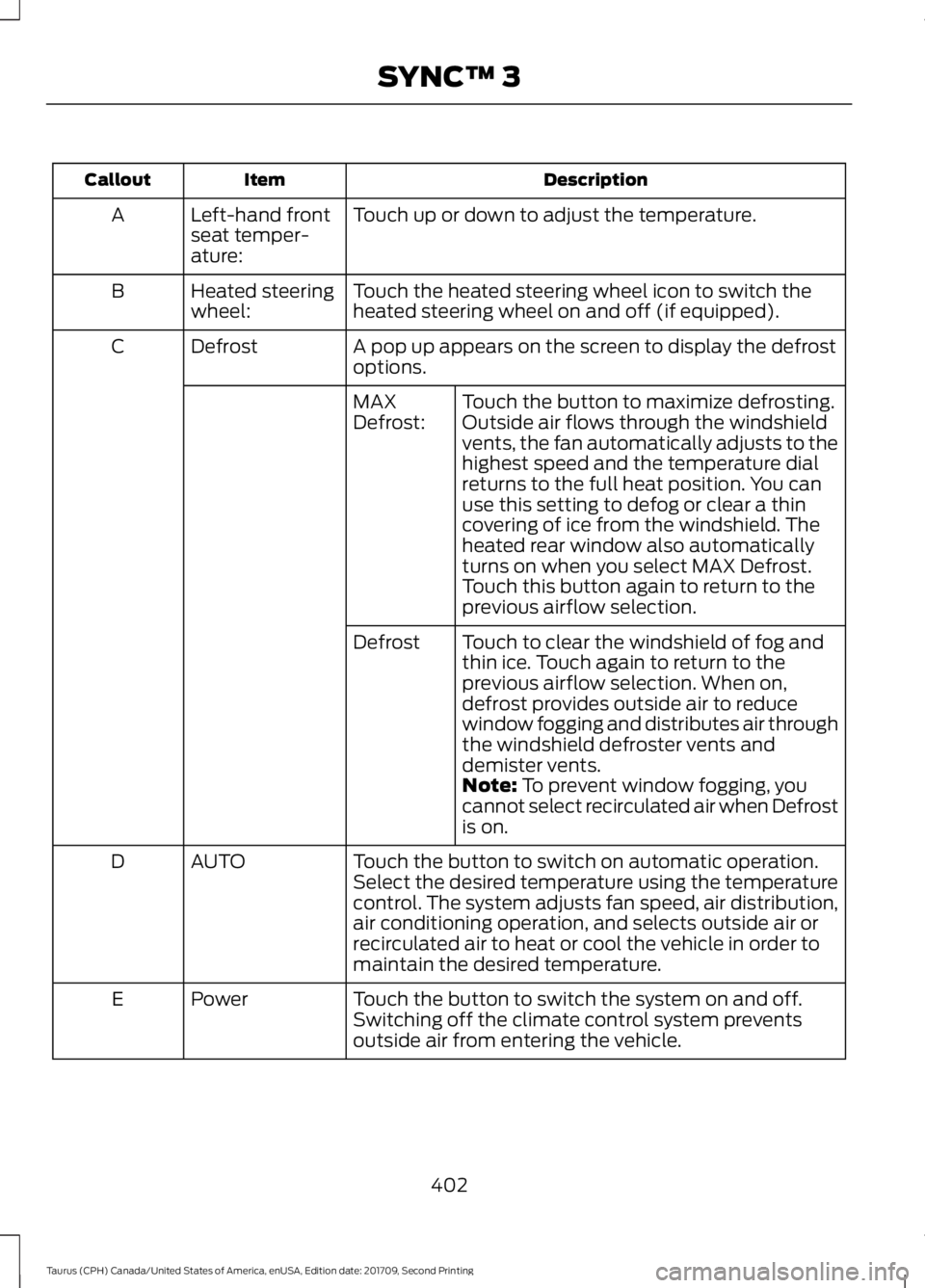
Description
Item
Callout
Touch up or down to adjust the temperature.
Left-hand front
seat temper-
ature:
A
Touch the heated steering wheel icon to switch the
heated steering wheel on and off (if equipped).
Heated steering
wheel:
B
A pop up appears on the screen to display the defrost
options.
Defrost
C
Touch the button to maximize defrosting.
Outside air flows through the windshield
vents, the fan automatically adjusts to the
highest speed and the temperature dial
returns to the full heat position. You can
use this setting to defog or clear a thin
covering of ice from the windshield. The
heated rear window also automatically
turns on when you select MAX Defrost.
Touch this button again to return to the
previous airflow selection.
MAX
Defrost:
Touch to clear the windshield of fog and
thin ice. Touch again to return to the
previous airflow selection. When on,
defrost provides outside air to reduce
window fogging and distributes air through
the windshield defroster vents and
demister vents.
Defrost
Note: To prevent window fogging, you
cannot select recirculated air when Defrost
is on.
Touch the button to switch on automatic operation.
Select the desired temperature using the temperature
control. The system adjusts fan speed, air distribution,
air conditioning operation, and selects outside air or
recirculated air to heat or cool the vehicle in order to
maintain the desired temperature.
AUTO
D
Touch the button to switch the system on and off.
Switching off the climate control system prevents
outside air from entering the vehicle.
Power
E
402
Taurus (CPH) Canada/United States of America, enUSA, Edition date: 201709, Second Printing SYNC™ 3
Page 500 of 510
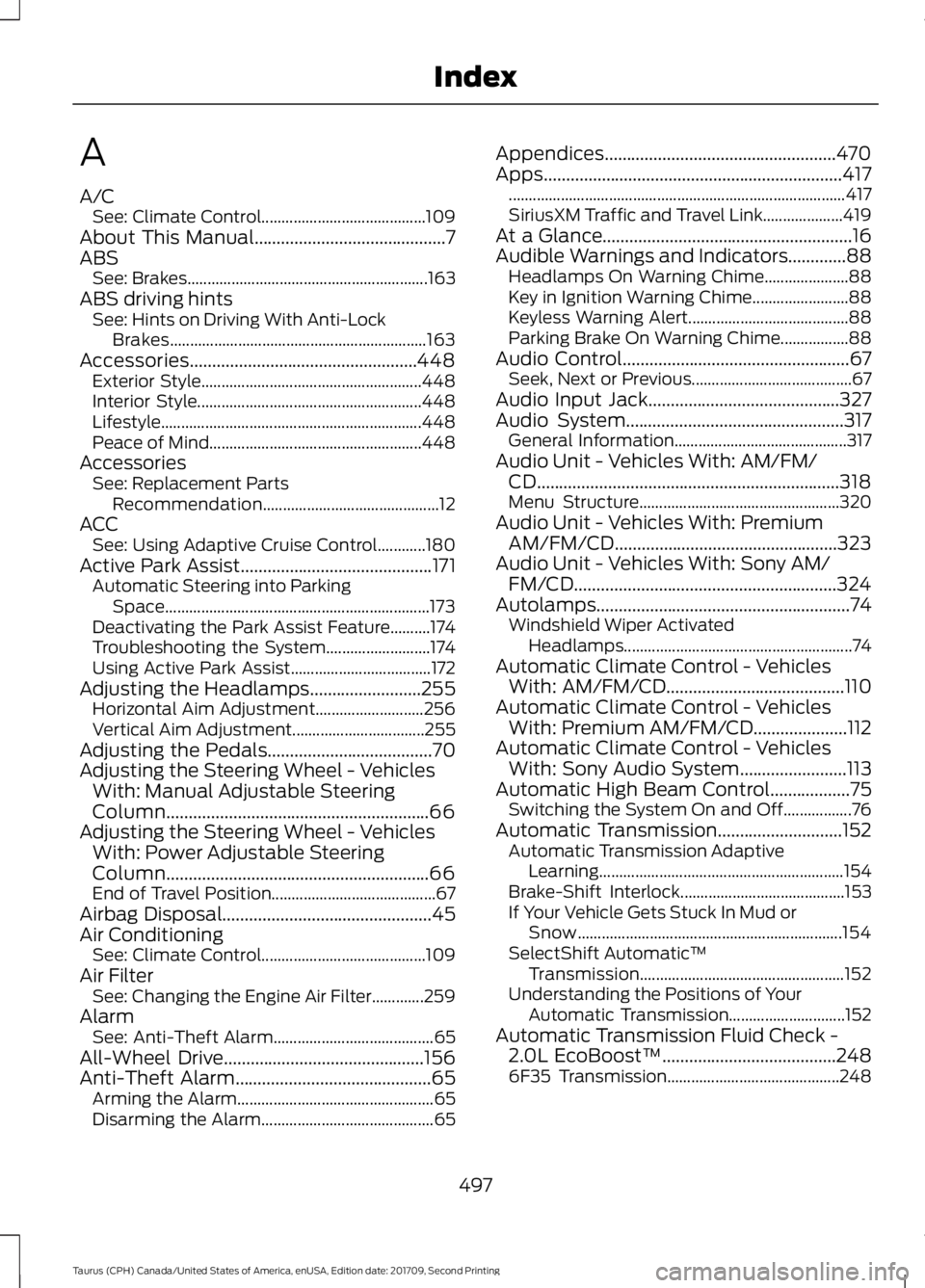
A
A/C
See: Climate Control......................................... 109
About This Manual...........................................7
ABS See: Brakes............................................................ 163
ABS driving hints See: Hints on Driving With Anti-Lock
Brakes................................................................ 163
Accessories...................................................448 Exterior Style....................................................... 448
Interior Style........................................................ 448
Lifestyle................................................................. 448
Peace of Mind..................................................... 448
Accessories See: Replacement Parts
Recommendation............................................ 12
ACC See: Using Adaptive Cruise Control............180
Active Park Assist
...........................................171
Automatic Steering into Parking
Space.................................................................. 173
Deactivating the Park Assist Feature..........174
Troubleshooting the System.......................... 174
Using Active Park Assist................................... 172
Adjusting the Headlamps.........................255 Horizontal Aim Adjustment........................... 256
Vertical Aim Adjustment................................. 255
Adjusting the Pedals.....................................70
Adjusting the Steering Wheel - Vehicles With: Manual Adjustable Steering
Column...........................................................66
Adjusting the Steering Wheel - Vehicles With: Power Adjustable Steering
Column...........................................................66
End of Travel Position......................................... 67
Airbag Disposal...............................................45
Air Conditioning See: Climate Control......................................... 109
Air Filter See: Changing the Engine Air Filter.............259
Alarm See: Anti-Theft Alarm........................................ 65
All-Wheel Drive.............................................156
Anti-Theft Alarm
............................................65
Arming the Alarm................................................. 65
Disarming the Alarm........................................... 65Appendices....................................................470
Apps...................................................................417
........................................................................\
............ 417
SiriusXM Traffic and Travel Link.................... 419
At a Glance........................................................16
Audible Warnings and Indicators.............88 Headlamps On Warning Chime..................... 88
Key in Ignition Warning Chime........................ 88
Keyless Warning Alert........................................ 88
Parking Brake On Warning Chime.................88
Audio Control...................................................67 Seek, Next or Previous........................................ 67
Audio Input Jack...........................................327
Audio System.................................................317 General Information........................................... 317
Audio Unit - Vehicles With: AM/FM/ CD....................................................................318
Menu Structure.................................................. 320
Audio Unit - Vehicles With: Premium AM/FM/CD..................................................323
Audio Unit - Vehicles With: Sony AM/ FM/CD...........................................................324
Autolamps.........................................................74 Windshield Wiper Activated
Headlamps......................................................... 74
Automatic Climate Control - Vehicles With: AM/FM/CD
........................................110
Automatic Climate Control - Vehicles With: Premium AM/FM/CD
.....................112
Automatic Climate Control - Vehicles With: Sony Audio System
........................113
Automatic High Beam Control..................75
Switching the System On and Off.................76
Automatic Transmission
............................152
Automatic Transmission Adaptive
Learning............................................................. 154
Brake-Shift Interlock......................................... 153
If Your Vehicle Gets Stuck In Mud or Snow.................................................................. 154
SelectShift Automatic ™
Transmission................................................... 152
Understanding the Positions of Your Automatic Transmission............................. 152
Automatic Transmission Fluid Check - 2.0L EcoBoost™
.......................................248
6F35 Transmission........................................... 248
497
Taurus (CPH) Canada/United States of America, enUSA, Edition date: 201709, Second Printing Index
Page 504 of 510
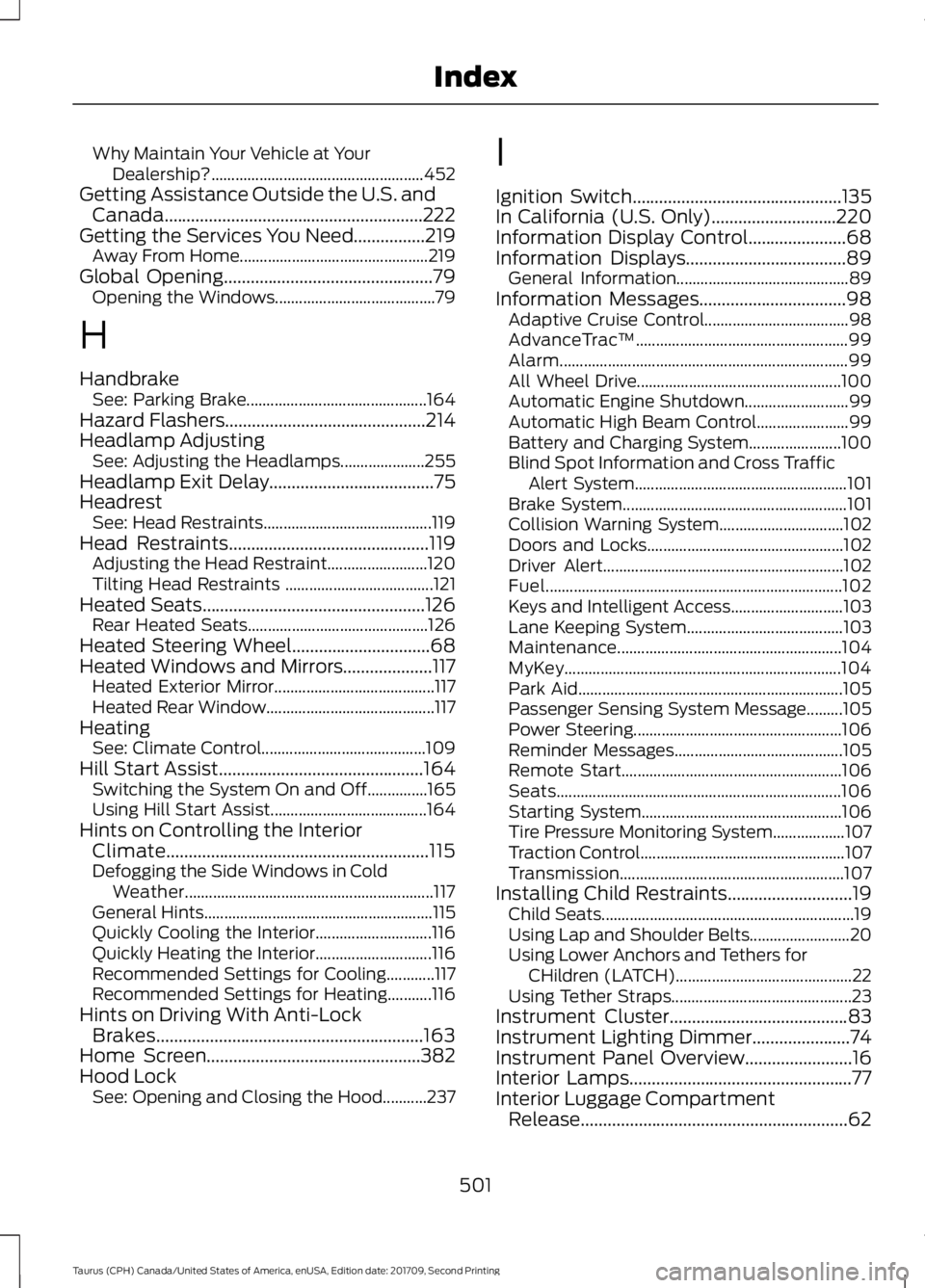
Why Maintain Your Vehicle at Your
Dealership?..................................................... 452
Getting Assistance Outside the U.S. and Canada..........................................................222
Getting the Services You Need................219 Away From Home............................................... 219
Global Opening...............................................79
Opening the Windows........................................ 79
H
Handbrake See: Parking Brake............................................. 164
Hazard Flashers
.............................................214
Headlamp Adjusting See: Adjusting the Headlamps..................... 255
Headlamp Exit Delay.....................................75
Headrest See: Head Restraints.......................................... 119
Head Restraints
.............................................119
Adjusting the Head Restraint......................... 120
Tilting Head Restraints ..................................... 121
Heated Seats
..................................................126
Rear Heated Seats............................................. 126
Heated Steering Wheel
...............................68
Heated Windows and Mirrors....................117 Heated Exterior Mirror........................................ 117
Heated Rear Window.......................................... 117
Heating See: Climate Control......................................... 109
Hill Start Assist..............................................164 Switching the System On and Off...............165
Using Hill Start Assist....................................... 164
Hints on Controlling the Interior Climate...........................................................115
Defogging the Side Windows in Cold Weather.............................................................. 117
General Hints......................................................... 115
Quickly Cooling the Interior............................. 116
Quickly Heating the Interior............................. 116
Recommended Settings for Cooling............117
Recommended Settings for Heating...........116
Hints on Driving With Anti-Lock Brakes............................................................163
Home Screen
................................................382
Hood Lock See: Opening and Closing the Hood...........237 I
Ignition Switch
...............................................135
In California (U.S. Only)............................220
Information Display Control......................68
Information Displays....................................89
General Information........................................... 89
Information Messages
.................................98
Adaptive Cruise Control.................................... 98
AdvanceTrac ™..................................................... 99
Alarm........................................................................\
99
All Wheel Drive................................................... 100
Automatic Engine Shutdown.......................... 99
Automatic High Beam Control....................... 99
Battery and Charging System....................... 100
Blind Spot Information and Cross Traffic Alert System..................................................... 101
Brake System........................................................ 101
Collision Warning System............................... 102
Doors and Locks................................................. 102
Driver Alert............................................................ 102
Fuel........................................................................\
.. 102
Keys and Intelligent Access............................ 103
Lane Keeping System....................................... 103
Maintenance........................................................ 104
MyKey..................................................................... 104
Park Aid.................................................................. 105
Passenger Sensing System Message.........105
Power Steering.................................................... 106
Reminder Messages.......................................... 105
Remote Start....................................................... 106
Seats....................................................................... 106
Starting System.................................................. 106
Tire Pressure Monitoring System.................. 107
Traction Control................................................... 107
Transmission........................................................ 107
Installing Child Restraints............................19 Child Seats............................................................... 19
Using Lap and Shoulder Belts......................... 20
Using Lower Anchors and Tethers for CHildren (LATCH)............................................ 22
Using Tether Straps............................................. 23
Instrument Cluster
........................................83
Instrument Lighting Dimmer......................74
Instrument Panel Overview........................16
Interior Lamps
..................................................77
Interior Luggage Compartment Release............................................................62
501
Taurus (CPH) Canada/United States of America, enUSA, Edition date: 201709, Second Printing Index
Page 506 of 510
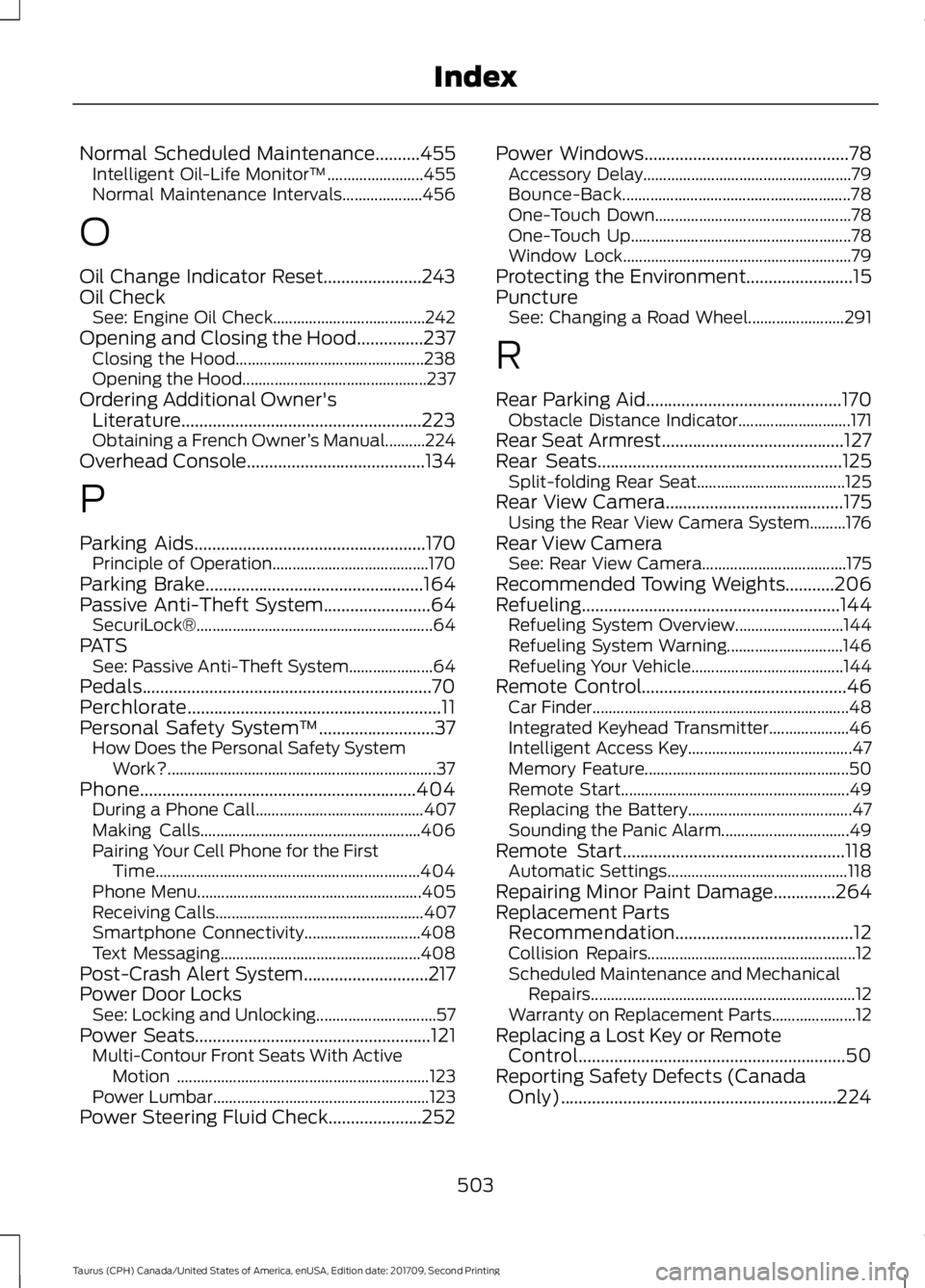
Normal Scheduled Maintenance..........455
Intelligent Oil-Life Monitor™........................ 455
Normal Maintenance Intervals.................... 456
O
Oil Change Indicator Reset......................243
Oil Check See: Engine Oil Check...................................... 242
Opening and Closing the Hood...............237 Closing the Hood............................................... 238
Opening the Hood.............................................. 237
Ordering Additional Owner's Literature......................................................223
Obtaining a French Owner ’s Manual..........224
Overhead Console........................................134
P
Parking Aids....................................................170 Principle of Operation....................................... 170
Parking Brake.................................................164
Passive Anti-Theft System........................64 SecuriLock®........................................................... 64
PATS See: Passive Anti-Theft System..................... 64
Pedals
.................................................................70
Perchlorate.........................................................11
Personal Safety System ™
..........................37
How Does the Personal Safety System
Work?................................................................... 37
Phone..............................................................404 During a Phone Call.......................................... 407
Making Calls....................................................... 406
Pairing Your Cell Phone for the First Time.................................................................. 404
Phone Menu........................................................ 405
Receiving Calls.................................................... 407
Smartphone Connectivity............................. 408
Text Messaging.................................................. 408
Post-Crash Alert System
............................217
Power Door Locks See: Locking and Unlocking.............................. 57
Power Seats
.....................................................121
Multi-Contour Front Seats With Active
Motion ............................................................... 123
Power Lumbar...................................................... 123
Power Steering Fluid Check.....................252 Power Windows
..............................................78
Accessory Delay.................................................... 79
Bounce-Back......................................................... 78
One-Touch Down................................................. 78
One-Touch Up....................................................... 78
Window Lock......................................................... 79
Protecting the Environment........................15
Puncture See: Changing a Road Wheel........................ 291
R
Rear Parking Aid
............................................170
Obstacle Distance Indicator............................ 171
Rear Seat Armrest.........................................127
Rear Seats
.......................................................125
Split-folding Rear Seat..................................... 125
Rear View Camera........................................175 Using the Rear View Camera System.........176
Rear View Camera See: Rear View Camera.................................... 175
Recommended Towing Weights...........206
Refueling..........................................................144 Refueling System Overview........................... 144
Refueling System Warning............................. 146
Refueling Your Vehicle...................................... 144
Remote Control
..............................................46
Car Finder................................................................ 48
Integrated Keyhead Transmitter.................... 46
Intelligent Access Key......................................... 47
Memory Feature................................................... 50
Remote Start......................................................... 49
Replacing the Battery......................................... 47
Sounding the Panic Alarm................................ 49
Remote Start..................................................118 Automatic Settings............................................. 118
Repairing Minor Paint Damage
..............264
Replacement Parts Recommendation........................................12
Collision Repairs.................................................... 12
Scheduled Maintenance and Mechanical Repairs.................................................................. 12
Warranty on Replacement Parts..................... 12
Replacing a Lost Key or Remote Control............................................................50
Reporting Safety Defects (Canada Only)..............................................................224
503
Taurus (CPH) Canada/United States of America, enUSA, Edition date: 201709, Second Printing Index
Page 507 of 510
Reporting Safety Defects (U.S.
Only)..............................................................224
Roadside Assistance...................................213
Vehicles Sold in Canada: Getting Roadside
Assistance........................................................ 214
Vehicles Sold in Canada: Roadside Assistance Program Coverage.................. 214
Vehicles Sold in Canada: Using Roadside Assistance........................................................ 214
Vehicles Sold in the United States: Getting Roadside Assistance.................................... 213
Vehicles Sold in the United States: Using Roadside Assistance.................................... 213
Roadside Emergencies
...............................213
Running-In See: Breaking-In.................................................. 210
Running Out of Fuel
.....................................142
Adding Fuel From a Portable Fuel
Container.......................................................... 143
Filling a Portable Fuel Container.................. 143
S
Safety Canopy ™
............................................43
Safety Precautions......................................140
Satellite Radio..............................................325
Satellite Radio Electronic Serial Number
(ESN)................................................................ 326
Satellite Radio Reception Factors...............325
SiriusXM Satellite Radio Service.................. 326
Troubleshooting................................................. 326
Scheduled Maintenance Record...........460
Scheduled Maintenance
...........................452
Seatbelt Extension........................................35
Seatbelt Height Adjustment......................32
Seatbelt Reminder
.........................................33
Belt-Minder™........................................................ 33
Seatbelts...........................................................30 Principle of Operation........................................ 30
Seatbelt Warning Lamp and Indicator Chime...............................................................33
Conditions of operation..................................... 33
Seats..................................................................119
Security..............................................................64
Settings...........................................................420 911 Assist............................................................... 425
Ambient Lighting............................................... 432
Bluetooth.............................................................. 422Clock.......................................................................
422
Display................................................................... 433
General.................................................................. 430
Media Player......................................................... 421
Mobile Apps......................................................... 428
Navigation............................................................ 426
Phone..................................................................... 422
Radio...................................................................... 425
Sound.................................................................... 420
Valet Mode........................................................... 434
Vehicle .................................................................... 432
Voice Control....................................................... 433
Wi-Fi & Hotspot................................................. 430
Side Airbags.....................................................42
Sitting in the Correct Position...................119
Snow Chains See: Using Snow Chains................................. 286
Spare Wheel See: Changing a Road Wheel........................ 291
Special Notices................................................12 New Vehicle Limited Warranty......................... 12
On Board Diagnostics Data Link Connector............................................................ 13
Special Instructions.............................................. 12
Special Operating Conditions Scheduled Maintenance..............................................458
Exceptions........................................................... 459
Speed Control See: Cruise Control............................................. 179
Stability Control............................................167 Principle of Operation....................................... 167
Starter Switch See: Ignition Switch........................................... 135
Starting a Gasoline Engine.......................136 Cold Weather Starting - Flex Fuel
Vehicles.............................................................. 137
Failure to Start...................................................... 137
Guarding Against Exhaust Fumes................138
Important Ventilating Information...............138
Stopping the Engine When Your Vehicle is Moving................................................................ 137
Stopping the Engine When Your Vehicle is Stationary.......................................................... 137
Starting and Stopping the Engine..........135 General Information.......................................... 135
Steering............................................................197 Electric Power Steering..................................... 197
Steering Wheel...............................................66
504
Taurus (CPH) Canada/United States of America, enUSA, Edition date: 201709, Second Printing Index