remote control FORD TAURUS 2018 Owner's Manual
[x] Cancel search | Manufacturer: FORD, Model Year: 2018, Model line: TAURUS, Model: FORD TAURUS 2018Pages: 510, PDF Size: 22.04 MB
Page 100 of 510
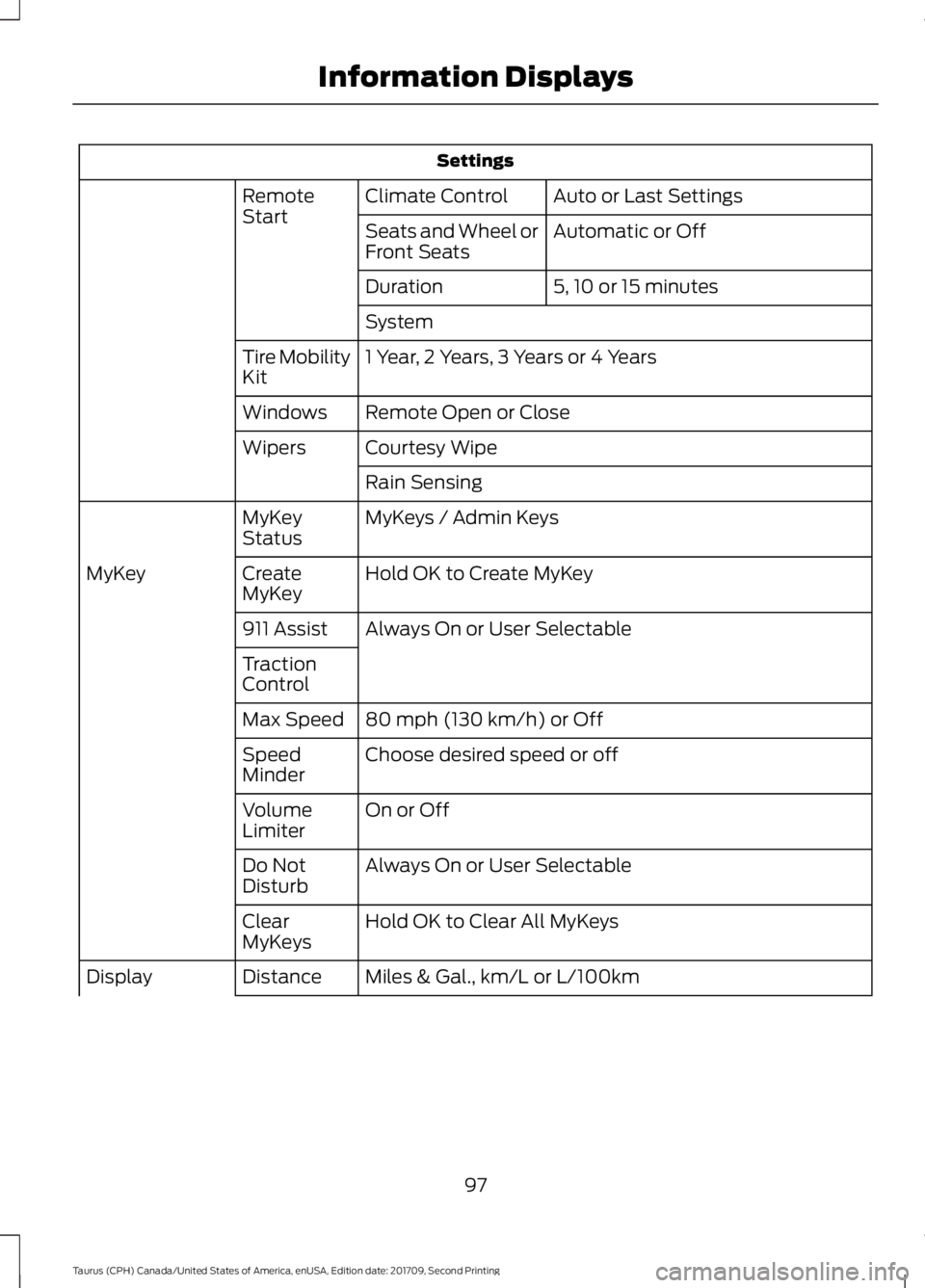
Settings
Auto or Last Settings
Climate Control
Remote
Start
Automatic or Off
Seats and Wheel or
Front Seats
5, 10 or 15 minutes
Duration
System
1 Year, 2 Years, 3 Years or 4 Years
Tire Mobility
Kit
Remote Open or Close
Windows
Courtesy Wipe
Wipers
Rain Sensing
MyKeys / Admin Keys
MyKey
Status
Hold OK to Create MyKey
Create
MyKey
MyKey
Always On or User Selectable
911 Assist
Traction
Control
80 mph (130 km/h) or Off
Max Speed
Choose desired speed or off
Speed
Minder
On or Off
Volume
Limiter
Always On or User Selectable
Do Not
Disturb
Hold OK to Clear All MyKeys
Clear
MyKeys
Miles & Gal., km/L or L/100km
Distance
Display
97
Taurus (CPH) Canada/United States of America, enUSA, Edition date: 201709, Second Printing Information Displays
Page 121 of 510
Note:
Do not clean the mirror housing or
glass with harsh abrasives, fuel or other
petroleum-based cleaning products.
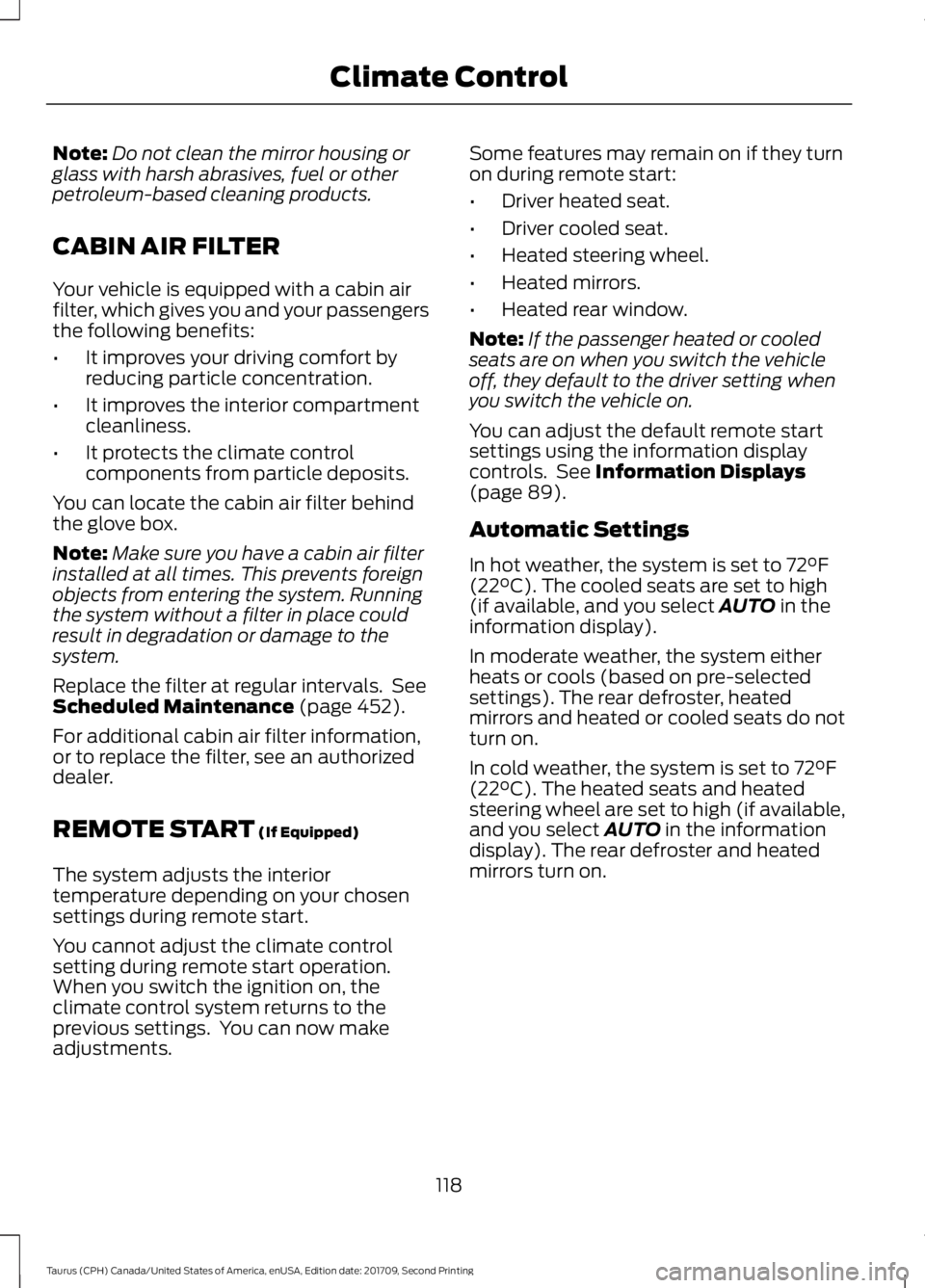
CABIN AIR FILTER
Your vehicle is equipped with a cabin air
filter, which gives you and your passengers
the following benefits:
• It improves your driving comfort by
reducing particle concentration.
• It improves the interior compartment
cleanliness.
• It protects the climate control
components from particle deposits.
You can locate the cabin air filter behind
the glove box.
Note: Make sure you have a cabin air filter
installed at all times. This prevents foreign
objects from entering the system. Running
the system without a filter in place could
result in degradation or damage to the
system.
Replace the filter at regular intervals. See
Scheduled Maintenance (page 452).
For additional cabin air filter information,
or to replace the filter, see an authorized
dealer.
REMOTE START
(If Equipped)
The system adjusts the interior
temperature depending on your chosen
settings during remote start.
You cannot adjust the climate control
setting during remote start operation.
When you switch the ignition on, the
climate control system returns to the
previous settings. You can now make
adjustments. Some features may remain on if they turn
on during remote start:
•
Driver heated seat.
• Driver cooled seat.
• Heated steering wheel.
• Heated mirrors.
• Heated rear window.
Note: If the passenger heated or cooled
seats are on when you switch the vehicle
off, they default to the driver setting when
you switch the vehicle on.
You can adjust the default remote start
settings using the information display
controls. See
Information Displays
(page 89).
Automatic Settings
In hot weather, the system is set to
72°F
(22°C). The cooled seats are set to high
(if available, and you select AUTO in the
information display).
In moderate weather, the system either
heats or cools (based on pre-selected
settings). The rear defroster, heated
mirrors and heated or cooled seats do not
turn on.
In cold weather, the system is set to
72°F
(22°C). The heated seats and heated
steering wheel are set to high (if available,
and you select
AUTO in the information
display). The rear defroster and heated
mirrors turn on.
118
Taurus (CPH) Canada/United States of America, enUSA, Edition date: 201709, Second Printing Climate Control
Page 127 of 510
MEMORY FUNCTION (If Equipped)
WARNINGS
Before activating the memory seat,
make sure that the area immediately
surrounding the seat is clear of
obstructions and that all occupants are
clear of moving parts. Do not use the memory function
when your vehicle is moving.
This function automatically recalls the
position of the following:
•
Driver seat.
• Power mirrors.
• Optional power adjustable pedals.
• Optional power steering column.
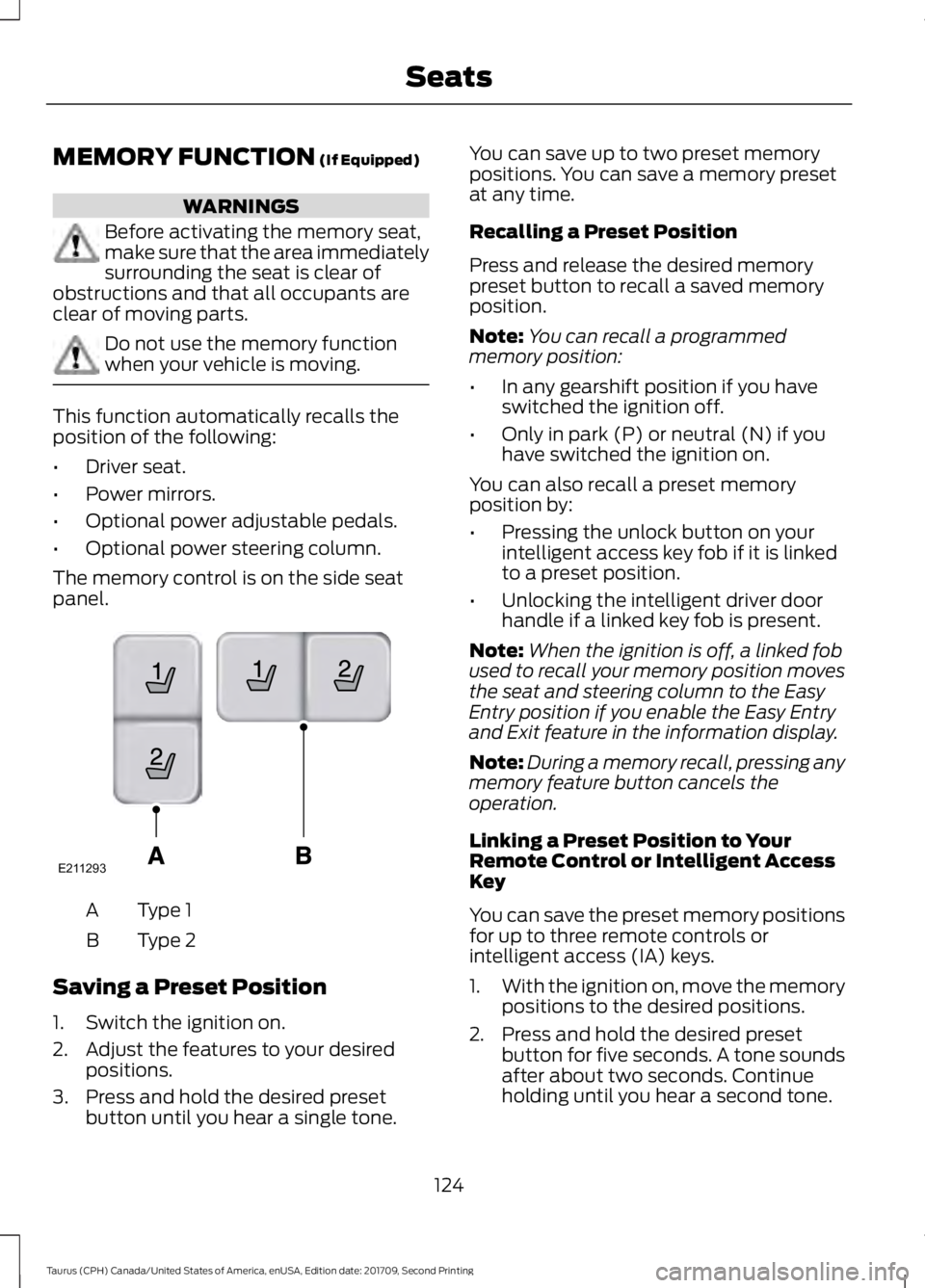
The memory control is on the side seat
panel. Type 1
A
Type 2
B
Saving a Preset Position
1. Switch the ignition on.
2. Adjust the features to your desired positions.
3. Press and hold the desired preset button until you hear a single tone. You can save up to two preset memory
positions. You can save a memory preset
at any time.
Recalling a Preset Position
Press and release the desired memory
preset button to recall a saved memory
position.
Note:
You can recall a programmed
memory position:
• In any gearshift position if you have
switched the ignition off.
• Only in park (P) or neutral (N) if you
have switched the ignition on.
You can also recall a preset memory
position by:
• Pressing the unlock button on your
intelligent access key fob if it is linked
to a preset position.
• Unlocking the intelligent driver door
handle if a linked key fob is present.
Note: When the ignition is off, a linked fob
used to recall your memory position moves
the seat and steering column to the Easy
Entry position if you enable the Easy Entry
and Exit feature in the information display.
Note: During a memory recall, pressing any
memory feature button cancels the
operation.
Linking a Preset Position to Your
Remote Control or Intelligent Access
Key
You can save the preset memory positions
for up to three remote controls or
intelligent access (IA) keys.
1. With the ignition on, move the memory
positions to the desired positions.
2. Press and hold the desired preset button for five seconds. A tone sounds
after about two seconds. Continue
holding until you hear a second tone.
124
Taurus (CPH) Canada/United States of America, enUSA, Edition date: 201709, Second Printing SeatsE211293
Page 128 of 510
3. Within three seconds, press the lock
button on the remote control you are
linking.
To unlink a remote control, follow the
same procedure – except in Step 3, press
the unlock button on the remote control.
Easy Entry and Exit Feature
If you enable the easy entry and exit
feature, it automatically moves the driver
seat position rearward up to 2 in (5 cm)
and the steering column up and forward
when you switch the ignition off.
When you switch the ignition on, the driver
seat and steering column return to the
previous position.
You can enable or disable this feature in
the information display. See Information
Displays
(page 89).
REAR SEATS
Split-folding Rear Seat WARNING
Before returning the seatback to its
original position, make sure that
cargo or any objects are not trapped
behind the seatback. After returning the
seatback to its original position, pull on the
seatback to make sure that it has fully
latched. An unlatched seat may become
dangerous in the event of a sudden stop
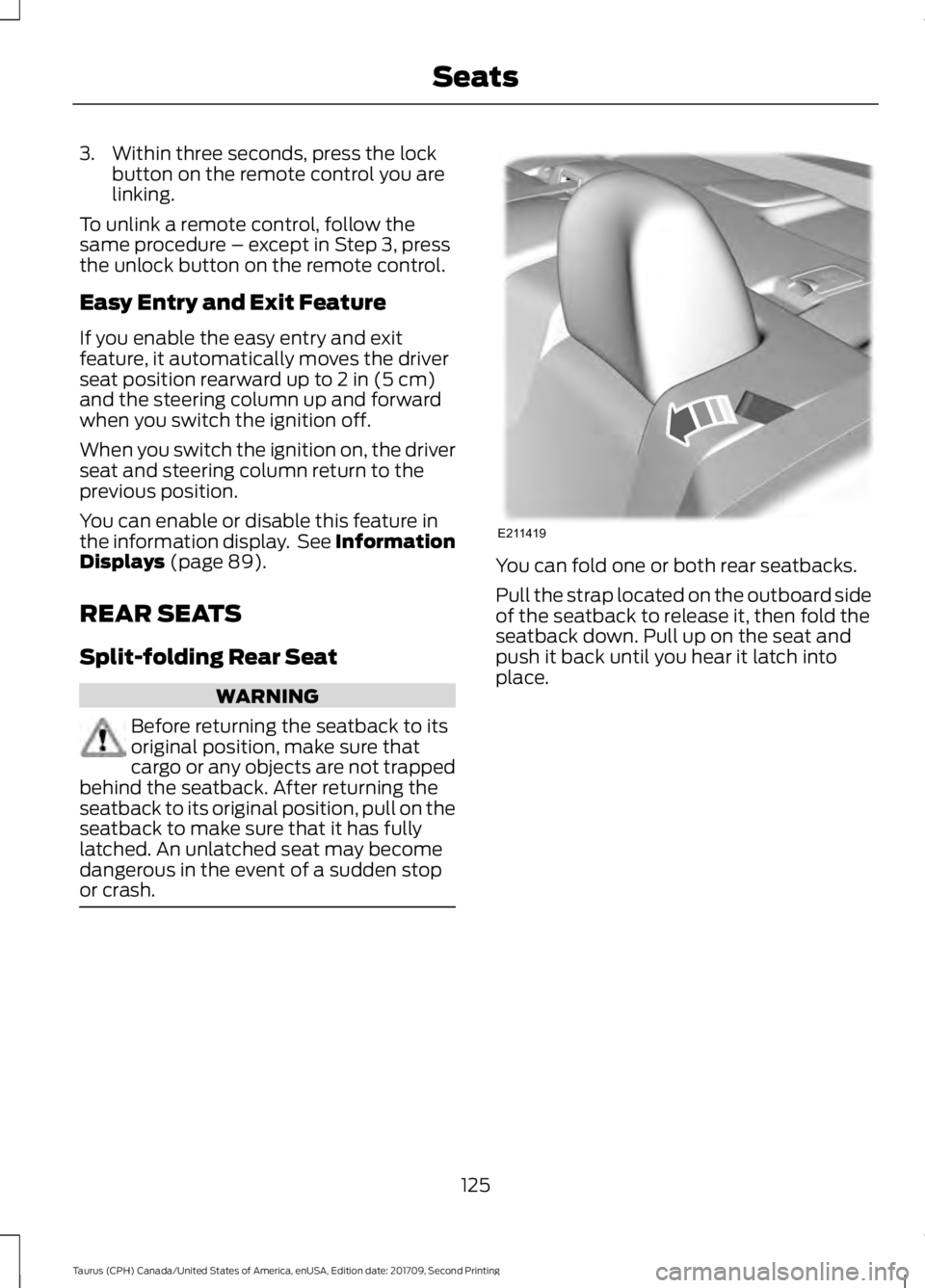
or crash. You can fold one or both rear seatbacks.
Pull the strap located on the outboard side
of the seatback to release it, then fold the
seatback down. Pull up on the seat and
push it back until you hear it latch into
place.
125
Taurus (CPH) Canada/United States of America, enUSA, Edition date: 201709, Second Printing SeatsE211419
Page 132 of 510
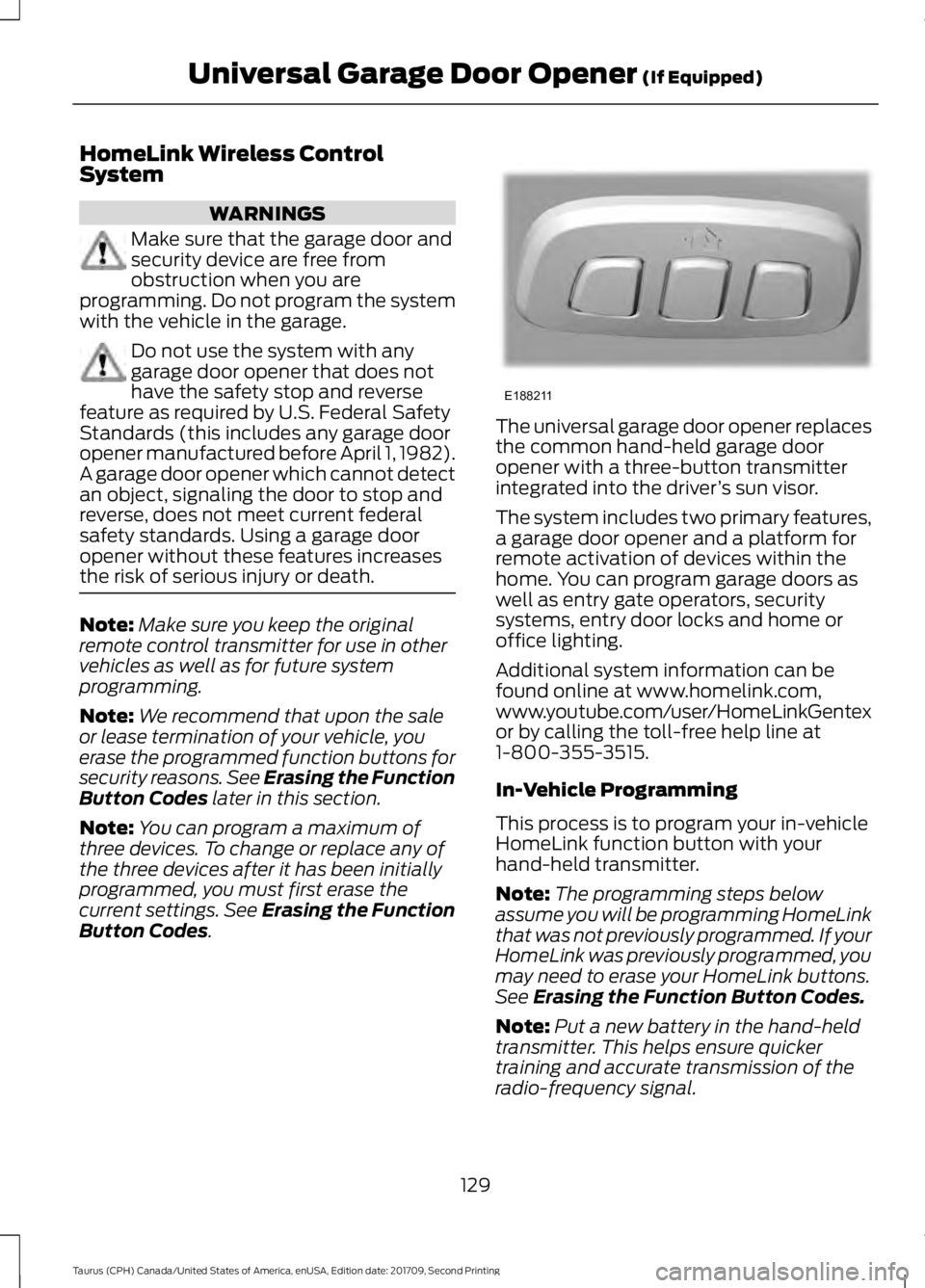
HomeLink Wireless Control
System
WARNINGS
Make sure that the garage door and
security device are free from
obstruction when you are
programming. Do not program the system
with the vehicle in the garage. Do not use the system with any
garage door opener that does not
have the safety stop and reverse
feature as required by U.S. Federal Safety
Standards (this includes any garage door
opener manufactured before April 1, 1982).
A garage door opener which cannot detect
an object, signaling the door to stop and
reverse, does not meet current federal
safety standards. Using a garage door
opener without these features increases
the risk of serious injury or death. Note:
Make sure you keep the original
remote control transmitter for use in other
vehicles as well as for future system
programming.
Note: We recommend that upon the sale
or lease termination of your vehicle, you
erase the programmed function buttons for
security reasons. See Erasing the Function
Button Codes later in this section.
Note: You can program a maximum of
three devices. To change or replace any of
the three devices after it has been initially
programmed, you must first erase the
current settings. See Erasing the Function
Button Codes
. The universal garage door opener replaces
the common hand-held garage door
opener with a three-button transmitter
integrated into the driver
’s sun visor.
The system includes two primary features,
a garage door opener and a platform for
remote activation of devices within the
home. You can program garage doors as
well as entry gate operators, security
systems, entry door locks and home or
office lighting.
Additional system information can be
found online at www.homelink.com,
www.youtube.com/user/HomeLinkGentex
or by calling the toll-free help line at
1-800-355-3515.
In-Vehicle Programming
This process is to program your in-vehicle
HomeLink function button with your
hand-held transmitter.
Note: The programming steps below
assume you will be programming HomeLink
that was not previously programmed. If your
HomeLink was previously programmed, you
may need to erase your HomeLink buttons.
See
Erasing the Function Button Codes.
Note: Put a new battery in the hand-held
transmitter. This helps ensure quicker
training and accurate transmission of the
radio-frequency signal.
129
Taurus (CPH) Canada/United States of America, enUSA, Edition date: 201709, Second Printing Universal Garage Door Opener
(If Equipped)E188211
Page 188 of 510
Possible Causes and Actions for This Message Displaying:
Action
Cause
Clean the grille surface in front of the radar
or remove the object causing the obstruc-
tion.
The surface of the radar is dirty or
obstructed.
Wait a short time. It may take several
minutes for the radar to detect that it is free
from obstruction.
The surface of the radar is clean but the
message remains in the display.
Do not use the system in these conditions
because it may not detect any vehicles
ahead.
Heavy rain or snow is interfering with the
radar signals.
Do not use the system in these conditions
because it may not detect any vehicles
ahead.
Water, snow or ice on the surface of the
road may interfere with the radar signals.
Wait a short time or switch to normal cruise
control.
You are in a desert or remote area with no
other vehicles and no roadside objects.
Due to the nature of radar technology, it is possible to get a blockage warning with no
actual block. This happens, for example, when driving in sparse rural or desert
environments. A false blocked condition either self clears, or clears after you restart your
vehicle.
Switching to Normal Cruise
Control WARNING
Normal cruise control will not brake
when your vehicle is approaching
slower vehicles. Always be aware of
which mode you have selected and apply
the brakes when necessary. You can change from adaptive cruise
control to normal cruise control through
the information display. The cruise control indicator light
replaces the adaptive cruise
control indicator light if you
select normal cruise control. The gap
setting does not display, and the system
does not respond to lead vehicles.
Automatic braking remains active to
maintain set speed.
185
Taurus (CPH) Canada/United States of America, enUSA, Edition date: 201709, Second Printing Cruise ControlE71340
Page 220 of 510
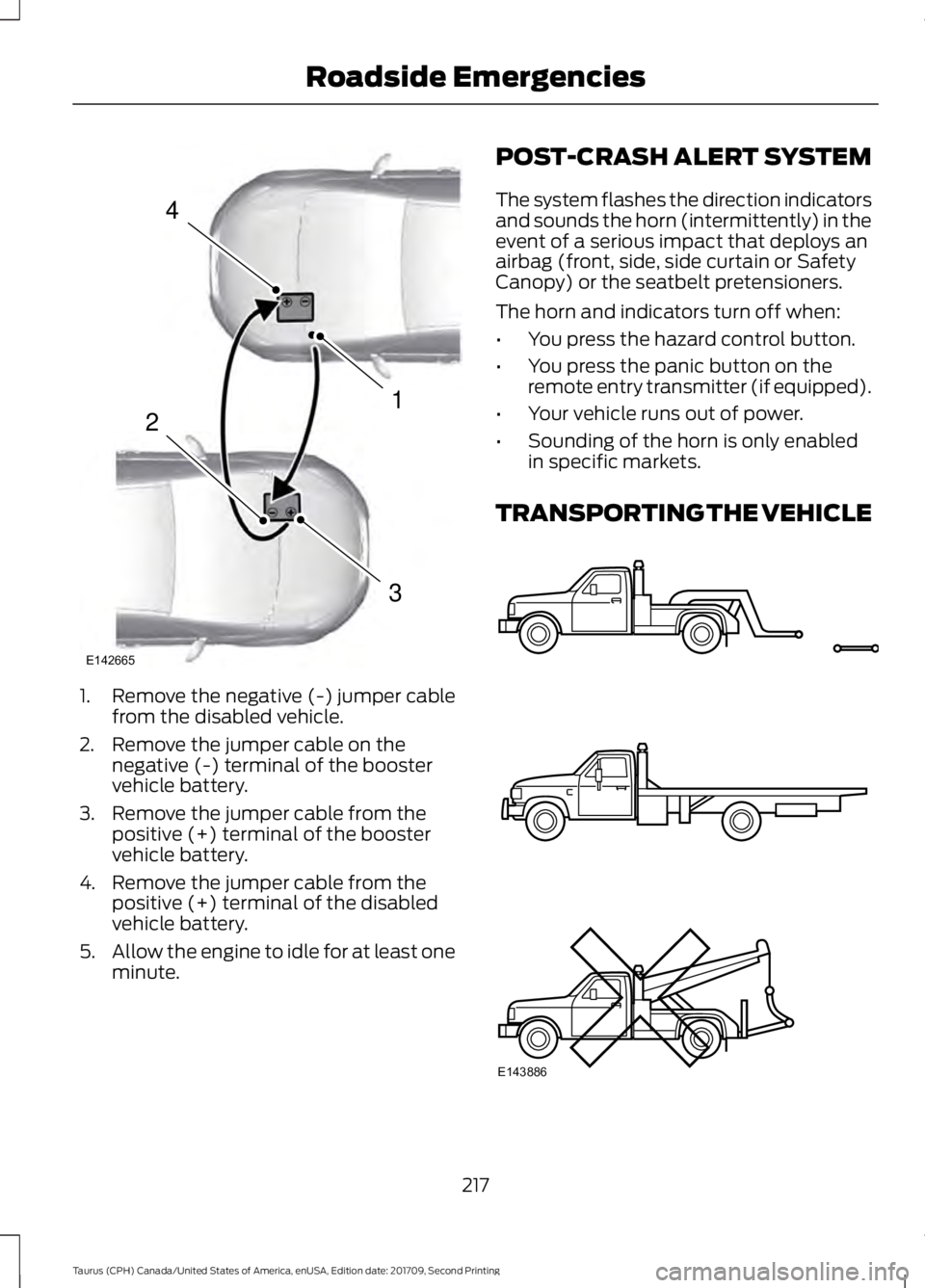
1. Remove the negative (-) jumper cable
from the disabled vehicle.
2. Remove the jumper cable on the negative (-) terminal of the booster
vehicle battery.
3. Remove the jumper cable from the positive (+) terminal of the booster
vehicle battery.
4. Remove the jumper cable from the positive (+) terminal of the disabled
vehicle battery.
5. Allow the engine to idle for at least one
minute. POST-CRASH ALERT SYSTEM
The system flashes the direction indicators
and sounds the horn (intermittently) in the
event of a serious impact that deploys an
airbag (front, side, side curtain or Safety
Canopy) or the seatbelt pretensioners.
The horn and indicators turn off when:
•
You press the hazard control button.
• You press the panic button on the
remote entry transmitter (if equipped).
• Your vehicle runs out of power.
• Sounding of the horn is only enabled
in specific markets.
TRANSPORTING THE VEHICLE 217
Taurus (CPH) Canada/United States of America, enUSA, Edition date: 201709, Second Printing Roadside Emergencies4
1
3
2
E142665 E143886
Page 286 of 510
This begins with the letters DOT
and indicates that the tire meets
all federal standards. The next
two numbers or letters are the
plant code designating where it
was manufactured, the next two
are the tire size code and the last
four numbers represent the week
and year the tire was built. For
example, the numbers 317 mean
the 31st week of 1997. After 2000,
the numbers go to four digits. For
example, 2501 means the 25th
week of 2001. The numbers in
between are identification codes
used for traceability. This
information is used to contact
customers if a tire defect requires
a recall.
Tire Replacement
Requirements
Your vehicle is equipped with tires
designed to provide a safe ride
and handling capability.
WARNINGS
Only use replacement tires
and wheels that are the same
size, load index, speed rating and
type (such as P-metric versus
LT-metric or all-season versus
all-terrain) as those originally
provided by Ford. The
recommended tire and wheel size
may be found on either the Safety
Compliance Certification Label
(affixed to either the door hinge
pillar, door-latch post, or the door
edge that meets the door-latch
post, next to the driver's seating
position), or the Tire Label which WARNINGS
is located on the B-Pillar or edge
of the driver's door. If this
information is not found on these
labels, then you should contact
your authorized dealer as soon as
possible. Use of any tire or wheel
not recommended by Ford can
affect the safety and performance
of your vehicle, which could result
in an increased risk of loss of
vehicle control, vehicle rollover,
personal injury and death. To reduce the risk of serious
injury, when mounting
replacement tires and wheels, you
should not exceed the maximum
pressure indicated on the sidewall
of the tire to set the beads without
additional precautions listed
below. If the beads do not seat at
the maximum pressure indicated,
re-lubricate and try again. For a mounting pressure
more than 20 psi (1.38 bar)
greater than the maximum
pressure, a Ford dealer or other
tire service professional should do
the mounting. Always inflate steel carcass
tires with a remote air fill with
the person inflating standing at a
minimum of
12 ft (3.66 m) away
from the wheel and tire assembly.
283
Taurus (CPH) Canada/United States of America, enUSA, Edition date: 201709, Second Printing Wheels and Tires
Page 504 of 510
Why Maintain Your Vehicle at Your
Dealership?..................................................... 452
Getting Assistance Outside the U.S. and Canada..........................................................222
Getting the Services You Need................219 Away From Home............................................... 219
Global Opening...............................................79
Opening the Windows........................................ 79
H
Handbrake See: Parking Brake............................................. 164
Hazard Flashers
.............................................214
Headlamp Adjusting See: Adjusting the Headlamps..................... 255
Headlamp Exit Delay.....................................75
Headrest See: Head Restraints.......................................... 119
Head Restraints
.............................................119
Adjusting the Head Restraint......................... 120
Tilting Head Restraints ..................................... 121
Heated Seats
..................................................126
Rear Heated Seats............................................. 126
Heated Steering Wheel
...............................68
Heated Windows and Mirrors....................117 Heated Exterior Mirror........................................ 117
Heated Rear Window.......................................... 117
Heating See: Climate Control......................................... 109
Hill Start Assist..............................................164 Switching the System On and Off...............165
Using Hill Start Assist....................................... 164
Hints on Controlling the Interior Climate...........................................................115
Defogging the Side Windows in Cold Weather.............................................................. 117
General Hints......................................................... 115
Quickly Cooling the Interior............................. 116
Quickly Heating the Interior............................. 116
Recommended Settings for Cooling............117
Recommended Settings for Heating...........116
Hints on Driving With Anti-Lock Brakes............................................................163
Home Screen
................................................382
Hood Lock See: Opening and Closing the Hood...........237 I
Ignition Switch
...............................................135
In California (U.S. Only)............................220
Information Display Control......................68
Information Displays....................................89
General Information........................................... 89
Information Messages
.................................98
Adaptive Cruise Control.................................... 98
AdvanceTrac ™..................................................... 99
Alarm........................................................................\
99
All Wheel Drive................................................... 100
Automatic Engine Shutdown.......................... 99
Automatic High Beam Control....................... 99
Battery and Charging System....................... 100
Blind Spot Information and Cross Traffic Alert System..................................................... 101
Brake System........................................................ 101
Collision Warning System............................... 102
Doors and Locks................................................. 102
Driver Alert............................................................ 102
Fuel........................................................................\
.. 102
Keys and Intelligent Access............................ 103
Lane Keeping System....................................... 103
Maintenance........................................................ 104
MyKey..................................................................... 104
Park Aid.................................................................. 105
Passenger Sensing System Message.........105
Power Steering.................................................... 106
Reminder Messages.......................................... 105
Remote Start....................................................... 106
Seats....................................................................... 106
Starting System.................................................. 106
Tire Pressure Monitoring System.................. 107
Traction Control................................................... 107
Transmission........................................................ 107
Installing Child Restraints............................19 Child Seats............................................................... 19
Using Lap and Shoulder Belts......................... 20
Using Lower Anchors and Tethers for CHildren (LATCH)............................................ 22
Using Tether Straps............................................. 23
Instrument Cluster
........................................83
Instrument Lighting Dimmer......................74
Instrument Panel Overview........................16
Interior Lamps
..................................................77
Interior Luggage Compartment Release............................................................62
501
Taurus (CPH) Canada/United States of America, enUSA, Edition date: 201709, Second Printing Index
Page 505 of 510
Interior Mirror....................................................81
Automatic Dimming Mirror................................ 81
Manual Dimming Mirror...................................... 81
Introduction.........................................................7
J
Jump Starting the Vehicle.........................215 Connecting the Jumper Cables..................... 215
Jump Starting....................................................... 216
Preparing Your Vehicle...................................... 215
Removing the Jumper Cables........................ 216
K
Keyless Entry...................................................60
SECURICODE™ Keyless Entry
Keypad................................................................ 60
Keyless Starting
.............................................135
Ignition Modes..................................................... 136
Keys and Remote Controls........................46
L
Lane Keeping System.................................187 Switching the System On and Off...............188
Lighting Control
...............................................73
Headlamp Flasher................................................ 74
High Beams............................................................. 73
Lighting...............................................................73 General Information............................................ 73
Load Carrying
...............................................200
Load Limit......................................................200
Special Loading Instructions for Owners of
Pick-up Trucks and Utility-type
Vehicles............................................................ 204
Vehicle Loading - with and without a Trailer................................................................ 200
Locking and Unlocking
.................................57
Activating Intelligent Access........................... 58
Autolock.................................................................. 59
Battery Saver......................................................... 60
Illuminated Entry................................................. 60
Illuminated Exit..................................................... 60
Locking and Unlocking the Doors with the Key Blade............................................................ 57
Opening a Rear Door From the Inside...........57
Opening the Luggage Compartment...........58 Power Door Locks.................................................
57
Remote Control..................................................... 57
Smart Unlocks for Integrated Keyhead Transmitter........................................................ 59
Smart Unlocks for Intelligent Access Keys...................................................................... 59
Lug Nuts See: Changing a Road Wheel........................ 291
M
Maintenance..................................................237 General Information.......................................... 237
Manual Climate Control............................109
Media Hub......................................................329
Memory Function
..........................................124
Easy Entry and Exit Feature............................ 125
Saving a Preset Position.................................. 124
Message Center See: Information Displays................................. 89
Mirrors See: Heated Windows and Mirrors................117
See: Windows and Mirrors................................ 78
Mobile Communications Equipment.......13
Moonroof...........................................................82 Bounce-Back......................................................... 82
Opening and Closing the Moonroof..............82
Venting the Moonroof........................................ 82
Motorcraft Parts - 2.0L EcoBoost™.................................................299
Motorcraft Parts - 3.5L Duratec............300
Motorcraft Parts - 3.5L Ecoboost™..................................................301
MyKey Troubleshooting...............................55
MyKey ™..............................................................51
Principle of Operation.......................................... 51
N
Navigation.....................................................409 cityseeker.............................................................. 416
Destination Mode................................................ 411
Map Mode............................................................ 409
Navigation Map Updates................................. 417
Navigation Menu................................................. 414
SiriusXM Traffic and Travel Link.................... 417
SYNC AppLink..................................................... 416
Waypoints............................................................. 415
502
Taurus (CPH) Canada/United States of America, enUSA, Edition date: 201709, Second Printing Index