traction control FORD TAURUS 2018 Owners Manual
[x] Cancel search | Manufacturer: FORD, Model Year: 2018, Model line: TAURUS, Model: FORD TAURUS 2018Pages: 510, PDF Size: 22.04 MB
Page 6 of 510
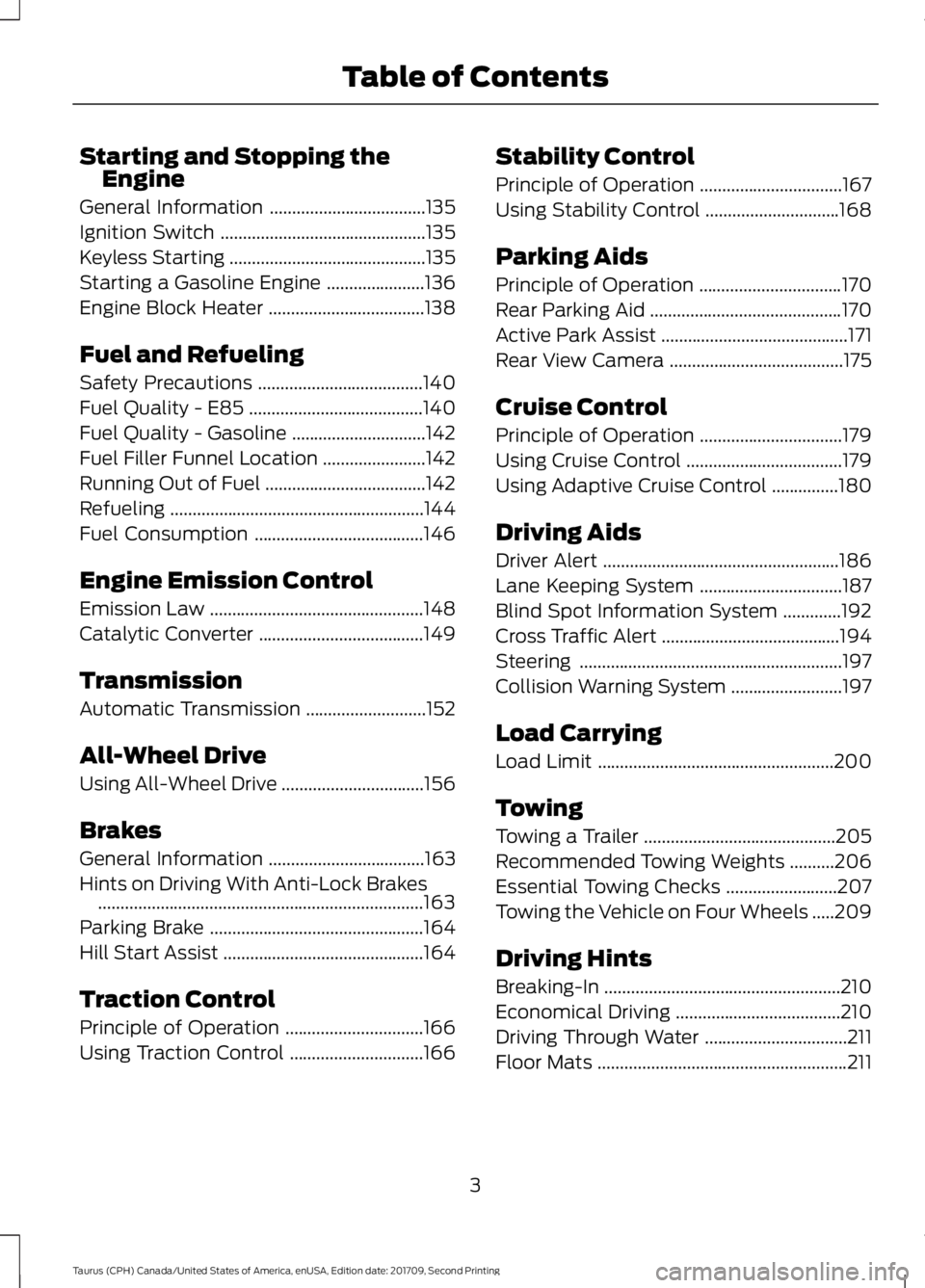
Starting and Stopping the
Engine
General Information ...................................135
Ignition Switch ..............................................
135
Keyless Starting ............................................
135
Starting a Gasoline Engine ......................
136
Engine Block Heater ...................................
138
Fuel and Refueling
Safety Precautions .....................................
140
Fuel Quality - E85 .......................................
140
Fuel Quality - Gasoline ..............................
142
Fuel Filler Funnel Location .......................
142
Running Out of Fuel ....................................
142
Refueling .........................................................
144
Fuel Consumption ......................................
146
Engine Emission Control
Emission Law ................................................
148
Catalytic Converter .....................................
149
Transmission
Automatic Transmission ...........................
152
All-Wheel Drive
Using All-Wheel Drive ................................
156
Brakes
General Information ...................................
163
Hints on Driving With Anti-Lock Brakes ........................................................................\
.
163
Parking Brake ................................................
164
Hill Start Assist .............................................
164
Traction Control
Principle of Operation ...............................
166
Using Traction Control ..............................
166Stability Control
Principle of Operation
................................
167
Using Stability Control ..............................
168
Parking Aids
Principle of Operation ................................
170
Rear Parking Aid ...........................................
170
Active Park Assist ..........................................
171
Rear View Camera .......................................
175
Cruise Control
Principle of Operation ................................
179
Using Cruise Control ...................................
179
Using Adaptive Cruise Control ...............
180
Driving Aids
Driver Alert .....................................................
186
Lane Keeping System ................................
187
Blind Spot Information System .............
192
Cross Traffic Alert ........................................
194
Steering ...........................................................
197
Collision Warning System .........................
197
Load Carrying
Load Limit .....................................................
200
Towing
Towing a Trailer ...........................................
205
Recommended Towing Weights ..........
206
Essential Towing Checks .........................
207
Towing the Vehicle on Four Wheels .....
209
Driving Hints
Breaking-In .....................................................
210
Economical Driving .....................................
210
Driving Through Water ................................
211
Floor Mats ........................................................
211
3
Taurus (CPH) Canada/United States of America, enUSA, Edition date: 201709, Second Printing Table of Contents
Page 55 of 510
•
Various vehicle speed reminders so you
know when your vehicle approaches
the limits. Warnings appear in the
information display and an audible
warning sounds when you exceed the
limit.
• Audio system maximum volume of
45%. A message will be shown in the
display when you attempt to exceed
the limited volume. Also, the
speed-sensitive or compensated
automatic volume control will be
disabled.
• Always on setting. When this is
selected, you will not be able to turn
off Advance Trac or traction control,
911 Assist or Emergency Assistance, or
Do Not Disturb (if your vehicle is equipped with these features).
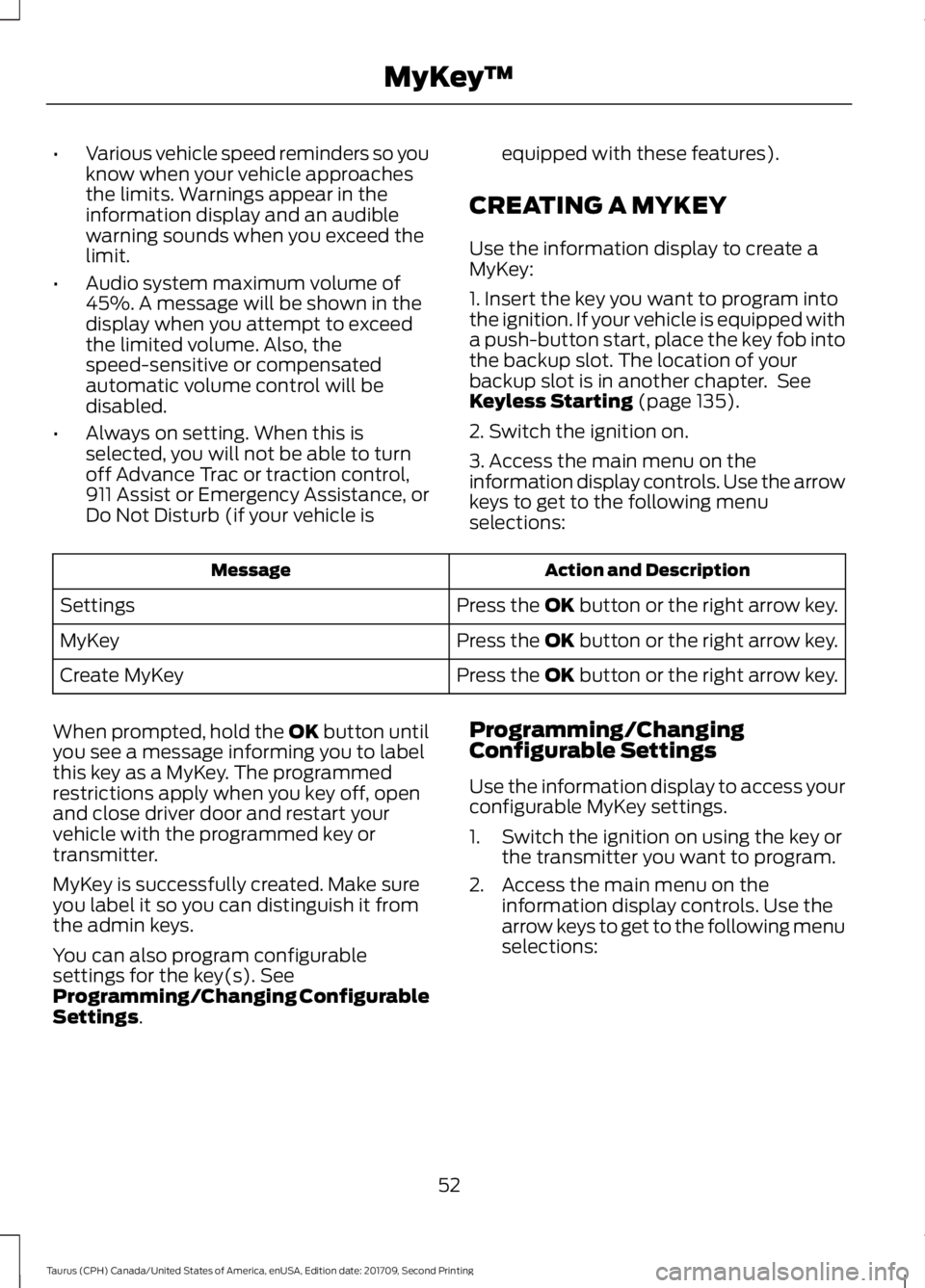
CREATING A MYKEY
Use the information display to create a
MyKey:
1. Insert the key you want to program into
the ignition. If your vehicle is equipped with
a push-button start, place the key fob into
the backup slot. The location of your
backup slot is in another chapter. See
Keyless Starting (page 135).
2. Switch the ignition on.
3. Access the main menu on the
information display controls. Use the arrow
keys to get to the following menu
selections: Action and Description
Message
Press the OK button or the right arrow key.
Settings
Press the OK button or the right arrow key.
MyKey
Press the OK button or the right arrow key.
Create MyKey
When prompted, hold the OK button until
you see a message informing you to label
this key as a MyKey. The programmed
restrictions apply when you key off, open
and close driver door and restart your
vehicle with the programmed key or
transmitter.
MyKey is successfully created. Make sure
you label it so you can distinguish it from
the admin keys.
You can also program configurable
settings for the key(s). See
Programming/Changing Configurable
Settings
. Programming/Changing
Configurable Settings
Use the information display to access your
configurable MyKey settings.
1. Switch the ignition on using the key or
the transmitter you want to program.
2. Access the main menu on the information display controls. Use the
arrow keys to get to the following menu
selections:
52
Taurus (CPH) Canada/United States of America, enUSA, Edition date: 201709, Second Printing MyKey
™
Page 94 of 510
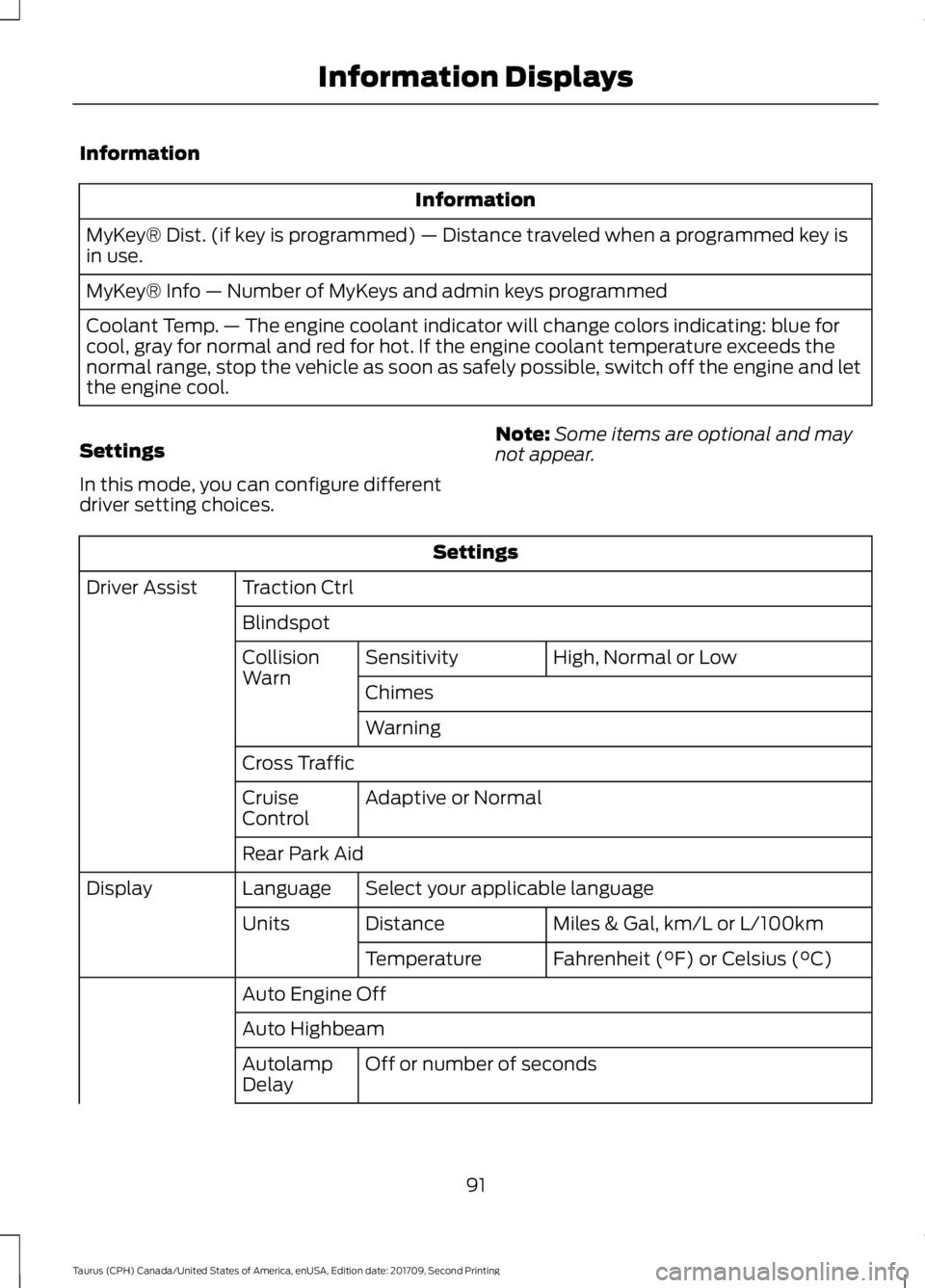
Information
Information
MyKey® Dist. (if key is programmed) — Distance traveled when a programmed key is
in use.
MyKey® Info — Number of MyKeys and admin keys programmed
Coolant Temp. — The engine coolant indicator will change colors indicating: blue for
cool, gray for normal and red for hot. If the engine coolant temperature exceeds the
normal range, stop the vehicle as soon as safely possible, switch off the engine and let
the engine cool.
Settings
In this mode, you can configure different
driver setting choices. Note:
Some items are optional and may
not appear. Settings
Traction Ctrl
Driver Assist
Blindspot High, Normal or Low
Sensitivity
Collision
Warn
Chimes
Warning
Cross Traffic Adaptive or Normal
Cruise
Control
Rear Park Aid
Select your applicable language
Language
Display
Miles & Gal, km/L or L/100km
Distance
Units
Fahrenheit (°F) or Celsius (°C)
Temperature
Auto Engine Off
Auto Highbeam Off or number of seconds
Autolamp
Delay
91
Taurus (CPH) Canada/United States of America, enUSA, Edition date: 201709, Second Printing Information Displays
Page 95 of 510
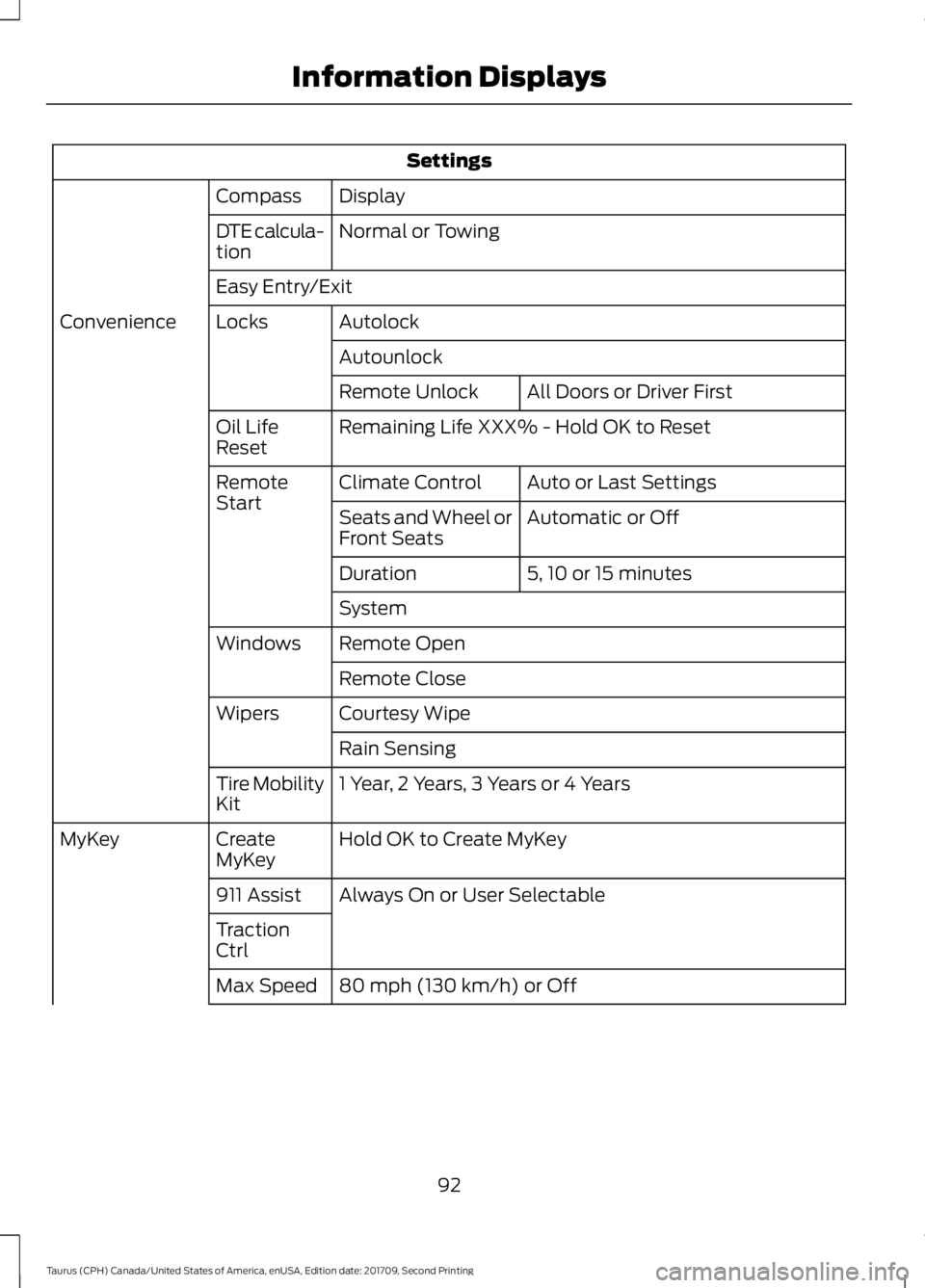
Settings
Display
Compass
Normal or Towing
DTE calcula-
tion
Easy Entry/Exit
Autolock
Locks
Convenience
AutounlockAll Doors or Driver First
Remote Unlock
Remaining Life XXX% - Hold OK to Reset
Oil Life
Reset
Auto or Last Settings
Climate Control
Remote
Start
Automatic or Off
Seats and Wheel or
Front Seats
5, 10 or 15 minutes
Duration
System
Remote Open
Windows
Remote Close
Courtesy Wipe
Wipers
Rain Sensing
1 Year, 2 Years, 3 Years or 4 Years
Tire Mobility
Kit
Hold OK to Create MyKey
Create
MyKey
MyKey
Always On or User Selectable
911 Assist
Traction
Ctrl
80 mph (130 km/h) or Off
Max Speed
92
Taurus (CPH) Canada/United States of America, enUSA, Edition date: 201709, Second Printing Information Displays
Page 99 of 510
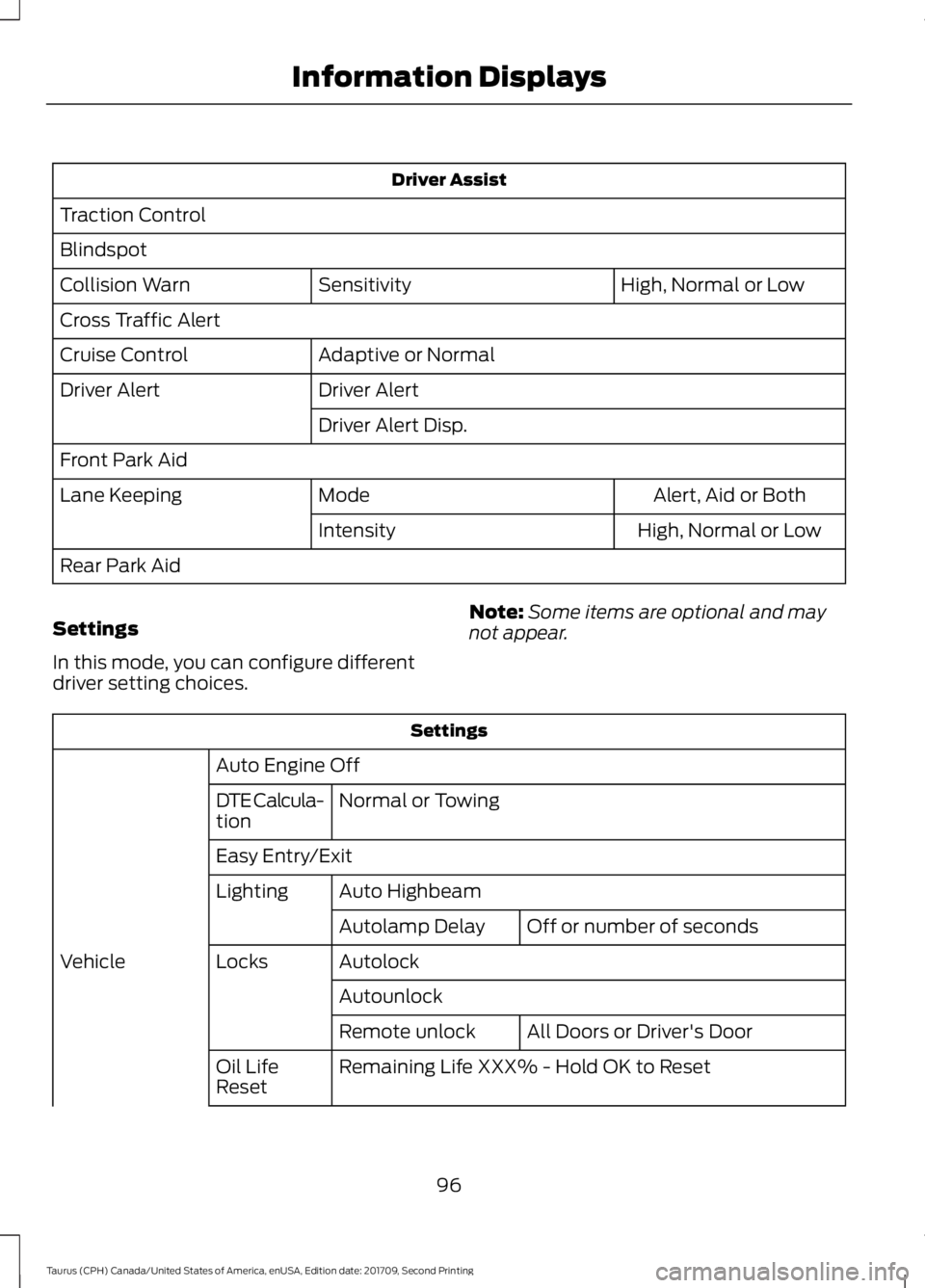
Driver Assist
Traction Control
Blindspot High, Normal or Low
Sensitivity
Collision Warn
Cross Traffic Alert
Adaptive or Normal
Cruise Control
Driver Alert
Driver Alert
Driver Alert Disp.
Front Park Aid Alert, Aid or Both
Mode
Lane Keeping
High, Normal or Low
Intensity
Rear Park Aid
Settings
In this mode, you can configure different
driver setting choices. Note:
Some items are optional and may
not appear. Settings
Auto Engine Off Normal or Towing
DTE Calcula-
tion
Easy Entry/Exit
Auto Highbeam
Lighting
Off or number of seconds
Autolamp Delay
Autolock
Locks
Vehicle
AutounlockAll Doors or Driver's Door
Remote unlock
Remaining Life XXX% - Hold OK to Reset
Oil Life
Reset
96
Taurus (CPH) Canada/United States of America, enUSA, Edition date: 201709, Second Printing Information Displays
Page 100 of 510
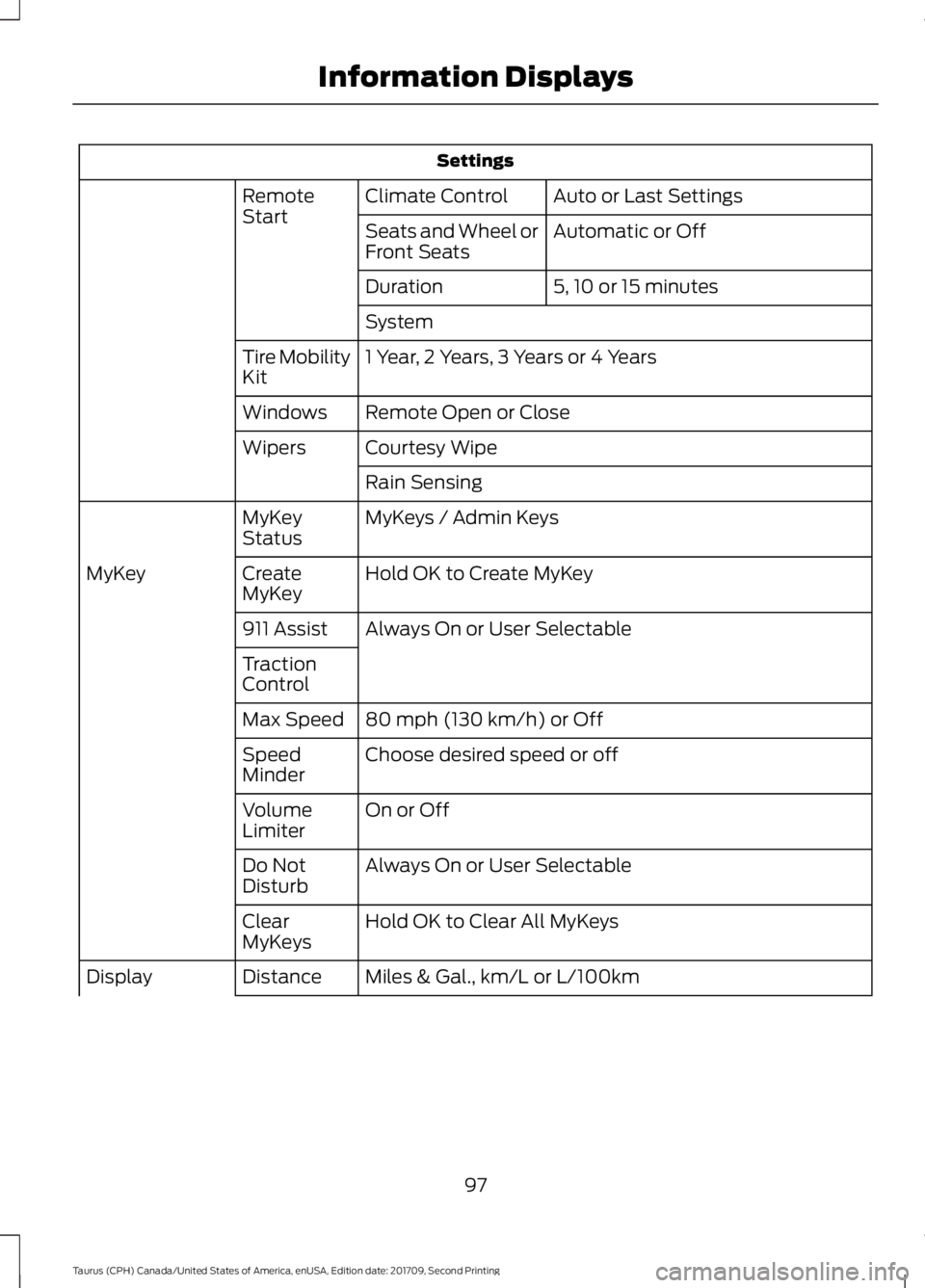
Settings
Auto or Last Settings
Climate Control
Remote
Start
Automatic or Off
Seats and Wheel or
Front Seats
5, 10 or 15 minutes
Duration
System
1 Year, 2 Years, 3 Years or 4 Years
Tire Mobility
Kit
Remote Open or Close
Windows
Courtesy Wipe
Wipers
Rain Sensing
MyKeys / Admin Keys
MyKey
Status
Hold OK to Create MyKey
Create
MyKey
MyKey
Always On or User Selectable
911 Assist
Traction
Control
80 mph (130 km/h) or Off
Max Speed
Choose desired speed or off
Speed
Minder
On or Off
Volume
Limiter
Always On or User Selectable
Do Not
Disturb
Hold OK to Clear All MyKeys
Clear
MyKeys
Miles & Gal., km/L or L/100km
Distance
Display
97
Taurus (CPH) Canada/United States of America, enUSA, Edition date: 201709, Second Printing Information Displays
Page 102 of 510
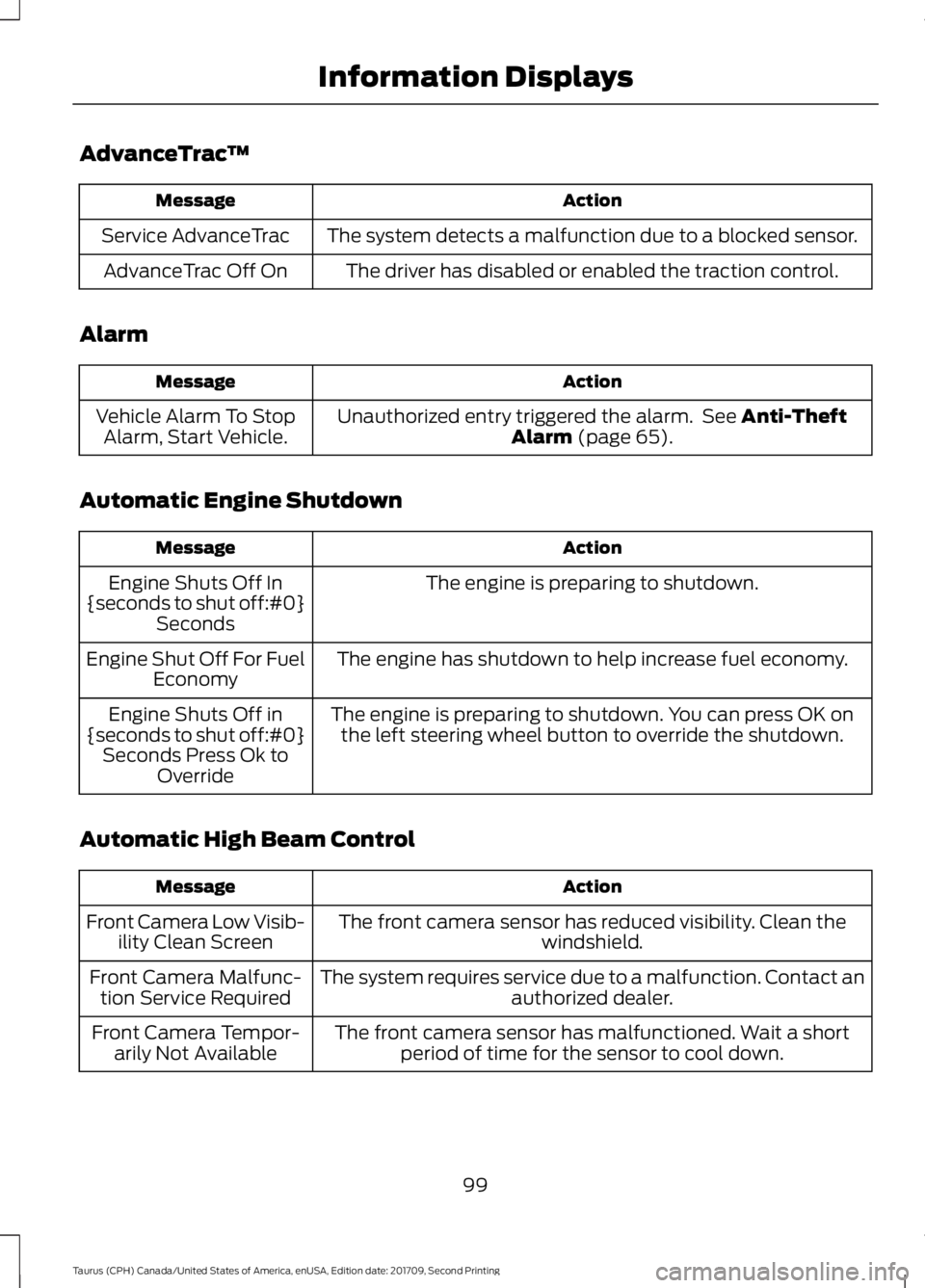
AdvanceTrac
™ Action
Message
The system detects a malfunction due to a blocked sensor.
Service AdvanceTrac
The driver has disabled or enabled the traction control.
AdvanceTrac Off On
Alarm Action
Message
Unauthorized entry triggered the alarm. See Anti-Theft
Alarm (page 65).
Vehicle Alarm To Stop
Alarm, Start Vehicle.
Automatic Engine Shutdown Action
Message
The engine is preparing to shutdown.
Engine Shuts Off In
{seconds to shut off:#0} Seconds
The engine has shutdown to help increase fuel economy.
Engine Shut Off For Fuel
Economy
The engine is preparing to shutdown. You can press OK onthe left steering wheel button to override the shutdown.
Engine Shuts Off in
{seconds to shut off:#0} Seconds Press Ok to Override
Automatic High Beam Control Action
Message
The front camera sensor has reduced visibility. Clean the windshield.
Front Camera Low Visib-
ility Clean Screen
The system requires service due to a malfunction. Contact anauthorized dealer.
Front Camera Malfunc-
tion Service Required
The front camera sensor has malfunctioned. Wait a shortperiod of time for the sensor to cool down.
Front Camera Tempor-
arily Not Available
99
Taurus (CPH) Canada/United States of America, enUSA, Edition date: 201709, Second Printing Information Displays
Page 110 of 510
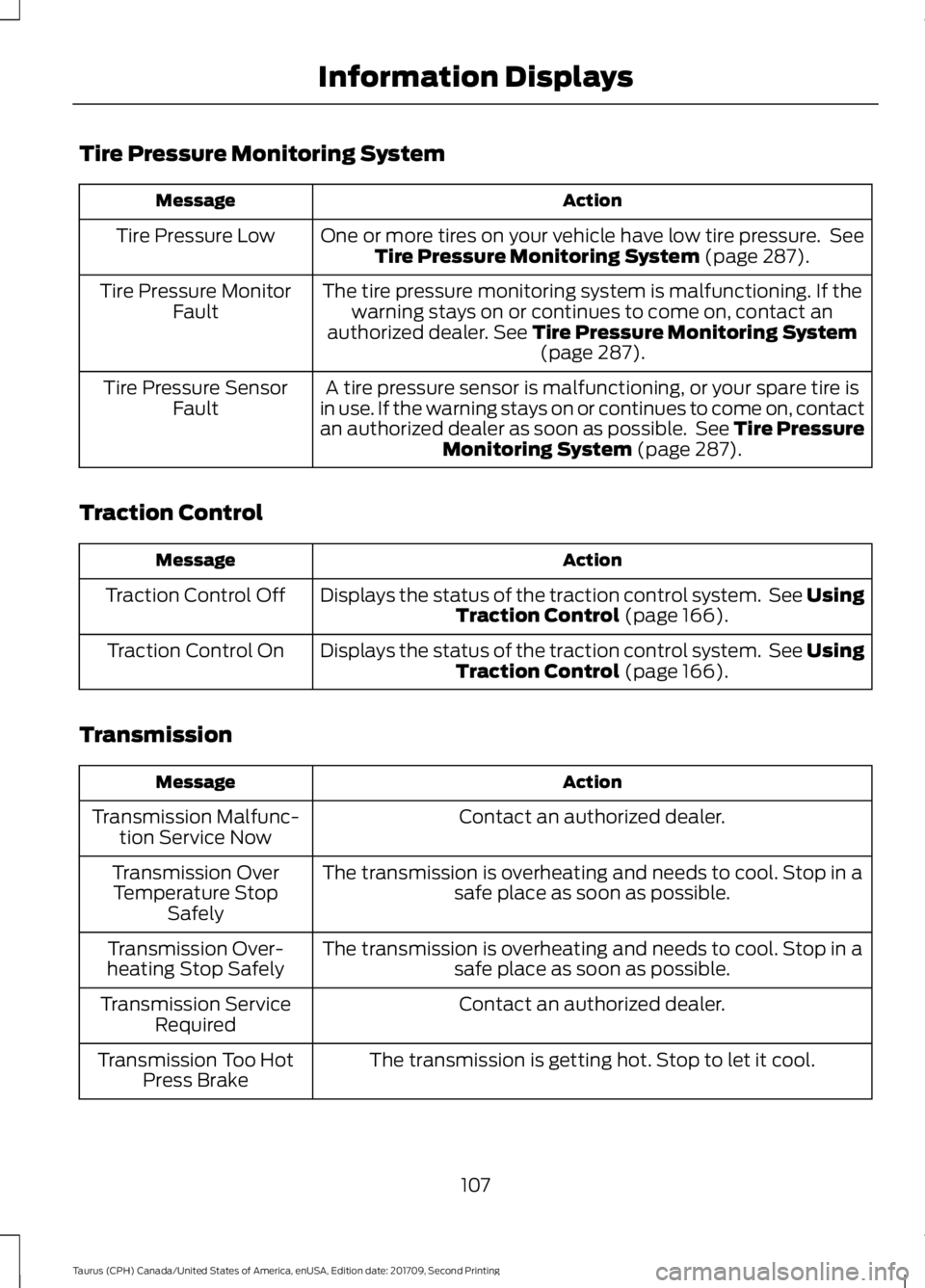
Tire Pressure Monitoring System
Action
Message
One or more tires on your vehicle have low tire pressure. SeeTire Pressure Monitoring System (page 287).
Tire Pressure Low
The tire pressure monitoring system is malfunctioning. If thewarning stays on or continues to come on, contact an
authorized dealer.
See Tire Pressure Monitoring System (page 287).
Tire Pressure Monitor
Fault
A tire pressure sensor is malfunctioning, or your spare tire is
in use. If the warning stays on or continues to come on, contact
an authorized dealer as soon as possible. See Tire Pressure Monitoring System
(page 287).
Tire Pressure Sensor
Fault
Traction Control Action
Message
Displays the status of the traction control system. See UsingTraction Control
(page 166).
Traction Control Off
Displays the status of the traction control system. See UsingTraction Control
(page 166).
Traction Control On
Transmission Action
Message
Contact an authorized dealer.
Transmission Malfunc-
tion Service Now
The transmission is overheating and needs to cool. Stop in asafe place as soon as possible.
Transmission Over
Temperature Stop Safely
The transmission is overheating and needs to cool. Stop in asafe place as soon as possible.
Transmission Over-
heating Stop Safely
Contact an authorized dealer.
Transmission Service
Required
The transmission is getting hot. Stop to let it cool.
Transmission Too Hot
Press Brake
107
Taurus (CPH) Canada/United States of America, enUSA, Edition date: 201709, Second Printing Information Displays
Page 163 of 510
Sand
Most of the time traction control improves
tire traction by managing wheel slip
through Brake, Engine, and AWD
calibrations. However, during low speed
driving, disabling traction control in deep
sand can help keep the wheels moving to
maintain vehicle momentum.
When driving over sand, try to keep all four
wheels on the most solid area of the trail.
Avoid reducing the tire pressures but shift
to a lower gear and drive steadily through
the terrain. Apply the accelerator slowly
and avoid spinning the wheels.
Do not drive your vehicle in deep sand for
an extended period of time. This could
cause the AWD system to overheat and
default to front-wheel drive. If this occurs,
an AWD OFF message displays in the
information display. To resume normal
AWD function as soon as possible, stop
the vehicle in a safe location and stop the
engine for at least 10 minutes. After the
engine has been restarted and the AWD
system has adequately cooled, the
AWD
OFF message turns off and normal AWD
function returns. In the event the engine is
not stopped, the AWD OFF message turns
off when the system cools and normal
AWD function returns.
When driving at slow speeds in deep sand
under high outside temperatures, use L
(Low) gear when possible. L (Low) gear
operation will maximize the engine and
transmission cooling capability.
Under severe operating conditions, the A/C
may cycle on and off to protect
overheating of the engine.
Avoid excessive speed because vehicle
momentum can work against you and
cause the vehicle to become stuck to the
point that assistance may be required from
another vehicle. Remember, you may be
able to back out the way you came if you
proceed with caution. Mud and Water
If you must drive through high water, drive
slowly. Traction or brake capability may
be limited.
When driving through water, determine the
depth; avoid water higher than the bottom
of the wheel rims (for cars) or the bottom
of the hubs (for trucks) (if possible) and
proceed slowly. If the ignition system gets
wet, the vehicle may stall.
Once through water, always try the brakes.
Wet brakes do not stop the vehicle as
effectively as dry brakes. Drying can be
improved by moving your vehicle slowly
while applying light pressure on the brake
pedal.
Be cautious of sudden changes in vehicle
speed or direction when you are driving in
mud. Even AWD vehicles can lose traction
in slick mud. As when you are driving over
sand, apply the accelerator slowly and
avoid spinning your wheels. If the vehicle
does slide, steer in the direction of the slide
until you regain control of the vehicle.
After driving through mud, clean off residue
stuck to rotating driveshafts and tires.
Excess mud stuck on tires and rotating
driveshafts causes an imbalance that
could damage drive components.
Note:
Driving through deep water may
damage the transmission.
If the front or rear axle is submerged in
water, have the power transfer unit (PTU)
or rear axle serviced by an authorized
dealer. 160
Taurus (CPH) Canada/United States of America, enUSA, Edition date: 201709, Second Printing All-Wheel Drive
(If Equipped)E143950
Page 164 of 510
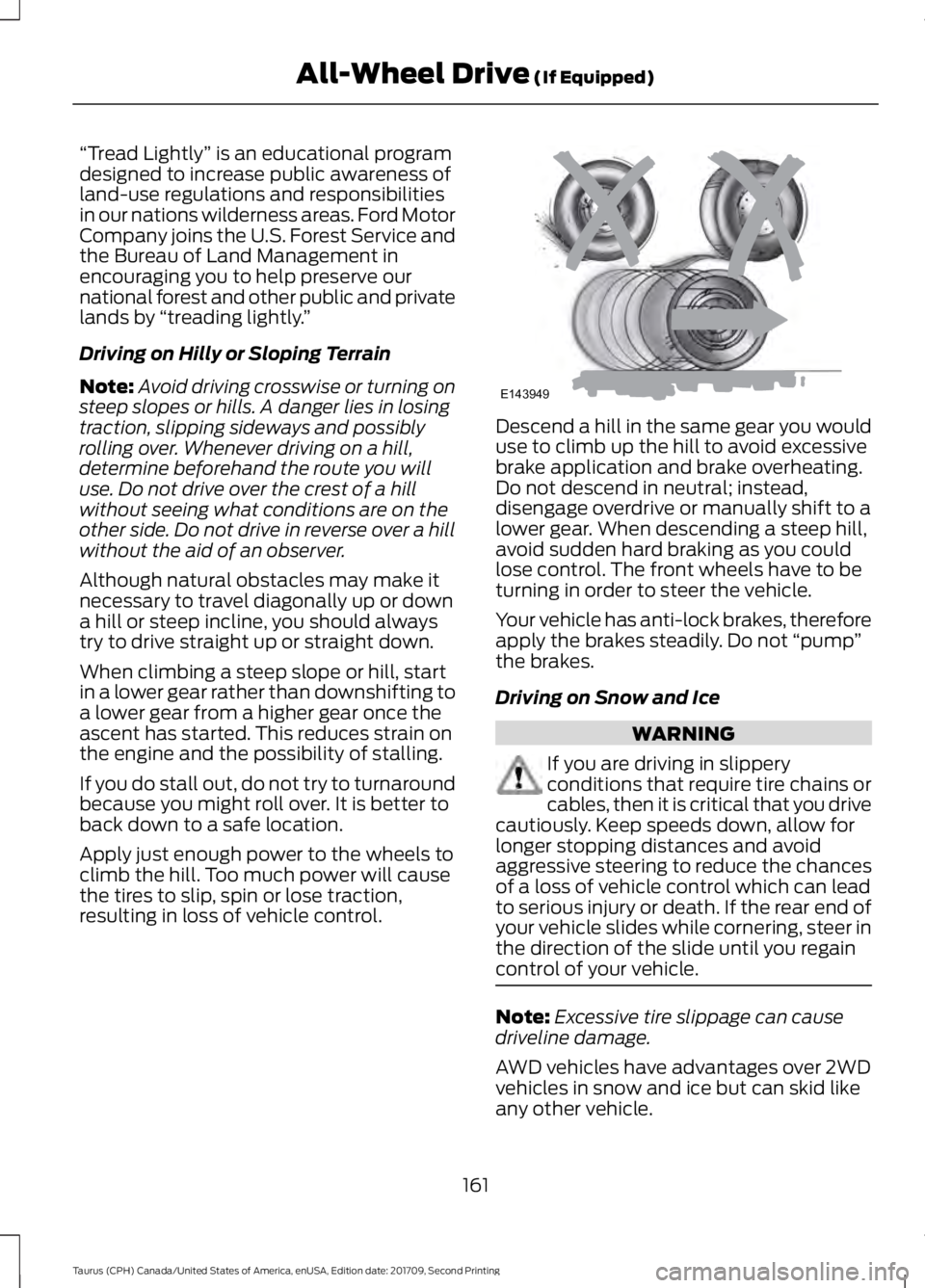
“Tread Lightly
” is an educational program
designed to increase public awareness of
land-use regulations and responsibilities
in our nations wilderness areas. Ford Motor
Company joins the U.S. Forest Service and
the Bureau of Land Management in
encouraging you to help preserve our
national forest and other public and private
lands by “treading lightly. ”
Driving on Hilly or Sloping Terrain
Note: Avoid driving crosswise or turning on
steep slopes or hills. A danger lies in losing
traction, slipping sideways and possibly
rolling over. Whenever driving on a hill,
determine beforehand the route you will
use. Do not drive over the crest of a hill
without seeing what conditions are on the
other side. Do not drive in reverse over a hill
without the aid of an observer.
Although natural obstacles may make it
necessary to travel diagonally up or down
a hill or steep incline, you should always
try to drive straight up or straight down.
When climbing a steep slope or hill, start
in a lower gear rather than downshifting to
a lower gear from a higher gear once the
ascent has started. This reduces strain on
the engine and the possibility of stalling.
If you do stall out, do not try to turnaround
because you might roll over. It is better to
back down to a safe location.
Apply just enough power to the wheels to
climb the hill. Too much power will cause
the tires to slip, spin or lose traction,
resulting in loss of vehicle control. Descend a hill in the same gear you would
use to climb up the hill to avoid excessive
brake application and brake overheating.
Do not descend in neutral; instead,
disengage overdrive or manually shift to a
lower gear. When descending a steep hill,
avoid sudden hard braking as you could
lose control. The front wheels have to be
turning in order to steer the vehicle.
Your vehicle has anti-lock brakes, therefore
apply the brakes steadily. Do not
“pump”
the brakes.
Driving on Snow and Ice WARNING
If you are driving in slippery
conditions that require tire chains or
cables, then it is critical that you drive
cautiously. Keep speeds down, allow for
longer stopping distances and avoid
aggressive steering to reduce the chances
of a loss of vehicle control which can lead
to serious injury or death. If the rear end of
your vehicle slides while cornering, steer in
the direction of the slide until you regain
control of your vehicle. Note:
Excessive tire slippage can cause
driveline damage.
AWD vehicles have advantages over 2WD
vehicles in snow and ice but can skid like
any other vehicle.
161
Taurus (CPH) Canada/United States of America, enUSA, Edition date: 201709, Second Printing All-Wheel Drive (If Equipped)E143949