lights FORD THUNDERBIRD 2004 11.G User Guide
[x] Cancel search | Manufacturer: FORD, Model Year: 2004, Model line: THUNDERBIRD, Model: FORD THUNDERBIRD 2004 11.GPages: 216, PDF Size: 5.69 MB
Page 33 of 216
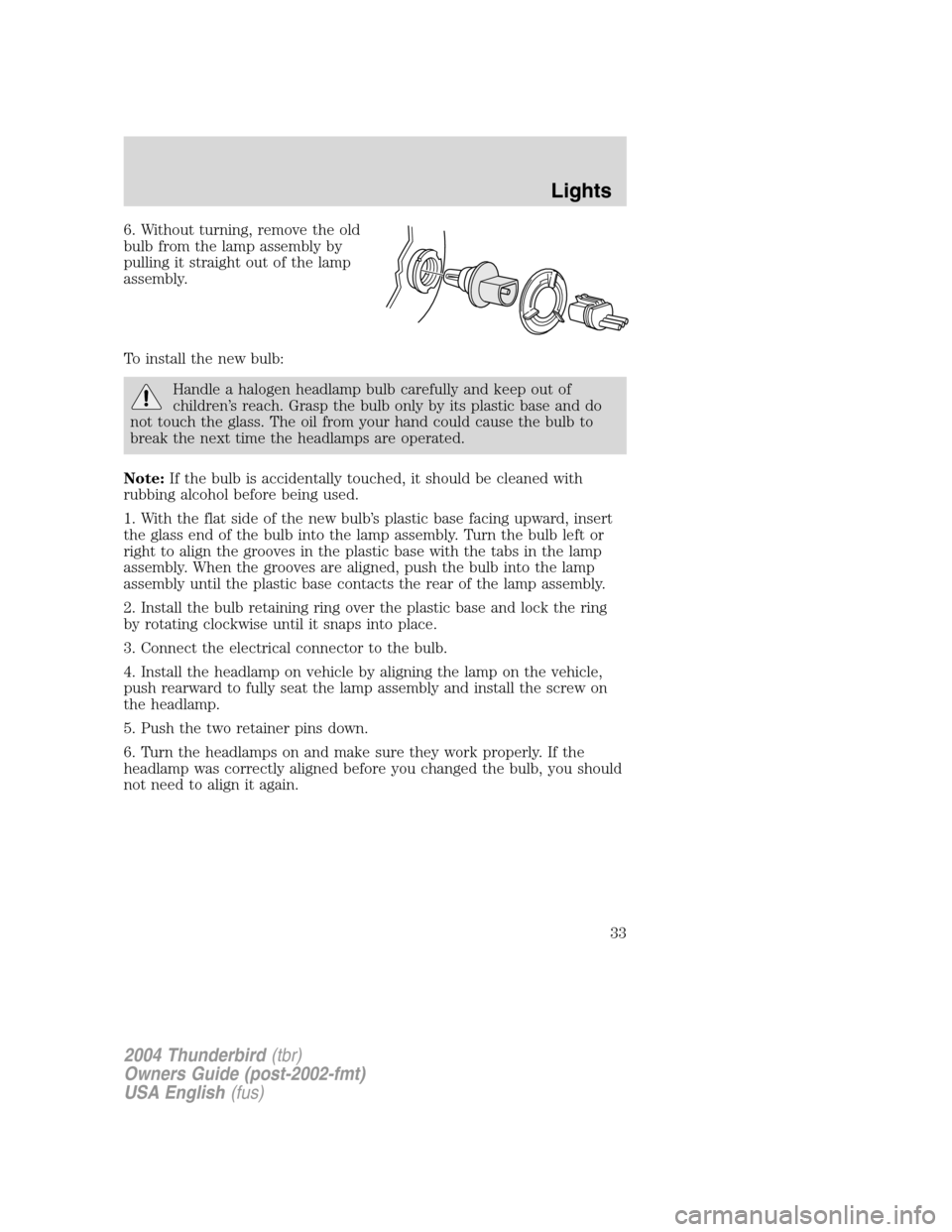
6. Without turning, remove the old
bulb from the lamp assembly by
pulling it straight out of the lamp
assembly.
To install the new bulb:
Handle a halogen headlamp bulb carefully and keep out of
children’s reach. Grasp the bulb only by its plastic base and do
not touch the glass. The oil from your hand could cause the bulb to
break the next time the headlamps are operated.
Note: If the bulb is accidentally touched, it should be cleaned with
rubbing alcohol before being used.
1. With the flat side of the new bulb ’s plastic base facing upward, insert
the glass end of the bulb into the lamp assembly. Turn the bulb left or
right to align the grooves in the plastic base with the tabs in the lamp
assembly. When the grooves are aligned, push the bulb into the lamp
assembly until the plastic base contacts the rear of the lamp assembly.
2. Install the bulb retaining ring over the plastic base and lock the ring
by rotating clockwise until it snaps into place.
3. Connect the electrical connector to the bulb.
4. Install the headlamp on vehicle by aligning the lamp on the vehicle,
push rearward to fully seat the lamp assembly and install the screw on
the headlamp.
5. Push the two retainer pins down.
6. Turn the headlamps on and make sure they work properly. If the
headlamp was correctly aligned before you changed the bulb, you should
not need to align it again.
2004 Thunderbird (tbr)
Owners Guide (post-2002-fmt)
USA English (fus)
Lights
33
Page 34 of 216
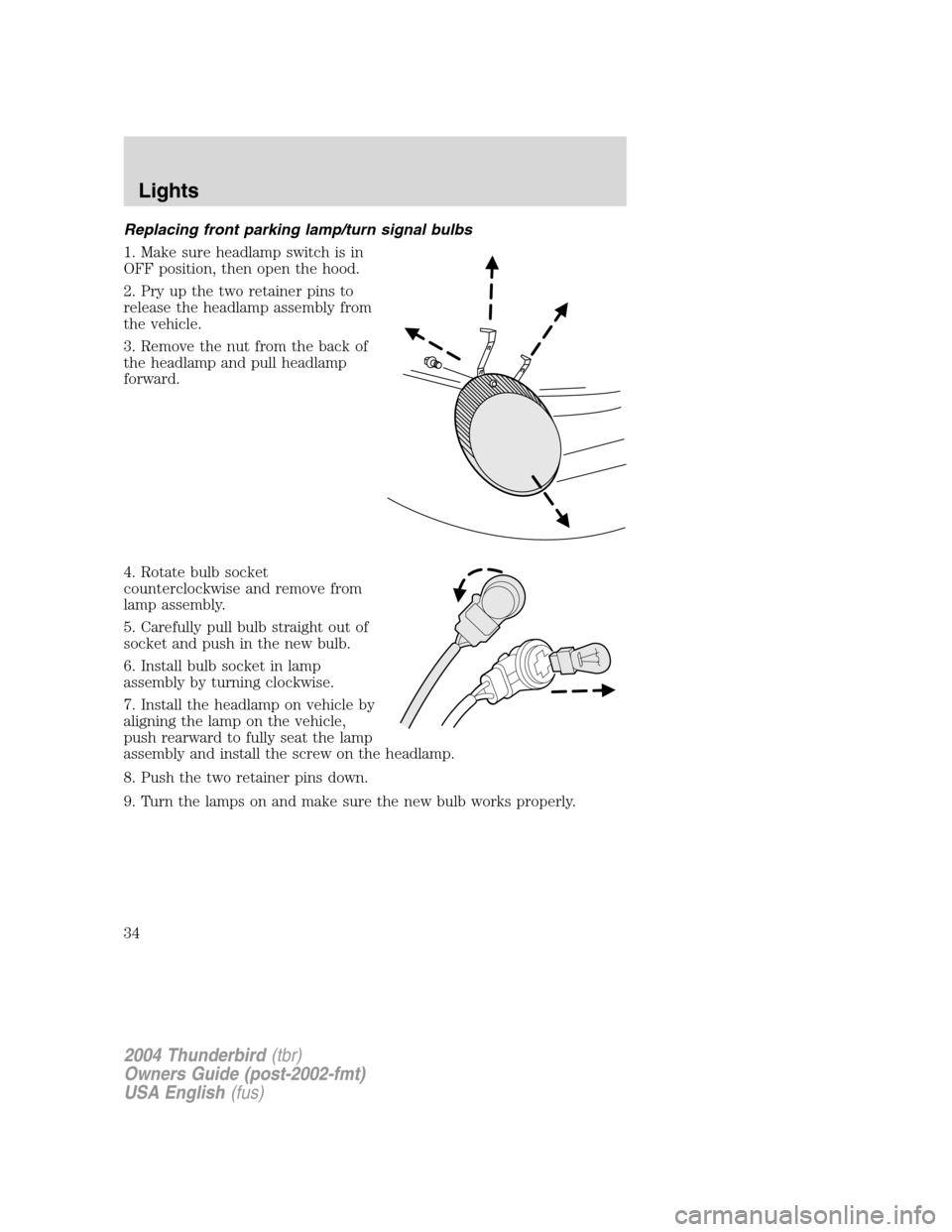
Replacing front parking lamp/turn signal bulbs
1. Make sure headlamp switch is in
OFF position, then open the hood.
2. Pry up the two retainer pins to
release the headlamp assembly from
the vehicle.
3. Remove the nut from the back of
the headlamp and pull headlamp
forward.
4. Rotate bulb socket
counterclockwise and remove from
lamp assembly.
5. Carefully pull bulb straight out of
socket and push in the new bulb.
6. Install bulb socket in lamp
assembly by turning clockwise.
7. Install the headlamp on vehicle by
aligning the lamp on the vehicle,
push rearward to fully seat the lamp
assembly and install the screw on the headlamp.
8. Push the two retainer pins down.
9. Turn the lamps on and make sure the new bulb works properly.
2004 Thunderbird(tbr)
Owners Guide (post-2002-fmt)
USA English (fus)
Lights
34
Page 35 of 216
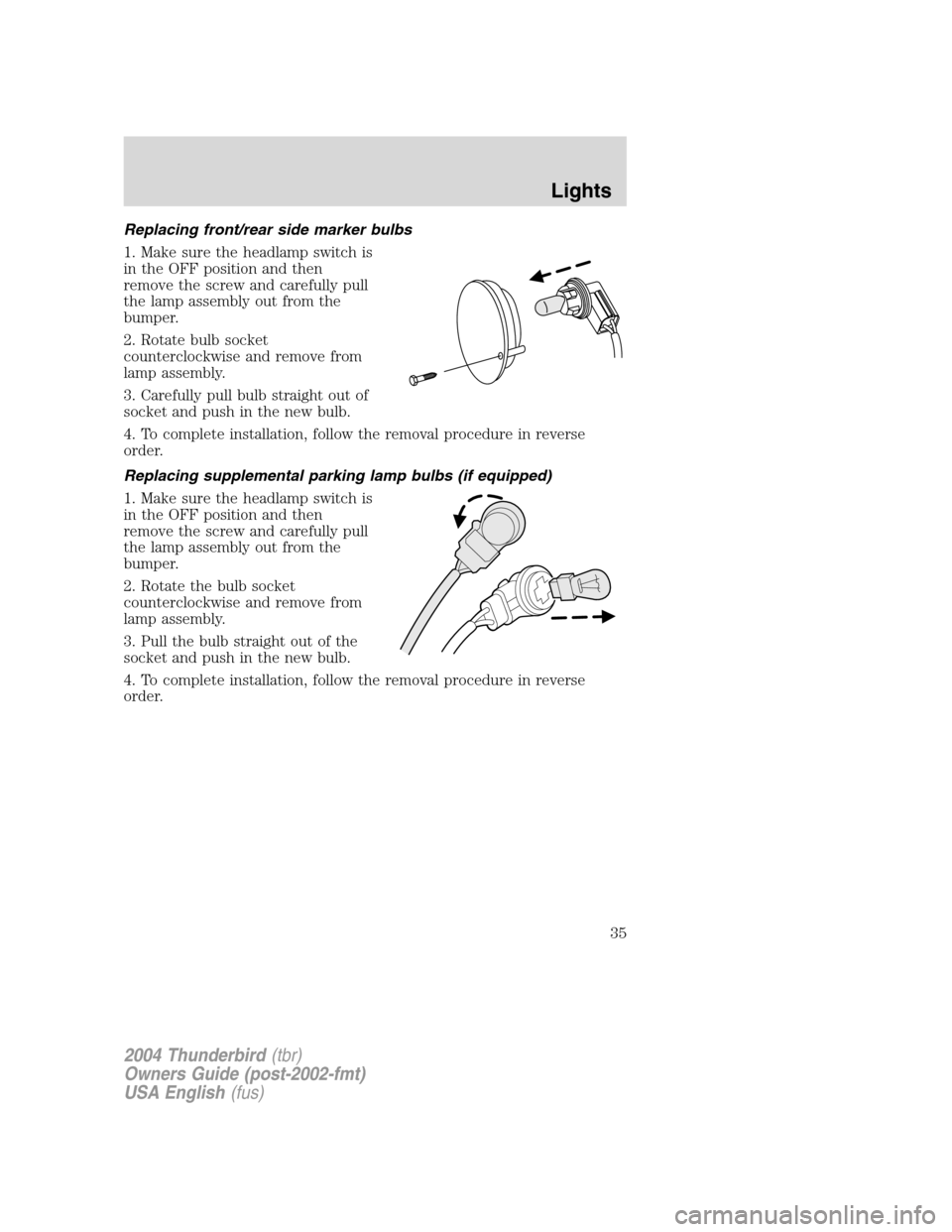
Replacing front/rear side marker bulbs
1. Make sure the headlamp switch is
in the OFF position and then
remove the screw and carefully pull
the lamp assembly out from the
bumper.
2. Rotate bulb socket
counterclockwise and remove from
lamp assembly.
3. Carefully pull bulb straight out of
socket and push in the new bulb.
4. To complete installation, follow the removal procedure in reverse
order.
Replacing supplemental parking lamp bulbs (if equipped)
1. Make sure the headlamp switch is
in the OFF position and then
remove the screw and carefully pull
the lamp assembly out from the
bumper.
2. Rotate the bulb socket
counterclockwise and remove from
lamp assembly.
3. Pull the bulb straight out of the
socket and push in the new bulb.
4. To complete installation, follow the removal procedure in reverse
order.
2004 Thunderbird(tbr)
Owners Guide (post-2002-fmt)
USA English (fus)
Lights
35
Page 36 of 216
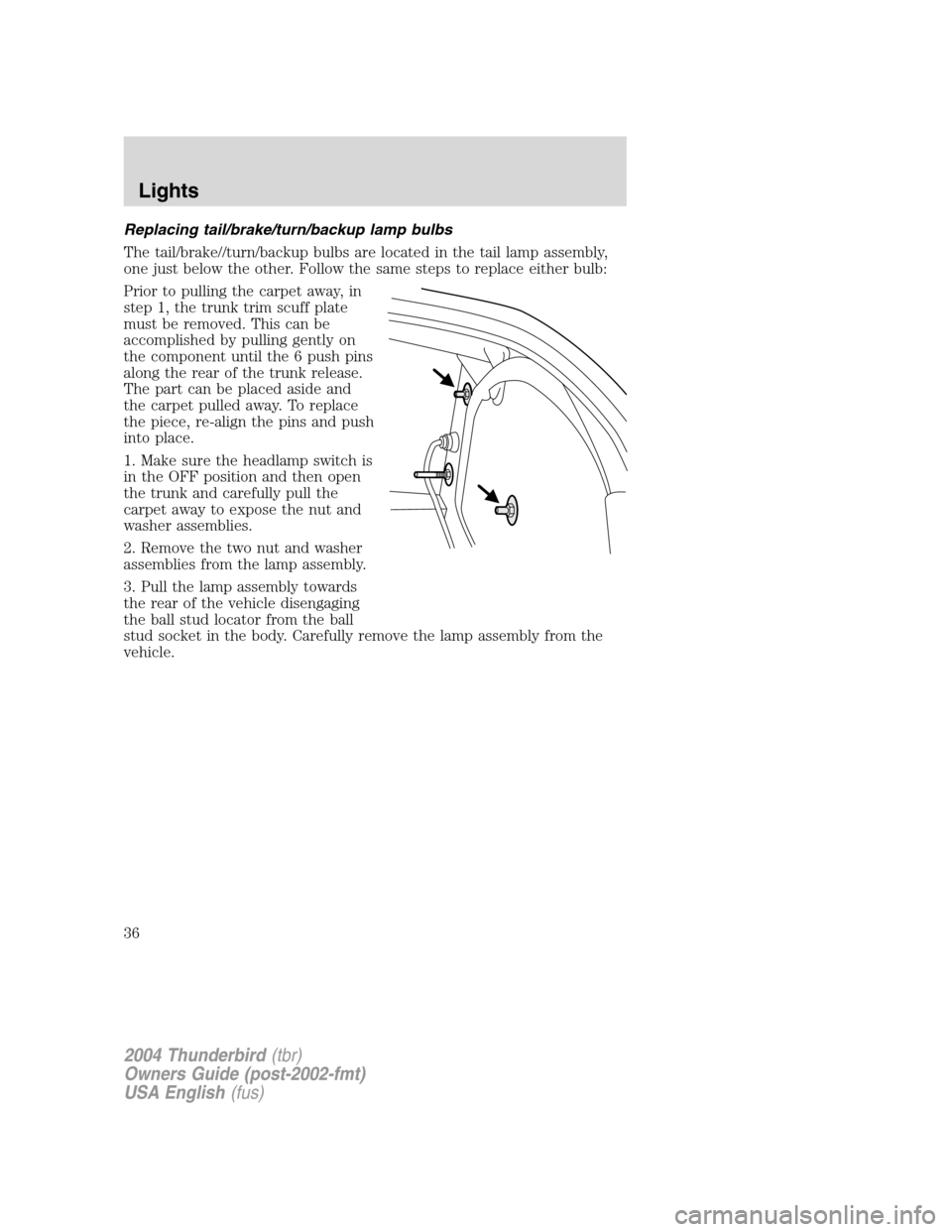
Replacing tail/brake/turn/backup lamp bulbs
The tail/brake//turn/backup bulbs are located in the tail lamp assembly,
one just below the other. Follow the same steps to replace either bulb:
Prior to pulling the carpet away, in
step 1, the trunk trim scuff plate
must be removed. This can be
accomplished by pulling gently on
the component until the 6 push pins
along the rear of the trunk release.
The part can be placed aside and
the carpet pulled away. To replace
the piece, re-align the pins and push
into place.
1. Make sure the headlamp switch is
in the OFF position and then open
the trunk and carefully pull the
carpet away to expose the nut and
washer assemblies.
2. Remove the two nut and washer
assemblies from the lamp assembly.
3. Pull the lamp assembly towards
the rear of the vehicle disengaging
the ball stud locator from the ball
stud socket in the body. Carefully remove the lamp assembly from the
vehicle.
2004 Thunderbird(tbr)
Owners Guide (post-2002-fmt)
USA English (fus)
Lights
36
Page 37 of 216
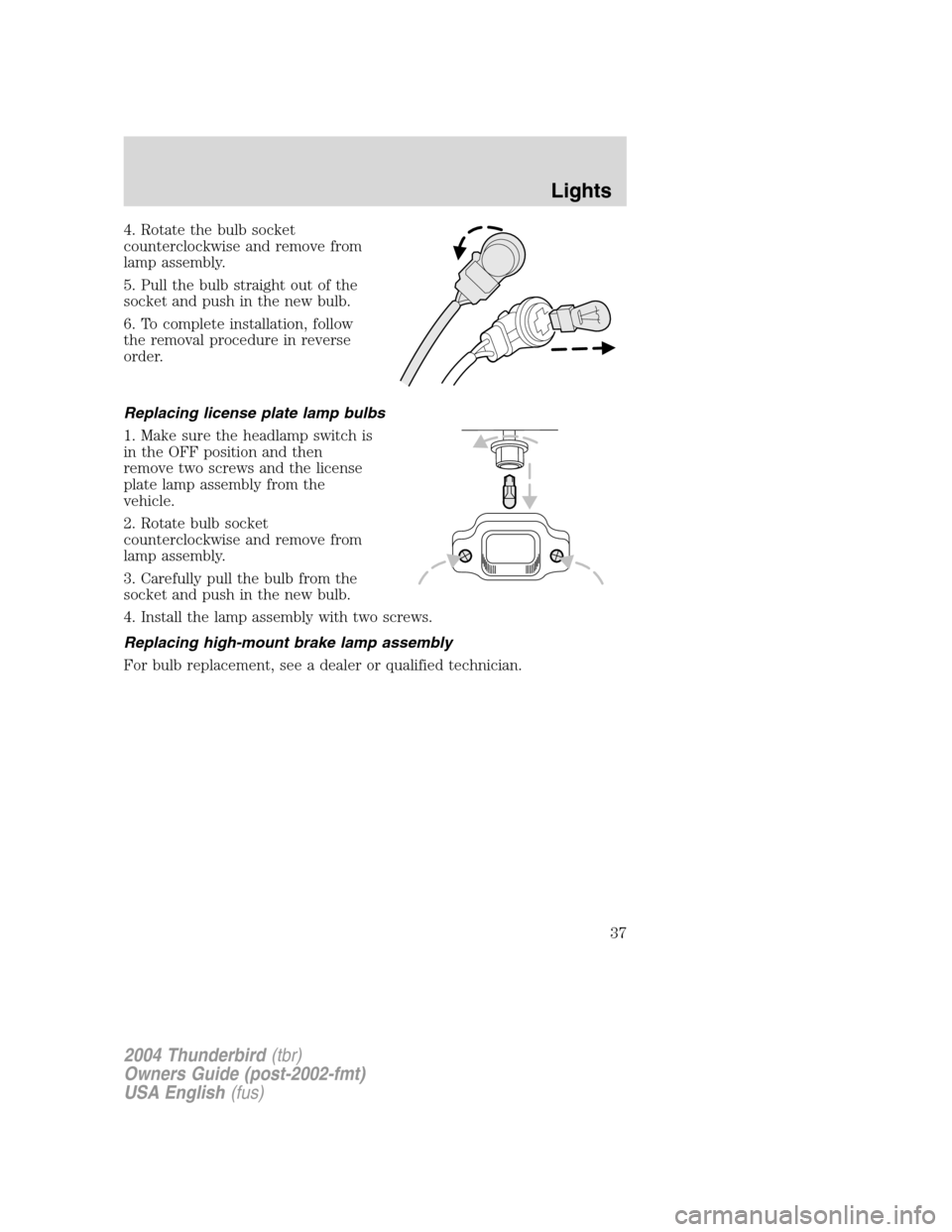
4. Rotate the bulb socket
counterclockwise and remove from
lamp assembly.
5. Pull the bulb straight out of the
socket and push in the new bulb.
6. To complete installation, follow
the removal procedure in reverse
order.
Replacing license plate lamp bulbs
1. Make sure the headlamp switch is
in the OFF position and then
remove two screws and the license
plate lamp assembly from the
vehicle.
2. Rotate bulb socket
counterclockwise and remove from
lamp assembly.
3. Carefully pull the bulb from the
socket and push in the new bulb.
4. Install the lamp assembly with two screws.
Replacing high-mount brake lamp assembly
For bulb replacement, see a dealer or qualified technician.
2004 Thunderbird(tbr)
Owners Guide (post-2002-fmt)
USA English (fus)
Lights
37
Page 62 of 216
The inside lights will not turn off if:
•they have been turned on using the dimmer control or
• any door is open.
The battery saver feature will turn off the interior lamps 30 minutes after
the ignition is turned to the OFF position.
Locking the doors
Turn the key in the door cylinder to lock the driver ’s door. Note:
Locking the driver ’s door using a key does not arm the perimeter alarm.
INTERIOR LUGGAGE COMPARTMENT RELEASE
Your vehicle is equipped with a mechanical interior luggage compartment
release handle that provides a means of escape for children and adults in
the event they become locked inside the luggage compartment.
Adults are advised to familiarize themselves with the operation and
location of the release handle.
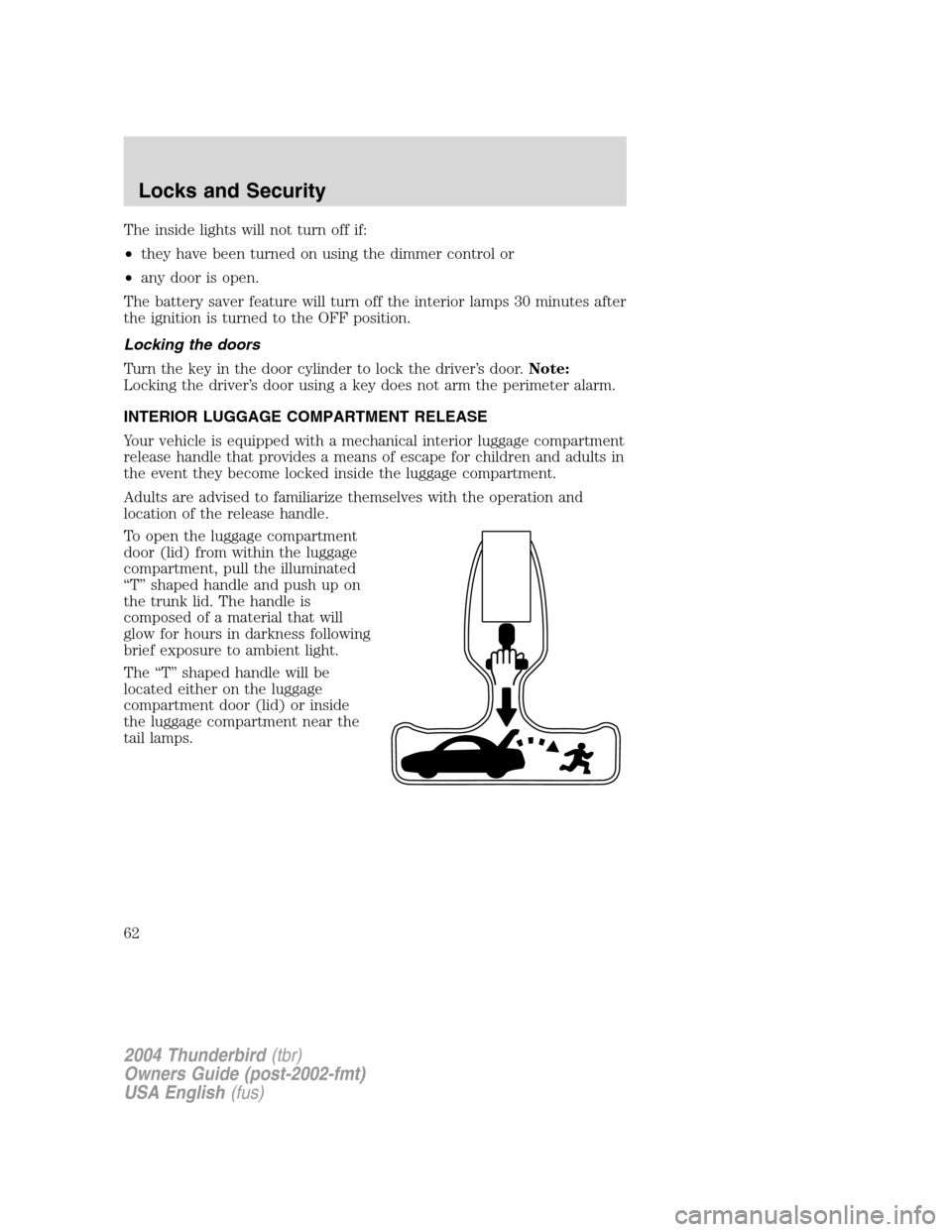
To open the luggage compartment
door (lid) from within the luggage
compartment, pull the illuminated
“ T ” shaped handle and push up on
the trunk lid. The handle is
composed of a material that will
glow for hours in darkness following
brief exposure to ambient light.
The “T ” shaped handle will be
located either on the luggage
compartment door (lid) or inside
the luggage compartment near the
tail lamps.
2004 Thunderbird (tbr)
Owners Guide (post-2002-fmt)
USA English (fus)
Locks and Security
62
Page 64 of 216
If there is any potential remote keyless entry problem with your vehicle,
ensureALL remote entry transmitters are taken to your authorized
dealer to aid in troubleshooting.
Locking the doors
1. Pressand release to lock all the doors and activate the anti-theft
system. Note:the turn signal lamps will flash once to confirm the doors,
trunk and hood are closed. If any closure is not closed, the turn signals
will not flash.
2. Press
and release again within three seconds to confirm that all the
doors, trunk and hood are closed. Note:The doors will lock again, and
the horn will chirp once.
If any of the doors, the trunk or the hood are not closed, the horn will
make two quick chirps and the lights will notflash until the last closure
is closed.
Unlocking the doors
1. Pressand release to unlock the driver ’s door and deactivate the
perimeter alarm (if activated). Note:The interior lamps will illuminate.
2. Press
and release again within three seconds to unlock all the
doors.
The remote entry system comes with an illuminated entry feature. This
feature turns on the interior lamps for 25 seconds or until the ignition is
turned to the RUN position.
The inside lights will not turn off if:
• they have been turned on using the dimmer control or
• any door is open.
The battery saver feature will turn off the interior lamps 30 minutes after
the ignition is turned to the OFF position.
2004 Thunderbird (tbr)
Owners Guide (post-2002-fmt)
USA English (fus)
Locks and Security
64
Page 67 of 216
How to reprogram your remote entry transmitters
You must haveall remote entry transmitters (maximum of four)
available before beginning this procedure.
To reprogram the remote entry
transmitters:
1. Ensure the vehicle is electronically unlocked.
2. Put the key in the ignition.
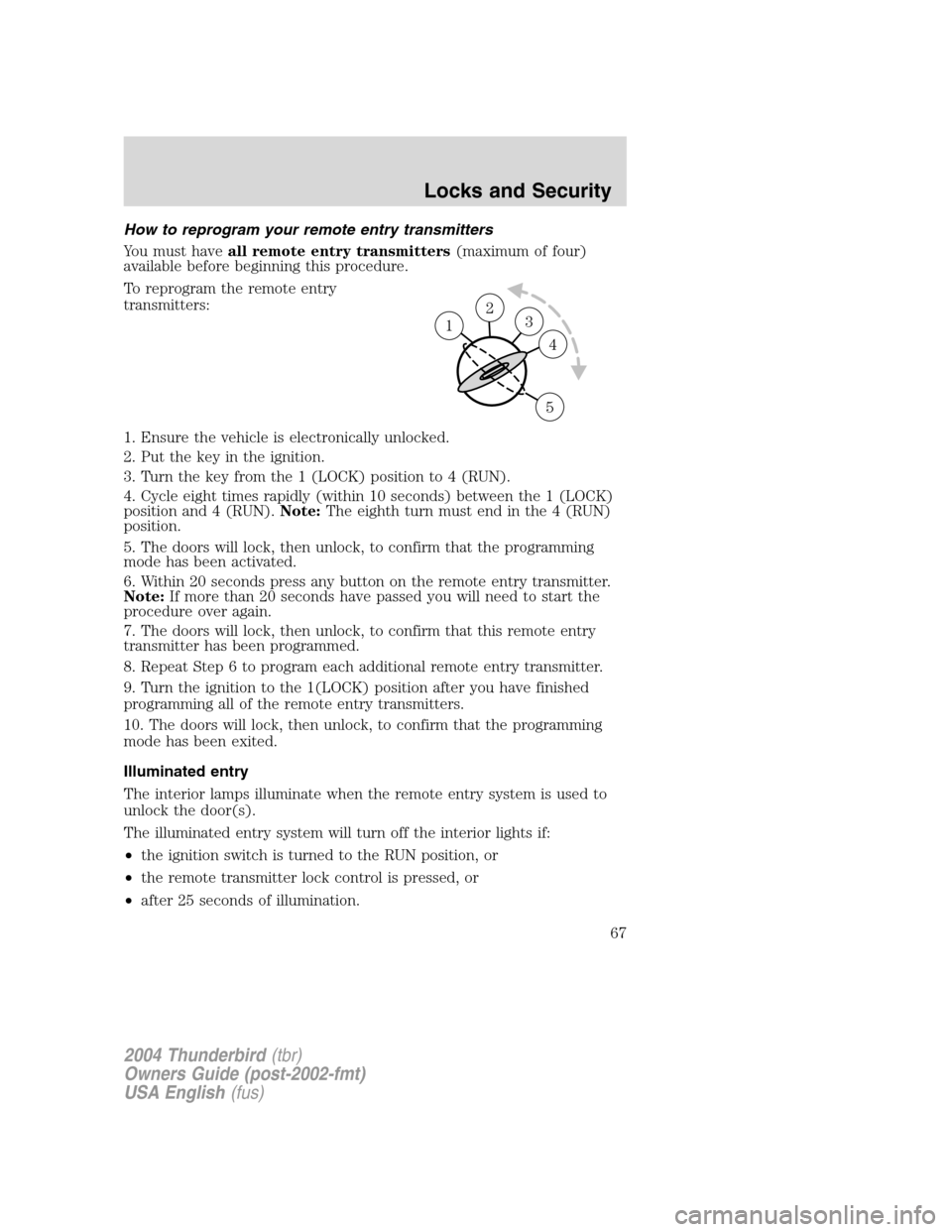
3. Turn the key from the 1 (LOCK) position to 4 (RUN).
4. Cycle eight times rapidly (within 10 seconds) between the 1 (LOCK)
position and 4 (RUN). Note:The eighth turn must end in the 4 (RUN)
position.
5. The doors will lock, then unlock, to confirm that the programming
mode has been activated.
6. Within 20 seconds press any button on the remote entry transmitter.
Note: If more than 20 seconds have passed you will need to start the
procedure over again.
7. The doors will lock, then unlock, to confirm that this remote entry
transmitter has been programmed.
8. Repeat Step 6 to program each additional remote entry transmitter.
9. Turn the ignition to the 1(LOCK) position after you have finished
programming all of the remote entry transmitters.
10. The doors will lock, then unlock, to confirm that the programming
mode has been exited.
Illuminated entry
The interior lamps illuminate when the remote entry system is used to
unlock the door(s).
The illuminated entry system will turn off the interior lights if:
• the ignition switch is turned to the RUN position, or
• the remote transmitter lock control is pressed, or
• after 25 seconds of illumination.
23 1
4
5
2004 Thunderbird (tbr)
Owners Guide (post-2002-fmt)
USA English (fus)
Locks and Security
67
Page 68 of 216
The inside lights will not turn off if:
•they have been turned on with the dimmer control, or
• any door is open.
The battery saver will shut off the interior lamps 30 minutes after the
ignition has been turned to the OFF position.
Autolock
The autolock feature will lock the vehicle ’s doors when:
• all the doors are closed,
• the ignition is in the RUN position, and
• you shift into forward or reverse, putting the vehicle in motion.
Relock
The autolock feature repeats when:
• either door is opened then closed while the ignition is in the RUN
position,
• you shift into forward or reverse, and
• you put the vehicle in motion by releasing the brake pedal.
Deactivating/activating autolock
Your vehicle comes with the autolock feature activated. There are two
methods to enable/disable this feature: One is through your dealer, and
the second is using a power door unlock/lock sequence.
Before following the activation or deactivation procedures, make sure
that the anti-theft system is not activated, ignition is off, and the vehicle
doors are closed.
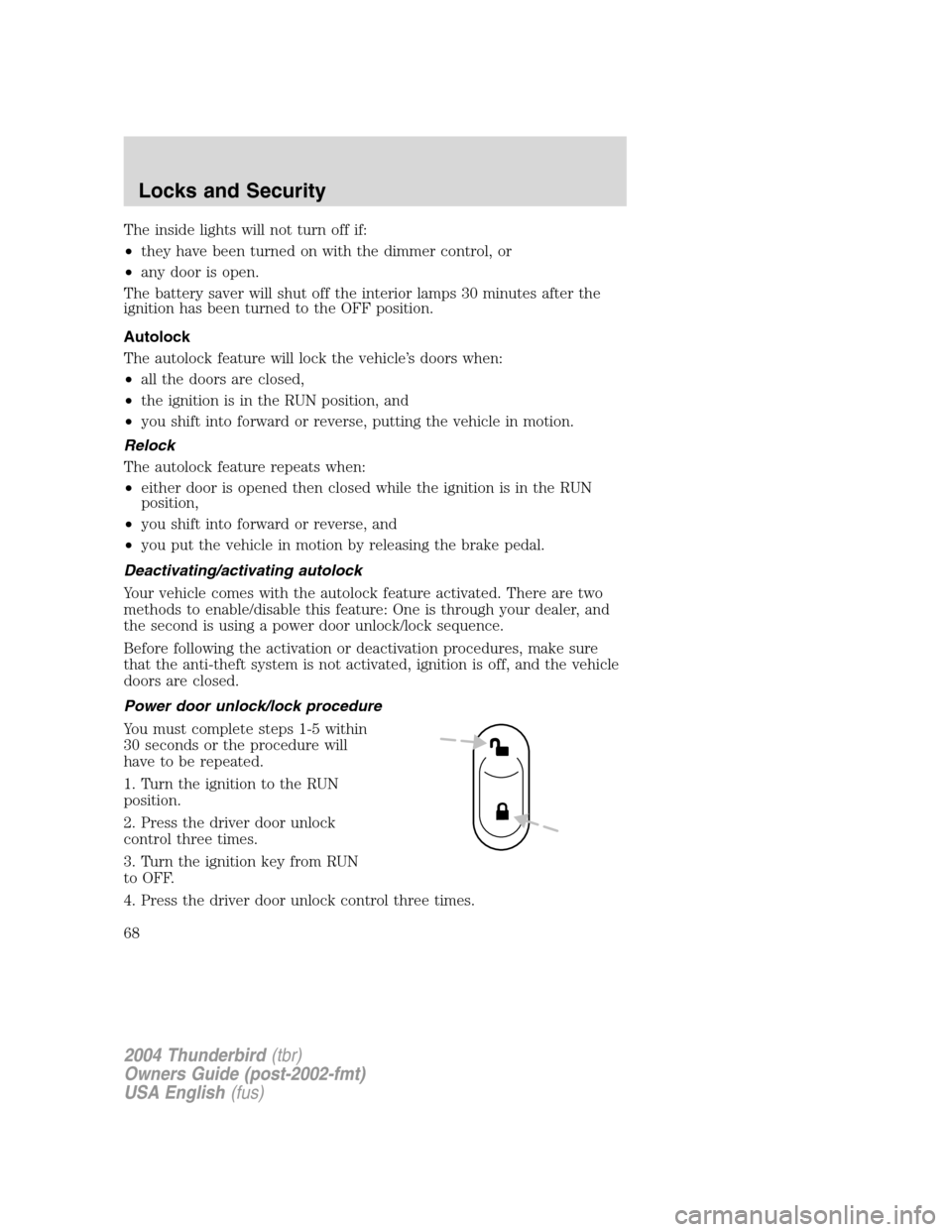
Power door unlock/lock procedure
You must complete steps 1-5 within
30 seconds or the procedure will
have to be repeated.
1. Turn the ignition to the RUN
position.
2. Press the driver door unlock
control three times.
3. Turn the ignition key from RUN
to OFF.
4. Press the driver door unlock control three times.
2004 Thunderbird (tbr)
Owners Guide (post-2002-fmt)
USA English (fus)
Locks and Security
68
Page 109 of 216
STARTING
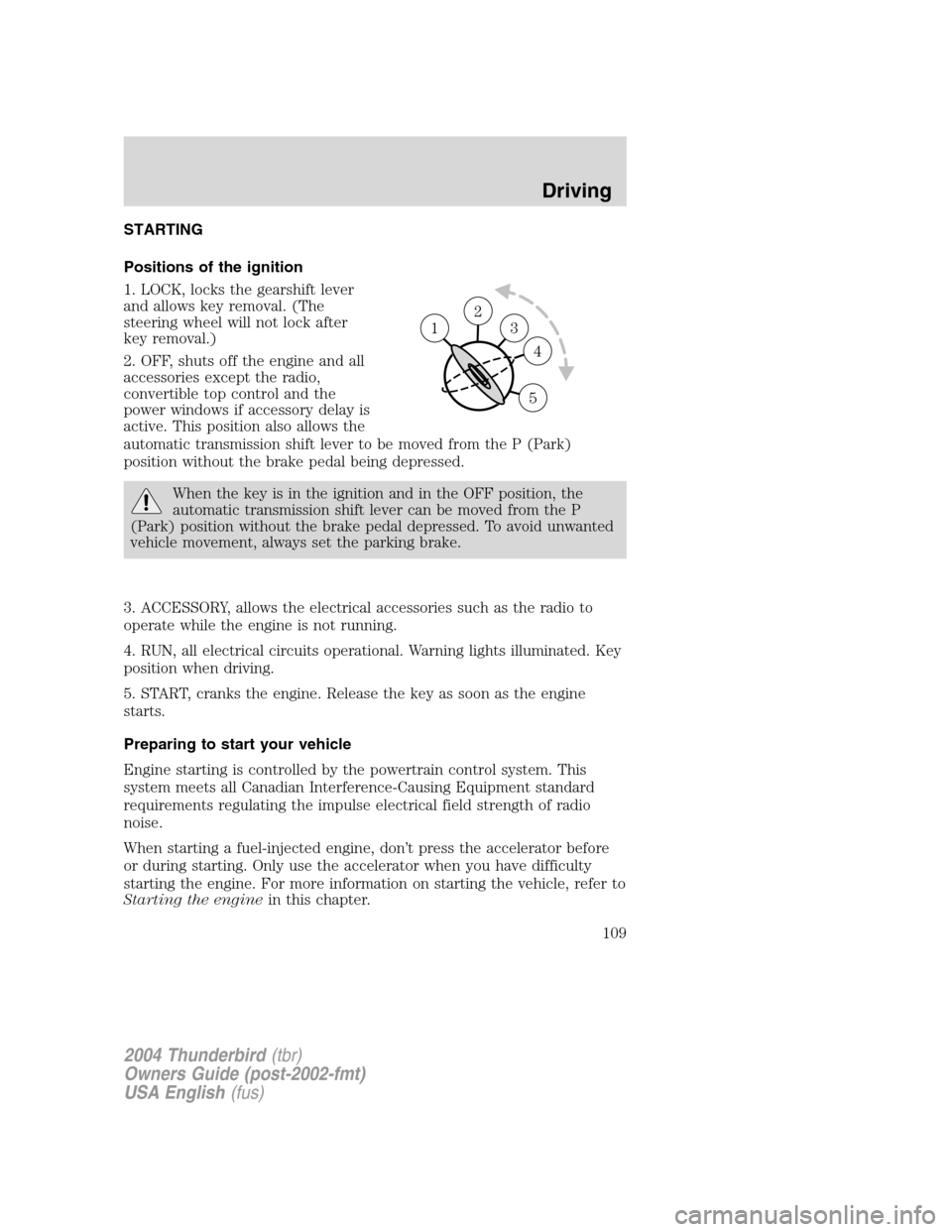
Positions of the ignition
1. LOCK, locks the gearshift lever
and allows key removal. (The
steering wheel will not lock after
key removal.)
2. OFF, shuts off the engine and all
accessories except the radio,
convertible top control and the
power windows if accessory delay is
active. This position also allows the
automatic transmission shift lever to be moved from the P (Park)
position without the brake pedal being depressed.
When the key is in the ignition and in the OFF position, the
automatic transmission shift lever can be moved from the P
(Park) position without the brake pedal depressed. To avoid unwanted
vehicle movement, always set the parking brake.
3. ACCESSORY, allows the electrical accessories such as the radio to
operate while the engine is not running.
4. RUN, all electrical circuits operational. Warning lights illuminated. Key
position when driving.
5. START, cranks the engine. Release the key as soon as the engine
starts.
Preparing to start your vehicle
Engine starting is controlled by the powertrain control system. This
system meets all Canadian Interference-Causing Equipment standard
requirements regulating the impulse electrical field strength of radio
noise.
When starting a fuel-injected engine, don ’t press the accelerator before
or during starting. Only use the accelerator when you have difficulty
starting the engine. For more information on starting the vehicle, refer to
Starting the engine in this chapter.
2
3
4
5
1
2004 Thunderbird(tbr)
Owners Guide (post-2002-fmt)
USA English (fus)
Driving
Driving
109