change wheel FORD TRANSIT 2015 5.G User Guide
[x] Cancel search | Manufacturer: FORD, Model Year: 2015, Model line: TRANSIT, Model: FORD TRANSIT 2015 5.GPages: 461, PDF Size: 5.82 MB
Page 234 of 461
Alloy wheels and wheel covers are coated
with a clear coat paint finish. To maintain
their condition we recommend that you:
•
Clean the wheels weekly using
Motorcraft Wheel and Tire Cleaner.
Apply using manufacturer's
instructions.
• Use a sponge to remove heavy
deposits of dirt and brake dust
accumulation.
• Rinse thoroughly with a strong stream
of water when you have completed the
cleaning process.
• To remove tar and grease, use
Motorcraft Bug and Tar Remover.
VEHICLE STORAGE
If you plan on storing your vehicle for 30
days or more, read the following
maintenance recommendations to make
sure your vehicle stays in good operating
condition.
We engineer and test all motor vehicles
and their components for reliable, regular
driving. Under various conditions,
long-term storage may lead to degraded
engine performance or failure unless you
use specific precautions to preserve engine
components.
General
• Store all vehicles in a dry, ventilated
place.
• Protect from sunlight, if possible.
• If vehicles are stored outside, they
require regular maintenance to protect
against rust and damage. Body
•
Wash your vehicle thoroughly to
remove dirt, grease, oil, tar or mud from
exterior surfaces, rear-wheel housing
and the underside of front fenders.
• Periodically wash your vehicle if it is
stored in exposed locations.
• Touch-up exposed or primed metal to
prevent rust.
• Cover chrome and stainless steel parts
with a thick coat of auto wax to prevent
discoloration. Re-wax as necessary
when you wash your vehicle.
• Lubricate all hood, door and trunk lid
hinges, and latches with a light grade
oil.
• Cover interior trim to prevent fading.
• Keep all rubber parts free from oil and
solvents.
Engine
• The engine oil and filter should be
changed prior to storage because used
engine oil contains contaminates that
may cause engine damage.
• Start the engine every 15 days for a
minimum of 15 minutes. Run at fast idle
with the climate controls set to defrost
until the engine reaches normal
operating temperature.
• With your foot on the brake, shift
through all the gears while the engine
is running.
• We recommend that you change the
engine oil before you use your vehicle
again.
Fuel system
• Fill the fuel tank with high-quality fuel
until the first automatic shutoff of the
fuel pump nozzle.
231 Transit (TTH) Canada/United States of America, enUSA, Edition date: 03/2014 Vehicle Care
Page 241 of 461
15: Indicates the wheel or
rim diameter in inches. If
you change the wheel
size, you will have to
purchase new tires to
match the new wheel
diameter.
E
95:
Indicates the tire's
load index. It is an index
that relates to how much
weight a tire can carry.
You may find this
information in the Owner ’s
Guide. If not, contact a
local tire dealer.
F
H: Indicates the tire's
speed rating. The speed
rating denotes the speed
at which a tire is designed
to be driven for extended
periods of time under a
G
standard condition of load
and inflation pressure.
The tires on your vehicle
may operate at different
conditions for load and
inflation pressure. These
speed ratings may need
to be adjusted for the
difference in conditions.
The ratings range from 81
mph (130 kph) to 186 mph
(299 kph). These ratings
are listed in the following
chart. United States of
America DOT Tire
Identification Number
(TIN):
This begins with
the letters DOT and
indicates that the tire
H
meets all federal
standards. The next two
numbers or letters are the
plant code designating
where it was
manufactured, the next
two are the tire size code
and the last four numbers
represent the week and
year the tire was built. For
example, the numbers 317
mean the 31st week of
1997. After 2000 the
numbers go to four digits.
For example, 2501 means
the 25th week of 2001.
The numbers in between
are identification codes
used for traceability. This
information is used to
contact customers if a tire
defect requires a recall.
M+S or M/S: Mud and
Snow, AT: All Terrain, AS:
All Season.
I
Tire Ply Composition
and Material Used:
Indicates the number of
plies or the number of
layers of rubber-coated
fabric in the tire tread and
J
sidewall. Tire
238 Transit (TTH) Canada/United States of America, enUSA, Edition date: 03/2014 Wheels and Tires
Page 244 of 461
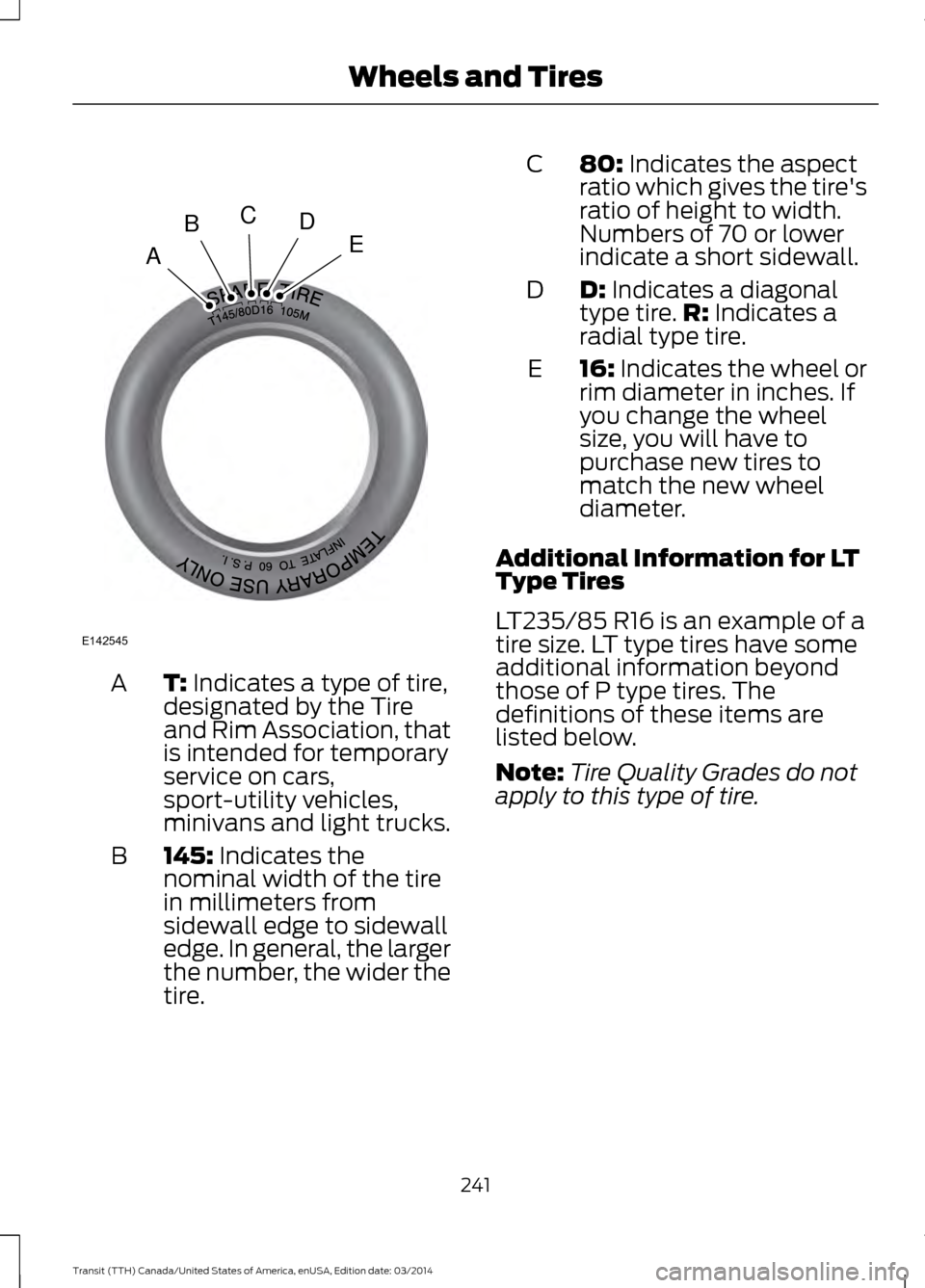
T: Indicates a type of tire,
designated by the Tire
and Rim Association, that
is intended for temporary
service on cars,
sport-utility vehicles,
minivans and light trucks.
A
145: Indicates the
nominal width of the tire
in millimeters from
sidewall edge to sidewall
edge. In general, the larger
the number, the wider the
tire.
B 80: Indicates the aspect
ratio which gives the tire's
ratio of height to width.
Numbers of 70 or lower
indicate a short sidewall.
C
D:
Indicates a diagonal
type tire. R: Indicates a
radial type tire.
D
16:
Indicates the wheel or
rim diameter in inches. If
you change the wheel
size, you will have to
purchase new tires to
match the new wheel
diameter.
E
Additional Information for LT
Type Tires
LT235/85 R16 is an example of a
tire size. LT type tires have some
additional information beyond
those of P type tires. The
definitions of these items are
listed below.
Note: Tire Quality Grades do not
apply to this type of tire.
241 Transit (TTH) Canada/United States of America, enUSA, Edition date: 03/2014 Wheels and TiresA
BCDE
E142545
Page 247 of 461
position), or Tire Label which is
located on the B-Pillar or the edge
of the driver door. Failure to follow
the tire pressure
recommendations can cause
uneven treadwear patterns and
adversely affect the way your
vehicle handles
Note:
Do not reduce tire pressure
to change the ride characteristics
of your vehicle. If you do not
maintain the tire pressures as
specified by Ford, your vehicle may
experience a condition known as
shimmy. This will cause severe
vibration and oscillations in the
steering wheel when your vehicle
travels over a bump or dip in the
road and is unable to dampen out
by itself. Significantly
under-inflated tires, incorrect tire
usage or any vehicle modifications
such as lift-kits can cause your
vehicle to shimmy. If your vehicle
begins to shimmy, slowly reduce
the speed of your vehicle by
pressing the brake pedal or
releasing the accelerator pedal. As
your vehicle speed reduces the
shimmy will cease.
The maximum inflation pressure
is the tire manufacturer's
maximum permissible pressure or
the pressure at which the
maximum load can be carried by
the tire. This pressure is normally
higher than the manufacturer ’s
recommended cold inflation
pressure, which can be found on
the Safety Compliance
Certification Label (affixed to either the door hinge pillar,
door-latch post, or the door edge
that meets the door-latch post,
next to the driver seating
position), or Tire Label which is
located on the B-Pillar or the edge
of the driver door. The cold
inflation pressure should never be
set lower than the recommended
pressure on the Safety
Compliance Certification Label or
Tire Label.
When weather temperature
changes occur, tire inflation
pressures also change. A 10°F
(6°C) temperature drop can
cause a corresponding drop of
10 psi (0.7 bar) in inflation
pressure. Check the tire pressures
frequently and adjust them to the
correct pressure which can be
found on the Safety Compliance
Certification Label or Tire Label.
To check the tire pressures:
1. Make sure the tires are cool, meaning they are not hot from
driving even a mile.
2. Remove the cap from the valve
on one tire, then firmly press
the tire gauge onto the valve
and measure the tire pressure.
3. Add enough air to reach the
recommended tire pressure.
4. Replace the valve cap.
5. Repeat this procedure for each
tire, including the spare.
244 Transit (TTH) Canada/United States of America, enUSA, Edition date: 03/2014 Wheels and Tires
Page 263 of 461
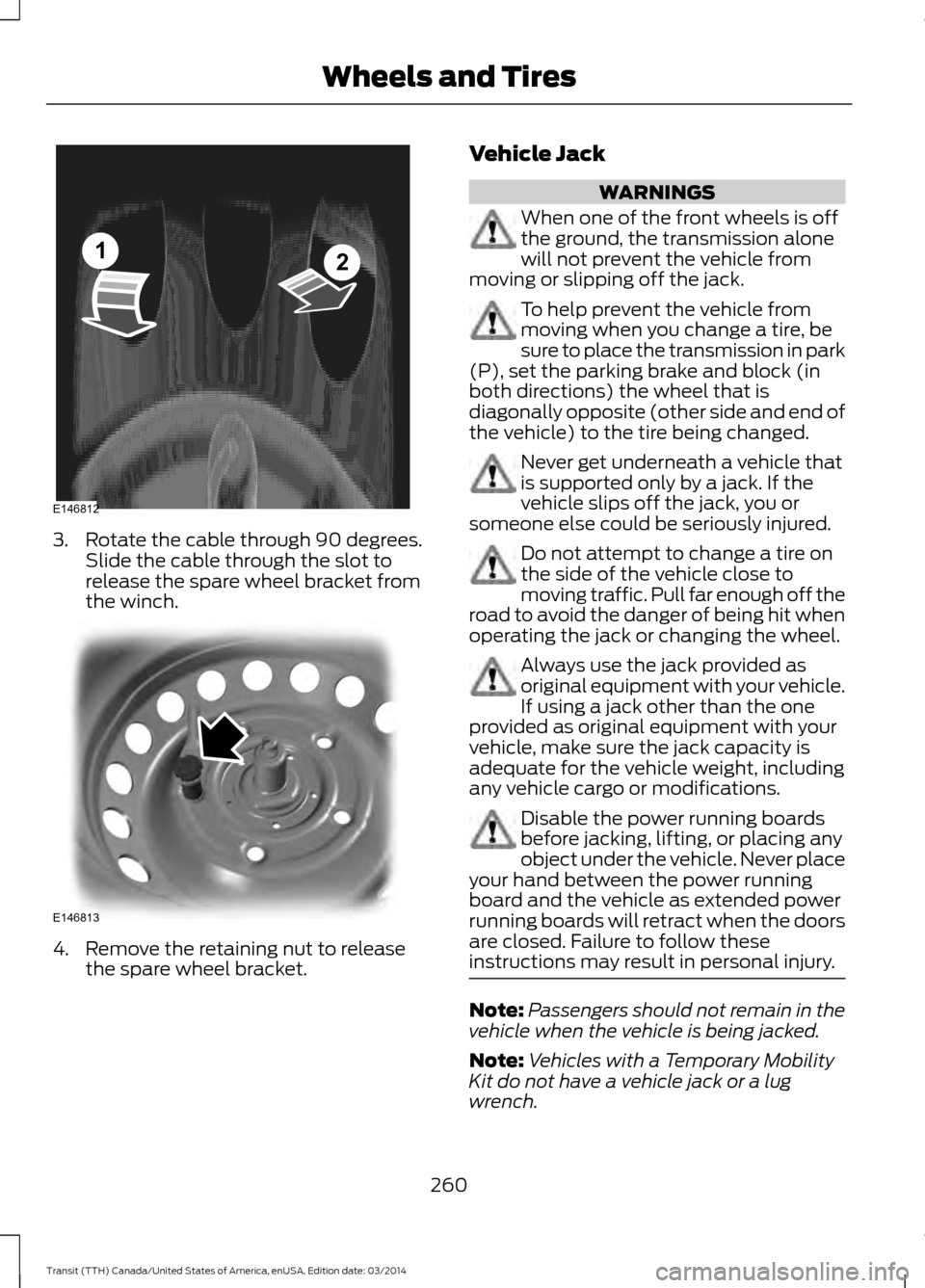
3. Rotate the cable through 90 degrees.
Slide the cable through the slot to
release the spare wheel bracket from
the winch. 4. Remove the retaining nut to release
the spare wheel bracket. Vehicle Jack WARNINGS
When one of the front wheels is off
the ground, the transmission alone
will not prevent the vehicle from
moving or slipping off the jack. To help prevent the vehicle from
moving when you change a tire, be
sure to place the transmission in park
(P), set the parking brake and block (in
both directions) the wheel that is
diagonally opposite (other side and end of
the vehicle) to the tire being changed. Never get underneath a vehicle that
is supported only by a jack. If the
vehicle slips off the jack, you or
someone else could be seriously injured. Do not attempt to change a tire on
the side of the vehicle close to
moving traffic. Pull far enough off the
road to avoid the danger of being hit when
operating the jack or changing the wheel. Always use the jack provided as
original equipment with your vehicle.
If using a jack other than the one
provided as original equipment with your
vehicle, make sure the jack capacity is
adequate for the vehicle weight, including
any vehicle cargo or modifications. Disable the power running boards
before jacking, lifting, or placing any
object under the vehicle. Never place
your hand between the power running
board and the vehicle as extended power
running boards will retract when the doors
are closed. Failure to follow these
instructions may result in personal injury. Note:
Passengers should not remain in the
vehicle when the vehicle is being jacked.
Note: Vehicles with a Temporary Mobility
Kit do not have a vehicle jack or a lug
wrench.
260 Transit (TTH) Canada/United States of America, enUSA, Edition date: 03/2014 Wheels and TiresE146812
12 E146813
Page 306 of 461
If you want the system to carry out the following
Voice command
Make calls.
(phone | Blackberry |
iPhone | Mobile)
Access the SYNC Services portal.
Services
Return to the main menu.
SYNC
Access the device connected to your USB port.
(USB [stick] | iPod | MP3
[player])
Run a vehicle health report.
vehicle [health] report
Adjust the level of voice interaction and feedback.
voice settings
Hear a list of voice commands available in the current mode.
[main menu] help
You can say any of the voice commands that appear within open and close brackets that
are separated by |. For example, where (cancel | stop | exit) appears you say; cancel or
stop or exit.
You must say any of the voice commands that appear outside of open and close brackets.
For example, where mobile (apps | applications) appears, you must say mobile followed
by either apps or applications.
You do not need to say words that appear within square brackets. For example, for where
(USB [stick] | iPOD | MP3 [player]) appears, you can say USB or USB stick.
Note: Mobile Applications, Services and Vehicle health report, is only available in the United
States of America.
System Interaction and Feedback
The system provides feedback through
audible tones, prompts, questions and
spoken confirmations depending on the
situation and the chosen level of
interaction (voice settings). You can
customize the voice recognition system to
provide more or less instruction and
feedback.
The default setting is to a higher level of
interaction in order to help you learn to use
the system. You can change these settings
at any time. Adjusting the Interaction Level Initiate a voice session by
pressing the voice button on the
steering wheel controls. See
Voice Control (page 62).
A tone sounds and the following
message appears in the information
display. Message
Listen
303 Transit (TTH) Canada/United States of America, enUSA, Edition date: 03/2014 SYNC™E142599
Page 333 of 461
SYNC Mobile App Voice Commands
The following voice commands are always available:
Action and Description
Voice command
SYNC prompts you to say the name of an app to start it on
SYNC.
Mobile Apps
SYNC lists all of the currently available mobile apps.
List mobile apps
SYNC searches your connected mobile device for SYNC-
compatible mobile apps.
Find New Apps
At any time you can say the name of a mobile app to start
the mobile app on SYNC.
SYNC lists the available voice commands for the specified
app if the app is running on SYNC.
help
App Permissions
App permissions are organized by groups.
You can grant these group permissions
individually. You can change a permission
group status any time when not driving, by
using the settings menu.
When you launch an app using SYNC, the
system may ask you to grant certain
permissions, for example:
• To allow your vehicle to provide vehicle
information to the app such as, but not
limited to: Fuel level, fuel economy, fuel
consumption, engine speed, rain
sensor, odometer, VIN, external
temperature, gear position, tire
pressure, and head lamp status.
• To allow your vehicle to provide driving
characteristic information such as, but
not limited to: MyKey, seat belt status,
engine revolutions per minute, gear
position, braking events, steering wheel
angle, and accelerator pedal position. •
To allow your vehicle to provide
location information, including: GPS
and speed.
• To allow the app to send push
notifications using the vehicle display
and voice capabilities while running in
a background state. Push notifications
may be particularly useful for news or
location based apps.
Note: You only need to grant permissions
the first time you use an app with SYNC.
Note: Ford is not responsible or liable for
any damages or loss of privacy relating to
usage of an app, or dissemination of any
vehicle data that you approve Ford to
provide to an app.
330 Transit (TTH) Canada/United States of America, enUSA, Edition date: 03/2014 SYNC™
Page 355 of 461
Using the Steering Wheel Controls
Depending on your vehicle, it may also have the following controls:
Action and Description
Control
Adjust the volume of playing media.
VOL
Use as you normally would in media modes.
Seek
Press to start a voice session. Press again to interrupt a voice
prompt and begin speaking. Press and hold to end an active
voice session.
Voice
Use as you normally would in media and phone modes.
Seek/call accept
Use as you normally would in media and phone modes.
Seek/call reject
Cleaning the Touchscreen Display
Use a dry, clean, soft cloth. If dirt or
fingerprints are still visible, apply a small
amount of alcohol to the cloth. Do not pour
or spray alcohol onto the display. Do not
use detergent or any type of solvent to
clean the display.
Support
The SYNC support team is available:
• Monday-Saturday, 8:30am-8:00pm
EST.
• United States: 1-888-270-1055
• Canada: 1-800-565-3673
Note: Times are subject to change due to
holidays. Safety Information WARNING
Driving while distracted can result in
loss of vehicle control, crash and
injury. We strongly recommend that
you use extreme caution when using any
device that may take your focus off the
road. Your primary responsibility is the safe
operation of your vehicle. We recommend
against the use of any hand-held device
while driving and encourage the use of
voice-operated systems when possible.
Make sure you are aware of all applicable
local laws that may affect the use of
electronic devices while driving. •
Do not attempt to service or repair the
system. Have your vehicle checked by
an authorized dealer.
• Do not operate media devices if the
power cables are broken or damaged.
352 Transit (TTH) Canada/United States of America, enUSA, Edition date: 03/2014 MyFord Touch
™
Page 372 of 461
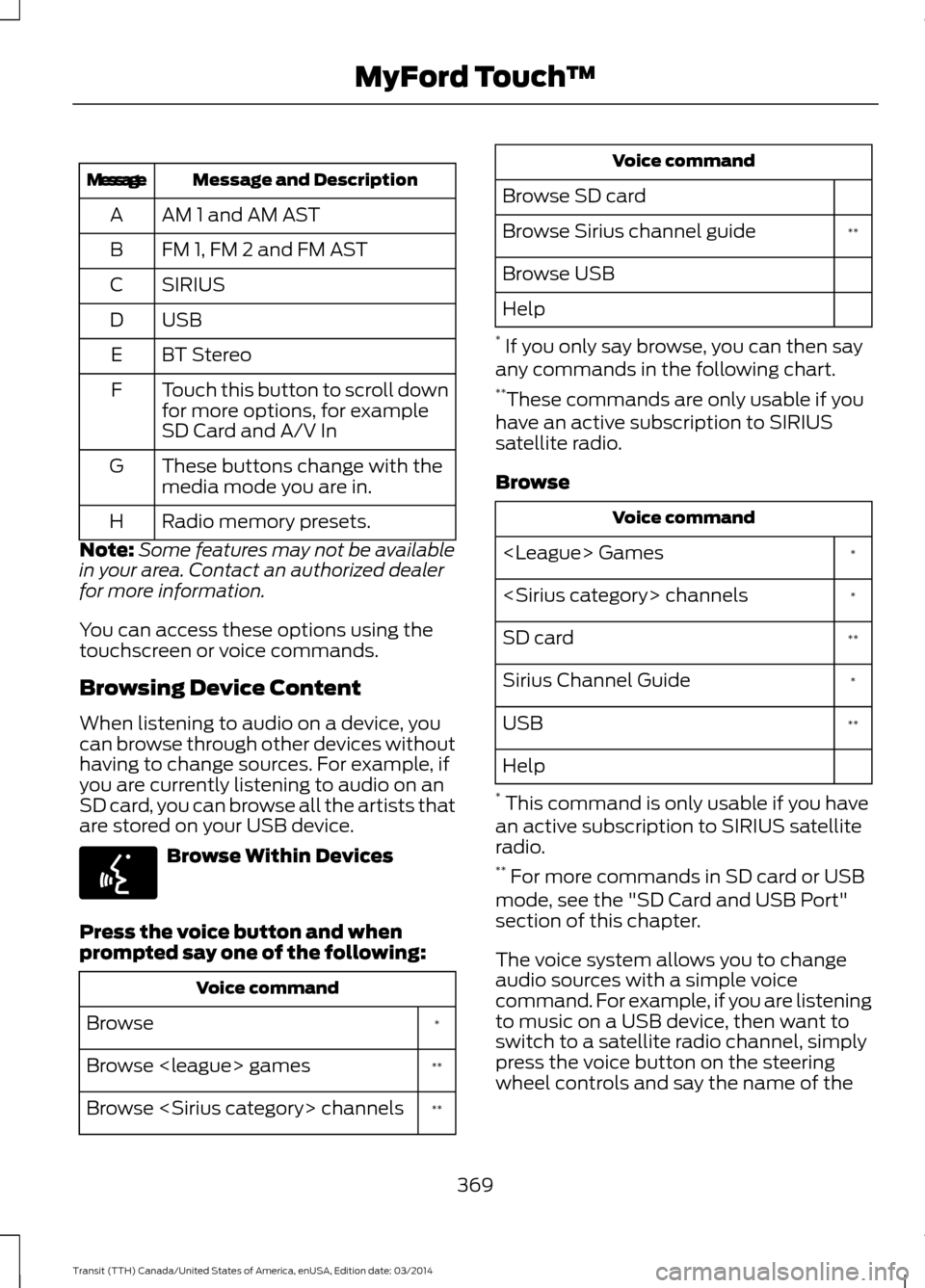
Message and Description
Message
AM 1 and AM AST
A
FM 1, FM 2 and FM AST
B
SIRIUS
C
USBD
BT Stereo
E
Touch this button to scroll down
for more options, for example
SD Card and A/V In
F
These buttons change with the
media mode you are in.
G
Radio memory presets.
H
Note: Some features may not be available
in your area. Contact an authorized dealer
for more information.
You can access these options using the
touchscreen or voice commands.
Browsing Device Content
When listening to audio on a device, you
can browse through other devices without
having to change sources. For example, if
you are currently listening to audio on an
SD card, you can browse all the artists that
are stored on your USB device. Browse Within Devices
Press the voice button and when
prompted say one of the following: Voice command
*
Browse
**
Browse
**
Browse
Browse SD card **
Browse Sirius channel guide
Browse USB
Help
* If you only say browse, you can then say
any commands in the following chart.
** These commands are only usable if you
have an active subscription to SIRIUS
satellite radio.
Browse Voice command
*
*
**
SD card
*
Sirius Channel Guide
**
USB
Help
* This command is only usable if you have
an active subscription to SIRIUS satellite
radio.
** For more commands in SD card or USB
mode, see the "SD Card and USB Port"
section of this chapter.
The voice system allows you to change
audio sources with a simple voice
command. For example, if you are listening
to music on a USB device, then want to
switch to a satellite radio channel, simply
press the voice button on the steering
wheel controls and say the name of the
369 Transit (TTH) Canada/United States of America, enUSA, Edition date: 03/2014 MyFord Touch
™E142599
Page 424 of 461
WARNING
Operating certain parts of this
system while driving can distract
your attention away from the road,
and possibly cause an accident or other
serious consequences. Do not change
system settings or enter data non-verbally
(using your hands) while driving. Stop the
vehicle in a safe and legal manner before
attempting these operations. This is
important since while setting up or
changing some functions you might be
required to distract your attention away
from the road and remove your hands from
the wheel. General Operation
Voice Command Control: Functions
within the Windows Automotive-based
system may be accomplished using only
voice commands. Using voice commands
while driving allows you to operate the
system without removing your hands from
the wheel.
Prolonged Views of Screen: Do not
access any function requiring a prolonged
view of the screen while you are driving.
Pull over in a safe and legal manner before
attempting to access a function of the
system requiring prolonged attention. Even
occasional short scans to the screen may
be hazardous if your attention has been
diverted away from your driving task at a
critical time.
Volume Setting: Do not raise the volume
e
xcessively. Keep the volume at a level
where you can still hear outside traffic and
emergency signals while driving. Driving
while unable to hear these sounds could
cause an accident. Use of Speech Recognition Functions:
Speech recognition software is inherently
a statistical process which is subject to
errors. It is your responsibility to monitor
any speech recognition functions included
in the system and address any errors.
Navigation Features: Any navigation
features included in the system are
intended to provide turn by turn
instructions to get you to a desired
destination. Please make certain all
persons using this system carefully read
and follow instructions and safety
information fully.
Distraction Hazard: Any navigation
features may require manual (non-verbal)
setup. Attempting to perform such set-up
or insert data while driving can seriously
distract your attention and could cause an
accident or other serious consequences.
Stop the vehicle in a safe and legal manner
before attempting these operations.
Let Your Judgment Prevail: Any
navigation features are provided only as
an aid. Make your driving decisions based
on your observations of local conditions
and existing traffic regulations. Any such
feature is not a substitute for your personal
judgment. Any route suggestions made by
this system should never replace any local
traffic regulations or your personal
judgment or knowledge of safe driving
practices.
Route Safety: Do not follow the route
suggestions if doing so would result in an
unsafe or illegal maneuver, if you would be
placed in an unsafe situation, or if you
would be directed into an area that you
consider unsafe. The driver is ultimately
responsible for the safe operation of the
vehicle and therefore, must evaluate
whether it is safe to follow the suggested
directions.
421 Transit (TTH) Canada/United States of America, enUSA, Edition date: 03/2014 Appendices