bluetooth FORD TRANSIT 2015 5.G Owner's Manual
[x] Cancel search | Manufacturer: FORD, Model Year: 2015, Model line: TRANSIT, Model: FORD TRANSIT 2015 5.GPages: 461, PDF Size: 5.82 MB
Page 337 of 461
![FORD TRANSIT 2015 5.G Owners Manual Media Voice Commands
Press the voice button and when
prompted say any of the following:
Voice command
(USB [stick] | iPod | MP3 [player])
Autoplay Off
Autoplay [on]
[Phone] Connections | [Media] Conne](/img/11/5392/w960_5392-336.png "FORD TRANSIT 2015 5.G Owners Manual Media Voice Commands
Press the voice button and when
prompted say any of the following:
Voice command
(USB [stick] | iPod | MP3 [player])
Autoplay Off
Autoplay [on]
[Phone] Connections | [Media] Conne")
Media Voice Commands
Press the voice button and when
prompted say any of the following:
Voice command
(USB [stick] | iPod | MP3 [player])
Autoplay Off
Autoplay [on]
[Phone] Connections | [Media] Connec-
tions | [Bluetooth] Connections
pause
play 1,2
play [album] [by [artist]]
Play all
1,2
play [artist]
1,2
play [genre]
3
[Play] Next Folder
[play] next track
1,2
play [playlist]
3
[Play] Previous Folder
[play] previous track
1,2
play [song | track | title | file]
1,2
Refine album
1,2
Refine artist
1,2
Refine song
1,2
Refine track
repeat (track | song) [on]
repeat off
1,2
(browse | search | show) album
1,2
(browse | search | show) all (artist |
artists)
1,2
(browse | search | show) all (genre
| genres)
1,2
(browse | search | show) all (song |
songs | title | titles | file | files | track
| tracks)
shuffle [all] [on]
shuffle off
[play] (similar music | more like this)
((who's | who is) this | who plays this |
(what's | what is) playing [now] | (what
| which) (song | track | artist) is this |
(who's | who is) playing | (what's | what
is) this)
1
it could be the name of anything, such as
a group, artist or song.
2 This voice command is not available until
indexing is complete.
3 This voice command is only available in
folder mode.
334 Transit (TTH) Canada/United States of America, enUSA, Edition date: 03/2014 SYNC™
Page 339 of 461
![FORD TRANSIT 2015 5.G Owners Manual Bluetooth Audio Command Guide
Press the voice button and when
prompted say any of the following:
Voice command
[Phone] Connections | [Media] Connec-
tions | [Bluetooth] Connections
pause
play Voice co](/img/11/5392/w960_5392-338.png "FORD TRANSIT 2015 5.G Owners Manual Bluetooth Audio Command Guide
Press the voice button and when
prompted say any of the following:
Voice command
[Phone] Connections | [Media] Connec-
tions | [Bluetooth] Connections
pause
play Voice co")
Bluetooth Audio Command Guide
Press the voice button and when
prompted say any of the following:
Voice command
[Phone] Connections | [Media] Connec-
tions | [Bluetooth] Connections
pause
play Voice command
[play] next track
[play] previous track
Media Menu Features
The media menu allows you to select your
media source, how to play your music, for
example by artist, genre, shuffle or repeat,
and to add, connect or delete devices.
Press the AUX button, then scroll to: Action and Description
Message
Press the
OK button to enter the media menu.
Menu
Select one of the following:
Play your music by artist, album, genre, playlist, track, similar
music or play all music. You can also choose to Explore USB
to view the supported digital music files on your playing
device.
Menu
Select and play music from your USB port, auxiliary input jack
or stream music from your Bluetooth-enabled cell phone.
Browse device
Select one of the following:
Press the
OK button to access music plugged into your USB
port. You can also plug in devices to charge them (if
supported by your device). Once connected, the system
indexes any readable media files. 1
USB
Press the OK button. This is a phone-dependent feature that
allows you to stream music playing on your Bluetooth-
enabled phone. If supported by your device, you can press
seek to play the previous or next track.
Bluetooth audio
Press the
OK button to select and play music from your
portable music player over your vehicle's speakers. 2
Line In
Choose to shuffle or repeat your music and select your
Autoplay settings. Once you turn these selections on, they
remain on until you turn them off. Press SEEK
to play the
previous or next track. 3
Media Player Settings
336Transit (TTH) Canada/United States of America, enUSA, Edition date: 03/2014 SYNC™
Page 340 of 461
Action and Description
Message
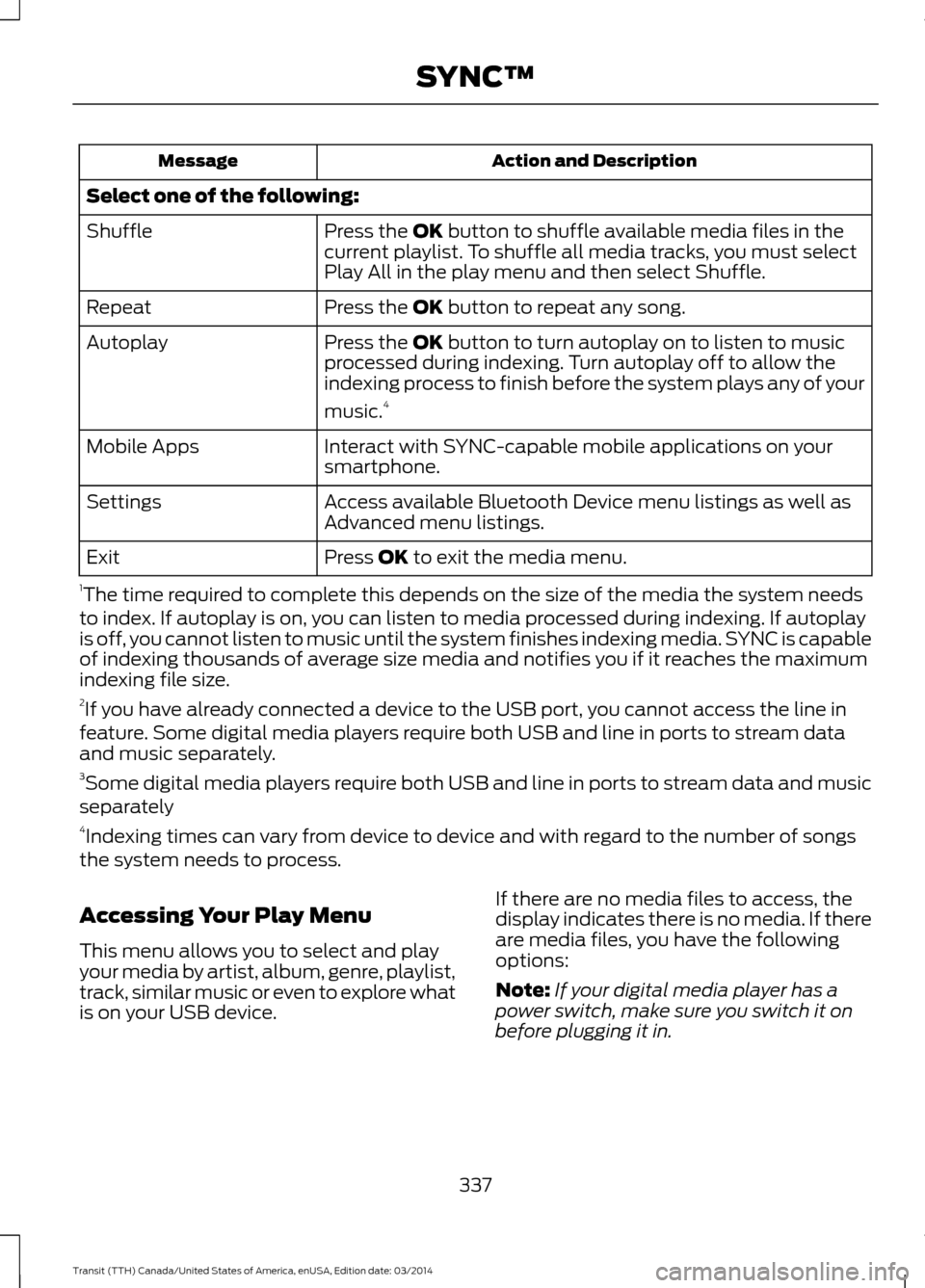
Select one of the following: Press the OK button to shuffle available media files in the
current playlist. To shuffle all media tracks, you must select
Play All in the play menu and then select Shuffle.
Shuffle
Press the
OK button to repeat any song.
Repeat
Press the
OK button to turn autoplay on to listen to music
processed during indexing. Turn autoplay off to allow the
indexing process to finish before the system plays any of your
music. 4
Autoplay
Interact with SYNC-capable mobile applications on your
smartphone.
Mobile Apps
Access available Bluetooth Device menu listings as well as
Advanced menu listings.
Settings
Press
OK to exit the media menu.
Exit
1 The time required to complete this depends on the size of the media the system needs
to index. If autoplay is on, you can listen to media processed during indexing. If autoplay
is off, you cannot listen to music until the system finishes indexing media. SYNC is capable
of indexing thousands of average size media and notifies you if it reaches the maximum
indexing file size.
2 If you have already connected a device to the USB port, you cannot access the line in
feature. Some digital media players require both USB and line in ports to stream data
and music separately.
3 Some digital media players require both USB and line in ports to stream data and music
separately
4 Indexing times can vary from device to device and with regard to the number of songs
the system needs to process.
Accessing Your Play Menu
This menu allows you to select and play
your media by artist, album, genre, playlist,
track, similar music or even to explore what
is on your USB device. If there are no media files to access, the
display indicates there is no media. If there
are media files, you have the following
options:
Note:
If your digital media player has a
power switch, make sure you switch it on
before plugging it in.
337 Transit (TTH) Canada/United States of America, enUSA, Edition date: 03/2014 SYNC™
Page 342 of 461
Action and Description
Message
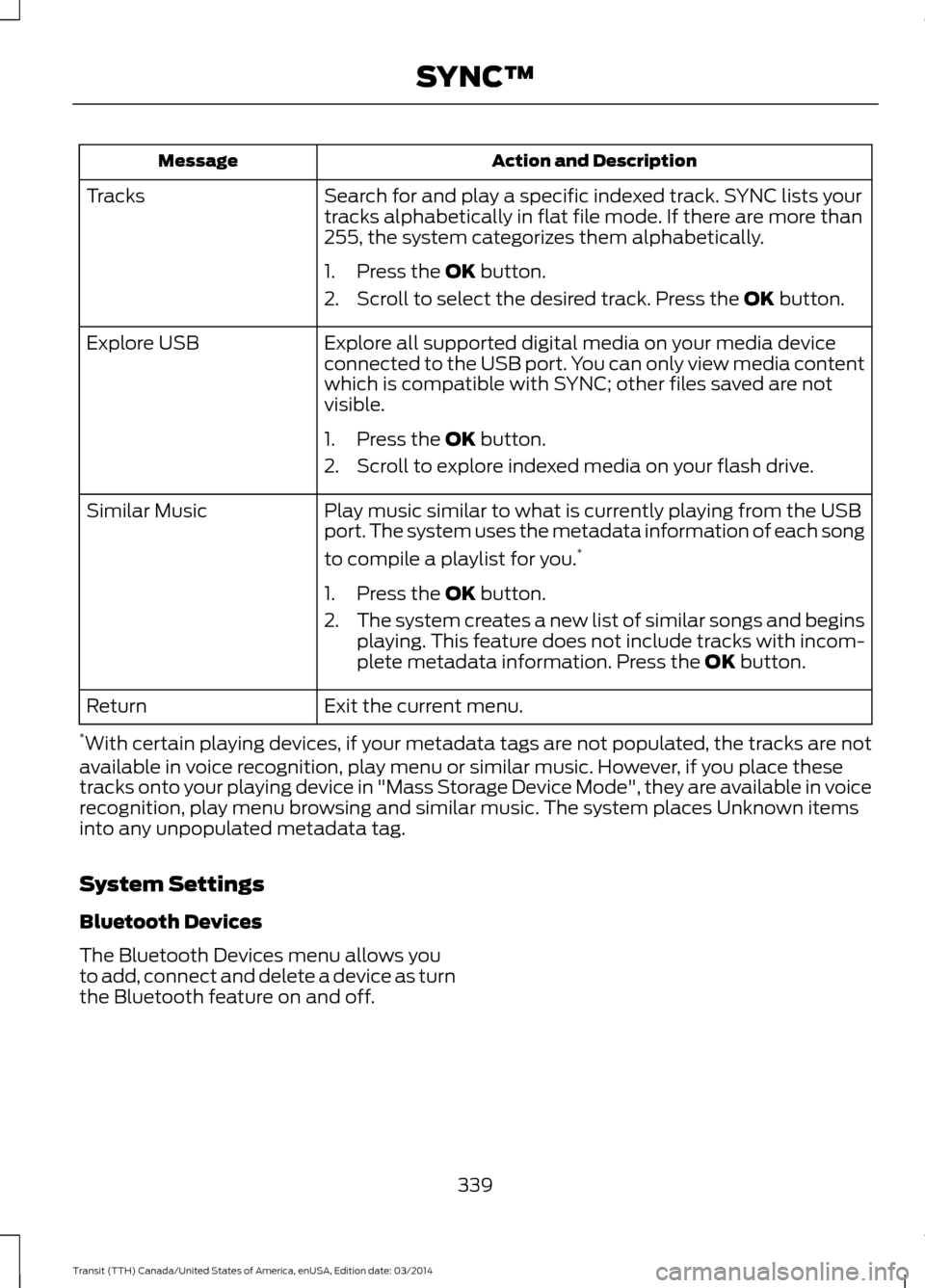
Search for and play a specific indexed track. SYNC lists your
tracks alphabetically in flat file mode. If there are more than
255, the system categorizes them alphabetically.
Tracks
1. Press the OK button.
2. Scroll to select the desired track. Press the OK
button.
Explore all supported digital media on your media device
connected to the USB port. You can only view media content
which is compatible with SYNC; other files saved are not
visible.
Explore USB
1. Press the
OK button.
2. Scroll to explore indexed media on your flash drive.
Play music similar to what is currently playing from the USB
port. The system uses the metadata information of each song
to compile a playlist for you. *
Similar Music
1. Press the
OK button.
2. The system creates a new list of similar songs and begins
playing. This feature does not include tracks with incom-
plete metadata information. Press the
OK button.
Exit the current menu.
Return
* With certain playing devices, if your metadata tags are not populated, the tracks are not
available in voice recognition, play menu or similar music. However, if you place these
tracks onto your playing device in "Mass Storage Device Mode", they are available in voice
recognition, play menu browsing and similar music. The system places Unknown items
into any unpopulated metadata tag.
System Settings
Bluetooth Devices
The Bluetooth Devices menu allows you
to add, connect and delete a device as turn
the Bluetooth feature on and off.
339Transit (TTH) Canada/United States of America, enUSA, Edition date: 03/2014 SYNC™
Page 343 of 461
Press the AUX button, then scroll to:
Action and Description
Message
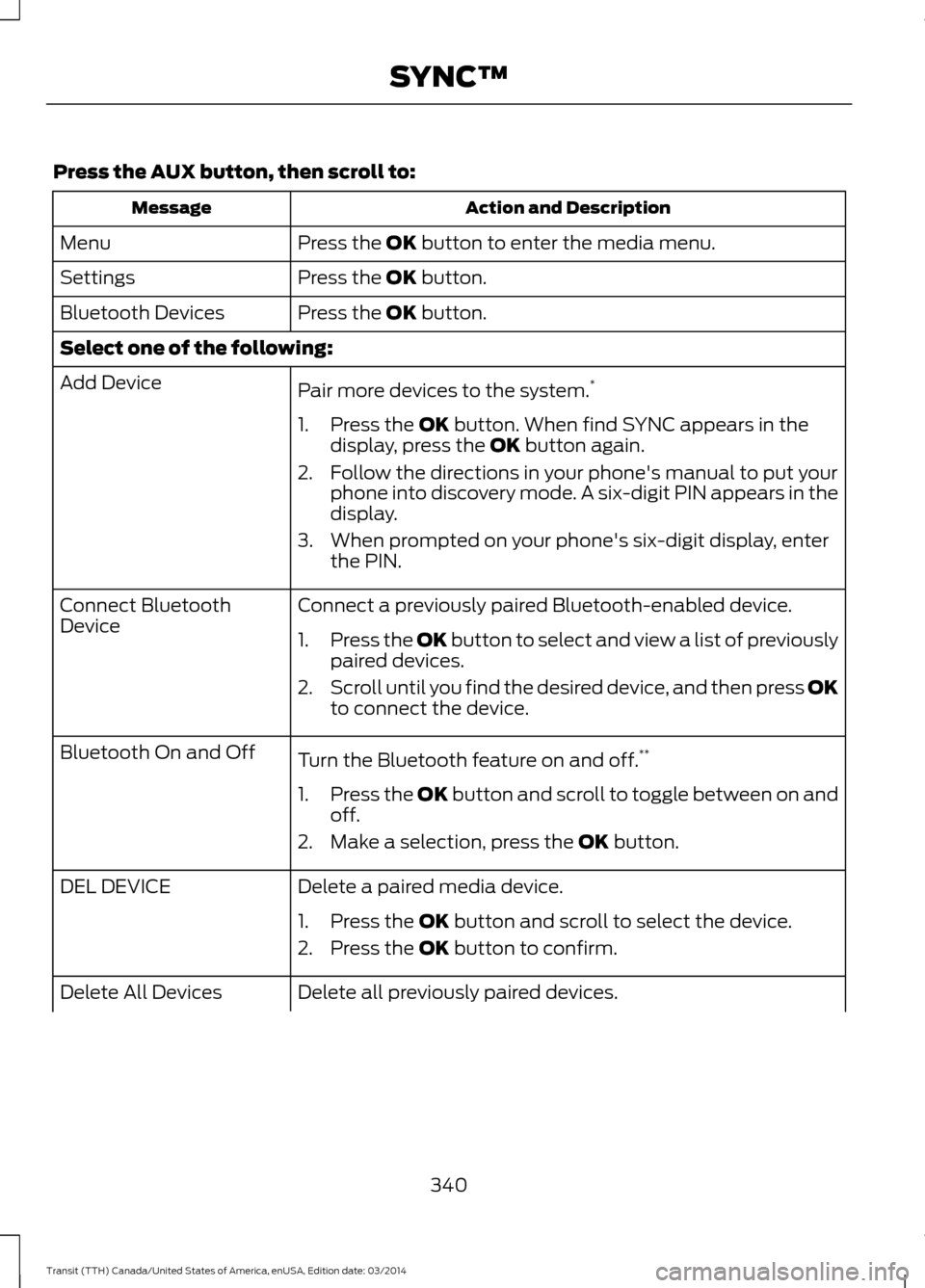
Press the
OK button to enter the media menu.
Menu
Press the
OK button.
Settings
Press the
OK button.
Bluetooth Devices
Select one of the following:
Pair more devices to the system. *
Add Device
1. Press the
OK button. When find SYNC appears in the
display, press the OK button again.
2. Follow the directions in your phone's manual to put your phone into discovery mode. A six-digit PIN appears in the
display.
3. When prompted on your phone's six-digit display, enter the PIN.
Connect a previously paired Bluetooth-enabled device.
Connect Bluetooth
Device
1.Press the OK button to select and view a list of previously
p
aired devices.
2. Scroll until you find the desired device, and then press OK
to connect the device.
Turn the Bluetooth feature on and off. **
Bluetooth On and Off
1.Press the OK button and scroll to toggle between on and
off.
2. Make a selection, press the
OK button.
Delete a paired media device.
DEL DEVICE
1. Press the
OK button and scroll to select the device.
2. Press the
OK button to confirm.
Delete all previously paired devices.
Delete All Devices
340Transit (TTH) Canada/United States of America, enUSA, Edition date: 03/2014 SYNC™
Page 344 of 461
Action and Description
Message
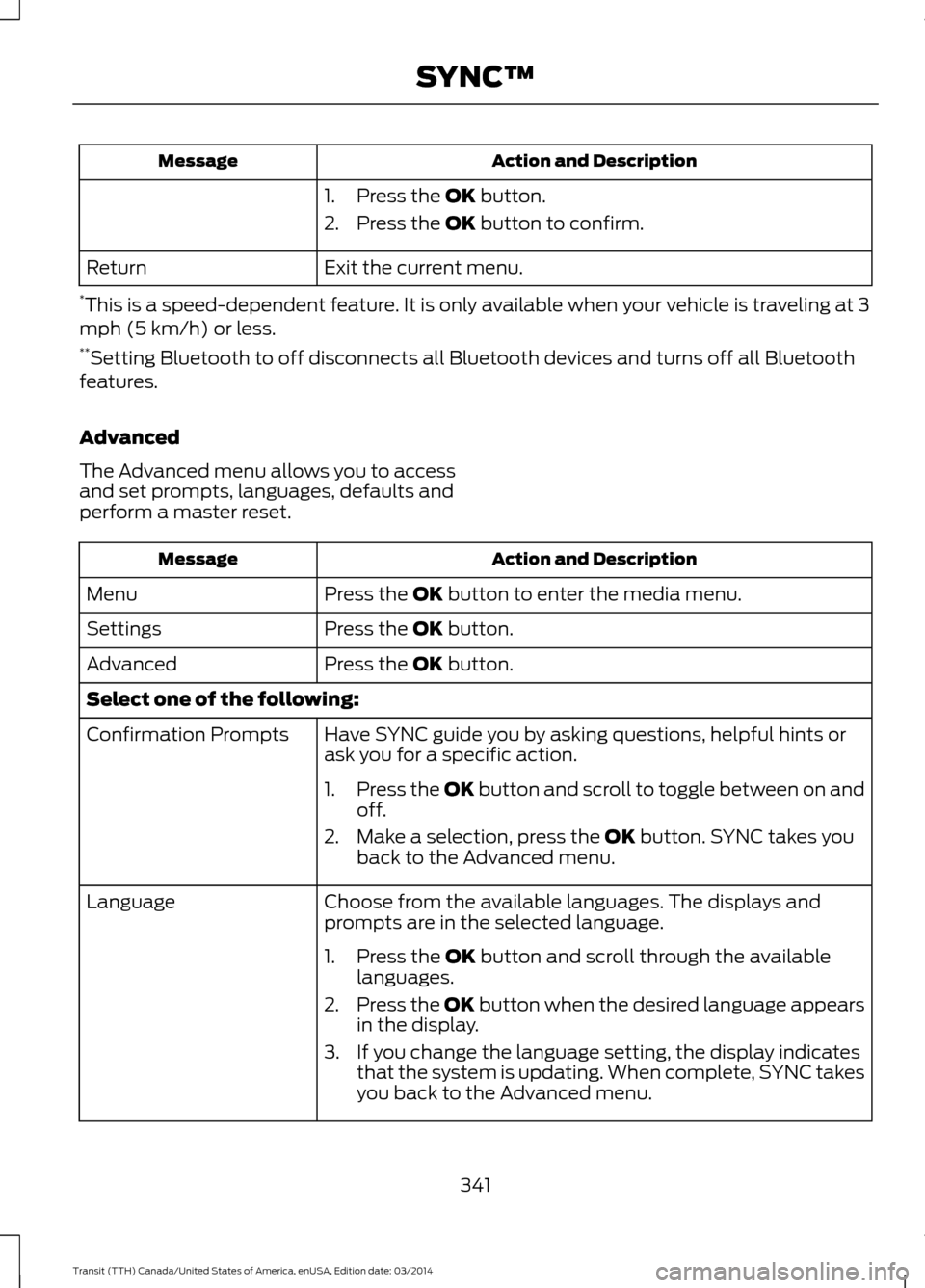
1. Press the OK button.
2. Press the
OK button to confirm.
Exit the current menu.
Return
* This is a speed-dependent feature. It is only available when your vehicle is traveling at 3
mph (5 km/h) or less.
** Setting Bluetooth to off disconnects all Bluetooth devices and turns off all Bluetooth
features.
Advanced
The Advanced menu allows you to access
and set prompts, languages, defaults and
perform a master reset. Action and Description
Message
Press the
OK button to enter the media menu.
Menu
Press the
OK button.
Settings
Press the
OK button.
Advanced
Select one of the following:
Have SYNC guide you by asking questions, helpful hints or
ask you for a specific action.
Confirmation Prompts
1.Press the OK button and scroll to toggle between on and
off
.
2. Make a selection, press the
OK button. SYNC takes you
back to the Advanced menu.
Choose from the available languages. The displays and
prompts are in the selected language.
Language
1. Press the
OK button and scroll through the available
languages.
2. Press the OK button when the desired language appears
in the displ
ay.
3. If you change the language setting, the display indicates that the system is updating. When complete, SYNC takes
you back to the Advanced menu.
341Transit (TTH) Canada/United States of America, enUSA, Edition date: 03/2014 SYNC™
Page 347 of 461
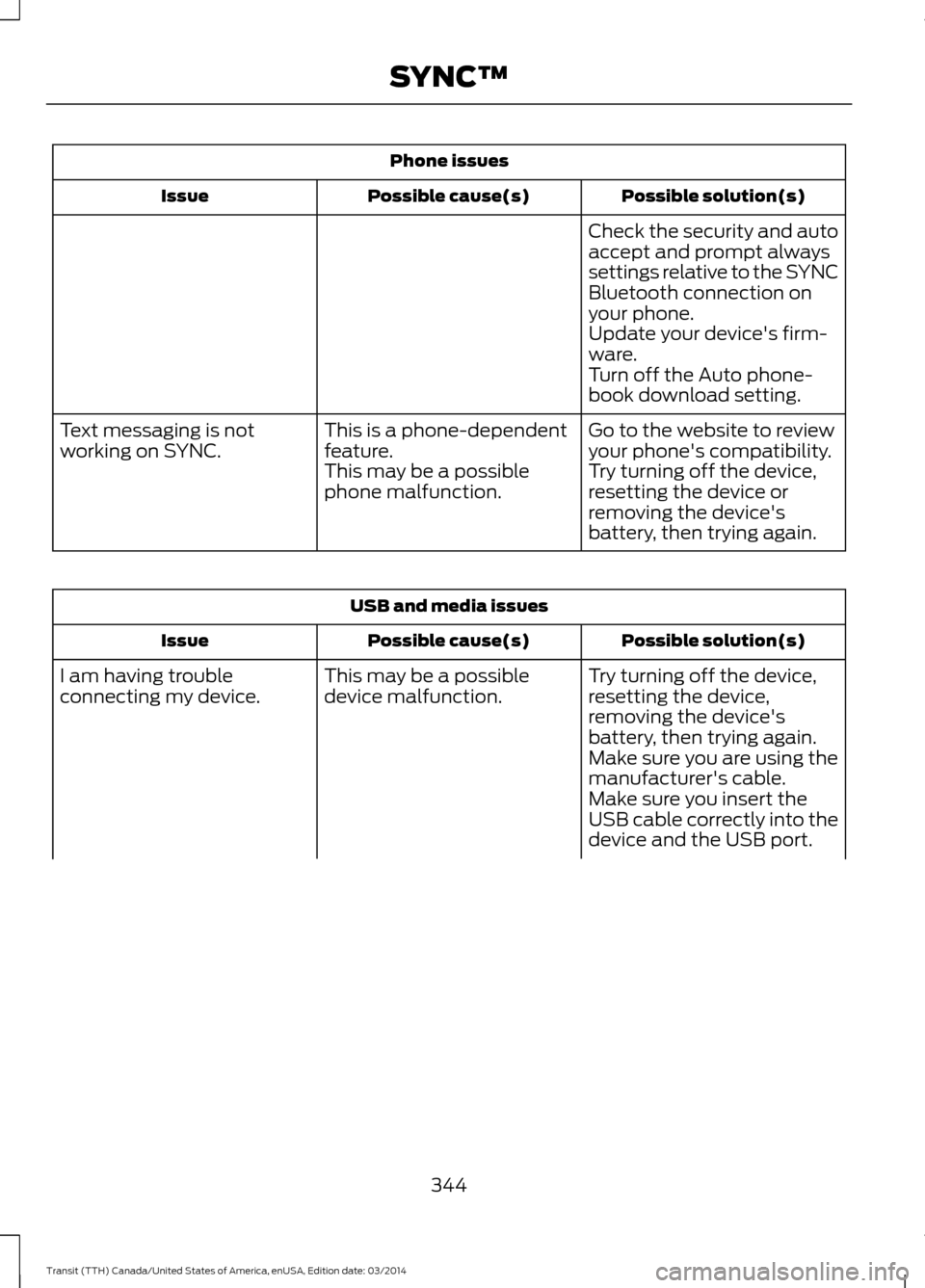
Phone issues
Possible solution(s)
Possible cause(s)
Issue
Check the security and auto
accept and prompt always
settings relative to the SYNC
Bluetooth connection on
your phone.
Update your device's firm-
ware.
Turn off the Auto phone-
book download setting.
Go to the website to review
your phone's compatibility.
This is a phone-dependent
feature.
Text messaging is not
working on SYNC.
Try turning off the device,
resetting the device or
removing the device's
battery, then trying again.
This may be a possible
phone malfunction. USB and media issues
Possible solution(s)
Possible cause(s)
Issue
Try turning off the device,
resetting the device,
removing the device's
battery, then trying again.
This may be a possible
device malfunction.
I am having trouble
connecting my device.
Make sure you are using the
manufacturer's cable.
Make sure you insert the
USB cable correctly into the
device and the USB port.
344 Transit (TTH) Canada/United States of America, enUSA, Edition date: 03/2014 SYNC™
Page 348 of 461
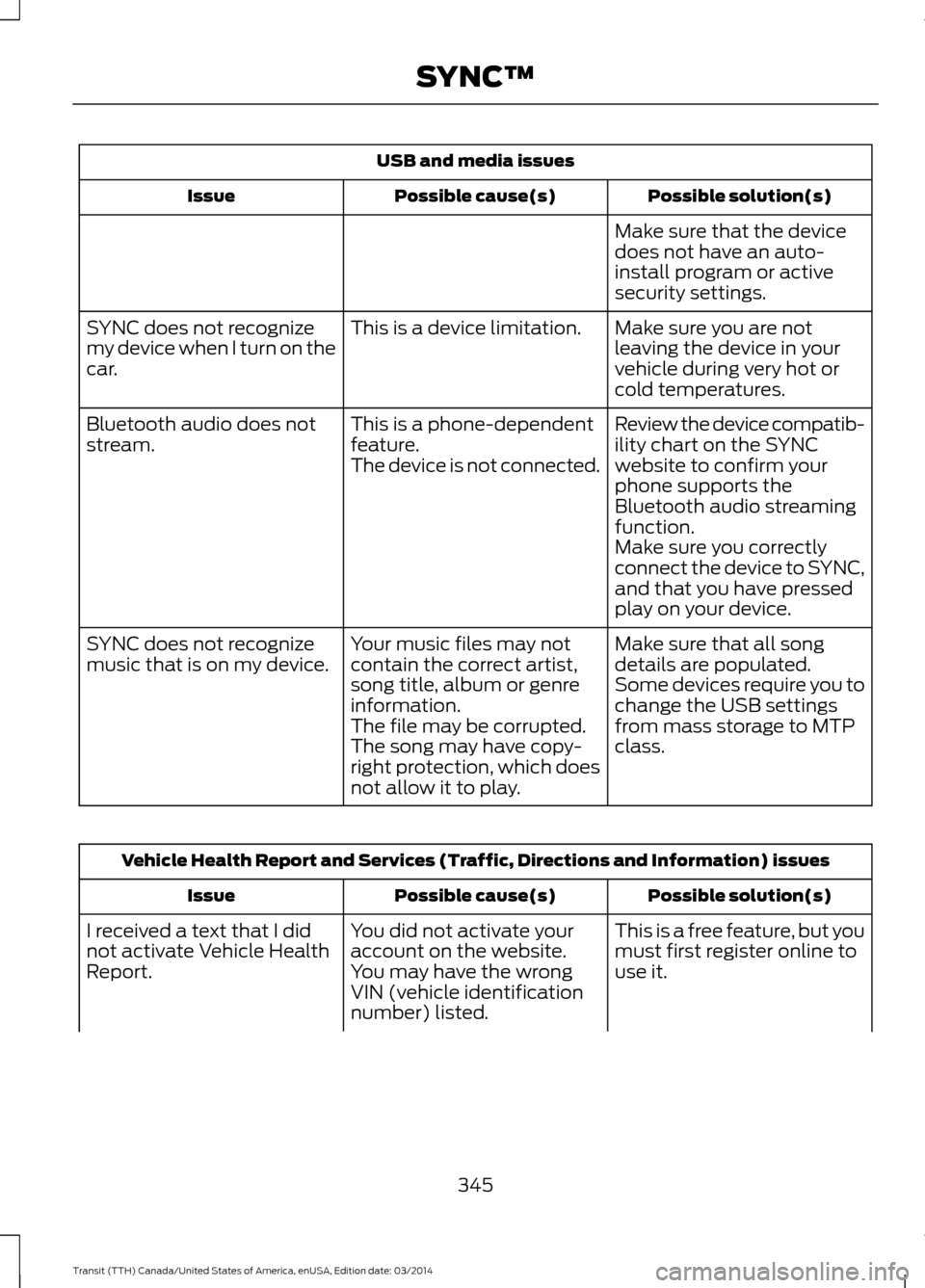
USB and media issues
Possible solution(s)
Possible cause(s)
Issue
Make sure that the device
does not have an auto-
install program or active
security settings.
Make sure you are not
leaving the device in your
vehicle during very hot or
cold temperatures.
This is a device limitation.
SYNC does not recognize
my device when I turn on the
car.
Review the device compatib-
ility chart on the SYNC
website to confirm your
phone supports the
Bluetooth audio streaming
function.
This is a phone-dependent
feature.
The device is not connected.
Bluetooth audio does not
stream.
Make sure you correctly
connect the device to SYNC,
and that you have pressed
play on your device.
Make sure that all song
details are populated.
Your music files may not
contain the correct artist,
song title, album or genre
information.
SYNC does not recognize
music that is on my device.
Some devices require you to
change the USB settings
from mass storage to MTP
class.
The file may be corrupted.
The song may have copy-
right protection, which does
not allow it to play. Vehicle Health Report and Services (Traffic, Directions and Information) issues
Possible solution(s)
Possible cause(s)
Issue
This is a free feature, but you
must first register online to
use it.
You did not activate your
account on the website.
You may have the wrong
VIN (vehicle identification
number) listed.
I received a text that I did
not activate Vehicle Health
Report.
345Transit (TTH) Canada/United States of America, enUSA, Edition date: 03/2014 SYNC™
Page 349 of 461
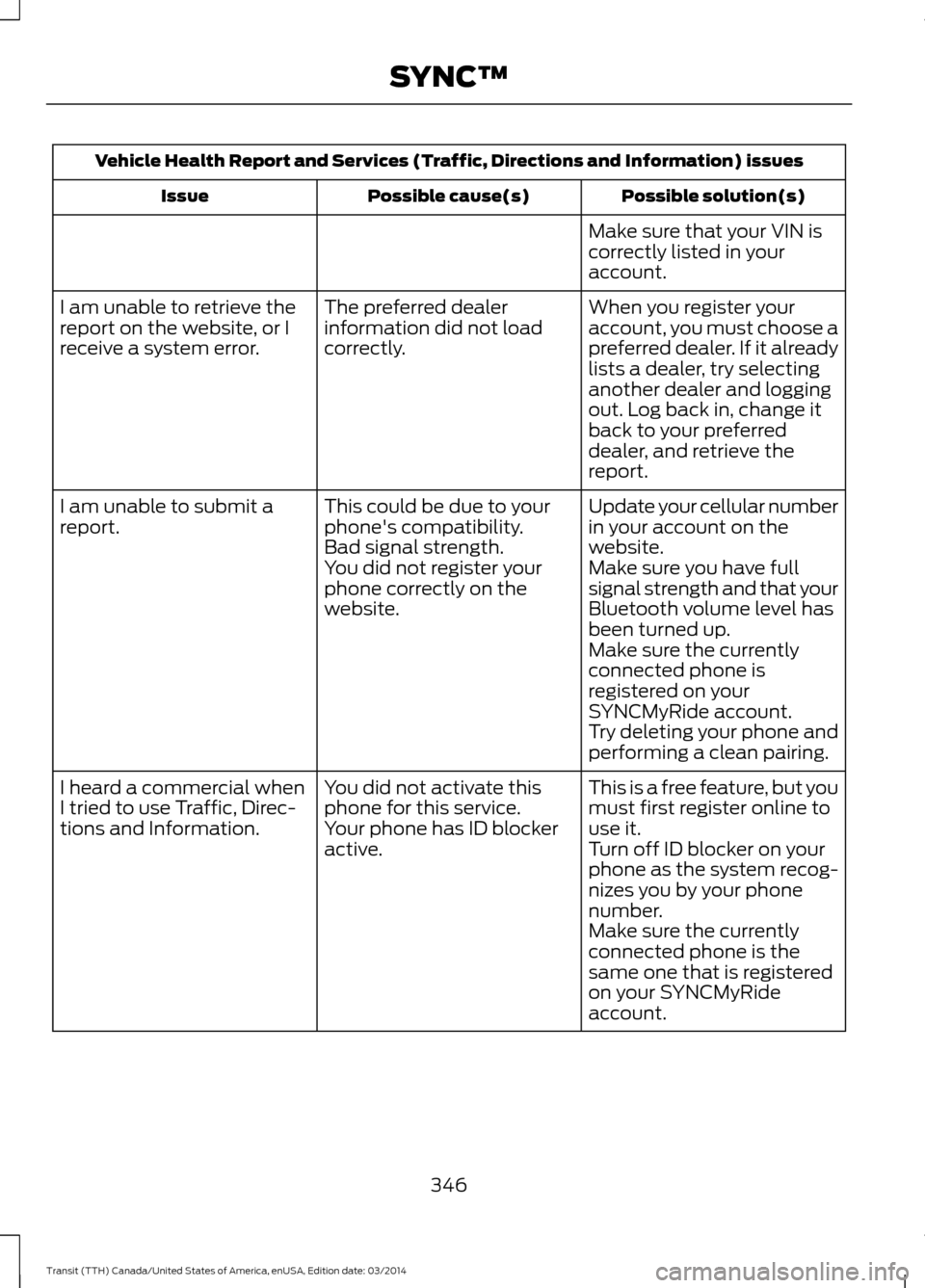
Vehicle Health Report and Services (Traffic, Directions and Information) issues
Possible solution(s)
Possible cause(s)
Issue
Make sure that your VIN is
correctly listed in your
account.
When you register your
account, you must choose a
preferred dealer. If it already
lists a dealer, try selecting
another dealer and logging
out. Log back in, change it
back to your preferred
dealer, and retrieve the
report.
The preferred dealer
information did not load
correctly.
I am unable to retrieve the
report on the website, or I
receive a system error.
Update your cellular number
in your account on the
website.
This could be due to your
phone's compatibility.
Bad signal strength.
I am unable to submit a
report.
Make sure you have full
signal strength and that your
Bluetooth volume level has
been turned up.
You did not register your
phone correctly on the
website.
Make sure the currently
connected phone is
registered on your
SYNCMyRide account.
Try deleting your phone and
performing a clean pairing.
This is a free feature, but you
must first register online to
use it.
You did not activate this
phone for this service.
Your phone has ID blocker
active.
I heard a commercial when
I tried to use Traffic, Direc-
tions and Information.
Turn off ID blocker on your
phone as the system recog-
nizes you by your phone
number.
Make sure the currently
connected phone is the
same one that is registered
on your SYNCMyRide
account.
346 Transit (TTH) Canada/United States of America, enUSA, Edition date: 03/2014 SYNC™
Page 359 of 461
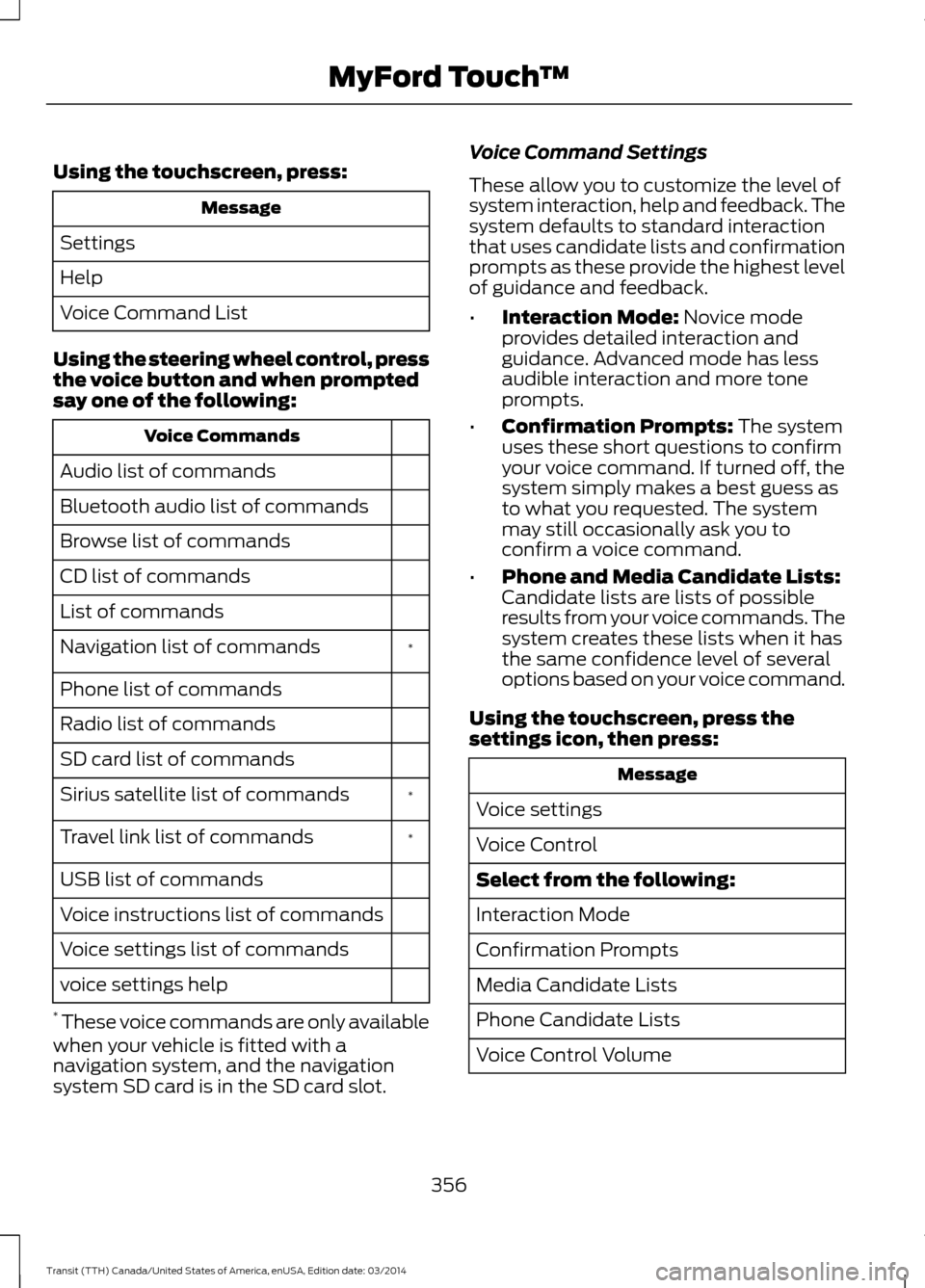
Using the touchscreen, press:
Message
Settings
Help
Voice Command List
Using the steering wheel control, press
the voice button and when prompted
say one of the following: Voice Commands
Audio list of commands
Bluetooth audio list of commands
Browse list of commands
CD list of commands
List of commands *
Navigation list of commands
Phone list of commands
Radio list of commands
SD card list of commands
*
Sirius satellite list of commands
*
Travel link list of commands
USB list of commands
Voice instructions list of commands
Voice settings list of commands
voice settings help
* These voice commands are only available
when your vehicle is fitted with a
navigation system, and the navigation
system SD card is in the SD card slot. Voice Command Settings
These allow you to customize the level of
system interaction, help and feedback. The
system defaults to standard interaction
that uses candidate lists and confirmation
prompts as these provide the highest level
of guidance and feedback.
•
Interaction Mode: Novice mode
provides detailed interaction and
guidance. Advanced mode has less
audible interaction and more tone
prompts.
• Confirmation Prompts:
The system
uses these short questions to confirm
your voice command. If turned off, the
system simply makes a best guess as
to what you requested. The system
may still occasionally ask you to
confirm a voice command.
• Phone and Media Candidate Lists:
Candidate lists are lists of possible
results from your voice commands. The
system creates these lists when it has
the same confidence level of several
options based on your voice command.
Using the touchscreen, press the
settings icon, then press: Message
Voice settings
Voice Control
Select from the following:
Interaction Mode
Confirmation Prompts
Media Candidate Lists
Phone Candidate Lists
Voice Control Volume
356 Transit (TTH) Canada/United States of America, enUSA, Edition date: 03/2014 MyFord Touch
™